





Google Cloud Featured at TechCrunch Disrupt 2021

4922
Of your peers have already read this article.
1:30 Minutes
The most insightful time you'll spend today!
Startups need to move quickly and focus their limited resources on areas where they can differentiate. If infrastructure isn’t your differentiator, don’t put a lot of energy into your infrastructure when someone else can do it for you. What’s more, time-to-market matters to startups more now than ever. Successful early stage companies know this, and leverage existing tools, libraries, frameworks and innovations whenever possible.
Next week Google Cloud will be featured at TechCrunch Disrupt, the iconic annual event where “founders and investors shaping the future of disruptive technology” come together to share stories, network, and learn from each other. Google Cloud will host a session and Google Cloud engineers will be available in a virtual booth to answer startup questions.
The session, “Demo Derby – How startups are disrupting the status quo with innovative data analytics, AI and modern app development” will be a fun, fast-paced set of presentations showing short demos of startups and startup projects built with Google Cloud.
Demo Derby Presenters
- Andrea Le Vot, Chief Data Protection Officer with startup BlueZoo will deliver a demo showing how they are revolutionizing the property insurance industry with AI and Cloud – and doing so while actually protecting people’s privacy.
- Dale Markowitz and Zack Akil, Applied AI Engineers, will show how easy it is to use AI for everything from video search to editing to automated translation.
- Vidya Nagarajan, Group Product Manager from Google Cloud will deliver a fast paced demo that shows how startups can drive developer productivity with serverless innovations.
“Disrupt is iconic for its engagement with founders, investors, and the broad community of early stage companies,” said Andrea Le Vot, Chief Data Protection Officer at BlueZoo. “We are thrilled to share our insights with others in our community, and to show how we have partnered with Google Cloud to innovate faster than most of the larger, well funded insurance companies in our market.”
The series of snippet sized demos will be followed by a roundtable discussion with the demo developers focused on lessons learned, best practices, how to reduce time-to-market, and how to focus on where you can most effectively differentiate.
The session will air on Day One of the event: Tuesday September 21, 2021 at 1pm PT and will be available on demand after the event for all Disrupt attendees.
Google Cloud Celebrates Journey of 3 Inspiring Founders for the Asian Pacific American Heritage Month

8141
Of your peers have already read this article.
1:30 Minutes
The most insightful time you'll spend today!
May is Asian Pacific American Heritage Month —a time for us to come together to celebrate and remember the important people and history of Asian and Pacific Island heritage. This feature highlights three AAPI founders from the Google For Startups community.
Read on to learn how these three founders built their businesses, leverage Google tech, and suggestion they have for aspiring entrepreneurs.
CultivatePeople
Founder: Lola Han
Description: CultivatePeople’s compensation software, Kamsa, provides global market pay rate data and helps companies make data-driven salary decisions so they can attract and retain their most valuable asset: employees.
Why GCP: “CultivatePeople began using GCP when integrating SSO/SAML authentication after our SaaS product became a high priority. We were able to exceed our clients’ expectations and increase their level of trust in our platform’s capabilities. We’re currently investigating additional machine learning products, such as Cloud AutoML, that will allow us to quickly deliver exciting features.”
Note from the Founder: “I grew up with immigrant parents who value stability and are risk-averse. My parents discouraged me from starting my own company because they didn’t want to see me struggle financially or see my health suffer (due to stress). I felt strongly about what CultivatePeople could do, so I started the company as a sole founder in 2017 and watched it double in size year over year since. While the ones I love most may not have cheered me on initially, it was important for me to hang on to the encouraging words of former bosses, executives, and founders to keep me focused on my mission.
My advice for other AAPI founders is to be a “silent assassin” and believe in the mission and values of your organization. Always remember to stop along the way and:
1) Enjoy the journey by celebrating wins and giving yourself credit;
2) Follow your intuition—it’s (almost) always right;
3) Recognize and invest in your people regularly (ie. give increases more than once a year, if warranted);
4) Give regular words of affirmation to employees on even small achievements.”

Swit
Founder: Josh Lee and Max Lim
Description: Swit is a team collaboration platform that seamlessly combines team chat with task management by allowing teams to turn their conversations into trackable tasks and share tasks to chat with simple drag-and-drop functionality, ensuring everyone is on the same page and projects get done faster.
Why GCP: “Swit is a cross-category hybrid work tool for chat and tasks. This functionality requires more complicated and heavier architecture for performance. So, configuring and managing virtual machines was really challenging to scale up our systems, while handling occasional unexpected traffic surges and frequent updates. Eventually we divided our monolithic architecture into 35 microservices when we launched our official product. The migration to GKE took around one month, and it turned out to be well worth the effort—our systems became able to offer high scalability and enough resilience to keep its uptime no matter what happened. Now we’re operating 84 workloads and 252 microservices with high stability with remarkably low downtime – less than 0.00001%/year.”
Note from the Founder: “As an AAPI founder based in Silicon Valley, I feel proud of the work ethics and diligence fellow Korean American entrepreneurs and professionals have long demonstrated here. Especially with K-pop breaking into the mainstream, I feel even more proud of our culture that strives toward an absolute perfection molded through years of training and dedication. The mission-driven culture of Silicon Valley coupled with Google’s edging technology and creativity really helped us build a product that not only encompasses verticals but also transcends cultures. Swit is growing at an unprecedented rate, and we hope to join the long list of successful AAPI entrepreneurs here. Swit’s close network with the AAPI community wouldn’t have been possible without Google support. We are grateful for this collaborative environment, and we hope to become the next-generation ambassador for collaboration after Google.”
Check out more from Swit in their founder story.

WISY
Founder: Min Chen
Description: Wisy develops technology to bring digital efficiency into the physical world, supporting consumer products businesses and making them thrive in the new economy. All of us have a bad experience when we can’t find the product we want to buy. That is a $1.9T problem in the consumer-packaged goods industry that Wisy is solving with AI and analytics to help manufacturers and retailers sell more by reducing out-of-stocks and waste at a global scale.
Why GCP: “GCP has an intuitive, easy to use interface, was lower cost, and offered preemptible instances with flexible compute options. Some of the reasons why Wisy decided to use GCP include instance and payment configurability, privacy and traffic security, cost-efficiency, and Machine Learning.
Wisy has been able to advance quickly with product development, as well as collaborate better and iterate faster in the creation of our AI models, while reducing costs by 40%. At Wisy, we are solving a problem that affects everyone who shops at a store.“
Note from the Founder: “Two years ago, I moved to San Francisco to expand my second startup, Wisy. This is when I learned that my name ‘Min’ stands for ‘minority.’ I was born in China, raised in a Black community in Panama, received scholarships to attend both Carnegie Mellon and UC Berkeley. I worked for 20 years in several countries, but I have never felt so discriminated against due to my race, ethnicity, gender and age than during my time in Silicon Valley. However, this is also the place I learned that my diverse life experience is my competitive advantage. My background enables me to recruit and relate to people in different countries, create scalable and flexible products for multinational customers, and run global operations efficiently.
My recommendation to AAPI founders is to find strength in their multicultural background. Don’t hide what makes you unique, do not limit yourselves, and do not let others limit you. You will lose your edge when trading authenticity for validation. Be proud and own your story.”
If you want to learn more about how Google Cloud can help your startup, visit our Startup Program application page here and sign up for our monthly startup newsletter to get a peek at our community activities, digital events, special offers, and more.To learn more about how you can help #StopAsianHate during Asian Pacific American Heritage Month and beyond, visit their website here.
Google Cloud Named Leader of AI Infrastructure: Forrester Research

4395
Of your peers have already read this article.
3:00 Minutes
The most insightful time you'll spend today!
Forrester Research has named Google Cloud a Leader in The Forrester Wave™: AI Infrastructure, Q4 2021 report authored by Mike Gualtieri and Tracy Woo. In the report, Forrester evaluated dimensions of AI architecture, training, inference and management against a set of pre-defined criteria. Forrester’s analysis and recognition gives customers the confidence they need to make important platform choices that will have lasting business impact.
Google received the highest possible score in 16 Forrester Wave evaluation criteria: architecture design, architecture components, training software, training data, training throughput, training latency, inferencing throughput, inferencing latency, management operations, management external, deployment efficiency, execution roadmap, innovation roadmap, partner ecosystem, commercial model, and number of customers.
We believe that Google’s vision to be a unified data and AI solution provider for the end-to-end data science experience is recognized by Forrester, through high scores in the areas of architecture and innovation. We are focused on building the most robust yet cohesive experience to enable our customers to leverage the best of Google every step of the way. Here are four key areas where Google excels, among the many highlighted in this report.
AI Infrastructure: Leverage the building blocks of innovation
When an organization chooses to run its business on Google Cloud, it benefits from innovative infrastructure available globally. Google offers users a rich set of building blocks such as Deep Learning VMs and containers, the latest GPUs/TPUs and a marketplace of curated ISV offerings to help architect your own custom software stack on VMs and/or Google Kubernetes Engine (GKE).
Google provides a range of GPU & TPU accelerators for various use cases, including high performance training, low cost inferencing and large-scale accelerated data processing. Google is the only public cloud provider to offer up to 16 NVIDIA A100 GPUs in a single VM, making it possible to train very large AI models on a single node. Users can start with one NVIDIA A100 GPU and scale to 16 GPUs without configuring multiple VMs for single-node ML training. Google also provides TPU pods for large-scale AI research with PyTorch, TensorFlow, and JAX. The new fourth generation TPU pods deliver exaflop-scale peak performance with leading results in recent MLPerf benchmarks which included a 480 billion parameter language model.
Google Kubernetes Engine provides the most advanced Kubernetes services with unique capabilities like Autopilot, highly automated cluster version upgrades, and cluster backup/restore. GKE is a good choice for a scalable multi-node bespoke platform for training, inference and Kubeflow pipelines, given its support for 15,000 nodes per cluster, auto-provisioning, auto-scaling and various machine types (e.g. CPU, GPU, TPU and on-demand, spot). ML workloads also benefit from GKE’s support for dynamic scheduling, orchestrated maintenance, high availability, job API, customizability, fault tolerance and ML frameworks. When a company’s footprint grows to a fleet of GKE clusters, its data teams can leverage Anthos Config Management to enforce consistent configurations and security policy compliance.
Comprehensive MLOps: Build models faster and more easily without skimping on governance
Google’s fully managed Vertex AI platform provides services for ML lifecycle management, from data ingestion and preparation all the way up to model deployment, monitoring, and management. Vertex AI requires nearly 80% fewer lines of code to train a model versus competitive platforms1, enabling data scientists and ML engineers across all levels of expertise to implement Machine Learning Operations (MLOps) so they can efficiently build and manage ML projects throughout the entire development lifecycle.
Vertex AI Workbench provides data scientists with a single environment for the entire data-to-ML workflow, enabling data scientists to build and train models 5x faster than traditional notebooks. This is enabled by integrations across data services (like Dataproc, BigQuery, Dataplex, and Looker), which significantly reduce context switching. Users are also able to access NVIDIA GPUs, modify hardware on the fly, and set up idle shutdown to optimize infrastructure costs.
Organizations can then build and deploy models built on any framework (including TensorFlow, PyTorch, Scikit learn or XGBoost) with Vertex AI, with built-in tooling to track a model’s performance. Vertex Training also provides various approaches for developing large models including Reduction Server to optimize bandwidth and latency of multi-node distributed training on NVIDIA GPUs for synchronous data parallel algorithms. Vertex AI Prediction is serverless, and performs automatic provisioning and deprovisioning of nodes behind the scenes to provide low latency online predictions. It also provides the capability to split traffic between multiple models behind an endpoint. Models trained in Vertex AI can also be exported to be deployed in private or other public clouds.Google’s strengths in its current offering are in architecture, training, data throughput, and latency. Its sweet spot is in its product offering, Vertex AI, which has core AI compute capabilities and MLOps services for end-to-end AI lifecycle management.
The Forrester Wave:™ AI Infrastructure, Q4 2021
In addition to building models, it is important to deploy tools for governance, security, and auditability. These tools are crucial for compliance in regulated industries, and they help teams to protect data, understand why given models fail, and determine how models can be improved.
For orchestration and auditability, Vertex Pipelines and Vertex ML Metadata tracks the inputs and outputs of an ML pipeline and the lineage of artifacts. Once models are in production, Vertex AI Model Monitoring supports feature skew and drift detection, alerting data scientists. These capabilities speed up debugging and create the visibility required for regulatory compliance and good data hygiene in general.For explainability, Vertex Explainable AI helps teams understand their model’s outputs for classification and regression tasks. Vertex AI tells how much each feature in the data contributed to the predicted result. Data teams can then use this information to verify that the model is behaving as expected, recognize bias in the model, and get ideas for ways to improve the model and training data.
These services together aim to simplify MLOps for data scientists and ML engineers, so that businesses can accelerate time to value for ML initiatives.
Security: Protect data while keeping ML pipelines flowing
The Google stack builds security through progressive layers that deliver defense in depth. To accomplish data protection, authentication, authorization and non-repudiation, we have measures such as boot-level signature and chain-of-trust validation.
Ubiquitous data encryption delivers unified control over data at-rest, in-use, and in-transit, with keys that are held by customers themselves.
We offer options to run in fully encrypted confidential environments utilizing managed Hadoop or Spark with Confidential Dataproc or Confidential VMs.
Partner Ecosystem: Work with world-class AI specialists
Google works with certified partners globally to help our customers design, implement and manage complex AI systems. We have a growing list of partners with Machine Learning specializations on Google who have demonstrated customer success across industries, including deep partnerships with the largest Global System Integrators. The Google Cloud Marketplace also provides a list of technology partners who allow enterprises to deploy machine learning applications on Google’s AI infrastructure.
Our dedication to being your partner of choice for ML Needs
Leading organizations like OTOY, Allen Institute for AI and DeepMind (an Alphabet subsidiary) choose Google for ML, and enterprises like Twitter, Wayfair and The Home Depot shared more about their partnership with Google in their recent sessions at Google Next 2021.
Establishing well-tuned and appropriately managed ML systems has historically been challenging, even for highly skilled data scientists with sophisticated systems. With the key pillars of Google’s investments above, organizations can build, deploy, and scale ML models faster, with pre-trained and custom tooling, within a unified AI platform.
We look forward to continuing to innovate and to helping customers on their digital transformation journey. To download the full report, click here. Get started on Vertex AI, learn what’s upcoming with infrastructure for AI and ML at Google here, and talk with our sales team.
Reasons to Leverage Vertex AI Custom Training Service

2945
Of your peers have already read this article.
6:00 Minutes
The most insightful time you'll spend today!
At one point or another, many of us have used a local computing environment for machine learning (ML). That may have been a notebook computer or a desktop with a GPU. For some problems, a local environment is more than enough. Plus, there’s a lot of flexibility. Install Python, install JupyterLab, and go!
What often happens next is that model training just takes too long. Add a new layer, change some parameters, and wait nine hours to see if the accuracy improved? No thanks. By moving to a Cloud computing environment, a wide variety of powerful machine types are available. That same code might run orders of magnitude faster in the Cloud.
Customers can use Deep Learning VM images (DLVMs) that ensure that ML frameworks, drivers, accelerators, and hardware are all working smoothly together with no extra configuration. Notebook instances are also available that are based on DLVMs, and enable easy access to JupyterLab.
Benefits of using the Vertex AI custom training service
Using VMs in the cloud can make a huge difference in productivity for ML teams. There are some great reasons to go one step further, and leverage our new Vertex AI custom training service. Instead of training your model directly within your notebook instance, you can submit a training job from your notebook.
The training job will automatically provision computing resources, and de-provision those resources when the job is complete. There is no worrying about leaving a high-performance virtual machine configuration running.
The training service can help to modularize your architecture. As we’ll discuss further in this post, you can put your training code into a container to operate as a portable unit. The training code can have parameters passed into it, such as input data location and hyperparameters, to adapt to different scenarios without redeployment. Also, the training code can export the trained model file, enabling working with other AI services in a decoupled manner.
The training service also supports reproducibility. Each training job is tracked with inputs, outputs, and the container image used. Log messages are available in Cloud Logging, and jobs can be monitored while running.
The training service also supports distributed training, which means that you can train models across multiple nodes in parallel. That translates into faster training times than would be possible within a single VM instance.
Example Notebook
In this blog post, we are going to explain how to use the custom training service, using code snippets from a Vertex AI example. The notebook we’re going to use covers the end-to-end process of custom training and online prediction. The notebook is part of the ai-platform-samples repo, which has many useful examples of how to use Vertex AI.
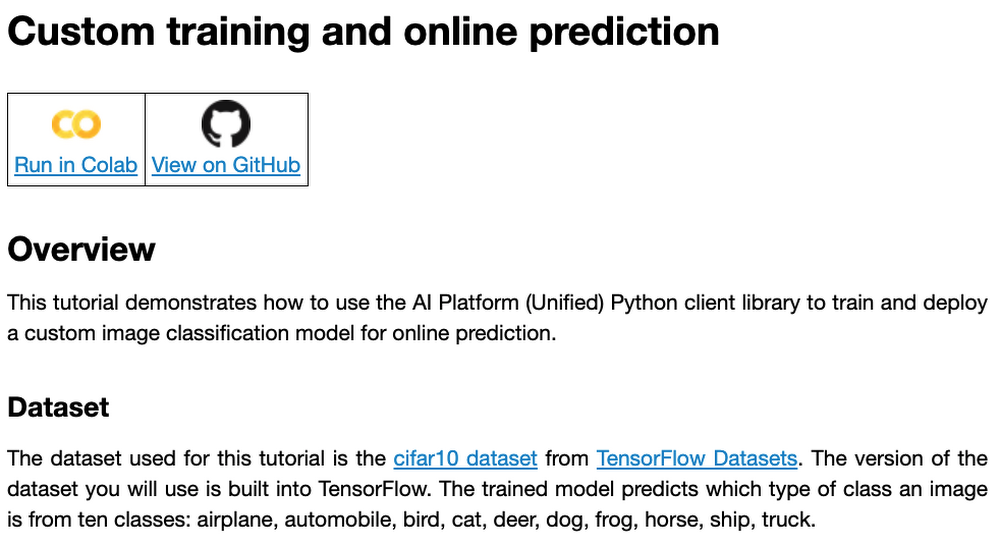
Custom model training concepts
The custom model training service provides pre-built container images supporting popular frameworks such as TensorFlow, PyTorch, scikit-learn, and XGBoost. Using these containers, you can simply provide your training code and the appropriate container image to a training job.
You are also able to provide a custom container image. A custom container image can be a good choice if you’re using a language other than Python, or are using an ML framework that is not supported by a pre-built container image. In this blog post, we’ll use a pre-built TensorFlow 2 image with GPU support.
There are multiple ways to manage custom training jobs: via the Console, gcloud CLI, REST API, and Node.js / Python SDKs. After jobs are created, their current status can be queried, and the logs can be streamed.
The training service also supports hyperparameter tuning to find optimal parameters for training your model. A hyperparameter tuning job is similar to a custom training job, in that a training image is provided to the job interface. The training service will run multiple trials, or training jobs with different sets of hyperparameters, to find what results in the best model. You will need to specify the hyperparameters to test; the range of values to explore for those hyperparameters; and details about the number of trials.
Both custom training and hyperparameter tuning jobs can be wrapped into a training pipeline. A training pipeline will execute the job, and can also perform an optional step to upload the model to Vertex AI after training.
How to package your code for a training job
In general, it’s a good practice to develop your model training code that is self-contained when especially executing them inside containers. This means the training codebase would operate in a standalone manner when executed.
Below is a template of such a self-contained, heavily-commented Python script that you can follow for your own projects too.
# Imports go hereimport tensorflow_datasets as tfdsimport tensorflow as tf…# Define the hyperparameters and constants like epochs, batch size, number of GPUs, etcparser = argparse.ArgumentParser()parser.add_argument('--lr', dest='lr',default=0.01, type=float,help='Learning rate.')parser.add_argument('--epochs', dest='epochs',default=10, type=int,help='Number of epochs.')...args = parser.parse_args()...# Prepare data loadersdef make_datasets_unbatched():# Scaling CIFAR10 data from (0, 255] to (0., 1.]def scale(image, label):image = tf.cast(image, tf.float32)image /= 255.0return image, labeldatasets, info = tfds.load(name='cifar10',with_info=True,as_supervised=True)return datasets['train'].map(scale).cache().shuffle(BUFFER_SIZE).repeat()# Build our model, compile, and train itmodel = [define your model]model.compile(loss=..., optimizer=..., metrics=...)model.fit(...)# Serialize our modelmodel.save(MODEL_DIR)
Note that the MODEL_DIR needs to be a location inside a Google Cloud Storage (GCS) bucket. This is because the training service can only communicate with that and not with our local system. Here is a sample location inside a GCS Bucket to save a model: gs://caip-training/cifar10-model where caip-training is the name of the GCS bucket.
Although we are not using any custom modules in the above code listing, one can easily incorporate them as we would normally inside a Python script. Refer to this document if you want to know more. Next up, we will review how to configure the training infrastructure, including the type and number of GPUs to use, and submit a training script to run inside the infrastructure.
How to submit a training job, including configuring which machines to use
To train a deep learning model efficiently on large datasets, we need hardware accelerators that are suited to run matrix multiplication in a highly parallelized manner. Distributed training is also common when it comes to training a large model on a large dataset. For this example, we will be using a single Tesla K80 GPU. Vertex AI supports a range of different GPUs (find out more here).
Here is how we initialize our training job with the Vertex AI SDK:
job = aiplatform.CustomTrainingJob(display_name=JOB_NAME,script_path="task.py",container_uri=TRAIN_IMAGE,requirements=["tensorflow_datasets==1.3.0"],model_serving_container_image_uri=DEPLOY_IMAGE,)
(aiplatform is aliased as from google.cloud import aiplatform)
Let’s review the arguments:
display_namerefers to a unique identifier to the training job used for easily locating it.script_pathrefers to the path of the training script to run. This is the script we discussed in the section above.container_urirefers to the URI of the container that will be used to run our training script. For this, we have several options to choose from. For this example, we will usegcr.io/cloud-aiplatform/training/tf-gpu.2-1:latest. We will use this same container for deployment as well but with a slightly changed container URI. You can find the containers available for model training here and the containers available for deployment purposes can be found here.requirementslet us specify any external packages that might be required to run the training script.model_serving_container_image_urispecifies the container URI that would be used during deployment.
Note: Using separate containers for distinct purposes like training and deployment is often a good practice, since it isolates the relevant dependencies for each purpose.
We are now all set up to submit a custom training job:
model = job.run(model_display_name=MODEL_DISPLAY_NAME,args=CMDARGS,replica_count=1,machine_type=TRAIN_COMPUTE,accelerator_type=TRAIN_GPU.name,accelerator_count=TRAIN_NGPU)
Here, we have:model_display_name that provides a unique name to identify our trained model. This comes in handy later down the pipeline when we would deploy it using the prediction service. args are our command-line arguments typically used to specify things like hyperparameter values.replica_count denotes the number of worker replicas to be used during training. machine_type specifies the type of base machine to be used during training. accelerator_type denotes the type of accelerator to be used during training. If we are interested in using a Tesla K80, then TRAIN_GPU should be specified as aip.AcceleratorType.NVIDIA_TESLA_K80. (aip is aliased as from google.cloud.aiplatform import gapic as aip.)accelerator_count specifies the number of accelerators to use. For a single host multi-GPU configuration, we would set the replica_count to 1 and then specify the accelerator_count as per our choice depending on the resource available under the corresponding compute zone.
Note that model here is a google.cloud.aiplatform.models.Model object. It is returned by the training service after the job is completed.
With this setup, we can actually start a custom training job that we can monitor. After we submit the above training pipeline, we should see some initial logs resembling this:
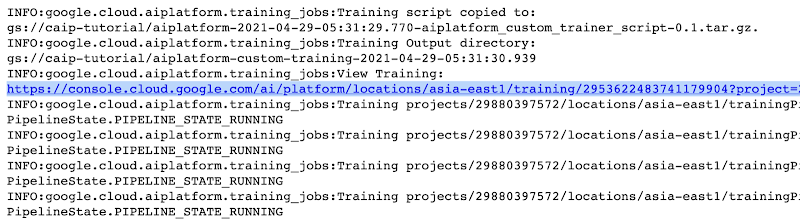
The link highlighted in Figure 2 will redirect to the dashboard of the training pipeline which looks like so:
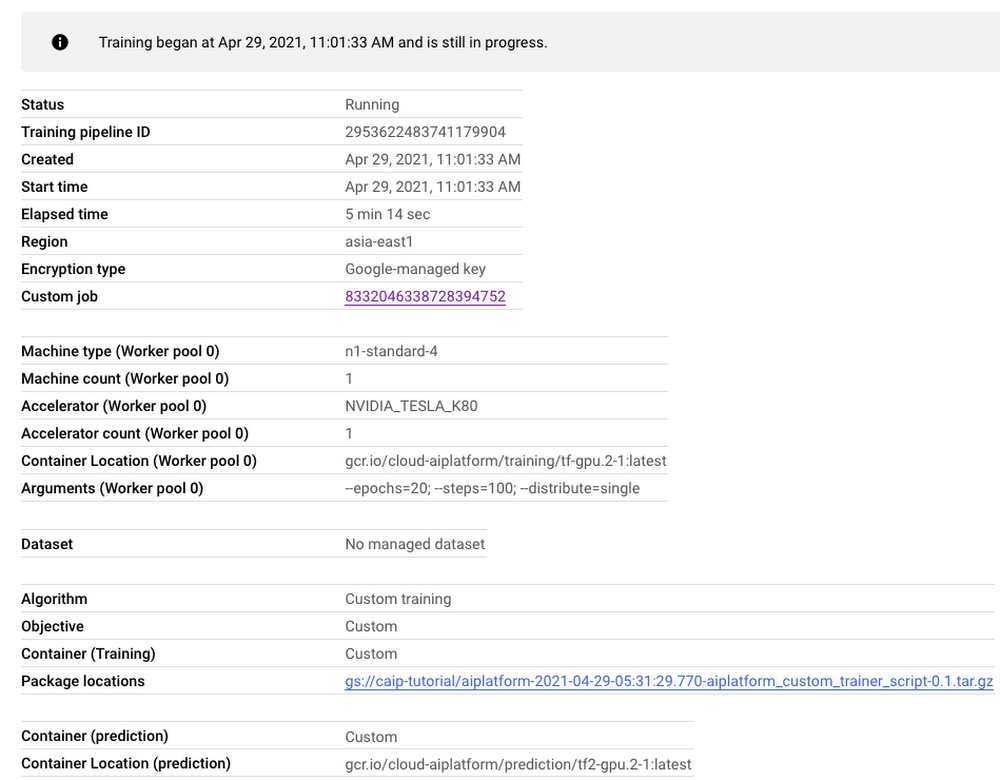
As seen in Figure 3, the dashboard provides a comprehensive summary of all the necessary artifacts related to our training pipeline. Monitoring your model training is also very important especially to catch any early training bugs. To view the training logs, we need to click the link beside the “Custom job” tab (refer to Figure 3). There also we are presented with roughly similar information as shown in Figure 3 but this time it includes the logs as well:
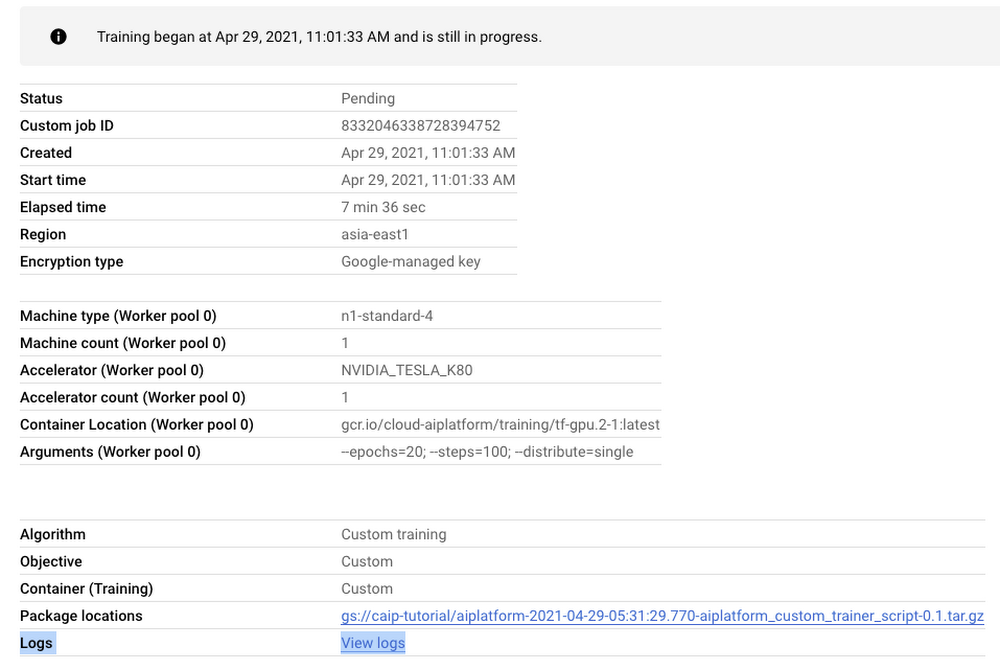
Note: Once we submit the custom training job, a training pipeline is first created to provision the training. Then inside the pipeline, the actual training job is started. This is why we see two very similar dashboards above but they have different purposes. Let’s check out the logs (which is maintained using Cloud Logging automatically):
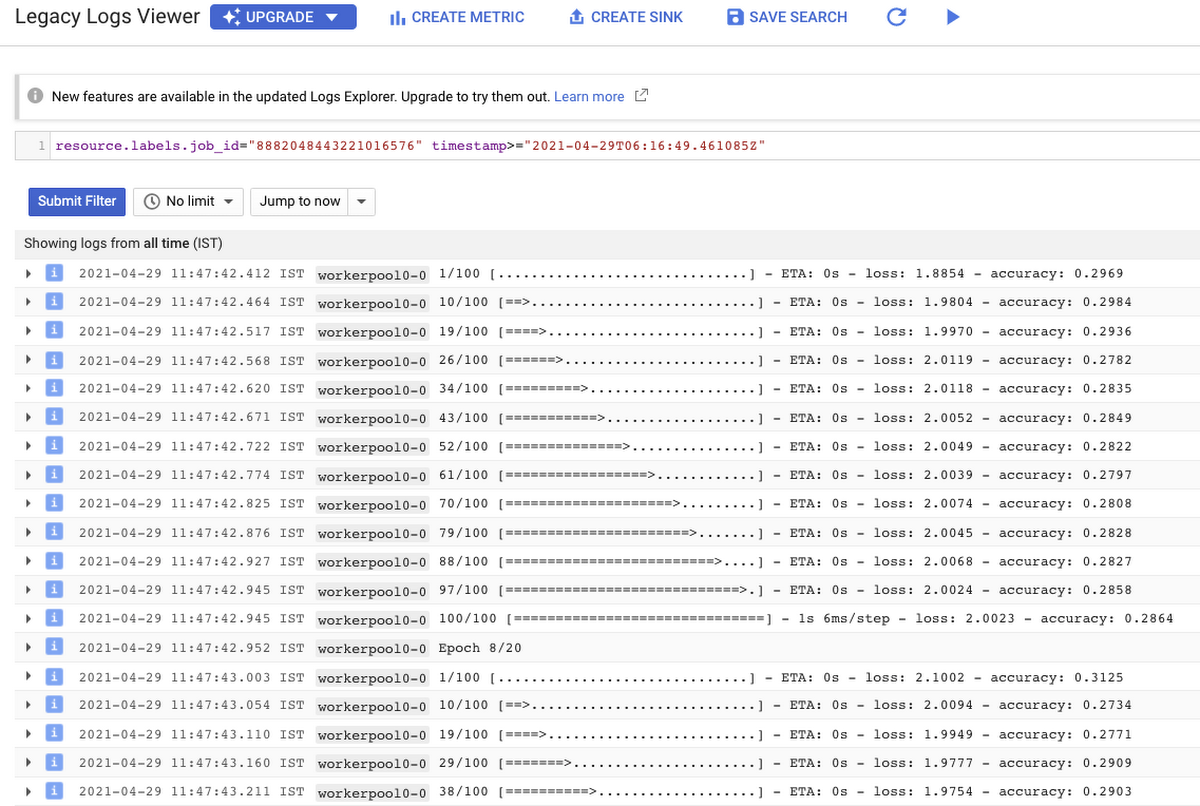
With Cloud Logging, it is also possible to set alerts on the basis of different criteria. For example, alerting the users when the training job fails or completes so that some immediate action could be taken. You can refer to this post for more details.
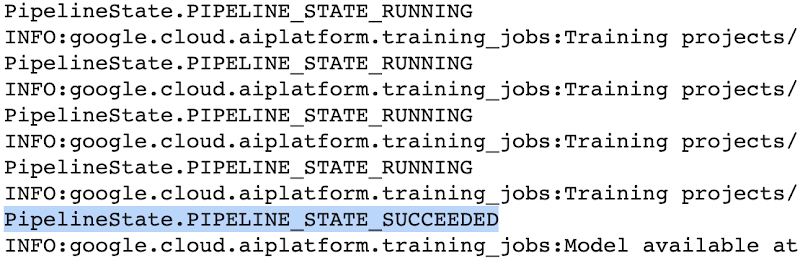
After the training pipeline is completed, on your end, you will notice the success status:
Accessing the trained model
Recall that we had to serialize our model inside a GCS Bucket in order to make it compatible with the training service. So, after the model is trained, we can access it from that location. We can even directly load it using the following line of code:
model = tf.keras.models.load_model('gs://[your-bucket-name]/[model-name]')
Note that we are referring to the TensorFlow model that resulted from training. The training service also maintains a similar “model” namespace to help us manage these models. Recall that the training service returns a google.cloud.aiplatform.models.Model object as mentioned earlier. It comes with a deploy() method that allows us to deploy our model programmatically within minutes with several different options. Check out this link if you are interested in deploying your models using this option.
Vertex AI also provides a dashboard for all the models that have been trained successfully and it can be accessed with this link. It resembles this:
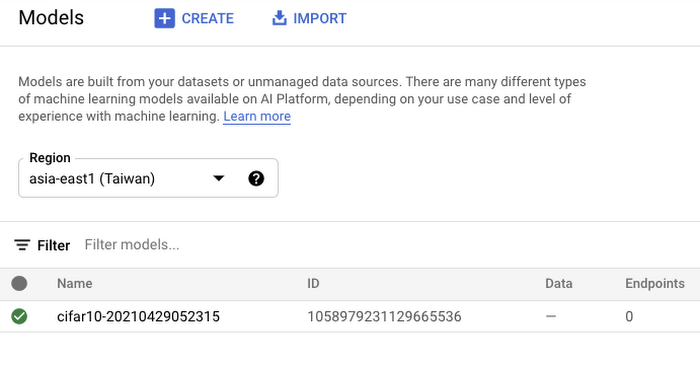
If we click the model as listed in Figure 7, we should be able to directly deploy from the interface:
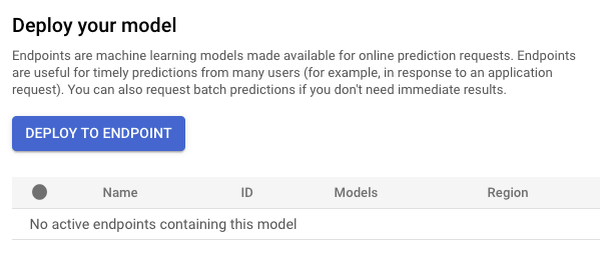
In this post, we will not be covering deployment, but you are encouraged to try it out yourself. After the model is deployed to an endpoint, you will be able to use it to make online predictions.
Wrapping Up
In this blog post, we discussed the benefits of using the Vertex AI custom training service, including better reproducibility and management of experiments. We also walked through the steps to convert your Jupyter Notebook codebase to a standard containerized codebase, which will be useful not only for the training service, but for other container-based environments. The example notebook provides a great starting point to understand each step, and to use as a template for your own projects.
3434
Of your peers have already watched this video.
38:26 Minutes
The most insightful time you'll spend today!
The Secret to Accelerated ML Model Training
As an infrastructure or a data science professional, it’s more critical than ever to keep abreast of the changes taking place to the infrastructure powering machine learning.
If we take a step back, we will realize that there’s been a tremendous amount of progress in machine learning in the last few years, resulting in multiple benefits including higher accuracy in speech and image recognition, for instance. This progress is in part due to the advances in the systems to train models.
One of these advances comes in the type of processors being leveraged to power ML. There’s been an evolution—from CPUs to GPUs to TPUs—each of which bring additional computational power.
Google Cloud TPUs allow data scientists to train their models at lightning speed on Google Cloud’s latest ML hardware.
In this video, you will see how to use your raw data to create different ML applications. More importantly, Zak Stone, Product Manager For TensorFlow and Cloud TPUs, Google Brain, will show you how to accelerate ML model training on TPUs using Google Cloud’s optimized, TensorFlow image classification code. Each step will be explained in detail.
3020
Of your peers have already watched this video.
19:00 Minutes
The most insightful time you'll spend today!
Driving Business Transformation in Healthcare Using Google Cloud and AI/ML
Before the COVID-19 pandemic, when you thought of healthcare and AI, a number of ideas sprang to mind. But the world, especially as it relates to healthcare has seen a completely different type of transformation as a result of COVID-19.
This video is about how Google Cloud is helping organizations respond to COVID-19 leveraging AI and ML and Google Cloud’s healthcare and life sciences products as well as some of the work that its partners are doing.
Joe Corkery, Director, Product Management – Google Cloud, and Thomas C. Tsai, MD, MPH – Department of Surgery at Brigham and Women’s Hospital, will run over the application of AI to COVID forecasting, how Google Cloud’s healthcare-specific product offerings are being used to address COVID-19 and highlight work being done by one a Google Cloud partner in that area and how it’s being used to combat COVID-19.
More Relevant Stories for Your Company


How AutoML is Changing Machine Learning and Accelerating AI Adoption
Currently, only a handful of businesses in the world have access to the talent and budgets needed to fully appreciate the advancements of ML and AI. And if you’re one of the companies, you still have to manage the time-intensive and complicated process of building and maintaining your own custom

Guide to Create and Manage Datasets with Vertex AI
At Google I/O this year, we introduced Vertex AI to bring together all our ML offerings into a single environment that lets you build and manage the lifecycle of ML projects. In a previous post, we gave you an overview of Vertex AI, sharing how it supports your entire ML workflow—from data management
VCP Peering and Private Endpoints on Vertex AI to Better Security and Predictions in Near Real-time
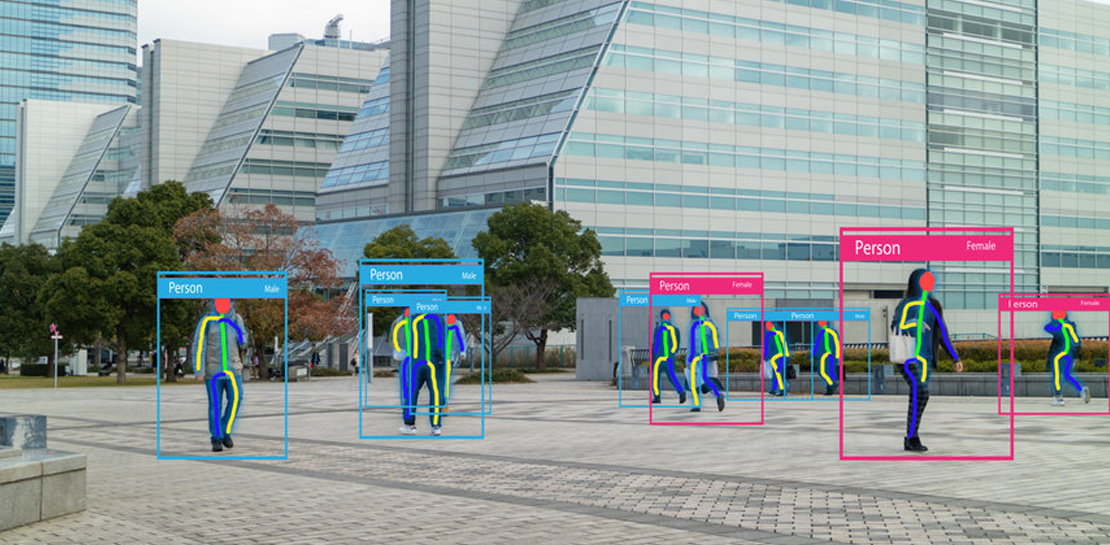
One of the biggest challenges when serving machine learning models is delivering predictions in near real-time. Whether you’re a retailer generating recommendations for users shopping on your site, or a food service company estimating delivery time, being able to serve results with low latency is crucial. That’s why we’re excited

Download the Forrester Study to Explore the Benefits of AI for IT Operations in Cloud Environment
Organizations are currently modernizing their businesses in order to meet the increasing complexity of today’s business landscape. In effect, business leaders must evaluate the best way to mitigate the challenges which plague their cloud operations, all while meeting customers’ growing expectations around digital experience (DX) through agility, automation, and proactive
