





Pay-Go Option for MongoDB on Google Cloud Helps Customers Scale as Required

3362
Of your peers have already read this article.
3:00 Minutes
The most insightful time you'll spend today!
As the volume and velocity of data grows daily, business success depends on the ability to manage it effectively and transform it into actionable insights. Since 2019, Google Cloud and MongoDB have worked together to give businesses the secure, global, and highly performant infrastructure, the sophisticated data intelligence, and the developer-centric tools they need to power modern, data-driven cloud applications. Our partnership with MongoDB continues to deliver richer yet simpler ways to lead with software.
With MongoDB Atlas on Google Cloud, developers can build upon a solid foundation that enables them to work with data the way they want in support of global-scale applications. For example, Forbes, a large business media brand, migrated its platform to Google Cloud and MongoDB Atlas in just six months. The company’s new cloud infrastructure helped the website scale to accommodate record-breaking growth even while making development more nimble. MongoDB’s document model meant developers could build new features quickly, easily incorporate changes, and better handle a growing diversity of data types. It also allowed for more powerful tools, such a machine-language trending story recommendation engine for journalists. Results have been impressive, including:
- 58% faster build time for new products and fixes
- Accelerated release cycle by 4x
- Reduced total cost of ownership by 25%
- 28% increase in subscriptions from new newsletters
The Forbes team is already looking ahead, with plans for improved personalization, loyalty, and management of first-party data. “Our decision to migrate to Google Cloud was made based on the toolset that it offers, scalability, and developer friendliness,” says Vadim Supitsky, Forbes CTO.
Over the course of the partnership between MongoDB and Google Cloud, we have continually added new benefits for our mutual customers, such as the ability to to integrate MongoDB Atlas with Google Cloud products; leveraging BigQuery to create a managed, serverless, scalable architecture; rich data connectivity; and flexible scaling. We’ve also made it easier to migrate MongoDB on-premises instances to MongoDB Atlas on Google Cloud.
Making MongoDB on Google Cloud even more flexible with Pay-Go
That’s why we’re excited to see yet another reason for companies to choose MongoDB Atlas on Google Cloud: A new pay-as-you-go option, available on the Google Cloud Marketplace. With this new offering, developers now have a simplified subscription experience, and enterprises have a simplified way to procure MongoDB in addition to privately negotiated offers already supported on the Google Cloud Marketplace. There are no up-front commitments required to use MongoDB Atlas on Google Cloud, and customers pay only for the resources they use and scale based on their needs. Here are just a few of the benefits of this new service:
- Spin up a MongoDB Atlas cluster on the Google Cloud Console within a few minutes
- No need for a separate credit card payment: You can use your Google Cloud Billing account for your MongoDB Atlas environment
- Receive a single bill for Google Cloud and MongoDB Atlas
- Apply Google Cloud committed spend to MongoDB transactions through Google Cloud Marketplace
- Get started with MongoDB Atlas with 512 MB of storage for free. Atlas free tier clusters are perfect for learning MongoDB or prototyping applications
We’re excited to see even further growth in our continuing partnership with three new developments: First, because resellers are such an important force, we are pleased to share that reseller partners can now make MongoDB Atlas available via the Google Cloud Marketplace. Second, MongoDB and Google Cloud have expanded our joint reach to 28 global regions after adding Toronto, Canada, and Santiago, Chile. And third, we’ve made a joint commitment to early stage companies through MongoDB for Startups and the Google for Startups Cloud Program. Pay-Go is great for startups because it’s easy to scale and you only pay for what you use. Similarly, MongoDB and Google are helping startups get off the ground with our respective programs, which both include credits and support.
Better together
Your company’s transformation hinges on new cloud database capabilities. The first step to building all-new digital experiences is to select the operational database that will power your application and, in essence, run your business.The partnership between MongoDB and Google Cloud gives you the benefits of a modern database service in a tightly integrated, cloud-native way. Since the beginning of our collaborative journey, we have made significant enhancements to the experience for our mutual customers, and we continue to work toward providing a rich developer experience for MongoDB Atlas on Google Cloud.
Discover how customers choose MongoDB and Google Cloud to power the future of customer innovation. For more information on how to get started, visit MongoDB Atlas on Google Cloud Marketplace.
New Enterprise Capabilities and Changes to Cloud Spanner Reduces Cost of Running Workloads by 90 Percent

5409
Of your peers have already read this article.
3:00 Minutes
The most insightful time you'll spend today!
Customers love Cloud Spanner because it gives them the benefits of relational semantics and SQL while also delivering the scale and availability of non-relational databases. Many of these customers want to move even more of their work to Spanner, and have requested smaller instance sizes to support development, testing and small production workloads. We’re happy to announce that they’ll soon get what they asked for: more granular instance sizing is coming to Spanner.
Granular instance sizing will be available in Public Preview soon. With this feature, you can run workloads on Spanner at as low as 1/10th the cost of regular instances, equating to approximately $65/month.
In addition, we are launching new enterprise capabilities to break down operational silos for real-time insights and provide greater database observability to developers:
- Datastream, now in public preview, is a change data capture (CDC) service that allows enterprises to synchronize data across heterogeneous databases and applications. With Spanner support in Datastream, users will be able to stream data from MySQL or Oracle to Spanner reliably and with minimal latency.
- BigQuery federation to Spanner (coming soon) lets users query transactional data residing in Spanner, from BigQuery, without moving or copying data.
- Key Visualizer, available now in public preview, provides interactive monitoring so developers can quickly identify trends and usage patterns in Spanner.
Democratizing access with more granular instance sizing
Today, customers provision Spanner instances by specifying the number of nodes they need to run their workloads. Each node can provide up to 10,000 queries per second (QPS) of reads or 2,000 QPS of writes (writing single rows at 1 KB of data per row) and 2 TB of storage. A Spanner node is replicated across 3 zones for regional instances, and 5 or more zones for multi-regional instances. The choice of node count determines the amount of serving and storage resources that are available to the databases in a given instance.
Historically, the most granular unit for provisioning resources on Spanner has been one node. To enable more granular control, we are introducing Processing Units (PUs); one Spanner node is equal to 1,000 PUs. Customers can now provision in batches of 100 PUs, and get a proportionate amount of compute and storage resources. This will allow teams to run smaller workloads on Spanner at much lower cost. With this feature, customers can start at 100 PUs and scale up as needed in batches of 100 PUs, to up to 1,000 PUs (1 node), all with zero downtime. Subsequently, customers can continue to scale up by adding more nodes, just like what they do today. Customers do have the choice of using either PUs or nodes to provision resources within workloads, when those workloads occupy multiple nodes of capacity.
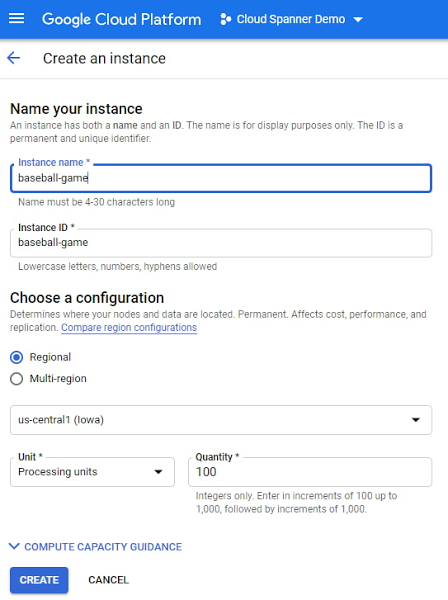
To illustrate with an example, let’s say a game developer creates a Spanner instance called “baseball-game” in us-central1, with 100 PU compute capacity at $65/month price.
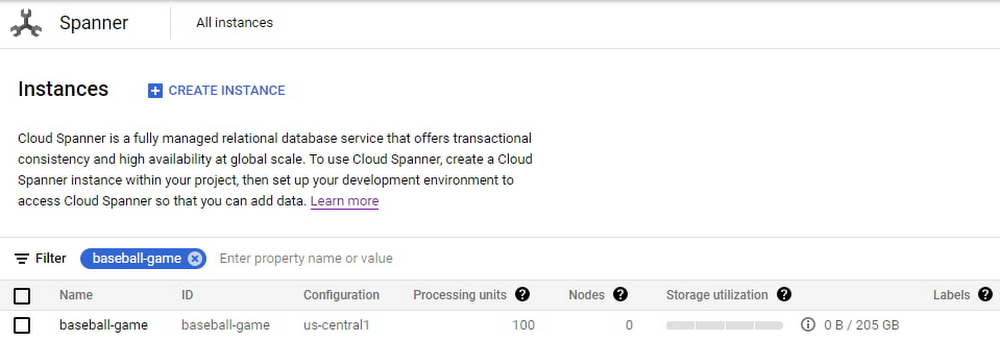
As you can see below, proportional maximum storage of 205 GB is assigned to the 100 PU instance.
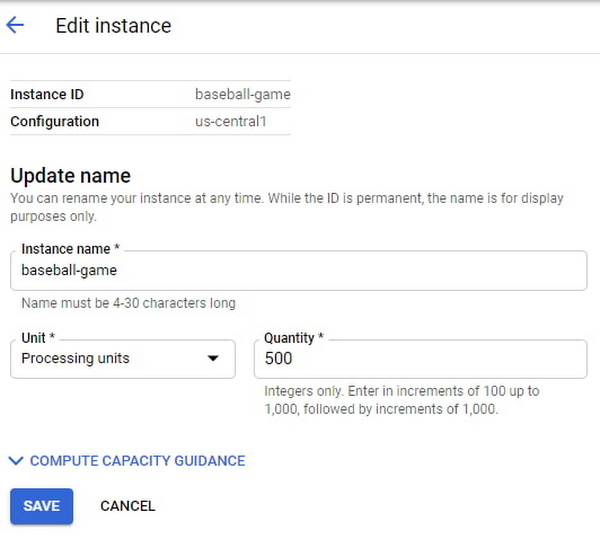
Once the game starts becoming popular and resource demands increase, the user edits the instance to increase the compute capacity to 500 PUs with proportional maximum 1 TB of storage.
The game grows in popularity, and the gaming company prepares to launch a much-awaited capability in the game. Anticipating a sharp increase in usage at launch day, the game developers increase the compute capacity to 3,000 PUs. Compute capacity assigned to the instance over a period of time can be viewed in Cloud Monitoring graphs:

Request Access
You can request early access to granular instance sizing feature by filling this form.
Breaking down operational silos with Datastream CDC and BigQuery federation
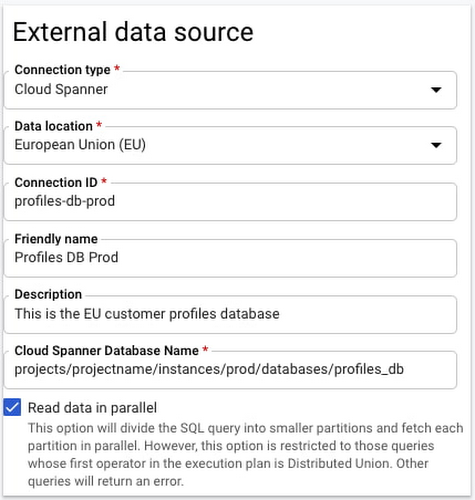
BigQuery Federation. BigQuery has made analytics easy by bringing together data from multiple sources for seamless analysis. Soon you’ll also be able to analyze data in Spanner directly in BigQuery. With Spanner’s BigQuery federation, you’ll be able to instantly query data residing in Spanner in real-time without moving or copying the data. Simply set up the Spanner as an external data source in BigQuery, as shown below.
Change Data Capture ingest. Now in public preview, Datastream lets you stream change data into Google Cloud from MySQL and Oracle databases. As of today, you can ingest this change data directly into Spanner using a built-in Dataflow template. This lets you migrate data from MySQL and Oracle databases into Spanner in near-real time.
Understanding performance and resource usage with Key Visualizer
Key Visualizer is a new interactive monitoring tool that lets developers and administrators analyze usage patterns in Spanner. It reveals trends and outliers in key performance and resource metrics for databases of any size, helping to optimize queries and reduce infrastructure costs. Designed for performance tuning and instance sizing, Key Visualizer is available today in public preview in the web-based Cloud Console for all Spanner databases at no additional cost. Learn more in the Key Visualizer blog.
Learn more
- To request early access to granular instance sizing in Spanner, fill out this form.
- To get started with Spanner today, create an instance or try it out with a Spanner Qwiklab.
How to Pick a Database that is Suitable for Your Application

7057
Of your peers have already read this article.
2:30 Minutes
The most insightful time you'll spend today!
Picking the right database for your application is not easy. The choice depends heavily on your use case—transactional processing, analytical processing, in-memory database, and so on—but it also depends on other factors. This post covers the different database options available within Google Cloud across relational (SQL) and non-relational (NoSQL) databases and explains which use cases are best suited for each database option.

Relational databases
In relational databases information is stored in tables, rows and columns, which typically works best for structured data. As a result they are used for applications in which the structure of the data does not change often. SQL (Structured Query Language) is used when interacting with most relational databases. They offer ACID consistency mode for the data, which means:
- Atomic: All operations in a transaction succeed or the operation is rolled back.
- Consistent: On the completion of a transaction, the database is structurally sound.
- Isolated: Transactions do not contend with one another. Contentious access to data is moderated by the database so that transactions appear to run sequentially.
- Durable: The results of applying a transaction are permanent, even in the presence of failures.
Because of these properties, relational databases are used in applications that require high accuracy and for transactional queries such as financial and retail transactions. For example: In banking when a customer makes a funds transfer request, you want to make sure the transaction is possible and it actually happens on the most up-to-date account balance, in this case an error or resubmit request is likely fine.
There are three relational database options in Google Cloud: Cloud SQL, Cloud Spanner, and Bare Metal Solution.
Cloud SQL: Provides managed MySQL, PostgreSQL and SQL Server databases on Google Cloud. It reduces maintenance cost and automates database provisioning, storage capacity management, back ups, and out-of-the-box high availability and disaster recovery/failover. For these reasons it is best for general-purpose web frameworks, CRM, ERP, SaaS and e-commerce applications.
Cloud Spanner: Cloud Spanner is an enterprise-grade, globally-distributed, and strongly-consistent database that offers up to 99.999% availability, built specifically to combine the benefits of relational database structure with non-relational horizontal scale. It is a unique database that combines ACID transactions, SQL queries, and relational structure with the scalability that you typically associate with non-relational or NoSQL databases. As a result, Spanner is best used for applications such as gaming, payment solutions, global financial ledgers, retail banking and inventory management that require ability to scale limitlessly with strong-consistency and high-availability.
Bare Metal Solution: Provides hardware to run specialized workloads with low latency on Google Cloud. This is specifically useful if there is an Oracle database that you want to lift and shift into Google Cloud. This enables data center retirements and paves a path to modernize legacy applications.
Non-relational databases
Non-relational databases (or NoSQL databases) store compex, unstructured data in a non-tabular form such as documents. Non-relational databases are often used when large quantities of complex and diverse data need to be organized. Unlike relational databases, they perform faster because a query doesn’t have to access several tables to deliver an answer, making them ideal for storing data that may change frequently or for applications that handle many different kinds of data.
For example, an apparel store might have a database in which shirts have their own document containing all of their information, including size, brand, and color with room for adding more parameters later such as sleeve size, collars, and so on.
Qualities that make NoSQL databases fast:
- Eventual consistency: stores usually exhibit consistency at some later point (e.g., lazily at read time)
- Horizontal scaling, usually using hashed distributions
- Typically, they are optimized for a specific workload pattern (i.e., key-value, graph, wide-column)
- Typically, they don’t support cross shard transactions or flexible isolation modes.
Because of these properties, non-relational databases are used in applications that require large scale, reliability, availability, and frequent data changes.They can easily scale horizontally by adding more servers, unlike some relational databases, which scale vertically by increasing the machine size as the data grows. Although, some relations databases such as Cloud Spanner support scale-out and strict consistency.
Non-relational databases can store a variety of unstructured data such as documents, key-value, graphs, wide columns, and more. Here are your non-relational database options in Google Cloud:
- Document databases: Store information as documents (in formats such as JSON and XML). For example: Firestore
- Key-value stores: Group associated data in collections with records that are identified with unique keys for easy retrieval. Key-value stores have just enough structure to mirror the value of relational databases while still preserving the benefits of NoSQL. For example: Datastore, Bigtable, Memorystore
- In-memory database: Purpose-built database that relies primarily on memory for data storage. These are designed to attain minimal response time by eliminating the need to access disks. They are ideal for applications that require microsecond response times and can have large spikes in traffic. For example: Memorystore
- Wide-column databases: Use the tabular format but allow a wide variance in how data is named and formatted in each row, even in the same table. They have some basic structure while preserving a lot of flexibility. For example: Bigtable
- Graph databases: Use graph structures to define the relationships between stored data points; useful for identifying patterns in unstructured and semi-structured information. For example: JanusGraph
There are three non-relational databases in Google Cloud:
- Firestore: Is a serverless document database which scales on demand and acts as a backend-as-a-service. It is DBaaS that increases the speed of building applications. It is perfect for all general purpose uses cases such as ecommerce, gaming, IoT and real time dashboards. With Firestore users can interact with and collaborate on live and offline data making it great for real-time application and mobile apps.
- Cloud Bigtable: Cloud Bigtable is a sparsely populated table that can scale to billions of rows and thousands of columns, enabling you to store terabytes or even petabytes of data. It is ideal for storing very large amounts of single-keyed data with very low latency. It supports high read and write throughput at sub-millisecond latency, and it is an ideal data source for MapReduce operations. It also supports the open-source HBase API standard to easily integrate with the Apache ecosystem including HBase, Beam, Hadoop and Spark along with Google Cloud ecosystem.
- Memorystore: Memorystore is a fully managed in-memory data store service for Redis and Memcached at Google Cloud. It is best for in-memory and transient data stores and automates the complex tasks of provisioning, replication, failover, and patching so you can spend more time coding. Because it offers extremely low latency and high performance, Memorystore is great for web and mobile, gaming, leaderboard, social, chat, and news feed applications.
Conclusion
Choosing a relational or a non-relational database largely depends on the use case. Broadly, if your application requires ACID transactions and your data structure is not going to change much, select a relational database.
In Google Cloud use Cloud SQL for any general-purpose SQL database and Cloud Spanner for large-scale globally scalable, strongly consistent use cases. In general, if your data structure may change later and if scale and availability is a bigger requirement than consistency then a non-relational database is a preferable choice. Google Cloud offers Firestore, Memorystore, and Cloud Bigtable to support a variety of use cases across the document, key-value, and wide column database spectrum.
For more comparison resources on each database check out the overview. For more hands-on experience with Bigtable, check out our on-demand training here and learn about migrating databases to managed services check out this whitepaper.
https://youtube.com/watch?v=2TZXSnCTd7E%3Fenablejsapi%3D1%26
For more #GCPSketchnote, follow the GitHub repo. For similar cloud content follow me on Twitter @pvergadia and keep an eye out on thecloudgirl.dev.
Data Warehouse Migration Challenges and How to Meet Them

3849
Of your peers have already read this article.
7:30 Minutes
The most insightful time you'll spend today!
In the last blog post, we discussed why legacy data warehouses are not cutting it any more and why organizations are moving their data warehouses to cloud.
At GCP, we often hear that customers feel that migration is an uphill battle because the migration strategy was not deliberately considered.
Migrating to a modern data warehouse from a legacy environment can require a massive up-front investment in time and resources. There’s a lot to think about before and during the process, so your organization has to take a strategic approach to streamline the process.
At Google Cloud, we work with enterprises shifting data to our BigQuery data warehouse, and we’ve helped companies of all kinds successfully migrate to cloud. Here are some of the questions we frequently hear around migrating a data warehouse to the cloud:
- How do we minimize any migration risks or security challenges?
- How much will it cost?
- How do we migrate our data to the target data warehouse?
- How quickly will we see equal or better performance?
These are big, important questions to ask—and have answered—when you’re starting your migration. Let’s take them in order.
How do we minimize any migration risks or security challenges?
It’s easy to consider an on-premises data warehouse secure because, well, it’s on-site and you can manage its data protection. But if scaling up an on-prem data warehouse is difficult, so is securing it as your business scales.
We’ve built in multiple features to secure BigQuery. For enterprise users, Cloud Identity and Access Management (Cloud IAM) is key to setting appropriate role-based user access to data.
You can also take advantage of SQL’s security views within BigQuery. And all BigQuery data is encrypted at rest and in transit.
You can add the protection of customer-managed encryption keys to establish even stronger security measures. Using virtual private cloud (VPC) security controls can secure your migration path, since it helps reduce data exfiltration risks.
How much will it cost?
The cost of a cloud data warehouse has a different structure from what you’re likely used to with a legacy data warehouse. An on-prem system like Teradata may depend on your IT team paying every three years for the hardware, then paying for licenses for users who need to access the system. Capacity increases come at an additional cost outside of that hardware budget.
With cloud, you’ve got a lot more options for cost and scale. Instead of a fixed set of costs, you’re now working on a price-utility gradient, where if you want to get more out of your data warehouse, you can spend more to do so immediately, or vice versa. While cloud data warehouses help reduce or eliminate capital and fixed costs, they are not all the same.
You’ll find varying levels of simplicity and cost savings across vendors, so it’s important to check out the operational costs of each data warehouse in relation to its performance.
With a cloud data warehouse like BigQuery, TCO becomes an important metric for customers when they’ve migrated to BigQuery (check out ESG’s report on that), and Google Cloud’s flexibility makes it easy to optimize costs.
How do we migrate all of our data to the target data warehouse?
This question encompasses both migrating your extract, transform, load (ETL) jobs and SAS/BI application workloads to the target data warehouse, as well as migrating all your queries, stored procedures, and other extract, load, transform (ELT) jobs.
Actually getting all of a company’s data into the cloud can seem daunting at the outset of the migration journey. We know that most businesses have a lot of siloed data. That might be multiple data lakes set up over the years for various teams, or systems acquired through acquisition that handle just one or two crucial applications. You may be moving data from an on-prem or cloud data warehouse to BigQuery and type systems or representations don’t match up.
One big step you can take to prepare for a successful migration is to do some workload and use case discovery.
That might involve auditing which use cases exist today and whether those use cases are part of a bigger workload, as well as identifying which datasets, tables, and schemas underpin each use case.
Use cases will vary by industry and by job role. So, for example, a retail pricing analyst may want to analyze past product price changes to calculate future pricing. Use cases may include the need to ingest data from a transactional database, transforming data into a single time series per product, storing the results in a data warehouse table, and more.
After the preparation and discovery phase, you should assess the current state of your legacy environment to plan for your migration. This includes cataloging and prioritizing your use cases, auditing data to decide what will be moved and what won’t, and evaluating data formats across your organization to decide what you’ll need to convert or rewrite.
Once that’s decided, choose your ingest and pipeline methods. All of these tasks take both technology and people management, and require some organizational consensus on what success will look like once the migration is complete.
How quickly will we see equal or better performance?
Managing a legacy data warehouse isn’t usually synonymous with speed. Performance often comes at the cost of capacity, so users can’t do the analysis they need till other queries have finished running.
Reporting and other analytics functions may take hours or days, which is especially true for running large reports with a lot of data, like an end-of-quarter sales calculation. As the amount of data and number of users rapidly grows, performance begins to melt down and organizations often face disruptive outages.
However, with a modern cloud data warehouse like BigQuery, compute and storage are decoupled, so you can scale immediately without facing capital infrastructure constraints.
BigQuery helps you modernize because it uses a familiar SQL interface, so users can run queries in seconds and share insights right away. Home Depot is an example of a customer that migrated their warehouse and reduced eight-hour workloads to five minutes.
Moving to cloud may seem daunting, especially when you’re migrating an entrenched legacy system. But it brings the benefits of adopting technology that lets the business grow, rather than simply adopting a tool. It’s likely you’ve already seen that the business demand exists. Now it’s time to stop standing in the way of that demand and instead make way for growth.
Google Cloud Data Heroes Series: Honoring Data Practitioner’s Journey and Learning with GCP

4975
Of your peers have already read this article.
4:00 Minutes
The most insightful time you'll spend today!
Google Cloud Data Heroes is a series where we share stories of the everyday heroes who use our data analytics tools to do amazing things. Like any good superhero tale, we explore our Google Cloud Data Heroes’ origin stories, how they moved from data chaos to a data-driven environment, what projects and challenges they are overcoming now, and how they give back to the community.
For our first issue, we couldn’t be more excited to introduce Google Cloud Data Heroine Lynn Langit. Lynn is a seasoned business woman in Minnesota beginning her eleventh year as the Founder of her own consulting business, Lynn Langit Consulting LLC. Lynn wears many data professional hats including Cloud Architect, Developer, and Educator. If that wasn’t already a handful, she also loves riding her bike at any given season of the year (pictured on the right), which you might imagine gets a bit challenging when you have to invest in bike studded snow tires!

Tell us how you got to be a data practitioner. What was that experience like and how did this journey bring you to GCP?
I worked on the business side of tech for many years. While I enjoyed my work, I found I was intrigued by the nuanced questions practitioners could ask – and the sophisticated decisions they could make – once they unlocked value from their data. This initial intrigue developed into a strong curiosity and I ultimately made the switch from business worker to data practitioner over 15 years ago. This was a huge change in career considering I got my bachelor’s degree in Linguistics and German. And so I started small. I taught myself most everything both at the beginning and even now through online resources, courses, and materials. I began with database and data warehousing, specifically building and tuning many enterprise databases. It wasn’t until Hadoop/NoSQL became available that I pivoted to Big Data…
Back then, I supplemented my self-paced learning with Microsoft technologies, even earning all Microsoft certifications in just one year. When I noticed the industry shifting from on premise to cloud, I shifted my learning from programming to cloud, too. I have been working in the public cloud for over ten years already!
“I started with AWS, but recently I have been doing most everything in GCP. I particularly love implementing data pipelining, data ops, and machine learning.”
How did you supplement your self teachings with Google Cloud data upskilling opportunities like product deep dives and documentation, courses, skills, and certificates?
One of the first Google Cloud data analytics products I fell in love with was BigQuery. BigQuery was my gateway product into a much larger open, intelligent, and unified data platform full of products that combined data analytics, databases, AI/ML, and business intelligence.
I’ve achieved Skills Badges in BigQuery, Data Analysis, and more. I’ve also achieved Google’s Professional Data Engineer Certification, and have been a Google Developer Expert since 2012.
Most recently, I was named one of few Data Analysis Innovator Champions within the Google Cloud Innovators Program, which I’m particularly excited about because I’ve heard it’s a coveted spot for data practitioners and necessitates a Googler nomination to move from the Innovator membership to Champion title!
You’re undoubtedly a data analytics thought leader in the community. When did you know you moved from data student to data master and what data project are you most excited about?
I knew I had graduated, if you will, to the data architect realm once I was able to confidently do data work that matters, even if that work was outside of my usual domains: adTech and finTech..
For example, my work over the past few years has been around human health outcomes, including combatting the COVID-19 pandemic. I do this by supporting scientists and bioinformatic researchers with genomic-scale data pipelines. Did I know anything about genomics before I started? Not at all! I self-studied bioinformatics and recorded my learnings on GitHub. Along the way I adopted my learnings into an open source GCP course on GitHub aimed at researchers who are new to working with GCP. What’s cool about the course is that I begin from the true basics of how to set up a GCP account. Then I gradually work up to mapping out genomic-scale data workflows, pipelines, analyses, batch jobs, and more using BigQuery and a host of other Google Cloud data products.
Now, I’ve received feedback that this repository has made a positive impact on researchers’ ability to process and synthesize enormous amounts of data quickly. Plus, it achieves the greater goal of broadening accessibility to a public cloud like GCP.
In what ways do you think you uniquely bring value back to the data community? Why is it important to you to give back to the data community?
I stay busy always sharing my learnings back to the community. I record Cloud and Big data technical screencasts (demos) on Youtube, I’ve authored 25 data and cloud courses on LinkedIn Learning, and I occasionally write Medium articles on cloud technology and random thoughts I have about everyday life. I’m also the cofounder of Teaching Kids Programming, with a mission to help equip middle and high school teachers with a great programming curriculum on Java.
Begin your own hero’s journey
Ready to embark on your Google Cloud data adventure? Begin your own hero’s journey with GCP’s recommended learning path where you can achieve badges and certifications along the way. Join the Cloud Innovators program today to stay up to date on more data practitioner tips, tricks, and events.
Connect with Google’s data community at our upcoming virtual event “Latest Google Cloud data analytics innovations”. Register and save your spot now to get your data questions answered live by GCP’s top data leaders and watch demos from our latest products and features including BigQuery, Dataproc, Dataplex, Dataflow, and more. Lynn will take the main stage as an emcee for this event – you won’t want to miss!
Finally, if you think you have a good Data Hero story worth sharing, please let us know! We’d love to feature you in our series as well.
Meesho’s Zero Downtime Success: Cloud CDN Migration Made Easy

1990
Of your peers have already read this article.
4:30 Minutes
The most insightful time you'll spend today!
Meesho is an Indian online marketplace that serves millions of customers every day. Recently, the company decided to adopt a multi-cloud strategy, leveraging Google Cloud’s scalable and reliable infrastructure to drive operational efficiency, modernize and scale for growth. To do so, they needed to migrate billions of static files and images to Google Cloud, to render the static content that serves their web and mobile applications. But with over a petabyte of data in their object storage system, and 10 billion requests per day, Meesho needed to perform this gigantic migration gradually, with zero downtime — a huge challenge.
In this blog post, we look at how Meesho did this using Storage Transfer Service, Cloud Storage and Cloud CDN. We also look at how it saved on storage capacity by resizing static images as needed on the fly, using Cloud Run.
CDN migration requirements
Migrating from one cloud to another isn’t easy. To pull it off, Meesho identified the following requirements:
- Petabyte-scale data transfer: Meesho needed to migrate billions of image files from their existing object storage server to Cloud Storage.
- Dynamic image resizing: To save on storage costs, Meesho wanted the ability to dynamically resize the images based on the end user platform and store the smaller images in the Cloud CDN cache.
- High-throughput data transfer: To support consumer demand, Meesho needed images to be served at a throughput of thousands of requests per second.
- Zero downtime: Since any downtime involves potential loss of revenue, Meesho needed to perform the migration without taking any systems offline.
Migration architecture
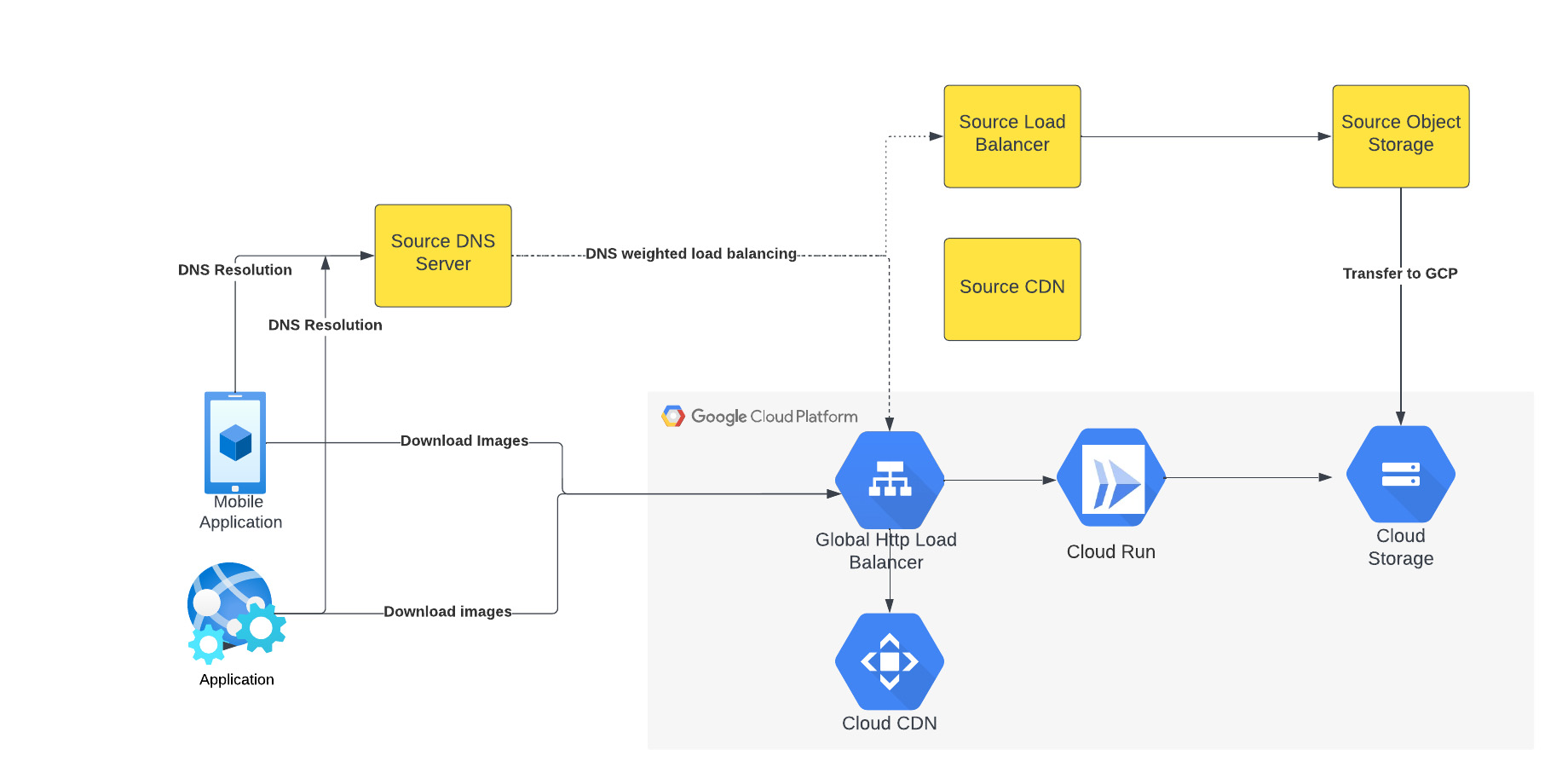
The above figure depicts the CDN migration architecture implemented in Meesho. The existing DNS server points to both the source load balancer as well as Google External HTTP Load Balancer with weighted distribution. The source load balancer points to the source object storage. Images were transferred from the source object storage to Google Cloud Storage.
The Google External HTTP Load Balancer was deployed with Cloud CDN to serve static images that are stored in the CDN cache to users. The Google Load Balancer public IP is configured as an end point on their existing DNS server. The Load Balancer is connected to Cloud Run, which talks to the Cloud Storage bucket. When a request reaches the Load Balancer in the edge, it first checks if the content is available in Cloud CDN, and returns the object from the closest edge network. If the image is not available in the Cloud CDN cache, the request is sent to Cloud Run which obtains the image from the Cloud Storage bucket and performs dynamic resizing of the image if necessary.
Data transfer
Meesho used Google Cloud’s Storage Transfer Service to transfer data from their current object storage to Cloud storage bucket over the internet. Since the number of files and total size of the data to be transferred was huge, Meesho executed multiple parallel transfers by specifying folders and subfolders as prefixes in a Storage Transfer Service job.
Dynamic image resizing
Meesho delivers static images to multiple end user platforms — mobile, laptop — at multiple resolutions. Rather than store each image at multiple image resolutions, Meesho opted to store a single high-resolution mezzanine image. It then attached Cloud Run as a serverless network endpoint group to a Cloud Load Balancer. Application requests for images specify the name of the object, the format of the image, and its resolution (for example, abc.jpeg with 750*450 resolution). If the specific image exists for the requested resolution, then it is returned from the Cloud Storage bucket to the end user and stored in the Cloud CDN cache. If an image for a specified resolution and/or format is not found, the mezzanine image (in our example, abc.jpeg) is resized to the specified resolution and format, then stored in Cloud Storage bucket and returned to the end user. The dynamic resizing and formatting is only performed the first time for a specific resolution.
In this architecture, it is important to configure Cloud Run to scale appropriately as it handles a bulk of “CDN cache-miss” requests. Meesho performed the following configuration steps:
- Configured the number of concurrent requests that a single instance of Cloud Run can handle
- Ensured a sufficient minimum of Cloud Run instances were available to serve user traffic to avoid cold-start latency
- Reviewed limits of Cloud Run maximum instance size for the region and increased the limits if necessary to handle peak load
- Set up smaller start-up times for Cloud Run containers, so that the application could quickly autoscale to handle a surge in traffic
- Optimized the memory and CPU configuration to handle processing requirements
CDN configuration
Cloud CDN was configured to ensure a high cache hit ratio > 99 %. This not only sped up the rendering of the images, but also reduced the load on Cloud Run, saving cost and improving performance.
Achieving zero downtime
Meesho followed well-established DevOps principles to achieve a zero-downtime migration:
- Metrics and alerts were configured in Cloud Monitoring to oversee the load balancer.
- The DNS server was configured to point to Cloud Load Balancer IP addresses in addition to their current load balancer, which served status assets.
- Weight-based DNS load balancing was employed to gradually shift the traffic to Google Cloud, while monitoring application performance and HTTP response codes.
- The initial migration process distributed .1% of traffic during non-peak hours. The metrics, end user performance and response codes were continuously monitored.
- Traffic was gradually incremented over a two-week period by increasing the weight of the Google Cloud Load balancer in DNS. By gradually shifting traffic, Meesho ensured a healthy cache-hit ratio, allowing Cloud Run to learn traffic patterns gradually and scale seamlessly.
Meesho learned a lot through this experience, and has the following advice for anyone undertaking a similar migration:
- While transferring data using Storage Transfer Service of Google Cloud, split the transfer process into multiple transfers.
- Ensure that applications do not pin certificates, which could create problems while migrating to the newer certificates in Google Cloud.
- Plan a gradual migration process to gradually increase the traffic to Google Cloud.
Summary
When all is said and done, Meesho considers its migration to Google Cloud a big success. After migrating the static images to Cloud CDN, Meesho held two major sales that each had three times the normal peak traffic, all with no issues. The CDN migration helped Meesho reduce its costs, improve performance and reduce load balancer errors when fetching static images. To learn more about Cloud CDN and how you can use it in your environment, check out the documentation.
More Relevant Stories for Your Company

BigQuery ML for Sentiment Analysis: How to Make the Most of Your Data
Introduction We recently announced BigQuery support for sparse features which help users to store and process the sparse features efficiently while working with them. That functionality enables users to represent sparse tensors and train machine learning models directly in the BigQuery environment. Being able to represent sparse tensors is a

Migrating From Oracle OLTP System to Cloud Spanner
Spanner uses certain concepts differently from other enterprise database management tools, so you might need to adjust your application to take full advantage of its capabilities. You might also need to supplement Spanner with other services from Google Cloud to meet your needs. Migration constraints When you migrate your application

Quantum Metric Increases Business 10-fold
At Quantum Metric, we’re in the business of bringing our customers business insights that are based on customer experience data and analytics for mid-market and Fortune 500 companies. Our software, powered by big data, machine intelligence, and Google Cloud, helps our customers identify, quantify, prioritize and measure opportunities to improve
How Moving Database to the Cloud Helped Recruit Technologies Gain Higher Availability and Lower Cost
There are just under 8 billion people on Earth, depending on the source. Here at Recruit, our work is to develop and maintain an email marketing system that sends personalized emails to tens of millions of customers of hundreds of web services, all with the goal of providing the best,
