





SoFi Stadium Personalizes Fan Experiences with Game-changing App Built on Google Cloud and Deloitte

3209
Of your peers have already read this article.
2:00 Minutes
The most insightful time you'll spend today!
Editor’s note: Engineers from SoFi Stadium, Google Cloud, and Deloitte built a fan-ready Personal Concierge app that uses advanced analytics to tailor game-day experiences for every visitor. SoFi’s 10-year partnership with Google Cloud not only pumps up the fans. Advanced analytics also enable stadium employees to securely store, analyze, and action analytics data, and seamlessly collaborate through tools and services included in Google Cloud Workspace.
SoFi Stadium, an industry-leading, outdoor-indoor events facility and home of the Los Angeles Rams and Los Angeles Chargers, is the centerpiece of Hollywood Park, a near 300-acre sports and entertainment destination. With the capacity to host up to 100,000 spectators across a range of luxury and premium seating options, the 3.1 million square-foot SoFi Stadium is the largest in the NFL. Completed in September 2020, it has already secured a global reputation—scheduled to host Super Bowl LVI in 2022, the College Football National Championship Game in 2023, and the Opening and Closing Ceremonies of the Olympic Games in 2028. Under the same roof canopy as the stadium is the 2.5-acre American Airlines Plaza and the 6,000-seat performance venue, YouTube Theater.
Through a long-term partnership with Google Cloud, SoFi Stadium is personalizing fan experiences, enabling a more fulfilling, collaborative, and productive work experience for employees, and delivering game-changing technology to the event space.
Personalizing the experience for every fan
Sports fans are known for their fierce loyalty and camaraderie. While they come to game day ready to cheer with fellow fans, each spectator has a different vision for what will make for a memorable event. SoFi Stadium is helping customers choose their game day flow by extending a personalized, streamlined experience to every stadium goer through several new digital innovations powered by Google Cloud.
First there’s the Personal Concierge App. Powered by Google Cloud and built by Deloitte, this personalized navigation and security tool may be the game day MVP that sports fans have always dreamed of. Hours of precious viewing time can be lost navigating a stadium campus for seating, parking, food, access, and amenities. This application enables fans to quickly locate available parking locations, select the ideal transportation for game day through real-time Google Maps routing, and discover SoFi Stadium events all from their mobile device. Event-goers can also receive digital credentials through the app, enabling them to bypass lines and accelerate their access to luxury viewing suites.
The advanced data analytics accrued from multiple sources and processed through Google Cloud products such as Cloud Scheduler, App Engine, Dataflow, BigQuery, Looker, Firebase, and more, enable SoFi Stadium to anticipate spectator tastes. These Google Cloud tools can remember preferences and provide attendees with real-time personal recommendations around the clock.
Performing at the top of their game with Workspace
Advanced data analytics enhance employee experiences, too. Credentialed team members can securely store and analyze data from multiple sources, create operational dashboards with real-time data, track key performance indicators after events, and better forecast attendance, revenue by product, and other important business metrics.
In addition to deploying a number of Google Cloud solutions including Compute Engine, Kubernetes Engine, Cloud CDN, BigQuery, and others to power the Personal Concierge App, SoFi Stadium is empowering its employees by fully migrating to Google Cloud’s Workspace. Workspace streamlines the stadium’s business operations by fostering fast and seamless access to collaboration and performance tools. Built-in software—including Gmail for business, Docs, Drive, Calendar, and Meet—will help employees work smarter and meet securely from anywhere.
“We couldn’t have picked a better partner to help manage our technology needs,” said Skarpi Hedinsson, Chief Technology Officer, SoFi Stadium and Hollywood Park. “Incorporating Google’s solutions into critical areas of our business ensures we can usher in a new era of innovation in sports and entertainment, raising the bar on what the ultimate fan experience looks like globally.”
Making the big-game even bigger
As Hollywood Park combines the expertise of its team and Google Cloud engineers to power the future of sports and live events, SoFi Stadium prepares to welcome a product of this collaboration with the Infinity Screen by Samsung, the largest video board in sports. With 80 million pixels, weighing 2.2 million pounds, and boasting 120-yards in length, the Infinity Screen by Samsung leverages Google Cloud-based media workflows and optimization technology to power its game-changing screen.
Through its partnership with Google Cloud, SoFi Stadium is actively developing new media streaming and high-speed wireless solutions. In addition, SoFi Stadium has the world’s first 4K/HDR live production facility. These digital innovations are powering a new standard for sports fans and opening a path to redefine what can take game day from good to great.
App Engine Basics to Help You Build and Deploy Low-latency, Scalable Apps

3524
Of your peers have already read this article.
2:00 Minutes
The most insightful time you'll spend today!
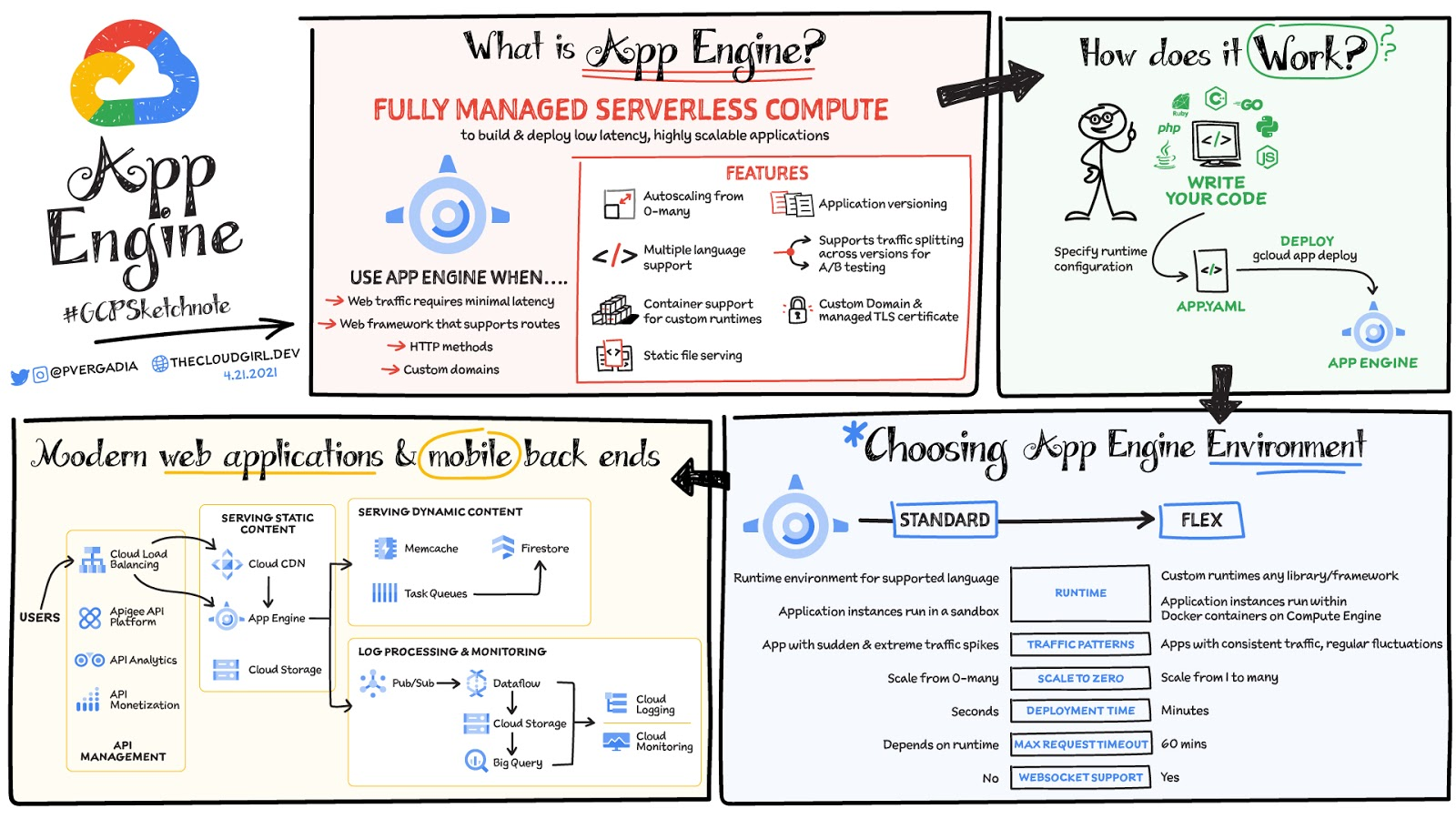
App Engine is a fully managed serverless compute option in Google Cloud that you can use to build and deploy low-latency, highly scalable applications. App Engine makes it easy to host and run your applications. It scales them from zero to planet scale without you having to manage infrastructure. App Engine is recommended for a wide variety of applications including web traffic that requires low-latency responses, web frameworks that support routes, HTTP methods, and APIs.
Environments
App Engine offers two environments; here’s how to choose one for your application:
- App Engine Standard – Supports specific runtime environments where applications run in a sandbox. It is ideal for apps with sudden and extreme traffic spikes because it can scale from zero to many requests as needed. Applications deploy in a matter of seconds. If your required runtime is supported and it’s an HTTP application, then App Engine Standard is the way to go.
- App Engine Flex – Is open and flexible and supports custom runtimes because the application instances run within Docker containers on Compute Engine. It is ideal for apps with consistent traffic and regular fluctuations because the instances scale from one to many. Along with HTTP applications it also supports applications requiring WebSockets. The max request timeout is 60 minutes.
How does it work
No matter which App Engine environment you choose, the app creation and deployment process is the same. First write your code, next specify the app.yaml file with runtime configuration, and finally deploy the app on App Engine using a single command: gcloud app deploy.
Notable features
- Developer friendly – A fully managed environment lets you focus on code while App Engine manages infrastructure.
- Fast responses – App Engine integrates seamlessly with Memorystore for Redis enabling distributed in-memory data cache for your apps.
- Powerful application diagnostics – Cloud Monitoring and Cloud Logging help monitor the health and performance of your app and Cloud Debugger and Error Reporting help diagnose and fix bugs quickly.
- Application versioning – Easily host different versions of your app, and easily create development, test, staging, and production environments.
- Traffic splitting – Route incoming requests to different app versions for A/B tests incremental feature rollouts, and similar use cases.
- Application security – Helps safeguard your application by defining access rules with App Engine firewall and leverage managed SSL/TLS certificates by default on your custom domain at no additional cost.
Conclusion
Whether you need to build a modern web application or a scalable mobile backend App Engine has you covered. For a more in-depth look, check out the documentation. Click here for demos on how to use serverless technology and free hands-on training.https://www.youtube.com/embed/Xuf3J6SKVV0?enablejsapi=1&
For more #GCPSketchnote, follow the GitHub repo. For similar cloud content follow me on Twitter @pvergadia and keep an eye out on thecloudgirl.dev.

3599
Of your peers have already downloaded this article
1:10 Minutes
The most insightful time you'll spend today!
According to the new Accelerate: State of DevOps 2018: Strategies for a New Economy report, elite DevOps performers have more frequent code deployments, faster lead times, lower change failure rates, and far quicker incident recovery times. And that’s just the beginning.
This year’s report reflects a fundamental industry change in how software and technology are viewed: What we referred to as IT performance in earlier research is now referred to as software delivery performance to differentiate this work from IT helpdesk and other support functions.
The ability to leverage this high-value performance is a key differentiator for organizations. Those that develop and deliver quickly are better able to experiment with ways to increase customer adoption and satisfaction, pivot when necessary, and keep up with compliance and regulatory demands.
This report highlights that any team in any industry, whether subject to a high degree of regulatory compliance or not—across all industry verticals—has the ability to achieve a high degree of software delivery performance. We classify teams into high, medium, and low performers and find that they exist in all organization types and industry verticals. You’ll find these classifications referenced throughout the report.
Download the report to find out what nearly 1,900 professionals said about the role of DevOps in their business, what sets top-performing DevOps teams apart, and how this gives them a competitive edge.
3489
Of your peers have already watched this video.
2:00 Minutes
The most insightful time you'll spend today!
Leveraging Intelligent Behavior Detection to Protect User Sensitive APIs
Malicious actors are out there, and APIs are their new target. External threats could be attacking your APIs as you read this, and your business might not even know it.
Attacks can come in the form of software applications that run automated tasks and they are everywhere. A growing percentage of a company’s traffic is generated by bots. In some cases, they compose as much as 50 percent of an organization’s traffic.
When these are used with malicious intent these software programs can be used to trigger dangerous attacks. It can lead to information scraping and account abuse. They can also probe for API weaknesses and skew analytics. Such attacks are adaptive and can easily blend in with normal traffic. Without a dedicated API security solution, your APIs could be breached creating serious problems for your brand reputation and customer loyalty.
This is where Apigee Sense comes in. Apigee is the only solution purpose-built for APIs. It collects, analyzes, detects and mitigates API attacks. Apigee Sense algorithms are built from analyzing metadata gathered from a billion daily API calls.
Watch this two-minute video to learn how to protect your APIs against malicious actors.
3392
Of your peers have already watched this video.
19:00 Minutes
The most insightful time you'll spend today!
Booking.com’s Apigee Hybrid on Anthos is the Largest Hybrid Deployment Ever
Apigee API Management Platform helps unlock the value of data in legacy systems and applications to accelerate end-user/customer experience by modernizing apps and building multi-cloud environments. With Apigee Hybrid on Anthos, a service mesh technology, Booking.com was able to achieve its goal of providing customers a connected trip experience. Watch the video to understand how Booking.com, a biggest brand in Booking Holdings portfolio with over 1.5 million room bookings in 24 hours moved to hybrid cloud and unified APIs to one platform offering a end-to-end customer journey for a connected trip!
Transforming the Bank of Anthos App with Spring Cloud GCP 4.0
1561
Of your peers have already read this article.
3:30 Minutes
The most insightful time you'll spend today!
We’re excited to announce that Spring Cloud GCP version 4.0 is now generally available! In this post, we’ll be describing what the new major version has to offer, and demonstrating the process of using the migration guide on one of our reference architectures, Bank of Anthos.
What’s new?
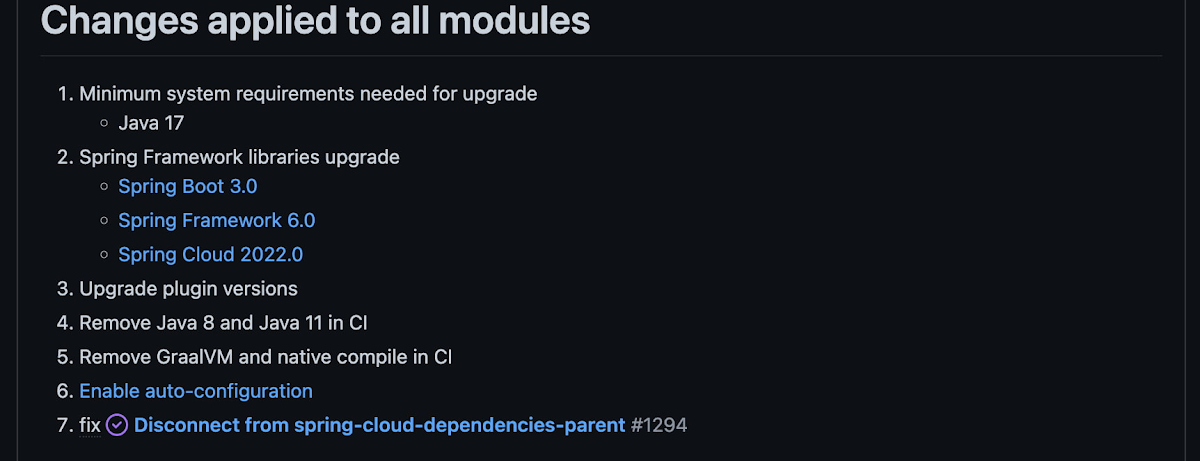
With this release, Spring Cloud GCP officially supports Spring Boot 3.x. However, this migration involves a number of breaking changes as outlined in the migration guide. The full list of changes made is available on Github, but the one of the most significant differences is that Java 17 is now a minimum requirement.
Another notable feature of this release is the addition of starter artifacts – Spring Boot starters for Google Cloud – that provide dependencies and auto-configurations for 80+ Google Client libraries. Just as the name suggests, these starters can serve as helpful starting points when working with a new client library. For now, they’re in preview.
These starters are not included in the BOM by default and need to be added as a dependency to your project before they can be used. For example, if you wanted to get started with Cloud Text-to-Speech, you would include the following:
<dependency>

    <groupId>com.google.cloud</groupId>

    <artifactId>google-cloud-texttospeech-spring-starter</artifactId>

    <version>4.0.0-preview</version>

  </dependency>
The upgrade process
We prepared a migration guide to help answer any questions involved with moving from 3.x to 4.x. Let’s follow those instructions to migrate Bank of Anthos.
We’ll start by cloning and building the application before the upgrade, according to the quickstart and development guide:
PROJECT_ID=<YOUR-PROJECT-ID>
gcloud services enable container --project ${PROJECT_ID}

git clone https://github.com/GoogleCloudPlatform/bank-of-anthos.git
cd bank-of-anthos/

gcloud services enable container.googleapis.com monitoring.googleapis.com \
  --project ${PROJECT_ID}

REGION=us-central1
gcloud container clusters create-auto bank-of-anthos \
  --project=${PROJECT_ID} --region=${REGION}

gcloud container clusters get-credentials bank-of-anthos \
  --project=${PROJECT_ID} --region=${REGION}

skaffold run --default-repo=gcr.io/${PROJECT_ID}/bank-of-anthos
With the environment set up for development, we’re ready to move on to the actual migration. The migration is already complete at time of writing, but here’s the full list of changes made:
- We began by checking the current Java, Spring Boot and Spring Cloud GCP versions.
- Our Java version is okay, but the other two are out of date, and will need to be updated.
We can also add the Spring Cloud GCP BOM to manage our versions going forward while we’re here.
- Our Java version is okay, but the other two are out of date, and will need to be updated.
- Then, in no particular order, we can make the following code changes:
- Remove the explicit type declarations from our ResponseEntity instantiations.
- Replace all javax.* imports with Jakarta.* counterparts, since Spring 3.0 makes use of Jakarta EE 9.0
With those changes in place, the app is upgraded and ready to re-deploy!
Live example
For a finished example of this migration, check out the Bank of Anthos repository on Github. It’s an excellent sample application that showcases a polyglot Java & Python app, served on Kubernetes and Google Cloud. All CI/CD and configurations are open source, so it may be instructive as you approach this migration.
Thanks for reading, and feel free to provide comments or feedback on Twitter, or in the issues section of the repository.
More Relevant Stories for Your Company

On-Demand Webinar: How APIs Help Walgreens Merge Physical and Digital Retail
APIs are how modern businesses rapidly expand into new contexts—making it possible for companies like Walgreens to transform from brick-and-mortar businesses into omnichannel organizations that serve customers in innovative ways. Headquartered in Deerfield, Illinois, Walgreens is the second-largest pharmacy store chain in the United States. It specializes in filling prescriptions,

Meet the 8 Sponsors of 2021 State of DevOps Reports
Google Cloud and the DORA research team are excited to announce our eight sponsors for the 2021 State of DevOps report. We recently launched the 2021 State of DevOps survey, a 25-min survey for the DevOps community to share how they are using DevOps to improve software delivery performance. So if you haven’t



Swarovski’s Journey towards Online and Offline Conversion with Predictive Analytics
Luxury brand and leader in crystals and glass production, Swarovski has charmed customers with its exquisite collections for over 125 years. To understand their customers better and map their online behaviors, Swarovski had to overcome prediction hurdles as majority of the purchases are not frequent or habitual. They are mostly



Indian Retailer Figures Optimizes Hyperlocal Delivery to Increase Customer Experience
Anyone who follows the Indian e-commerce scene knows that one of the largest challenges these companies face is hyperlocal delivery. That was a problem facing Wellness Forever, a retail chain of pharmacies with 150-plus stores across India. “Exactly a year ago, we started our journey of hyperlocal deliveries. This optimization
