





New research reveals who’s targeted by email attacks

4083
Of your peers have already read this article.
03:30 Minutes
The most insightful time you'll spend today!
Every day, we stop more than 100 million harmful emails from reaching Gmail users. Last year, during the peak of the pandemic crisis we saw 18 million daily malware and phishing emails related to COVID-19. This is in addition to more than 240 million COVID-related daily spam messages. Our ML models evolve to understand and filter new threats, and we continue to block more than 99.9% of spam, phishing, and malware from reaching our users.
We wanted to explore what factors influence being targeted by email phishing and malware and whether higher-risk users are adopting the strongest protections we have to offer. To do this, we teamed up with researchers at Stanford University to study over a billion phishing and malware emails and their anonymized targets. We recently presented our study at the Internet Measurement Conference (IMC), and it’s now available here.
We found that multiple factors correlate with higher risk: where you live, what devices you use, and whether your information appeared in previous third-party data breaches.
Phishing and malware evolves faster than you think
We aggregated and analyzed all of the phishing and malware campaigns that Gmail automatically blocked over a five-month period to identify patterns.
- We found that users in the United States were the most popular targets (42% of attacks), followed by the United Kingdom (10% of attacks), and Japan (5% of attacks).
- Most attackers don’t localize their efforts, using the same English email template for users in multiple countries.
- There is, however, some evidence of regional attackers: 78% of the attacks targeting users in Japan occurred in Japanese, while 66% of attacks targeting Brazilian users occurred in Portuguese.
We also noticed some patterns among attackers and botnets that distribute phishing and malware emails:
- They rely on fast-churning campaigns. A similar email based on a template is sent to 100–1,000 targets on average.
- The campaigns are brief and bursty, lasting just one to three days on average.
- In a single week, these small-scale campaigns accounted for over 100 million phishing and malware emails in aggregate, targeting Gmail users around the globe.
While the users that attackers target change from week to week, in aggregate these patterns remain largely stable over time.
Factors that correlate with heightened risk
Beyond how attackers operate phishing and malware campaigns, we also analyzed what factors put a user at higher risk of attack. In order to avoid singling out any individual user or their personal data, we used an anonymization technique called “k-anonymity” to ensure any risk trends that we identified applied to a broad group of similar users. We modeled the likelihood of receiving any phishing or malware emails in a given week as a function of geographic location, demographics, security posture, device access, and prior security incidents (such as having personal data revealed by a third-party data breach).
Here is what our model found:
- Having your email or other personal details exposed in a third-party data breach increased the odds of being targeted by phishing or malware by 5X.
- Where you live also affects risk. In Australia, users faced 2X the odds of attack compared to the United States, despite the United States being the most popular target by volume (not per capita).
- With respect to demographics, the odds of experiencing an attack was 1.64X higher for 55- to 64-year-olds, compared to 18- to 24-year-olds.
- Mobile-only users experienced lower odds of attack: 0.80X compared to multi-device users. This may stem from socioeconomic factors related to device ownership and attackers targeting wealthier groups.
These correlations help us understand that risk is not evenly spread across geographic and demographic boundaries.
How to stay safer
Gmail’s phishing and malware protections are automatically turned on by default. Here’s our top recommendations for what you can do today to stay safer.
For individual users:
- Complete a Security Checkup for personalized and actionable security advice.
- If appropriate, consider enrolling in Google’s Advanced Protection program, which provides Google’s strongest security to users at increased risk of targeted online attacks.
- Enable Enhanced Safe Browsing Protection in Google Chrome to substantially increase your defenses against dangerous websites and downloads on the web.
- Browse these additional tips to manage your online security and choose the right level of protection for yourself.
For Workspace admins:
- New research reveals who’s targeted by email attacks. Take a look at our advanced phishing and malware protection. These are turned on by default across all Google Workspace licenses, and you can further customize them according to the unique needs of your organization.
Google Workspace’s Single Connected Experience Makes Workplaces Hybrid-ready

4040
Of your peers have already read this article.
1:30 Minutes
The most insightful time you'll spend today!
Our collective understanding of work—where it takes place and how it gets done—has been transformed over the last year. As companies and organizations across the globe reimagine work, new challenges and opportunities are emerging. How do people working “somewhere else” stay connected and part of the same conversations as those in the office? And if hybrid work is the sum of all the places and ways that work happens, how do employees create a shared experience, better manage their time and attention, and build stronger connections along the way?
For well over a decade, we’ve been building the future of work with products and experiences that transform how teams of all sizes connect, create, and collaborate together—on any device, from any location. Last October, we launched Google Workspace as an integrated solution with a singular promise: everything you need to get anything done, now in one place. In March, we introduced a series of innovations to help people better manage their time and build deeper connections with each other as the future of work continues to evolve. And at Google I/O last month, we took our next big step in transforming collaboration with smart canvas, a new product experience in Google Workspace. And today, we’re delivering additional innovations that address the specific challenges and opportunities of the hybrid work world.
A dedicated space for teamwork and collaboration
Chat and video meetings have been an essential part of work during the last year, serving as a bridge for separated colleagues to collaborate in real time. As we reflect on the lessons of a year where many people were working remotely, we know that distributed teams need a new type of dedicated, shared space. A place in Google Workspace to bring projects to life by connecting the right content, people, and conversations in new and powerful ways.
With the introduction of Spaces, we’re evolving the Rooms experience in Google Chat into a dedicated place for organizing people, topics, and projects in Google Workspace. Over the summer, we’ll evolve Rooms to become Spaces and launch a streamlined and flexible user interface that helps teams and individuals stay on top of everything that’s important. Powered by new features like in-line topic threading, presence indicators, custom statuses, expressive reactions, and a collapsible view, Spaces will seamlessly integrate with files and tasks, becoming a new home in Google Workspace for getting more done—together.

Spaces can provide a place to fuel knowledge sharing and community building for teams of all sizes, where all the relevant information, conversations, and files for a project can be organized, and where topics—even at the organization level—can be intelligently moderated. With the ability to pin messages where everyone can see them, Spaces will play a crucial role in helping people stay connected and informed as hybrid work evolves.
As we transition from Rooms to Spaces in Google Chat this summer we’ll be delivering new features on a rolling basis. Customers can have their admins turn on Google Chat in Gmail so their organizations can start using Rooms today, ensuring a seamless path to Spaces when it becomes available.
Keeping everyone in the conversation during hybrid meetings
Collaboration equity—the ability to contribute equally, regardless of location, role, experience level, language, and device preference—is a cornerstone of Google Workspace. When teammates were fully remote during the last year, everyone experienced meetings in much the same way and had access to the same communication features. But what happens when some colleagues are in a conference room together while others are joining from living rooms, home offices, or a remote co-working space? How do they all participate equally in the same conversation?
At Google I/O, we previewed Companion Mode in Google Meet as a way of fostering collaboration equity in a hybrid work world. Companion Mode is designed to seamlessly connect those in the room with their remote teammates, giving everyone advanced features to participate, while leveraging the best of in-room audio and video conferencing capabilities.

Companion Mode gives every meeting participant, no matter where they are, access to interactive features and controls like screen sharing, polls, in-meeting chat, hand raise, Q&A, live captions, and more. Colleagues who are in the same meeting room together will enable Companion Mode on their personal devices, giving them their own video tile in Meet and helping them to stay connected with their remote teammates. Companion Mode will be available on the web and our upcoming progressive web app in September, and it will be coming soon to mobile.
To allow meeting organizers to better plan for hybrid meetings, invitees will soon be able to RSVP with their join location, indicating whether they’ll be joining in a meeting room or remotely.
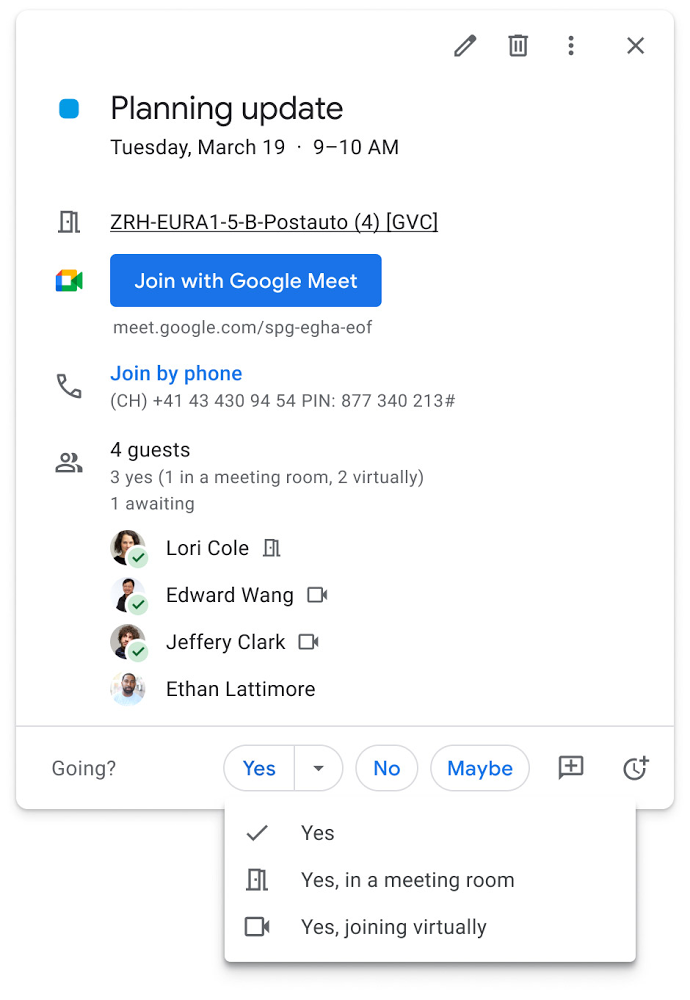
Updates to improve the in-room experience are also coming to Google Meet hardware in September, including the ability to see and use the hand-raise feature and receive notifications from polls and Q&As. The modular design of Meet’s Series One room kits can easily accommodate a variety of space layouts and be paired with an AV cart for optimum flexibility.
We’re also continually launching new controls to make meetings more safe and secure, including the ability for admins to set policies for who can join meetings, and how participants can engage within meetings. To help everyone stay focused in meetings without interruption, in the next few months we’ll introduce moderation controls for hosts, giving them the ability to prevent the use of in-meeting chat and prohibit presenting during meetings, as well as allowing them full control to mute and prevent participants from unmuting.
Together, these changes will make meetings a safer, more connected, and inclusive experience across all hybrid environments. Register today for our free webinar on how Google Workspace is enabling hybrid work and helping foster collaboration equity.
Trusted hybrid collaboration in Google Workspace
Security, data privacy, and trust continue to be the foundation that make anywhere, anytime collaboration possible. As organizations explore new ways for their teams to collaborate securely in a hybrid work world, we’re introducing several ways that we’re strengthening this foundation in Google Workspace.
Today, we’re announcing new security and privacy capabilities to help Google Workspace customers realize the full power of trusted, cloud-native collaboration. Google Workspace Client-side encryption will help customers strengthen the confidentiality of their data while addressing a range of data sovereignty and compliance needs. It will also strengthen meeting security when it comes to Google Meet this fall. Additionally, we’re rolling out a number of security enhancements for Google Drive, including trust rules for Drive that help control how files can be shared within and outside your organization; Drive labels that classify files and apply controls based on their sensitivity levels; and enhanced phishing and malware protections to help safeguard against insider threats and user error. For full details, please visit our security blog post.
A single, connected experience
As businesses move to a hybrid work environment, the importance of creating secure collaboration spaces and fostering human connection has never been more important. Because Google Workspace was designed to fuel anywhere, anytime collaboration, we’re now helping millions of organizations navigate the challenges and opportunities of the newly emerging work model. Our customers are using Google Workspace to rethink virtual meetings, provide people with modern tools to stay connected and manage their time and attention, and double down on security and privacy. In countless ways, Google Workspace was built for this moment.
See how we’re bringing Google Workspace to everyone. With this change, all of our 3 billion existing users across consumer, enterprise, and education now have access to the full Google Workspace experience, including Gmail, Chat, Calendar, Drive, Docs, Sheets, Meet and more.
Google Cloud VMware Engine Achieves HIPAA Compliance
6968
Of your peers have already read this article.
1:30 Minutes
The most insightful time you'll spend today!
We are excited to announce that as of April 1, 2021, Google Cloud VMware Engine is covered under the Google Cloud Business Associate Agreement (BAA), meaning it has achieved HIPAA compliance. Healthcare organizations can now migrate and run their HIPAA-compliant VMware workloads in a fully compatible VMware Cloud Verified stack running natively in Google Cloud with Google Cloud VMware Engine, without changes or re-architecture to tools, processes, or applications.
Healthcare organizations increasingly use cloud platforms to personalize patient care, analyze large datasets more effectively, enhance research and development collaboration, and share medical knowledge. Leveraging cloud platforms can also help healthcare organizations increase the privacy and security of information systems, including protected health information (PHI), and, as a result, better comply with applicable laws and regulations while reducing the burden of compliance. For PHI, the Health Insurance Portability and Accountability Act of 1996 (HIPAA) set standards in the United States to protect individually identifiable health information. HIPAA applies to health plans, most healthcare providers, and healthcare clearinghouses that manage PHI electronically, and to persons or entities that perform certain functions on their behalf.
With Google Cloud, organizations can leverage solutions that enable secure, continuous patient care and data-driven clinical and operational decisions with ease, while being empowered with collaboration and productivity tools. Further, Google Cloud Platform supports HIPAA compliance. We offer HIPAA-regulated customers the same products at the same pricing that is available to all customers, unlike many other cloud providers.
For healthcare organizations that leverage VMware on-premises, having a consistent, cloud-integrated platform that provides seamless access to native cloud services unlocks the opportunity to extend, migrate, and modernize healthcare IT infrastructure and applications in a fast, low-risk manner at their own pace. This is especially important for mission-critical healthcare provider workloads, where having a low-risk way to adopt the cloud is important. Google Cloud VMware Engine offers that solution. By achieving coverage under Google Cloud’s BAA, Google Cloud VMware Engine enables healthcare organizations to realize the benefits of cloud computing and stay on track with their HIPAA compliance efforts without additional complexity. This is very relevant in hybrid scenarios, where customers would like to leverage other native cloud services such as analytics and big data processing, without having to enter into multiple BAAs.
Google Cloud VMware Engine offers dedicated, isolated software-defined datacenter environments with fully redundant and dedicated 100 Gbps networking that are suitable for healthcare organizations to run applications storing and processing PHI data. Customers have the ability to encrypt their virtual storage area network (vSAN) using an external key management server. Healthcare customers can run their workloads in a native VMware environment—vSphere, vCenter, vSAN, NSX-T, and HCX—while benefiting from Google Cloud’s highly performant infrastructure to meet the needs of their workloads. Customers can connect their VMware applications to native Google Cloud services such as BigQuery and artificial intelligence (AI) to derive new insights from existing data and quickly make informed decisions.
Protecting against and mitigating the impact of ransomware attacks is top-of-mind for Healthcare organizations. This requires building a cyber resilience program and back-up strategy to prepare for how users can restore core systems or assets affected by a security (in this case, ransomware) incident. This is a critical function for supporting recovery timelines and lessening the impact of a cyber event so organizations can get back to operating their business. Google Cloud VMware Engine in combination with Google Cloud first party solutions such as Actifio Go, or partner solutions such as NetApp CVO can provide an efficient way to recover incremental point-in-time backups along with on-demand provisioning of new compute to recover both data and infrastructure from Ransomware attacks quickly and efficiently.
Healthcare customers can also use Google Cloud VMware Engine as a disaster recovery (DR) target for their on-premises VMware workloads. Healthcare organizations also need a business continuity plan for their mission critical applications. When a disaster occurs, hospitals need their data protected so they can quickly get back to treating patients. It is a HIPAA requirement that healthcare organizations must be able to recover from a natural disaster. Google Cloud VMware Engine offers a like-for-like cost-effective DR target for these customers. The DR environment can be operated without new training using the same tools as their on-premises deployment. Google Cloud VMware Engine is currently available in 12 regions across the globe including three regions in the US, which means our regional and multi-national customers can take advantage of this service for geographic diversification as well.
If you are interested in understanding more and taking advantage of Google Cloud VMware Engine, contact your Google sales team now.
For details, see HIPAA compliance on Google Cloud Platform.
Rethinking time management: Helping employees manage their time efficiently

3592
Of your peers have already read this article.
3:30 Minutes
The most insightful time you'll spend today!
As business leaders evaluate their hybrid work models, employee productivity is top of mind. They’re trying to understand how to balance organizational needs for productivity with employee needs for autonomy, flexibility, and work/life balance. In my role as Google’s Productivity Advisor, I help organizations and employees realize that being productive means working smartly and efficiently — not overworking. And one key to productivity is developing strong time management skills.
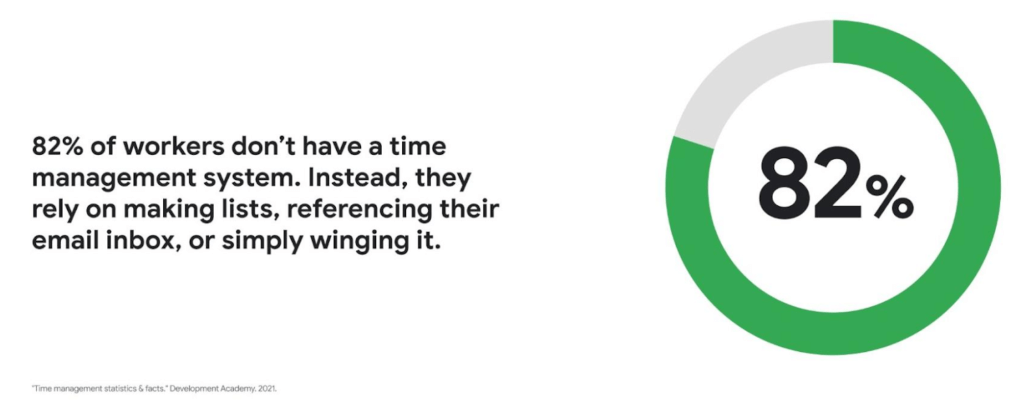
Recent research found that 82% of workers don’t have a proper time management system, however. Instead, they rely on making lists, referencing their inbox, or simply winging it. And the result is telling: 21% of people say “their work is never under control or only under control one day per week.”
Everyone works differently, and one of the best things about hybrid work is that it empowers people to work in their own way, at their own pace. However, if your employees are managing their time inefficiently over the long term, their risk of burnout increases — which can be bad news for employee wellbeing, morale and productivity.
In order for any hybrid work plan to be effective and your teams to be healthy, your employees need to build their time management muscle. You can help them do so with a three-step process:
- Understand how your employees are currently managing their time
- Encourage your employees to identify time management strengths and areas for improvement
- Empower your employees to maximize their time management practices
Step 1: Understanding your employees’ work habits
Before you can help your employees manage their time more effectively, you first need to understand how they spend it. To start, identify habits that might be preventing your employees from establishing productive workflows. For example, some employees might be working too much outside of business hours or spending the majority of their working hours in meetings.
While observation may help you glean some of this information, it’s best to go straight to the source. To find out if your employees feel they’re managing their time efficiently, simply ask them! You can distribute an anonymous questionnaire using a survey tool, like Google Forms, with questions like:
- Are you having trouble getting all your work done?
- Do you feel like you have enough independent working time?
- Do alerts and notifications interrupt or enhance your workflow?
- Which productivity and collaboration tools do you find the most and the least useful?
- How do you communicate best with your coworkers when working on- and off-site?
One major hurdle to effective time management can be too many meetings. To learn if meeting fatigue is plaguing your teams, include a survey question asking employees if they feel like they devote too much time to meetings. Help them get specific by encouraging them to use a tool like Time Insights. With this feature, employees can see exactly how much time they spend in meetings and how much focus time they schedule each week to accurately answer your survey.
Fielding an anonymous questionnaire is a great way to start your time management audit. The learnings that emerge can help you identify patterns in your workplace and among your teams — but they won’t reveal how individual employees work. For that, you’ll need to reach out to them directly.
Step 2: Identifying individual strengths to harness and areas for improvement
Once you have a general idea of how your team works, you can dig deeper into your individual employees’ time management methods and working styles. With this information, you can then help them identify the practices that work — and don’t work — for them.
Suggest to your employees that they spend a week observing their productivity patterns and time management methods. You might encourage people to look at:
- Their level of energy at different times during the day and/or on different days of the week
- The different types of work, such as strategic or administrative, they like doing and when
- How much time they spend doing work versus communicating about work
- How they feel during and after group meetings
- The amount of time they spend in deep-focus versus time spent switching among different tasks
If your organization uses digital timesheets, your employees can consult built-in, automatic time-tracking insights to see where they’re spending their time. Otherwise, you can easily create a custom time-tracking app using a no-code solution like AppSheet to help your employees measure the time they devote to their various responsibilities.
Once everyone has completed their weeklong study, set up dedicated meetings to review your employees’ observations with them individually. Armed with this new understanding, you and your employees can clarify when and how each person does their best work, identify areas for improvement, and start adjusting accordingly.
Step 3: Empowering your employees to flex their time management muscle
Now that you have clarity on how your employees spend their time, you can work with them to develop personal time management practices. To set them up for success, look for opportunities that take advantage of their strengths and offset their challenges — no matter how they like to work.
It’s important to remember there’s no one-size-fits-all solution to using time productively. Some workers love to tackle the most difficult tasks first thing in the morning; others feel more energized at the end of their day. Some people think best in conversation while others prefer to be alone with their thoughts. To help your employees develop time management practices that fit their working style, they need to feel empowered to decide how they can use their time and tools productively.
When it comes to time management, calendars are your best friend, so encourage your employees to take advantage of simple features. Google Calendar lets everyone see availability; by glancing at a shared calendar, coworkers will know when to reach out to someone (and when not to). You can also prompt your employees to block off quiet time during windows when they feel most productive, and use tools like Focus time to protect the time they need for heads-down work.
Email and chat are important, but they can also become a distraction if not used intentionally. Most people open email first thing in the morning, leave it open all day, and check it often. Instead, when you and your employees need to focus, try closing the email tab or using Gmail features to snooze and star emails to stay on task. The same approach applies to chat: check it strategically and turn off notifications when you need deep focus.
Finally, be intentional about building and maintaining trust with your teams as they develop new time management skills. If you decide to use Google Meet for regular check-ins, partner with your employees to develop meeting agendas directly inside Calendar invites to ensure your shared time will be used efficiently.
Valuing impact over output
Hybrid work offers an opportunity for business leaders to rethink their perspective on employee time management and what it means to be productive. Remember, the goal of building effective time management skills isn’t always to become more efficient so one can take on additional work. Often times, taking a step back helps us simplify how we work in order to deepen our impact. When you empower your employees to create a personal time management system, I think you’ll find they will be happier and healthier, with more to contribute to your organization.
Why APIs are De Facto Business Requirements

5546
Of your peers have already read this article.
1:30 Minutes
The most insightful time you'll spend today!
The benefits of APIs are becoming more clear in an ever-evolving tech landscape, yet ITDMs still struggle to convince executives and investors to buy into an API-first strategy. Here’s a look at the importance of APIs in a changing world, and how ITDMs can make the business case in order to secure the best API strategy for their organization.

According to Google Cloud’s new “State of the API Economy 2021” report, a majority of IT decision-makers view application programming interfaces, or APIs, as essential ingredients in improved customers experiences, expanded partner engagement, accelerated innovation, and other demands of today’s business environment. This is encouraging: APIs are how software talks to other software, and since much of digital transformation involves combining disparate data and functionality into rich user experiences and process automations, APIs are an essential ingredient in modern business strategies.
What’s less encouraging: the research surveys primarily IT professionals, not business leaders. It’s clear that IT people see the benefits of APIs in the ever-changing tech landscape, but we still hear regular concerns from these same people that they have trouble convincing executives and investors to buy into an API-first strategy. In this article, we’ll look into why they are having these difficulties and some proven ways to successfully position an API strategy not just as a technological solution, but also as a business requirement.
The importance of APIs in a changing world
The rise of APIs has been heavily influenced by the introduction of disruptive new business models and evolving customer preferences that traditional technologies are not positioned to quickly and efficiently address.
For example, traditionally, if your business sold tickets to events, it would build physical ticket booths and maybe a website or first-party mobile app. Today, tickets in many cases aren’t so much a physical thing presented to an usher as a digital code that an usher scans. Likewise, tickets are less-often purchased in person as opposed to online, and reliance on a first-party website can be unnecessarily restrictive. It places the burden on the business to attract customers, whereas surfacing organically in social media, search engine results, and other digital experiences lets the business meet customers where they’re already assembled.
Moreover, as COVID-19 continues to disrupt events throughout the world, many ticket sellers—and most organizations, for that matter—have pivoted to digital-first business interactions as a matter of necessity. All of these changes in the business model, and all of the interacting systems and functionality that underpin them, rely on communication among APIs.
Similarly, today’s banks cannot grow by simply building more branches or hiring more tellers. Instead, they need to make financial information and functionality available when and where customers require it, whether that means via an ATM, a first-party app, or within some other digital experience. Many banks also need to do more than just present this functionality, as customers are increasingly interested in the analytics and insights their spending patterns can yield. Again, all of these interactions—from customers making a purchase within an app to banks applying machine learning in order to offer customers financial insights—are enabled by APIs.
Related: The “State of API Economy 2021” report describes how digital transformation initiatives evolved throughout 2020, as well as where they’re headed in the years to come. Download for free.
When guidance meets resistance
These examples do not illustrate technology that updates the status quo, but rather technology that unlocks business opportunities that transcend the status quo—and that help businesses to thrive even as the status quo fades into irrelevance and obsolescence. APIs are thus not just an IT topic but also important business enablers that should be understood by everyone involved with the enterprise’s investments, from internal stakeholders approving business strategies to external shareholders trying to assess an organization’s trajectory.
The challenge for investor relations is to convey these financial and operational benefits in a way that clearly communicates the need for a new business model rather than refinements to the existing models. It’s essential that IT professionals understand APIs, but it’s also essential for business leaders to understand them too.
This is even trickier given that arguments for API investments are often based on future potential, while arguments for more conservative alternatives are based on past success.
At a high level, the API value proposition is clear: In the past, valuable functionality and data have been encased in systems and applications, making them difficult to scale or leverage for new, evolving use cases. In contrast, APIs make functionality and data infinitely reusable, infinitely scalable, and modular such that APIs can easily be combined for new uses. All of this accrues to richer user experiences and more flexibility than ever for companies to monetize their digital assets, share them with partners, or combine them with assets from third parties.
It’s essential that IT professionals understand APIs, but it’s also essential for business leaders to understand them too.
But investors typically want as much information as possible because their decisions can affect not just productivity and output, but company stock prices and potential future growth. High-level arguments may not be persuasive. The deeper assurances investors crave would normally come from guidance.
Guidance in this context refers to insights based on growth forecasts and customer adoption, but this can be difficult early in market entry. Robust forecasting processes need to be developed to demonstrate the efficacy and value of the API economy, which can be hard to predict: whereas APIs are well understood in some sectors, and especially among digital natives, they are in the early stages of the growth rate in other verticals, making it challenging to forecast developer adoption of a given API. And since there is a shortage of information, trying to use traditional guidance comes with a risk of being wrong and thus of little value to investors.
Related: Set your 2021 API resolutions with these top 2020 posts.
How to deliver a more useful value proposition
While guidance may be premature during the early stages of market entry, investor relations teams still need to convey the full value of an enterprise to investors. To do this, they need a value proposition that emphasizes the intrinsic value of the investment while reinforcing the benefits that can best drive business and stock growth. Considering how large an investment of time, effort, and money transitioning to an API economy can be, it is vital to convey that the benefits are substantial.
A solid value proposition should demonstrate maximum returns, and while this shouldn’t include far-fetched or unobtainable claims, it can include reasonable aspirational visions alongside statistical insights. To craft these aspirational narratives, investor relations teams should look to their organization’s existing business needs and challenges, and then demonstrate how APIs can benefit the organization in these areas. Here are some options that speak to a number of common business requirements:
- Sales channel: API investments are reusable, improve speed to market, enable automated processes and partner onboarding, and can uncover unanticipated opportunities.
- Cost: Businesses can reduce operational costs by using and reusing APIs for innovation and business development, and by using the services native to your partner’s digital surface, you can further reduce innovation costs and risks.
- Earnings: API-enabled digital ecosystems unlock a variety of partner services that leverage the business’s shared data to drive new customer acquisition, new market positions, new transaction volumes, and direct API monetization.
- Risk mitigation: By investing in a credible API, businesses can mitigate downside risks that traditional enterprises can face from market disruptors, industry-wide shifts to digital tools, and inabilities to ingest and analyze growing data sources.
- Intellectual property: Unlike project-driven innovation and customized, point-to-point integration that traps enterprise knowledge in small teams and divisional silos, APIs are reusable and modular, breaking down silos and encouraging intra-organizational collaboration.
- Speed to market: The efficient, repeatable API interface informs improvements to the fulfillment process with consistent access to data from across the organization, which drives solutions that more quickly and efficiently meet customer needs.
- Ethics: APIs offer the flexibility and economical advantages that give organizations the capacity to focus on their brand’s ethical “reason for being” beyond profitability by serving economically marginal and underserved market segments.
- Customer credibility: Organizations can deliver the extended, connected digital experiences that customers expect with the tools and flexibility included with API products.
- Employee retention: Businesses can avoid losing key employees by updating their legacy technologies with APIs, giving employees the opportunity to enhance their skills with modern technologies.
- Corporate strategy: Enterprises that use APIs’ reusable, modular structure and tools are more capable of adapting to rapid structural shifts in customer demand patterns and sectoral changes in the economy.
Whichever of these business challenges a team speaks to, it is imperative that they demonstrate the benefits of APIs, and that once they’ve determined the angle they intend to use, they keep their message consistent. While we’ve seen a number of viable ways to position APIs as a winning strategy, switching among them could make the presentation—and APIs in general—seem insubstantial and unreliable.
This is why it’s key to decide on the most relevant business concerns, and once you’ve tailored your presentation, to make sure that you have message alignment, including buy-in and support from C-level executives. With a strong pitch built around solving existing business concerns and solidarity from relevant stakeholders, you can go into your investor meeting with the confidence to secure the best API strategy for your organization.
Strengthen your pitch with additional insights. Here are five key trends in 2021 for API-first digital transformation.
About the Author: Paul Rohan is a researcher on Open Banking and a Google Cloud solutions consultant. Paul works with banking C-Suites that are examining the impact of the Platform Economy and Digital Ecosystems on financial services industry growth, market structures and governance. Paul is the author of “PSD2 in Plain English” and “Open Banking Strategy Formation”.
Why settle for the status quo?

3970
Of your peers have already read this article.
2:30 Minutes
The most insightful time you'll spend today!
Virtual meetings, remote collaboration, flexible hours: it’s becoming clear that these new ways of working are here to stay.
Business leaders, since the onset of COVID-19, have seen workplace transformation go from an almost theoretical long-term goal to an urgent priority. Employers and employees want more flexible ways of working, and delivering on this requires the right technology.
But flexibility isn’t the only thing that employees want. Remote working has significantly increased the demands we’re getting from many directions—in both our professional and our personal lives. Employees feel overloaded with too much information and too many tasks across too many different tools. Instead of learning another tool, we need the tools we already use to be even more helpful, and work together, in an integrated, intuitive way.
Today’s teams need to re-imagine not only how they communicate and collaborate with each other remotely, but also how they continue to serve their own customers and support the communities they belong to. From doctors consulting with patients, to financial institutions providing critical advice to customers, to teachers delivering distant learning, to car dealerships creating virtual showrooms—it’s clear that these new ways of working are here to stay.
The future of work is here. COVID-19 has accelerated a shift in how organizations like yours get work done. Take this 2-minute assessment below to see where you’re at on the journey to the future of work, and get a free guide to help you take the next step.
More Relevant Stories for Your Company
Center for Internet Security’s Latest Benchmark for Securing Chrome
As the way people work continues to evolve, keeping security policies in place that protect organizations but give workers the ability to get things done is more important than ever. IT and security teams must aim to stay a step ahead of web-based security threats that come their organization’s way.




The Amazing Tech Behind This Animal Rescue Center Helps Save Costs and Rescue More Animals
The Royal Society for the Prevention of Cruelty to Animals (RSPCA) is the UK’s largest animal welfare charity. Each year, it finds new homes for more than 50,000 animals in need. Streamlining the charity’s IT systems is the job of Billie Laidlaw, Assistant Director IT Resources. “Every pound we save



How Intuit Solved a Long-standing Dilemma: Frictionless, But Secure, Collaboration
If there’s one thing that the folks at Intuit hold dear, it’s the ability to stay agile. “Intuit is a 35-year-old start-up. We’re about 9,000 people in eight countries around the world,” is how Atticus Tysen, SVP and CIO, Intuit, describes the company. Founded in 1983, Intuit is a financial

Download the Forrester Study to Explore the Benefits of AI for IT Operations in Cloud Environment
Organizations are currently modernizing their businesses in order to meet the increasing complexity of today’s business landscape. In effect, business leaders must evaluate the best way to mitigate the challenges which plague their cloud operations, all while meeting customers’ growing expectations around digital experience (DX) through agility, automation, and proactive
