





Minimum Instances for Cloud Functions to Keep Performances Going for Serverless Apps
3372
Of your peers have already read this article.
2:00 Minutes
The most insightful time you'll spend today!
Cloud Functions, Google Cloud’s Function as a Service (FaaS) offering, is a lightweight compute platform for creating single-purpose, standalone functions that respond to events, without needing an administrator to manage a server or runtime environment.
Over the past year we have shipped many new important capabilities on Cloud Functions: new runtimes (Java, .NET, Ruby, PHP), new regions (now up to 22), an enhanced user and developer experience, fine-grained security, and cost and scaling controls. But as we continue to expand the capabilities of Cloud Functions, the number-one friction point of FaaS is the “startup tax,” a.k.a. cold starts: if your function has been scaled down to zero, it can take a few seconds for it to initialize and start serving requests.
Today, we’re excited to announce minimum (“min”) instances for Cloud Functions. By specifying a minimum number of instances of your application to keep online during periods of low demand, this new feature can dramatically improve performance for your serverless applications and workflows, minimizing your cold starts.
Min instances in action
Let’s take a deeper look at min instances with a popular, real-world use case: recording, transforming and serving a podcast. When you record a podcast, you need to get the audio in the right format (mp3, wav), and then make the podcast accessible so that users can easily access, download and listen to it. It’s also important to make your podcast accessible to the widest audience possible including those with trouble hearing and those who would prefer to read the transcript of the podcast.
In this post, we show a demo application that takes a recorded podcast, transcribes the audio, stores the text in Cloud Storage, and then emails an end user with a link to the transcribed file, both with and without min instances.
Approach 1: Building the application with Cloud Functions and Cloud Workflows
In this approach, we use Cloud Functions and Google Cloud Workflows to chain together three individual cloud functions. The first function (transcribe) transcribes the podcast, the second function (store-transcription) consumes the result of the first function in the workflow and stores it in Cloud Storage, and the third function (send-email) is triggered by Cloud Storage when the transcribed result is stored and sends an email to the user to inform them that the workflow is complete.

Cloud Workflows executes the functions in the right order and can be extended to add additional steps in the workflow in the future. While the architecture in this approach is simple, extensible and easy to understand, the cold start problem remains, impacting end-to-end latency.
Approach 2: Building the application with Cloud Functions, Cloud Workflows and min instances
In this approach, we follow all the same steps as in Approach 1, with a slightly modified configuration that enables a set of min instances for each of the functions in the given workflow.

This approach presents the best of both worlds. It has the simplicity and elegance of wiring up the application architecture using Cloud Workflows and Cloud Functions. Further, each of the functions in this architecture leverages a set of min instances to mitigate the cold-start problem and time to transcribe the podcast.
Comparison of cold start performance
Now consider executing the Podcast transcription workflow using Approach 1, where no min instances are set on the functions that make up the app. Here is an instance of this run with a snapshot of the log entries. The start and end timestamps are highlighted to show the execution of the run. You can see here that the total runtime in Approach 1 took 17 s.
Approach 1: Execution Time (without Min Instances)

Now consider executing the podcast transformation workflow using Approach 2, where min instances are set on the functions. Here is an instance of this run with a snapshot of the log entries. The start and end timestamps are highlighted to show the execution of the run, for a total of 6 s.
Approach 2: Execution Time (with Min Instances)
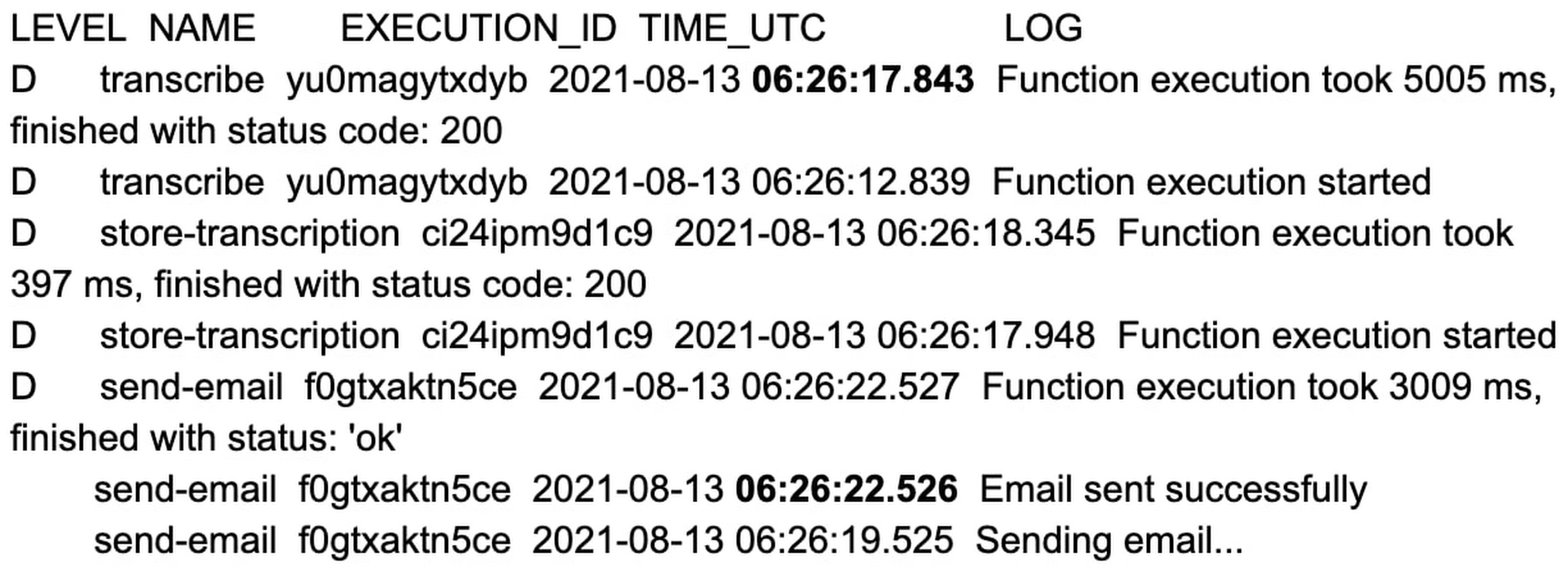
That’s an 11 second difference between the two approaches. The example set of functions are hardcoded with a 2 to 3 second sleep during function initialization, and when combined with average platform cold-start times, you can clearly see the cost of not using min instances.
You can reproduce the above experiment in your own environment using the tutorial here.
Check out min instances on Cloud Functions
We are super excited to ship min instances on Cloud Functions, which will allow you to run more latency-sensitive applications such as podcast transcription workflows in the serverless model. You can also learn more about Cloud Functions and Cloud Workflows in the following Quickstarts: Cloud Functions, Cloud Workflows.
4947
Of your peers have already watched this video.
21:10 Minutes
The most insightful time you'll spend today!
Learn Modern App Development Practices to Ship Software Faster
Cloud-native, Kubernetes, Serverless have been the hottest and most widely discussed topics given the velocity and agility benefits.
Learn more about how you can leverage these modern app development practices to ship software faster, while reducing costs and improving security and compliance.
Learn how Google Cloud lets you modernize existing applications at your own pace using these technologies. Regardless of where you are in your app modernization journey, watch this video to learn how to improve the developer experience and deliver software faster.

3995
Of your peers have already downloaded this article
2:00 Minutes
The most insightful time you'll spend today!
Digital is disrupting every industry. From drugstore chains to banks to telcos, businesses are becoming software companies and adopting modern software practices. Why? If they don’t adapt to a new market reality, they will fail.
As the business context is changing so is the technology stack. Enterprise application architectures are evolving from integration-centric enterprise service bus (ESB) architectures to application-centric, microservices, platform-as-a-service (PaaS), multi-cloud, and API-driven architectures.
APIs are the lynchpin to the success of these digital businesses. All applications use APIs to access application services and data through APIs. These services can be microservices or cloud workloads or legacy SOAP services or IoT. To ensure that applications and developers can effectively use these services to build partner, consumer, and internal apps, companies need to deliver secure, scalable, easy-to-use modern APIs.
Over the last few years, we’ve participated in hundreds of enterprises’ API-led digital transformation initiatives. This guide distills our learnings from these customer engagements and shares best practices about managing APIs across the lifecycle.
Gartner found that 77% of app development supporting digital business will occur in-house. Seventy percent of organizations claim to be either using or investigating microservices, and nearly one-third currently use them in production, according to a report from NGINX.
Download the E-book to gain deeper insights into efficient API management.
Accelerate Developer Productivity with Google Workspace

5773
Of your peers have already read this article.
3:30 Minutes
The most insightful time you'll spend today!
The software development process requires complex, cross-functional collaboration while continuously improving products and services. Our customers who build software say that they value Google Workspace for its ability to drive innovation and collaboration throughout the entire software development life cycle. Developers can hold standups and scrums in Google Chat, Meet, and Spaces, create and collaborate on requirements documentation in Google Docs and Sheets, build team presentations in Google Slides, and manage their focus time and availability with Google Calendar.
Development teams also use many other tools to get work done, like tracking issues and tasks in Atlassian’s Jira, managing workloads with Asana, and incident management in PagerDuty. One of the benefits of Google Workspace is that it’s an open platform tailored to improve the performance of your tools by seamlessly integrating them together. We’re constantly expanding our ecosystem and improving Google Workspace, giving you the power to push your software development even further.
Make software development more agile
Google Workspace gives you real-time visibility into project progress and decisions to help you ship quality code fast and stay connected with your stakeholders, all without switching tools and tabs. By leveraging applications from our partners, you can pull valuable information out of silos, making collaborating on requirements, code reviews, bug triage, deployment updates, and monitoring operations easy for the whole team. This allows your teams to stay focused on their priorities while keeping everyone aligned, ensuring collaborators are always in the loop.
Plan and execute together
When combined with integrations, Google Workspace makes the software development planning process more collaborative and efficient. For example, many organizations use Asana—a leading work management platform—to coordinate and manage everything from daily tasks to cross-functional strategic initiatives. To make the experience more seamless, Asana built integrations so users can always have access to their tasks and projects with Google Drive, Gmail, and Chat. With these integrations for Google Workspace, you can turn your conversations into action and create new tasks in Asana—all without leaving Google Workspace.
“We’ve seen exceptional, heavy adoption of tasks being created from within the Gmail add-on. Our customers and community have also shown very strong interest in future development work, which is something we’ll continue to prioritize.” Strand Sylvester, Product Manager, Asana
To date, users have installed the Asana for Gmail add-on over 2.5 million times, as well as over 3.8 million installs of the Asana for Google Workspace add-on for Google Drive.

Start coding quickly
Google Workspace makes it easy for product managers, UX designers, and engineers to agree on what they’re building and why. By bringing all stakeholders, decisions, and requirements into one place—whether it’s a Gmail or Google Chat conversation, or a document in Google Docs, Sheets, or Slides—Google Workspace removes friction, helping your teams finalize product specifications and get started right away.
Integrations like GitHub for Google Chat make the entire development process fit easily into a developer’s workflow. With this integration, teams can quickly push new commits, make pull requests, do code reviews, and provide real-time feedback that improves the quality of their code—all from Google Chat.

Speed up testing
Integrations like Jira for Google Chat accelerate the entire QA process in the development workflow. The app acts as a team member in the conversation, sending new issues and contextual updates as they are reported to improve the quality of your code and keep everyone informed on your Jira projects.

Ship code faster
Developers use Jenkins—a popular open-source continuous integration and continuous delivery tool—to build and test products continuously. Along with other cloud-native tools, Jenkins supports strong DevOps practices by letting you continuously integrate changes into the software build.
With Jenkins for Google Chat, development and operations teams can connect into their Jenkins pipeline and stay up to date by receiving software build notifications directly in Google Chat.

Proactively monitor your services
Improving the customer experience requires capturing and monitoring data sources to improve application and infrastructure observability. Google Workspace supports DevOps teams and organizations by helping stakeholders collaborate and troubleshoot more effectively. When you integrate Datadog with Google Chat, monitoring data becomes part of your team’s discussion, and you can efficiently collaborate to resolve issues as soon as they arise.
The integration makes it easy to start a discussion with all the relevant teams by sharing a snapshot of a graph in any of your Chat spaces. When an alert notification is triggered, it allows you to notify each Chat space independently, precisely targeting your communication to the right teams.

Improve service reliability
Orchestrating business-wide responses to interruptions is a cross-functional effort. When revenue and brand reputation depends on customer satisfaction, it’s important to proactively manage service-impacting events. Google Workspace supports response teams by ensuring that urgent alerts reach the right people by providing teams with a central space to discover incidents, find the root cause, and resolve them quickly.
PagerDuty for Google Chat empowers developers, DevOps, IT operations, and business leaders to prevent and resolve business-impacting incidents for an exceptional customer experience—all from Google Chat. See and share details with link previews, and perform actions by creating or updating incidents. By keeping all conversations in a central space, new responders can get up to speed and solve issues faster without interrupting others.

Accelerate developer productivity
Integrating your DevOps tools with Google Workspace allows your development teams to centralize their work, stay focused on what’s important—like managing their work—build code quickly, ship quality products, and communicate better during service impacting incidents. For more apps and solutions that help centralize your work so you and your teams can connect, create, and get things done, check out Google Workspace Marketplace, where you’ll find more than 5,300 public applications that integrate directly into Google Workspace.
Speeding Up App Modernization with Apigee and Anthos

3437
Of your peers have already read this article.
1:30 Minutes
The most insightful time you'll spend today!
If you build apps and services that your customers consume, two things are certain:
- You’re exposing APIs in some form or the other.
- Your apps are made by multiple functions working together to deliver products and services.
As you scale up and grow, your enterprise architecture can benefit from a sound strategy for both API management and service management, both of which impact your customer and developer experience. In this article, we’ll explore how these two technologies fit into your application modernization strategy, including how we’re seeing our customers use Anthos Service Mesh and Apigee API Management together.
How APIs, microservices, and a service mesh are related
APIs accelerate your modernization journey by unlocking and allowing legacy data and applications to be consumed by new cloud services. As a result, organizations can launch new mobile, web, and voice experiences for customers.
The API layer acts as a buffer between legacy services and front-end systems and keeps the front-end systems up and running by routing requests as the legacy services are migrated or transformed into modern architectures. In addition, an API management platform, like Apigee, manages the lifecycle of those APIs with design, publish, analyze, and governance capabilities.
Once microservices architectures become prevalent in an organization, technical complexity increases and organizations find a need for deeper and more granular visibility into their applications and services. This is where a service mesh comes into play.
A service mesh is not only an architecture that empowers managed, observable, and secure communication across an organization’s services, but also the tool that enables it. Anthos Service Mesh lets organizations build platform-scale microservices with requirements around standardized security, policies, and controls, and it provides teams with in-depth telemetry, consistent monitoring, and policies for properly setting and adhering to SLOs.
How API management and a service mesh compliment one another
Many organizations ask themselves, “Do I really need both an API management platform and a service mesh? How do I manage them together?”
The answer to the first question is yes. These two technologies focus on different aspects of the technology stack and are complementary to each other. A service mesh modernizes your application networking stack by standardizing how you deal with network security, observability, and traffic management. An API management layer focuses on managing the lifecycle of APIs, including publishing, governance, and usage analytics.
Most organizations draw a logical boundary at business units or technology groups. Sharing these microservices outside that boundary with other business units or with partners is where Apigee plays a significant role. You can drive and manage the consumption of those services through developer portals, monitoring API usage, providing authentication, and more, with Apigee.
Google Cloud offers Anthos Service Mesh for service management and Apigee for API management. These two products work together to provide IT teams with a seamless experience throughout the application modernization journey. The Apigee Adapter for Envoy enables organizations that use Anthos Service Mesh to reap the benefits of Apigee by enforcing API management policies within a service mesh.
Accelerate your application modernization journey
Though the journey to application modernization doesn’t always follow a clear-cut path, by adopting API management and a service mesh as part of a modernization journey, your organization can be better equipped to rapidly respond to changing markets securely and at scale.
Wherever you are on your application modernization journey, Google Cloud can help. To learn more about how service management and API management can be part of your application modernization journey, read this whitepaper.
Google Cloud Celebrates Journey of 3 Inspiring Founders for the Asian Pacific American Heritage Month

8155
Of your peers have already read this article.
1:30 Minutes
The most insightful time you'll spend today!
May is Asian Pacific American Heritage Month —a time for us to come together to celebrate and remember the important people and history of Asian and Pacific Island heritage. This feature highlights three AAPI founders from the Google For Startups community.
Read on to learn how these three founders built their businesses, leverage Google tech, and suggestion they have for aspiring entrepreneurs.
CultivatePeople
Founder: Lola Han
Description: CultivatePeople’s compensation software, Kamsa, provides global market pay rate data and helps companies make data-driven salary decisions so they can attract and retain their most valuable asset: employees.
Why GCP: “CultivatePeople began using GCP when integrating SSO/SAML authentication after our SaaS product became a high priority. We were able to exceed our clients’ expectations and increase their level of trust in our platform’s capabilities. We’re currently investigating additional machine learning products, such as Cloud AutoML, that will allow us to quickly deliver exciting features.”
Note from the Founder: “I grew up with immigrant parents who value stability and are risk-averse. My parents discouraged me from starting my own company because they didn’t want to see me struggle financially or see my health suffer (due to stress). I felt strongly about what CultivatePeople could do, so I started the company as a sole founder in 2017 and watched it double in size year over year since. While the ones I love most may not have cheered me on initially, it was important for me to hang on to the encouraging words of former bosses, executives, and founders to keep me focused on my mission.
My advice for other AAPI founders is to be a “silent assassin” and believe in the mission and values of your organization. Always remember to stop along the way and:
1) Enjoy the journey by celebrating wins and giving yourself credit;
2) Follow your intuition—it’s (almost) always right;
3) Recognize and invest in your people regularly (ie. give increases more than once a year, if warranted);
4) Give regular words of affirmation to employees on even small achievements.”
Swit
Founder: Josh Lee and Max Lim
Description: Swit is a team collaboration platform that seamlessly combines team chat with task management by allowing teams to turn their conversations into trackable tasks and share tasks to chat with simple drag-and-drop functionality, ensuring everyone is on the same page and projects get done faster.
Why GCP: “Swit is a cross-category hybrid work tool for chat and tasks. This functionality requires more complicated and heavier architecture for performance. So, configuring and managing virtual machines was really challenging to scale up our systems, while handling occasional unexpected traffic surges and frequent updates. Eventually we divided our monolithic architecture into 35 microservices when we launched our official product. The migration to GKE took around one month, and it turned out to be well worth the effort—our systems became able to offer high scalability and enough resilience to keep its uptime no matter what happened. Now we’re operating 84 workloads and 252 microservices with high stability with remarkably low downtime – less than 0.00001%/year.”
Note from the Founder: “As an AAPI founder based in Silicon Valley, I feel proud of the work ethics and diligence fellow Korean American entrepreneurs and professionals have long demonstrated here. Especially with K-pop breaking into the mainstream, I feel even more proud of our culture that strives toward an absolute perfection molded through years of training and dedication. The mission-driven culture of Silicon Valley coupled with Google’s edging technology and creativity really helped us build a product that not only encompasses verticals but also transcends cultures. Swit is growing at an unprecedented rate, and we hope to join the long list of successful AAPI entrepreneurs here. Swit’s close network with the AAPI community wouldn’t have been possible without Google support. We are grateful for this collaborative environment, and we hope to become the next-generation ambassador for collaboration after Google.”
Check out more from Swit in their founder story.

WISY
Founder: Min Chen
Description: Wisy develops technology to bring digital efficiency into the physical world, supporting consumer products businesses and making them thrive in the new economy. All of us have a bad experience when we can’t find the product we want to buy. That is a $1.9T problem in the consumer-packaged goods industry that Wisy is solving with AI and analytics to help manufacturers and retailers sell more by reducing out-of-stocks and waste at a global scale.
Why GCP: “GCP has an intuitive, easy to use interface, was lower cost, and offered preemptible instances with flexible compute options. Some of the reasons why Wisy decided to use GCP include instance and payment configurability, privacy and traffic security, cost-efficiency, and Machine Learning.
Wisy has been able to advance quickly with product development, as well as collaborate better and iterate faster in the creation of our AI models, while reducing costs by 40%. At Wisy, we are solving a problem that affects everyone who shops at a store.“
Note from the Founder: “Two years ago, I moved to San Francisco to expand my second startup, Wisy. This is when I learned that my name ‘Min’ stands for ‘minority.’ I was born in China, raised in a Black community in Panama, received scholarships to attend both Carnegie Mellon and UC Berkeley. I worked for 20 years in several countries, but I have never felt so discriminated against due to my race, ethnicity, gender and age than during my time in Silicon Valley. However, this is also the place I learned that my diverse life experience is my competitive advantage. My background enables me to recruit and relate to people in different countries, create scalable and flexible products for multinational customers, and run global operations efficiently.
My recommendation to AAPI founders is to find strength in their multicultural background. Don’t hide what makes you unique, do not limit yourselves, and do not let others limit you. You will lose your edge when trading authenticity for validation. Be proud and own your story.”
If you want to learn more about how Google Cloud can help your startup, visit our Startup Program application page here and sign up for our monthly startup newsletter to get a peek at our community activities, digital events, special offers, and more.To learn more about how you can help #StopAsianHate during Asian Pacific American Heritage Month and beyond, visit their website here.
More Relevant Stories for Your Company

Budget-Friendly Log Management: Four Steps to Cost Optimization in Google Cloud
As part of our ongoing series on cost management for observability data in Google Cloud, we’re going to share four steps for getting the most out of your logs while on a budget. While we’ll focus on optimizing your costs within Google Cloud, we’ve found that this works with customers

New Visual Interface for Google Cloud’s Speech-to-Text API Makes API Easy to Use !
At Google Cloud, we’re committed to making artificial intelligence (AI) accessible to everyone and easier to harness for new use cases. That’s why we’re excited to announce the general availability of our intuitive, new visual user interface for Google Cloud’s Speech-to-Text (STT) API, right in Google Cloud Console, which makes the API

Building a Bank with Kubernetes: How Monzo is Creating the Best Banking App Ever
Based in London, Monzo is a bank that lives on the smartphone and is built for the way modern customers live today. By solving their problems, treating them fairly and being totally transparent, Monzo believes it can transform the way people bank. “We are building a full retail bank. What

A Year of Connecting Brand and Consumers with Google’s Business Messages
Last June, in the early months of the pandemic, we expanded Business Messages to support all kinds of businesses, from pharmacies and grocery stores to airlines and luxury brands. Then, in December, we announced the ability for small businesses to use the Google Maps app to message with their customers. We knew people would
