





Budget-Friendly Log Management: Four Steps to Cost Optimization in Google Cloud

1212
Of your peers have already read this article.
4:30 Minutes
The most insightful time you'll spend today!
As part of our ongoing series on cost management for observability data in Google Cloud, we’re going to share four steps for getting the most out of your logs while on a budget. While we’ll focus on optimizing your costs within Google Cloud, we’ve found that this works with customers with infrastructure and logs on prem and in other clouds as well.
Step 1: Analyze your current spending on logging tools
To get started, create an itemized list of what volume of data is going where and what it costs. We’ll start with the billing report and the obvious line items including those under Operations Tools/Cloud Logging:
- Log Volume – the cost to write log data to disk once (see our previous blog post for an explanation)
- Log Storage Volume – the cost to retain logs for more than 30 days
If you’re using tools outside Cloud Logging, you’ll also need to include any costs related to these solutions. Here’s a list to get you started:
- Log vendor and hardware costs — what are you paying to observability vendors? If you’re running your own logging solution, you’ll want to include the cost of compute and disk.
- If you export logs within Google Cloud, include Cloud Storage and BigQuery costs
- Processing costs — consider the costs for Kafka, Pub/Sub or Dataflow to process logs. Network egress charges may apply if you’re moving logs outside Google Cloud.
- Engineering resources dedicated to managing your logging tools across your enterprise often are significant too!
Step 2: Eliminate waste — don’t pay for logs you don’t need
While not all costs scale directly with volume, optimizing your log volume is often the best way to reduce spend. Even if you are using a vendor with a contract that locks you into a fixed price for a period of time, you may still have costs in your pipeline that can be reduced by avoiding wasteful logs such as Kafka, Pub/Sub or Dataflow costs.
Finding chatty logs in Google Cloud
The easiest way to understand which sources are generating the highest volume of logs within Google Cloud is to start with our pre-built dashboards in Cloud Monitoring. To access the available dashboards:
- Go to Monitoring -> Dashboards
- Select “Sample Library” -> “Logging”
This blog post has some specific recommendations for optimizing logs for GKE and GCE using prebuilt dashboards.
As a second option, you can use Metrics Explorer and system metrics to analyze the volume of logs. For example, type “log bytes ingested” into the filter. This specific metric corresponds to the Cloud Logging “Log Volume” charge. There are many ways to filter this data. To get a big picture, we often start with grouping by both “resource_type” and “project_id”.
To narrow down the resource type in a particular project, add a “project_id” filter. Select “sum” under the Advanced Options -> Click on Aligner and select “sum”. Sort by volume to see the resources with the highest log volume.
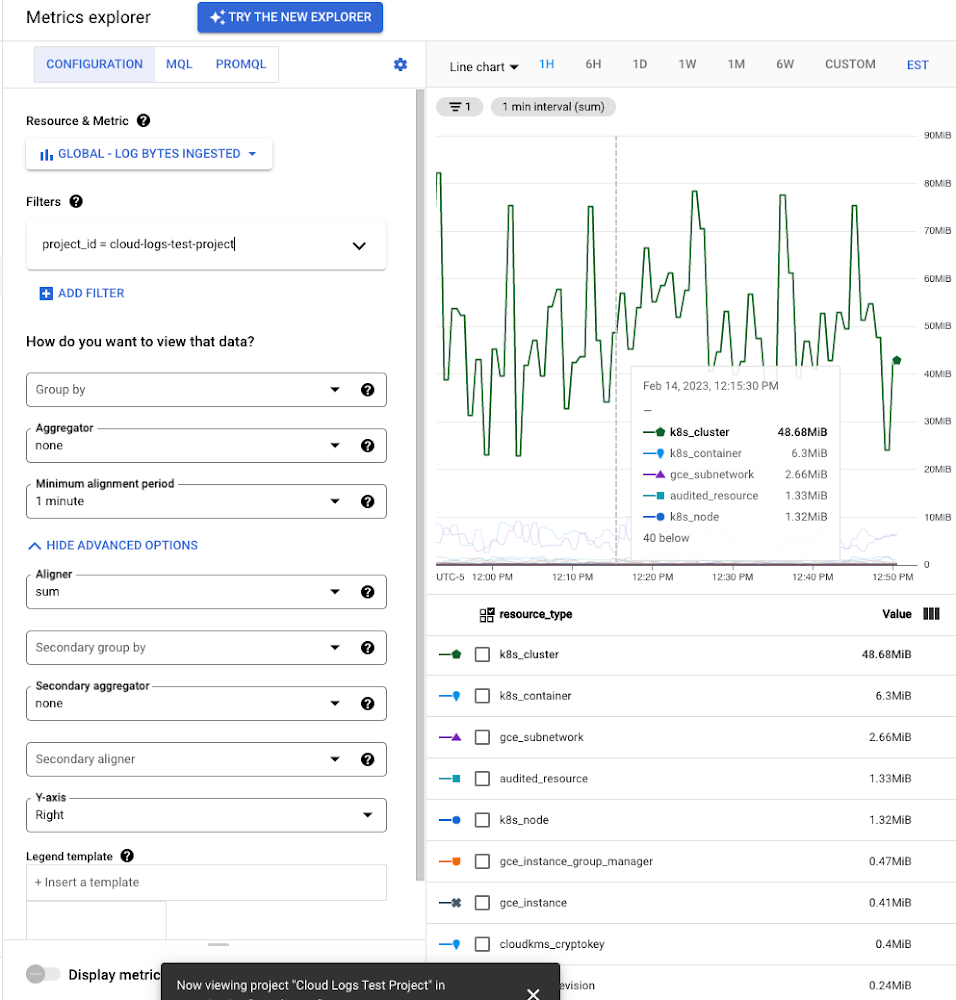
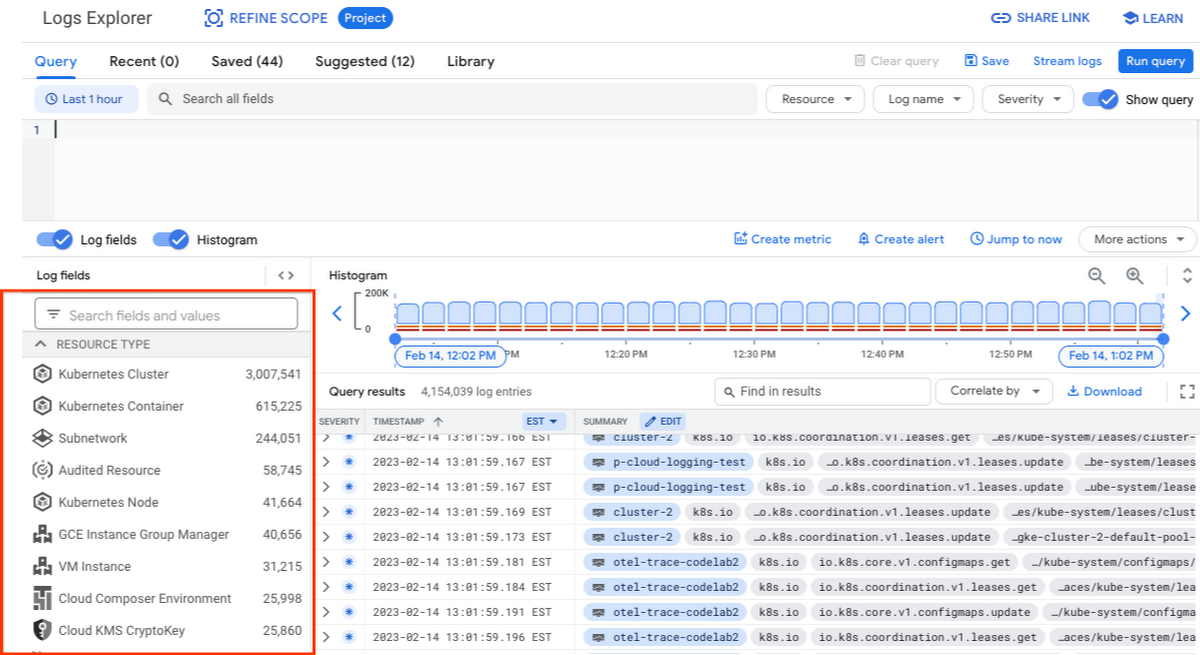
While these rich metrics are great for understanding volumes, you’ll probably want to eventually look at the logs to see whether they’re critical to your observability strategy. In Logs Explorer, the log fields on the left side help you understand volumes and filter logs from a resource type.
Reducing log volume with the Logs Router
Now that we understand what types of logs are expensive, we can use the Log Router and our sink definitions to reduce these volumes. Your strategy will depend on your observability goals, but here are some general tools we’ve found to work well.
The most obvious way to reduce your log volume is not to send the same logs to multiple storage destinations. One common example of this is when a central security team uses an aggregated log sink to centralize their audit logs but individual projects still ingest these logs. Instead, use exclusion filters on the _Default log sink and any other log sinks in each project to avoid these logs. Exclusion filters also work on log sinks to BigQuery, Pub/Sub, or Cloud Storage.
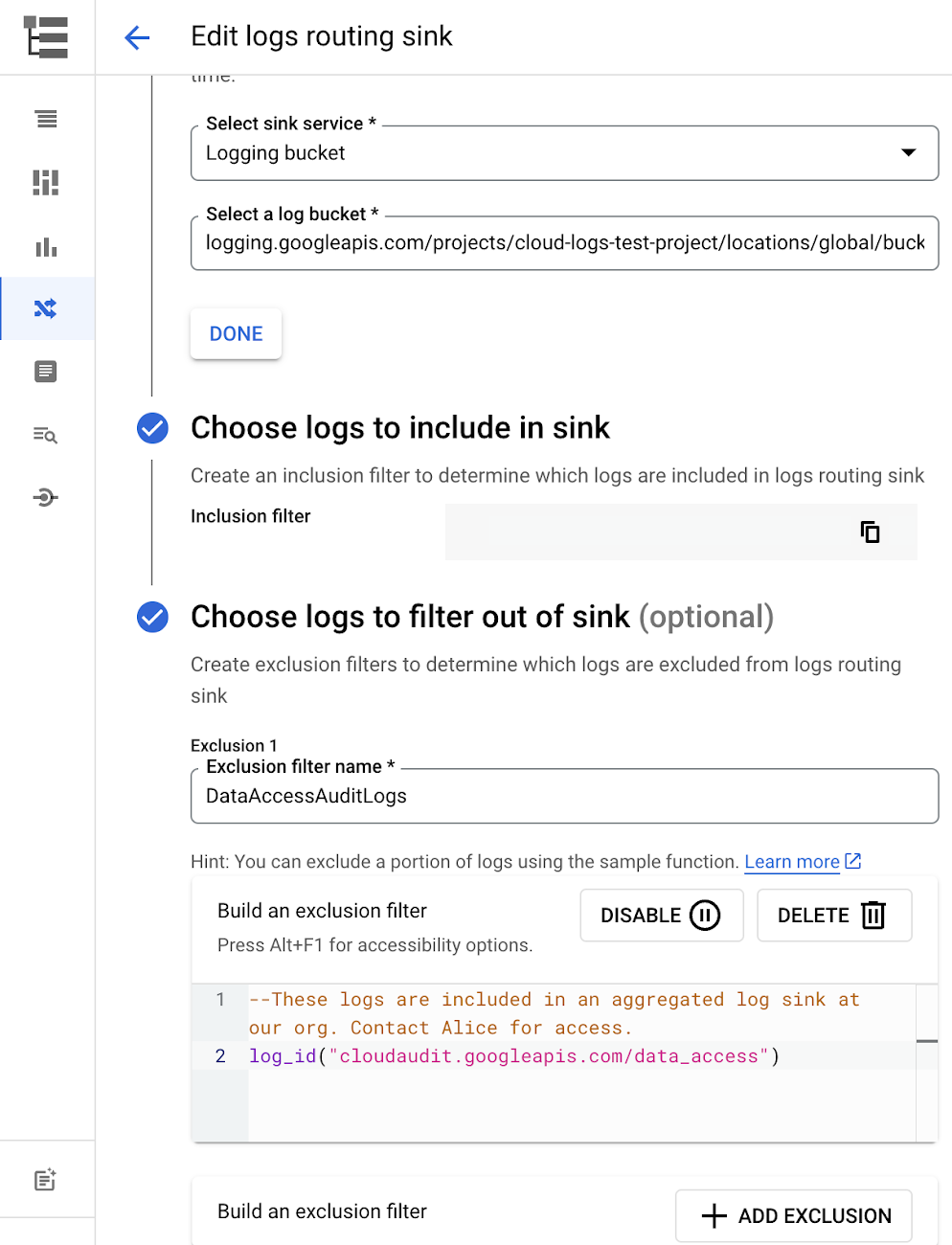
Similarly, if you’re paying to store logs in an external log management tool, you don’t have to save these same logs to Cloud Logging. We recommend keeping a small set of system logs from GCP services such as GKE in Cloud Logging in case you need assistance from GCP support but what you store is up to you, and you can still export them to the destination of your choice!
Another powerful tool to reduce log volume is to sample a percentage of chatty logs. This can be particularly useful with 2XX log balancer logs, for example. This can be a powerful tool, but we recommend you design a sampling strategy based on your usage, security and compliance requirements and document it clearly.
Step 3: Optimize costs over the lifecycle of your logs
Another option to reduce costs is to avoid storing logs for more time than you need them. Cloud Logging charges based on the monthly log volume retained per month. There’s no need to switch between hot and cold storage in Cloud Logging; doubling the default amount of retention only increases the cost by 2%. You can change your custom log retention at any time.
If you are storing your logs outside of Cloud Logging, it is a good idea to compare the cost to retain logs and make a decision.
Step 4: Setup alerts to avoid surprise bills
Once you are confident that the volume of logs being routed through log sinks fit in your budget, set up alerts so that you can detect any spikes before you get a large bill. To alert based on the volume of logs ingested into Cloud Logging:
- Go to the Logs-based metrics page. Scroll down to the bottom of the page and click the three dots on “billing/bytes_ingested” under System-defined metrics.
- Click “ Create alert from metric”
- Add filters (For example: use resource_id or project_id. This is optional).
- Select the logs based metric for the alert policy.
You can also set up similar alerts on the volume for log sinks to Pub/Sub, BigQuery or Cloud Storage.
Conclusion
One final way to stretch your observability budget is to use more Cloud Operations. We’re always working to bring our customers the most value possible for their budget such as our latest feature, Log Analytics, which adds querying capabilities but also makes the same data available for analytics, reducing the need for data silos. Many small customers can operate entirely on our free tier. Larger customers have expressed their appreciation for the scalable Log Router functionality available at no extra charge that would otherwise require an expensive event store to process data. So it’s no surprise that a 2022 IDC report showed that more than half of respondents surveyed stated that managing and monitoring tools from public cloud platforms provide more value compared to third-party tools. Get started with Cloud Logging and Monitoring today.
3249
Of your peers have already watched this video.
24:00 Minutes
The most insightful time you'll spend today!
Building Cloud-native Apps at Scale with Kubernetes and Other Dev Tools
Developer productivity is directly linked to customer value generation, higher levels of customer satisfaction and faster time to market. To help build cloud-native applications that cater to customer demands and at scale, experts at Google Cloud share insights on CI/CD tools, processes and interfaces for deploying and developing Google Kubernetes Engine applications. Watch the video on Modernizing App Development and Delivery with the Google Cloud Golden Path from Next ’21 to also learn about developer tools like Cloud Code and Skaffold.
Apigee and Vision API: ICICI Prudential Life Insurance’s Journey of Speeding Document Processing

5529
Of your peers have already read this article.
2:00 Minutes
The most insightful time you'll spend today!
Google Cloud results
- Helps enable instant document approval with optical character recognition by Vision API
- Processes 100,000 documents in 20 minutes with automated document processing product Recognic, powered by Vision API and Apigee
- Helps increase the number of applications processed by 30% within the same timeframe
The insurance landscape in India has seen significant changes in recent years with the adoption of new technology. As one of the major insurance providers in the country, ICICI Prudential Life Insurance has aimed to lead in this transformation journey. “There has been a data explosion across India over the past few years, together with a high mobile penetration rate. Today, about 60% of our customers approach us via mobile, for example, which was certainly not the case before,” says Alpesh Karnik, SVP, IT, at ICICI Life Insurance.
Consumer expectations have also evolved, with easier access to information and online services. “Consumers today are more informed on the importance of investing in insurance products, so there’s much more of a pull factor when it comes to sales, but they also want to be able to get these products quickly and easily,” adds Alpesh. To meet the demands of these consumers, ICICI Prudential Life Insurance realized it needed to make its processes even faster and more efficient. Looking to upgrade its infrastructure, the company turned to Google Cloud.
“The biggest benefit of using Recognic and Vision API is that it eliminates the initial waiting time, which can result in drop-offs. Now customers can know immediately whether their documents are sufficient, or if they need to revise or submit any others.”—Alpesh Karnik, SVP, IT, ICICI Prudential Life Insurance
Serving customers better by speeding up processes with Google Cloud
ICICI Prudential Life Insurance’s distributors were already using tablets to input customer data faster and more efficiently, but many of the company’s solutions still required a team at the back end to manually sift through documents for approval. This meant that customers needed to wait five or six hours, or sometimes until the next working day, to know if their documents were approved or needed revision.
That all changed after partnering with Google Cloud Premier Partner Searce to take advantage of its AI/ML powered automated document processing product Recognic, which is built on Google Cloud. Developed using the optical character recognition (OCR) capabilities of Cloud Vision, Recognic reads, understands, and validates documents at scale, enabling organizations that handle massive amounts of paperwork to digitize these documents and then accurately store and index them.
“Google Cloud has cut down the middle- and back-office work, leading to a 30% increase in the number of applications we can process in the same time span without the need for additional resources.”—Alpesh Karnik, SVP, IT, ICICI Prudential Life Insurance
“In the case of ICICI Prudential, the biggest benefit of using Recognic and Vision API is that it eliminates the initial waiting time, which can result in drop-offs. Now customers can know immediately whether their documents are sufficient, or if they need to revise or submit any others,” Alpesh adds.
Alpesh explains that if the details on the application form match the documents provided, the case doesn’t need to go to the underwriter for further checks and can go directly to policy issuance. “Google Cloud has cut down the middle- and back-office work, leading to a 30% increase in the number of applications we can process in the same time span without the need for additional resources.”
ICICI Prudential Life Insurance is also working with Searce to build deep learning models into Recognic so that it can overcome template barriers and input data from a variety of forms. This is particularly helpful for financial and medical documents underwriting because unlike a passport or driving license, financial documents have a higher structural complexity.
As customer data becomes more important in the work of ICICI Prudential Life Insurance, so does protecting it, and the company is taking every measure to safeguard the security and privacy of its customers’ information. “Details of customers’ contactability are automatically removed by Google Cloud after processing is complete. This step in the workflow gives us the confidence that data is not stored at any level of the optical character recognition process,” says Alpesh.
Partnering with the right teams for dedicated support
In achieving the best solution for its business goals, ICICI Prudential Life Insurance recognizes the importance of its decision to work with partners that truly understand the insurance business. “There are many intricacies involved in this business, and it’s clear that both Google Cloud and Searce really took the time to understand our underwriting processes before coming up with a solution,” says Alpesh. He adds that during the implementation process, all findings were well documented and queries were responded to quickly.
“We didn’t want to take any shortcuts deploying Recognic, but at the same time, we didn’t want to draw out the implementation process. The excellent support from both Google Cloud and Searce throughout the journey was reassuring for us as they were always thinking ahead.”
Future-proofing the organization through machine learning and AI
In the coming years, Alpesh foresees the insurance industry to be even more agile than it is today. “I doubt elaborate processes such as underwriting or operations checks will need to be done manually in the future. Everything will be done through machine learning and AI.” In light of this, ICICI Prudential Life Insurance is doing everything it can to prepare, as customers’ expectations are set to keep evolving. “We have to be prepared for the future, and I believe that with Google Cloud, we can do it.”

About ICICI Prudential Life Insurance
ICICI Prudential Life Insurance aims to lead the Indian insurance field through quality products and a hassle-free claim settlement experience. A customer-centric company, it offers long-term savings and protection plans to meet customers’ needs at every stage of life.Industries: Financial Services & InsuranceLocation: India

About Searce
Searce is a niche cloud consulting business with futuristic tech in its DNA, focused on “realizing the Next in the Now” for its clients. Specializing in cloud data engineering, AI/ML, and ad
5 Best Practices for Cloud Cost Optimization

5791
Of your peers have already read this article.
3:30 Minutes
The most insightful time you'll spend today!
When customers migrate to Google Cloud Platform (GCP), their first step is often to adopt Compute Engine, which makes it easy to procure and set up virtual machines (VMs) in the cloud that provide large amounts of computing power. Launched in 2012, Compute Engine offers multiple machine types, many innovative features, and is available in 20 regions and 61 zones!
Compute Engine’s predefined and custom machine types make it easy to choose VMs closest to your on-premises infrastructure, accelerating the workload migration process cost effectively. Cloud allows you the pricing advantage of ‘pay as you go’ and also provides significant savings as you use more compute with Sustained Use Discounts.
As Technical Account Managers, we work with large enterprise customers to analyze their monthly spend and recommend optimization opportunities. In this blog, we will share the top recommendations that we’ve developed based on our collective experience working with GCP customers.
Getting ready to save
Before you get started, be sure to familiarize yourself with the VM instance pricing page—required reading for anyone who needs to understand the Compute Engine billing model and resource-based pricing. In addition to those topics, you’ll also find information about the various Compute Engine machine types, committed use discounts and how to view your usage, among other things.
Another important step to gain visibility into your Compute Engine cost is using Billing reports in the Google Cloud Console and customizing your views based on filtering and grouping by projects, labels and more. From there you can export Compute Engine usage details to BigQuery for more granular analysis. This allows you to query the datastore to understand your project’s vCPU usage trends and how many vCPUs can be reclaimed. If you have defined thresholds for the number of cores per project, usage trends can help you spot anomalies and take proactive actions. These actions could be rightsizing the VMs or reclaiming idle VMs.
Now, with these things under your belt, let’s go over the five ways you can optimize your Compute Engine resources that we believe will give you the most immediate benefit.
1. Apply Compute Engine rightsizing recommendations
Compute Engine’s rightsizing recommendations feature provides machine type recommendations that are generated automatically based on system metrics gathered by Stackdriver Monitoring over the past eight days. Use these recommendations to resize your instance’s machine type to more efficiently use the instance’s resources. It also recommends custom machine types when appropropriate. Compute Engine makes viewing, resizing and other actions easier right from the Cloud Console as shown below.
Recently, we expanded Compute Engine rightsizing capabilities from just individual instances to managed instance groups as well. Check out the documentation for more details.

For more precise recommendations, you can install the Stackdriver Monitoring agent which collects additional disk, CPU, network, and process metrics from your VM instances to better estimate your resource requirements. You can also leverage the Recommender API for managing recommendations at scale.
2. Purchase Commitments
Our customers have diverse workloads running on Google Cloud with differing availability requirements. Many customers follow a 70/30 rule when it comes to managing their VM fleet—they have constant year-round usage of ~70%, and a seasonal burst of ~30% during holidays or special events.
If this sounds like you, you are probably provisioning resources for peak capacity. However, after migrating to Google Cloud, you can baseline your usage and take advantage of deeper discounts for Compute workloads. Committed Use Discounts are ideal if you have a predictable steady-state workload as you can purchase a one or three year commitment in exchange for a substantial discount on your VM usage.
We recently released a Committed Use Discount analysis report in the Cloud Console that helps you understand and analyze the effectiveness of the commitments you’ve purchased. In addition to this, large enterprise customers can work with their Technical Account Managers who can help manage their commitment purchases and work proactively with them to increase Committed Use Discount coverage and utilization to maximize their savings.
3. Automate cost optimizations
The best way to make sure that your team is always following cost-optimization best practices is to automate them, reducing manual intervention.
Automation is greatly simplified using a label—a key-value pair applied to various Google Cloud services. For example, you could label instances that only developers use during business hours with “env: development.” You could then use Cloud Scheduler to schedule a serverless Cloud Function to shut them down over the weekend or after business hours and then restart them when needed. Here is an architecture diagram and code samples that you can use to do this yourself.
Using Cloud Functions to automate the cleanup of other Compute Engine resources can also save you a lot of time and money. For example, customers often forget about unattached (orphaned) persistent disk, or unused IP addresses. These accrue costs, even if they are not attached to a virtual machine instance. VMs with the “deletion rule” option set to “keep disk” retain persistent disks even after the VM is deleted. That’s great if you need to save the data on that disk for a later time, but those orphaned persistent disks can add up quickly and are often forgotten! There is a Google Cloud Solutions article that describes the architecture and sample code for using Cloud Functions, Cloud Scheduler, and Stackdriver to automatically look for these orphaned disks, take a snapshot of them, and remove them. This solution can be used as a blueprint for other cost automations such as cleaning up unused IP addresses, or stopping idle VMs.
4. Use preemptible VMs
If you have workloads that are fault tolerant, like HPC, big data, media transcoding, CI/CD pipelines or stateless web applications, using preemptible VMs to batch-process them can provide massive cost savings. In fact, customer Descartes Labs reduced their analysis costs by more than 70% by using preemptible VMs to process satellite imagery and help businesses and governments predict global food supplies.
Preemptible VMs are short lived— they can only run a maximum of 24 hours, and they may be shut down before the 24 hour mark as well. A 30-second preemption notice is sent to the instance when a VM needs to be reclaimed, and you can use a shutdown script to clean up in that 30-second period. Be sure to fully review the full list of stipulations when considering preemptible VMs for your workload. All machine types are available as preemptible VMs, and you can launch one simply by adding “-preemptible” to the gcloud command line or selecting the option from the Cloud Console.
Using preemptible VMs in your architecture is a great way to scale compute at a discounted rate, but you need to be sure that the workload can handle the potential interruptions if the VM needs to be reclaimed. One way to handle this is to ensure your application is checkpointing as it processes data, i.e., that it’s writing to storage outside the VM itself, like Google Cloud Storage or a database. As an example, we have sample code for using a shutdown script to write a checkpoint file into a Cloud Storage bucket. For web applications behind a load balancer, consider using the 30-second preemption notice to drain connections to that VM so the traffic can be shifted to another VM. Some customers also choose to automate the shutdown of preemptible VMs on a rolling basis before the 24-hour period is over, to avoid having multiple VMs shut down at the same time if they were launched together.
5. Try autoscaling
Another great way to save on costs is to run only as much capacity as you need, when you need it. As we mentioned earlier, typically around 70% of capacity is needed for steady-state usage, but when you need extra capacity, it’s critical to have it available. In an on-prem environment, you need to purchase that extra capacity ahead of time. In the cloud, you can leverage autoscaling to automatically flex to increased capacity only when you need it.
Compute Engine managed instance groups are what give you this autoscaling capability in Google Cloud. You can scale up gracefully to handle an increase in traffic, and then automatically scale down again when the need for instances is lowered (downscaling). You can scale based on CPU utilization, HTTP load balancing capacity, or Stackdriver Monitoring metrics. This gives you the flexibility to scale based on what matters most to your application.
High costs do not compute
As we’ve shown above, there are many ways to optimize your Compute Engine costs. Monitoring your environment and understanding your usage patterns is key to understanding the best options to start with, taking the time to model your baseline costs up front. Then, there are a wide variety of strategies to implement depending on your workload and current operating model.
For more on cost management, check out our cost management video playlist. And for more tips and tricks on saving money on other GCP services, check out our blog posts on Cloud Storage, Networking and BigQuery cost optimization strategies. We have additional blog posts coming soon, so stay tuned!
What Users and System Designers Must Learn from Google’s Best Practices for Password Management

5277
Of your peers have already read this article.
3:00 Minutes
The most insightful time you'll spend today!
Updated for 2021: This post includes updated best practices including the latest from Google’s Best Practices for Password Management whitepapers for both users and system designers.
Account management, authentication and password management can be tricky. Often, account management is a dark corner that isn’t a top priority for developers or product managers. The resulting experience often falls short of what some of your users would expect for data security and user experience.
Fortunately, Google Cloud brings several tools to help you make good decisions around the creation, secure handling and authentication of user accounts (in this context, anyone who identifies themselves to your system—customers or internal users). Whether you’re responsible for a website hosted in Google Kubernetes Engine, an API on Apigee, an app using Firebase, or other service with authenticated users, this post lays out the best practices to follow to ensure you have a safe, scalable, usable account authentication system.
1. Hash those passwords
My most important rule for account management is to safely store sensitive user information, including their password. You must treat this data as sacred and handle it appropriately.
Do not store plaintext passwords under any circumstances. Your service should instead store a cryptographically strong hash of the password that cannot be reversed—created with Argon2id, or Scrypt. The hash should be salted with a value unique to that specific login credential. Do not use deprecated hashing technologies such as MD5, SHA1 and under no circumstances should you use reversible encryption or try to invent your own hashing algorithm. Use a pepper that is not stored in the database to further protect the data in case of a breach. Consider the advantages of iteratively re-hashing the password multiple times.
Design your system assuming it will be compromised eventually. Ask yourself “If my database were exfiltrated today, would my users’ safety and security be in peril on my service or other services they use?” As well as “What can we do to mitigate the potential for damage in the event of a leak?”
Another point: If you could possibly produce a user’s password in plaintext at any time outside of immediately after them providing it to you, there’s a problem with your implementation.
If your system requires detection of near-duplicate passwords, such as changing “Password” to “pAssword1”, save the hashes of common variants you wish to ban with all letters normalized and converted to lowercase. This can be done when a password is created or upon successful login for pre-existing accounts. When the user creates a new password, generate the same type of variants and compare the hashes to those from the previous passwords. Use the same level of hashing security as with the actual password.
2. Allow for third-party identity providers if possible
Third-party identity providers enable you to rely on a trusted external service to authenticate a user’s identity. Google, Facebook, and Twitter are commonly used providers.
You can implement external identity providers alongside your existing internal authentication system using a platform such as Identity Platform. There are a number of benefits that come with Identity Platform, including simpler administration, a smaller attack surface, and a multi-platform SDK. We’ll touch on more benefits throughout this list.
3. Separate the concept of user identity and user account
Your users are not an email address. They’re not a phone number. They’re not even a unique username. Any of these authentication factors should be mutable without changing the content or personally identifiable information (PII) in the account. Your users are the multi-dimensional culmination of their unique, personalized data and experience within your service, not the sum of their credentials. A well-designed user management system has low coupling and high cohesion between different parts of a user’s profile.
Keeping the concepts of user account and credentials separate will greatly simplify the process of implementing third-party identity providers, allowing users to change their username, and linking multiple identities to a single user account. In practical terms, it may be helpful to have an abstract internal global identifier for every user and associate their profile and one or more sets of authentication datavia that ID as opposed to piling it all in a single record.
4. Allow multiple identities to link to a single user account
A user who authenticates to your service using their username and password one week might choose Google Sign-In the next without understanding that this could create a duplicate account. Similarly, a user may have very good reason to link multiple email addresses to your service. If you’ve properly separated user identity and authentication, it will be a simple process to link several authentication methods to a single user.
Your backend will need to account for the possibility that a user gets part or all the way through the signup process before they realize they’re using a new third-party identity not linked to their existing account in your system. This is most simply achieved by asking the user to provide a common identifying detail, such as email address, phone, or username. If that data matches an existing user in your system, require them to also authenticate with a known identity provider and link the new ID to their existing account.
5. Don’t block long or complex passwords
NIST publishes guidelines on password complexity and strength. Since you are (or will be very soon) using a strong cryptographic hash for password storage, a lot of problems are solved for you. Hashes will always produce a fixed-length output no matter the input length, so your users should be able to use passwords as long as they like. If you must cap password length, do so based on the limits of your infrastructure; often this is a matter of memory usage (memory used per login operation * potential concurrent logins per machine), or more likely—the maximum POST size allowable by your servers. We’re talking numbers from hundreds of KB to over 1MB. Seriously. Your application should already be hardened to prevent abuse from large inputs. This doesn’t create new opportunities for abuse if you employ controls to prevent credential stuffing and hash the input as soon as possible to free up memory.
Your hashed passwords will likely already consist of a small set of ASCII characters. If not, you can easily convert a binary hash to Base64. With that in mind, you should allow your users to use literally any characters they wish in their password. If someone wants a password made of Klingon, Emoji, and ASCII art with whitespace on both ends, you should have no technical reason to deny them. Just make sure to perform Unicode normalization to ensure cross-platform compatibility. See our system designers whitepaper (PDF) for more information on Unicode and supported characters in passwords.
Any user attempting to use an extreme password is probably following password best practices (PDF) including using a password manager, which allows the entry of complex passwords even on limited mobile device keyboards. If a user can input the string in the first place (i.e., the HTML specification for password input disallows line feed and carriage return), the password should be acceptable.
6. Don’t impose unreasonable rules for usernames
It’s not unreasonable for a site or service to require usernames longer than two or three characters, block hidden characters, and prevent whitespace at the beginning and end of a username. However, some sites go overboard with requirements such as a minimum length of eight characters or by blocking any characters outside of 7-bit ASCII letters and numbers.
A site with tight restrictions on usernames may offer some shortcuts to developers, but it does so at the expense of users and extreme cases will deter some users.
There are some cases where the best approach is to assign usernames. If that’s the case for your service, ensure the assigned username is user-friendly insofar as they need to recall and communicate it. Alphanumeric generated IDs should avoid visually ambiguous symbols such as “Il1O0.” You’re also advised to perform a dictionary scan on any randomly generated string to ensure there are no unintended messages embedded in the username. These same guidelines apply to auto-generated passwords.
7. Validate the user’s identity
If you ask a user for contact information, you should validate that contact as soon as possible. Send a validation code or link to the email address or phone number. Otherwise, users may make a typo in their contact info and then spend considerable time using your service only to find there is no account matching their info the next time they attempt login. These accounts are often orphaned and unrecoverable without manual intervention. Worse still, the contact info may belong to someone else, handing full control of the account to a third party.
8. Allow users to change their username
It’s surprisingly common in legacy systems or any platform that provides email accounts not to allow users to change their username. There are very good reasons not to automatically release usernames for reuse, but long-term users of your system will eventually come up with significant reasons to use a different username and they likely won’t want to create a new account.
You can honor your users’ desire to change their usernames by allowing aliases and letting your users choose the primary alias. You can apply any business rules you need on top of this functionality. Some orgs might limit the number of username changes per year or prevent a user from displaying or being contacted via anything but their primary username. Email address providers are advised to never re-issue email addresses, but they could alias an old email address to a new one. A progressive email address provider might even allow users to bring their own domain name and have any address they wish.
If you are working with a legacy architecture, this best practice can be very difficult to meet. Even companies like Google have technical hurdles that make this more difficult than it would seem. When designing new systems, make every effort to separate the concept of user identity and user account and allow multiple identities to link to a single user account and this will be a much smaller problem. Whether you are working on existing or greenfield code, choose the right rules for your organization with an emphasis on allowing your users to grow and change over time.
9. Let your users delete their accounts
A surprising number of services have no self-service means for a user to delete their account and associated PII. Depending on the nature of your service, this may or may not include public content they created such as posts and uploads. There are a number of good reasons for a user to close an account permanently and delete all their PII . These concerns need to be balanced against your user experience, security, and compliance needs. Many if not most systems operate under some sort of regulatory control (such as PCI or GDPR), which provides specific guidelines on data retention for at least some user data. A common solution to avoid compliance concerns and limit data breach potential is to let users schedule their account for automatic future deletion.
In some circumstances, you may be legally required to comply with a user’s request to delete their PII in a timely manner. You also greatly increase your exposure in the event of a data breach where the data from “closed” accounts is leaked.
10. Make a conscious decision on session length
An often overlooked aspect of security and authentication is session length. Google puts a lot of effort into ensuring users are who they say they are and will double-check based on certain events or behaviors. Users can take steps to increase their security even further.
Your service may have good reason to keep a session open indefinitely for non-critical analytics purposes, but there should be thresholds after which you ask for password, 2nd factor, or other user verification.
Consider how long a user should be able to be inactive before re-authenticating. Verify user identity in all active sessions if someone performs a password reset. Prompt for authentication or 2nd factor if a user changes core aspects of their profile or when they’re performing a sensitive action. Re-authenticate if the user’s location changes significantly in a short period of time. Consider whether it makes sense to disallow logging in from more than one device or location at a time.
When your service does expire a user session or requires re-authentication, prompt the user in real time or provide a mechanism to preserve any activity they have not saved since they were last authenticated. It’s very frustrating for a user to take a long time to fill out a form, only to find all their input has been lost and they must log in again.
11. Use 2-Step Verification
Consider the practical impact on a user of having their account stolen when choosing 2-Step Verification (also known as two-factor authentication, MFA, or 2FA) methods. Time-based one-time passwords (TOTP), email verification codes, or “magic links” are consumer-friendly and relatively secure. SMS 2FA auth has been deprecated by NIST due to multiple weaknesses, but it may be the most secure option your users will accept for what they consider a trivial service.
Offer the most secure 2FA auth you reasonably can. Hardware 2FA such as the Titan Security Key are ideal if feasible for your application. Even if a TOTP library is unavailable for your application, email verification or 2FA provided by third-party identity providers is a simple means to boost your security without great expense or effort. Just remember that your user accounts are only as secure as the weakest 2FA or account recovery method.
12. Make user IDs case-insensitive
Your users don’t care and may not even remember the exact case of their username. Usernames should be fully case-insensitive. It’s trivial to store usernames and email addresses in all lowercase and transform any input to lowercase before comparing. Make sure to specify a locale or employ Unicode normalization on any transformations.
Smartphones represent an ever-increasing percentage of user devices. Most of them offer autocorrect and automatic capitalization of plain-text fields. Preventing this behavior at the UI level might not be desirable or completely effective, and your service should be robust enough to handle an email address or username that was unintentionally auto-capitalized.
13. Build a secure auth system
If you’re using a service like Identity Platform, a lot of security concerns are handled for you automatically. However, your service will always need to be engineered properly to prevent abuse. Core considerations include implementing a password reset instead of password retrieval, detailed account activity logging, rate-limiting login attempts to prevent credential stuffing, locking out accounts after too many unsuccessful login attempts, and requiring two-factor authentication for unrecognized devices or accounts that have been idle for extended periods. There are many more aspects to a secure authentication system, so please see the further reading section below for links to more information.
Further reading
There are a number of excellent resources available to guide you through the process of developing, updating, or migrating your account and authentication management system. I recommend the following as a starting place:
- Our Modern Password Security for System Designers whitepaper (PDF)
- The related Modern password security for users whitepaper (PDF)
- NIST 800-063B covers Authentication and Lifecycle Management
- OWASP continually updates their Password Storage Cheat Sheet
- OWASP goes into even more detail with the Authentication Cheat Sheet
- Google Cloud Identity Platform is a multi-protocol customer identity and access management solution, with robust authentication features
- Google’s Firebase Authentication site has a rich library of guides, reference materials and sample code
BPAY: Uncovering New Business Opportunities with APIs

4019
Of your peers have already read this article.
3:15 Minutes
The most insightful time you'll spend today!
Editor’s note: Today we hear from Jon White and Angela Donohoe from BPAY Group. BPAY Group is best known for BPAY, the leading electronic bill payment system in Australia, handling one-third of the market. Learn how BPAY Group is positioning the organization for the future by using APIs to streamline workflows for existing customers and new businesses.
BPAY has been a leader in the bill payment industry in Australia for 22 years and provides a secure, fast, and convenient way to connect individuals, businesses, and banks to help people stay on top of their bills.
One of the reasons that BPAY is the preferred bill payment service for so many Australians is our commitment to human-centered design. We’re continuously talking with customers and looking at ways that we can deliver better experiences, products, and services, such as peer-to-peer payments. During these conversations, we noticed some ways that our processes were causing friction for existing or potential customers.
For example, we traditionally used a batch processing system to handle requests between billing companies and banks. But that could cause headaches for some customers, as an error in even one request could cause the whole batch to be rejected. Plus, many “neobanks” (new types of digital-only banks) wanted to work with real-time transactions instead of batch processes, which take longer to complete.
We realized that APIs had the potential to solve many of the challenges impacting customers while opening the doors for future product and business development. We developed a few customer-facing APIs and tested them in closed betas. This experiment went far better than we expected, and we realized that there was a huge appetite for APIs among our biller customers.
While we had developed many APIs for internal systems, developing APIs that were easy to consume by our customers was a new challenge. We needed to move away from our home-grown API development approach and make our API environment more powerful, versatile, and easier to use. The API experts at The Singularity worked with us to develop a strong API strategy. We decided that we would need to support our new strategy with a scalable API management platform.
After a rigorous search, we landed on the Apigee API Management Platform. Apigee was the only solution that met all our technology and business requirements. With Apigee, we have a solid foundation for APIs that will help us deliver more value for all customers.
Creating a custom development environment
BPAY is a trusted brand in Australia, so it was very important to us that we maintain our reputation for excellent customer experiences. When setting up our developer portal, we started with a closed pilot and used developer feedback to make the portal as convenient and simple to use as possible. The Apigee developer portal has many built-in features to help us customize experiences, and if we run into roadblocks, the Apigee team at Google listens and helps us create the custom experience we want.
The developer portal has already proven to be extremely popular. In its first month live, we registered 104 developers in the sandbox environment and 10 developers in the production environment. That was before we even started marketing our developer portal, so we expect those numbers to rise quickly.
Breaking new ground with APIs
We’ve already released four foundational APIs, with a goal of eventually releasing dozens. Our APIs are helping us create smoother experiences for customers. We mentioned that when processing a batch of payment files, one mistake could cause the entire batch to get rejected. Our APIs now enable businesses to validate all payment information before submitting a batch file, dramatically reducing the chances of errors. They can even use our APIs to automatically generate batch files in the right format for different banks.
While APIs improve service for current customers, they also open the doors for new areas of business. Buy now, pay later (BNPL) services, which enable customers to spread out payments across weeks or months, are already popular in retail spaces. After releasing our first APIs, we connected with two BNPL billing services. These companies use our APIs to validate customers’ bill payment information and then pay the bill in full on behalf of customers. This was a completely new use case for us, one that could not have been implemented without our APIs.
The payment service NoahPay also adopted our APIs to validate payment information and let customers pay bills using funds from their WeChat accounts. This is an exciting new market for us, as it’s one of the first examples of how we can connect to international digital wallets through our new APIs. It’s also a great way to introduce users of WeChat, a messaging app used by more than 1 billion people in China, to the BPAY brand.
Planning for the future of bill pay
We have big plans for APIs in the future, and Apigee helps make these plans a reality. We plan to establish a generous freemium monetization model that will allow customers to make up to 200,000 API calls for free each month with tiered payment plans above that. This will enable us to open the doors for smaller organizations while providing optimal support for larger businesses and banks that might need to make millions of calls. Having powerful end-to-end monetization features built in to Apigee means that we can process monetized transactions with ease.
Built-in reporting functionality will also help us make sure that we’re understanding the market’s need for APIs and always providing our customers with valuable services and support.
Apigee greatly streamlines creating self-service API environments. Even as we grow our business, our internal teams will be able to continue providing excellent customer service without needing extra staff to answer questions, help with integration support, and constantly check API security. APIs are the way of the future, and Apigee prepares us meet the challenges that come along with it.
More Relevant Stories for Your Company



Leveraging Intelligent Behavior Detection to Protect User Sensitive APIs
Malicious actors are out there, and APIs are their new target. External threats could be attacking your APIs as you read this, and your business might not even know it. Attacks can come in the form of software applications that run automated tasks and they are everywhere. A growing percentage

Building Unique Customer Experiences with Speed & Scale: Sprinklr & Google Cloud
Enterprises are increasingly seeking out technologies that help them create unique experiences for customers with speed and at scale. At the same time, customers want flexibility when deciding where to manage their enterprise data, particularly when it comes to business-critical applications. That’s why I’m thrilled that Sprinklr, the unified customer

The Latest in Spring Cloud GCP: Upgrading the Sample Bank of Anthos App
We’re excited to announce that Spring Cloud GCP version 4.0 is now generally available! In this post, we’ll be describing what the new major version has to offer, and demonstrating the process of using the migration guide on one of our reference architectures, Bank of Anthos. What’s new? With this release, Spring Cloud
How to Choose the Right ML Model for Your Applications
Many of our customers want to know how to choose a technology stack for solving problems with machine learning (ML). There are many choices for these solutions available, some that you can build and some that you can buy. We’ll be focusing on the build side here, exploring the various
