





Measuring Deforestation in Extractive Supply Chains With ML

2567
Of your peers have already read this article.
2:30 Minutes
The most insightful time you'll spend today!
Introduction
In my experience, I have observed that it’s common in machine learning to surrender to the process of experimenting with many different algorithms in a trial and error fashion, until you get the desired result. My peers and I at Google have a People and Planet AI YouTube series where we talk about how to train and host a model for environmental purposes using Google Cloud and Google Earth Engine. Our focus is inspiring people to use deep learning, and if we could rename the series, we would call it AI for Minimalists since we would recommend artificial neural networks for most of our use cases. And so in this episode we give an overview of what deep learning is and how you can use it for tracking deforestation in supply chains. I also included a summary of the architecture and products you can use in this blog that I presented at the 2022 Geo For Good Summit. For those of you interested in diving even deeper into code, please visit our end-to-end sample (click “open in colab” at the bottom of the screen to view this tutorial in a notebook format).
What’s included in this article
- What is Deep Learning?
- Measuring deforestation in extractive supply chains with ML
- When to build a custom model outside of Earth Engine?
- How to build a model with Google Cloud & Earth Engine?
- Try it out!
What is Deep Learning?
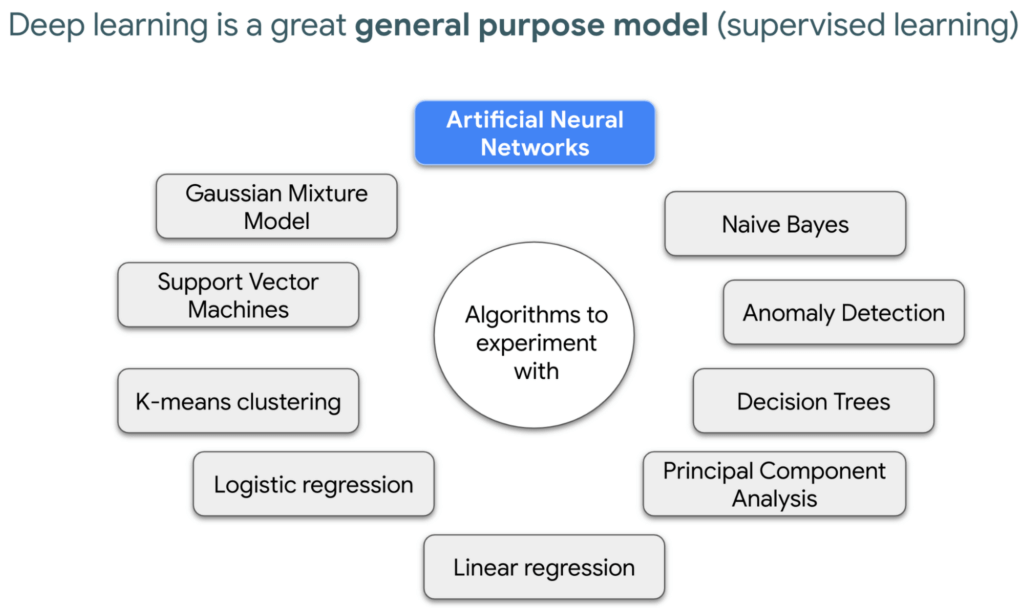
Out of the many ML algorithms out there, I’m happy to share that deep learning or artificial neural networks is a technique that can be used for almost any supervised learning job.
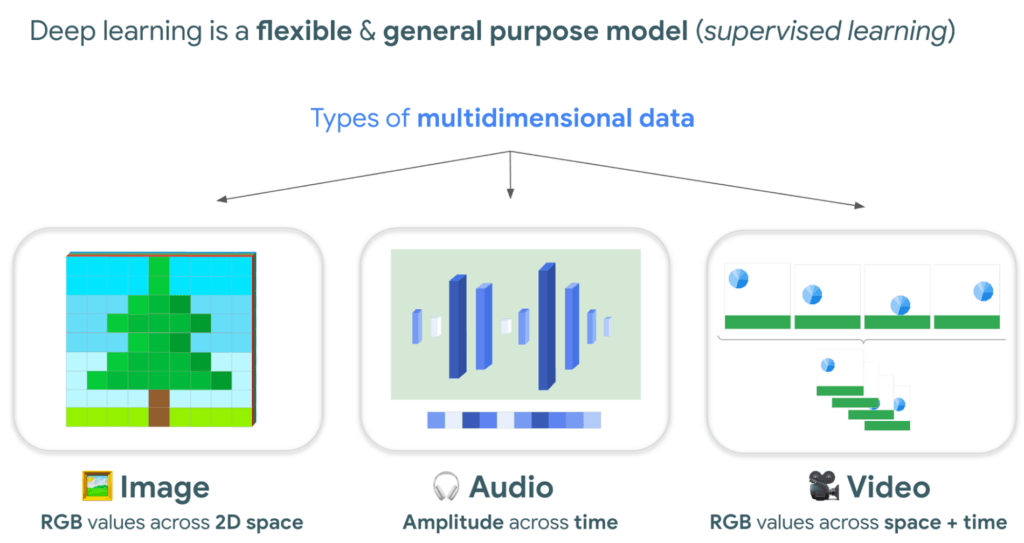
In supervised learning, you tell a computer the right answers to look for, through examples. Deep learning is very flexible, and is a great go-to algorithm. Especially for images, audio, or video files which are types of multidimensional data. This is because each of these data types have one or more dimensions with specific values for each point.
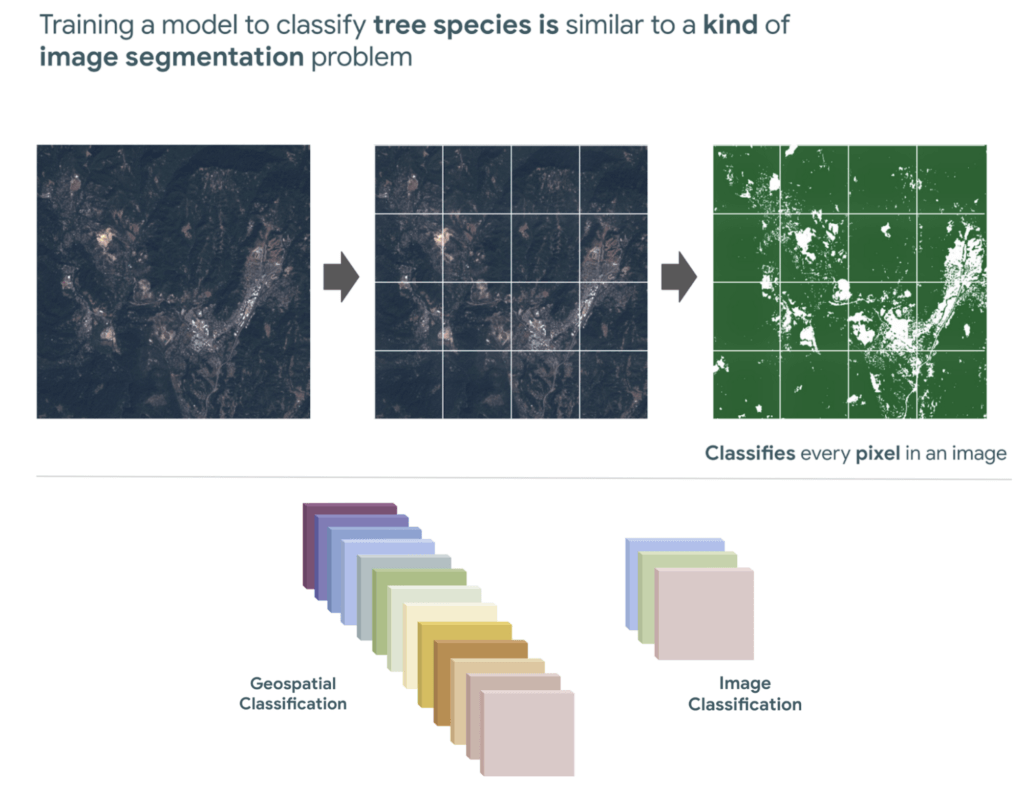
And training a model to classify tree species using satellite images is kind of like an image segmentation problem, where every pixel in the image is classified.
“Deep learning approaches problems differently”
David Cavazos, Developer Programs Engineer
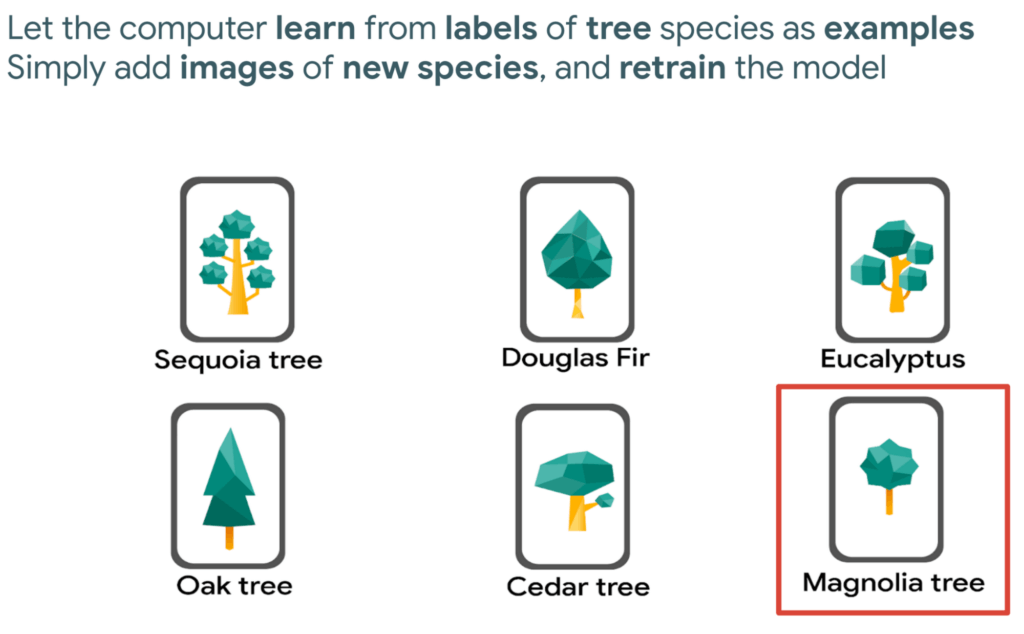
There’s no writing a function with explicit & sequential steps that reviews every single pixel one by one for every image, as traditional software development does. Let’s say you wish to build a model that classifies tree species. You don’t spend time coding all the instructions, but instead give a computer examples of images with tree species labels, and let it learn from these examples. And when you want to add more species, it’s as simple as adding new images of that species to retrain the model.
Measuring deforestation in extractive supply chains with ML
So let’s say we would like to measure deforestation using deep learning; to get started with building a model we first need a dataset that includes satellite images with an even amount of labels marking where there are trees and where there aren’t. Next, we choose a goal, here are a few common ones. In our case, we simply want to know if there are trees or not for every pixel, and so this would be a binary semantic segmentation problem.
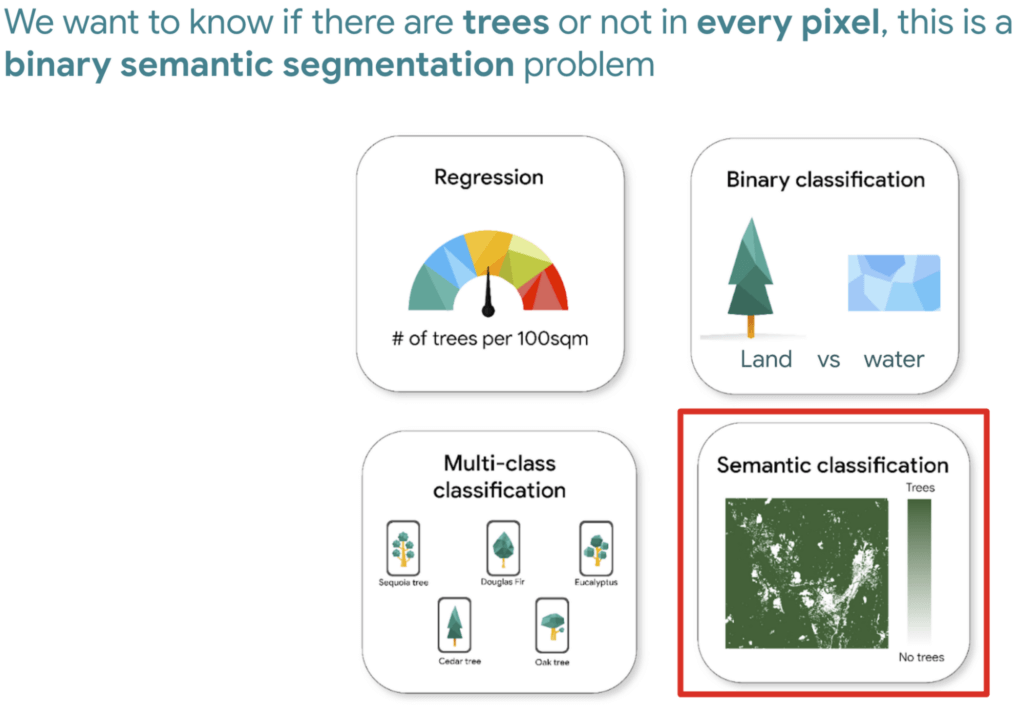
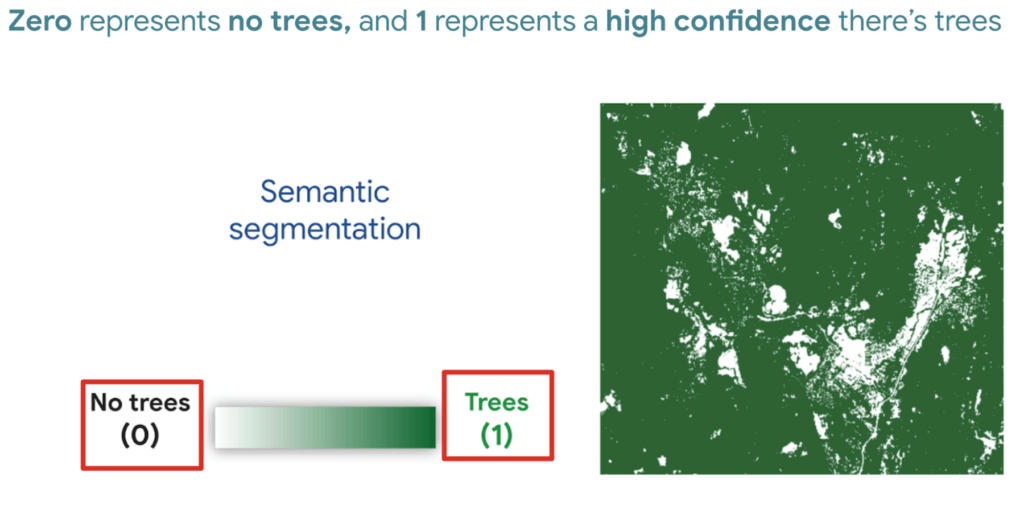
And based on this goal, we expect the outputs to be the percentage of trees for every pixel; as a number between 0 and 1. Zero represents no trees, and one represents a high confidence there are trees.
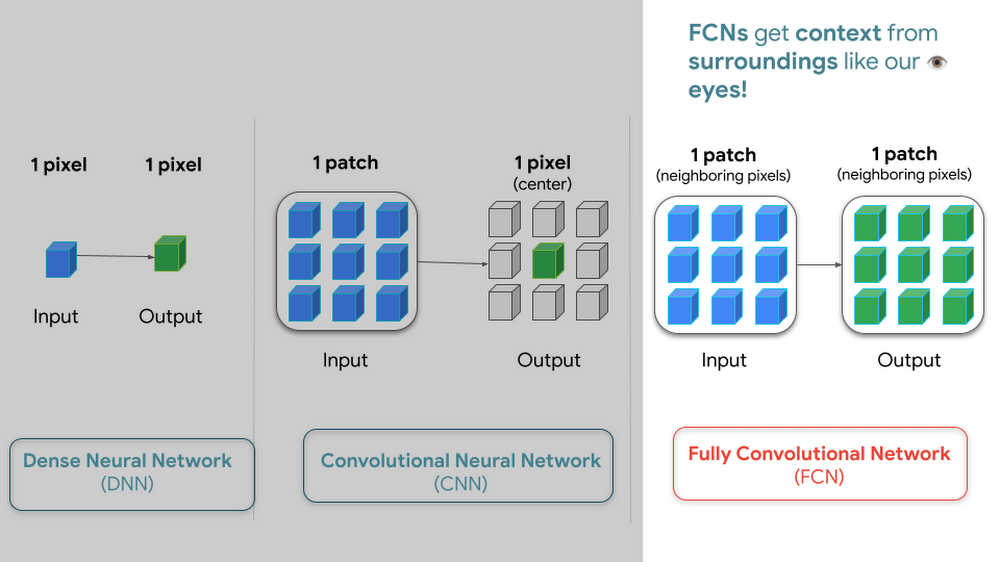
But how do we go from input images into probabilities of trees? Well think about it this way…there are many ways to approach this problem, here are 3 common ways of doing so. My peers and I prefer using Fully convolutional networks when building a map with ML predictions
And since a model is a collection of interconnected layers, we must come up with an arrangement of layers that transforms our data inputs based on our desired outputs. Each layer by the way has something called an activation function, which performs the transformations of each layer before it passes them to the next layer.
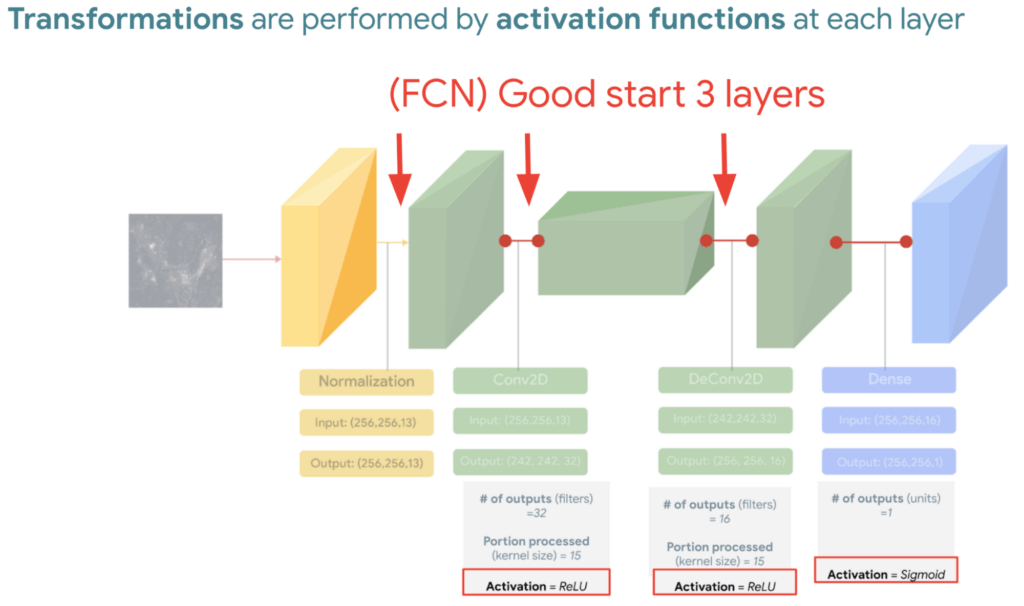
FYI Below is a handy dandy table, with our recommended activation and loss functions to choose from based on your goal. We hope this saves you time.
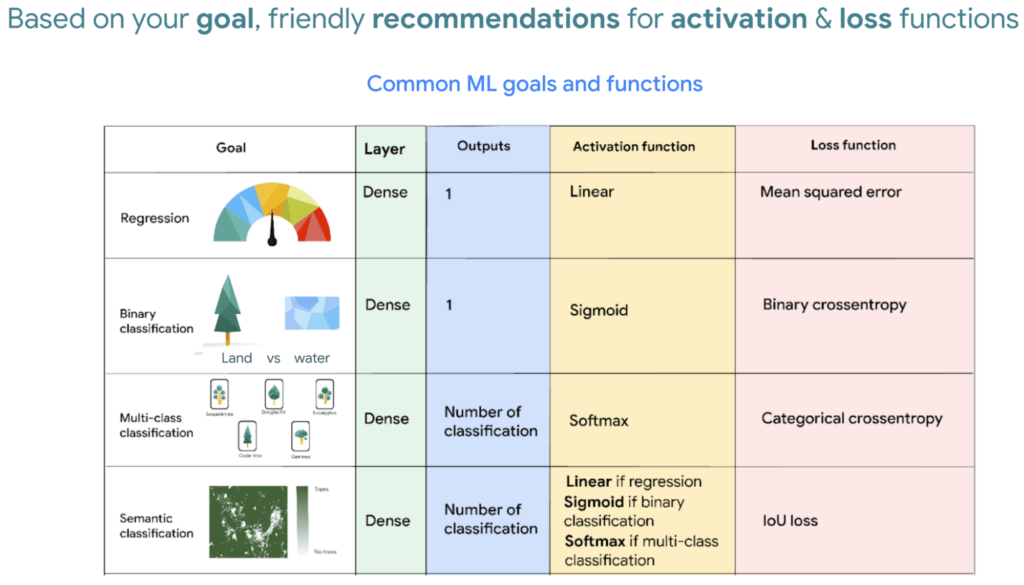
We then reach the fourth and last layer. Depending on our goals at the beginning, we also choose an appropriate loss function that helps us score how well the model did during training.
After choosing layers and functions you will split your data into training and validation datasets. Just remember that all of this work is about experimenting repeatedly until you reach desired results. Our 8min episode gives this overview more in detail.
When to build a custom model outside of Earth Engine
So now that we covered what is deep learning, the next step is understanding which tools to use to build our deforestation model. For starters it’s important to call out that Google Earth Engine is a wonderful tool that helps organizations of all sizes find insights about changes on the planet, in order to make a climate positive impact. It has built-in machine learning algorithms (classifiers) that let users quickly spin them up, with just a basic machine learning background. This is fantastic place to start when using ML on geospatial data, however there are multiple situations where you will want to opt to build a custom model such as:
- You want to use a popular ML library such as TensorFlow Keras.
- You wish to build a state of the art model to build a global and accurate land cover map product such as Google’s Dynamic World.
- Or because you generally have too much data to process that you can’t execute it in just one task in Earth Engine (and are trying to figure out hacky ways to export your data).
Whenever you identify with any of these options, you will want to roll up your sleeves and dive into building a custom model, which does require expertise and of course working with multiple products. But I have good news, using deep learning is a great go-to algorithm.
How to build a model with Google Cloud & Earth Engine?
To get started, you will need an account with Google Earth Engine which is free for non-commercial entities and Google Cloud account which has a free tier if you are just getting started for all users. I have broken up the products you would use by function.
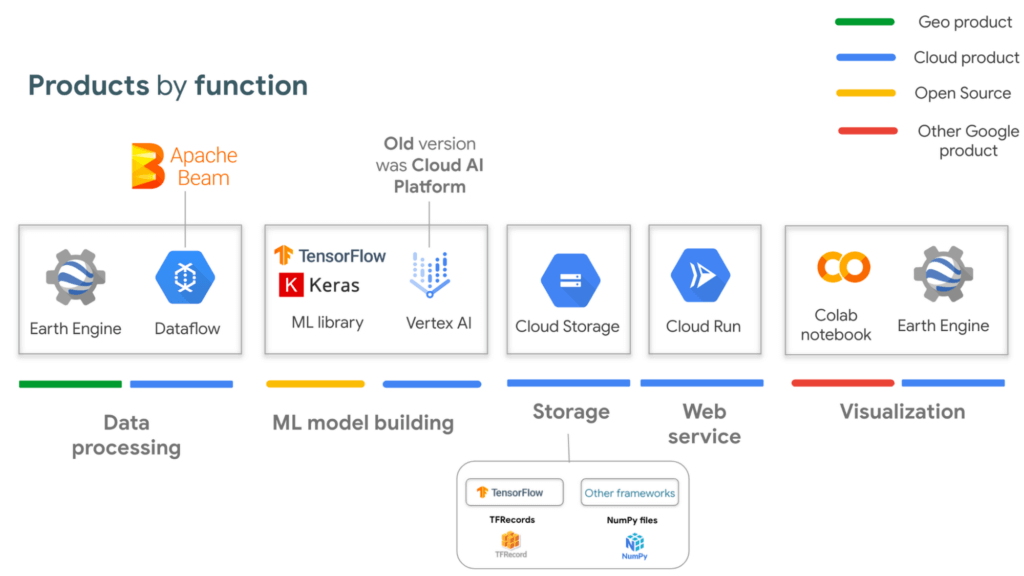
If you are interested in looking deeper into this overview, visit our slides here starting from slide 53 and read the speaker notes. Our code sample also walks through how to integrate with all of these projects end to end (just scroll down and click “open in colab”). But here is a quick visual summary. The main place to start is to identify which are the inputs and which are the outputs.
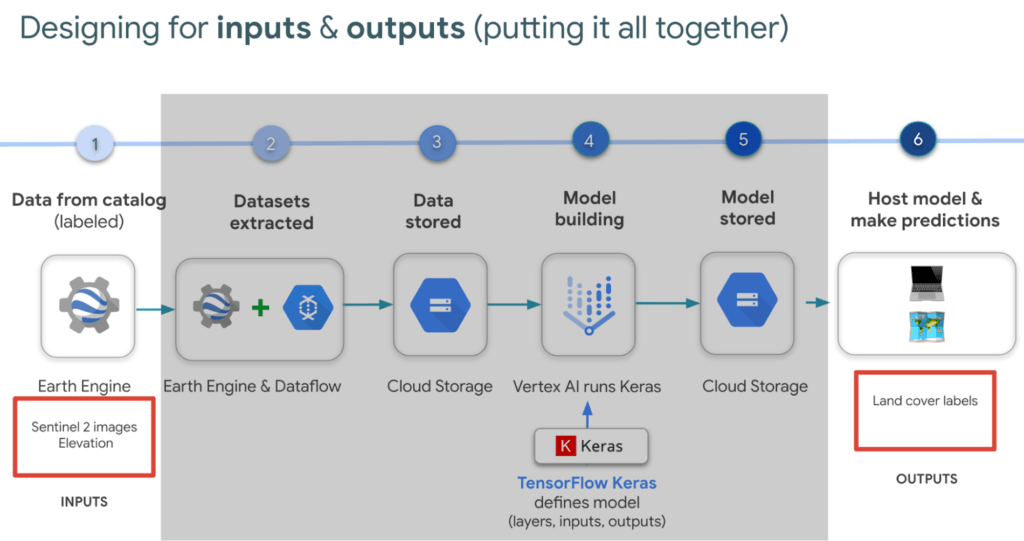
In our latest episodes for our People and Planet AI YouTube series, we walk through how to train a model and then host it in a relatively inexpensive web hosting platform called Cloud Run in episodes of less than 10mins.
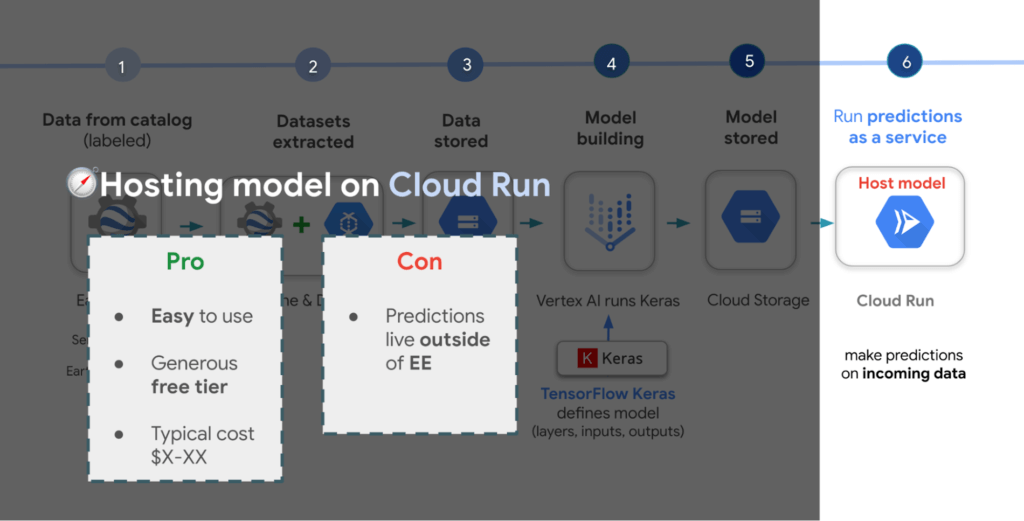
There are a few options presented in the slides, however the current best practice is to train a model using Vertex AI. Do note though that Google Earth Engine is currently not integrated with Vertex AI (we are working on this), but it is with the older (ML predecessor) called Cloud AI Platform (which is the recommended ML platform to use moving forward). As such, if you would like to import your model for detecting deforestation back into Earth Engine after training it in Vertex AI for example, you can host the model in Cloud AI Platform and get predictions. Just note that it’s a 24 hour paid service and so it can cost upwards of $100 or more a month to host your model to stream predictions. It also currently supports the following model building platforms if you don’t wish to use TensorFlow.
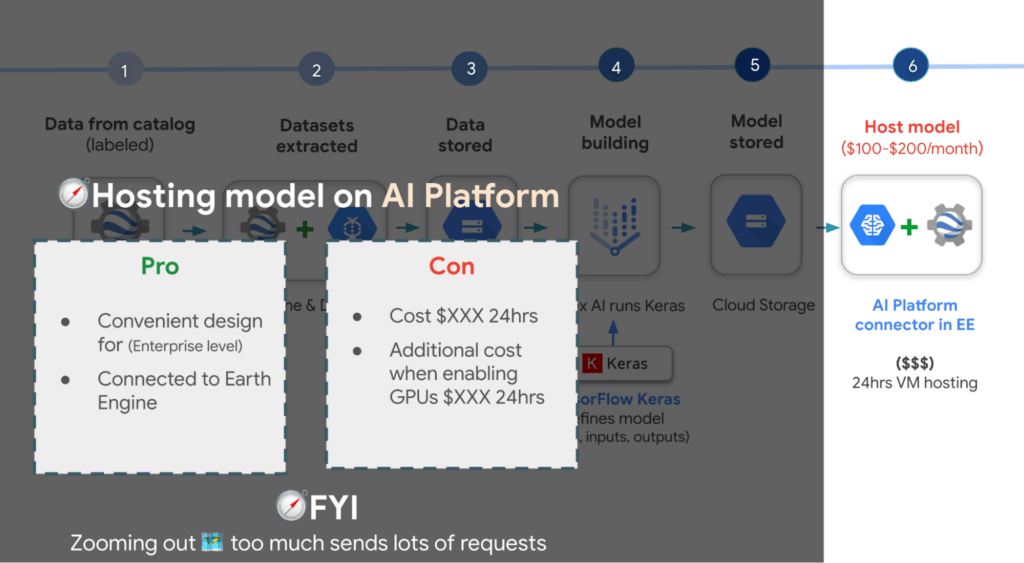
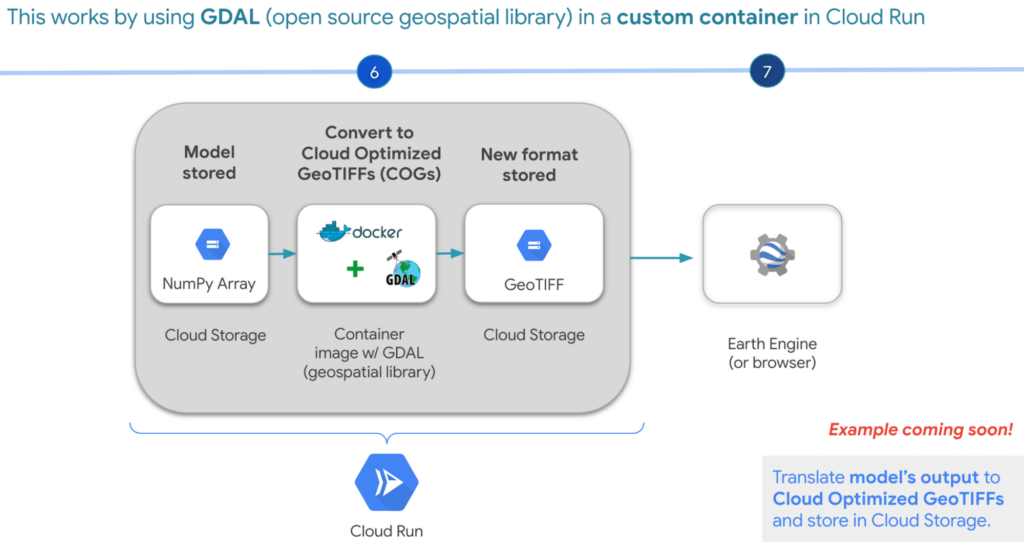
A cheaper alternative but without the convenience AI Platform offers is to manually translate the model’s output, which is NumPy Arrays into Cloud Optimized GeoTIFFs in order to load it back into Earth Engine using Cloud Run. Within this web service you would store the NumPy arrays into a Cloud Storage bucket, then spin up a container image with GDAL, an open source geospatial library in order to convert them into Cloud Optimized GeoTIFF files into Cloud Storage. This way you can view predictions from your browser or Earth Engine.
Try it out
This was a quick overview of deep learning and what Cloud products you can use to solve meaningful environmental challenges like detecting deforestation in extractive supply chains. If you would like to try it out, check out our code sample here (click “open in colab” at the bottom of the screen to view the tutorial in our notebook format or click this shortcut here).
Drive Business Results Faster with Advanced AI Technology: Translation Hub, Document AI, and Contact Center AI

2771
Of your peers have already read this article.
2:30 Minutes
The most insightful time you'll spend today!
When it comes to the adoption of artificial intelligence (AI), we have reached a tipping point. Technologies that were once accessible to only a few are now broadly available. This has led to an explosion in AI investment. However, according to research firm McKinsey, for AI to make a sizable contribution to a company’s bottom line, they “must scale the technology across the organization, infusing it in core business processes” — and based on conversations with our customers, we couldn’t agree more.
While investments in pure data science continue to be essential for many, widespread adoption of AI increasingly involves a category of applications and services that we call AI Agents. These are technologies that let customers apply the best of AI to common business challenges, with limited technical expertise required by employees, and include Google Cloud products like Document AI and Contact Center AI. Today, at Google Cloud Next ‘22, we’re announcing new features to our existing AI Agents and a brand new one with Translation Hub.
“AI is becoming a key investment for many companies’ long term success. However, most companies are still in the experimental phases with AI and haven’t fully put the technology into production because of long deployment timelines, IT staffing needs, and more,” said Ritu Jyoti, group vice president, worldwide AI and automation research practice global AI research lead, at IDC. “Organizations need AI products that can be immediately applied to automate processes and solve business problems. Google Cloud is answering this problem by providing fully managed, scalable AI Agents that can be deployed fast and deliver immediate results.”
Translation Hub: An enterprise-scale translation AI Agent
At I/O this year, we announced the addition of 24 new languages to Google Translate to allow consumers in more locations, especially those whose languages aren’t represented in most technology, to help reduce communication barriers through the power of translation. Businesses strive for the same goals, but unfortunately it is often out of reach due to the high costs that come with scaling translation.
That’s why today, we are announcing Translation Hub, our AI Agent that provides customers with self-service document translation. With 135 languages, Translation Hub can create impactful, inclusive, and cost-effective global communications in a few clicks.

With Translation Hub, now researchers are able to share their findings instantly across the world, goods and services providers can reach underserved markets, and public sector administrators can reach more members of their communities in a language they understand — all of which ultimately help make for a more connected, inclusive world.
Translation Hub brings together Google Cloud AI technology, like Neural Machine Translation and AutoML, to help make it easy to ingest and translate content from the most common enterprise document types, including Google Docs and Slides, PDFs, and Microsoft Word. It not only preserves layouts and formatting, but also provides granular management controls such as support for post-editing human-in-the-loop feedback and document review.
“In just three months of using Translation Hub and AutoML translation models, we saw our translated page count go up by 700% and translation cost reduced by 90%,” said Murali Nathan, digital innovation and employee experience lead, at materials science company Avery Dennison. “Beyond numbers, Google’s enterprise translation technology is driving a feeling of inclusion among our employees. Every Avery Dennison employee has access to on-demand, general purpose, and company-specific translations. English language fluency is no longer a barrier, and our employees are beginning to broadly express themselves right in their native language.”
Document AI: A document processing AI Agent to automate workflows
Every organization needs to process documents, understand their content, and make them available to the appropriate people. Whether it’s during procurement cycles involving invoices and receipts, contract processes to close deals, or for general increases in efficiency, Document AI simplifies and automates various document processing. With two new features launching today, Document AI can allow employees to focus on higher impact tasks and better serve their own customers.
For example, payments provider Libeo used Document AI to uptrain an invoice parser with 1,600 documents and increase its testing accuracy from 75.6% to 83.9%. “Thanks to uptraining, the Document AI results now beat the results of a competitor and will help Libeo save ~20% on the overall cost for model training over the long run,” said Libeo chief technology officer, Pierre-Antoine Glandier.
Today, we’re announcing these new features to our existing Document AI Agent:
- Document AI Workbench can remove the barriers around building custom document parsers, helping organizations extract fields of interest that are specific to their business needs. Relative to more traditional development approaches, it requires less training data and offers a simple interface for both labeling data and one-click model training.
- Document AI Warehouse can eliminate the challenges that many enterprises face when tagging and extracting data in documents by bringing Google’s Search technologies to Document AI. This feature can make it simpler and easier to search for and manage documents like workflow controls to accommodate invoice processing, contracts, approvals, and custom workflows.
Contact Center AI: A contact center AI Agent to improve customer experiences
Scaling call center support can be expensive and difficult, especially when implementing AI technologies to support representatives. Contact Center AI is an AI Agent for virtually all contact center needs, from intelligently routing customers, to facilitating handoffs between virtual and human customer support representatives, to analyzing call center transcripts for trends and much more.
Just days ago, we announced that Contact Center AI Platform is now generally available to provide additional deployment choice and flexibility. With this addition to Contact Center AI, we are furthering our commitment to providing an AI Agent that can assist organizations to quickly scale their contact centers to improve customer experiences and create value via data-driven decisions.
Dean Kontul, division chief information officer at KeyBank, had this to say about powering their contact center with Contact Center AI from Google Cloud: “With Google Cloud and Contact Center AI, we will quickly move our contact center to the Cloud, supporting both our customers and agents with industry-leading customer experience innovations, all while streamlining operations through more efficient customer care operations.”
Start delivering business results with AI Agents, today!
If you’re ready to get started with Translation Hub, this Next ‘22 session has the details, including a deeper dive into Avery Dennison’s use of the AI Agent.
To learn more about our Document AI announcements, check out our session with Commerzbank, “Improve document efficiency with AI,” as well as “Transform digital experiences with Google AI powered search and recommendations.”
And, to explore Contact Center AI Platform, watch “Delight customers in every interaction with Contact Center AI,” featuring more insight into KeyBank’s use case.
Making Your Pictures Worth a Thousand Labels! (with Cloud Vision API)

1204
Of your peers have already read this article.
2:30 Minutes
The most insightful time you'll spend today!
In this post, I’ll be showing some amazing ways the Vision API can extract meaning from your images – keep reading, or jump directly into a tutorial using Python, Node.js, Go, or Java! This tutorial can be completed at no cost within the Google Cloud Free Tier.
They say a picture is worth a thousand words. But how do you make those words available and useful? Around the world, we are generating more images than ever before, and it’s no surprise that businesses are turning to image recognition technology to help meet the immense opportunities created with this growing set of data.
Cloud Vision API is a powerful tool that enables you to perform a variety of tasks including label detection, text recognition, and object tracking on your image data. Whether it’s identifying products in a retail store, analyzing social media posts for brand mentions, or scanning through millions of images to find a specific object, the Cloud Vision API can help businesses automate their image analysis workflows and gain valuable insights from their visual data. To protect privacy, and help you build responsibly, the Cloud Vision API offers features to limit personal identification, such as person blur, which hides identifiable features.
Let’s explore a few of the key features of the Cloud Vision API.
Detect famous landmarks
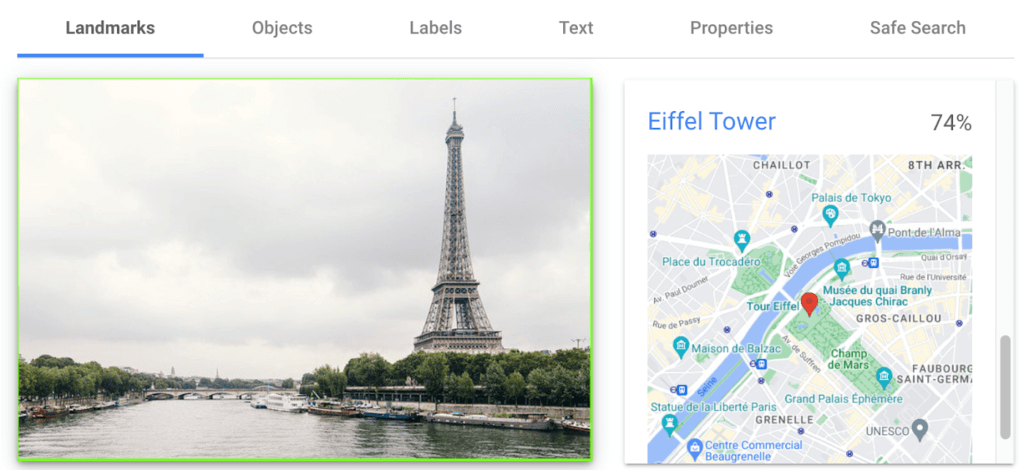
Landmark detection allows you to analyze images to identify specific landmarks such as buildings, natural features, and other recognizable locations. Cloud Vision API recognizes landmarks and provides information about them, including their name, location, and other relevant details. Perhaps you are trying to identify the landmarks in images shared by customers as part of social campaigns, or want to build a mobile app that provides information to tourists on famous landmarks.
In the below left-hand side image, Cloud Vision API has detected the Eiffel Tower, shown in the visualized response. Not shown in this visualization here, but also detected, were Pont de Bir-Hakeim (the bridge) and Champs de Mars (the park in front of the Eiffel Tower).
Detect objects and label images
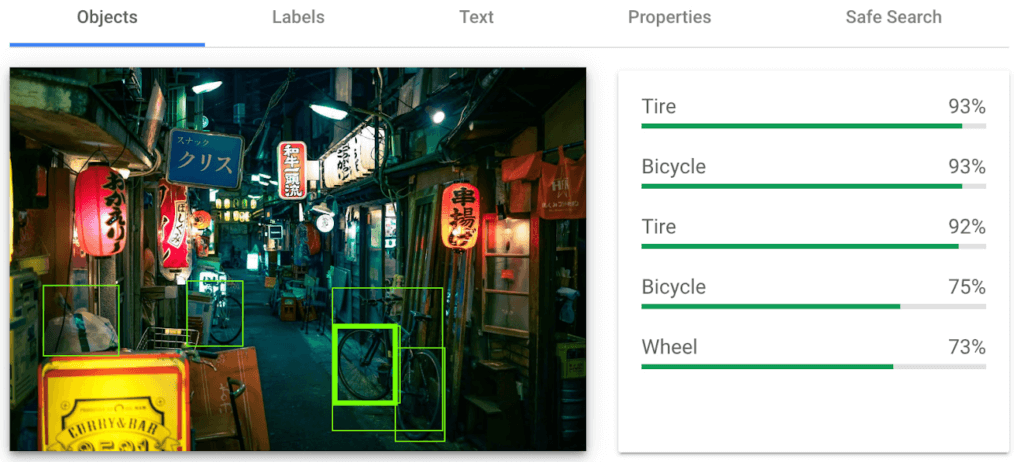
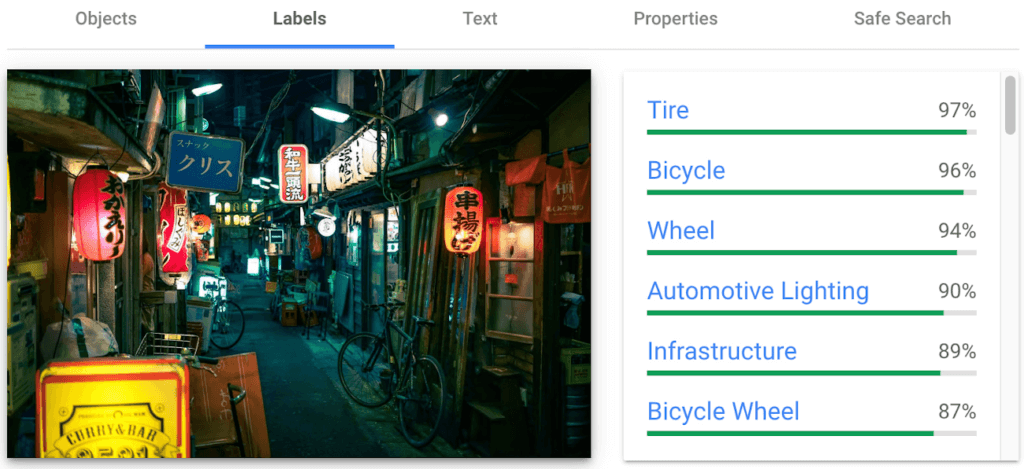
Object detection and labels are two related features that enable you to identify and classify objects within an image. Object detection detects and locates objects within an image, and provides information such as the position, size, and orientation of each object. Labels, on the other hand, provide a general classification of the content within an image.
Object detection has practical applications in many industries such as self-driving vehicles (where it’s critical), retail, manufacturing and more, while labels can be used to help classify and organize large collections of images, or to categorize and filter content.
You can see the similarities and differences in the responses provided by the object detection and labeling features in this image taken in Setagaya.
Detect text
Cloud Vision API detects and extracts text from any image, even if it’s handwritten or in different languages. Once it detects text, the API can provide information about the position, orientation, and size of each text element, as well as individual words, and their bounding boxes.
In this image of a traffic sign, Cloud Vision API has detected the text and provided it in the response.

Detect explicit content
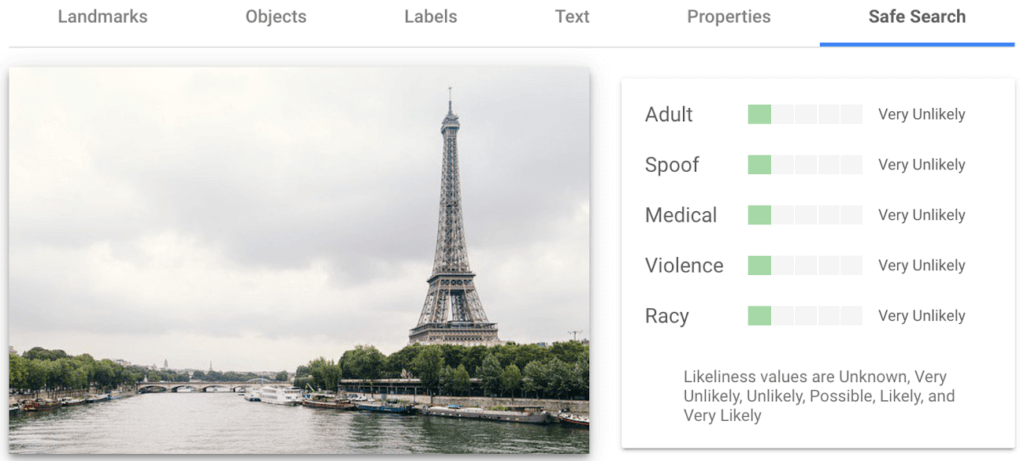
Cloud Vision API can automatically identify and flag explicit or inappropriate content within an image using five categories: adult, spoof, medical, violence, and racy. The API provides a score that indicates the likelihood for each category in the image, which you can use to set thresholds in your application and decide how to handle those that exceed them. This feature is particularly useful for filtering or moderating user-generated content.
Luckily for the images I shared here, each category has been deemed “very unlikely” to be present. Phew!


Next Steps
These are just a few features of the Cloud Vision API and how it can help your business with automating image analysis workflows and gaining valuable insights from your visual data.
Head to the interactive walkthrough tutorials in Python, Node.js, Go, and Java to see step-by-step how to access the API and learn more about all the features that you can integrate into your own applications! Again, this tutorial can be completed at no cost within the Google Cloud Free Tier.
How TeamSnap Improved Return on Ad Spend Significantly

5610
Of your peers have already read this article.
3:30 Minutes
The most insightful time you'll spend today!
Anyone who has ever coached or played on a sports team, or had a child involved in sports, knows how difficult scheduling and logistics can be. From game and practice schedules, to uniforms and who’s bringing the snacks, it can be a lot for coaches, administrators, parents, and players to manage.
It’s no wonder that TeamSnap, a sports team, club, and tournament management app, has exploded in popularity worldwide. By syncing events to everyone’s personal calendars and providing messaging and payment tracking, TeamSnap makes communication and organization easy.
TeamSnap markets its app to coaches, players, and clubs via targeted YouTube ads. It also uses Google AdWords and DoubleClick to advertise on search results and run programmatic campaigns. These methods have been highly effective, helping TeamSnap grow to millions of users worldwide and become one of the most popular apps in the iOS app store.
As its business and data grew, TeamSnap was challenged to track ROI and measure the customer journey across channels and devices over time. The company’s marketing budget grew quickly, making it even more important to spend wisely. With data in Google Analytics 360, DoubleClick Campaign Manager, Google AdWords, and Salesforce, TeamSnap needed a way to link and correlate those data sources in a scalable, timely, and cost-effective way to understand the true impact of its digital marketing across websites and mobile apps.
To avoid the painstaking manual process of pulling data from multiple sources, TeamSnap began using Google Analytics 360, which integrates with Google BigQuery, to provide a fully managed big data analysis service. TeamSnap analyzes the data using Tableau, which connects directly to Google BigQuery for fast analytics and helps the company share and collaborate on that information with self-service ease.
The combination allows TeamSnap to easily track the activity of millions of users with self-service ease, without worrying about the scalability or availability of the big data platform.
“Before Google Analytics 360, Google BigQuery, and Tableau, tracking our return on ad spend was difficult because we had so much data,” says Ken McDonald, Chief Growth Officer at TeamSnap. “We didn’t always have insights to make the best choices. We don’t have that problem anymore because we’ve moved to real-time reporting. We find additional revenue growth opportunities almost daily.”
Making Ad Dollars Work Harder
TeamSnap now automatically imports unsampled Google Analytics 360 logs into the Google BigQuery data warehouse. To import data from other sources such as Google AdWords, DoubleClick, and YouTube, TeamSnap uses Google BigQuery Data Transfer Service. With all relevant data consolidated in Google BigQuery, TeamSnap can use Tableau to perform advanced analytics on its digital marketing, executing ad-hoc analyses in seconds, while eliminating data sampling issues, to improve accuracy. These analyses can also be reused and shared with internal and external stakeholders via Tableau Online, promoting governed reuse and consistency.
“Using Google Analytics 360 and Google BigQuery with Tableau to track our return on ad spend is ideal,” says Ken. “It’s easy to use SQL to query the data or explore it with drag-and-drop ease.”
With Google BigQuery, Ken and his team can bring all the data from the TeamSnap billing systems, internal CRM, and other Google services into one straightforward dataset that everyone uses. With Tableau, users are able to perform self-service analytics on this data and provision analyses via shared dashboards that communicate the same consistent truth across the company. These dashboards provide a single view of the business to discover new patterns and questions worth analyzing.
All of this results in enormous time savings because no one is re-inventing the wheel. “Using these tools, we immediately reallocated $300,000 of ad spend that was performing poorly, generating 200% ROI in the first two days,” says Ken.
Ken now spends his time analyzing data instead of trying to pull it all together, identifying pockets of inefficient spend in real time and reallocating those marketing dollars toward better performing campaigns.
“Before, we could only focus on the largest campaign-level datasets because it was so time consuming to pull the data,” he says. “With Google BigQuery and Tableau, we can examine our advertising ROI much more granularly and reallocate more than $10 million in ad spend annually to grow the company faster and more efficiently.”
More Effective A/B Testing
To make sure it is delivering the best customer experiences, TeamSnap uses Google Optimize to run A/B tests on its website. It uses Google BigQuery and Tableau to verify and supplement these findings by measuring longer-term customer behavior across devices, spanning both web and mobile apps.
By pulling in data from Google Optimize, Google Analytics 360, Salesforce, and in-house billing and CRM systems, and understanding it with Tableau, TeamSnap has increased the accuracy and effectiveness of its A/B testing, gaining a more complete picture of customer onboarding and activity. In some cases, it found that short-term indicators it previously trusted were actually poor predictors of long-term behavior.
“Integration between Google Analytics 360 and Google BigQuery is seamless, giving us much more confidence in our A/B testing,” says Ken. “We’re constantly finding new and interesting ways to use our digital marketing data. Often, making a simple change can increase revenue by hundreds of thousands of dollars a year.”
Improving Product Quality
TeamSnap also uses Google BigQuery and Tableau to improve its own product, tracking customer activity at such a granular level that usability and functionality issues can be exposed and addressed faster. It’s also increasing customer engagement by verifying that potential customers are coming in through the right onboarding path—for example, a coach versus a player, or a consumer versus a club or other sports business. Using A/B testing to make sure customers are routed to the appropriate flow, TeamSnap drove $4 million in additional customer value each year.
“We initially chose Google BigQuery and Tableau to help with marketing, but we realized quickly that they could help us on the product side as well,” says Ken. “Most of the testing we do is about making things better and easier for our customers, and we’re accelerating that process with Google BigQuery and Tableau.”
Personalization with Recommendation AI Improves Reader Experience on Newsweek Platform

2969
Of your peers have already read this article.
1:30 Minutes
The most insightful time you'll spend today!
Newsweek provides the latest news, in-depth analysis, and ideas about international issues, technology, business, culture, and politics to its readers around the world. While editors pick the best articles to display on the home page and topic pages, it is also critical for Newsweek to offer a personalized experience by delivering fresh and relevant article recommendations tailored to the unique interests of each reader. This need became even more important during the pandemic as readers wanted to be kept informed about the latest news and understand its impact on their own lives and businesses.
Personalization with Recommendations AI
Google has spent years delivering recommended content across flagship properties such as Google Ads, Google Search, and YouTube. Recommendations AI takes advantage of Google’s expertise in recommendations and is powered by state-of-the-art machine learning models. It is also a fully managed service with automated model training and recommendation serving infrastructure that have helped to meet Newsweek’s planet-scale needs.
Newsweek had been concerned that a sizable fraction of their users left the website after reading only one article and as a result was evaluating deploying ML-based recommendations on their article detail page to increase user engagement. Newsweek and Google Cloud expected that highly personalized recommendations from Recommendations AI would help readers find the articles they would be most interested in, thereby significantly increasing the click-through rate (CTR) of recommendations being shown.
Newsweek ran A/B tests on both desktop and mobile to compare their existing solution with content recommendations from Recommendations AI which leverage a user’s reading history along with article metadata such as categories, titles, and article publish time to ensure that recommendations are relevant, fresh, and personalized. The result was a strong improvement in business metrics.
“Google Cloud Recommendations AI has not only improved our CTR by 50%-75% and subscription conversion rate by 10%, but also allowed us to increase total revenue per visit by 10%,” says Michael Lukac, Newsweek’s Chief Technology Officer. “The fully managed service, advanced AI, and real-time personalization have allowed us to make an improvement in our user engagement. It has improved the diversity of content and personalized assets to the individual reader. Newsweek has been able to easily create and edit models from the dashboard while retraining them daily to handle changing catalogs.”
Next Steps
Newsweek has seen tremendous benefit from Recommendations AI’s ability to create a superior reader experience with personalization, and sees opportunities to further improve the reader’s journey by having Google cover more real estate on their site, app, and on other channels such as personalized newsletters. To explore what Google Cloud’s Recommendations AI can do for your business, click here.
3424
Of your peers have already watched this video.
3:53 Minutes
The most insightful time you'll spend today!
How Good Are Google’s Vision, Speech, Translation and Natural Language ML APIs?
Many companies want to be able to adopt machine learning and artificial intelligence quickly into their businesses.
But it isn’t always straight-forward and easy. Custom building the models and setting up and maintaining the infrastructure required for an AI project is time-consuming.
That is where Google’s machine learning APIs come into play.
These ready-to-go ML APIs for vision, speech, translation and natural language can be deployed almost immediately. Imagine being able to tell the state of mind of customers who walk into a store (vision API). Or being able to bridge, easily, India’s significant local language challenges (translation API).
In this short video, you’ll see how easy it is to access—and how accurate—Google’s machine learning APIs for vision, speech, translation and natural language processing.
Watch it now and find new ways to improve your business!
More Relevant Stories for Your Company


Experiment: Machine Learning Helps IGG Acquire High-value App Users
What we set out to test Can machine learning help app businesses efficiently acquire high-value users at scale? The background IGG (I Got Games) is a China-based online game developer with over 300 million players worldwide. They are always looking to acquire and grow a valuable user base for their games.

Enhancing SAP Build Process Automation with Google Document AI and Google Workspace
SAP Build Process Automation is designed to optimize business processes and boost efficiency. The platform helps both business users and developers alike digitize core workflows and incorporate artificial intelligence (AI) into time consuming and error-prone manual tasks. All digital paths can benefit from automation. The pandemic, supply chain shortages, and

Improved TabNet on Vertex AI: High-performance, scalable Tabular Deep Learning
Data scientists choose models based on various tradeoffs when solving machine learning (ML) problems that involve tabular (i.e., structured) data, the most common data type within enterprises. Among such models, decision trees are popular because they are easy to interpret, fast to train, and can obtain high accuracy quickly from
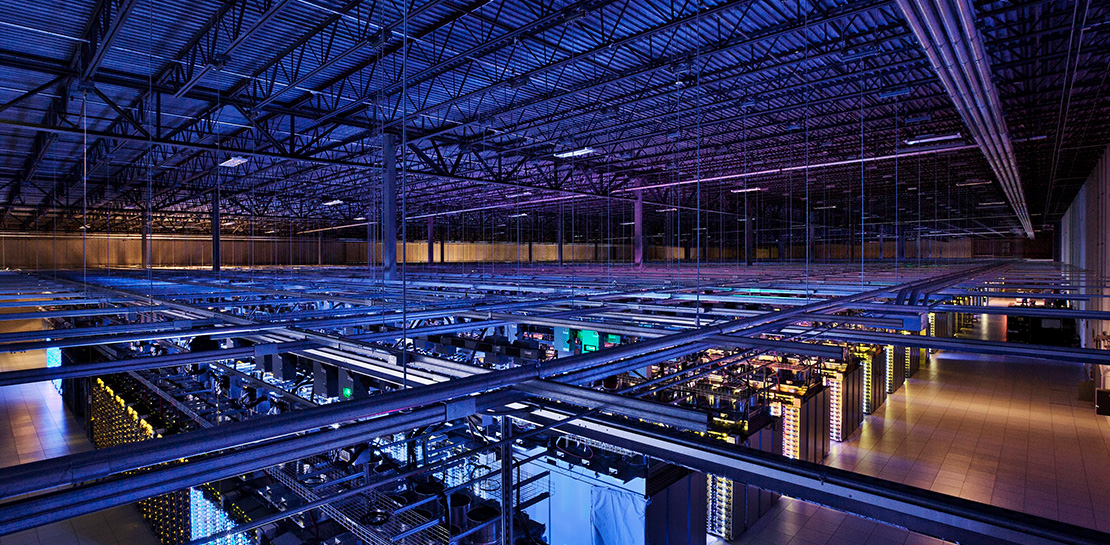
SystemsResearch@Google (SRG) to Revamp the Future of Hyperscaler Systems
For over two decades, Google has helped lead the invention of modern cloud systems—defining, designing and deploying warehouse-scale computing as the foundation for reliable, performant, and secure global-scale information services delivered to billions of users around the world. This leadership involves significant innovation across a broad range of systems technologies, including distributed systems, storage
