





Maximizing Reliability, Minimizing Costs: Right-Sizing Kubernetes Workloads

944
Of your peers have already read this article.
3:30 Minutes
The most insightful time you'll spend today!
Do you know how much money you could save by adjusting workload requests to better represent their actual usage? If you’re not rightsizing your workloads, you might be overpaying for resources that your workloads aren’t even using or worse, putting your workloads at risk for reliability issues due to under provisioning.
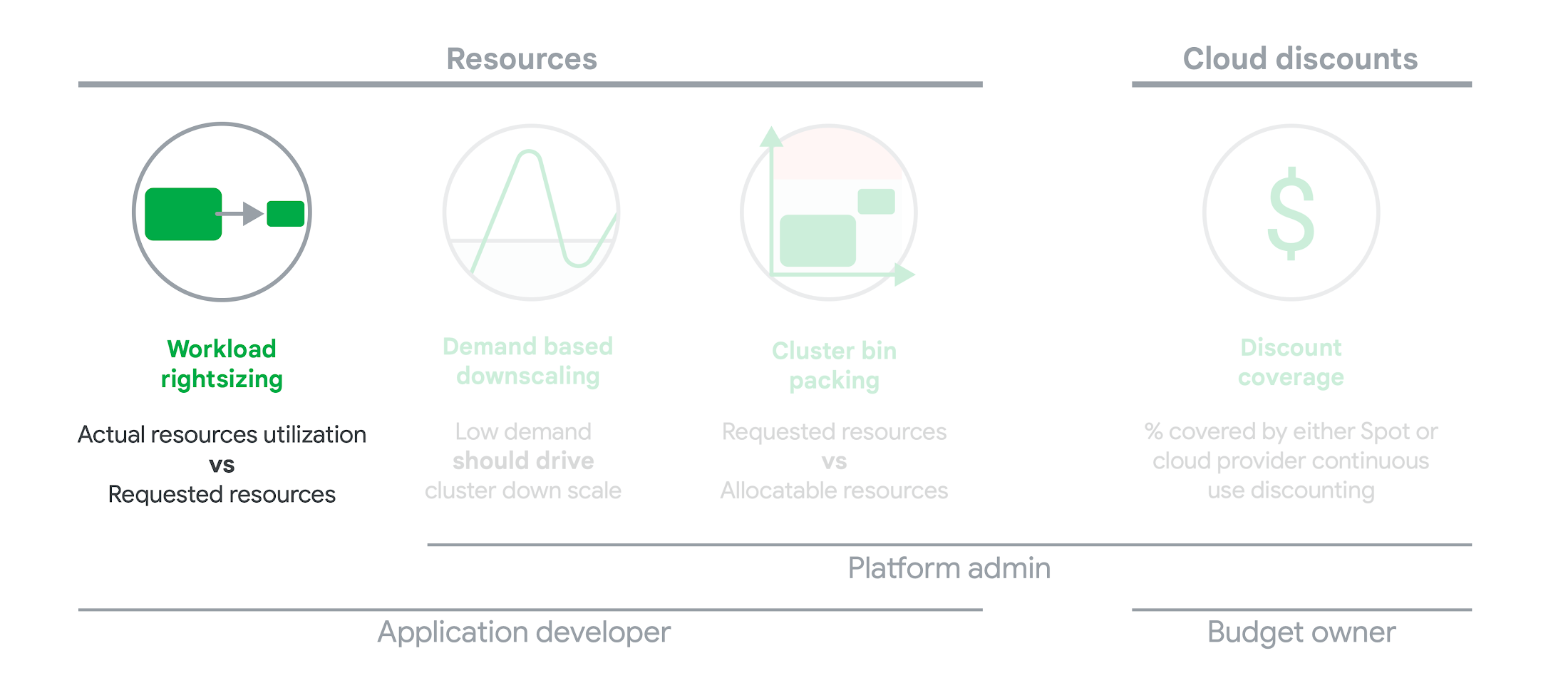
As we’ve previously discussed, setting the resources is the most important thing you can do to increase the reliability of your Kubernetes workloads. In this blog we will help you with the second key finding from the State of Kubernetes Cost Optimization report!
The research … found that workload rightsizing has the biggest opportunity to reduce resource waste.
State of Kubernetes Cost Optimization report
According to our research findings, workload rightsizing is the most important golden signal. Workload rightsizing measures the capacity of developers to properly use the CPU and memory they have requested for their applications.
Rightsizing is challenging
It can be quite difficult to predict the resource needs of your applications, which historically has not been a concern for developers in traditional data center environments.In traditional data center environments, resources were typically over-provisioned upfront to ensure capacity for peak demand and future growth, so developers didn’t need to focus on accurately predicting resource needs as they were covered by the excess capacity, whereas in cloud environments, resources are consumed on-demand. Finding a balance between efficiency and reliability can often feel like a delicate balancing act.
Tools for workload rightsizing
There are native tools in Cloud Monitoring and the GKE UI you can use to rightsize your workloads running on GKE.
Rightsizing in the console
The Workload Cost Optimization tab helps you identify workloads that can be optimized by displaying the resources used versus what’s requested.
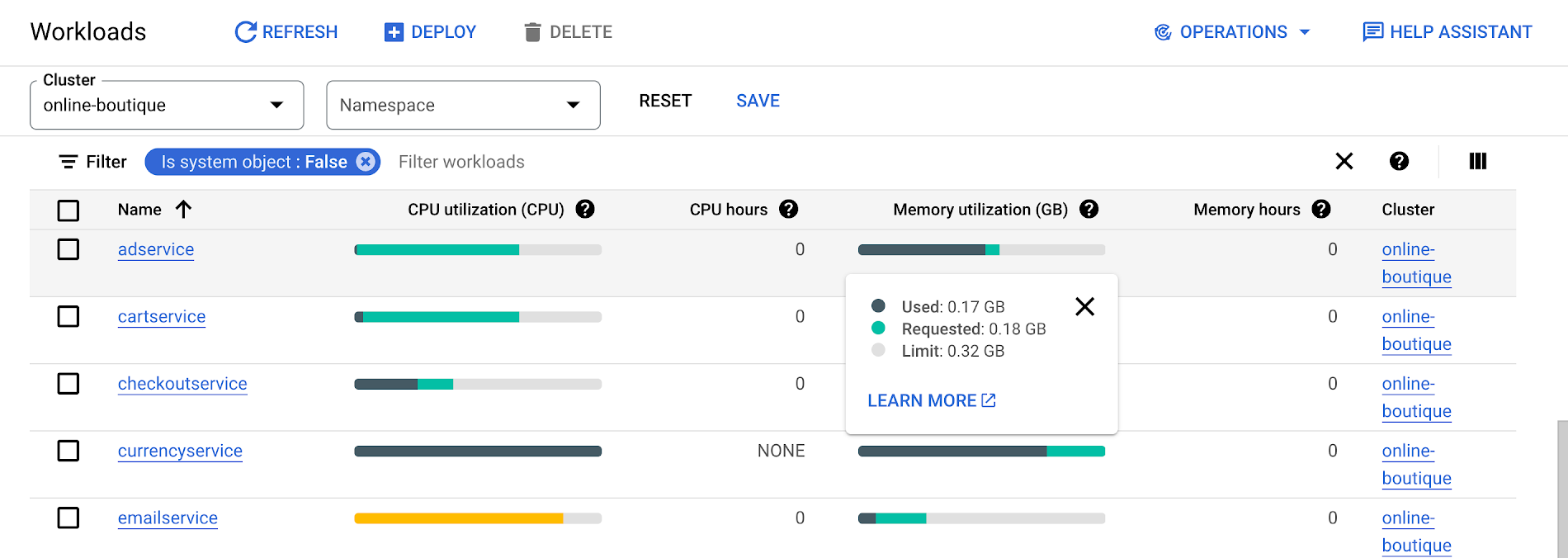
To take advantage of potential cost savings, you can drill into clusters to see workload level resource recommendations.
To view workload resource recommendations for Deployment objects only:
- In the GKE Cost Optimization.
- Select a cluster.
- Click Workloads > Cost Optimization.
- Select one Deployment workloads
- In the workload’s detail page, select Actions > Scale > Edit Resource Requests
Rightsizing with Cloud Monitoring
Cloud Monitoring provides built-in VPA scale recommendations metrics that you can use to monitor the performance of your workloads and to identify opportunities to rightsize them without the need to create VPA objects.
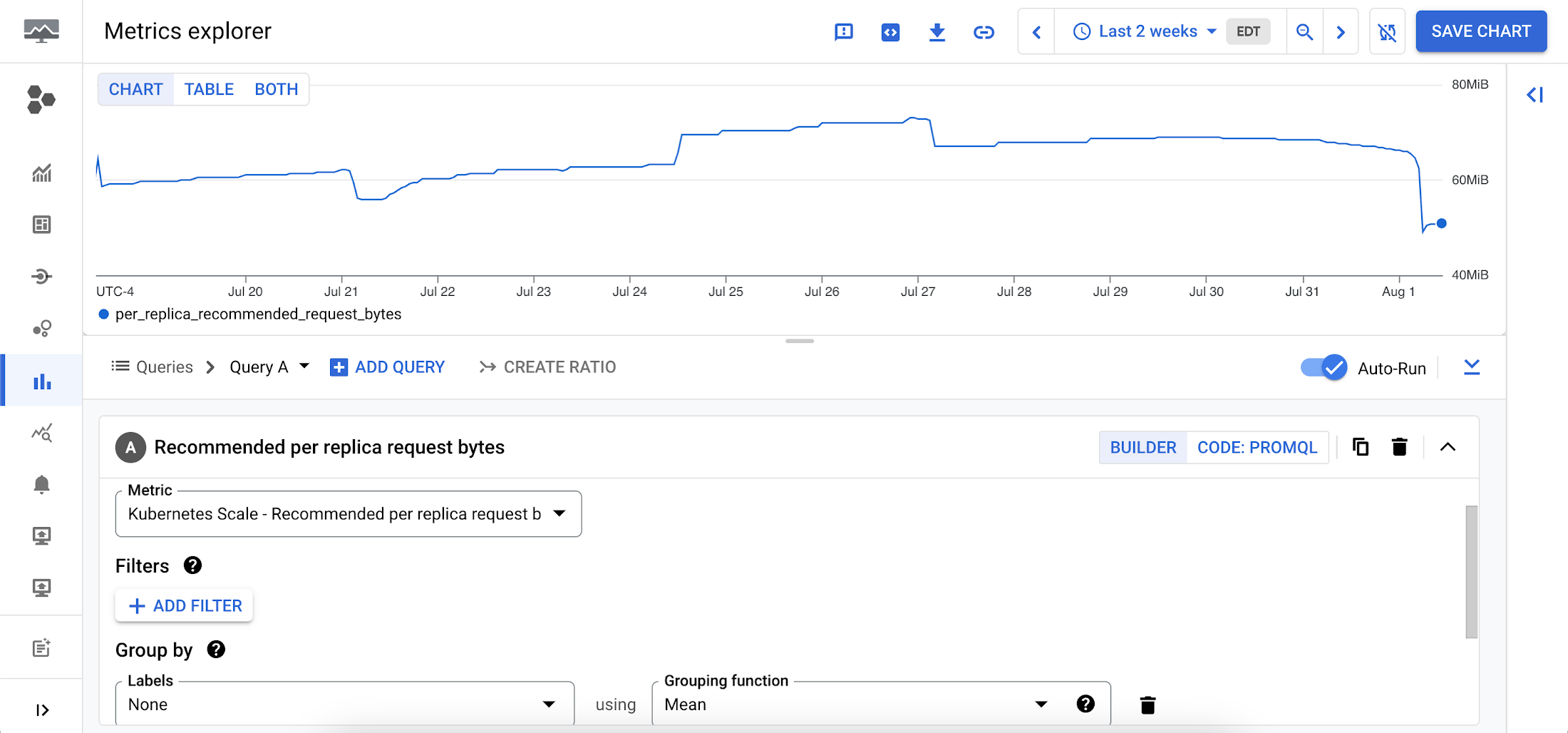
To view these metrics:
1. Go to the Cloud Monitoring > Metric Explore console.
2. In the Metric dropdown, select the metrics:
- Memory recommendations:
Kubernetes Scale > autoscaler > Recommended per replica request bytes - CPU recommendations:
Kubernetes Scale > autoscaler > Recommended per replica request cores
Rightsizing at scale
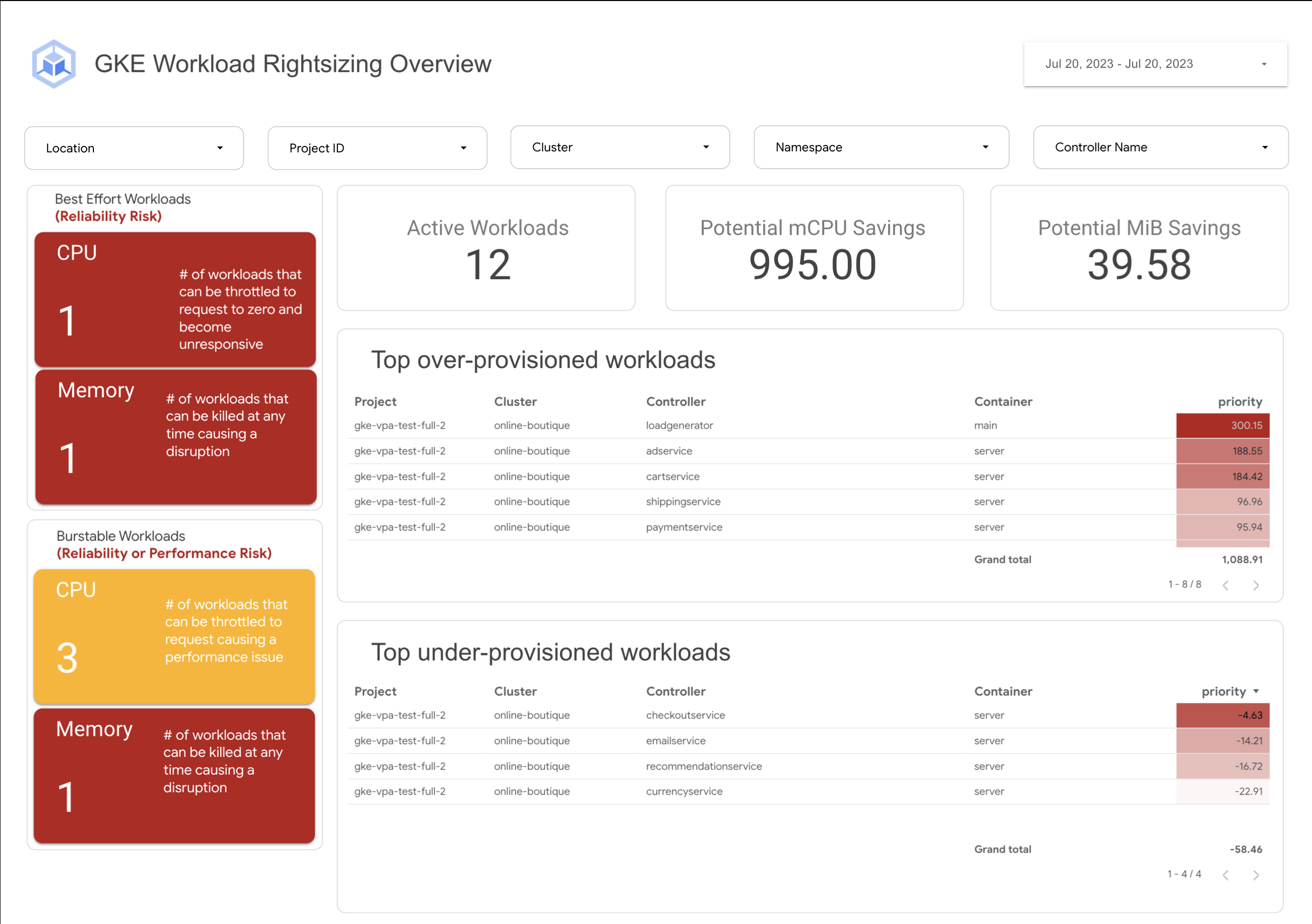
If you’re interested in viewing recommendations across clusters and projects, We’ve created a guide that you can use today to help you right-size your GKE workloads at scale. This solution leverages your actual cluster’s metric data and built-in workload recommendations provided by Cloud Monitoring. You can determine the resource requirements for all your workloads without having to create additional VPA autoscaler objects in each of your clusters. The guide walks you through deploying the solution.
In conclusion
In conclusion, rightsizing your workloads is essential for both cost savings and reliability. By following the tips in this blog, you can ensure that your workloads are using the right amount of resources, which will save you money and increase your workload’s reliability.
Links to the solution presented in this blog and other useful tools to help you optimize your cluster are listed below:
- The Right-sizing workloads at scale solution guide
- Setting resource requests: the key to Kubernetes cost optimization
- The simple kube-requests-checker tool
- An interactive tutorial to get set up in GKE with a set of sample workloads
Download the State of Kubernetes Optimization report, review the key findings, and stay tuned for our next blog post.
Google Launches Product Locator and Gives Store Locator Plus an Upgrade to Expand Retail Offerings

5855
Of your peers have already read this article.
1:30 Minutes
The most insightful time you'll spend today!
We all experienced, first hand, how Covid-19 has impacted the world and our communities. Last year, store closures, reduced hours, and social-distancing requirements drove people to adopt more e-commerce options, which, according to eMarketer, grew 27.6% worldwide in 2020. Meanwhile, consumer desires to shop locally also grew with Google searches for “____ near me” up 100% year over year,1 and 1 in 3 consumers having tried curbside pickup over the last year.2
As countries begin to lift Covid-19 restrictions, businesses are looking toward a post-pandemic future and asking ‘Which of these shopping trends will stick and how should I adapt?’ At Google, we expect consumers to continue demanding helpful shopping experiences that blur the line between the physical retail and digital experience, as well as help them to continue shopping locally.3 To address these changes in shopper behavior, we refreshed our retail solutions—adding a new solution, Product Locator, and updating Store Locator Plus—to help you offer the best possible online-to-offline experience and drive shoppers to your stores.
Introducing Product Locator solution: connecting online shopping to nearby stores
Under Covid restrictions, consumers have grown accustomed to having a myriad of shopping options, from curbside pickup to same-day delivery. Increased searches for ‘along my route’ and ‘in stock’ tell us that convenience is king for today’s consumer.4 Retailers can increase online conversion rates and drive store visits by including product availability and pick-up options on each of their product description pages (PDP); emphasizing the speed and convenience of these options and saving on significant shipping costs.
Our newest retail solution, Product Locator, can further help drive customers to visit by showing the exact distance stores are to the shopper and even estimated driving time, to further highlight the convenience of a store visit. A study conducted by Shopify found that showcasing local inventory boosted key store metrics including 45% of local pickup who made an additional purchase upon arrival.5 See the Product Locator solution guide to get started today.

Update your store locator page to address more of shoppers’ needs
Store locators allow shoppers to more easily find your stores and can be made even more helpful with our Store Locator Plus solution. Our updated Store Locator Plus solution refreshes the store locator page to be more informative and engaging by integrating offers redeemable in-store, online scheduling for appointments and services, and text me directions services. Implement Store Locator Plus today using the guide.
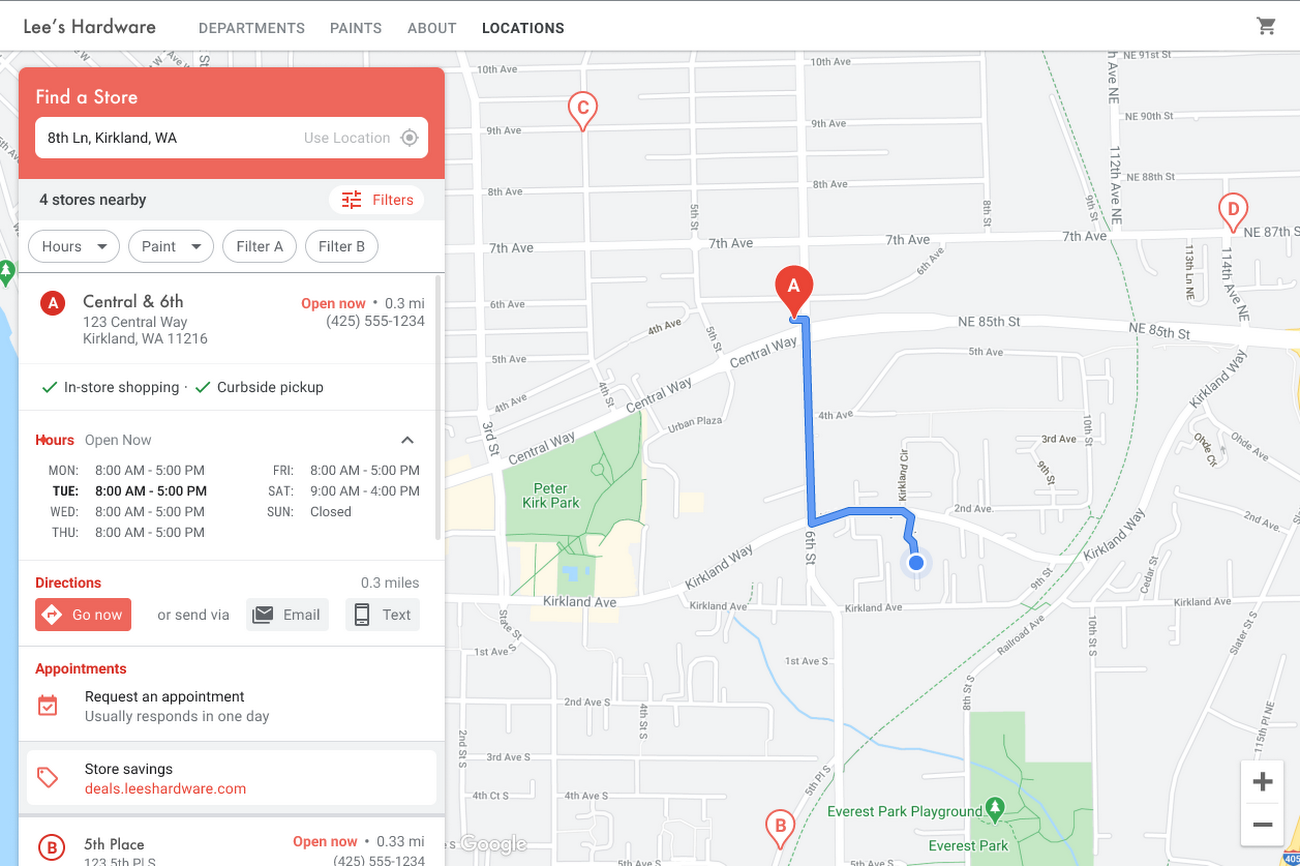
Build and customize Store Locator Plus for your business in minutes
At Google Maps Platform, we are always thinking of ways to make building a map easier and faster for our customers. In May at I/O we made Cloud-based Maps Styling generally available, enabling map updates to happen without touching a line of code. Today we’re excited to introduce Quick Builder, our free, low code builder which allows you to demo, customize and build a version of the Store Locator Plus solution for your website in minutes. Experience Quick Builder today.
To learn more about how you can start adopting these retail solutions, visit our retail solutions page.
For more information on Google Maps Platform, visit our website.
1 Global Insights Briefing: Getting back out there
2 https://www.shopify.com/pos/future-of-retail-2021
3 https://www.thinkwithgoogle.com/future-of-marketing/digital-transformation/covid-trends-1-year/
4 https://www.thinkwithgoogle.com/consumer-insights/consumer-trends/pandemic-shopping-behavior/
5 https://www.shopify.com/pos/future-of-retail-2021
Take a Look at 30 Eventrac Locations!

4940
Of your peers have already read this article.
2:00 Minutes
The most insightful time you'll spend today!
New locations in Eventarc
Back in August, we announced more Eventarc locations (17 new regions, as well as 6 new dual-region and multi-region locations to be precise). This takes the total number of locations in Eventarc to more than 30. You can see the full list in the Eventarc locations page or by running gcloud eventarc locations list .
What does location mean in Eventarc?
An Eventarc location usually refers to the single region that the Eventarc trigger gets created in. However, depending on the trigger type, the location can be more than a single region:
- Pub/Sub triggers only support single-region locations.
- Cloud Storage triggers support single-region, dual-region, and multi-region locations.
- Cloud Audit Logs triggers support single-region locations and the special
globalregion.
Before looking into trigger location in more detail, let’s look at other locations relevant in Eventarc.
What other locations are relevant in Eventarc?
Triggers connect event sources to event targets:
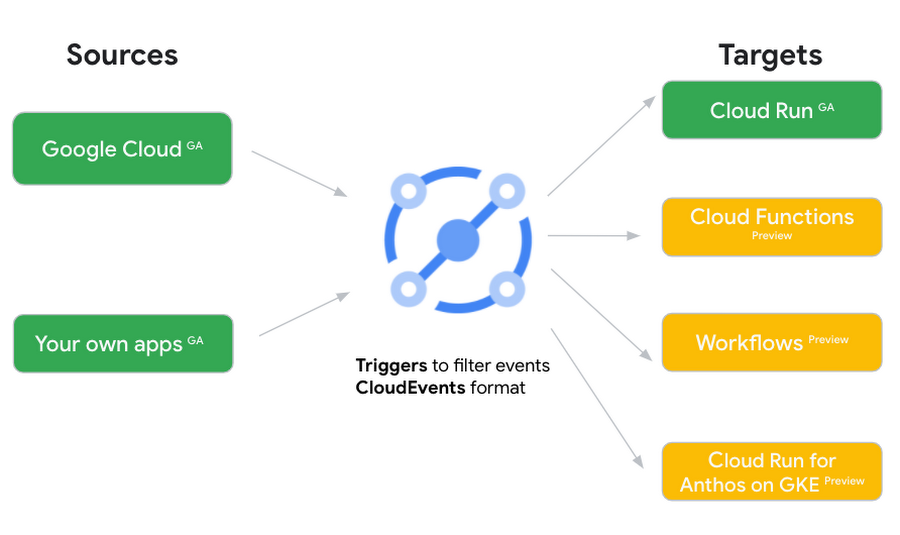
Each event source, event target, and trigger has its own location. Sometimes, these locations have to match and sometimes they can be different.
Here’s an example of a trigger connecting Cloud Storage events from a bucket in the europe-west1 region to a Cloud Run service in the us-central1 region with a trigger located in the europe-west1 region:
gcloud eventarc triggers create trigger-storage \--destination-run-service=hello \--destination-run-region=us-central1 \--location=europe-west1 \--event-filters="type=google.cloud.storage.object.v1.finalized" \--event-filters="bucket=my-bucket-in-europe-west1-region" \--service-account=$PROJECT_NUMBER-compute@developer.gserviceaccount.com
In many cases, you don’t have control over the location of the event source. In the example above, the Cloud Storage bucket is in the europe-west1 region. That’s the location that you need to work with and it has implications for the trigger location (which I’ll get to later).
The location of the event target is the region of the service where you want the events to go. You get to choose this from one of the supported regions when you deploy your Cloud Run service. You typically want this to be in the same region as your event source for latency and data locality reasons (but this is not strictly a requirement). In the example above, the event source (bucket) is in europe-west1 but the event target (Cloud Run service) is in us-central1 as specified by the --destination-run-region flag.
The location of the trigger is dictated by the event source location, but the trigger type also comes into play. It is specified by the –location flag. Let’s take a look at the trigger location for each trigger type in more detail.
Location in Pub/Sub triggers
In a Pub/Sub trigger, you connect a Pub/Sub topic to an event target. Pub/Sub topics are global and not tied to a single region. However, when you create a Pub/Sub trigger, you need to specify a region for it (because Eventarc triggers need to live in a region) with the --location flag as follows:
gcloud eventarc triggers create trigger-pubsub \--destination-run-service=hello \--destination-run-region=us-central1 \--location=us-central1 \--event-filters="type=google.cloud.pubsub.topic.v1.messagePublished" \--transport-topic=projects/your-projectid/topics/your-topic
By specifying a location, Eventarc automatically configures the geofencing feature in Pub/Sub such that events only persist in the specified location. As I noted above, you typically want to (but are not required to) choose the same region for the trigger and the Cloud Run service for lower latency and data locality. You can also use regional Pub/Sub service endpoints to publish to the topic to ensure that all of the data stays in a single region.
Location in Cloud Storage triggers
In a Cloud Storage trigger, you connect a Cloud Storage bucket to an event target. A Cloud Storage bucket can be in a single-region (e.g. europe-west1), dual-region (e.g. eur4), or multi-region (e.g. eu) location. The location of the bucket dictates the location of the trigger and they have to match. The earlier trigger example was for a bucket in the europe-west1 single-region location. Here’s another trigger connecting Cloud Storage events from a bucket in the eu multi-region location. Notice how the location flag matches the bucket region:
gcloud eventarc triggers create trigger-storage \--destination-run-service=hello \--destination-run-region=us-central1 \--location=eu \--event-filters="type=google.cloud.storage.object.v1.finalized" \--event-filters="bucket=my-bucket-in-eu-multi-region" \--service-account=$PROJECT_NUMBER-compute@developer.gserviceaccount.com
If the bucket region and the trigger region do not match, you’ll see an error:
ERROR: (gcloud.eventarc.triggers.create) INVALID_ARGUMENT: The request was invalid: Bucket "my-bucket-in-eu-multi-region" location "eu" does not match trigger location "europe-west1". Try again by creating the trigger in "eu".
Location in Cloud Audit Logs triggers
In a Cloud Audit Logs trigger, you connect any event source that emits Audit Logs to an event target. The location of the event source will dictate the trigger location. This is typically a single region but there is a special global region that’s necessary in some cases.
For example, if you want to read Cloud Storage events from a bucket in the europe-west1 region with an Audit Logs trigger, you will create the trigger with the same location. Note that this will match all buckets in the europe-west1 region as there’s no filter by bucket in Audit Logs:
gcloud eventarc triggers create trigger-auditlog \--destination-run-service=hello \--destination-run-region=us-central1 \--location=europe-west1 \--event-filters="type=google.cloud.audit.log.v1.written" \--event-filters="serviceName=storage.googleapis.com" \--event-filters="methodName=storage.objects.create" \--service-account=$PROJECT_NUMBER-compute@developer.gserviceaccount.com
On the other hand, if you want to match a dual-region or a multi-region bucket such as eu, you will create the trigger with the global location as Audit Logs triggers only support a single or global region. Note that this will match all buckets in all regions globally:
gcloud eventarc triggers create trigger-storage \--destination-run-service=hello \--destination-run-region=us-central1 \--location=global \--event-filters="type=google.cloud.storage.object.v1.finalized" \--event-filters="bucket=my-bucket-in-europe-west1-region" \--service-account=$PROJECT_NUMBER-compute@developer.gserviceaccount.com
As you can see from this example, if you want to read Cloud Storage events, the native Cloud Storage trigger is a much better option, but this example illustrates a typical case in which a global Audit Log trigger is necessary.
That wraps up this closer look at locations in Eventarc. Feel free to reach out to me on Twitter @meteatamel for any questions or feedback.
3444
Of your peers have already watched this video.
51:50 Minutes
The most insightful time you'll spend today!
API Design Best Practices and Common Pitfalls
The job of an API is to make the application developer as successful as possible. When crafting APIs, the primary design principle should be to maximize application developer productivity and promote adoption.
API designers and developers generally understand the importance of adhering to design principles while implementing an interface. No one wants to design or implement a bad API! Even so, it’s sometimes tempting to look for shortcuts to reach those aggressive sprint timelines, get to the finish line, and deploy an API. The result? Not so desirable!
So what are the API design principles that help optimize developer productivity?
Watch Martin Nally explore the problems and solutions of quality API design. In this webcast , Nally shares insights on topics like designing quality APIs within the limitations of legacy software and recommendations on the technology choices that best satisfy the varying goals.
Nally is a Senior Software Engineer, Apigee for Google Cloud and has almost 40 years of experience as a software developer and architect and is an expert in web APIs. He currently designs and implements systems using APIs at Google.
Transport Platform’s Richly-detailed Geospatial Data Allows Commuters to Track Buses in Real-time!

5638
Of your peers have already read this article.
3:00 Minutes
The most insightful time you'll spend today!
Vinayak Bhavnani, Co-Founder and CTO of India-based bus transport technology company Chalo, shares how Google Maps Platform is used to improve visibility for commuters and bus operators across India by visualizing geospatial data.
Effective public transport networks contribute to the local economy and help make cities safe, pleasant, and sustainable. In India, buses make up around 90% of the public transport offering, but when you talk to the people who ride them every day, you find that there’s a lot of room for improvement. Heavy traffic means there are rarely any fixed schedules and it’s impossible to know exactly when your bus is coming. We’ve found that people tend to wait at a bus stop for up to 30 minutes a day, which creates a lot of frustration and wasted time.
When we founded Chalo, our aim was to make the daily city commute a more positive experience. Reliability is synonymous with visibility: when you know exactly when the bus is coming, you can plan your day better. If you’re in your office, for example, and see the next bus is in 10 minutes, you can be at the stop at the exact time it arrives, instead of waiting around. To enable this, we base our solutions on richly-detailed geospatial data provided by Google Maps Platform.
Eliminating wait times and increasing revenue with geospatial data
In India, bus passengers tend to have fewer resources. The Chalo App, which can be downloaded for free, allows them to see exactly where their bus is on its route and when it will arrive at their nearest stop. They also tend to be late adopters of mobile technology, meaning we had to create an interface that was user-friendly, reassuring and adapted to all age groups and backgrounds. One of the main reasons we opted for Google Maps Platform is that it’s very present in India and other emerging markets and is familiar to our users, which inspires trust. At the same time, we like the fact that Google Maps Platform provides rich geospatial data while being simple to implement and work with. We use the Geocoding API, Reverse Geocoding, and the Directions API to enable location search and provide directions.
We also worked with MediaAgility to identify the Google Maps Platform products most suited to our needs and the best practices to be followed. This helped to ensure that our business objectives could be met efficiently.
The Chalo App also enables digital ticketing, alongside the Chalo Card, a payment card for those who don’t own a smartphone. India, like the rest of the world, is gradually moving away from cash payments, but the public transport system is proving slow to catch up, meaning people still must have cash in hand when they board the bus. Digital ticketing not only makes commuting more convenient, it also helps protect passengers, drivers and conductors during the COVID-19 health crisis by limiting physical contact.
Chalo also offers solutions aimed at bus operators that help them improve their services and their bottom line. In major Indian cities, buses are run by a combination of public and private agencies and small private individual bus operators, with the majority of the latter only operating one or two buses. The market is very fragmented and there’s not much incentive for bus operators to invest in infrastructure or customer experience – especially when they have little to no visibility on where their fleet is at a given time, how many kilometers it travels in a day, or how much money it takes.
The Chalo dashboard provides operators with a map-based real-time overview of bus locations, alongside scheduling features and route, ticketing, and passenger statistics. Geospatial intelligence and insight into passenger demand enable operators to explore new avenues of revenue and adapt routes and services to passenger needs. Operators who’ve partnered with Chalo report an average improvement of 10% to 30% of their bus fleet operations.
Chalo is currently powering about 100 million rides a month on 15,000 buses in 37 cities. We’d like to see the number of rides increase tenfold over the next few years. To do that, we’re looking to broaden our offer and expand to other parts of the country and across international borders. A pilot is underway in Bangkok, and we’re considering expansion into South-East Asia, Africa, and the Middle East. Having access to detailed geospatial data anywhere in the world via Google Maps Platform, without having to make any major investments or changes to our technology stack, will make this considerably easier.
At the same time, we’re exploring artificial intelligence and machine learning to improve the accuracy of our scheduling features and we’re introducing video-based solutions for people-counting on buses. Our aim is to continually improve our offering and optimize our services. We’re looking forward to working closely with Google to make that happen.
For more information on Google Maps Platform, visit our website.
3184
Of your peers have already watched this video.
6:00 Minutes
The most insightful time you'll spend today!
A Headless Ecommerce on Google Cloud
Headless commerce helps marketing teams gain flexibility to alter frontend elements to run marketing campaigns and promotions and create the most superior customer experience on frontend devices. Watch the video to learn the basics of building a headless commerce application on Google Cloud. Meaning you will learn to have the frontend experience deployed on Cloud Run in Google Cloud, and integrate with commerce backend from Google Cloud Marketplace offering partner commerce tools.
More Relevant Stories for Your Company

How Recommendation AI Helps Retailers Optimize Click-through and Conversion Rates
Time to go outside again, I guess. I'll need a sun hat. Sunscreen. Maybe some new sandals? What else? With the Recommendations AI service, I might be reminded to grab a reusable water bottle and a swimsuit. Or some after-sun aloe lotion. Good thing, cause I'll need it. Photo by Nawartha

Rubin Observatory Leverages Google Cloud to Power Astronomical Research
This week, the Vera C. Rubin Observatory is launching the first preview of its new Rubin Science Platform (RSP) for an initial cohort of astronomers. The observatory, which is located in Chile but managed by the U.S. National Science Foundation’s NOIRLab in Tucson, AZ and SLAC in California, is jointly funded by the NSF and the U.S. Department

Lending DocAI Shortens Borrowers’ Journey on Roostify
The home lending journey entails processing an immense number of documents daily from hundreds of thousands of borrowers. Currently, home lending document processing relies on some outdated digital models and a high dependency on manual labor, resulting in slow processing times and higher origination costs. Scaling a business that sorts

Three Reasons Why Enterprises Must Think Next-gen Serverless
As we reflect on the past year, Heraclitus' phrase “The only constant in life is change” has never rang more true. With the pandemic, companies had to shift operations, launch new products and adapt to extreme demand patterns, sometimes within a matter of weeks. To respond to customer needs faster
