





Three Reasons Why Enterprises Must Think Next-gen Serverless

4910
Of your peers have already read this article.
2:00 Minutes
The most insightful time you'll spend today!
As we reflect on the past year, Heraclitus’ phrase “The only constant in life is change” has never rang more true. With the pandemic, companies had to shift operations, launch new products and adapt to extreme demand patterns, sometimes within a matter of weeks.
To respond to customer needs faster and more efficiently, many companies turned to serverless technology, designing applications with real-time signals and intelligence built in. From apps and sites for healthcare appointments and vaccinations, public-sector employment benefits, contact tracing, retail logistics, curbside delivery, hotel and travel booking—you name it, companies built it with serverless.
Redefining serverless
The world changed, the market changed, our lives changed and we here at Google Cloud also changed, introducing new products to meet our customers’ needs and grow with them.
Serverless technology, in particular, has changed a lot since it was first introduced. Google first launched serverless compute in 2008 with the launch of App Engine, helping customers scale their applications faster and seamlessly. We then added the ability to run Functions as a Service with Cloud Functions, giving customers a simple developer experience with integrated telemetry and observability. In parallel, we also introduced innovations to the container market with Kubernetes. Pretty soon, customers started asking us if we could combine the awesome serverless attributes of auto-scaling and developer experience with the flexibility of containers.
Enter Cloud Run, the next generation of serverless. Serverless is now no longer just about event-driven programming or microservices. It’s also about running complex workloads at scale while still preserving a delightful developer experience. In fact, serverless with Cloud Run is about having a true developer platform with the flexibility to run any language, any library, any binary.
There are three capabilities that make Cloud Run the next-generation of serverless, and not the same ‘serverless’ you find elsewhere:
- A great developer-centric experience
- Versatility: expanding to a broader set of containerized apps
- Built-in DevOps and security
Let’s take a look at the attributes in greater depth.
A great developer experience
Being developer-centric comes from having fully-managed self-operating infrastructure and a great developer experience. We want everyone to be able to develop smart applications and for that we have to make it easy. We also want to be sure we are bringing your technical talent closer to where you generate your business value.
To make things easy, last year we introduced buildpacks, which creates container images directly from source code. No need to learn Docker or containers. Although there are containers underneath, they’re transparent to the developer.
To simplify things further, we also introduced a single “gcloud run deploy” command to build and deploy code to Cloud Run. These types of features are some of the reasons why 98% of Cloud Run users deploy an application on their first try in less than 5 minutes.
In fact, in the past year alone, we added over 25 new features and services to our serverless stack, making development of complex apps easier. One of our main launches was Workflows, which lets you combine Cloud Run with any Google Cloud product or any HTTP-based API service. As a developer, this is very useful when automating complex processes, or integrating GCP’s analytic services across a variety of systems.
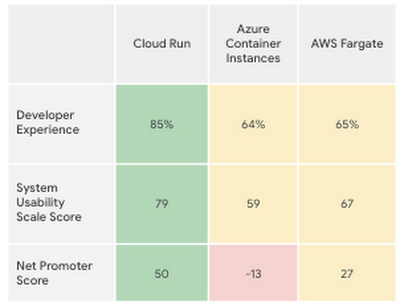
Taken together, all these new features make the Cloud Run developer experience far easier than its competitors’, according to a recent report by User Research International.
Versatility
Next-generation serverless is also about versatility. It supports a wider variety of applications and caters to enterprise requirements. Functions and web apps of course, but also heavyweight applications, and in the fullness of time, also brownfield and third-party containerized apps. This versatility is enabled by the container primitive, which removes restrictions on languages, run times, and hardware.
Being able to run a greater variety of apps on our serverless stack means you can optimize for predictable usage. Today, we announced new spend-based committed use discounts for Cloud Run. Enterprises with stable, steady-state, and predictable usage can now purchase committed use contracts directly in the billing UI. There are no upfront payments, so these discounts are a perfect way to reduce your spend by as much as 17%. RELATED ARTICLEMaximize your Cloud Run investments with new committed use discountsCommitted use discounts in Cloud Run enable predictable costs—and a substantial discount!
Another way we provide versatility is with support for WebSockets and gRPC in Cloud Run. With these new additions, you get the benefits of serverless infrastructure to build responsive, high-performance applications. We also added the use of min instances with Cloud Run. This feature allows you to cut cold-start times and run latency-sensitive applications on Cloud Run! At the same time, you can still scale to zero, or keep a minimum amount of compute available, for example when running brownfield Java applications.
Built-in DevOps
Serverless doesn’t just make it faster for developers to set up their apps—it also helps once the application is up and running, taking a big management load off of operations teams. Notably, serverless systems take care of “scaling” an application up or down. That means that if your application suddenly starts fielding a lot of traffic, the serverless platform automatically spins up more resources to handle the load. No more dreaded timeouts, wheels or hourglasses—or work for your operations team. Likewise, as soon as demand goes down, the platform takes care of decommissioning resources, i.e., scaling down, so that you’re not paying for resources that you no longer need. Want to run your service globally with low latency, without an operations team, and zero stranded costs? Cloud Run takes care of global load balancing and autoscaling to zero for you in every Google Cloud region.
Further, features like support for gradual rollouts and rollbacks allow developers to experiment and test ideas quickly, as well as sophisticated traffic management in Cloud Run. Likewise, Cloud Run provides access to distributed tracing with no setup or configuration, allowing developers to find performance bottlenecks in production.
Next up: serverless security
As part of DevOps best practices, we build in security for your serverless applications at every layer: deployment time, runtime and networking. For example, built-in vulnerability scanning ensures you only deploy artifacts you trust.
Today, we are announcing Cloud Run support for Google Secret Manager and customer-managed encryption keys (CMEK), making it easy to protect data at rest and store sensitive data. We’re also integrating Cloud Run with Binary Authorization, which lets you enforce specific policies to make sure only verified images make it to production. And finally, we added a new integration with Identity-Aware Proxy, support for VPC-SC, and egress controls that you can use to enforce a security perimeter, limiting both who can access specific services and what resources can be accessed when these services run in production. You can read more about these security enhancements here. RELATED ARTICLE4 new features to secure your Cloud Run servicesWe’re improving the security of your Cloud Run environment with things like support for Secret Manager and Binary Authorization.
In summary, the next generation of serverless combines the best of serverless with containers to run a broad spectrum of apps, with no language, networking or regional restrictions. The next generation of serverless will help developers build the modern applications of tomorrow—applications that adapt easily to change, scale as needed, respond to the needs of their customers faster and more efficiently, all while giving developers the best developer experience. Learn more by attending The Power of Serverless, a two-hour virtual event where we’ll lay out our vision for serverless compute, and where serverless subject matter experts will present on in-depth serverless development topics. Hope to see you there!
Want to learn even more about serverless and cloud-native application development? Check out the upcoming Modern App Dev & Delivery workshop, and our Ask the Experts roundtable.
Wunderkind Leverages Google Cloud to Address the Growing Needs of its Customer Base

5324
Of your peers have already read this article.
1:30 Minutes
The most insightful time you'll spend today!
Editor’s note: We’re hearing here how martech provider Wunderkind easily met the scaling demands of their growing customer base on multiple use cases with Cloud Bigtable and other Google Cloud data solutions.
Wunderkind is a performance marketing channel and we mostly have two kinds of customers: online retailers, and publishers like Gizmodo Media Group, Reader’s Digest, The New York Post and more. We help retailers boost their e-commerce revenue through real-time messaging solutions designed for email, SMS, onsite, and advertising. Brands want to provide a one-to-one experience to more of their customers, and we use our extensive history with best practices in email marketing and technology to help brands reach more customers through targeted messaging and personalized shopping experiences. With publishers, it’s a different value proposition, we use the same platform to provide a non disruptive and personalized ad experience for their website. For example, if you are on their site and then you left, we might show an ad tailored to you when you come back later – depending on the campaign.
After running into limitations with our legacy database system, we turned to Cloud Bigtable and Google Cloud, which helped us be more flexible and easily scale for high traffic demand – which can be a stable 40,000 requests per second, and meet the needs of our growing number of data use cases.
Three different databases power our core product
In our core offering, companies send us user events from their websites. We store these events and later decide (using our secret sauce) if and how to reach out to those users on behalf of our customers. Because many of our customers are retailers, Black Friday and Cyber Monday are big traffic days for us as. On such days, we can get 31 billion events, sometimes as many as 200K events per second. We show 1.6 billion impressions that have seen close to 1 billion pageviews. And at the end of all this, we securely send about 100 million emails. We noticed the same thing for election time; traffic reached the same high volume. We need scalable solutions to support this level of traffic as well as the elasticity to let us pay only for what we use, and that’s where Google Cloud comes in.
So how does this work? Our externally facing APIs, which are running on Google Kubernetes Engine, receive those user events—up to hundreds of thousand per second. All the components in our architecture need to be able to handle this demand. So from our APIs, those events go to Pub/Sub, Dataflow and from there they are written to Bigtable and BigQuery, Google Cloud’s serverless, and highly scalable data warehouse. This business user activity data underpins almost all our products. Events can be things like product views or additions to shopping carts. When we store this data in Bigtable, we use a combination of email address and the customer ID as the Bigtable key and we record the event details in that record.
What do we do with this information next? It’s important to mention that we also mark the last time we received an event about a user in Memorystore for Redis, Google Cloud’s fully managed Redis service. This is important because we have another service that is periodically checking Memorystore for users that have not been active for a campaign-specific period of time (it can be 30 minutes, for example), then deciding whether to reach out to them.
How we decide when we reach out is an intelligent part of our product offering, based on the channel, message, product, etc. When we do reach out, we use Memorystore for Redis as a rate limiter or token bucket. In order not to overwhelm the email or texting providers we send API requests to, we throttle those requests using Memorystore. (We prefer to preemptively throttle the outgoing API requests as opposed to handling errors later.)
When we do reach out, often we will need details for a specific product—let’s say if the website belongs to a retailer. We usually get that information from the retailer through various channels and we store product information in Cloud SQL for MySQL. We pull that information when we need to send an email with product information, and we use Memorystore for Redis to cache that information, since many of the products are repeatedly called. Our Cloud SQL instance has 16 vCPUs, 60GBs of memory and 0.5TB of disk space and when we perform those product information updates, we have about a thousand write transactions per second. We are also in the process of migrating some tables from a self managed MySQL instance, and we keep those tables synchronized with Cloud SQL using Datastream.
Our user history database was originally stored in AWS DynamoDB, but we were running into problems with how they structured the data, and we’d often get hot shards but with no way to determine how or why. That led to our decision to migrate to Bigtable. We set up the migration first by writing the data to two locations from Pub/Sub, performed some backfill of data until that was up and running, and then started working on the reading. We performed this over a few short months, then switched everything to Bigtable.
So, as mentioned, we are using Bigtable for multiple databases. The instance that stores our user events has about 30 TB with about 50 nodes.
Profile management
A second use case for Bigtable is for user profile management, where we track, for example, user attributes based on subscription activity, whether they’ve opted in or out of various lists, and where we apply list-specific rules that determine which targeted emails we send out to users.
Our very own URL shortener
Our third use case for Bigtable is our URL shortener. When our customers build out campaigns and choose a URL, we append tracking information to the query string of the URLs and they become long. Many times, we are sending them via SMS texts, so the URLs need to be short. We originally used an external solution, but made the determination that they couldn’t support our future demands. Our calls tend to be very bursty in nature, and we needed to plan for a future state of supporting higher throughput. We use a separate table in Bigtable for this shortened URL. We generate the short slug that is 62 bit-encoded and use it as the rowkey. We use the long slug as a Protobuf-encoded data structure in one of the row cells and we also have a cell for counting how many times it was used. We use Bigtable’s atomic increment to increase that counter to track how many times the short slug was used.
When the user receives a text message on their phone, they click the short URL, which goes through to us, and we expand it to the long slug (from Bigtable) and redirect them to the appropriate site location. Obviously, for the URL shortener use case, we need to make the conversion very quickly. Bigtable’s low latency helps us meet that demand and we can scale it up to meet higher throughput demands.
Meeting the future with Google Cloud
Our business has grown considerably, and as we keep signing up new clients, we need to scale up accordingly, and Bigtable has met our scaling demands easily. With Bigtable and other Google Cloud products powering our data architecture, we’ve met the demand of incredibly high traffic days in the last year, including Black Friday and Cyber Monday. Traffic for these events went much higher than expected, and Bigtable was there, helping us easily scale on demand.
We are working on leveraging a more cloud native approach and using Google Cloud managed services like GKE, Dataflow, pub/sub, Cloud SQL , Memorystore, BigQuery and more. Google has those 1st party products and we don’t see the value in rolling out or self managing such solutions ourselves..
Thanks to Google Cloud, we now have reliable and flexible data solutions that will help us meet the needs of our growing customer base, and delight their users with fast, responsive, personalized shopping messaging and experiences.
Learn more about Wunderkind and Cloud Bigtable. Or check out our recent blog exploring the differences between Bigtable and BigQuery.
Arab Bank Accelerates its App Development and Testing Using Apigee and Anthos

6154
Of your peers have already read this article.
3:30 Minutes
The most insightful time you'll spend today!
Founded in 1930 and headquartered in Jordan, Arab Bank is one of the oldest banks in the Middle East. Operating out of 28 countries, we’ve earned our customers’ trust with a prudent approach to operations and respect for the cultures and customs in the region.
With a few exceptions where cloud providers have hosted their datacenter in a Middle Eastern or North African country, the banking sector, in general, in the region has been slow to adopt cloud technology for a number of reasons, including concern about data security, maturity and security controls of cloud services (PaaS and SaaS), and regulations in place. But on the other hand, we saw the opportunity to accelerate our development and testing using the cloud, as well as to partner with the fintech community and digital service providers to integrate their solution in the banking ecosystem. We needed more flexibility to connect with the outside world, and a more open architecture to help us drive our internal innovation at a faster rate with the help of the fintech industry. By collaborating with Google Cloud, we reached those goals and accelerated app development and testing through products like Apigee and Anthos. We’re now offering innovative apps and services to our customers and employees that leverage new technological capabilities to give more agility and flexibility, and to optimize our workloads.
Embracing the cloud in a regulated industry
To get started with the cloud, we needed to create internal awareness about cloud technology, the API layer, containers and their benefits amongst our leaders and staff. Google helped us educate and get buy-in from key functions by organizing open technology demonstration sessions and discussion panels. When considering potential cloud providers we had four decision criteria: maturity of security controls, ease of use, cost, and scalability / agility for new deployments and continuous innovation. This last factor was critical, and we were impressed by Google Cloud’s innovation roadmap, both via direct conversations and at Google’s Next conference, where we met a lot of people passionate about technology, innovation and building something new.
Going back to our journey, given the above-mentioned regional limitations, we started to develop a hybrid cloud approach. This helped us continue to operate on-premises for a number of services in production, particularly those that have personally identifiable information (PII) or other sensitive data attached, and to leverage the cloud for development, testing and production workloads that don’t contain customer data.
In the short term, we didn’t anticipate that our many jurisdictions would allow data to be transported to other countries. But cloud tools will allow us to tokenize or anonymize customer data while maintaining customer data on-premises. This applies to many digital journeys such as customer onboarding, credit facility online applications, or marketplace navigation. In the coming years, we predict our API integration with partners will accelerate and enrich the overall digital value proposition of our business segments, namely consumer banking, small and medium-size businesses and large corporate and institutional clients.
Building connections and cornerstones in the cloud
The first move in our digital transformation was to implement Apigee, Google Cloud’s API management platform, to connect to the world’s digital banking ecosystem. Apigee provides the security, sharing, mediation policies, and developer portal capabilities for us to successfully meet Open Banking standards while focusing on innovation.
On the back of the Apigee implementation, we created an accelerator program to incubate Fintech ideas that can, in turn, integrate into our digital platforms and be offered to our customers. We also developed various banking APIs, all designed and documented in accordance with PSD2 and Open Banking regulations, and made them available to our partners. These APIs exposed on our API development portal offer the needed code structure for fintech companies to design creative solutions around them.
Next, we adopted Anthos, Google Cloud’s managed application platform. Anthos has become a cornerstone of our operations because it works across hybrid cloud, offering integration of microservice containers and fueling collaborative opportunities with external parties. Our current Anthos infrastructure includes several hundreds of microservices now running on containers in Google Kubernetes Engine (GKE) and on-premises. We now use the cloud for collaboration, development and testing, but not for production, which is done on-premises.
Along the way, Google Cloud’s Professional Services Organization (PSO) helped us through the entire cloud setup process, and with the adoption of Anthos. We originally built on the cloud tools through an iterative process, learning from our successes and errors along the way. Now that we have a better sense of how Anthos operates, we’re building a fresh infrastructure atop a sound, stable, and resilient foundation that will let us scale easily as we work to transform Arab Bank into a digital-first enterprise, that is our ambition.
Currently products running on Anthos include customer acquisition and onboarding via mobile apps, and our Arabi-Pay app, which allows customers to instantly pay each other via WhatsApp or other messaging platforms. Leveraging Anthos, our instant loan service for Arab Bank salaried employees can grant and disburse loans up to $7,000 in less than seven minutes.
In addition, we’ve built a number of digital journeys for our Small and Medium Enterprise (SME) customers, such as our SME client digital onboarding process and paperless SME lending platform.
While some may think that digital adoption in this part of the world can be slow, as customer contact remains anchored in our customs, the recent COVID-19 pandemic has accelerated the adoption of digital banking services and electronic payments, inspiring more confidence to buy and pay online. Thanks to our rich and user-friendly banking app that relies on Apigee and Anthos for critical customer journeys, over 90% of new-to-bank customers are using our mobile apps. Within the next 18 months, we predict that number will be closer to 100%.
Of course, with higher customer adoption comes the challenge of potential service interruptions. A single moment of downtime can be highly visible to many digital customers. But Google Cloud’s Anthos and Apigee give us the flexibility to resume processes at a fast rate, so any interruptions are almost invisible to our customers. In fact, when the COVID-19 pandemic hit, though our branches could be open only for limited hours each day, our consumer clients in particular were able to take advantage of our digital services in a very self-sufficient manner. Being well positioned with Google Cloud, we could also keep our internal teams and external partners connected and productive. Without Google Cloud, continuing the digital transformation of the bank at the pace we wanted would have been a big challenge.
Collaborating across borders and time zones
With Google Cloud, our ability to collaborate and partner has transformed significantly. We operate 24/7 now because our developers are scattered across multiple geographies and different time zones. Because testing and deployment can run around the clock, including on weekends, we currently deploy a new digital journey in a few weeks, faster than ever before. This has given our organization a spirited mindset that prioritizes innovation, and raised the bar in terms of our operating model.
Another consideration about Google Cloud tools is the elimination of inefficient processes typically seen in a software development lifecycle. We now build in a completely agile manner, from design squads until deployment in production. Compared to where we were two years ago, when we had an annual maximum of two systems releases in production, we now have close to monthly releases of our digital packages. In addition, we also supplement those monthly releases with additional ad-hoc releases and fixes in between. As a result, we have removed internal silos and improved tremendously the collaboration between the product and sales teams, operations, IT Dev Factory and Infrastructure, as well as our supporting functions.
Through the agile process facilitated by APIs, we introduced Design Thinking workshops involving external customers and prospects early on to understand their true pain points better and emotions during the existing journeys and how to make new digital journeys frictionless. As a result, the relevance of our products for various customer personas has improved tremendously.
Transcending banking
With Google Cloud, we can offer our customers so much more than just banking. We’ve become more digitally relevant to their lives. For example, we recently launched a mortgage app that helps customers all the way from home selection through mortgage negotiations and closing, and even to getting the home decorated. It’s an end-to-end journey in which API integration with key regional players was a cornerstone to our success.
For other digital products, we have an extensive roadmap of lifestyle-based solutions relevant to each segment and age group. We’ve only scratched the surface of the services we can provide, and we see the cloud as the future for everything we want to do.
Read more about Google Cloud’s Open Banking solution to learn how you can simplify and accelerate the process of delivering open banking as required by PSD2. You can also view our video on Open Banking, powered by Apigee API Management.
Memorystore for Redis Read Replicas to Scale App Read Requests by 6X

5504
Of your peers have already read this article.
2:00 Minutes
The most insightful time you'll spend today!
Modern applications need to process large-scale data at millisecond latency to provide experiences like instant gaming leaderboards, fast analysis of streaming data from millions of IoT sensors, or real-time threat detection of malicious websites. In-memory datastores are a critical component to deliver the scale, performance, and availability required by these modern applications.
Memorystore makes it easy for developers building applications on Google Cloud to leverage the speed and powerful capabilities of the most loved in-memory store: Redis. Memorystore for Redis standard tier instances are a popular choice for applications requiring a highly available Redis instance. Standard tier provides a failover replica across zones for redundancy and provides fast failover with a 99.9% SLA. However, in some cases, your applications will require more read throughput from a standard tier instance. One of the common patterns customers use to scale read queries in Redis is leveraging read replicas.
Introducing Memorystore for Redis Read Replicas
Today we are excited to announce the public preview of Memorystore for Redis Read Replicas, which allows you to seamlessly scale your application’s read requests by 6X with the click of a button.
With read replicas, you can easily add up to five replicas and leverage the read endpoint to automatically load balance read queries across all the available replicas, increasing read performance linearly with each replica added. Additionally, Memorystore’s support for Redis 6 introduced multi-thread I/O, increasing performance significantly for M3 and higher configurations. Combined, you can achieve read requests of more than a million requests per second.
You will benefit from this new functionality in several ways. You will be able to scale on demand with up to five read replicas and use read endpoint with any redis client to easily load balance read queries across multiple replicas. This new functionality will also improve availability with automatic distribution of replicas across multiple zones. With read replicas, you will also be able to minimize application downtime with fast failover to the replica with the least replication lag. In the future, Memorystore will also easily enable read replicas on existing standard tier instances to increase read throughput.
You can learn more about how to configure and use read replicas in the Read Replicas Overview.
Improving performance with Read Replicas and Redis 6
With the launch of read replicas, you can easily increase the read throughput of a Memorystore instance. You can further enhance the read performance by leveraging Redis version 6 along with read replicas.
To understand why combining read replicas and Redis 6 can significantly improve your application’s read performance, let’s look at the various Memorystore configurations that you can use with your applications today. Memorystore Basic and Standard offerings provide different capacity tiers. The capacity tier determines the single node performance of a basic and standard tier instance.
The table below outlines the configuration of the various capacity tiers:
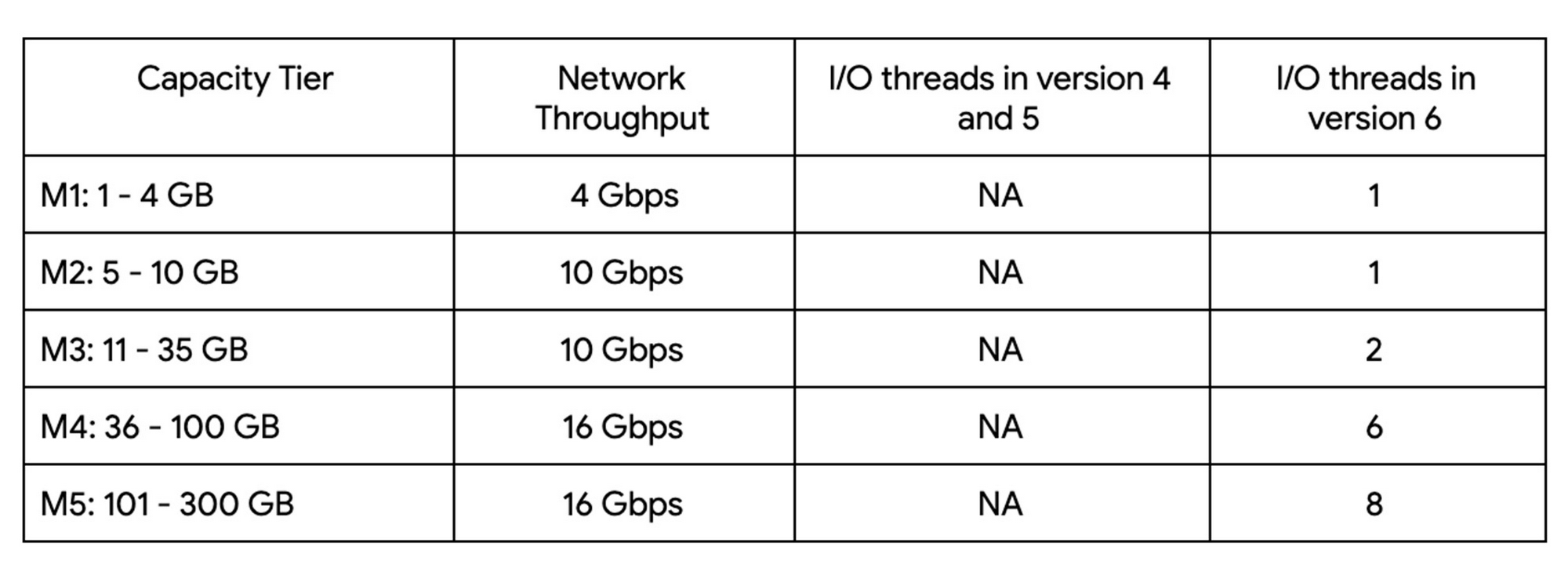
Up until version 5, Redis processed commands using a single thread. The processing involved reading the request, parsing the request, processing the request, and writing the response back to the socket. This approach means that all of the processing, which includes writing the response, was sequentially processed by a single vCPU regardless of the number of vCPUs available in the instance.
Redis 6 introduced I\O threading which allows writing the response using parallel threads. This functionality enables Redis 6 to more effectively leverage available vCPUs, thereby increasing the overall throughput compared to lower versions. Memorystore for Redis version 6 leverages I\O threading and automatically configures the optimal number of I\O threads to achieve the best possible performance for the various capacity tiers. We have also improved the overall network throughput for all redis versions by leveraging improvements in the Google Cloud infrastructure. Together these improvements deliver significant performance improvements and come at no additional cost to you.
So what can you expect from using Redis 6? As outlined in the table, Redis version 5 and lower uses a single thread to process the write requests for all tiers while Redis 6 uses a larger number of I\O threads at higher capacity tiers which provides substantially incremental throughput for higher capacity tiers.
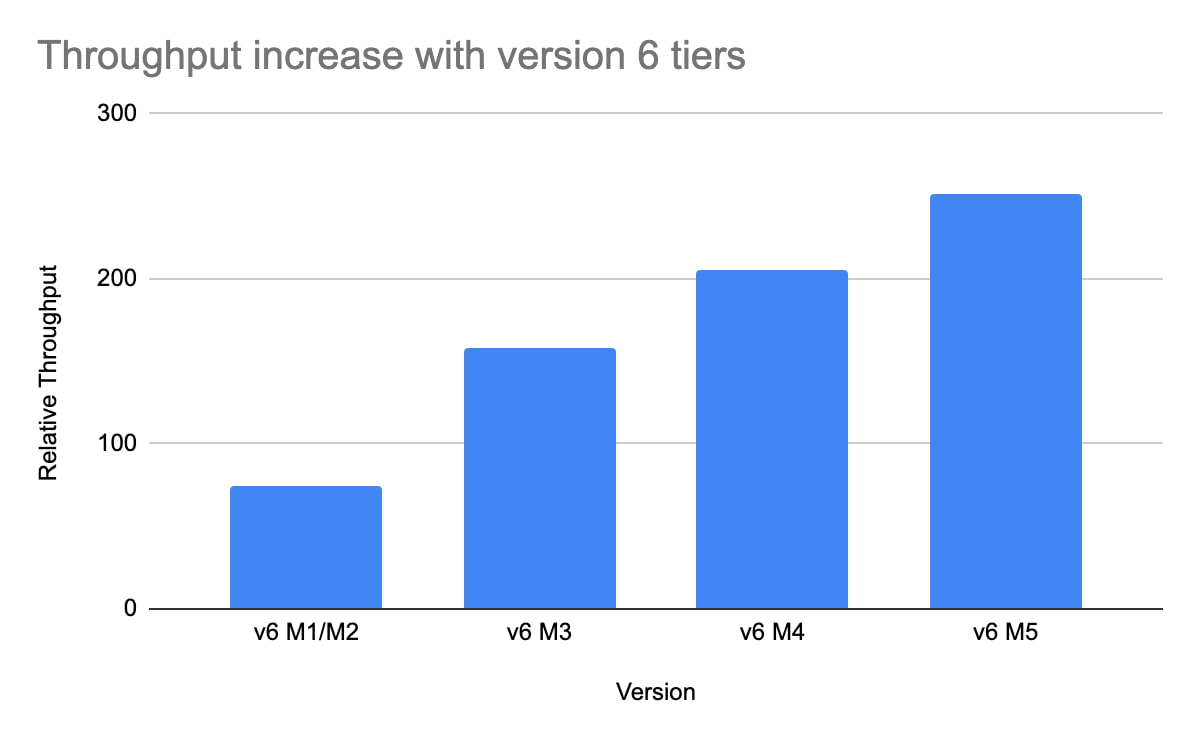
For example, using a Redis 6 standard tier instance with a capacity of 101 GB (M5), we have observed up to a 200% improvement in read/write performance compared to version 5, though the actual value you’ll see is dependent on your workload. You can get the benefits of Redis 6 by upgrading an existing instance or by deploying a new instance.
By enabling read replicas on an instance using Redis 6, you can further improve the read performance. Read throughput scales linearly with the number of replicas so you can increase your read queries on an instance by up to 500% using five read replicas. By combining Redis 6 and read replicas, you can see a 10X increase in read performance compared to a version 5 standard tier instance with no read replicas.
We are excited about the launch of read replicas but this is just one step in our journey to deliver the scale you need at the best price-performance. You can learn more about read replicas pricing on our Memorystore pricing page and get started using the Read Replicas Overview.
Deploying Ray on GKE: Distributed Computing Made Easy

956
Of your peers have already read this article.
3:30 Minutes
The most insightful time you'll spend today!
The rapidly evolving landscape of distributed computing demands efficient and scalable frameworks. Ray.io is an open-source framework to easily scale up Python applications across multiple nodes in a cluster. Ray provides a simple API for building distributed, parallelized applications, especially for deep learning applications.
Google Kubernetes Engine (GKE) is a managed container orchestration service that makes it easy to deploy and manage containerized applications. GKE provides a scalable and flexible platform that abstracts away the underlying infrastructure.
KubeRay enables Ray to be deployed on Kubernetes. You get the wonderful Pythonic unified experience delivered by Ray, and the enterprise reliability and scale of GKE managed Kubernetes. Together, they offer scalability, fault tolerance, and ease of use for building, deploying, and managing distributed applications.
In this blog post, we share a solution template to get you started easily with Ray on GKE. We discuss the components of the solution and showcase an inference example using Ray Serve for Stable Diffusion.
Overview of the Solution
In this solution template we use KubeRay, an OSS solution for managing Ray clusters on Kubernetes, as the operator for provisioning our workloads. Follow the step-by-step instructions in the README file to get started. The solution contains two groups of resources: platform-level and user-level.
Platform-level resources are expected to be deployed once for each development environment by the system administrator. These include the common infrastructure and GCP service integrations that are shared by all users.
- GKE cluster and node pool. Configurations can be changed in the main.tf file. This module deploys a GKE cluster with a GPU node pool, including required Nvidia drivers for GPUs. You can replace these with other machine types.
- Kubernetes system namespace and service accounts, along with the necessary IAM policy bindings. This allows the platform administrator to provide fine-grained user access control and quota policies for Ray cluster resources.
- KubeRay operator. The operator is responsible for watching for changes in KubeRay resources and reconciling the state of the KubeRay clusters.
- Logging. The `logging_config` section enables logs from system components and workloads to write logs to Cloud logging.
- Monitoring. The `monitoring_config` section enables Managed Prometheus integration. This allows the deployment to automatically scrape system-level metrics and writes them to the managed metrics service.
- Workload identity. This enables your workloads to authenticate with other GCP services using Google IAM service accounts.
User-level resources are expected to be deployed once by each user in the development environment.
- KubeRay cluster. This is the actual Ray cluster that we will be used for your workloads. It is configured to use a Workload Identity pool and a IAM-binded service account that provides fine-grained access to GCP services. You can customize the Ray cluster settings by editing the kuberay-values.yaml file.
- Logging. The solution adds a side car container deployed alongside each KubeRay worker node. This uses fluentbit to forward Ray logs from the head node to Cloud logging. You can edit the fluentbit-config file to change how the logging container filters and flushes logs.
- Monitoring. This module provides a PodMonitoring resource that scrapes metrics from the user’s Ray cluster and uploads data points to Google Managed Prometheus. An optional installation for Grafana dashboard is included and can be accessed through a web browser.
- JupyterHub server. This module installs a JupyterHub notebook server in the user namespace, enabling users to interact directly with their Ray clusters.
Run a Workload on Your Ray Cluster
Let’s try running the provided example with Ray Serve to deploy Stable Diffusion. This example was originally taken from the Ray Serve documentations here. To open the example in Jupyter notebook, go to the external IP for proxy-public in your browser (instructions to get the IP). And then click on File -> Open from URL, and input the raw URL of the notebook to open it.
Since the notebook runs in the same Kubernetes cluster as the Ray cluster, it is able to talk directly to the latter using its cluster-internal service endpoint – thus there is no need to expose the Ray cluster to public internet traffic. For production workloads, you should secure your endpoints with GCP account credentials. Google Cloud Identity Aware Proxy (IAP) can be used to enable fine-grained access control to user resources, such as our Ray cluster, to protect your GCP resources from unnecessary exposure. A full tutorial on how to enable IAP on your GKE cluster can be found here.
The notebook contains code for deploying a pre-trained model to a live endpoint. The last cell makes a call to the created service endpoint:prompt = “a cute cat is dancing on the grass.”input = “%20″.join(prompt.split(” “))resp = requests.get(f”http://example-cluster-kuberay-head-svc:8000/imagine?prompt={input}”)with open(“output.png”, ‘wb’) as f: f.write(resp.content)
Executing the notebook will generate a file with a unique picture of a cute cat. Here is an example we got:

Congratulations! You have now deployed a large model for image generation on GKE.
Logging and Monitoring
As mentioned earlier, this solution enables logging and monitoring automatically. Let’s find those logs.
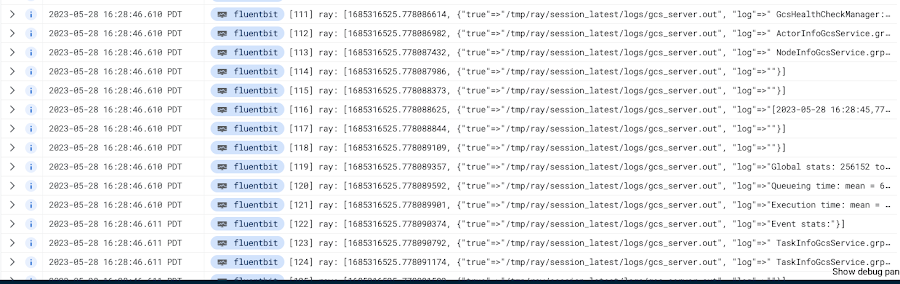
In your Cloud Console, open up Logging -> Log Explorer. In the query text box, enter the following:resource.type=”k8s_container”resource.labels.cluster_name=%CLUSTER_NAME%resource.labels.pod_name=%RAY_HEAD_POD_NAME%resource.labels.container_name=”fluentbit”
You should see the Ray logs from your cluster forwarded here.
To see your monitoring metrics, go to Metrics Explorer in the Cloud Console. Under the menu for “Target”, select “Prometheus Target” and then “Ray”. Select the metric that you want to see, for instance `prometheus/ray_component_cpu_percentage/gauge`:
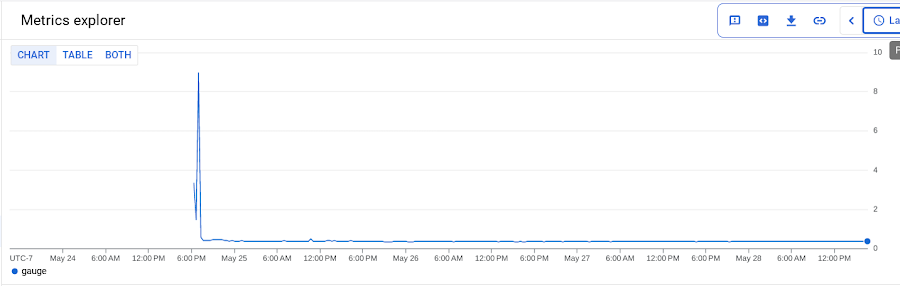
The deployment also comes with a Grafana deployment. Follow this guide to open it up and view your Ray cluster’s metrics.
Conclusion
The combination of Ray and GKE offers a simple and powerful solution for building, deploying, and managing distributed applications. Ray’s simplicity makes it an attractive choice for data and model developers while GKE’s scalability and reliability is the defacto choice for enterprise platforms. The solution template presented in this blog post offers a convenient way to get started quickly with KubeRay, the recommended approach to deploy Ray on GKE.
If you have any questions for building Ray on Kubernetes and GKE, you can contact us directly at ray-on-gke@google.com or comment in GitHub. Learn more about building AI Platforms with GKE by visiting our User Guide.
Transform ‘Dark Data’ from Documents with Document AI, Cloud Functions and Workflows

8183
Of your peers have already read this article.
2:00 Minutes
The most insightful time you'll spend today!
At enterprises across industries, documents are at the center of core business processes. Documents store a treasure trove of valuable information whether it’s a company’s invoices, HR documents, tax forms and much more. However, the unstructured nature of documents make them difficult to work with as a data source. We call this “dark data” or unstructured data that businesses collect, process and store but do not utilize for purposes such as analytics, monetization, etc. These documents in pdf or image formats, often trigger complex processes that have historically relied on fragmented technology and manual steps. With compute solutions on Google Cloud and Document AI, you can create seamless integrations and easy to use applications for your users. Document AI is a platform and a family of solutions that help businesses to transform documents into structured data backed by machine learning. In this blog post we’ll walk you through how to use Serverless technology to process documents with Cloud Functions, and with workflows of business processes orchestrating microservices, API calls, and functions, thanks to Workflows.
At Cloud Next 2021, we presented how to build easy AI-powered applications with Google Cloud. We introduced a sample application for handling incoming expense reports, analyzing expense receipts with Procurement Document AI, a DocAI solution for automating procurement data capture from forms including invoices, utility statements and more. Then organizing the logic of a report approval process with Workflows, and used Cloud Functions as glue to invoke the workflow, and do analysis of the parsed document.

We also open sourced the code on this Github repository, if you’re interested in learning more about this application.

In the above diagram, there are two user journeys: the employee submitting an expense report where multiple receipts are processed at once, and the manager validating or rejecting the expense report.
First, the employee goes to the website, powered by Vue.js for the frontend progressive JavaScript framework and Shoelace for the library of web components. The website is hosted via Firebase Hosting. The frontend invokes an HTTP function that triggers the execution of our business workflow, defined using the Workflows YAML syntax.
Workflows is able to handle long-running operations without any additional code required, in our case we are asynchronously processing a set receipt files. Here, the Document AI connector directly calls the batch processing endpoint for service. This API returns a long-running operation: if you poll the API, the operation state will be “RUNNING” until it has reached a “SUCCEEDED” or “FAILED” state. You would have to wait for its completion. However, Workflows’ connectors handle such long-running operations, without you having to poll the API multiple times till the state changes. Here’s how we call the batch processing operation of the Document AI connector:
- invoke_document_ai:call: googleapis.documentai.v1.projects.locations.processors.batchProcessargs:name: ${"projects/" + project + "/locations/eu/processors/" + processorId}location: "eu"body:inputDocuments:gcsPrefix:gcsUriPrefix: ${bucket_input + report_id}documentOutputConfig:gcsOutputConfig:gcsUri: ${bucket_output + report_id}skipHumanReview: trueresult: document_ai_response
Machine learning uses state of the art Vision and Natural Language Processing models to intelligently extract schematized data from documents with Document AI. As a developer, you don’t have to figure out how to fine tune or reframe the receipt pictures, or how to find the relevant field and information in the receipt. It’s Document AI’s job to help you here: it will return a JSON document whose fields are: line_item, currency, supplier_name, total_amount, etc. Document AI is capable of understanding standardized papers and forms, including invoices, lending documents, pay slips, driver licenses, and more.
A cloud function retrieves all the relevant fields of the receipts, and makes its own tallies, before submitting the expense report for approval to the manager. Another useful feature of Workflows is put to good use: Callbacks, that we introduced last year. In the workflow definition we create a callback endpoint, and the workflow execution will wait for the callback to be called to continue its flow, thanks to those two instructions:
- create_callback:call: events.create_callback_endpointargs:http_callback_method: "POST"result: callback_details...- await_callback:try:call: events.await_callbackargs:callback: ${callback_details}timeout: 3600result: callback_requestexcept:as: esteps:- update_status_to_error:...
In this example application, we combined the intelligent capabilities of Document AI to transform complex image documents into usable structured data, with Cloud Functions for data transformation, process triggering, and callback handling logic, and Workflows enabled us to orchestrate the underlying business process and its service call logic.
Going further
If you’re looking to make sense of your documents, turning dark data into structured information, be sure to check out what Document AI offers. You can also get your hands on a codelab to get started quickly, in which you’ll get a chance at processing handwritten forms. If you want to explore Workflows, quickstarts are available to guide you through your first steps, and likewise, another codelab explores the basics of Workflows. As mentioned earlier, for a concrete example, the source code of our smart expense application is available on Github. Don’t hesitate to reach out to us at @glaforge and @asrivas_dev to discuss smart scalable apps with us.
More Relevant Stories for Your Company

How APIs Help National Bank of Pakistan Modernize the Banking Experience
NBP, Pakistan’s largest government-owned bank, serves private and commercial customers and also acts as the government treasury bank. This means that it handles all government transactions—including disbursements and cash collection. In the past, every government transaction had to be handled physically through the NBP branch network. But in a populous




Indian Retailer Figures Optimizes Hyperlocal Delivery to Increase Customer Experience
Anyone who follows the Indian e-commerce scene knows that one of the largest challenges these companies face is hyperlocal delivery. That was a problem facing Wellness Forever, a retail chain of pharmacies with 150-plus stores across India. “Exactly a year ago, we started our journey of hyperlocal deliveries. This optimization

Reactive Programming on Google Maps Platform: Watch Video to Learn
The Google Maps Platform Android SDK supports extensions for reactive programming, which helps you write code to handle asynchronous operations. Write reactive and responsive mapping applications with Google Maps Platform In mobile apps, asynchronous events can happen at any point in time: user touch events, waiting for network calls to complete, or

Application Modernization Made Easy
Modernizing apps on the cloud isn’t an “all or nothing” decision. Businesses want the option to modernize on-premises or choose multi-cloud solutions that meet their needs. That’s why we created a new solution for running apps anywhere – simply, flexibly, and securely. Embracing open standards, Anthos lets you run your applications, unmodified,
