





How Recommendation AI Helps Retailers Optimize Click-through and Conversion Rates

7076
Of your peers have already read this article.
3:00 Minutes
The most insightful time you'll spend today!
Time to go outside again, I guess. I’ll need a sun hat. Sunscreen. Maybe some new sandals? What else?
With the Recommendations AI service, I might be reminded to grab a reusable water bottle and a swimsuit. Or some after-sun aloe lotion. Good thing, cause I’ll need it.

Recommendations AI is a solution that uses machine learning to bring product recommendations to their shoppers across any catalog or client list. This service is part of our full suite of Retail solutions. When you integrate with the Retail API, you get the benefit of Google’s Product Discovery. Integrating once to reap the benefits over and over. Recommendations is the starting point, and you can easily extend into Retail Search and Vision Product Search in the upcoming future.
The Recommendations solution is fully managed, global-scale and powered by deep learning, so you can focus on a great shopping experience and let someone else worry about the infrastructure.
Compared to baseline recommendation systems used by customers, Recommendations AI showed double digit uplift in conversion and clickthrough rates in A/B experiments controlled by the customers. You can optimize for click-through, conversion or session revenue, and fine tune the models to make sure you omit out-of-stock items or duplicates, for example.

So how does it work, and how do you get started? Read on, and we’ll walk you through the pipeline, starting with the data you already have to placement in your online store.
Formula: Data -> Model -> Placement
You start with your catalog, the list of all the things (postcards, movies, pie recipes) that you want to show your customers. Then you ingest your PII-redacted user events -this is the historic event data like home page views, add to cart events and more along with real time user events. This user event is joined with the product catalog and items that allows us to construct the sequence of shoppers’ activity, thus being able to predict what the shopper has a high propensity to purchase next. The user events can come from both online activity across devices or offline store purchases
The recommendation model will return a list of products, which are the recommendations. The brains of the operation, if you will. This model is trained using all the data that you ingest, using the latest neural network models and techniques that Google has built expertise over the years in flagship products like Youtube and News, that allows us to uncover shopper intent, so it can best predict the right recommendations to show to the right people.
Every model outputs a list of product identifiers, but where do they go? They go into placements, the spots, panels, carousels on your customer’s journey interacting with your brand that you’ve set aside to highlight recommendations. A model can send recommendations to one or more placements, but each placement only receives information from one recommendation model. Your pages will then need to render the products with the right images, text or other metadata, using the product ID that is returned by the model.
What do recommendations look like?
Let’s start by browsing our postcard-selling website, where I’ve been buying some vintage California postcards already. The recommendations algorithm has caught on to my interest, showing me other potential cards to purchase based on my history:

Put your data to work
To get started we need to bring your data into the recommendation model, so it can understand your customers, your inventory, and your sales patterns.
The model takes in the product catalog you use, and metadata about those products to better understand nuances in assortment, pricing and variables like size and style. You might already have this data stored in BigQuery or Merchant Center, and hence we provide easy integrations that you can leverage to get started even faster.
As for the user events, don’t worry if you already have systems in place to capture web and mobile activity. We make it easy to bring in your real time event logs by providing seamless integrations with Google Tag Manager, Javascript pixel, or even historic events from Cloud Storage, BigQuery or using inline API or JSON, so you can immediately train the models on this imported data. All this allows you to kickstart integrating with Recommendations AI in a matter of days.
The models then construct a sequence of activities that the user went through and joins with the products that the user engaged with. Once your data is ready to go, it takes a few days to train the model. Next onto making the data work for you.
Quickly customize your model
Setting up your own recommendations project in the console gives you the ability to choose what sort of model to train (based on what recommendations you want to generate) and your objective. Are you optimizing for click-through rate–more people click on the recommendation links or products–or for conversion rate–more people choose or buy what was suggested or revenue ?
Different models can be optimized for different optimization goals.; the GCP console explains what each one can do and how you can choose to optimize it.

Let’s unpack some of this terminology real quick.
We’ve got three model types:
- Recommended for you – Means we think these are items you’ll want to buy, based on your history; this is usually used on a home page to showcase items.
- Others you may like – Means if you’re browsing the page of a water bottle, we will recommend alternative brands of water bottles that you may like as well as a backpack, based on your engagement history.
- Frequently bought together – Means that when anyone buys sunscreen, we notice that they often also buy aloe lotion, so we will surface those items when someone adds any one of them to their cart.
And then we have three business objectives that the models optimize for:
- Click-through rate – How frequently did somebody click on a recommended item?
- Conversion rate– How frequently did somebody add a recommended item to their cart?
- Revenue per session – How much money did the recommendations generate for you?
Deliver anywhere along the journey
Now that you’re all set up in the Retail AI console, you can test out the recommendations in the console, even before you deploy to production.

You can integrate Recommendations into your frontend by calling the Predict APIt. The placements of recommendations will report data back into the dashboard and you can analyze and measure success for future iterations.
On top of that you can use the recommendations for other parts of your customer’s journey. Email promotions, storefront kiosks, display ads or follow-up notifications can include recommendations based on past activity and cart contents. The model gives you useful product recommendations for a wide variety of touchpoints and steps in the purchasing process.
More best practices, and guides, are available inside our documentation.
How to get started
Training your own models can be tedious, time-consuming, and expensive. On top of that it requires deeper data science expertise to set up. Let us do it instead!
You can see how IKEA Retail uses Recommendations AI in this recent talk and blog from the Google Cloud Retail Summit..
To get started today you’ll need to make a Cloud project and enable the Retail API, which then allows you to access all the recommendation tools in one menu. Bring in your catalog and purchasing data, define a placement or two, and you can start putting recommendations on your site in a matter of days.
5343
Of your peers have already watched this video.
31:30 Minutes
The most insightful time you'll spend today!
Enhancing Collaboration with Sheets, Python, and Google Cloud
See how you can enhance collaboration within your organization using Google Sheets. Watch to learn about a new set of tools to create custom functions that tap into the power of Python and to expose functions in a standardized fashion throughout your organization.
How to Pick a Database that is Suitable for Your Application

7047
Of your peers have already read this article.
2:30 Minutes
The most insightful time you'll spend today!
Picking the right database for your application is not easy. The choice depends heavily on your use case—transactional processing, analytical processing, in-memory database, and so on—but it also depends on other factors. This post covers the different database options available within Google Cloud across relational (SQL) and non-relational (NoSQL) databases and explains which use cases are best suited for each database option.

Relational databases
In relational databases information is stored in tables, rows and columns, which typically works best for structured data. As a result they are used for applications in which the structure of the data does not change often. SQL (Structured Query Language) is used when interacting with most relational databases. They offer ACID consistency mode for the data, which means:
- Atomic: All operations in a transaction succeed or the operation is rolled back.
- Consistent: On the completion of a transaction, the database is structurally sound.
- Isolated: Transactions do not contend with one another. Contentious access to data is moderated by the database so that transactions appear to run sequentially.
- Durable: The results of applying a transaction are permanent, even in the presence of failures.
Because of these properties, relational databases are used in applications that require high accuracy and for transactional queries such as financial and retail transactions. For example: In banking when a customer makes a funds transfer request, you want to make sure the transaction is possible and it actually happens on the most up-to-date account balance, in this case an error or resubmit request is likely fine.
There are three relational database options in Google Cloud: Cloud SQL, Cloud Spanner, and Bare Metal Solution.
Cloud SQL: Provides managed MySQL, PostgreSQL and SQL Server databases on Google Cloud. It reduces maintenance cost and automates database provisioning, storage capacity management, back ups, and out-of-the-box high availability and disaster recovery/failover. For these reasons it is best for general-purpose web frameworks, CRM, ERP, SaaS and e-commerce applications.
Cloud Spanner: Cloud Spanner is an enterprise-grade, globally-distributed, and strongly-consistent database that offers up to 99.999% availability, built specifically to combine the benefits of relational database structure with non-relational horizontal scale. It is a unique database that combines ACID transactions, SQL queries, and relational structure with the scalability that you typically associate with non-relational or NoSQL databases. As a result, Spanner is best used for applications such as gaming, payment solutions, global financial ledgers, retail banking and inventory management that require ability to scale limitlessly with strong-consistency and high-availability.
Bare Metal Solution: Provides hardware to run specialized workloads with low latency on Google Cloud. This is specifically useful if there is an Oracle database that you want to lift and shift into Google Cloud. This enables data center retirements and paves a path to modernize legacy applications.
Non-relational databases
Non-relational databases (or NoSQL databases) store compex, unstructured data in a non-tabular form such as documents. Non-relational databases are often used when large quantities of complex and diverse data need to be organized. Unlike relational databases, they perform faster because a query doesn’t have to access several tables to deliver an answer, making them ideal for storing data that may change frequently or for applications that handle many different kinds of data.
For example, an apparel store might have a database in which shirts have their own document containing all of their information, including size, brand, and color with room for adding more parameters later such as sleeve size, collars, and so on.
Qualities that make NoSQL databases fast:
- Eventual consistency: stores usually exhibit consistency at some later point (e.g., lazily at read time)
- Horizontal scaling, usually using hashed distributions
- Typically, they are optimized for a specific workload pattern (i.e., key-value, graph, wide-column)
- Typically, they don’t support cross shard transactions or flexible isolation modes.
Because of these properties, non-relational databases are used in applications that require large scale, reliability, availability, and frequent data changes.They can easily scale horizontally by adding more servers, unlike some relational databases, which scale vertically by increasing the machine size as the data grows. Although, some relations databases such as Cloud Spanner support scale-out and strict consistency.
Non-relational databases can store a variety of unstructured data such as documents, key-value, graphs, wide columns, and more. Here are your non-relational database options in Google Cloud:
- Document databases: Store information as documents (in formats such as JSON and XML). For example: Firestore
- Key-value stores: Group associated data in collections with records that are identified with unique keys for easy retrieval. Key-value stores have just enough structure to mirror the value of relational databases while still preserving the benefits of NoSQL. For example: Datastore, Bigtable, Memorystore
- In-memory database: Purpose-built database that relies primarily on memory for data storage. These are designed to attain minimal response time by eliminating the need to access disks. They are ideal for applications that require microsecond response times and can have large spikes in traffic. For example: Memorystore
- Wide-column databases: Use the tabular format but allow a wide variance in how data is named and formatted in each row, even in the same table. They have some basic structure while preserving a lot of flexibility. For example: Bigtable
- Graph databases: Use graph structures to define the relationships between stored data points; useful for identifying patterns in unstructured and semi-structured information. For example: JanusGraph
There are three non-relational databases in Google Cloud:
- Firestore: Is a serverless document database which scales on demand and acts as a backend-as-a-service. It is DBaaS that increases the speed of building applications. It is perfect for all general purpose uses cases such as ecommerce, gaming, IoT and real time dashboards. With Firestore users can interact with and collaborate on live and offline data making it great for real-time application and mobile apps.
- Cloud Bigtable: Cloud Bigtable is a sparsely populated table that can scale to billions of rows and thousands of columns, enabling you to store terabytes or even petabytes of data. It is ideal for storing very large amounts of single-keyed data with very low latency. It supports high read and write throughput at sub-millisecond latency, and it is an ideal data source for MapReduce operations. It also supports the open-source HBase API standard to easily integrate with the Apache ecosystem including HBase, Beam, Hadoop and Spark along with Google Cloud ecosystem.
- Memorystore: Memorystore is a fully managed in-memory data store service for Redis and Memcached at Google Cloud. It is best for in-memory and transient data stores and automates the complex tasks of provisioning, replication, failover, and patching so you can spend more time coding. Because it offers extremely low latency and high performance, Memorystore is great for web and mobile, gaming, leaderboard, social, chat, and news feed applications.
Conclusion
Choosing a relational or a non-relational database largely depends on the use case. Broadly, if your application requires ACID transactions and your data structure is not going to change much, select a relational database.
In Google Cloud use Cloud SQL for any general-purpose SQL database and Cloud Spanner for large-scale globally scalable, strongly consistent use cases. In general, if your data structure may change later and if scale and availability is a bigger requirement than consistency then a non-relational database is a preferable choice. Google Cloud offers Firestore, Memorystore, and Cloud Bigtable to support a variety of use cases across the document, key-value, and wide column database spectrum.
For more comparison resources on each database check out the overview. For more hands-on experience with Bigtable, check out our on-demand training here and learn about migrating databases to managed services check out this whitepaper.
https://youtube.com/watch?v=2TZXSnCTd7E%3Fenablejsapi%3D1%26
For more #GCPSketchnote, follow the GitHub repo. For similar cloud content follow me on Twitter @pvergadia and keep an eye out on thecloudgirl.dev.
5063
Of your peers have already watched this video.
2:50 Minutes
The most insightful time you'll spend today!
FedEx Ground Makes Talent Recruitment More Effective with AI
FedEx Ground is a package shipping company and is a subsidiary of FedEx. It wanted to make hiring easier, and more intuitive so that it could hire the best people.
“We need to have every advantage we can to recruit and retain talent. That’s what led us to the work with Google and its capabilities,” says Matt Tokorcheck, VP, Operations, Support and Engineering, FedEx Ground
The challenge was the narrow slotting of job roles. The openings were listed under specific headings which revolved around job types or departments–and if applicants didn’t fit or understand those categories, they didn’t apply.
Take, for example, applicants that came from the military. “Many of my fellow service members and veterans expressed difficulty in finding a job post the military because a lot of the skill sets that they’ve developed and honed over their military career aren’t as useful in the civilian world,” says David Henderson, Industrial Engineer, FedEx.
So FedEx Ground decided to work with Google Cloud’s AI-powered talent solution.
“As a job seeker when you come to our career site to search for jobs, that search is powered by Jibe and the Google Jobs API. And it really matches the keywords that a job seeker inputs with the jobs that are available at FedEx Ground, says Shailesh Bokil, MD, Talent Acquisition and Planning, Fedx Ground.
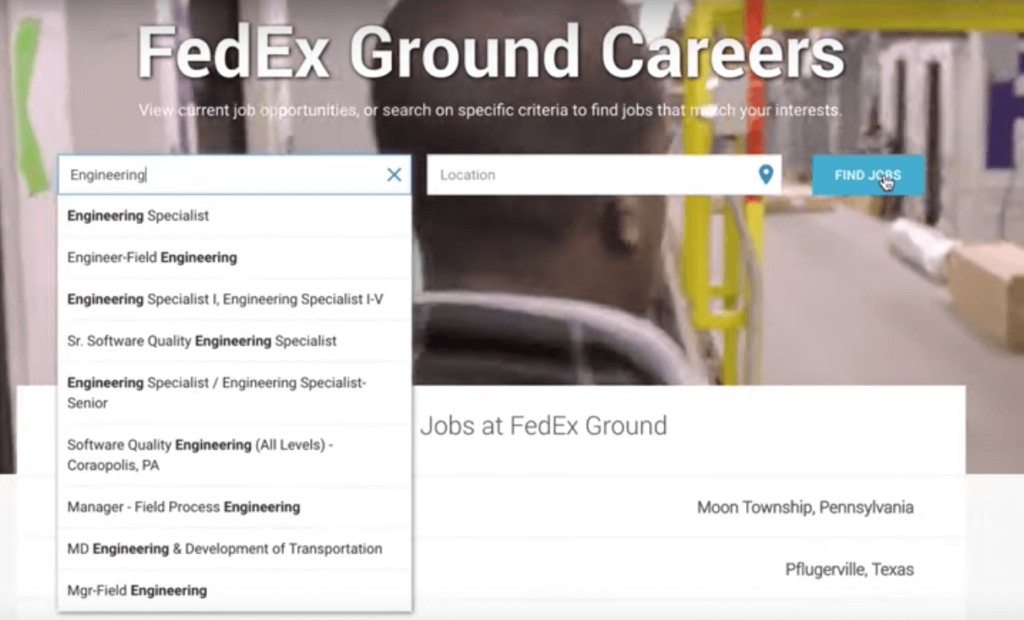
This makes job hunting a very intuitive experience for applicants.
“When I type into the search bar, I was immediately prompted to input my MOS, which is your military occupational specialty. And what it (the system) does is it takes the skills that are developed while serving in that MOS0 and matches them with skill sets that employers are looking. When I input 12A (an MOS), immediately I was getting results back for various engineer positions.
To find out more about how FedEx Ground employs AI-powered talent solution, watch the video.

3585
Of your peers have already downloaded this article
2:30 Minutes
The most insightful time you'll spend today!
After undergoing an agile transformation, ING realized it needed a standardized platform to support the work their developers were doing. “Our DevOps teams got empowered to be autonomous,” says Thijs Ebbers, Infrastructure Architect.
“It has benefits, you get all kinds of ideas. But a lot of teams are going to devise the same wheel. Teams started tinkering with Docker, Docker Swarm, Kubernetes, Mesos. Well, it’s not really useful for a company to have one hundred wheels, instead of one good wheel,” Ebbers added.
Using Kubernetes for container orchestration and Docker for containerization, the ING team began building an internal public cloud for its CI/CD pipeline and green-field applications. The pipeline, which has been built on Mesos Marathon, will be migrated onto Kubernetes.
The bank-account management app Yolt in the U.K. (and soon France and Italy) market already is live hosted on a Kubernetes framework. At least two greenfield projects currently on the Kubernetes framework will be going into production later this year. By the end of 2018, the company plans to have converted a number of APIs used in the banking customer experience to cloud-native APIs and host these on the Kubernetes-based platform.
“Cloud native technologies are helping our speed, from getting an application to test to acceptance to production,” says Infrastructure Architect Onno Van der Voort. “If you walk around ING now, you see all these DevOps teams, doing stand-ups, demoing. They try to get new functionality out there really fast.”
Find out how.
Shifting Down: A New Way to Cloud for Developers

914
Of your peers have already read this article.
4:30 Minutes
The most insightful time you'll spend today!
Application developers are the backbone of the modern cloud economy. The role of developers is felt in the seen and the unseen, from the smartphone apps we use every day to the network optimization that is powering a sustainable future. Given your importance in transforming so many fundamental aspects of society and industry, you’re facing more pressure than ever to remain innovative in the face of changing markets and industries. With limited time, shrinking budgets, increasingly complex environments, and compounding operational responsibilities, it’s no wonder that one of our most popular developer sessions last year at Next was focused on burnout.
Google remains a consistent advocate and ally of developers, from our ongoing contributions to open source projects like TensorFlow and Kubernetes to our free learning paths and certifications. The Application Developer spotlight session at Next ‘23 will lay out our aspiration to build a new way to cloud for developers. We favor “shifting down” instead of “shifting left,” to give you a cloud experience that is easy, fast, and secure.
An easy way to get started — with a trial at no charge for new users
Whether you’re just starting to create a new application, or laying the groundwork for your burgeoning developer career, navigating a new platform and its services can pose formidable challenges. Key details, like the more suitable Google Cloud service for running a dynamic website or estimating the cost of an application, may seem elusive. Moreover, as you transition from design to execution, it’s crucial to understand functional aspects like which APIs should be enabled or the IAM roles necessary for managing your services.
Today, we’re thrilled to announce the general availability of Jump Start Solutions to streamline your introduction to Google Cloud. These application and infrastructure solutions shift many of the tasks at the initial learning and researching phase down to the platform. Jump Start Solutions adhere to best practice principles and can be launched with a single click. Plus, new Google Cloud customers can take advantage of the $300 credit sign up trial. Whether you’re looking to explore, learn, or find a launching pad for creating production-ready applications, Jump Start Solutions are an easy starting point. Each solution comes with an estimated cost, comprehensive reference architecture, and tutorials.
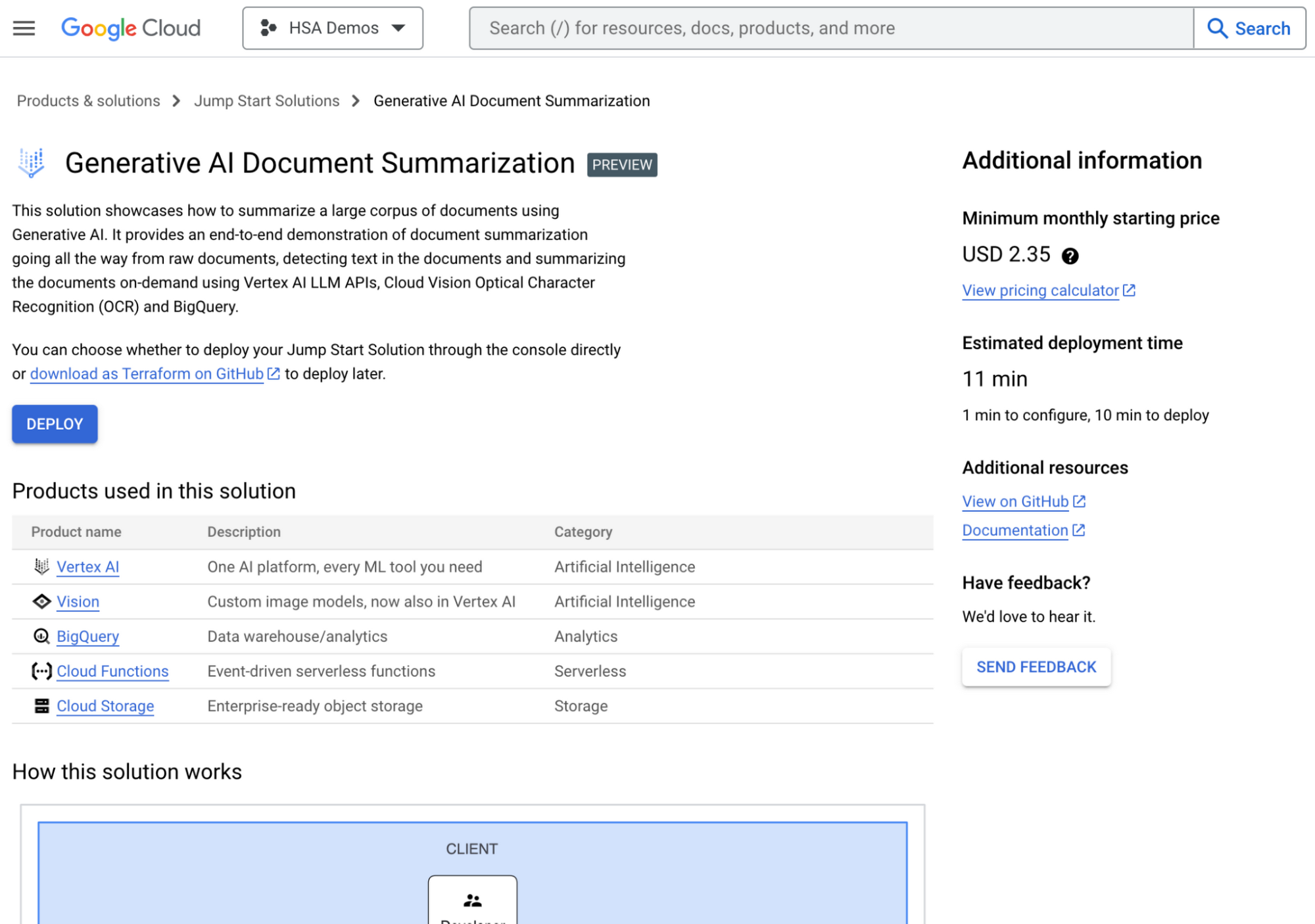
The Generative AI document summarization solution in the Google Cloud Console
Some of our 14 solutions available today include a generative AI-powered document summarization app and an AI-powered image processing app. These are just the beginning of a wide range of solutions which help you lay a secure and stable foundation from which to build, innovate, and grow.
Speeding up your development with AI and automation
Imagine training a generative AI model using the best practices, documentation, and architecture guidance of Google Cloud and applying that to your coding experience. No longer will you have to leave your IDE to research how to complete a coding task, no more repeating low-value manual tasks, and no more hunting for expert guidance.
Duet AI is now in preview across many services in Google Cloud to help shift the burden of researching, coding, and testing, down to the platform. A few of the ways developers can use Duet AI include:
- Code Completion and Code generation in your IDEs. You get recommendations as you type for full functions and code blocks based on comments, fixes for errors found in the code, and generation of unit tests for code directly in your IDE.
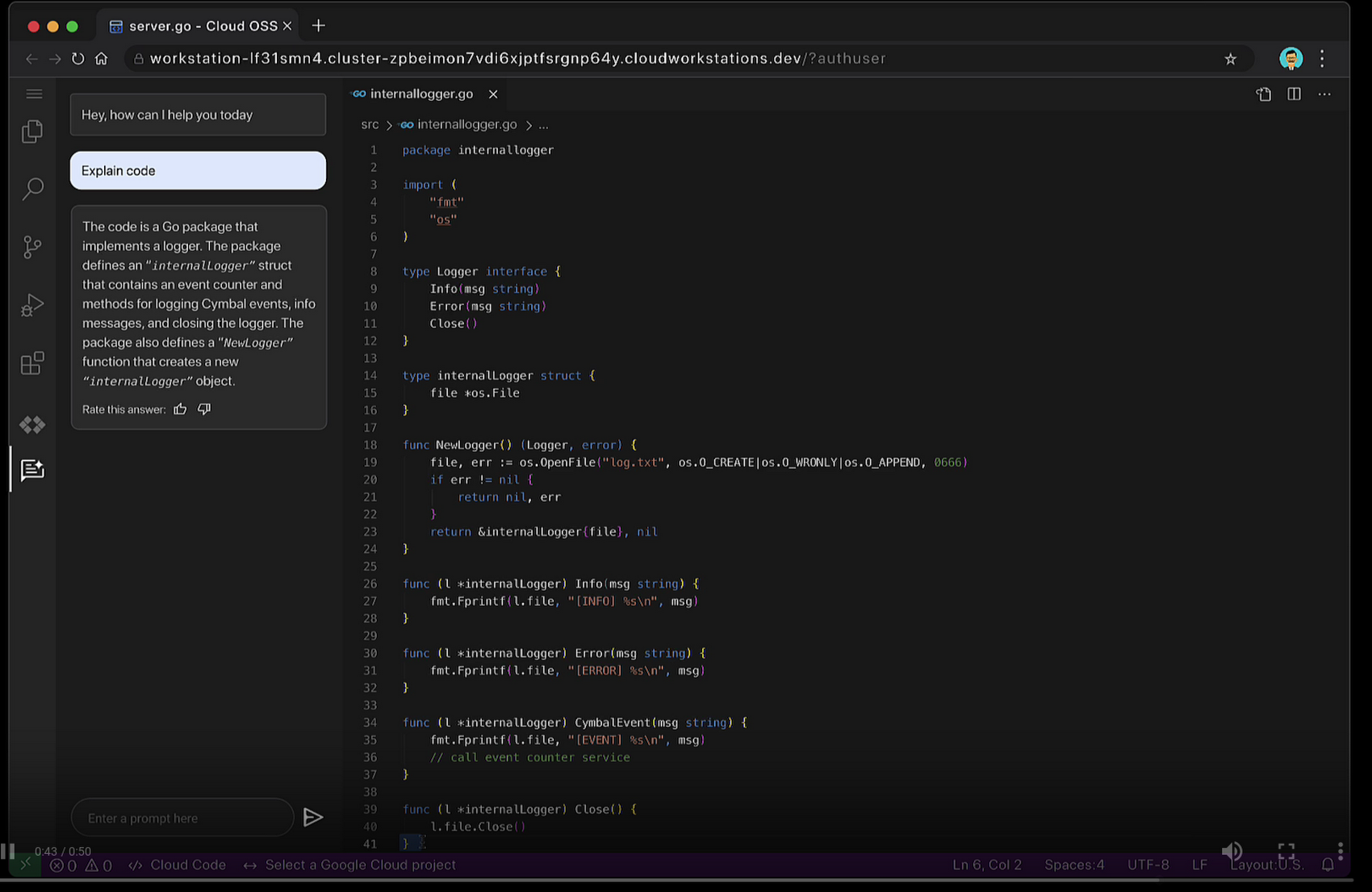
- Chat assistance so you can use natural language to ask questions about code bases and APIs, and retrieve coding best practices. Chat assistance is available across many Google Cloud products, such as in the Cloud Console, Cloud Workstations, BigQuery, Spanner, and Apigee.
Duet AI in Google Cloud supports 20+ programming languages such Go, Java, Javascript, Python, and SQL. Thanks to Cloud Code, you can use Duet AI with many popular IDEs such as VSCode, and JetBrains IDEs like IntelliJ, PyCharm, GoLand, and Webstorm. And, with Duet AI’s source citations, suggestions provided by Duet AI are automatically flagged when directly quoting at length from a source to help you comply with any license requirements.
Enterprise companies like Wayfair who are committed to enhancing developer productivity are already using Duet AI, and are excited about how it makes life easier for their developers.
“At Wayfair, developer productivity is top of mind for us. We are excited to incorporate Duet AI in our efforts to have developers across Wayfair build applications incredibly fast! With Duet AI, we can increase developer productivity, and joy at the same time.” – Mark Quigley, Director of Engineering Enablement, Wayfair
Shifting down interoperability
Modern application development stacks are a mosaic of in-house creativity and essential third-party applications such as CRM, ERP, or payment systems. What is the lifeblood linking these siloed pieces? Integration. Building integrations demands time-consuming development work, niche skills, and deep understanding of third party systems like SAP or Salesforce. These compounding complexities can delay delivery and increase budget costs. We envision a world where platforms shoulder the burden of integration, liberating developers to innovate with their regained time.
Today, we’re pleased to announce the general availability of Application Integration – a no-code integration platform as a service (iPaaS) designed to empower you to weave together your applications. Its intuitive drag-and-drop interface transforms the complex task of integration into a simple point-and-click journey. With 75+ pre-built connectors you can link Google Cloud services like BigQuery, Cloud Storage with third-party applications like Salesforce, MongoDB, Oracle, and SAP.
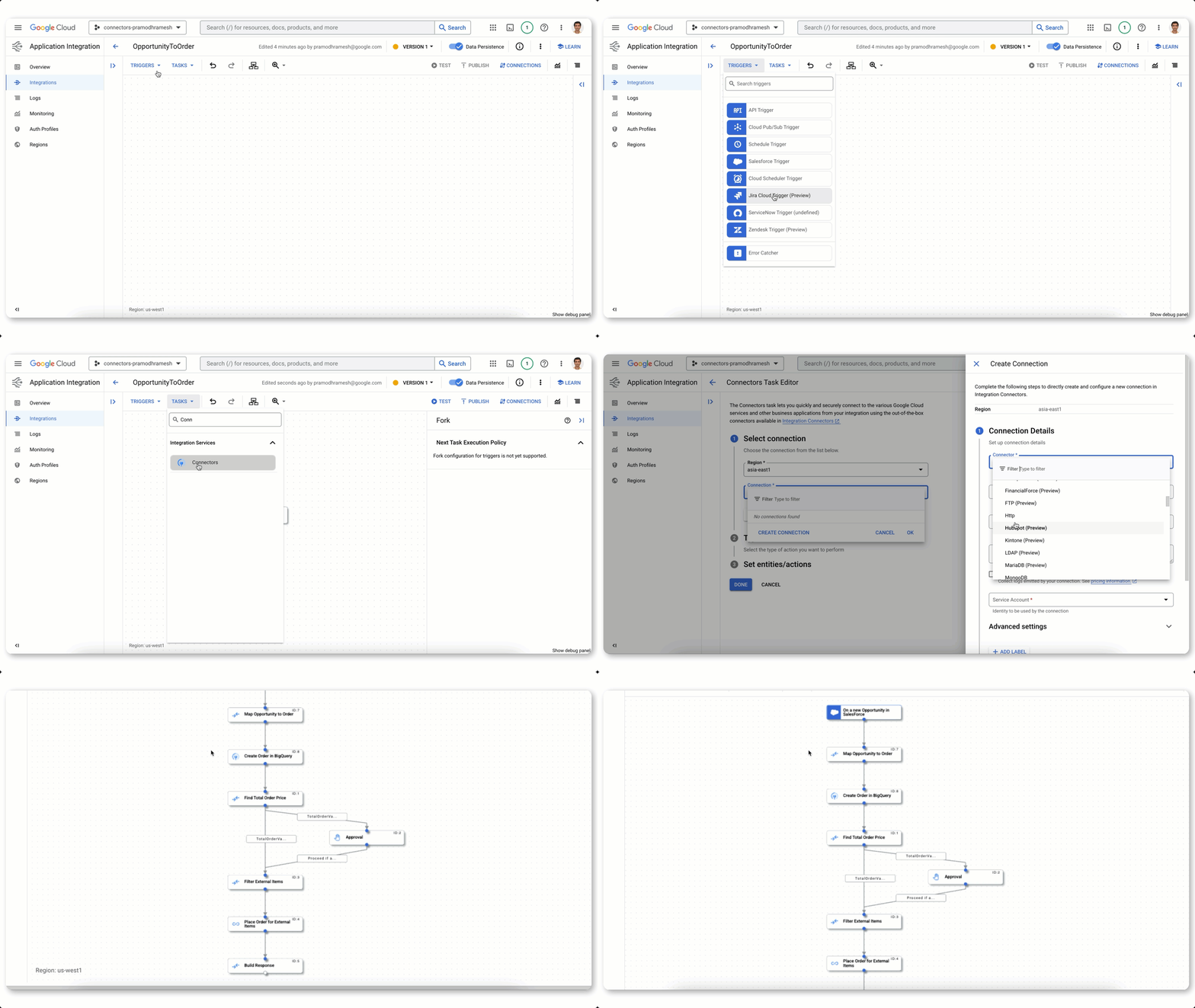
Building an integration flow using connectors, visual designer, and automated triggers
Further, Duet AI in Application Integration can shift even more work away from you and onto the platform. Using natural language, you can generate a recommended list of integration flows. Because Duet AI pulls context from your environment, it generates flows using your existing APIs and assets. To further harden your integration flows, Duet AI automatically generates documentation and test cases in a single click.
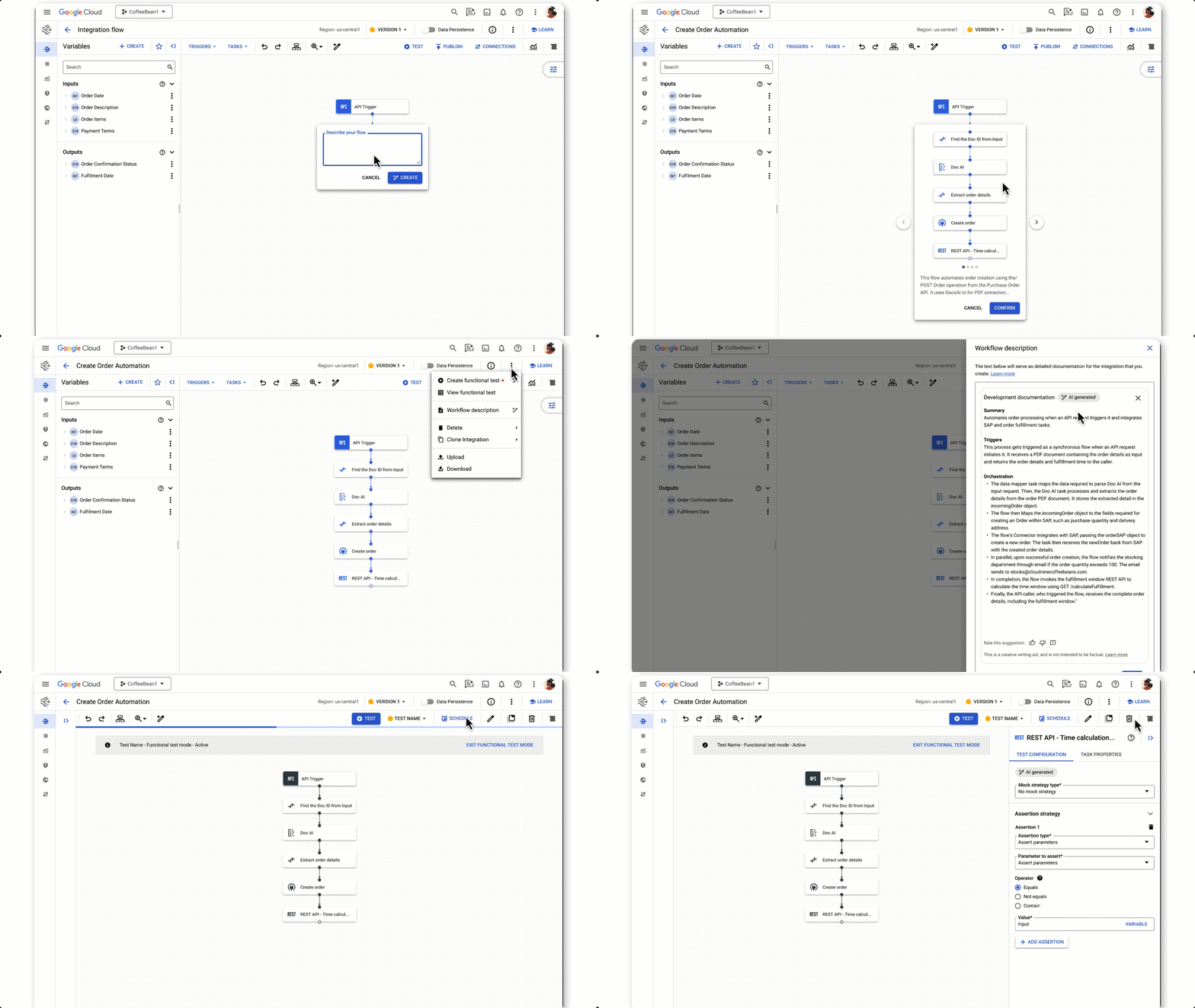
Using Duet AI to build integration flows, documentation, and tests with natural language
Secure, platform-driven application development
With the world’s attention on how AI will shape the future, the challenges created by distributed workforces continue to be felt. Developer teams need help with onboarding, access to consistent tools and libraries, and development environments powerful enough for today’s workloads.
We recently announced the general availability of Cloud Workstations, powerful, secure and customizable development environments available anywhere, using a browser, local IDE, or terminal. Cloud Workstations can shift the burden of provisioning, scaling, managing and securing developer environments down to the platform. And like many other services across Google Cloud, you can use Duet AI in Cloud Workstations to help make you more efficient with everything from writing code to implementing best practices.
While the reality of geographically dispersed and rapidly growing development teams highlights the need to address traditional concerns, such as platform and data security, even greater scrutiny is placed on the software supply chain.
An expanded partnership with GitLab for secure DevOps
Google Cloud continues to grow at a fast pace and that means we are constantly welcoming many new developers to our platform. We know the tools you choose for software development are an important factor in your success. We want to make it easy to use the tools you love. Today we announced that Google Cloud and GitLab are partnering to offer a secure DevOps solution that can shift the work to connect our technologies down to the platform while giving you integrated source management, artifact management, CI/CD, and enhanced security features.
Developers already using Google Cloud gain access to GitLab’s comprehensive AI-powered DevSecOps platform and GitLab customers gain access to Google Cloud’s Secure Software Supply Chain technologies like Supply-chain Levels for Software Artifacts (SLSA), software bill of materials (SBOM), and Binary Authorization policies.
We can help you gain value from Google Cloud faster with deeply integrated partner tooling. That’s exactly what we are doing with our expanded GitLab partnership. Learn more on GitLab’s blog. You can also sign up to stay informed about the latest partnership developments.
Start shifting down with Google Cloud
At the heart of Google Cloud is a simple, yet powerful idea: to empower you to do what you excel at — coding exceptional software. In the fast-paced era of digital transformation, we understand the mounting pressures that developers face, which is why we believe it’s the responsibility of platforms to shoulder the burdens hindering your creative process. We’re helping you by streamlining your onboarding experience, optimizing your coding efficiency, and shifting the weight of security from you to the platform. We’re not alone in this journey; we’re collaborating with partners like Gitlab at our side. So if you’re an application developer, check out Google Cloud. It’s the new way to cloud on the cloud platform that’s designed to make your life easier.
More Relevant Stories for Your Company

Private Services Connect in Google Cloud Regions Enables Customers to Consume Services Faster
At Google Cloud, we believe in making it simple and secure to consume services whether they're from Google, a third party or customer-owned. With Private Service Connect, we have adopted a service-centric approach to our network that abstracts the underlying networking infrastructure. And today, we are announcing Private Service Connect is

PaGaLGuY Turns to Google Cloud Platform to Power Leading India Education Network
Founded in 2006, PaGaLGuY started as a forum that enabled students, typically aged between 20 and 30 to discuss and seek advice on academic issues. By 2011, PaGaLGuY had increased its traffic to about 250,000 page views per month. The business is now one of India’s largest education networks and

Building a Bank with Kubernetes: How Monzo is Creating the Best Banking App Ever
Based in London, Monzo is a bank that lives on the smartphone and is built for the way modern customers live today. By solving their problems, treating them fairly and being totally transparent, Monzo believes it can transform the way people bank. “We are building a full retail bank. What

Ten Videos to Help You Get Started with Anthos
Do you need to develop, run and secure applications across your hybrid and multicloud environments? Look no further than Anthos, our managed application platform that extends Google Cloud services and engineering practices to your environments so you can modernize apps faster and establish operational consistency across them. To help you
