





Lending DocAI Shortens Borrowers’ Journey on Roostify

11790
Of your peers have already read this article.
3:00 Minutes
The most insightful time you'll spend today!
The home lending journey entails processing an immense number of documents daily from hundreds of thousands of borrowers. Currently, home lending document processing relies on some outdated digital models and a high dependency on manual labor, resulting in slow processing times and higher origination costs. Scaling a business that sorts through millions of documents daily, while increasing efficacy and accuracy, is no small feat. When it comes to applying for a mortgage loan, consumers expect a digital experience that’s as good as the in-person one. Roostify simplifies the home lending journey for lenders and their customers.
No time to spare: Overcoming document processing challenges with AI
Roostify provides enterprise cloud applications for mortgage and home lenders. In order to empower its customers to deliver a better, more personalized lending experience, they needed to automate and scale their in-house document parsing functionality.
As a key component of its document intelligence service, Roostify is leveraging Google Cloud’s Lending DocAI machine learning platform to automate processing documents required during a home loan application process, such as tax returns or bank statements with multi-language support. This partnership delivers data capture at scale, enabling Roostify customers to automatically identify document types from the uploaded file and to extract relevant entities such as wages, tax liabilities, names, and ID numbers for further processing, and make things move faster in the cumbersome lending process.
Roostify’s solutions leverage Google Cloud’s Lending DocAI, which is built on the recently announced Document AI platform, a unified console for document processing. Customers can easily create and customize all the specialized parsers (e.g., mortgage lending documents and tax returns parsers) on the platform without the need to perform additional data mapping or training. All Google Cloud’s specialized parsers are fine-tuned to achieve industry-leading accuracy, helping customers and partners confidently unlock insights from documents with machine learning. Learn more about the solution from the GA launch blog and the overview video.
Integrating Lending DocAI’s intelligent document processing capabilities into the Roostify platform means more innovation for their customers and tangible results: faster loan processing times, fewer document intake errors, and lower origination costs. Additional support in Google Lending DAI for other languages and more documents like global Know Your Customer (KYC) documents or payroll reports is in the near future.
Full integration of AI solutions
Working together with Roostify’s platform team, we were able to help them solve their document processing challenge through integration of various GCP products such as Lending DocAI (LDAI), Data Loss Prevention (DLP) for redacting sensitive data, BigQuery for data warehousing and analytics, and Firestore for API status. To make it very safe and secure, all data was encrypted end-to-end at Rest and in Transit. LDAI won’t require any training data to process. It is an easy plug and play API.
Here is a sneak peek in the high level deployment architecture for LDAI in Roostify environment:

Here are the steps for processing data:
- Receives document processing request from the client.
- API Function directs requests to the pre-processing service. For Async requests a processing ID is generated and returned to the caller.
- Pre-processing service sends the request for further processing (Long/short PDF conversion), calling other microservices and receives back the responses. Any error in the response received is then sent to the response processing service.
- If the response is synchronous, the pre-processing service directs it to the LDAI Invoker service.
- If the response is asynchronous, the pre-processing service feeds it into the Cloud Pub/Sub service.
- Cloud Pub/Sub service feeds the response back to the LDAI Invoker service.
- LDAI Invoker service routes the request to the Google LDAI API for classification if there are multiple pages in the document.
- Document will be split based on LDAI response and then saved in a GCS bucket for temporary storage.
- LDAI entity interface for single page processing and then LDAI Invoker sends LDAI results to LDAI Response Processing
- If a request is a synchronous request the LDAI Response Processor sends results to the API Function so that it can complete the synchronous call and respond to the rConnect caller.
- If the request is an asynchronous request the LDAI Response Processor will respond to the caller’s webhook and complete the transaction.
- Finally, Data stored in the GCP bucket will be deleted.
All the responses that come from the LDAI API can optionally feed into BigQuery via the Response Processor, after parsing it through Data Loss Prevention (DLP) API to redact the PII/sensitive information. Throughout the processing of both asynchronous and synchronous requests all transactions are logged using Cloud Logging. For asynchronous transactions, the state is maintained throughout the process using Cloud Firestore.
Roostify currently uses this technology to power two different solutions: Roostify Document Intelligence and Roostify Beyond™. Roostify Document Intelligence is a real-time document capture, classification, and data extraction solution built for home lenders. It ingests documents uploaded by borrowers and loan officers, identifies the relevant documents, and extracts and classifies key information. Roostify Document Intelligence is available as a standalone API service to any home lender with any digital lending infrastructure already in place.
Roostify Beyond™ is a robust suite of AI-powered solutions that enables home lenders to create intelligent experiences from start to close. It combines powerful data, insightful analytics, and meaningful visualization to streamline the underwriting process. Roostify Beyond™ is currently available only to Roostify customers as part of an Early Adopter program and will be rolled out to the market later this year.


Through this partnership, Roostify has enabled its customers to adopt a data-first approach to their home lending processes, which will lead to improved user experiences and significantly reduced loan processing times.
Fast track end-to-end deployment with Google Cloud AI Services (AIS)
Google AIS (Professional Services Organization), in collaboration with our partner Quantiphi, helped Roostify deploy this system into production and fast-tracked the development multifold to generate the final business value.
The partnership between Google Cloud and Roostify is just one of the latest examples of how we’re providing AI-powered solutions to solve business problems.
Google Extends Support for Windows Server Containers on Anthos for Faster App Modernization and Consistent Dev Experience
5584
Of your peers have already read this article.
3:00 Minutes
The most insightful time you'll spend today!
Today, many applications in organizations’ data centers run on Windows Server. Modernizing these traditional Windows apps onto Kubernetes promises a host of benefits: a consistent platform across environments, better portability, scalability, availability, simplified management and speed of deployment, just to name a few. But how? Rewriting traditional .NET applications to run on Linux with .NET Core can be challenging and time-consuming. There is, however, a lower-toil, more developer friendly option.
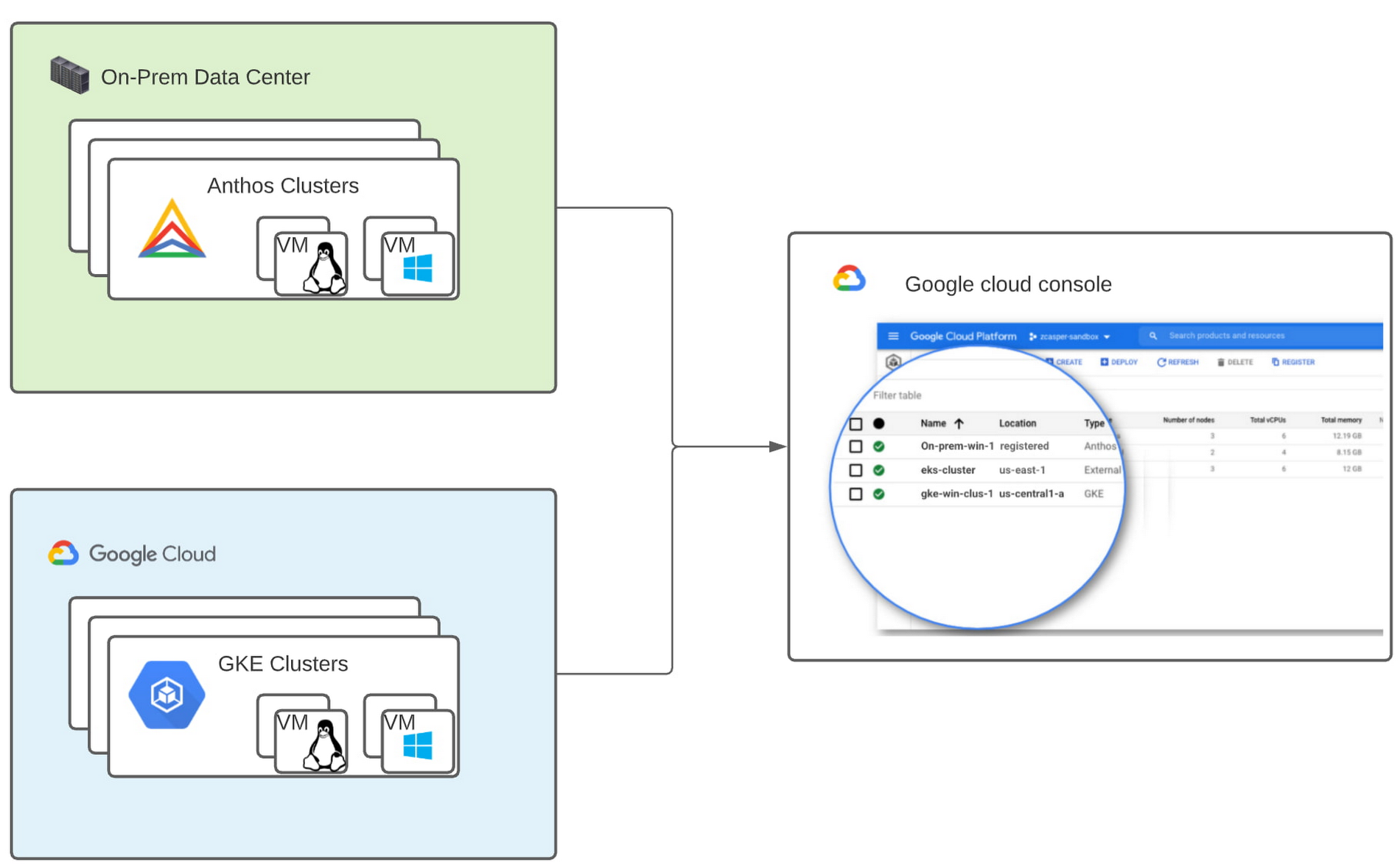
Last year, we announced support for Windows Server containers running on Google Kubernetes Engine (GKE), our cloud-based managed Kubernetes service, which lets you take the advantage of containers without porting your apps to .NET core or rewriting them for Linux. Today, we’re going a step further with support for Windows Server containers on Anthos clusters on VMware in your on-premises environment. Now available in preview, you can consolidate all your Windows operations across on-prem and Google Cloud.
Bringing Windows Server support to our family of Kubernetes-based services—GKE running on Google Cloud, and Anthos everywhere—with the same experience, lets you modernize apps faster and achieve a consistent development and deployment experience across hybrid and cloud environments. Further, by running Windows and Linux workloads side by side, you get operational consistency and efficiency—no need to have multiple teams specializing in different tooling or platforms to manage different workloads. The single-pane-of-glass view and the ability to manage policies from a central control plane simplifies the management experience, while bin packing multiple Windows applications drives better resource utilization, leading to infrastructure and license savings.
With all these benefits, it’s no surprise that customers such as Thales, a French multinational firm specializing in aerospace and security services, have been able to reap significant benefits by moving Windows applications to GKE.
“We moved our Windows applications from VMs to Windows containers on GKE and now have a unified mechanism for Linux and Windows-based application management, scaling, logging, and monitoring. Earlier, setting up these applications in VMs and configuring them for high availability used to take up to a week, and the applications were not easily scalable,” said Najam Siddiqui, Solutions Architect at Thales. “Now with GKE, the setup takes only a few minutes. GKE’s automatic scaling and built-in resiliency features make scaling and high-availability setup seamless. Also, manually maintaining the VMs and applying security patches used to be tedious, which is now handled by GKE.”
Let’s take a deeper look at the architecture that lets you run your Windows container-based workloads on-prem.
Windows Server running on-prem with Anthos
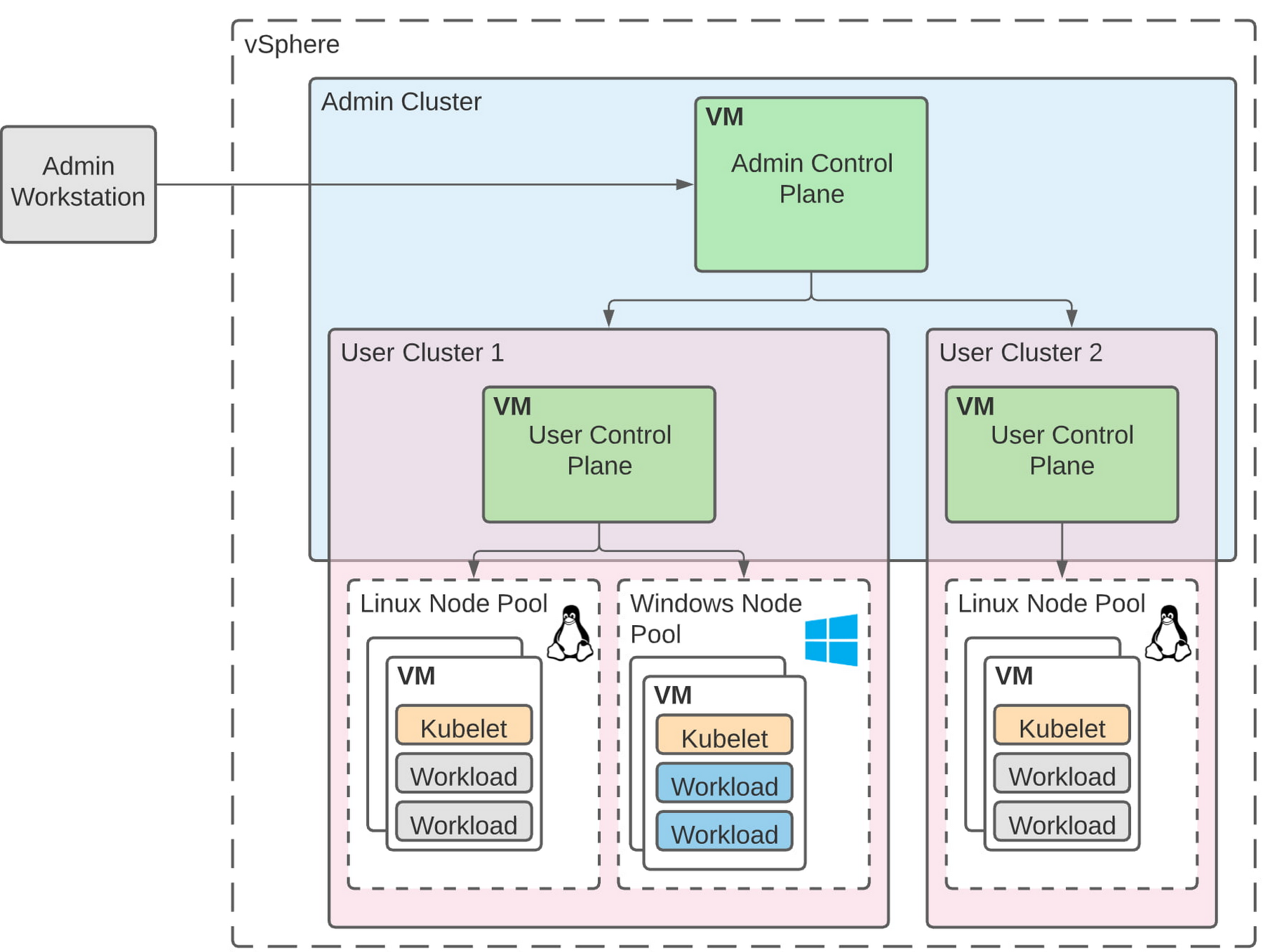
The diagram below illustrates the high-level architecture of running Windows container-based workloads in an on-prem GKE cluster with Anthos. Windows server node-pools can be added to an existing or new Anthos cluster. Kubelet and Kube-proxy run natively on Windows nodes, allowing you to run mixed Windows and Linux containers in the same cluster. The admin cluster and the user cluster control plane continue to be Linux-based, providing you a consistent orchestration experience and management ease across Windows and Linux workloads.
Get started today
When considering modernizing your on-prem Windows estate, we recommend running Windows Server containers on Anthos in your own data center. If you are new to Anthos, the Anthos getting started page and the Coursera course on Architecting Hybrid Cloud with Anthos are good places to start. You can also find detailed documentation on our website, and our partners are eager to help you with any questions related to the published solutions, as is the GCP sales team. And as always, please don’t hesitate to reach out to us at anthos-onprem-windows@google.com if you have any feedback or need help unblocking your use case.
How Eventrac and Workflows Integration Helps Implement Hybrid Architecture in Google Cloud

6531
Of your peers have already read this article.
3:00 Minutes
The most insightful time you'll spend today!
I previously talked about Eventarc for choreographed (event-driven) Cloud Run services and introduced Workflows for orchestrated services.
Eventarc and Workflows are very useful in strictly choreographed or orchestrated architectures. However, you sometimes need a hybrid architecture that combines choreography and orchestration.
For example, imagine a use case where a message to a Pub/Sub topic triggers an automated infrastructure workflow or where a file upload to a Cloud Storage bucket triggers an image processing workflow. In these use cases, the trigger is an event but the actual work is done as an orchestrated workflow.
How do you implement these hybrid architectures in Google Cloud? The answer lies in Eventarc and Workflows integration.
Eventarc triggers
To recap, an Eventarc trigger enables you to read events from Google Cloud sources via Audit Logs and custom sources via Pub/Sub and direct them to Cloud Run services:

One limitation of Eventarc is that it currently only supports Cloud Run as targets. This will change in the future with more supported event targets. It’d be nice to have a future Eventarc trigger to route events from different sources to Workflows directly.
In absence of such a Workflows enabled trigger today, you need to do a little bit of work to connect Eventarc to Workflows. Specifically, you need to use a Cloud Run service as a proxy in the middle to execute the workflow.
Let’s take a look at a couple of concrete examples.
Eventarc Pub/Sub + Workflows integration
In the first example, imagine you want a Pub/Sub message to trigger a workflow.
Define and deploy a workflow
First, define a workflow that you want to execute. Here’s a sample workflows.yaml that simply decodes and logs the Pub/Sub message body:
main:params: [args]steps:- init:assign:- headers: ${args.headers}- body: ${args.body}...- pubSubMessageStep:call: sys.logargs:text: ${"Decoded Pub/Sub message data is " + text.decode(base64.decode(args.body.message.data))}severity: INFODeploy the workflow with a single command:gcloud workflows deploy ${WORKFLOW_NAME} --source=workflow.yaml --location=${REGION}
Deploy a Cloud Run service to execute the workflow
Next, you need a Cloud Run service to execute this workflow. Workflows has an execution API and client libraries that you can use for your favorite language. Here’s an example of the execution code from a Node app.js file. It simply passes the received HTTP request headers and body to the workflow and executes it:
const execResponse = await client.createExecution({parent: client.workflowPath(GOOGLE_CLOUD_PROJECT, WORKFLOW_REGION, WORKFLOW_NAME),execution: {argument: JSON.stringify({headers: req.headers, body: req.body})}});
Deploy the Cloud Run service with the Workflows name and region passed as environment variables:
gcloud run deploy ${SERVICE_NAME} \--image gcr.io/${PROJECT_ID}/${SERVICE_NAME} \--region=${REGION} \--allow-unauthenticated \--update-env-vars GOOGLE_CLOUD_PROJECT=${PROJECT_ID},WORKFLOW_REGION=${REGION},WORKFLOW_NAME=${WORKFLOW_NAME}
Connect a Pub/Sub topic to the Cloud Run service
With Cloud Run and Workflows connected, the next step is to connect a Pub/Sub topic to the Cloud Run service by creating an Eventarc Pub/Sub trigger:
gcloud eventarc triggers create ${SERVICE_NAME} \--destination-run-service=${SERVICE_NAME} \--destination-run-region=${REGION} \--location=${REGION} \--event-filters="type=google.cloud.pubsub.topic.v1.messagePublished"
This creates a Pub/Sub topic under the covers that you can access with:
export TOPIC_ID=$(basename $(gcloud eventarc triggers describe ${SERVICE_NAME} --format='value(transport.pubsub.topic)'))
Trigger the workflow
Now that all the wiring is done, you can trigger the workflow by simply sending a Pub/Sub message to the topic created by Eventarc:
gcloud pubsub topics publish ${TOPIC_ID} --message="Hello there"
In a few seconds, you should see the message in Workflows logs, confirming that the Pub/Sub message triggered the execution of the workflow:

Eventarc Audit Log-Storage + Workflows integration
In the second example, imagine you want a file creation event in a Cloud Storage bucket to trigger a workflow. The steps are similar to the Pub/Sub example with a few differences.
Define and deploy a workflow
As an example, you can use this workflow.yaml that logs the bucket and file names:
main:params: [args]steps:...- log:call: sys.logargs:text: ${"Workflows received event from bucket " + bucket + " for file " + file}severity: INFO
Deploy a Cloud Run service to execute the workflow
In the Cloud Run service, you read the CloudEvent from Eventarc and extract the bucket and file name in app.js using the CloudEvent SDK and the Google Event library:
const cloudEvent = HTTP.toEvent({ headers: req.headers, body: req.body });//"protoPayload" : {"resourceName":"projects/_/buckets/events-atamel-images-input/objects/atamel.jpg}";const logEntryData = toLogEntryData(cloudEvent.data);const tokens = logEntryData.protoPayload.resourceName.split('/');const bucket = tokens[3]
Executing the workflow is similar to the Pub/Sub example, except you don’t pass in the whole HTTP request but rather just the bucket and file name to the workflow:
const execResponse = await client.createExecution({parent: client.workflowPath(GOOGLE_CLOUD_PROJECT, WORKFLOW_REGION, WORKFLOW_NAME),execution: {argument: JSON.stringify({bucket: bucket, file: file})}});
Connect Cloud Storage events to the Cloud Run service
To connect Cloud Storage events to the Cloud Run service, create an Eventarc Audit Logs trigger with the service and method names for Cloud Storage:
gcloud eventarc triggers create ${SERVICE_NAME} \--destination-run-service=${SERVICE_NAME} \--destination-run-region=${REGION} \--location=${REGION} \--event-filters="type=google.cloud.audit.log.v1.written" \--event-filters="serviceName=storage.googleapis.com" \--event-filters="methodName=storage.objects.create" \--service-account=${PROJECT_NUMBER}-compute@developer.gserviceaccount.com
Trigger the workflow
Finally, you can trigger the workflow by creating and uploading a file to the bucket:
echo "Hello World" > random.txtgsutil cp random.txt gs://${BUCKET}/random.txt
In a few seconds, you should see the workflow log the bucket and object name.
Conclusion
In this blog post, I showed you how to trigger a workflow with two different event types from Eventarc. It’s certainly possible to do the opposite, namely, trigger a Cloud Run service via Eventarc with a Pub/Sub message (see connector_publish_pubsub.workflows.yaml) from Workflows or a file upload to a bucket from Workflows.
All the code mentioned in this blog post is in eventarc-workflows-integration. Feel free to reach out to me on Twitter @meteatamel for any questions or feedback.
Ten Videos to Help You Get Started with Anthos

3452
Of your peers have already read this article.
2:00 Minutes
The most insightful time you'll spend today!
Do you need to develop, run and secure applications across your hybrid and multicloud environments? Look no further than Anthos, our managed application platform that extends Google Cloud services and engineering practices to your environments so you can modernize apps faster and establish operational consistency across them.
To help you get started, we created the Anthos 101 video learning series. It’s a great starting point for understanding the basics of Anthos—and you can watch the whole series in less than an hour.
Let’s dive in.
1. What is Anthos?
Discover what Anthos is and how it helps enterprises manage their applications. You’ll learn about the different tools Anthos offers—like the ability to create environs and platform administrators—to help you modernize and manage your application infrastructure.
https://youtube.com/watch?v=Qtwt7QcW4J8%3Fenablejsapi%3D1%26
2. How to get started with Anthos on Google Cloud
Ready to get started with Anthos? In this lesson, you’ll create your own Anthos deployment. You’ll learn about the different tools on the Anthos dashboard—like the Service Mesh card and Cluster Status cards—plus how to deploy and alter Google Kubernetes Engine (GKE) clusters and Anthos Service mesh via Google Compute Engine.
https://youtube.com/watch?v=ghFiaz7juoA%3Fenablejsapi%3D1%26
3. How to modernize and run Windows apps in Anthos
Running a Windows application that’s in need of modernization? In this lesson, you’ll discover how you can create and deploy a Windows-based application on Anthos, allowing you to modernize existing workloads and manage your application seamlessly. You’ll even learn to do this without requiring access to source code, re-writing, or re-architecting your existing application.
https://youtube.com/watch?v=w6tzIjZhTIk%3Fenablejsapi%3D1%26
4. How to build modern CI/CD with Anthos
Continuous integration? Continuous delivery? These are two things that developers need to think about with container adoption for hybrid or multicloud environments. Learn how Anthos helps you increase your development velocity without compromising the security of your application.
https://youtube.com/watch?v=ayRz5NmM6pI%3Fenablejsapi%3D1%26
5. How to adopt a multi-cluster strategy for your applications in Anthos
There are a number of use cases that might require a multi-cluster strategy, such as maintaining multiple clusters on the cloud and in your own data center. In this lesson, learn the different tools that Anthos offers—such as GKE, Anthos Config Management, and Anthos Service Mesh—to help deploy and manage multiple clusters.
https://youtube.com/watch?v=ZhF-rTXq-Us%3Fenablejsapi%3D1%26
6. How to improve observability using golden signals in Anthos
Observability is important in application development, but without the right tools monitoring your services can be time consuming. In this episode, learn more how Anthos Service Mesh can help you monitor and manage the four Golden Signals—latency, traffic, errors, and saturation—for your application.
https://youtube.com/watch?v=EDcy3KwV22o%3Fenablejsapi%3D1%26
7. How to modernize legacy Java apps with Anthos
Looking to modernize legacy Java applications? In this lesson, you’ll learn the three categories of Java applications and their unique paths for modernization via Anthos. This can help you reduce your dependency on high-cost proprietary software, decrease operational overhead, and increase software delivery speed.
https://youtube.com/watch?v=hQWcx9iyF7E%3Fenablejsapi%3D1%26
8. How to apply a zero trust model for your deployments using Anthos
It’s time to rethink traditional security models when it comes to network observability and consistency for IAM permissions. In this lesson, learn how you can adopt a zero trust posture with Anthos. This allows you to better secure your network, detect underlying network compromises, and ensure workloads are secure before deployment.
https://youtube.com/watch?v=_qG2vazlozY%3Fenablejsapi%3D1%26
9. How to go beyond business continuity with Anthos
Sometimes a business continuity plan that only covers traditional backup and disaster recovery methods simply isn’t enough. In this lesson, learn how Anthos helps resolve issues like data redundancy, scaling without code changes, implementing measurable SLOs, and much more. You’ll also discover how Anthos can help you manage your application beyond the confines of traditional backup and disaster recovery approaches.
https://youtube.com/watch?v=kUxqdjbgcXs%3Fenablejsapi%3D1%26
10. How to simplify identity with Anthos
Managing identities across hybrid and multicloud environments can be troublesome and hard to keep track of. Luckily, Anthos is capable of simplifying identity management for users and workloads. In this lesson, you’ll learn how Anthos can extend and enable existing capabilities, while allowing you to manage IAM permissions across multiple Anthos and GKE environments.
https://youtube.com/watch?v=6P-4ZEwZqZQ%3Fenablejsapi%3D1%26
11. How to optimize costs with Anthos
Learn how you can optimize costs with Anthos through greater observability, improving existing operations, and many other practices.
https://youtube.com/watch?v=8mGICSTRoYw%3Fenablejsapi%3D1%26
Keep learning
This is just a starting point for learning about Anthos. To deepen your knowledge, check out our free on-demand training: Getting started with Anthos. Or, you can download our Anthos Under the Hood ebook, or get hands-on right now with the Anthos sandbox.
Are You Providing Sufficient Digital Leadership?

4969
Of your peers have already read this article.
5:00 Minutes
The most insightful time you'll spend today!
It has been seven years since Marc Andreesen’s famous article “Why Software is Eating the World” was published in the Wall Street Journal, and given the slow pace of change in many companies, some executives still may not be taking the threat of being “eaten” seriously enough.
Software, and platform business models based on software, have the potential to deliver powerful economic forces into virtually any company or industry. Every company has valuable assets—such as data, expertise or access to certain services or user bases—and most of these assets can be delivered via software. Once an asset is expressed as software in a modern way—that is, as an application programming interface (API)—it can be combined with other software to create new applications and digital experiences.
Benefits of this approach, just to name a few, include near-zero marginal cost to scale up APIs for new users or use cases; global reach for both partners using APIs and end users consuming the digital experiences those APIs power; and network effects triggered as more partners use a given company’s digital assets and spread its services into new markets and use cases.
Disruption by software-powered business models
In the last two decades we’ve seen individual companies and entire industries upended by these kinds of software-powered business models. Examples abound: Amazon and the retail industry, Netflix and movie rentals, Uber and ride hailing, Airbnb and hotels, etc. We’ve reached the point that these companies’ names have become verbs synonymous with being “eaten” by software (e.g., “Amazoned” or “Netflixed”).
The most famous examples of digital disruption involve digital natives, of course, but legacy businesses are leveraging software to evolve too. Brazilian retailer Magazine Luiza—a company I’ve worked with through my employer, Google Cloud’s Apigee team—has enjoyed enormous revenue growth and seen its stock soar, for example, as it has built out its digital platform capabilities and transitioned from a primarily brick-and-mortar model to an omnichannel one. The point is, whether a company has been in business five decades, five years or five months, software remains ravenous and is always looking for new companies and industries to “eat.”
Change in the face of serious threats
Facing this threat, how should corporate leadership respond? There are some excellent examples of CEOs who have galvanized their companies and led them through the massive, gut-wrenching change required to pivot in the face of a serious threat. A few of the biggest examples include:
- In 1995, it became apparent to Microsoft co-founder and then-CEO Bill Gates that the internet was “the most important single development to come along since the IBM PC,” and, if not embraced in haste, a threat to many of Microsoft’s businesses. In May of that year he published the “The Internet Tidal Wave” memo and focused all of Microsoft on adopting and building for the internet. Almost 20 years later, current Microsoft CEO Satya Nadella similarly made the bold decision to redirect the company for a cloud-first world.
- Facebook went public at $38 per share in May of 2012 but within months, stocks could be had for a little over half that. The concern? Facebook was a desktop-optimized website without a polished mobile presence, and by 2012, consumer attention had begun to accelerate towards mobile at a much higher rate than many initially predicted. Facebook CEO Mark Zuckerberg reacted by not only proclaiming Facebook a mobile-first company, but also backing up that proclamation with action.
- Turning to another company I’ve worked with via Apigee, T-Mobile launched its highly visible “Uncarrier” campaign—which offers streamlined, customer-friendly plans and services—while also investing in and executing a new IT vision dedicated to ongoing digital transformation. T-Mobile execs have credited the technology effort, spearheaded by CEO John Legere, with helping the company to introduce new services and better service customers. T-Mobile’s market cap has more than doubled since Legere took over in 2012.
Keeping pace with changing customer needs
In the face of an existential threat, strong executive leadership is required to pivot the company to safety, as these examples attest. Digital transformationisn’t about deploying new technologies just to make an existing approach more efficient or to add a few new apps or features to the status quo; digital transformation is about keeping pace with changing customer needs by leveraging software platforms to continuously evolve how the business operates. This can be akin to turning an enormous ship—and a ship can’t turn very well without her captain, first mate, and other leaders showing the way.
Research supports this. A recent Deloitte survey, for example, found that over “80 percent of respondents from digitally maturing organizations say their leaders have sufficient knowledge and ability to lead the company’s digital strategy,” compared to only “22 percent of early-stage business respondents [who] have the same belief.” Similarly, Gartner research finds that CEOs are seeking a “deeper understanding of digital business” as they shift their focus from growth in general to how technology helps them attain it.
More recently, the onslaught of software devouring the world has been further accelerated by machine learning making everything smarter, voice interfaces changing how people interact with devices, and more. To keep pace, corporate leaders need to galvanize their companies to build and deploy software faster, make systems and data easily accessible inside and outside their companies, and improve digital experiences through not only machine learning but also constant data-driven iteration.
Seven years after Andreesen’s editorial, the pace of digital disruption is still increasing, and so is the need for strong leadership to pivot fully into digital. Over half of the Fortune 500 has been acquired, merged or declared bankruptcy since 2000—and the companies that survive in coming years won’t be those whose leaders treat technology as an IT concern rather than a core part of the business.
What’s New in Retail: Bits from Google Cloud’s Retail & Consumer Goods Summit

7956
Of your peers have already read this article.
3:00 Minutes
The most insightful time you'll spend today!
Today we’re hosting our Retail & Consumer Goods Summit, a digital event dedicated to helping leading retailers and brands digitally transform their business. For me, this is a personally exciting moment, as I see tremendous opportunities for those companies that choose to focus on their customers and leverage technology to elevate experiences.
Our event includes breakout sessions to help retailers and brands become customer centric, embrace the digital moment and transform their operations. Some of my favorite sessions include:
- Why Search Abandonment is the metric that matters, highlighting Retail Search, and featuring a conversation with Macy’s
- Driving Consumer Closeness in a Privacy-Centric World, discussing how retailers and brands can create a successful first party data strategy, featuring a conversation with P&G
- The Modern Store: 7 Innovation Hotspots, sharing how retailers and brands can approach store transformation to unlock the most value from technology, featuring a conversation with The Home Depot.
I’ll be speaking in our Retail Spotlight session, discussing the current retail landscape and our industry approach, followed by conversations with Albert Bertilsson, Head of Engineering – Edge at IKEA Retail (Indga Group) and Neelima Sharma, Senior Vice President, Technology Ecommerce, Marketing and Merchandising at Lowe’s.
Let me share a bit more about the topics we’ll discuss in that session.
In retail specifically, digital-first shopping journeys are blurring the lines between the physical and digital brand experience. Shoppers want to know what’s available before they visit your stores, and they expect fulfillment options like curbside pickup. We see this when tracking trends for interest in curbside pickup or in-stock items.

This has left many retailers asking how they can get smarter with their data, tackle the $300 billion dollar problem of “search abandonment,” move faster to create new customer experiences, and do a better job of connecting their employees and customers – with confidence.
Our team has been spending time thinking about how we can rise and succeed in this new era together. We continue to focus on areas where we can bring the best of our capabilities to our retail customers around the world. And we’re focused on ways we can bring the best of what Google has to offer through cloud integrations.
Our goal is to help retailers become customer-centric and data-driven, capture digital and omni-channel revenue growth, create the modern store and drive operational improvement.

Let’s dig into each of these strategic pillars in a bit more detail.
Become customer centric and data driven
Customers today expect experiences that are timely, targeted, and tailored for them and their needs, and reject experiences that can’t deliver these features. Data modeling, legacy technology, and siloed systems often prevent retailers from providing that level of personalized experience.
At Google Cloud, we work with global retailers and our ecosystem partners to activate and bring value from first-party data, particularly in the field of customer data platforms (CDPs). This includes integrations from Google Cloud, such as our business intelligence platform Looker and other popular platforms to power one source of customer data through the organization. We also help retailers modernize their data warehouse with Looker for gathering business intelligence across their organization. This is important not just for consumer data, but inventory, supply chain, and store operations as well.
Capture Digital and Omnichannel Growth
We power some of the largest e-commerce sites in the world, helping them scale for Black Friday, Cyber Monday, and other holiday events. While scale is critically important, it’s also important to consider the quality of the online experience. How do your customers find products? How can you help deliver seamless online and omnichannel experiences?
To help, we’re building product discovery solutions that bring together the best of our technologies that help retailers drive engagement with their consumers. Retail Search, for example, gives retailers the ability to provide Google-quality search on their own digital properties – search that is customizable for their unique business needs and built upon Google’s advanced understanding of user intent & context.
The imperative is clear. Recent research found that retailers lose more than $300 billion to search abandonment — when purchase intent is not converted into a sale due to bad search results — every year in the US alone.
Today, we announced that Retail Search is available to a larger set of retailers. If you are interested in learning more about Retail Search you can contact your sales representative for additional details.
Create the modern store
With the rise of buying trends like curbside pickup and proximity-based search, our Google Maps Platform team is working on new products and features to help raise inventory awareness for your shoppers. We want to help you make it easier for them to understand what’s available to purchase in their channel of choice.
With Product Locator, each product page connects customers with information they need for local pickup and delivery options. This ensures customers are aware of pickup and delivery options throughout the buying journey—not just checkout.
Awareness of local inventory can boost a wide range of key metrics for your business. Shopify recently shared that shoppers who opt for local pickup over delivery had a +13% higher conversion rate and that 45% of local pickup customers make an additional purchase upon arrival.
This is just one quick example of how our Google Maps Platform team can improve experiences for your shoppers.
Operational improvement
It can be challenging to operate in a world and at a time when consumer behavior and supply chains are so disrupted and volatile, and where entire retail teams had to go remote during the pandemic and beyond.
We’re working with retailers to leverage artificial intelligence (AI) to improve consumer experience through chat bots or conversational commerce that solves problems for customers from anywhere. You can learn more about these offerings in our Conversational Commerce with Google breakout session, featuring Albertsons.
As the need for digital transformation continues to accelerate, Google Cloud is helping retailers stay ahead of the curve with solutions for digital and omnichannel growth, data-driven and customer-focused experiences, and operational improvement. For every era of cloud technologies, from the past into the future, Google Cloud is committed to providing solutions to retailers.
Read more about our solutions for retail, and check out additional sessions, including the CPG Industry Spotlight Session How To Grow Brands in Times of Rapid Change – Featuring L’Oréal at our Retail & Consumer Goods Summit.
More Relevant Stories for Your Company

Budget-Friendly Log Management: Four Steps to Cost Optimization in Google Cloud
As part of our ongoing series on cost management for observability data in Google Cloud, we’re going to share four steps for getting the most out of your logs while on a budget. While we’ll focus on optimizing your costs within Google Cloud, we’ve found that this works with customers

How Barilla Created a Social Media Style App to Improve Efficiency
Google Cloud Results Replaced conflicting, time-consuming paper logs with a near real-time, transparent appScaled rapidly and easily to accommodate new teams thanks to Google App EngineEnables photographic and video communication to replace confusing textNew factory solution rolled out in just 15 days In 1877, Pietro Barilla set up a small

APIs: The New Marketing Platform
APIs power all digital marketing channels and the apps we use today. APIs are a window on your company’s digital assets, exposing them so developers and partners can build mobile apps and become part of your innovation engine. Thanks to the open API economy, you can build mobile apps that

Enhancing Developer Productivity with Skaffold v2 GA
For years, Google has been committed to maximizing developer productivity. In 2019, we announced the general availability of Skaffold, a command-line tool that facilitates continuous development and delivery for containerized applications. Today, we're excited to announce that Skaffold V2 is now generally available. Skaffold V2 expands Skaffold’s supported platforms and
