





Maximizing API Potential: A Look at 7 Prominent API Management Use Cases

2703
Of your peers have already read this article.
4:30 Minutes
The most insightful time you'll spend today!
Paper currency — which started gaining prominence in the 1600s — changed the face of global economics and ushered in a new era of international monetary regulation. The primary reason currency created such disruption was its ability to standardize the “medium of exchange”. APIs created a similar effect in the world of technology and digitalization by creating a standardized, reusable, and secure way to exchange information.
Modern web APIs took shape in the early 2000s and played a key role in “.com”mercializing every business. APIs started as a connective tissue primarily relegated to a technical context and quickly evolved into a gateway to new business models, revenue streams, and ecosystems. In 2017, McKinsey estimated a total of $1 Trillion in profit could be up for grabs in the API economy. And in 2022, GGV Capital created an index of API-first startups — a generation of stylistically divergent SaaS companies with leaner operating cost structures and organic usage growth. Just as currency is going through an evolution from banknotes to digital wallets, the world of API management is also on the brink of change.
With more than 15 years of experience managing APIs at Google-scale, we’ve got a unique vantage point from which to observe that change. In today’s post, we will spotlight seven API management use cases that we see growing in prominence — and how you can take advantage of these trends to future-proof your architecture.
1 “Shift left” in API security
As a gateway to a wealth of information, APIs have also quickly become the primary attack vector in security incidents. When we surveyed 500 technology leaders, we learned that more than 50% of organizations experienced an API security incident in the last 12 months. Adding to the increasing magnitude of attacks, there are an increasing number of vectors for potential API security incidents like misconfigurations, outdated APIs/data/components, and bots/spam/abuse.
These security issues aren’t just in production APIs, but at every stage in the API lifecycle. Notably, we found that 67% of the issues are discovered during testing as part of the release management process. This trend ushers in the need for forward-thinking organizations to “shift left with security” — moving controls earlier into the production workflow — by bringing security teams and API teams closer. To stay ahead of security threats, many organizations are actively looking for solutions that allow them to be proactive while minimizing the burden on their security teams. According to our research, integrating capabilities that proactively identify security threats (60%) is top of mind for most IT leaders for the next year.
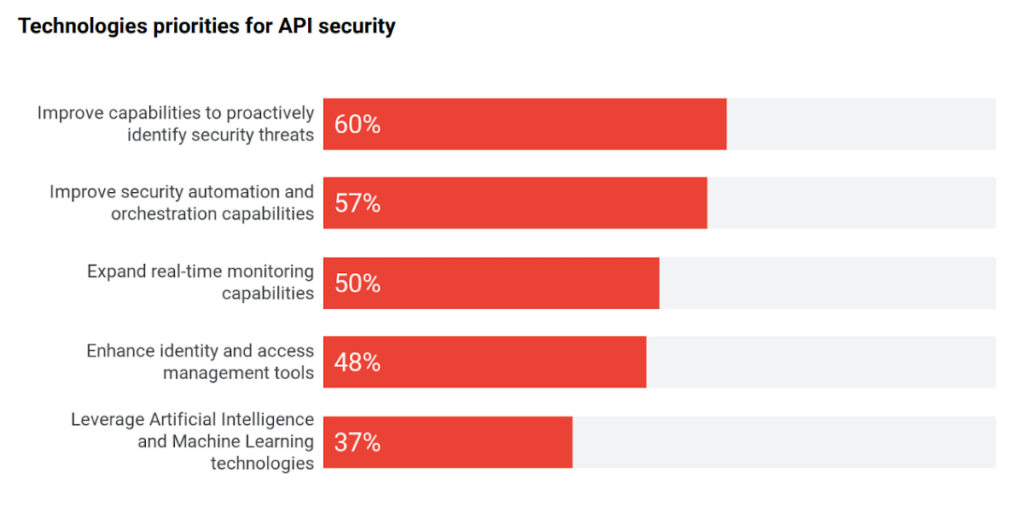
Source: 2022 API Security Research Report
2 “Knowledge graph” for your enterprise APIs
It comes as no surprise that every organization is relying on APIs to expand and even ground their digital ecosystem — a network of partners, developers, and customers facilitated by modern, cloud-first technologies. There is a growing magnitude and variety of middleware assets, contributing to the growth of IT complexity.
As the number of APIs continues to increase, there is a need to simplify consumption for internal and external developers. Even the most objectively useful APIs remain unseen by most of the organization. In turn this results in redundant code, reduced developer productivity, or worse — turned into a potential security attack vector. This complexity is shifting focus towards consolidation of all middleware assets, growing adoption, and improving education (see below) to improve developer efficiency and de-mystify the IT complexity.
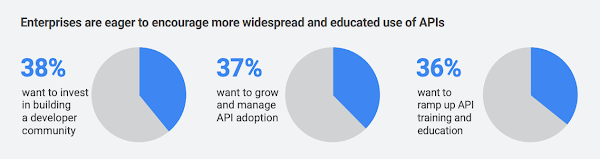
This sprawl is a growing problem in the world of APIs, but it has a lot in common with an age-old phenomenon in the world of web pages and content—search. Google was born out of this problem to help organize the world’s information. Similar to Google’s knowledge graph for web pages, there is a need to index, organize, and instantly present API information for developers that need it. Although it is an emerging practice, we see an increasing number of digital leaders and security teams in larger organizations with mature API programs invest in solutions that help consolidate all APIs, organize their information, and manage their lifecycle.
3 The imminent need for “omni” control planes
APIs have taken on such a vital role in the modern application stack that they have slowly become the neural links across the entire enterprise architecture — bridging legacy and modern applications, shifting architectures towards microservices, and enabling operations across heterogeneous environments. To support all these technological decisions without sacrificing speed, organizations adopted multiple API gateways and fragmented API management solutions. However, this led to a lack of universal visibility, consistent governance, comprehensive security, and meaningful analytics across ALL the enterprise APIs (not just the ones within the confines of a given API management solution). And it increases the maintenance costs — fundamentally undercutting the value of APIs. With this evolution there is a growing need for an omni control plane — analogous to the brain in a human body — across all enterprise APIs.
4 API governance rising through the priority ranks
Despite the clear need for governance, there is still no unified understanding on a good (or right) approach to API governance. With the rapid adoption of APIs without appropriate standardization or quality standards, API governance is top of mind for IT leaders, again.
According to our research, 45% of IT leaders identified API governance as a critical component of their API program. The top three components of API security, performance analytics, and governance demonstrate the critical need for visibility, quality, and security across all APIs.
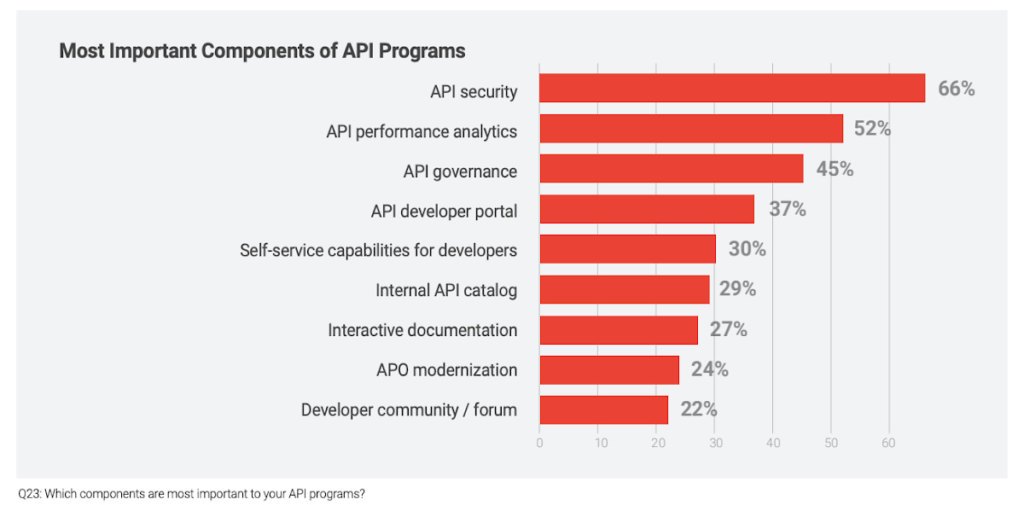
As digital consumers, we have seen this phenomenon across many industries and digital products. For example AirBnB disrupted the short-term rental market by providing standardized listings, detailed information, and high-resolution photos. In fact, the same governance phenomenon is ubiquitous in the world of e-commerce where there is a clear correlation between a high-quality website or product listing and increasing sales.
The same analogy holds true in the world of APIs, as ~90% of developers use APIs in their work there is a direct correlation between the use of APIs and developer productivity. Digital officers and CIOs need to add appropriate governance controls to standardize API design and improve reuse without adding friction to development timelines.
5 Evolution of design patterns with multiple API gateways
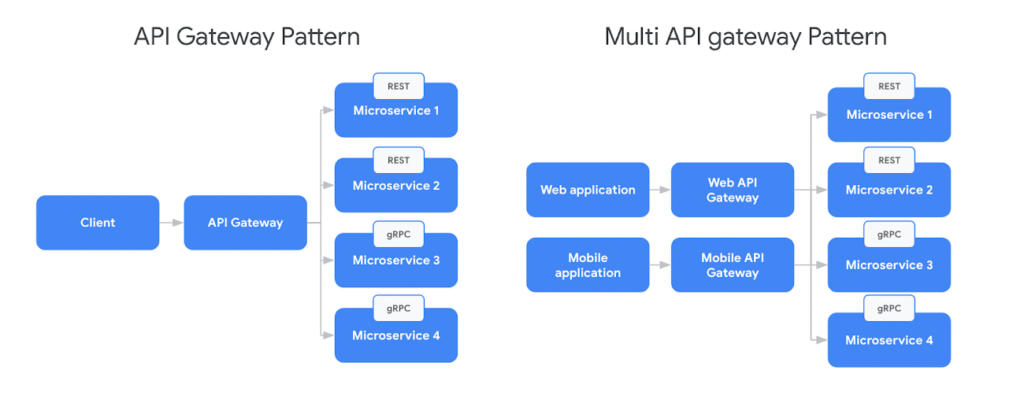
Adoption of new API architectural styles and microservices increased the complexity of the modern application stack. Our research found that 54% of organizations use a service mesh and API management in conjunction today to support the API gateway design pattern. In parallel, there is broad adoption of new protocols like GraphQL or AsyncAPI, outpacing the innovation in API gateways. For example, in a recent survey from DZone found that GraphQL accounted for 22.7% of application integrations.
In response to this challenge IT teams are adopting multiple API gateways — by design — which is creating the need for complex communication patterns for future scalability. But the existing design patterns were mostly sufficient when client applications used homogeneous API protocols (Ex: REST). Although patterns like Backend For FrontEnd (BFF) intended to provide specific API interactions that are relevant on a per-client basis, they still did not account for complexities from multiple gateways and protocols. In response to the adoption of new protocols, there is a need to evolve the existing BFF pattern to account for multiple API gateways and protocols.
6 Driving green value chains with digital twins
A digital twin is an effectively indistinguishable virtual representation of a physical object, system, or a process. For example the digital twin of a wind turbine (the object being studied) might be used to capture data like performance, rpm (revolutions per minute), or output captured by various sensors outfitted on the turbine. Digital twin adoption is growing and McKinsey estimates investments in digital twins will reach $58 billion by 2026 with a 58% CAGR. Every digital twin uses APIs to monitor, engage, and possibly control the physical asset. For example, Google created the Digital Buildings project — an open source, Apache-licensed effort to manage applications and analyses between a large heterogeneous portfolio of buildings.
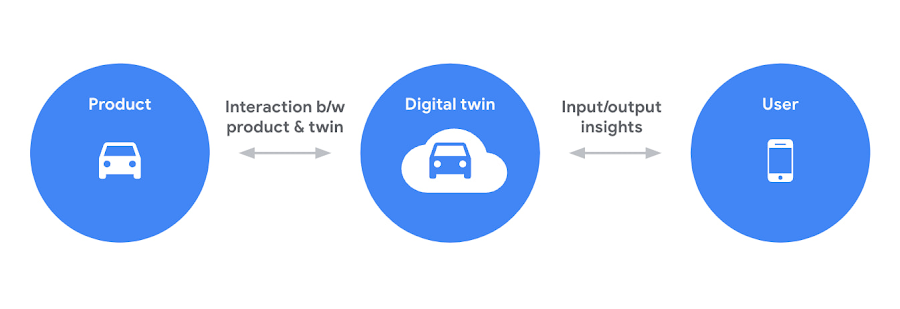
Sustainability is one of the driving forces behind the increased use of digital twins. As the need to reach net zero emissions accelerates, many organizations are tying performance (and in some cases even executive pay) to environmental, social, and governance goals. APIs help connect the dots between digital twins and sustainability. For example, an organization operating a manufacturing process could build a digital twin with APIs to collect behavioral data from sensors, monitoring systems, or other sources — which can eventually be integrated into the organization’s digital platform or applications. These digital twins could be used to analyze and optimize the use of materials and energy, to minimize waste and emissions. Additionally, digital twins could be used to monitor and analyze the performance of systems over time, to identify opportunities for continuous improvement.
Overall, APIs play a valuable role in supporting sustainability efforts by enabling digital twins, effectively driving more efficient operation of systems, and providing insights to improve environmental impact. For further examples, check out this video about driving a green value chain with APIs.
7 Commercializing access to data products
The growing use of data-rich services (like IoT, ML models, remote access services, and web scraping, etc.) coupled with massive ingestion of data everyday is creating massive growth in data delivery paradigms like data lakehouses, data marketplaces, and data streaming systems (global data marketplaces alone are poised to reach $3.5 billion by 2028). Unfortunately, most of these systems are fragmented with almost no relationship or interoperability.
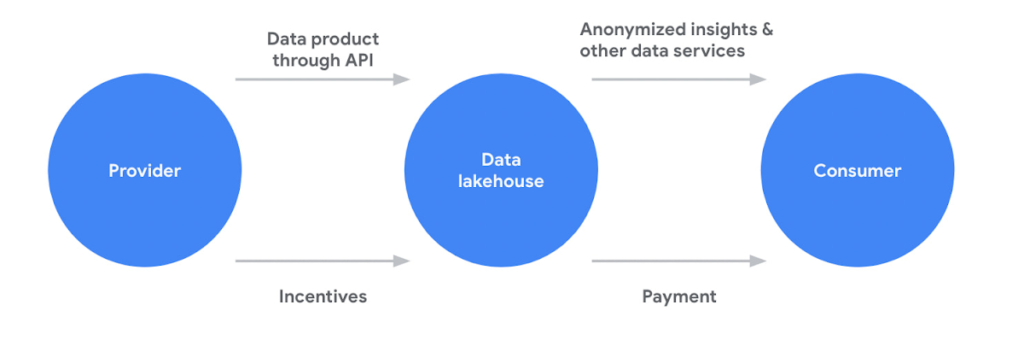
APIs are filling this critical gap for organizations in two critical ways. First, APIs are providing standard and easy access to systems like data lakehouses or analytics hubs. Second, APIs are a key enabler of data products (digital products or services built using data as a core value proposition), a core component of any data sharing system. APIs provide a standardized way for different applications to interact with the data product. For example, an API could be used to allow a mobile app to access data from a weather forecast or a recommendation engine data product. Beyond data products, APIs also provide easy and standardized access various data management platform
APIs continue to play a critical role in every application, experience, and ecosystem. Robust API strategies help organizations adapt to any architecture, business model, or environment in the face of changing technology landscape. Learn more about how Apigee is driving innovation and helping companies future proof their architectures to stay ahead of the top API trends.
How to Build A Basic Image Search Utility for Natural Language Queries

4683
Of your peers have already read this article.
6:00 Minutes
The most insightful time you'll spend today!
This post shows how to build an image search utility using natural language queries. Our aim is to use different GCP services to demonstrate this. At the core of our project is OpenAI’s CLIP model. It makes use of two encoders – one for images and one for texts. Each encoder is trained to learn representations such that similar images and text embeddings are projected as close as possible.
We will first create a Flask-based REST API capable of handling natural language queries and matching them against relevant images. We will then demonstrate the use of the API through a Flutter-based web and mobile application. Figure 1 shows how our final application would look like:
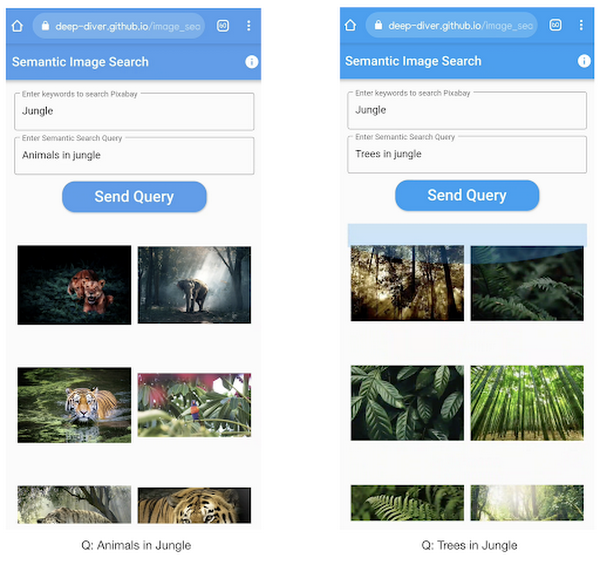
All the code shown in this post is available as a GitHub repository. Let’s dive in.
Application at a high-level
Our application will take two queries from the user:
- Tag or keyword query. This is needed in order to pull a set of images of interest from Pixabay. You can use any other image repositories for this purpose. But we found Pixabay’s API to be easier to work with. We will cache these images to optimize the user experience. Suppose we wanted to find images that are similar to this query: “horses amidst flowers”. For this, we’d first pull in a few “horse” images and then run another utility to find out the images that best match our query.
- Longer or semantic query that we will use to retrieve the images from the pool created in the step above. These images should be semantically similar to this query.
Note: Instead of two queries, we could have only taken a single long query and run named-entity extraction to determine the most likely important keywords to run the initial search with. For this post, we won’t be using this approach.
Figure 2 below depicts the architecture design of our application and the technical stack used for each of the components.
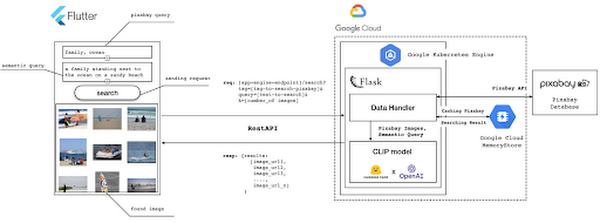
Figure 2 also presents the core logic of the API we will develop in bits and pieces in this post. We will deploy this API on a Kubernetes cluster using the Google Kubernetes Engine (GKE). The following presents a brief directory structure of our application code-base:
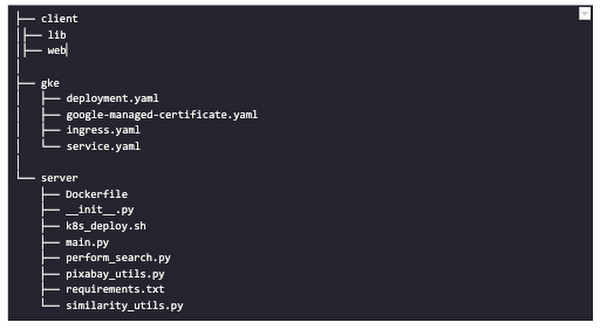
Next, we will walk through the code and other related components for building our image search API. For various machine learning-related utilities, we will be using PyTorch.
Building the backend API with Flask
First, we’d need to fetch a set of images with respect to user-provided tags/keywords before performing the natural language image search. The utility below from the pixabay_utils.py script can do this for us:
def fetch_images_tag(pixabay_search_keyword, num_images):"""Fetches images from Pixabay w.r.t a keyword.:param pixabay_search_keyword: Keyword to perform the search on Pixabay.:param num_images: Number of images to retrieve.:return: List of PIL images.:return: List of image URLs."""query = (PIXABAY_API+ "&q="+ pixabay_search_keyword.lower()+ "&image_type=photo&safesearch=true&per_page="+ str(num_images))response = requests.get(query)output = response.json()all_images = []all_image_urls = []for each in output["hits"]:imageurl = each["webformatURL"]response = requests.get(imageurl)image = Image.open(BytesIO(response.content)).convert("RGB")all_images.append(image)all_image_urls.append(imageurl)return (all_images, all_image_urls)
Note that all the API utilities are logging relevant information. But for brevity, we have omitted the lines of code responsible for that. Next, we will see how to invoke the CLIP model and select the images that would best match a given query semantically. For this, we’ll be using Hugging Face, an easy-to-use Python library offering state-of-the-art NLP capabilities. We’ll collate all the logic related to this search inside a SimilarityUtil class:
class SimilarityUtil:def __init__(self):self.model = CLIPModel.from_pretrained(CLIP_MODEL)self.processor = CLIPProcessor.from_pretrained(CLIP_PREPROCESSOR)self.device = "cuda" if torch.cuda.is_available() else "cpu"def perform_sim_search(self, images, query_phrase, top_k=3):"""Performs similarity search between the images and query.:param images: A list of PIL images initially retrieved withrespect to some entity e.g. Tiger.:param query_phrase: A list containing a single text query,e.g. "Tiger drinking water".:param top_k: Number of top images to return from `images`.:return: Top-k indices matching the query semantically andtheir similarity scores."""model = self.model.to(self.device)# Obtain the text-image similarity scoreswith torch.no_grad():inputs = self.processor(text=[query_phrase], images=images, return_tensors="pt", padding=True)inputs = inputs.to(self.device)outputs = model(**inputs)# Image-text similarity scoreslogits_per_image = outputs.logits_per_image.cpu()(top_indices, top_scores) = self.sort_scores(logits_per_image, top_k)return (top_indices, top_scores)def sort_scores(self, scores, top_k):"""Sorts the scores in a descending manner.:param scores: Scores to sort through.:param top_k: Number of top scores to return.:return: Top-k scores and their indices."""values, indices = scores.squeeze().topk(top_k)top_indices, top_scores = [], []for score, index in zip(values, indices):top_indices.append(int(index.numpy()))score = score.numpy().tolist()top_scores.append(round(score, 3))return (top_indices, top_scores)
CLIP_MODEL uses a ViT-base model to encode the images for generating meaningful embeddings with respect to the provided query. The text-based query is also encoded using A Transformers-based model for generating the embeddings. These two embeddings are matched with one another during inference. To know more about the particular methods we are using for the CLIP model please refer to this documentation from Hugging Face.
In the code above, we are first invoking the CLIP model with images and the natural language query. This gives us a vector (logits_per_image) that contains the similarity scores between each of the images and the query. We then sort the vector in a descending manner. Note that we are initializing the CLIP model while instantiating the SimilarityUtil to save us the model loading time. This is the meat of our application and we have tackled it already. If you want to interact with this utility in a live manner you can check out this Colab Notebook.
Now, we need to collate our utilities for fetching images from Pixabay and for performing the natural language image search inside a single script – perform_search.py. Following is the main class of that script:
class Searcher:def __init__(self):self.similarity_model = SimilarityUtil()def get_similar_images(self, keyword, semantic_query, pixabay_max, top_k):"""Finds semantically similar images.:param keyword: Keyword to search with on Pixabay.:param semantic_query: Query to find semantically similar images retrieved from Pixabay.:param pixabay_max: Number of maximum images to retrieve from Pixabay.:param top_k: Top-k images to return.:return: Tuple of top_k URLs and the similarity scores of the images present inside the URLs."""images_redis_key = keyword + "_images"urls_redis_key = keyword + "_urls"if redis_client.exists(images_redis_key) and redis_client.exists(urls_redis_key):keyword_images = redis_client.get(images_redis_key)keyword_image_urls = redis_client.get(urls_redis_key)else:(keyword_images, keyword_image_urls) = fetch_images_tag(keyword, pixabay_max)redis_client.set(images_redis_key, keyword_images)redis_client.set(urls_redis_key, keyword_image_urls)(top_indices, top_scores) = self.similarity_model.perform_sim_search(keyword_images, semantic_query, top_k)top_urls = [keyword_image_urls[index] for index in top_indices]return (top_urls, top_scores)
Here, we are just calling the utilities we had previously developed to return the URLs of the most similar images and their scores. What is even more important here is the caching capability. For that, we combined GCP’s MemoryStore and a Python library called direct-redis. More on setting up MemoryStore later.
MemoryStore provides a fully managed and low-cost platform for hosting Redis instances. Redis databases are in memory and light-weight making them an ideal candidate for caching. In the code above, we are caching the images fetched from Pixabay and their URLs. So, in the event of a cache hit, we won’t need to call the CLIP model and this will tremendously improve the response time of our API.
Other options for caching
We can cache other elements of our application. For example, the natural language query. When searching through the cached entries to determine if it’s a cache hit, we can compare two queries for semantic similarity and return results accordingly.
Consider that a user had entered the following natural language query: “mountains with dark skies”. After performing the search, we’d cache the embeddings of this query. Now, consider that another user entered another query: “mountains with gloomy ambiance”. We’d compute its embeddings and run a similarity search with the cached embeddings. We’d then compare the similarity scores with respect to a threshold and parse the most similar queries and their corresponding results. In case of a cache miss, we’d just call the image search utilities we developed above.
When working on real-time applications we often need to consider these different aspects and decide what enhances the user experience and maximizes business at the same time.
All that’s left now for the backend is our Flask application – main.py:
@app.route("/search", methods=["GET"])def get_images():tag = request.args.get("t").lower()query = request.args.get("s_query").lower()top_k = request.args.get("k")(top_urls, top_scores) = searcher.get_similar_images(tag, query, MAX_PIXABAY_SEARCH, int(top_k))return jsonify({"top_urls": top_urls, "top_scores": top_scores})
Here we are first parsing the query parameters from the request payload of our search API. We are then just calling the appropriate function from perform_search.py to handle the request. This Flask application is also capable of handling CORS. We do this via the flask_cors library:
cors = CORS(app,resources={r"/search/*": {"origin": "*"},r"/test/*": {"origin": "*"},},)
And this is it! Our API is now ready for deployment.
Deployment with Compute Engine and GKE
The reason why we wanted to deploy our API on Kubernetes is because of the flexibility Kubernetes offers for managing deployments. When operating at scale, auto scalability and load balancing are very important. With the comes the requirement of security — we’d not want to expose the utilities for interacting with any internal services such as databases. With Kubernetes, we can achieve all these easily and efficiently.
GKE provides secured and fully managed functionalities for operationalizing Kubernetes clusters. Here are the steps to deploy the API on GKE at a glance:
- We first build a Docker image for our API and then push it to the Google Container Registry (GCR).
- We then create a Kubernetes cluster on GKE and initialize a deployment.
- We then add scalability options.
- If any public exposure is needed for the API, we then tackle it.
We can assimilate all the above into a shell script – k8s_deploy.sh:
## Docker build and push ### We are inside the `server` directorydocker build -t gcr.io/${PROJECT_ID}/search_service .docker push gcr.io/${PROJECT_ID}/search_service## Deploy on a GKE cluster ### Configure the Docker command-line tool to authenticate to Container Registrygcloud auth configure-docker# Create a Kubernetes clustergcloud container clusters create image-search-nlp# Create a deploymentkubectl create deployment clip-search --image=gcr.io/${PROJECT_ID}/search_service# Number of worker replicaskubectl scale deployment clip-search --replicas=3# HorizontalPodAutoscaler resourcekubectl autoscale deployment clip-search --cpu-percent=80 --min=1 --max=5# Expose deploymentkubectl expose deployment clip-search --name=clip-search-service --type=LoadBalancer --port 80 --target-port 8080
These steps are well explained in this tutorial that you might want to refer to for more details. We can configure all the dependencies on our local machine and execute the shell script above. We can also use the GCP Console to execute it since a terminal on the GCP Console is pre-configured with the system-level dependencies we’d need. In reality, the Kubernetes cluster should only be created once and different deployment versions should be created under it.
After the above shell script is run successfully, we can run kubectl get service to know the external IP address of the service we just deployed:
NAME CLUSTER-IP EXTERNAL-IP PORT(S) AGEclip-search-service 10.3.251.122 203.0.113.0 80:30877/TCP 10s
We can now consume this API with the following base URI: http://203.0.113.0/. If we wanted to deal with only http-based API requests, then we are done here. But secured communication is often a requirement in order for applications to operate reliably. In the following section, we are to discuss how to configure the additional items to allow our Kubernetes cluster to allow https requests.
Configurations for handling https requests with GKE
A secure connection is almost often a must-have requirement in modern client/server applications. The front-end Flutter application would be hosted on GitHub Pages for this project, and it requires https-based connection as well. Even if configuring https connection particularly for a GKE-based cluster can be considered a chore, its setup might seem daunting at first.
There are six steps to configure https connection in the GKE environment:
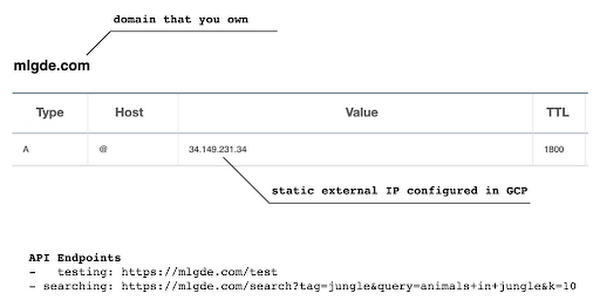
- You need to have a domain name, and there are a lot of inexpensive options that you can buy. For instance, mlgde.com domain for this project is acquired via Gabia which is a Korean service provider.
- A reserved (static) external IP address has to be acquired via gcloud command or GCP console.
- You need to bind the domain name with the acquired external IP address. This is a platform-specific configuration that issued the domain name to you.
- There is a special ManagedCertificate resource which is specific to the GKE environment. ManagedCertificate resource specifies the domain that the SSL certificate will be created for, so you need this.
- An Ingress resource should be created by listing the static external IP address, ManagedCertificate resource, and the service name and port which the incoming traffic will be routed to. The Service resource could remain the same as in the above section with only changes from LoadBalancer to ClusterIP.
- Last but not least, you need to modify the existing Flask application and Deployment resource to support liveness and readiness probes which are used to check the health status of the Deployment. The Flask application side can be simply modified with the flask-healthz Python package, and you only need to add
livenessProbeandreadinessProbesections in the Deployment resource. In the code example below, thelivenessProbeandreadinessProbeare checked via/aliveand/readyendpoints respectively.
from flask_healthz import healthzfrom flask_healthz import HealthErrorapp = Flask(__name__)app.register_blueprint(healthz, url_prefix="/")def printok():print("Everything is fine")def liveness():try:printok()except Exception:raise HealthError("Can't connect to the file")def readiness():try:printok()except Exception:raise HealthError("Can't connect to the file")app.config.update(HEALTHZ = {"alive": "main.liveness","ready": "main.readiness",})
One thing to be careful of is the initialDelaySeconds attribute of the probes. It is uncommon to configure this attribute with a big number, but it could be bigger than 90 – 120 seconds depending on the size of the model to be used. For this project, it is configured in 90 seconds in order to wait until the CLIP model is fully loaded into memory (full YAML script here).
livenessProbe:httpGet:path: /aliveport: 8080initialDelaySeconds: 90periodSeconds: 10readinessProbe:httpGet:path: /readyport: 8080initialDelaySeconds: 90periodSeconds: 10
Again, these steps may seem daunting at first, but it will become clear when you have done it once. Here is the official document for Using Google-managed SSL certificates You can find all the GKE-related resources used in this project here.
Once every step is completed you should be able to see your server application running on the GKE environment. Please make sure to run kubectl apply command whenever you create Kubernetes resources such as Deployment, Service, Ingress, and ManagedCertificate, and it is important to wait for more than 10 minutes until the ManagedCertifcate provisioning is done.
You can run gcloud compute addresses list command to find out the static external IP address that you have configured.
NAME ADDRESS/RANGE TYPE PURPOSE NETWORK REGION SUBNET STATUSgde 34.149.231.34 EXTERNAL IN_USE
Then, the IP address has to be mapped to the domain. Figure 3 is a screenshot of a dashboard from where we got the mlgde.com domain. It clearly shows mlgde.com is mapped to the static external IP address configured in GCP.
In case you’re wondering why we didn’t deploy this application on App Engine, well that is because of the compute needed to execute the CLIP model. App Engine instance won’t fit in that regime. We could have also incorporated compute-heavy capabilities via a VPC Connector. That is a design choice that you and your team would need to consider. In our experiments, we found the GKE deployment to be easier and suitable for our needs.
Infrastructure for the CLIP model
As mentioned earlier, at the core of our application is the CLIP model. It is computationally a bit more expensive than the regular deep learning models. This is why it makes sense to have the hardware infrastructure set up accordingly to execute it. We ran a small benchmark in order to see how a GPU-based environment could be beneficial here.
We ran the CLIP on a Tesla P100-based machine and also on a standard CPU-only machine 1000 times. The code snippet below is the meat of what we executed:
DEVICE = "cuda" if torch.cuda.is_available() else "cpu"start_time = time.time()for _ in range(1000):with torch.no_grad():model = model.to(DEVICE)inputs = processor(text=[semantic_search_phrase],images=all_images, return_tensors="pt", padding=True)inputs = inputs.to(DEVICE)outputs = model(**inputs)end_time = time.time() - start_timeprint(f"Total time: {end_time:.3f} seconds.")
As somewhat expected, with the GPU, the code took 13 minutes to complete execution. With no GPU, it took about 157 minutes.
It is uncommon to leverage GPUs for model prediction because of cost restrictions, but sometimes we have to access GPUs for deploying a big model like CLIP. We configured a GPU-based cluster on GKE and compared the performance differences with and without it. It took about 1 second to handle a request with GPU and MemoryStore cache while it took more than 4 seconds with MemoryStore only (without the GPUs).
For the purposes of this post, we used a CPU-based cluster on Kubernetes. But It is easy to configure GPU usage in a GKE cluster. This document shows you how to do so. For a short summary, there are two steps. First, a node should be configured with GPUs when creating a GKE cluster. Second, GPU drivers should be installed in GKE nodes. You don’t need to visit and manually install GPU drivers for each node by yourself. Rather you can simply apply the DaemonSet resource to GKE as described here.
Setting up MemoryStore
In this project, we first query the general concept of images to Pixabay, then we filter the images with a semantic query using CLIP. It means we can cache the initially retrieved images from Pixabay for the next specific semantic query. For instance, you may want to search with “gentleman wearing tie” at first, then you may want to retry searching for “gentleman wearing glass”. In this case, the base images remain all the same, so they could be stored in a cache server like Redis.
MemoryStore is a GCP service wrapping the Redis which is an in-memory data store, so you can simply use a standard Redis Python package for accessing it. The only thing to be careful about when provisioning a MemoryStore Redis instance is to make sure it is in the same region where your GKE cluster or Compute Engine instance is.
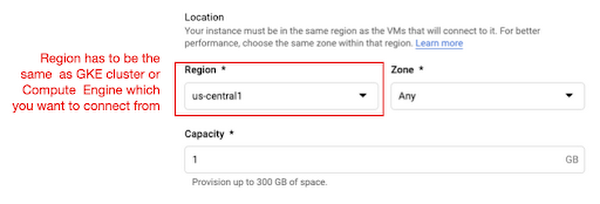
The code snippet below shows how to make a connection to the Redis instance in Python. Nothing specific to GCP, but you only need to be aware of the usage of the standard redis-py package.
# REDISHOST is the IP address to the MemoryStore instanceredis_host = os.environ.get("REDISHOST", "localhost")redis_port = int(os.environ.get("REDISPORT", 6379))redis_client = redis.StrictRedis(host=redis_host, port=redis_port)
After creating a connection, you can store and retrieve data from MemoryStore. There are more advanced use cases of Redis, but we only used exists, get, and set methods for the demonstration purpose. These methods should be very familiar if you know maps, dictionaries, or other similar data structures. For the code portion that uses Redis-related utilities, please refer to the Searcher Python class we discussed in an earlier section.
In the URLs below, you can find side-by-side comparisons of using MemoryStore:
- Without MemoryStore: https://youtu.be/7B88Eyrd-4s
- With MemoryStore (1st try): https://youtu.be/LE6xeEIRuMM
- With MemoryStore (2nd try): https://youtu.be/rRfK17sdk84
Putting everything together
All that’s left now is to collate the different components we developed in the sections above and deploy our application with a frontend. All the frontend-related code is present here.
- The front-end application is written in the Flutter development kit. The main screen contains two text fields for queries to Pixabay and CLIP model respectively. When you click the “Send Query” button, it will send out a RestAPI request to the server. After receiving the result back from the server, the retrieved images from the semantic query will be displayed at the bottom section of the screen.
- Please note that a Flutter application can be deployed to various environments including desktop, web, iOS, and Android. In order to keep as simple as possible, we chose to deploy the application to the GitHub Pages. Whenever there is any change to a client-side source directory, the GitHub Action will be triggered to build a web page and deploy the latest version to the GitHub Pages.
Our final application is deployed here and it looks like so:

Note that due to constraints, the above-mentioned URL will only be live for one or two months.
It is also possible to redeploy the back-end application with a GitHub Action.
- The very first step is to craft a Dockerfile like below. Since Python is a scripting language, and there are lots of heavy packages that the application is dependent on, it is important to cache the steps. For instance, installing the dependencies should be separated from other commands.
FROM pytorch/pytorch:latestWORKDIR /app# install the dependenciesCOPY requirements.txt requirements.txtRUN pip install -r requirements.txtCOPY . .# set up environment variablesENV PIXABAY_API_KEY="..."ENV REDIS_IN_USE="true"ENV REDISHOST="..."# expose port that Flask app is listening onEXPOSE 8080# run the Flask appCMD [ "python3", "main.py" ]
- With the Dockerfile defined, we can use a GitHub Action like this for automatic deployment.
Edge cases
Since the CLIP model is pre-trained on a large corpus of image and text pairs it’s likely that it may not generalize well to every natural language query we throw at it. Also, because we are limiting the number of images on which the CLIP model can operate, this somehow restricts the expressivity of the model.
We may be able to improve the performance for the second situation by increasing the number of images to be pre-fetched and by indexing them into a low-cost and high-performance database like Datastore.
Costs
In this section, we wanted to provide the readers a breakdown of the costs they might incur in order to consume the various services used throughout the application.
- Frontend hosting
- The front-end application is hosted on GitHub Pages, so there is no expenditure for this.
- Compute Engine
- With an e2-standard-2 instance type without GPUs, the cost is around $48.92 per month. In case you want to add a GPU (NVIDIA K80), the cost goes up to $229.95 per month.
- MemoryStore
- The cost for MemoryStore depends on the size. With 1GB of space, the cost is around $35.77 per month, and whenever you add more GBs the cost will be doubled.
- Google Kubernetes Engine
- The monthly cost for a 3 node GKE cluster with n2-standard-2 (vCPUs: 2, RAM: 8GB without GPUs) is about $170.19. If you add one GPU (NVIDIA K80) to the cluster, the cost goes up to $835.48.
While you may think that is a lot cost-wise, it is good to know that Google gives away free $300 credits when you create a new GCP account. It is still not enough for leveraging GPUs, but it is enough to learn and experiment with GKE and MemoryStore usage.
Conclusion
In this post, we walked through the components needed to build a basic image search utility for natural language queries. We discussed how these different components are connected to each other. Our image search API is able to utilize caching and was deployed on a Kubernetes cluster using GKE. These elements are essential when building a similar service to cater to a much bigger workload. We hope this post will serve as a good starting point for that purpose. Below are some references on similar areas of work that you can explore:
- Building a real-time embeddings similarity matching system
- Detecting image similarity using Spark, LSH and TensorFlow
Acknowledgments: We are grateful to the Google Developers Experts program for supporting us with GCP credits. Thanks to Karl Weinmeister and Soonson Kwon of Google for reviewing the initial draft of this post.
3139
Of your peers have already watched this video.
18:45 Minutes
The most insightful time you'll spend today!
Reduce Costs, Increase Profits by Modernizing Your Mainframe Applications with Google Cloud
Mainframe powers much of global commerce and for decades—with its proprietary platform and legendary lock-in—was resistant to effective competition. Even years after most organizations began adopting public cloud, migrating off the mainframe remains too complex for many organizations to undertake.
Google Cloud brings a unique, automated approach to modernization enabling customers to go from mainframe to containers.
Gain operational efficiency
Escape capital-intensive mainframe refresh cycle with Google cloud. Move to a modern cloud-based model to reduce operational cost and improve maintainability.
Deliver agile services
You can also evolve software capabilities for faster and frequent updates. Use cloud-native technologies such as GKE alongside your on-premises workloads and accelerate time to market.
Mitigate risk and get access to talent
Also, eliminate the dependency on scarce skills. Gain access to top engineering talent and avoid vendor lock-in by modernizing to open software languages.
Watch this video where Travis Webb, Cloud Solutions Architect for Enterprise at Google Cloud, takes you through the challenges of modernizing mainframe and the key technical aspects of this solution that make it possible.
Scaling with Breaking News: BBC’s Serverless Infrastructure on Google Cloud

1265
Of your peers have already read this article.
3:30 Minutes
The most insightful time you'll spend today!
Editors note: Today’s post is from Neil Craig at the British Broadcasting Corporation (BBC), the national broadcaster of the United Kingdom. Neil is part of the BBC’s Digital Distribution team which is responsible for building the services such as the public-facing www bbc.co.uk and .com websites and ensuring they are able to scale and operate reliably.
The BBC’s public-facing websites inform, educate, and entertain over 498 million adults per week across the world. Because breaking news is so unpredictable, we need a core content delivery platform that can easily scale in response to surges in traffic, which can be quite unpredictable.
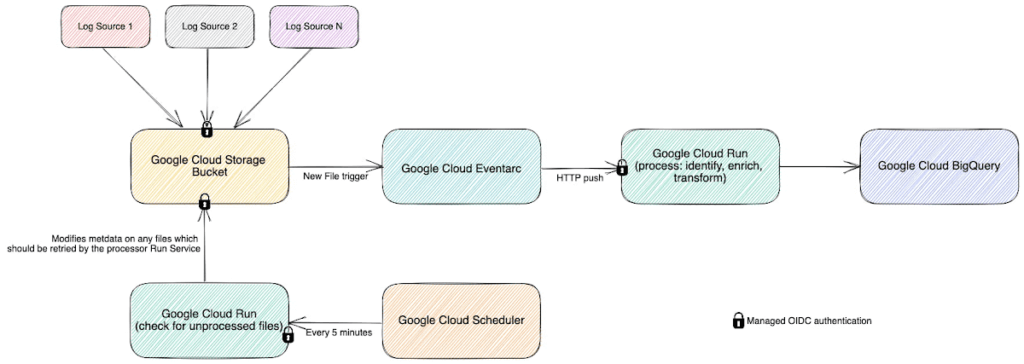
To this end, we recently rebuilt our log-processing infrastructure on a Google Cloud serverless platform. We’ve found that the new system, based on Cloud Storage, Eventarc, Cloud Run and BigQuery, enables us to provide a reliable and stable service without us having to worry about scaling up during busy times. We’re also able to save license fee payers money by operating the service more cost effectively than our previous architecture. Not having to manually manage the scale of major components of the stack has freed up our time, allowing us to spend it on using, rather than creating the data.
A log in time
To operate the site and ensure our services run smoothly we continually monitor Traffic Manager and CDN access logs. Our websites generate more than 3B log lines per day, and handle large data bursts during major news events; on a busy day our system supports over 26B log lines in a single day.
As initially designed, we stored log data in a Cloud Storage bucket. But every time we needed to access that data, we had to download terabytes of logs down to a virtual machine (VM) with a large amount of attached storage, and use the ‘grep’ tool to search and analyze them. From beginning to end, this took us several hours. On heavy news days, the time lag made it difficult for the engineering team to do their jobs.
We needed a more efficient way to make this log data available, so we designed and deployed a new system that deals with logs and reacts to spikes more efficiently as they arrive, improving the timeliness of critical information significantly.
In this new system, we still leverage Cloud Storage buckets, but on arrival, each log generates an event using EventArc. That event triggers Cloud Run to validate, transform and enrich various pieces of information about the log file such as filename, prefix, and type, then processes it and outputs the processed data as a stream into BigQuery. This event-driven design allows us to process files quickly and frequently — processing a single log file typically takes less than a second. Most of the files that we feed into the system are small, fewer than 100 Megabytes, but for larger files, we automatically split those into multiple files and Cloud Run automatically creates additional parallel instances very quickly, helping the system scale almost instantly.
The nature of running a global website which provides news coverage means we see frequent, unpredictable large spikes of traffic. We learn from these and optimize our systems where necessary so we’re confident in the system’s ability to handle significant traffic. For example, around the time of the announcement of the Queen’s passing in September, we saw some huge traffic spikes. During the largest, within one minute, we went from running 150 – 200 container instances to over 1000…. and the infrastructure just worked. Because we engineered the log processing system to rely on the elasticity of a serverless architecture, we knew from the get-go that it would be able to handle this type of scaling.
Around the time of the announcement of the Queen’s passing in September, we saw some huge traffic spikes. During the largest, within one minute, we went from running 150 – 200 container instances to over 1000…. and the infrastructure just worked
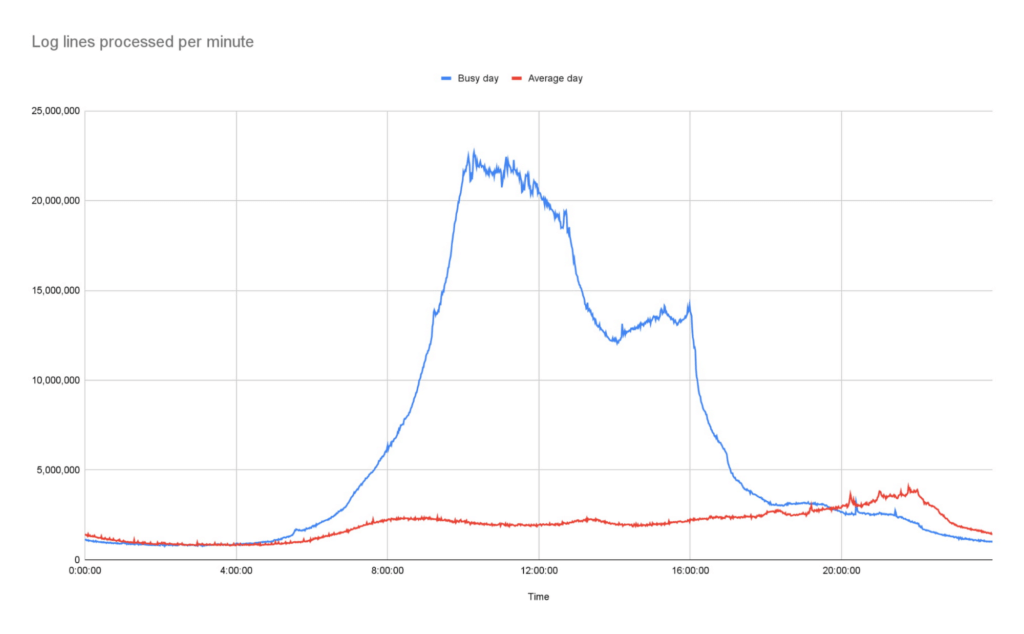
Our initial concern about choosing serverless was cost. It turns out that using Cloud Run is significantly more cost-effective than running the number of VMs we would need for a system that could survive reasonable traffic spikes with a similar level of confidence.
Switching to Cloud Run also allows us to use our time more efficiently, as we no longer need to spend time managing and monitoring VM scaling or resource usage. We picked Cloud Run intentionally because we wanted a system that could scale well without manual intervention. As the digital distribution team, our job is not to do ops work on the underlying components of this system — we leave that to the specialist ops teams at Google.
Another conscious choice we made whilst rebuilding the system was to use the built-in service-to-service authentication in Google Cloud. Rather than implementing and maintaining the authentication mechanism ourselves, we add some simple configuration which instructs the client side to create and send a OIDC token for a service account we define and the server side to authenticate and authorize the client. Another example is pushing events into Cloud Run, where we can configure Cloud Run authorization to only accept events from specific EventArc triggers, so it is fully private.
Going forward, the new system has allowed us to make better use of our data safely. For example, BigQuery’s per-column permissions allow us to open up access to our logs to other engineering teams around the organization, without having to worry about sharing PII that’s restricted to approved users.
The goal of our team is to empower all teams within the BBC to get the content they want on the web when they want it, make it reliable, secure, and make sure it can scale. Google Cloud serverless products helped us to achieve these goals with relatively little effort and require significantly less management than previous generations of technology.
Rhode Island’s VCC Platform Built on GCP Helps Jobseekers Get Back to Work!

3252
Of your peers have already read this article.
5:00 Minutes
The most insightful time you'll spend today!
2020 brought many challenges, especially as in-person operations were shut down, and many were left vulnerable to unemployment.
The State of Rhode Island responded to these challenges, by modernizing their workforce development operations and moving completely to a custom online platform called the Virtual Career Center, also nicknamed “the VCC.”
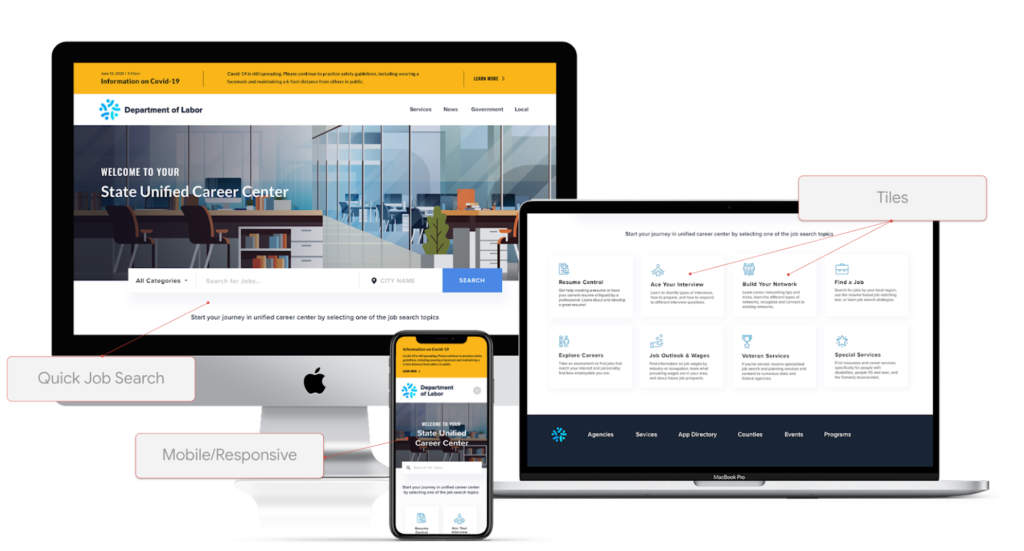
It was developed in partnership with Google Cloud and a nonprofit called “Research Improving People’s Lives” (RIPL), and was fully built by Google Cloud partner Maven Wave, which helps a wide array of organizations, including public sector customers, with many types of cloud initiatives.
In this episode of Architecting with Google Cloud, we interviewed Joel Osman, head of Digital Experience & Custom Applications at MavenWave who shared a lot of insights such as:
“We looked at how we can apply leading edge emerging technologies to help people get back to work and use them as tools in such a way that we can augment the personal one to one interactions that agencies had been using with job seekers, to help them get back to work.”
One of those key benefits is enabling job seekers to find coaches that are specialized in their respective community. During the in-person walk-in model, applicants were paired on a first come first serve basis with any available coach on site. Meanwhile online scheduling has enabled a greater opportunity to match veterans, college graduates, non-English speakers, etc with coaches with prior experience in that specific area.
How the VCC was built
This VCC web app was built on Angular. It has a custom frontend built on top of 2 key Google Cloud products. The first is Workspace, which includes functionality such as video conferencing, documents, slides, chat, file storage, etc. And the other is Google Cloud computing resources. Here’s a view of the architecture:
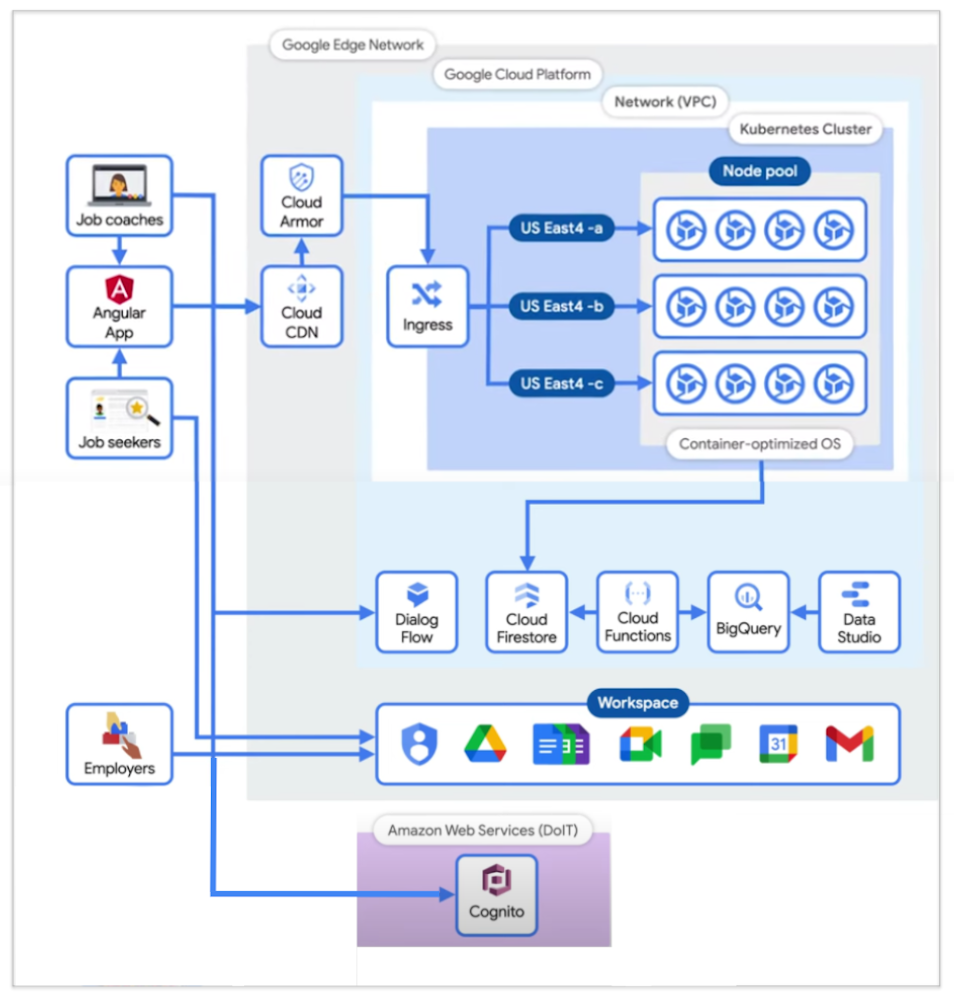
There are 3 main types of users at this time, and that’s job coaches, job seekers, and employers.
- 👩🔧 Job Coaches all have Google IDs in the Google Workspace domain, and therefore authenticate against the Google identity repository.
- 🕵️♂️ Job Seekers are authenticated through a Cognito-based process maintained by the nonprofit I mentioned earlier (RIPL), the Rhode Island infrastructure team, and the Department of Information Technology (DoIT). Cognito was an identity repository setup prior to this project for users interacting with the State, and remained as their form of authentication.
- 🧭 Employers participate directly with Google Meet, and, to an extent, Google Calendar; but not the Angular app. There’s also a focus on building a future dashboard to see how the center has helped employers with applicants.
The specific Google Cloud components used are the following:
- Firestore: realtime Database that keeps data in sync across client apps.
- BigQuery: serverless warehouse for data.
- Data Studio: is used to build filterable dashboards over BigQuery
- Cloud Functions: which serve as triggers to keep scheduling and data workflows in sync.
- Kubernetes cluster: runs & autoscales the server-side code in a single-region deployment, with a minimum of four nodes per zone across three zones of the US East region.
- Cloud Armor: protects applications and websites from attacks, and sets NIST-compliant policies.
- Google’s Content Distribution Network (CDN): content is accessed and cached.
To manage the lifecycle of the infrastructure, a Terraform script is used, which is an open source tool, and is structured into 5 folder environments:
- Admin
- Dev
- QA & UAT
- Networks
- Prod
- Shared Services (for CI/CD pipelines between Dev & Prod).
Adoption outcomes
A universal fear we technical practitioners may have is:
“Will our tool be loved and adopted by our intended audiences?”
Joel mentioned Job Coaches at the time were not used to working from home, and the team was concerned that they would potentially feel overwhelmed with a lot of new technology.
As a rewarding surprise, when Job Coaches were presented the proof of concept, it was received with positivity.
“95% of Job Coaches rated the VCC as a valuable solution and 87% reported to find it very or extremely effective.”
This alignment was thanks to designing the tool with the users in mind, and performing user research since the beginning of the journey, which helped address their day to day needs.
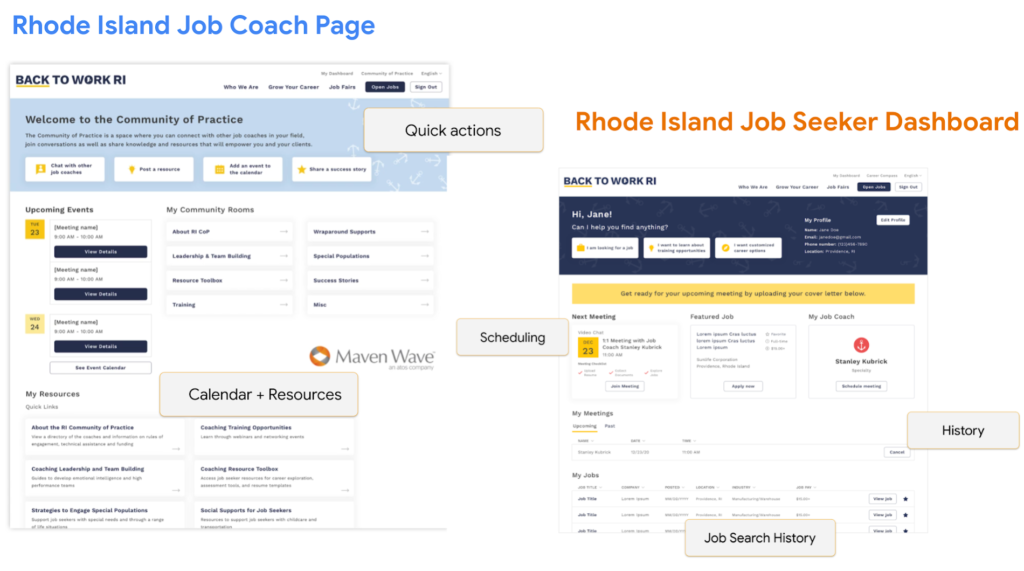
Additional innovation for the future
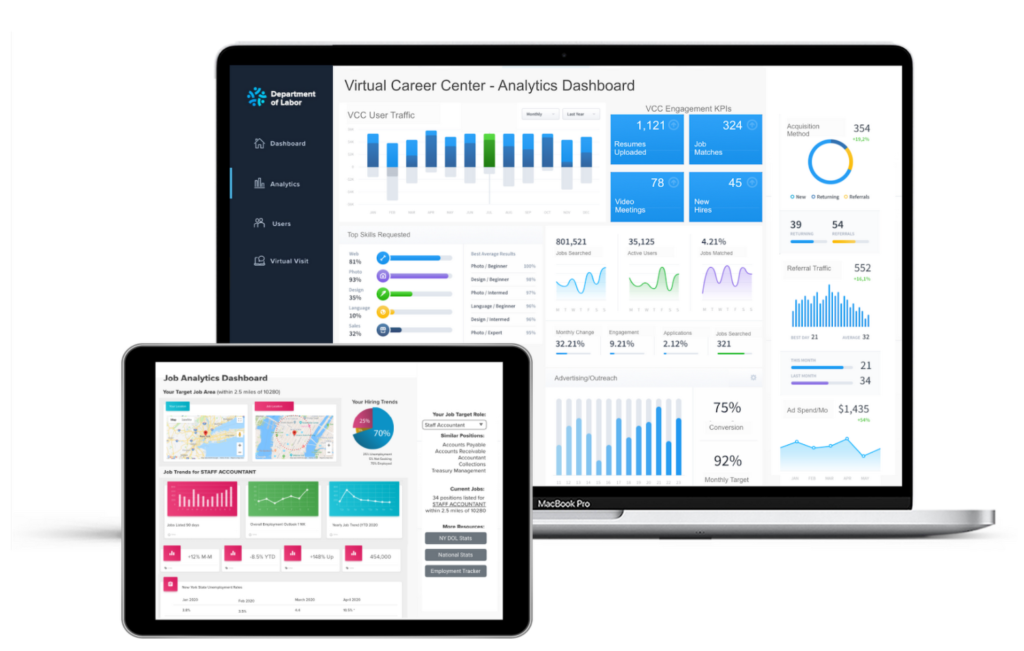
After creating a centralized hub and moving operations to a digital format, many more benefits also arise. For example, there can now be an integrated data analytics view which enables meaningful dashboards that can be customized for different audiences such as job applicants, coaches, program stakeholders, or state agencies.
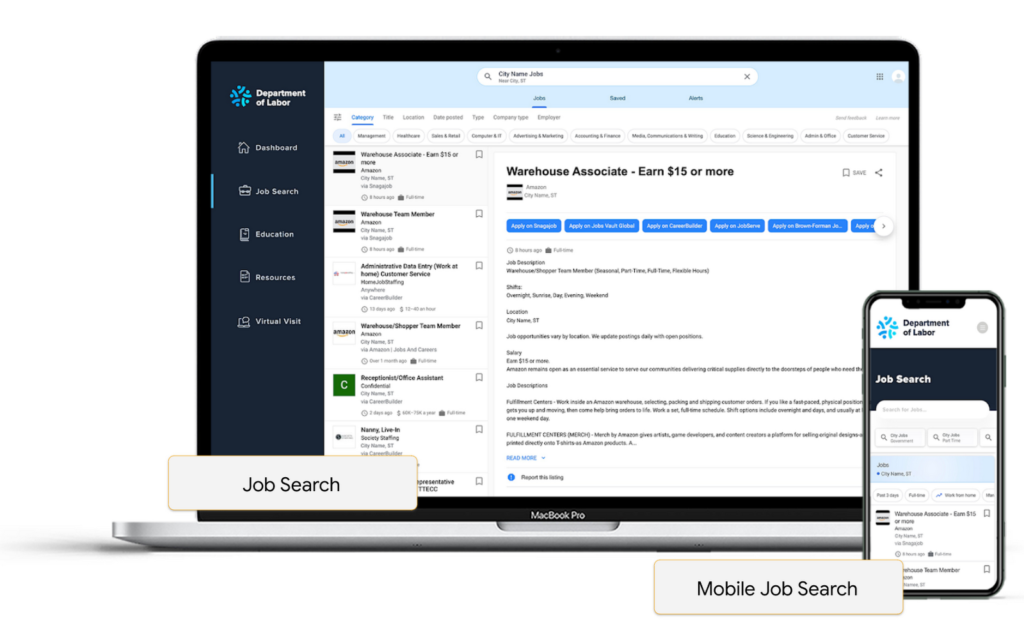
There can be improved job searchability by integrating machine learning, helping with resume building and parsing that take keywords out of a resume and match them to a variety of relevant job clusters, rather than just performing raw keyword searches.
Embedding chat bots can also help reduce the load of call centers in states, as they utilize natural language processing as well to help guide job seekers with prompt answers.

Conclusion
The State of Rhode Island’s Virtual Career Center is an amazing success story. By having worked with an experienced partner to move their operations to a digital format, they were able to respond to their citizen’s needs in a time where in-person operations were not possible. They also unlocked opportunities such as better matching and reporting along that journey.
For any organization whether they are in the public sector, university, private sector, etc; anyone can take advantage of this platform and customize it to their needs as Maven Wave shared that they offer a menu of options, where you can pick and choose functionality based on your requirements, IT resources, and budget.

4113
Of your peers have already downloaded this article
10:32 Minutes
The most insightful time you'll spend today!
While microservices are lauded as catalysts for speed and scale, the conversation is incomplete if it does not include APIs. Without APIs, microservices cannot be securely, reliably, and adaptably scaled across an organization or to outside partners. Moreover, because these APIs and their microservices are meant to be widely consumed and reused, it’s not enough for companies to merely create the APIs and move on. Rather, the APIs should be continually managed so the business can control how its microservices are accessed, generate insight into how they are used, and encourage reliability of its services.
As microservices grow beyond their original use cases and are being leveraged to share important functionality throughout the enterprises and even with external partners, the problem that arises is how this sharing creates challenges for teams trying to secure, monitor, understand usage of, and fully take advantage of microservices.
In this eBook we explore how leading enterprises are facing these challenges head-on and scaling their microservices strategies. Learn how APIs make it possible for microservices to be securely, reliably, and adaptably shared, and how an API management platform enables enterprises to ensure that they maintain control over their microservices as consumption grows.
More Relevant Stories for Your Company




Case Study: How Texas’ Largest Grocery Chain Successfully Modernized its Legacy Mainframes
H-E-B, like many enterprises, is moving away from legacy mainframes in favor of microservices and public cloud infrastructure. With hundreds of applications powering their 100+ year-old grocery business (with more than 400 stores in Texas and Mexico), H-E-B needs to be confident that the platform they are building will provide


Reactive Programming on Google Maps Platform: Watch Video to Learn
The Google Maps Platform Android SDK supports extensions for reactive programming, which helps you write code to handle asynchronous operations. Write reactive and responsive mapping applications with Google Maps Platform In mobile apps, asynchronous events can happen at any point in time: user touch events, waiting for network calls to complete, or

Conquering Hybrid API Management: Building The Perfect Team and Platform
Introduction In our discussions with technology leaders from around the world for – The Digital Crunch Time: 2022 State of APIs and Applications – two themes emerged #1 Cloud — and hybrid cloud specifically — is becoming a driving factor of success with 59% of respondents saying they were looking to increase
