





Conquering Hybrid API Management: Building The Perfect Team and Platform

2005
Of your peers have already read this article.
5:00 Minutes
The most insightful time you'll spend today!
Introduction
In our discussions with technology leaders from around the world for – The Digital Crunch Time: 2022 State of APIs and Applications – two themes emerged
#1 Cloud — and hybrid cloud specifically — is becoming a driving factor of success with 59% of respondents saying they were looking to increase their hybrid cloud adoption within the next 12 months.
#2 82% of organizations with a mature API strategy and higher API adoption reported increased efficiency, collaboration, and agility.
It’s clear that hybrid cloud – usually a combination of on-premise infrastructure (or private cloud) and a public cloud computing environment (like Google Cloud) – and APIs are becoming popular keys to success. The challenge now becomes – how to structure your teams and architect your platform to manage APIs at scale in hybrid environments?
In this two-part series, we’ll look at how successful organizations are managing APIs on a large scale across hybrid environments using Apigee. In this post we’ll look at how to structure the right team and set up the platform to help you thrive. In part 2 of this series, we will explore how to operate the platform with optimum clusters, scaling, and automation.
Why is it difficult to manage APIs at scale in hybrid environments?
As your business grows, it makes sense that you will need to scale and build more APIs to keep pace. This can mean thousands of APIs with tens of thousands of transactions per second. And these APIs are often operated across completely different business units with many development teams. Like with any large scale operation, building a central governance across these hundreds of APIs is extremely challenging.
Operating APIs in a hybrid environment offers a number of benefits — less latency, compliance with regulations etc., — but to get the most out of them, you need a clinical and pragmatic approach to solving the two challenges outlined below.
#1 How to structure your API teams?
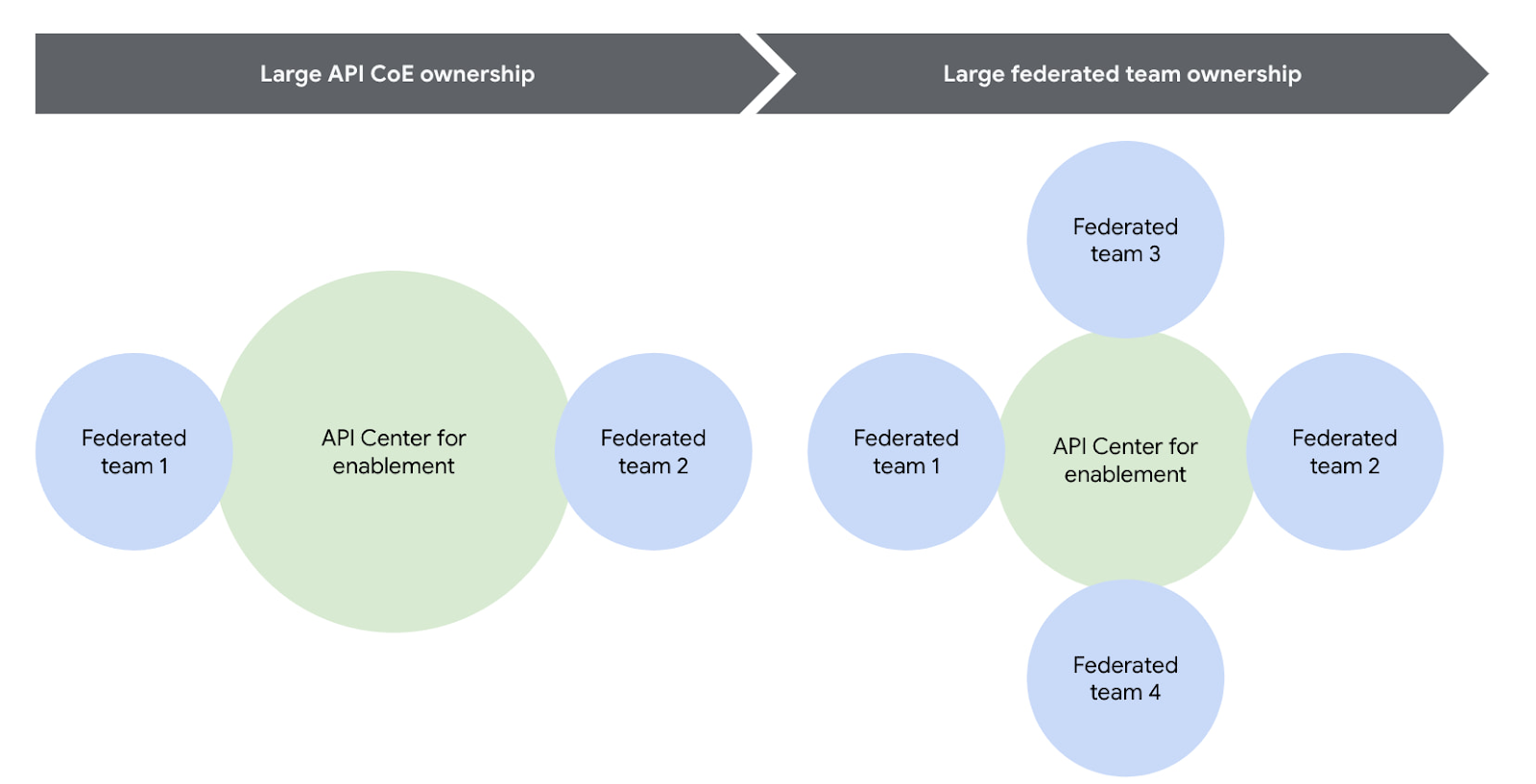
One of the most successful patterns when structuring your API teams is a Center for Enablement team. This team is made up of many federated API producer teams throughout the enterprise with one central team of deep subject matter experts. This central team builds out the guardrails for the API program, develops reusable content, helps automate things like the CI/CD pipeline, and delivers best practices.
Note that the level of implementation handled by the centralized team may vary. For example, they may have a full CI/CD pipeline to maintain, or they may simply provide templates for the federated dev teams to build their own pipeline. However implementation is coordinated, having this structure ensures a consistent API model with appropriate governance and security in place across the enterprise.
Another successful strategy is to reduce the size or redefine the role of the central teams over time. For example, one of our customers recently adopted a model where their largest business units are fully responsible for operating their own infrastructure using a GitOps model. In this case, the centralized team created the automation for installing and upgrading Apigee hybrid, but the business units themselves operated their own copy of the platform, allowing them complete autonomy. In this way, gradually increasing the autonomy for the federated teams will help avoid delivery bottlenecks while ensuring consistent governance.
You can visualize this change over time pretty easily using the following diagram.
#2 How to architect your platform?
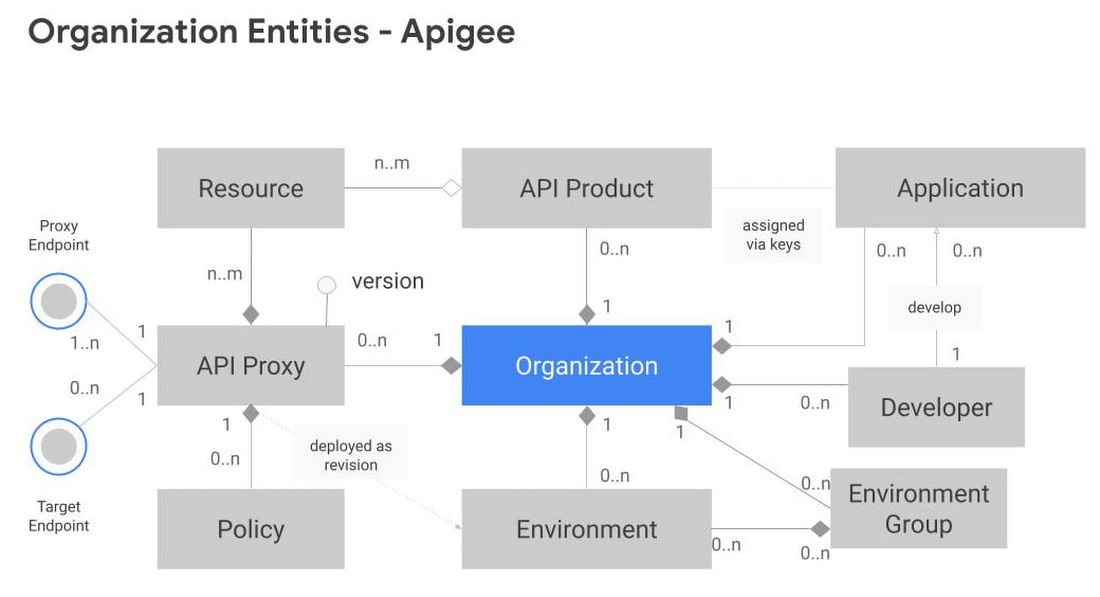
Another challenge is designing your Apigee organizations (top-level container that contains all your API proxies and related resources) and environments (software environment for creating and deploying API proxies). To tackle this, you first need to understand the relationship between different entities within an Apigee organization. Apigee organization is the top level entity – nothing shared between Apigee organizations. Using an organization in Apigee, customers can segregate resources and manage access to these resources based on their own requirements. In practice, this means that each Apigee organization has its own apps, API keys, developers, proxies, and so on. The diagram below provides a visual representation of how different entities in an Apigee organization interact with each other.
Another key factor to consider is the technical limits of the platform – designing around these limits leads to higher platform performance and stability.
In the design phase, it is vital to articulate fundamental requirements of your architecture and agree on these baseline principles with all the stakeholders involved. Some of these fundamental questions include:
- How many regions need to host runtimes?
- Host runtime instances for organizations that handle production traffic in at least 2 regions to meet aggressive uptime SLAs. During upgrades, ensure only one of these regions upgrades at a time.
- What are the steps in your Software Development Lifecycle (SDLC) and how does Apigee fit into it?
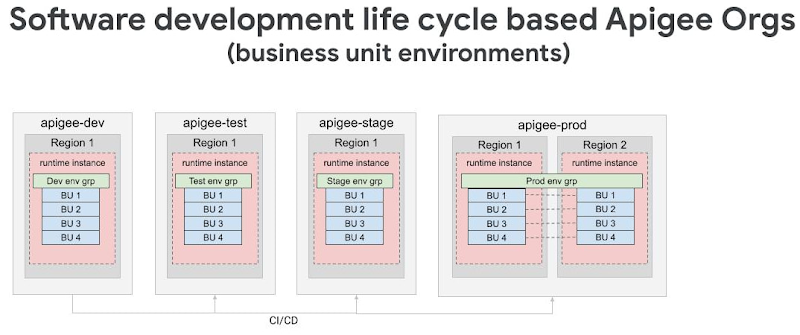
- Use Apigee organizations as the SDLC perimeter — such as a dev organization and a test organization — to give yourself the capacity for a large number of proxies. It is also common that the dev organization in this model has relatively permissive access for developers, allowing them to work more efficiently.
- What level of access or separation do you need between business units or development teams?
- Create separation between different teams by leveraging environments with conditional identity and access management to restrict access as necessary
- If your team is very large and you plan to have multiple organizations, you may want to divide the operational ownership for these different Apigee organizations among different teams in your enterprise while keeping them operating under the centralized team.
- In such a shared responsibility model, the largest consumers of the system stand up and operate their own instances. Teams with many APIs or distinct operational needs can use the automation from the central team to stand up and operate their own Apigee hybrid clusters. This reduces the burden on the centralized team while allowing business units to be self-sufficient and ensuring that the clusters are optimized to meet that team’s needs.
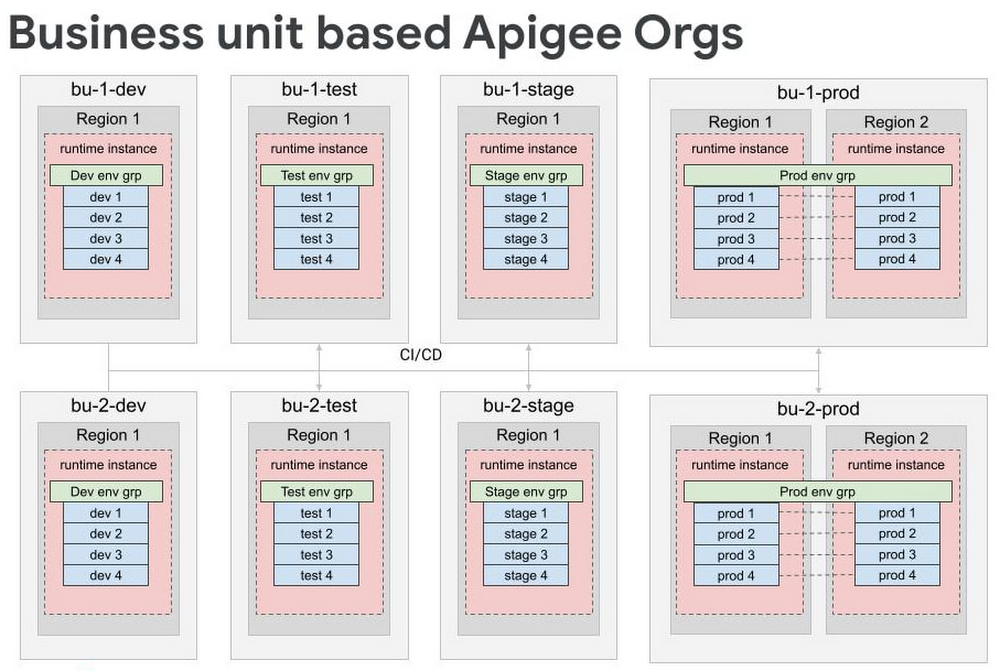
- For very large scale programs where additional separation is necessary, consider creating separate organizations for each business unit, each of which has the full complement of SDLC orgs. Some customers have this level of scale, and often it makes logical sense to divide up into different Apigee orgs because it’s rare that 5000 APIs are all related and used together.
By working off these baseline recommendations, you will come up with your own logical design of Apigee organizations and environments. Using Apigee organizations to represent your SDLC with business units — or functional areas or some other dividing mechanism — is a good way to design different environments.
For large scale deployments — involving thousands of proxies — we recommend dividing organizations into different logical business units while still following the SDLC model. In many cases, only the largest business units will need their own organizations, and it is possible to have a shared organization that contains multiple business units.
Conclusion
Like with any large scale IT project, there isn’t one“correct” way to operate APIs in a hybrid cloud environment. Finding the right approach for your enterprise starts with knowing the organizational requirements and tailoring Apigee for your use case. In the next installment of this series, we will explore how to operate Apigee with the optimal resources (clusters, automation, and monitoring etc.) for a large scale hybrid API program.
Check out our documentation to learn more or start using Apigee hybrid.
3184
Of your peers have already watched this video.
1:30 Minutes
The most insightful time you'll spend today!
Start Your Serverless Expeditions Now!
Google Cloud’s fully managed serverless platform like Cloud Run helps build and run highly scalable containerized applications. In traditional scenarios, over or under-provisioning enterprise applications can result in outages and cost hurdles. Severless Experts at the Google Cloud succinctly breakdown what serverless means for an organization and how Engineering Managers and CTO can rest assured with the predictability, developer productivity, automated release process and infrastructure abstraction.
Watch the video to unravel the serverless journey with Cloud Run!
Cloud IoT Core Helps Businesses Leverage their IoT Data to Build a Competitive Edge

7084
Of your peers have already read this article.
1:30 Minutes
The most insightful time you'll spend today!
The ability to gain real-time insights from IoT data can redefine competitiveness for businesses. Intelligence allows connected devices and assets to interact efficiently with applications and with human beings in an intuitive and non-disruptive way. After your IoT project is up and running, many devices will be producing lots of data. You need an efficient, scalable, affordable way to both manage those devices and handle all that information.
IoT Core is a fully managed service for managing IoT devices. It supports registration, authentication, and authorization inside the Google Cloud resource hierarchy as well as device metadata stored in the cloud, and the ability to send device configuration from other GCP or third-party services to devices.
Main components
The main components of Cloud IoT Core are the device manager and the protocol bridges:
- The device manager registers devices with the service, so you can then monitor and configure them. It provides:
- Device identity management
- Support for configuring, updating, and controlling individual devices
- Role-level access control
- Console and APIs for device deployment and monitoring
- Two protocol bridges (MQTT and HTTP) can be used by devices to connect to Google Cloud Platform for:
- Bi-directional messaging
- Automatic load balancing
- Global data access with Pub/Sub
How does Cloud IoT Core work?
Device telemetry data is forwarded to a Cloud Pub/Sub topic, which can then be used to trigger Cloud Functions as well as other third-party apps to consume the data. You can also perform streaming analysis with Dataflow or custom analysis with your own subscribers.
Cloud IoT Core supports direct device connections as well as gateway-based architectures. In both cases the real time state of the device and the operational data is ingested into Cloud IoT Core and the key and certificates at the edge are also managed by Cloud IoT Core. From Pub/Sub the raw input is fed into Dataflow for transformation, and the cleaned output is populated in Cloud Bigtable for real-time monitoring or BigQuery for warehousing and machine learning. From BigQuery the data can be used for visualization in Looker or Data Studio and it can be used in Vertex AI for creating machine learning models. The models created can be deployed at the edge using Edge Manager (in experimental phase). Device configuration updates or device commands can be triggered by Cloud Functions or Dataflow to Cloud IoT Core, which then updates the device.
Design principles of Cloud IoT Core
As a managed service to securely connect, manage, and ingest data from global device fleets, Cloud IoT COre is designed to be:
- Flexible, providing easy provisioning of device identities and enabling devices to access most of Google Cloud
- IThe industry leader in IoT scalability and performance
- Interoperable, with supports for the most common industry-standard IoT protocols
Use cases
IoT use cases range across numerous industries. Some typical examples include:
- Asset tracking, visual inspection, and quality control in retail, automotive, industrial, supply chain and logistics
- Remote monitoring and predictive maintenance in oil & gas, utilities, manufacturing, and transportation
- Connected homes and consumer technologies.
- Vision intelligence in retail, security, manufacturing, and industrial sectors
- Smart living in commercial, residential, and smart spaces
- Smart factories with predictive maintenance and real-time plant floor analytics
For a more in-depth look into Cloud IoT Core check out the documentation.
https://youtube.com/watch?v=76v16P-Wqe4%3Fenablejsapi%3D1%26
For more #GCPSketchnote, follow the GitHub repo. For similar cloud content follow me on Twitter @pvergadia and keep an eye out on thecloudgirl.dev.
3617
Of your peers have already watched this video.
15:20 Minutes
The most insightful time you'll spend today!
Building a Bank with Kubernetes: How Monzo is Creating the Best Banking App Ever
Based in London, Monzo is a bank that lives on the smartphone and is built for the way modern customers live today. By solving their problems, treating them fairly and being totally transparent, Monzo believes it can transform the way people bank.
“We are building a full retail bank. What we are trying to be is become the best banking app in the world. This means that instead of showing you cramped indecipherable descriptors that you get from traditional banks, we actually show you the name of the merchant along with the logo and a real-time balance rather than something that’s often delayed by 24 to 48-hours. Basically, we strive to make everything as clear and easy to understand for customers,” says Oliver Beattie, Head of Engineering, Monzo.
In their quest for building the best banking application, Kubernetes is significantly helping Monzo overcome core banking challenges and continuously innovate.
“Kubernetes makes our application extensible. We want our application to be very easy to change not just now but maybe 10 or 20 years from now. As what we have now will not be the gold standard 20 years down the line. We want our application to be better than those the legacy banks have,” says Beattie.
Running multiple services at the same time on a particular application and ensuring speed was a significant hurdle Monzo had to overcome.
“You cannot run 150 services on a single machine and expect all of them to be fast. What we wanted is to treat our application as a big pool of resources, which is what Kubernetes exactly allowed us to do. We can now run one big group of worker machines and run all our applications there and scale them up and down as needed. Owing to Kubernetes we are now able to reduce one-third of our infrastructure costs,” says Beattie.
Watch the full video to get deeper insights into how Kubernetes is helping Monzo build the best banking application ever.
Speeding up migrations to Google Cloud with migVisor by EPAM

3088
Of your peers have already read this article.
2:30 Minutes
The most insightful time you'll spend today!
Application modernization is quickly becoming one of the pillars of successful digital transformation and cloud migration initiatives. Many organizations are becoming aware of the dramatic benefits that can be achieved by moving legacy, on-premises apps and databases into cloud native infrastructure and services, such as reduced Total Cost of Ownership (TCO), elimination of expensive commercial software licenses, and improved performance, scalability, security and availability.
The complexity of applications and databases to a cloud-centric architecture requires a rapid, accurate, and customized assessment of modernization potential and identification of challenges. Addressing business and functional drivers, TCO calculations, uncovering technological challenges and cross-platform incompatibilities, preparation of migration, and rollback plans can be essential to the success and outcome of the migration.
These cloud migration initiatives are often divided into three high-level phases:
- Discovery: identifying and cataloging the source inventory. Output is usually an inventory of source apps, databases, servers, networking, storage, etc. The discovery of existing assets within a data center is usually straightforward and can often be highly automated.
- Pre-migration readiness: the planning phase. This includes the analysis of the current portfolio of the databases and applications for migration readiness, determining the target architecture, identifying technological challenges or incompatibilities, calculating TCO, and preparing detailed migration plans.
- Migration execution: where the rubber hits the road. During this phase of the migration process, database schemas are actively converted, the application data access layer is refactored, data is replicated from source to target, often in real-time, and the application is deployed in its determined compute platform(s).
Successful evaluation and planning phase as part of the pre-migration readiness phase can bolster confidence in investment towards modernization. Skipping or inaccurately completing the pre-migration phase can lead to a costly and sub-optimal result. Relying on manual pre-migration assessments can lead to long migration timelines, reduced success rates and poor confidence in the post-migration state, increased risk and total migration cost.
Some of the commonly asked question during pre-migration include:
- How compatible are my source databases, which are often commercial and proprietary in nature, with their open-source cloud-native alternatives? For example, how compatible are my Oracle workloads and usage patterns with Cloud SQL for PostgreSQL?
- What’s my degree of vendor lock-in with my current technology stack? Are proprietary features and capabilities being used that are incompatible with open-source database technologies?
- How tightly-coupled are my applications with my current database engine technology? Can my applications be deployed as-is, refactored for cloud readiness with ease, or will it be a big undertaking?
- How much effort will my migration require? How expensive will it be? What will be my run-rate in Google Cloud post-migration and my ROI?
- Can we identify quick-win applications and databases to start with?
There is a direct association between the accuracy and speed of the pre-migration phase and the outcome of the migration itself. The faster and more accurately organizations complete the required pre-migration analysis, the more cost efficient and successful the migration itself will usually be.
EPAM Systems, Inc., a leader in digital transformation, worked with Google Cloud as a preferred partner to accelerate cloud migrations beginning with pre-migration assessments. Leveraging EPAM’s migVisor for Google Cloud—a unique pre-migration accelerator that automates the pre-migration process—and EPAM’s consulting and support services, organizations can quickly generate a cloud migration roadmap for rapid and systematic pre-migration analysis. This approach has resulted in the completion of thousands of database assessments for hundreds of customers.
migVisor is agentless, non-intrusive, and hosted in the EPAM cloud. migVisor seamlessly connects to your source databases and runs SQL queries to ascertain the database configuration, code, schema objects and infrastructure setup. Scanning of source databases is done rapidly and without interruption to production workloads.
migVisor prepares customers to land applications in Google Cloud and its managed suite of databases services and platforms such as Cloud SQL, bare metal hosting, Spanner and Cloud Bigtable. migVisor supports re-hosting (lift-and-shift), re-platforming, and re-factoring.
“EPAM’s recent application assessment update to its migration tooling system, migVisor, will bring a new level of transparency to the entire application and database modernization process”, said Dan Sandlin, Google Cloud Data GTM Director at Google Cloud. “This enables organizations to make the most of digital technologies and provides a clear IT ecosystem transformation that allows our customers to build a flexible foundation for future innovation.”
Previously, migVisor focused on assessments of the source databases and the compatibility of customers’ existing database portfolio with cloud-centric database technologies. Coming this quarter, migVisor adds support for application assessments, augmenting its existing and class-leading capabilities in the database space.
The addition of application modernization assessment functionality in migVisor, combined with EPAM’s certification and specialization in Google Cloud Data Management and hands-on engineering experience, strengthens EPAM’s position as a leader for large-scale digital transformation projects and migVisor as a trusted product for cloud migration assessments to Google Cloud customers. EPAM provides customers an end-to-end solution for faster and more cost-effective migrations. Assessments that used to take weeks can now be completed in mere days.
Within minutes of registering for an account, anyone can start using migVisor by EPAM to automatically assess applications and application code. Visit the migVisor page to learn more and sign up for your account.

Modernize your Windows Server Workloads using Google Cloud Platform
DOWNLOAD RESEARCH REPORTS6242
Of your peers have already downloaded this article
1:30 Minutes
The most insightful time you'll spend today!
Application Modernization is an important enabler of Digital Transformations (DX), which fuel competitive advantage through increased productivity and business agility. Public cloud infrastructure proves to be a solid foundation for application modernization by providing Self-Service Provisioning capabilities, cloud-based & cloud-native technologies, and easier access to technology innovations such as AI/ML.
Windows Server-based enterprise applications rely on the underlying infrastructure for platform performance, security, and availability. A better performing cloud platform enables them to perform better and hence prove to be more resource-optimized and cost-effective.
Download this IDC report to understand why you should move your Windows Server workloads to Google Cloud and the benefits you can derive.
More Relevant Stories for Your Company




Google Cloud’s ML-based Image Classification App: A Key to Global Wildlife Conservation
Wildlife provides critical benefits to support nature and people. Unfortunately, wildlife is slowly but surely disappearing from our planet and we lack reliable and up-to-date information to understand and prevent this loss. By harnessing the power of technology and science, we can unite millions of photos from [motion sensored cameras]

Quick Recap on Google Cloud: Latest News, Launches, Updates, Events and More
Want to know the latest from Google Cloud? Find it here in one handy location. Check back regularly for our newest updates, announcements, resources, events, learning opportunities, and more. Tip: Not sure where to find what you’re looking for on the Google Cloud blog? Start here: Google Cloud blog 101: Full list

Google Cloud Helped Digitec Galaxus Personalize Over 2 Million Newsletters in a Week
Digitec Galaxus AG is the biggest online retailer in Switzerland, operating two online stores: Digitec, Switzerland's online market leader for consumer electronics and media products, and Galaxus, the largest Swiss online shop with a steadily growing range of consistently low-priced products for almost all daily needs. Known for its efficient, personalized shopping experiences,



Indian Retailer Figures Optimizes Hyperlocal Delivery to Increase Customer Experience
Anyone who follows the Indian e-commerce scene knows that one of the largest challenges these companies face is hyperlocal delivery. That was a problem facing Wellness Forever, a retail chain of pharmacies with 150-plus stores across India. “Exactly a year ago, we started our journey of hyperlocal deliveries. This optimization
