





Manage IAM permissions with the Google Cloud mobile app

1218
Of your peers have already read this article.
2:00 Minutes
The most insightful time you'll spend today!
What’s new with Permissions Management on the Cloud Mobile App
Identity and Access Management (IAM) is the foundation of a strong cloud security posture, ensuring that the right access and permissions for cloud resources are granted across your organization. The Google Cloud mobile app gives cloud administrators the ability to quickly and easily manage their organization’s cloud identities and access from the mobile platform of their choice.
Permissions management is one of the top user-requested features for the Cloud mobile app based on feedback we’ve received. The Permissions tab is used by more than half of our mobile users every month, highlighting the importance of easily managing permissions on-the-go.
We are excited to announce the availability of enhanced permissions management on the Google Cloud mobile app. This new capability enables you to easily view, assign and search for all the roles in your organization.
Manage permissions easily on-the-go
The Cloud mobile app has expanded beyond supporting the three basic roles of Owner, Editor, and Reader, to supporting all the roles in your organization. Administrators are not only able to see all the roles but also assign these roles across their organization:
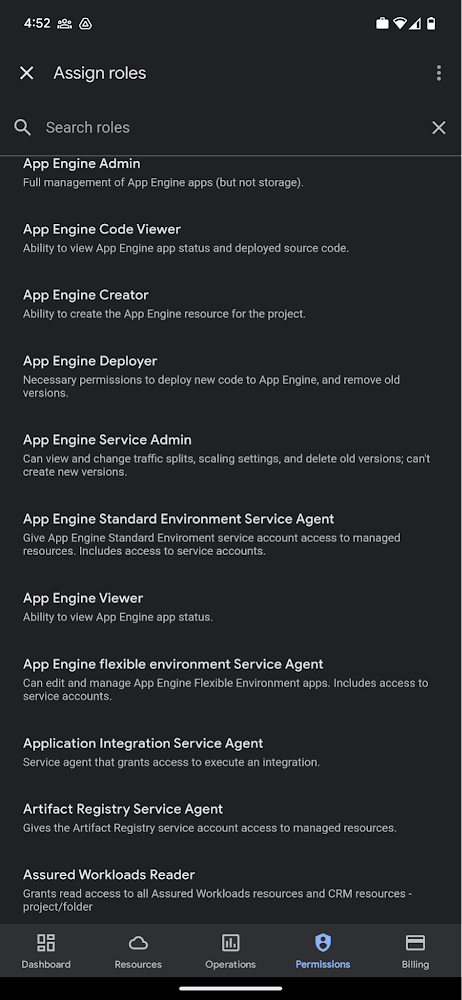
Administrators can also easily view a list of users, and click into each to see all the roles assigned to each user. On top of that, you can easily leverage the search capability to check if a role is assigned and modify its assignment. You can even assign multiple roles at the same time for easy editing. The app will show you a summary of changes before you will proceed.
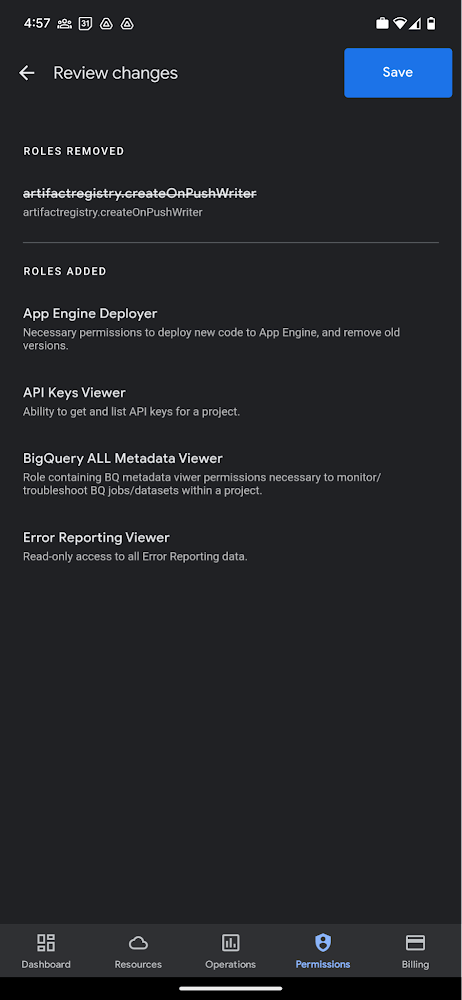
The layout is optimized for mobile, with the categories of information organized for easy viewing. Currently assigned roles are always displayed on the top of the screen so they are easily accessible. Basic roles appear below, followed by all other roles grouped by Google Cloud products.
Get started on the Google Cloud app today
To summarize we’ve enhanced permissions management on the Google Cloud mobile app with:
- Smoother navigation
- Support for all the roles in your organization
- Easy search for assigned roles
- Ability to review changes before applying
Give enhanced permission management a try and explore the possibilities by downloading the app today from Google Play or the Apple App Store. If you have any feedback, we would love to hear from you – simply click on the “send feedback” button in the app to share your experience.
Best Kept Security Secrets: How to Resolve Cloud Trust Paradox with Cloud EKM

4635
Of your peers have already read this article.
2:30 Minutes
The most insightful time you'll spend today!
Whether driven by government policy, industry regulation, or geo-political considerations, the evolution of cloud computing has led organizations to want even more control over their data and more transparency from their cloud services. At Google Cloud, one of the best tools for achieving that level of control and transparency is a bit of technological magic we call Cloud External Key Manager (EKM).
Cloud EKM can help you protect your cloud data at rest with encryption keys which are stored and managed in a third-party key management system that’s outside Google Cloud’s infrastructure, and ultimately outside Google’s control. This can help you achieve full separation between your encryption keys and your data stored in the cloud. Cloud EKM works with symmetric and asymmetric encryption keys, and offers organization policies that allow for fine-grained control over what types of keys are used. Via Key Access Justification (KAJ) it also offers a way for clients to control each key use.
At their core, many cloud security and cloud computing discussions are about the kinds of trust that Cloud EKM specifically and encryption more broadly can help create. While the concept of digital trust is much bigger than cybersecurity and its tripartite components of security, privacy, and compliance, one of the most crucial themes of cloud computing is the cloud trust paradox. In order to trust the cloud more, you must be able to trust it less, and external control of keys and their use can help reduce concerns over unauthorized access to sensitive data.

How it works
From our Cloud EKM documentation, you can use keys that you manage within a supported external key management partner to protect data within Google Cloud. You can protect data at rest in services that support CMEK, or by calling the Cloud Key Management Service API directly.
Cloud EKM provides several benefits:
- Key provenance: You control the location and distribution of your externally-managed keys. Externally-managed keys are never cached or stored within Google Cloud. Google cannot see them. Instead, Cloud EKM communicates directly with the external key management device for each request.
- Access control: You manage access to your externally-managed keys. Before you can use an externally-managed key to encrypt or decrypt data in Google Cloud, you must grant the Google Cloud project access to use the key. You can revoke this access at any time.
- Centralized key management: You can manage your keys and access policies from a single location and user interface, whether the data they protect resides in the cloud or on your premises. The system that managed the keys is entirely outside Google control.
In all cases, the key resides on the external system, and is never sent to Google.
Here’s how it works:
- Create or use an existing key in a supported external key management partner system. This key has a unique URI.
- Grant your Google Cloud project access to use the key, in the external key management partner system.
- Create a Cloud EKM key in your Google Cloud project, using the URI for the externally-managed key.
The Cloud EKM key and the external key management partner key work together to protect your data. The external key is never exposed to Google and cannot be accessed by Google employees. Furthermore, Cloud EKM can be combined with Key Access Justifications (KAJ) to establish cryptographic control over data access.
KAJ with Cloud EKM can give customers the ability to deny Google Cloud administrators access to their data at rest for any reason, even in situations typically exempted from customer control, such as outages or responses to third-party data requests. KAJ does this by providing customers a clear reason why data is being decrypted, which they can use to programmatically decide whether to permit decryption and thus allow access to their data.
Previously, we’ve discussed three patterns where keeping the keys off the cloud may in fact be truly necessary or outweighs the benefits of cloud-based key management. Here’s a brief summary of those three scenarios where Cloud EKM can help solve these Hold Your Own Key dilemmas.
Scenario 1: The last data to go to the cloud
As organizations complete their digital transformations by migrating data processing workloads to the cloud, there is often a pool of data that can not be moved to the cloud. Perhaps it’s the most sensitive data, the most regulated data, or the data with the toughest internal security control requirements.
Finance, healthcare, manufacturing and other heavily-regulated organizations face myriad risk, compliance, and policy reasons that may make it challenging to send some of their data to a public cloud provider. However, the organization may be willing to migrate this data set to the cloud as long as it is encrypted and they have sole possession of the encryption keys.
Scenario 2: Regional regulations and concerns
Regional requirements are playing a larger role in how organizations migrate to and operate workloads in the public cloud.
Some organizations are already facing situations where they are based in one country and want to use a cloud provider based in a different country, but they aren’t comfortable with or legally allowed to give the provider access to encryption keys for their stored data. Here the situations are more varied, and can include an organization’s desire to stay ahead of evolving regulatory demands or industry-specific mandates.
Ultimately, this scenario allows organizations to utilize Google Cloud while keeping their encryption keys in the location of their choice, and under their physical and administrative control.
Scenario 3: Centralized encryption key control
The focus here is on operational efficiency. Keeping all the keys within one system to cover multiple cloud and on-premise environments can help reduce overhead and attack surface, thus helping to improve security. As Gartner researchers concluded in their report, “Develop an Enterprisewide Encryption Key Management Strategy or Lose the Data1,” organizations are motivated to reduce the number of key management tools.
“By minimizing the number of third-party encryption solutions being deployed within an environment, organizations can focus on establishing a cryptographic center of excellence,” Gartner researchers said
Given that few organizations are 100% cloud-based today for workloads that require encryption, keeping keys on-prem can streamline key management. Centralizing key management can give the cloud user a central location to enforce policies around access to keys and access to data-at-rest, while a single set of keys can help reduce management complexity. A properly implemented system with adequate security and redundancy outweighs the need to have multiple systems.
Do I need Cloud EKM?
Whether protecting highly sensitive data, retaining key control to address geopolitical and regional concerns, or supporting hybrid and multi-cloud architectures, Cloud EKM is best suited for those Google Cloud customers who must keep their encryption keys off of the cloud and always under their full control.
To learn more about Cloud EKM, please review these resources:
- Our research explaining why Google Cloud users can benefit from Cloud EKM
- The most recent updates to Cloud EKM
- Take a deeper dive into the cloud trust paradox
- Gartner, Develop an Enterprisewide Encryption Key Management Strategy or Lose the Data, David Mahdi, Brian Lowans, March 2022.
5582
Of your peers have already downloaded this article
1:30 Minutes
The most insightful time you'll spend today!
Protecting a global network against persistent and constantly evolving cyber threats is one of the most important challenges faced by Google Cloud. So, how does Google’s global network protects seven different global businesses, each with over 1 billion customers, including popular Google services such as Google Search, YouTube, Maps, and Gmail?
The answer is a multi-step process, which is constantly changing and evolving to stay one step ahead of the malicious hackers and attackers. For instance, it’s network communications protocols—the rules that enable communications between systems—change multiple times per second to make malicious intrusions much harder.
Data in Google Cloud is encrypted both in transit and at rest. Google’s network capacity far exceeds any traffic load it hosts to thwart and DDoS attack. In addition, it has numerous other products, tools, and processes at work to provide defense in depth.
Download this e-book to get a detailed overview of Google Cloud’s approach to security and privacy.
reCAPTCHA Keeps Unemployment Claims and COVID Vaccine Registration Portals Threat-free

3014
Of your peers have already read this article.
1:30 Minutes
The most insightful time you'll spend today!
More people than ever have been conducting more of their lives online due to the COVID-19 pandemic. This creates a new landscape for fraudsters to create and release new attacks. Research commissioned by Forrester Consulting showed 84% of companies have seen an increase in bot attacks. 71% of organizations have seen an increase in the amount of successful attacks. 65% of businesses have experienced more frequent attacks and greater revenue loss due to bot attacks. With so many people visiting government websites to learn more about the COVID-19 vaccine, make vaccine appointments, or file for unemployment, these web pages have become prime targets for bot attacks and other abusive activities. But reCAPTCHA Enterprise has helped state governments protect COVID-19 vaccine registration portals and unemployment claims portals from abusive activities.
Assisting with unemployment claims during COVID-19
Alongside the wave of unemployment claims caused by COVID-19, many state government agencies, such as Wisconsin’s Workforce Development, have seen an increase in attempted malicious bot logins on their external websites. Many states have had malicious actors visit unemployment claims portals and enter stolen credentials to file fraudulent unemployment claims. Because many unemployment claims portals are mandated to pay a recipient within 2 weeks, the claims portal processes this fraudulent information and bad actors receive unemployment checks weeks before their false claims are recognized. By then, the fraudsters have their money and have repeated this process using other stolen credentials.
reCAPTCHA Enterprise helps state governments reduce false claims by preventing adversaries from automatically reusing credentials on unemployment claims portals. reCAPTCHA Enterprise’s scale and speed to determine fraudster behavior across the Internet helped some of the largest states in the United States, such as Texas.
Registering for the COVID-19 Vaccine and accessing state-sponsored resources
Several states, such as Pennsylvania, are challenged by web traffic that fluctuates based on the COVID-19 Vaccine Phase. For example, during Phase 1, there was a large increase in web traffic from both humans and bots because of the demand for the very few available vaccination slots. As more states move into Phase 2 and Phase 3, and the vaccine is more widely available, traffic is increasing because bad actors know more people are coming to these websites to register to be vaccinated.
reCAPTCHA Enterprise was implemented to stop bad actors from scripting bots to book vaccine appointments and then sell those appointment slots on another website for profit. These fake web pages are falsely promoted as websites where people can register for the vaccine. Vaccine appointments are not the only government system from which fraudsters try to profit. Transportation and social service departments also face frequent attacks, wherein fraudsters try to profit by booking and then selling appointments with those organizations.
Fending off these attacks was made easier thanks to reCAPTCHA Enterprise, a frictionless fraud detection service that leverages our experience from more than a decade of defending the internet and data for our network of more than 5 million sites. The reCAPTCHA Enterprise platform can understand fraudulent behavior, introduce friction to block bots from booking appointments, and allow legitimate users to access the vaccine portals and other state portals.
Because reCAPTCHA Enterprise does not require end users to complete captcha challenges, several state governments installed reCAPTCHA Enterprise across search, login, and registration web pages. State governments are also placing reCAPTCHA Enterprise on webpages where end users can access healthcare, receive assistance for housing or food, register motor vehicles, or propose legislation. With reCAPTCHA Enterprise on more pages, it becomes more difficult for malicious software or bots to carry out their attacks against different pages, but not for end users to browse, login into accounts, book appointments, or apply for resources. Because reCAPTCHA Enterprise requires no action from end users to stop fraud, state governments implemented reCAPTCHA Enterprise on all points of interaction on their webpages to ensure maximum security without impacting the user experience.
Providing security everywhere and pricing for all
Many state governments are familiar with buying cloud services in a pay-as-you-go model. reCAPTCHA Enterprise eased the purchasing process by providing state governments with predictable, scalable, and customizable pricing. State governments know up front how much they can expect to pay each month based on the number of assessments reCAPTCHA Enterprise performs. reCAPTCHA Enterprise’s flexible pricing model keeps pace with the natural fluctuations of visitors to vaccination registration and unemployment claims. reCAPTCHA Enterprise has a dedicated sales team that can tailor pricing to your specific use cases so both your webpages and budget are not compromised.
reCAPTCHA Enterprise has helped many state governments serve their constituents by making it easier to get vaccinated and collect unemployment. It helps constituents take advantage of public services and makes it more difficult for fraudsters to manipulate and interfere with them.
To start protecting your web pages from credential stuffing and other attacks, get started with reCAPTCHA Enterprise today.
Google Workspace to Extend Digital Sovereignity for EU Organizations in Later Part of 2022

4811
Of your peers have already read this article.
2:00 Minutes
The most insightful time you'll spend today!
European organizations are moving their operations and data to the cloud in increasing numbers to enable collaboration, drive business value, and transition to hybrid work. However, the cloud solutions that underpin these powerful capabilities must meet an organization’s critical requirements for security, privacy, and digital sovereignty. We often hear from European Union policymakers and business leaders that ensuring the sovereignty of their cloud data, through regionalization and additional controls over administrative access, is crucial in this evolving landscape.
Today, we’re announcing Sovereign Controls for Google Workspace, which will provide digital sovereignty capabilities for organizations, both in the public and private sector, to control, limit, and monitor transfers of data to and from the EU starting at the end of 2022, with additional capabilities delivered throughout 2023. This commitment builds on our existing Client-side encryption, Data regions, and Access Controls capabilities.
Offering enhanced customer controls, including Client-side encryption
Encryption is an important technical control that limits a cloud provider’s access to customer data. Google Workspace already uses the latest cryptographic standards to encrypt all data at rest and in transit between our facilities. The European Data Protection Board recommendations include encryption as part of the supplementary measures to protect data. Google Workspace is leading the way on such measures with our Client-side encryption feature that allows customers to continue benefiting from the powerful innovations of Google Cloud while retaining complete confidentiality and control over their data.
Google Workspace’s unique approach to client-side encryption provides our customers with authoritative privacy control over their data through encryption keys that they can hold on site, within a nation’s borders, or within any other boundary they define. Google never has access to the keys or key holders, which means the data is indecipherable to us and we have no technical ability to access it. We deliver this level of encryption without the need for legacy desktop clients, while maintaining the same high-quality experience for your users such as online co-authoring.
Organizations can choose to use Client-side encryption pervasively across all their users, or create rules that apply to specific users, organizational units, or shared drives. Client-side encryption is now generally available for Google Drive, Docs, Sheets, and Slides, with plans to extend the functionality to Gmail, Google Calendar, and Meet by the end of 2022.
Expanding data location controls
Data regions already allow our customers to control the storage location of their covered data at-rest. We will enhance this capability by the end of 2023 through expanded coverage of data storage and processing in-region along with an in-country copy.
As employees and organizations adopt new ways of working in a hybrid world, they need secure access to data to drive key business outcomes. But this trend, combined with complex technical architectures, presents significant challenges to retaining control over where data resides.
Our cloud-native architecture means that Google Workspace functions fully within a browser, without requiring caches or installed software on employee devices. We adopt a zero-trust approach, with built-in security that provides controls to geo-fence devices and users through Context Aware Access. Moreover, admins can set sharing boundaries and define rules that govern user communication.
In short, we empower admins with critical capabilities that can give them granular control over the flow of their data without hindering the modern collaboration capabilities that form the foundation of Google Workspace. We are enabling organizations to strike the right balance between data location and collaboration across teams, partners, and customers.
Control and transparency for administrative access
When moving to a cloud-based service, organizations need greater visibility and control over all forms of administrative access to their systems, including who has access, the nature and circumstances of that access, and the ability to specify that only certain personnel—in designated countries or regions—have access. These capabilities are core to our approach for meeting evolving digital sovereignty standards.
Building on this approach, we will implement a series of new Access Controls by the end of 2023 that will enable customers to:
- Restrict and/or approve Google support access through Access Approvals.
- Limit customer support to EU-based support staff through Access Management.
- Ensure round-the-clock support from Google Engineering staff, when needed, with remote-in virtual desktop infrastructure .
- Generate comprehensive log reports on data access and actions through Access Transparency, which is already available in GA.
Sovereign Controls for Google Workspace will deliver digital sovereignty through a comprehensive set of capabilities for organizations working in and across EU regions. In parallel, Google Cloud will continue to provide customers with legal mechanisms for international data transfer, which will include making the protections offered by the new EU data transfer framework available once it is implemented.
We remain committed to equipping our customers in Europe and across the globe with powerful technical solutions that help them adapt to, and stay on top of, a rapidly evolving regulatory landscape. We’ve designed and built Google Workspace to operate on a secure foundation, providing capabilities to keep our users safe, their data secure, and their information private. Digital sovereignty is core to our ongoing mission in Europe and elsewhere, and a guiding principle that customers can rely on now and into the future.
Google Cloud’s BeyondCorp Framework Helps Govts Adopt Zero Trust Approach to Security

3088
Of your peers have already read this article.
1:30 Minutes
The most insightful time you'll spend today!
For more than a decade, Google has applied a Zero Trust approach to most aspects of our operations. Zero Trust’s core tenet–that implicit trust in any single component of a complex, interconnected system can create serious security risks–is fundamental to how we operate and build our security architecture.
Early in our security journey, we realized that despite our best efforts user credentials would periodically fall into the hands of malicious actors. This is why we developed the BeyondCorp framework. We needed additional layers of defense against unauthorized access that would not impede user productivity. We also understood that software that interacts with the larger world should not have a perimeter-based trust model. These realizations led to the layered protection in our BeyondProd framework, which extends the Zero Trust paradigm to our production workloads.
Earlier this year, the United States Office of Management and Budget (OMB) released a Federal Strategy to Move the U.S. Government Towards a Zero Trust Architecture. This marks an important step for the U.S. government’s efforts to modernize under Executive Order 14028 on Improving the Nation’s Cybersecurity. In parallel, guidance from the United Kingdom’s National Cyber Security Center (NCSC) has also called for the move to a Zero Trust approach to security and outlined in 2021 its report on Zero Trust architecture design principles.
Adopting a Zero Trust approach can help organizations inside and outside the public sector stay ahead of both regulatory requirements and security threats, but it requires thoughtful planning and execution. Our goal is to bring the best practices for Zero Trust together in one place, leveraging the experiences and knowledge of our existing customers, and Google’s own experience with implementing Zero Trust.
How Google Cloud can help government agencies move toward Zero Trust
Agencies can rely on Google Zero Trust capabilities for remote access, secure collaboration, and boundary security. To better serve the Zero Trust needs of our customers, we introduced BeyondCorp Enterprise in January 2021, a solution that provides Zero Trust secure access to resources and applications in the cloud and on-premises. BeyondCorp Enterprise was built based on years of Google’s own innovation as we implemented Zero Trust globally for ourselves. It leverages the Chrome browser and Google’s global network, and it offers integrated real-time threat and data protection.
Here are five ways BeyondCorp Enterprise can be applied to help organizations adopt the Zero Trust cybersecurity principles set forth in the recent White House memorandum (M-22-09) and other global government guidance for Zero Trust.
- Enable enterprise applications to be used over the public internet: It’s no secret that VPN usage poses daily burdens and long-term challenges for IT and cybersecurity managers, as well as end-users. BeyondCorp Enterprise provides users with seamless and secure access to web applications (including SaaS apps and apps hosted on any cloud), plus central management controls and threat and data protection capabilities, all built-in to the Chrome browser. Through BeyondCorp Enterprise, end-users can access applications simply and still benefit from enterprise-grade security, without sacrificing their productivity or user experience.
- Leverage phishing-resistant MFA to access secure resources: Many cyberattacks start with phishing messages that lead users to infected websites and attempt to steal credentials. The use of phishing-resistant MFA, as recommended by M-22-09, can protect personnel from sophisticated online attacks. BeyondCorp Enterprise supports strong phishing-resistant authentication, by allowing factors such as Titan Security Keys to be used as attributes in access policies that are enforced at the application layer. Organizations can customize how to incorporate phishing-resistant MFA methods into their access policies for individual applications and resources. Phishing protection is also built into the Chrome browser, powered by Google Safe Browsing, and these capabilities block access to malicious content, detect phishing sites, prevent malware transfers, and generate reports of unsafe activity, adding even more protection against bad actors.
- Use context-aware authorization: The U.S. federal strategy states that a Zero Trust architecture should incorporate more granularly and dynamically defined permissions and that every request for access should be evaluated to determine whether it is appropriate. With context-aware authorization, organizations can build and customize access policies to include different contextual signals about a user including their role, their location, and even the time of day. Every interaction between a user and a BeyondCorp-protected resource is evaluated in real-time against the resource’s access policy to ensure users are and remain authorized to access it, with continuous authorization for all interactions at a per request level.
- Incorporate device-level signal into authentication: At Google, we believe that trust must be granted based on what is known about a user’s identity and their device. We are pleased that OMB similarly recommends that authentication incorporate at least one device-level signal alongside identity information. Since BeyondCorp Enterprise supports device-level attributes without requiring users to install agents, this can be done easily by leveraging the Endpoint Verification extension in the Chrome browser, where administrators can gather endpoint security posture information and easily construct and implement granular resource access policies. The ability to collect and utilize this information through an agentless approach is especially helpful for BeyondCorp Enterprise customers who support a workforce with bring-your-own-device policies or unmanaged devices.
- Include the extended workforce in your Zero Trust strategy: A Zero Trust approach aimed to provide secure access to the right users, at the right time, and for the right purposes should be inclusive of all users, not just full-time staff. Government agencies rely on contractors and partners to carry out many important missions. Unfortunately, the extended workforce is often more vulnerable to attacks if they are given too much privileged access or if their security practices are not properly assessed before access is provisioned. At the same time, federal administrators can’t always manage third-party devices or software directly, which can make secure access challenging.
BeyondCorp Enterprise supports a feature called protected profiles, an ideal solution for granting Zero Trust access to the extended workforce. It enables users to securely access resources from unmanaged devices and be protected by the same security capabilities without needing to install agents. Furthermore, administrators can gain visibility into risky activities and view any security events that are generated from within protected profiles.
Applying the NCSC Zero Trust principles on Google Cloud
Last year, the U.K. government’s NCSC launched its Zero Trust architecture design principles to help organizations securely adopt a Zero Trust architecture. To help private and public sector organizations in the U.K., the Google Cybersecurity Action Team (GCAT) released a detailed research paper that outlines how organizations can leverage Google Cloud technologies and services to align with these principles. This is a technical guide aimed at enterprise and security architects charged with developing and executing a Zero Trust strategy under the principles outlined by the NCSC, including:
- Know your architecture, including users, devices, services and data with Google Cloud Professional Services Organization (PSO) who can support discovery, planning and risk mitigation.
- Know your User, Service and Device identities including reference architectures for Cloud Identity.
- Assess your user behavior, device and service health by leveraging built in reporting from Google Cloud and Chronicle.
- Use policies to authorize requests with BeyondCorp Enterprise policy-based authorization.
- Authenticate & Authorize everywhere by reviewing the BeyondCorp and BeyondProd frameworks which combine to deliver ubiquitous authentication and authorization.
- Focus your monitoring on users, devices and services with device management and Cloud native monitoring capabilities.
- Don’t trust any network, including your own. Review details on Google’s Secure by Design infrastructure.
- Choose services designed for Zero Trust. Review how to protect modern and legacy applications with BeyondCorp.
For more detail on how we’re supporting the U.K.’s NCSC, please review our recent research paper for insight into their priorities, and where Google will be discussing Secure by Design principles and how to respond to security incidents.
Zero Trust assessment and planning services for organizations
Organizations that are managing complex environments while undergoing Zero Trust adoption could benefit strongly from experienced support and guidance. The Google Cybersecurity Action Team (GCAT) is committed to helping customers meet Zero Trust security and compliance requirements in the cloud through specialized consulting engagements and workshops for public sector customers. Read more about how growing cybersecurity requirements for U.S. federal government customers via executive orders and White House mandates are being supported through Google Cloud solutions.
GCAT’s multi-week Zero Trust Foundations engagement helps organizations build a strategy to achieve a Zero Trust security model across their operations. Zero Trust Foundations is co-delivered by Google Cloud’s Office of the CISO and our public sector Professional Services Organization. It can help focus and accelerate customers’ Zero Trust efforts by sharing lessons learned from Google’s own BeyondCorp zero-trust journey, and our global implementation of defense-in-depth best practices. Contact us today to learn more.
To learn more about ways Google Cloud can help organizations embarking on a Zero Trust journey, tune into our second annual Google Cloud Security Summit on May 17 and hear directly from customers who are already using our Zero Trust solutions to achieve their organization’s security goals.
About the Authors:
Jeanette Manfra is the former Assistant Director for the Cybersecurity and Infrastructure Security Agency at the Department of Homeland Security. Dan Prieto is the former Director of the Defense Industrial Base Cybersecurity program at the Department of Defense. Both Dan and Jeanette also served in the White House on the staff of the National Security Council’s cybersecurity directorate.
More Relevant Stories for Your Company



Modernize Your Security Posture for Cloud-Native Applications with Anthos
Modern security approaches have moved beyond a traditional perimeter-based security model. As many organizations seek to adopt cloud-native architectures and are deploying applications in hybrid and multi-cloud environments they demand a more flexible and extensible approach towards security. Learn how to address security issues as early in the development and

Ubuntu Pro Images Now Available on Google Cloud
Today, we’re pleased to announce the general availability of Ubuntu Pro images on Google Cloud, providing customers with an improved Ubuntu experience, expanded security coverage, and integration with critical Google Cloud features. In partnership with Canonical, we’re making it even easier for customers that have fully embraced open source to ensure


How Google Workspace Helps Manage, Govern and Protect Sensitive Data
The shift towards a hybrid work style and trends accelerated by the pandemic has resulted in data deluge. With companies and individuals sharing increasingly large volumes of information and collaborating with internal and external stakeholders, the need for innovations for higher security also escalates. View this video to learn how

Gmail’s BIMI Increases Confidence about Security and Delivers Immersive Email Experiences
Creating a secure-by-default experience based on robust defenses has always been a core design principle for Gmail. That’s why we’ve established a strong baseline of security in Gmail, with built-in protections to help automatically filter out potentially malicious messages. While these defenses help keep Gmail users safe, email functions as
