





Making Mothers’ Day Special: How Google Cloud Migration for 1-800-FLOWERS.COM, Inc Impacts CX

6845
Of your peers have already read this article.
2:30 Minutes
The most insightful time you'll spend today!
Editor’s note: In honor of Mother’s Day, we look at how 1-800-FLOWERS.COM, Inc. migrated to Google Cloud as part of its digital transformation to quickly deploy seamless and convenient customer experiences across multiple brands on Mother’s Day and every day.
As a leading provider of gifts designed to help customers express, connect, and celebrate, 1-800-FLOWERS.COM, Inc. has embraced cloud technologies to grow and transform its business through constant innovation. As part of our digital transformation, we recently completed the migration of our ecommerce platform and other services to Google Cloud. We’ve transitioned from a monolithic to a microservices platform, moved many workloads from our on-premises data centers to our Google Cloud environment, and scaled both horizontally and vertically.
Since our migration, we’ve developed efficient processes to launch new brands, improved the customer experience across all brands, and seen significantly increased site traffic.
Nurturing a more delightful customer journey
Customer delight is at the core of everything we do. Whether it be with a flower bouquet, a sweet treat, or a personalized keepsake, our mission is to deliver smiles. With the rise of the COVID-19 pandemic, we’ve all been challenged to find unique and safe ways to continue honoring the special connections in our lives and celebrating occasions with loved ones. Our customers have adapted by doing things such as sending gifts to isolated loved ones, sharing the same meal together virtually, or using video to engage with others through group activities like flower arranging and building charcuterie boards.
The customer experience is a top priority for us, and we constantly look for innovative ways to enhance the customer journey across our ecommerce platform of more than a dozen brands. As a result, we’ve continued to see a rise in demand as customers enjoy the ease and convenience of our site and discover our full family of brands.
Migrating to a cloud-first mindset
As we’ve continued to innovate and iterate on the customer experience, we knew we wanted to evolve our platform. We wanted to shift to a microservices platform, which would allow our team the opportunity to release updates to our site more often and set up the right continuous integration/continuous deployment (CI/CD) practices.
Working with Google Cloud, we were able to move our ecommerce platform to the cloud and standardize our site and brand deployment by building one release that could then be repeated across all of our brands. We built everything in a modular fashion, including microservices and code libraries, so that sites could be easily constructed and replicated for each brand. And because of this, we were able to launch Shari’s Berries extremely quickly after we acquired the brand in 2019.
Moving our platform to a completely homegrown solution of microservices was a daunting task. But our team handled it beautifully through load-testing, stress-testing, and building new monitoring tools. And with Google Cloud supporting us all along the way, managing the migration process was simple and easy from start to finish.
Arranging a better bouquet of services
Currently, we’ve migrated every customer-facing touchpoint for all of our brands to Google Cloud—whether it’s on the web or mobile, our AI bots, or our chat interfaces.
- We run on Google Kubernetes Engine and Istio.
- We have nearly 200 microservices built to help power our entire ecommerce stack across several cloud services running on Google Cloud.
- We’re utilizing BigQuery for our offline intelligence.
Results are coming up roses
Our new stack on Google Cloud has benefits for both us and our customers. We moved from a session-based to a token-based system, which provides enhanced security as well as a consistent, convenient experience across all our brands. Using service workers and a single-page app, we are able to download all the relevant site content to the browser in under two seconds to create an instant-click experience for each and every customer. We also use Google Analytics to measure our user interactions and provide personalized results to each customer. Our hope is that with this new system, we can learn from customer behavior to offer gift givers a more personalized shopping experience during each visit.
The benefits of our new tech stack have not only helped us enhance the solutions we offer to customers today, they’ve also enabled us to offer new ones at lightning speed. With our legacy system, we used to release new code once a week or once a month. Now, even during our peak periods, we’re able to release 10 to 15 times a day and can deploy and pivot quickly to create new microservices and microsites on the fly—often without having to touch any code.
Efficiencies abound
The benefits of moving our platform to Google Cloud have extended to our internal teams as well. Before the migration, we had only two environments for developing and testing, which made it time-consuming to test updates before they went into production. Now with Google Cloud, we have several different journey teams—which are made up of developers, product owners, and technical owners—all working in several different environments, solving problems, and creating new solutions together.
Everyone is now empowered to be self-sufficient, developing and releasing microservices on their own when they’re ready. This has given our developers more time to take part in continued development and learning opportunities. For example, we offer lunch-and-learn sessions as well as other resources for everyone to take advantage of so they can continue to learn and refine their skills.
Planting the seeds for future growth
As we look to the future and think about how we help our customers express, connect, and celebrate, we’ll continue to collaborate across teams to deliver solutions that spread smiles. Specifically, we’re exploring additional use of AI to help us better serve our customers across all our brands.
We’ve enjoyed the ongoing support we’ve received from the Google Cloud team as they help us build new solutions and design a road map for the future. Their support has helped the 1-800-FLOWERS.COM, Inc. team to realize the power of the cloud and bring the very best experience to our customers.
Learn more about 1-800-FLOWERS.COM, Inc., or check out our recent blog about cloud migration for the real world.
Groww’s Google Cloud-Powered Platform: The Key to Secure and Successful Investing

2938
Of your peers have already read this article.
4:00 Minutes
The most insightful time you'll spend today!
Groww makes investments simple and accessible, using Google Kubernetes Engine to ensure a reliable platform for customers, and makes data-backed decisions to grow its business with BigQuery.
About Groww
Headquartered in Bangalore, Groww is India’s fast-growing online investment platform that offers a simple and easy way to invest in stocks, direct mutual funds, IPOs, ETFs, and digital gold. Its mission is to make investing as intuitive and accessible as ecommerce.

Google Cloud results
- Reduces hardware costs with Preemptable Virtual Machines
- Enables a lean DevOps team with Google Cloud
- Analyzes data effectively and quickly for agile business growth
Investing is one way to ensure financial security. However, the thought of it can be a daunting one, especially for people without any prior experience. With a mission to make investment simple for digital natives in India, Groww was launched in 2016.
“We noticed that many people were on social media, booking cabs, and ordering food online, but the same people were not investing, despite having the means to do so,” says Singh. This observation led to a lightbulb moment for the team, and they realized that in order to appeal to the millennial, mobile-savvy generation, they had to create an investment platform that was as easy to use as an ecommerce platform.
Managing unpredictable spikes with Google Kubernetes Engine
As with any platform, there are bound to be peak and non-peak hours when it comes to traffic. For Groww, regular spikes take place in the early mornings, or in the evenings when people are more relaxed having come home from work. But the nature of the fintech industry is a volatile one. Investors are only human, and their investment decisions can be swayed quickly by the news. As such, spikes in traffic can happen at the most unpredictable times. To cope with this unpredictability, Groww uses Google Kubernetes Engine to scale up and down automatically to meet the required capacity around the clock. This also helps the company save costs, as it pays only for what is needed.
“No matter how much of an expert you are, you can never predict when traffic on the platform will be heavy,” says Singh. “Google Kubernetes Engine helps ensure that we never run out of capacity, without overspending on infrastructure cost.”
More recently, the investment company started using Preemptible Virtual Machines, which run at one third of its hardware cost. It also leverages Anthos to monitor and manage its backend infrastructure and to have better workload visibility. Singh shares, “We are very open to adopting new technologies, and our team is always eager to learn if we can do things better. We believe that technology is always evolving and it’s our responsibility to learn and make use of what’s available out there.”
Despite having so much running in the background, Singh explains that the company keeps a very lean DevOps team. “We’ve only got four or five people in DevOps, and that’s only possible because Google Cloud products are already able to run on their own.”
Making swift, data-backed business decisions
Infrastructure is only part of the equation for a successful business. Outside of operations, the ability to analyze data effectively is arguably the most important component for a startup to thrive. Groww leverages BigQuery to make decisions quickly and efficiently. “With BigQuery, we have a place where we can put all data, fire queries, and build dashboards almost instantly, allowing us to make business decisions quickly,” explains Singh.
The team also uses Looker Studio to clearly visualize the information generated through charts and graphs. The best part? Groww doesn’t need to spend additional time and resources setting up a large data team, since BigQuery does most of the work and in a shorter period of time. The resources saved also enables the team to focus on addressing functional requirements, rather than managing and sizing the data platform.
“From a startup perspective, BigQuery is really helpful because often setting up your own data lake can be very costly, and a distraction when the team is also busy focusing on setting up an infrastructure,” adds Singh.
Ensuring security and compliance with Google Cloud
As a fintech company, security and compliance continue to be top priorities for Groww. It chose Google Cloud as its preferred cloud provider because there are three data center replication zones in Mumbai, which means it adheres to financial regulations for keeping its user data within borders.
Moving forward, Groww plans to evolve its platform alongside its users. Singh says, “As we gain more users with different wants and needs, it will be a natural progression that the company evolves. I believe that with Google Cloud, we are well equipped to pave the way to the future.”
How BigQuery’s Unique Features Support Your Data at Petabyte-scale

4801
Of your peers have already read this article.
3:00 Minutes
The most insightful time you'll spend today!
Organizations rely on data warehouses to aggregate data from disparate sources, process it, and make it available for data analysis in support of strategic decision-making. BigQuery is the Google Cloud enterprise data warehouse designed to help organizations to run large scale analytics with ease and quickly unlock actionable insights. You can ingest data into BigQuery either through batch uploading or by streaming data directly to unlock real-time insights. As a fully-managed data warehouse, BigQuery takes care of the infrastructure so you can focus on analyzing your data up to petabyte-scale. BigQuery supports SQL (Structured Query Language), which you’re likely already familiar with if you’ve worked with ANSI-compliant relational databases.
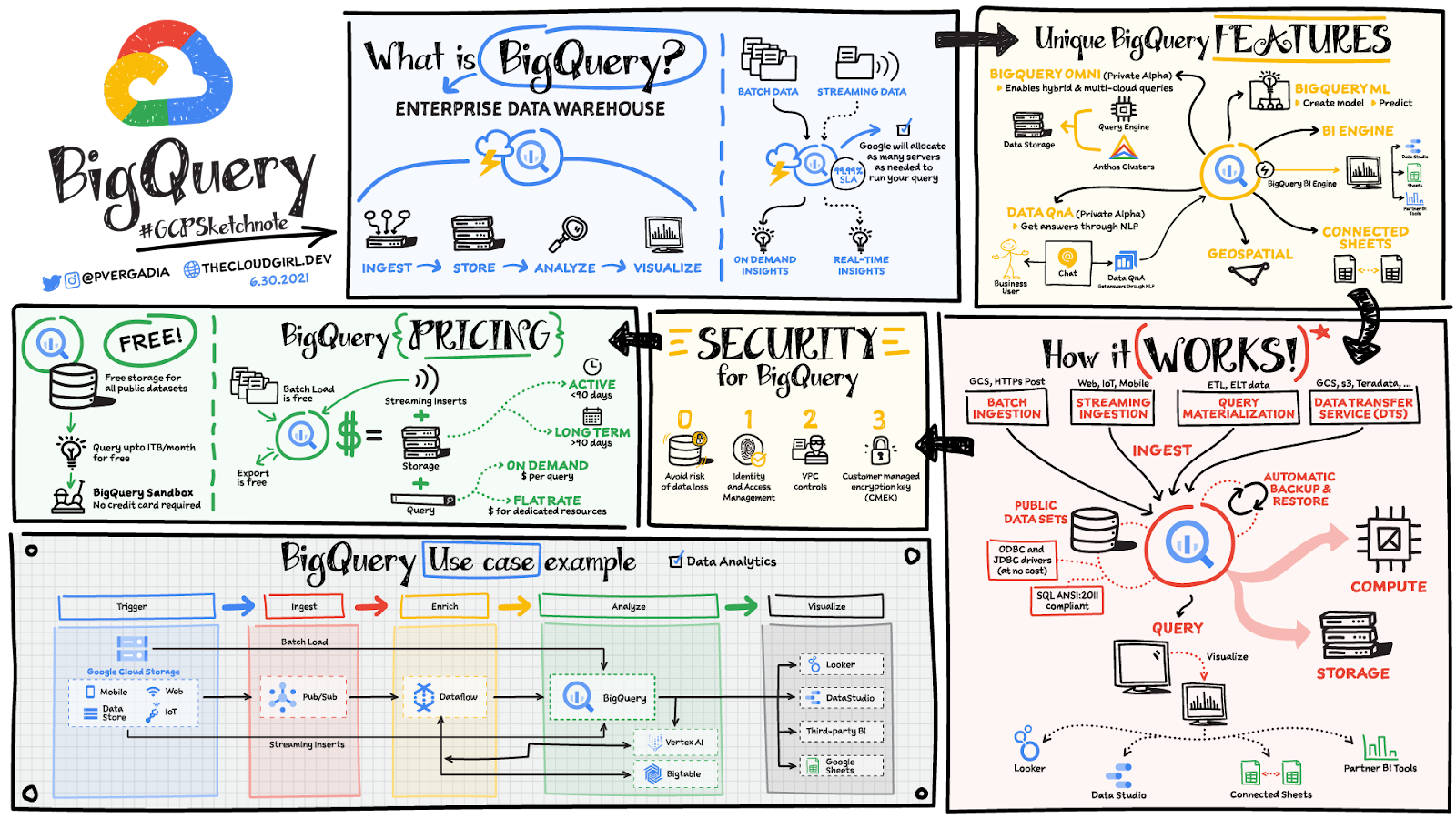
BigQuery unique features
BI Engine – BigQuery BI Engine is a fast, in-memory analysis service that provides subsecond query response times with high concurrency. BI Engine integrates with Google Data Studio and Looker for visualizing query results and enables integration with other popular business intelligence (BI) tools.
BigQuery ML: BigQuery ML is unlocking machine learning for millions of data analysts. It enables data analysts and data scientists to build and operationalize machine learning models directly within BigQuery, using simple SQL.
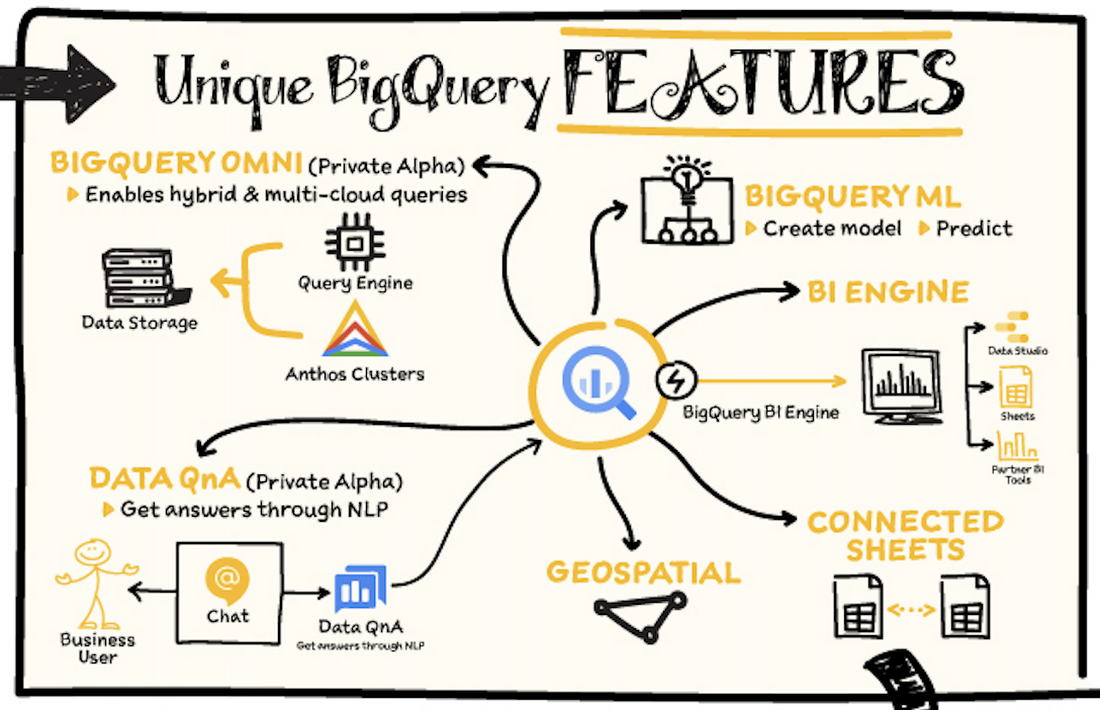
BigQuery Omni – BigQuery Omni is a flexible, multi-cloud analytics solution powered by Anthos that lets you cost-effectively access and securely analyze data across Google Cloud, Amazon Web Services (AWS), and Azure, without leaving the BigQuery user interface (UI). Using standard SQL and familiar BigQuery APIs, you can break down data silos and gain critical business insights from a single pane of glass.
Data QnA: Data QnA enables self-service analytics for business users on BigQuery data as well as federated data from Cloud Storage, Bigtable, Cloud SQL, or Google Drive. It uses Dialogflow and enables users to formulate free-form text analytical questions, with auto-suggested entities while users type a question.
Connected Sheets -The native integration between Sheets and BigQuery makes it possible for all business stakeholders, who are already quite familiar with spreadsheet tools, to get their own up-to-date insights at any time.
Geospatial data – BigQuery offers accurate and scalable geospatial analysis with geography data types. It supports core GIS functions – measurements, transforms, constructors, and more – using standard SQL.
How does it work?
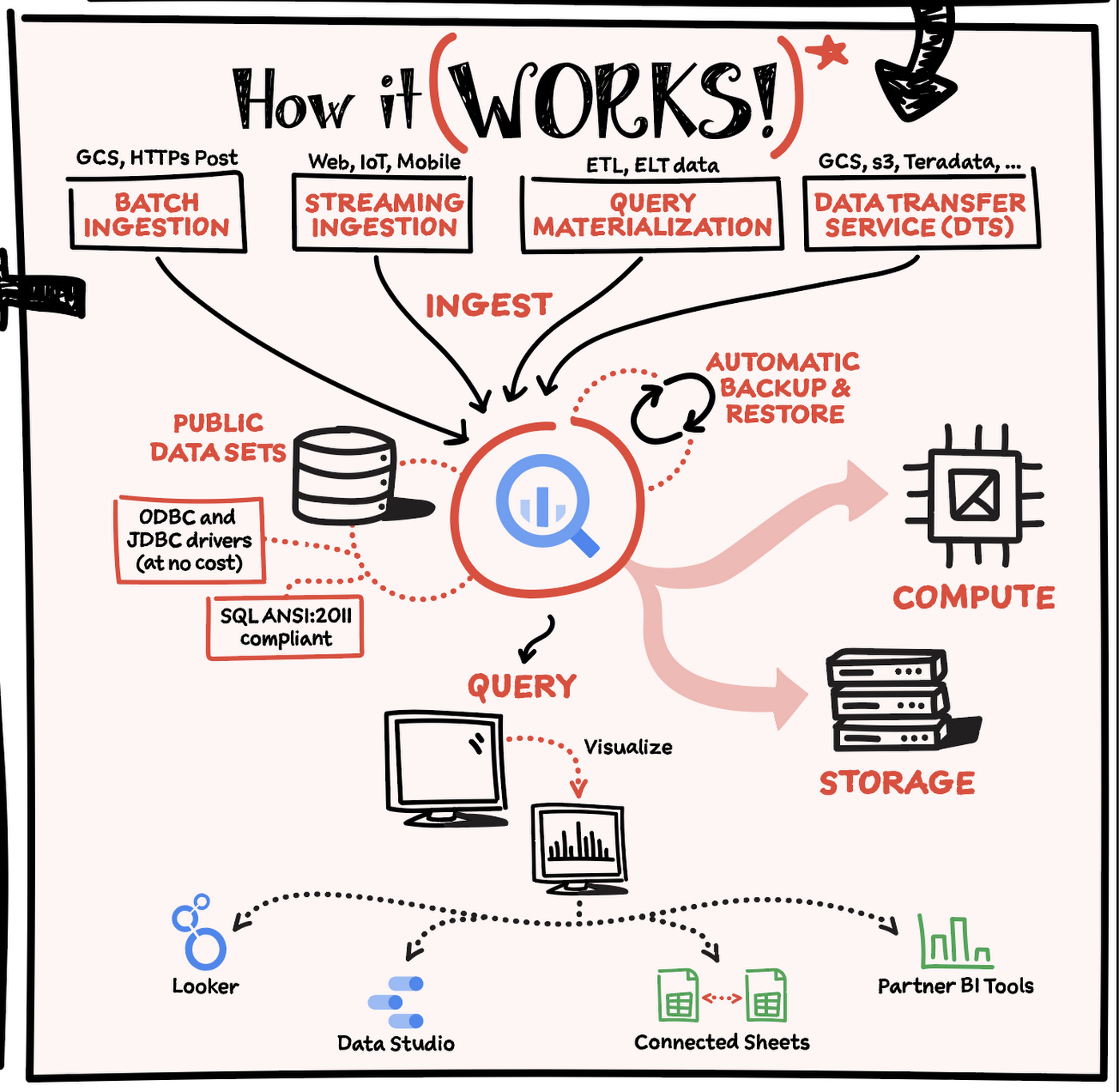
Here’s how it works: You ingest your own data into BigQuery or use data from the public datasets. Storage and compute are decoupled and can scale independently on demand. This offers immense flexibility and cost control for your business as you don’t need to keep expensive compute resources up and running all the time. As a result, BigQuery is much more cost-effective than traditional node-based cloud data warehouse solutions or on-premises systems. BigQuery also provides automatic backup and restore of your data.
You can ingest data into BigQuery in batches or stream real-time data from web, IoT, or mobile devices via Pub/Sub. You can also use Data Transfer Service to ingest data from other clouds, on-premises systems or third-party services. BigQuery also supports ODBC and JDBC drivers to connect with existing tools and infrastructure.
Interacting with BigQuery to load data, run queries, or create ML models can be done in three different ways. You can use the UI in the Cloud Console, the BigQuery command-line tool, or the API via client libraries available in several languages.
When it comes time to visualize your data, BigQuery integrates with Looker as well as several other business intelligence tools across the Google partner ecosystem.
What about security?
BigQuery offers built-in data protection at scale. It provides security and governance tools to efficiently govern data and democratize insights within your organization.
- Within BigQuery, users can assign dataset-level and project-level permissions to help govern data access. Secure data sharing ensures you can collaborate and operate your business with trust.
- Data is automatically encrypted both while in transit and at rest, ensuring that your data is protected from intrusions, theft, and attacks.
- Cloud DLP helps you discover and classify sensitive data assets.
- Cloud IAM provides access control and visibility into security policies.
- Data Catalog helps you discover and manage data.
How much does it cost?
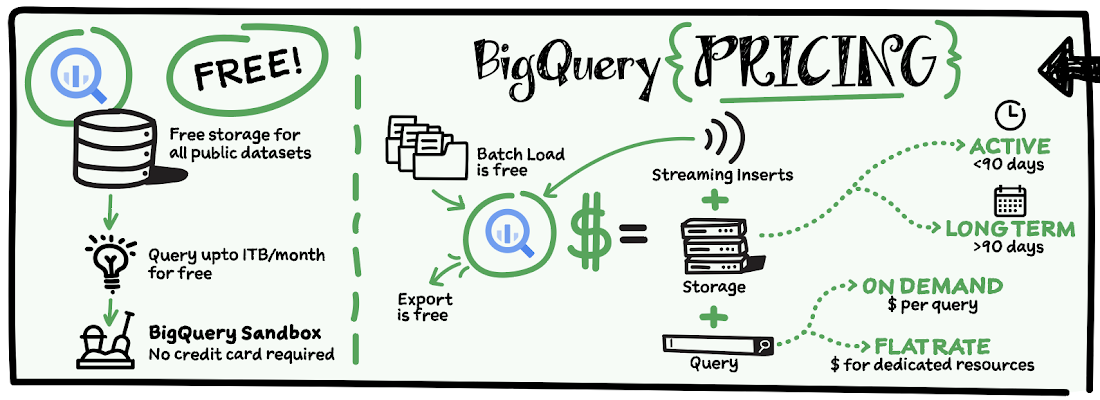
The BigQuery sandbox lets you explore BigQuery capabilities at no cost and confirm that BigQuery fits your needs. With BigQuery you get predictable price-performance: you pay for storing and querying data, and for streaming inserts. Loading and exporting data are free of charge. Storage costs are based on the amount of data stored, and have two rates based on how often the data is changing. Query costs can be either:
- On-demand – you are charged per query by the amount of data processed
- Flat-rate – if you prefer to purchase dedicated resources
You can start with the pay-as-you-go, on-demand option and later move to flat-rate if that better suits your usage. Or, start with flat-rate, get a better understanding of your usage and move to the pay-as-you-go models for additional workloads.
To explore BigQuery and its capabilities a bit more, check out the sandbox; and when you’re ready to modernize your data warehouse with BigQuery then check out the documentation to streamline your migration process here. https://www.youtube.com/embed/So-tVyBQt8E?enablejsapi=1&
For more #GCPSketchnote, follow the GitHub repo. For similar cloud content follow me on Twitter @pvergadia and keep an eye out on thecloudgirl.dev.
Wayfair Writes its Success Story with BigQuery for Internal Analytics

4939
Of your peers have already read this article.
4:00 Minutes
The most insightful time you'll spend today!
Editor’s note: Home-goods and furniture giant Wayfair first partnered up with Google Cloud to transform and scale its storefront—work that proved its value many times over during the unprecedented surge in ecommerce traffic during 2020. Today, we hear how BigQuery’s performance and cost optimization have transformed the company’s internal analytics to create an environment of “yes”.
At Wayfair, we have several unique challenges relating to the scale of our product catalog, our global delivery network, and our position in a multi-sided marketplace that supports both our customers and suppliers. To give you a sense of our scale we have a team of more than 3,000 engineers with tens of millions of customers. We supply more than 20 Million items using more than 16,000 supplier partners.
Serving those constituents generates a lot of analytics work. Wayfair runs over a billion ‘analytic’ database queries a year, from both humans and systems, against multi-petabyte datasets. Scaling our previous environment to meet these challenges required us to maintain dozens of copies of data for different use cases and manage complex data synchronization routines to move trillions of records each day, resulting in long development times and high support costs for our analytics projects.
Centralizing our data using Cloud Storage and BigQuery enabled us to break down existing silos and build unified pipelines for our batch and real-time operations. BigQuery shines by letting us decouple our compute and storage resources and flexibly ingest structured data in streaming and batch modes. We also benefit from the same decoupling for more complicated machine learning (ML) workflows in Dataproc and Cloud Storage. In particular, BigQuery is extremely low maintenance. From ML and easy data integrations to the integrated query cache, many out-of-the-box features have proven valuable for multiple use cases.
Beyond storage and compute, Google Cloud offers multiple tools to maximize the value of our data. For example, we can easily connect Data Studio to BigQuery for lightning-fast dashboarding of enterprise KPI reporting. When we need to dive deeper into a metric, Looker provides an interface and semantic model that empowers more business users to answer important questions — without understanding SQL or our vast dataset and table structure.
The combination of all of Google Cloud’s tools enables every Wayfairian the opportunity to self-serve their data visualization and analysis needs. We are able to support all of the requirements of our internal and external users, from descriptive analytics to alerting and ML, in a platform that blends Google’s proprietary technology with open-source standards.we have seen a greater than 90% reduction in the number of analytic queries in production that take more than one minute to run
As a result, we have seen a greater than 90% reduction in the number of analytic queries in production that take more than one minute to run, which delights our users and increases adoption of our analytics tools across the business.
Higher performance means saying “Yes” more often
We went into the BigQuery experience expecting very strong performance on large, aggregate queries and excellent scalability — the kind of performance that could enable consistent 5-15 minute processing queries and 5-10 second response times for large analytics queries.
We weren’t disappointed — we saw slightly better than linear performance profiles as record counts went up from millions to trillions for a flat resource allocation. BigQuery had the expected high performance for aggregate queries. This made our large data processing pipelines predictable and straightforward to maintain and optimize.
Below is a plot of gigabytes processed by a query against query run time in seconds; outliers are filtered and the axes are pruned to ranges where we had a large sample size. This focuses on longer-duration queries. As an example of the linear performance, a 2 terabyte query averages 5 minutes — 2.5min/terabyte — and an 18 terabyte query (9 times as much data) averages 25s — only 1.4min/terabyte. This is despite the fact that complex queries [sorting and analytic functions are particularly problematic] are more common with large data sizes. We do see increasing variability at large sizes as slot limits and other resource constraints come into play, but these factors are controllable and ultimately a business optimization decision.
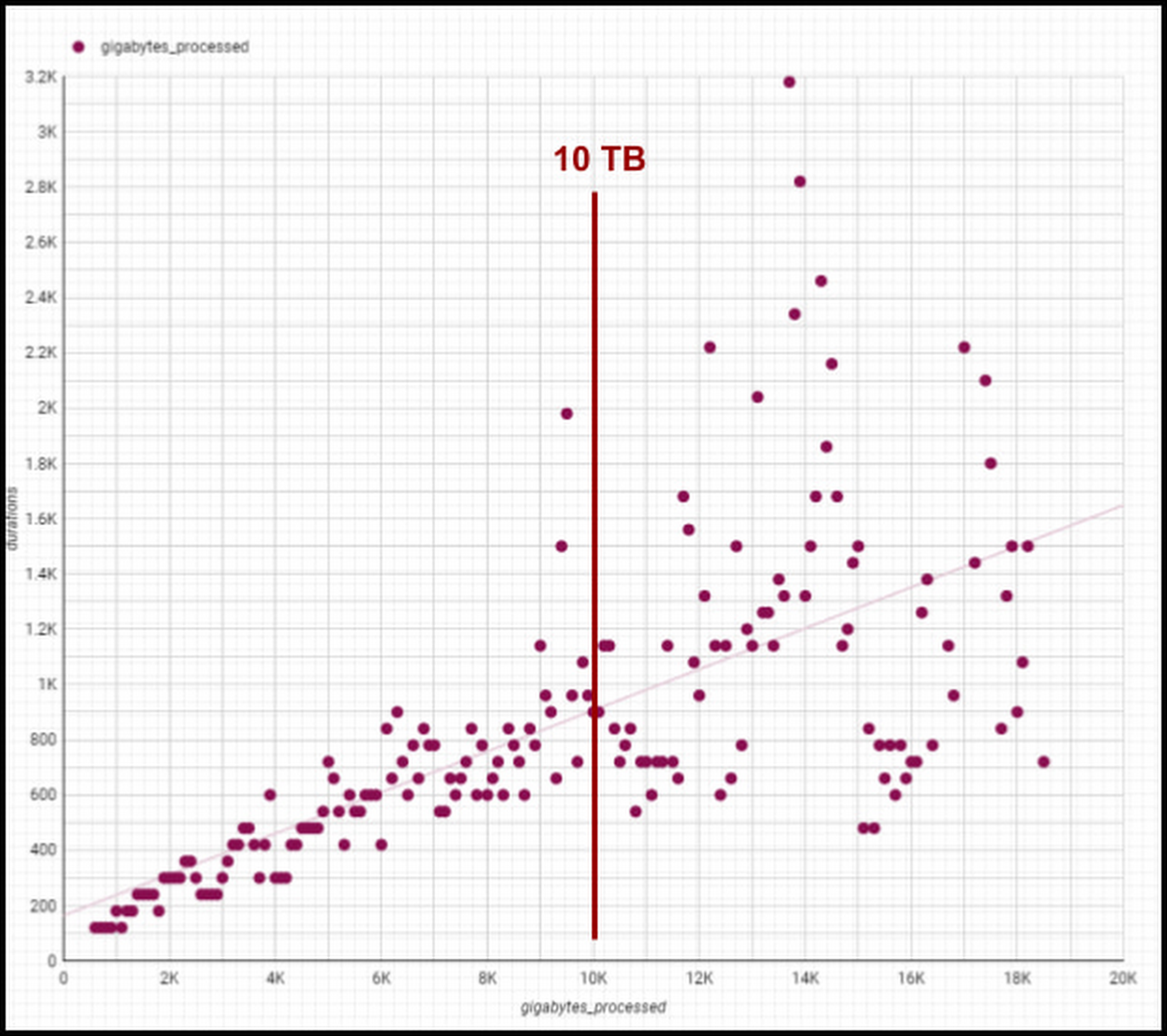
Though individual values vary greatly depending on query complexity [analytic functions/sorting can be computationally expensive], the overall trend line is below 1-1 for bytes versus duration, meaning our BigQuery query runtimes are increasing slower than our data volumes. We are still seeing sub 1:1 threshold runtimes, and we’re already at 100 PB of total data with single queries running on 50PB or more. Going strong!
One unexpected and pleasant surprise has been high performance for smaller queries, such as those required for development, interactive analytics, and internal applications we use for forecasting, segmentation, and other latency-sensitive data workflows. BigQuery’s resource management systems have provided smoother degradation and parallelism profiles than we initially expected for a multi-tenant platform.
We regularly see sub-second p50 query performance for interactive use cases, with p90 performance coming in under 10 seconds for Looker, Data Studio, and AtScale — meeting the threshold we set to avoid analysts losing focus during a business investigation. The chart below shows p50, p90, and p95 timing for core workloads, as well as the number of queries in each bucket and the number of unique users. [Looker and Atscale will use small numbers of service accounts for a large number of users].

This has enabled two important shifts in the way our customers experience analytics services:
- Delivering better user productivity. People no longer have long wait times to get results for a basic query delivering an improved overall user experience.
- Scaling our data transformation. BigQuery has proven, effective data transformation that allows us to embrace the industry shift away towards ELT (extract, load, transform) to transform raw data right within the database.
We no longer have to ask ourselves, “Can we meet the SLA for this data processing task?” The new conversation is, “Of course, we can meet it. What’s the associated cost based on how many resources we assign?” We can make cost and resource trade-offs clear to our users and say “yes” more often to requirements that have measurable business value.
Supporting cost vs. performance decisions
Democratized access to internal analytics is a powerful decision-making tool. With BigQuery’s robust tooling, the decision about how to best allocate computational resources is in the hands of the analytics groups closest to the business decision being made. If they want to spend a sprint optimizing a dashboard, they can show exactly how much money it will save. If they choose not to optimize a report, they can offset the decision with concrete cost savings and other realized value.
Wayfair teams also benefit from visibility into their committed costs by abstracting away the details of the underlying services, including BigQuery slots, the virtual CPUs used to execute SQL queries.
Take a look at this example view consumed by our teams (the metrics for these dashboards are from the BigQuery INFORMATION_SCHEMA (jobs and reservations tables):
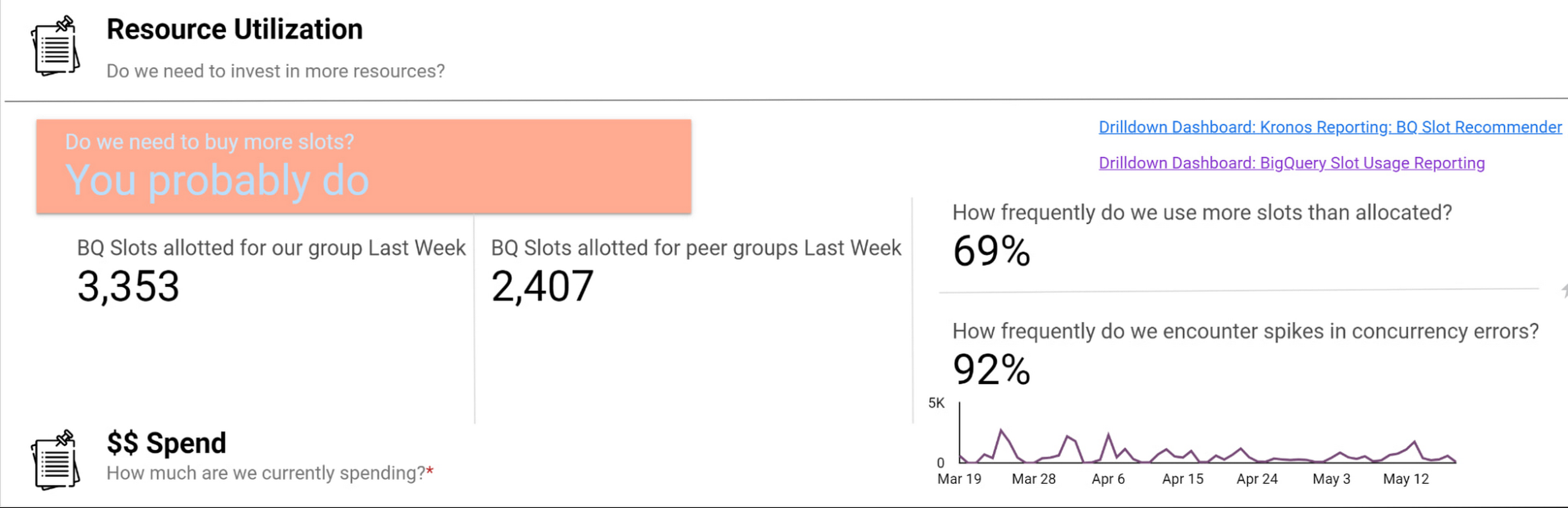
Suppose an organization wants to purchase capacity for a period of time. In that case, we provide an average cost for a slot during that time and charge them based on their slot usage for queries, multiplied by the average price.
Teams can see whether their consumption matches their reservations with a consistent, high-level number. We apply the same approach to tools like Dataproc by aggregating up the costs of component services and providing an organizational cost for those services.
How we use performance signals to improve user efficiency
Instead of overcorrecting for occasional performance fluctuations by allocating excessive resources, we try to align incentives so that people make the right choices for the business. Showback doesn’t work in a vacuum — it requires context and integrated insights. Teams need to show the cost of running a dashboard as well as the ROI is in terms of end user engagement and what peer dashboards with equivalent source datasets might cost.
We want to give users the freedom to do things the way they want and need to while also educating them on achieving their goals and using best practices to reduce their costs and improve their performance. The goal is never for all dashboards to load “less than x seconds” — we believe that any dashboard can load in x seconds when it is properly designed and resourced.
For instance, BigQuery allocates slots for a new workload quickly and efficiently, and queries that are optimized and have dedicated resources consistently complete quickly. When users experience a slowdown, it’s typically because they are sharing resources or inefficiently using their resources. Variable performance is a useful signal to help users discover opportunities to optimize queries and work more productively. We value these signals as we like to focus on the aggregate experience of all users interacting with the tool, not individual interaction.
A natural way to improve user efficiency is to reward ideal behaviors and discourage those that do not align with our analytics strategy. Some examples include splitting out high-demand reporting from ad-hoc exploration to reduce concurrency errors or encouraging people to use materialized tables instead of writing complex custom SQL. For instance, a dedicated reporting project might only include an organization’s Data Studio dashboard if it directly references a table or meets other optimization requirements. Using this approach, we give our users a high degree of freedom and experimentation at the entry-level while providing a well-documented path to scale.
Visibility into query performance improves business performance
The detailed tracking information we get from Google Cloud products is critical — Google’s robust analytics performance has enabled us to scale Data Studio to over 15,000 Wayfarians. Of course, a larger user base always comes with concerns that less sophisticated users may not appropriately optimize their queries or make the best use of the infrastructure.
Evaluating the different Data Studio dashboards helps us identify opportunities to use better query optimization practices, such as reducing custom queries, connecting directly to permanent tables, or using the BI Engine to improve dashboard performance. Recently, our team built new billing projects specific for Data Studio reporting. We can scale up a reservation dedicated to reporting about a major sales event in minutes.
Beyond everyday reporting, holidays and sales events may require higher, guaranteed performance. BigQuery’s flexible capacity commitments allow us to decide at a business level whether an urgent need requires us to reprioritize resources immediately or whether we have the time to optimize queries and rebuild dashboards to be performant. These new billing projects let us evaluate if teams need to scale up resourcing, what areas they can optimize in BigQuery, or if a new reservation is needed to resource that team separately.
Recommendations for achieving high performance at low cost
Are you wondering how to allocate BigQuery slots? Teams must see direct, immediate return on their investment in performance and optimization.
Our first rule of thumb is to align resource utilization with ownership as closely as possible. This makes it easier for teams to secure dedicated resources, even if they start out small. We’re comfortable doing this because BigQuery dynamically reassigns capacity between the targeted reservation and other consumers in milliseconds. We always get the total usage of our slots — there is no wasted capacity even when we break assignments down granularly.
Once a team has a reservation, we provide reporting that consumes various BigQuery information schema views, such as query logs and reservation information, and processes it into aggregated reporting. We look for metrics like the average slots available to a query at a point in time, overall query performance, and how long queries took to execute to pinpoint the overall health of a reservation against our business objectives. Flex slots also let us experiment easily with additional capacity, and BigQuery’s performance is so consistent that we can use straightforward models to estimate return on additional slot investment.
Other key cost optimization tips we have found helpful at Wayfair include:
- Optimize for worst-case performance. Given BigQuery’s ability to share slots, we expect teams will often see much better performance, but we find that thinking it’s more effective when teams think about the most pessimistic case when resourcing their jobs.
- Take advantage of BI Engine reservations. We like to think critically about the data and workload. BI Engine reservations are excellent for workloads that query lots of small dimension tables or a few larger tables loaded into memory. In cases like that, such as with OLAP tools using pre-computed aggregates, we’ve seen BI engine investments drive a 25% reduction in average query time—excellent ROI.
- Leverage Looker for large, longitudinal datasets. Since Looker supports a wide range of use cases, we see a broader range of performance — p50 is still under a second, but p95 can get as high as a minute. For these cases, we recommend modeling user patterns [first of month, first day of week] and dynamically allocating more slots for these periods while deprioritizing batch workloads in the key windows.
- Lean in heavily on the BQ cache for broad-based reporting. To avoid a Monday morning reporting lag, We use the BigQuery cache to avoid Monday morning report loading lags. Up to 30% of our Data Studio queries hit the BQ cache, ensuring our Data Studio p95 consistently stays under 10 seconds.
- Use slots-per-job to improve experience. In our reporting, we find that the most valuable view is slots-per-job. We look for dips in slots available for jobs as this situation often correlates strongly with poor user experiences. For example, our reporting showed us that Looker has the highest volumes of queries and users on Mondays and during each month’s first two business days. We used this information to scale up slots to support these periods of highest demand, delivering on performance SLAs to support business users.

- Get a global picture of usage. We manage slots in a central tool. Teams input their requirements into a calendar to indicate when they want higher or lower capacity to inform our flex slot purchases and annual commitments. It might seem like dozens of relatively inconsistent workloads at the team level, but the picture changes when you look at demand across a week (or our entire business). Understanding global usage makes it easy for us to model baseline capacity recommendations for serving year slots versus flexible demands.
Reaping the rewards of BigQuery
From our first initial undertaking with Google Cloud to transform our storefront, we had a lot of confidence in the underlying technology offerings and the teams that ran them and their ability to meet our unique requirements. But our experience using BigQuery for internal analytics at Wayfair has exceeded our already high expectations.
BigQuery’s fast, dynamic allocation of resources and ability to transform data in place are important to our mission of maintaining consistently high performance for our users while closely managing costs. Moreover, our visibility into query and dashboard performance through BigQuery’s DSP views and other performance metrics have helped us make clearer connections between performance goals and the costs required to meet them — and guide our analysts across the company towards attaining high performance on every project.
Cart.com to Transform e-Commerce for Brands Globally

8789
Of your peers have already read this article.
1:30 Minutes
The most insightful time you'll spend today!
The ecommerce playing field has been hard to navigate for most retailers, and Cart.com is on a mission to change that. Traditionally, retailers needing to run their online store, order fulfillment, customer service, marketing, and other essential activities have had to cobble together systems to get the capabilities they need – much less having access to analytics across these functions. The result is costly, siloed ecommerce operations that are difficult to manage and scale.
It’s clearly not a formula for success, yet that’s the reality facing most retailers. Cart.com, in contrast, has set out to democratize ecommerce by giving brands of all sizes the full capabilities they need to take on the world’s largest online retailers. Our end-to-end environment empowers retailers to keep more of their revenue, set up proven strategies for managing all aspects of their business, and act on valuable insights from customer data every step of the way.
Together with our talented team, we’re building a unified ecommerce platform that already provides value to many leading or up and coming brands including Whataburger, GUESS, Dr. Scholl’s, Rowing Blazers, and Howler Bros.
We’re excited about the opportunity ahead as we reimagine traditional approaches to online sales, fulfillment, marketing, accessing growth capital, providing a unified view of all ecommerce and marketing analytics, and other activities. Expectations for Cart.com are high, and we are building a company that can scale to $100B in revenue and beyond. Supported by the Startup Program by Google Cloud and Google Cloud solutions, we’re establishing a technology platform to transform all aspects of ecommerce for brands worldwide.
Partner in disruption
At Cart.com, we’re currently targeting an underserved market. Our ideal customer is beyond demonstrating product-market-fit and is now at an inflection point seeking a growth opportunity. Typically, those companies are generating between $1M and $100M in annual revenue. We’ve seen an enthusiastic response from brands and retailers as well as investors, with backing from investors in just over a year totaling $143 million in three funding rounds.
Our strategy is to build an integrated ecommerce model that combines best-of-breed solutions, many of which we gain through acquisitions and then build upon to provide a streamlined and fully integrated experience for our brands. We’ve made seven acquisitions so far to round out our online store, order fulfillment, marketing services, customer service, and we have launched some integral partnerships including easy access to growth capital through our relationship with Clearco and product protection for customers on every purchase with Extend. Instead of acquiring a data company, we’re building our data platform on Google Cloud, across each operating function for a single-view for brands to harness actionable data. We see Google Cloud as the leader for data management, analytics, machine learning (ML) and artificial intelligence (AI).
Other reasons why we’re building our business on Google Cloud include scalability, excellence, security, reach, and data analytics that are far superior to other environments.
We also feel a cultural and mission alignment with Google Cloud and envision leaning into a long-term partnership of marketing, selling, and disrupting the disruptors together. Equally important to us are the investments Google Cloud is willing to make in early-stage companies like ours. The support through the Google Cloud for Startups program has been outstanding.
Built on Google Cloud
A wide range of Google Cloud solutions provide the foundation for our platform. For instance, Cloud Pub/Sub keeps our services communicating with one another. We rely on fully managed relational databases, like Cloud SQL and Cloud Spanner, to securely handle the huge volume of brand and shopper data generated every day.
Cloud Run allowed us to develop inside of containers before our Kubernetes infrastructure was ready to go. Now, we are taking advantage of all the capabilities in Google Kubernetes Engine. BigQuery integrates with all Google Cloud solutions and offers true data streaming natively out of the box, along with Dataflow for advanced analytics. We also use Container Registry to store and manage our Docker container images. Right now, we’re testing Cloud Composer to evaluate using it for data workflow orchestration instead of Apache Airflow.
The openness of the Google Cloud environment is further enabled by Anthos, which we may deploy soon to perform data integrations quickly as we acquire more companies over the next year. For example, if we acquire a company using Azure, we can easily align it with our Google Cloud ecosystem.
Enabling ecommerce 2.0
Recently, our team has been experimenting with Google Cloud Vertex AI and the fully managed services of AI deployment and ML operations. The capabilities would save us substantial time in the management of the ML lifecycle which allows us to focus more on developing proprietary AI that will transform commerce at scale.
Because Google Cloud is so far ahead in data science, our teams benefit from deep Google Cloud expertise as we look to provide brands with unmatched insights into customers to improve services and revenue. We’re also planning to test Recommendations AI among other tools to deploy customer product recommendations and personalization as turnkey productized offerings. Moving forward, we will likely use Bigtable to aid in serving machine learning to hundreds of thousands of brands due to its low latency and scalability.
Fanatical about brand success
We know that our work with Google Cloud for Startups and use of Google Cloud solutions for best-in-class data management, analytics, ML, and AI will enable us to offer even more transformative services to brands.
We also see the opportunity to use our platform and customer insights to break down barriers between brands, enabling retailers to share information and work better together when it’s in their best interests. What we’re building today on Google Cloud is fundamentally changing what’s possible for retailers of any size everywhere.
As a startup, when recruiting talent or working with prospective customers, it helps to share our success with Google Cloud. We view them as an extension of the Cart.com team. It also validates our business as we continue building a more integrated, holistic approach to commerce that opens new opportunities and drives growth for brands worldwide.
For more details about Cart.com’s vision for unified ecommerce, check out our video.
If you want to learn more about how Google Cloud can help your startup, visit our page here to get more information about our program, and sign up for our communications to get a look at our community activities, digital events, special offers, and more.
Tyson Foods’ Story of Unlocking Opportunities by Integrating Real-time Analytics with AI and BI

6491
Of your peers have already read this article.
3:00 Minutes
The most insightful time you'll spend today!
As data environments become more complex, companies are turning to streaming analytics solutions that analyze data as it’s ingested and deliver immediate, high-value insights into what is happening now. These insights enable decision makers to act in real time to take advantage of opportunities or respond to issues as they occur.
While understanding what is happening now has great business value, forward-thinking companies are taking things a step further, using real-time analytics integrated with artificial intelligence (AI) and business intelligence (BI) to answer the question, “what might happen in the future?” Arkansas-based Tyson Foods has embraced AI/BI analytics to enable predictive insights that unlock new opportunities and drive future growth.
Creating a digital twin for connected intelligence company wide
Before using AI/BI, Tyson’s analytics capabilities consisted of traditional BI solutions focused on KPIs and simplifying data so that humans could understand it. Tyson wanted to leverage its data to uncover ways to improve current processes and grow its business. But with BI alone, Tyson struggled to use data to run the simulations and scenarios essential to make educated decisions. To keep growing, it had to embrace the complexity of its data, building ways to analyze it and use it to inform decision making.
Tyson’s on-premises analytics solutions limited its ability to be aggressive and make intelligent, timely, prescriptive decisions. The solution was to create a digital twin to scale optimizations within business processes, moving from local optimizations to system-wide connected optimizations. Doing so meant shifting entirely to cloud computing, with an initial focus on building the ingestion component of the digital twin platform.
Investing in a digital twin enabled Tyson to accelerate new capabilities like supply chain simulation “what-if” scenarios, prescriptive price elasticity recommendations, and improvement of customer intimacy.
Solving the ingestion problem for faster time to insights
Before its migration to Google Cloud, analytics projects that Tyson suffered from uncertainty over how to obtain the data. This problem was prolific and caused project times to be extended for weeks or even months due to the need to write and support one-off data ingestion processes at the front end. This problem also prevented the IT team from delivering analytics solutions fast enough for the business to take full advantage of them.
To solve this analytics problem, the team created Data Ingestion Compute Engine (DICE). DICE is a Google Cloud-hosted, open-source, cloud-native ingestion platform developed to provide configuration-based, no-ops, code-free ingestion from disparate enterprise data systems, both internal and external. It is centered on three high-level goals:
- Accelerate the speed of delivery of IT analytics solutions
- Enable growth of IT capabilities to produce meaningful insight
- Reduce long-term total cost of ownership for ingestion solutions
Creating DICE ingestion platform with Google Cloud services
Teams use DICE to set up secure data ingestion jobs in minutes without having to manage complex connections or write, deploy, and support their own code. DICE enables unbound scale, highly parallel processing, DevSecOps, open source, and the implementation of Lambda Data Architecture.
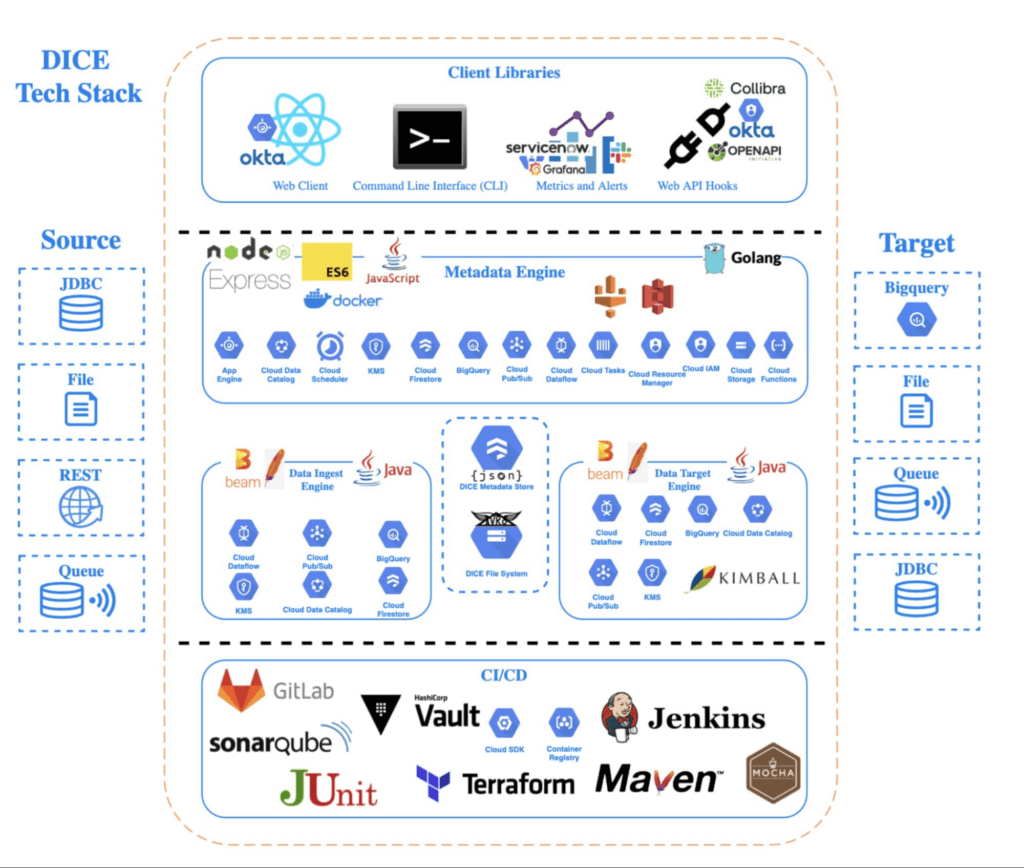
A DICE job is the logical unit of work in the DICE platform, consisting of immutable and mutable configurations persisted as JSON documents stored in Firestore. The job exists as an instruction set for the DICE data engine, which is Apache Beam running Dataflow to instruct which data to pull, how to pull it, how often to pull it, how to process it, when it changes, and where to direct it.
Two of DICE’s primary layers include the metadata engine and the data engine. The metadata engine is responsible for the creation and management of DICE job configuration and orchestration. It is made up of many microservices that interact with multiple Google Cloud services, including the job configuration creation API, job build configuration helper API, and job execution scheduler API.
The data engine is responsible for the physical ingestion of data, the change detection processing of that data, and the delivery of that data to specified targets. The data engine is Java code that uses the Apache Beam unified programming model and runs in Dataflow. It is comprised of streaming, jobs, and Dataflow flex template batch jobs. Logically, the data engine is segmented across three layers: the inbound processing layer, the DICE file system layer, and the target processing layer, which takes the data from the DICE file system and moves it to targets.
Rolling DICE for thousands of ingestion jobs each day
DICE was first deployed to a production environment in November 2019, and just two years later, it has more than 3,000 data ingestion jobs from more than a hundred disparate data systems, both internal and external to Tyson Foods. Most of these jobs run multiple times a day. On a daily basis the DICE environment sees more than 25,000 Dataflow jobs running and an average of 3.25 terabytes of new data being ingested.
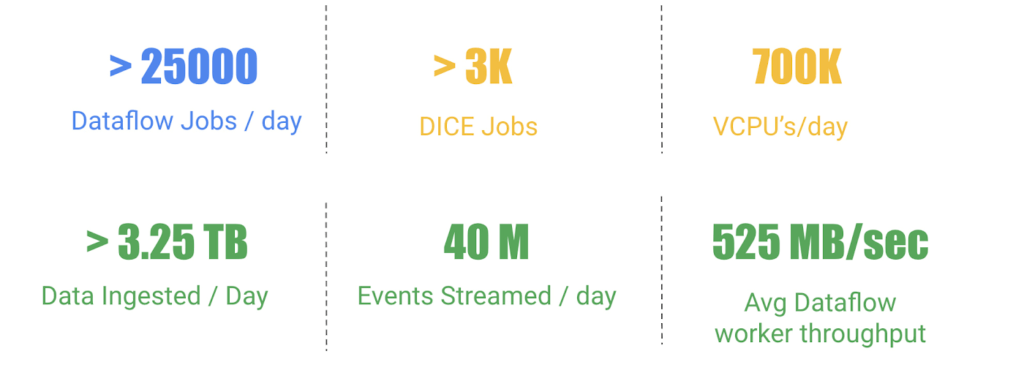
DICE supports ingestion from many different types of technologies, including BigQuery, SQL Server, SAP HANA, Postgres, Oracle, MySQL, Db2, various types of file systems, and FTP servers. Additionally, DICE supports target platform technologies for ingestion jobs that include multiple JDBC targets, multiple file system targets, and BigQuery and queue-based store and forward technologies.
The platform continues to see linear growth of DICE jobs, all while keeping platform costs relatively flat. With increasing demand for the platform, Tyson’s IT team is constantly enhancing DICE to support new sources and targets.
This intelligent platform keeps adding new value and makes it simple for Tyson to take advantage of its data. This innovation is a necessity in this fast-changing world of digital business in which companies must transform a high volume of complex data into actionable insight.
More Relevant Stories for Your Company




How Spotify Serves Personalized Music Recommendations
Music for everyone. That’s Spotify’s promise. And it lives up to it by serving over 140 million music lovers across the world. Every day it renders personalized music recommendations to hundreds of millions of happy customers.“Spotify is a global business with a global user base. Being able to provide a

How Google Cloud Solutions Help Retail Firms to ABP(Always Be Pivoting)
For years, retailers have been told that they must embrace a litany of new technologies, trends, and imperatives like online shopping, mobile apps, omnichannel, and digital transformation. In search of growth and stability, retailers adopted many of these, only to realize that for every box they ticked, there was another

Google Cloud Leads the Landscape for Unstructured Data Security Platform: Forrester
As organizations expand their use of cloud computing services, more of their sensitive data inevitably moves to and lives in the cloud. Much of this sensitive data is unstructured and can be challenging to secure. Despite this potential challenge, the usefulness of cloud for data storage and processing is too
Discover Effingo: Google’s Solution to Moving Data at Massive Scale
Every hour of every day, Google moves a lot of data around the world. But how? With the Effingo (Latin for ‘to duplicate’ or ‘copy’) data copying service, a Google-only service that moves data internally and on Google Cloud customers’ behalf. As a Google Cloud customer perhaps you move data
