





Google Cloud Leads the Landscape for Unstructured Data Security Platform: Forrester
7051
Of your peers have already read this article.
1:30 Minutes
The most insightful time you'll spend today!
As organizations expand their use of cloud computing services, more of their sensitive data inevitably moves to and lives in the cloud. Much of this sensitive data is unstructured and can be challenging to secure. Despite this potential challenge, the usefulness of cloud for data storage and processing is too big for most organizations to ignore and has in turn led to data sprawl, where their sensitive data is spread over many resources, both in the cloud and on-premise. Addressing data sprawl requires solutions that can discover, manage, and secure sensitive data, especially unstructured data, as it spreads.
To help organizations confidently move their sensitive data to the cloud, Google Cloud works diligently to earn and maintain customer trust. Control and transparency are pillars of our approach to offering a trusted cloud. Therefore, we’ve been expanding our capabilities to act on unstructured data as sprawl increases.
Given the importance of these capabilities to our strategy, we are happy to announce today that Forrester Research has named Google Cloud a Leader in The Forrester Wave™: Unstructured Data Security Platforms, Q2 2021 report, and rated Google Cloud highest in the current offering category among the providers evaluated.
The report evaluates the 11 most significant providers with platform solutions to secure and protect unstructured data, spanning from cloud providers to data security-focused vendors. The report notes that “Google offers breadth and depth with built-in data security in the cloud. Google Cloud Platform, Google Workspace, and BeyondCorp Enterprise have underlying data security products and features for protecting customer data.”
Google Cloud tools focused on protecting unstructured data were developed and battle-tested internally at Google to alleviate some of our own data security challenges. This brings the best of Google security to the organizations utilizing Google Cloud and our security tools. The report highlights that “Google productizes capabilities originally developed to secure its own business, and brings a disciplined approach to product enhancements for enterprise requirements. It serves a wide range of enterprise and mid-market, with a focus on emphasizing data protection needs by industry. ”
Google Cloud’s data security strategy focuses on meeting customers wherever they are in their cloud migration journey. The report highlights that “Google further enables a Zero Trust approach with third-party integrations through its BeyondCorp Alliance of partners in device management, endpoint security and gateways.”
Google Cloud received the highest possible score in sixteen criteria, in total receiving the most 5 out of 5 ratings among all vendors assessed. These criteria include: Data Intelligence, Access Control, Deletion, Obfuscation-Scope, Obfuscation-Key Management, Deployment, Security and Risk, APIs and Integration, Data Security Platform Vision, Data Security Execution Roadmap, Performance, Planned Enhancements, Zero Trust Enabling Partner Ecosystem, Diversity, Equity and Inclusion, Installed Base, and Revenue.
Notably, Google Cloud received the highest possible score in the Obfuscation criteria. Obfuscation can help protect sensitive data, like personally identifiable information (PII), which is critical to many enterprise workflows. Cloud DLP helps customers inspect and mask this sensitive data with techniques like redaction, bucketing, and tokenization, which help strike the balance between risk and utility. This is especially crucial when dealing with unstructured or free-text workloads, in which it can be challenging to know what data to redact. More than 150 detectors combine to power Cloud DLP’s masking, which can be deployed in data migrations and business workloads like real-time data collection and processing. For Obfuscation specifically, the report mentioned that Google “takes a broad view of DLP, which includes in-line redaction of sensitive elements in unstructured data and DLP APIs that extend support to additional data types like images or other media.”
We are honored to be a Leader in The Forrester Wave™ Unstructured Data Security Platforms Q2 2021 report, and look forward to continuing to innovate and partner with you on ways to make your digital transformation journey safer as we work to become your most trusted Cloud.
A copy of the full report can be viewed here.
HarbourBridge Schema Assistant Allows Quick, Bulk Migration to Cloud Spanner
5474
Of your peers have already read this article.
1:30 Minutes
The most insightful time you'll spend today!
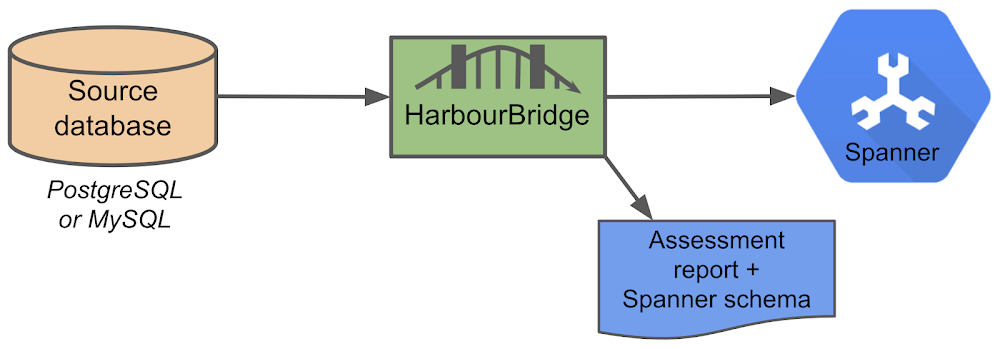
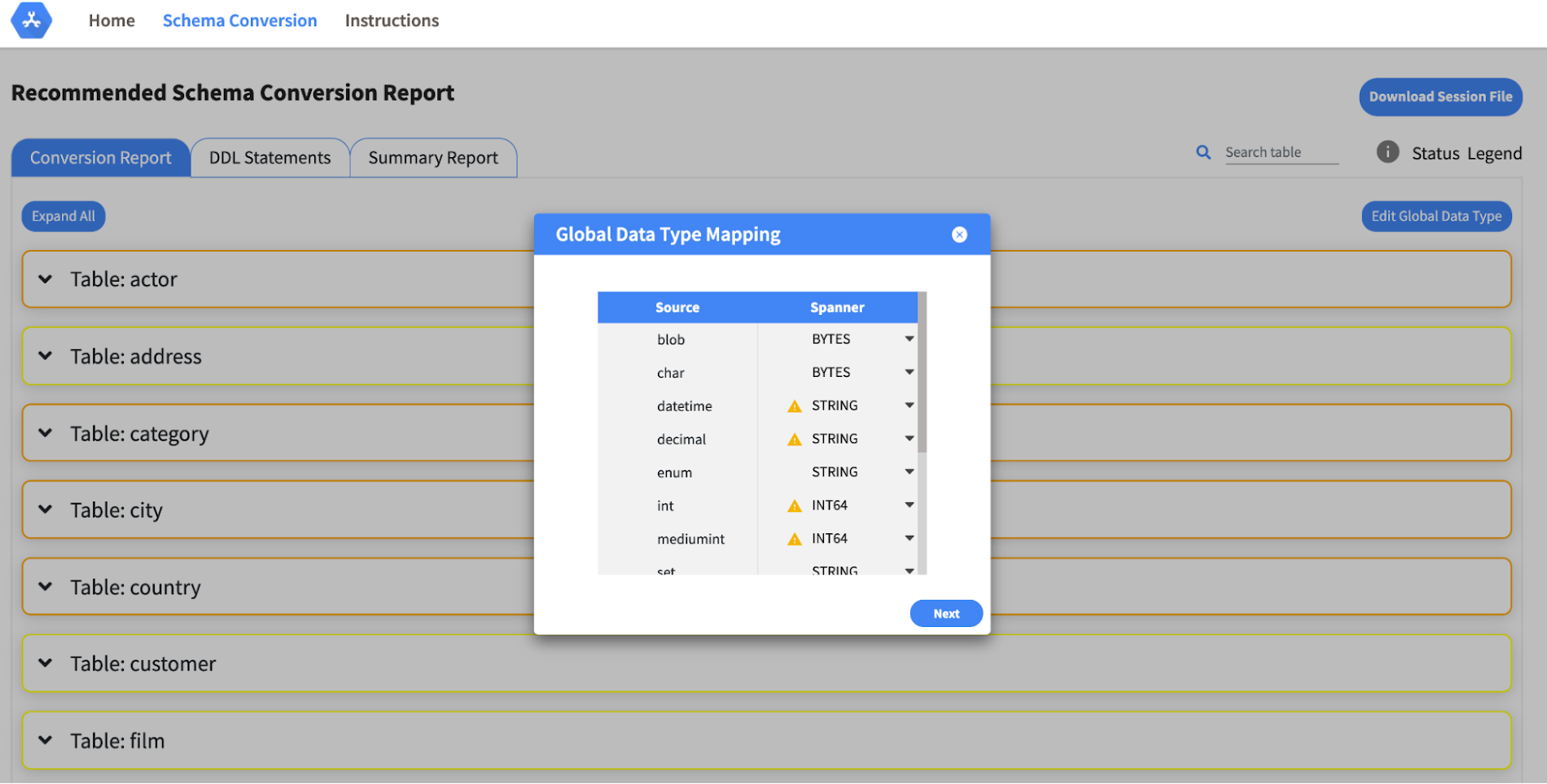
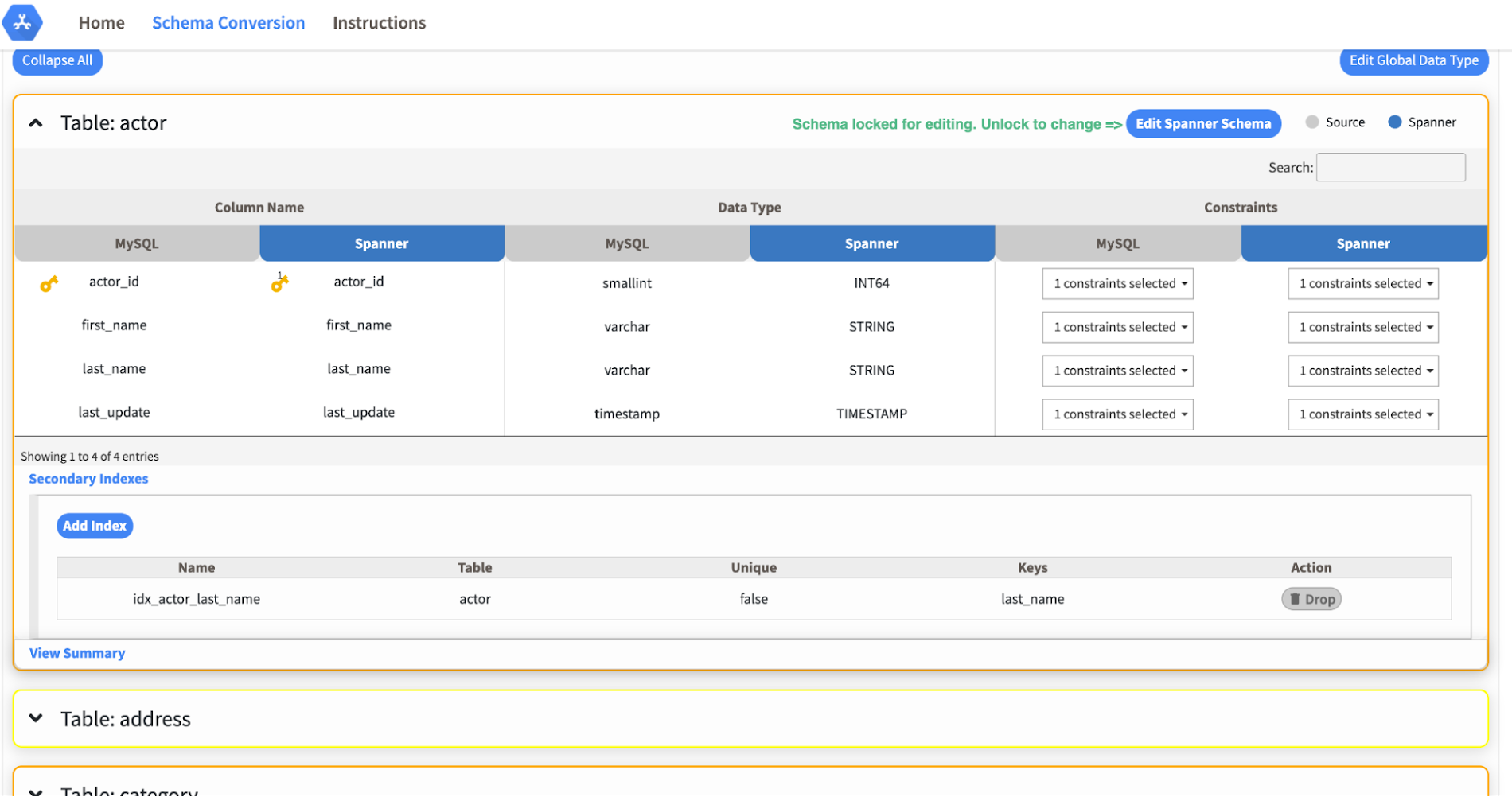
Today we’re announcing the HarbourBridge Schema Assistant, which provides a guided schema-design workflow for migrating from MySQL or PostgreSQL to Spanner. HarbourBridge imports dump files (from mysqldump or pg_dump) or directly connects to your source database, and converts the source database schema to an equivalent Spanner schema. The new Schema Assistant capability displays the source schema and Spanner schema side-by-side, highlights errors and walks you through a series of steps to validate and optimize your Spanner schema. It also produces a browsable assessment report with an overall migration-fitness score for Spanner, a table-by-table detailed analysis of type mappings and a list of features used in the source database that aren’t supported by Spanner. It supports editing of table and column names, column types, primary keys and constraints, as well as dropping of tables, columns, foreign keys and secondary indexes.
The new Schema Assistant complements HarbourBridge’s existing data and schema migration capabilities and is a critical step towards our goal of building a complete open-source migration toolkit. HarbourBridge continues to support command-line schema and data migration and turn-key Spanner evaluation.
Complementing the bulk data migration capabilities of HarbourBridge, we are also announcing the ability to migrate change events from MySQL to Cloud Spanner.
Supported Features in Schema Assistant
- Global type mapping. Users can customize the global mapping for how types should be mapped to Spanner consistently across the schema. For example, mapping large integers in source schema to Spanner’s NUMERIC.
- Local type mapping. Users can override the custom type mapping for a given table/column.
- Session management. A session keeps track of all the changes made to the schema mapping.
- Customization of secondary indexes. Users can add, edit and delete secondary indexes to optimize their Spanner performance.
- Customization of foreign keys and interleaved tables. Table interleaving is an important design consideration when migrating to Cloud Spanner as explained in more detail in this blog post.
Features in the pipeline
We are already working to further expand the supported set of schema editing features and welcome your feedback. We are particularly excited to expand the Schema Assistant’s design recommendations for optimizing Spanner schemas e.g. in-depth recommendations for primary key design.
HarbourBridge is open source and we gladly accept contributions from the wider community.
A Recap on Google Cloud Databases and Storage Options- Part 2
3956
Of your peers have already read this article.
6:00 Minutes
The most insightful time you'll spend today!
Isaac Newton said, “If I have seen farther than others it is because I have stood on the shoulders of giants.” He meant that in order to explain the Law of Gravity, he used the work of major thinkers who came before him in order to make intellectual progress (as-in giving credit). In the 1640’s (yes, the time of the English Civil War and the start of the mini Ice Age), we can say the Age of Reason began and the word “data” was also (re)born in a way.
Why? Hard to assert a specific reason, it could be apropos of all those events of that decade, and somewhere amidst all that, the scientists and Churchmen (rather Churchman, Henry Hammond who really coined the term data) started to pen down their credit in books and there was a continued proliferation of data to reason their finding (and most times to reason why their work was better than that of the others). And thus comes to us the word datum from the Latin verb dare (it means “to give”, not the English dare).
Dare to Recap History?
Data is history captured through language (it has become the future as well, but that is for another day). Now we all like history (well, most of us). But it is highly likely the context gets lost in the complexity and style of definition. One way to mitigate that risk is to have a clear set of definitions (language), sustained hold of events (history), a clean process of capture (extract) and a scalable process for translation and aggregation (transform). If we want our data to be successful and rise to the occasion, then we need to keep these ways to mitigate the risk of complexity in mind.
And this is exactly what we discussed in the Part 1 of this blog series, Data Modeling Basics—the various business attributes, technical aspects, design questions, and considerations for designing your database model.
In this blog…
We will look into the different databases and storage options in Google Cloud, a brief note on each one of them, when to choose one over the other, interesting alternatives, exceptions and if you make it to the end of the blog, a fun challenge to make sure we put this little tech nugget to an ACID test (see what I did there?). If you are a cloud enthusiast, a database practitioner, a data geek, or a general wonderer of life with computing, you may find this engaging…
Google Cloud Storage Options
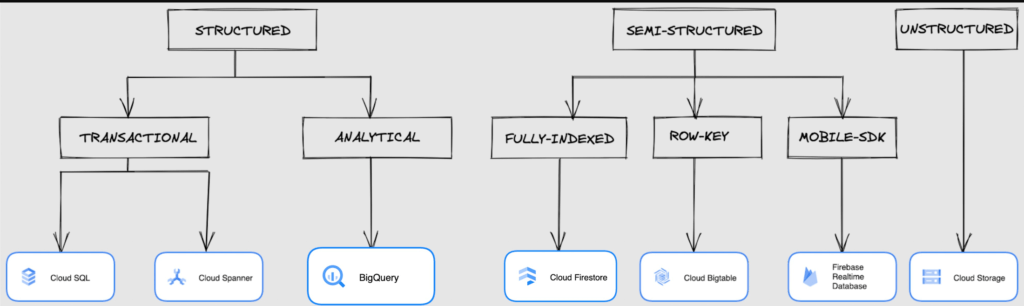
We at Google Cloud, have realized how hard it is to go through these laundry list assessment aspects and have made it simpler for you with a Decision Tree. (Of course, It ain’t Christmas if not for the tree):
If only the world was always “Structured”
In a structured world, you will know all the attributes on a first-name basis (I mean to say that you will have a well defined fixed set of attributes that can be modeled in a table of rows and columns), and the applications are transactional or analytical in orientation. Transactional Structured Data operate one row at a time generally and they need to adhere to ACID compliance. (Ah. Now you connect the dots, if not already.) ACID properties are Atomicity, Consistency, Isolation, and Durability. Cloud SQL and Cloud Spanner are our Google Cloud choices for Transactional Structured Data use cases.
Let’s look at the below aspects for each type and structure of data:
- Why that option? (highlights and key features)
- When to choose?
- When not to choose?
- Security aspects
Cloud SQL
- Fully Managed, cloud-native RDBMS (Relational DataBase Management System) that offers both MySQL, PostgreSQL, SQL Server engines
- Cloud SQL is accessible from apps running on App Engine, GKE, or Compute Engine
Note: A managed database is one that does not require as much administration and operational support (creating databases, performing backups, updating the operating system of database instances) as an unmanaged database.
When to use Cloud SQL?
- Typical online transaction processing (OLTP) workloads
- Lift and shift of on-premise SQL databases (or from anywhere else) to cloud
- Regional applications that do not need to store > 30 TB of data in a single instance
When not to use Cloud SQL?
Cloud SQL is not an appropriate storage system for online analytical processing (OLAP) workloads or data that requires dynamic schemas on a per-object basis.
Security
Data stored is encrypted both in transit and at rest. Have built-in support for access control, using network firewalls to manage database access.
Cloud Spanner
Relational, horizontally scalable, global database with strong consistency- Supports schemas, ACID transactions, and SQL queries (ANSI 2011)
- Scales horizontally in regions, but can also scale across regions for workloads that have more stringent availability requirements
When to use Cloud Spanner?
- For large amounts of data and when you require high transactional consistency
- When you require sharding for higher throughput, access and low latency
When not to use Cloud Spanner?
Cloud Spanner is not an appropriate storage system for online analytical processing (OLAP) workloads
Security
Security features in Spanner include data-layer encryption, audit logging, and Identity and Access Management (IAM) integration.
Analytical Structure is when we want the data to tell us an aggregated or enhanced story, for which we use limited columns and multiple rows and hence mostly use a Column-Oriented storage mechanism. Column-oriented storage is if we want to store the data in the tables by columns instead of by rows, and this column-oriented storage is done to efficiently access only a subset of columns for querying. BigQuery is the data warehouse option for analytics needs.
BigQuery
BigQuery is a fully managed Data Warehouse for analytics with built-in data transfer service- Peta-byte scale, low-cost warehouse that supports loading data through the web interface, command line tools, and REST API calls
- Incorporates features for machine learning, business intelligence, and geospatial analysis that are provided through BigQuery ML, BI Engine, and GIS.
Note: A data warehouse stores large quantities of data for query and analysis instead of transactional processing.
When to use BigQuery?
For use cases that cover process analytics and optimization, big data (Petabyte scale) processing and analytics, data warehouse modernization, machine learning-based behavioral analytics, and predictions
When not to use BigQuery?
BigQuery is not a Transactional database and is oriented on running analytical queries, not for simple CRUD operations and queries.
Security
BigQuery provides encryption at rest and in transit. Cloud Data Loss Prevention (Cloud DLP) can be used to scan the BigQuery tables and to protect sensitive data and meet compliance requirements. BigQuery supports access control of datasets and tables using Identity and Access Management (IAM).
And then we have the Semi-structured and the Unstructured world of data that we will address in the below sections.
Cloud Firestore (Cloud Datastore)
Firestore is the next major version of Datastore and a re-branding of the product. Taking the best of Datastore and the Firebase Realtime Database, Firestore is a NoSQL document database built for automatic scaling, high performance, and ease of application development.
- A fully managed, serverless NoSQL Google Cloud database designed for the development of serverless apps that stores JSON data
- Can be used to store, sync, and query data for web, mobile, and IoT applications
- Automatically handles sharding and replication making it highly available, durable, and scalable
- Provides ACID transactions, SQL-like queries, indexes, and more
- If a client does not have network connectivity, the Firestore API lets your app persist data to a local disk and synchronizes itself with the current server state once connectivity is reestablished
When to use?
For use cases of app development, live synchronization, offline support, multi-user collaborative applications, leader board, etc.
When not to use?
Not a relational database so not meant for relational structured data use cases.
Security
Firestore Security Rules support serverless authentication and authorization for the mobile and web client libraries. Identity and Access Management (IAM) manages database access.
Cloud Bigtable
- Bigtable is a wide-column, fully managed, high-performance NoSQL database service designed for terabyte- to petabyte-scale workloads
- Bigtable is battle tested on Google internal Bigtable database infrastructure that powers Google Search, Google Analytics, Google Maps, and Gmail
- Provides consistent, low-latency, and high-throughput storage for large-scale NoSQL data
When to use?
- For large amounts of single key data and is preferable for low-latency, high throughput workloads
- For real-time app serving workloads and large-scale analytical workloads
When not to use?
While Bigtable is considered an OLTP system, it doesn’t support multi-row transactions, SQL queries or joins. For those use cases, consider either Cloud SQL or Datastore.
Security
- All the data at rest in Cloud Bigtable is encrypted using Google’s default encryption, by default.
- Instead of Google managing the encryption keys that protect your data, your Bigtable instance can also be protected using a key that you manage (customer-managed encryption keys (CMEK)) in Cloud Key Management Service (Cloud KMS).
Cloud Storage
- Google Cloud Storage is an object storage system that is durable and highly available, persists unstructured data like images, videos, data files, videos, backup, and other data
- It is unstructured and so the files in the cloud storage are atomic that you read the entire file but you cannot access specific blocks in the files
- Cloud Storage is available in multiple classes, depending on the availability and performance required for apps and services
- Standard – Offers the highest levels of availability and is appropriate for storing data that requires low-latency access
Nearline – Low-cost, highly durable, fast-access storage service for storing data that you access less than once per month
Coldline – Very-low-cost, highly durable, fast-access storage service for storing data that you intend to access less than once per quarter
Archive – Lowest-cost, highly durable, fast-access storage service for storing data that you intend to access less than once per year
Security
Files in Cloud Storage are organized by project into individual buckets. These buckets can support either custom access control lists (ACLs) or centralized identity and access management (IAM) controls.
Firebase Realtime Database
- Firebase is a realtime, NoSQL, Google Cloud database that is a part of the Firebase platform that allows you to store and sync data in real-time and includes caching capabilities for offline use
- Data is stored as JSON and synchronized in real-time to every connected client and remains available when app goes offline
When to use?
For mobile and web app development, development of apps that work across devices
When not to use?
Not in relational dataset use cases. The Realtime Database is a NoSQL database and as such has different optimizations and functionality compared to a relational database. The Realtime Database API is designed to only allow operations that can be executed quickly.
Security
The Realtime Database provides a flexible, expression-based rules language, called Firebase Realtime Database Security Rules, to define how your data should be structured and when data can be read from or written to. When integrated with Firebase Authentication, developers can define who has access to what data, and how they can access it.
That’s a rather packed read. But I hope you find this useful to understand comprehensively the basics of data, storage options and databases in Google Cloud Platform.
Next Steps, before I go…
In the blog part 1 of the series, I ended with an action item – “How would you model a NoSQL solution for an application that needs to query the lineage between individual entities that are represented in pairs?”.
Well, my answer is Firestore. As part of this episode, why don’t you take some time to go over the options and key aspects that attribute to this.
Home Depot’s Interconnected Retail Experience by Virtue of Google Cloud Migration for SAP Applications

8270
Of your peers have already read this article.
1:30 Minutes
The most insightful time you'll spend today!
With nearly 2,300 stores, The Home Depot is the world’s largest home-improvement chain — a brand that professional contractors and DIYers alike have come to depend on. The home improvement industry continues to experience unprecedented demand and dramatic increases in online ordering accompanied by expanding consumer expectations for things like curbside pickup and same day delivery. The Home Depot’s decision to migrate to cloud-based infrastructure, including the migration of the company’s SAP applications on Google Cloud which began in 2017, has set it up for success in an increasingly digital world, and helped the company adapt to changing market conditions quickly.
Interconnected retail at scale
Building on a strong customer-first philosophy, The Home Depot aims to create what it calls interconnected retail—allowing customers to shop however, whenever, and wherever they want. “So many companies are focused on omni-channel retail,” explains Sam Moses, Vice President of Corporate Systems. “At The Home Depot, we wanted to take it to the next level. Interconnected retail puts the customer at the center of everything and enables them to shop in store, online, or both. Customers can begin a transaction online and continue in-store, or vice-versa.”
To support this strategy, the company’s SAP environment needed to be more agile. Running everything on-premises, from central finance to POS systems, meant that The Home Depot’s IT teams experienced redundancy and repetitive, manual processes. Their data warehouse needed an upgrade to process and analyze growing and increasingly diverse data sets. The Home Depot chose to migrate its SAP environment to Google Cloud to support both the velocity and scale needed for the business as well as critical analytics capabilities needed for its bold digital initiatives. “We chose Google Cloud to support our SAP implementation. Our decision had a lot to do with the relationship between Google Cloud and SAP and also for the applications and services that are offered by Google Cloud, like BigQuery, which are helping to enable data and analytics within our organization,” Moses explains.
After migrating its SAP applications—including S/4HANA, its customer activity repository (CAR), general ledger, e-commerce system, enterprise data warehouse and more to Google Cloud, the company now has the speed, scale and flexibility to tackle enormous spikes in the business, all while staying fully available for their customers. Additionally, The Home Depot was able to transform its financial systems and make them more agile to deliver critical information across multiple business functions in real time.
Maximizing data insights to support customer experiences
By migrating to Google Cloud, The Home Depot is leveraging Google Cloud analytics to build the industry’s most efficient supply chain including more robust demand forecasting, supplier lead times, estimated delivery times and more, all while maintaining better security than before. “We experienced unprecedented change in our customers’ behavior and their buying patterns, which puts a lot of pressure on our supply chain,” explains Moses. “So having the ability to leverage data and analytics gives us insights to know exactly what it is that our customers need.”
The company’s analysts now use BigQuery ML for machine learning directly against the company’s BigQuery data and use AutoML to determine the best model for predictions. The Home Depot’s engineers have also adapted BigQuery to monitor, analyze, and act on application performance data across all its stores and warehouses in real time—capabilities that were not as seamless in the on-premises environment.
With hundreds of projects on Google Cloud, The Home Depot’s cloud journey is well on track, but the company is always looking to the future. “As our customers’ needs have continued to evolve, and as technology has continued to evolve, our relationship with Google will continue to advance — to be able to innovate together, to be able to find new solutions together, to better serve our customers.”
Learn more about how The Home Depot is renovating its retail operation with SAP on Google Cloud.

5498
Of your peers have already downloaded this article
1:30 Minutes
The most insightful time you'll spend today!
IDC recently examined the benefits of implementing BigQuery for SAP data. The findings reveal massive improvements to the SAP customers’ overall business results due to faster access to data insights, lower data warehouse operation cost, and increased productivity among the data warehouse and development teams. Download the report now!
Cloud IoT Core Helps Businesses Leverage their IoT Data to Build a Competitive Edge

7098
Of your peers have already read this article.
1:30 Minutes
The most insightful time you'll spend today!
The ability to gain real-time insights from IoT data can redefine competitiveness for businesses. Intelligence allows connected devices and assets to interact efficiently with applications and with human beings in an intuitive and non-disruptive way. After your IoT project is up and running, many devices will be producing lots of data. You need an efficient, scalable, affordable way to both manage those devices and handle all that information.
IoT Core is a fully managed service for managing IoT devices. It supports registration, authentication, and authorization inside the Google Cloud resource hierarchy as well as device metadata stored in the cloud, and the ability to send device configuration from other GCP or third-party services to devices.
Main components
The main components of Cloud IoT Core are the device manager and the protocol bridges:
- The device manager registers devices with the service, so you can then monitor and configure them. It provides:
- Device identity management
- Support for configuring, updating, and controlling individual devices
- Role-level access control
- Console and APIs for device deployment and monitoring
- Two protocol bridges (MQTT and HTTP) can be used by devices to connect to Google Cloud Platform for:
- Bi-directional messaging
- Automatic load balancing
- Global data access with Pub/Sub
How does Cloud IoT Core work?
Device telemetry data is forwarded to a Cloud Pub/Sub topic, which can then be used to trigger Cloud Functions as well as other third-party apps to consume the data. You can also perform streaming analysis with Dataflow or custom analysis with your own subscribers.
Cloud IoT Core supports direct device connections as well as gateway-based architectures. In both cases the real time state of the device and the operational data is ingested into Cloud IoT Core and the key and certificates at the edge are also managed by Cloud IoT Core. From Pub/Sub the raw input is fed into Dataflow for transformation, and the cleaned output is populated in Cloud Bigtable for real-time monitoring or BigQuery for warehousing and machine learning. From BigQuery the data can be used for visualization in Looker or Data Studio and it can be used in Vertex AI for creating machine learning models. The models created can be deployed at the edge using Edge Manager (in experimental phase). Device configuration updates or device commands can be triggered by Cloud Functions or Dataflow to Cloud IoT Core, which then updates the device.
Design principles of Cloud IoT Core
As a managed service to securely connect, manage, and ingest data from global device fleets, Cloud IoT COre is designed to be:
- Flexible, providing easy provisioning of device identities and enabling devices to access most of Google Cloud
- IThe industry leader in IoT scalability and performance
- Interoperable, with supports for the most common industry-standard IoT protocols
Use cases
IoT use cases range across numerous industries. Some typical examples include:
- Asset tracking, visual inspection, and quality control in retail, automotive, industrial, supply chain and logistics
- Remote monitoring and predictive maintenance in oil & gas, utilities, manufacturing, and transportation
- Connected homes and consumer technologies.
- Vision intelligence in retail, security, manufacturing, and industrial sectors
- Smart living in commercial, residential, and smart spaces
- Smart factories with predictive maintenance and real-time plant floor analytics
For a more in-depth look into Cloud IoT Core check out the documentation.
https://youtube.com/watch?v=76v16P-Wqe4%3Fenablejsapi%3D1%26
For more #GCPSketchnote, follow the GitHub repo. For similar cloud content follow me on Twitter @pvergadia and keep an eye out on thecloudgirl.dev.
More Relevant Stories for Your Company

Principles to Make Organizations Data Engineering Driven
In the “What type of data processing organisation” paper, we examined that you can build a data culture whether your organization consists mostly of data analysts, or data engineers, or data scientists. However, the path and technologies to become a data-driven innovator are different and success comes from implementing the right


How Apna is using data and AI to drive the gig economy in India
In this episode, Theo speaks to Ronak Shah, Head of Data at apna.co. As one of the largest gig economies in the world, India is seeing rising numbers among younger people joining the ecosystem. Driven by digital adoption and new ways of working, Apna saw an opportunity to help bridge

Renaulution: Renault’s story of migrating to 70 applications in 2 years
Editor’s note: Renault, the French automaker, embarked on a wholesale migration of its information systems—moving 70 applications to Google Cloud. Here’s how they migrated from Oracle databases to Cloud SQL for PostgreSQL. The Renault Group, known for its iconic French cars has grown to include four complementary brands, and sold

Over 700 SaaS Companies Trust Google’s Data Cloud to Build Intelligent Apps!
Today, a typical enterprise uses over 100 SaaS applications while large organizations commonly use over 400 apps. These applications contain valuable data on customers, suppliers, employees, products and more, offering the potential for valuable insights and powerful workflows. However, in the past, this data has often remained siloed and underutilized,
