





Lucent Bio: Boosting collaboration and sustainability with Google Workspace

4685
Of your peers have already read this article.
2:30 Minutes
The most insightful time you'll spend today!
From electrifying transportation to shifting the grid to renewable energy, environmental sustainability is one of the greatest challenges of our generation. A critical but often forgotten goal is the development of sustainable agricultural practices, especially given increasing water shortages and soil degradation around the world.
Lucent Bio was born to solve some of these threats to humanity’s ability to feed itself. It delivers crop nutrition solutions that accelerate the transition to sustainable agriculture. Lucent Bio developed novel technology for bioactive crop nutrition products, including its flagship product—Soileos®—which boosts nutrient density in crops, regenerates soil, avoids polluting agro-ecosystems, and enables the circular economy. Soileos is a plant-based product that is made by upcycling food processing co-products such as lentil and pea hulls into bioactive nutrients that then create the next harvest.
As a start-up, Lucent Bio has used Google Workspace since day one to drive collaboration, streamline operations, and scale. As an organization, it is also closely aligned with Google’s sustainability goals. Google is carbon-neutral for its operations and has made a public commitment with detailed plans to run on carbon-free energy by 2030, meaning clean power every hour of every day.
Google Workspace has been an invaluable resource to fuel collaboration between the engineers at the Lucent Bio pilot plant, the scientists at the research lab and greenhouse, and on-field agronomists as they conduct trials on Soileos across North America. Without the use of Google Workspace during the COVID 19 pandemic, Lucent Bio would not have been able to achieve their current scale.
“In just 18 months, Lucent Bio has been able to scale manufacturing from 1 kg to 1,000 kg of product per day. This year, we’re poised to take the next big step to 20,000 kg per day. During this scale-up process, we went through several iterations of improvements, resulting in a completely zero-waste manufacturing process—a hugely difficult but impressive achievement in line with our mission to accelerate the transformation of agriculture to sustainability. Every step of the way, Google Workspace has been an essential part of our innovation and growth strategy.”
Michael Riedijk, CEO Lucent Bio
Google Workspace runs on the cleanest cloud in the industry. It helps teams of all sizes, and across all industries, connect, create, and collaborate from anywhere. Workspace recently launched AI-generated summaries in Spaces, which help distributed teams stay focused while quickly catching up on chat messages they might have missed. Innovations like these keep the scientists at Lucent Bio collaborating as they build a more sustainable future for agriculture.
You can find more about Google’s commitment to sustainability here, including our goal to become not just carbon-neutral, but carbon-free by 2030, efforts to combat deforestation, and how we’re supporting clean energy.
3976
Of your peers have already watched this video.
22:21 Minutes
The most insightful time you'll spend today!
Boosting Chrome OS adoption with effective change management
Can you remember the last time you asked a child to do something how did you convince them to do what you wanted? How many times did they ask you why probably more than once, right? So we know change is hard when we ask someone to make a change we’re asking a lot from them. Very often with IT projects we expect people to change, we don’t really think through the implications of this.
The purpose of this video is to guide you to migrate to Chromebooks and help you understand the reason why. When putting together your change management plan there’s a much larger chance of your project being able to deliver on its business objectives.
Introducing new technology into your organization is an exciting step. However, change management and workforce adoption of the new technology can be challenging. Get insights from Google’s Chrome Enterprise expert on change management strategies and best practices for increasing Chromebook adoption in your organization.
3967
Of your peers have already watched this video.
36:30 Minutes
The most insightful time you'll spend today!
Lessons for the Indian Government: How the State of Arizona Innovates with Emerging Tech
Government agencies of every size and jurisdiction are being called upon to provide accurate and real-time information and deliver essential services across the globe in a world infested by COVID-19.
Doug Lange, Chief Strategy Officer, state of Arizona, is primarily responsible for two things. One is Arizona’s statewide IT Strategic plan. The other to find different ways to promote emerging technologies across the state of Arizona.
Arizona is constructed of roughly 130 agencies, boards, and commissions. You have everything from the Department of Transportation to the Department of Revenue, all the way down to the Board of Nursing or the Board of Barbers. An important call-out for the state of Arizona: It’s a Federated state. That means every one of the agencies have the ability to make decisions. Lange works with an asset, which would be the Arizona Strategic Enterprise Technology office, also known as the Office of the State CIO.
“Our charge is really to partner with the governor’s office, and find ways to really promote enterprise opportunities
across all 130 agencies across the state of Arizona, to really find those wins. And when you start to dig into our why,
I think that makes a little more sense. How do we run government at the speed of business,
start to break through some of those barriers, and ultimately, find efficiencies that are going to be real savings and real wins for the citizens that are ultimately consuming the services for our agencies,” says Lange.
So with that charge, technology plays a huge part. And not only is technology a part of what any organization is doing, whether you’re talking about the public sector or private sector. But when you get into government,
there are just so many different ways that emerging technologies can really make a difference, says Lange.
Find out how Lange is enabling the State of Arizona with emerging technologies that support remote working and meetings for government officials and ensuring they quicken decision-making and serve citizens efficiently.
Dr. Agarwal’s Eye Hospital Cuts IT Support Tickets By 80% With Google

4963
Of your peers have already read this article.
3:00 Minutes
The most insightful time you'll spend today!
About Dr. Agarwal’s Eye Hospital
Dr. Agarwal’s Eye Hospital specializes in treating eye conditions such as cataracts; glaucoma; corneal problems such as ulcers, inflammation, and thinning; and retinal issues such as degeneration and detachment. The business operates 62 hospitals in cities across India and 14 hospitals in 8 countries in Africa, including Zambia, Nigeria, and Ghana.

Founded by the late Dr. J. Agarwal, Dr. Agarwal’s Eye Hospital, headquartered in Chennai, India, operates 62 hospitals in cities across India and 14 hospitals in 8 countries in Africa, including Zambia, Nigeria, and Ghana.
According to Dilip Ramadasan, GM-IT, Dr. Agarwal’s Eye Hospital, the business is the second-largest network of eye-care hospitals globally and aims to provide the best eye care in the world.
“We have focused on service over the last couple of years and decided to completely revamp back-end operations such as information technology and finance,” says Dilip.
“Realizing our vision involved moving to a completely new infrastructure that could deliver the scalability, agility, and performance our evolving application stack required.”
Replacing Aging Desktop Hardware and Applications
The business placed particular emphasis on upgrading its aging desktop fleet and traditional productivity applications.
“When I arrived in 2015, we only had 35 hospitals and all of them were using desktops that were five years or older,” Dilip says. “These desktops were due for replacement within the following six months to a year, so I had an ideal opportunity to upgrade our capabilities and address issues such as excessive support costs and resource requirements.”
For example, if a desktop at a hospital in a remote location experienced a problem, Dilip had to dispatch one of his technology team members to fix the issue. This could take up to five days, while the employee whose desktop was underperforming or failing often needed to wait until the fix was applied before resuming work.
Three Criteria for Improvement
When evaluating options to enhance the hospital’s information technology environment, Dilip applied three criteria: increasing revenue, increasing efficiency, and reducing costs.
Dilip elected to replace the traditional desktops and applications with Chromebase devices running Google Chrome and G Suite applications. “This option aligned perfectly with our efficiency and cost criteria,” he says.
The business started a four-month pilot of Chromebase devices with G Suite in October 2015 at four newly-opened hospitals.
“We wanted to see how users would react to the Chromebases running G Suite compared to the traditional desktops and applications,” he adds. “A large component of the project entailed educating users about the benefits of G Suite applications such as Google Docs and Sheets.”
Chromebases Running G Suite Deployed to 600 Users
Dr. Agarwal’s Eye Hospital has completed the deployment of Chromebases running G Suite to 600 users. This group comprised team members who needed to access a billing application or a human resources management system and doctors who needed to access patients’electronic medical records.
“My desktop total cost of ownership fell by up to 70% when I deployed these devices,” Dilip says.
With G Suite running on Chromebase devices, Dilip has been able to resolve many desktop support issues remotely, minimizing the need to send support team members to distant locations.
“The number of support tickets we used to process on the desktop computing side has fallen by a full 80%,” he says. “As a result, I’ve been able to cut the number of desktop support team members from eight to three and redeploy them to server and application management and support.”
Dilip cites Sheets and Google Drive as the G Suite applications most beneficial to the business.
Sheets enables hospital team members to share important cost and revenue numbers without having to attach multiple versions of spreadsheets to emails, while Google Drive facilitates collaboration by enabling the team members to store and view shared documents.
“Team members are able to spend more time on core activities rather than on picking up numbers and sharing them with regional managers,” Dilip says.
The business also uses Google Vault to protect management data held in emails and help ensure compliance with legislative requirements.
Google Cloud Platform Products Under Evaluation
Dr. Agarwal’s Eye Hospital is evaluating extending its deployment of Google Cloud Platform products to Google BigQuery and Google Data Studio.
“We are looking to add a business intelligence layer over applications running in other cloud environments, and Google potentially provides an option to do that,” Dilip says.
“This layer would enable us to analyze electronic medical record data to increase our understanding of patterns such as how a particular disease affects an individual across various stages of life and what types of interventions would deliver the best results.”
“Google has introduced the flexibility we need to reposition our engineers as needed, improved the relationship between the information technology team and operations teams, and given the information technology team greater confidence in resolving issues,” adds Dilip. “We will be continuing to scout for opportunities across Google platforms to increase our revenue and efficiencies while decreasing our costs.”
Google Launches Product Locator and Gives Store Locator Plus an Upgrade to Expand Retail Offerings

5846
Of your peers have already read this article.
1:30 Minutes
The most insightful time you'll spend today!
We all experienced, first hand, how Covid-19 has impacted the world and our communities. Last year, store closures, reduced hours, and social-distancing requirements drove people to adopt more e-commerce options, which, according to eMarketer, grew 27.6% worldwide in 2020. Meanwhile, consumer desires to shop locally also grew with Google searches for “____ near me” up 100% year over year,1 and 1 in 3 consumers having tried curbside pickup over the last year.2
As countries begin to lift Covid-19 restrictions, businesses are looking toward a post-pandemic future and asking ‘Which of these shopping trends will stick and how should I adapt?’ At Google, we expect consumers to continue demanding helpful shopping experiences that blur the line between the physical retail and digital experience, as well as help them to continue shopping locally.3 To address these changes in shopper behavior, we refreshed our retail solutions—adding a new solution, Product Locator, and updating Store Locator Plus—to help you offer the best possible online-to-offline experience and drive shoppers to your stores.
Introducing Product Locator solution: connecting online shopping to nearby stores
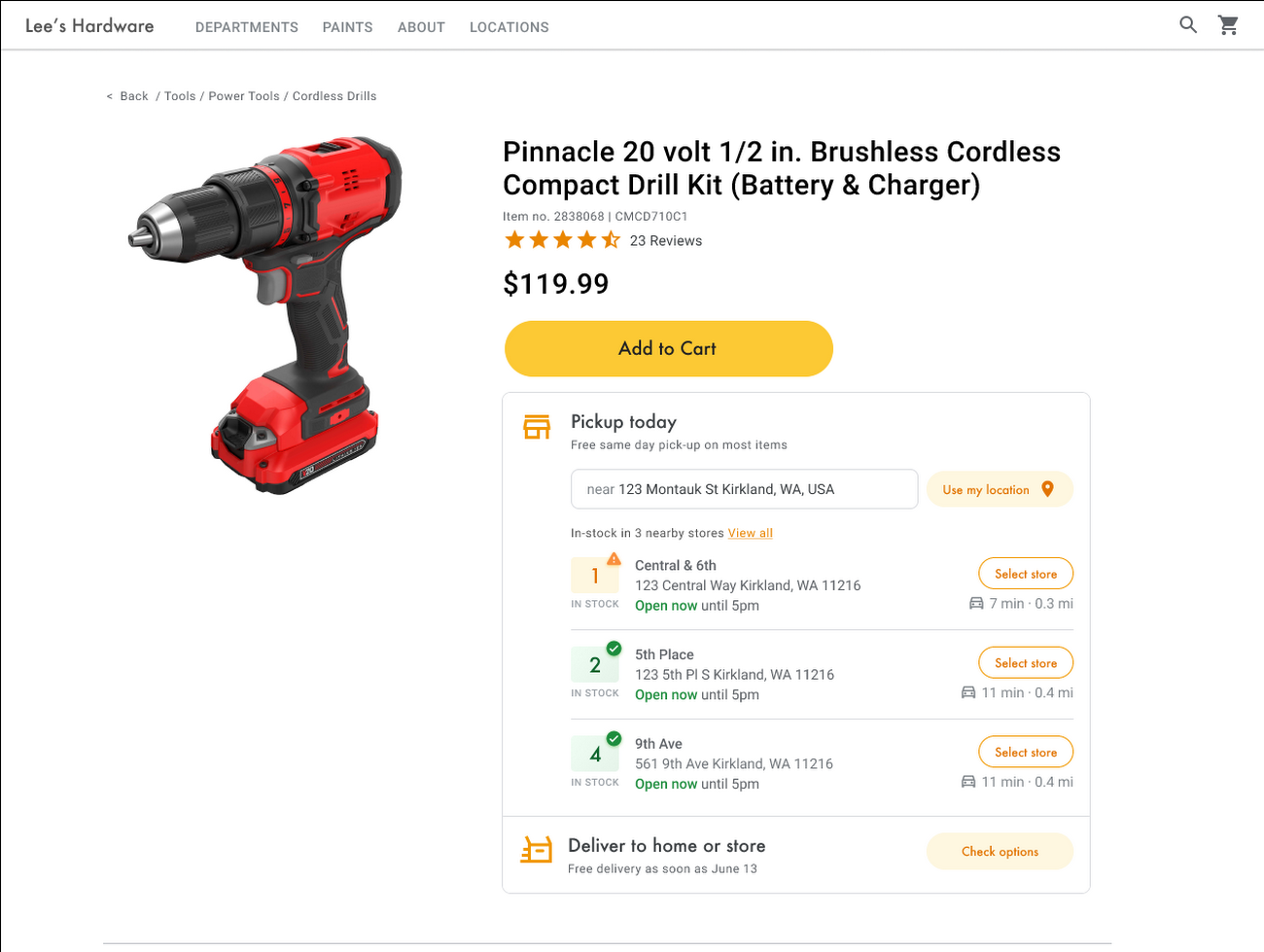
Under Covid restrictions, consumers have grown accustomed to having a myriad of shopping options, from curbside pickup to same-day delivery. Increased searches for ‘along my route’ and ‘in stock’ tell us that convenience is king for today’s consumer.4 Retailers can increase online conversion rates and drive store visits by including product availability and pick-up options on each of their product description pages (PDP); emphasizing the speed and convenience of these options and saving on significant shipping costs.
Our newest retail solution, Product Locator, can further help drive customers to visit by showing the exact distance stores are to the shopper and even estimated driving time, to further highlight the convenience of a store visit. A study conducted by Shopify found that showcasing local inventory boosted key store metrics including 45% of local pickup who made an additional purchase upon arrival.5 See the Product Locator solution guide to get started today.
Update your store locator page to address more of shoppers’ needs
Store locators allow shoppers to more easily find your stores and can be made even more helpful with our Store Locator Plus solution. Our updated Store Locator Plus solution refreshes the store locator page to be more informative and engaging by integrating offers redeemable in-store, online scheduling for appointments and services, and text me directions services. Implement Store Locator Plus today using the guide.
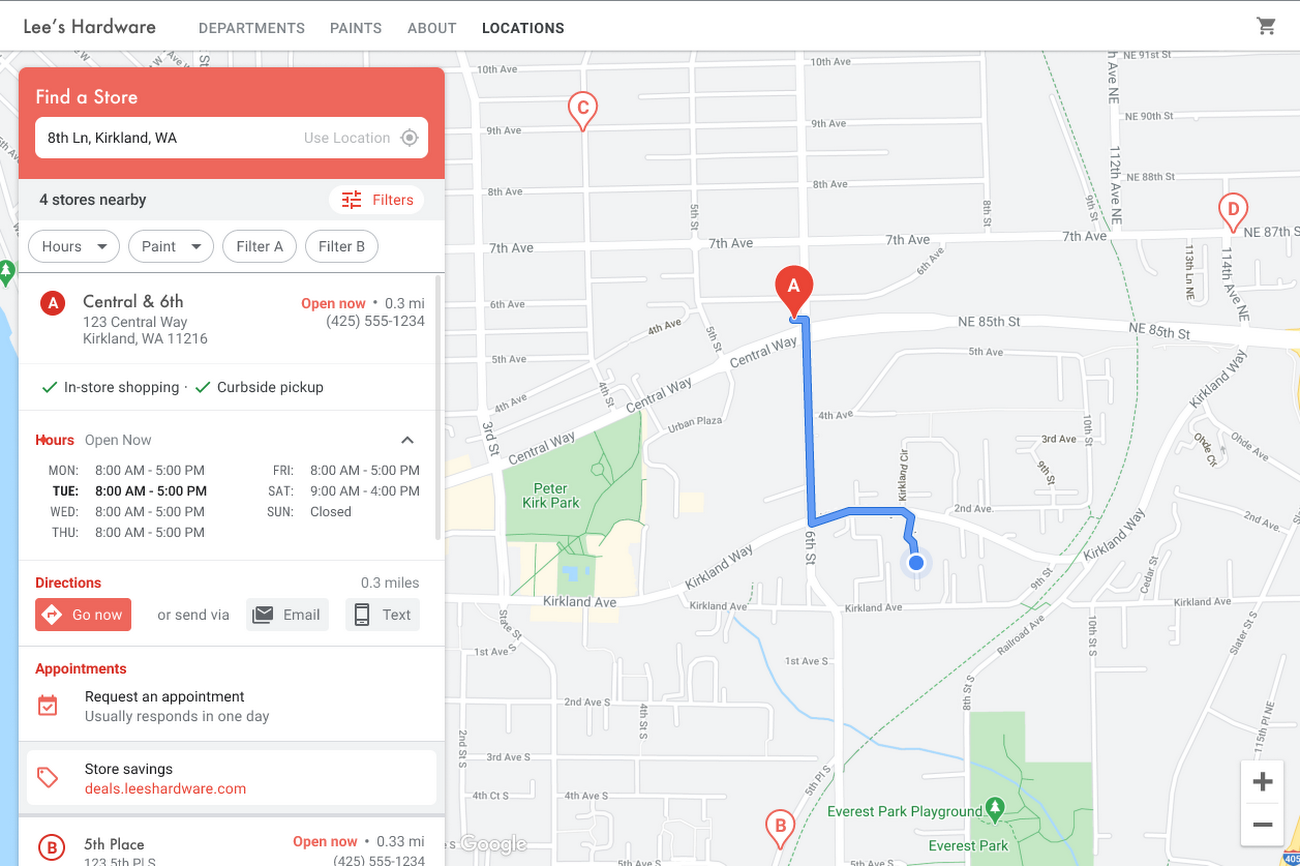
Build and customize Store Locator Plus for your business in minutes
At Google Maps Platform, we are always thinking of ways to make building a map easier and faster for our customers. In May at I/O we made Cloud-based Maps Styling generally available, enabling map updates to happen without touching a line of code. Today we’re excited to introduce Quick Builder, our free, low code builder which allows you to demo, customize and build a version of the Store Locator Plus solution for your website in minutes. Experience Quick Builder today.
To learn more about how you can start adopting these retail solutions, visit our retail solutions page.
For more information on Google Maps Platform, visit our website.
1 Global Insights Briefing: Getting back out there
2 https://www.shopify.com/pos/future-of-retail-2021
3 https://www.thinkwithgoogle.com/future-of-marketing/digital-transformation/covid-trends-1-year/
4 https://www.thinkwithgoogle.com/consumer-insights/consumer-trends/pandemic-shopping-behavior/
5 https://www.shopify.com/pos/future-of-retail-2021
Scaling Your Startup: Strategies for Optimization and Growth

2874
Of your peers have already read this article.
2:30 Minutes
The most insightful time you'll spend today!
Reboot your Startup with our technical guided series
At Google Cloud, we want to provide you with the access to all the tools you need to grow your business. Through the Google Cloud Technical Guides for Startups, leverage industry leading solutions with how-to video guides and resources curated for startups.
This multi-series contains 3 chapters: Start, Build and Grow, which matches your startup’s journey:
- The Start Series: Begin by building, deploying and managing new applications on Google Cloud from start to finish.
- The Build Series: Optimize and scale existing deployments to reach your target audiences.
- The Grow Series: Grow and attain scale with deployments on Google Cloud.
Additionally, at Google we have the Google for Startups Cloud Program, which is designed to help your business get off the ground and enable a sustainable growth plan for the future. The start of the Build Series delineates the benefits of the program, the application process, and more to help your business get started on Google Cloud.
A quick recap of the Build Series
Once you have applied for the Google for Startups Cloud Program, there’s so much to explore and try out on Google Cloud.
Figuring out a rapid but solid application development process can be key to many businesses in reducing time to market. Furthermore, learning what database to use to handle application data can be tricky. Deep dive into our Firestore video which walks through how Firestore can help you unlock application innovation with simplicity and speed.
We then move on to a deep dive into BigQuery and how it can help businesses. BigQuery is designed to support analysis over petabytes of data regardless of whether it’s structured or unstructured. This video is the goto video for getting started on BigQuery!If you are someone looking to run your Spark and Hadoop jobs faster and on the cloud, look to Dataproc. To learn more about Dataproc and how this has helped other customers with their Hadoop clusters, click the video below to learn all things Dataproc related.
Next, we find out what Dataflow can bring to your business; some advantages, sample architectures, demos on the console, and how other customers are using Dataflow.
We also talked about Machine Learning, starting from selecting the right ML solution to Machine Learning APIs on cloud to exploring Vertex AI. Following that we look into API management in Google Cloud and how Apigee helps operate your APIs with enhanced scale, security, and automation.
We ended the series with the last two episodes focusing around security deep-dive and using Cloud Tasks and Cloud Scheduler.
Coming up next – The Grow Series
Dive into the next chapter of this multi-series, with our upcoming Grow Series, where we will be focusing on growing and attaining scale with deployments on Google Cloud.
Check out our website and join us by checking out the video series on the Google Cloud Tech channel, and subscribe to stay up to date.
See you in the cloud!
More Relevant Stories for Your Company

New Map Customization Features for Enhanced User Experiences
A customized map can be key to delivering a frictionless experience that engages users and sets you apart in users’ minds–whether you’re a real estate company fine-tuning points of interest (POIs) on a map to help buyers decide where to live, or a regional pharmacy styling a map to ensure

How Morrisons Connects All of its 120,000 Employees Across 500 Offices on One Platform
Morrisons is a large supermarket chain in the United Kingdom, headquartered in Bradford, West Yorkshire, England.Eleven million customers trust Morrisons, a leading UK supermarket, to provide quality food at affordable prices each week. With 120,000 staff nationwide across more than 500 sites, good communication is crucial. G Suite helps Morrisons

Ways to Manage Extensions on Windows and Mac If You Haven’t Moved to Chrome Browser Cloud Management
Many enterprises are looking to better manage extensions on their corporate devices. Extensions themselves are a great tool for productivity and customization of Chrome. However, some extensions can have the potential for far reaching rights to sites your users visit and devices they browse from, giving IT the desire to

How Google Meet Keeps Your Video Conferences Secure
All over the world, businesses, schools and users depend on G Suite to help them stay connected and get work done. Google designs, builds, and operates our products on a secure foundation, aimed at thwarting attacks and providing the protections needed to keep you safe. G Suite and Google Meet
