





How Morrisons Connects All of its 120,000 Employees Across 500 Offices on One Platform

6164
Of your peers have already read this article.
2:30 Minutes
The most insightful time you'll spend today!
Morrisons is a large supermarket chain in the United Kingdom, headquartered in Bradford, West Yorkshire, England.
Eleven million customers trust Morrisons, a leading UK supermarket, to provide quality food at affordable prices each week. With 120,000 staff nationwide across more than 500 sites, good communication is crucial. G Suite helps Morrisons connect every member of their team affordably, whether they’re picking stock in a warehouse or serving customers in-store.
Morrisons used to print half a million sheets of paper every week and file them in over 3,000 filing cabinets in order to fulfill compliance requirements. Now, with collaboration in Docs and rapid information collection with Forms, they’ve reduced paperwork. Outside the office, staff has replaced clunky VPNs and outdated handheld devices with G Suite, which can work on any device. And with Google’s intuitive administrative tools, local managers can set up new accounts in three minutes instead of five to ten days.
Instead of shared logins, all employees have a G Suite account, and Google+ brings these colleagues from across the company together to share tips and advice. Morrisons also improves services based on customer feedback collected by shop floor staff that use apps on mobile devices.
Safeguarding time and attention with Google Workspace and Gmail

3991
Of your peers have already read this article.
3:30 Minutes
The most insightful time you'll spend today!
As the pandemic forced millions of people to work from home, many of us found ourselves spending more time in video meetings and in our inboxes as a way to bridge the distance from our colleagues. When the workplace became the living room or the makeshift home office, and as professional and personal responsibilities sometimes collided, we had to find new ways to manage time and attention and to sustain human connection.
When it comes to work emails during the pandemic, we were sending more of them, to more recipients, and we often sent them outside of normal business hours. A study conducted by the Organizational Behavior Unit of Harvard Business School assessed email statistics eight weeks before the start of the pandemic-related lockdowns and eight weeks after. The study concluded that after lockdowns, employees sent 5.2% more emails a day, emails had 2.9% more recipients, and about 8.3% more emails were sent after business hours.
Many of the latest Google Workspace features are designed to help people save time, find focus, and manage tasks more efficiently, whether it’s with smarter emails, writing suggestions, Google Assistant, segmentable working hours, or predictive search. These features combine to save the equivalent of a full working month every year, per person, so that you can spend more time on what matters instead of managing tools.
With that in mind, let’s take a deeper look at how Gmail can help you better manage time and attention.
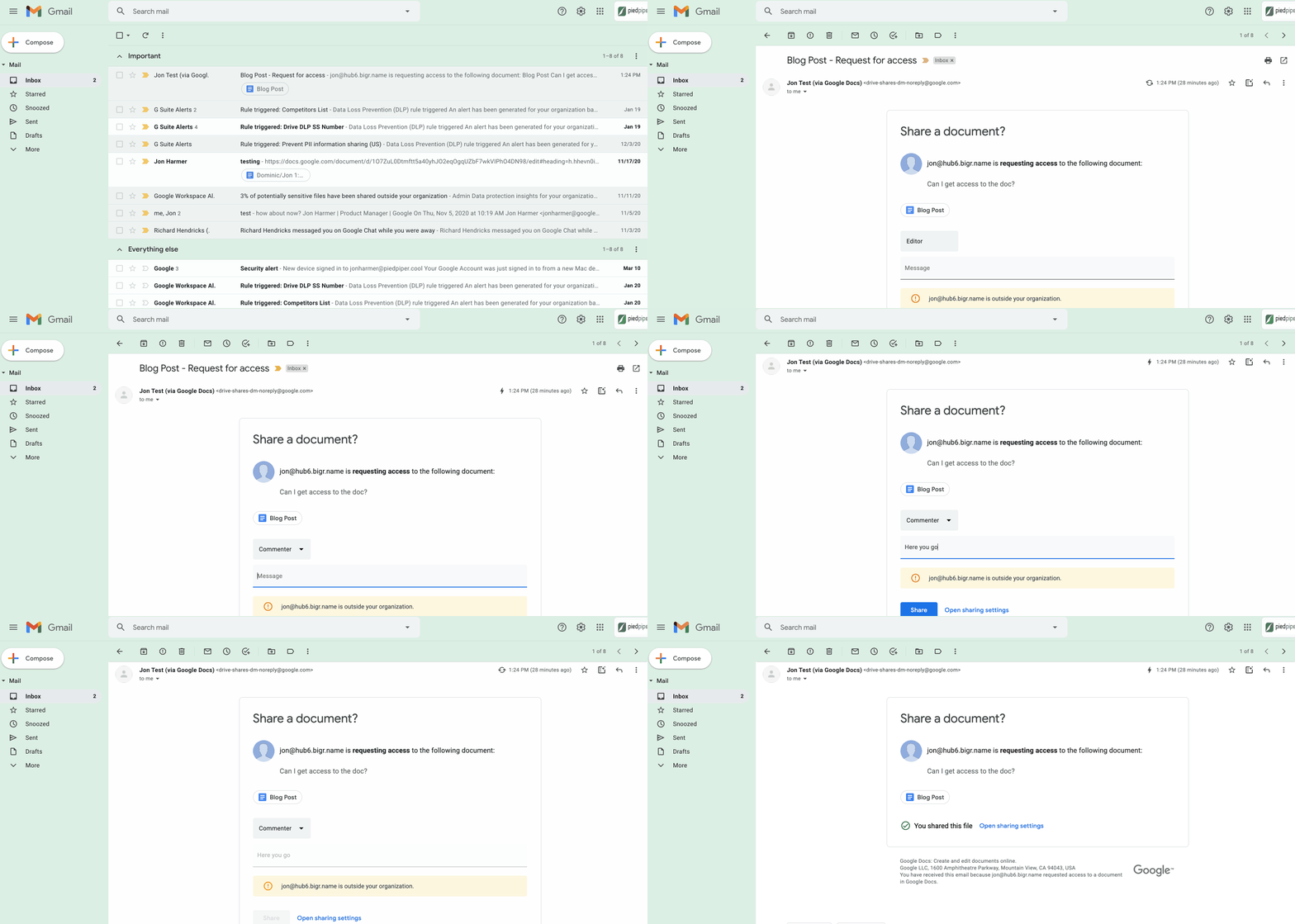
1. Use dynamic email to help recipients complete tasks directly inside an email message. With the new dynamic email support in Gmail, you can easily send and receive emails that enable the reader to take action directly from within the message. This removes the burden of opening multiple documents and tabs. Email recipients can grant access to Drive files, respond to or resolve comments in Docs, Slides, or Sheets, and RSVP to events—all without leaving the message. Learn more.
2. Stay productive, even when you’re offline. Gmail Offline lets you read, reply, delete, and search your Gmail messages when you’re not connected to the internet. Once you set it up, an outbox will appear in the left panel. When a connection later becomes available, Gmail will automatically send the messages from your outbox, and download any new messages to your inbox. This is great for those working on the frontlines who need to stay productive and informed, even when they’re offline.
3. Get organized and prioritize your work with Tasks in Gmail. This feature allows you to easily convert emails into tasks with just one click. You can create due dates that will automatically appear in your calendar, and check tasks off as you complete them. Baked directly into the side panel, you can create, view and manage your task lists without leaving Gmail.
4. Spend time innovating, not writing emails. Gmail’s template functionality lets you create standardized email messages that can be edited and sent out to different recipients in a matter of seconds. If this feature sounds appealing, check out Smart Reply and Smart Compose to learn more ways to write and reply to emails faster.
5. Get search results faster in Gmail. Search chips help you find what you’re looking for in Gmail faster, without needing to sort through irrelevant results or use search operators (e.g., from: marketing@company.com). For example, you can search a colleague’s name and further narrow your results by selecting search chips like attachment type (Doc, Sheet, PDF, etc.) or a specific timeframe. You can even exclude specific keywords and calendar invites from your results. You can also use search chips to search your Google Chat history, directly from within Gmail. To use search chips, all you need to do is type in a Gmail search, click on the search filter chips below the search box and Gmail will take care of the rest.

6. Tune out the irrelevant with the Gmail mute feature. Because we’ve all found ourselves trapped in unnecessary email threads, we created the Gmail Mute feature. With two clicks, you can mute email threads that aren’t relevant or that you no longer wish to follow. All future responses to that thread will now be automatically muted so you can focus your attention elsewhere. If you decide to rejoin the conversation, you can unmute the email thread just as easily.
Accuracy and Real-time Updates with Google Maps’ On-Demand Rides and Delivery Solution Impacts CX

5634
Of your peers have already read this article.
3:00 Minutes
The most insightful time you'll spend today!
Last year we launched our on-demand rides and delivery solution to help businesses improve operations as well as transform the driver and customer journey from booking to arrival or delivery. When it comes to on-demand rides and deliveries, every minute matters. When users book a ride or order food, they want a seamless experience and real-time accurate updates. Today, we’re taking a closer look into data quality improvements for location, time and distance accuracy, and motorbike routes.
Machine learning helps drive location accuracy
Location accuracy stands at the base of our customers’ operation. The location signals that are coming from mobile devices can sometimes be off for various reasons and a driver’s location can get stuck, or jump around.
Recently we developed mechanisms in our fleet management product that can take in multiple location signals and determine the most reliable location to use for a given vehicle. With that, we noticed drastic improvements:
- Eliminated long periods of location ‘stuckness’ almost completely; a vehicle is considered ‘stuck’ when we think it’s moving but the measured location is not
- Reduced the jumpiness of the location signal by 52%-86%: ‘jumpiness’ is when a vehicle shows a sudden and usually drastic change in location. A jump is determined to exist when the speed the vehicle had to go at in order to cover the distance it did is unrealistic
- Reduced the average jump distance by 44%-86% : ‘jump distance’ is the distance between two consecutive location pings when we determined a ‘location jump’ has occurred.
Dunzo, a local e-commerce platform in India, explains how integrating the order tracking capability within Google Maps Platform’s On Demand Rides and Delivery solution has helped reduce support calls by 90%. The out-of-the-box solution helped Dunzo’s motorbike delivery partners with updating location sync to reduce stuckness and jumpiness as well as deliver premium user experiences.
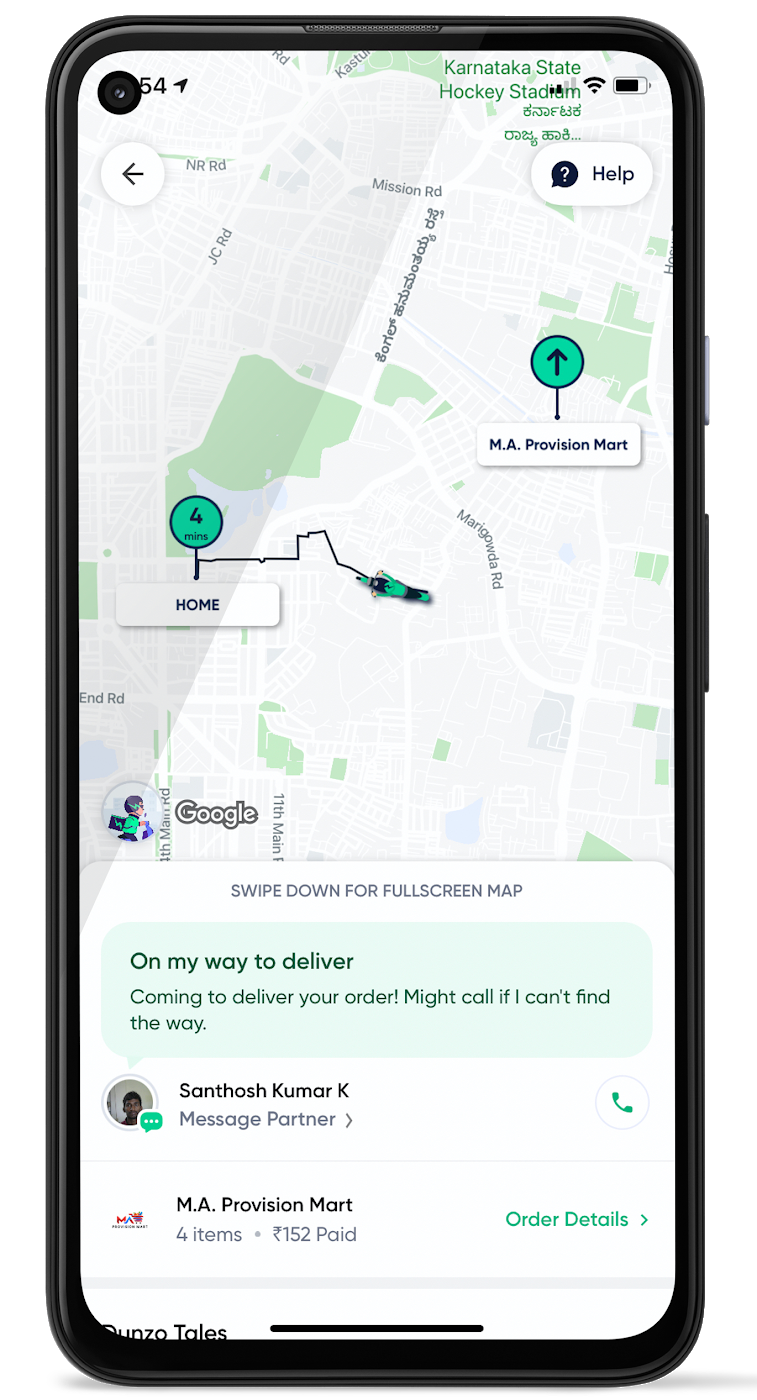
When the vehicle location is more reliable, the dispatch decision is of higher quality, meaning there is a higher chance you will be able to make the optimal decision. This can lead to less wait time for consumers, increased driver happiness and fewer cancellations.
Improvements in ETA accuracy in motorbike routes
In many geographic areas, road space is limited and car ownership is prohibitively expensive so motorbike is a prominent transportation mode. Motorbike mapping requires unique routing, ETA models, and navigation capabilities. Improvements in motorbike routing and ETA estimation have enabled customers like Gojek to offer better overall services, even in geographies with poor wifi or missing roads.
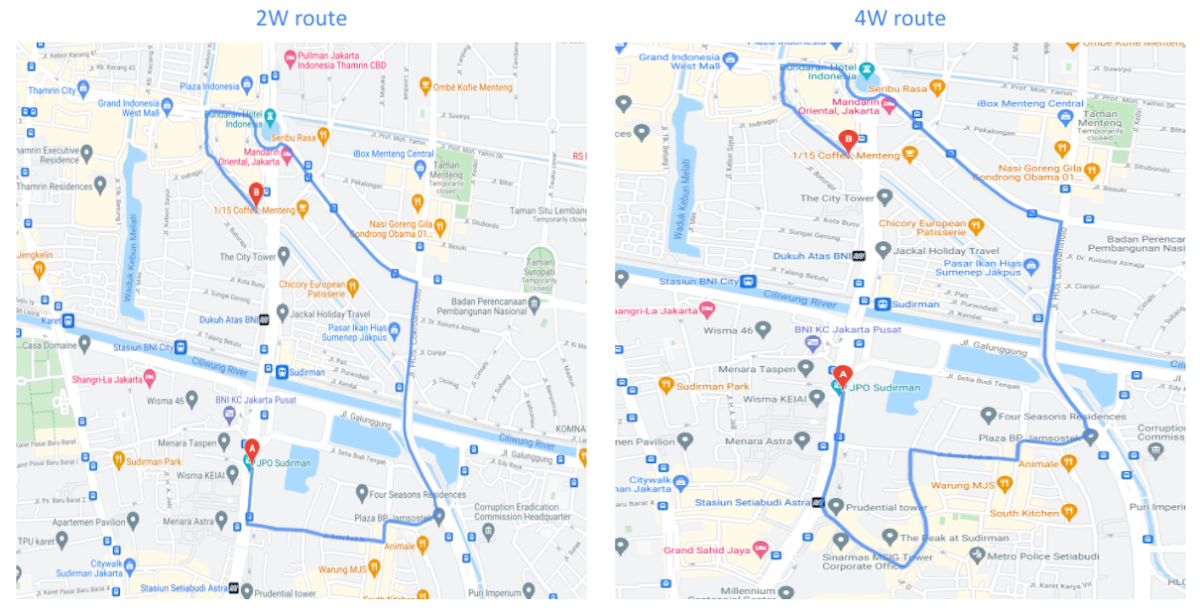
Recently, we further improved ETA outcomes by developing new machine learning models trained specifically for motorbikes. These models help our systems account for differences in congestion and traffic flow that arise in different regions and scenarios.
Globally, we measured an ~8% improvement in ETA accuracy for riders in the general public, and a ~6% improvement in on-demand rides and deliveries ETA accuracy. In this on-demand economy, where consumers are accustomed to real-time trip and order progress, these improvements will significantly improve their experience.
We will continue to innovate on both our car and motorbike on-demand rides and deliveries capabilities based on customer demand and requirements. We are committed to the success of our customers by building a seamless experience for all parties—consumers, drivers, and fleet operators—in the rides and deliveries journey.
For more information on Google Maps Platform, visit our website.
How This Sri Lankan Bank is Striving to Make Banking Accessible to All

4638
Of your peers have already read this article.
1:30 Minutes
The most insightful time you'll spend today!
Headquartered in the Sri Lankan capital of Colombo, Cargills Bank is not short on ambition or vision: it plans to make banking services accessible to all Sri Lankans and become a financial services leader at home and internationally. Founded in 2014 and licensed by the Central Bank of Sri Lanka to provide domestic and offshore banking services, Cargills Bank provides Retail, Credit and Debit Cards, Corporate, SME, Agri, Micro Finance, Treasury, and Trade banking products to customers.
The bank delivers these products from a network that includes 19 branches, the internet, mobile applications, and a partnership with supermarket chain Cargills Food City that enables customers to transact at more than 370 service points across Sri Lanka.
Cargills Bank initially deployed productivity and communications applications running in an on-premises data center. However, these applications could not support the bank’s growing need to operate as an agile, collaborative, technology-enabled institution. “We wanted to minimize the time and resources dedicated to administration and give our employees the ability to engage and collaborate more effectively. This naturally led us to the cloud and to G Suite,” says Indika Fernando, Senior Manager IT, Applications and Development, Cargills Bank.
Accelerating workflows
The bank also wanted to use scripts to accelerate and automate workflows that incorporated its productivity applications. “The limitations of our previous platform meant it took us three weeks to complete a simple workflow. We wanted to accelerate this process for simple and complex workflows,” explains Fernando.
A technology review by the Cargills Bank IT team found G Suite could meet all of the company’s business and technical requirements. “Employees could meet using voice and video connections from their desktops, mobile devices, and meeting rooms, and collaborate in real time on documents,” says Fernando.
This was a considerable improvement compared to the previous platform that required each stakeholder to wait until other people provided their input, or people providing input into different copies of the same document, forcing a document author to spend time consolidating all feedback into a final version.
“With G Suite, we can be sure that all stakeholders provide detailed and timely input into the documents we rely on to make critical business decisions,” says Fernando.
Augmenting G Suite
G Suite also supported an initiative by Cargills Bank to provide single sign-on for all business applications, while cost effectively giving workers access to cloud-based spreadsheet, document, slide, information collection, web, and wiki creation tools. Furthermore, Apps Script enables the bank’s developers to perform tasks including building add-ons for G Suite products such as Sheets, Docs, Slides, and Forms; writing custom functions for Sheets; publishing web apps embedded in Google Sites; and interacting with services such as AdSense, Analytics, Calendar, Drive, Gmail, and Maps.
Cargills Bank completed migrating its workforce to G Suite a couple of years ago. To help ensure the project was completed on time, within budget, and delivered access to the full range of G Suite tools, the bank engaged Google Partner Finetech Consultancy, which is also headquartered in Colombo.
“The partner oversaw creation of our architecture and undertook training and change management,” says Fernando. “It provided expert consultancy and troubleshooting throughout the three-month deployment and played an integral role in enabling us to launch on schedule.”
The bank has established a Google based social network to create and run internal communities and give its employees the freedom to create communities. “The communities effectively operate as internal social networks that our departments and staff can use to disseminate day-to-day information and announcements,” says Fernando. “For example, leaders of a training and development community use the forum to publish details of upcoming training programs and celebrate people who have completed training exercises.”
Cargills Bank has also established Hangouts Meet as a key communication tool. Employees use voice, video, and chat services to collaborate, with an audit trail that is a requirement in a regulated industry.
Using Apps Script to increase the power of G Suite has delivered a range of benefits to Cargills Bank and enabled the institution to pass on valuable insights to the Sri Lankan Google user community. “Our work with Google has made us a source of expert knowledge that can be accessed by the wider business community” says Fernando.
Workflows increased from 25 to 40
With G Suite and Apps Script, Cargills Bank teams are working more efficiently and the number of streamlined processes has increased from 25 to 40. The bank is using Forms to support simple applications, and a combination of Forms, Apps Script, and HTML code to run complex workflows encompassing validation, documentation, and authorization, and that require sandboxes for code testing and experimentation.
Key workflows supported by Forms and Apps Script include credit card and bank account applications. These workflows automate the process of helping ensure relevant teams review and accept or reject customer applications based on KYC rules. For example, when a customer applies for a new account, a bank employee will scan the request document and supporting information, which is then sent electronically to another team for verification. That team may reject, request more information, or approve the application for escalation to another team for authorization. The authorization team can then approve, reject, or request more information. Each step is automated and associated documentation stored on Drive.
For a credit card application, the Cargills Bank risk department uses a Forms and Apps Script powered workflow to evaluate risk factors such as an applicant’s age, credit history, income, and assets.
Other workflows powered by G Suite manage vehicle reservations, loan origination, customer complaints, incident management, system access requests, lead generation, and e-learning.
“All requests and requirements for vehicles for occasions such as official visits are submitted and authorized through a process supported by Apps Script,” says Fernando. “An approved reservation is sent to the calendar of the person who made the request and pops up in a person’s mobile phone or computer when it is scheduled. This is much simpler than our previous system that required us to send text messages to people to advise them their vehicles were ready.”
E-learning a key process
E-learning is a particularly important activity Cargills Bank has implemented using G Suite. Employees complete learning modules online that help them perform their roles effectively and to pass exams set either by the bank or based on content regulated by the Central Bank of Sri Lanka. Most of the learning material is created in Forms, while Google workflows and dashboards enable managers to track when employees have completed various e-learning modules.
Automation through Google has enabled Cargills Bank to complete backend processes associated with workflows from two days to just two minutes. Uptime is over 99 percent, helping ensure the bank can meet regulatory and internal business requirements.
With workflows powered by G Suite and Apps Script well established within the bank, the institution is continuing to invest in Google Cloud Platform services. A Cloud SQL database manages retail and housing loan information captured and used by Cargills Bank’s loan origination system and workflows. The bank has also started using Google Data Studio to create dashboards that enable it to visualize critical information.
Furthermore, Fernando and his team are exploring the potential of Google machine learning services to help develop chatbots. “Whenever our development team sees a powerful new product from Google, we conduct a deep dive to determine what application it may have for the bank,” Fernando says.
Upgraded G Suite and added new workflows
In January 2019, Cargills Bank elected to upgrade to G Suite Business to take advantage of features such as unlimited storage to archive all its files in digital formats on Drive.
The institution had also used Apps Script to develop complex new workflows across several modules to automate and streamline credit risk scoring, and track and audit hardware movement. In addition, Cargills Bank has developed and deployed new applications using App Maker, available through G Suite Business, and connected them to Cloud SQL to enhance the security of workflow data.
Cargills Bank is now using Google Data Studio, through connectivity to Sheets, to create dashboards for its previously-developed workflow applications.
The institution has also stepped up its collaboration activities through the use of the Jamboard digital whiteboard, available through G Suite. Initially used to exchange ideas between members of the Cargills Bank technology department, the service is due to launch to all users in the coming months.
Reduced friction
Cargills Bank Chief Operating Officer Rohan Muttiah welcomes the role G Suite plays in enabling the business to realize its objectives. “Cloud-based productivity tools such as G Suite reduce friction within our business processes, enabling us to operate more efficiently and effectively in bringing banking to the people of Sri Lanka,” he says.
“Deploying G Suite has given us an agile, dynamic platform to achieve growth based on increased use of fintech and digital technologies,” Fernando says. “Ultimately we want all Sri Lankans to access financial services wherever and whenever they need to and we see G Suite as providing many of the capabilities that enable us to do that.”
3811
Of your peers have already watched this video.
23:47 Minutes
The most insightful time you'll spend today!
No user left behind: Empowering collaboration with security
Your employees need to work from home to keep your business running. The traditional network-based on-premise approach to security is broken when your end-users are accessing core apps in the cloud from anywhere on any device.
Our primary goal is to ensure that security does not get in the way of end-user productivity. And there are two sides to the same coin here. So your end users just want easy access to the tools to do their jobs. But admins want to make sure that they do that in a secure manner so that admins don’t lose access to their most valuable corporate access.
When COVID-19 led to an unprecedented increase in video conferencing usage, Google’s global infrastructure allowed us to scale, meet, to not just match but exceed, user demand. And we’ve continued to scale ever since, all the while, maintaining security, privacy, and compliance for our customers.
In this video, we’re going to focus on four key areas of security, secure collaboration, secure users, secure devices, and secure access and data.
7769
Of your peers have already watched this video.
1:52 Minutes
The most insightful time you'll spend today!
Video: How Whirlpool’s 90,000 Employees Collaborate to Bring 100 New Products to Market Every Year
As one of the world’s largest manufacturing companies, Whirlpool needs no introduction. The 104-year-old company manufactures home appliances from over 70 manufacturing and technology research centers around the world.
Innovation has been the company’s focus since its inception and that’s evident from the fact that it introduced close to 100 new products in 2017 alone.
For any company to be that innovative, it needs creative minds to collaborate and work towards the same goal, all at once. That’s especially true for Whirlpool that has over 90,000 employees across the globe.
“The need that we have to be connected, the speed with which we need to operate has gone up,” says a Whirlpool executive.
And that’s why, Whirlpool switched to G Suite, Google Cloud’s collaboration and productivity tool that brings together the power of Gmail, Docs, Drive, and Calendar all in one place.
“The opportunity to make a global company feel local, entrepreneurial, and fast-paced, is a big challenge. Google Apps helps us get there. What we’ve really done is create an opportunity for people to collaborate truly on a global basis, regardless of location, place and time. That makes a huge difference in terms of the speed with which we can operate,” says a Whirlpool executive.
More Relevant Stories for Your Company

Google Products Helps HMH’s Healthcare Staff Work from Anywhere Efficiently and Securely!
Hackensack Meridian Health (HMH) executive Mark Eimer explains how an ambitiously-timed rollout of a comprehensive suite of Google products helped the entire organization—from doctors to IT staff—achieve better security, cultivate a more equitable work environment, and ultimately, improve patient outcomes. How does a recently merged, 17-hospital healthcare system fast-track a platform migration

16 Popular Chrome Insider Posts to Help You Simplify Browser Deployments
We launched the Chrome Insider blog in 2019 to share tips and best practices with IT admins so they could better deploy, manage, and secure Chrome browser. Since then, the series has covered everything from supporting legacy browsers to protecting enterprise credentials to simplifying deployments. To make it even easier

AirAsia Flies High With Data Analytics and AI
AirAsia’s vision is simple: allow everyone to fly. Founded in 2001, the airline and sister company AirAsia X have grown to service 150+ destinations in 25 markets, using 274 aircraft to operate 11,000+ weekly flights from 23 hubs across the region. While the airline is known as a provider of

Workspace’s Collaboration Equity Integral for Delivering the ‘Promise of Hybrid Workplace’
Like many businesses around the world, Google is trying to combine on-site and off-site work into an efficient hybrid model. And like most businesses, we’re also figuring out how to get it right. As we grow our vision for the best possible hybrid workplace, one theme consistently emerges: the need for
