





Scaling Machine Learning Operations with Vertex AI AutoML and Pipeline

2560
Of your peers have already read this article.
2:30 Minutes
The most insightful time you'll spend today!
When you build a Machine Learning (ML) product, consider at least two MLOps scenarios. First, the model is replaceable, as breakthrough algorithms are introduced in academia or industry. Second, the model itself has to evolve with the data in the changing world.
We can handle both scenarios with the services provided by Vertex AI. For example:
- AutoML capability automatically identifies the best model based on your budget, data, and settings.
- You can easily manage the dataset with Vertex Managed Datasets by creating a new dataset or adding data to an existing dataset.
- You can build an ML pipeline to automate a series of steps that start with importing a dataset and end with deploying a model using Vertex Pipelines.
This blog post shows you how to build this system. You can find the full notebook for reproduction here. Many folks focus on the ML pipeline when it comes to MLOps, but there are more parts to building MLOps as a “system”. In this post, you will see how Google Cloud Storage (GCS) and Google Cloud Functions manage data and handle events in the MLOps system.
Architecture
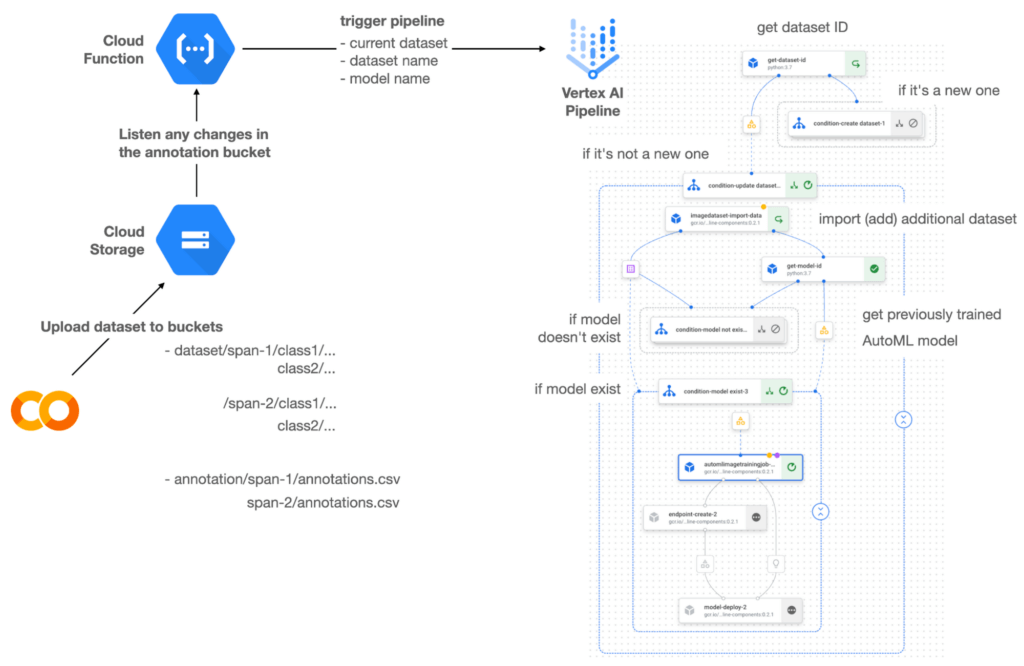

Figure 1 shows the overall architecture presented in this blog. We cover the components and their connection in the context of two common workflows of the MLOps system.
Components
Vertex AI is at the heart of this system, and it leverages Vertex Managed Datasets, AutoML, Predictions, and Pipelines. We can create and manage a dataset as it grows using Vertex Managed Datasets. Vertex AutoML selects the best model without your knowing much about modeling. Vertex Predictions creates an endpoint (RestAPI) to which the client communicates.
It is a simple, fully managed yet somewhat complete end-to-end MLOps workflow moves from a dataset to training a model that gets deployed. This workflow can be programmatically written in Vertex Pipelines. Vertex Pipelines outputs the specification for an ML pipeline allowing you to re-run the pipeline whenever or wherever you want. Specify when and how to trigger the pipeline using Cloud Functions and Cloud Storage.
Cloud Functions is a serverless way to deploy your code in Google Cloud. In this particular project, it triggers the pipeline by listening to changes on the specified Cloud Storage location. Specifically, if a new dataset is added, for example, a new span number is created; the pipeline is triggered to train the dataset, and a new model is deployed.
Workflow
This MLOps system prepares the dataset with either Vertex Dataset’s built-in user interface (UI) or any external tools based on your preference. You can upload the prepared dataset into the designated GCS bucket with a new folder named SPAN-NUMBER. Cloud Functions then detects the changes in the GCS bucket and triggers the Vertex Pipeline to run the jobs from AutoML training to endpoint deployment.
Inside the Vertex Pipeline, it checks if there is an existing dataset created previously. If the dataset is new, Vertex Pipeline creates a new Vertex Dataset by importing the dataset from the GCS location and emits the corresponding Artifact. Otherwise, it adds the additional dataset to the existing Vertex Dataset and emits an artifact.
When the Vertex Pipeline recognizes the dataset as a new one, it trains a new AutoML model and deploys it by creating a new endpoint. If the dataset isn’t new, it tries to retrieve the model ID from Vertex Model and determines whether a new AutoML model or an updated AutoML model is needed. The second branch determines whether the AutoML model has been created. If it hasn’t been created, the second branch creates a new model. Also, when the model is trained, the corresponding component emits the artifact as well.
Directory structure that reflects different distributions
In this project, I have created two subsets of the CIFAR-10 dataset, SPAN-1 and SPAN-2. A more general version of this project can be found here, which shows how to build training and batch evaluation pipelines pipelines. The pipelines can be set up to cooperate so they can evaluate the currently deployed model and trigger the retraining process.
ML Pipeline with Kubeflow Pipelines (KFP)
We chose to use Kubeflow Pipelines to orchestrate the pipeline. There are a few things that I would like to highlight. First, it’s good to know how to make branches with conditional statements in KFP. Second, you need to explore AutoML API specifications to fully leverage AutoML capabilities, such as training a model based on the previously trained one. Last, you also need to find a way to emit artifacts for Vertex Dataset and Vertex Model to consume that Vertex AI can recognize them. Let’s go through these one by one.
Branching strategy
In this project, there are two main conditions and two sub-branches inside the second main branch. The main branches split the pipeline based on a condition if there is an existing Vertex Dataset. The sub-branches are applied in the second main branch, which is selected when there is an exciting Vertex Dataset. It looks up the list of models and decides to train an AutoML model from scratch or a previously trained one.
ML pipelines written in KFP can have conditions with a special syntax of kfp.dsl.Condition. For instance, we can define the branches as follows:
from google_cloud_pipeline_components import aiplatform as gcc_aip


# try to get Vertex Dataset ID
dataset_op = get_dataset_id(...)

with kfp.dsl.Condition(name="create dataset",
                       dataset_op.outputs['Output'] == 'None'):
    # Create Vertex Dataset, train AutoML from scratch, deploy model

with kfp.dsl.Condition(name="update dataset",
                       dataset_op.outputs['Output'] != 'None'):
    # Update existing Vertex Dataset
    ...

    # try to get Vertex Model ID
    model_op = get_model_id(...)

    with kfp.dsl.Condition(name='model not exist',
                           model_op.outputs['Output'] == 'None'):
    # Create Vertex Dataset, train AutoML from scratch, deploy model

    with kfp.dsl.Condition(name='model exist',
                           model_op.outputs['Output'] != 'None'):
        # Create Vertex Dataset, train AutoML based on trained one, deploy model
get_dataset_id and get_model_id are custom KFP components used to determine if there is an existing Vertex Dataset and Vertex Model respectively. Both return “None” if a model is found and some other value if a model isn’t found. They also emit Vertex AI-aware artifacts. You will see what this means in the next section.
Emit Vertex AI-aware artifacts
Artifacts track the path of each experiment in the ML pipeline and display metadata in the Vertex Pipeline UI. When Vertex AI aware artifacts are released into in the pipeline, Vertex Pipeline UI displays links for its internal services such as Vertex Dataset, so that users can visit a web page for more information.
So how could you write a custom component to generate Vertex AI-aware artifacts? To do this, custom components should have Output[Artifact] in their parameters. Then you need to replace the resourceName of the metadata attribute with a special string format.
The following code example is the actual definition of get_dataset_id used in the previous code snippet:
@component(
    packages_to_install=["google-cloud-aiplatform",
                         "google-cloud-pipeline-components"]
)
def get_dataset_id(project_id: str,
                     location: str,
                 dataset_name: str,
                 dataset_path: str,
                      dataset: Output[Artifact]) -> str:
    from google.cloud import aiplatform
    from google.cloud.aiplatform.datasets.image_dataset import ImageDataset
    from google_cloud_pipeline_components.types.artifact_types import VertexDataset


    aiplatform.init(project=project_id, location=location)

    datasets = aiplatform.ImageDataset.list(project=project_id,
                                            location=location,
                                            filter=f'display_name={dataset_name}')

    if len(datasets) > 0:
        dataset.metadata['resourceName'] =
               f'projects/{project_id}/locations/{location}/datasets/{datasets[0].name}'
        return f'projects/{project_id}/locations/{location}/datasets/{datasets[0].name}'
    else:
        return 'None'
As you see, the dataset is defined in the parameters as Output[Artifact]. Even though it appears in the parameter, it is actually emitted automatically. You just need to provide the necessary data as if it is a function variable.
The dataset component retrieves the list of Vertex Dataset by calling the aiplotform.ImageDataset.list API. If the length of it is zero, it simply returns ‘None’. Otherwise, it returns the found resource name of the Vertex Dataset and provides the dataset.metadata[‘resourceName’] with the resource name at the same time. The Vertex AI-aware resource name follows a special string format, which is ‘projects/<project-id>/locations/<location>/<vertex-resource-type>/<resource-name>’.
The <vertex-resource-type>can be anything that points to an internal Vertex AI service. For instance, if you want to specify that the artifact is the Vertex Model, then you should replace <vertex-resource-type> with models. The <resource-name> is the unique ID of the resource, and it can be accessed in the name attribute of the resource found by the aiplatform API. The other custom component, get_model_id, is written in a very similar way as well.
AutoML based on the previous model
You sometimes want to train a new model on top of the previously best model. If that is possible, the new model will probably be much better than the one trained from scratch, because it leverages previously learned knowledge.
Luckily, Vertex AutoML comes with the ability to train a model using a previous model. AutoMLImageTrainingJobRunOp component lets you train a model by simply providing the base_model argument as follows:
training_job_run_op =
gcc_aip.AutoMLImageTrainingJobRunOp(
…,
base_model=model_op.outputs['model'],
…
)
When training a new AutoML model from scratch, you pass ‘None‘ in the base_model argument, and it is the default value. However, you can set it with a VertexModel artifact, and the component will trigger an AutoML training job based on the other model.
One thing to be careful of is that VertexModel artifacts can’t be constructed in a typical way of Python programming That means you can’t create an instance of VertexModel artifact by setting the id found in the Vertex Model dashboard. The only way you can create one is to set the metadata[‘resourceName’] parameters properly. The same rule applies to other Vertex AI-related artifacts such as VertexDataset. You can see how the VertexDataset artifact is constructed properly to get an existing Vertex Dataset to import additional data into it. See the full notebook of this project here.
Cost
You can reproduce the same result from this project with the free $300 credit when you create a new GCP account.
At the time of this blog post, Vertex Pipelines costs about $0.03/run, and the type of underlying VM for each pipeline component is e2-standard-4, which costs about $0.134/hour. Vertex AutoML training costs about $3.465/hour for image classification. GCS holds the actual data, which costs about $2.40/month for 100GiB capacity, and Vertex Dataset is free.
To simulate two different branches, the entire experiment took about one to two hours, and the total cost for this project is approximately $16.59. Please find more detailed pricing information about Vertex AI here.
Conclusion
Many people underestimate the capability of AutoML, but it is a great alternative for app and service developers who have little ML background. Vertex AI is a great platform that provides AutoML as well as Pipeline features to automate the ML workflow. In this article, I have demonstrated how to set up and run a basic MLOps workflow, from data injection to training a model based on the previously-achieved best one, to deploying the model to a Vertex AI platform. With this, we can let our ML model automatically adapt to the changes in a new dataset. What’s left for you to implement is to integrate a model monitoring system to detect data/model drift. One example is found here.
Three Data Insights That Set Marketing Leaders Apart from Marketing Laggards

3339
Of your peers have already read this article.
1:15 Minutes
The most insightful time you'll spend today!
With insights directing the bulk of today’s marketing decisions, leading marketers are driving growth by embracing three core mindset shifts. Marketing leaders are working toward a holistic view of consumers; they are investing in machine learning to support their activities
1. Leading marketers are working toward a holistic view of consumers.
- 63% of leading marketers agree they are using KPIs to develop a single integrated view of the customer.
- 66% of leading marketers agree they should build teams for end-to-end customer experiences and journeys, across channels and devices.
- Marketing leaders are 60% more likely than laggards to believe that marketing teams should own a data-driven customer strategy that supports all organizational stakeholders.
2. Leading marketers are investing in machine learning to support their activities.
- Measurement-leaders are more than 2X as likely as their measurement-challenged counterparts to agree that their organization is already investing in automation and machine learning technologies to drive marketing activities.
- 75% of marketers who use machine learning to drive marketing activities said they were satisfied with how their KPIs inform and influence decision-making across their enterprise.
- 73% of marketing leaders who have invested in machine learning have shifted more than 10% of their time from manual activation to strategic insight generation.
3. Leading marketers believe how they apply their data is crucial to success.
- 66% of marketing leaders believe how companies apply their data will play a key role in their ability to thrive.
- 60% of leading marketers believe data-driven attribution is essential to understanding journeys of high-value customers.
- Marketing leaders are 53% more likely than laggards to say machine learning processes data signals to help marketers better understand consumer intent.
Harnessing the Power of Data and AI to Transform Life Science Supply Chains

3981
Of your peers have already read this article.
3:30 Minutes
The most insightful time you'll spend today!
Global life science supply chains are lengthy and complex with many moving parts. One small disruption can create serious delays and affect your ability to deliver therapeutics for patients.
Supply chain disruptors
Over the last few years, healthcare organizations have encountered a range of obstacles, from both internal and external factors, that have resulted in supply networks failing to get drugs and medical devices to where they need to be on time. These obstacles include:
- Labor and supply shortages
- Rising material costs
- Raw material constraints
- Geo-political events
- Unpredictable weather
How do you overcome supply chain disruptors that are out of your control?
The intelligent healthcare supply chain
While many organizations have already implemented data-driven supply chains, organizations are still faced with the challenges of static, siloed, and different functional supply chain applications; limited data exchange with key trading partners across upstream and downstream operations; and the inability to effectively leverage relevant external data.
At Google Cloud, we believe the key to meaningful and effective change is a data-driven supply chain that allows you to achieve visibility, flexibility, and innovation.
Our solutions help you prepare for the unpredictable and enhance the value of your data. By unlocking AI-driven insights, you can strengthen distribution networks and optimize your workflows and supply chains to become more reliable, intelligent, and sustainable. Some of the business challenges we address include:
- Predicting demand with Vertex AI Forecast
- Visual inspection for quality and predictive maintenance with pre-built ML models
- Automating and optimizing pickup and delivery operations with Cloud Fleet Routing API
- Real time and holistic inventory visibility with Supply Chain Twin
Make sure you’re prepared for the unpredictable with real-time visibility over your distribution networks. Learn how you can harness the power of AI and analytics and gain actionable insights that enhance your supply chain.
Google’s Record-breaking Performance Tops the MLPerf Benchmark Results

3129
Of your peers have already read this article.
4:00 Minutes
The most insightful time you'll spend today!
The latest round of MLPerf benchmark results have been released, and Google’s TPU v4 supercomputers demonstrated record-breaking performance at scale. This is a timely milestone since large-scale machine learning training has enabled many of the recent breakthroughs in AI, with the latest models encompassing billions or even trillions of parameters (T5, Meena, GShard, Switch Transformer, and GPT-3).
Google’s TPU v4 Pod was designed, in part, to meet these expansive training needs, and TPU v4 Pods set performance records in four of the six MLPerf benchmarks Google entered using TensorFlow and JAX. These scores are a significant improvement over our winning submission from last year and demonstrate that Google once again has the world’s fastest machine learning supercomputers. These TPU v4 Pods are already widely deployed throughout Google data centers for our internal machine learning workloads and will be available via Google Cloud later this year.
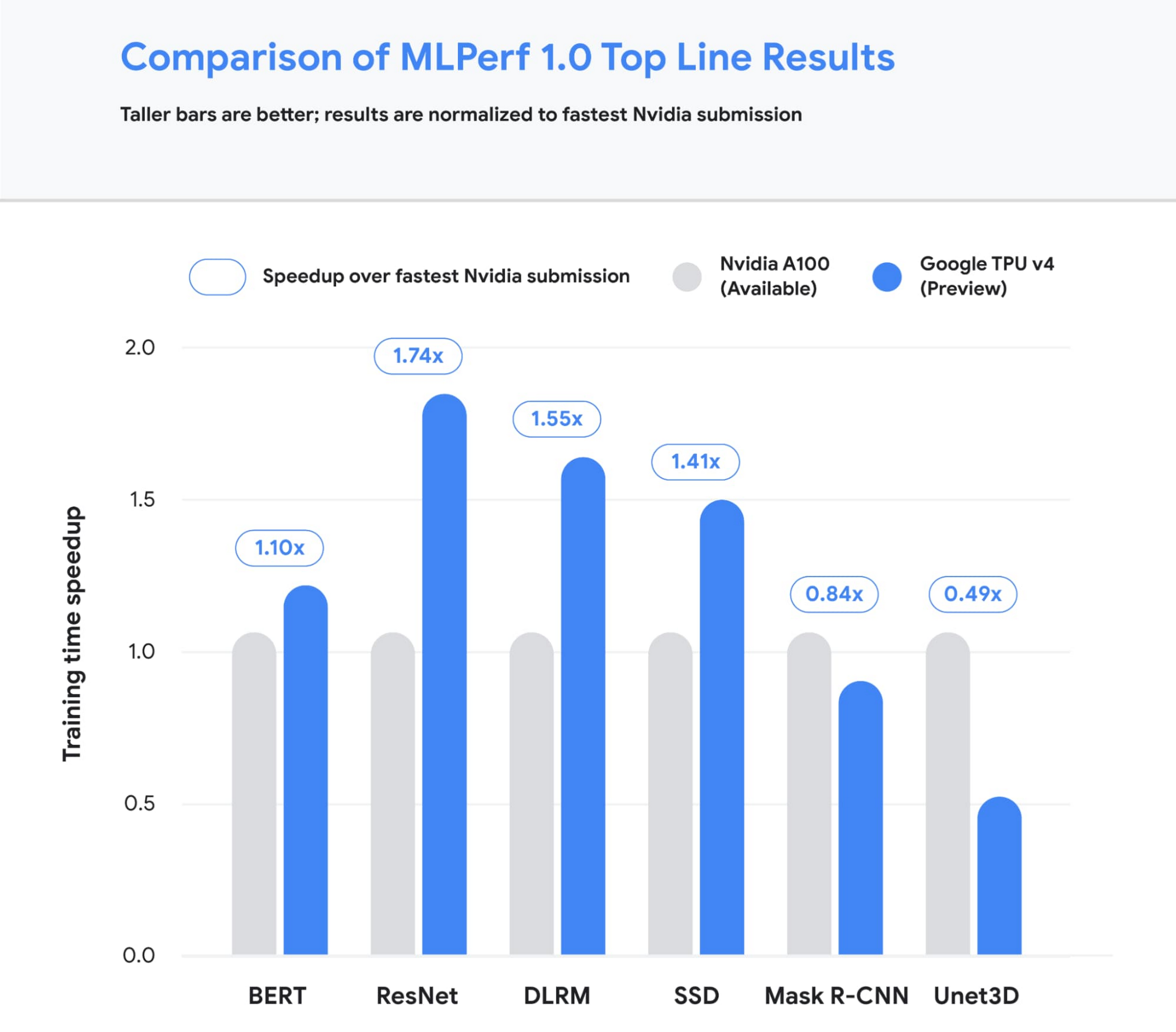
Figure 1: Speedup of Google’s best MLPerf Training v1.0 TPU v4 submission over the fastest non-Google submission in any availability category – in this case, all baseline submissions came from NVIDIA. Comparisons are normalized by overall training time regardless of system size. Taller bars are better.1
Let’s take a closer look at some of the innovations that delivered these ground-breaking results and what this means for large model training at Google and beyond.
Google’s continued performance leadership
Google’s submissions for the most recent MLPerf demonstrated leading top-line performance (fastest time to reach target quality), setting new performance records in four benchmarks. We achieved this by scaling up to 3,456 of our next-gen TPU v4 ASICs with hundreds of CPU hosts for the multiple benchmarks. We achieved an average of 1.7x improvement in our top-line submissions compared to last year’s results. This means we can now train some of the most common machine learning models in a matter of seconds.
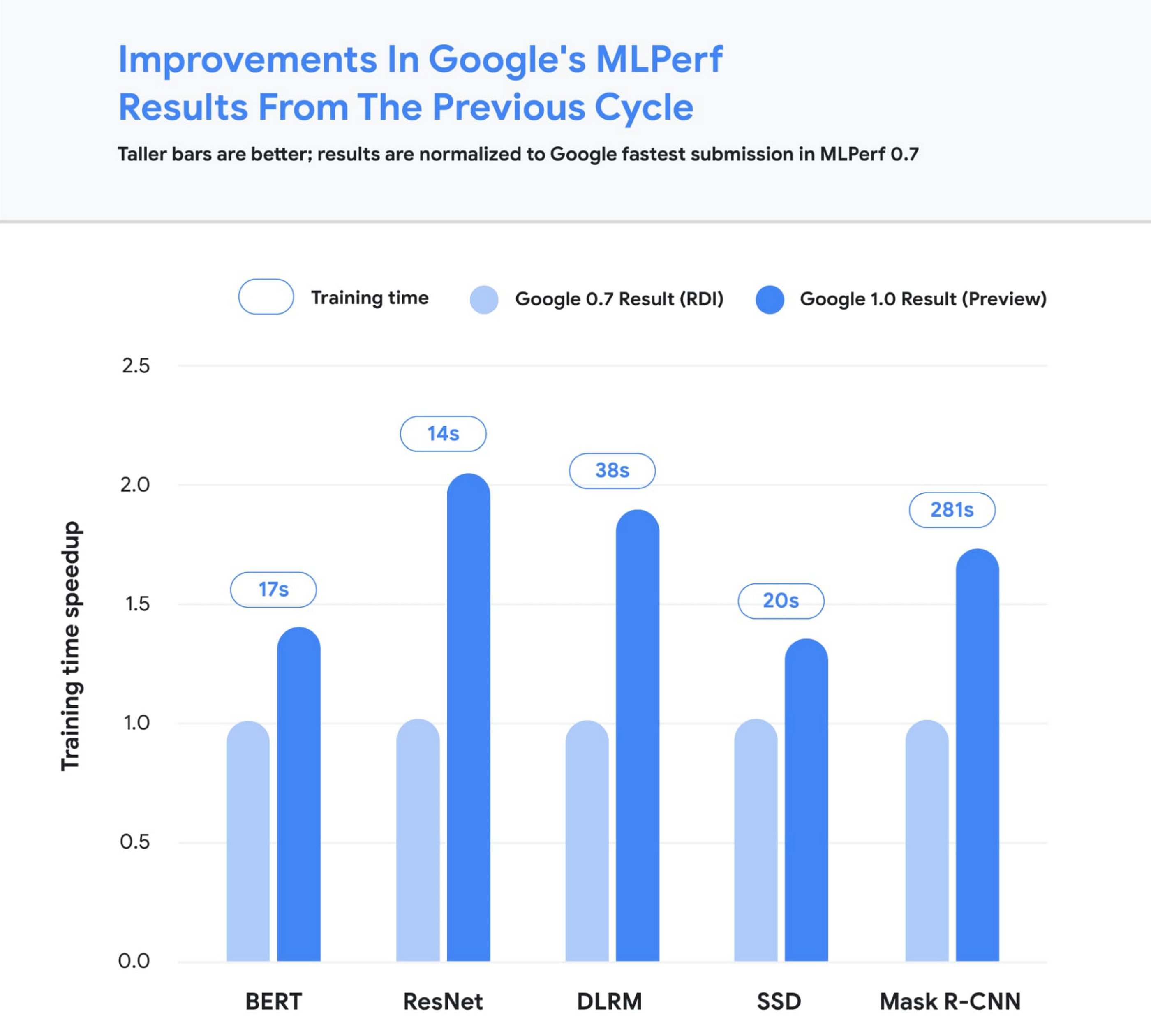
Figure 2: Speedup of Google’s MLPerf Training v1.0 TPU v4 submission over Google’s MLPerf Training v0.7 TPU v3 submission (exception: DLRM results in MLPerf v0.7 were obtained using TPU v4). Comparisons are normalized by overall training time regardless of system size. Taller bars are better. Unet3D not shown since it is a new benchmark for MLPerf v1.0.2
We achieved these performance improvements through continued investment in both our hardware and software stacks. Part of the speedup comes from using Google’s fourth-generation TPU ASIC, which offers a significant boost in raw processing power over the previous generation, TPU v3. 4,096 of these TPU v4 chips are networked together to create a TPU v4 Pod, with each pod delivering 1.1 exaflop/s of peak performance.

Figure 3: A visual representation of 1 exaflop/s of computing power. If 10 million laptops were running simultaneously, then all that computing power would almost match the computing power of 1 exaflop/s.
In parallel, we introduced a number of new features into the XLA compiler to improve the performance of any ML model running on TPU v4. One of these features provides the ability to operate two (or potentially more) TPU cores as a single logical device using a shared uniform memory access system. This memory space unification allows the cores to easily share input and output data – allowing for a more performant allocation of work across cores. A second feature improves performance through a fine-grained overlap of compute and communication. Finally, we introduced a technique to automatically transform convolution operations such that space dimensions are converted into additional batch dimensions. This technique improves performance at the low batch sizes that are common at very large scales.
Enabling large model research using carbon-free energy
Though the margin of difference in topline MLPerf benchmarks can be measured in mere seconds, this can translate to many days worth of training time on the state-of-the-art models that comprise billions or trillions of parameters. To give an example, today we can train a 4 trillion parameter dense Transformer with GSPMD on 2048 TPU cores. For context, this is over 20 times larger than the GPT-3 model published by OpenAI last year. We are already using TPU v4 Pods extensively within Google to develop research breakthroughs such as MUM and LaMDA, and improve our core products such as Search, Assistant and Translate. The faster training times from TPUs result in efficiency savings and improved research and development velocity. Many of these TPU v4 Pods will be operating at or near 90% carbon free energy. Furthermore, cloud datacenters can be ~1.4-2X more energy efficient than typical datacenters, and the ML-oriented accelerators – like TPUs – running inside them can be ~2-5X more effective than off-the-shelf systems.
We are also excited to soon offer TPU v4 Pods on Google Cloud, making the world’s fastest machine learning training supercomputers available to customers around the world. Cloud TPUs support leading frameworks such as TensorFlow, PyTorch, and Jax, and we recently released an all-new Cloud TPU system architecture that provides direct access to TPU host machines, greatly improving the user experience.
Want to learn more?
Please contact your Google Cloud sales representative to request early access to Cloud TPU v4 Pods. We are excited to see how you will expand the machine learning frontier with access to exaflops of TPU computing power!
1. All results retrieved from www.mlperf.org on June 30, 2021. MLPerf name and logo are trademarks. See www.mlperf.org for more information. Chart uses results 1.0-1067, 1.0-1070, 1.0-1071, 1.0-1072, 1.0-1073, 1.0-1074, 1.0-1075, 1.0-1076, 1.0-1077, 1.0-1088, 1.0-1089, 1.0-1090, 1.0-1091, 1.0-1092.
2. All results retrieved from www.mlperf.org on June 30, 2021. MLPerf name and logo are trademarks. See www.mlperf.org for more information. Chart uses results 0.7-65, 0.7-66, 0.7-67, 1.0-1088, 1.0-1090, 1.0-1091, 1.0-1092.
How TapClicks’ Google Cloud Migration Makes Life Easy for Marketers

8573
Of your peers have already read this article.
2:00 Minutes
The most insightful time you'll spend today!
Editor’s note: In this blog post we learn how TapClicks migrated to Google Cloud to offer their marketing customers a unified platform for data management, operations, insights, and analysis.
TapClicks is a smart marketing cloud, powered by data, that unifies our customer’s marketing. By choosing to migrate our core applications last year to Google Cloud, we cut costs, solved data-sharing concerns for our customers, and opened our stack up to a new ecosystem of possibilities.
The core problem that we’re solving for our customers is how to manage their marketing infrastructures data and operations. Life isn’t easy for marketers now. There are 7,000 different vendors servicing this space today – creating much complexity between digital agencies, media, and brands. Marketers face challenges in navigating all of these systems, logging in and out, understanding pacing goals, and managing the flow of marketing data so they can analyze and report internally as well as to their clients at scale.
We unify omnichannel campaign data (250 API connectors and 6000 Smart Connectors ™ ) from a plethora of marketing sources on an automated data warehousing solution, creating simplicity for organizations. Over 4,000 agencies, media companies, and brands use our Marketing Operations and Data Management Platform, which imports data at scale and creates an automatic data warehouse on Google Cloud. Teams can also leverage TapClicks, like our world class Facebook connector, to import data directly into Google Data Studios. Beyond importing and storing, we also provide data exporting to other Google solutions like Google Data Studio and Google Sheets. We also create interactive dashboards that let stakeholders and clients analyze their data, as well as automated, multi-channel reports that go out to clients at specified times. So channel comparisons, optimizations, attribution, and calculations are easily performed. Some of our customers are able to generate hundreds of thousands of individual reports and dashboards for their clients.
Although we may be best known for our reporting and analytics, we also empower teams managing the marketing operations workflow from customers and internal stakeholders, especially at scale. Our user-friendly, configurable system helps manage their orders and campaigns. Through automation of this process, we deliver tremendous amounts of efficiency, time saving, cost savings, and reduction of errors. The combination of these solutions makes up our unified platform, with additional capabilities like marketing intelligence that offers competitive and brand-level analysis. This is a disruptive solution in use by all leading media companies, agencies and many brands.
Partnering for possibilities
We faced a few challenges with our original tech stack, which included a mix of the leader in web services revenue, leaders in high performance data warehousing, as well as vendors on bare metal servers.
- One challenge was around costs, which were growing.
- Second, many of our customers work with multiple brands, and are very hesitant to share their data with the leader in web services, who’s often viewed as their competitor.
- Third, these vendors are more focused on their own revenue rather than a true long term partnership that would enable their customers to enjoy similar success as they have experienced.
When looking at other cloud providers, Google Cloud emerged for us as the front runner. They were competitive on costs, and their native Kubernetes support was superior— a big selling point for our DevOps team. There’s also a movement in the marketing and advertising industry away from AWS toward Google Cloud because of the data-sharing concern. Finally, most of our customers are already using Google Cloud tools, so there’s brand recognition and familiarity there, and easier integrations with their own systems.
Migrating to Google Cloud
Our migration, which took about five months, involved moving a significant chunk of our infrastructure, including our core applications, using Google Kubernetes Engine (GKE). In our legacy architecture, each of our clients was assigned to one of our virtual machines (VMs), and there was a lot of unused capacity because we had to provision for the max usage. We appreciated GKE’s cloud native capabilities, especially autoscaling, a huge benefit for our web application. We have varying usage patterns during the day, and though our application is mostly used during business hours, there are also days in the month of higher usage, and autoscaling saves us time and costs. GKE also makes deployments much easier, and we anticipate a lot of benefits there for our developer environments. We’ve moved some of our microservices into GKE and plan to move more in the future. All in all, we were able to migrate our core products and the bulk of our AWS spend successfully to Google Cloud.
We also moved from our other vendors Relational Database Service (RDS) to running MySQL on our own VMs on Google Cloud, which gives us more flexibility in terms of settings and fine tuning. We’re still trying to find the best mix as we’re modernizing our infrastructure, and we took this opportunity to migrate from MySQL 5.7 to 8.0.
Our next stage is exploring more of the capabilities and services of Google Cloud, including BigQuery, which we’re considering for our own data warehouse. The fact that we could also run Snowflake on Google Cloud, if needed, was another selling point for our migration.
We’re especially interested in BigQuery ML’s machine learning and natural language processing capabilities, which enabled better predictive insights. Our customers want insights from their campaigns— which are working, which are paying off, where should they invest next? Using our platform, they’re looking not only to generate reporting, but also identify opportunities to improve campaign performance. We plan to use AI and ML to improve those capabilities, so that our customers can seamlessly unlock insight and intelligence from their marketing data and campaigns.
Double-clicking on Google Cloud
For us, being able to deeply leverage and partner with Google Cloud to deliver those solutions on a single stack is critical, and we think our customers will love it. We see TapClicks and Google Cloud partnering at a level beyond what you typically see in a cloud provider relationship. Already, fifty percent of our company is working with various Google Cloud solutions, and we envision TapClicks and Google Cloud as extensions of each other, providing a single, powerful platform solution.
Google Cloud understands the partnership concept, and their team was able to shine a light on their services and what they could bring to the table. Compared to our previous experiences, dealing with the Google Cloud team has been a true pleasure. Now that we’ve migrated, we’re ready to take our next steps into the services available to us in the Google Cloud ecosystem, and the problems we’ll continue to solve for our customers. Learn more about TapClicks and BigQuery ML.
Google Cloud Modernized Wisconsin Department of Workforce Development to Process 150K+ Unemployment Claims Per Week

2999
Of your peers have already read this article.
2:00 Minutes
The most insightful time you'll spend today!
When confronted with challenges, resilient organizations adapt and innovate to address changing customer needs. Through its partnership with Google Cloud, the Wisconsin Department of Workforce Development exemplifies this evolutionary approach.
Just a few months ago, challenges created by the antiquated unemployment insurance (UI) system threatened the agency’s ability to serve constituents who lost their jobs during the pandemic. Now, and in the months ahead, that continuing evolution will transform how the DWD serves its constituents with the modernization of their UI system, which includes customer experience workflows, predictive analytics, and streamlining and expediting paper applications.
Like many workforce development agencies nationwide, last year, DWD experienced a deluge of claims filed in response to the COVID-19 economic fallout. Unfortunately, DWD’s legacy UI infrastructure — largely written in the COBOL computing language and hosted on a mainframe server – was no match for the volume and complexity of cases. Wisconsin’s multiple technology systems required a large amount of manual processing, with staff using spreadsheets to manually calculate benefit adjustments. As a result, the state just couldn’t keep up with the surge of claims, and it needed to pivot quickly to a new solution to keep up with demand.
DWD initially responded by staffing up call centers, hiring UI application adjudicators, and deploying other personnel–all told, hiring, contracting with, or reassigning more than 1,300 individuals. However, while this enabled DWD to respond to approximately 7 million calls per month, the massive number of incoming claims surged to create a backlog of more than 750,000 claims. Legacy technology issues continued to significantly slow the query-response time.
DWD leaders recognized that staffing alone was not the solution and that innovation was needed to overcome past, inadequate IT investment. To address the inherited issues, Wisconsin turned to Google Cloud. Working together, we were able to scale the state’s response to claims and speed up overall response time. We were also successful in screening out fraudulent claims so that the UI program could be administered–with integrity–to Wisconsinites who needed financial assistance.
Year-to-date, Wisconsin has now disbursed $2 billion in unemployment benefits, in addition to successfully clearing its entire 2020 UI backlog. As a result of our partnership, the state is now processing an average of 157,000 claims each week and releasing most payments to citizens within two to three business days. Before the new system was in place, the response time could be weeks or even months.
Here is how Wisconsin and Google Cloud are modernizing the state’s current legacy system through a modular approach:
- Artificial intelligence (AI)/ machine learning (ML) for predictive analytics: Through the use of Google AI/ML, the state is creating predictive analytics based on historical data to shorten adjudication decision-making for UI claims, enabling it to release payments to eligible claimants faster. Comprehensive data models and confidence scores analyze the backlog data to determine the shortest route to approval and payments, with a high level of confidence and accuracy. DWD is using Google Cloud technology to identify where in the process the claimant was getting stuck in one of the “hold buckets” for processing a UI claim. Using Google Cloud’s data and AI/ML tools, Wisconsin is able to identify problem areas and quickly resolve those issues. This informed DWD’s rewrite of the UI claim application process. And it also helped DWD identify fraudulent claims.
- Document AI (DocAI) for streamlining paper applications: DWD is also partnering with Google Cloud to streamline paper applications and fax documents as part of UI claims processing–enabling documents to be submitted online instead of by fax or hard-copy mail. Our DocAI solution helps Wisconsin staff make faster decisions by rapidly extracting critical data from documents, saving time, and removing manual processes, which allows employees to focus on high-priority activities.
These modernization steps in Wisconsin are resulting in a bold new vision for state unemployment systems across the United States. Through a combination of design thinking, deep partnership with state officials, and modern technology, DWD’s solutions are tailored to maximize benefits to the constituents they’re designed to serve. By joining forces with Google Cloud and utilizing modernizing technology to make informed, data-driven decisions, Wisconsin DWD is helping residents have a better experience that is easier to understand and navigate–all while better serving the community overall.
More Relevant Stories for Your Company

How Recommendation AI Helps Retailers Optimize Click-through and Conversion Rates
Time to go outside again, I guess. I'll need a sun hat. Sunscreen. Maybe some new sandals? What else? With the Recommendations AI service, I might be reminded to grab a reusable water bottle and a swimsuit. Or some after-sun aloe lotion. Good thing, cause I'll need it. Photo by Nawartha

AL/ML and Data Products Delivered through Google Cloud Makes them Leader of Gartner 2022 Magic Quadrant
Gartner® named Google as a Leader in the 2022 Magic Quadrant™ for Cloud AI Developer Services report. This evaluation covered Google’s language, vision and structured data products including AutoML, all of which we deliver through Google Cloud. We believe this recognition is a reflection of the confidence and satisfaction that

How Notified Managed to Boost AI-driven, Dynamic Influencer Discovery and Classify its Content Using NLP
Notified is a leading communications cloud for events, public relations, and investor relations to drive meaningful insights and outcomes. They provide communications solutions to effectively reach and engage customers, investors, employees, and the media. One of Notified’s Public Relations solutions is the ‘Media Contact Database’ that allows customers to discover

How the City of Memphis Uses Technology to Identify 75 Percent More Potholes
At 340 square miles, the City of Memphis is among the largest in the United States in terms of land area. Memphis has over 6,800 lane-miles of city streets, enough to drive back and forth to Los Angeles four times. Keeping these streets well maintained and safe for citizens and visitors is
