





How Recommendation AI Helps Retailers Optimize Click-through and Conversion Rates

7058
Of your peers have already read this article.
3:00 Minutes
The most insightful time you'll spend today!
Time to go outside again, I guess. I’ll need a sun hat. Sunscreen. Maybe some new sandals? What else?
With the Recommendations AI service, I might be reminded to grab a reusable water bottle and a swimsuit. Or some after-sun aloe lotion. Good thing, cause I’ll need it.

Recommendations AI is a solution that uses machine learning to bring product recommendations to their shoppers across any catalog or client list. This service is part of our full suite of Retail solutions. When you integrate with the Retail API, you get the benefit of Google’s Product Discovery. Integrating once to reap the benefits over and over. Recommendations is the starting point, and you can easily extend into Retail Search and Vision Product Search in the upcoming future.
The Recommendations solution is fully managed, global-scale and powered by deep learning, so you can focus on a great shopping experience and let someone else worry about the infrastructure.
Compared to baseline recommendation systems used by customers, Recommendations AI showed double digit uplift in conversion and clickthrough rates in A/B experiments controlled by the customers. You can optimize for click-through, conversion or session revenue, and fine tune the models to make sure you omit out-of-stock items or duplicates, for example.

So how does it work, and how do you get started? Read on, and we’ll walk you through the pipeline, starting with the data you already have to placement in your online store.
Formula: Data -> Model -> Placement
You start with your catalog, the list of all the things (postcards, movies, pie recipes) that you want to show your customers. Then you ingest your PII-redacted user events -this is the historic event data like home page views, add to cart events and more along with real time user events. This user event is joined with the product catalog and items that allows us to construct the sequence of shoppers’ activity, thus being able to predict what the shopper has a high propensity to purchase next. The user events can come from both online activity across devices or offline store purchases
The recommendation model will return a list of products, which are the recommendations. The brains of the operation, if you will. This model is trained using all the data that you ingest, using the latest neural network models and techniques that Google has built expertise over the years in flagship products like Youtube and News, that allows us to uncover shopper intent, so it can best predict the right recommendations to show to the right people.
Every model outputs a list of product identifiers, but where do they go? They go into placements, the spots, panels, carousels on your customer’s journey interacting with your brand that you’ve set aside to highlight recommendations. A model can send recommendations to one or more placements, but each placement only receives information from one recommendation model. Your pages will then need to render the products with the right images, text or other metadata, using the product ID that is returned by the model.
What do recommendations look like?
Let’s start by browsing our postcard-selling website, where I’ve been buying some vintage California postcards already. The recommendations algorithm has caught on to my interest, showing me other potential cards to purchase based on my history:

Put your data to work
To get started we need to bring your data into the recommendation model, so it can understand your customers, your inventory, and your sales patterns.
The model takes in the product catalog you use, and metadata about those products to better understand nuances in assortment, pricing and variables like size and style. You might already have this data stored in BigQuery or Merchant Center, and hence we provide easy integrations that you can leverage to get started even faster.
As for the user events, don’t worry if you already have systems in place to capture web and mobile activity. We make it easy to bring in your real time event logs by providing seamless integrations with Google Tag Manager, Javascript pixel, or even historic events from Cloud Storage, BigQuery or using inline API or JSON, so you can immediately train the models on this imported data. All this allows you to kickstart integrating with Recommendations AI in a matter of days.
The models then construct a sequence of activities that the user went through and joins with the products that the user engaged with. Once your data is ready to go, it takes a few days to train the model. Next onto making the data work for you.
Quickly customize your model
Setting up your own recommendations project in the console gives you the ability to choose what sort of model to train (based on what recommendations you want to generate) and your objective. Are you optimizing for click-through rate–more people click on the recommendation links or products–or for conversion rate–more people choose or buy what was suggested or revenue ?
Different models can be optimized for different optimization goals.; the GCP console explains what each one can do and how you can choose to optimize it.

Let’s unpack some of this terminology real quick.
We’ve got three model types:
- Recommended for you – Means we think these are items you’ll want to buy, based on your history; this is usually used on a home page to showcase items.
- Others you may like – Means if you’re browsing the page of a water bottle, we will recommend alternative brands of water bottles that you may like as well as a backpack, based on your engagement history.
- Frequently bought together – Means that when anyone buys sunscreen, we notice that they often also buy aloe lotion, so we will surface those items when someone adds any one of them to their cart.
And then we have three business objectives that the models optimize for:
- Click-through rate – How frequently did somebody click on a recommended item?
- Conversion rate– How frequently did somebody add a recommended item to their cart?
- Revenue per session – How much money did the recommendations generate for you?
Deliver anywhere along the journey
Now that you’re all set up in the Retail AI console, you can test out the recommendations in the console, even before you deploy to production.

You can integrate Recommendations into your frontend by calling the Predict APIt. The placements of recommendations will report data back into the dashboard and you can analyze and measure success for future iterations.
On top of that you can use the recommendations for other parts of your customer’s journey. Email promotions, storefront kiosks, display ads or follow-up notifications can include recommendations based on past activity and cart contents. The model gives you useful product recommendations for a wide variety of touchpoints and steps in the purchasing process.
More best practices, and guides, are available inside our documentation.
How to get started
Training your own models can be tedious, time-consuming, and expensive. On top of that it requires deeper data science expertise to set up. Let us do it instead!
You can see how IKEA Retail uses Recommendations AI in this recent talk and blog from the Google Cloud Retail Summit..
To get started today you’ll need to make a Cloud project and enable the Retail API, which then allows you to access all the recommendation tools in one menu. Bring in your catalog and purchasing data, define a placement or two, and you can start putting recommendations on your site in a matter of days.
MLOps Framework: Helping You Choose the Right Capabilities to Manage ML Projects
2892
Of your peers have already read this article.
3:00 Minutes
The most insightful time you'll spend today!
Establishing a mature MLOps practice to build and operationalize ML systems can take years to get right. We recently published our MLOps framework to help organizations come up to speed faster in this important domain.
As you start your MLOps journey, you might not need to implement all of these processes and capabilities. Some will have a higher priority than others, depending on the type of workload and business value that they create for you, balanced against the cost of building or buying processes or capabilities.
To help ML practitioners translate the framework into actionable steps, this blog post highlights some of the factors that influence where to begin, based on our experience in working with customers.
The following table shows the recommended capabilities (indicated by check marks) based on the characteristics of your use case, but remember that each use case is unique and might have exceptions. (For definitions of the capabilities, see the MLOps framework.)
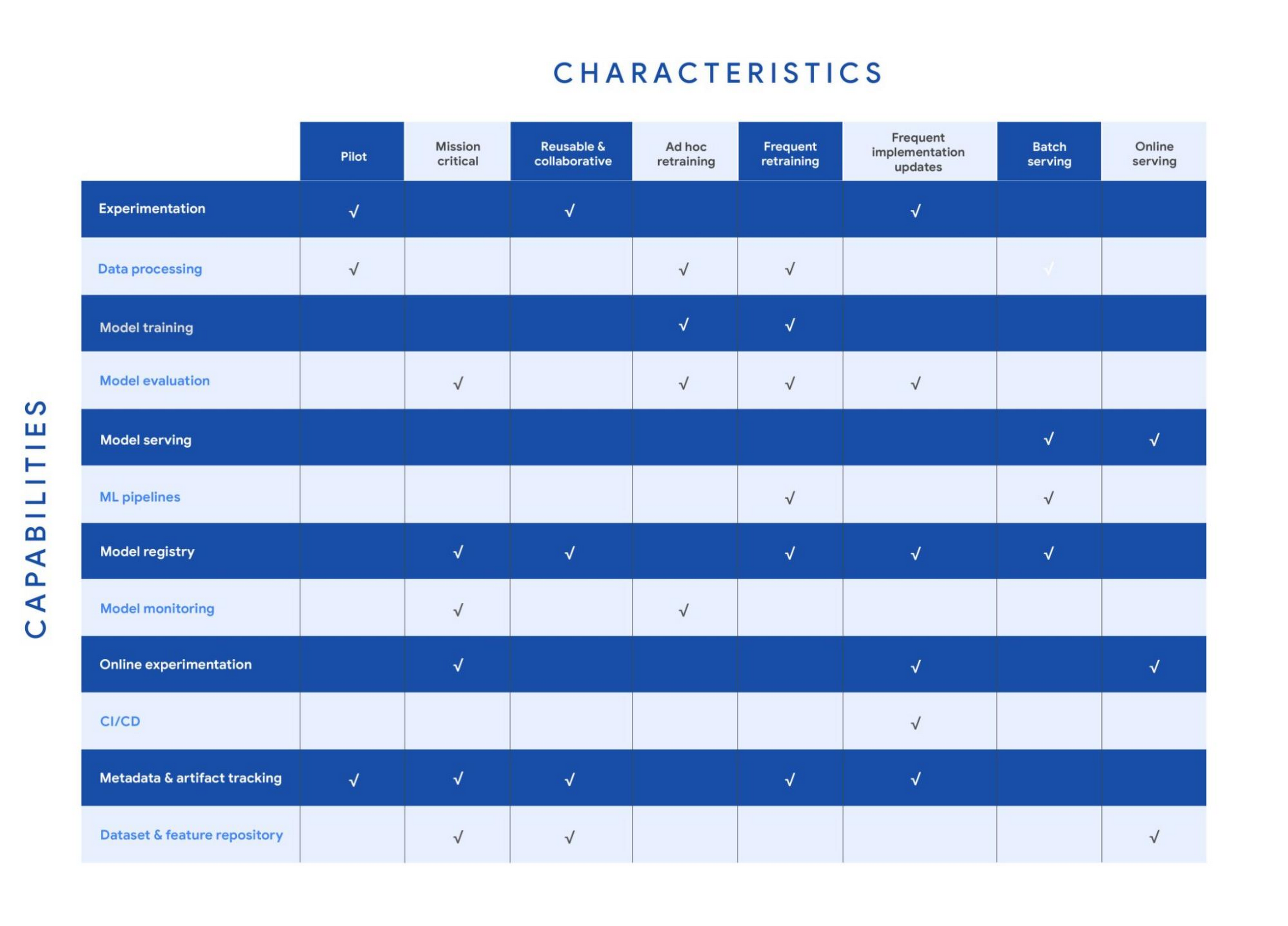
Your use case might have multiple characteristics. For example, consider a recommender system that’s retrained frequently and that serves batch predictions. In that case, you need the data processing, model training, model evaluation, ML pipelines, model registry, and metadata and artifact tracking capabilities for frequent retraining. You also need a model serving capability for batch serving.
In the following sections, we provide details about each of the characteristics and the capabilities that we recommend for them.
Pilot
Example: A research project for experimenting with a new natural language model for sentiment analysis.
For testing a proof of concept, your focus is typically on data preparation, feature engineering, model prototyping, and validation. You perform these tasks using the experimentation and data processing capabilities. Data scientists want to set up experiments quickly and easily and track and compare them. Therefore, you need the ML metadata and artifact tracking capability in order to debug, to provide traceability and lineage, to share and track experimentation configurations, and to manage ML artifacts. For large-scale pilots, you might also require dedicated model training and evaluation capabilities.
Mission-critical
Example: An equities trading model where model performance degradation in production can put millions of dollars at stake.
In a mission-critical use case, failure with the training process or production model has a significant negative impact on the business (a legal, ethical, reputational, or financial risk). The model evaluation capability is important to identify bias and fairness, as well as to provide explainability of the model. Additionally, monitoring is essential to assess the quality of the model during training and to assess how it performs in production. Online experimentation lets you test newly trained models against the one in production using a controlled environment before you replace the deployed model. Such use cases also need a robust model governance process to store, evaluate, check, release, and report on models and to protect against risks. You can enable model governance by using the model registry and metadata and artifact tracking capabilities. Additionally, datasets and feature repositories provide you with high-quality data assets that are consistent and versioned.
Reusable and collaborative
Example: Customer Analytic Record (CAR) features that are used across various propensity modeling use cases.
Reusable and collaborative assets allow your organization to share, discover, and reuse AI data, source code, and artifacts. A feature store helps you standardize the processes of registering, storing, and accessing features for training and serving ML models. Once features are curated and stored, they can be discovered and reused by multiple data science teams. Having a feature store helps you avoid reengineering features that already exist, and saves time on experimentation. You can also use tools to unify data annotation and categorization. Finally, by using ML metadata and artifacts tracking, you help provide consistency, testability, security and repeatability of the ML workflows.
Ad hoc retraining
Example: An object detection model to detect various car parts, which needs to be retrained only when new parts are introduced.
In ad hoc retraining, models are fairly static and you do not retrain them except when the model performance degrades. In these cases, you need data processing, model training, and model evaluation capabilities to train the models. Additionally, because your models are not updated for long periods, you need model monitoring. Model monitoring detects data skews, including schema anomalies, as well as data and concept drifts and shifts. Monitoring also lets you continuously evaluate your model performance, and it alerts you when performance decreases or when data issues are detected.
Frequent retraining
Example: A fraud detection model that’s trained daily in order to capture recent fraud patterns.
Use cases for frequent retraining are ones where model performance relies on changes in the training data. The retraining might be based on time intervals (for example, daily or weekly), or it could be triggered based on events like when new training data becomes available. For this scenario, you need ML pipelines to connect multiple steps like data extraction, preprocessing, and model training. You also need the model evaluation capability to ensure that the accuracy of the newly trained model meets your business requirements. As the number of models you train grows, both a model registry and metadata and artifact tracking help you keep track of the training jobs and model versions.
Frequent implementation updates
Example: A promotion model with frequent changes to the architecture to maximize conversion rate.
Frequent implementation updates involve changes to the training process itself. That might mean switching to a different ML framework, such as changing the model architecture (for example, LSTM to Attention) or adding a data transformation step in your training pipeline. Such changes in the foundation of your ML workflow require controls to ensure that the new code is functional and that the new model matches or outperforms the previous one. Additionally, the CI/CD process accelerates the time from ML experimentation to production, as well as reducing the possibility for human error. Because the changes are significant, online experimentation is necessary to ensure that the new release is performing as expected. You also need other capabilities such as experimentation, model evaluation, model registry, and metadata and artifact tracking to help you operationalize and track your implementation updates.
Batch serving
Example: A model that serves weekly recommendations to a user who has just signed up for a video-streaming service.
For batch predictions, there is no need to score in real time. You precompute the scores and you store them for later consumption, so latency is less of a concern than in online serving. However, because you process a large amount of data at a time, throughput is important. Often batch serving is a step in a larger ETL workflow that extracts, pre-processes, scores, and stores data. Therefore, you need the data processing capability and ML pipelines for orchestration. In addition, a model registry can provide your batch serving process with the latest validated model to use for scoring.
Online serving
Example: A RESTful microservice that uses a model to translate text between multiple languages.
Online inference requires tooling and systems in order to meet latency requirements. The system often needs to retrieve features, to perform inference, and then to return the results according to your serving configurations. A feature repository lets you retrieve features in near real time, and model serving allows you to easily deploy models as an endpoint. Additionally, online experiments help you test new models with a small sample of the serving traffic before you roll the model out to production (for example, by performing A/B testing).
Get started with MLOps using Vertex AI
We recently announced Vertex AI, our unified machine learning platform that helps you implement MLOps to efficiently build and manage ML projects throughout the development lifecycle. You can get started using the following resources:
- MLOps: Continuous delivery and automation pipelines in machine learning
- Getting started with Vertex AI
- Best practices for implementing machine learning on Google Cloud
Acknowledgements: I’d like to thank all the subject matter experts who contributed, including Alessio Bagnaresi, Alexander Del Toro, Alexander Shires, Erin Kiernan, Erwin Huizenga, Hamsa Buvaraghan, Jo Maitland, Ivan Nardini, Michael Menzel, Nate Keating, Nathan Faggian, Nitin Aggarwal, Olivia Burgess, Satish Iyer, Tuba Islam, and Turan Bulmus. A special thanks to the team that helped create this, Donna Schut, Khalid Salama, and Lara Suzuki, and Mike Pope for his ongoing support.
An AI-Powered Cost Cutting Guide: 8 Strategies for Maximizing Profits

1707
Of your peers have already read this article.
3:30 Minutes
The most insightful time you'll spend today!
We are increasingly seeing one question arise in virtually every customer conversation: How can the organization save costs and drive new revenue streams?
Everyone would love a crystal ball, but what you may not realize is that you already have one. It’s in your data. By leveraging Data Cloud and AI solutions, you can put your data to work to achieve your financial objectives. Combining your data and AI reveals opportunities for your business to reduce expenses and increase profitability, which is especially valuable in an uncertain economy.
Google Cloud customers globally are succeeding in this effort, across industries and geographies. They are improving ROI by saving money and creating new revenue streams. We have distilled the strategies and actions they are implementing—along with customer examples and tips—in our eBook, “Make Data Work for You.” In it, you’ll find ways you can pare costs, increase profitability, and monetize your data.
Find money in your data
Our Google Cloud teams have identified eight strategies that successful organizations are pursuing to trim expenses and uncover new sources of revenue through intelligent use of data and AI. These use cases range from scaling small efficiencies in logistics to accelerating document-based workflows, monetizing data, and optimizing marketing spend.
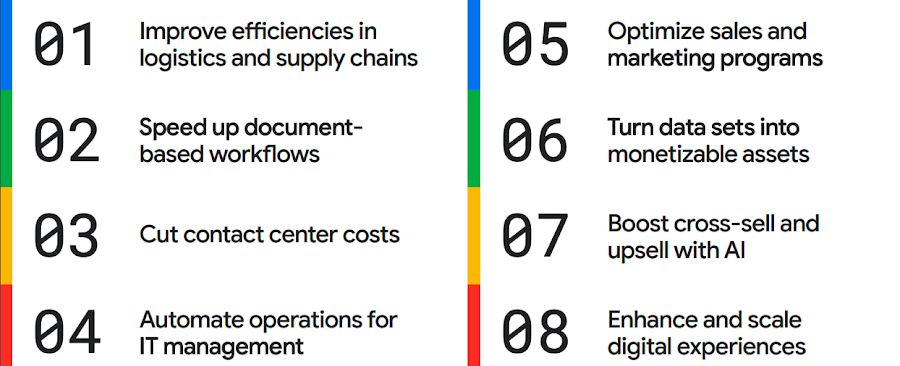
The results are impressive. They include massive cost savings and additional revenue. On-time deliveries have increased sharply at one company, and procure-to-pay processing costs have fallen by more than half at another. Other organizations have reaped big gains in ecommerce upselling and customer satisfaction.
We’ve found that businesses across every industry and around the globe are able to take action on at least one of these eight strategies. Contrary to common misperceptions, implementation does not require massive technology changes, crippling disruption to your business, or burdensome new investments.
What success looks like
If you worry your business is not ready or you need to gain buy-in from leadership, the success stories of the 15 companies in this report are helpful examples. Learning how organizations big and small, in different industries and parts of the world, have implemented these data and AI strategies makes the opportunities more tangible.
Carrefour
Among the world’s largest retailers, Carrefour operates supermarkets, ecommerce, and other store formats in more than 30 countries. To retain leadership in its markets, the company wanted to strengthen its omnichannel experience.
Carrefour moved to Google Data Cloud and developed a platform that gives its data scientists secure, structured access to a massive volume of data in minutes. This paved the way for smarter models of customer behavior and enabled a personalized recommendation engine for ecommerce services.
The company saw a 60% increase in ecommerce revenue during the pandemic, which it partly attributes to this personalization.
ATB Financial
ATB Financial, a bank in the Canadian province of Alberta, uses its data and AI to provide real-time personalized customer service, generating more than 20,000 AI-assisted conversations monthly. Machine learning models enable agents to offer clients real-time tailored advice and product suggestions.
Moreover, marketing campaigns and month-end processes that used to take five to eight hours now run in seconds, saving over CA$2.24 million a year.
Bank BRI
Bank BRI, which is owned by the Indonesian government, has 75.5 million clients. Through its use of digital technologies, the institution amasses a lot of valuable data about this large customer base.
Using Google Cloud, the bank packages this data through more than 50 monetized open APIs for more than 70 ecosystem partners who use it for credit scoring, risk management, and other applications. Fintechs, insurance companies, and financial institutions don’t have the talent or the financial resources to do quality credit scoring and fraud detection on their own, so they are turning to Bank BRI.
Early in the effort, the project generated an additional $50 million in revenue, showing how data can drive new sources of income.
How to get going now
“Make Data Work for You” will help you launch your financial resiliency initiatives by outlining the steps to get going. The process lays the groundwork for realizing your own cost savings and new revenue streams by leveraging data and AI.
Among these steps include building frameworks to operate cost efficiently, make informed decisions related to spending and optimize your data and AI budgets.
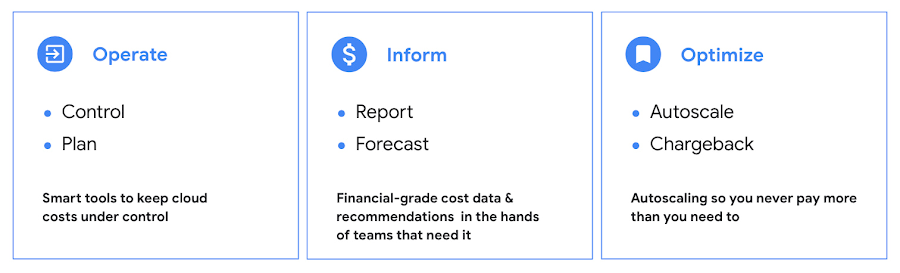
Operate: Billing that’s specific to your use-case
Control your costs by choosing data and analytics vendors who offer industry-leading data storage solutions and flexible pricing options. For example, multiple pricing options such as flat rate and pay-as-you-go allow you to optimize your spend for best price-performance.
Inform: make informed decisions based on usage
Use your cloud vendor’s dashboards or build a billing data report to gain insights on your spending over time. Make use of cost recommendations and other forecasting tools to predict what your future expenses are going to be.
Optimize: Never pay more than you use
While planning data analytics capacity, organizations often overprovision and overpay than what they actually use. Consider migrating your workloads that have unpredictable demand to a data warehousing solution that offers granular level autoscaling features so that you never have to pay for more than what you use.
There are other key moves that will set your initiative up for success including how to shorten time to value in building AI models and measuring impact. You can find details in the report.
A brighter future
The teams at Google Cloud helped the companies in “Make Data Work for You,” along with many more organizations, use their data and AI to achieve meaningful results. Download the full report to see how you can too.
5047
Of your peers have already watched this video.
2:50 Minutes
The most insightful time you'll spend today!
FedEx Ground Makes Talent Recruitment More Effective with AI
FedEx Ground is a package shipping company and is a subsidiary of FedEx. It wanted to make hiring easier, and more intuitive so that it could hire the best people.
“We need to have every advantage we can to recruit and retain talent. That’s what led us to the work with Google and its capabilities,” says Matt Tokorcheck, VP, Operations, Support and Engineering, FedEx Ground
The challenge was the narrow slotting of job roles. The openings were listed under specific headings which revolved around job types or departments–and if applicants didn’t fit or understand those categories, they didn’t apply.
Take, for example, applicants that came from the military. “Many of my fellow service members and veterans expressed difficulty in finding a job post the military because a lot of the skill sets that they’ve developed and honed over their military career aren’t as useful in the civilian world,” says David Henderson, Industrial Engineer, FedEx.
So FedEx Ground decided to work with Google Cloud’s AI-powered talent solution.
“As a job seeker when you come to our career site to search for jobs, that search is powered by Jibe and the Google Jobs API. And it really matches the keywords that a job seeker inputs with the jobs that are available at FedEx Ground, says Shailesh Bokil, MD, Talent Acquisition and Planning, Fedx Ground.
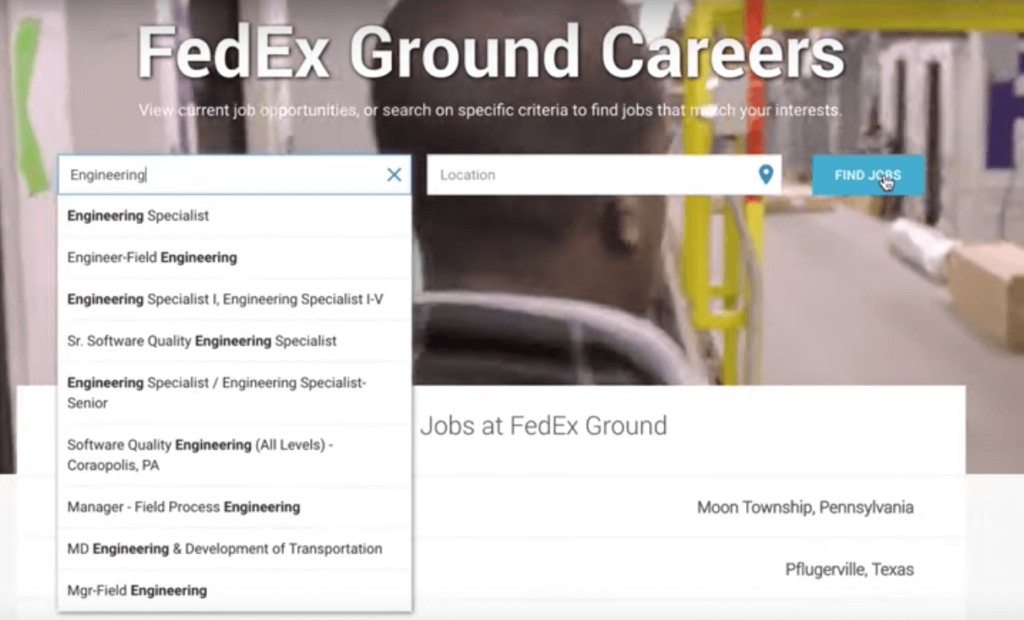
This makes job hunting a very intuitive experience for applicants.
“When I type into the search bar, I was immediately prompted to input my MOS, which is your military occupational specialty. And what it (the system) does is it takes the skills that are developed while serving in that MOS0 and matches them with skill sets that employers are looking. When I input 12A (an MOS), immediately I was getting results back for various engineer positions.
To find out more about how FedEx Ground employs AI-powered talent solution, watch the video.
Home Depot’s Interconnected Retail Experience by Virtue of Google Cloud Migration for SAP Applications

8267
Of your peers have already read this article.
1:30 Minutes
The most insightful time you'll spend today!
With nearly 2,300 stores, The Home Depot is the world’s largest home-improvement chain — a brand that professional contractors and DIYers alike have come to depend on. The home improvement industry continues to experience unprecedented demand and dramatic increases in online ordering accompanied by expanding consumer expectations for things like curbside pickup and same day delivery. The Home Depot’s decision to migrate to cloud-based infrastructure, including the migration of the company’s SAP applications on Google Cloud which began in 2017, has set it up for success in an increasingly digital world, and helped the company adapt to changing market conditions quickly.
Interconnected retail at scale
Building on a strong customer-first philosophy, The Home Depot aims to create what it calls interconnected retail—allowing customers to shop however, whenever, and wherever they want. “So many companies are focused on omni-channel retail,” explains Sam Moses, Vice President of Corporate Systems. “At The Home Depot, we wanted to take it to the next level. Interconnected retail puts the customer at the center of everything and enables them to shop in store, online, or both. Customers can begin a transaction online and continue in-store, or vice-versa.”
To support this strategy, the company’s SAP environment needed to be more agile. Running everything on-premises, from central finance to POS systems, meant that The Home Depot’s IT teams experienced redundancy and repetitive, manual processes. Their data warehouse needed an upgrade to process and analyze growing and increasingly diverse data sets. The Home Depot chose to migrate its SAP environment to Google Cloud to support both the velocity and scale needed for the business as well as critical analytics capabilities needed for its bold digital initiatives. “We chose Google Cloud to support our SAP implementation. Our decision had a lot to do with the relationship between Google Cloud and SAP and also for the applications and services that are offered by Google Cloud, like BigQuery, which are helping to enable data and analytics within our organization,” Moses explains.
After migrating its SAP applications—including S/4HANA, its customer activity repository (CAR), general ledger, e-commerce system, enterprise data warehouse and more to Google Cloud, the company now has the speed, scale and flexibility to tackle enormous spikes in the business, all while staying fully available for their customers. Additionally, The Home Depot was able to transform its financial systems and make them more agile to deliver critical information across multiple business functions in real time.
Maximizing data insights to support customer experiences
By migrating to Google Cloud, The Home Depot is leveraging Google Cloud analytics to build the industry’s most efficient supply chain including more robust demand forecasting, supplier lead times, estimated delivery times and more, all while maintaining better security than before. “We experienced unprecedented change in our customers’ behavior and their buying patterns, which puts a lot of pressure on our supply chain,” explains Moses. “So having the ability to leverage data and analytics gives us insights to know exactly what it is that our customers need.”
The company’s analysts now use BigQuery ML for machine learning directly against the company’s BigQuery data and use AutoML to determine the best model for predictions. The Home Depot’s engineers have also adapted BigQuery to monitor, analyze, and act on application performance data across all its stores and warehouses in real time—capabilities that were not as seamless in the on-premises environment.
With hundreds of projects on Google Cloud, The Home Depot’s cloud journey is well on track, but the company is always looking to the future. “As our customers’ needs have continued to evolve, and as technology has continued to evolve, our relationship with Google will continue to advance — to be able to innovate together, to be able to find new solutions together, to better serve our customers.”
Learn more about how The Home Depot is renovating its retail operation with SAP on Google Cloud.
Enhanced AI-based Photo Editing: Let’s Enhance Fuels The Next Wave of Innovation with Google Cloud and NVIDIA

2715
Of your peers have already read this article.
3:30 Minutes
The most insightful time you'll spend today!
There’s an explosion in the number of digital images generated and used for both personal and business needs. On e-commerce platforms and online marketplaces for example, product images and visuals heavily influence the consumer’s perception, decision making and ultimately conversion rates. In addition, there’s been a rapid shift towards user-generated visual content for ecommerce — think seller-generated product imagery, host-generated rental property photos and influencer-generated social media content. The challenge? These user-generated images are often captured using mobile cameras and vary greatly in terms of their size, quality, compression ratios and resolution, making it difficult for companies to provide consistent high-quality product images on their platforms.
That’s exactly the problem that Let’s Enhance, a computer vision startup with teams across the US and Ukraine, set out to solve with AI. The Let’s Enhance platform improves the quality of any user-generated photo automatically using AI-based features to enhance images through automatic upscaling, pixelation and blur fixes, color and low-light correction, and removing compression artifacts — all with a single click and no professional equipment or photo-editing chops.
“Let’s Enhance.io is designed to be a simple platform that brings AI-powered visual technologies to everyone — from marketers and entrepreneurs to photographers and designers,” said Sofi Shvets, CEO and Co-founder of Let’s Enhance.
To date, Let’s Enhance has processed more than 100M photos for millions of customers worldwide for use-cases ranging from digital art galleries, real estate agencies, digital printing, ecommerce and online marketplaces. With the introduction of Claid.ai, their new API to automatically enhance and optimize user-generated content at scale for digital marketplaces, they needed to process millions of images every month and manage sudden peaks in user demand.
However, building and deploying an AI-enabled service at scale for global use is a huge technical challenge that spans model building, training, inference serving and resource scaling. It demands an infrastructure that’s easy to manage and monitor, can deliver real-time performance to end customers wherever they are and can scale as user-demand peaks, all while optimizing costs.
To support their growing user-base, Let’s Enhance chose to deploy their AI-powered platform to production on Google Cloud and NVIDIA. But before diving into their solution, let’s take a close look at the technical challenges they faced in meeting their business goals.
Architecting a solution to fuel the next wave of growth and innovation
To deliver the high-quality enhanced images that end-customers see, Let’s Enhance products are powered by cutting-edge deep neural networks (DNNs) that are both compute- and memory-intensive. While building and training these DNN models in itself is a complex, iterative process, application performance — when processing new user-requests, for instance — is crucial to delivering a quality end user experience and reducing total deployment costs.
A single inference or processing request i.e., from user-generated image, which can vary widely in size, at the input to the AI-enhanced output image, requires combining multiple DNN models within an end-to-end pipeline. The key inference performance metrics to optimize for included latency (the time it takes from providing an input image to the enhanced image being available) and throughput ( the number of images that can be processed per second)..
Together, Google Cloud and NVIDIA technologies provided all the elements that the Let’s Enhance team needed to set themselves up for growth and scale. There were three main components in the solution stack:
- Compute resources: A2 VMs, powered by NVIDIA A100 Tensor Core GPUs
- Infrastructure management: Google Kubernetes Engine (GKE)
- Inference serving: NVIDIA Triton Inference Server
Improved throughput and lower costs with NVIDIA A100 Multi-Instance GPUs (MIG) on Google Cloud
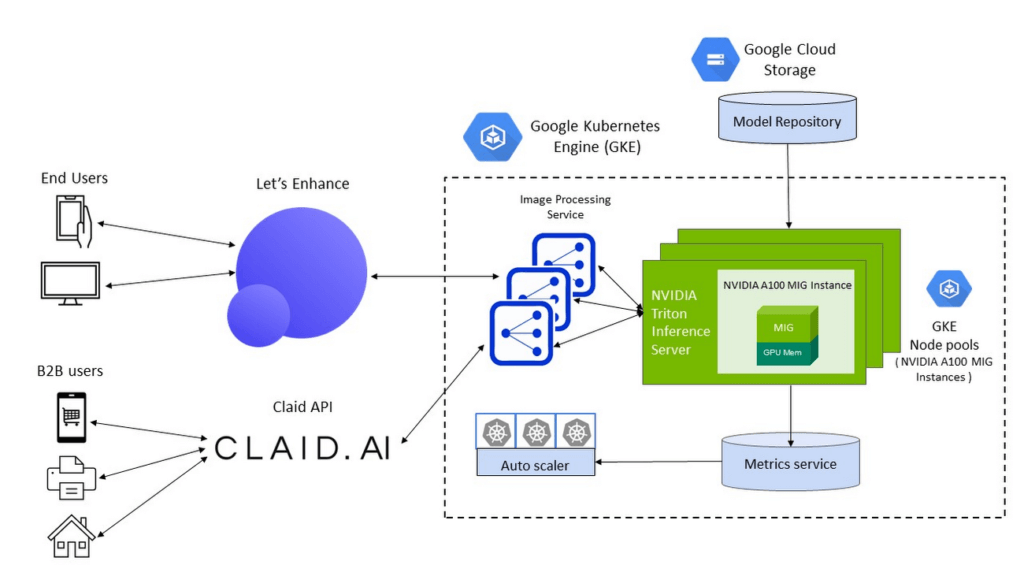
To meet the computational requirements of the DNN models and deliver real-time inference performance to their end-users, Let’s Enhance chose Google Cloud A2 VMs powered by NVIDIA A100 Tensor Core GPUs as their compute infrastructure. A100 GPU’s Multi-Instance GPU (MIG) capability offered them the unique ability to partition a single GPU into two independent instances and simultaneously process two user-requests at a time, making it possible to service a higher volume of user requests while reducing the total costs of deployment.
The A100 MIG instances delivered a 40% average throughput improvement compared to the NVIDIA V100 GPUs, with an increase of up to 80% for certain image enhancement pipelines using the same number of nodes for deployment. With improved performance from the same sized node pools, Let’s Enhance observed a 34% cost savings using MIG-enabled A100 GPUs.
Simplified infrastructure management with GKE
To offer a guaranteed quality-of-service (QoS) to their customers and manage user demand, Let’s Enhance needed to provision, manage and scale underlying compute resources while keeping utilization high and costs low.
GKE offers industry-leading capabilities for training and inference such as support for 15,000 nodes per cluster, auto-provisioning, auto-scaling and various machine types (e.g. CPU, GPU and on-demand, spot), making it the perfect choice for Let’s Enhance.
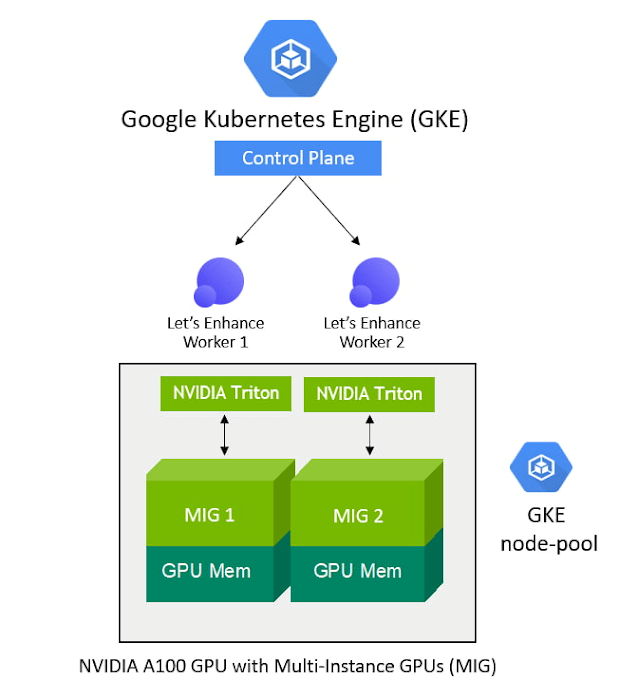
With support for NVIDIA GPUs and NVIDIA GPU sharing capabilities, GKE can provision multiple A100 MIG instances to process user requests in parallel and maximize utilization. As the compute required for the deployed ML pipelines increases (e.g., a sudden surge in inference requests to service), GKE can automatically scale to additional node-pools with MIG partitions — offering finer granularity to provision the right-sized GPU acceleration for workloads of all sizes.
“Our total averaged throughput varied between 10 and 80 images / sec. Thanks to support for NVIDIA A100 MIG and auto scaling mechanisms in GKE we can now scale that up to 150 images/sec and more, based on user-demand and GPU availability,” said Vlad Pranskevičius, Co-founder and CTO, Let’s Enhance.
In addition, GKE’s support for dynamic scheduling, automated maintenance and upgrades, high availability, job API, customizability and fault tolerance simplified managing a production deployment environment, allowing the Let’s Enhance team to focus on building advanced ML pipelines.
High-performance inference serving with NVIDIA Triton Inference Server
To optimize performance and simplify the deployment of their DNN models onto the GKE-managed node pools of NVIDIA A100 MIG instances, Let’s Enhance chose the open-source NVIDIA Triton Inference Server, which deploys, runs and scales AI models from any framework onto any GPU- or CPU-based infrastructure.
NVIDIA Triton’s support for multiple frameworks enabled the Let’s Enhance team to serve models trained in both TensorFlow and PyTorch, eliminating the need to set up and maintain multiple serving solutions for different framework backends. In addition, Triton’s ensemble model and shared memory features helped maximize performance and minimize data transfer overhead for their end-to-end image processing pipeline, which consists of multiple models and large amounts of raw image data transferring between them.
“We saw over 20% performance improvement with Triton vs. custom inference serving code, and were also able to fix several errors during deployment due to Triton’s self-healing features”, said Vlad. “Triton is packed with cool features, and as I was watching its progress from the very beginning, the pace of product development is just amazing.”
To further enhance end-to-end inference performance, the team is adopting NVIDIA TensorRT, an SDK to optimize trained models for deployment with the highest throughput and lowest latency while preserving the accuracy of predictions.
“With the subset of our models which we converted from Tensorflow to NVIDIA TensorRT we observed a speedup of anywhere between 10% and 42%, depending on the model, which is impressive,” said Vlad. “For memory-intensive models like ours, we were also able to achieve predictable memory consumption, which is another great benefit of using TensorRT, helping prevent any unexpected memory-related issues during production deployment.”
Teamwork makes the dream work
By using Google Cloud and NVIDIA, Let’s Enhance addressed the real-time inference serving and infrastructure management challenges of taking their AI-enabled service to production at scale in a secure Google Cloud infrastructure.
GKE, NVIDIA AI software and A2 VMs powered by NVIDIA A100 GPUs brought together all the elements they needed to deliver the desired user experience and build a solution that can dynamically scale their end-to-end pipelines based on user demand.
The close collaboration with the Google Cloud and NVIDIA team, every step of the way, also helped Let’s Enhance get their solution to market fast. “The Google Cloud and NVIDIA teams are incredible to work with. They are highly professional, always responsive and genuinely care about our success,” said Vlad. “We were able to get technical advice and recommendations directly from Google Cloud product and engineering teams, and also have a channel to share our feedback about Google Cloud products, which was really important to us.”
With a solid foundation and solution architecture that can meet their growing business needs, Let’s Enhance is marching towards their goal of bringing AI-enhanced digital images to everyone. “Our vision is to help businesses effectively manage user-generated content and increase conversion rates with next-gen AI tools,” said Sofi. ”Our next step towards that is to expand our offerings to completely replace manual work for photo preparation, including as well as cover pre-stages as image quality assessment and moderation.”
To learn more about the Let’s Enhance products and services, check out their blog here.
More Relevant Stories for Your Company




Transitioning Kagglers to TPU with TF 2.x
Kaggle has, historically, become synonymous with machine learning competitions but it's much more than that. Kaggle is a data science platform. Over 5 million data scientists from all over the world come to Kaggle to not only not only participate in machine learning competitions but to learn data science build


Driving Business Transformation in Healthcare Using Google Cloud and AI/ML
Before the COVID-19 pandemic, when you thought of healthcare and AI, a number of ideas sprang to mind. But the world, especially as it relates to healthcare has seen a completely different type of transformation as a result of COVID-19. This video is about how Google Cloud is helping organizations


Signal Generation in the Investment Management Industry
Machine learning is seeing a lot of use cases in the financial sector. One of them is leverage AI to sift signal from noise and create insights or predictions that can give financial planners an edge. In this video, David Li, Head of Advanced Analytics, BlackRock and Colman Madden, Customer



Nippon India Mutual Fund Re-Invents How Indians Buy with AI
Nippon India Mutual Fund, formerly Reliance Mutual Funds is changing the way Indians purchase funds making it easier and faster, with the help of Google Cloud. In India, only 3-4 percent of the population has invested in mutual funds. There's a sizeable market to tap into for mutual fund houses--if
