





No-code Development Platforms Help Employees Reclaim their Time and Talent

3884
Of your peers have already read this article.
4:00 Minutes
The most insightful time you'll spend today!
As offices reopen, businesses aren’t keeping to a single formula. Many are embracing hybrid models, with employees splitting time between home and the office. Some are staying 100% remote. Others are returning the full workforce to offices with a greater focus on digitization.
Regardless of their model, one thing is certain: technology is more central than ever to organizations’ ability to work smarter and more effectively. In particular, organizations need technology that can be tailored to specific business needs. For example, a retail store manager may need a way to ensure improved sanitation practices, or office workers may need to create an app to manage desk reservations.
Google Workspace can help by bringing together everything you need to get things done, all in one place—including the ability to build custom apps and automations with AppSheet. AppSheet, Google Cloud’s no-code development platform, lets employees–even those with no programming experience–reclaim their time and talent by building custom apps and automations.
Building solutions with AppSheet is often easier and faster than traditional coding, as AppSheet leverages Google’s machine learning expertise to help you quickly go from idea to solution, helping your business to match the pace and agility that today’s landscape requires. In this article, we’ll explore how you can use AppSheet to create custom solutions that will help your business adapt to shifting business needs. To illustrate, we’ll focus on a use case many businesses face: reservation and management of meeting rooms and other office resources, but this process can easily be adapted for a wide variety of use cases, from apps for retail pickup to incident reporting and more.
Simplify and centralize with apps
The first thing to consider is whether your solution would be best managed via a custom interface. If you’re trying to simplify a process for someone, such as inspections or inventory tracking, or centralize information, such as resource portals or events calendars, creating a custom app is the way to go.
For this example app, we created a simple Google Sheet to hold our backend data. Sheets are ideal backend data sources when we know the amount of data will not grow exponentially, especially when piloting to a first office or group of users. We can switch our data seamlessly at any time to a scalable Google Cloud SQL database or other database if needed.
The example app has several worksheets to manage the different buildings, rooms, checkpoints and people (including their roles).

We can build an app in AppSheet directly from our Sheet by selecting Tools > AppSheet > Create an App.
After creating our app, we see an overview of the data that we’ve connected, how pieces of data relate to each other, the views that are presented to the user, and a live interactive preview of the app. Refining the app is intuitive. When you input keywords, for instance, AppSheet surfaces appropriate functionality options that can be further customized. If we have address or location data, it’s automatically turned into a map view that we can further customize.
Our office management app will offer building managers and cleaners administrative features for managing equipment, disinfection schedules, and maintenance information, and it will also offer views for employees to check occupancy and safely reserve desks and equipment.
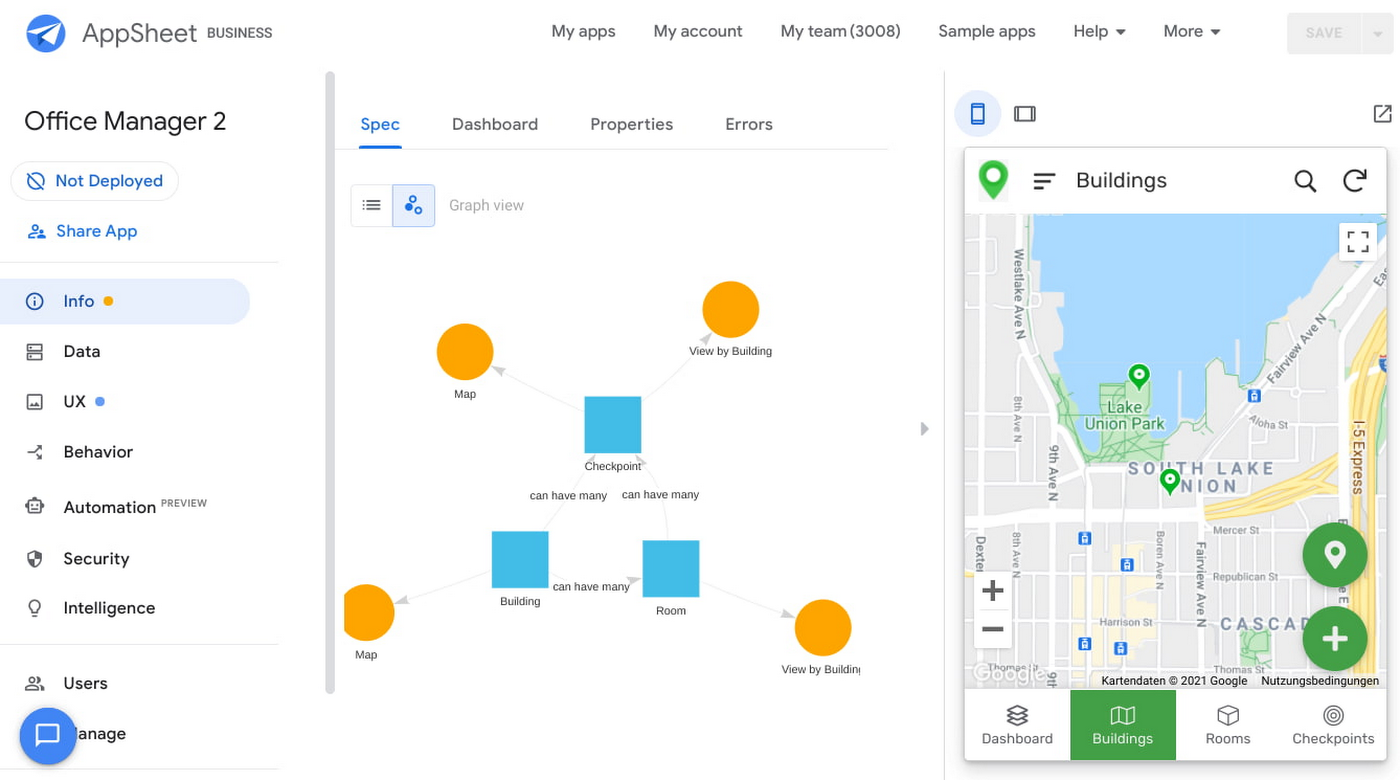
Opening an office and then a room in the app gives us an overview of both the floorplan and the occupancy and reservations for spaces and equipment in the room.
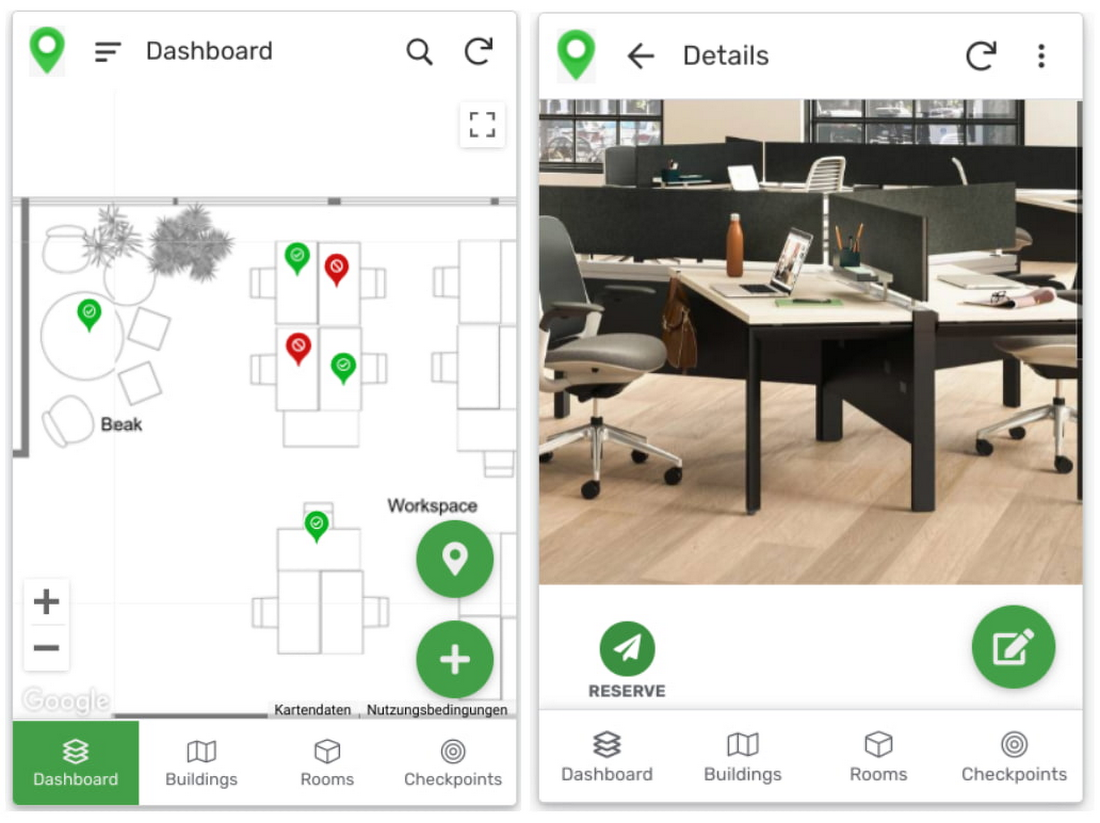
Users can then reserve spaces and equipment in the app, without having to first search for a form or page in the intranet, or even log onto their work computer. The reservation is an automation routine in AppSheet, which performs pre-configured actions when triggered.
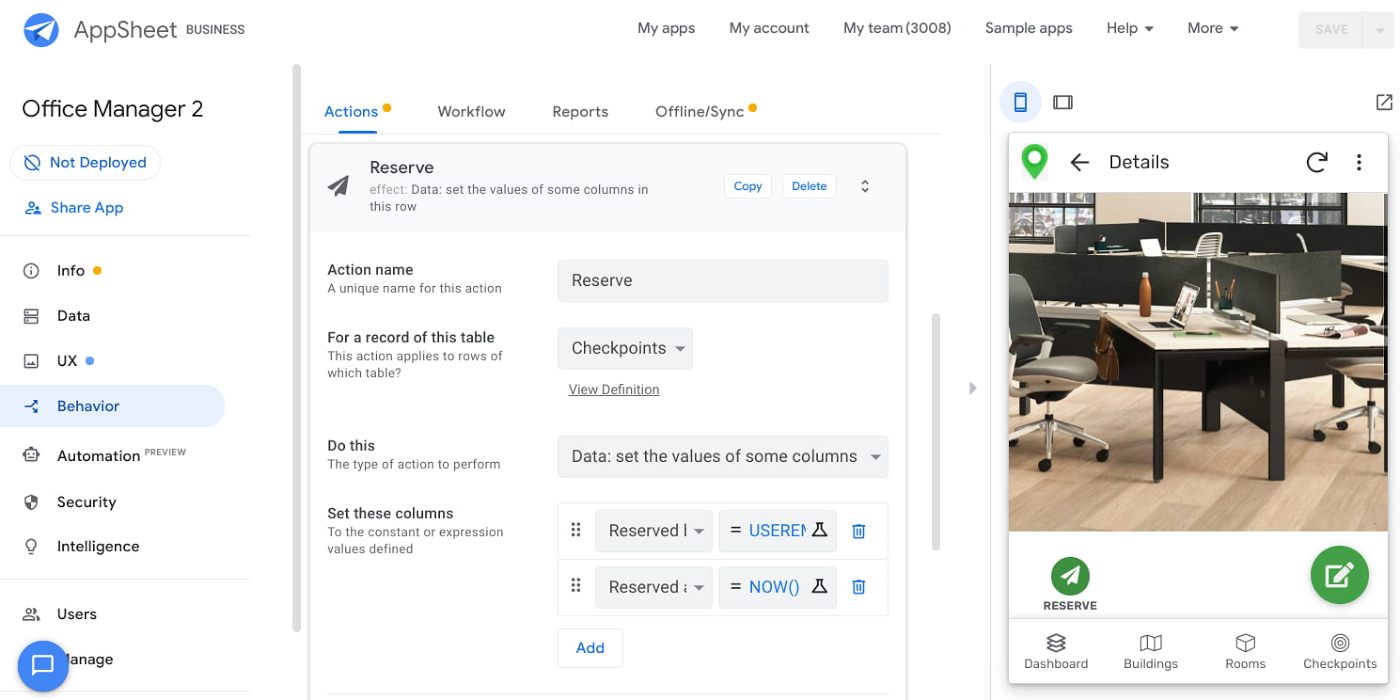
As illustrated in the screenshot above, when the action is triggered either by pressing a button in the app, scanning a QR code, or tapping an RFC tag, the action simply sets the “Reserved by” and “Reserved at” columns to the current user and timestamp.
Streamline with automations
AppSheet Automation, which was recently made generally available, makes it possible to reduce repetitive tasks and streamline processes even further.
In this example, one challenge you may encounter is that users often forget to release a desk or resource when they’re finished, which means those reservations stay blocked until an administrator releases all blocked reservations. However, it’s also important that resources aren’t immediately released, as they first need to be cleaned and disinfected before being made available to new users.
AppSheet Automation can solve this challenge by periodically checking all resources that have been reserved for longer than four hours, then alerting the user to either re-reserve them or release them to be cleaned. If there is no answer, the automation can trigger the resources to be cleaned, then released.

We can configure this as a recurring event, and create a bot that sends the notifications and triggers actions based on the user input (or lack of input).
Optimize for multiple roles
Creating an app for one user is one thing–creating an app that fits the needs of multiple types of users is another. AppSheet has you covered for this kind of complexity because it lets you build multiple roles into a single app.
In our office management app, for example, the office manager can have a particular view and dashboard, and workers in the office can have their own views and functionalities front and center. This makes it possible to automate tasks for all types of users with a single app.
Likewise, AppSheet Automation lets you easily react to real-time changes in data, send notifications to groups of users, and initiate additional workflows using data shared between the app and the users. If a group needs to reserve a conference space for an important late-breaking meeting, for example, there might be ripple effects across a number of user groups. The ability to automate all these updates and interactions can ultimately save a lot of time and effort.
AppSheet also supports advanced features such as QR codes, NFC, and bluetooth sensor integration. This could help users check into locations or workspaces, further streamlining the task of helping people safely navigate and collaborate within the office.
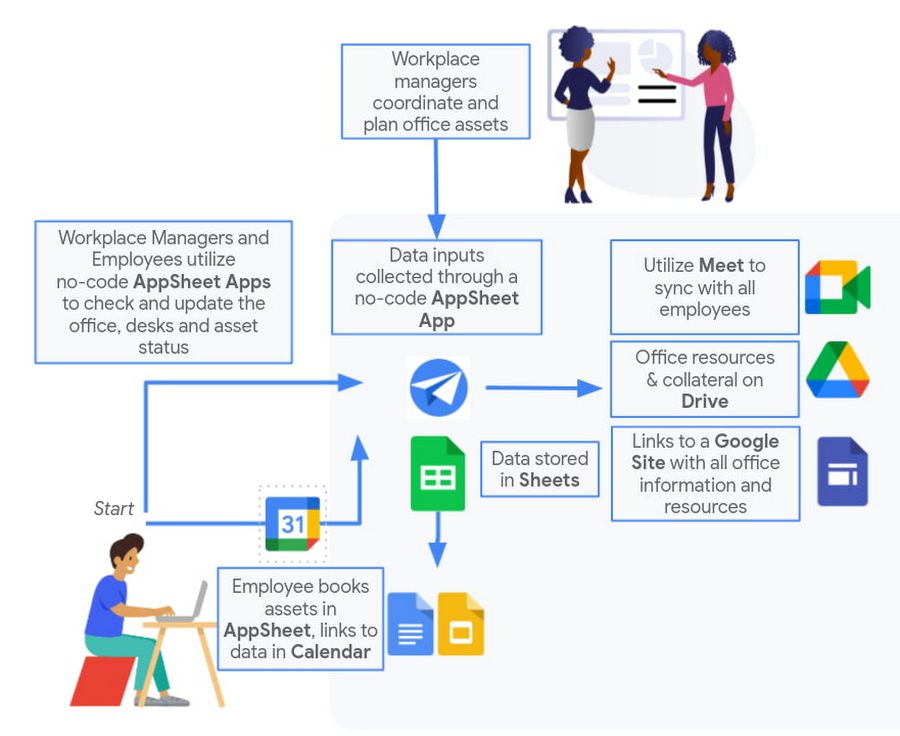
Mission critical solutions, faster than ever
In the past, the type of app explored in this article would have required a central data store, distribution to specific groups of users, management and dashboard capabilities, as well as smartphone sensor integration for NFC and image capturing. This would have necessitated a mammoth implementation project and a team of professional coders.
But with no-code, you can effectively design and implement these requirements in hours and days rather than months and years. Changes can be made on the fly in any browser, including pushing out new versions to users. Though AppSheet opens up app building and digital automations to any knowledge worker, it also includes robust security and governance controls, ensuring that as you manage getting employees back into office, you don’t neglect IT security.
Try out your own back-to-the-office app for free today at AppSheet.com, or explore and copy our sample app.
Tips to Get Most of Google Workspace and Make Hybrid Work Efficient and Effective!

3738
Of your peers have already read this article.
1:30 Minutes
The most insightful time you'll spend today!
In response to the pandemic, an overwhelming 92% of the U.S. workforce is now interested in working in a hybrid or fully remote capacity1. All employers, including government leaders, are now critically focused on finding the right tools and techniques to foster engagement, improve productivity, and strengthen relationships – in-person and virtually – or risk losing and/or retaining top talent.
Creating a positive work environment starts with having the right technology that can provide a variety of meeting tools to make work easier and more productive from any location. Google Workspace enables agency leaders to support their workforce with capabilities to address a variety of needs, from virtual training and learning, to mobilizing emergency response and critical service delivery. Below we’ve highlighted some of our top tips for getting the most out of Google Workspace to make hybrid work more efficient and effective.
Capture meeting agendas in a Google Doc
Create more effective, engaging meetings by attaching an agenda doc to your Google Calendar event and invite your attendees in to comment and review ahead of time. Google Docs, Google Slides, and Google Sheets allow collaborators to leave color-coded comments that can be incorporated into a live video meeting or a face-to-face roundtable meeting.
Engage attendees with interactive features in Google Meet
We’ve added new features to make meetings more interactive and inclusive throughout 2022. New in-meeting reactions, livestream Q&A and polls, and streaming meetings directly to YouTube, and client-side encryption are all coming to Google Meet soon. We’re incorporating Meet directly into Docs, Sheets, and Slides to make it easier to coordinate on projects.
Knowing how to include everyone into a meeting, even while some folks are remote and some are in the office, will be critical to bringing cohesion to the work experience. Government leaders can foster a culture that helps workers be more productive, satisfied, and perhaps even happier with their work lives.
Add focus time to your calendar and see how time is spent
Google Workspace has also introduced product features to promote wellness. This includes focus time on Google Calendar, out of office and do not disturb statuses on Google Chat, or even backgrounds and noise cancellation on Google Meet that allow individuals to separate their home from work. Allowing employees to set boundaries or notify others of working times can help combat work fatigue. Time Insights in Calendar provide individuals with personalized analytics to see how time is spent across meetings and collaborators throughout a week. A secure cloud environment further brings these tools together to create systems of collaboration.
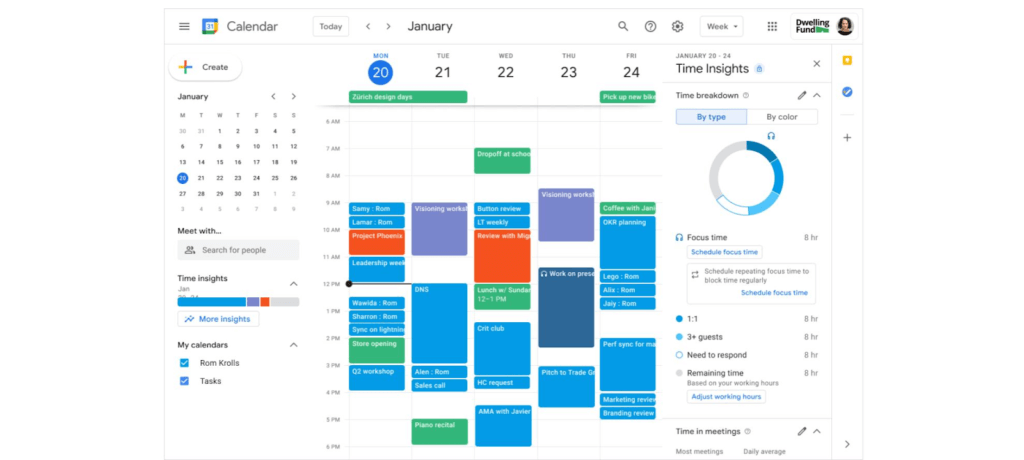
Creating positive outcomes with a culture focused on integrated work environments
The shift to hybrid work has already started leading to more meaningful engagements among all employees. Video calls have connected the new, tech savvy generation of workers with more experienced workers. In a Fedscoop Radio podcast on embracing hybrid-work strategies and tools, Gary Dannoff, Global Google Workspace Strategic Alliance Leader, noted that multigenerational teams with a 25-year age gap between team members are 75% more likely to have positive outcomes than teams with a smaller age span or none. As we return to the office, let’s engage with and support this new culture of cross-cultural, cross-generational, and cross-geographic collaborative environments created by the challenges we all adapted to during the pandemic.
Google Workspace supports a shift toward future-ready workplace cultures while providing the empathy and confidence needed for returning employees. Danoff also explains that to create a “future-proof” culture, you need to shift your mindset towards building a workplace that is future-ready. Using modern technology to foster collaboration in an evolving work environment helps organizations transform how work is done.
Collaborative technology facilitates productivity and constituent engagement
Agencies around the country are embracing the new era of hybrid work. The State of Arizona migrated 36,000 employees to Google Workspace with little disruption to the way people did their jobs. Now, Arizona is planning to expand their platform to support even more departments that require highly regulated data.
To help constituents get back to work, states like Rhode Island and Wisconsin have created Virtual Career Centers that leverage Google Cloud solutions, which includes Google Workspace, where constituents can schedule meetings and video conferences with career coaches, develop and collaborate on resumes using cloud-based document storage, communicate directly with job recruiters, attend virtual job fairs, and apply to open positions.
For more ideas on how to bring a collaborative, innovative culture into the workplace, catch up on content from the Google Workspace Summit.
1 Source: https://www.pwc.com/us/en/library/covid-19/us-remote-work-survey.html#content-free-1-0f39
Active Assist Expands Globally: Unleashing Cloud Optimization Insights Worldwide

1283
Of your peers have already read this article.
3:30 Minutes
The most insightful time you'll spend today!
Active Assist provides insights and recommendations to help Google Cloud customers proactively optimize their cloud environments for cost, security, performance, and sustainability. If you’re like most customers, you’ve likely encountered these insights and recommendations in the console — either in the Recommendations Hub or embedded on a resource page, like IAM or the VM list pages. (Note that for the rest of this post, we’ll use the word “recommendations” to mean “insights and recommendations.”)
We heard from customers who love recommendations that it should be easier to discover and work with these valuable suggestions across an entire organization, so last year we launched the Recommendations BigQuery export feature to Preview. This allows you to automatically export the recommendations to a BigQuery dataset, which you can then investigate with tools like DataStudio or Looker, and integrate with your company’s existing monitoring solutions and workflows.
Many of you have told us how powerful this feature is, so we’ve been working hard on improvements to make it even more useful. We’re happy to announce that BQ Export 1.0 is now in GA, and that BQ Export 2.0 is in Preview, with new support for Billing Account-level recommendations and cost optimization recommendations that include discount information. This post will cover what’s new with Active Assist BQ Export, as well as a couple other new features of Active Assist.
New features to Active Assist BigQuery Export
Before we dive into the details, if you’re new to Recommendations BQ Export check out our handy getting started guide. It covers the permissions you’ll need and how to set up the export, including instructions for using a service account. It also includes some sample queries and instructions for interacting with the data using Google Sheets. You may also want to check out our prior blog post showing how to optimize your cloud spend with BigQuery and Looker.
Now, on to what’s new!
1. Non-project scoped recommendations
You can now see non-project scoped recommendations, such as billing account, organization, and folder-level recommendations in your export to BigQuery. This ensures that in your export, you are able to see the full portfolio of recommendations that are available to you.
2. Custom contract Pricing
If you have any applicable custom contract pricing for your company, your cost-related recommendations now take those into account (based on your historical costs) in the cost saving calculation when you export them to BigQuery. This will ensure that you have the most accurate cost savings data we have for you and your organization to help you make the best judgment and prioritization when choosing to adopt recommendations. However, you must have the correct permissions first in order to see the custom contract pricing. If the user executing the export to BigQuery does not have the correct permissions, you may continue to see list pricing in your estimated savings. Also, note that the console UI and the Recommender API already have this support.
3. Export now available globally
Customers outside of the US can now set up an export of recommendations to a BigQuery dataset.
Improvements to Active Assist discoverability and usability
1. Global Recommender Viewer role: You can now add the global Recommender Viewer role, which gives you view access to all insights and recommendations available to you, simplifying permission management for new recommenders. Newly launched recommendations will also automatically be added as they become generally available.
2. Dismiss recommendations via Recommender API: You can now directly dismiss recommendations via our API, allowing you to focus on the recommendations you care about and work more efficiently.
3. Shareable links: Another feature that quietly launched recently is the availability of shareable URLs that link to recommendation details in the console. You can access these links in the UI from the upper right of the details panel of any recommendation.
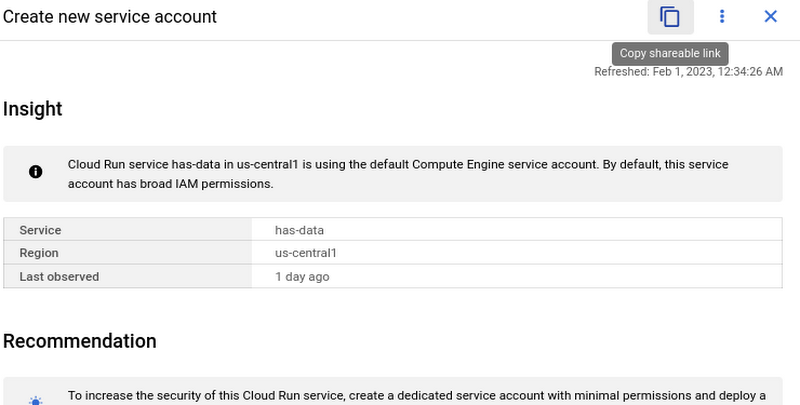
However, these links become even more powerful when combined with Recommendations BigQuery Export. The URLs all have a standard format. This means that within the BigQuery export tables you can easily calculate a new column containing these links using an expression like:
“https://console.cloud.google.com/home/recommendations/view-link/” +
name +
“?project=” +
cloud_entity_id
This example is for project level recommendations (where cloud_entity_type = PROJECT_NUMBER).
For cloud_entity_type = FOLDER, use:
“https://console.cloud.google.com/home/recommendations/view-link/” +
name +
“?folder=” +
cloud_entity_id
For cloud_entity_type = ORGANIZATION, use
“https://console.cloud.google.com/home/recommendations/view-link/” +
name +
“?organizationId=” +
cloud_entity_id
These links can then be embedded in your reports and dashboards, or used by other BigQuery clients.
As a reminder, if you’re interested in setting up reports or dashboards using Recommendations BigQuery Export, take a look at this previous blog post for some great ideas, or you can reference our getting started guide. If you have any feedback, please feel free to reach out to active-assist-feedback@google.com.
How Google Meet Keeps Your Video Conferences Secure

6803
Of your peers have already read this article.
4:30 Minutes
The most insightful time you'll spend today!
All over the world, businesses, schools and users depend on G Suite to help them stay connected and get work done. Google designs, builds, and operates our products on a secure foundation, aimed at thwarting attacks and providing the protections needed to keep you safe. G Suite and Google Meet are no exception.
Google Meet’s security controls are turned on by default, so that in most cases, organizations and users won’t have to do a thing to ensure the right protections are in place. Here, we’ll summarize the key capabilities of Google Meet that help protect you.
Proactive protections to combat abuse and block hijacking attempts
Google Meet employs an array of counter-abuse protections to keep your meetings safe. These include anti-hijacking measures for both web meetings and dial-ins.
Google Meet makes it difficult to programatically brute force meeting IDs (this is when a malicious individual attempts to guess the ID of a meeting and make an unauthorized attempt to join it) by using codes that are 10 characters long, with 25 characters in the set. We limit the ability of external participants to join a meeting more than 15 minutes in advance, reducing the window in which a brute force attack can even be attempted. External participants cannot join meetings unless they’re on the calendar invite or have been invited by in-domain participants. Otherwise, they must request to join the meeting, and their request must be accepted by a member of the host organization.
In addition, we’re rolling out several features to help schools keep meetings safe and improve the remote learning experiences for teachers and students, including:
- Only meeting creators and calendar owners can mute or remove other participants. This ensures that instructors can’t be removed or muted by student participants.
- Only meeting creators and calendar owners can approve requests to join made by external participants. This means that students can’t allow external participants to join via video, and that external participants can’t join before the instructor.
- Meeting participants can’t rejoin nicknamed meetings once the final participant has left. This means if the instructor is the last person to leave a nicknamed meeting, students can’t join later without the instructor present.

Secure deployment and access controls for admins and end-users
To limit the attack surface and eliminate the need to push out frequent security patches, Google Meet works entirely in your browser. This means we do not require or ask for any plugins or software to be installed if you use Chrome, Firefox, Safari, or Microsoft Edge. On mobile, we recommend that you install the Google Meet app.
To help ensure that only authorized users administer and access Meet services, we support multiple 2-Step Verification options for accounts that are secure and convenient. These include hardware and phone-based security keys and Google prompt. Additionally, Google Meet users can enroll their account in our Advanced Protection Program (APP), which provides our strongest protections available against phishing and account hijacking and is specifically designed for the highest-risk accounts.
For G Suite Enterprise and G Suite for Education customers, we offer Access Transparency, which logs any Google access to Google Meet recordings stored in Drive, along with the reason for the access (support team actions that you might have requested, for example). Customers can also use data regions functionality to store select/covered data of Google Meet recordings in specific regions (i.e. US or Europe).
Secure, compliant, and reliable meeting infrastructure
In Google Meet, all data is encrypted in transit by default between the client and Google for video meetings on a web browser, on the Android and iOS apps, and in meeting rooms with Google meeting room hardware. Meet adheres to IETF security standards for Datagram Transport Layer Security (DTLS) and Secure Real-time Transport Protocol (SRTP). For every person and for every meeting, Meet generates a unique encryption key, which only lives as long as the meeting, is never stored to disk, and is transmitted in an encrypted and secured RPC (remote procedure call) during the meeting setup.
Security is an integral part of all our operations at Google. Our team of full-time security and privacy professionals supports our software engineering and operations to ensure that security is always a part of how we build and run our services. All of our Google Cloud and G Suite customers benefit from these capabilities, including:
- Secure-by-design infrastructure: Google Meet benefits from Google Cloud’s defense-in-depth approach to security, which utilizes the built-in protections and global-private network that Google uses to secure your information and safeguard your privacy.
- Compliance certifications: Our Google Cloud products, including Google Meet, regularly undergo independent verification of their security, privacy, and compliance controls, including validation against standards such as SOC, ISO/IEC 27001/17/18, HITRUST, and FedRAMP. We support your compliance requirements around regulations such as GDPR and HIPAA, as well as COPPA and FERPA for education.
- Incident management: We have a rigorous process for managing data and security incidents that specifies actions, escalations, mitigation, resolution, and notification of any potential incidents impacting customer data.
- Reliability: Google’s network is engineered to accommodate peak demand and handle future growth. Our network is resilient and engineered to accommodate the increased activity we’ve seen on Google Meet.
- Transparency: At Google Cloud, we’re clear about our commitments regarding customer data: we process customer data according to your instructions; we never use customer data for advertising purposes; and we publish the locations of our Google data centers, which are highly available, resilient, and secure.
During COVID-19 and beyond, we will continue to protect Google Meet users and their data, and keep innovating with new features to make our tools helpful, secure, and safe.
Partnering with Google Cloud is the Key Behind Recent Healthcare Innovations

8827
Of your peers have already read this article.
2:00 Minutes
The most insightful time you'll spend today!
It’s simply amazing to witness how some of our systems integrators employ Google Cloud solutions to drive innovation in ways we at Google may never have considered—especially in healthcare. According to analyst firm MarketsandMarkets, the market for the Cloud in healthcare is projected to grow 43% between 2020 and 2025 to nearly $65 billion, fueled by the need for better technology infrastructures and faster digital transformation.
Healthcare and life sciences communities are looking to Google Cloud and its Service engagement model partners to improve collaboration and activate the power of medical data. These transformations deliver robust data analytics and bring a much deeper perspective into health epidemics like COVID-19 to help save lives.
In the healthcare and life sciences industry, our Google Cloud partners and customers provide constant energy and inspiration–and are the magic in some key healthcare innovations globally.
Let me show you how they are solving real-world business challenges.
Improving collaboration in Healthcare
Cloudbakers and Comanche County Memorial Hospital transitioned 2,000 employees to Google Workspace to improve collaboration, reduce costs, and increase security. By implementing a system that requires less maintenance while enabling mobile access to data and true collaboration, Comanche County Memorial Hospital saves $175,000 annually on licenses and helps medical professionals spend more time with patients.
“We chose Google Workspace because it cost a quarter of what we were paying previously, offers the kind of modern features that healthcare facilities need, and gave us data security and peace of mind.” —James Wellman, CIO, Comanche County Memorial Hospital
Accessing previously locked down medical data
Google Cloud and Quantiphi supported advances in cloud-based machine learning services to reduce infrastructure costs, unlock new paths of treatment, and dramatically reduce the amount of time it takes to evaluate scanned imagery following a stroke. John Hopkins University BIOS Division has been working on medical imaging to accelerate insights from scans on approximately 500 patients from 2,500 hours to 90 minutes, and lead to more accurate decision-making for brain injury patients that will ultimately improve medical outcomes.
“We’ve aligned closely with the goal of showing that a cloud-based, AI-driven approach is robust and that it can be performed while protecting personal PHI. In terms of costs, the cloud has definitely reduced some of the traditional financial demands of our research.” —Daniel F. Hanley, Jr., M.D., Director, Johns Hopkins University BIOS Division
Improving data access with the flexibility of Google Cloud
With the help of MediaAgility, TRIARQ migrated to Google Cloud to modernize their platform, build new applications, and expand their global footprint. With BigQuery, TRIARQ can now consolidate all transactional data, past and present, into a single location to report on specific insights and predict future data from e-prescriptions to complex revenue-cycle data and value-base analysis.
“The future of this industry will need to be a global one, and we can no longer be stuck in legacy systems if we want to survive. Having a team that is passionate about supporting us in this journey is definitely a plus point.”—Yaw Kwakye, Co-founder and Chief Architect, TRIARQ
Increasing visibility to COVID-19 outbreaks for actionable insights
As part of its response to the COVID-19 pandemic, HCA Healthcare chose to work with Google Cloud and SADA to create a national portal that increases visibility into outbreaks in 3,100 counties across the country in just 8 weeks. Now, the portal generates 30,000 new analytical views each day that can help inform private and public sector decision making for reopenings, closures, hot spots, and many other population health management activities.
“This project required deep knowledge of AI, and consumer-facing platforms, as well as healthcare. Google brought together the ideal combination of product, people, and partners. Google Cloud’s healthcare-specific products along with SADA’s expertise in the healthcare IT space made this partnership the perfect choice to move quickly and intelligently.”—Dr. Edmund Jackson, Chief Data Officer, HCA Healthcare
We’re committed to building the technology, resources, and services through Partner Advantage to help our partners address this opportunity. Looking for a solution focused partner in your region who has achieved Expertise and/or Specialization in your industry? Search our Global Partner Directory. Not yet a Google Cloud partner? Visit Partner Advantage and learn how to become one today!
Google’s Intelligent Products Essentials Assist Manufacturers in Product Development Journey

6925
Of your peers have already read this article.
3:00 Minutes
The most insightful time you'll spend today!
Expectations for both consumer and commercial products have changed. Consumers want products that evolve with their needs, adapt to their preferences, and stay up-to-date over time. Manufacturers, in turn, need to create products that provide engaging customer experiences not only to better compete in the marketplace, but also to provide new monetization opportunities.
However, embedding intelligence into new and existing products is challenging. Updating hardware is costly, and existing connected products do not have the capability to add new features. Furthermore, manufacturers do not have sufficient customer insights due to product telemetry and customer data silos, and may lack the AI expertise to quickly develop and deploy these features.
That’s why today we’re launching Intelligent Products Essentials, a solution that allows manufacturers to rapidly deliver products that adapt to their owners, update features over-the-air using AI at the edge, and provide customer insights using analytics in the cloud. The solution is designed to assist manufacturers in their product development journeys—whether developing a new product or enhancing existing ones.
With Intelligent Products Essentials, manufacturers can:
- Personalize customer experiences: Provide a compelling ownership experience that evolves over the lifetime of the product. For example, a chatbot that contextualizes responses based on product status and customer profile.
- Manage and update products over-the-air: Deploy updates to products in the field, gather performance insights and evolve capabilities over time with monetization opportunities.
- Predict parts and service issues: Detect operating thresholds, anomalies and predict failures to proactively recommend service using AI, reducing warranty claims, decreasing parts shortages and increasing customer satisfaction.
In order to help manufacturers quickly deploy these use cases and many more, Intelligent Products Essentials provides the following:
- Edge connections: Connect and ingest raw or time-series product telemetry from various device platforms utilizing IoT Core or Pub/Sub and enable deployment and management of firmware over-the-air and machine learning models with Vertex AI at the edge.
- Ownership App Template: Easily build connected product companion apps that work on smartphones, tablets, and computers. Use a pre-built API and accompanying sample app that can incorporate product or device registration, identity management, and provide application behavior analytics using Firebase.
- Product fleet management: Manage, update and analyze fleets of connected products via APIs, Google Kubernetes Engine, and Looker.
- AI services: Create new features or capabilities for your products using AI and machine learning products such as DialogFlow, Vision AI, AutoML, all from Vertex AI.
Enterprise data integration: Integrate data sources such as Enterprise Asset Management (EAM), Enterprise Resource Planning (ERP), Customer Relationship Management (CRM) systems and others using Dataflow and BigQuery.
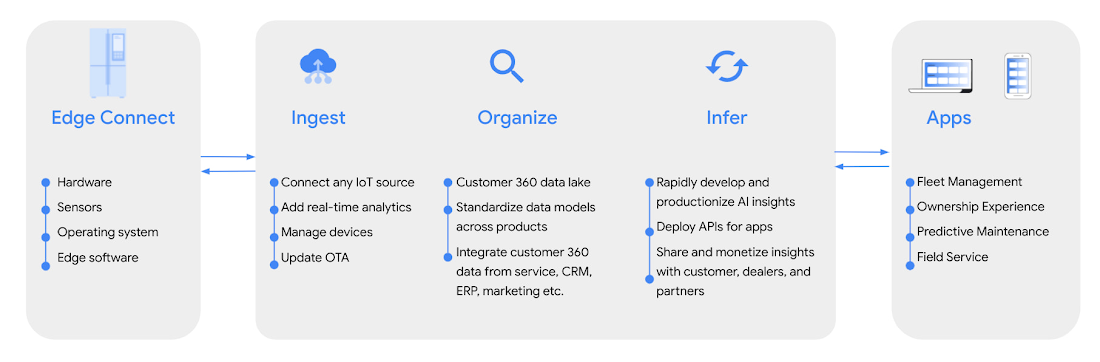
Intelligent Products Essentials helps manufacturers build new features across consumer, industrial, enterprise, and transportation products. Manufacturers can implement the solution in-house, or work with one of our certified solution integration partners like Quantifi and Softserve.
“The focus on intelligent products that Google Cloud is deploying provides a digital option for manufacturers and users. At its heart, systems like Intelligent Product Essentials are all about decision making. IDC sees faster and more effective decision-making as the fundamental reason for the drive to digitize products and processes. It’s how you can make faster and more effective decisions to meet heightened customer expectations, generate faster cash flow, and better revenue realization,” said Kevin Prouty, Group Vice President at IDC. “Digital offerings like Google’s Intelligent Product Essentials potentially go the last mile with the ability to connect the digital thread all the way through to the final user.”
Customers adopting Intelligent Products Essentials
GE Appliances, a Haier company, are enhancing their appliances using new AI-powered intelligent features to enable:
- Intelligent cooking: Help cook the perfect meal to personal preferences, regardless of your expertise and abilities in the kitchen.
- Frictionless service: Build smart appliances that know when they need maintenance and make it simple to take action or schedule services.
- Integrated digital lifestyle: Make appliances useful at every step of the way by integrating them with digital lifestyle services – for example, automating appliance behaviors according to customer calendars, such as oven preheating or scheduling the dishwasher to run in the late evening.
“Intelligent Products Essentials enhances our smart appliances ecosystem, offering richer consumer habit insights. This enables us to develop and offer new features and experiences to integrate with their digital lifestyle.“ —Shawn Stover, Vice-president Smart Home Solutions at GE Appliances.https://www.youtube.com/embed/zaWAJN8aKOw?enablejsapi=1&
Serial 1, Powered by Harley-Davidson, is using Intelligent Product Essentials to manage and update its next generation eBicycles, and personalize its customers’ digital ownership experiences.
“At Serial 1, we are dedicated to creating the easiest and most intuitive way to experience the fun, freedom, and adventure of riding a pedal-assist electric bicycle. Connectivity is a key component of delivering that mission, and working together to integrate Intelligent Product Essentials into our eBicycles will ensure that our customers enjoy the best possible user experience.”— Jason Huntsman, President, Serial 1.
Magic Leap, an augmented reality pioneer with industry-leading hardware and software, is building field service solutions with Intelligent Products Essentials with the goal of connecting manufacturers, dealers, and customers to more proactive and intelligent service.
“We look forward to using Intelligent Products Essentials to enable us to rapidly integrate manufacturers’ product data with dealer service partners into our field service solution. We’re excited to partner with Google Cloud as we continue to push the boundaries of physical interaction with the digital world.” — Walter Delph, Chief Business Officer, Magic Leap
Intelligent Product Essentials is available today. To learn more, visit our website.
More Relevant Stories for Your Company




L’Oréal: Managing Big-data Complexity with Google Cloud
L’Oreal is a global company with a presence in 150 countries worldwide. Between managing all of its brands and requirements for different countries, L’Oreal looks to data to make insightful business decisions. How does L’Oreal unify its data across all its systems and databases? How does L’Oreal make the data

How Swiggy’s UK Competitor Expanded to 14 Countries in Just Three Years
Deliveroo is the fastest-growing technology company in the United Kingdom, and the first-ever to win Deloitte's UK Technology Fast 50 two years in a row. Founded in 2013, the food courier service achieved a three-year growth rate of over 15,000% to 2018, expanding beyond its London base to operate in 14 countries in



How G Suite Makes it Easy to Work with Microsoft Office and Exchange
A silent transformation is taking shape in organizations today. Employees are looking for new ways to discover new ideas, and work together anytime, anywhere to ensure businesses are always on. Without IT’s help that’s not possible. And to make this possible IT teams are working over-time to ensure seamless collaboration

Enhancing SAP Build Process Automation with Google Document AI and Google Workspace
SAP Build Process Automation is designed to optimize business processes and boost efficiency. The platform helps both business users and developers alike digitize core workflows and incorporate artificial intelligence (AI) into time consuming and error-prone manual tasks. All digital paths can benefit from automation. The pandemic, supply chain shortages, and
