





Kitabisa is shaping the future of fundraising with Google Cloud

3116
Of your peers have already read this article.
3:30 Minutes
The most insightful time you'll spend today!
The name Kitabisa means “we can” in Bahasa Indonesia, the official language of Indonesia, and captures our aspirational ethos as Indonesia’s most popular fundraising platform. Since 2013, Kitabisa has been collecting donations in times of crisis and natural disasters to help millions in need. Pursuing our mission of “channeling kindness at scale,” we deploy AI algorithms to foster Southeast Asia’s philanthropic spirit with simplicity and transparency.
Unlike e-commerce platforms that can predict spikes in demand, such as during Black Friday, Kitabisa’s mission of raising funds when disasters like earthquakes strike is by definition unpredictable. This is why the ability to scale up and down seamlessly is critical to our social enterprise.
In 2020, Indonesia’s COVID-19 outbreak coincided with Ramadan. Even in normal times, this is a peak period, as the holy month inspires charitable activity. But during the pandemic, the crush of donations pushed our system beyond the breaking point. Our platform went down for a few minutes just as Indonesia’s giving spirit was at its height, creating frustrations for users.
A new cloud beginning
That’s when we realized we needed to embark on a new cloud journey, moving from our monolithic system to one based on microservices. This would enable us to scale up for surges in demand, but also scale down when a wave of giving subsides. We also needed a more flexible database that would allow us to ingest and process the vast amounts of data that flood into our system in times of crisis.
These requirements led us to re-architect our entire platform on Google Cloud. Guided by a proactive Google Cloud team, we migrated to Google Kubernetes Engine (GKE) for our overall containerized computing infrastructure, and from Amazon RDS to Cloud SQL for MySQL and PostgreSQL, for our managed database services.
The result surpassed our expectations. During the following year’s Ramadan season, we gained a 50% boost in computing resources to easily handle escalating crowdfunding demands on our system. This was thanks to both the seamless scaling of GKE and recommendations from the Google Cloud Partnership team on deploying and optimizing Cloud SQL instances with ProxySQL to optimize our managed database instances.
A progressive journey to kindness at scale
While Kitabisa’s mission has never wavered, our journey to optimized performance took us through several stages before we ultimately landed on our current architecture on Google Cloud.
Origins on a monolithic provider
Kitabisa was initially hosted on DigitalOcean, which only allowed us to run monolithic applications based on virtual machines (VMs) and a stateful managed database. This meant manually adding one VM at a time, which led to challenges in scaling up VMs and core memory when a disaster triggered a spike in donations.
Conversely, when a fundraising cycle was complete, we could not scale down automatically from the high specs of manually provisioned VMs, which was a strain on manpower and budgetary resources.
Transition to containers
To improve scalability, Kitabisa migrated from DigitalOcean to Amazon Web Services (AWS), where we hoped deploying load balancers would provide sufficient automated scaling to meet our network needs. However, we still found manual configurations to be too costly and labor-intensive.
We then attempted to improve automation by switching to a microservices-based architecture. But on Amazon Elastic Container Service (Amazon ECS) we hit a new pain point: when launching applications, we needed to ensure that they were compatible with CloudFormation in deployment, which reduced the flexibility of our solution building due to vendor locking.
We decided it was “never too late” to migrate to Kubernetes, which is a more agile containerized solution. Given that we were already using AWS, it seemed natural to move our microservices to Amazon Elastics Kubernetes Service (Amazon EKS). But we soon found that provisioning Kubernetes clusters with EKS was still a manual process that required a lot of configuration work for every deployment.
Unlocking automated scalability
At the height of the COVID-19 crisis, faced with mounting demands on our system, we decided it was time to give Google Kubernetes Engine (GKE) a try. Since Kubernetes is a Google-designed solution, it seemed likeliest that GKE would provide the most flexible microservices deployment, alongside better access to new features.
Through a direct comparison with AWS, we discovered that everything from provisioning Kubernetes clusters to deploying new applications became fully automated, with the latest upgrades and minimal manual setups. By switching to GKE, we can now absorb any unexpected surge in donations, and add new services without expanding the size of our engineering team. The transformative value of GKE became apparent when severe flooding hit Sumatra in November 2021, affecting 25,000 people. Our system easily handled the 30% spike in donations.
Moving to Cloud SQL and ProxySQL
Kitabisa was also held back by its monolithic database system, which was prone to crashing under heavy demand. We started to solve the problem by moving from a stateful DigitalOcean database to a stateless Redis one, which freed us from relying on a single server, giving us better agility and scale.
But the strategy left a major pain point because it still required us to self-manage databases. In addition, we were experiencing high database egress costs due to the need to execute data transfers from a non-Google Cloud database into BigQuery.
In December 2021, we migrated our Amazon RDS to Cloud SQL for MySQL, and immediately saved 10% in egress costs per month. But one of the greatest benefits came when the Google Cloud team recommended using the open source proxy for MySQL to improve the scalability and stability of our data pipelines.
Cloud SQL’s compatibility allowed us to use connection pooling tools such as ProxySQL to better load balance our application. Historically, creating a direct connection to a monolithic database was a single point of failure that could end up in a crash. With Cloud SQL plus ProxySQL, we create layers in front of our database instances. It serves as a load balancer that allows us to connect simultaneously to multiple database instances, by creating a primary and a read replica instance. Now, whenever we have a read query, we redirect the query to our read replica instance instead of the primary instance.
This configuration has transformed the stability of our database environment because we can have multiple database instances running at the same time, with the load distributed across all instances. Since switching to Cloud SQL as our managed database, and using ProxySQL, we have experienced zero downtime on our fundraising platform even when a major crisis hits.
We are also saving costs. Rather than having a separate database for each different Kubernetes cluster, we’ve merged multiple database instances into one instance. We now group databases according to business units instead of per service, yielding database cost reductions of 30%.
Streamlining with Terraform deployment
There’s another key way in which Google Cloud managed services have allowed us to optimize our environment: using Terraform as an infrastructure-as-a-code tool to create new applications and upgrades to our platform.
We also managed to automate the deployment of Terraform code into Google Cloud with the help of Cloud Build, and no human intervention. That means our development team can focus on creative tasks, while Cloud Build deploys a continuous stream of new features to Kitabisa.
The combination of seamless scalability, resilient data pipelines, and creative freedom is enabling us to drive the future of our platform, expanding our mission to inspire people to create a kinder world in other Asian regions.
We believe that having Google Cloud as our infrastructure backbone will be a critical part of our future development, which will include adding exciting new insurtech features. Now firmly established on Google Cloud, we can go further in shaping the future of fundraising to overcome turbulent times.
Report on API-led Digital Transformations in 2020 and the Future

6801
Of your peers have already read this article.
1:30 Minutes
The most insightful time you'll spend today!
In 2020, many businesses across industries turned their focus and investments towards digital strategies. APIs being an integral part of every organization’s digital disruption, will grow in relevance throughout 2021. Read the report to gain more insights on driving API-led digital transformations and in-depth analysis of Google Cloud’s Apigee API Management Platform usage data, case studies and third-party surveys conducted with tech leaders.
5042
Of your peers have already watched this video.
21:00 Minutes
The most insightful time you'll spend today!
Uber’s Story of Scaling Their App with Millions of Concurrent Requests
Uber has millions of concurrent customers who use the platform to book rides and place food delivery orders, generating billions of database transactions per day. In just a click of a button, Uber captures users’ intent which bases their fulfillment model to meet the customers’ demand, and match it to active providers that address their demand with supply.
Uber’s fulfillment platform capability is the lifeline powering every line of business and also allows rapid scaling of new verticals. Hundreds of microservices at Uber depend on this fulfillment platform as a source of truth for all their active booking, delivery or order session. The events generated by this platform are used by hundreds of offline data sets to power business decisions. Additionally over hundreds of developers at Uber extend the platform with APIs, events and codes to build 120+ unique fulfillment flows!
Watch the video to learn about Uber’s decision to move from on-prem to Google Cloud’s Cloud Spanner while still taking live orders at scale and meeting customers’ expectations.

Microservices Done Right: How Indian Businesses Can Build a Highly Scalable Business
DOWNLOAD E-BOOK4320
Of your peers have already downloaded this article
4:30 Minutes
The most insightful time you'll spend today!
Microservices represent a new form of API-based application architecture that enables enterprises to leverage continuous iteration/continuous deployment (CI/CD) tools and processes within containerized architectures and PaaS.
Nearly 70% of organizations are either using or investigating microservices, and nearly one-third are using them in production.
These are powerful techniques popularized by many companies, including Amazon, Netflix, and Airbnb. Amazon championed the approach and proved it to be useful in ensuring effective communication within teams and enabling the company to deploy code to production hundreds of times of day two.
At Netflix, one of the earliest adopters of microservices, roughly 30 independent teams have delivered over 500 microservices.
However, companies have struggled with security, with a lack of visibility into usage and performance of the microservices APIs, and with building agile microservices for clean reuse.
Their challenges include bolstering security in a zero-trust environment, ensuring compliance, providing transparent control to mitigate risk, improving the developer experience, and encouraging and increasing microservices reuse.
Managed microservices are the solution; companies are making strategic investments in API management platforms for their microservices success. All microservices have APIs and enterprises need to manage their microservices in the same way as they manage APIs.
5 Best Practices for Cloud Cost Optimization

5789
Of your peers have already read this article.
3:30 Minutes
The most insightful time you'll spend today!
When customers migrate to Google Cloud Platform (GCP), their first step is often to adopt Compute Engine, which makes it easy to procure and set up virtual machines (VMs) in the cloud that provide large amounts of computing power. Launched in 2012, Compute Engine offers multiple machine types, many innovative features, and is available in 20 regions and 61 zones!
Compute Engine’s predefined and custom machine types make it easy to choose VMs closest to your on-premises infrastructure, accelerating the workload migration process cost effectively. Cloud allows you the pricing advantage of ‘pay as you go’ and also provides significant savings as you use more compute with Sustained Use Discounts.
As Technical Account Managers, we work with large enterprise customers to analyze their monthly spend and recommend optimization opportunities. In this blog, we will share the top recommendations that we’ve developed based on our collective experience working with GCP customers.
Getting ready to save
Before you get started, be sure to familiarize yourself with the VM instance pricing page—required reading for anyone who needs to understand the Compute Engine billing model and resource-based pricing. In addition to those topics, you’ll also find information about the various Compute Engine machine types, committed use discounts and how to view your usage, among other things.
Another important step to gain visibility into your Compute Engine cost is using Billing reports in the Google Cloud Console and customizing your views based on filtering and grouping by projects, labels and more. From there you can export Compute Engine usage details to BigQuery for more granular analysis. This allows you to query the datastore to understand your project’s vCPU usage trends and how many vCPUs can be reclaimed. If you have defined thresholds for the number of cores per project, usage trends can help you spot anomalies and take proactive actions. These actions could be rightsizing the VMs or reclaiming idle VMs.
Now, with these things under your belt, let’s go over the five ways you can optimize your Compute Engine resources that we believe will give you the most immediate benefit.
1. Apply Compute Engine rightsizing recommendations
Compute Engine’s rightsizing recommendations feature provides machine type recommendations that are generated automatically based on system metrics gathered by Stackdriver Monitoring over the past eight days. Use these recommendations to resize your instance’s machine type to more efficiently use the instance’s resources. It also recommends custom machine types when appropropriate. Compute Engine makes viewing, resizing and other actions easier right from the Cloud Console as shown below.
Recently, we expanded Compute Engine rightsizing capabilities from just individual instances to managed instance groups as well. Check out the documentation for more details.

For more precise recommendations, you can install the Stackdriver Monitoring agent which collects additional disk, CPU, network, and process metrics from your VM instances to better estimate your resource requirements. You can also leverage the Recommender API for managing recommendations at scale.
2. Purchase Commitments
Our customers have diverse workloads running on Google Cloud with differing availability requirements. Many customers follow a 70/30 rule when it comes to managing their VM fleet—they have constant year-round usage of ~70%, and a seasonal burst of ~30% during holidays or special events.
If this sounds like you, you are probably provisioning resources for peak capacity. However, after migrating to Google Cloud, you can baseline your usage and take advantage of deeper discounts for Compute workloads. Committed Use Discounts are ideal if you have a predictable steady-state workload as you can purchase a one or three year commitment in exchange for a substantial discount on your VM usage.
We recently released a Committed Use Discount analysis report in the Cloud Console that helps you understand and analyze the effectiveness of the commitments you’ve purchased. In addition to this, large enterprise customers can work with their Technical Account Managers who can help manage their commitment purchases and work proactively with them to increase Committed Use Discount coverage and utilization to maximize their savings.
3. Automate cost optimizations
The best way to make sure that your team is always following cost-optimization best practices is to automate them, reducing manual intervention.
Automation is greatly simplified using a label—a key-value pair applied to various Google Cloud services. For example, you could label instances that only developers use during business hours with “env: development.” You could then use Cloud Scheduler to schedule a serverless Cloud Function to shut them down over the weekend or after business hours and then restart them when needed. Here is an architecture diagram and code samples that you can use to do this yourself.
Using Cloud Functions to automate the cleanup of other Compute Engine resources can also save you a lot of time and money. For example, customers often forget about unattached (orphaned) persistent disk, or unused IP addresses. These accrue costs, even if they are not attached to a virtual machine instance. VMs with the “deletion rule” option set to “keep disk” retain persistent disks even after the VM is deleted. That’s great if you need to save the data on that disk for a later time, but those orphaned persistent disks can add up quickly and are often forgotten! There is a Google Cloud Solutions article that describes the architecture and sample code for using Cloud Functions, Cloud Scheduler, and Stackdriver to automatically look for these orphaned disks, take a snapshot of them, and remove them. This solution can be used as a blueprint for other cost automations such as cleaning up unused IP addresses, or stopping idle VMs.
4. Use preemptible VMs
If you have workloads that are fault tolerant, like HPC, big data, media transcoding, CI/CD pipelines or stateless web applications, using preemptible VMs to batch-process them can provide massive cost savings. In fact, customer Descartes Labs reduced their analysis costs by more than 70% by using preemptible VMs to process satellite imagery and help businesses and governments predict global food supplies.
Preemptible VMs are short lived— they can only run a maximum of 24 hours, and they may be shut down before the 24 hour mark as well. A 30-second preemption notice is sent to the instance when a VM needs to be reclaimed, and you can use a shutdown script to clean up in that 30-second period. Be sure to fully review the full list of stipulations when considering preemptible VMs for your workload. All machine types are available as preemptible VMs, and you can launch one simply by adding “-preemptible” to the gcloud command line or selecting the option from the Cloud Console.
Using preemptible VMs in your architecture is a great way to scale compute at a discounted rate, but you need to be sure that the workload can handle the potential interruptions if the VM needs to be reclaimed. One way to handle this is to ensure your application is checkpointing as it processes data, i.e., that it’s writing to storage outside the VM itself, like Google Cloud Storage or a database. As an example, we have sample code for using a shutdown script to write a checkpoint file into a Cloud Storage bucket. For web applications behind a load balancer, consider using the 30-second preemption notice to drain connections to that VM so the traffic can be shifted to another VM. Some customers also choose to automate the shutdown of preemptible VMs on a rolling basis before the 24-hour period is over, to avoid having multiple VMs shut down at the same time if they were launched together.
5. Try autoscaling
Another great way to save on costs is to run only as much capacity as you need, when you need it. As we mentioned earlier, typically around 70% of capacity is needed for steady-state usage, but when you need extra capacity, it’s critical to have it available. In an on-prem environment, you need to purchase that extra capacity ahead of time. In the cloud, you can leverage autoscaling to automatically flex to increased capacity only when you need it.
Compute Engine managed instance groups are what give you this autoscaling capability in Google Cloud. You can scale up gracefully to handle an increase in traffic, and then automatically scale down again when the need for instances is lowered (downscaling). You can scale based on CPU utilization, HTTP load balancing capacity, or Stackdriver Monitoring metrics. This gives you the flexibility to scale based on what matters most to your application.
High costs do not compute
As we’ve shown above, there are many ways to optimize your Compute Engine costs. Monitoring your environment and understanding your usage patterns is key to understanding the best options to start with, taking the time to model your baseline costs up front. Then, there are a wide variety of strategies to implement depending on your workload and current operating model.
For more on cost management, check out our cost management video playlist. And for more tips and tricks on saving money on other GCP services, check out our blog posts on Cloud Storage, Networking and BigQuery cost optimization strategies. We have additional blog posts coming soon, so stay tuned!
Reactive Programming on Google Maps Platform: Watch Video to Learn

5306
Of your peers have already read this article.
1:30 Minutes
The most insightful time you'll spend today!
The Google Maps Platform Android SDK supports extensions for reactive programming, which helps you write code to handle asynchronous operations.
Write reactive and responsive mapping applications with Google Maps Platform
In mobile apps, asynchronous events can happen at any point in time: user touch events, waiting for network calls to complete, or receiving push notifications, to name a few. As an app developer, accounting for these events and composing them with other asynchronous events can be challenging. Reactive programming is an alternative to passing callbacks for different events and helps simplify the process of working with asynchronous events. In reactive programming, events are modeled as a stream, emitting items over time.
https://youtube.com/watch?v=1TmJvOZfBVQ%3Fenablejsapi%3D1%26
There are two libraries you can use to write reactive code: Kotlin Flows and RxJava. The next two videos show you how to use each one.
Writing reactive and responsive mapping applications using Kotlin
If you’re a Kotlin developer looking to use Coroutines and Flows, the KTX library allows you to use Kotlin Flows to receive events. The Maps KTX library includes extension functions that return Kotlin Flow objects, so you can listen to events in a reactive manner. Unlike suspending functions, which return a single value, Kotlin Flows can return several values over time. For example, you can use a Flow to receive camera event changes over time. To get started using Kotlin Flows in your app, include the Maps KTX library in the dependencies section in your build.gradle file.
https://youtube.com/watch?v=Cotx1ZmEYg8%3Fenablejsapi%3D1%26
Creating reactive maps on Android with RxJava
Integrate Google Maps Platform SDKs with popular Android library RxJava. RxJava is the Java implementation of Reactive Extensions, which is a library for composing asynchronous and event-based programs using observable sequences. One thing RxJava does is allows you to convert callback-based asynchronous code into a chain of transformations. Learn how this works and the other ways you can use RxJava in the third video in this series.
https://youtube.com/watch?v=AgGE7fAMrdA%3Fenablejsapi%3D1%26
We hope you learn more about reactive programming concepts to help you build responsive and reactive mobile apps in this three-part YouTube series. Have ideas for helpful videos you’d like to see on our channel? Leave a comment on any of our videos. And don’t forget to subscribe to our YouTube channel for the latest updates, tutorials, customer stories, and more.
For more information on Google Maps Platform, visit our website.
More Relevant Stories for Your Company

Speeding Up App Modernization with Apigee and Anthos
If you build apps and services that your customers consume, two things are certain: You’re exposing APIs in some form or the other. Your apps are made by multiple functions working together to deliver products and services. As you scale up and grow, your enterprise architecture can benefit from a sound


Building a Software Delivery Platform with Anthos
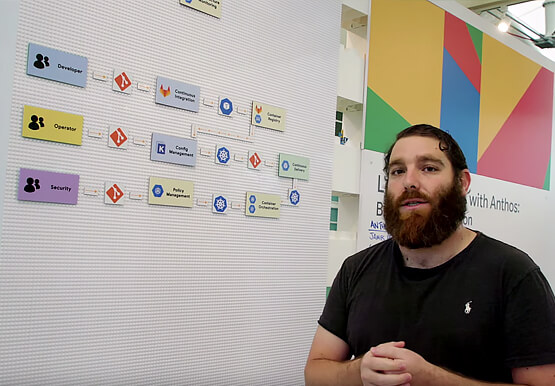
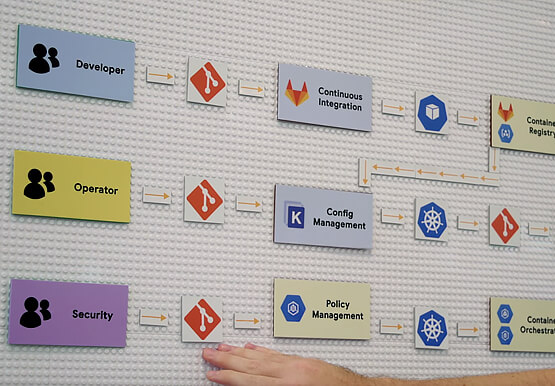
Understand the architecture of a GitOps based CI/CD pipeline. In a CI/CD pipeline, there are three different personas -- developers, operators, and security engineers. This demo includes common developer, operator, and security engineer tasks to show how the patterns can improve your company’s software delivery performance.

Apigee Helps Bank BRI Rewrite its Digital Future and Achieve Financial Inclusion
About Bank BRI Bank Rakyat Indonesia is one of the largest banks in Indonesia and is committed to increasing financial inclusions among un-banked Indonesians. Bank BRI specializes in using modern digital banking to facilitate microfinance lending across its network of over 10,000 branches and thousands of branchless agents. Google Cloud

Google Cloud Celebrates Journey of 3 Inspiring Founders for the Asian Pacific American Heritage Month
May is Asian Pacific American Heritage Month —a time for us to come together to celebrate and remember the important people and history of Asian and Pacific Island heritage. This feature highlights three AAPI founders from the Google For Startups community. Read on to learn how these three founders built
