





Speeding Up App Modernization with Apigee and Anthos

3441
Of your peers have already read this article.
1:30 Minutes
The most insightful time you'll spend today!
If you build apps and services that your customers consume, two things are certain:
- You’re exposing APIs in some form or the other.
- Your apps are made by multiple functions working together to deliver products and services.
As you scale up and grow, your enterprise architecture can benefit from a sound strategy for both API management and service management, both of which impact your customer and developer experience. In this article, we’ll explore how these two technologies fit into your application modernization strategy, including how we’re seeing our customers use Anthos Service Mesh and Apigee API Management together.
How APIs, microservices, and a service mesh are related
APIs accelerate your modernization journey by unlocking and allowing legacy data and applications to be consumed by new cloud services. As a result, organizations can launch new mobile, web, and voice experiences for customers.
The API layer acts as a buffer between legacy services and front-end systems and keeps the front-end systems up and running by routing requests as the legacy services are migrated or transformed into modern architectures. In addition, an API management platform, like Apigee, manages the lifecycle of those APIs with design, publish, analyze, and governance capabilities.
Once microservices architectures become prevalent in an organization, technical complexity increases and organizations find a need for deeper and more granular visibility into their applications and services. This is where a service mesh comes into play.
A service mesh is not only an architecture that empowers managed, observable, and secure communication across an organization’s services, but also the tool that enables it. Anthos Service Mesh lets organizations build platform-scale microservices with requirements around standardized security, policies, and controls, and it provides teams with in-depth telemetry, consistent monitoring, and policies for properly setting and adhering to SLOs.
How API management and a service mesh compliment one another
Many organizations ask themselves, “Do I really need both an API management platform and a service mesh? How do I manage them together?”
The answer to the first question is yes. These two technologies focus on different aspects of the technology stack and are complementary to each other. A service mesh modernizes your application networking stack by standardizing how you deal with network security, observability, and traffic management. An API management layer focuses on managing the lifecycle of APIs, including publishing, governance, and usage analytics.
Most organizations draw a logical boundary at business units or technology groups. Sharing these microservices outside that boundary with other business units or with partners is where Apigee plays a significant role. You can drive and manage the consumption of those services through developer portals, monitoring API usage, providing authentication, and more, with Apigee.
Google Cloud offers Anthos Service Mesh for service management and Apigee for API management. These two products work together to provide IT teams with a seamless experience throughout the application modernization journey. The Apigee Adapter for Envoy enables organizations that use Anthos Service Mesh to reap the benefits of Apigee by enforcing API management policies within a service mesh.
Accelerate your application modernization journey
Though the journey to application modernization doesn’t always follow a clear-cut path, by adopting API management and a service mesh as part of a modernization journey, your organization can be better equipped to rapidly respond to changing markets securely and at scale.
Wherever you are on your application modernization journey, Google Cloud can help. To learn more about how service management and API management can be part of your application modernization journey, read this whitepaper.
10187
Of your peers have already watched this video.
1:00 Minutes
The most insightful time you'll spend today!
Predict User Churn on Gaming Apps with Google Analytics Data using BigQuery ML
User retention can be a major challenge for mobile game developers. According to the Mobile Gaming Industry Analysis in 2019, most mobile games only see a 25% retention rate for users after the first day. To retain a larger percentage of users after their first use of an app, developers can take steps to motivate and incentivize certain users to return. But to do so, developers need to identify the propensity of any specific user returning after the first 24 hours.
In this blog post, we will discuss how you can use BigQuery ML to run propensity models on Google Analytics 4 data from your gaming app to determine the likelihood of specific users returning to your app.
You can also use the same end-to-end solution approach in other types of apps using Google Analytics for Firebase as well as apps and websites using Google Analytics 4. To try out the steps in this blogpost or to implement the solution for your own data, you can use this Jupyter Notebook.
Using this blog post and the accompanying Jupyter Notebook, you’ll learn how to:
- Explore the BigQuery export dataset for Google Analytics 4
- Prepare the training data using demographic and behavioural attributes
- Train propensity models using BigQuery ML
- Evaluate BigQuery ML models
- Make predictions using the BigQuery ML models
- Implement model insights in practical implementations
Google Analytics 4 (GA4) properties unify app and website measurement on a single platform and are now default in Google Analytics. Any business that wants to measure their website, app, or both, can use GA4 for a more complete view of how customers engage with their business. With the launch of Google Analytics 4, BigQuery export of Google Analytics data is now available to all users. If you are already using a Google Analytics 4 property, you can follow this guide to set up exporting your GA data to BigQuery.
Once you have set up the BigQuery export, you can explore the data in BigQuery. Google Analytics 4 uses an event-based measurement model. Each row in the data is an event with additional parameters and properties. The Schema for BigQuery Export can help you to understand the structure of the data.
In this blogpost, we use the public sample export data from an actual mobile game app called “Flood It!” (Android, iOS) to build a churn prediction model. But you can use data from your own app or website.
Here’s what the data looks like. Each row in the dataset is a unique event, which can contain nested fields for event parameters.
SELECT *FROM `firebase-public-project.analytics_153293282.events_*`TABLESAMPLE SYSTEM (1 PERCENT)
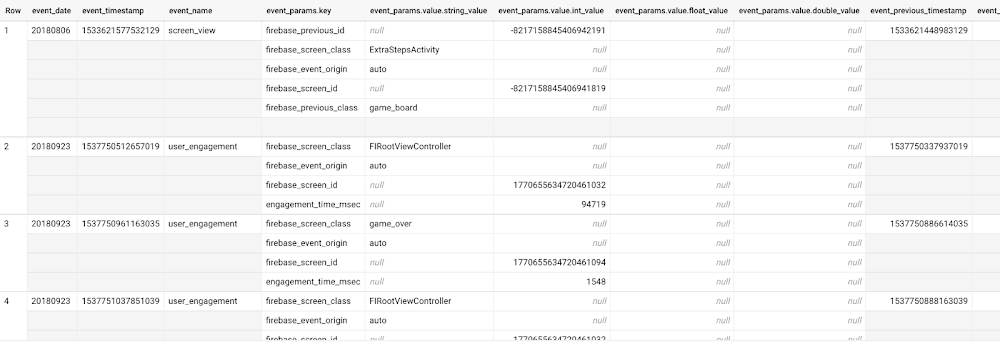
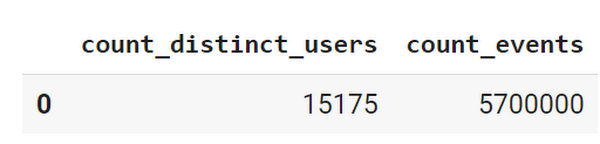
This dataset contains 5.7M events from over 15k users.
SELECTCOUNT(DISTINCT user_pseudo_id) as count_distinct_users,COUNT(event_timestamp) as count_eventsFROM`firebase-public-project.analytics_153293282.events_*
Our goal is to use BigQuery ML on the sample app dataset to predict propensity to user churn or not churn based on users’ demographics and activities within the first 24 hours of app installation.
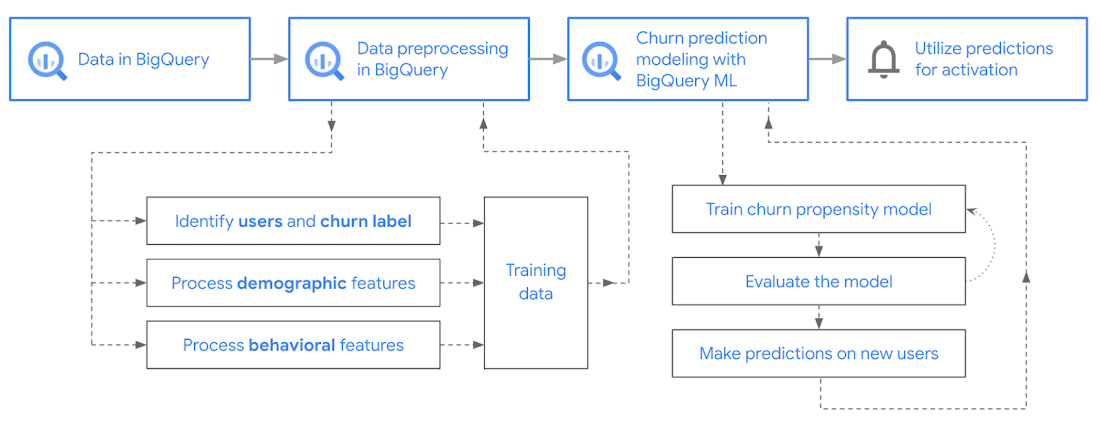
In the following sections, we’ll cover how to:
- Pre-process the raw event data from GA4
- Identify users & the label feature
- Process demographic features
- Process behavioral features
- Train classification model using BigQuery ML
- Evaluate the model using BigQueryML
- Make predictions using BigQuery ML
- Utilize predictions for activation
Pre-process the raw event data
You cannot simply use raw event data to train a machine learning model as it would not be in the right shape and format to use as training data. So in this section, we’ll go through how to pre-process the raw data into an appropriate format to use as training data for classification models.
This is what the training data should look like for our use case at the end of this section:
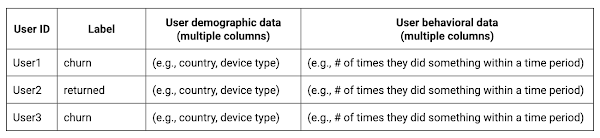
Notice that in this training data, each row represents a unique user with a distinct user ID (user_pseudo_id).
Identify users & the label feature
We first filtered the dataset to remove users who were unlikely to return the app anyway. We defined these ‘bounced’ users as ones who spent less than 10 mins with the app. Then we labeled all remaining users:
- churned: No event data for the user after 24 hours of first engaging with the app.
- returned: The user has at least one event record after 24 hours of first engaging with the app.
For your use case, you can have a different definition of bounce and churning. Also you can even try to predict something else other than churning, e.g.:
- whether a user is likely to spend money on in-game currency
- likelihood of completing n-number of game levels
- likelihood of spending n amount of time in-game etc.
In such cases, label each record accordingly so that whatever you are trying to predict can be identified from the label column.
From our dataset, we found that ~41% users (5,557) bounced. However, from the remaining users (8,031), ~23% (1,883) churned after 24 hours:
SELECTbounced,churned,COUNT(churned) as count_usersFROMbqmlga4.returningusersGROUP BY 1,2ORDER BY bounced
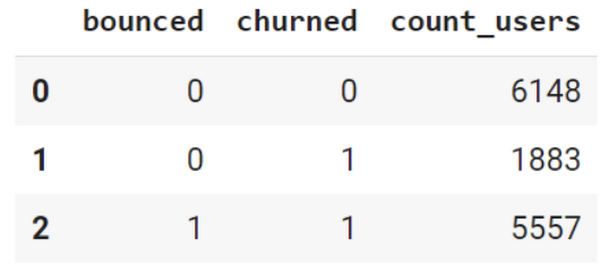
To create these bounced and churned columns, we used the following snippet of SQL code.
...#churned = 1 if last_touch within 24 hr of app installation, else 0IF (user_last_engagement < TIMESTAMP_ADD(user_first_engagement,INTERVAL 24 HOUR),1,0 ) AS churned,#bounced = 1 if last_touch within 10 min, else 0IF (user_last_engagement <= TIMESTAMP_ADD(user_first_engagement,INTERVAL 10 MINUTE),1,0 ) AS bounced,...
You can view the Jupyter Notebook for the full query used for materializing the bounced and churned labels.
Process demographic features
Next, we added features both for demographic data and for behavioral data spanning across multiple columns. Having a combination of both demographic data and behavioral data helps to create a more predictive model.
We used the following fields for each user as demographic features:
geo.countrydevice.operating_systemdevice.language
A user might have multiple unique values in these fields — for example if a user uses the app from two different devices. To simplify, we used the values from the very first user engagement event.
CREATE OR REPLACE VIEW bqmlga4.user_demographics AS (WITH first_values AS (SELECTuser_pseudo_id,geo.country as country,device.operating_system as operating_system,device.language as language,ROW_NUMBER() OVER (PARTITION BY user_pseudo_id ORDER BY event_timestamp DESC) AS row_numFROM `firebase-public-project.analytics_153293282.events_*`WHERE event_name="user_engagement")SELECT * EXCEPT (row_num)FROM first_valuesWHERE row_num = 1 #first engagement);
Process behavioral features
There is additional demographic information present in the GA4 export dataset, e.g. app_info, device, event_params, geo etc. You may also send demographic information to Google Analytics through each hit via user_properties. Furthermore, if you have first-party data on your own system, you can join that with the GA4 export data based on user_ids.
To extract user behavior from the data, we looked into the user’s activities within the first 24 hours of first user engagement. In addition to the events automatically collected by Google Analytics, there are also the recommended events for games that can be explored to analyze user behavior. For our use case, to predict user churn, we counted the number of times the follow events were collected for a user within 24 hours of first user engagement:
user_engagementlevel_start_quickplaylevel_end_quickplaylevel_complete_quickplaylevel_reset_quickplaypost_scorespend_virtual_currencyad_rewardchallenge_a_friendcompleted_5_levelsuse_extra_steps
The following query shows how these features were calculated:
WITHevents_first24hr AS (SELECTe.*FROM`firebase-public-project.analytics_153293282.events_*` eJOINbqmlga4.returningusers rONe.user_pseudo_id = r.user_pseudo_idWHERETIMESTAMP_MICROS(e.event_timestamp) <= r.ts_24hr_after_first_engagement)SELECTuser_pseudo_id,SUM(IF(event_name = 'user_engagement', 1, 0)) AS cnt_user_engagement,# ... repeated for all behavior data ...SUM(IF(event_name = 'use_extra_steps', 1, 0)) AS cnt_use_extra_steps,FROMevents_first24hrGROUP BY1
View the notebook for the query used to aggregate and extract the behavioral data. You can use different sets of events for your use case. To view the complete list of events, use the following query:
SELECTevent_name,COUNT(event_name) as event_countFROM`firebase-public-project.analytics_153293282.events_*`GROUP BY 1ORDER BYevent_count DESC
After this we combined the features to ensure our training dataset reflects the intended structure. We had the following columns in our table:
- User ID:
user_pseudo_id
- Label:
churned
- Demographic features
countrydevice_osdevice_language
- Behavioral features
cnt_user_engagementcnt_level_start_quickplaycnt_level_end_quickplaycnt_level_complete_quickplaycnt_level_reset_quickplaycnt_post_scorecnt_spend_virtual_currencycnt_ad_rewardcnt_challenge_a_friendcnt_completed_5_levelscnt_use_extra_stepsuser_first_engagement
At this point, the dataset was ready to train the classification machine learning model in BigQuery ML. Once trained, the model will output a propensity score between churn (churned=1) or return (churned=0) indicating the probability of a user churning based on the training data.
Train classification model
When using the CREATE MODEL statement, BigQuery ML automatically splits the data between training and test. Thus the model can be evaluated immediately after training (see the documentation for more information).
For the ML model, we can choose among the following classification algorithms where each type has its own pros and cons:
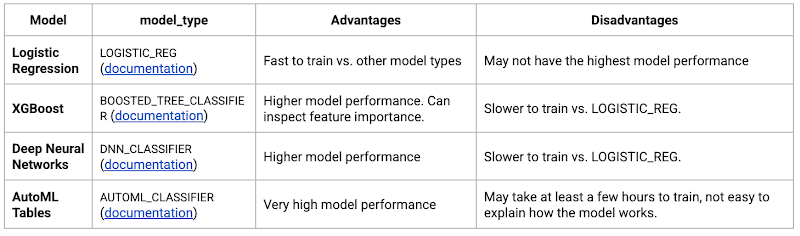
Often logistic regression is used as a starting point because it is the fastest to train. The query below shows how we trained the logistic regression classification models in BigQuery ML.
CREATE OR REPLACE MODEL bqmlga4.churn_logregTRANSFORM(EXTRACT(MONTH from user_first_engagement) as month,EXTRACT(DAYOFYEAR from user_first_engagement) as julianday,EXTRACT(DAYOFWEEK from user_first_engagement) as dayofweek,EXTRACT(HOUR from user_first_engagement) as hour,* EXCEPT(user_first_engagement, user_pseudo_id))OPTIONS(MODEL_TYPE="LOGISTIC_REG",INPUT_LABEL_COLS=["churned"]) ASSELECT*FROMbqmlga4.train
We extracted month, julianday, and dayofweek from datetimes/timestamps as one simple example of additional feature preprocessing before training. Using TRANSFORM() in your CREATE MODEL query allows the model to remember the extracted values. Thus, when making predictions using the model later on, these values won’t have to be extracted again. View the notebook for the example queries to train other types of models (XGBoost, deep neural network, AutoML Tables).
Evaluate model
Once the model finished training, we ran ML.EVALUATE to generate precision, recall, accuracy and f1_score for the model:
SELECT*FROMML.EVALUATE(MODEL bqmlga4.churn_logreg)

The optional THRESHOLD parameter can be used to modify the default classification threshold of 0.5. For more information on these metrics, you can read through the definitions on precision and recall, accuracy, f1-score, log_loss and roc_auc. Comparing the resulting evaluation metrics can help to decide among multiple models.Furthermore, we used a confusion matrix to inspect how well the model predicted the labels, compared to the actual labels. The confusion matrix is created using the default threshold of 0.5, which you may want to adjust to optimize for recall, precision, or a balance (more information here).
SELECTexpected_label,_0 AS predicted_0,_1 AS predicted_1FROMML.CONFUSION_MATRIX(MODEL bqmlga4.churn_logreg)
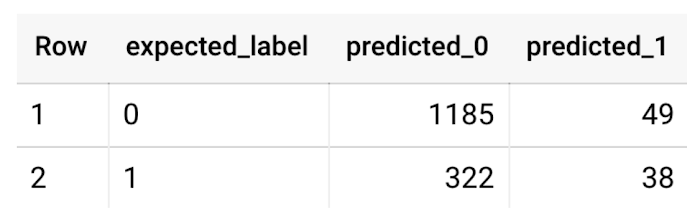
This table can be interpreted in the following way:

Make predictions using BigQuery ML
Once the ideal model was available, we ran ML.PREDICT to make predictions. For propensity modeling, the most important output is the probability of a behavior occurring. The following query returns the probability that the user will return after 24 hrs. The higher the probability and closer it is to 1, the more likely the user is predicted to return, and the closer it is to 0, the more likely the user is predicted to churn.
SELECTuser_pseudo_id,returned,predicted_returned,predicted_returned_probs[OFFSET(0)].prob as probability_returnedFROMML.PREDICT(MODEL bqmlga4.churn_logreg,(SELECT * FROM bqmlga4.train)) #can be replaced with a proper test dataset
Utilize predictions for activation
Once the model predictions are available for your users, you can activate this insight in different ways. In our analysis, we used user_pseudo_id as the user identifier. However, ideally, your app should send back the user_id from your app to Google Analytics. In addition to using first-party data for model predictions, this will also let you join back the predictions from the model into your own data.
- You can import the model predictions back into Google Analytics as a user attribute. This can be done using the Data Import feature for Google Analytics 4. Based on the prediction values you can Create and edit audiences and also do Audience targeting. For example, an audience can be users with prediction probability between 0.4 and 0.7, to represent users who are predicted to be “on the fence” between churning and returning.
- For Firebase Apps, you can use the Import segments feature. You can tailor user experience by targeting your identified users through Firebase services such as Remote Config, Cloud Messaging, and In-App Messaging. This will involve importing the segment data from BigQuery into Firebase. After that you can send notifications to the users, configure the app for them, or follow the user journeys across devices.
- Run targeted marketing campaigns via CRMs like Salesforce, e.g. send out reminder emails.
You can find all of the code used in this blogpost in the Github repository:
What’s next?
Continuous model evaluation and re-training
As you collect more data from your users, you may want to regularly evaluate your model on fresh data and re-train the model if you notice that the model quality is decaying.
Continuous evaluation—the process of ensuring a production machine learning model is still performing well on new data—is an essential part in any ML workflow. Performing continuous evaluation can help you catch model drift, a phenomenon that occurs when the data used to train your model no longer reflects the current environment.
To learn more about how to do continuous model evaluation and re-train models, you can read the blogpost: Continuous model evaluation with BigQuery ML, Stored Procedures, and Cloud Scheduler
More resources
If you’d like to learn more about any of the topics covered in this post, check out these resources:
- BigQuery export of Google Analytics data
- BigQuery ML quickstart
- Events automatically collected by Google Analytics 4
- Qwiklabs: Create ML models with BigQuery ML
Or learn more about how you can use BigQuery ML to easily build other machine learning solutions:
- How to build demand forecasting models with BigQuery ML
- How to build a recommendation system on e-commerce data using BigQuery ML
Let us know what you thought of this post, and if you have topics you’d like to see covered in the future! You can find us on Twitter at @polonglin and @_mkazi_.Thanks to reviewers: Abhishek Kashyap, Breen Baker, David Sabater Dinter.
Securing apps using Anthos Service Mesh

3992
Of your peers have already read this article.
1:30 Minutes
The most insightful time you'll spend today!
Hi there! I’m David Challoner from Access Site Reliability Engineering (SRE), here with Anthony Bushong from Developer Relations to talk about how Corp Eng is adopting Anthos Service Mesh internally at Google.
Corp Eng is Google’s take on “Enterprise IT”. A big part of the Corp Eng mission is running the first and third party software that powers internal business processes – from legal and finance to floor planning and even the app hosting our cafe menus – all with the same security or production standards as any of Google’s first party applications.
Googlers need to access these applications, which sometimes then need to access other applications or other Google Cloud services. This traffic can cross different trust boundaries which can trigger different policies.
Access SRE runs the systems that mediate this access, and we implemented Anthos Service Mesh as part of our solution to secure the way Googlers access these applications.
But why?
You can probably tell, but the applications Corp Eng is responsible for have disparate requirements. This often means that certain applications are tied to disparate infrastructure due to legal, business or technical reasons – which can be challenging when those infrastructures work and operate differently.
Enter Anthos. Google Cloud built Anthos to provide a consistent platform interface unifying the experience of working with apps on these varying underlying infrastructures, with the Kubernetes API at its foundation.
So when searching for the right tool to build a common authorization framework to mediate access to CorpEng services, we turned to Anthos – specifically Anthos Service Mesh, powered by the open-source project, Istio. Whether these services were deployed in Google Cloud, in Corp Eng data centers, or at the edge onsite at actual Google campuses, Anthos Service Mesh delivered a consistent means for us to program secure connectivity.
To frame the impact ASM had on our organization, it’s helpful to introduce the roles of the folks who manage and use it:
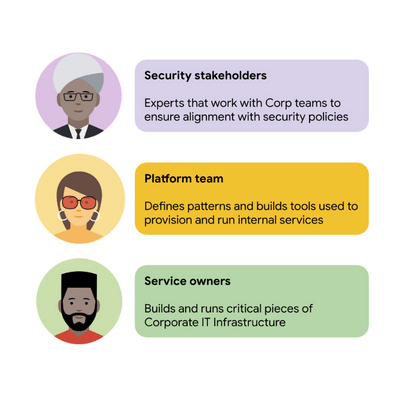
For security stakeholders, ASM provides an extensible policy enforcement point running next to each application capable of provisioning a certificate based on the identity of the workload and enforcing mandatory fine-grained application-aware access controls.
For platform operators, ASM is delivered as a managed product, which reduces operational overhead by providing out-of-the-box release channels, maintenance windows, and a published Service Level Objective(SLO).
For service owners, ASM enables the decoupling of their applications from networking concerns, while also providing features like rate limiting, load shedding, request tracing, monitoring, and more. Features like these were typically only available for applications that ran on Borg, Google’s first-party cluster manager that ultimately inspired the creation of Kubernetes.
In sum, we were able to secure access to a plethora of different services with minimal operational overhead, all while providing service owners granular traffic control.
Let’s see what this looks like in practice!
The architecture
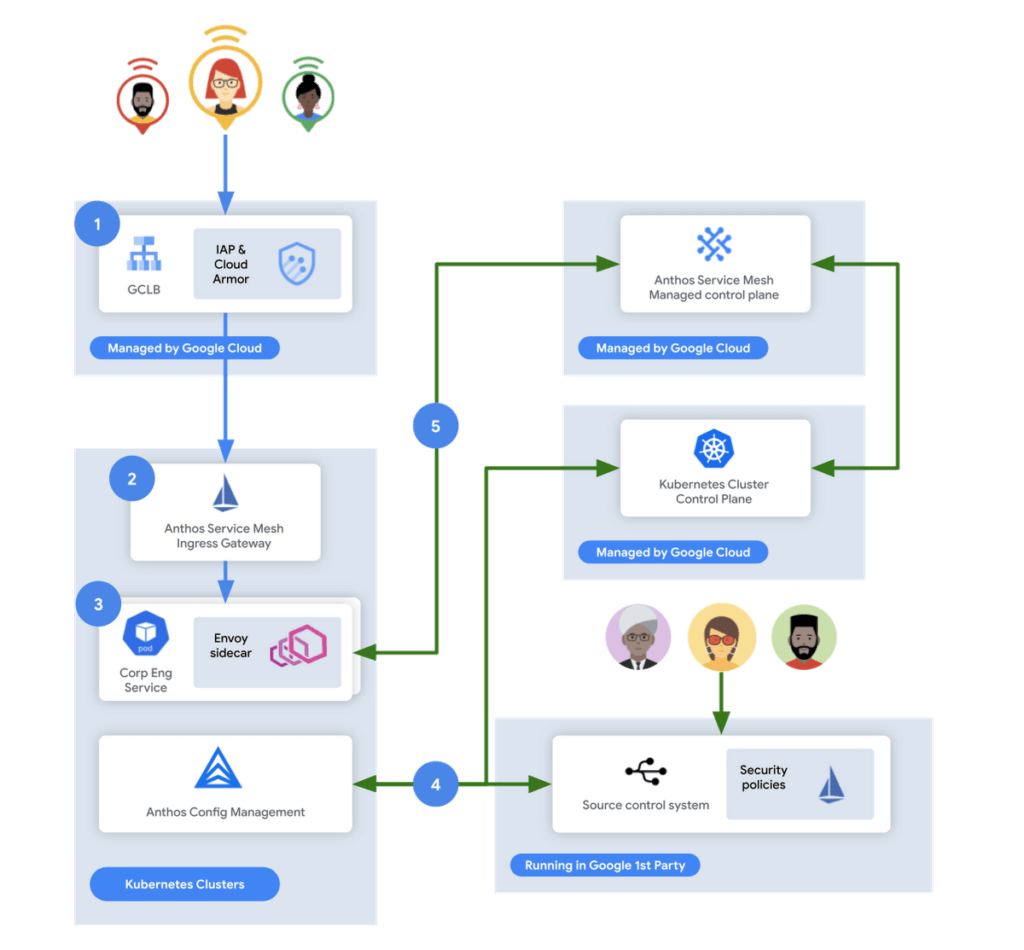
In this flow, user access first reaches the Google Cloud Global Load Balancer [1], configured with Identity Aware Proxy (IAP) and Cloud Armor. IAP is the publicly available implementation of Google’s internal philosophy of BeyondCorp, providing an authentication layer that works from untrusted networks without the need for a VPN.
Once a user is authenticated, their request then flows to the Ingress Gateway provided by Anthos Service Mesh [2]. This provides additional checks that traffic flows to services only when the request has come through IAP, while also enforcing mutual TLS (mTLS) between the Anthos Service Mesh Gateway to the Corp services owned by various teams.
Finally, additional policies are enforced by the sidecar running in every single service Pod [3]. Policies are pulled from source control using Anthos Config Management[4], and are propagated to all sidecars by the managed control plane provided by Anthos Service Mesh[5].
Managing the mesh
If you’re not familiar with how Istio works, it follows the pattern of a control plane and a data plane. We talked a little bit about the data plane – it is made up of the sidecar containers running alongside all of our service Pods. The control plane, however, is what’s responsible for updating these sidecars with the policies we want to enforce:
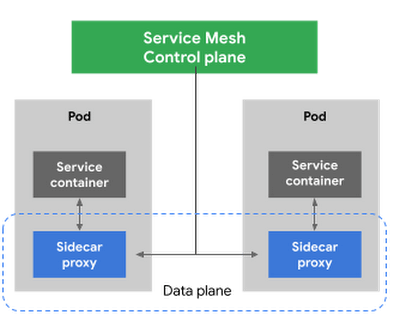
Figure 3 – High-level architecture for Istio
Thus, it is critical for us to ensure that the control plane is healthy. This is where Anthos Service Mesh gives our platform owners a huge advantage with its support for a fully-managed control plane. To provision cloud resources, like many other companies, our organization uses Terraform, the popular open-source infrastructure as code project. This gave us a declarative and familiar means for provisioning the Anthos Service Mesh control plane.
First, you enable the managed control plane feature for GKE by creating the google_gke_hub_feature resource below using Terraform.
resource "google_gke_hub_feature" "feature_asm" {
name = "servicemesh"
location = "global"
provider = google-beta
}
Keep in mind that at publication time, this is only available via the google-bet provider in Terraform.
Once created, we then provision a ControlPlaneRevision custom resource in a GKE cluster to spin up a managed control plane for ASM in that cluster:
apiVersion: mesh.cloud.google.com/v1alpha1
kind: ControlPlaneRevision
metadata:

name: asm-managed

namespace: istio-system
spec:

type: managed_service

channel: regular
Using this custom resource, we are able to set the release channel for the ASM managed control plane. This allows for our platform team to define the pace of upgrades in accordance with our team’s needs.
In addition to managing the control plane, ASM also provides management functionality around the data plane to ensure each sidecar Envoy is kept up to date with the latest security updates and is compatible with the control plane – one less thing for service operators to worry about. It does this using Kubernetes Mutating Admission Webhooks and Namespace labels to modify our Pod workload definitions to inject the appropriate sidecar proxy version.
Syncing mandatory access policies
With the core Anthos Service Mesh components in place, our security practitioners can define consistent, mandatory security policies for every single GKE cluster, using Istio APIs.
For example, one policy is enforcing strict mTLS between Pods using automatically provisioned workload identity certificates. Earlier, we talked about how this is enforced between the Istio Gateway; that same policy enforces mTLS between all Pods in our cluster.

Another policy we implement is denying all egress traffic by default, requiring service teams to explicitly declare their outbound dependencies. The following is an example of using an Istio Service Entry to allow granular access to a specific external service – in this case, Google. This helps prevent unintended access to external services.
apiVersion: networking.istio.io/v1alpha3

kind: ServiceEntry
metadata:

name: google
spec:

hosts:
  - www.google.com

ports:
  - number: 443

name: https

protocol: HTTPS

resolution: DNS

location: MESH_EXTERNAL
EOF
These policies are automatically synced to all service mesh namespaces in each cluster using Anthos Config Management. By using our internal source control system as a source of truth, Anthos Config Management can sync and reconcile policies across all of our GKE clusters, ensuring that these policies are in place for every single one of our services. You can find more details about our implementation of Anthos Config Management here.
With this in place, our team plans on eventually migrating away from security automation that operates solely based on explicit IP, port and protocol policies.
Integration with Identity-aware Proxy
The publicly available version of the BeyondCorp proxy used by CorpEng is called Identity-aware Proxy (IAP), which offers an integration with Anthos Service Mesh. IAP allows you to authenticate users trying to access your services and apply Context-Aware-Access policies. This integration comes with two main benefits:
- Ensuring that user traffic to services in the service mesh only come through Identity-aware Proxy
- Enforcing Context-aware access (CAA) trust levels for devices, defined by multiple device signals we collect
Identity-aware Proxy allows us to capture this information in a Request Context Token (RCToken), which is a JSON Web Token (JWT) created by Identity-aware Proxy that can be verified by ASM. IAP inserts this JWT into the Ingress-Authorization header. Using Istio Authorization Policies similar to the following policy, any requests without this JWT are denied:
apiVersion: security.istio.io/v1beta1
kind: AuthorizationPolicy
metadata:
name: iap-gateway-require-jwt
namespace: istio-system
spec:
selector:
matchLabels:
app: istio-iap-ingressgateway
action: DENY
rules:
- from:
- source:
notRequestPrincipals: ["*"]
Here is an example policy that requires a fullyTrustedDevice access level – this might be a device in your organization that is known to be corporate-owned, fully-updated, and running an IT-approved configuration :
apiVersion: security.istio.io/v1beta1
kind: AuthorizationPolicy
metadata:
  name: require-fully-trusted-device
  namespace: fooService
spec:
  selector:
    matchLabels:
      app: fooService
  action: ALLOW
  rules:
  - from:
    - source:
       requestPrincipals: ["*"]
    when:
    - key: request.auth.claims[google.access_levels]
      values: ["accessPolicies/$orgId/accessLevels/fullyTrustedDevice"]
This allows our security team to not only secure service to service communications, or outbound calls from services, but also specifically require incoming requests come from trusted devices and authenticated users using a trusted device.
Enabling service teams
As an SRE, one of our priorities is ensuring Service-level indicators (SLIs), SLOs, and Service-level agreements (SLAs) exist for services. Anthos Service Mesh helps us empower service owners to do this for their services, as it exposes horizontal request metrics like latency and availability to all services in the mesh.
Before Anthos Service Mesh, each application had to export these separately (if at all). With ASM service owners can easily define their Service’s SLOs in the cloud console or via terraform using these horizontally exported metrics. This then allows us to integrate SLOs into our higher-level service definitions so we can enable SLO monitoring and alerting by default. You can see the SRE book for more details on SLOs and Error budgets.
The takeaway
ASM is a powerful tool that enterprises can use to modernize their IT infrastructure. It provides:
- A shared environment-agnostic enforcement point to manage security policy
- A unified way to provision identities, describe application dependencies
This also enables previously unheard of operational capabilities such as distributed tracing or incremental canary rollouts – which were difficult to find in the typical enterprise application landscape.
Because it can be incrementally adopted and composed with existing authorization systems to close gaps – barriers to adoption are low and we recommend you start evaluating it today!

Google is the Top Provider for Continuous Integration Tools, According to Forrester
DOWNLOAD WHITEPAPER3603
Of your peers have already downloaded this article
12:30 Minutes
The most insightful time you'll spend today!
Google’s continuous integration (CI) and continuous delivery (CD) platform, Cloud Build, emerges as a Leader for Continuous Integration.
“Google Cloud Build comes out swinging, going toe to toe with other cloud giants. Google Cloud Build is relatively new when compared to the other public cloud CI offerings, they had a lot to prove, and they did so.”
— Forrester Wave: Continuous Integration Tools
Forrester Wave on Continuous Integration identifies most significant continuous integration (CI) tool providers and shows how each vendor measures up on 27 criteria. Download the full report to see what makes Cloud Build a Leader in Continuous Integration.

In the report, you will learn:
- Where the market stands and where it’s going
- Why Google has the strongest score for security and compliance within CI/CD
- How Cloud Build ranks amongst the other vendors on performance and scalability
- How Cloud Build’s enterprise strategy and vision are superior to other vendors
3393
Of your peers have already watched this video.
19:00 Minutes
The most insightful time you'll spend today!
Booking.com’s Apigee Hybrid on Anthos is the Largest Hybrid Deployment Ever
Apigee API Management Platform helps unlock the value of data in legacy systems and applications to accelerate end-user/customer experience by modernizing apps and building multi-cloud environments. With Apigee Hybrid on Anthos, a service mesh technology, Booking.com was able to achieve its goal of providing customers a connected trip experience. Watch the video to understand how Booking.com, a biggest brand in Booking Holdings portfolio with over 1.5 million room bookings in 24 hours moved to hybrid cloud and unified APIs to one platform offering a end-to-end customer journey for a connected trip!
Serverless for Startups, the Best Way to Succeed: Expert Says

7064
Of your peers have already read this article.
1:30 Minutes
The most insightful time you'll spend today!
As Google Cloud has become a choice for more startups, I’ve experienced an increase in founders asking how they should think about cloud services. Though each startup is different and requirements may vary across industries and regions, I’ve seen a few core best practices that help startups to succeed—as well as several traps to avoid.
For example, If you go with a public cloud provider, you’re ideally not starting from ground zero like you would running your own data center, but it’s important not to introduce similar complexity in a virtualized environment. Just because you’re using public cloud infrastructure doesn’t mean you want to manage it.
Instead, you want to leverage platforms that abstract away complexity so your team can focus on delivering value to customers. That’s where serverless comes in. Serverless platforms are fully managed by the provider, offering automatic scaling for workloads, as well as provisioning, configuring, patching, and management of servers and clusters. Freed from these resource-intensive tasks, your technical talent can focus on the things that differentiate your business, not on IT curation.
This applies to not only running stateless applications, but also managing and analyzing data. You should be collecting data points about which features are most popular on your platform, what people are buying, the types of activities that help your customers get their jobs done, and so on. This information is essential to building and executing on a product roadmap that will serve your customers. However, it’s not enough to collect this data, you need to make your data accessible, secure, and easy for your team to analyze—so where do you run and host it?
On Google Cloud, this is where options like Spanner and Cloud SQL can play a large role, as can BigQuery for analysis. You won’t have to worry about standing up infrastructure or patching servers—you can just stream your data to our data management platforms, where it’s available whenever someone needs to run a query. By leveraging a serverless architecture, your startup can be data-driven without having to invest in the traditional complexity of database administration and management—and that can significantly change your playing field.
Serverless is just one of the factors you should consider as you build out your tech stack. To hear my thoughts on a range of other topics relevant to startups — such as security, cloud credits, and the differences among managed services — check out the below video or visit our Build and Grow page.
More Relevant Stories for Your Company

Application Rationalization: Your App Development Team is Gonna Love It!
On April 6th, 2022, Google Cloud established a new partnership with CAST, to help accelerate the migration and application modernization programs of customers worldwide, complementing the Google capabilities already available through the Google Cloud Application Modernization Program (CAMP). Application Rationalization (App Rat) is the first step towards a cloud adoption

How to Build an API Program That Doesn’t Suck
Modern web APIs allow businesses to build compelling experiences that generate, consume, and combine digital assets. They’ve become the foundation upon which digital business is built. But the path to success can be unclear, rough, and challenging. The game has changed, after all, and this requires tossing out many of

Meet the 8 Sponsors of 2021 State of DevOps Reports
Google Cloud and the DORA research team are excited to announce our eight sponsors for the 2021 State of DevOps report. We recently launched the 2021 State of DevOps survey, a 25-min survey for the DevOps community to share how they are using DevOps to improve software delivery performance. So if you haven’t

Arab Bank Accelerates its App Development and Testing Using Apigee and Anthos
Founded in 1930 and headquartered in Jordan, Arab Bank is one of the oldest banks in the Middle East. Operating out of 28 countries, we’ve earned our customers’ trust with a prudent approach to operations and respect for the cultures and customs in the region. With a few exceptions where cloud providers
