





Kaluza & Google Cloud: Committed to Powering Up 73 Million EVs by 2040

1231
Of your peers have already read this article.
4:00 Minutes
The most insightful time you'll spend today!
Electric vehicles already account for one in seven car sales globally, and with new gas and diesel cars being phased out across the world, global sales are forecast to reach 73 million units in 2040. But with power grids becoming increasingly dependent on variable energy sources such as wind and solar, rising demand from electric vehicles risks overstraining grids at peak times, potentially leading to power outages.
At Kaluza, we believe that our platform has a vital role to play in helping power grids and utility companies to stabilize their networks, while at the same time delivering more affordable, cleaner energy to the consumer. Powered by Google Cloud, the advanced algorithms behind our Kaluza Flex solution automatically charge electric vehicles when the power supply is at its cheapest and greenest, helping to accelerate the global transition towards a zero-carbon future.
Decarbonizing the grid with low-cost smart charging programs
Launched by OVO Energy in 2019, Kaluza has taken its deep understanding of the energy market to partner with some of the world’s major energy suppliers and vehicle manufacturers, including AGL in Australia, Fiat and Nissan in the UK, and Mitsubishi Corporation and Chubu in Japan, to launch smart charging programs that help customers save money while reducing their carbon footprint.
A good example of this is Charge Anytime, which we recently launched with OVO Energy in the UK. With this tariff, customers use Kaluza to smart-charge their electric vehicle, and pay just 10p per kWh — a third of their household electricity rate — to do so. This means that if the customer plugs in their vehicle to charge when they get home from work at, say, 6:00 p.m. — a time when both demand and the carbon intensity on the grid are at their highest — their vehicle will then be smartly charged at the lowest cost and greenest periods throughout the night, ready for when they need it in the morning.
This smart charging reduces the energy company’s costs by enabling them to take advantage of lower wholesale electricity prices. These savings are then passed on to the end customer through tariffs such as Charge Anytime, saving customers hundreds of pounds a year and reducing their carbon footprint. Meanwhile, the National Grid is able to reduce the strain on the network during peak hours, while simultaneously using up the excess renewable energy that might otherwise have gone to waste.
Optimized charging schedules, fueled by Google Cloud
Behind Kaluza’s smart charging solution lies some sophisticated technology, all of which is built on Google Cloud. Our core optimization engine gathers real-time data from a wide range of sources, including battery and charging data from the electric vehicles, and data from the energy suppliers and grid operators, such as the carbon intensity, and price forecasts.
After passing through our real-time data backbone, that data is stored in BigQuery where it’s used to train and validate our smart charging optimization models. These models are then deployed with Google Kubernetes Engine so that whenever a customer plugs in an electric vehicle, data from that vehicle passes in real-time through our optimization engine to calculate the ideal charging schedule for that vehicle, ensuring it uses the cheapest, least carbon-intensive energy available.
Customer interface: easy to use, simple to build
Of course, the customer isn’t aware of any of this complexity. All they need to do is open their charging app and use Kaluza’s intuitive interface to set what time they want their car to be ready and how much charge they want in their battery. Then they simply plug in their car, and our algorithms take care of the rest.
Customers can also use Kaluza to view breakdowns of how much carbon and money they’ve saved, along with insights around things like billing and battery life, all of which is backed by Cloud SQL.
With Google Cloud, we were able to roll out this end-user app very quickly. Instead of having to build a different version of the app for each operating system, we were able to build an OS-agnostic version using Flutter, which then builds the app for each platform, enabling us to get to market faster.
This has been a benefit of our architecture in general. With Google Cloud taking the complexity out of otherwise time-consuming development processes, we’ve been able to experiment with and validate propositions rapidly, and roll out new products and features at speed, to ensure that we remain at the vanguard of a rapidly evolving sector.
Giving energy companies full visibility with BigQuery and Looker
As for the grid operators and energy companies, the Kaluza platform allows them to visualize how many participating electric vehicles are plugged into the network at any one time. BigQuery and Looker Studio dashboards provide granular insights, such as how many vehicles are idle, how many are charging, and how well our optimization engine is working.
The platform also allows companies to view those vehicles on an aggregate level, and identify any issues. Google Cloud machine learning capabilities can even allow grid operators to use this aggregate view to forecast how much energy will be required at any one time, and dial the power generation up or down accordingly.
Ultimately, these insights help network operators and utility companies to optimize energy usage, and balance out the peaks and troughs of supply and demand, ensuring that excess renewable energy is captured, while carbon-intensive fuel use is reduced.
Feeding energy back into the grid with bidirectional charging
Vehicle-to-Grid (V2G), or bidirectional, charging is something that we are very excited about, and have begun rolling out in the UK, as we prepare to launch in other global markets. Built on the same Google Cloud architecture as the rest of Kaluza Flex, V2G not only enables smart charging, but allows electric vehicles to feed stored energy back into the grid.
Imagine an electric vehicle battery that can store 40 kWh of energy, but only uses 5 kWh a day. That leaves 35 kWh a day that can be charged to the battery during times of low demand, when energy is cheapest and greenest, then fed back into the network during peak periods, removing the need for more fossil fuels to be burned to meet demand.
Not only does V2G go further than conventional smart charging to make use of renewable energy when it’s abundant and support the balancing of the energy system, it also results in even lower energy prices for the customer, as they are effectively selling energy back to the grid. For example, as part of a large domestic V2G trial made in partnership with OVO and Nissan, Kaluza saved customers an average of £450 a year, with some customers saving up to £800/year by selling surplus energy back to the grid — transforming their homes into mini power stations.
With Kaluza Flex, we have a platform that offers benefits for all parties, from the grid operators, through to energy retailers and vehicle manufacturers, and all the way to the customer. Now, our aim is to bring this exciting offering to as many markets as possible, a goal which is made easier thanks to the scalable infrastructure and time-saving solutions of Google Cloud.
As more people make the switch to electric vehicles, our goal is to ensure that smart charging becomes standard practice, as we help to deliver on the potential of electric vehicles to contribute to a greener, decarbonized future.
5400
Of your peers have already watched this video.
4:00 Minutes
The most insightful time you'll spend today!
AppSheet is Useful for Schools & Universities to Custom-build Apps
AppSheet, Google Cloud’s no-code platform that eases application development and automation process without writing even a line of code. In the education space, AppSheet can come in handy easily as a unified platform to build custom applications that also integrates seamlessly with Workspace, allowing schools and universities to save on time and resources on updating IT infrastructure.
From updating sheets, sharing documents and study material over drive to scheduling events on Calendar, organizing lectures and team meets over Meets, AppSheet allows easy collaboration and access. Watch the video to build apps that are best for your University or school using Google Cloud’s AppSheet!
Deploying Ray on GKE: Distributed Computing Made Easy

969
Of your peers have already read this article.
3:30 Minutes
The most insightful time you'll spend today!
The rapidly evolving landscape of distributed computing demands efficient and scalable frameworks. Ray.io is an open-source framework to easily scale up Python applications across multiple nodes in a cluster. Ray provides a simple API for building distributed, parallelized applications, especially for deep learning applications.
Google Kubernetes Engine (GKE) is a managed container orchestration service that makes it easy to deploy and manage containerized applications. GKE provides a scalable and flexible platform that abstracts away the underlying infrastructure.
KubeRay enables Ray to be deployed on Kubernetes. You get the wonderful Pythonic unified experience delivered by Ray, and the enterprise reliability and scale of GKE managed Kubernetes. Together, they offer scalability, fault tolerance, and ease of use for building, deploying, and managing distributed applications.
In this blog post, we share a solution template to get you started easily with Ray on GKE. We discuss the components of the solution and showcase an inference example using Ray Serve for Stable Diffusion.
Overview of the Solution
In this solution template we use KubeRay, an OSS solution for managing Ray clusters on Kubernetes, as the operator for provisioning our workloads. Follow the step-by-step instructions in the README file to get started. The solution contains two groups of resources: platform-level and user-level.
Platform-level resources are expected to be deployed once for each development environment by the system administrator. These include the common infrastructure and GCP service integrations that are shared by all users.
- GKE cluster and node pool. Configurations can be changed in the main.tf file. This module deploys a GKE cluster with a GPU node pool, including required Nvidia drivers for GPUs. You can replace these with other machine types.
- Kubernetes system namespace and service accounts, along with the necessary IAM policy bindings. This allows the platform administrator to provide fine-grained user access control and quota policies for Ray cluster resources.
- KubeRay operator. The operator is responsible for watching for changes in KubeRay resources and reconciling the state of the KubeRay clusters.
- Logging. The `logging_config` section enables logs from system components and workloads to write logs to Cloud logging.
- Monitoring. The `monitoring_config` section enables Managed Prometheus integration. This allows the deployment to automatically scrape system-level metrics and writes them to the managed metrics service.
- Workload identity. This enables your workloads to authenticate with other GCP services using Google IAM service accounts.
User-level resources are expected to be deployed once by each user in the development environment.
- KubeRay cluster. This is the actual Ray cluster that we will be used for your workloads. It is configured to use a Workload Identity pool and a IAM-binded service account that provides fine-grained access to GCP services. You can customize the Ray cluster settings by editing the kuberay-values.yaml file.
- Logging. The solution adds a side car container deployed alongside each KubeRay worker node. This uses fluentbit to forward Ray logs from the head node to Cloud logging. You can edit the fluentbit-config file to change how the logging container filters and flushes logs.
- Monitoring. This module provides a PodMonitoring resource that scrapes metrics from the user’s Ray cluster and uploads data points to Google Managed Prometheus. An optional installation for Grafana dashboard is included and can be accessed through a web browser.
- JupyterHub server. This module installs a JupyterHub notebook server in the user namespace, enabling users to interact directly with their Ray clusters.
Run a Workload on Your Ray Cluster
Let’s try running the provided example with Ray Serve to deploy Stable Diffusion. This example was originally taken from the Ray Serve documentations here. To open the example in Jupyter notebook, go to the external IP for proxy-public in your browser (instructions to get the IP). And then click on File -> Open from URL, and input the raw URL of the notebook to open it.
Since the notebook runs in the same Kubernetes cluster as the Ray cluster, it is able to talk directly to the latter using its cluster-internal service endpoint – thus there is no need to expose the Ray cluster to public internet traffic. For production workloads, you should secure your endpoints with GCP account credentials. Google Cloud Identity Aware Proxy (IAP) can be used to enable fine-grained access control to user resources, such as our Ray cluster, to protect your GCP resources from unnecessary exposure. A full tutorial on how to enable IAP on your GKE cluster can be found here.
The notebook contains code for deploying a pre-trained model to a live endpoint. The last cell makes a call to the created service endpoint:prompt = “a cute cat is dancing on the grass.”input = “%20″.join(prompt.split(” “))resp = requests.get(f”http://example-cluster-kuberay-head-svc:8000/imagine?prompt={input}”)with open(“output.png”, ‘wb’) as f: f.write(resp.content)
Executing the notebook will generate a file with a unique picture of a cute cat. Here is an example we got:

Congratulations! You have now deployed a large model for image generation on GKE.
Logging and Monitoring
As mentioned earlier, this solution enables logging and monitoring automatically. Let’s find those logs.
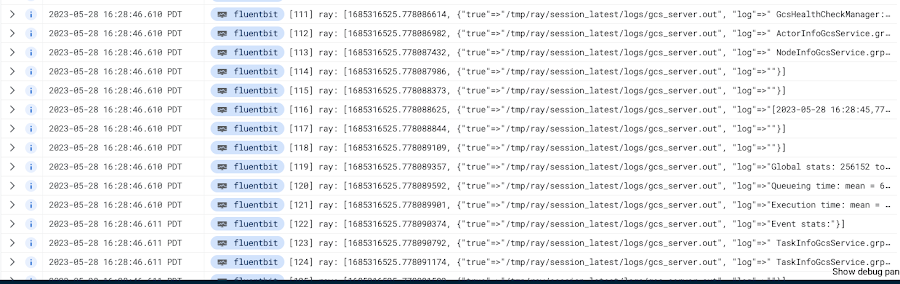
In your Cloud Console, open up Logging -> Log Explorer. In the query text box, enter the following:resource.type=”k8s_container”resource.labels.cluster_name=%CLUSTER_NAME%resource.labels.pod_name=%RAY_HEAD_POD_NAME%resource.labels.container_name=”fluentbit”
You should see the Ray logs from your cluster forwarded here.
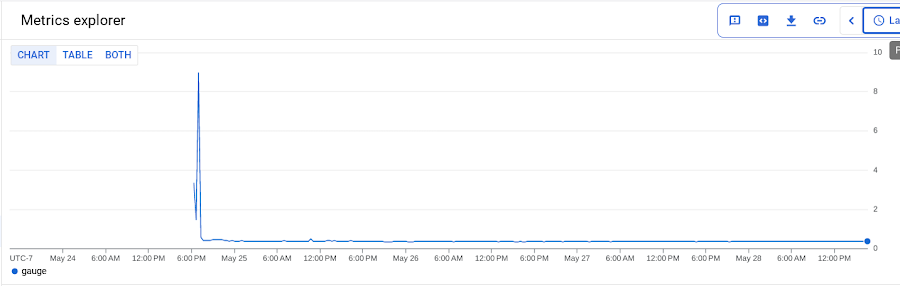
To see your monitoring metrics, go to Metrics Explorer in the Cloud Console. Under the menu for “Target”, select “Prometheus Target” and then “Ray”. Select the metric that you want to see, for instance `prometheus/ray_component_cpu_percentage/gauge`:
The deployment also comes with a Grafana deployment. Follow this guide to open it up and view your Ray cluster’s metrics.
Conclusion
The combination of Ray and GKE offers a simple and powerful solution for building, deploying, and managing distributed applications. Ray’s simplicity makes it an attractive choice for data and model developers while GKE’s scalability and reliability is the defacto choice for enterprise platforms. The solution template presented in this blog post offers a convenient way to get started quickly with KubeRay, the recommended approach to deploy Ray on GKE.
If you have any questions for building Ray on Kubernetes and GKE, you can contact us directly at ray-on-gke@google.com or comment in GitHub. Learn more about building AI Platforms with GKE by visiting our User Guide.
KRM Series Part 5: Learn to Manage and Configure Hosted Resources with Kubernetes

3213
Of your peers have already read this article.
3:00 Minutes
The most insightful time you'll spend today!
This is the fifth and final post in a multi-part series about the Kubernetes Resource Model. Check out parts 1, 2, 3, and 4 to learn more.
In part 2 of this series, we learned how the Kubernetes Resource Model works, and how the Kubernetes control plane takes action to ensure that your desired resource state matches the running state.
Up until now, that “running resource state” has existed inside the world of Kubernetes- Pods, for example, run on Nodes inside a cluster. The exception to this is any core Kubernetes resource that depends on your cloud provider. For instance, GKE Services of type Load Balancer depend on Google Cloud network load balancers, and GKE has a Google Cloud-specific controller that will spin up those resources on your behalf.
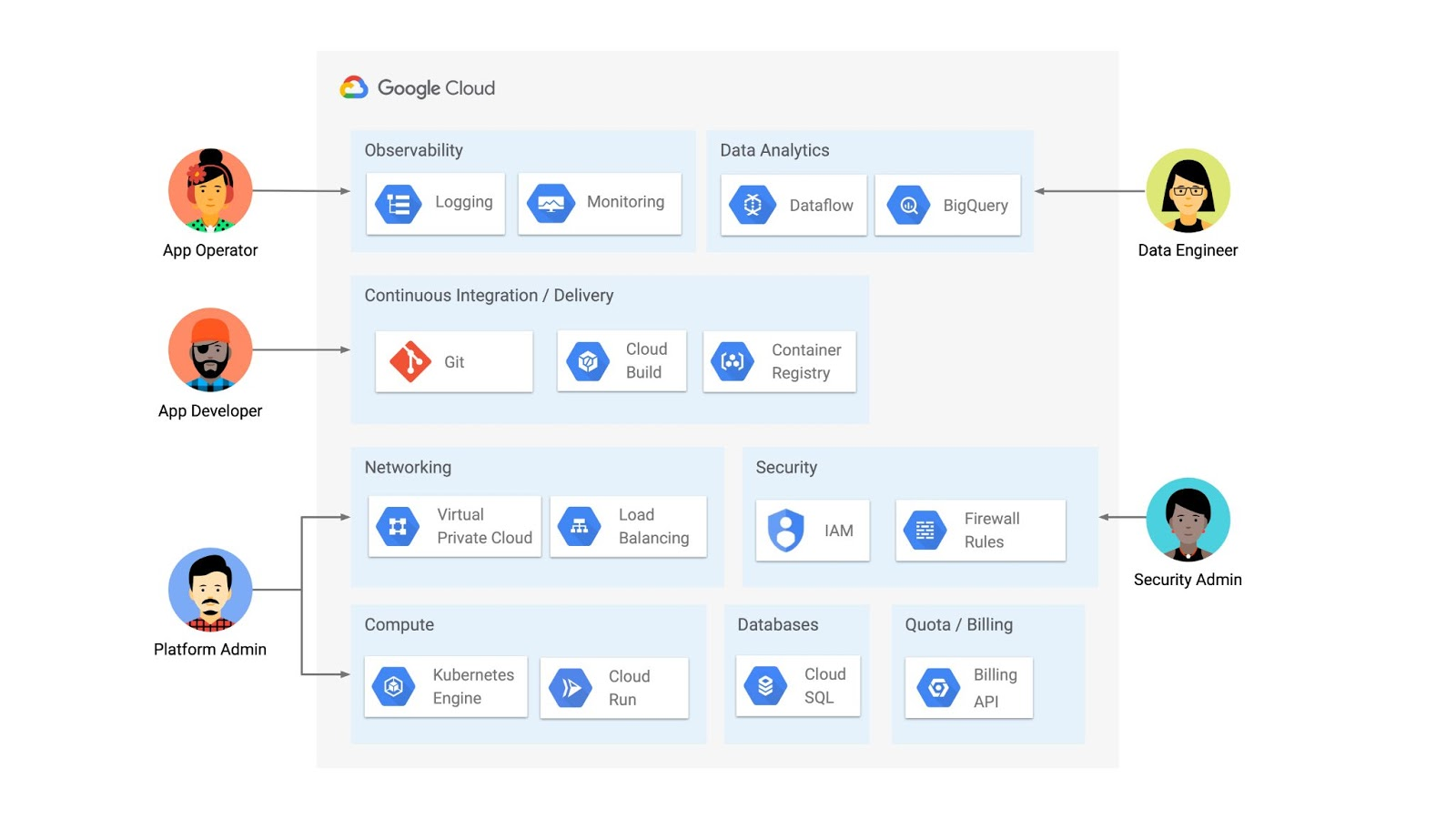
But if you’re operating a Kubernetes platform, it’s likely that you have resources that live entirely outside of Kubernetes. You might have CI/CD triggers, IAM policies, firewall rules, databases. The first post of this series introduced the platform diagram below, and asserted that “Kubernetes can be the powerful declarative control plane that manages large swaths” of that platform. Let’s close that loop by exploring how to use the Kubernetes Resource Model to configure and provision resources hosted in Google Cloud.
Why use KRM for hosted resources?
Before diving into the “what” and “how” of using KRM for cloud-hosted resources, let’s first ask “why.” There is already an active ecosystem of infrastructure-as-code tools, including Terraform, that can manage cloud-hosted resources. Why use KRM to manage resources outside of the cluster boundary?
Three big reasons. The first is consistency. The last post explored ways to ensure consistency across multiple Kubernetes clusters- but what about consistency between Kubernetes resources and cloud resources? If you have org-wide policies you’d like to enforce on Kubernetes resources, chances are that you also have policies around hosted resources. So one reason to manage cloud resources with KRM is to standardize your infrastructure toolchain, unifying your Kubernetes and cloud resource configuration into one language (YAML), one Git config repo, one policy enforcement mechanism.
The second reason is continuous reconciliation. One major advantage of Kubernetes is its control-loop architecture. So if you use KRM to deploy a hosted firewall rule, Kubernetes will work constantly to make sure that resource is always deployed to your cloud provider- even if it gets manually deleted.
A third reason to consider using KRM for hosted resources is the ability to integrate tools like kustomize into your hosted resource specs, allowing you to customize resource specifications without templating languages.
These benefits have resulted in a new ecosystem of KRM tools designed to manage cloud-hosted resources, including the Crossplane project, as well as first-party tools from AWS, Azure, and Google Cloud.
Let’s explore how to use Google Cloud Config Connector to manage GCP-hosted resources with KRM.
Introducing Config Connector
Config Connector is a tool designed specifically for managing Google Cloud resources with the Kubernetes Resource Model. It works by installing a set of GCP-specific resource controllers onto your GKE cluster, along with a set of Kubernetes Custom Resources for Google Cloud products, from Cloud DNS to Pub/Sub.
How does it work? Let’s say that a security administrator at Cymbal Bank wants to start working more closely with the platform team to define and test Policy Controller constraints. But they don’t have access to a Linux machine, which is the operating system used by the platform team. The platform team can address this by manually setting up a Google Compute Engine (GCE) Linux instance for the security admin. But with Config Connector, the platform team can instead create a declarative KRM resource for a GCE instance, commit it to the config repo, and Config Connector will spin up the instance on their behalf.
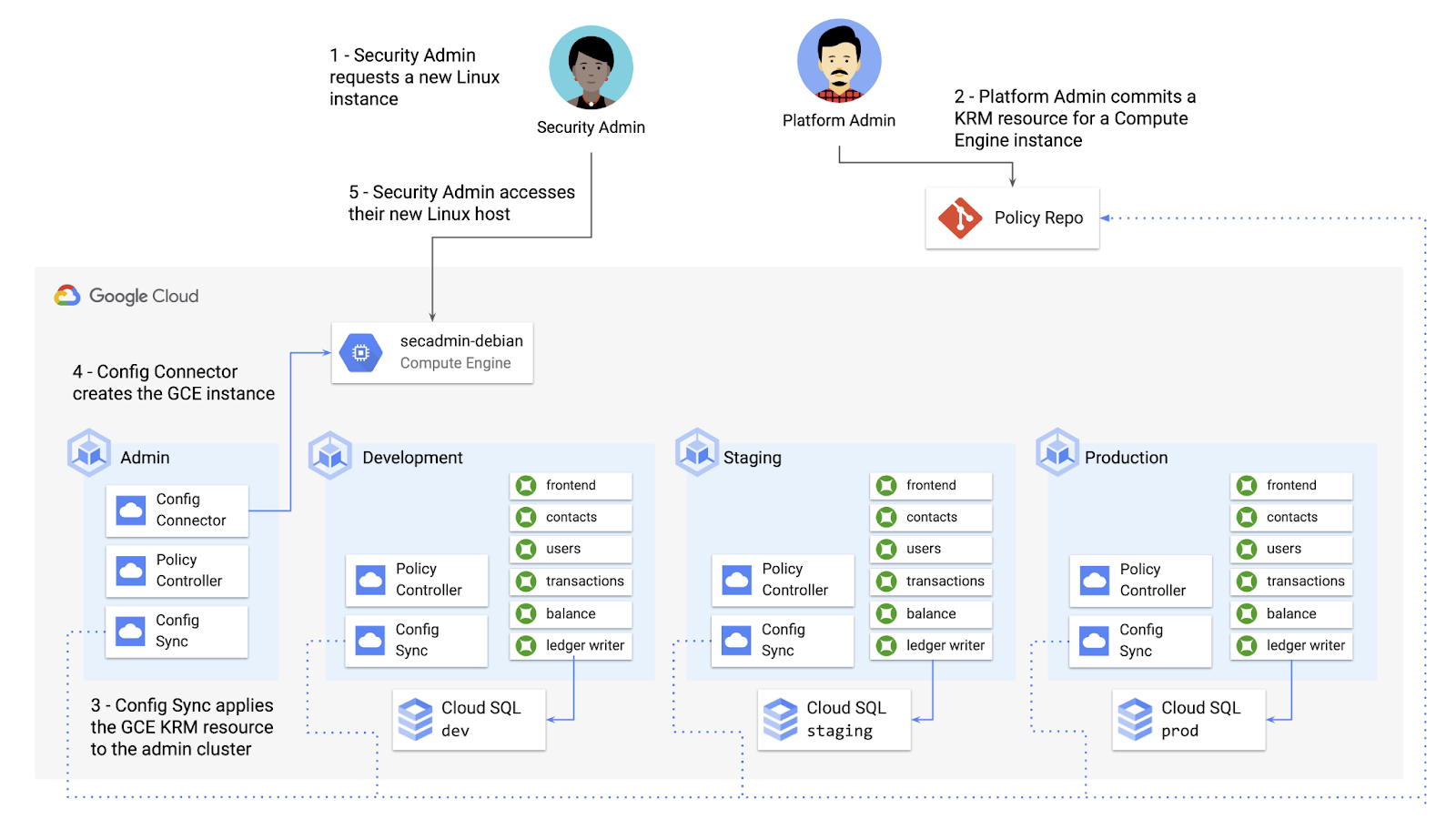
What does this declarative resource look like? A Config Connector resource is just a regular Kubernetes-style YAML file- in this case, a custom resource called Compute Instance. In the resource spec, the platform team can define specific fields, like what GCE machine type to use.
apiVersion: compute.cnrm.cloud.google.com/v1beta1kind: ComputeInstancemetadata:annotations:cnrm.cloud.google.com/allow-stopping-for-update: "true"name: secadmin-debianlabels:created-from: "image"network-type: "subnetwork"spec:machineType: n1-standard-1zone: us-west1-abootDisk:initializeParams:size: 24type: pd-ssdsourceImageRef:external: debian-cloud/debian-9...
Once the platform team commits this resource to the Config Sync repo, Config Sync will deploy the resource to the cymbal-admin GKE cluster, and Config Connector, running on that same cluster, will spin up the GCE resource represented in the file.
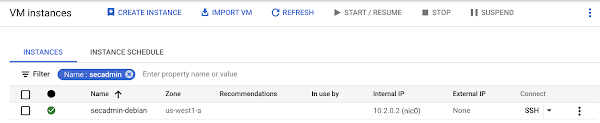
This KRM workflow for cloud resources opens the door for powerful automation, like custom UIs to automate resource requests within the Cymbal Bank org.
Integrating Config Connector with Policy Controller
By using Config Connector to manage Google Cloud-hosted resources as KRM, you can adopt Policy Controller to enforce guardrails across your cloud and Kubernetes resources.
Let’s say that the data analytics team at Cymbal Bank is beginning to adopt BigQuery. While the security team is approving production usage of that product, the platform team wants to make sure no real customer data is imported. Together, Config Connector and Policy Controller can set up guardrails for BigQuery usage within Cymbal Bank.
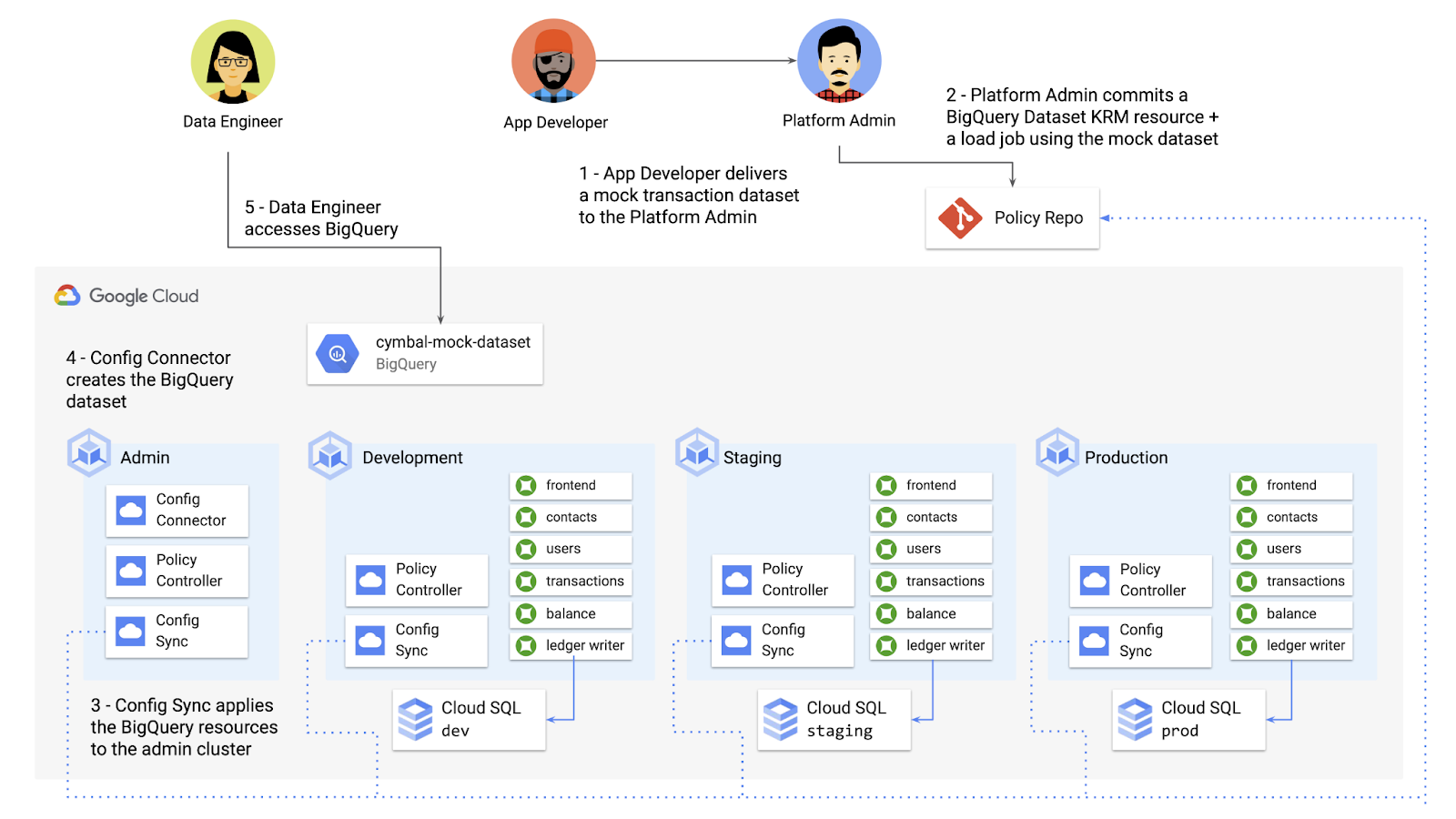
Config Connector supports BigQuery resources, including Jobs, Datasets, and Tables. The platform team can work with the analytics team to define a test dataset, containing mocked data, as KRM, pushing those resources to the Config Sync repo as they did with the GCE instance resource.
apiVersion: bigquery.cnrm.cloud.google.com/v1beta1kind: BigQueryJobmetadata:name: cymbal-mock-load-jobannotations:configsync.gke.io/cluster-name-selector: cymbal-adminspec:location: "US"jobTimeoutMs: "600000"load:sourceUris:- "gs://cymbal-bank-datasets/cymbal-mock-transactions.csv"
From there, the platform team can create a custom Constraint Template for Policy Controller, limiting the allowed Cymbal datasets to only the pre-vetted mock dataset:
rego: |package bigquerydatasetallownameviolation[{"msg": msg}] {input.review.object.kind == "BigQueryDataset"input.review.object.metadata.name != input.parameters.allowedNamemsg := sprintf("The BigQuery dataset name %v is not allowed", [input.review.object.metadata.name])}apiVersion: constraints.gatekeeper.sh/v1beta1
These guardrails, combined with IAM, can allow your organization to adopt new cloud products safely- not only defining who can set up certain resources, but within those resources, what field values are allowed.
Manage existing GCP resources with Config Connector
Another useful feature of Config Connector is that it supports importing existing Google Cloud resources into KRM format, allowing you to bring live-running resources into the management domain of Config Connector.
You can use the config-connector command line tool to do this, exporting specific resource URIs into static files:
config-connector export "//sqladmin.googleapis.com/sql/v1beta4/projects/cymbal-bank/instances/cymbal-dev" \--output cloudsql/
Output:
apiVersion: sql.cnrm.cloud.google.com/v1beta1kind: SQLInstancemetadata:annotations:cnrm.cloud.google.com/project-id: cymbal-bankname: cymbal-devspec:databaseVersion: POSTGRES_12region: us-east1resourceID: cymbal-dev...
From here, we can push these KRM resources to the config repo, and allow Config Sync and Config Controller to start lifecycling the resources on our behalf. The screenshot below shows that the cymbal-dev Cloud SQL database now has the “managed-by-cnrm” label, indicating that it’s now being managed from Config Connector (CNRM = “cloud-native resource management”).
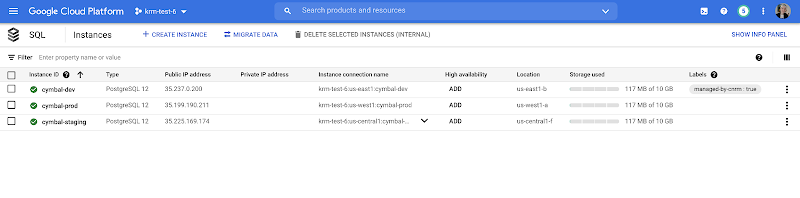
This resource export tool is especially useful for teams looking to try out KRM for hosted resources, without having to invest in writing a new set of YAML files for their existing resources. And if you’re ready to adopt Config Connector for lots of existing resources, the tool has a bulk export option as well.
Overall, while managing hosted resources with KRM is still a newer paradigm, it can provide lots of benefits for resource consistency and policy enforcement. Want to try out Config Connector yourself? Check out the part 5 demo.
This post concludes the Build a Platform with KRM series. Hopefully these posts and demos provided some inspiration on how to build a platform around Kubernetes, with the right abstractions and base-layer tools in mind.
Thanks for reading, and stay tuned for new KRM products and features from Google.
How the Telegraph is Reimagining Media with Google Cloud

10208
Of your peers have already read this article.
3:30 Minutes
The most insightful time you'll spend today!
Whether they’re reading the newspaper on the way to work, or catching up on the latest headlines on their smartphones, readers expect up-to-the-minute news wherever and whenever makes the most sense for them. As a result, media companies are increasingly looking for ways to improve, expand, and simplify their offerings, and they’re increasingly looking to the cloud to do it.
For more than 160 years The Telegraph has been counted on by readers across the United Kingdom and globally for award-winning news and journalism. An early adopter of cloud technology, it’s been a G Suite customer since 2008 and has already been using Google Cloud Platform to analyze digital behaviors to improve engagement and advertising performance since 2016.
Recently, The Telegraph announced it’s migrating fully to Google Cloud. By migrating all their production and pre-production services, they aim to deliver content faster, provide compelling experiences to readers, and reduce environmental impact.
“We are delighted to announce our newest collaboration with Google Cloud,” said Chris Taylor, Chief Information Officer, The Telegraph. “We have always worked closely with Google as they help us to provide our readers with great experiences on our digital products, collaboration software and internet scale through search. Their continued leadership in projects such as Kubernetes are enabling us to build flexible development environments that truly support DevOps.”
Powering the Digital Publishing Ecosystem
The Telegraph produces large volumes of digital content every day. It was imperative for them to find a cloud provider they could trust to support this ecosystem. By working with Google Cloud they have changed the way they see and engage with data: they can collect new information about their products every second and use that to continually hone their strategy. The Telegraph are placing more confidence and trust in the data captured about their content and now have one of the best available pieces of technology for capturing and analyzing the stories they publish in real-time.
Leveraging AI to support journalists
Time is critical when journalists are on a story, and The Telegraph wants to put important data in the hands of its journalists right when they need it. To do this, it will be using AutoML to classify content for journalists and make it more discoverable. For example, a reporter will be able to bring up relevant assets that link to their stories. It will also apply AutoML to classify Telegraph stock photos to help journalists attach compelling visual content to their stories faster.
Building compelling reader experiences with the help of APIs
Readers have an ever-increasing expectation of personalization. To meet this need, The Telegraph launched My Telegraph, currently live in beta, to offer registered readers personalized news experiences based on their interests or the particular journalists they want to follow. My Telegraph was developed on an API management platform provided by Google Cloud’s Apigee. You can learn more about how it’s applying API management to My Telegraph, in this blog post.
Working for environmental good
The Telegraph is the biggest selling quality newspaper in the UK, an accolade which requires it to print and distribute hundreds of thousands of copies each day. Optimal management of print production is important, and by using a combination of the cloud and machine learning, The Telegraph is better able to predict demand for physical newspapers, maximizing sales and minimizing waste. This makes great business sense for The Telegraph but also has great environmental benefit.
5220
Of your peers have already watched this video.
24:03 Minutes
The most insightful time you'll spend today!
How to Manage Complexity While Going Multi-Cloud with Anthos
Today’s success depends more than ever on making the most of both on-premises investments and the various cloud offerings available to you. Come learn about how Google Cloud is bringing to you simplified operations everywhere to help you succeed in a world of hybrid, multi cloud and edge scenarios that could otherwise threaten to fragment your deployment. Use Anthos to take an uncompromising stand on quality infrastructure everywhere for your applications.
More Relevant Stories for Your Company

Apigee and Vision API: ICICI Prudential Life Insurance’s Journey of Speeding Document Processing
Google Cloud results Helps enable instant document approval with optical character recognition by Vision APIProcesses 100,000 documents in 20 minutes with automated document processing product Recognic, powered by Vision API and ApigeeHelps increase the number of applications processed by 30% within the same timeframe The insurance landscape in India has seen

How to Build an API Program That Doesn’t Suck
Modern web APIs allow businesses to build compelling experiences that generate, consume, and combine digital assets. They’ve become the foundation upon which digital business is built. But the path to success can be unclear, rough, and challenging. The game has changed, after all, and this requires tossing out many of

A Run-through of an Innovative 2021 with Apigee
Apigee is committed to continually innovating new capabilities and solutions for our customers, and 2021 saw new product launches, partnerships, and best practices for managing your expanding range of business-critical use cases. Here are some of our favorite stories from 2021. Spotting the trends in APIs Our State of API Economy 2021

How Macquarie Democratized Digital Banking with APIs
Google Cloud Results Enables the speed and agility required to build open APIsConnects over 1 million customers through Apigee digital touch pointsHelps enable a range of digital banking and commercial partnerships1billion API requests served annually In 2016, Macquarie launched a new digital banking experience that was based on empowering customers, creating personalized
