





Apigee and Vision API: ICICI Prudential Life Insurance’s Journey of Speeding Document Processing

5520
Of your peers have already read this article.
2:00 Minutes
The most insightful time you'll spend today!
Google Cloud results
- Helps enable instant document approval with optical character recognition by Vision API
- Processes 100,000 documents in 20 minutes with automated document processing product Recognic, powered by Vision API and Apigee
- Helps increase the number of applications processed by 30% within the same timeframe
The insurance landscape in India has seen significant changes in recent years with the adoption of new technology. As one of the major insurance providers in the country, ICICI Prudential Life Insurance has aimed to lead in this transformation journey. “There has been a data explosion across India over the past few years, together with a high mobile penetration rate. Today, about 60% of our customers approach us via mobile, for example, which was certainly not the case before,” says Alpesh Karnik, SVP, IT, at ICICI Life Insurance.
Consumer expectations have also evolved, with easier access to information and online services. “Consumers today are more informed on the importance of investing in insurance products, so there’s much more of a pull factor when it comes to sales, but they also want to be able to get these products quickly and easily,” adds Alpesh. To meet the demands of these consumers, ICICI Prudential Life Insurance realized it needed to make its processes even faster and more efficient. Looking to upgrade its infrastructure, the company turned to Google Cloud.
“The biggest benefit of using Recognic and Vision API is that it eliminates the initial waiting time, which can result in drop-offs. Now customers can know immediately whether their documents are sufficient, or if they need to revise or submit any others.”—Alpesh Karnik, SVP, IT, ICICI Prudential Life Insurance
Serving customers better by speeding up processes with Google Cloud
ICICI Prudential Life Insurance’s distributors were already using tablets to input customer data faster and more efficiently, but many of the company’s solutions still required a team at the back end to manually sift through documents for approval. This meant that customers needed to wait five or six hours, or sometimes until the next working day, to know if their documents were approved or needed revision.
That all changed after partnering with Google Cloud Premier Partner Searce to take advantage of its AI/ML powered automated document processing product Recognic, which is built on Google Cloud. Developed using the optical character recognition (OCR) capabilities of Cloud Vision, Recognic reads, understands, and validates documents at scale, enabling organizations that handle massive amounts of paperwork to digitize these documents and then accurately store and index them.
“Google Cloud has cut down the middle- and back-office work, leading to a 30% increase in the number of applications we can process in the same time span without the need for additional resources.”—Alpesh Karnik, SVP, IT, ICICI Prudential Life Insurance
“In the case of ICICI Prudential, the biggest benefit of using Recognic and Vision API is that it eliminates the initial waiting time, which can result in drop-offs. Now customers can know immediately whether their documents are sufficient, or if they need to revise or submit any others,” Alpesh adds.
Alpesh explains that if the details on the application form match the documents provided, the case doesn’t need to go to the underwriter for further checks and can go directly to policy issuance. “Google Cloud has cut down the middle- and back-office work, leading to a 30% increase in the number of applications we can process in the same time span without the need for additional resources.”
ICICI Prudential Life Insurance is also working with Searce to build deep learning models into Recognic so that it can overcome template barriers and input data from a variety of forms. This is particularly helpful for financial and medical documents underwriting because unlike a passport or driving license, financial documents have a higher structural complexity.
As customer data becomes more important in the work of ICICI Prudential Life Insurance, so does protecting it, and the company is taking every measure to safeguard the security and privacy of its customers’ information. “Details of customers’ contactability are automatically removed by Google Cloud after processing is complete. This step in the workflow gives us the confidence that data is not stored at any level of the optical character recognition process,” says Alpesh.
Partnering with the right teams for dedicated support
In achieving the best solution for its business goals, ICICI Prudential Life Insurance recognizes the importance of its decision to work with partners that truly understand the insurance business. “There are many intricacies involved in this business, and it’s clear that both Google Cloud and Searce really took the time to understand our underwriting processes before coming up with a solution,” says Alpesh. He adds that during the implementation process, all findings were well documented and queries were responded to quickly.
“We didn’t want to take any shortcuts deploying Recognic, but at the same time, we didn’t want to draw out the implementation process. The excellent support from both Google Cloud and Searce throughout the journey was reassuring for us as they were always thinking ahead.”
Future-proofing the organization through machine learning and AI
In the coming years, Alpesh foresees the insurance industry to be even more agile than it is today. “I doubt elaborate processes such as underwriting or operations checks will need to be done manually in the future. Everything will be done through machine learning and AI.” In light of this, ICICI Prudential Life Insurance is doing everything it can to prepare, as customers’ expectations are set to keep evolving. “We have to be prepared for the future, and I believe that with Google Cloud, we can do it.”

About ICICI Prudential Life Insurance
ICICI Prudential Life Insurance aims to lead the Indian insurance field through quality products and a hassle-free claim settlement experience. A customer-centric company, it offers long-term savings and protection plans to meet customers’ needs at every stage of life.Industries: Financial Services & InsuranceLocation: India

About Searce
Searce is a niche cloud consulting business with futuristic tech in its DNA, focused on “realizing the Next in the Now” for its clients. Specializing in cloud data engineering, AI/ML, and ad
Google Cloud Accelerates Financial Organizations’ Journey towards Digital Transformation

10452
Of your peers have already read this article.
2:00 Minutes
The most insightful time you'll spend today!
When I reflect back on the past year and the pandemic, I’m struck by how the reliance on remote work and operations has changed the fundamentals of business forever. For the financial services industry, this rings particularly true. Many conversations I’m having right now with organizations revolve around embracing a transformation cloud, and thinking of cloud computing not just as an infrastructure decision, but also as the locus for transformation throughout the company.
Today, as we welcome the industry to our Financial Services Summit, we’ll demonstrate just how Google Cloud accelerates a financial organization’s digital transformation through app and infrastructure modernization, data democratization, people connections, and trusted transactions. We hope you’ll join us.
How we’re helping financial services firms build their transformation clouds
At Google Cloud, we continue to focus on areas where we can bring the best of our capabilities to banking, capital markets, insurance, and payments customers around the world. Our work with financial services industry customers has given us a deep understanding of the real-world, specific use cases that matter most to them. This groundwork led us to engineer products and solutions that are open and flexible, not ones that force them to rip out existing investments in ERP or other early IaaS cloud implementations.
It’s why we’ve engineered solutions such as Lending DocAI, Open Banking with Apigee, and Datashare for financial services to help transform the industry. These solutions were created with our customers’ security and compliance top-of-mind and are built at the intersection of user-optimized experience, technology, and sovereignty.
At their core, financial institutions want to drive growth, reduce costs, mitigate risk, stay compliant, and increase efficiency. As a result, when we partner with them on their transformation journeys, we consider three essential focus areas:
- Enabling the human experience and connected interactions
- Building an open and intelligent data foundation for better insights
- Providing the most trusted and secure cloud in the industry
Enabling humans and connected interactions
A company’s transformation is about more than technology; people and culture ultimately drive change. HSBC, for example, recognized its business users would benefit from guided answers to common questions around risk policy compliance, and turned to Google Cloud to leverage AI and machine learning bots to assist employees, ease the burden on policy experts, and improve the user experience. Using Dialogflow, a core component of Contact Center AI, HSBC was able to build a conversational platform that quickly and accurately addresses user needs at scale.
Another example is Equifax, which used Google Workspace to support collaboration not only internally between employees, but also externally with customers. Customers can use Google Cloud solutions for financial services to build these sorts of technology-enabled human interactions quickly and easily—supporting organizational change at scale.
Building an open and intelligent data foundation for smarter, faster insights
The real impact of Google Cloud solutions for financial services comes when the whole company has access to the right information at the right time, and can act more intelligently on that data. Our solutions help businesses safely leverage their data and get a complete 360-degree view of their customers’ information, which can often be scattered across multiple systems (CRM, lending, credit, etc.). This helps financial institutions improve the overall customer experience—and sometimes even develop new products quickly.
Indeed, all financial institutions are looking for ways to grow revenue and reduce expenses, and data can be a critical ingredient to doing both effectively. As daily transactions rise, so does the volume and complexity of data. But to implement new customer experience innovations (and new revenue streams), financial institutions must first capture data effectively. This is why AXA Switzerland, for example, uses real-time analytics on Google Cloud to gain cross-industry insights about future trends and customer preferences.
Financial services organizations also need the confidence of building on a platform that provides choice, flexibility, and agility to move fast. It’s why we have an open cloud approach that allows Google Cloud services to run in different physical locations such as on-premises, other public clouds, and the edge. Customers can also harness the power of data and AI through our open APIs, machine-learning services, and analytics engines on any major cloud platform. This is why companies like Macquarie Bank are taking advantage of Google Cloud’s open, hybrid architecture to modernize and empower its developers.
Compliant and secure to address risk and regulatory needs
As a highly regulated industry, financial services is focused on security and compliance, risk and regulations, and fraud detection and prevention. Google Cloud offers unique capabilities to earn customers’ trust as part of our continuing work to be the most trusted cloud in the industry. Google Cloud provides a secure foundation that you can verify and independently control. Our cloud technology reduces risk and data loss, because it is built on comprehensive zero-trust architecture. Finally, we offer a shared-fate model built on best practices in risk management via automation, guidance, and insurance. This is why customers like BBVA have confidence anywhere their systems may operate.
On the regulatory front, global legislators and regulators continue to focus on the stability of the industry that only a decade ago went through one of the biggest liquidity crises in history. With this oversight comes strong expectations of risk mitigation. Google Cloud offers a single, global set of controls, reviewed by financial institutions and regulators around the world, and verified in collaborative audits—making compliance simpler and less costly for our customers.
Finally, Google Cloud allows financial services firms to operate confidently with advanced security tools that help protect data, applications, and infrastructure, as well as their customers from fraudulent activity, spam, and abuse. We help protect your data against threats, using the same infrastructure and security services we use for our own operations, ensuring you never have to trade-off between ease of use and security. Google Cloud encrypts data at-rest and in-transit. And we now also offer the ability to encrypt data-in use, while it’s being processed for customer VM and container workloads.
Let us help you with your transformation cloud journey
We’ve seen leading financial services companies embrace Google Cloud to help them move beyond infrastructure toward the next phase of their cloud evolution. This is an era where no company is better positioned to lead than Google Cloud, and we’re excited to help you with your journey.
Learn more about Google Cloud for financial services.
BigQuery Omni: Your Solution for Multi-Cloud Geospatial Analytics

1490
Of your peers have already read this article.
6:30 Minutes
The most insightful time you'll spend today!
As we become increasingly reliant on technology to make decisions, geospatial data is becoming more critical than ever. It is a powerful resource that can be used to solve a variety of problems, from tracking the movement of goods, identifying interest areas and potential areas of disaster.
Geospatial data incorporates data with a geographic component, such as latitude and longitude coordinates, addresses, postal codes, or place names, and can be obtained from a variety of sources, including satellites, sensors, and surveys, making it an incredibly powerful tool with a broad range of applications.
One of the key features of BigQuery, Google Cloud’s serverless enterprise data warehouse, is its ability to analyze geospatial data. However, oftentimes geospatial data sits in a variety of public clouds, not just Google Cloud. To access it effectively, you need a multi-cloud analytics solution that lets you capitalize on the distinct capabilities of each cloud platform, while extracting insights and value from data sitting across multiple cloud platforms.
BigQuery Omni is a multi-cloud analytics solution that enables the analysis of data stored across public cloud environments, including Google Cloud, Amazon Web Services (AWS) and Microsoft Azure, without the need to transfer the data. With BigQuery Omni, users can employ the same SQL queries and tools used to analyze data in Google Cloud to analyze data in other clouds, making it easier to gain insights from all data, regardless of the storage location. For businesses using multiple clouds, BigQuery Omni is an excellent tool to unify analytics and optimize the value of data.
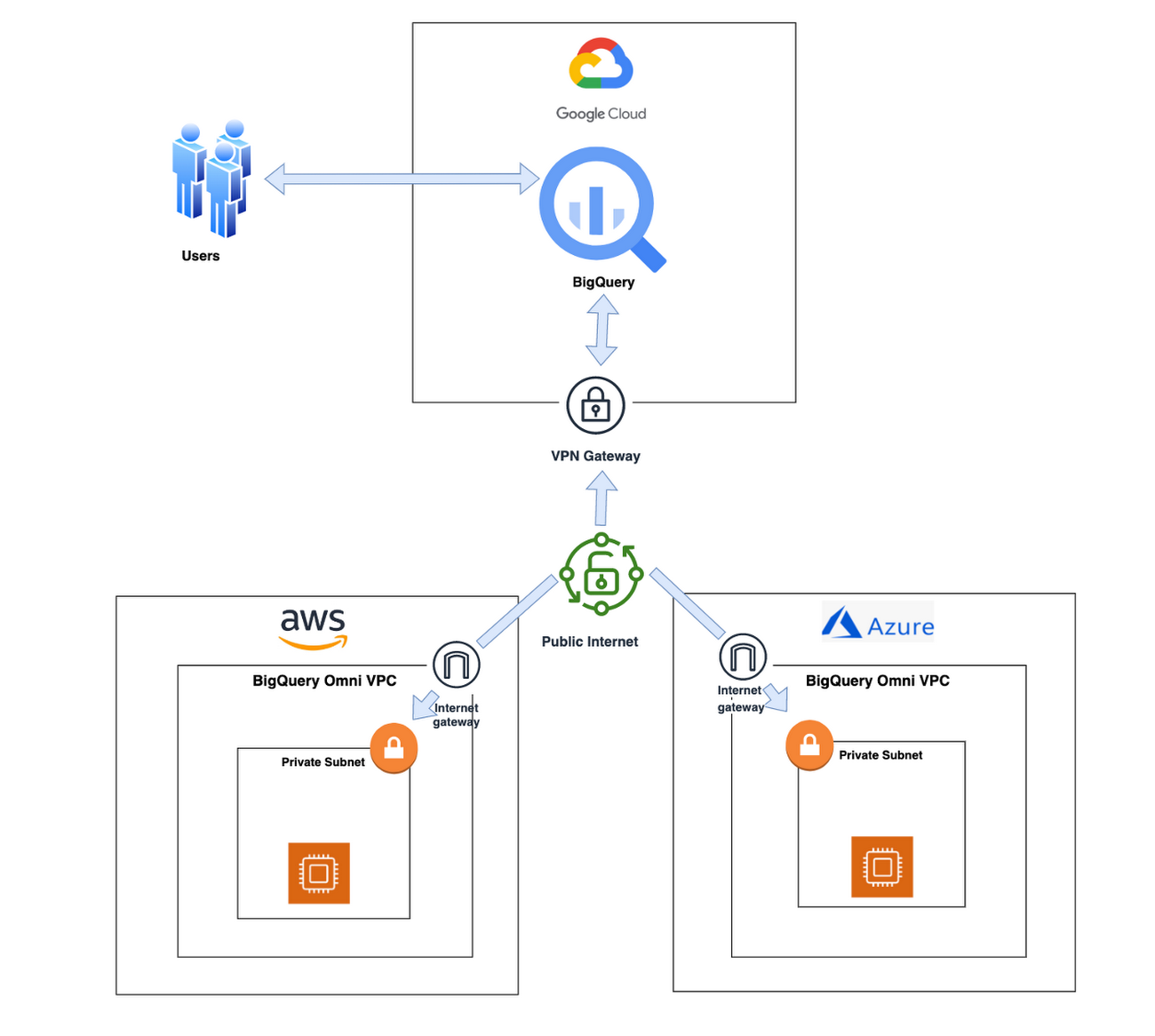
With BigQuery Omni, organizations can analyze location-based information or geographic components, such as latitude and longitude coordinates, addresses, postal codes, or place names without even copying their data to Google Cloud. For example, you could use BigQuery Omni to analyze data from a fleet of delivery vehicles to track their location and identify potential problems.
BigQuery Omni and geospatial data analysis
If you are working with geospatial data, BigQuery Omni is a powerful tool that can help you to get insights from your data. It is scalable, reliable, and secure, making it a great option for unifying your analytics and getting the most out of your data.
Here are a few examples of ways organizations might use BigQuery Omni for geospatial data:
- A transportation company could use BigQuery Omni to analyze data from GPS sensors in its vehicles to track the movement of its fleet and identify potential problems.
- A retail company could use BigQuery Omni to analyze data from its point-of-sale systems to track customer behavior and identify trends.
- A government agency could use BigQuery Omni to analyze data from its weather sensors to track the movement of storms and identify areas at risk of flooding.
BigQuery Omni and geospatial data can be used together to gain insights into a variety of business problems. Specifically, some of the advantages of using BigQuery Omni and geospatial data include:
- Access to quality geospatial data: BigQuery supports loading of newline-delimited GeoJSON files and provides built-in support for loading and querying geospatial data. Data from public data sources like BigQuery public datasets, the Earth Engine catalog, and the United States Geological Survey (USGS) can be easily integrated into your BigQuery environment. Earth Engine has an integrated data catalog with a comprehensive collection of analysis-ready datasets, including satellite imagery and climate data. This data can be combined with proprietary data sources such as SAP, Oracle, Esri ArcGIS Server, Carto, and QGIS.
- Loading and preprocessing of geospatial data: BigQuery has built-in support for loading and querying geospatial data types, and you can use partner solutions such as FME Spatial ETL to load data.
- Working with different geospatial data types and formats: BigQuery supports a variety of file types and formats including WKT, WKB, CSV and GeoJSON.
- Coordinate reference systems: BigQuery’s geography data type is globally consistent. That means that your data is registered to the WGS84 reference system and your analyses can span a city block or multiple continents.
Overall, geospatial analytics with BigQuery Omni provides a wide range of technical capabilities for processing and analyzing geospatial data, making it a powerful tool for businesses that need to work with location-based data.
Analyzing geospatial data with BigQuery Omni
Imagine a retailer who has a large chain of department stores with locations all over the country. They are looking to expand their business and want to identify areas with high sales potential. They want a way to get a better understanding of their sales volume within specific geographic boundaries. To achieve this goal, the retailer turns to the GIS (Geographic Information System) functions built into BigQuery. Here are the steps what the retailer takes to analyze this dataset:
Step 1 : An initial orders dataset on AWS S3 contains 5.54 million rows, and with separate locations (300 rows) and zipcode (33144 rows) metadata files on AWS S3.
Orders Parquet files:
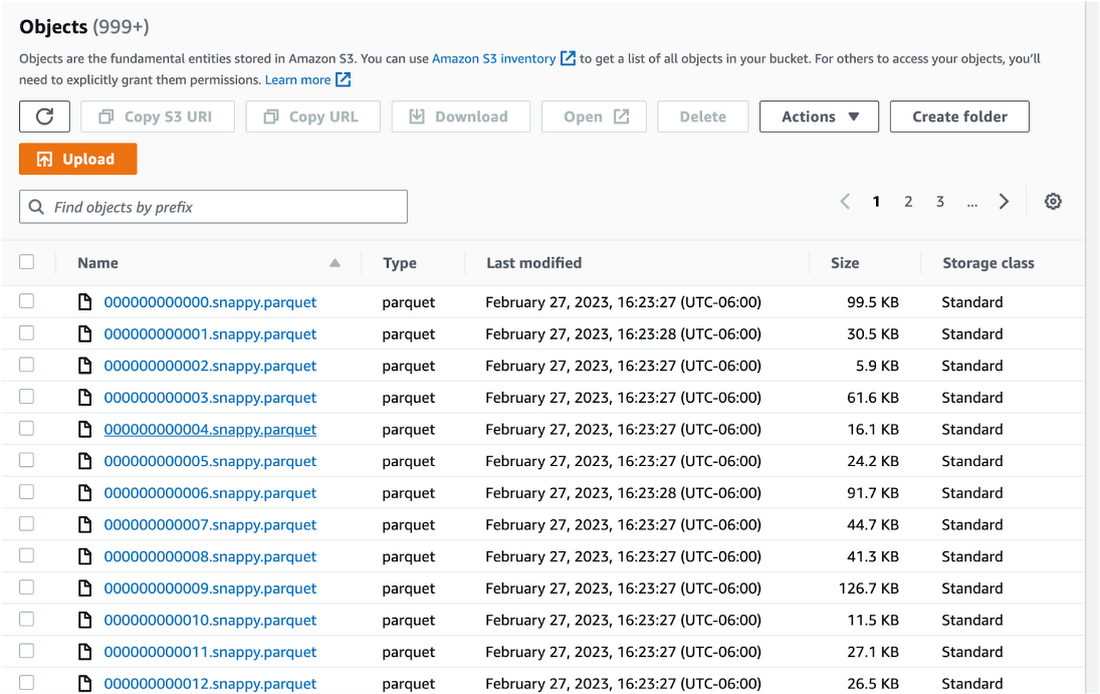
Location and Zipcode files:

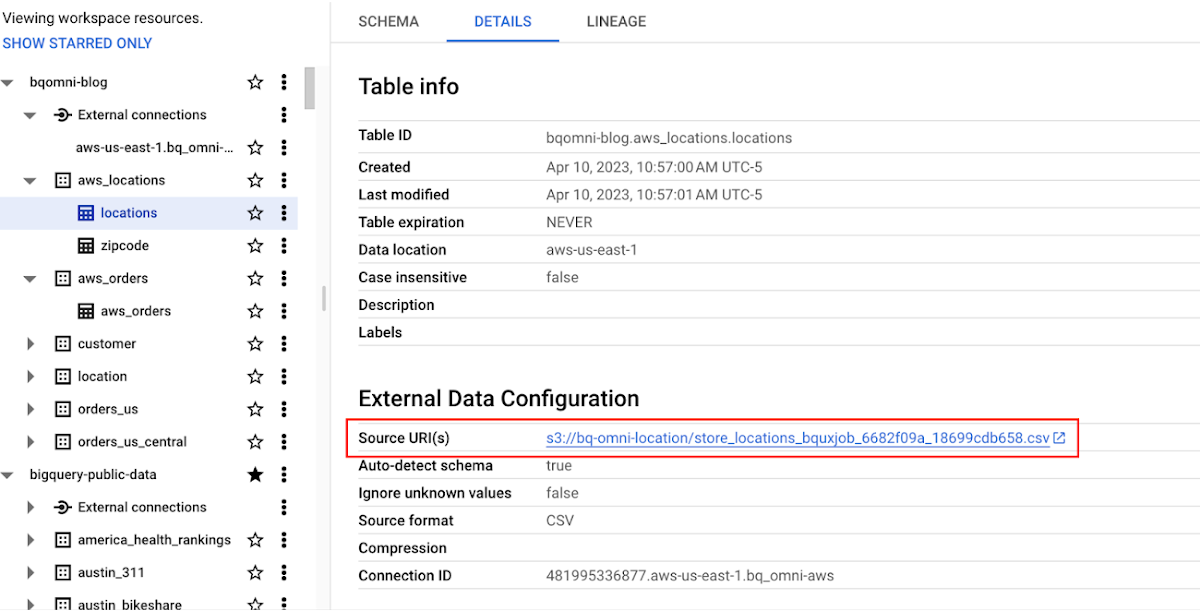
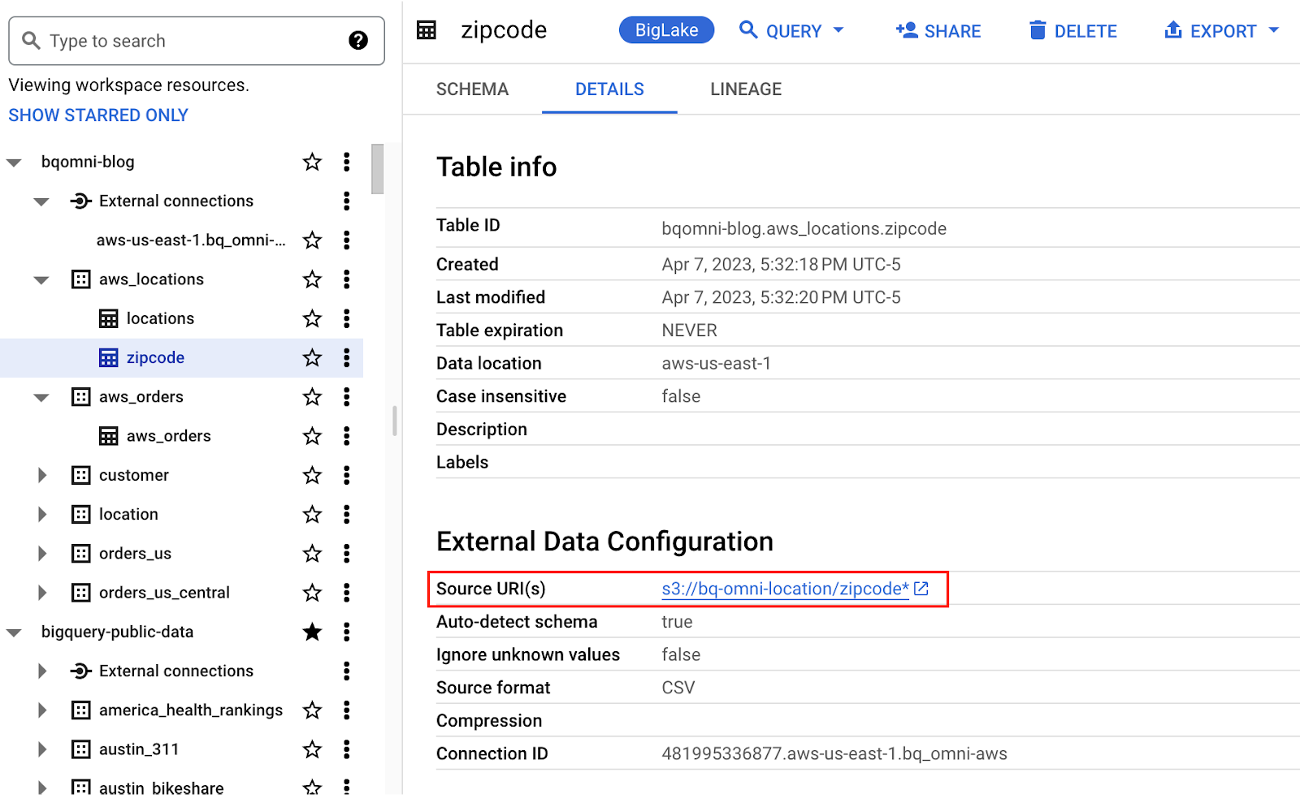
Step 2 : The retailer uses BigQuery Omni to establish a connection between the data stored in AWS and BigQuery, enabling them to access the S3 datasets externally.
External Connection for AWS
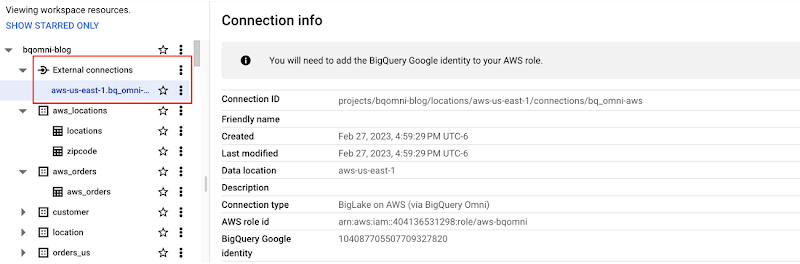
External Table for orders
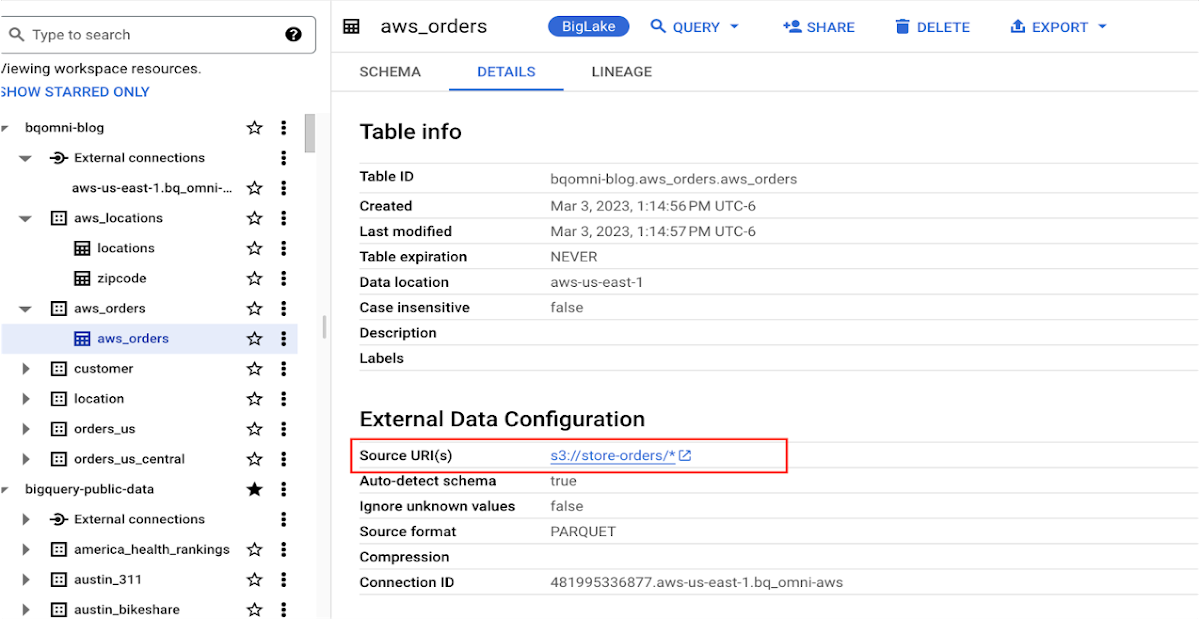
External Table for locations
External Table for zipcode
Step 3 : They combine the orders and locations datasets using BigQuery Omni, and remotely aggregate the data on AWS. Joining this dataset with geospatial datasets helps them derive geospatial coordinates.
The final aggregated dataset is reduced to 23 rows. Subsequently, they bring back the result dataset, which contains just 23 rows. This helps them reduce the extraction of millions of rows to just 23 rows for their geospatial analytics.
Select sales.store_city store_city,
sales.number_of_sales_last_10_mins number_of_sales_last_10_mins,
sales.store_zip store_zip,
 ST_GeogPoint(zip_lat_lng.longitude ,
   zip_lat_lng.latitude  ) geo
FROM (
 SELECT
   FORMAT_DATETIME("%X",
     CURRENT_DATETIME("America/Los_Angeles")) current_time,
   MAX(DATETIME(time_of_sale,
       "America/Los_Angeles")) time_of_last_sale,
   COUNT(1) number_of_sales_last_10_mins,
   locations.city store_city,
   locations.zip store_zip
 FROM
   `bqomni-blog.aws_locations.orders_small`  sales
 JOIN
   `bqomni-blog.aws_locations.locations` locations
 ON
   sales.store_id = locations.id
 GROUP BY
   locations.city,
   locations.zip ) sales
JOIN
   `bqomni-blog.aws_locations.zipcode` zip_lat_lng
ON
 cast(sales.store_zip as INT) = cast(zip_lat_lng.zipcode as INT)
 WHERE ST_WITHIN( ST_GeogPoint(zip_lat_lng.longitude , zip_lat_lng.latitude  ) ,ST_GeogFromText(zip_lat_lng.zipcode_geom ) )
 AND zip_lat_lng.state_name  = "New York"
 ORDER BY number_of_sales_last_10_mins
Aggregated Sales data by region

To build richer views of their sales volume data, the retailer uses BigQuery GeoViz integration, a powerful tool that allows for visualizing geographic data on maps.BigQuery Geo Viz is a web tool for visualization of geospatial data in BigQuery using Google Maps APIs. You can run a SQL query and display the results on an interactive map
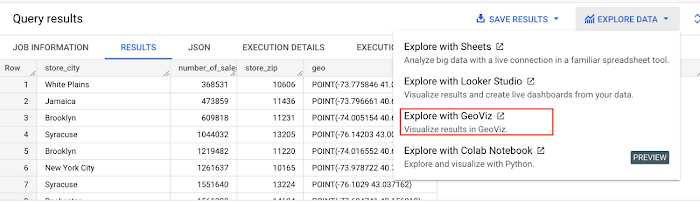
BigQuery Geo view for sales data analysis
With the geo-tagged data in place, the retailer can now see regional sales volume, sales density, distribution by department by time, and distribution within department, all powered through BigQuery.
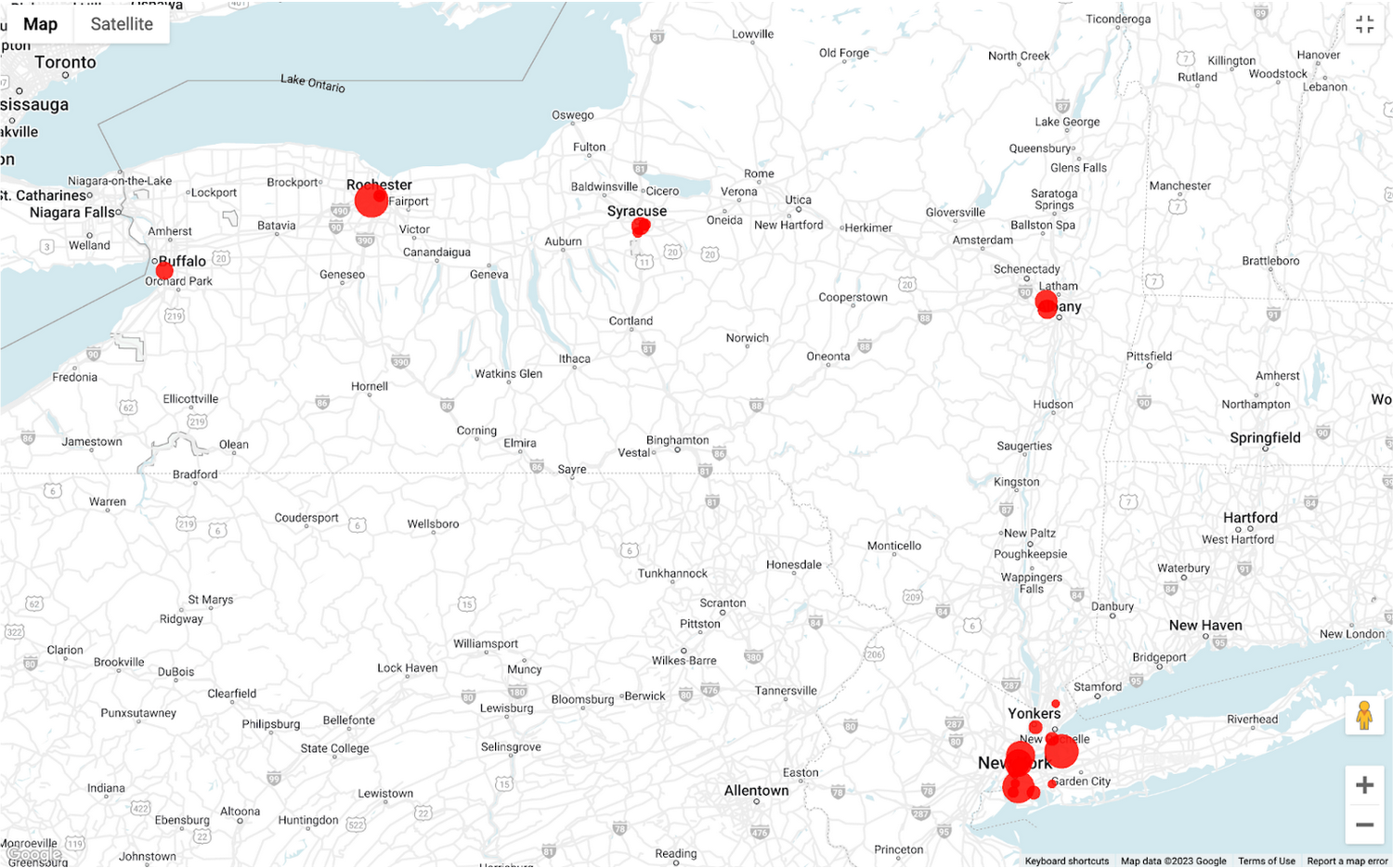
Satellite view

Benefits of using BigQuery Omni
Beyond geospatial analysis, BigQuery Omni offers a number of benefits, including:
Reduced costs: BigQuery Omni’s ability to eliminate data transfers between clouds can help organizations reduce costs and simplify data management, making it a valuable tool for multi-cloud analytics. Also, the ability to access and analyze data across multiple clouds can reduce the need for data replication and synchronization, which can further simplify the ETL process and improve data consistency.
Unified governance: BigQuery Omni uses the same security controls as BigQuery, which include features such as encryption, access controls, and audit logs, to help protect data from unauthorized access.
Single pane for analytics: BigQuery Omni provides a single interface for querying data across all three clouds, which can simplify the process of analyzing data and reduce the need for organizations to use multiple analytics tools.
Flexibility: Analyze data stored in any of the supported cloud storage services, giving organizations the flexibility to work with the data they have regardless of where it’s located.
BigQuery Omni is a valuable tool for geospatial analysis because it allows you to analyze data from multiple sources without having to move the data. This can save you time and money, and it can also help you to get more accurate insights from your data.If you are looking for a way to improve the accuracy, efficiency, and decision-making of your business, using BigQuery Omni to analyze geospatial data can be a powerful tool.
References
- Omni-introduction
- Omni-benefits
- Omni-aws-create-connection
- Omni-azure-create-connection
- BigQuery Omni Retail Demo on Looker
- Omni-pricing
- Working with Geospatial Data
- Geospatial Analytics – Intro
Learn more about how BigQuery Omni can help your organization.
How APIs Help Financial Services Firms Enhance Digital CX and Increase Revenue

3465
Of your peers have already read this article.
2:00 Minutes
The most insightful time you'll spend today!
Faced with changing customer behaviors and demands, tightening margins, and increasing threat from digital competitors, financial services institutions (FSIs) will need to meet customers where they are, open up their services, and establish new ways to monetize their products. Doing so will also enable them to build a better profile of their customers, and deliver more personalized user experiences and fast, convenient banking and payment services. Cloud technology plays a big role in this shift toward digital FSIs.
In Asia, bank branches now account for just 12% to 21% of monthly transactions in the region, with customers turning to digital channels for routine transactions such as peer-to-peer transfers and bill payments, according to McKinsey&Company. Overall customer engagement has climbed from an average 12.7 to 14.9 transactions a month in Asia’s developed markets, and from 6 to 8.1 in emerging markets.1
Fueled by growing smartphone adoption, the evolving customer behavior and momentum toward digital platforms have enabled digital-first players to snag a growing piece of the banking pie.
McKinsey estimates that digital banking penetration has grown an average of 97% in Asia’s developed markets, and 52% in emerging markets, with between 30% and 50% of those that have yet to use digital banking likely to do so.
Consumers now are more than ready to make the switch to neobanks, or digital banks. In Singapore, 63% are open to banking with digital-only players, according to a Visa study. On what will entice them to do so, 63% point to bill payments while 56% will use neobank services to make payments at retail outlets. Furthermore, 54% prefer digital banks for the convenience they offer while 52% like the faster service.
Among those who are open to digital banks, 60% will move some services from their current bank to these new players even if the latter have no prior banking experience. One in five of respondents say they are willing to switch all services to a neobank.
The same is true for small and midsize businesses (SMBs) in Singapore. According to a separate survey by Visa, 88% of these companies will consider moving some services to digital banks.
Driven to do so by their frustration over a lack of quality corporate products and control of their banking experience, 55% of SMBs believe neobanks will help bring down overall banking costs. Another 54% say digital banks offer greater convenience, while 53% point to greater ease in paying bills online.
These stats should worry even established FSIs, especially those that have not done quite enough to open up their service ecosystems and drive innovation through APIs.
An API toward new revenue
While most banks have active APIs, the services that some of them currently provide are just functional; they’re the means to an end for partners to obtain their targeted products and services. Without knowing, consumers use these types of APIs indirectly by using their favorite applications every day—a payment processing API will enable them to purchase their lunch, while a loan application API will get them that dream home.
But while banks do not always own the customer journey, they still can find opportunities to sell their products via partners. Many leading banks are leveraging key technologies, such as API management, artificial intelligence (AI), and data analytics to embed digital banking into consumers’ everyday lives, including groceries, travel, entertainment, healthcare, and food delivery.
When traditional banks open up their APIs to third parties offering broader services that pull in unique services into their own apps, they then become plugged into the broader customer journey. This helps boost usage of their services and embeds them in the overall customer experience. It also provides aggregated data that will help banks build richer consumer profiles, and deliver more personalized products and services.
APIs also create equal opportunities for smaller participants to be involved in the financial services ecosystem, potentially creating micro-segments that previously may not have existed. With insufficient demand within a closed system, to justify the provision of such services, some customers in these micro-segments have previously been left unserved. The APIs, which facilitate collaboration between the different micro-segments so they can be commercially viable, help assuage this problem.
Some banks are also opening up APIs to allow access to datasets that enable businesses to trigger automated workflows and enhance their operational efficiencies. Others, such as Bank Rakyat Indonesia (Bank BRI) have generated new revenue by leveraging Google Cloud’s Apigee to manage their API lifecycle and identify new revenue opportunities.
Apigee’s monetization feature has helped Bank BRI realize $50 million in revenue and enabled the bank to define its pricing based on API calls and automatically bill based on usage.
In addition, the Indonesian bank uses the data analysis alongside Google Maps Platform to score its customer base of 75.5 million, and identify those who can be recruited as BRILink agents for underbanked areas. These agents are customers who maintain a minimum balance of $800 USD and score high on reliability.
The appointment of branchless agents via the Agent BRILink app has pushed the loan volume from the bank’s branchless business to $26 billion in 2018, up from $15 billion the year before.
How banks can get started with APIs
Clearly, there are new revenue opportunities for banks to leverage the data they already have. Here are some tips to help FSIs kickstart their API journey:
- Align with internal leadership growth initiatives. Leverage executive key performance indicators around growth and cost savings to foster a culture that offers APIs to micro-segmented markets with an eye on cultivating a healthy financial services ecosystem.
- Productize APIs with a strong value proposition. Starting with an API-first approach, stock the shelves of your API shop with new services and a strong inventory of APIs that will entice third parties (i.e., retailers, telcos, etc.) to start using them. This customer-first, outside-in approach will serve as a strong base to build on and enable the addition of more APIs as adoption grows.
- Actively nurture a developer community. A properly trained API manager will ensure constant contact with the developer community, and that partners are provided with case studies to help them identify viable use cases for your APIs.
- Leverage security as a strategic enabler. Security is a key enabler of the API economy, and most API security postures are defensive. By leveraging deep security tooling together with strong identification of developers, banks can better track information and data usage offensively.
FSIs also need to avoid some common pitfalls, such as overlooking the need to continuously improve their APIs. If no one is using it, the API clearly is failing to provide any real value to third-party developers.
In addition, efforts should be made to market the APIs and let developers know what is available. A common mistake FSIs make is assuming their work is done once their APIs are released and neglecting the need to carry out community outreach and marketing to generate awareness about the APIs.
If you are interested in learning more about this topic, don’t miss our session at the Google Cloud Financial Services Summit on Embedded Finance: The Future of Banking.
1. McKinsey & Company. “Asia’s digital banking race: Giving customers what they want.” Global Banking Practice. April 2018.
Master AI Prompt Engineering with 6 Proven Tips

1032
Of your peers have already read this article.
2:30 Minutes
The most insightful time you'll spend today!
As AI-powered tools become increasingly prevalent, prompt engineering is becoming a skill that developers need to master. Large language models (LLMs) and other generative foundation models require contextual, specific, and tailored natural language instructions to generate the desired output. This means that developers need to write prompts that are clear, concise, and informative.
In this blog, we will explore six best practices that will make you a more efficient prompt engineer. By following our advice, you can begin creating more personalized, accurate, and contextually aware applications. So let’s get started!
Tip #1: Know the model’s strengths and weaknesses
As AI models evolve and become more complex, it is essential for developers to comprehend their capabilities and limitations. Understanding these strengths and weaknesses can help you, as a developer, avoid making mistakes and create safer, more reliable applications.
For example, an AI model that is trained to recognize images of blueberries may not be able to recognize images of strawberries. Why? Because the model was only trained on a dataset of blueberry images. If a developer uses this model to build an application that is supposed to recognize both blueberries and strawberries, the application would likely make mistakes, leading to an ineffective outcome, and poor user experience.
It’s important to note that AI models have the ability to be biased. This is due to AI models being trained on data that is collected from the real world, and so it can reflect the inequitable power dynamics inherently rooted in our social hierarchy. If the data that is used to train an AI model is biased, then the model will also be biased. This can lead to problems if the model is used to make decisions that affect people by reinforcing societal biases. Addressing these biases is important to ensure that data is fair, promoting equality, and ensuring the responsibility of AI technology. Prompt engineers should be aware of training limitations or biases so they can craft prompts more effectively and understand what kind of prompting is even possible for a given model.

Tip #2: Be as specific as possible
AI models have the ability to comprehend a variety of prompts. For instance Google’s PaLM 2 can understand natural language prompts, multilingual text, and even programming codes like Python and JavaScript. Although AI models can be very knowledgeable, they are still imperfect, and have the ability to misinterpret prompts that are not specific enough. In order for AI models to navigate ambiguity, it is important to tailor your prompts specifically to your desired outcome.
Let’s say you would like your AI model to generate a recipe for 50 vegan blueberry muffins. If you prompt the model with “what is a recipe for blueberry muffins?”, the model does not know that you need to make 50 muffins. It is thus unlikely to list the larger volume of ingredients you’ll need or include tips to help you more efficiently bake such a large number of muffins. The model can only go off the context that is provided. A more effective prompt would be “I am hosting 50 guests. Generate a recipe for 50 blueberry muffins.” The model is more likely to generate a response that is relevant to your request and meets your specific requirements.
Tip #3: Utilize contextual prompts
Utilize contextual information in your prompts to help the model gain an in-depth understanding of your requests. Contextual prompts can include the specific task you want the model to perform, a replica of the output you’re looking for, or a persona to emulate, from a marketer or engineer to a high school teacher. Defining a tone and perspective for an AI model gives it a blueprint of the tone, style, and focused expertise you’re looking for to improve the quality, relevance, and effectiveness of your output.
In the case of the blueberry muffins, it is important to prompt the model using the context of the situation. The model might need more context than generating a recipe for 50 people. If it needs to be aware that the recipe must be vegan friendly, you might prompt the model by asking it to answer by emulating a skilled vegan chef.
By providing contextual prompts, you can help ensure that your AI interactions are as seamless and efficient as possible. The model will be able to more quickly understand your request and it will be able to generate more accurate and relevant responses.
Tip #4: Provide AI models with examples
When creating prompts for AI models, it is helpful to provide examples. This is because prompts act as instructions for the model, and examples can help the model to understand what you are asking for. Providing a prompt with an example looks something like this: “here are several recipes I like – create a new recipe based on the ones I provided.” The model can now understand the your ability and needs in order to make this pastry,
Tip #5: Experiment with prompts and personas
The way you construct your prompt impacts the model’s output. By creatively exploring different requests, you will soon have an understanding of how the model weighs its answers, and what happens when you interfuse your domain knowledge, expertise, and lived experience with the power of a multi-billion parameter large language model.
Try experimenting with different keywords, sentence structures, and prompt lengths to discover the perfect formula. Allow yourself to step into the shoes of various personas, from work personas such as “product engineer” or “customer service representatives,” to parental figures or celebrities such as your grandmother, a celebrity chef, and explore everything from cooking to coding!
By crafting unique, and innovative, requests replete with your expertise and experience, you can learn which prompts provide you with your ideal output. Further refining your prompts, known as ‘tuning,’ allows the model to have a greater understanding and framework for your next output.
Tip #6: Try chain-of-thought prompting
Chain of thought prompting is a technique for improving the reasoning capabilities of large language models (LLMs). It works by breaking down a complex problem into smaller steps, and then prompting the LLM to provide intermediate reasoning for each step. This helps the LLM to understand the problem more deeply, and to generate more accurate and informative answers. This will help you to understand the answer better and to make sure that the LLM is actually understanding the problem.
Conclusion
Prompt engineering is a skill that all workers, across industries and organizations, will need as AI-powered tools are becoming more prevalent. Remember to incorporate these five essential tips the next time you communicate with an AI model, so you can generate the accurate outputs that you desire. AI will forever continue to develop, constantly refining itself as we use it, so I encourage you to remember that learning, for mind and machine, is a never ending journey. Happy Prompting!
Manage Packages Using Artifact Registry in Google Cloud Functions with Private Dependencies

3383
Of your peers have already read this article.
2:30 Minutes
The most insightful time you'll spend today!
Late last year, we announced that Artifact Registry was going GA, allowing GCP customers to manage their packages within the same platform as they were being deployed. In this blogpost, we want to show you how to do exactly that with a private dependency.
Private dependencies allow your packages to be shared with only a select group of viewers. If your codebase is already private, a private dependency can help modularize functionality using the same methodologies you use in your open source projects. Furthermore, you can experimentally develop your private dependency without breaking your overall codebase by pinning the version of the dependency on a working release. It can also provide necessary and durable abstraction if multiple projects depend on the same functionality. It does so by allowing multiple teams access to up-to-date and tested code rather than relying on copying and pasting fragmented code snippets.
With Artifact Registry, you can now wire together your serverless processes with your private dependencies without ever leaving Google Cloud Platform. This blogpost will discuss one example of how you can host your private dependency and later deploy to a serverless host like Google Cloud Functions using Cloud Build to automate the deployment.
Before getting started, take a look at the sample code here to copy and follow along.
Creating a package
Let’s walk through deploying a Google Cloud Function with a simple private dependency written in Node. Our example dependency will return the input given in unicode. It’s index.js file will look like this:
const unicode = require('to-unicode');// This function returns the input in unicode.module.exports = (input) => {return unicode(input);};
First, you’ll want to prepare your package to upload to Artifact Registry. For Node, this package should have a package.json file, which should dictate the entry point and information about the package. You can create a simple one like the one below by running the command npm init -y.
For the name of the package you should specify your scope. A scope allows you to group packages, which is helpful if you want to publish a private package; alternatively, publishing without a scope would make the repository public by default. In this blogpost, we’re going to use the scope @example, but you should name it after your private dependency’s group (i.e., your company, team or project).
{"name": "@example/blog-repo","version": "1.0.0","description": "A sample repository for blogpost demonstration purposes.","main": "index.js","scripts": {"test": "echo \"Error: no test specified\" && exit 1","artifactregistry-login": "npx google-artifactregistry-auth"},"author": "Blogpost Authors","license": "ISC","devDependencies": {"google-artifactregistry-auth": "^2.1.0"},"dependencies": {"to-unicode": "^1.0.2"}}
Another important detail in this file is that the devDependencies property contains the dependency for authenticating to the google artifact registry. To authenticate, you will use the command in the scripts section later in this tutorial.
Uploading the package to Artifact Registry & setting up authentication
Follow the instructions on these guides for creating an npm package repository on Artifact Registry, without configuring npm or pushing the repository. Next, you’ll want to configure the .npmrc file. To do so, simply add an empty file titled .npmrc, which should live at the base of your repository. To configure this file to deploy to the registry you just created, run the following command, and add the output to the .npmrc file. (Note: you may need to install the Google Cloud SDK before running the command.)
gcloud alpha artifacts print-settings npm –scope=@example
—repository=blog-repo —location=”us-central1”
Copy that output into your .npmrc file. Ultimately, it should look like this, substituting <projectId> for your Google Cloud Platform project ID.
@example:registry=https://us-central1-npm.pkg.dev/<projectId>/blog-repo///us-central1-npm.pkg.dev/<projectId>/blog-repo/:_authToken=""//us-central1-npm.pkg.dev/<projectId>/blog-repo/:always-auth=true
Then, you can push the package to the artifact repository. To do so, run this command (ensuring that you’ve copied the scripts portion from the package.json file above):
npm run artifactregistry-login <path to your .npmrc file>
This command allows you to refresh your access token when pushing your repository.
Then, simply publish by running:
npm publish
You can confirm you’ve deployed your library by searching for the repo in Artifact Registry in your Google Cloud Platform dashboard.
Setting up your Google Cloud Function
Once you have set up a repository in Artifact Registry, you can start to build your applications on top of it. Take a simple serverless example, like a Google Cloud Function:
const unicode = require('@example/blog-repo');const escapeHtml = require('escape-html');exports.mygcf= (req, res) => {res.send(`Hello ${escapeHtml(unicode(req.query.name || req.body.name || 'World'))}!`);};
This simple Cloud Function uses our private dependency to print out “Hello World” to the specified URL in unicode (it actually uses the same example in this tutorial). But how will Cloud Function successfully pull the private dependency? By using the .npmrc file you created in your original repository.
To see it in action, follow instructions for creating a simple Google Cloud Function. You can follow the tutorial exactly, ensuring that the following three key elements are in your function:
- When you create the index.js file (as done in the tutorial), it should live at the base of the repository, and should use the private dependency you’ve set up in artifact registry (like the example above),
- Its package.json should list:
- Your dependency with the version as listed in Artifact Registry
- A script to authenticate with artifact registry (just as for your dependency)
{"name": "mygcf","version": "1.0.0","description": "","main": "index.js","scripts": {"test": "echo \"Error: no test specified\" && exit 1","artifactregistry-login": "npx google-artifactregistry-auth .npmrc"},"author": "","license": "ISC","dependencies": {"escape-html": "^1.0.3","@example/blog-repo": "1.0.0","ini":: "^2.0.0"}}
- And, most importantly, you should copy over your
.nmprcfile to the base of this Google Cloud Function to authenticate your npmrc token.
Then, you can deploy the function using the following command:
gcloud functions deploy mygcf --runtime nodejs12 --trigger-http --allow-unauthenticated
To see it in action, simply follow the http trigger link (from the tutorial) and check out your input in unicode.
Automate and protect your Cloud Function
The command above will deploy the function, but it does so by exposing your token in your .npmrc file, and by forcing you to manually re-authenticate each time you redeploy the function. To automate the redeployment of the function in a safe manner, you can add a cloudbuild.yaml file to the root of your Cloud Function package.
First, let’s start by creating a helper function to modify the .npmrc file. You should save the following file to the root of your Cloud Function package, and name it npmrc-parser.js:
const fs = require('fs');const ini = require('ini');function main(pathToAuthToken, pathToNpmrc) {const config = ini.parse(fs.readFileSync(pathToNpmrc, 'utf-8'));const token = config[pathToAuthToken];config[pathToAuthToken] = "${TOKEN}";fs.writeFileSync(pathToNpmrc, ini.stringify(config));console.log(token);return token;}const args = process.argv.slice(2);main(...args);
Next, let’s create the file cloud build file. To do so, copy the following file in the root of your directory, and title it cloudbuild.yaml:
steps:- name: nodeentrypoint: npmargs: ['run', 'artifactregistry-login']- name: nodeentrypoint: npmargs: ['install']- name: nodeentrypoint: /bin/bashargs:- -c- |token=$(node npmrc-parser.js ${_PATHTOTOKEN} ${_PATHTONPMRC})echo $tokenecho $token > _TOKEN- name: gcr.io/cloud-builders/gcloudentrypoint: /bin/bashargs:- -c- |gcloud functions deploy "${_FUNCTIONNAME}" \--trigger-http \--runtime nodejs12 \--allow-unauthenticated \--set-build-env-vars TOKEN="$(cat _TOKEN)"
The first two steps of the build file will authenticate your private dependency, and install all dependencies on the project. The third step will call the custom helper function we created above to prepare your .npmrc file. This function takes two arguments, pathToAuthToken, and pathToNpmrc. The pathToAuthToken is the left-hand side of the authToken assignment in your .npmrc file. It should look something like this, replacing projectId with your own project:
"//us-central1-npm.pkg.dev/<projectId>/blog-repo/:_authToken"
The pathToNpmrc would be wherever you’ve saved your .npmrc file. In this case, the value would look like so:
".npmrc"
This build step removes the token value on the file and saves it to a variable, and replaces the .npmrc file with the environment variable TOKEN. So, the Cloud Function never stores the actual token in the source code, and the .npmrc file that is saved locally looks like this:
@example:registry=https://us-central1-npm.pkg.dev/<projectId>/blog-repo/
//us-central1-npm.pkg.dev/<projectId>/blog-repo/:_authToken=””
//us-central1-npm.pkg.dev/<projectId>/blog-repo/:always-auth=true
The last step in the build file redeploys the function, replacing the environment variable in the .npmrc file with the token value we just created. To run the build steps, you can set up a trigger, or run the following command manually, replacing the variables as we’ve described above:
gcloud builds submit --config=cloudbuild.yaml \ --substitutions=_PATHTOTOKEN="<PATHTOTOKEN>",_PATHTONPMRC="<PATHTONPMRC>",_FUNCTIONNAME="<CLOUDFUNCTIONNAME>"
Before running, make sure you’ve set the appropriate permissions for your Cloud Build function.
That’s all there is to it! Once set up this way, your Google Cloud Function can pull in your private dependency from Artifact Registry without hosting on any external package managers, and without any manual deployment steps.
Automate publishing your private dependency
To speed up the deployment of your local package to Artifact Registry, you can also add a Cloud Build file to your Artifact Registry package that will trigger a publishing event when changes are saved to your package. You can follow the setup steps here, but here is a snippet of a sample cloudbuild.yaml file that would live in your private dependency:
steps:- name: gcr.io/cloud-builders/npmargs: ['run', 'artifactregistry-login']- name: gcr.io/cloud-builders/npmargs: ['publish','${_PACKAGE}']
What about other languages and runtimes?
Even though this blog post focuses on Node.js, Cloud Functions and Artifact Registry support other runtimes as well, like Python and Java. For example, with Python the steps for deploying the module to Python aren’t much more complicated than Node. Once you’ve readied your private dependency and published to Artifact Registry, you can start creating a Google Cloud Function like the one above, but in Python. Next, you will want to fetch and package these dependencies locally.
More Relevant Stories for Your Company

Chrome OS’s Hybrid Work Model Powers Google’s Return to Work Strategy
The pandemic continues to deeply affect our lives around the globe. In some places, new cases are surging and returning to work is the last thing on people’s minds. In other areas, conditions are improving and companies are starting to think about transitioning their workforce back to the office. Exactly

Google Cloud named a Leader in API Management Solutions in The Forrester Wave
The right API strategy is a key element of your digital business success, so choosing the best API management solution is critical - but often challenging. Organizations like yours need to address a wide range of criteria to support an effective digital business strategy, and that requires a robust API

Swiggy: Delivering Local Food Within 40 Minutes
Founded in 2014, Swiggy started small, delivering food to a few neighborhoods in Bengaluru, India. As the company grew, the team wanted a mapping technology that could help expand the service throughout India. Swiggy needed a scalable mapping platform that covered a wide geographic area and offered tools to help

Anthos Makes Hybrid and Multi-Cloud Deployments Easy
Most enterprises have applications in disparate locations—in their own data centers, in multiple public clouds, and at the edge. These apps run on different proprietary technology stacks, which reduces developer velocity, wastes computing resources, and hinders scalability. How can you consistently secure and operate existing apps, while developing and deploying
