





IT Team Figures Out Easiest Way to Build Data Pipelines and Create ML Models

14068
Of your peers have already read this article.
5:15 Minutes
The most insightful time you'll spend today!
Building a strong brand in today’s hyper-competitive business environment takes vision. It also requires a flexible, easily managed approach to digital asset management (DAM), so marketing professionals and other stakeholders can easily share, store, track, and manipulate assets to build the brand.
Many of today’s leading companies, including JetBlue, Slack, TripAdvisor, Lyft, and HealthONE, rely on Brandfolder to deliver consistent, organized, and efficient brand experiences. Brandfolder provides an easy-to-use platform that can scale across an entire company with little end-user training, empowering customers to distribute digital assets wherever they are needed. Customers also gain much greater insight into how those assets are used, and how to use them more effectively in marketing campaigns and brand messaging.
“Google Cloud made it easy to build an ML platform to quickly iterate through different brand intelligence use cases and release data-driven product features into the Brandfolder platform.”
—Ajay Rajasekharan, Head of Data Science, Brandfolder
Brandfolder is constantly advancing its development efforts to introduce new data-driven features without complicating the user experience. Big data, artificial intelligence (AI), and machine learning (ML) are key to meeting customers’ unique business needs, and essential for Brandfolder to compete in the fast-moving DAM industry. To enhance these capabilities, Brandfolder sought a public cloud provider that could help it scale its data pipeline cost effectively while providing access to advanced AI technologies.
After graduating from the Techstars startup accelerator program in 2013, Brandfolder tried two other cloud providers before standardizing on Google Cloud Platform (GCP).
“We saw a difference with Google Cloud from the very beginning because the interactions felt like a strategic relationship,” says Jim Hanifen, Head of Product at Brandfolder. “Google gave us startup credits and a lot of face-to-face support, which we hadn’t experienced with other cloud providers. We decided to move our entire infrastructure to Google Cloud Platform.”
Building an ML platform for brand intelligence
After performing an initial lift-and-shift migration of virtual machines (VMs) onto Compute Engine, Brandfolder built an ML platform using GCP managed services to seamlessly deliver its data products. The platform leverages Cloud SQL, Cloud Storage as the data lake, Cloud Dataproc for cloud-native Apache Spark computing clusters, Cloud Composer as the batch job scheduler, Cloud Pub/Sub as the backbone data pipeline, Container Registry to store Docker images, and Google Kubernetes Engine (GKE) as the application orchestrator. Cloud Dataflow brings data into the data lake and into BigQuery for analysis.
“Google Cloud made it easy to build an ML platform to quickly iterate through different brand intelligence use cases and release data-driven product features into the Brandfolder platform,” says Ajay Rajasekharan, Head of Data Science at Brandfolder, who describes the architecture in a detailed blog. “We simply ingest raw application and event data on one end and output an ML service on the other.”
“Moving to Google Cloud Platform allows us to complete more sophisticated data analysis and ML models much faster, and at a much lower cost. We can create brand-specific ML models 12x faster and get them into production quickly to address our customers’ unique business needs.”
—Brett Nekolny, Head of Engineering, Brandfolder
For many general use cases, Brandfolder does not need to build custom ML models, and instead relies on pre-trained API models from GCP. For example, it uses Vision API and Video Intelligence API to auto-tag creative assets on import to enable fast, intuitive searches across images and videos. When more product- and brand-specific modeling is required to address unique customer use cases, Brandfolder builds and trains custom ML models using its GCP pipeline or Cloud AutoML, a suite of products built on Google transfer learning and neural architecture search technology. For example, if a Brandfolder customer makes different types of grills, Brandfolder can use AutoML Vision to train a model to recognize the different grills.
“Moving to Google Cloud Platform allows us to complete more sophisticated data analysis and ML models much faster, and at a much lower cost,” explains Brett Nekolny, Head of Engineering at Brandfolder. “We can create brand-specific ML models 12x faster and get them into production quickly to address our customers’ unique business needs.”
Industry-leading security and performance
Google Cloud’s security model helps Brandfolder give existing and prospective customers peace of mind that their data will be protected. Cloud Identity & Access Management (Cloud IAM) provides enterprise-grade access control, while Cloud Identity-Aware Proxy (Cloud IAP) enables remote users to work more securely without the hassles of a VPN client. GCP also isolates cloud resources into projects, making it easy to assign permissions and keep data and VMs organized and segregated.
“With Google Cloud, everything begins and ends with security, which makes things very easy for us,” says Jim. “If we’re under a security review, we can submit a Google security white paper. If a potential customer has security concerns, we tell them we are hosted on GCP, and those concerns go away.”
To give customers even better application performance for accessing their brand assets, Brandfolder uses Cloud Memorystore, an in-memory data store service for Redis, to cache data and provide sub-millisecond data access for production applications.
“It was much easier for us to use Cloud Memorystore versus running Redis on our compute instances,” says Brett. “The high availability, replication across zones, and automatic failover with no data loss are big for us.”
Global private network interconnects between Google Cloud and the Fastly content delivery network (CDN) dramatically reduce latency, allowing Brandfolder’s customers to deliver and update even very large creative assets quickly around the world.
“What’s beautiful about the relationship between Google and Fastly is that if one of our customers uploads a new version of an asset, we can propagate that out to Fastly, and the new version will automatically show up in all the places where it’s referenced,” says Brett.
“The ability to quickly solve problems with AI has a substantial impact on our revenue, and that’s more apparent every quarter. Few of our competitors are doing product- or brand-specific modeling because it takes a lot of time and resources. We overcame those hurdles with Google Cloud.”
—Jim Hanifen, Head of Product, Brandfolder
Improving employee and customer productivity
Brandfolder also uses Google solutions for real-time collaboration and productivity, using G Suite to connect employees with intuitive, cloud-based apps. Teams use Gmail, Calendar, Docs, Drive, Sheets, Slides, and Hangouts Meet every day to move the business forward. Many of Brandfolder’s customers are also G Suite users, and Brandfolder offers a plug-in that allows them to view their creative assets inside of Docs and pull images in as needed. Customers can also log into Brandfolder with their G Suite credentials, making the solution even easier to use.
“We’ve been using G Suite since the beginning, and it’s helped us collaborate efficiently to build a successful, growing company,” says Jim. “Our teams expect to have that kind of close collaboration, and everyone here enjoys the G Suite experience.”
Driving 99 percent annual business growth
With automated tagging and other innovative AI-based features, Brandfolder is helping customers locate and distribute assets faster. As a result, Brandfolder is building customer loyalty and increasing sales, growing its business by 99 percent year-over-year. Since moving to GCP, Brandfolder has been able to scale its analytics and data pipeline 50x without a corresponding increase in costs and has not had to expand its development team.
“The ability to quickly solve problems with AI has a substantial impact on our revenue, and that’s more apparent every quarter,” says Jim. “Few of our competitors are doing product- or brand-specific modeling because it takes a lot of time and resources. We overcame those hurdles with Google Cloud.”
How to Pick a Database that is Suitable for Your Application

7020
Of your peers have already read this article.
2:30 Minutes
The most insightful time you'll spend today!
Picking the right database for your application is not easy. The choice depends heavily on your use case—transactional processing, analytical processing, in-memory database, and so on—but it also depends on other factors. This post covers the different database options available within Google Cloud across relational (SQL) and non-relational (NoSQL) databases and explains which use cases are best suited for each database option.

Relational databases
In relational databases information is stored in tables, rows and columns, which typically works best for structured data. As a result they are used for applications in which the structure of the data does not change often. SQL (Structured Query Language) is used when interacting with most relational databases. They offer ACID consistency mode for the data, which means:
- Atomic: All operations in a transaction succeed or the operation is rolled back.
- Consistent: On the completion of a transaction, the database is structurally sound.
- Isolated: Transactions do not contend with one another. Contentious access to data is moderated by the database so that transactions appear to run sequentially.
- Durable: The results of applying a transaction are permanent, even in the presence of failures.
Because of these properties, relational databases are used in applications that require high accuracy and for transactional queries such as financial and retail transactions. For example: In banking when a customer makes a funds transfer request, you want to make sure the transaction is possible and it actually happens on the most up-to-date account balance, in this case an error or resubmit request is likely fine.
There are three relational database options in Google Cloud: Cloud SQL, Cloud Spanner, and Bare Metal Solution.
Cloud SQL: Provides managed MySQL, PostgreSQL and SQL Server databases on Google Cloud. It reduces maintenance cost and automates database provisioning, storage capacity management, back ups, and out-of-the-box high availability and disaster recovery/failover. For these reasons it is best for general-purpose web frameworks, CRM, ERP, SaaS and e-commerce applications.
Cloud Spanner: Cloud Spanner is an enterprise-grade, globally-distributed, and strongly-consistent database that offers up to 99.999% availability, built specifically to combine the benefits of relational database structure with non-relational horizontal scale. It is a unique database that combines ACID transactions, SQL queries, and relational structure with the scalability that you typically associate with non-relational or NoSQL databases. As a result, Spanner is best used for applications such as gaming, payment solutions, global financial ledgers, retail banking and inventory management that require ability to scale limitlessly with strong-consistency and high-availability.
Bare Metal Solution: Provides hardware to run specialized workloads with low latency on Google Cloud. This is specifically useful if there is an Oracle database that you want to lift and shift into Google Cloud. This enables data center retirements and paves a path to modernize legacy applications.
Non-relational databases
Non-relational databases (or NoSQL databases) store compex, unstructured data in a non-tabular form such as documents. Non-relational databases are often used when large quantities of complex and diverse data need to be organized. Unlike relational databases, they perform faster because a query doesn’t have to access several tables to deliver an answer, making them ideal for storing data that may change frequently or for applications that handle many different kinds of data.
For example, an apparel store might have a database in which shirts have their own document containing all of their information, including size, brand, and color with room for adding more parameters later such as sleeve size, collars, and so on.
Qualities that make NoSQL databases fast:
- Eventual consistency: stores usually exhibit consistency at some later point (e.g., lazily at read time)
- Horizontal scaling, usually using hashed distributions
- Typically, they are optimized for a specific workload pattern (i.e., key-value, graph, wide-column)
- Typically, they don’t support cross shard transactions or flexible isolation modes.
Because of these properties, non-relational databases are used in applications that require large scale, reliability, availability, and frequent data changes.They can easily scale horizontally by adding more servers, unlike some relational databases, which scale vertically by increasing the machine size as the data grows. Although, some relations databases such as Cloud Spanner support scale-out and strict consistency.
Non-relational databases can store a variety of unstructured data such as documents, key-value, graphs, wide columns, and more. Here are your non-relational database options in Google Cloud:
- Document databases: Store information as documents (in formats such as JSON and XML). For example: Firestore
- Key-value stores: Group associated data in collections with records that are identified with unique keys for easy retrieval. Key-value stores have just enough structure to mirror the value of relational databases while still preserving the benefits of NoSQL. For example: Datastore, Bigtable, Memorystore
- In-memory database: Purpose-built database that relies primarily on memory for data storage. These are designed to attain minimal response time by eliminating the need to access disks. They are ideal for applications that require microsecond response times and can have large spikes in traffic. For example: Memorystore
- Wide-column databases: Use the tabular format but allow a wide variance in how data is named and formatted in each row, even in the same table. They have some basic structure while preserving a lot of flexibility. For example: Bigtable
- Graph databases: Use graph structures to define the relationships between stored data points; useful for identifying patterns in unstructured and semi-structured information. For example: JanusGraph
There are three non-relational databases in Google Cloud:
- Firestore: Is a serverless document database which scales on demand and acts as a backend-as-a-service. It is DBaaS that increases the speed of building applications. It is perfect for all general purpose uses cases such as ecommerce, gaming, IoT and real time dashboards. With Firestore users can interact with and collaborate on live and offline data making it great for real-time application and mobile apps.
- Cloud Bigtable: Cloud Bigtable is a sparsely populated table that can scale to billions of rows and thousands of columns, enabling you to store terabytes or even petabytes of data. It is ideal for storing very large amounts of single-keyed data with very low latency. It supports high read and write throughput at sub-millisecond latency, and it is an ideal data source for MapReduce operations. It also supports the open-source HBase API standard to easily integrate with the Apache ecosystem including HBase, Beam, Hadoop and Spark along with Google Cloud ecosystem.
- Memorystore: Memorystore is a fully managed in-memory data store service for Redis and Memcached at Google Cloud. It is best for in-memory and transient data stores and automates the complex tasks of provisioning, replication, failover, and patching so you can spend more time coding. Because it offers extremely low latency and high performance, Memorystore is great for web and mobile, gaming, leaderboard, social, chat, and news feed applications.
Conclusion
Choosing a relational or a non-relational database largely depends on the use case. Broadly, if your application requires ACID transactions and your data structure is not going to change much, select a relational database.
In Google Cloud use Cloud SQL for any general-purpose SQL database and Cloud Spanner for large-scale globally scalable, strongly consistent use cases. In general, if your data structure may change later and if scale and availability is a bigger requirement than consistency then a non-relational database is a preferable choice. Google Cloud offers Firestore, Memorystore, and Cloud Bigtable to support a variety of use cases across the document, key-value, and wide column database spectrum.
For more comparison resources on each database check out the overview. For more hands-on experience with Bigtable, check out our on-demand training here and learn about migrating databases to managed services check out this whitepaper.
https://youtube.com/watch?v=2TZXSnCTd7E%3Fenablejsapi%3D1%26
For more #GCPSketchnote, follow the GitHub repo. For similar cloud content follow me on Twitter @pvergadia and keep an eye out on thecloudgirl.dev.

1110
Of your peers have already downloaded this article
1:30 Minutes
The most insightful time you'll spend today!
A common perception is that migrating existing workloads to the public cloud—especially those with a lot of data—is complex, time consuming, and risky. But with the right planning, organizations can rapidly establish the right practices to accelerate migrations, lower risk, and succeed in the cloud.
Bushel: Empowering Agribusinesses One Step at a Time with Google Cloud

3112
Of your peers have already read this article.
3:00 Minutes
The most insightful time you'll spend today!
Working to put food on all of our tables, today’s farmers are facing a higher amount of instability from input supply chain issues to weather patterns. Adding to this challenge are problems farmers face when trying to correctly time grain purchases, sales and transport. Farmers have always been stewards of the land, but now the demand for sustainable products has them needing to better prove their regenerative practices.
At Bushel, we understand these problems can’t be solved overnight or by a single company. We focus on empowering agribusinesses and farmers to work even more closely together to build a more sustainable agricultural supply chain by rapidly responding to market changes. With Bushel, farmers can track market prices in real time, instantly buy and sell grain, analyze inventory and transactions, and securely share verified information with grain operators and other producers. We provide the digital tools to streamline how farmers buy and sell commodities throughout the agricultural industry’s supply chain to help address market inefficiencies that can lead to waste, and have the information and resources to help them flex and adapt as complexity increases in farming operations.
Approximately 40% to 50% of all U.S. grain transactions now pass through the Bushel platform. As we continue to grow, Bushel continues to focus on what digital tEmpowering Farmers: Bushel Drives 40-50% of US Grain Transactions, Fueling Sustainable Agricultureools can support each point in the supply chain. Many focus on the first mile at the farm or last mile at the store. But Bushel is focused on modernizing the middle where grain purchasing and processing sit. We aim to help local grain industries and stabilize regional agricultural supply chains.
Starting with a simple mobile app; now scaling into an agricultural ecosystem
Bushel began its journey in 2017 as a small-scale platform for farmers that delivered grain contracts, cash bids, and receipts. As Bushel evolved into a comprehensive agricultural ecosystem, we realized we needed knowledgeable technology partners to help us rapidly scale while saving time and administrative costs. That’s why we started partnering with the Google for Startups Cloud Program to get support from Google and work with Google Cloud Managed Services partner, DoiT International to help support our use of GKE and create a multi-regional deployment as well as migrate our CUDs to new Compute Engine families and continue to optimize our footprint. We’ll also use DoiT’s Flexsave technology to reduce the management overhead of CUDs in the future.
In just one year, we expanded to over 1,200 live grain receiving locations and quickly grew our services portfolio with electronic signature capabilities, commodity balances, and web development. Because that relationship between farmer and agribusiness is so important, we provide more than 200 grain companies with white-labled digital experiences so each farmer sees their local grain facility they do business with on both desktop and mobile. To further our extension into the digital infrastructure of agriculture, we subsequently acquired GrainBridge and FarmLogs to help farmers handle specific jobs and tasks, and provide the needed insights to improve their business operations. Over 2,000 grain receiving locations across the United States and Canada now use Bushel products. We accomplished all this on Google Cloud.
We leverage the secure-by-design infrastructure to protect millions of financial transactions and keep sensitive customer data safe. Our data is processed and stored in Google’s secure data centers, which maintain adherence to a number of compliance frameworks. We utilize Google Kubernetes Engine extensively as it reduces operational overhead and offers auto scaling up to 15,000 nodes.
Database provisioning, storage capacity management, and other time-consuming tasks are automated with our Cloud SQL usage. Query Insights for Cloud SQL streamlines database observability and seamlessly integrates with existing apps and Google Cloud services such as GKE and BigQuery.
Empowering farmers and agribusinesses in North America
The Google Cloud Account Team had been instrumental in helping Bushel build an expansive agricultural platform that powers APIs, apps, websites, and digital solutions. Google’s startup experts are incredibly responsive, with deep technical knowledge that can’t be found elsewhere. Google Cloud also has provided us credits to explore new ways of analyzing the vast amounts of data we generate, verify, and transfer with solutions such as BigQuery and Pub/Sub.
With BigQuery, we can run analytics at scale with 26%–34% lower three-year TCO than cloud data warehouse alternatives. BigQuery delivers actionable insights on a highly secure and scalable platform, includes built-in machine learning capabilities, and integrates with Pub/Sub to ingest and stream analytic events via Dataflow.
With Bushel, farmers across North America are rapidly responding to sudden market changes by tracking grain prices in real time and instantly buying and selling crops. We see a future where this business information becomes insights – where a farmer can not just know where to sell their grain, but when to sell. The burden right now to engage with carbon markets is high, full of paper-based binders and verification forms. We see a world where farming practices recorded digitally can be permissioned along the supply chain for a better picture of how our food is grown.
With the Bushel platform, millions of farmers around the world will have the digital tools to modernize local grain industries, build more sustainable agricultural supply chains, and help to address global food inequity.
If you want to learn more about how Google Cloud can help your startup, visit our page here to get more information about our program, and sign up for our communications to get a look at our community activities, digital events, special offers, and more.
Google Cloud’s 101 Illustrated References for Cloud Engineers and Architects

3382
Of your peers have already read this article.
1:30 Minutes
The most insightful time you'll spend today!
Many people are visual learners; I am definitely one of them, and judging by the tremendous response you all showed to Google Cloud Sketchnotes on LinkedIn and Twitter, you are too.
-Priyanka Vergadia, Lead Developer Advocate, Google
“A picture is worth a thousand words”
Shortly after I started creating and sharing visual explanations of Google Cloud concepts in late 2020, I began receiving overwhelmingly positive feedback from fellow cloud architects and enthusiasts. That feedback led me to think about pulling these sketches together into a reference guide — a one-stop shop for cloud learning fun. So here it is!
🥁 Introducing “Visualizing Google Cloud: 101 Illustrated References for Cloud Engineers and Architects”
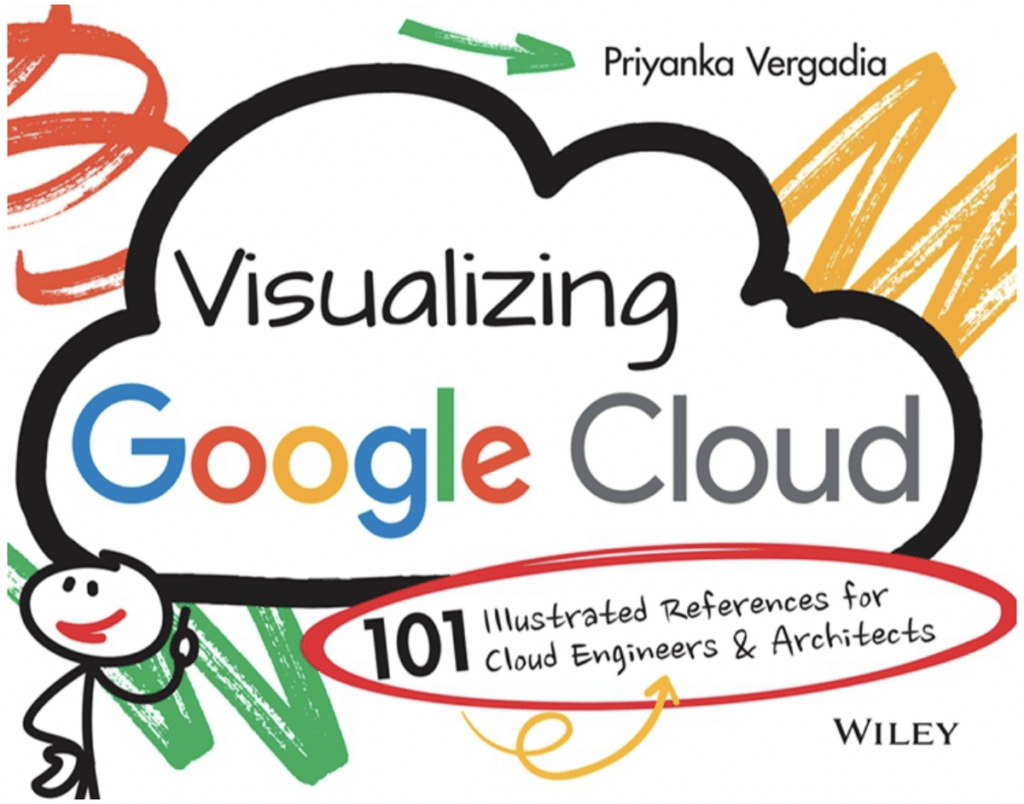
🤔 What is this book about?
This book is my way of making Google Cloud technical concepts fun and interesting via visual storytelling. It covers Google Cloud essentials from end to end, with a visual explanation of each concept, how it works, and how you can apply it with other concepts to meet the needs of your real-world use case. After reading thousands of pages of Google Cloud documentation and experimenting with virtually every Google Cloud product, I distilled that experience down to this book of accessible, bite-sized visuals.
The sketches are spread across five broad categories:
- Infrastructure, storage, and databases: Run and scale applications seamlessly
- Data analytics and machine learning: Derive actionable insights from data
- Networking: Connect, scale, secure, modernize, and optimize your infrastructure
- Application development and modernization: Build apps using containers and microservices
- Security: Protect data, users, and applications in cloud
🙋♀️ Who is this book for?
It is for all cloud enthusiasts. It is for anyone who is planning a cloud migration or new cloud deployment, preparing for cloud certification, or looking to make the most of Google Cloud. If you are a cloud solutions architect, an IT decision-maker, or a data and machine learning engineer, you will find this book a good starting point. In short, this book is for YOU!
When you get the book you’ll not only help yourself, you’ll also help provide meals for schoolchildren who need them. All the books’ proceeds go directly to the awesome folks at Wiley and a charity that fights malnutrition and supports the right to education.
🪜 Next Steps
I hope this book helps you on your Google Cloud journey by making it both easier and more fun. Are you ready to dive in? Order here, learn more about how the idea of the book came about here and please share your thoughts with me on Twitter or LinkedIn.
Google Cloud Connector for SAP LaMa Helps Make Most of the Multi & Hybrid-cloud Strategies
3491
Of your peers have already read this article.
1:30 Minutes
The most insightful time you'll spend today!
As an SAP user, you may already be familiar with SAP Landscape Management (SAP LaMa) — a specialized product that supports centralized management of your SAP landscape. SAP LaMa is useful for a wide range of SAP customers and use cases, but it’s especially important to large enterprises that manage very large, diverse, and often geographically dispersed SAP landscapes.
Google Cloud recently released a free connector that our SAP customers can deploy on an existing or new SAP LaMa instance. It’s a potentially important contribution for enterprises that need to address the growing complexity associated with multi-cloud and hybrid-cloud application strategies.
Let’s take a look at how SAP LaMa works, how it fits into a customer’s SAP landscape, and what kinds of benefits they can expect. We’ll also run through some adjustments that SAP admins will need to make in order to launch the connector.
SAP LaMa: Bringing simplicity to SAP landscapes
The Google Cloud Connector for SAP LaMa is distributed as a Java archive — provided free of charge — that customers can deploy on a SAP LaMa system that already exists on premises, or on another cloud, or as part of a new SAP LaMa deployment on Google Cloud. SAP LaMa itself is a centralized SAP management tool designed to simplify, automate, and orchestrate a variety of management and administration tasks across your entire SAP landscape. Some examples of use cases for LaMa include:
- Getting a single, comprehensive overview of your organization’s full SAP landscape
- Automating day-to-day system administration tasks, like system refreshes
- Executing mass stop/start operations across your landscape
- Deploying custom operations and workflows within the SAP application environment
SAP admins can reclaim a significant amount of time by creating SAP context sensitive automation routines that can execute without human intervention, and by completing system maintenance tasks more quickly and consistently. SAP LaMa also elevates service quality by using automation to remove manual intervention (and thus human error) from the system admin process.
The Google Cloud Connector builds bridges for SAP customers
The Google Cloud connector functions as a trigger that extends LaMa functionality to SAP systems deployed on Google Cloud. The connector enables standard SAP LaMa execution scenarios, such as:
- Listing Google Cloud projects, zones, and VM instances within SAP LaMa’s landscape overview
- Mass stop/start of Google Compute Engine (GCE) instances, using either the SAP LaMa user interface or the scheduler
- System clone, copy, and DB refresh with Post Copy Automation
- Resizing of machine types
- Relocating SAP application instances to another VM instance
- SAP HANA failover to a replicated SAP HANA HA system via the SAP Host Agent
By supporting native SAP automation and orchestration, the Google Cloud connector contributes to the overall value customers get from using SAP LaMa. What may be just as important, however, is how the connector makes life easier for customers running Google Cloud as part of a hybrid cloud or multi-cloud SAP landscape. That’s an increasingly important advantage, given recent research revealing that 82% of enterprises are currently deploying hybrid clouds.1
Before getting started with the Google Cloud connector, it’s important to be aware that you’ll have to run it on SAP LaMa 3.0 (the current version), and that you will need to have an SAP Landscape Management – Enterprise Edition licence provided by SAP to support all functionality.
In addition, getting access to the full SAP LaMa feature set for your Google Cloud SAP environment will require you to deploy SAP systems using SAP’s adaptive design principles. These include:
- Using SID (SAP system ID) and instance-specific disk mount points
- Using alias IP for virtual host mapping and portability
- Configuring DNS to manage virtual hostname (aka. FQDN) for all VMs
- Using a local NFS host to manage shared files, as well as copying, migrating, and managing solutions like Filestore and NetApp separately
Because meeting these requirements may require altering your production systems, you’ll have to assess the pros and cons of doing so to take full advantage of the Google Cloud Connector.
Google Cloud is constantly looking for ways to support our SAP customers in running more efficiently and in making the most of their hybrid cloud and multi-cloud strategies. Releasing the Google Connector for SAP LaMa is one more reflection of our commitment to creating value for customers any way we can. Learn more about Google Cloud offerings for SAP customers.
More Relevant Stories for Your Company

Rebel Foods Improves Accuracy of Forecast Time by 60% by Using Google Cloud
Google Cloud Results Enables accurate allocation of marketing spend to underserved areasSupports expansion into international marketsHelps ensure accurate forecasting of inventory levelsImproves accuracy of forecasted delivery times by at least 60% Operating in India since 2011, Rebel Foods has grown from a brick-and-mortar business that provided wraps to customers to

Frost & Sullivan: State of Digital Transformation in India
Digital transformation is about how digital technologies can connect people and processes to solve challenges that traditional methodologies could not. While this transformation is imperative for businesses of all sizes, the Frost & Sullivan Enterprise Cloud Maturity Index (ECMI) assessment indicates that around 85% of CXOs want to digitally transform

Confidential Computing: Google Cloud Security, Project Zero and AMD Come Together to Secure Sensitive Workloads
At Google Cloud, we believe that the protection of our customers’ sensitive data is paramount, and encryption is a powerful mechanism to help achieve this goal. For years, we have supported encryption in transit when our customers ingest their data to bring it to the cloud. We’ve also long supported
Cloud Bigtable brings database stability and performance to Precognitive
At Precognitive, we were able to start with a blank technology slate to support our fraud detection software products. When we started building the initial version of our platform in 2017, we had some decisions to make: What coding language to use? What cloud infrastructure provider to choose? What database
