





IT Prediction: The Importance of Workload-Optimized, Ultra-Reliable Infrastructure in Today’s World

2549
Of your peers have already read this article.
2:30 Minutes
The most insightful time you'll spend today!
Editor’s note: This post is part of an ongoing series on IT predictions from Google Cloud experts. Check out the full list of our predictions on how IT will change in the coming years.
Prediction: By 2025, over half of cloud infrastructure decisions will be automated by AI and ML
Google’s infrastructure is designed with scale-out capabilities to support billions of people, powering services like Search, YouTube, and Gmail every day. To do that, we’ve had to pioneer global-scale computing and storage systems and shorten network latency and distance limitations with new innovations. Along the way, we’ve come to see cloud infrastructure as more than a simple commodity — it’s a source of inspiration and new capabilities.
But even as the demand on the industry’s cloud infrastructure continues to increase, there are simultaneously plateaus in the efficiency available from the underlying hardware. In the past, we saw annual performance gains of 30-40%, levels that often enabled a single infrastructure configuration to meet the needs of the vast majority of workloads. As these improvements have slowed and new workloads such as AI/ML and analytics have emerged, we have seen a corresponding explosion in the variety and capability of infrastructure. While empowering, the burden of picking the right combination of infrastructure components for a given workload still falls on an organization’s cloud architects.
But by 2025, we predict that the burden and complexity of infrastructure decision making will disappear through the power of AI and ML automation, which will automatically combine purpose-built infrastructure, prescriptive architectures, and an ecosystem to deliver a workload-optimized, ultra-reliable infrastructure. The focus for cloud architects will therefore be on enabling business logic and innovation, rather than how that logic maps to underlying infrastructure.
Already, we are making investments to turn this vision into reality, building custom silicon like the Infrastructure Processing Unit (IPU) for our new C3 VMs or a liquid-cooled board for the new tensor processing unit. The latter, the TPU v4 platform, is likely the world’s fastest, largest, and most efficient machine learning supercomputer. It can train large-scale workloads up to 80% faster and 50% cheaper than alternatives. Put another way, TPU v4 will nearly double the performance of critical ML and AI services at half the cost, unlocking new possibilities for what organizations can achieve when leveraging large-scale learning and inference for business services.
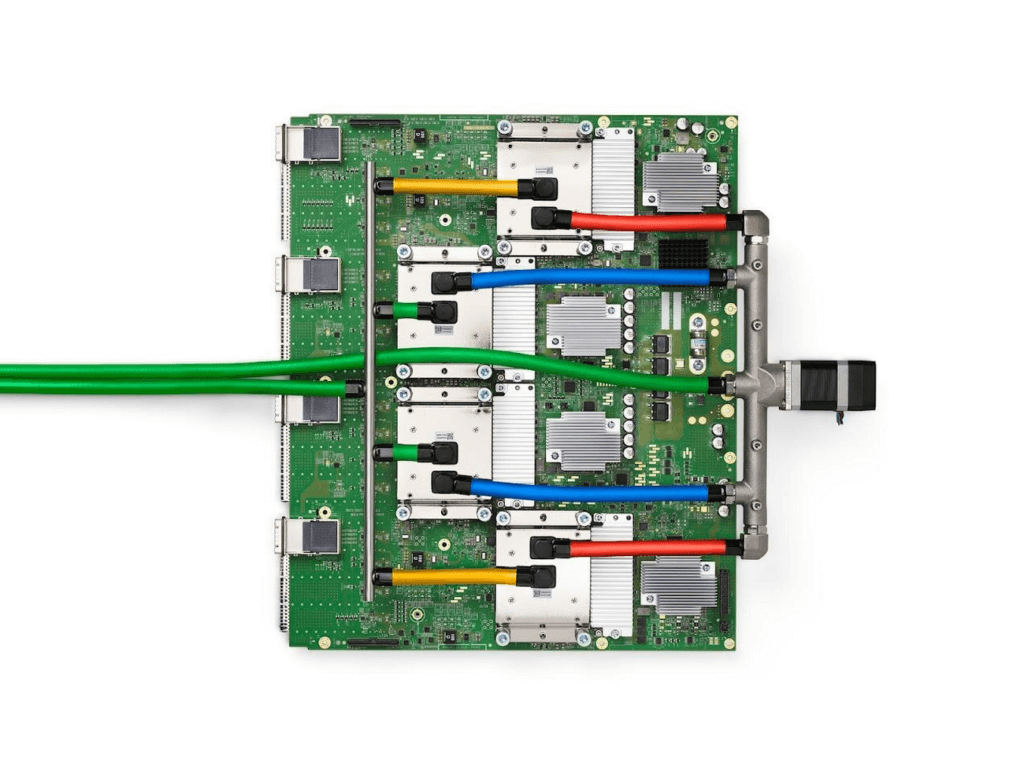
The TPUv4
These same IPUs and TPUs represent the foundation that will make it possible to automate cloud infrastructure decisions. They’ll be able to support the telemetry data and ML-based analytics for proactive infrastructure recommendations that will increase the performance and reliability of workloads.
Instead of determining hardware specifications and building the right infrastructure, you’ll only need to specify a workload. AI and ML will take over the burden and recommend, configure, and identify the best options based on your budgetary, performance, and scaling requirements. What is most exciting for us is how this will enable a much more rapid pace of service innovation, which is the primary end goal of great cloud infrastructure.

7995
Of your peers have already downloaded this article
20:30 Minutes
The most insightful time you'll spend today!
These business and technology innovators are leveraging cloud computing, machine learning, APIs, collaborative platforms, among others to advance healthcare, financial services, retail, media and entertainment, manufacturing, and government.
They include some of the biggest brands in the world, as well as some you’ve probably never heard of. But they all have one thing in common: They are astounding in their idea, scope and execution.
Every story has a short–and a longer–version. Scan through them and choose to dive deeper into stories that reflect challenges that your company or your industry is facing. You’ll find solutions to problems you previously thought impossible to solve.
Google’s Intelligent Products Essentials Assist Manufacturers in Product Development Journey

6935
Of your peers have already read this article.
3:00 Minutes
The most insightful time you'll spend today!
Expectations for both consumer and commercial products have changed. Consumers want products that evolve with their needs, adapt to their preferences, and stay up-to-date over time. Manufacturers, in turn, need to create products that provide engaging customer experiences not only to better compete in the marketplace, but also to provide new monetization opportunities.
However, embedding intelligence into new and existing products is challenging. Updating hardware is costly, and existing connected products do not have the capability to add new features. Furthermore, manufacturers do not have sufficient customer insights due to product telemetry and customer data silos, and may lack the AI expertise to quickly develop and deploy these features.
That’s why today we’re launching Intelligent Products Essentials, a solution that allows manufacturers to rapidly deliver products that adapt to their owners, update features over-the-air using AI at the edge, and provide customer insights using analytics in the cloud. The solution is designed to assist manufacturers in their product development journeys—whether developing a new product or enhancing existing ones.
With Intelligent Products Essentials, manufacturers can:
- Personalize customer experiences: Provide a compelling ownership experience that evolves over the lifetime of the product. For example, a chatbot that contextualizes responses based on product status and customer profile.
- Manage and update products over-the-air: Deploy updates to products in the field, gather performance insights and evolve capabilities over time with monetization opportunities.
- Predict parts and service issues: Detect operating thresholds, anomalies and predict failures to proactively recommend service using AI, reducing warranty claims, decreasing parts shortages and increasing customer satisfaction.
In order to help manufacturers quickly deploy these use cases and many more, Intelligent Products Essentials provides the following:
- Edge connections: Connect and ingest raw or time-series product telemetry from various device platforms utilizing IoT Core or Pub/Sub and enable deployment and management of firmware over-the-air and machine learning models with Vertex AI at the edge.
- Ownership App Template: Easily build connected product companion apps that work on smartphones, tablets, and computers. Use a pre-built API and accompanying sample app that can incorporate product or device registration, identity management, and provide application behavior analytics using Firebase.
- Product fleet management: Manage, update and analyze fleets of connected products via APIs, Google Kubernetes Engine, and Looker.
- AI services: Create new features or capabilities for your products using AI and machine learning products such as DialogFlow, Vision AI, AutoML, all from Vertex AI.
Enterprise data integration: Integrate data sources such as Enterprise Asset Management (EAM), Enterprise Resource Planning (ERP), Customer Relationship Management (CRM) systems and others using Dataflow and BigQuery.
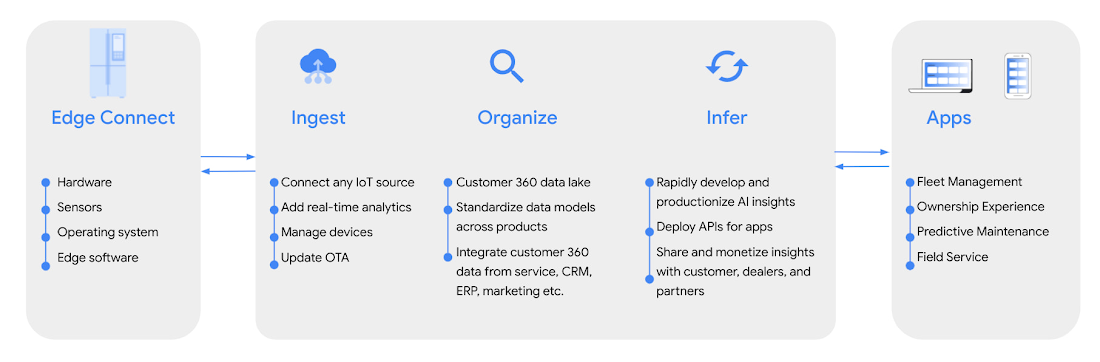
Intelligent Products Essentials helps manufacturers build new features across consumer, industrial, enterprise, and transportation products. Manufacturers can implement the solution in-house, or work with one of our certified solution integration partners like Quantifi and Softserve.
“The focus on intelligent products that Google Cloud is deploying provides a digital option for manufacturers and users. At its heart, systems like Intelligent Product Essentials are all about decision making. IDC sees faster and more effective decision-making as the fundamental reason for the drive to digitize products and processes. It’s how you can make faster and more effective decisions to meet heightened customer expectations, generate faster cash flow, and better revenue realization,” said Kevin Prouty, Group Vice President at IDC. “Digital offerings like Google’s Intelligent Product Essentials potentially go the last mile with the ability to connect the digital thread all the way through to the final user.”
Customers adopting Intelligent Products Essentials
GE Appliances, a Haier company, are enhancing their appliances using new AI-powered intelligent features to enable:
- Intelligent cooking: Help cook the perfect meal to personal preferences, regardless of your expertise and abilities in the kitchen.
- Frictionless service: Build smart appliances that know when they need maintenance and make it simple to take action or schedule services.
- Integrated digital lifestyle: Make appliances useful at every step of the way by integrating them with digital lifestyle services – for example, automating appliance behaviors according to customer calendars, such as oven preheating or scheduling the dishwasher to run in the late evening.
“Intelligent Products Essentials enhances our smart appliances ecosystem, offering richer consumer habit insights. This enables us to develop and offer new features and experiences to integrate with their digital lifestyle.“ —Shawn Stover, Vice-president Smart Home Solutions at GE Appliances.https://www.youtube.com/embed/zaWAJN8aKOw?enablejsapi=1&
Serial 1, Powered by Harley-Davidson, is using Intelligent Product Essentials to manage and update its next generation eBicycles, and personalize its customers’ digital ownership experiences.
“At Serial 1, we are dedicated to creating the easiest and most intuitive way to experience the fun, freedom, and adventure of riding a pedal-assist electric bicycle. Connectivity is a key component of delivering that mission, and working together to integrate Intelligent Product Essentials into our eBicycles will ensure that our customers enjoy the best possible user experience.”— Jason Huntsman, President, Serial 1.
Magic Leap, an augmented reality pioneer with industry-leading hardware and software, is building field service solutions with Intelligent Products Essentials with the goal of connecting manufacturers, dealers, and customers to more proactive and intelligent service.
“We look forward to using Intelligent Products Essentials to enable us to rapidly integrate manufacturers’ product data with dealer service partners into our field service solution. We’re excited to partner with Google Cloud as we continue to push the boundaries of physical interaction with the digital world.” — Walter Delph, Chief Business Officer, Magic Leap
Intelligent Product Essentials is available today. To learn more, visit our website.
Reasons to Leverage Vertex AI Custom Training Service

2946
Of your peers have already read this article.
6:00 Minutes
The most insightful time you'll spend today!
At one point or another, many of us have used a local computing environment for machine learning (ML). That may have been a notebook computer or a desktop with a GPU. For some problems, a local environment is more than enough. Plus, there’s a lot of flexibility. Install Python, install JupyterLab, and go!
What often happens next is that model training just takes too long. Add a new layer, change some parameters, and wait nine hours to see if the accuracy improved? No thanks. By moving to a Cloud computing environment, a wide variety of powerful machine types are available. That same code might run orders of magnitude faster in the Cloud.
Customers can use Deep Learning VM images (DLVMs) that ensure that ML frameworks, drivers, accelerators, and hardware are all working smoothly together with no extra configuration. Notebook instances are also available that are based on DLVMs, and enable easy access to JupyterLab.
Benefits of using the Vertex AI custom training service
Using VMs in the cloud can make a huge difference in productivity for ML teams. There are some great reasons to go one step further, and leverage our new Vertex AI custom training service. Instead of training your model directly within your notebook instance, you can submit a training job from your notebook.
The training job will automatically provision computing resources, and de-provision those resources when the job is complete. There is no worrying about leaving a high-performance virtual machine configuration running.
The training service can help to modularize your architecture. As we’ll discuss further in this post, you can put your training code into a container to operate as a portable unit. The training code can have parameters passed into it, such as input data location and hyperparameters, to adapt to different scenarios without redeployment. Also, the training code can export the trained model file, enabling working with other AI services in a decoupled manner.
The training service also supports reproducibility. Each training job is tracked with inputs, outputs, and the container image used. Log messages are available in Cloud Logging, and jobs can be monitored while running.
The training service also supports distributed training, which means that you can train models across multiple nodes in parallel. That translates into faster training times than would be possible within a single VM instance.
Example Notebook
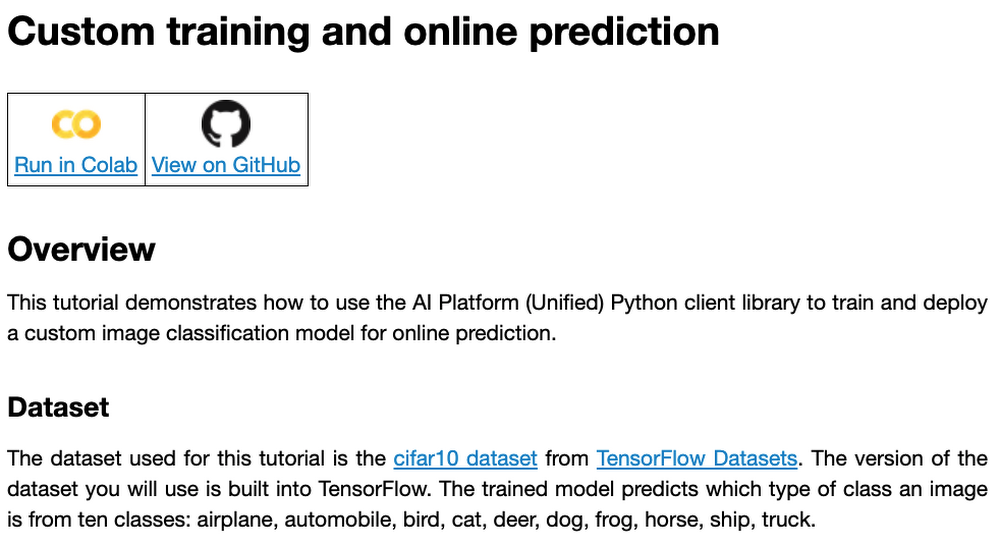
In this blog post, we are going to explain how to use the custom training service, using code snippets from a Vertex AI example. The notebook we’re going to use covers the end-to-end process of custom training and online prediction. The notebook is part of the ai-platform-samples repo, which has many useful examples of how to use Vertex AI.
Custom model training concepts
The custom model training service provides pre-built container images supporting popular frameworks such as TensorFlow, PyTorch, scikit-learn, and XGBoost. Using these containers, you can simply provide your training code and the appropriate container image to a training job.
You are also able to provide a custom container image. A custom container image can be a good choice if you’re using a language other than Python, or are using an ML framework that is not supported by a pre-built container image. In this blog post, we’ll use a pre-built TensorFlow 2 image with GPU support.
There are multiple ways to manage custom training jobs: via the Console, gcloud CLI, REST API, and Node.js / Python SDKs. After jobs are created, their current status can be queried, and the logs can be streamed.
The training service also supports hyperparameter tuning to find optimal parameters for training your model. A hyperparameter tuning job is similar to a custom training job, in that a training image is provided to the job interface. The training service will run multiple trials, or training jobs with different sets of hyperparameters, to find what results in the best model. You will need to specify the hyperparameters to test; the range of values to explore for those hyperparameters; and details about the number of trials.
Both custom training and hyperparameter tuning jobs can be wrapped into a training pipeline. A training pipeline will execute the job, and can also perform an optional step to upload the model to Vertex AI after training.
How to package your code for a training job
In general, it’s a good practice to develop your model training code that is self-contained when especially executing them inside containers. This means the training codebase would operate in a standalone manner when executed.
Below is a template of such a self-contained, heavily-commented Python script that you can follow for your own projects too.
# Imports go hereimport tensorflow_datasets as tfdsimport tensorflow as tf…# Define the hyperparameters and constants like epochs, batch size, number of GPUs, etcparser = argparse.ArgumentParser()parser.add_argument('--lr', dest='lr',default=0.01, type=float,help='Learning rate.')parser.add_argument('--epochs', dest='epochs',default=10, type=int,help='Number of epochs.')...args = parser.parse_args()...# Prepare data loadersdef make_datasets_unbatched():# Scaling CIFAR10 data from (0, 255] to (0., 1.]def scale(image, label):image = tf.cast(image, tf.float32)image /= 255.0return image, labeldatasets, info = tfds.load(name='cifar10',with_info=True,as_supervised=True)return datasets['train'].map(scale).cache().shuffle(BUFFER_SIZE).repeat()# Build our model, compile, and train itmodel = [define your model]model.compile(loss=..., optimizer=..., metrics=...)model.fit(...)# Serialize our modelmodel.save(MODEL_DIR)
Note that the MODEL_DIR needs to be a location inside a Google Cloud Storage (GCS) bucket. This is because the training service can only communicate with that and not with our local system. Here is a sample location inside a GCS Bucket to save a model: gs://caip-training/cifar10-model where caip-training is the name of the GCS bucket.
Although we are not using any custom modules in the above code listing, one can easily incorporate them as we would normally inside a Python script. Refer to this document if you want to know more. Next up, we will review how to configure the training infrastructure, including the type and number of GPUs to use, and submit a training script to run inside the infrastructure.
How to submit a training job, including configuring which machines to use
To train a deep learning model efficiently on large datasets, we need hardware accelerators that are suited to run matrix multiplication in a highly parallelized manner. Distributed training is also common when it comes to training a large model on a large dataset. For this example, we will be using a single Tesla K80 GPU. Vertex AI supports a range of different GPUs (find out more here).
Here is how we initialize our training job with the Vertex AI SDK:
job = aiplatform.CustomTrainingJob(display_name=JOB_NAME,script_path="task.py",container_uri=TRAIN_IMAGE,requirements=["tensorflow_datasets==1.3.0"],model_serving_container_image_uri=DEPLOY_IMAGE,)
(aiplatform is aliased as from google.cloud import aiplatform)
Let’s review the arguments:
display_namerefers to a unique identifier to the training job used for easily locating it.script_pathrefers to the path of the training script to run. This is the script we discussed in the section above.container_urirefers to the URI of the container that will be used to run our training script. For this, we have several options to choose from. For this example, we will usegcr.io/cloud-aiplatform/training/tf-gpu.2-1:latest. We will use this same container for deployment as well but with a slightly changed container URI. You can find the containers available for model training here and the containers available for deployment purposes can be found here.requirementslet us specify any external packages that might be required to run the training script.model_serving_container_image_urispecifies the container URI that would be used during deployment.
Note: Using separate containers for distinct purposes like training and deployment is often a good practice, since it isolates the relevant dependencies for each purpose.
We are now all set up to submit a custom training job:
model = job.run(model_display_name=MODEL_DISPLAY_NAME,args=CMDARGS,replica_count=1,machine_type=TRAIN_COMPUTE,accelerator_type=TRAIN_GPU.name,accelerator_count=TRAIN_NGPU)
Here, we have:model_display_name that provides a unique name to identify our trained model. This comes in handy later down the pipeline when we would deploy it using the prediction service. args are our command-line arguments typically used to specify things like hyperparameter values.replica_count denotes the number of worker replicas to be used during training. machine_type specifies the type of base machine to be used during training. accelerator_type denotes the type of accelerator to be used during training. If we are interested in using a Tesla K80, then TRAIN_GPU should be specified as aip.AcceleratorType.NVIDIA_TESLA_K80. (aip is aliased as from google.cloud.aiplatform import gapic as aip.)accelerator_count specifies the number of accelerators to use. For a single host multi-GPU configuration, we would set the replica_count to 1 and then specify the accelerator_count as per our choice depending on the resource available under the corresponding compute zone.
Note that model here is a google.cloud.aiplatform.models.Model object. It is returned by the training service after the job is completed.
With this setup, we can actually start a custom training job that we can monitor. After we submit the above training pipeline, we should see some initial logs resembling this:
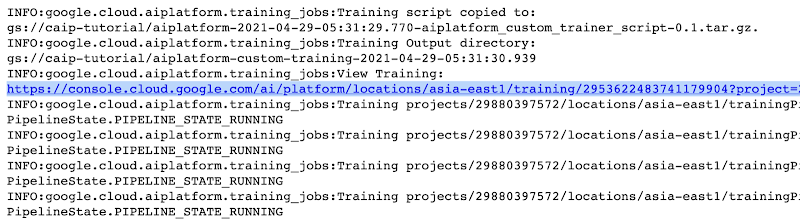
The link highlighted in Figure 2 will redirect to the dashboard of the training pipeline which looks like so:
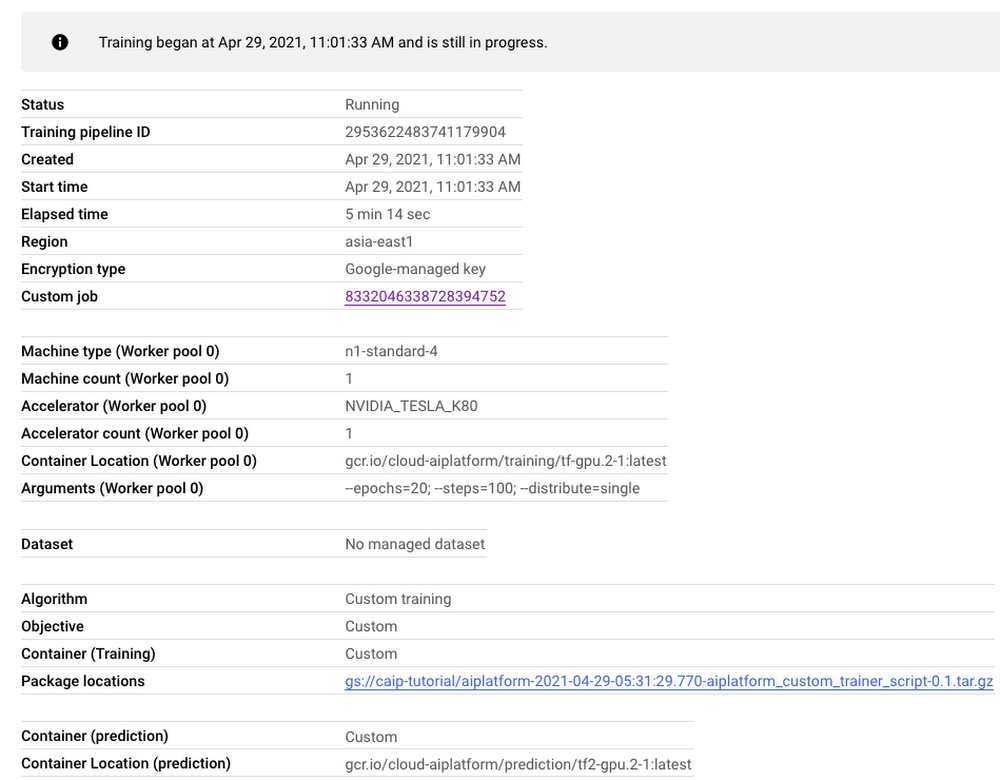
As seen in Figure 3, the dashboard provides a comprehensive summary of all the necessary artifacts related to our training pipeline. Monitoring your model training is also very important especially to catch any early training bugs. To view the training logs, we need to click the link beside the “Custom job” tab (refer to Figure 3). There also we are presented with roughly similar information as shown in Figure 3 but this time it includes the logs as well:
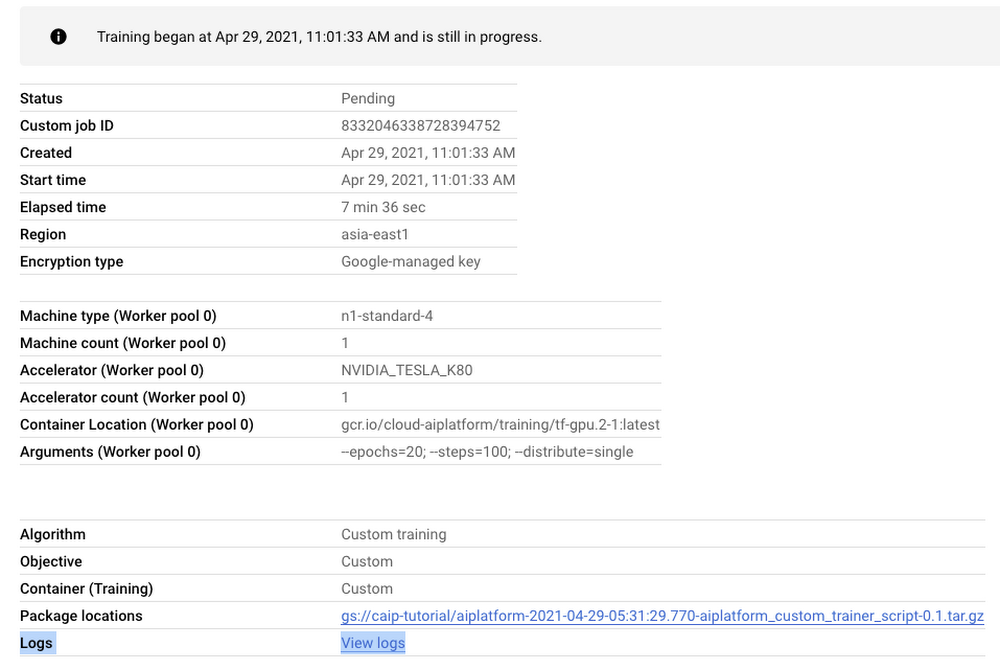
Note: Once we submit the custom training job, a training pipeline is first created to provision the training. Then inside the pipeline, the actual training job is started. This is why we see two very similar dashboards above but they have different purposes. Let’s check out the logs (which is maintained using Cloud Logging automatically):
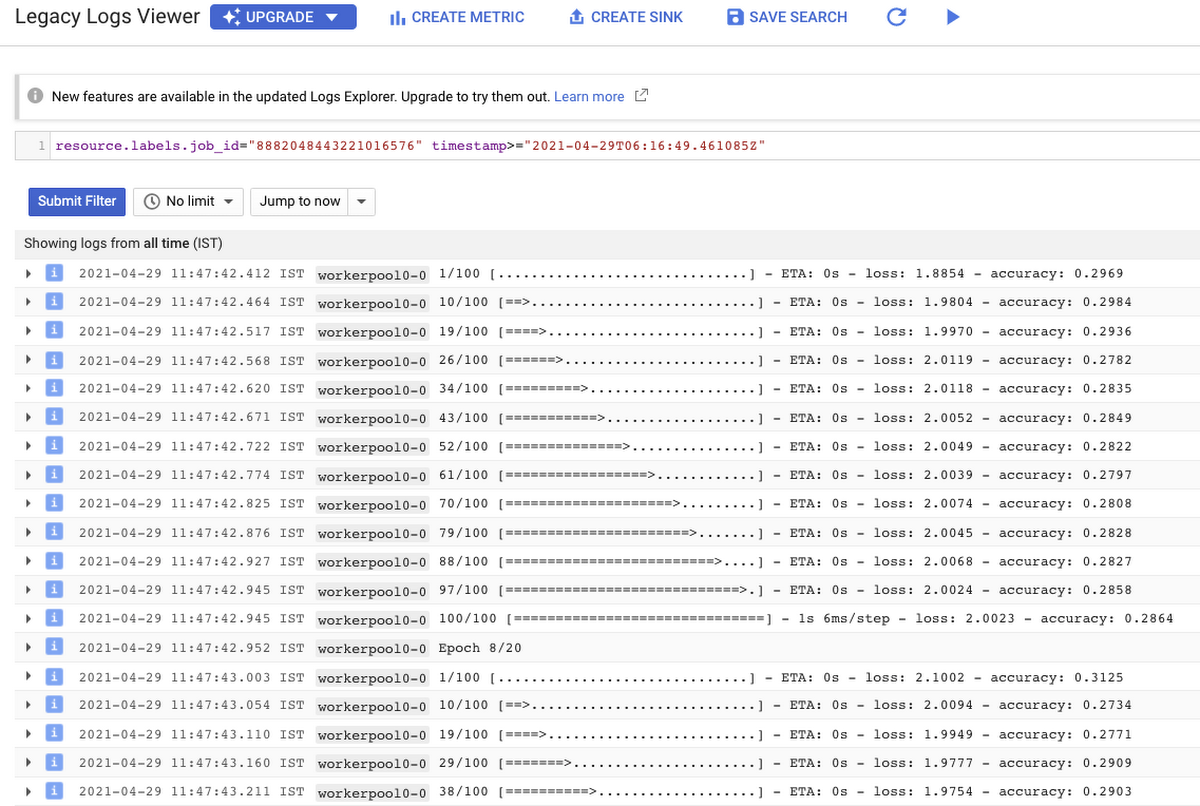
With Cloud Logging, it is also possible to set alerts on the basis of different criteria. For example, alerting the users when the training job fails or completes so that some immediate action could be taken. You can refer to this post for more details.
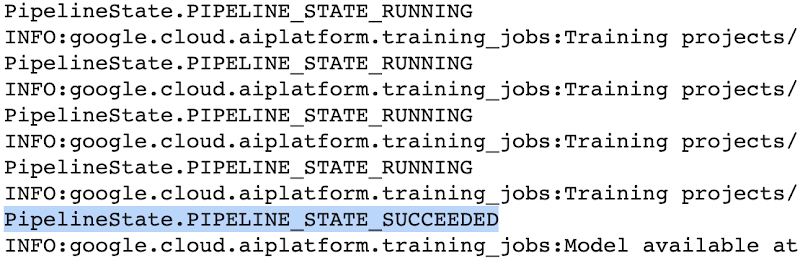
After the training pipeline is completed, on your end, you will notice the success status:
Accessing the trained model
Recall that we had to serialize our model inside a GCS Bucket in order to make it compatible with the training service. So, after the model is trained, we can access it from that location. We can even directly load it using the following line of code:
model = tf.keras.models.load_model('gs://[your-bucket-name]/[model-name]')
Note that we are referring to the TensorFlow model that resulted from training. The training service also maintains a similar “model” namespace to help us manage these models. Recall that the training service returns a google.cloud.aiplatform.models.Model object as mentioned earlier. It comes with a deploy() method that allows us to deploy our model programmatically within minutes with several different options. Check out this link if you are interested in deploying your models using this option.
Vertex AI also provides a dashboard for all the models that have been trained successfully and it can be accessed with this link. It resembles this:
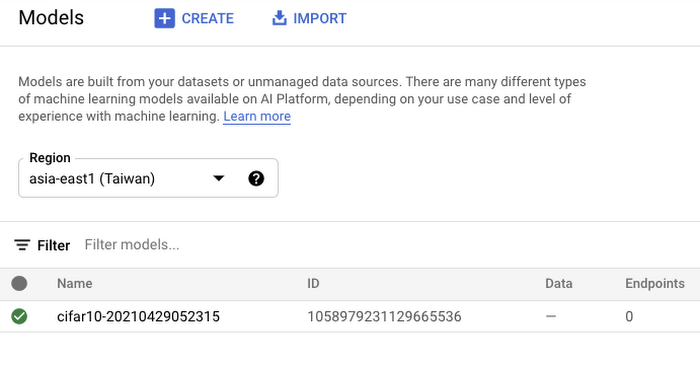
If we click the model as listed in Figure 7, we should be able to directly deploy from the interface:
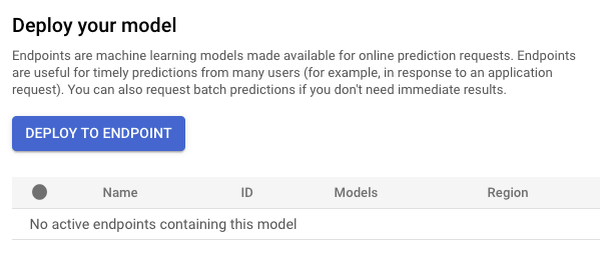
In this post, we will not be covering deployment, but you are encouraged to try it out yourself. After the model is deployed to an endpoint, you will be able to use it to make online predictions.
Wrapping Up
In this blog post, we discussed the benefits of using the Vertex AI custom training service, including better reproducibility and management of experiments. We also walked through the steps to convert your Jupyter Notebook codebase to a standard containerized codebase, which will be useful not only for the training service, but for other container-based environments. The example notebook provides a great starting point to understand each step, and to use as a template for your own projects.

Le Figaro Uses Google Firebase to Personalize Experiences and Generates 3X Revenue Results
DOWNLOAD CASE STUDY8299
Of your peers have already downloaded this article
1:45 Minutes
The most insightful time you'll spend today!
Le Figaro, established in 1826, is France’s oldest and largest daily morning newspaper. The company’s mission is to provide timely, digestible and engaging news to their readers. As one of the first in the industry to offer digital content, Le Figaro engages their subscribers across 11 Android, iOS and web apps that cover news, sports, lifestyle and games. Le Figaro has about 22M monthly active users on their mobile and web apps and 120K paid digital subscribers.
The Challenge
In a saturated news app market, Le Figaro was looking to increase paying customers and to retain existing paid subscribers. To do this, Le Figaro’s development team needed to engage readers with personalized content at the right price point, but how could they pull it off with limited time and resources?
The Solution
Le Figaro used a number of Firebase products to retain existing users and increase paid subscriptions. They sent targeted notifications through Firebase Cloud Messaging reminding customers to follow topics and journalists they found interesting. This helped reduce churn by keeping subscribers engaged in content they valued. They also tested different subscription amounts using Firebase A/B testing, which helped Le Figaro identify the price points that led to the highest number of conversions among both Android and iOS users.
“Using Firebase has completely transformed Le Figaro’s digital business by making it easy to rapidly innovate and personalize content for our readers. With Firebase we have seen continuous increases in retention, downloads and screen time in our apps!”
Valentin Paquot, Mobile CTO, Le Figaro
Le Figaro found their biggest increase in paid subscriptions came from embedding real time interactive infographics into their mobile and web app articles. When a user added information into the infographic, it triggered a Cloud Function that accessed data stored in Cloud Firestore and returned a personalized infographic to the user in real time.
For example, in the article “Are you rich?” readers could input their income into the infographic and compare it against different income groups in Paris instantaneously. The infographics was behind a paywall and users had to subscribe to gain access.
According to Le Figaro, this infographic saw 3X the rate of paid subscription sign-ups compared to their other infographics. The team built this interactive infographic system in 3 days instead of their average time of 2-3 weeks using a traditional backend service. Using Cloud Functions and Cloud Firestore, they estimate they were able to reduce development time by 86%.
What Are India’s Biggest Companies Doing on Google Cloud?
9283
Of your peers have already read this article.
6:30 Minutes
The most insightful time you'll spend today!
In the last year, there’s been an upward trend in cloud adoption in India. In fact, NASSCOM finds that cloud spending in India is estimated to grow at 30% per annum to cross the US$7 billion mark by 2022.
At Google, in our conversations with customers, discussions have evolved beyond cost savings and efficiencies. While those are still very relevant reasons for adopting cloud technologies, Indian enterprises are looking to Google Cloud to help them drive digital transformation, identify new revenue generating business models, reach previously untapped consumer markets, and build customer loyalty through greater insight and personalization.
Here are some companies and their stories.
Tata Steel: Mining data and maximizing its power
Tata Steel is a great example of an established enterprise from a traditional industry that is modernizing and embracing cloud computing. With an ambition to be a leader in manufacturing in India and a digital-first organization by 2022, Tata Steel believes smart analytics is key to enhancing operational efficiency and gaining business advantage.
To organize data from siloed systems across the organization and make it easily accessible to all employees, Tata Steel is using Cloud Search and plans to scale it to more than one million documents and 28 disparate enterprise content sources including enterprise resource planning (ERP) and SharePoint. In fact, Tata Steel is one of the first Indian enterprises to harness the power of Cloud Search to meet some of the most aggressive ingestion demands, with indexing durations reduced from weeks to seconds.
They are also leveraging Google Cloud Platform (GCP) services like Google Cloud Storage and BigQuery to build their data lake and enterprise data warehouse so they can take advantage of advanced analytics and machine learning. Managed services such as AI Platform further enable Tata Steel to manage end-to-end AI/ML workflows within the GCP console. This complements their existing on-premise reporting and analytics tools, and brings data management to the forefront of everything they do—from forecasting market demand to predictive equipment maintenance.
“Digital is not just a goal, it’s become a way of life. We are digitizing everything from the deployment of factory vehicles to improving material throughput to marketing and sales. As a result, we have petabytes of structured and unstructured data that is not only waiting to be mined, but that we can generate intelligence from to create opportunities across our multiple lines of business using GCP,” said Sarajit Jha, Chief Business Transformation & Digital Solutions at Tata Steel.
Helping L&T Financial Services reach customers in rural communities
In rural communities, quick access to financial services can make a tremendous difference to livelihoods. L&T Financial Services provides farm-equipment finance, micro loans and two-wheeler finance to consumers across rural India backed by a strong digital and analytics platform. Their digital-loan approval app, which runs on GCP, makes it significantly faster and easier for people to apply for financial assistance to purchase important things such as farming equipment and two-wheelers. It also helps rural women entrepreneurs get quicker access to funds for their businesses through micro loans.
L&T Financial found G Suite to be a far better collaborative tool to help staff work together efficiently. Employees can interact with each other in real time using Hangouts Meet, and the task of information sharing is more seamless and secure through Drive. BigQuery also helps L&T Financial Services generate behavior scorecards to track credit quality of its micro-loan customers.
“Cloud is the technology that enables us to achieve scale and reach. Today there are countless data points available about rural consumers which enable us to personalize our products to serve them better. With access to faster compute power, we can also on-board consumers more efficiently. Our rural businesses have clocked a disbursement CAGR of 60% over the past three years.” said Sunil Prabhune, Chief Executive-Rural Finance, and Group Head-Digital, IT and Analytics, L&T Financial Services.
Creating conversational connections for Digitate’s customers
Digitate, a venture of TCS (Tata Consultancy Services), has integrated Dialogflow into its flagship brand ignio, an award-winning artificial intelligence platform for driving IT operations, workload operations and ERP operations for diverse enterprises. This integration is the next step in ignio’s product development journey, and will enable users to chat or talk with ignio to detect issues, triage problems, resolve them and even predict system behavior.
“ignio combines its unique self-healing AIOps capabilities for enterprise IT and business operations with Dialogflow’s AI/ML-based, easy to use, natural and rich conversational capabilities to create an unparalleled, intuitive and feature-rich experience for our customers,” says Akhilesh Tripathi, Head of Digitate.
Indian enterprises going G Suite
The base of Indian enterprises that are making the switch to G Suite to streamline their productivity and collaboration also continues to grow. Sharechat, BookMyShow, Hero MotorCorp, DB Corp and Royal Enfield are now able to move faster within their organizations, using intelligent, cloud-based apps to transform the way they work.
A hybrid and multi-cloud future in India
IDC predicts that by 2023, 55% of India 500 organizations will have a multi-cloud management strategy that includes integrated tools across public and private clouds. (IDC FutureScape: Worldwide Cloud 2019 Predictions — India Implications (# AP43922319). We look forward to sharing more success stories of Indian enterprises that have taken the next step in their digital transformation journey.
More Relevant Stories for Your Company
Google Cloud VMware Engine Achieves HIPAA Compliance
We are excited to announce that as of April 1, 2021, Google Cloud VMware Engine is covered under the Google Cloud Business Associate Agreement (BAA), meaning it has achieved HIPAA compliance. Healthcare organizations can now migrate and run their HIPAA-compliant VMware workloads in a fully compatible VMware Cloud Verified stack running natively

Upgrade Your Contact Center with Knowlarity’s AI-powered Speech Analytics for Higher CX
Did you know, everyday about 56 million hours worth of phone conversations, equalling to 420 billion spoken words are handled by contact centers? Knowlarity, a renowned cloud business communication service provider with nearly 6,000 customers and over a million virtual users, leverages AI-powered speech analytics that offer insights to gauge

AirAsia Turns to Google Cloud to refine Pricing, Increase Revenue, and Improve Customer Experience
AirAsia needed a platform incorporating products that could capture, process, analyze, and report on data, while delivering value for money and meeting its speed and availability requirements. The airline also wanted to minimise infrastructure management and system administration demands on its technology team members. The airline conducted a proof of


AI-as-a-Service is Here. It’s Really Almost Plug-and-Play
What is the one thing that enterprises want providers to do vis-à-vis AI? To decomplexify it. Today, the path to AI adoption is confusing, and requires skills that are out of reach for most enterprises. That’s what Google Cloud is addressing. “It used to be—still is true—that AI's a pretty
