





How Toyota’s Google Cloud-powered Voice Assistant Gives a Turboboost to Drivers’ Experience

4831
Of your peers have already read this article.
2:00 Minutes
The most insightful time you'll spend today!
Over the decades, technology has helped us organize large amounts of physical information in ways that are streamlined, efficient, and easily accessible. Rows upon rows of encyclopedias are no longer needed; simply punch in or speak a query into Google Search and find numerous results at your fingertips. There’s no need to haul around cases of CDs or cassettes either, when you can access hundreds of thousands of songs on music streaming services.
We wanted to bring that same level of accessibility to one specific type of publication: the printed car manual. Here’s how we shifted the paper manual to become an easy-to-access, voice-activated digital experience for owners of the all-new Sienna. It’s helped this resource become just as modern and useful as Toyotas themselves.
Putting cloud technology in the driver’s seat
Far too often, the printed car manual remains unused, collecting dust in the glove compartment—that is, until it’s needed during a roadside emergency or to solve the meaning of a mysterious light popping up on the dashboard. Even then, thumbing through hundreds of pages during high-stakes moments can be stressful. On top of that, these manuals can be expensive to print and update.
Digital versions, such as a PDF file, are a nice start. But, they’re often little more than reformatted flat documents. In poor visual conditions on the side of a road, the last thing a driver wants to do is squint at a phone or scroll through pages of tiny text. And similar to printed manuals, digital versions don’t facilitate ongoing, real-time conversations between drivers and automakers when it matters the most; they’re often only text and pictures, and at best, schematic drawings.
With that in mind, we set out to elevate and personalize the car manual by creating a voice-activated digital owner’s manual experience, all powered by Google Cloud. A voice-based assistant was the clear choice because, as it felt like the most intuitive, natural option, especially while driving. In fact, 51% of U.S. adults have used a voice assistant while driving, and 95% of all drivers expect to use a voice assistant in the next three years.
We’re now putting this technology on the road by powering the Toyota Driver’s Companion for the all-new 2021 Toyota Sienna model. Accessible through the existing Toyota app, this companion provides real-time assistance, any time of the day. Drivers can ask questions and the companion will efficiently provide helpful answers in convenient ways, from voice to 3D walkthroughs and explorable environments.
What a modern car manual should do
The Toyota Driver’s Companion has interactive features to help drivers discover the Sienna’s dashboard, set up the car’s interior and exterior appearance, better understand vehicle maintenance, and explore Dynamic Radar Cruise Control, Lane Departure Alert and other features.
Here are a few other additional key features to call out within the Toyota Driver’s Companion:
- An easily accessible virtual voice through the Toyota Driver’s Companion lets app users ask personal questions about their 2021 Sienna such as “what’s the height of my car?” and receive immediate answers either by voice, display or interactive input.
- The manual automatically connects with the purchased vehicle’s VIN number to create a completely personalized experience, curated specifically for the driver. For example, if an unfamiliar light on the dashboard pops up, the Toyota Driver’s Companion can help identify the light’s meaning.
- Interactive hotspots throughout the vehicle’s interior let drivers explore the cabin virtually. Drivers can discover button functionalities, find specific dials, and learn more about car functions, such as how to slide seats or open doors, to become acclimated with their new vehicle.
To bring this experience to life, we tapped into some of our key Google Cloud solutions:
- APIs powered by Google Cloud artificial intelligence technology make accessing specific vehicle information easy and effortless, by leveraging Google’s natural language processing:
- Google Cloud DialogFlow API serves as the decision tree that gives intelligence for both finding an answer for a question, i.e., how the Companion responds to the end user’s questions.
- One of our Text-to-Speech APIs—called Wavenet—creates the Companion’s realistic voice.
- And finally, our Speech-to-Text API “listens” to the user’s voice and finds the correct information to craft responses. That means a driver can ask a question multiple ways, and the Companion will still respond with the right answer.
Our Firebase mobile app dev platform gleans analytic insights that help improve the overall experience and services for OEMs and drivers alike.https://www.youtube.com/embed/66QxWS-PzIM?enablejsapi=1&
We’re encouraging better consumer experiences by providing faster access to fresh information, in a natural, accessible format—voice. But these new voice-activated experiences aren’t only an opportunity to help out drivers; it’s also about strengthening connections between drivers, their vehicles, and automakers, too.
Our hope is that through this information exchange, drivers can provide feedback on the most frequently misunderstood features, enabling OEMs to address questions early on. By understanding the most requested features, OEMs can also predict and inform driver questions about features. We’re incredibly excited to help make the driver’s experience more connected and helpful.
How to Choose the Right ML Model for Your Applications
4889
Of your peers have already read this article.
2:00 Minutes
The most insightful time you'll spend today!
Many of our customers want to know how to choose a technology stack for solving problems with machine learning (ML). There are many choices for these solutions available, some that you can build and some that you can buy. We’ll be focusing on the build side here, exploring the various options and the problems they solve, along with our recommendations.
The best ML applications are trained with the largest amount of data
But first, keep in mind an important concept: the quality of your ML model improves with the size of your data. Dramatic ML performance and accuracy are driven by improvements in data size, as shown in the graph below. This is a text model, but the same principles hold for all kinds of ML models.
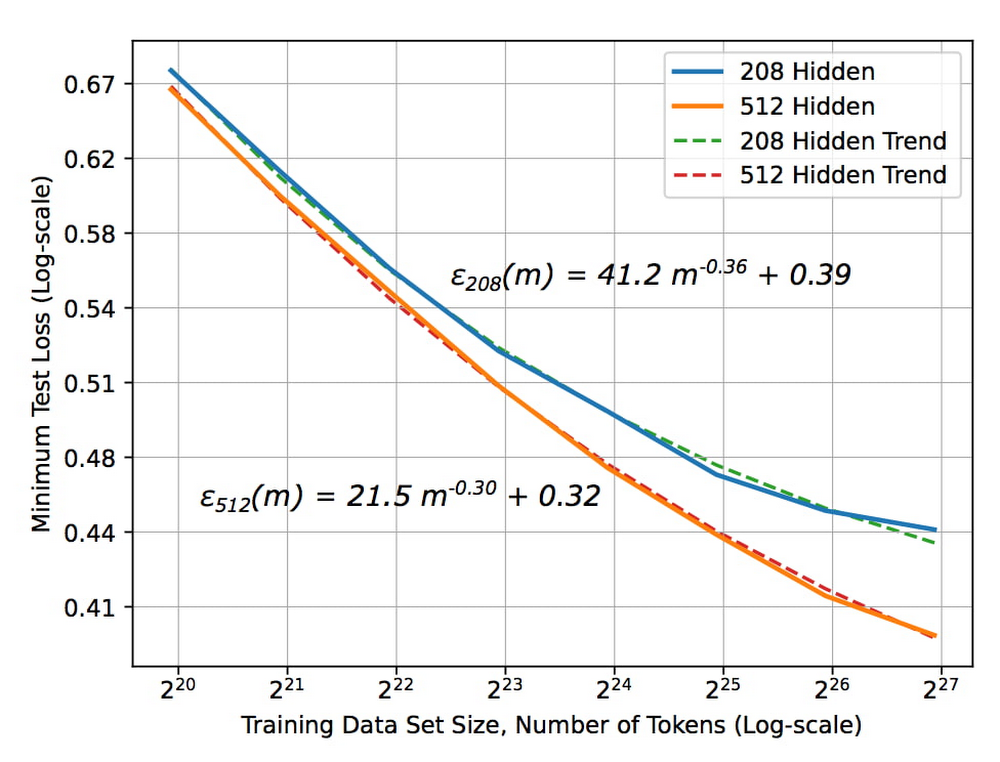
The X axis represents the size of the data set and the Y axis is the error rate. As the size of the data set increases, the error rate drops. But notice something critical about the size of the data set — the x-axis is2^20, 2^21, 2^ 22, etc. In other words, each new tic here is a doubling of the data set size. To get a linear decrease in your error rate you need to exponentially increase the size of your data set.
The blue curve in the graph represents a slightly more sophisticated ML model than the orange curve. Suppose you are deciding between two choices: create a better model or double the data set size. Assuming that these two choices cost the same, it’s better to keep gathering more data. It’s only when improvements due to data size increases start to plateau that it becomes necessary to build a better model.
Secondly, ML systems need to be retrained for new situations. For example, if you have a recommendation system in YouTube and you want to provide recommendations in Google Now, you can’t use the same recommendations model. You have to train it in the second instance on the recommendations you want to make in Google Now. So even though the model, the code, and the principles are the same, you have to retrain the model with new data for new situations.
Now, let’s combine these two concepts: you get a better ML model when you have more data, and an ML model typically needs to be retrained for a new situation. You have a choice of either spending your time building an ML model or buying a vendor’s off-the-shelf model.
To answer the question of whether to buy or whether to build, first determine if the buyable model is solving the same problem that you want to solve. Has it been trained on the same input and on similar labels? Let’s say you’re trying to do a product search, and the model has been trained on catalog images as inputs. But you want to do a product search based on users’ mobile phone photographs of the products. The model that was trained on catalog images won’t work on your mobile phone photographs, and you’d have to build a new model.
But let’s say you’re considering a vendor’s translation model that’s been trained on speeches in the European Parliament. If you want to translate similar speeches, the model works well as it uses the same kind of data.
The next question to ask: does the vendor have more data than you do? If the vendor has trained their model on speeches in the European Parliament but you have access to more speech data than they have, you should build. If they have more data, then we recommend buying their model.
Bottom line: buy the vendor’s solution if it’s trained on the same problem and has access to more data than you do.
Technology stack for common ML use cases
If you need to build, what is the technology stack you need? What are the skills your people need to develop? This depends on the type of problem you are solving. There are four broad categories of ML applications: predictive analytics, unstructured data, automation, and personalization. The recommended technology stack for each is slightly different.
Predictive analytics
Predictive analytics includes detecting fraud, predicting click-through rates, and forecasting demand.
Step one: build an enterprise data warehouse
Here, your data set is primarily structured data, so our recommended first step is to store your data in an enterprise data warehouse (EDW). Your EDW is a source of training examples and product histories tracked over time, and can break down silos and gather data from throughout your organization.
Step two: get good at data analytics
Next, you’d build a data culture, get skilled at data analytics, start to build dashboards, and enable data-driven decisions. At this point, you have all of the data and you know which pieces are trustworthy.
Step three: build ML
From your EDW, you can build your models using SQL pipelines. We recommend using BigQuery ML when doing ML with the data in your EDW. If you want to build a more sophisticated model, you can train TensorFlow/Keras models on BigQuery data. A third option is AutoML tables for state-of-the-art accuracy and for building online microservices.
Unstructured data
Examples of how our customers use ML to gain insights from unstructured data include annotating videos, identifying eye diseases, and triaging emails. Unstructured data can include videos, images, natural language, and text. Deep learning has revolutionized the way we do ML on unstructured data, whether you’re looking at language understanding, image classification, or speech-to-text.
For unstructured data, the models you use will employ deep learning. Here, the ROI heavily favors using AutoML. The amount of time that you’d spend trying to create a new ML model from scratch is almost never worth it. You can spend your money more effectively collecting more data than trying to get a slightly better model. Regardless of the type of unstructured data, our recommendation is to use AutoML for small and medium size data sizes.
But AutoML has a limit to scale. At some point, the size of your data set is going to be so large that architecture search is going to get really expensive. At that point, you may want to go to a best-of-breed model with custom retraining from TensorFlow Hub, for example. If you have data sets that are in the millions of examples, you can build your own custom neural network (NN) architectures. But determine if your data set size has started to plateau, by plotting a graph similar to the one at the top of this post. Build a custom NN architecture only after you’ve plateaued, where increasing amounts of data won’t give you a better model.
Automation
Some examples of how customers are using ML for automation include scheduling maintenance, counting retail footfall, and scanning medical forms. The key thing to keep in mind as you pick a technology stack for these problems is that you’re not building just one ML model. If you want to schedule maintenance orwant to reject transactions, for example, you’ll need to train multiple linked models.
Instead of individual models, think in terms of ML pipelines, which you can orchestrate using all of the technologies already mentioned. Then you have three choices for operationalizing, with three levels of sophistication.
- Vertex AI has turnkey serverless training and batch/online predictions. This is what is recommended for a team of data scientists. .
- Deep Learning VM Image, Cloud Run, Cloud Functions or Dataflow feature customized training and batch/online predictions. This is what is recommended if the team consists of data engineers and scientists.
- Vertex AI Pipelines are fully customizable and recommended for organizations with separate ML engineering and data science teams.
When doing automation, the individual models that you chain together into a pipeline will be a mix – some will be prebuilt, some will be customized, and others will be built from scratch. Vertex AI, by providing a unified interface for all these model types, simplifies the operationalization of these models.
Personalization
ML application examples of personalization include customer segmentation, customer targeting, and product recommendations. For personalization, we again recommend using an EDW, because customer segmentation uses structured marketing data. For product recommendations, you will similarly have prior purchases and web logs in your EDW., You can power clustering applications, or recommendation systems like matrix factorization, and create embeddings directly from your EDW for sophisticated recommendation systems.
For specific use cases, choose the technology stack based on your data size and scope. Start with BigQuery ML for its quick, easy matrix factorization approach. Once your application proves viable and you want a slightly better accuracy, then try AutoML recommendations. But once your data set grows beyond the capabilities of AutoML recommendations, consider training your own custom TensorFlow and Keras models.
To summarize, successful ML starts with the question, “Do I build or do I buy?” If an off-the-shelf solution exists that was trained with similar data and with access to more data than you have, then buy it. Otherwise build it, using the technology stack recommended above for the four categories of ML applications.
Learn more about our artificial intelligence (AI) and ML solutions and check out sessions from our Applied ML Summit on-demand.
Want to Code for the Cloud? Get Started with the Native App Development Track

6759
Of your peers have already read this article.
2:00 Minutes
The most insightful time you'll spend today!
Earlier this year, we launched the Google Cloud skills challenge, which provides 30 days of free access to training to build your cloud knowledge and an opportunity to earn skill badges that showcase your Google Cloud competencies. Today, we’re adding a Native App Development track to the skills challenge, joining the Getting Started, Data Analytics, Kubernetes, Machine Learning (ML) and Artificial Intelligence (AI) tracks.
The Native App Development track is designed for cloud developers who want to learn to build serverless web apps and Google Assistant applications on Google Cloud using Cloud Run and Firebase. Specifically, you’ll have an opportunity to earn three skill badges in the Native App Dev track: Serverless Firebase Development, Serverless Cloud Run Development, and Build Interactive Apps with Google Assistant. To earn a skill badge, you complete a series of hands-on labs and take a final assessment challenge lab to test your skills.
Here’s an overview of each badge.
Serverless Firebase Development
To earn this skill badge, you’ll learn how to build serverless web apps, import data into a serverless database, and build Google Assistant applications using Firebase, Google’s backend-as-service platform for creating mobile and web applications.
Serverless Cloud Run Development
For this badge, you’ll discover how to use Cloud Run, a fully managed serverless platform, to connect and leverage data stored in Cloud Storage. You’ll learn how to use Cloud Run to build a resilient, asynchronous system with Pub/Sub, build a REST API gateway as well as build and expose services.
Build Interactive Apps with Google Assistant
To earn the final skills badge, you’ll build Google Assistant applications by creating a project in the Actions console, integrating Dialogflow, testing your action in the Actions simulator, and adding Cloud Translation API to your assistant application.
Ready to jump into the skills challenge? Sign up here.
You can also check out this quick video below to learn how to join the skills challenge.

6806
Of your peers have already downloaded this article
3:08 Minutes
The most insightful time you'll spend today!
Reach the Right Customers
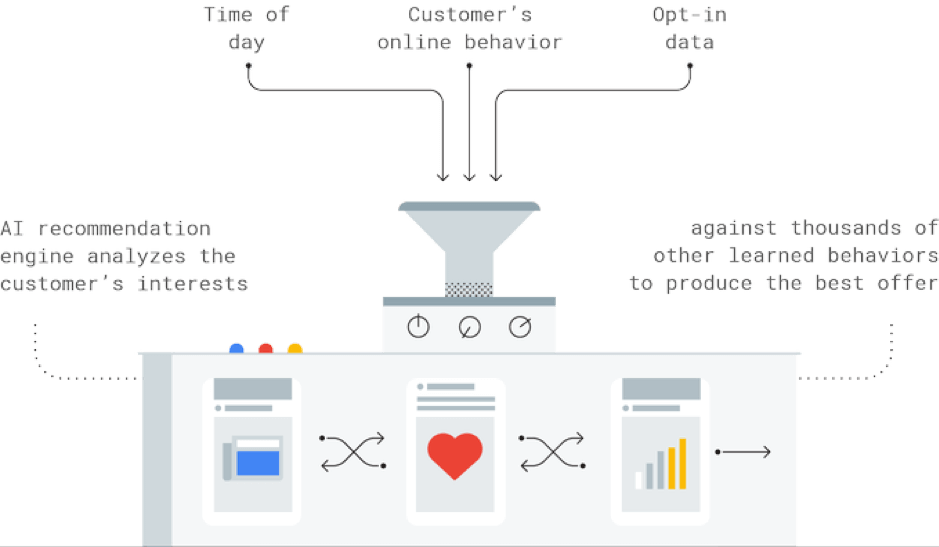
How can AI help you target customers who are looking for products like yours?
The challenge: This customer wants to buy the best cat food for her pets.

How AI Works
The Result
A targeted offer for a discount on luxury cat food is shown to the customer.

Predict What Customers Want
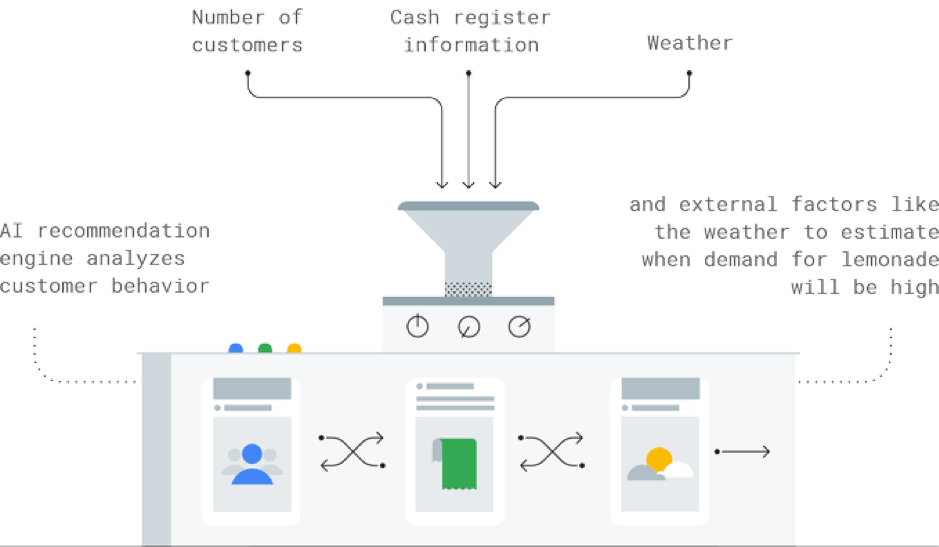
How can AI help you stay one step ahead when customer demand is uncertain?
The challenge: This lemonade seller isn’t sure how much lemonade he’ll need in the week ahead.

How AI Works
The Result
The seller makes just the right amount of lemonade to satisfy his customers and earn a juicy profit.

Keep Your Customers
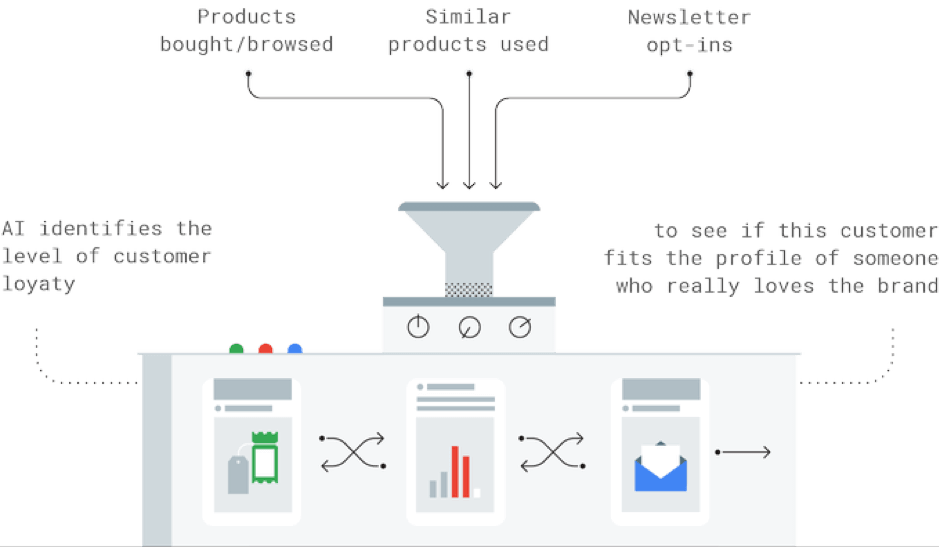
Your next job is retaining your customers. How can AI deliver campaigns that drive loyalty?
The challenge: This customer has bought products from a fitness brand. But can that brand ensure she becomes a loyal fan?

How AI Works
The Result
The brand delivers personalized offers that entice the customer to add to her sportswear collection — at exclusive discounts, too.

Transcend from Prototype to Production: Train Your ML models with Vertex AI

2621
Of your peers have already read this article.
1:30 Minutes
The most insightful time you'll spend today!
You’re working on a new machine learning problem, and the first environment you use is a notebook. Your data is stored on your local machine, and you try out different model architectures and configurations, executing the cells of your notebook manually each time. This workflow is great for experimentation, but you quickly hit a wall when it comes time to elevate your experiments up to production scale. Suddenly, your concerns are more than just getting the highest accuracy score.
Sound familiar?
Developing production applications or training large models requires additional tooling to help you scale beyond just code in a notebook, and using a cloud service provider can help. But that process can feel a bit daunting.
To make things a little easier for you, we’ve created the Prototype to Production video series, which covers all the foundational concepts you’ll need in order to build, train, scale, and deploy machine learning models on Google Cloud using Vertex AI.
Let’s jump in and see what it takes to get from prototype to production!
Getting started with Notebooks for machine learning
Episode one of this series shows you how to create a managed notebook using Vertex AI Workbench. With your environment set up, you can explore data, test different hardware configurations, train models, and interact with other Google Cloud services.
Storing data for machine learning
When working on machine learning problems, it’s easy to be laser focused on model training. But the data is where it all really starts.
If you want to train models on Vertex AI, first you need to get your data into the cloud. In episode 2, you’ll learn the basics of storing unstructured data for model training and see how to access training data from Vertex AI Workbench.
Training custom models on Vertex AI
You might be wondering, why do I need a training service when I can just run model training directly in my notebook? Well, for models that take a long time to train, a notebook isn’t always the most convenient option. And if you’re building an application with ML, it’s unlikely that you’ll only need to train your model once. Over time, you’ll want to retrain your model to make sure it stays fresh and keeps producing valuable results.
Manually executing the cells of your notebook might be the right option when you’re getting started with a new ML problem. But when you want to automate experimentation at scale, or retrain models for a production application, a managed ML training option will make things much easier.
Episode 3 shows you how to package up your training code with Docker and run a custom container training job on Vertex AI. Don’t worry if you’re new to Docker! This video and the accompanying codelab will cover all the commands you’ll need.
CODELAB: Training custom models with Vertex AI
How to get predictions from an ML model
Machine learning is not just about training. What’s the point of all this work if we don’t actually use the model to do something?
Just like with training, you could execute predictions directly from a notebook by calling model.predict. But when you want to get predictions for lots of data, or get low latency predictions on the fly, you’re going to need something more than a notebook. When you’re ready to use your model to solve a real world problem with ML, you don’t want to be manually executing notebook cells to get a prediction.
In episode 4, you’ll learn how to use the Vertex AI prediction service for batch and online predictions.
CODELAB: Getting predictions from custom trained models
Tuning and scaling your ML models
By this point, you’ve seen how to go from notebook code, to a deployed model in the cloud. But in reality, an ML workflow is rarely that linear. A huge part of the machine learning process is experimentation and tuning. You’ll probably need to try out different hyperparameters, different architectures, or even different hardware configurations before you figure out what works best for your use case.
Episode 5, covers the Vertex AI features that can help you with tuning and scaling your ML models. Specifically, you’ll learn about hyperparameter tuning, distributed training, and experiment tracking.
CODELAB: Hyperparameter tuning on Vertex AI
CODELAB: Distributed Training on Vertex AI
We hope this series inspires you to create ML applications with Vertex AI! Be sure to leave a comment on the videos if you’d like to see any of the concepts in more detail, or learn how to use the Vertex AI MLOps tools.
If you’d like try all the code for yourself, check out the following codelabs:
How TapClicks’ Google Cloud Migration Makes Life Easy for Marketers

8572
Of your peers have already read this article.
2:00 Minutes
The most insightful time you'll spend today!
Editor’s note: In this blog post we learn how TapClicks migrated to Google Cloud to offer their marketing customers a unified platform for data management, operations, insights, and analysis.
TapClicks is a smart marketing cloud, powered by data, that unifies our customer’s marketing. By choosing to migrate our core applications last year to Google Cloud, we cut costs, solved data-sharing concerns for our customers, and opened our stack up to a new ecosystem of possibilities.
The core problem that we’re solving for our customers is how to manage their marketing infrastructures data and operations. Life isn’t easy for marketers now. There are 7,000 different vendors servicing this space today – creating much complexity between digital agencies, media, and brands. Marketers face challenges in navigating all of these systems, logging in and out, understanding pacing goals, and managing the flow of marketing data so they can analyze and report internally as well as to their clients at scale.
We unify omnichannel campaign data (250 API connectors and 6000 Smart Connectors ™ ) from a plethora of marketing sources on an automated data warehousing solution, creating simplicity for organizations. Over 4,000 agencies, media companies, and brands use our Marketing Operations and Data Management Platform, which imports data at scale and creates an automatic data warehouse on Google Cloud. Teams can also leverage TapClicks, like our world class Facebook connector, to import data directly into Google Data Studios. Beyond importing and storing, we also provide data exporting to other Google solutions like Google Data Studio and Google Sheets. We also create interactive dashboards that let stakeholders and clients analyze their data, as well as automated, multi-channel reports that go out to clients at specified times. So channel comparisons, optimizations, attribution, and calculations are easily performed. Some of our customers are able to generate hundreds of thousands of individual reports and dashboards for their clients.
Although we may be best known for our reporting and analytics, we also empower teams managing the marketing operations workflow from customers and internal stakeholders, especially at scale. Our user-friendly, configurable system helps manage their orders and campaigns. Through automation of this process, we deliver tremendous amounts of efficiency, time saving, cost savings, and reduction of errors. The combination of these solutions makes up our unified platform, with additional capabilities like marketing intelligence that offers competitive and brand-level analysis. This is a disruptive solution in use by all leading media companies, agencies and many brands.
Partnering for possibilities
We faced a few challenges with our original tech stack, which included a mix of the leader in web services revenue, leaders in high performance data warehousing, as well as vendors on bare metal servers.
- One challenge was around costs, which were growing.
- Second, many of our customers work with multiple brands, and are very hesitant to share their data with the leader in web services, who’s often viewed as their competitor.
- Third, these vendors are more focused on their own revenue rather than a true long term partnership that would enable their customers to enjoy similar success as they have experienced.
When looking at other cloud providers, Google Cloud emerged for us as the front runner. They were competitive on costs, and their native Kubernetes support was superior— a big selling point for our DevOps team. There’s also a movement in the marketing and advertising industry away from AWS toward Google Cloud because of the data-sharing concern. Finally, most of our customers are already using Google Cloud tools, so there’s brand recognition and familiarity there, and easier integrations with their own systems.
Migrating to Google Cloud
Our migration, which took about five months, involved moving a significant chunk of our infrastructure, including our core applications, using Google Kubernetes Engine (GKE). In our legacy architecture, each of our clients was assigned to one of our virtual machines (VMs), and there was a lot of unused capacity because we had to provision for the max usage. We appreciated GKE’s cloud native capabilities, especially autoscaling, a huge benefit for our web application. We have varying usage patterns during the day, and though our application is mostly used during business hours, there are also days in the month of higher usage, and autoscaling saves us time and costs. GKE also makes deployments much easier, and we anticipate a lot of benefits there for our developer environments. We’ve moved some of our microservices into GKE and plan to move more in the future. All in all, we were able to migrate our core products and the bulk of our AWS spend successfully to Google Cloud.
We also moved from our other vendors Relational Database Service (RDS) to running MySQL on our own VMs on Google Cloud, which gives us more flexibility in terms of settings and fine tuning. We’re still trying to find the best mix as we’re modernizing our infrastructure, and we took this opportunity to migrate from MySQL 5.7 to 8.0.
Our next stage is exploring more of the capabilities and services of Google Cloud, including BigQuery, which we’re considering for our own data warehouse. The fact that we could also run Snowflake on Google Cloud, if needed, was another selling point for our migration.
We’re especially interested in BigQuery ML’s machine learning and natural language processing capabilities, which enabled better predictive insights. Our customers want insights from their campaigns— which are working, which are paying off, where should they invest next? Using our platform, they’re looking not only to generate reporting, but also identify opportunities to improve campaign performance. We plan to use AI and ML to improve those capabilities, so that our customers can seamlessly unlock insight and intelligence from their marketing data and campaigns.
Double-clicking on Google Cloud
For us, being able to deeply leverage and partner with Google Cloud to deliver those solutions on a single stack is critical, and we think our customers will love it. We see TapClicks and Google Cloud partnering at a level beyond what you typically see in a cloud provider relationship. Already, fifty percent of our company is working with various Google Cloud solutions, and we envision TapClicks and Google Cloud as extensions of each other, providing a single, powerful platform solution.
Google Cloud understands the partnership concept, and their team was able to shine a light on their services and what they could bring to the table. Compared to our previous experiences, dealing with the Google Cloud team has been a true pleasure. Now that we’ve migrated, we’re ready to take our next steps into the services available to us in the Google Cloud ecosystem, and the problems we’ll continue to solve for our customers. Learn more about TapClicks and BigQuery ML.
More Relevant Stories for Your Company

Gyfted: Finding the Right Man for the Job Using Google Cloud AI/ML Tools
It’s no secret that many organizations and job seekers find the hiring process exhausting. It can be time consuming, costly, and somewhat risky for both parties. Those are just some of the experiences we wanted to change when we started Gyfted, a pre-vetted talent marketplace for people who complete tech

Enabling Sustainable Agriculture: InstaDeep uses Cloud TPU v4
You are what you eat. We’ve all been told this, but the truth is what we eat is often more complex than we are – genetically at least. Take a grain of rice. The plant that produces rice has 40,000 to 50,000 genes, double that of humans, yet we know

A Look Back on Google Cloud’s Data Analytics Development Efforts from June
June is the month that holds the summer solstice, and some of us in the northern hemisphere get to enjoy the longest days of sunshine out of the entire year. We used all the hours we could in June to deliver a flurry of new features across BigQuery, Dataflow, Data

Revolutionizing Cloud Computing: Introducing G2 VMs with NVIDIA L4 GPUs
Organizations across industries are looking to AI to turn troves of data into intelligence, powered by the latest advances in generative AI. Yet for many organizations, there is a barrier to adopting the latest models because they can be costly to train or serve. A new class of cloud GPUs
