





A Look Back on Google Cloud’s Data Analytics Development Efforts from June

5959
Of your peers have already read this article.
4:00 Minutes
The most insightful time you'll spend today!
June is the month that holds the summer solstice, and some of us in the northern hemisphere get to enjoy the longest days of sunshine out of the entire year. We used all the hours we could in June to deliver a flurry of new features across BigQuery, Dataflow, Data Fusion, and more. Let’s take a look!
Simple, Sophisticated, and Secure
Usability is a key tenant of our data analytics development efforts. Our new user-friendly BigQuery improvements this month include:
- Flexible data type casting
- Formatting to change column descriptions
- GRANT/REVOKE access control commands using SQL
We hope this will delight data analysts, data scientists, DBAs, and SQL-enthusiasts who can find out more details in our blog here.
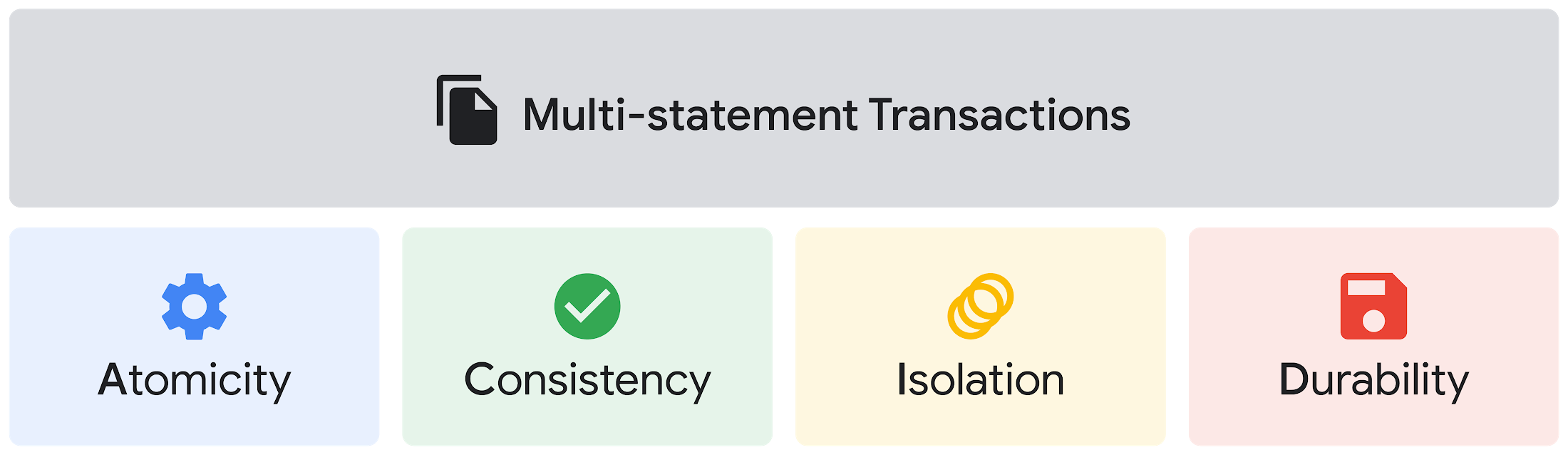
Beyond simplifying commands, we also recognize that it’s equally important to have more sophistication when dealing with transactions. That’s why we introduced multi-statement transactions in BigQuery.
As you probably know, BigQuery has long supported single-statement transactions through DML statements, such as INSERT, UPDATE, DELETE, MERGE and TRUNCATE, applied to one table per transaction. With multi-statement transactions, you can now use multiple SQL statements, including DML, spanning multiple tables in a single transaction.
This means that any data changes across multiple tables associated with all statements in a given transaction are committed atomically (all at once) if successful—or all rolled back atomically in the event of a failure.
We also know that organizations need to control access to data, down to the granular level and that, with the complexity of data platforms increasing day by day, it’s become even more critical to identify and monitor who has access to sensitive data.
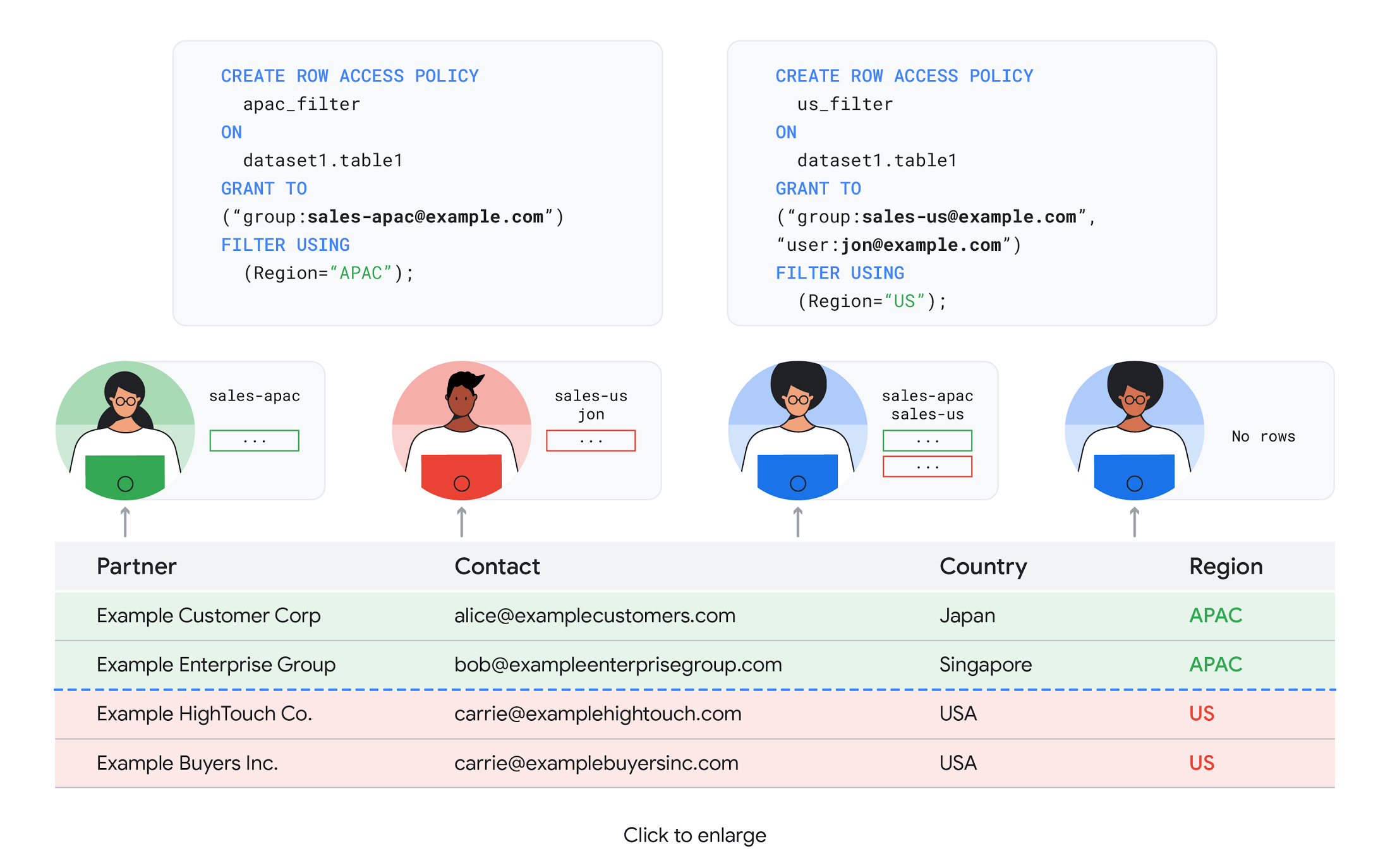
To help address these needs, we announced the general availability of BigQuery row-level security. This capability gives customers a way to control access to subsets of data in the same table for different groups of users. Row-level security in BigQuery enables different user personas access to subsets of data in the same table and can easily be created, updated, and dropped using DDL statements. To learn more, check out the documentation and best practices.
Simple, Safe, and Smart
Beyond building a simpler, more sophisticated and more secure data platform for customers, our team has been focused on providing solutions powered by built-in intelligence. One of our core beliefs is that for machine learning to be adopted and useful at scale, it must be easy to use and deploy.
BigQuery ML, our embedded machine learning capabilities, have been adopted by 80% of our top customers around the globe and it has become a cornerstone of their data to value journey.
As part of our efforts, we announced the general availability of AutoML tables in BigQuery ML. This no-code solution lets customers automatically build and deploy state-of-the-art machine learning models on structured data. With easy integration with Vertex AI, AutoML in BQML makes it simple to achieve machine learning magic in the background. From preprocessing data to feature engineering and model tuning all the way to cross validation, AutoML will “automagically” select and ensemble models so everyone—even non-data scientists—can use it.
Want to take this feature for a test drive? Try it today on BigQuery’s NYC Taxi public dataset following the instructions in this blog!
Speaking of public datasets, we also introduced the availability of Google Trends data in BigQuery to enable customers to measure interest in a topic or search term across Google Search. This new dataset will soon be available in Analytics Hub and will be anonymized, indexed, normalized, and aggregated prior to publication.
Want to ensure your end-cap displays are relevant to your local audience? You can take signals from what people are looking for in your market area to inform what items to place. Want to understand what new features could be incorporated into an existing product based on what people are searching for? Terms that appear in these datasets could be an indicator of what you should be paying attention to.
All this data and technology can be put to use to deploy critical solutions to grow and protect your business. For example, it can be difficult to know how to define anomalies during detection. If you have labeled data with known anomalies, then you can choose from a variety of supervised machine learning model types that are already supported in BigQuery ML.
But what if you don’t know what kind of anomaly to expect, and you don’t have labeled data? Unlike typical predictive techniques that leverage supervised learning, organizations may need to be able to detect anomalies in the absence of labeled data.
That’s why, we were particularly excited to announce the public preview of new anomaly detection capabilities in BigQuery ML that leverage unsupervised machine learning to help you detect anomalies without needing labeled data.
Our team has been working with a large number of enterprises who leverage machine learning for better anomaly detection. In financial services for example, customers have used our technology to detect machine-learned anomalies in real-time foreign exchange data.
To make it easier for you to take advantage of their best practices, we teamed up with Kasna to develop sample code, architecture guidance, and a data synthesizer that generates data so you can test these innovations right away.
Simple, Scalable, and Speedy
Capturing, processing and analyzing data in motion has become an important component of our customer architecture choices. Along with batch processing, many of you need the flexibility to stream records into BigQuery so they can become available for query as they are written.
Our new BigQuery Storage Write API combines the functionality of streaming ingestion and batch loading into a single API. You can use it to stream records into BigQuery or even batch process an arbitrarily large number of records and commit them in a single atomic operation.
Flexible systems that can do batch and real-time in the same environment is in our DNA: Dataflow, our serverless, data processing service for streaming and batch data was built with flexibility in mind.
This principle applies not just to what Dataflow does but also how you can leverage it—whether you prefer using Dataflow SQL right from the BigQuery web UI, Vertex AI notebooks from the Dataflow interface, or the vast collection of pre-built templates to develop streaming pipelines.
Dataflow has been in the news quite a bit recently. You might have noted the recent introduction of Dataflow Prime, a new no-ops, auto-tuning functionality that optimizes resource utilization and further simplifies big data processing. You might have also read that Google Dataflow is a Leader in The 2021 Forrester Wave™: Streaming Analytics, giving Dataflow a score of 5 out of 5 across 12 different criteria.
We couldn’t be more excited about the support the community has provided to this platform. The scalability of Dataflow is unparalleled and as you set your company up for more scale, more speed, and “streaming that screams”, we suggest you take a look at what leaders at Sky, RVU or Palo Alto Networks have already accomplished.
If you’re new to Dataflow, you’re in for a treat: this past month, Priyanka Vergadia (AKA CloudGirl) released a great set of resources to get you started. Read her blog here and watch her introduction video below!
https://youtube.com/watch?v=WRspZRG9e90%3Fenablejsapi%3D1%26
Simple structure that sticks together
We thrive to be the partner of choice for your transformation journey, regardless where your data comes from and how you choose to unify your data stack.
Our partners at Tata Consultancy Services (TCS) recently released research that highlights the importance of a unifying digital fabric and how data integration services like Google Cloud Data Fusion can enable their clients to achieve this vision.
We also announced SAP Integration with Cloud Data Fusion, Google Cloud’s native data integration platform, to seamlessly move data out of SAP Business Suite, SAP ERP and S4/HANA. To date, we provide more than 50 pipelines in Cloud Data Fusion to rapidly onboard SAP data.
This past month, we introduced our SAP Accelerator for Order to Cash. This accelerator is a sample implementation of the SAP Table Batch Source feature in Cloud Data Fusion and will help you get started with your end-to-end order to cash process and analytics.
It includes sample Cloud Data Fusion pipelines that you can configure to connect to your SAP data source, perform transformations, store data in BigQuery, and set up analytics in Looker. It also comes with LookML dashboards which you can access on Github.
Countless great organizations have chosen to work with Google for their SAP data. In June, we wrote about ATB Financial’s journey and how the company uses data to better serve over 800,000 customers, save over CA$2.24 million in productivity, and realize more than CA$4 million in operating revenue through “D.E.E.P”, a data exposure enablement platform built around BigQuery.
Finally, if you are an application developer looking for a unified platform that brings together data from Firebase Crashlytics, Google Analytics, Cloud Firestore, and third party datasets, we have good news!
This past month, we released a unified analytics platform that combines Firebase, BigQuery, Google Looker and FiveTran to easily integrate disparate data sources, and infuse data into operational workflows for greater product development insights and increased customer experience. This resource comes with sample code, a reference guide and a great blog! We hope you enjoy it. See you all next month!
https://youtube.com/watch?v=L25Vfzr2Ciw%3Fenablejsapi%3D1%26
How Generative AI is Reshaping the Telecom Sector

1123
Of your peers have already read this article.
5:30 Minutes
The most insightful time you'll spend today!
Communication service providers (CSPs) are at an inflection point. From stagnating revenues, to network strain in meeting the demands of 5G, to challenges in delivering innovative customer experiences, there’s enormous pressure on the telecommunications industry to transform.
Over the past few years, CSPs around the globe have turned to artificial intelligence (AI) to address some of these challenges, but the lion’s share of an operator’s operational expenses are still spent on infrastructure and data management. This has limited their ability to capitalize on core data assets and develop differentiated customer experiences that meet individual needs.
Enter generative AI, a type of machine intelligence that’s received enormous attention as of late. We’ve all marveled over its ability to generate text that reads like it was written by a person, to create new images, and to build even musical scores. It’s a riveting addition to the AI toolset — and one that complements machine learning (ML) and its ability to identify patterns to make predictions, spot efficiencies, or interpret large data sets.
But while there’s a lot of hype around generative AI, at Google Cloud we view it through a much more practical lens for the telecommunications industry. Generative AI can accelerate the transformation already underway, with its potential to streamline many of the tools and processes that CSPs engage with daily, bringing a new level of natural interaction between people and computers, and enabling machines to be programmed to carry out an action with a spoken request, and respond in natural, interactive ways.
Generative AI builds on existing Google Cloud data, AI, and ML services. For example, Contact Center AI, with human-like interactions between callers and computers, has been successfully adopted by CSPs for many years, increasing the satisfaction of both customers and call center workers. As we add generative AI to this technology, CSPs and their customers will see even greater capabilities and impact, for example, virtual agents that not only provide helpful information, but also let customers make payments and execute other transactions. With generative AI, CSPs will be able to harness customer call summaries to better understand customer sentiment and identify cross-sell and up-sell opportunities. CSPs could also easily and quickly build and deploy virtual agents informed by customer conversations that enable more innovative and personalized customer interactions. And that’s just the start.
Three key areas
The contact center is just one of the areas where practical and generative AI will help drive new value. When reflecting on the key challenges facing CSPs today, three areas in particular stand out where generative AI may be transformative:
- Personalized experiences: In addition to further improvements in customer call center interactions, generative AI can deliver improved personalization in ecommerce interactions — a big factor in helping customers sort through their choices of phones and calling plans. Personalization is also important for lowering churn, offering relevant new services, and managing the customer lifecycle. For example, generative AI could enable CSPs to produce marketing campaign content customized for select themes, and target individual customers with customized text and images.
- Autonomous networks: Generative AI will also help to pave the way for autonomous networks by connecting multiple complex AI/ML models used across network planning and operations with large language models (LLMs) that can understand network behaviors and create action plans in areas including network capacity planning and performance. For example, generative AI will enable CSPs to train models with customer experience and sentiment data to build better prediction capabilities. Importantly, the customer data sets used to tune these models are not public, but curated internal customer data — significantly enhancing privacy, factuality, and relevance, while protecting intellectual property. In addition, generative AI will be able to help network planning and design, which requires high levels of reporting and analysis.
- Streamlined operations: Both operations center uptime and field service efficiency are crucial for managing costs and improving customer satisfaction. In particular, applying generative AI to field service devices can speed up diagnostics and analysis, and can even help with installation, parts, and troubleshooting, and minimizing the number of times companies have to send out trucks and improve field-service training. Generative AI will also provide a productivity boost to IT development processes, enabling code generation and troubleshooting to deliver reliable software products and services.
Data security and reliability
An under-discussed area in generative AI is the importance of data quality and data security in building and training the LLMs that power the technology. Many CSPs are rightly concerned about intellectual property leaking both into and out of LLMs, risking the security of their systems and their intellectual property. We’ve long offered industry-leading data security and privacy technologies, and with generative AI integrated with Vertex AI, we can ensure all data is secured within the CSP’s environment.
Meanwhile, to ensure that their LLMs generate accurate information, CSPs are building out scenarios and use cases for training on smaller, controlled amounts of their own data, sometimes accompanied by highly trusted sources from partners and others. Google Cloud also provides tools including Prompt Engineering, Tuning, and Reinforcement Learning from Human Feedback to further ensure data factuality and reliability. This will likely result in the first generative AI applications targeted to smaller, high-impact problems, like optimizing network topologies.
The human element
Of course, people are critical to the success of generative AI, whether that means solving problems in call centers, field service workers combining AI information with their own knowhow, marketing and creative teams brainstorming with generative AI to make new presentations and marketing materials, or operations engineers augmenting and approving an AI suggestion. We’ve built a lot of amazing technology to help augment what people cannot do: synthesize millions, if not billions, of records and sources to help energize new workflows and productivity.
Telecommunications is a fast-changing industry that is tech savvy and hungry to learn and deploy the best possible new technologies, and that includes generative AI. Each meeting with a CSP inspires new ideas, sparks more use cases, and leads to more industry-changing initiatives. It’s exciting to see this pace of change, and we are only just getting started.
We look forward to showing you more soon as we deep dive into some of the exciting CSP industry use cases in upcoming blog posts. We also invite you to find out more about how Google Cloud is partnering with CSPs around the world to deliver a holistic cloud transformation.
6071
Of your peers have already watched this video.
1:30 Minutes
The most insightful time you'll spend today!
Explore the Innovations and Architecture Powering Spanner and BigQuery
Previously, databases had architectures with tightly coupled storage and compute. This resulted in higher latency, and with faster networks these constraints no longer surface. With Google Cloud’s BigQuery and CloudSpanner, the storage and compute architecture have been separated, allowing for better scalability and availability to address businesses’ high throughput data needs.
Watch the video to understand how these database and analysis products leverage Google’s distributed storage system, in-house custom network hardware and software, internal cluster management system and more!
Unified, Flexible and Accessible: How Companies’ Data Help Them Achieve More on Google Cloud

4874
Of your peers have already read this article.
1:30 Minutes
The most insightful time you'll spend today!
As the volume of data that people and businesses produce continues to grow exponentially, it goes without saying that data-driven approaches are critical for tech companies and startups across all industries. But our conversations with customers, as well as numerous industry commentaries, reiterate that managing data and extracting value from it remains difficult, especially with scale.
Numerous factors underpin the challenges, including access to and storage of data, inconsistent tools, new and evolving data sources and formats, compliance concerns, and security considerations. To help you identify and solve these challenges, we’ve created a new whitepaper, “The future of data will be unified, flexible, and accessible,” which explores many of the most common reasons our customers tell us they’re choosing Google Cloud to get the most out of their data.
For example, you might need to combine data in legacy systems with new technologies. Does this mean moving all your data to the cloud? Should it be in one cloud or distributed across several? How do you extract real value from all of this data without creating more silos?
You might also be limited to analyzing your data in batch instead of processing it in real-time, adding complexity to your architecture and necessitating expensive maintenance to combat latency. Or you might be struggling with unstructured data, with no scalable way to analyze and manage it. Again, the factors are numerous—but many of them accrue to inadequate access to data, often exacerbated by silos, and insufficient ability to process and understand it.
The modern tech stack should be a streaming stack that scales with your data, provides real-time analytics, incorporates and understands different types of data, and lets you use AI/ML to predictively derive insights and operationalize processes. These requirements mean that to effectively leverage your data assets:
- Data should be unified across your entire company, even across suppliers, partners, and platforms., eliminating organizational and technology silos.
- Unstructured data should be unlocked and leveraged in your analytics strategy.
- The technology stack should be unified and flexible enough to support use cases ranging from analysis of offline data to real-time streaming and application of ML without maintaining multiple bespoke tech stacks.
- The technology stack should be accessible on-demand, with support for different platforms, programming languages, tools, and open standards compatible with your employees’ existing skill sets.
With these requirements met, you’ll be equipped to maximize your data, whether that means discerning and adapting to changing customer expectations or understanding and optimizing how your data engineers and data scientists spend their time. In coming weeks, we’ll explore aspects of the whitepaper in additional blog posts—but if you’re ready to dive in now, and to steer your tech company or startup towards success by making your data better work for you, click here to download your copy, free of charge.
Guide to Create and Manage Datasets with Vertex AI

3049
Of your peers have already read this article.
2:00 Minutes
The most insightful time you'll spend today!
At Google I/O this year, we introduced Vertex AI to bring together all our ML offerings into a single environment that lets you build and manage the lifecycle of ML projects. In a previous post, we gave you an overview of Vertex AI, sharing how it supports your entire ML workflow—from data management all the way to predictions. Today, we’ll talk a little about how to manage ML datasets with Vertex AI.
Many enterprises want to use data to make meaningful predictions that can bolster their business or help them venture into new markets. This often requires using custom machine learning models—something not every business knows how to create or use. This is where Vertex AI can help. Vertex AI provides tools for every step of the machine learning workflow—from managing data sets to different ways of training the model, evaluating, deploying, and making predictions. It also supports varying levels of ML expertise, so you don’t need to be an ML expert to use Vertex AI.https://www.youtube.com/embed/CN2X6oIlnmI?enablejsapi=1&
Types of data you can use in Vertex AI
Datasets are the first step of the machine learning lifecycle—to get started you need data, and lots of it. Vertex AI currently supports managed datasets for four data types—image, tabular, text, and videos.
Image
Image datasets let you do:
- Image classification—Identifying items within an image.
- Object detection—Identifying the location of an item in an image
- Image segmentation—Assigning labels to pixel level regions in an image.
To ensure your model performs well in production, use training images similar to what your users will send. For example, if users are likely to send low quality images, be sure to have blurry and low resolution images in your data set. Don’t forget to include different angles, backgrounds, and resolutions. We recommend you include at least 1,000 images per label (item you want to identify), but you can always get started with 10 per label. The more examples you provide, the better your model will be.
Tabular
Tabular datasets enable you to do:
- Regression—Predicting a numerical value.
- Classification—Predicting a category associated with a particular example.
- Forecasting—Predicting the likelihood of sudden events or demands.
Tabular data sets support hundreds of columns and millions of rows.
Text
With text datasets, you can do:
- Classification—Assigning one or more labels to an entire document.
- Entity extraction—Identifying custom text entities within a document, like “too expensive” or “great value”.
- Sentiment analysis—Identifying the overall sentiment expressed in a block of text, for example, if a customer was happy or upset or frustrated.
Video
Video datasets enable:
- Classification—Labeling entire videos, shots, or frames.
- Action recognition—Identifying clips video clips where specific actions occur.
- Object tracking—Tracking specific objects in a video.
Creating and managing datasets in Vertex AI
Now that we’ve covered the different types of data you can use, let’s shift to creating and managing those datasets. In the Cloud Console, go to Vertex AI dashboard page and click Datasets, then click Create Project.
Say you want to classify items within a set of photos. Create an image dataset and select image classification. You can import files directly from your computer, which will be stored in Cloud Storage. Then, you’ll need to add the corresponding labels (items you want to identify) for your images. If you already have labels, you can use the Import File option to import a CSV with your image URLs and their labels. If your data is not labeled and you would like human help to label it, you can use the Vertex AI data labeling service. Once the files are uploaded, you can create labels and assign them to the images. You can also analyze the images in the data set, the number of images per label, and a few other properties.
Depending on the type of data you use, your options might vary slightly. For example, if you want to use tabular data, you could upload a CSV file from your computer, use one from Cloud Storage, or select a table from BigQuery directly. Once you select the table, the data is available for analysis.
More to come
This concludes our overview of creating and managing datasets in Vertex AI. In a future installment, we’ll go over the next phase of the machine learning workflow: building and training ML models.
If you enjoyed this post, keep an eye out for more AI Simplified episodes on YouTube. In the meantime, here’s where you can learn more about Vertex AI.

5130
Of your peers have already downloaded this article
7:30 Minutes
The most insightful time you'll spend today!
Sure, machine learning is becoming a business imperative, but how does it work in practice?
That’s the subject of a new step-by-step guide to solving business problems with artificial intelligence and ML, based on insights gathered by IDG Research Services.
Its publication comes at a time when technology leaders face growing pressure to embrace these emerging technologies, yet many have questions about how to get started.
It has real-life examples such as a health services company that used ML to reduce support ticket-resolution time from 48 minutes to six.
In another section, a financial services VP explains that cloud-based ML services enable his company to avoid spending money on computing resources that sit idle.
The guide also includes concrete tips for new ML adopters, provided by the CIOs and other IT leaders who participated in IDG’s research. For example, a real-estate CIO recommends the use of third-party tools that rely on AI and ML technologies, while a financial services VP highlights the challenge and potential of incorporating unstructured data into ML initiatives.
Download the guide now!
More Relevant Stories for Your Company

New Research Shows Top Marketers Use Machine Learning to Drive Growth
Automation and machine learning technologies are changing the way marketers drive results for their customers and brands. But there’s still a significant gap between those who are just talking about machine learning and those who are taking action. For marketers looking to become leaders in their field, this is an

Vector Search: The Tech Powering Billions of Search Results for Google Users
Recently, Google Cloud partner Groovenauts, Inc. published a live demo of MatchIt Fast. As the demo shows, you can find images and text similar to a selected sample from a collection of millions in a matter of milliseconds: Image similarity search with MatchIt Fast Give it a try — and either select a preset




Conversational AI in Search, Maps and Online Shopping!
Did you know about 77 percent of customers are likely to make a purchase from a brand they can message with? Direct interaction with the brand to gather product information shortens buyers' journey and personalizes it with appropriate messages. To helps businesses add speed, simplicity and convenience in brand-customers interaction,

Google Cloud’s No-Cost Skill Badge: Up Your Generative AI Game
Generative AI is a rapidly expanding technology with a wide range of potential applications. Google Cloud Learning is thrilled to offer a new, no-cost Generative AI Fundamentals skill badge. This skill badge is designed for anyone eager to learn about the power of generative AI. No technical skills or prior knowledge
