





How This Online Shoe Retailer Transformed Itself by Reducing its Workload by Two Hours Per Day

4387
Of your peers have already read this article.
4:15 Minutes
The most insightful time you'll spend today!
By offering customers a choice of 30,000 shoe styles at reasonable prices with a straightforward returns policy, Footway has become one of the largest online shoe retailers in Europe. Founded in 2011 and based in Kista, Sweden, the company has grown to become a market leader and four years ago acquired the Heppo and Brandos brands.
In 2017, Footway expanded from the Nordic market to seven other European countries: Poland, Holland, the UK, France, Germany, Austria, and Switzerland.
To build the business, Footway has had to prove to its customers that buying shoes online is quick and easy. That means, at the backend, processing returns and queries efficiently to provide a seamless consumer experience. However, as the company’s IT infrastructure grew organically, its data storage procedures were not clearly systematized, which made it difficult to implement the efficient, time-saving processes that enable Footway to provide its excellent customer service.
The company needed to move its team onto a system that would resolve this issue, and make compliance to ever-changing data regulations easier. Implementing G Suite was the answer.
“One of our strategic objectives is to automate processes and increase efficiency in our organization,” says Louise Liljedahl, HR Manager and Co-founder at Footway. “We want to work more efficiently every day. One of our main goals with the G Suite project was to get everyone working in the same platform with good structure.”
Systematizing data storage
In order for a relatively small team to run a big retail operation, good organization and process automation are key. Before working with Google Cloud, Footway’s communications and data storage processes were not systematized, making it difficult to work effectively. “Our internal IT had many different places to save files, and, for example, no structure for where to save pictures or graphic elements or where to archive agreements,” explains Louise. “Another trigger for change was the GDPR. To be compliant, we needed to see who has access to what information, and looked for good audit systems to control those permissions”. To do that, Footway implemented G Suite.
With support from implementation partner Avalon Solutions, the migration of the company’s calendar, contacts, and email data using CloudMigrator was swift and seamless. “The transformation process was very lean and quick,” says Louise. “We had a small test group of six people working with G Suite for two weeks to see how to move over to Google Sheets from Excel, for example. Everyone was very enthusiastic.”
To systematize its storage and make day-to-day working easier, Footway moved its document and images to Google Drive. This means Footway can control access both internally and externally. “Google Drive helps us keep everything in the right place. And it is definitely an easier way to share things when it comes to working with external partners, as we know exactly who we’re sharing documents and information with.”
Increasing automation
Following the move to G Suite, Footway automated communications with influencers and bloggers using Gmail and Google Forms. This saves time and means more bloggers can be contacted.
“We send automatic emails through G Suite to different influencers to set up cooperative agreements and partnerships,” says Louise. “Using Gmail and Forms has helped us to go from having contact with 4 bloggers a day, to 200 a day. The person responsible saves two hours a day from his or her workload with this new process.”
Achieving stable growth
Thanks to G Suite, Footway’s data is now organized in a way that is easily accessible and highly secure. “It’s much easier to find company and client information because it’s structured,” says Louise. “That saves a lot of time when searching for something.” The ways people can collaborate have also been transformed, as Footway made the switch to using Google Chromebook, encouraging more flexible working and spontaneous collaboration. “Before, people would take notes on paper and come back to their computer to write everything down. Now they use their Chromebooks instead and have more small, spontaneous meetings.”
Now, Footway plans to extend the use of Chromebooks and to use the functions G Suite offers to further automate the company’s daily processes and grow the business. “People tend to be fearful of change, but this one has been very positive for the whole organization,” says Louise. “We’re excited about how G Suite can help us as a company to grow in a stable way. We can automate processes and use Google products to work more efficiently.”
16 Popular Chrome Insider Posts to Help You Simplify Browser Deployments

4434
Of your peers have already read this article.
1:00 Minutes
The most insightful time you'll spend today!
We launched the Chrome Insider blog in 2019 to share tips and best practices with IT admins so they could better deploy, manage, and secure Chrome browser. Since then, the series has covered everything from supporting legacy browsers to protecting enterprise credentials to simplifying deployments. To make it even easier to find and browse the series, we’ve pulled together all the posts to date here so you can read them all in one place or bookmark them for later.
Managing Chrome tips and tricks
- Understanding Policy Precedence for Chrome browser
- Protecting enterprise credentials with Password Alert
- Managing Chrome browser in a controlled environment
- Simplifying Chrome deployments on macOS
- Configuring Chrome browser in your VDI environment
- Know your options for Modern Enterprise Browser Management
- Managing policies and extensions across operating systems in Chrome Browser
Improving extension management and reporting
- Improving Chrome browser extension management through permissions
- Publishing custom extensions for the enterprise
- Enhanced extension reporting with Chrome Browser’s Takeout API
Ensuring your organization is secure
- Managing BeyondCorp Enterprise’s threat and data protection capabilities in Chrome
- A primer on enterprise private browsing modes
Increasing your organization’s productivity
- Ready, set, Chrome—Improvements and polices to make Chrome more performant
- Troubleshooting with Chrome Browser
- Preparing your enterprise for Flash deprecation
- Apps from the past? Fear not with legacy browser support in Chrome Enterprise
Although the series is 16 posts strong, there are plenty more Chrome Insider posts to come. You can read these posts and more on our Chrome Enterprise channel.
3931
Of your peers have already watched this video.
19:57 Minutes
The most insightful time you'll spend today!
Work beyond borders: How to use G Suite with Microsoft and your favorite third-party applications
The average enterprise uses 129 different applications on a day to day basis. These applications enable critical workflows that drive businesses forward. But when these apps don’t work well together that leads to lost time, frustration, and missed opportunities.
Professionals have access to dozens of applications in their organization. Apps like DocuSign, Box, or Trello can simplify individual processes and drive businesses to adopt newer ways of work. It’s really great that there seems to be an app specifically designed for what we need to get done for each task.
But there’s a downside to this proliferation of apps. The flood of notifications and disconnected processes frustrates users. Our work is spread across more apps than ever before, which inevitably leads to lots of apps switching, and reduces our ability to focus. Context-switching between applications cuts into time spent on value-additive work.
Learn how G Suite works seamlessly with Microsoft and other third-party applications to support key workflows, enhance collaboration, and help teams get to impact quickly.
*Google Workspace, formerly known as G Suite.
4083
Of your peers have already watched this video.
1:00 Minutes
The most insightful time you'll spend today!
Say Hello to Google Workspace
Make way for Google Workspace to connect, create, and collaborate with your team and organization. Watch the video to explore how you can achieve more with Google Workspace and how it can transform the future of workplace!
Bringing Multiple Security Elements Together: Chrome

5378
Of your peers have already read this article.
2:00 Minutes
The most insightful time you'll spend today!
Security and the way we’ve been able to advance user protections over the years is hands down one of my favorite topics when it comes to Chrome. I’ve been on the Chrome team for over 14 years and have seen the browser evolve to become a critical tool that helps people get work done at home or in the office. At the same time, Chrome is often the best line of defense to protect users against malicious software on the internet.
Now more than ever, security has to be top of mind for IT and security teams. Cybercrime is up 600% due to the COVID-19 pandemic, and remote work has increased the average cost of a data breach by $137,000. Those numbers are staggering. And IT teams need to make sure every piece of their tech stack helps support their security needs.
Chrome has worked for years to quickly mitigate risks, block malicious sites and content, and proactively improve web security to keep your users and corporate data safe, pioneering new layered defenses like sandboxing and site isolation. When we think of security and Chrome, we believe it takes multiple elements of security coming together to give organizations the best protection possible.
Security you don’t have to think about: Chrome has many built in protections in place by default that benefit all users. This includes our team’s work to minimize zero days and roll out fixes quickly. With auto updates enabled, Chrome offers enterprises fast and automatic fixes for zero day vulnerabilities. The Chrome security team recently published a post explaining the state of in-wild-bugs that’s worth a read. More examples of the defense-in-depth Chrome offers include capabilities like site isolation and sandboxing that keep malicious code from affecting other visited sites or impacting user machines. Our scanning infrastructure helps us detect and remove harmful extensions from the Chrome Web Store (in fact, last year we saw an almost 90% drop in malware) to prevent your end users from getting infected with malicious extensions. These are protections built directly into Chrome that automatically keep your users and organization safe.
Protections for Chrome users: We provide additional layers of protection that keep your end users safe while they’re on the web and give them helpful information whenever there are potential security risks. For example, Safe Browsing, offered natively in Chrome, helps protect devices by showing warnings to users when they attempt to navigate to dangerous sites or download malicious files. We also give users insights into the safety of their passwords, letting them know if their passwords have been compromised, or even prompting them to change their corporate password if they try to re-use it against company policies. You users are working hard to get things done, and Chrome’s layered security supports their workflows while helping them stay safe on the web.
Enterprise Controls: Every organization has unique security needs. That’s why Chrome provides enterprises with advanced safeguards and granular policy management to help meet those security goals. With hundreds of policy options, admins can use a variety of management tools, including Chrome Browser Cloud Management, to customize the browser. Chrome Browser Cloud Management goes even further, providing powerful enterprise extension management, a security priority for many organizations. Our extension request workflow allows end users to request extensions and admins to allow or deny extension requests. We also recently released extension pinning that allows admins to pin to specific versions of extensions to support any internal security review processes.
Visibility and reporting is another focus area to support IT teams. Through Chrome Browser Cloud Management, administrators can get more insight into their browser environment. This data can help IT teams make security decisions, better understand the devices running Chrome and investigate if issues arise.
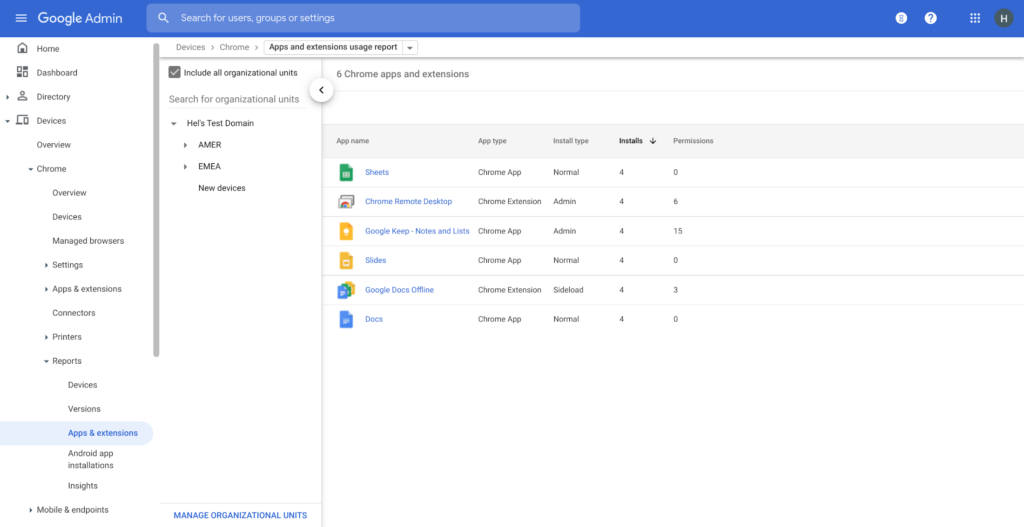
Zero trust security: Finally, Chrome can help modernize an enterprise’s security strategy by migrating to Zero Trust access models. BeyondCorp Enterprise helps secure endpoints by directly integrating Threat and Data Protection in Chrome. This protects against intentional or accidental data loss and prevents malware and phishing in real-time. Additionally, Chrome and BeyondCorp Enterprise provide device trust and endpoint security signals directly from the browser, significantly easing deployment of zero-trust in your environment. In 2022, we plan to partner with leading players in the cybersecurity and zero trust space to add additional integrations.
For security recommendations, check out the new Chrome 2.1 CIS Benchmark that covers independent recommendations on which Chrome policies to configure to help support organizations’ security and compliance needs.
Google Dataflow Named Leader in The 2021 Forrester Wave™: Streaming Analytics

6650
Of your peers have already read this article.
2:00 Minutes
The most insightful time you'll spend today!
We are excited to announce that Google has been named a Leader in The Forrester Wave™: Streaming Analytics, Q2 2021 report. Thank you to our strong community of customers and partners for working with us to deliver a customer focused product. We believe Forrester’s recognition is an acknowledgement of our leadership across an integrated set of capabilities that rely on data to drive transformation. We were also honored to be named a leader in The Forrester Wave™: Cloud Data Warehouse, Q1 2021.
Forrester gave Dataflow a score of 5 out of 5 across 12 different criteria and according to the report: “Google Cloud Dataflow has strengths in data sequencing, advanced analytics, performance, and high-availability. Google Dataflow’s sweet spot is for enterprises that have a preponderance of real-time data generated on Google Cloud Platform or wish to simplify all data processing by using a single platform that unifies both streaming and batch jobs.”
Harnessing the power of real-time data
The speed with which businesses are able to respond to change is the difference between those that successfully navigate the future and those that get left behind. In order to accelerate their digital transformation, reimagine their business and leverage the power of real-time data, today’s data leaders require a streaming analytics platform that provides both depth and breadth.
Cloud Pub/Sub and Cloud Dataflow, based on more than a decade of experience in internet scale systems for Google’s own needs, provide customers with a reliable, scalable, performant platform. In addition, we’ve designed these products for ease of use to make streaming analytics accessible to more users, which is why customers such as Sky and others from across all industries use Dataflow to run streaming analytics workloads.
5 out of 5 across key streaming analytics criteria
While Forrester gave Dataflow a score of 5 out of 5 in 12 criteria, the product achieved the highest possible scores in areas that are top of mind for our customers.
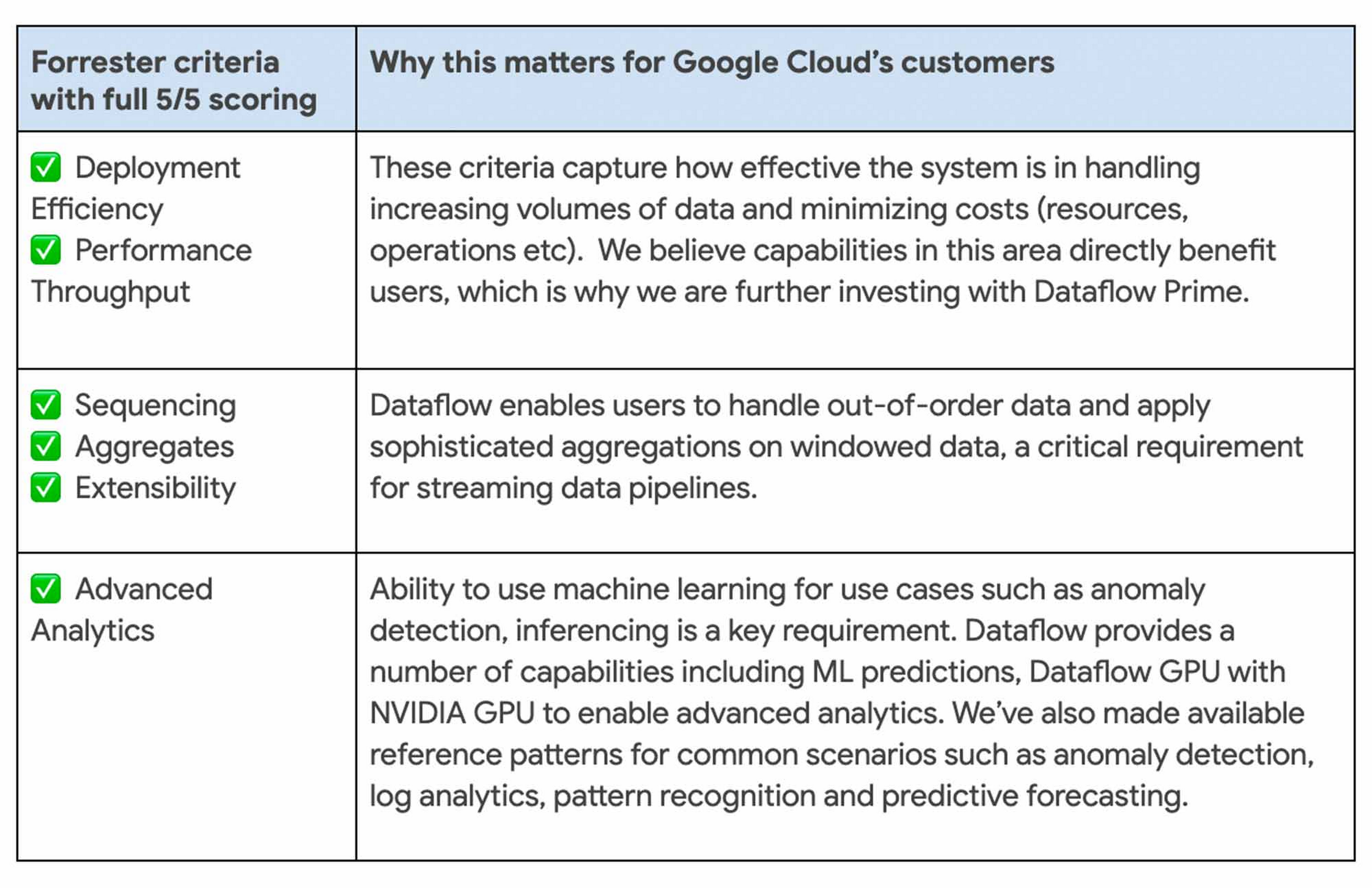
We continue to be focused on solving problems that matter to you. For example, just in the last month we announced Dataflow Prime and Auto Sharding for BigQuery – two new auto tuning capabilities that bring efficiency and simplicity to your streaming pipelines.
Dataflow achieves highest score possible in strategy
With Google, organizations gain an industry leading product and a partner that has the vision and strategy to help you tackle new business challenges and provide delightful experiences to your customers.

In summary, we are honored to be a Leader in The Forrester Wave™, Streaming Analytics, and look forward to continuing to innovate and partner with you on your digital transformation journey.
Download the full report: The Forrester Wave™: Streaming Analytics, Q2 2021 and check out these smart analytics reference patterns. To learn more about Dataflow, visit our website and get to know the product by taking an interactive tutorial. You can also watch recordings from the Data Cloud Summit event (May 2021), where we provided an in-depth view of new product innovations in Dataflow and other data analytics products.
More Relevant Stories for Your Company

7 Tricks No One Will Tell You to Work Smarter and Grow Your Business Faster
We’re dedicated to creating products that are helpful for our users, including those in a business setting. G Suite helps companies of all sizes transform how they work by encouraging people to focus on what really matters, whether that be fostering a culture of collaboration like Iron Mountain or reducing IT and

A Breakdown of Cloud-based Data Ingestion Practices
Businesses around the globe are realizing the benefits of replacing legacy data silos with cloud-based enterprise data warehouses, including easier collaboration across business units and access to insights within their data that were previously unseen. However, bringing data from numerous disparate data sources into a single data warehouse requires you

How Google Maps Platform Boosts Domino’s Operations and Fast Growing Franchise across Indonesia
Editor’s note: Today’s blog post is from Mayank Singh, Chief Digital Officer and VP Marketing and IT at pizza delivery group Domino's Indonesia. He explains how Google Maps Platform is enabling their business to optimize their operations and supporting the franchise's ambitious expansion strategy in one of the world's most



Lessons for the Indian Government: How the State of Arizona Innovates with Emerging Tech
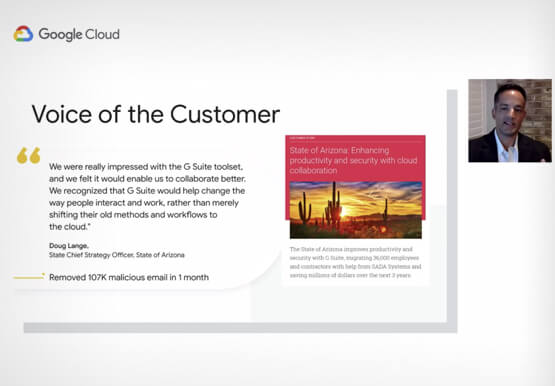
Government agencies of every size and jurisdiction are being called upon to provide accurate and real-time information and deliver essential services across the globe in a world infested by COVID-19. Doug Lange, Chief Strategy Officer, state of Arizona, is primarily responsible for two things. One is Arizona's statewide IT Strategic
