





7 Tricks No One Will Tell You to Work Smarter and Grow Your Business Faster

7116
Of your peers have already read this article.
4:20 Minutes
The most insightful time you'll spend today!
We’re dedicated to creating products that are helpful for our users, including those in a business setting. G Suite helps companies of all sizes transform how they work by encouraging people to focus on what really matters, whether that be fostering a culture of collaboration like Iron Mountain or reducing IT and infrastructure costs like Nielsen.
Here’s how Google’s leading artificial intelligence (AI) can help people accomplish more in the workplace. First, Google Docs is packed with more assistive features to help you create high-quality work more quickly. In addition, the Google Assistant has been helping people get things done in their personal lives for the past few years. With remote working becoming the norm these days, Google Assistant has more features to help G Suite users work more efficiently and seamlessly.
Assistive writing features in Google Docs
AI-powered capabilities within Docs makes it faster and easier for people to create high-quality, error-free content.
- Write faster. Smart Compose in Google Docs uses Google AI to suggest complete sentences as they are created. Smart Compose has already saved people from typing more than 2 billion characters each week.
- Cut back on grammatical and spelling errors. To build on the intelligence, Docs is using cutting-edge, neural network technology to power grammar suggestions. The neural network approach has proven to help individuals catch even more errors in internal experiments. In addition, we’ve brought spelling autocorrect to Docs. Using the power of Google Search, this intelligent feature constantly learns new words or phrases that become part of the English language from search to inform spelling suggestions in documents, just as it does already in Gmail.
- Receive suggestions that are tailored to your business. Lastly, our machine-learning based spelling suggestions to recognize commonly used words from your business domain to inform recommendations is also a useful feature. For example, if your organization has an internal project name or acronym that’s commonly used, Docs will not only stop underlining such terms, but will also suggest corrections when these terms are misspelled.
Expanding the power of the Google Assistant for G Suite Businesses
You can accomplish more on the go with the Google Assistant when you’re logged into your G Suite account. We’ve also enabled remote workers with the Asus Hangouts Meet Hardware kit to respond to voice commands in meeting rooms.
- Manage your calendar while on the move. Whether you’re on your commute home or on the go between meetings, the Google Assistant can help you manage scheduling in Google Calendar. You can ask the Assistant to read your calendar, create events, cancel events, or even reschedule events.
- Send quick messages and dial into calls hands-free. Beyond managing your calendar, we know that sometimes you need to send messages and join calls on the go. You can say things like, “Hey Google, join my next meeting” or “Hey Google, send an email to my next meeting”.
- Have a more seamless meeting experience. Google Assistant is available in meeting rooms with Asus Hangouts Meet Hardware kit. Instead of clicking into meetings to join them, people can say voice commands to the Assistant to join a meeting, exit a meeting, or even make a phone call.
- Increase accessibility in meeting rooms. Another goal in bringing the Google Assistant into meeting rooms is to increase accessibility. People can say a voice command, like “Hey, Google, turn on spoken feedback,” to use accessibility features without having to find the button to turn them on.
Two Ways to Deploy SAP HANA System on Google Cloud

7879
Of your peers have already read this article.
4:00 Minutes
The most insightful time you'll spend today!
Many of the world’s leading companies run on SAP—and deploying it on Google Cloud extends the benefits of SAP even further. Migrating your current SAP S/4HANA deployment to Google Cloud—whether it resides on your company’s on-premises servers or another cloud service—provides your organization with a flexible virtualized architecture that lets you scale your environment to match your workloads, so you pay only for the compute and storage capacity you need at any given moment. Google Cloud includes built-in features, such as Compute Engine live migration and automatic restart, that minimize downtime for infrastructure maintenance. And it allows you to integrate your SAP data with multiple data sources and process it using Google Cloud technology such as BigQuery to drive data analytics.
SAP server-side architecture consists of two layers: the SAP HANA database, and the Netweaver application layer. In this blog post, we’ll look at the options and steps for moving the database layer to Google Cloud as a lift and shift or rehost, a straightforward approach that entails moving your current SAP environment unchanged onto Google Cloud.
Deploying an SAP HANA system on Google Cloud
Google Cloud offers SAP-certified virtual machines (VMs) optimized for SAP products, including SAP HANA and SAP HANA Enterprise Cloud, as well as dedicated servers for SAP HANA for environments greater than 12TB. (For a complete list of VM and hardware options, visit the Certified and Supported SAP HANA Hardware Directory.)
Before proceeding with a rehost migration to Google Cloud, your current (source) environment and Google Cloud (target) environments should meet these specifications:
Prerequisites:
- The configuration of the Google Cloud environment (i.e., VM resources, SSD storage capacity) should be identical to that of the source environment. If the underlying hardware is different, however, you must use Option 2 for your migration, detailed below.
- Both environments should be running the same operating system (SUSE or RHEL Linux).
- The HANA version, instance number, and system ID (SID) should be identical.
- Schema names must remain the same.
- Establishing the network connection between the on-premises environment and Google Cloud will be required in this phase to support rehost of the SAP application.you can use Cloud VPN or Dedicated Interconnect. Learn more about Dedicated Interconnect and Cloud VPN.
Note: Depending on your internet connection and bandwidth requirements, we recommend using a Dedicated Interconnect over Cloud VPN for production environments.
We offer a number of automated processes to accelerate your cloud journey. To deploy the SAP HANA system on Google Cloud, you can use the Google Cloud Deployment manager or Terraform and Ansible scripts available on GitHub with configuration file templates to define your installation. For more details, see the Google Cloud SAP HANA Planning Guide.
Note: To deploy SAP HANA on Google Cloud machine types that are certified by SAP for production, please review the Certification for SAP HANA on Google Cloud page.
Moving an SAP HANA Database to Google Cloud
There are two different options you can use to rehost your SAP HANA database to Google Cloud, and each has pros and cons that you should consider when deciding on your approach.
Option 1: Asynchronous replication uses SAP’s built-in replication tool to provide continuous data replication from the source system (also known as the primary system) to the destination or secondary system—in this case residing on Google Cloud. It’s best for mission-critical applications for which minimum downtime is a high priority, and for large databases. In addition, the high level of automation means that the process requires less manual intervention. Here’s where you can learn more on HANA Asynchronous Replication.
Option 2: Backup and restore relies on SAP’s backup utility to create an image of the database that is then transferred to Google Cloud, where it is restored in the new environment. Downtime for this method varies by database size, so large databases may require more downtime via this method vs. asynchronous replication. It also involves more manual tasks. However, it requires fewer resources to perform, making it an attractive option for less urgent use cases. Here’s where you can learn more on SAP HANA database Backup and restore.

How to migrate the SAP HANA database to Google Cloud using Asynchronous Replication

- Create and configure Dedicated Interconnect or Cloud VPN between the current environment and Google Cloud.
- Set up SAP HANA asynchronous replication. You can configure system replication using SAP HANA Cockpit, SAP HANA Studio, or hdbnsutil. See Setting Up SAP HANA System Replication in the SAP HANA Administration Guide.
- Be sure to use the same instance number and HANA SID in the template as the primary instance.
- Configure the Google Cloud instance as the secondary node for using HANA Asynchronous replication.
- Perform data validation once full data replication is completed to the SAP HANA database in Google Cloud. To learn more: HANA System Replication overview.
- Perform an SAP HANA takeover on your standby database. This switches your active system from the current primary system onto the secondary system on Google Cloud. Once the takeover command runs, the system on Google Cloud becomes the new primary system.To learn more: HANA Takeover.
How to migrate the SAP HANA database to Google Cloud using Backup and Restore

- Create a full backup of your SAP HANA database in your current environment.
- Create a new storage bucket in your Google Cloud environment. Visit Creating Storage Buckets in the Google Cloud Storage documentation.
- Download and install gsutil onto the source environment and run it to upload the HANA backup to the Google Cloud storage bucket. To install gsutil utility on any computer or server, visit Install gsutil in the Google Cloud Storage documentation.
Note: You can run parallel multi thread/multi processing in gsutil to copy large files more quickly. - Recover the HANA database on Google Cloud using SAP’s RECOVER DATABASE statement. See RECOVER DATABASE Statement (Backup and Recovery) in the SAP HANA SQL Reference Guide for SAP HANA Platform.
Note: BackInt agent is an integrated SAP interface tool used for HANA database on Google Cloud.Backint agent for SAP HANA can be used to store and retrieve backups directly from Google Cloud Storage. It is supported and certified by SAP on Google Cloud. To learn more: SAP HANA Backint Agent on Google Cloud.
In summary, we recommend using Asynchronous Replication (Option 1) for mission-critical applications that require the lowest downtime window. For all other applications, we recommend Backup and Restore (Option 2), as this approach requires fewer resources. It’s also a great way to implement the backup and restore functionality on Google Cloud.
A rehost migration is the most straightforward path to getting your SAP on HANA system up and running on Google Cloud. And the sooner you migrate, the sooner you can take advantage of the many benefits Google Cloud brings to your SAP solution. For more information on the different migration options please review: SAP on Google Cloud: Migration strategies.
Learn more about deploying SAP on Google Cloud. Technical resources can be found here.
How EDI empowers its workforce in the field, in the office, and at home

3885
Of your peers have already read this article.
5:12 Minutes
The most insightful time you'll spend today!
For consulting companies such as EDI Environmental Dynamics Inc. (EDI), interactions among employees and customers are the direct drivers of value, and helping them collaborate has a tangible impact on the bottom line. However, connecting people from the field to work-from-home spaces to the office is no easy task.
EDI, an environmental consulting company that helps organizations assess environmental impacts and meet government regulations, has eight offices across Western and Northern Canada. Frontline workers account for 80% of its total employees, ranging from biologists and scientists to safety inspectors and project managers. EDI’s success is directly linked to its remote workforce’s ability to work effectively in the field and to collaborate with coworkers and clients across Western Canada. With the help of Google Workspace and AppSheet, EDI is enabling its mobile workforce to function more efficiently and collaboratively than ever before.
Bringing efficiency to its frontline workers
Just four years ago, much of EDI’s fieldwork was still being tracked with pen and paper, resulting in frequent challenges, from error-prone data retention to inefficient collaboration. Luckily, EDI was able to address this using AppSheet, Google Cloud’s no-code application development platform.
With AppSheet, EDI has replaced the majority of its pen-and-paper processes with tailored apps. As EDI’s Director of IT, Dennis Thideman explains, “AppSheet allows us to be much more responsive to our field needs. Using it, we can spin up a basic industrial application, share it with our field workers, and have them adjust their workflows—all in just a few hours. Doing that from scratch might take weeks or months.”
For EDI, there are a couple of features that make AppSheet shine. First, AppSheet is platform-agnostic, meaning it works on most devices and most operating systems, so any employee can access their AppSheet apps. Secondly, because 90% of EDI’s projects involve working in remote areas, they can leverage AppSheet’s Offline Mode, allowing workers to collect data on their mobile devices in the field and have it automatically download when they reconnect to the internet.
Eliminating the challenges associated with pen and paper has resulted in even more benefits than EDI leaders originally anticipated: namely, employees work faster across an unexpectedly wide range of use cases. For example, governmental regulations require EDI to complete a pre-trip safety evaluation before heading into the field. Before using AppSheet, this evaluation would take upwards of four hours to complete. By streamlining the process with an AppSheet app, EDI employees have reduced that time down to one hour. EDI averages over 850 evaluations every year, and they’ve realized over 2,550 hours in annual savings—savings that can be passed on to clients and allow staff to focus more time on other tasks. This is just one of more than 35 mission-critical applications that EDI has built with AppSheet.
Time savings is a huge benefit, but as Logan Thideman, an IT manager at EDI, explains “At the end of the day, we realized that the biggest benefits of AppSheet aren’t about time savings as much as they are about high-quality data.” Collecting and analyzing good data is critical to EDI’s operations, as most data collected in the field can never be replicated. For example, if a water quality sample for a certain day is lost (which can happen easily when using pen and paper), that information can never be retrieved again. AppSheet makes data collection easy. Employees are much less likely to lose a smart device than they are a paper form, and any data entered would be immediately uploaded to a Google Sheet or SQL database when they return from the field, meaning data is always backed up in the cloud. From there, information can quickly be analyzed by coworkers, passed on to the client, or shared with government agencies to ensure proper compliance.
Overall, EDI found that the more they could enable their field workers with AppSheet apps, the more those employees could focus on providing quality research and recommendations to their clients and gain a stronger competitive advantage in the market.
Enhancing collaboration everywhere
Enabling collaboration in remote environments can be difficult, but Google Workspace has made this easy for EDI. Google Workspace lets employees effortlessly share documents and work together in real time. Given its ease of use for mobile workers, Google Meet has become all-important and is used as EDI’s tool of choice for face-to-face collaboration. It became even more essential when COVID-19 arrived. As Dennis Thideman explains, “Google Meet allowed us to adapt to the COVID-19 environment quickly as we were already conversant with it. In just two days, we were able to transition our employees from office to home because of it.” By leveraging Google Meet and the rest of the Google Workspace platform, EDI employees are able to remain productive, regardless of where they’re working.
Google Workspace also makes it easy to collaborate with customers. Because many of EDI’s customers leverage Microsoft Office tools such as Word, Excel, and PowerPoint, EDI still needs to use them. Google Workspace makes it easy to continue using Microsoft products in its environment, allowing employees to store Microsoft Office files on Google Drive and open, edit and save them using Google Docs, Sheets, and Slides.
AppSheet and Google Workspace’s deep integrations also make collaboration easy. Employees can update data in Google Sheets, save images and reports to Drive, and update Calendar events all from AppSheet apps. Together, the two platforms simplify many of the activities that consumed so much time in the past.
An empowered workforce
Empowering employees has been at the core of EDI’s success, and Google Workspace and AppSheet have given EDI a clear advantage. Collaboration has become easier and more agile using Google Workspace. Robust AppSheet apps have been built to streamline mission-critical processes. For unique project requirements, simple AppSheet apps are built in a matter of hours. As Dennis Thideman summarizes, Google Workspace and AppSheet “make managing a distributed, deskless workforce much simpler, giving EDI better growth opportunities and a competitive edge in the marketplace.”
Accuracy and Real-time Updates with Google Maps’ On-Demand Rides and Delivery Solution Impacts CX

5640
Of your peers have already read this article.
3:00 Minutes
The most insightful time you'll spend today!
Last year we launched our on-demand rides and delivery solution to help businesses improve operations as well as transform the driver and customer journey from booking to arrival or delivery. When it comes to on-demand rides and deliveries, every minute matters. When users book a ride or order food, they want a seamless experience and real-time accurate updates. Today, we’re taking a closer look into data quality improvements for location, time and distance accuracy, and motorbike routes.
Machine learning helps drive location accuracy
Location accuracy stands at the base of our customers’ operation. The location signals that are coming from mobile devices can sometimes be off for various reasons and a driver’s location can get stuck, or jump around.
Recently we developed mechanisms in our fleet management product that can take in multiple location signals and determine the most reliable location to use for a given vehicle. With that, we noticed drastic improvements:
- Eliminated long periods of location ‘stuckness’ almost completely; a vehicle is considered ‘stuck’ when we think it’s moving but the measured location is not
- Reduced the jumpiness of the location signal by 52%-86%: ‘jumpiness’ is when a vehicle shows a sudden and usually drastic change in location. A jump is determined to exist when the speed the vehicle had to go at in order to cover the distance it did is unrealistic
- Reduced the average jump distance by 44%-86% : ‘jump distance’ is the distance between two consecutive location pings when we determined a ‘location jump’ has occurred.
Dunzo, a local e-commerce platform in India, explains how integrating the order tracking capability within Google Maps Platform’s On Demand Rides and Delivery solution has helped reduce support calls by 90%. The out-of-the-box solution helped Dunzo’s motorbike delivery partners with updating location sync to reduce stuckness and jumpiness as well as deliver premium user experiences.
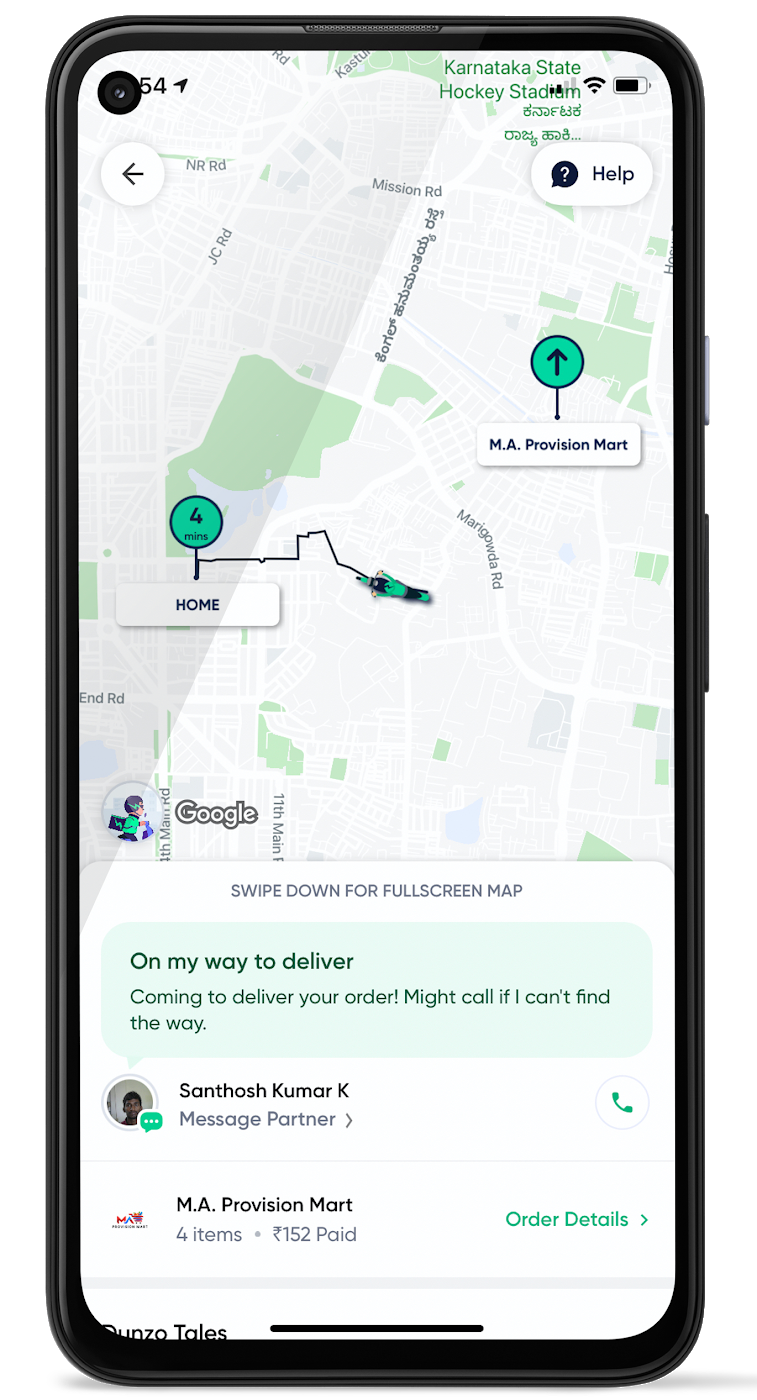
When the vehicle location is more reliable, the dispatch decision is of higher quality, meaning there is a higher chance you will be able to make the optimal decision. This can lead to less wait time for consumers, increased driver happiness and fewer cancellations.
Improvements in ETA accuracy in motorbike routes
In many geographic areas, road space is limited and car ownership is prohibitively expensive so motorbike is a prominent transportation mode. Motorbike mapping requires unique routing, ETA models, and navigation capabilities. Improvements in motorbike routing and ETA estimation have enabled customers like Gojek to offer better overall services, even in geographies with poor wifi or missing roads.
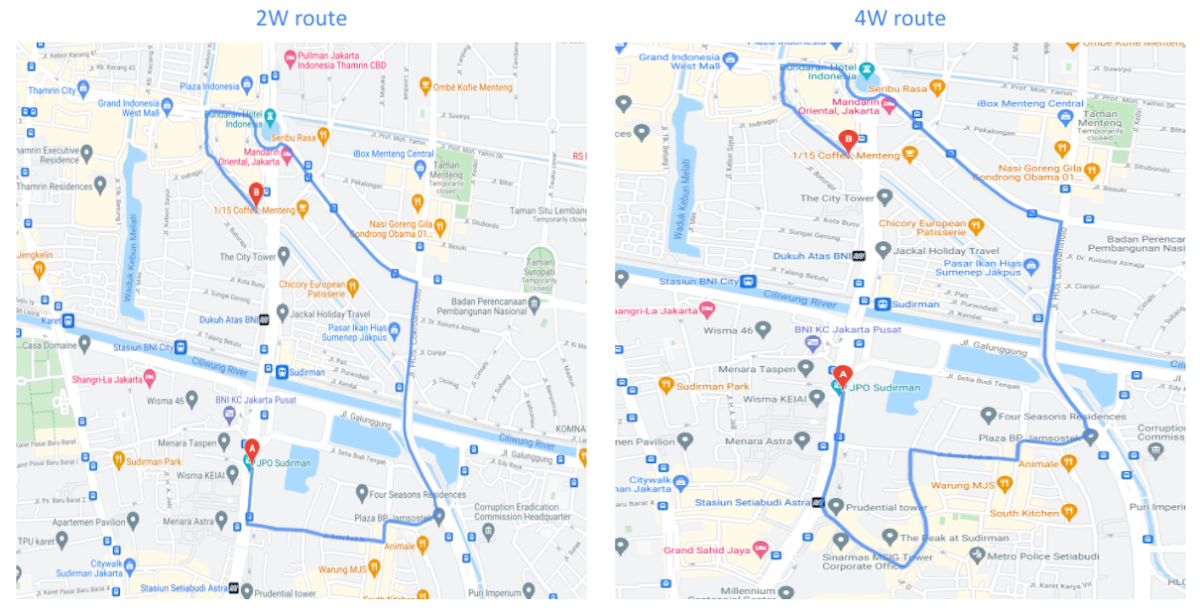
Recently, we further improved ETA outcomes by developing new machine learning models trained specifically for motorbikes. These models help our systems account for differences in congestion and traffic flow that arise in different regions and scenarios.
Globally, we measured an ~8% improvement in ETA accuracy for riders in the general public, and a ~6% improvement in on-demand rides and deliveries ETA accuracy. In this on-demand economy, where consumers are accustomed to real-time trip and order progress, these improvements will significantly improve their experience.
We will continue to innovate on both our car and motorbike on-demand rides and deliveries capabilities based on customer demand and requirements. We are committed to the success of our customers by building a seamless experience for all parties—consumers, drivers, and fleet operators—in the rides and deliveries journey.
For more information on Google Maps Platform, visit our website.
4624
Of your peers have already watched this video.
37:00 Minutes
The most insightful time you'll spend today!
On-Demand Webinar: The Underrated Impact of Real-Time Collaboration on Your Business
There comes a time in your life when you have to build that dreaded sales report, once a month. That’s the stuff of nightmares.
First, you need to gather data from multiple sources, sometimes multiple, siloed sheets, different departments, numerous salespeople, and wait endlessly. That’s time-consuming.
Then you have to plot all of that in one sheet, check for errors, and pray that the numbers are accurate enough to make informed decisions. That’s cumbersome and complex.
And then repeat this arduous task, month after month. What do you gain? Sleepless nights.
But had you put all of that data on the cloud, in a platform like Google Sheets—that lets multiple team members input, edit, and work on the same sheet all at the same time—creating sales reports wouldn’t seem like a huge mountain to climb.
In this webinar, Ryan Weber, Product Manager, Google Cloud, provides simple tricks and tips that help you build reports quickly, accurately, and cost-effectively with real-time collaboration, so that you spend more time on innovation and getting products out to market faster. And a lot less time building reports.
Watch this on-demand webinar to find out how.
3968
Of your peers have already watched this video.
22:21 Minutes
The most insightful time you'll spend today!
Boosting Chrome OS adoption with effective change management
Can you remember the last time you asked a child to do something how did you convince them to do what you wanted? How many times did they ask you why probably more than once, right? So we know change is hard when we ask someone to make a change we’re asking a lot from them. Very often with IT projects we expect people to change, we don’t really think through the implications of this.
The purpose of this video is to guide you to migrate to Chromebooks and help you understand the reason why. When putting together your change management plan there’s a much larger chance of your project being able to deliver on its business objectives.
Introducing new technology into your organization is an exciting step. However, change management and workforce adoption of the new technology can be challenging. Get insights from Google’s Chrome Enterprise expert on change management strategies and best practices for increasing Chromebook adoption in your organization.
More Relevant Stories for Your Company

Google Meet on Glass: A New Way of Collaborating Teams with Video Meetings in Real-time
Open beta now available to all Google Workspace customers Seeing is believing. For many service technicians, trainers, and other frontline workers, the ability to share a real-time view of what they can see with their virtual clients or teams can make all the difference. That’s what we’ve heard from global

Messages by Google: Unveiling New Features for AT&T Android Users
Today, we’re announcing that we’re working with AT&T to establish Messages by Google as the default messaging application for all AT&T customers in the United States using Android phones. The collaboration aims to help accelerate the industry toward global Rich Communication Services (RCS) coverage and interoperability to offer a consistent, secure, and

New ways Google Workspace works with tools you already use
Looking back on 2020, it’s clear that the ways we work have rapidly transformed—from the rise of remote work and increasingly digitized processes, to balancing time across work and personal responsibilities. But one thing hasn’t changed—businesses still rely on a staggering number of applications to get work done. Working from

All About Cloud Run, its Scalability and Management Features
Mindful Containers is a fictitious company that is creating containerized microservice applications. They need a fully managed compute environment for deploying and scaling serverless containerized microservices. So, they are considering Cloud Run. They are excited about Cloud Run because it abstracts away the cluster configuration, monitoring, and management so they
