





How Swiggy’s UK Competitor Expanded to 14 Countries in Just Three Years

4547
Of your peers have already read this article.
1:30 Minutes
The most insightful time you'll spend today!
Deliveroo is the fastest-growing technology company in the United Kingdom, and the first-ever to win Deloitte’s UK Technology Fast 50 two years in a row. Founded in 2013, the food courier service achieved a three-year growth rate of over 15,000% to 2018, expanding beyond its London base to operate in 14 countries in Europe and the Asia-Pacific region, from Spain to Singapore, Hong Kong, and Taiwan.
“G Suite products work really well, with no steep learning curve. As a fast-growing company, our strategy is to go to G Suite tools first to find immediate, effective answers within one integrated solution.”
– Asif Akmal, Director of IT, Deliveroo
The company runs multiple offices in each of its 14 markets, manned by more than 2,500 full-time staff. “Around 2016, we made a clear decision,” says Asif Akmal, Director of IT at Deliveroo. “As the company was scaling, we needed a strategy for all our offices to scale with us, and we needed the right infrastructure to do that. We can’t afford to have downtime, or to have tools that confuse staff, rather than help them.”
Together with Google Cloud Premier Partner Netpremacy, Deliveroo created a strategy around G Suite that emphasizes the speed and efficiency the company needs to set up offices and train new staff.
“G Suite products work really well, with no steep learning curve,” says Asif. “As a fast-growing company, our strategy is to go to G Suite tools first to find immediate, effective answers within one integrated solution.”
Putting videoconferencing at the core of the business
Videoconferencing is central to the Deliveroo business model. “Many of our international offices rely on operational staff from headquarters, whether for daily one-to-ones or group meetings,” says Asif. “Some of our engineers are constantly present in remote offices on a permanent live video stream, with a screen at the desk where there would be a chair. That makes it mission critical for us to have the correct infrastructure in place in order to do videoconferencing.”
Because internet connectivity can be inconsistent at new offices, Deliveroo teams occasionally need to be able to dial into videoconferencing over the phone, as well as connect through the internet. Previously, Deliveroo used a separate videoconferencing solution in order to have this feature. Now, as G Suite Enterprise users, Deliveroo employees can use Hangouts Meet for the same dial-in functionality, higher quality reception, and up to 100 participants on each call.
“Videoconferencing is crucial. And with Hangouts Meet we can have just one AV person in the whole business setting up and overseeing the infrastructure in 14 countries.”
– Asif Akmal, Director of IT, Deliveroo
“It was a simple decision to switch to Hangouts Meet,” says Asif. “It came with the enterprise package that we were already on, so we made a substantial cost savings by stopping the other solution, which cost almost £15 a month per user. Financially, that made it a no-brainer, but Hangouts also works better from a technical and integration perspective.”
“One of the first things that we address as a company moving into a new office is: Where do we get the videoconferencing system in place so we can start doing calls straight away?” says Elliott Shafii, Google Technology Engineer at Deliveroo. That’s why Deliveroo has a blueprint for video conferencing rooms, specifying the equipment required and the size and acoustics of the rooms where they’ll be installed. Once the necessary Hangouts Meet hardware has been delivered, the Deliveroo AV Manager flies out to the location, installs the equipment in two days, signs off on it, and flies back.
“Videoconferencing is crucial,” says Asif. “And with Hangouts Meet we can have just one AV person in the whole business setting up and overseeing the infrastructure in 14 countries.”
Issuing new devices in one-tenth of the time
Deliveroo facilitates its exceptional growth rate by minimizing the time teams need to spend getting to grips with new tools. “With G Suite, users don’t have much that they need to learn,” says Asif. “That means we can deploy the solution in any country and be comfortable that people can walk into a room and connect to a meeting without problems.”
Asif and his team worked closely with Netpremacy to make training in G Suite tools efficient and accessible, for new starters and anyone who wants to learn. “Collaborating on Docs and Sheets, and using Drive to share files instead of sending attachments allows us to move more rapidly than any other business,” says Asif. “That’s why we have permanent staff in the IT team who concentrate exclusively on the onboarding process, so anyone can learn to use one of the G Suite products in just one hour.”
Introducing Pixelbooks is the latest step in Deliveroo’s pursuit of speed and efficiency. “Previously, it took an average of 50 minutes to set someone up on a laptop,” says Asif. “With Chrome devices, that induction period is down to five minutes. We just open the box, enroll the device, and hand it over.”
Creating a cloud-based company
“Our strong relationships with Netpremacy and Google Cloud product managers mean we can align our internal strategies with them. Working together, we can create the ideal environment for our culture of collaboration.”
– Asif Akmal, Director of IT, Deliveroo
Using G Suite, Deliveroo is building its ideal workplace to support a more mobile, agile approach to work. “By the end of next year, we should have the vast majority of new starters using Pixelbooks,” says Asif. “We expect that to increase the use of Docs and Sheets and other G Suite tools, in place of other applications. We want to see ourselves as a cloud-based company, and G Suite is ideal for reaching that goal.”
As part of the further deployment of G Suite tools, Deliveroo plans to roll out more Jamboards, in addition to the 14 already in use across the business. “Previously, we would take photographs of whiteboards and share those,” says Elliott. “I remember seeing someone wheeling a whiteboard back to his desk from a meeting, and thinking ‘That poor guy is going to have to sit at his desk and copy everything down.'”
“At that point, before Jamboards, we actually made a significant financial investment in another interactive whiteboard solution,” adds Asif. “Now that solution is collecting dust, because we’ve got Jamboards, which are much more cost-effective and work brilliantly within the G Suite system.”
“Our strong relationships with Netpremacy and Google Cloud product managers mean we can align our internal strategies with them,” says Asif. “Working together, we can create the ideal environment for our culture of collaboration.”
Embracing the cloud helps Deliveroo both to enable rapid collaboration and to minimize the maintenance and management of infrastructure: an ideal combination for a fast-growing technology company.
How 4K+ Coffee Lovers Get their Cuppa at Costa Coffee with the Help of Google Maps

3829
Of your peers have already read this article.
1:30 Minutes
The most insightful time you'll spend today!
Editor’s note: Gordon Lucas, Global Head of Digital Engineering at Costa Coffee, explains how Google Maps Platform helps direct customers to each of its 4,000 plus Costa Coffee shops across the world, as well as streamline payments, and optimize deliveries.
When brothers Sergio and Bruno Costa opened the first Costa Coffee in central London in 1971, they relied on word of mouth to grow trade. Personal recommendations encouraged people who lived and worked locally to visit the coffee shop and sample what became (and still remains) our signature blend coffee, Mocha Italia.
Fast forward 50 years and we have more than 4,000 coffee shops spread over 31 countries. To make it as easy as possible for our global customers to pick up a Mocha Italia, a Costa Americano, or any other Costa Coffee product wherever we operate, we decided to create a visual app. We wanted the app to help customers across the world find their most convenient eat-in, takeaway, drive-thru, partner store, or delivery platform, and highlight which services are available and at what times.

Enhancing the customer experience with intelligent maps
We were already using Google Maps Platform products on our website to provide our customers with a basic store locator service. So when we launched our mobile app in 2017, we added more interactive geospatial features to make our customers’ journeys quicker and easier.
We chose to enhance our existing Google Maps Platform solution because our developers enjoyed using it. Google Maps Platform offered all the capabilities we needed to boost our solutions, and we were excited to see how we’d be able to leverage geospatial data to improve the experience of our customers.
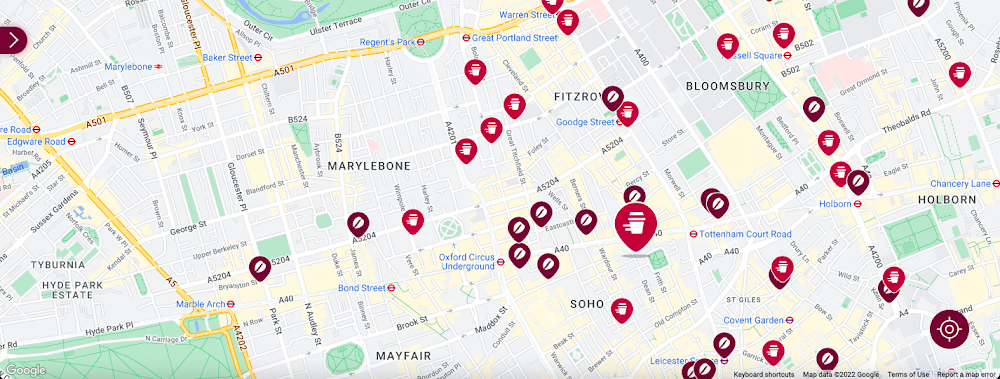
Our Google Cloud Premier Partner, Snowdrop Solutions, supported us in deploying all our requirements so the app’s new features could be rolled out globally. We wanted to direct pedestrians and vehicles to standalone Costa Coffee shops and kiosks in supermarkets and gas stations. We also wanted a dynamic map feature to highlight which locations offered click-and-collect, drive-thru, and delivery services. We then wanted to link these services to our online payments systems, seamlessly integrating our transaction process to make it as easy as possible for our customers.
To that end, we used the Maps Static API to embed maps within our app, and the Geocoding API to convert addresses into coordinates to create markers on our maps. We also use the Places API to allow customers to search for a Costa Coffee facility based on their location.
A new route for customer satisfaction
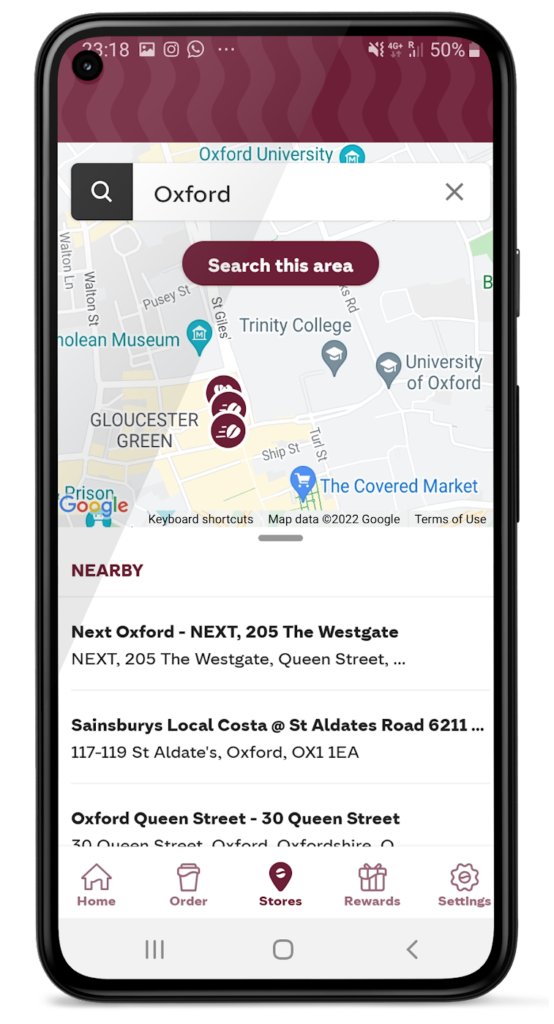
We had one issue when it came to locating Costa Coffee shops, however. We noticed that some customers were selecting the wrong store to collect orders. Fortunately, Google Maps Platform provided a quick fix that solved this issue. We updated the service to provide customers with a map of their collection point upon receipt of their order, remindIng them which store to collect from. A tweak like adding a map to a receipt improves customer satisfaction. The drop in calls to our customer service is testimony to this.
Geospatial intelligence became invaluable in the pandemic
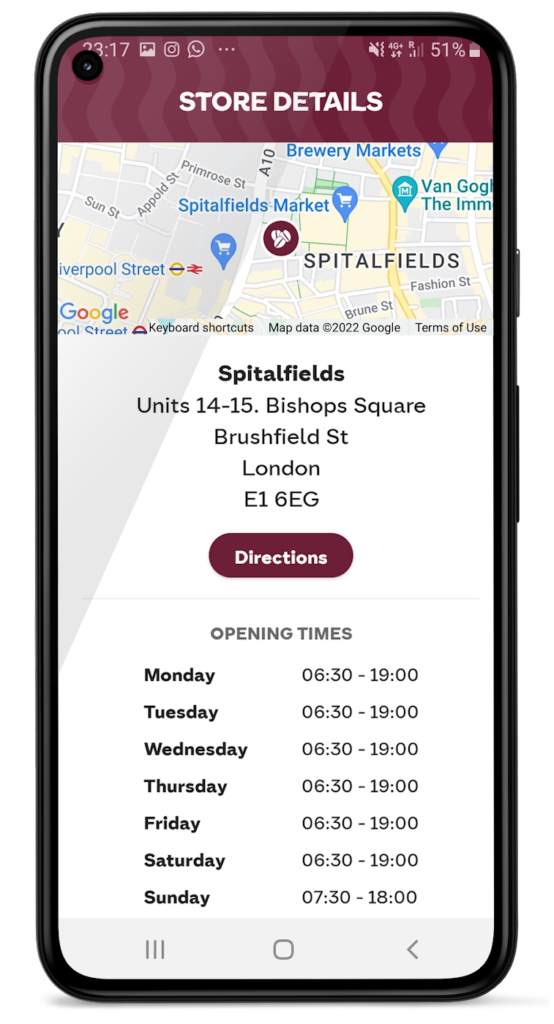
We had to adjust our service when the pandemic hit and Google Maps Platform was again instrumental in helping us. Because we had to comply with unique lockdown measures and travel restrictions across different locations, it could be challenging for our customers to stay up-to-date on the changing opening times and service guidelines of our shops. So we used Google Maps Platform Places API to show our customers which nearby stores, click-and-collect outlets, or drive-thrus were open, and when, during lockdowns.
Integrating this with our mobile ordering system also enabled us to promote COVID-safe contactless payments. Customers can locate a Costa Coffee shop, select, order, purchase, and collect their order or have it delivered to their cars without the need for any human contact. This reduces service wait times and minimizes the risk of transmission between customers and baristas. It also makes our employees feel more safe at work.
Geospatial data optimizes our entire operation
When the lockdown ended, our in-app order data showed a spike in demand, illustrating how much our customers miss their Costa Coffee experience. This data not only helps us to identify demand, it lets us track user preferences, informs where to direct supplies to meet a raised demand, and creates more accurate forecasts. This data can also help us manage costs.
Geospatial intelligence is also used to improve the experience of customers, from when they first look to order a cappuccino to when they arrive at the shop to enjoy it. We are using geomarketing to surface local offers. Say a Costa Coffee shop is trialing a new beverage, a pop-up can suggest users of our app try it next time they’re nearby.
Google Maps Platform has become integral to our digital operations. New features and capabilities of Google Maps Platform products have allowed us to continue innovating. The Costa Coffee footprint now spreads physically and digitally around the globe, and with the help of Google Maps Platform we can still offer the same tailored personal service that spurred the initial success of the Costa Brothers 50 years ago.
For more information on Google Maps Platform, visit our website.
Streamlining Your Experience: Enhanced Search and Navigation in Google Cloud Console
1368
Of your peers have already read this article.
4:30 Minutes
The most insightful time you'll spend today!
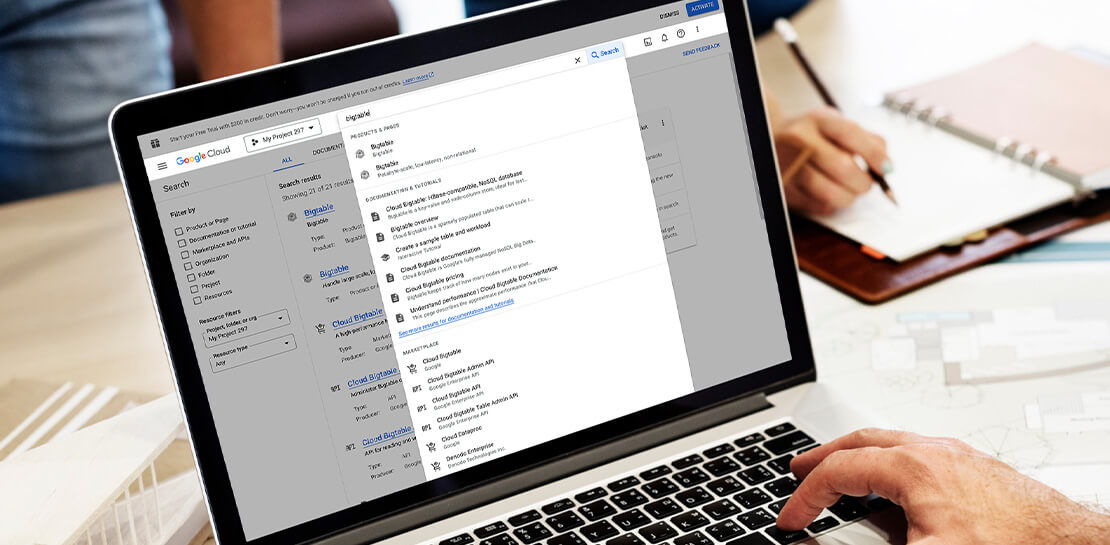
The Google Cloud console is a powerful platform that lets users manage their cloud projects end-to-end with an intuitive web-based UI. With over 120 Google Cloud products across thousands of pages, it can be challenging to navigate through the console quickly, and many users don’t like to use the command line interface. To help, Google Cloud console team recently made several improvements to our search and navigation features, making it easier to find what you need, when you need it.
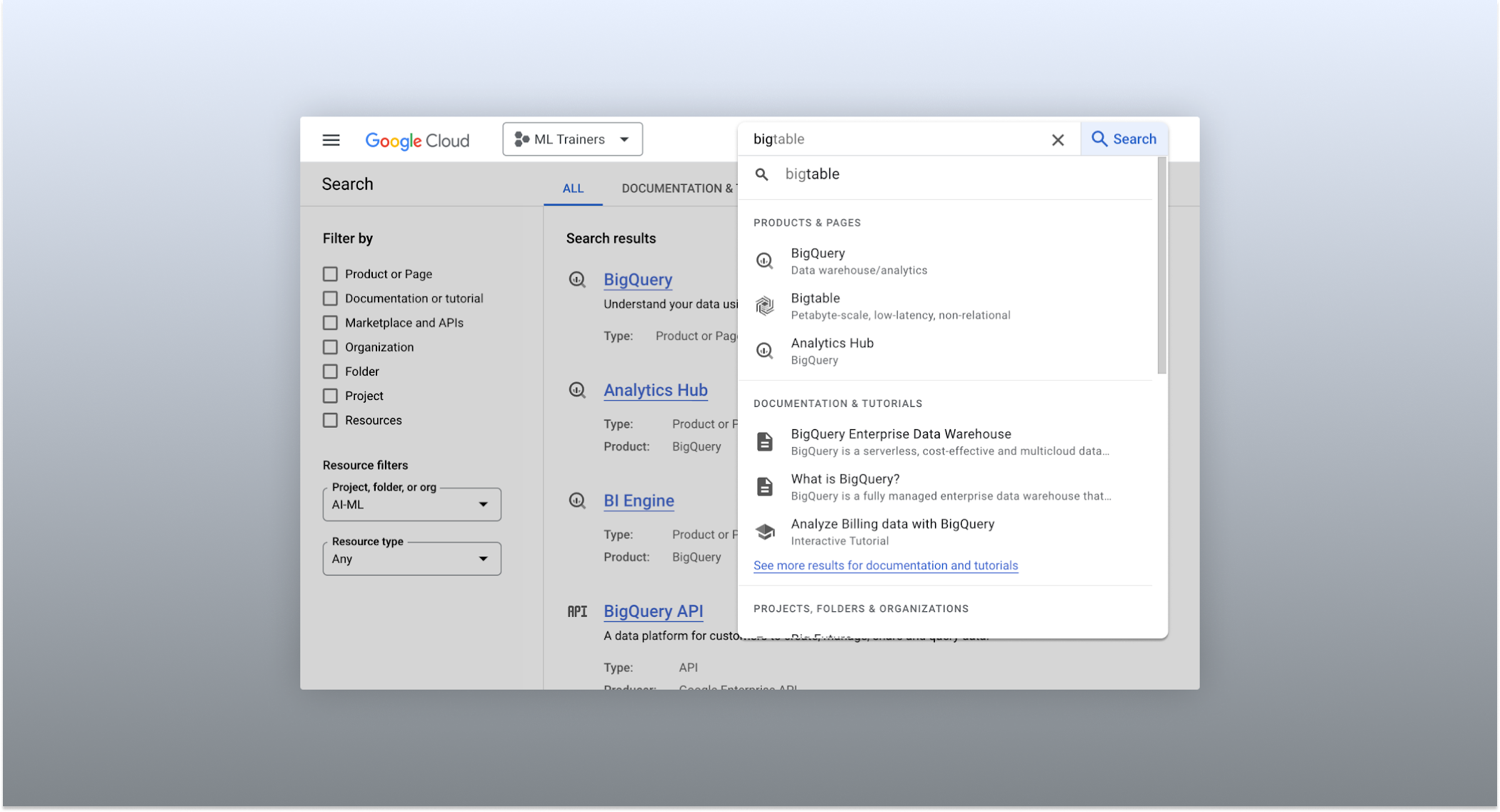
The Cloud console’s search dropdown and result page
Expanded resource-type search
One of the most significant improvements to the console’s search feature is the increased resource-type coverage. You can now find instances of nearly all of the over 120 products that Google Cloud offers directly from the search bar, rather than by manually clicking to the details section nested within specific product pages. This wider coverage saves you time compared to browsing through the different product categories to find what you’re looking for. This improvement also allows the console experience team to continuously add new resource types as we develop new features and capabilities in our various product offerings.
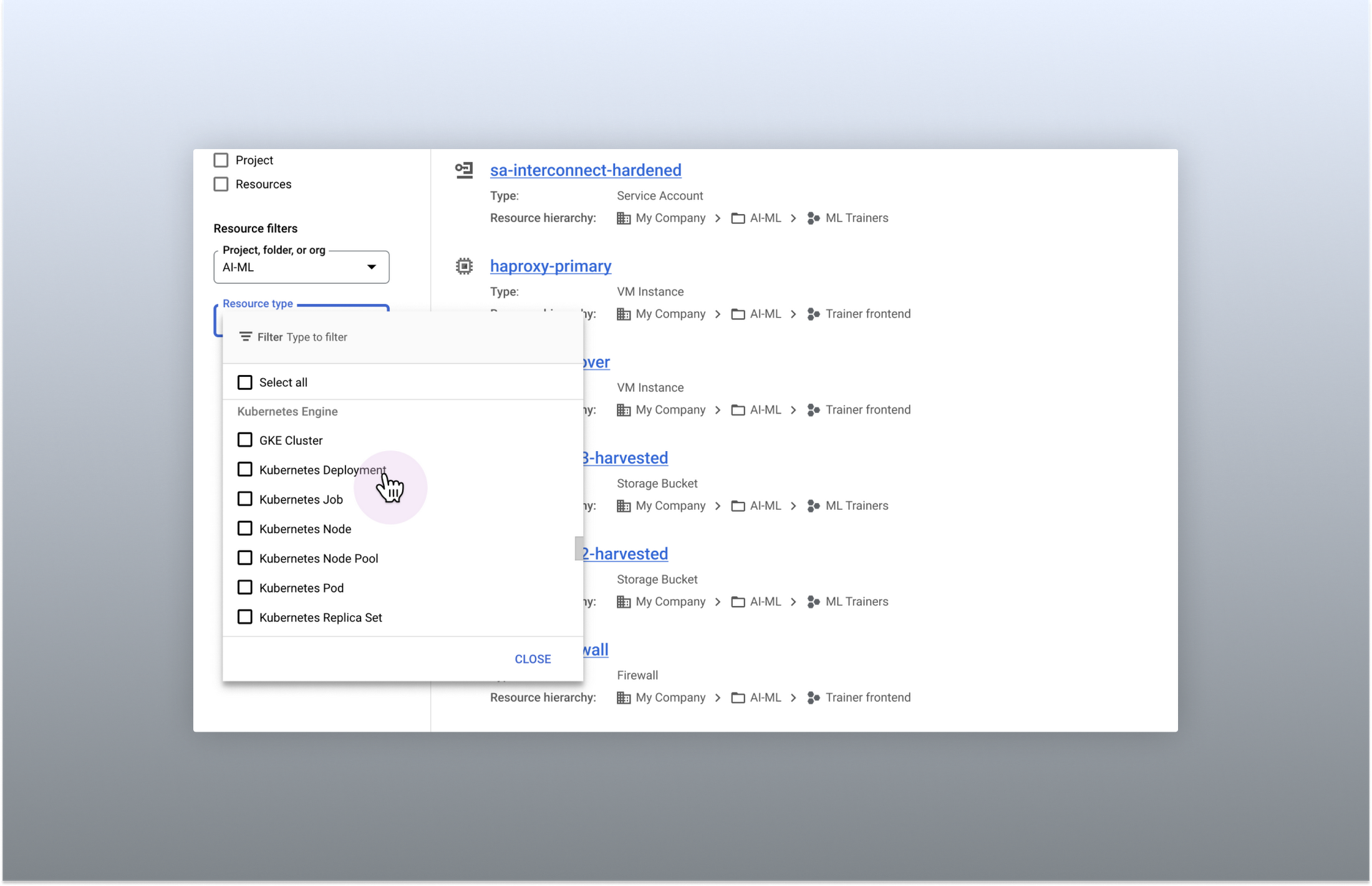
Search for more than 90 types of resources using Google Cloud console
Improved documentation search
We also improved the coverage and accuracy of the search experience for documentation, making it easier to find specific pages or interactive tutorials. Developers looking to get started with something they’re unfamiliar with may want to undertake tutorials in the context of their own working environment. Even experienced developers just looking for a quick answer to their question may not want to leave the console, so we expect these improvements can help users of all experience levels.
We’ve heard from you that finding the right documentation from within the console can be tricky, and so we hope this change can save you from needing to switch over to web search to be confident that they’ll find what you’re looking for.
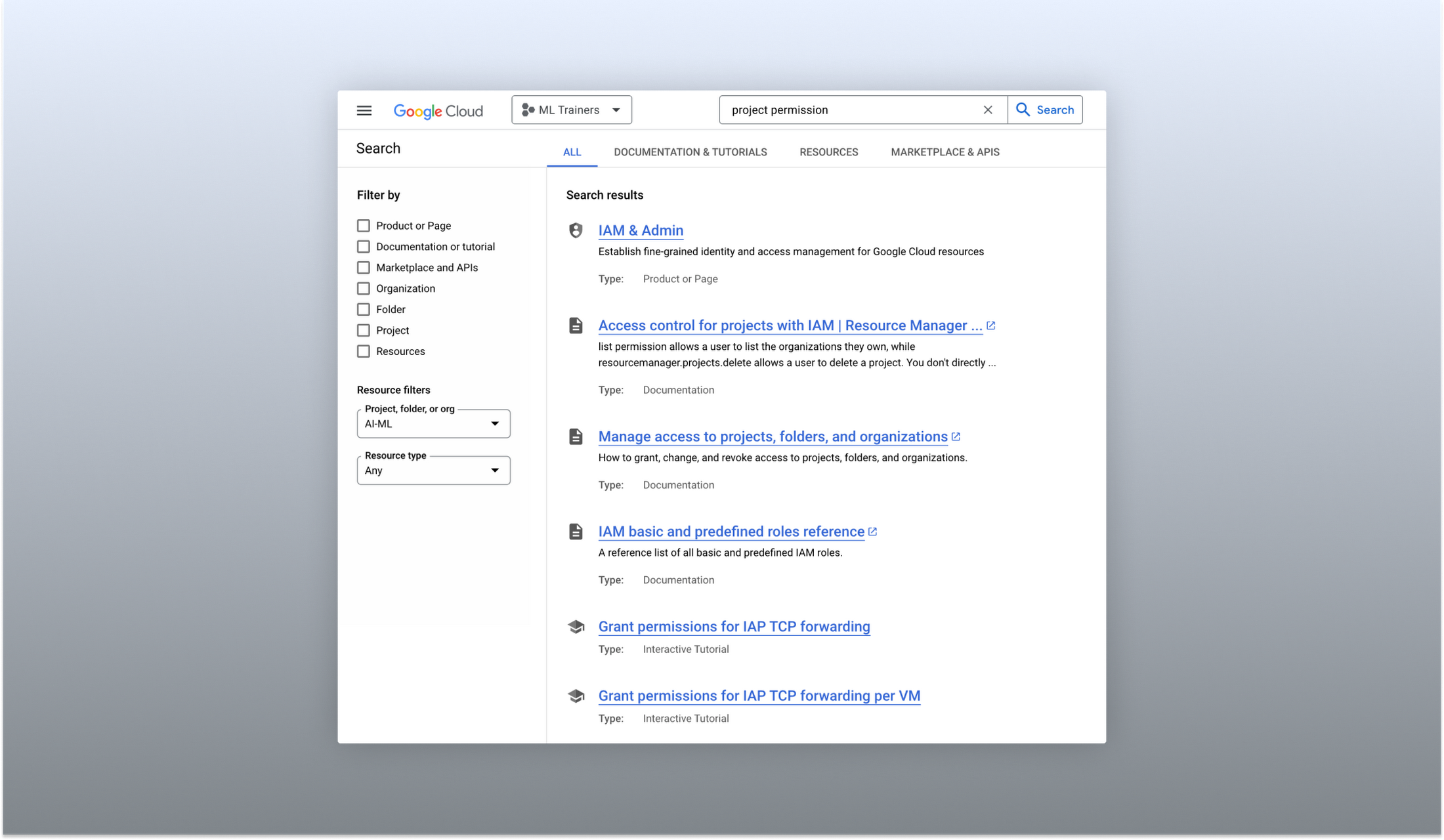
Cloud documentation and tutorials are available for search in the console
A refreshed search results page
To make browsing search results easier, we also overhauled our search results page by dividing results into tabs, similar to Google web search. This means that you can refine your search by diving into one of those categories individually. In addition to maintaining an “all results” tab, there are tabs for:
- Documentation and tutorials
- Resource instances, and
- Marketplace and APIs
Each tab also has a better filtering experience that’s unique to that search result category. For instance, the Resources tab lets you filter by metadata like the last time a resource was interacted with, while the Documentation tab allows you to search for interactive tutorials only. If you can’t find what you’re looking for in the autocomplete dropdown, try the search results page. It can provide additional results or context to help you find exactly what you’re looking for.
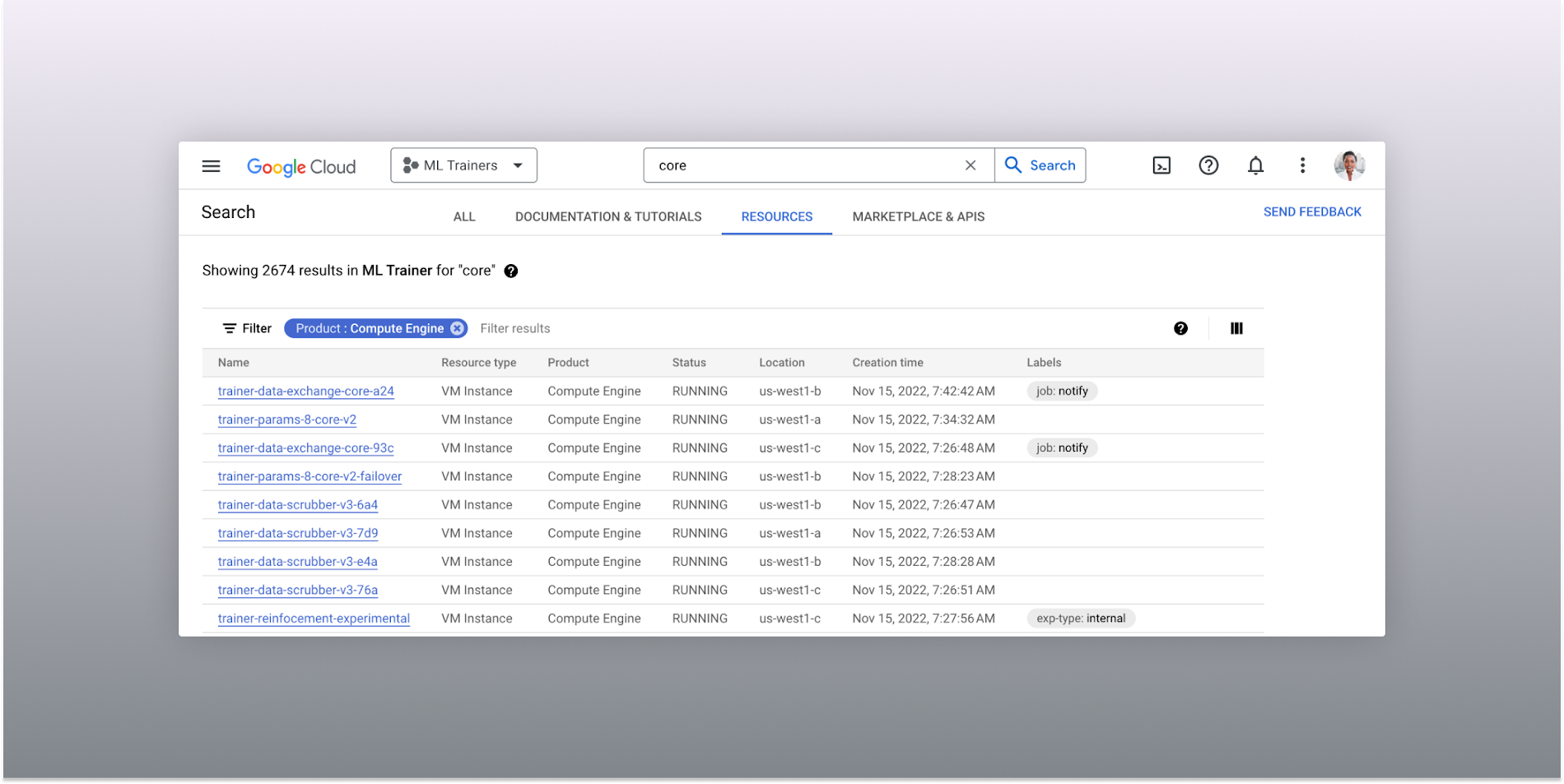
The Resources tab lists results in a denser, metadata-rich format with filtering available
Accurate industry-wide synonyms
Google Cloud console search now interprets industry-wide synonyms accurately — if you’re coming from AWS or Azure and know the name of a product in that ecosystem, searching for it will return the Google Cloud equivalent. A full list of synonyms can be found here.
General usability improvements
We also shipped several smaller quality-of-life improvements related to search, including:
- Improvements to accessibility, including better color contrast and zoom behaviors
- Faster latency targets and shorter load times for results
- A search keyboard shortcut — just type “/” to begin searching without using your mouse
- The ability to search for an API resource by its key
We also updated the look and feel of our platform bar to a cleaner, more modern experience that’s more in line with the branding across other Google Cloud interfaces.
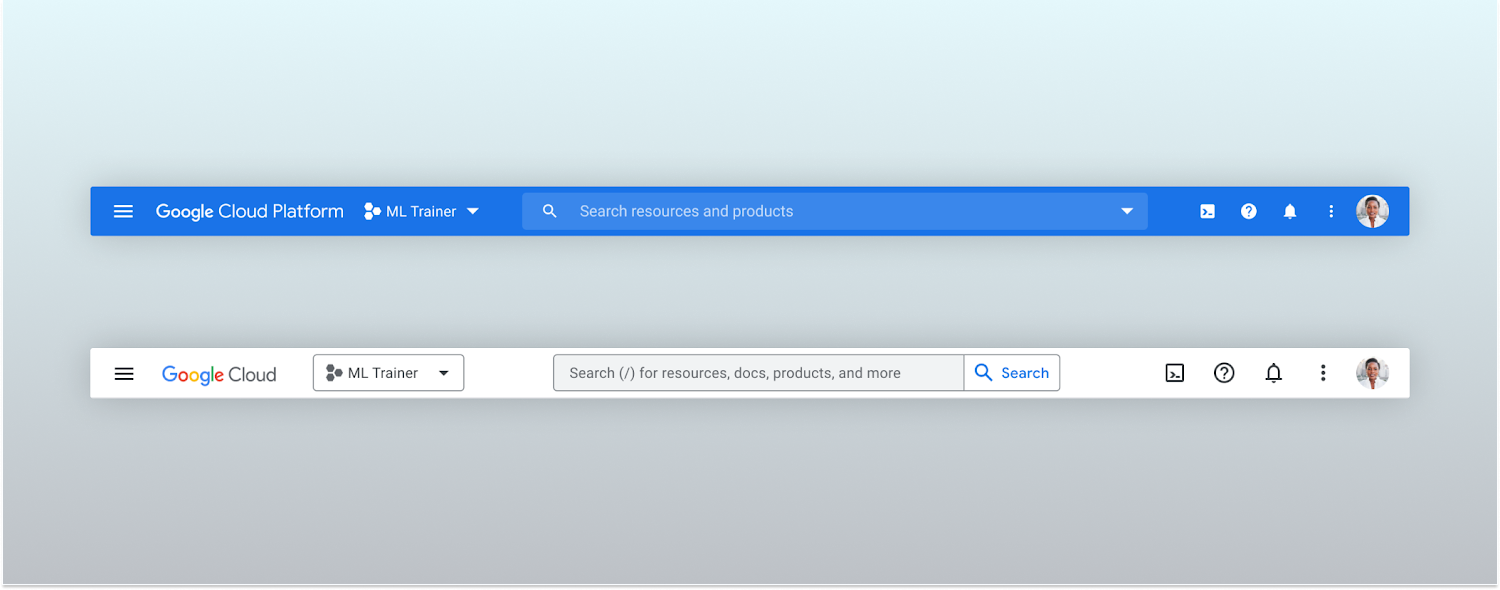
Google Cloud console’s old platform bar (top) and the updated version (bottom)
A customizable navigation menu
Finally, we made usability improvements to the left-hand navigation menu by allowing you to pin specific products. Products can be pinned from the left nav menu or our brand new All Product Page. This is a shift away from the default ordering of products that attempted a “one size fits all” approach to navigation. This customization feature lets you tailor the console to your specific needs and work more efficiently.
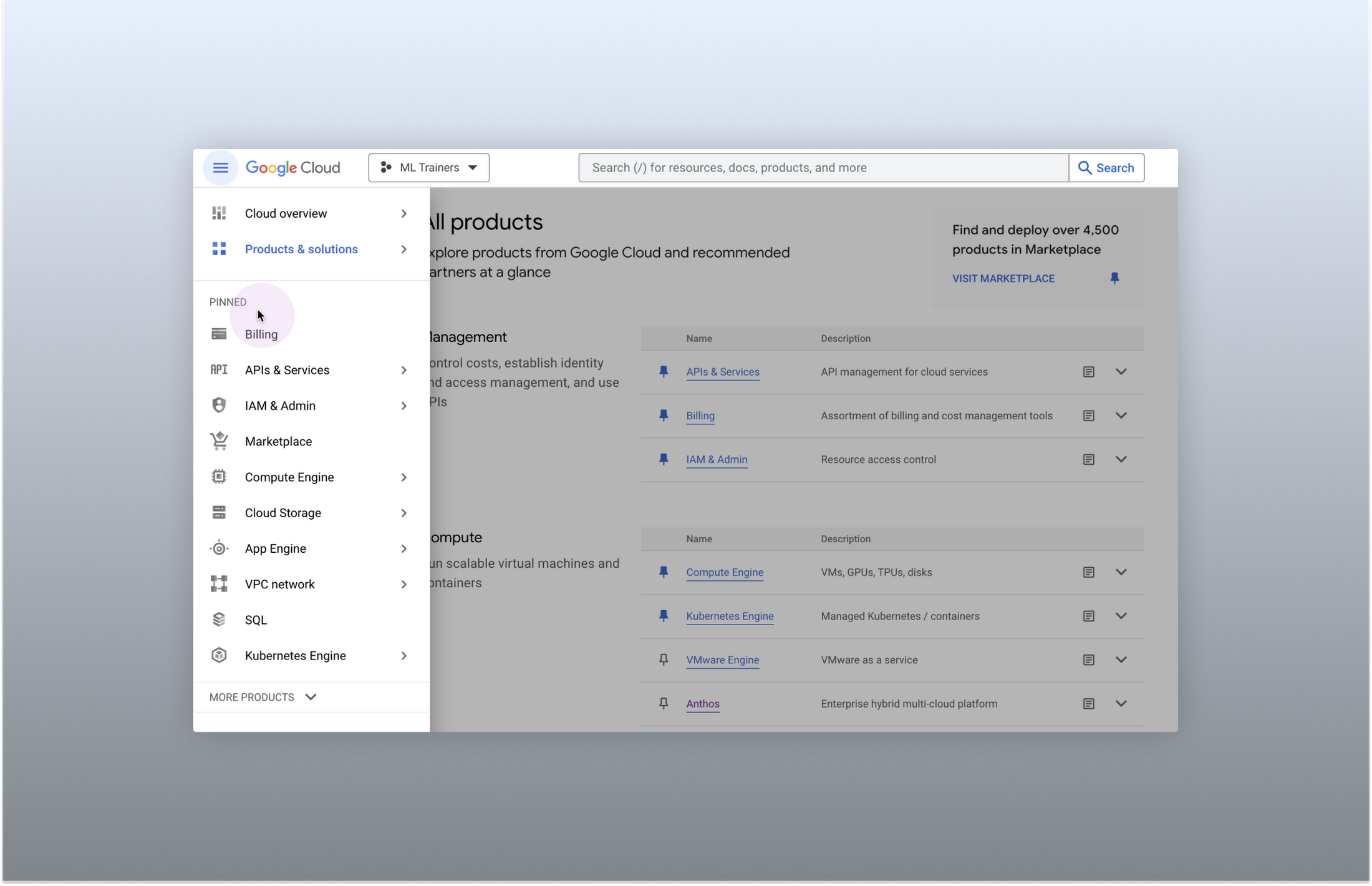
Products can be pinned to the left nav menu for easy access
Final thoughts
The Google Cloud console’s navigation and search features have come a long way. With these recent improvements, you can find what you need quickly and efficiently, making it easier to manage your cloud resources. From expanded resource-type search to improved documentation search and refined search results, the console is more user-friendly than ever before.

4445
Of your peers have already downloaded this article
3:48 Minutes
The most insightful time you'll spend today!
By focussing on win-win outcomes for buyers, sellers, and the communities in which it operates, the OLX Group has become a leading online trading platform with 17 brands, 4,000 employees across the world, and 300 million monthly users.
When the company wanted to improve communication and collaboration between teams around the world without imposing a top down solution, it used G Suite.
The OLX Group wanted to help its leadership team communicate its goals effectively and keep its local teams empowered. The company looked for a solution to address its communication needs and improve collaboration in a simple, easy-to-use way that could be rapidly deployed across its workforce.
“We needed to connect everybody and have a product that we could scale to the whole world. Our leadership and culture embrace change, so there’s always an open door to test new technologies that will help us improve and move fast. Google is, I think, a perfect example of that,” says Ana Garcia, Global Head of Communications at OLX Group.
The OLX Group has found a solution that connects all its teams across the world without compromising autonomy.
“Having a single document where managers in every country can input content at the same time is great. It’s the ultimate collaboration and I think it’s something that only Google can do for you,” she says.
6357
Of your peers have already watched this video.
1:30 Minutes
The most insightful time you'll spend today!
How Bloomberg uses Google Translate to Share Breaking News with the World
Bloomberg uses Google Translate to instantly share news with customers in more than 170 countries. Financial markets can move within seconds of a story breaking, so speed matters. With Google’s automated translation Bloomberg can quickly disseminate breaking financial news to customers around the world in 40 different languages.
The Story Behind How Woolworth Innovates to Better Customer Experience

4390
Of your peers have already read this article.
2:30 Minutes
The most insightful time you'll spend today!
As one of Australia and New Zealand’s most innovative retailers, Woolworths is always looking for ways to use technology to give its customers more convenient ways to shop. This innovative approach does not stop with our customers. Our extensive staff needs intuitive technology to enable them to work more efficiently, collaboratively and effectively. To do this, they need to be able to access the right applications and information, from any location, using any device.
This is why we’ve decided to move to G Suite and Chrome. Changing to a cloud-based suite of tools is a key part of our strategy to use technology to promote greater collaboration, productivity, and effectiveness. Over the next 12 months, we will be rolling out Gmail, Google Calendar and Google Hangouts Meet to the staff in our national and state offices. This is the first phase of what we hope will be a company-wide transformation of our workplace technology.
We are also actively looking at how we can innovate with Google+, Google Drive and Google Sites to transform the way we approach other aspects of our business.
The move to G Suite and Chrome builds on the successful roll-out of Gmail and our ‘Tap to Support’ app on iPads to Woolworths supermarket store managers last year. The custom-made application, built on Google App Engine, helps our managers stay on the shop floor and focused on customers by allowing them to log a support ticket with our national support office in just one click rather than being tied to a PC in the back office.
Soon more of our staff will be able to experience the productive and collaborative benefits of being able to work from any device, anywhere. Geographically dispersed teams, like our merchandising or state-based workers, will be able to use Google Docs to collaborate in real-time.
Going Google will transform the way our employees interact with technology and collaborate with each other at every level of the organization. We’re looking forward to providing our staff with access to intuitive consumer technology at work and see the move to Google as the beginning of our journey towards a more efficient and innovative style of working.
More Relevant Stories for Your Company

Collaboration Helps Healthcare Firm Roche Group Focus on Saving Lives
Dr. Alan Hippe, CFO & CIO, Roche Group, shares how collaboration tools help healthcare firms like the Roche Group take timely decisions that help them focus on saving patients’ lives. For over 110 years, Roche has been pioneering the discovery, development, production and marketing of novel healthcare solutions. Our focus

IT Team Figures Out Easiest Way to Build Data Pipelines and Create ML Models
Building a strong brand in today's hyper-competitive business environment takes vision. It also requires a flexible, easily managed approach to digital asset management (DAM), so marketing professionals and other stakeholders can easily share, store, track, and manipulate assets to build the brand. Many of today's leading companies, including JetBlue, Slack,




Video: How Did GANT Get Products to Market in Just Three Months?
It was in 1949 that a Ukranian immigrant Berl Gantmacher launched--what was going to be an iconic shirt-making company--GANT in Connecticut, America. Since then, the company has reinvented shirts every single day. Headquartered in Stockholm, Sweden, GANT operates in 70 countries. In 2017, GANT wanted to launch a flagship store

Maximize your downtime with these 12 cost-effective Google Cloud learning opportunities
The holiday season is upon us! If you are making your list and checking it twice, we’ve got a few learning gifts you can tick off the list and share with others too. For the season of giving, we’ve wrapped up some of our most popular training and certification opportunities
