





How Ather Energy is leveraging the Cloud to build and scale smart mobility solutions for India

8394
Of your peers have already read this article.
8:30 Minutes
The most insightful time you'll spend today!
In 2013, long before the world was discussing clean energy and sustainable practices, two IIT Madras graduates — Swapnil Jain and Tarun Mehta — had an idea to develop India’s first-ever electrical scooter.
This was at a time when auto manufacturers were still focusing on fossil-fuel-driven vehicles and ‘eco-friendly’ mobility solutions were more a trendy alternative catering to a niche market.
The duo founded Ather Energy in 2013 and launched their first fully-electric scooter, the Ather S340, in Bengaluru in 2016. Since then, the company has released several new models into the market and is planning to expand to eight more cities by the end of the year.
To support the smooth running of their vehicles, lower costs, improve time to market, and create great customer experience, Ather turned to Google Cloud.
Read the Full Story on YourStory
KRM Series Part 5: Learn to Manage and Configure Hosted Resources with Kubernetes

3208
Of your peers have already read this article.
3:00 Minutes
The most insightful time you'll spend today!
This is the fifth and final post in a multi-part series about the Kubernetes Resource Model. Check out parts 1, 2, 3, and 4 to learn more.
In part 2 of this series, we learned how the Kubernetes Resource Model works, and how the Kubernetes control plane takes action to ensure that your desired resource state matches the running state.
Up until now, that “running resource state” has existed inside the world of Kubernetes- Pods, for example, run on Nodes inside a cluster. The exception to this is any core Kubernetes resource that depends on your cloud provider. For instance, GKE Services of type Load Balancer depend on Google Cloud network load balancers, and GKE has a Google Cloud-specific controller that will spin up those resources on your behalf.
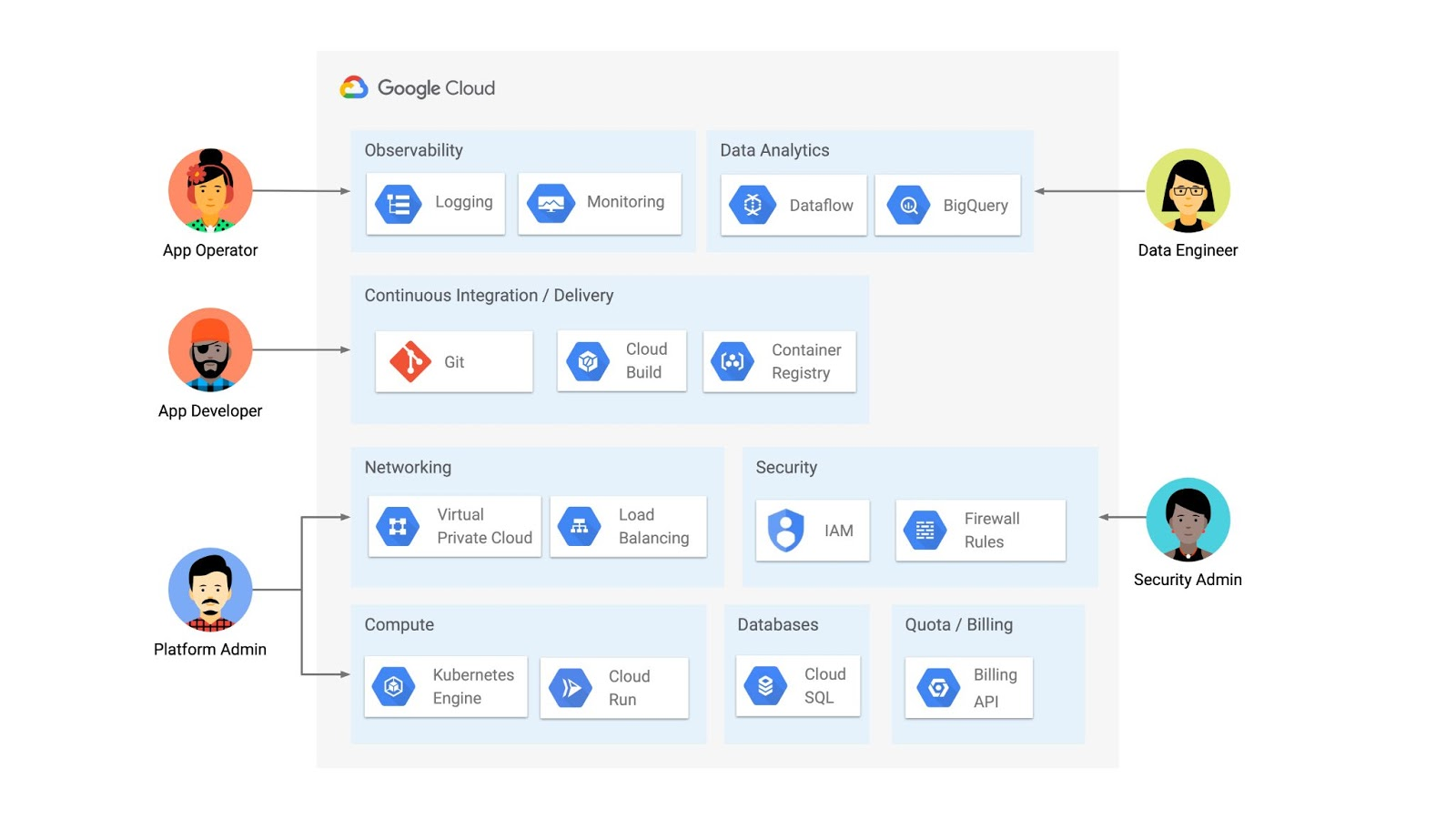
But if you’re operating a Kubernetes platform, it’s likely that you have resources that live entirely outside of Kubernetes. You might have CI/CD triggers, IAM policies, firewall rules, databases. The first post of this series introduced the platform diagram below, and asserted that “Kubernetes can be the powerful declarative control plane that manages large swaths” of that platform. Let’s close that loop by exploring how to use the Kubernetes Resource Model to configure and provision resources hosted in Google Cloud.
Why use KRM for hosted resources?
Before diving into the “what” and “how” of using KRM for cloud-hosted resources, let’s first ask “why.” There is already an active ecosystem of infrastructure-as-code tools, including Terraform, that can manage cloud-hosted resources. Why use KRM to manage resources outside of the cluster boundary?
Three big reasons. The first is consistency. The last post explored ways to ensure consistency across multiple Kubernetes clusters- but what about consistency between Kubernetes resources and cloud resources? If you have org-wide policies you’d like to enforce on Kubernetes resources, chances are that you also have policies around hosted resources. So one reason to manage cloud resources with KRM is to standardize your infrastructure toolchain, unifying your Kubernetes and cloud resource configuration into one language (YAML), one Git config repo, one policy enforcement mechanism.
The second reason is continuous reconciliation. One major advantage of Kubernetes is its control-loop architecture. So if you use KRM to deploy a hosted firewall rule, Kubernetes will work constantly to make sure that resource is always deployed to your cloud provider- even if it gets manually deleted.
A third reason to consider using KRM for hosted resources is the ability to integrate tools like kustomize into your hosted resource specs, allowing you to customize resource specifications without templating languages.
These benefits have resulted in a new ecosystem of KRM tools designed to manage cloud-hosted resources, including the Crossplane project, as well as first-party tools from AWS, Azure, and Google Cloud.
Let’s explore how to use Google Cloud Config Connector to manage GCP-hosted resources with KRM.
Introducing Config Connector
Config Connector is a tool designed specifically for managing Google Cloud resources with the Kubernetes Resource Model. It works by installing a set of GCP-specific resource controllers onto your GKE cluster, along with a set of Kubernetes Custom Resources for Google Cloud products, from Cloud DNS to Pub/Sub.
How does it work? Let’s say that a security administrator at Cymbal Bank wants to start working more closely with the platform team to define and test Policy Controller constraints. But they don’t have access to a Linux machine, which is the operating system used by the platform team. The platform team can address this by manually setting up a Google Compute Engine (GCE) Linux instance for the security admin. But with Config Connector, the platform team can instead create a declarative KRM resource for a GCE instance, commit it to the config repo, and Config Connector will spin up the instance on their behalf.
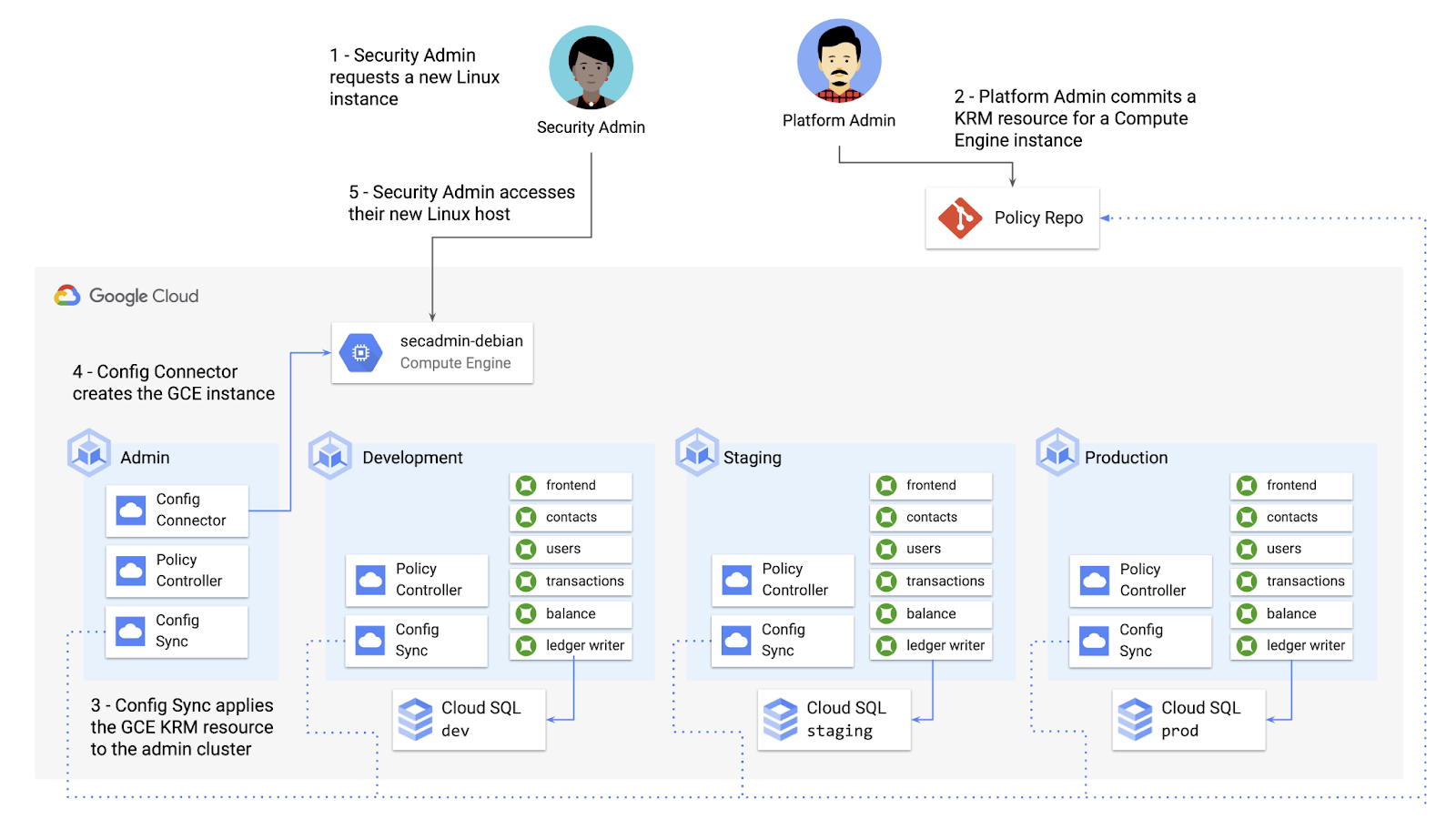
What does this declarative resource look like? A Config Connector resource is just a regular Kubernetes-style YAML file- in this case, a custom resource called Compute Instance. In the resource spec, the platform team can define specific fields, like what GCE machine type to use.
apiVersion: compute.cnrm.cloud.google.com/v1beta1kind: ComputeInstancemetadata:annotations:cnrm.cloud.google.com/allow-stopping-for-update: "true"name: secadmin-debianlabels:created-from: "image"network-type: "subnetwork"spec:machineType: n1-standard-1zone: us-west1-abootDisk:initializeParams:size: 24type: pd-ssdsourceImageRef:external: debian-cloud/debian-9...
Once the platform team commits this resource to the Config Sync repo, Config Sync will deploy the resource to the cymbal-admin GKE cluster, and Config Connector, running on that same cluster, will spin up the GCE resource represented in the file.
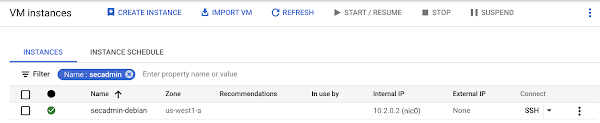
This KRM workflow for cloud resources opens the door for powerful automation, like custom UIs to automate resource requests within the Cymbal Bank org.
Integrating Config Connector with Policy Controller
By using Config Connector to manage Google Cloud-hosted resources as KRM, you can adopt Policy Controller to enforce guardrails across your cloud and Kubernetes resources.
Let’s say that the data analytics team at Cymbal Bank is beginning to adopt BigQuery. While the security team is approving production usage of that product, the platform team wants to make sure no real customer data is imported. Together, Config Connector and Policy Controller can set up guardrails for BigQuery usage within Cymbal Bank.
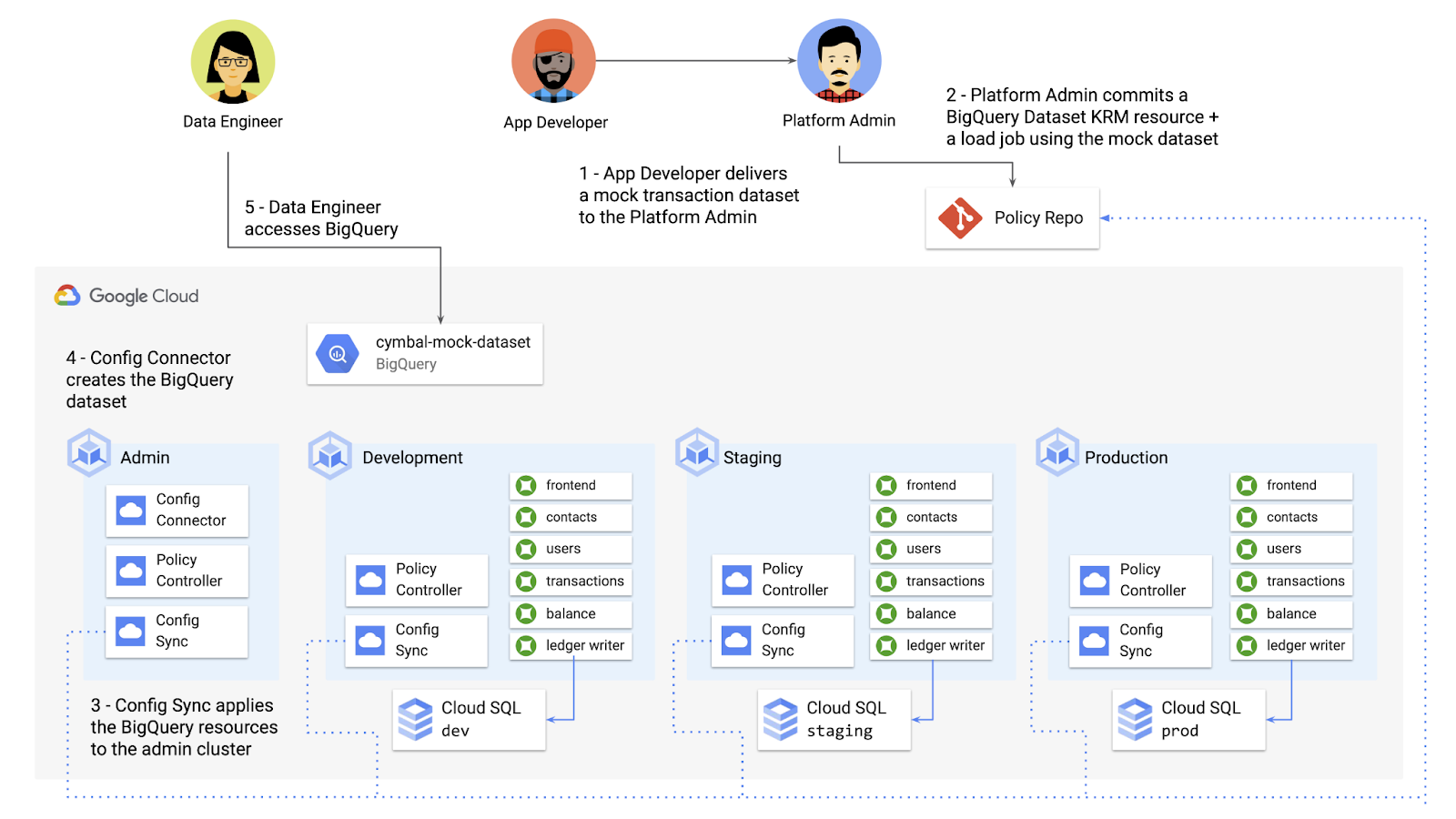
Config Connector supports BigQuery resources, including Jobs, Datasets, and Tables. The platform team can work with the analytics team to define a test dataset, containing mocked data, as KRM, pushing those resources to the Config Sync repo as they did with the GCE instance resource.
apiVersion: bigquery.cnrm.cloud.google.com/v1beta1kind: BigQueryJobmetadata:name: cymbal-mock-load-jobannotations:configsync.gke.io/cluster-name-selector: cymbal-adminspec:location: "US"jobTimeoutMs: "600000"load:sourceUris:- "gs://cymbal-bank-datasets/cymbal-mock-transactions.csv"
From there, the platform team can create a custom Constraint Template for Policy Controller, limiting the allowed Cymbal datasets to only the pre-vetted mock dataset:
rego: |package bigquerydatasetallownameviolation[{"msg": msg}] {input.review.object.kind == "BigQueryDataset"input.review.object.metadata.name != input.parameters.allowedNamemsg := sprintf("The BigQuery dataset name %v is not allowed", [input.review.object.metadata.name])}apiVersion: constraints.gatekeeper.sh/v1beta1
These guardrails, combined with IAM, can allow your organization to adopt new cloud products safely- not only defining who can set up certain resources, but within those resources, what field values are allowed.
Manage existing GCP resources with Config Connector
Another useful feature of Config Connector is that it supports importing existing Google Cloud resources into KRM format, allowing you to bring live-running resources into the management domain of Config Connector.
You can use the config-connector command line tool to do this, exporting specific resource URIs into static files:
config-connector export "//sqladmin.googleapis.com/sql/v1beta4/projects/cymbal-bank/instances/cymbal-dev" \--output cloudsql/
Output:
apiVersion: sql.cnrm.cloud.google.com/v1beta1kind: SQLInstancemetadata:annotations:cnrm.cloud.google.com/project-id: cymbal-bankname: cymbal-devspec:databaseVersion: POSTGRES_12region: us-east1resourceID: cymbal-dev...
From here, we can push these KRM resources to the config repo, and allow Config Sync and Config Controller to start lifecycling the resources on our behalf. The screenshot below shows that the cymbal-dev Cloud SQL database now has the “managed-by-cnrm” label, indicating that it’s now being managed from Config Connector (CNRM = “cloud-native resource management”).
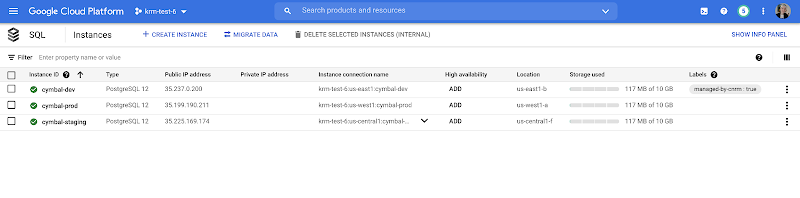
This resource export tool is especially useful for teams looking to try out KRM for hosted resources, without having to invest in writing a new set of YAML files for their existing resources. And if you’re ready to adopt Config Connector for lots of existing resources, the tool has a bulk export option as well.
Overall, while managing hosted resources with KRM is still a newer paradigm, it can provide lots of benefits for resource consistency and policy enforcement. Want to try out Config Connector yourself? Check out the part 5 demo.
This post concludes the Build a Platform with KRM series. Hopefully these posts and demos provided some inspiration on how to build a platform around Kubernetes, with the right abstractions and base-layer tools in mind.
Thanks for reading, and stay tuned for new KRM products and features from Google.
Google Cloud Offering a Natural Migration Path for Developers Accustomed to Heroku

2788
Of your peers have already read this article.
1:30 Minutes
The most insightful time you'll spend today!
Modern developers worldwide have grown accustomed to the comfort of writing code, pushing to a remote Git repository and having that code be deployed at an accessible URL without having to worry about how it is deployed. This was a workflow popularized by Heroku years ago which brought joy and productivity to developers even if it did impose some loss of flexibility for operation teams.
To address that loss of flexibility when meeting security and integration requirements, Heroku introduced Private Spaces. Private Spaces provide network isolation from the internet since any application or datastore provisioned by Heroku is accessible to the internet by default.
Cloud Run is quickly becoming the “swiss army knife” of serverless here at Google Cloud and it’s a natural migration path for developers accustomed to Heroku. The fundamentals are all there:
- Continuously Deploy via Git push using open source Buildpacks or Dockerfiles
- Set CPU and Memory requirements for each instance
- Horizontally scalable apps that scale from zero to thousands of instances to meet traffic demands automatically
So while devs are kept happy, can Cloud Run do something for the Ops folks? Yes. Here are some things available right in the Cloud Run UI:
- Proper Secret Management with IAM based access control. No more setting secrets as environment variables.
- Traffic management between different revisions for blue-green or canary deployments.
- Define SLIs and SLOs with ease. Eg: 90% of requests have to be served under 200ms in a calendar month.
- Secure your service with tools such as Software Delivery Shield, Binary Authorization, and Cloud Armor. Definitely deserves its own blog post.
Recreating Private Spaces on Cloud Run
Let’s focus on network isolation now, let’s say you have an internet-facing app and a private backend API that talks to a private database. Simplest architecture ever, it conceptually looks a bit like this:
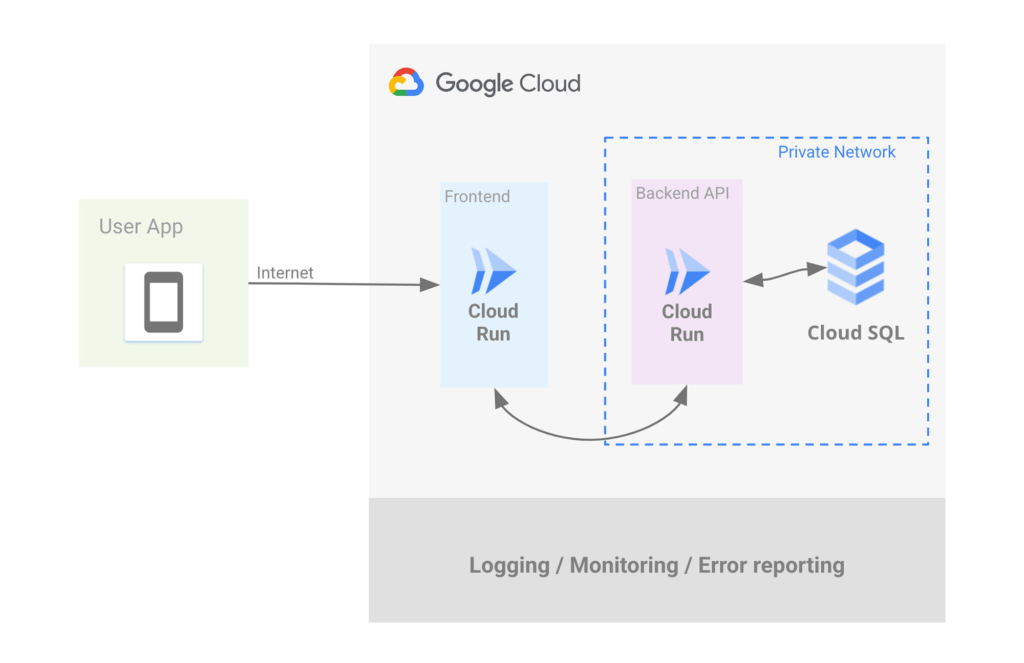
Let’s address the database first. If you want to use Postgres then Cloud SQL is most likely what you want, but do keep in mind that we have other datastores that speak Postgres such as AlloyDB and Spanner.
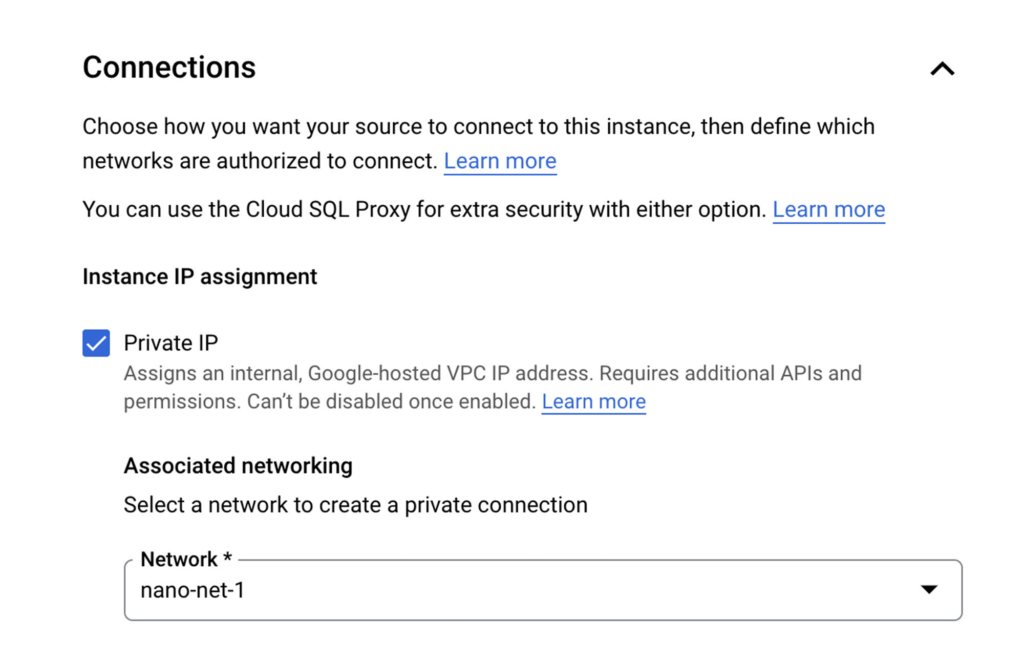
Cloud SQL allows you to create a Postgres instance that’s isolated from the internet by simply unchecking the Public IP checkbox and checking the Private IP checkbox. This will assign an IP address to your Postgres instance on your project’s network.
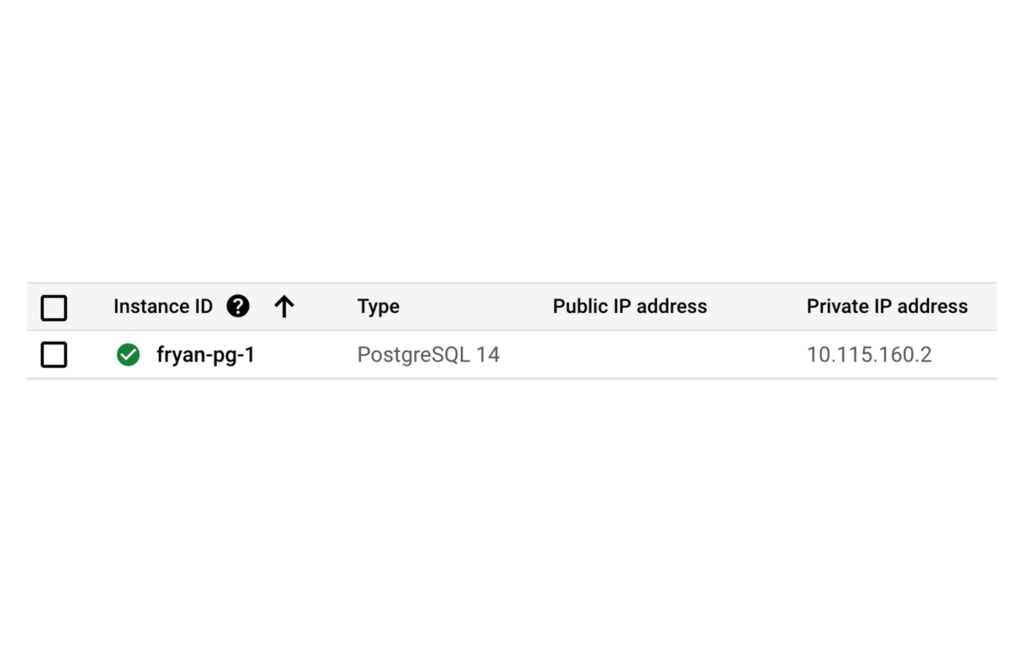
Once the DB is provisioned you’ll see the IP clearly listed, such as:
Of course there’s so much more to say about CloudSQL, to learn more please take a look at our documentation.
Ok now that you’ve dealt with Postgres, let’s address the private backend API on Cloud Run.
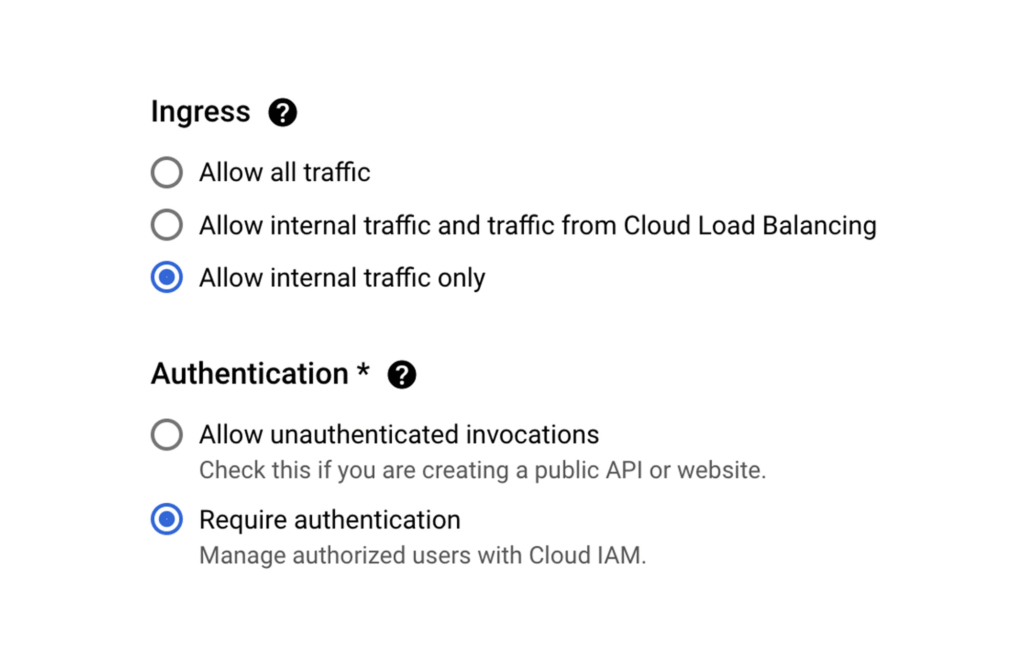
When creating a new Cloud Run service via the Google Cloud Console, Ingress can be limited to “Internal traffic only” so only traffic from internal sources, including your VPC, can access the service. In other words, the internet can not touch it.
As an additional level of security, it’s also possible to enforce that only requests from authorized users be served, In this case a “user” is most likely another service using its associated service account which will need the “roles/run.invoker” in order to call this service.
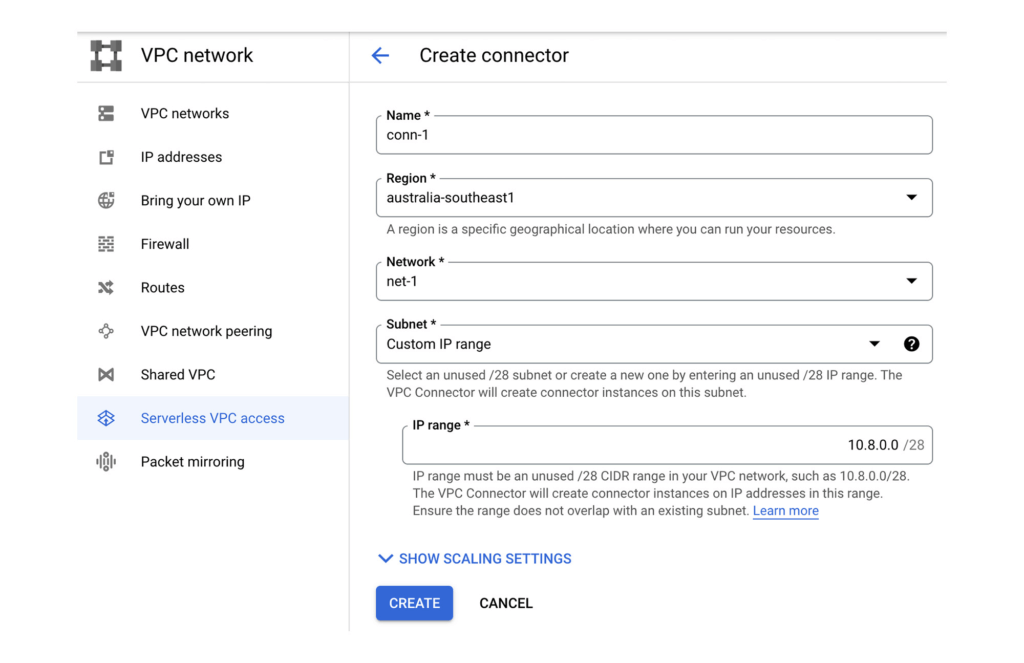
Now let’s make sure that our Backend API Service can reach the Postgres instance by configuring a VPC Connector. This will allow Cloud Run services to reach into the VPC and therefore, the internal IP for the Postgres instance.
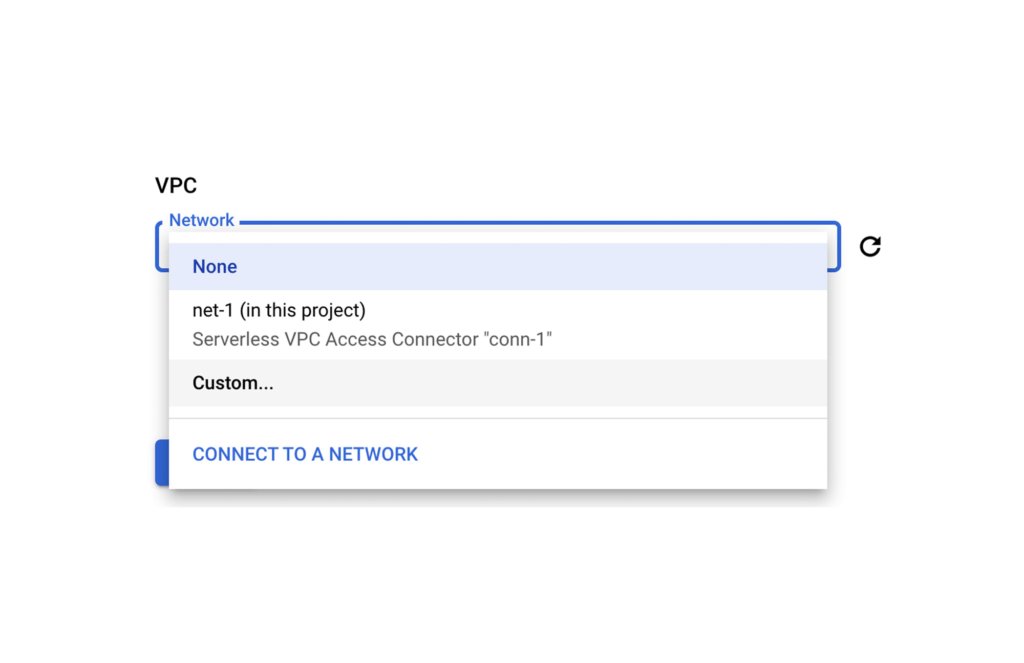
Once the VPC Connector is created, you can associate it with a Cloud Run service.
Then it’s just a matter of configuring your code to use the Postgres instance’s private IP address. A good 12-Factor app friendly spot to do that is with a connection string in an environment variable as part of the Cloud Run service configuration. Better yet, as this may contain a DB password, you can use Secret Manager to mount this environment variable from an encrypted and protected secret.
Finally, let’s now set up that Front End Cloud Run service which will respond to requests from the internet, and securely communicate with the backend API service.
For the frontend service choose to “Allow all traffic” and also “Allow unauthenticated invocations” so anyone on the web can access our URL. We could of course choose the middle option and use Cloud Load Balancing in conjunction with Cloud Armor which provides defenses against DDoS and application attacks, and offers a rich set of WAF rules. However, let’s keep it simple for now.
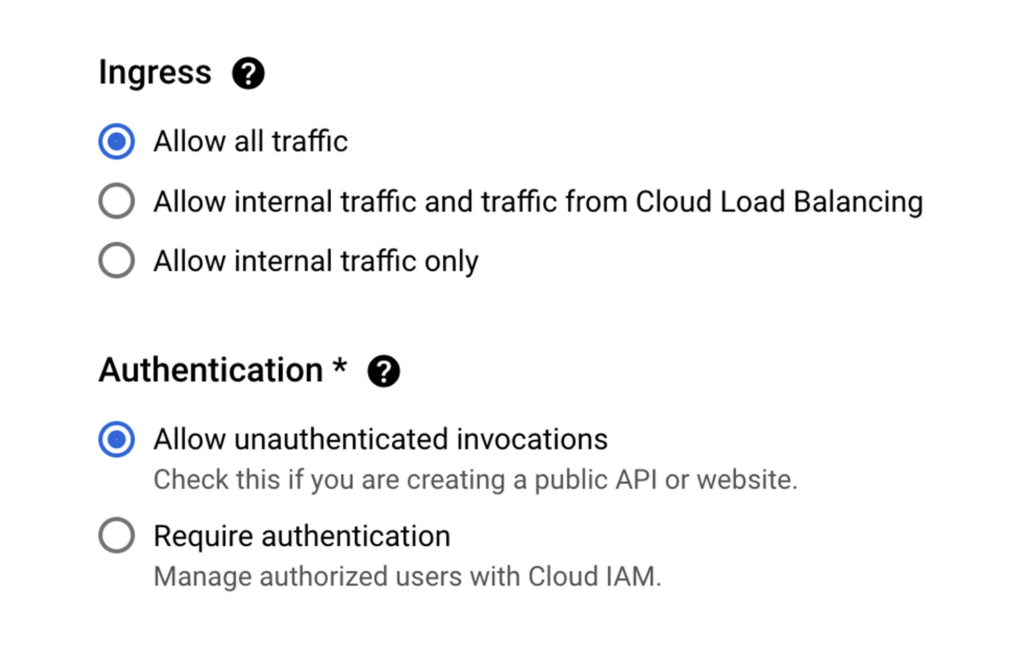
Keep in mind that our Backend service will only accept requests from within our VPC network, and that we don’t have a private IP address for Cloud Run.
So let’s ensure that all egresses from our Frontend actually get routed to the VPC Connector, this way when our Frontend calls a Backend API via it’s URL endpoint, the Backend will receive the request from within the VPC and allow it in.
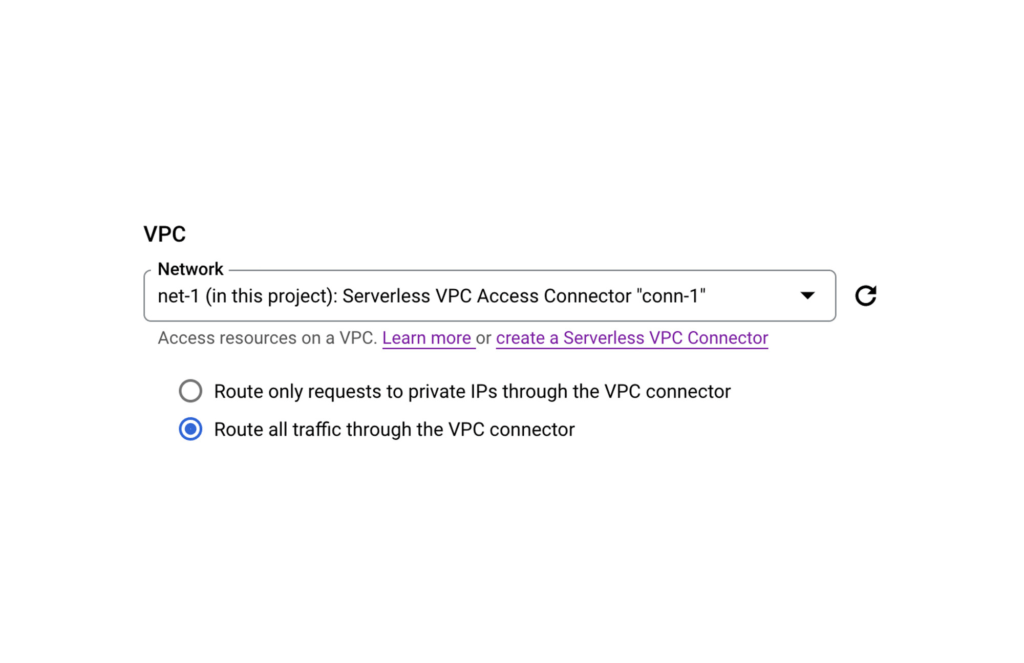
PS: If your Backend requires authentication don’t forget to create a Service Account for your Frontend Service and then give it the necessary role following a service-to-service auth pattern.
And that’s it. You now have an operationally acceptable private space like environment with an app composed of two Cloud Run services where the Backend service and Postgres instance are network isolated from the Internet. If after reading this blog you would like to get hands-on experience with the technologies mentioned above, then take a look at Google Cloud Skills Boost. There you will find learning paths, quests, and labs curated to boost your cloud skills in a particular area.
For example here’s a great lab that takes you through developing a REST API on Cloud Run using Go.
Memorystore for Redis Read Replicas to Scale App Read Requests by 6X

5520
Of your peers have already read this article.
2:00 Minutes
The most insightful time you'll spend today!
Modern applications need to process large-scale data at millisecond latency to provide experiences like instant gaming leaderboards, fast analysis of streaming data from millions of IoT sensors, or real-time threat detection of malicious websites. In-memory datastores are a critical component to deliver the scale, performance, and availability required by these modern applications.
Memorystore makes it easy for developers building applications on Google Cloud to leverage the speed and powerful capabilities of the most loved in-memory store: Redis. Memorystore for Redis standard tier instances are a popular choice for applications requiring a highly available Redis instance. Standard tier provides a failover replica across zones for redundancy and provides fast failover with a 99.9% SLA. However, in some cases, your applications will require more read throughput from a standard tier instance. One of the common patterns customers use to scale read queries in Redis is leveraging read replicas.
Introducing Memorystore for Redis Read Replicas
Today we are excited to announce the public preview of Memorystore for Redis Read Replicas, which allows you to seamlessly scale your application’s read requests by 6X with the click of a button.
With read replicas, you can easily add up to five replicas and leverage the read endpoint to automatically load balance read queries across all the available replicas, increasing read performance linearly with each replica added. Additionally, Memorystore’s support for Redis 6 introduced multi-thread I/O, increasing performance significantly for M3 and higher configurations. Combined, you can achieve read requests of more than a million requests per second.
You will benefit from this new functionality in several ways. You will be able to scale on demand with up to five read replicas and use read endpoint with any redis client to easily load balance read queries across multiple replicas. This new functionality will also improve availability with automatic distribution of replicas across multiple zones. With read replicas, you will also be able to minimize application downtime with fast failover to the replica with the least replication lag. In the future, Memorystore will also easily enable read replicas on existing standard tier instances to increase read throughput.
You can learn more about how to configure and use read replicas in the Read Replicas Overview.
Improving performance with Read Replicas and Redis 6
With the launch of read replicas, you can easily increase the read throughput of a Memorystore instance. You can further enhance the read performance by leveraging Redis version 6 along with read replicas.
To understand why combining read replicas and Redis 6 can significantly improve your application’s read performance, let’s look at the various Memorystore configurations that you can use with your applications today. Memorystore Basic and Standard offerings provide different capacity tiers. The capacity tier determines the single node performance of a basic and standard tier instance.
The table below outlines the configuration of the various capacity tiers:
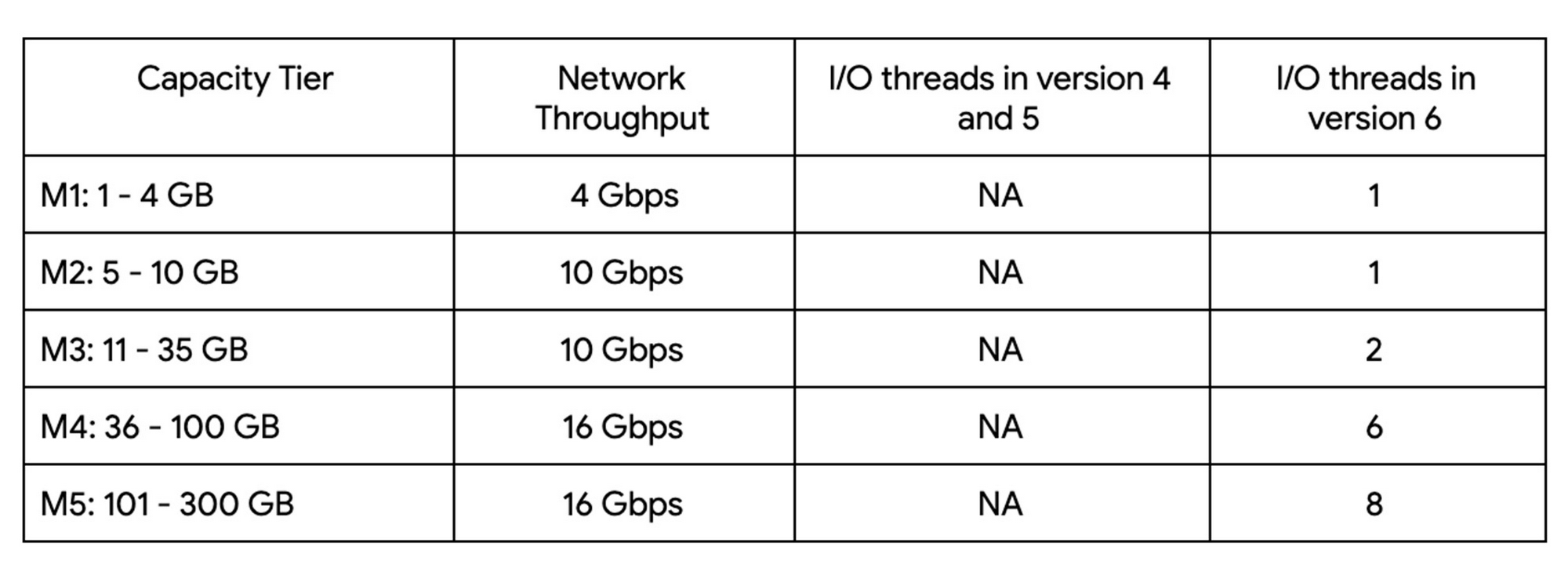
Up until version 5, Redis processed commands using a single thread. The processing involved reading the request, parsing the request, processing the request, and writing the response back to the socket. This approach means that all of the processing, which includes writing the response, was sequentially processed by a single vCPU regardless of the number of vCPUs available in the instance.
Redis 6 introduced I\O threading which allows writing the response using parallel threads. This functionality enables Redis 6 to more effectively leverage available vCPUs, thereby increasing the overall throughput compared to lower versions. Memorystore for Redis version 6 leverages I\O threading and automatically configures the optimal number of I\O threads to achieve the best possible performance for the various capacity tiers. We have also improved the overall network throughput for all redis versions by leveraging improvements in the Google Cloud infrastructure. Together these improvements deliver significant performance improvements and come at no additional cost to you.
So what can you expect from using Redis 6? As outlined in the table, Redis version 5 and lower uses a single thread to process the write requests for all tiers while Redis 6 uses a larger number of I\O threads at higher capacity tiers which provides substantially incremental throughput for higher capacity tiers.
For example, using a Redis 6 standard tier instance with a capacity of 101 GB (M5), we have observed up to a 200% improvement in read/write performance compared to version 5, though the actual value you’ll see is dependent on your workload. You can get the benefits of Redis 6 by upgrading an existing instance or by deploying a new instance.
By enabling read replicas on an instance using Redis 6, you can further improve the read performance. Read throughput scales linearly with the number of replicas so you can increase your read queries on an instance by up to 500% using five read replicas. By combining Redis 6 and read replicas, you can see a 10X increase in read performance compared to a version 5 standard tier instance with no read replicas.
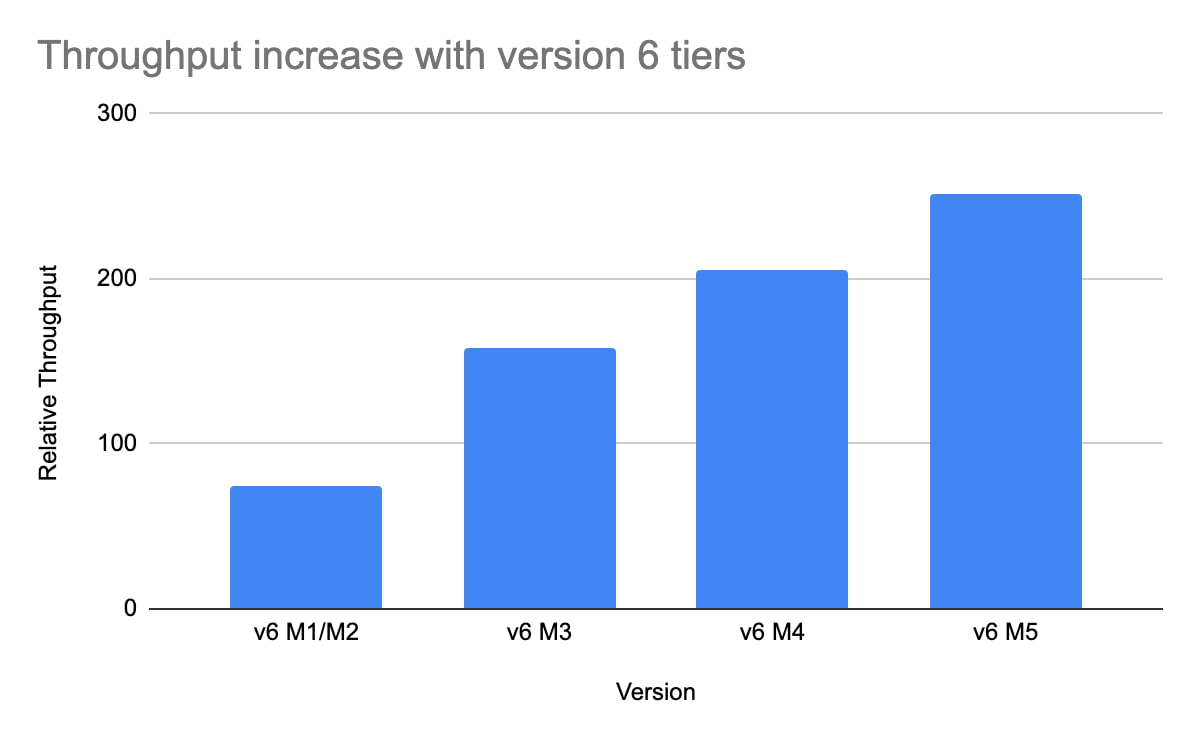
We are excited about the launch of read replicas but this is just one step in our journey to deliver the scale you need at the best price-performance. You can learn more about read replicas pricing on our Memorystore pricing page and get started using the Read Replicas Overview.
3344
Of your peers have already watched this video.
25:30 Minutes
The most insightful time you'll spend today!
Building Globally Scalable Services with Istio and ASM
Building distributed applications is hard! Building globally scalable distributed applications is harder. Maintaining and growing these services as your business grows is even harder.
Learn how to create a globally scalable platform for your business on Google Cloud using service meshes. See how to build a platform on Google Cloud from the ground up.
Optimizing Cloud Load Balancing in Hybrid and Multicloud Architectures

2763
Of your peers have already read this article.
3:30 Minutes
The most insightful time you'll spend today!
Today’s enterprise applications are often assembled across distributed environments. This includes the integration of services across multi-cloud, multi-SaaS and on-premises environments. While the approach has the advantage of enabling enterprises to choose the best service available to support their applications, it adds the complexity of delivering services across heterogeneous environments. To solve this, Cloud Load Balancing supports an open cloud strategy, which includes:
- Supporting universal traffic management policies across heterogeneous environment by leveraging open source and open standards
- Enabling a global front-end so applications can leverage a common set of policies and security postures
- Providing tools that give your users the highest possible performance and reliability
Universal traffic management with open source and open standards
Kubernetes is a great solution for managing containers across environments. We believe that traffic management policies should also be supported across environments. Cloud Load Balancing creates homogeneous traffic policies across highly distributed heterogeneous environments by supporting standard-based traffic management in a fully managed solution, and allowing open source Envoy Proxy sidecars to be used on-premises or in a multi-cloud environment, using the same traffic management as our fully managed Cloud Load Balancers.
As enterprises start modernizing services and refactor monolithic applications, they require solutions that can provide consistent traffic management across distributed systems at scale. But organizations want to invest their time and resources innovating and building new applications — not on the infrastructure and networking required to deploy and manage these services. Envoy is an open-source high-performance proxy that runs alongside the application to deliver common platform-agnostic networking capabilities, including:
- New load balancing algorithms, (e.g. round robin, ring hash, least conns)
- Weighted traffic splitting
- Fault injection
- Request mirroring
- Outlier detection
- Additional header transformation options
- Request retries
- Additional backend session affinity options
- Cross-origin resource sharing (CORS)
Hybrid Load Balancing across multi-cloud and private clouds
Over the years Google has deployed Load Balancers across 173+ Edge Pop locations, delivering customer applications at massive-scale on Google infrastructure. And now Google Cloud has introduced Hybrid Load Balancing, extending our Load Balancing capabilities beyond Google’s network to on-premises private clouds and multi-cloud solutions. This allows our customers to migrate applications to the cloud iteratively, or build hybrid applications that are assembled from services that are running across heterogeneous environments.
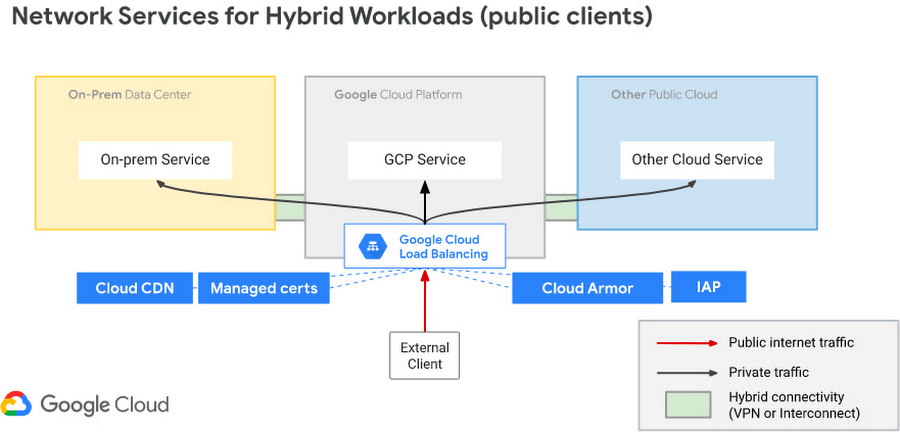
Supporting modern application delivery with HTTP3/QUIC
Cloud Load Balancing is a fully distributed load balancing solution that balances user traffic (HTTP(s), HTTPS/2, HTTPS/3 with gRPC, TCP/SSL, UDP, and QUIC) to multiple backends to avoid congestion, reduce latency, increase security, and reduce costs. It is built on the same frontend-serving infrastructure that powers Google services, supporting millions of queries per second with consistent high performance and low latency.
To serve massive amounts of traffic, Google built the first scaled-out software-defined load balancing, Maglev, which has been serving global traffic since 2008. It has sustained the rapid global growth of Google services, and it also provides network load balancing functions for Google Cloud Platform customers. To accommodate ever-increasing traffic, Maglev is specifically optimized for packet processing performance with Linux Kernel Offload. Maglev is also equipped with consistent hashing and connection tracking features, to minimize the negative impact of unforeseen faults and failures on connection-oriented protocols.
Another key enabler to support this global-scale is that our Cloud Load Balancers are built on top of QUIC(RFC9000), a protocol developed from the original Google QUIC) (gQUIC). HTTP/3 is supported between the External HTTP(S) Load Balancer, Cloud CDN, and end clients. And once enabled, customers typically see dramatic improvements in performance and throughput.

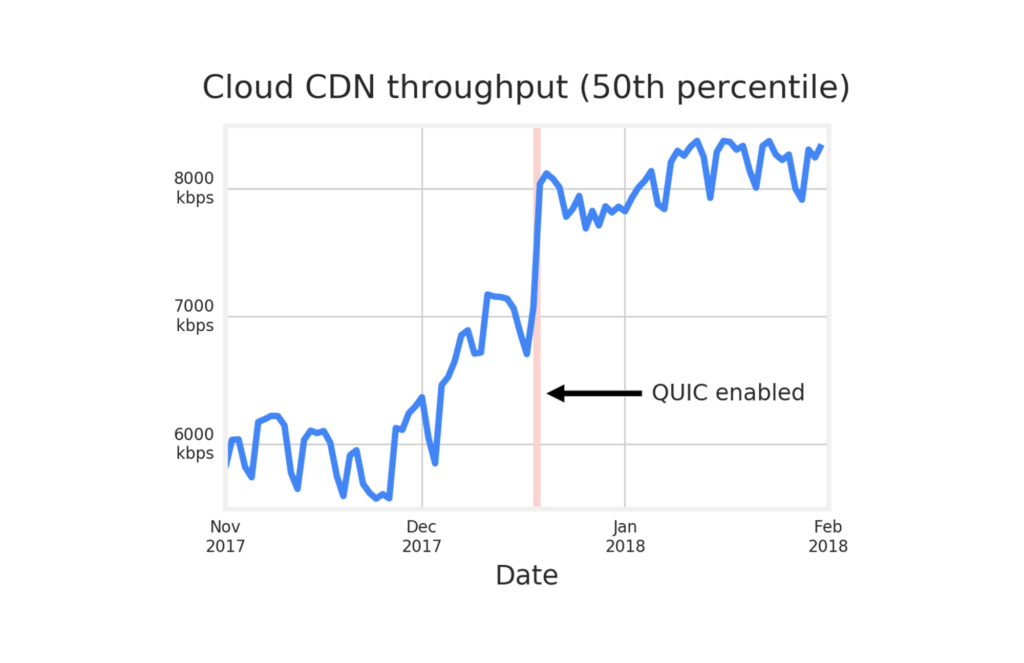
Google Cloud already supports HTTP3 in Cloud Load Balancer. To use HTTP/3 for your applications, you can enable it on your external HTTPS Load Balancers via the Google Cloud Console or the gCloud SDK with a single click.
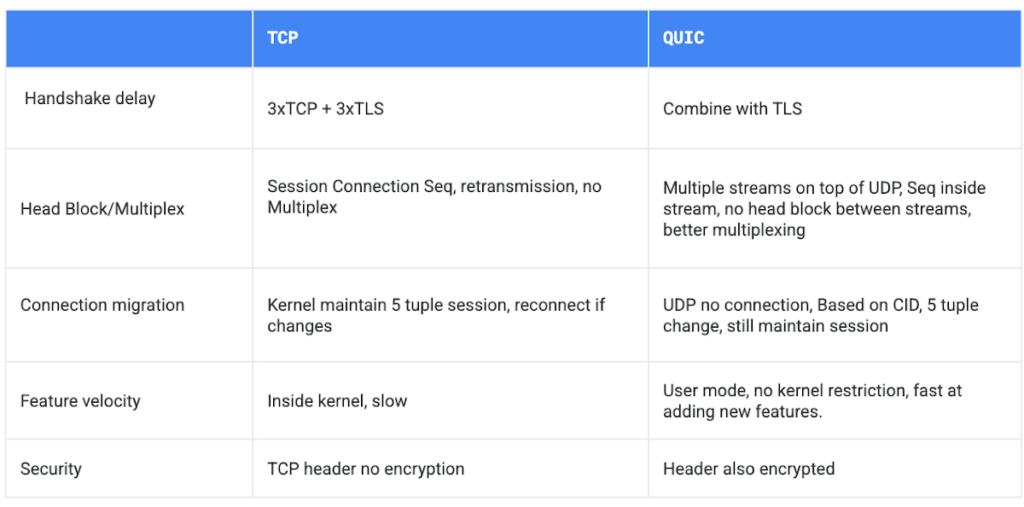
If your service is sensitive to latency, QUIC will make it faster because it establishes connections with reduced handshakes. When a web client uses TCP and TLS, it requires two to three round trips with a server to establish a secure connection before the browser can send a request. With QUIC, if a client has connected with a given server before, it can start sending data without any round trips, so your web pages will load faster.
QUIC has advantages over legacy TCP as follows.
Summary
Since 2008, Google has been an innovator in software-defined networking, supporting applications running at massive scale. Google Cloud Load Balancers support HTTP3 and QUIC as a next generation web transport protocol, which significantly improves customer traffic latency. Google Load Balancers also have incorporated the Envoy proxy as a foundational technology, providing our customers with advanced traffic management that’s compatible with the open source Envoy ecosystem. This allows our users to have the choice to combine Google’s fully-managed Cloud Load Balancers with open source Envoy Proxies, to enable consistent traffic management capabilities across a multi-cloud distributed environment. And with Hybrid Load Balancing, customers can leverage our 173+ world wide PoPs to seamlessly manage traffic across Google Cloud, on-premises and other cloud providers.
Google Cloud Load Balancers include all these capabilities natively. And when used together, they support globally-scaled applications that run seamlessly across the heterogeneous environments many enterprises deploy today.
More Relevant Stories for Your Company

Dataflow Guarantees 50+% Increase in Developer Productivity and Infrastructure Cost Savings: Read More
In our conversations with technology leaders about data-driven transformation using Google Data Cloud - industry’s leading unified data and AI solution - , one important topic is incorporating continuous intelligence to move from answering questions such as “What has happened? to questions like “What is happening?” and “What might happen?”.

Apigee and Vision API: ICICI Prudential Life Insurance’s Journey of Speeding Document Processing
Google Cloud results Helps enable instant document approval with optical character recognition by Vision APIProcesses 100,000 documents in 20 minutes with automated document processing product Recognic, powered by Vision API and ApigeeHelps increase the number of applications processed by 30% within the same timeframe The insurance landscape in India has seen

Learn About Kf: How it Helps Move Existing Cloud Foundry Workloads to Kubernetes
While many companies are writing brand-new Kubernetes-based applications, it’s still quite common to find companies who want to migrate existing workloads. A common source platform for these applications is Cloud Foundry. However, getting an existing Cloud Foundry application running on Kubernetes can be non-trivial, especially if you want to avoid

Centralized Analytics: Apigee and Cloud Run API Management
Most enterprise companies enforce strict requirements for how APIs should be exposed to the public internet that require centralized handling of the authentication credentials, the collection of metrics metrics and other classic API management capabilities. Before the introduction of sidecars in Cloud Run, developers either had to implement these requirements
