





How APIs Help Financial Services Firms Enhance Digital CX and Increase Revenue

3478
Of your peers have already read this article.
2:00 Minutes
The most insightful time you'll spend today!
Faced with changing customer behaviors and demands, tightening margins, and increasing threat from digital competitors, financial services institutions (FSIs) will need to meet customers where they are, open up their services, and establish new ways to monetize their products. Doing so will also enable them to build a better profile of their customers, and deliver more personalized user experiences and fast, convenient banking and payment services. Cloud technology plays a big role in this shift toward digital FSIs.
In Asia, bank branches now account for just 12% to 21% of monthly transactions in the region, with customers turning to digital channels for routine transactions such as peer-to-peer transfers and bill payments, according to McKinsey&Company. Overall customer engagement has climbed from an average 12.7 to 14.9 transactions a month in Asia’s developed markets, and from 6 to 8.1 in emerging markets.1
Fueled by growing smartphone adoption, the evolving customer behavior and momentum toward digital platforms have enabled digital-first players to snag a growing piece of the banking pie.
McKinsey estimates that digital banking penetration has grown an average of 97% in Asia’s developed markets, and 52% in emerging markets, with between 30% and 50% of those that have yet to use digital banking likely to do so.
Consumers now are more than ready to make the switch to neobanks, or digital banks. In Singapore, 63% are open to banking with digital-only players, according to a Visa study. On what will entice them to do so, 63% point to bill payments while 56% will use neobank services to make payments at retail outlets. Furthermore, 54% prefer digital banks for the convenience they offer while 52% like the faster service.
Among those who are open to digital banks, 60% will move some services from their current bank to these new players even if the latter have no prior banking experience. One in five of respondents say they are willing to switch all services to a neobank.
The same is true for small and midsize businesses (SMBs) in Singapore. According to a separate survey by Visa, 88% of these companies will consider moving some services to digital banks.
Driven to do so by their frustration over a lack of quality corporate products and control of their banking experience, 55% of SMBs believe neobanks will help bring down overall banking costs. Another 54% say digital banks offer greater convenience, while 53% point to greater ease in paying bills online.
These stats should worry even established FSIs, especially those that have not done quite enough to open up their service ecosystems and drive innovation through APIs.
An API toward new revenue
While most banks have active APIs, the services that some of them currently provide are just functional; they’re the means to an end for partners to obtain their targeted products and services. Without knowing, consumers use these types of APIs indirectly by using their favorite applications every day—a payment processing API will enable them to purchase their lunch, while a loan application API will get them that dream home.
But while banks do not always own the customer journey, they still can find opportunities to sell their products via partners. Many leading banks are leveraging key technologies, such as API management, artificial intelligence (AI), and data analytics to embed digital banking into consumers’ everyday lives, including groceries, travel, entertainment, healthcare, and food delivery.
When traditional banks open up their APIs to third parties offering broader services that pull in unique services into their own apps, they then become plugged into the broader customer journey. This helps boost usage of their services and embeds them in the overall customer experience. It also provides aggregated data that will help banks build richer consumer profiles, and deliver more personalized products and services.
APIs also create equal opportunities for smaller participants to be involved in the financial services ecosystem, potentially creating micro-segments that previously may not have existed. With insufficient demand within a closed system, to justify the provision of such services, some customers in these micro-segments have previously been left unserved. The APIs, which facilitate collaboration between the different micro-segments so they can be commercially viable, help assuage this problem.
Some banks are also opening up APIs to allow access to datasets that enable businesses to trigger automated workflows and enhance their operational efficiencies. Others, such as Bank Rakyat Indonesia (Bank BRI) have generated new revenue by leveraging Google Cloud’s Apigee to manage their API lifecycle and identify new revenue opportunities.
Apigee’s monetization feature has helped Bank BRI realize $50 million in revenue and enabled the bank to define its pricing based on API calls and automatically bill based on usage.
In addition, the Indonesian bank uses the data analysis alongside Google Maps Platform to score its customer base of 75.5 million, and identify those who can be recruited as BRILink agents for underbanked areas. These agents are customers who maintain a minimum balance of $800 USD and score high on reliability.
The appointment of branchless agents via the Agent BRILink app has pushed the loan volume from the bank’s branchless business to $26 billion in 2018, up from $15 billion the year before.
How banks can get started with APIs
Clearly, there are new revenue opportunities for banks to leverage the data they already have. Here are some tips to help FSIs kickstart their API journey:
- Align with internal leadership growth initiatives. Leverage executive key performance indicators around growth and cost savings to foster a culture that offers APIs to micro-segmented markets with an eye on cultivating a healthy financial services ecosystem.
- Productize APIs with a strong value proposition. Starting with an API-first approach, stock the shelves of your API shop with new services and a strong inventory of APIs that will entice third parties (i.e., retailers, telcos, etc.) to start using them. This customer-first, outside-in approach will serve as a strong base to build on and enable the addition of more APIs as adoption grows.
- Actively nurture a developer community. A properly trained API manager will ensure constant contact with the developer community, and that partners are provided with case studies to help them identify viable use cases for your APIs.
- Leverage security as a strategic enabler. Security is a key enabler of the API economy, and most API security postures are defensive. By leveraging deep security tooling together with strong identification of developers, banks can better track information and data usage offensively.
FSIs also need to avoid some common pitfalls, such as overlooking the need to continuously improve their APIs. If no one is using it, the API clearly is failing to provide any real value to third-party developers.
In addition, efforts should be made to market the APIs and let developers know what is available. A common mistake FSIs make is assuming their work is done once their APIs are released and neglecting the need to carry out community outreach and marketing to generate awareness about the APIs.
If you are interested in learning more about this topic, don’t miss our session at the Google Cloud Financial Services Summit on Embedded Finance: The Future of Banking.
1. McKinsey & Company. “Asia’s digital banking race: Giving customers what they want.” Global Banking Practice. April 2018.
Google Introduces BigQuery Connector for SAP to Power Customers’ Data Analytics Strategy

5489
Of your peers have already read this article.
2:00 Minutes
The most insightful time you'll spend today!
Google Cloud has a genuine passion for solving technology problems that make a difference for our customers. With the release of our BigQuery Connector for SAP, we’re taking a another big step towards solving a major challenge for SAP customers with a quick, easy, and inexpensive way to integrate SAP data with BigQuery, our serverless, highly scalable, and cost-effective multi cloud data warehouse designed for business agility.
Solving for simplified data integration
Like most businesses today, SAP customers are eager to unlock the immediate insights and opportunities within their ever-growing stores of business data. However, many are discovering just how hard it can be to take the first step in any modern, cloud-enabled data analytics strategy: combining SAP data with other cloud-native, and enterprise data sets in real-time and at scale. According to a 2020 SAPInsider study, more than half of SAP customers surveyed said data integration was their top analytics pain point. These companies urgently need a rapid, sustainable, cost-effective and scalable way to integrate SAP data with modern cloud data analytics solutions.
The BigQuery Connector for SAP gives our customers a solution: a fast, simple, cost-effective and massively scalable way to make SAP data fully accessible within BigQuery by leveraging customers’ existing SAP Landscape Transformation Replication Server (SLT) tooling and skill sets. It’s the first SAP SLT direct near real-time connector for BigQuery without the need to set up additional infrastructure or third-party middleware, and can be deployed using a variety of embedded or stand-alone deployment options. In fact, most customers can install the BigQuery Connector for SAP in less than an hour—a remarkably easy way to start working with our industry-leading analytics solution that delivers proven and quantifiable business advantages for customers. Additionally, the BigQuery Connector for SAP is not restricted to customers who have deployed their SAP applications on Google Cloud. Customer’s who are running their SAP applications on-premise, or on any cloud, can also deploy and realize the analytical benefits of the solution.
Designing a solution with customer requirements and investments in mind
When the Google Cloud team started work on an analytics data integration tool for our SAP customers, we began with a set of requirements designed to root out the usual sources of cost and complexity. These included:
- The need for real-time performance with deltas replicated in milliseconds
- The ability to integrate data from almost any SAP Netweaver based application running today, regardless of its deployment location (on premises, any cloud, Google Cloud)
- Automatic BigQuery data type mapping with minimal transformation required
- Generation of target tables in BigQuery directly from source, if required
- Application layer integration that avoids the issues of direct database access
- Leveraging customers’ existing SAP skillsets, change data capture, and infrastructure
An important step towards meeting these requirements came when Alphabet, Google’s parent company, decided to leverage SAP SLT as a foundation for developing direct data replication between SAP and BigQuery for its internal corporate landscape. SLT as part of SAP’s strategic Business Technology Platform, supports real-time replication of data from SAP or third-party systems to SAP HANA, however, one of its limitations was direct integration with targets like BigQuery.
SAP SLT was a logical foundation for developing the connector for several reasons:
- It’s widely adopted among SAP customers who likely already leverage SLT for SAP analytics data integration
- It works with almost every non-SaaS SAP application environment running today
- It supports real-time replication performance at massive scale
It was an obvious choice for the Alphabet engineering team who saw immediate value from integrating SAP with BigQuery.
“The BigQuery Connector for SAP has enabled fast, low latency data replication for billions of records from 500+ tables of our most critical financial and supply chain data. Now in one cost-effective BigQuery data lake, this ERP data can be combined with other data sources for previously impossible real-time analytics and ML use cases. This allows us to drive much deeper strategic insights that support business and operational excellence, management and P&L reporting and more.”—Anil Nagalla, Sr. Engineering Director, Financial Systems, Google
SAP data integration with BigQuery enables new value
By leveraging SAP SLT, the BigQuery Connector for SAP can integrate real-time data streams from any SAP system—while also taking advantage of customers’ existing SAP investments and skillsets.
At the same time, the BigQuery Connector for SAP does a lot of heavy lifting on its own. For example, it automatically handles the complex, multi-step process of transforming SAP data types for use in BigQuery—mapping data-type transitions between the SAP and BigQuery environments, creating a target table schema on BigQuery for the transformed data types, building the target BigQuery table, and even adapting as new data types appear in your SAP environment.
For teams that want to fine-tune the BigQuery Connector for SAP’s automated recommendations, the connector supports additional levels of customization and choice. But if you simply want to get the job done and give your data analytics team greater support for their high-value work, then you’ll love just how quickly and easily the BigQuery Connector for SAP turns the complicated work of data integration and performance to process large volumes of data into a done deal. By integrating enterprise data sets in real time, customers can drive differentiated value and unlock new insights and actions that drive a competitive advantage.
The BigQuery Connector for SAP really shines as an enabling tool that transports and transforms your SAP data to power analytics solutions enabled by accelerators like the Google Cloud Cortex Framework: a comprehensive set of reference architectures, deployment accelerators, and integration services designed to give SAP customers a fast and seamless path to value with their data analytics investments. Simply put, the more SAP data you make available within Google Cloud, the easier it is to get meaningful—and often game-changing—insights from these solutions.
Learn more about the BigQuery Connector for SAP
Ready to get started with your own SAP data analytics strategy on Google Cloud? Install the Google Cloud BigQuery Connector for SAP, and discover a faster, simpler, more sustainable way to power your company’s data analytics strategy.
Forrester and IDC’s Research Confirms Quantifiable Benefits of Running SAP on Google Cloud
3647
Of your peers have already read this article.
3:00 Minutes
The most insightful time you'll spend today!
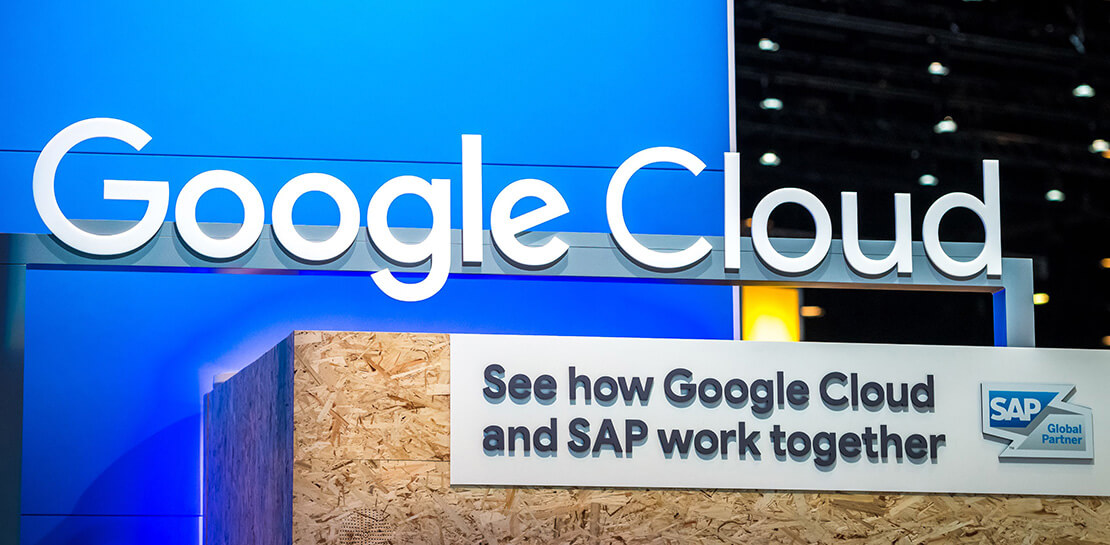
Cloud migration is top of mind for most companies with SAP applications. While the advantages of the cloud for SAP customers is generally understood, the move itself can be complicated and disruptive. So what actually are the business benefits and cost savings? How long will it take to recoup such an investment? Two recently published reports from Forrester and IDC can help to quantify the benefits and ROI.
Getting answers to the million-dollar questions
Forrester and IDC bring different methodologies to the table; they asked somewhat different questions and used different models to calculate their financial KPIs. This allows you to get two different points of view on the same basic questions about value, risk, and ROI.
As it turns out, both reports found that customers who migrate their SAP environments to Google Cloud see an impressive return on their investments. From uptime and infrastructure to efficiency and productivity—both Forrester and IDC identified major benefits to companies that have made the move to Google Cloud.
Let’s walk through some of the highlights from both reports.
Forrester’s TEI model spotlights the power of uptime improvements
Based on in-depth conversations and quantitative research with six companies, here are the key findings from the Forrester Total Economic Impact (TEI) study for companies running SAP systems on Google Cloud:
- Direct cost savings. When they compare cloud subscription and related costs to what they spent on legacy systems and infrastructure, most IT leaders expect a cloud migration to deliver up-front savings. But according to Forrester, the companies interviewed reported average savings of more than $3 million a year, including eliminated hardware purchases, right-sized software licensing, staffing efficiencies, and other operational cost savings.
- Dramatically improved uptime. Customers told Forrester that migrating SAP to Google Cloud pretty much eliminates downtime—planned or unplanned—as a significant IT concern. According to Forrester, companies realized an average of $1.5 million in savings per year by avoiding the revenue and user productivity losses that had once been a fact of life for their IT teams.
- Significant efficiency gains. Because Google Cloud works to mitigate performance bottlenecks, infrastructure mishaps, network delays and more, the companies Forrester interviewed reported a yearly average of $500,000 in productivity gains for SAP business users and frontline workers.
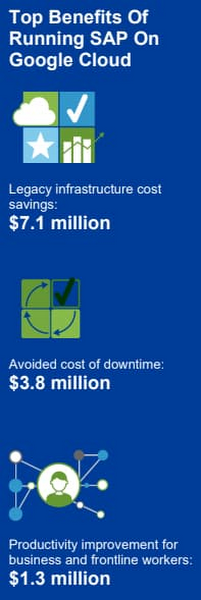
Companies also reported an annual average of $500,000 in additional IT efficiency gains after migrating SAP to Google Cloud. This quantifies what happens when IT practitioners no longer have to deal with the bottlenecks that come with legacy systems, and are able to spend their time on tasks that actually build value and help the business. Based on the Forrester analysis, the companies interviewed could expect average three-year net benefits of about $15.4 million.
“We benefit from any technical innovation in the infrastructure area because Google Cloud is doing that for us,” one customer told Forrester. “So, whenever there’s new hardware available or new processes or whatever, I don’t have to run the specific project to migrate from A to B.”
IDC finds that good things happen when SAP downtime is reduced
The IDC report highlights four areas where Google Cloud generates the most value for customers:
1. Cutting infrastructure costs. According to IDC, customers running SAP on Google Cloud spent 31% less on infrastructure each year, or an average of $233,000 less per company. The ability to scale SAP environments dynamically and to keep them right-sized was a major factor; so were the advantages of automated infrastructure monitoring and savings on software licenses once these companies could stop overprovisioning.
2. Giving a team better things to do. IDC found that the infrastructure, database, and security teams of the companies they interviewed reduced the time they need to maintain and manage SAP environments by an average of 66% per year, for a savings of $443,000, per company. As a result, these companies got the equivalent of a major staff expansion from their SAP migrations—giving them both the staff time and the expertise to focus on far more valuable activities.
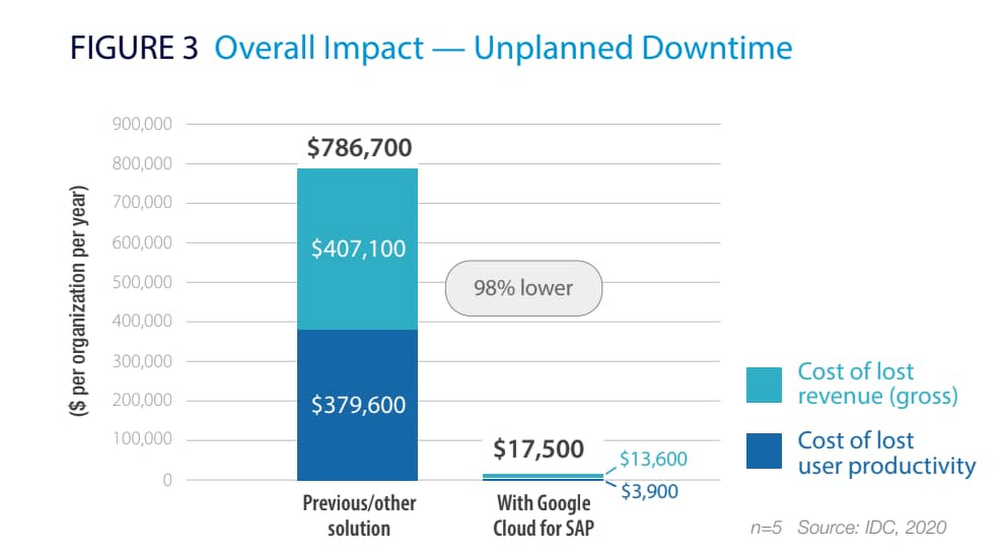
3. Limiting unplanned downtime. These companies reported to IDC an average 98% reduction in unplanned downtime. Migrating SAP to Google Cloud significantly reduces the threat of downtime and saves the business an average of nearly $770,000 per year in lost revenue and user productivity. For some firms, the downtime savings topped $1 million per year.
4. Making users more productive. The companies interviewed told IDC that by avoiding downtime and disruptions associated with upgrade and maintenance tasks for their legacy SAP systems, they saved an average of $363,000 annually in user productivity. But there’s an even more interesting under-the-hood stat contributing to these gains: These companies reduced the time required to deploy new SAP compute and storage resources from an average of 8.8 days to 1 hour.
When IDC added up these and other savings associated with running SAP on Google Cloud, it found an average three-year savings of more than $3.5 million and a five-month payback period.
“We acquired another company, so basically overnight we needed to be able to deal with that increase,” said one customer IDC spoke with. “We doubled our footprint overnight, and we had to take on hundreds of additional employees. We needed a platform that we could easily scale up if we required, and that’s the benefit of running SAP on Google Cloud for us.”
Explore the reports
There is a lot to think about when considering a move of SAP systems to the cloud. The cloud has many advantages, but migration can seem complicated and tricky; we appreciate that you are looking to understand the full picture. These papers are a great place to start.
Download the reports—Forrester’s “Total Economic Impact of SAP on Google Cloud” and IDC’s “Business Value of SAP for Google Cloud Environments.” Then, get in touch.
Three Typical Connectivity Use Cases to Pick the Right Option for Your Enterprise

3314
Of your peers have already read this article.
3:00 Minutes
The most insightful time you'll spend today!
Enterprises today have a very broad mix of networks — from SD-WANs, dedicated WANs such as MPLS, cloud interconnects, to VPNs. At the same time, they’re moving those WANs to the cloud to take advantage of faster turn-up, lower cost, and increased feature velocity. As workloads migrate to the cloud and multi-cloud environments, we believe that it’s critical to simplify enterprises’ networking model.
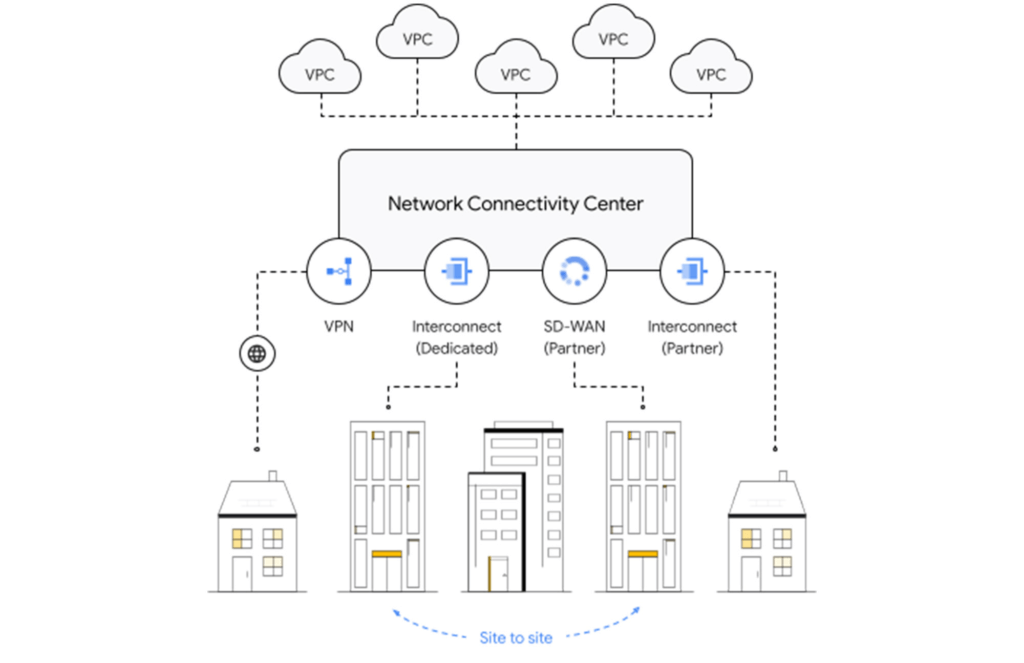
Each major cloud provider uses distinct abstraction models to configure networks or connections between your resources. Some use gateways, some use connections or links. Network Connectivity Center, launched last year, provides a simple management solution for your network connection, and is now Generally Available.
In this post, we outline the typical connectivity use cases for customers to help you select and set up the best connectivity option for your environment.
Understanding cloud network connectivity
Cloud networking refers to the ability to connect two resources together inside a cloud, across clouds and with on-premises data centers. A cloud provider needs to provide three main types of connectivity:
- Site-to-cloud – Between on-premises equipment and cloud resources
- Site-to-site – To connect on-premises resources together
- VPC-to-VPC – Connectivity between cloud resources
- Let’s take a look at each one.
Site-to-cloud connectivity
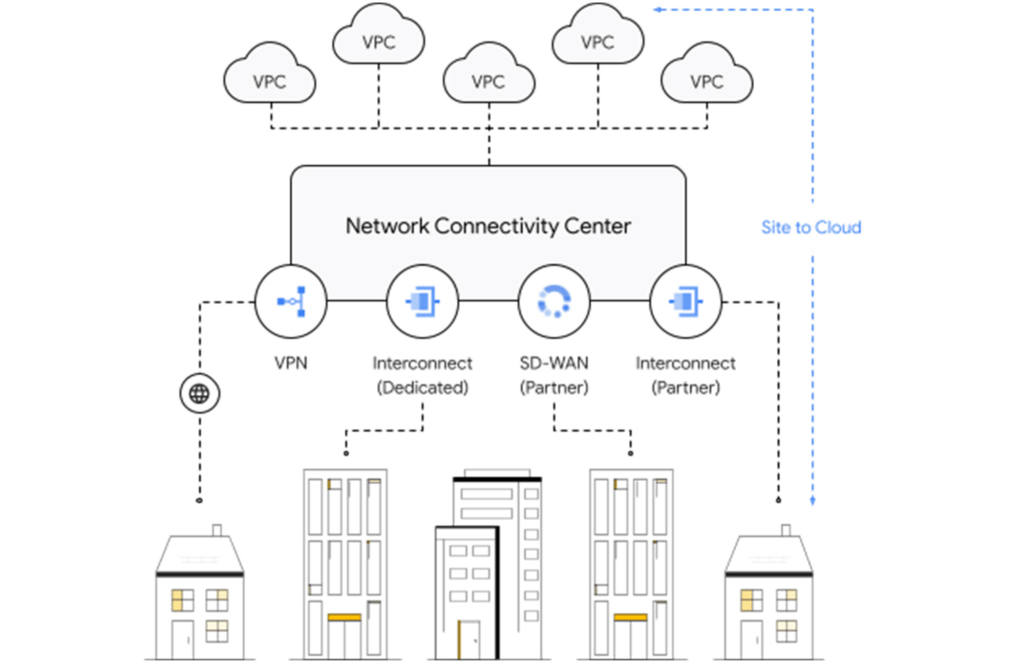
Site-to-cloud connectivity traditionally is done via a cloud interconnect or a cloud VPN. The automatic exchange of routes between on-premises and multiple VPCs can be done using a transit VPC.
A newer approach is to add cloud providers into an SD-WAN mesh using a router virtual appliance in Google Cloud. Network Connectivity Center brings the capacity to synchronize the appliance routes dynamically via BGP to Cloud Router and hence their VPCs. It enables connectivity between on-premises data centers and branch offices and their cloud workloads via SD-WAN-enabled connectivity. This capability is available globally across all 29+ Google Cloud regions. Several of our partners also support this capability in their router appliances.
Site-to-site connectivity
Site-to-site connectivity enables network connectivity directly between two or more hybrid connection points (VPN, Interconnect or SD-WAN). Network Connectivity Center simplifies this model by automating the routing announcements in this environment, such that all sites connected to a single global Network Connectivity Center hub are able to communicate freely in any-any fashion. You can see an example of this for a specific market vertical use case in a recent blog, Voice trading in the cloud — digital transformation of private wires.
VPC-to-VPC connectivity
You can create a full or partial mesh of VPC connections using multiple technologies, with VPC peering being the most common. VPC peering provides highly performant, low latency, private connectivity for customer networks connected via hybrid connectivity and Network Connectivity Center to multiple VPCs containing workloads, which can be segmented via granular firewall policies as needed. Alternatively, you can use a transit VPC model to connect multiple VPCs together in a hub and spoke topology.
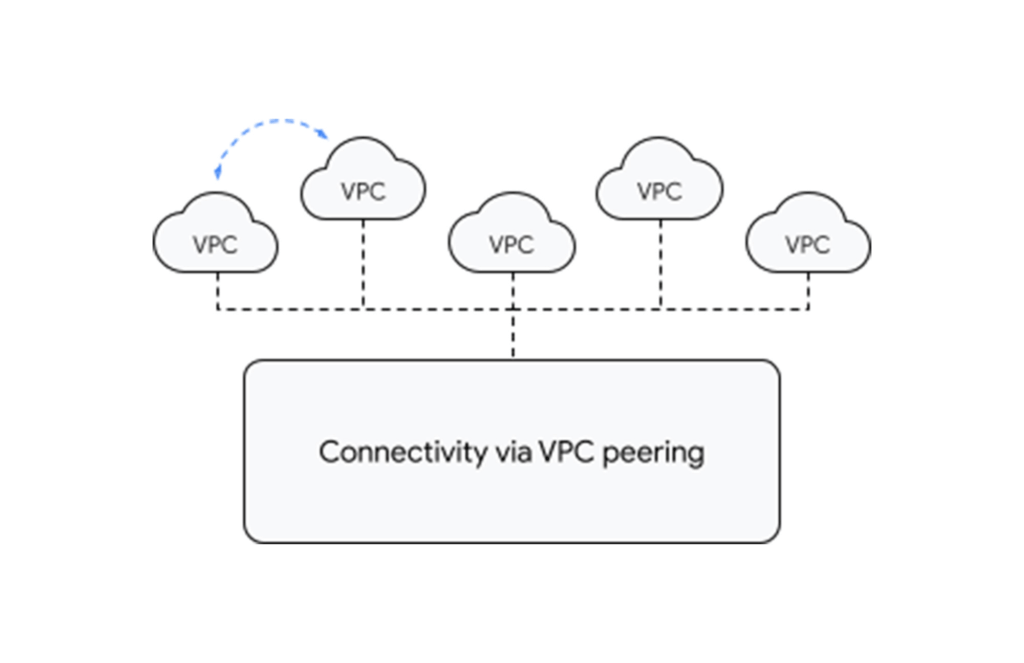
With tight integration with third-party router appliances as mentioned earlier, you can also leverage their third-party supported solutions such as next-generation firewalls to connect your VPCs together to meet specific compliance and segmentation requirements. Network Connectivity Center allows you to synchronize the routing tables of these appliances with your VPC’s routing table, simplifying the process of setting up redundant configurations.
What’s next for cloud networking connectivity in Google Cloud?
As enterprises continue to migrate different types of workloads to public cloud providers, networking topologies are becoming more complex. In summary, we have solutions for all connectivity needs. We aim to keep our models and solutions understandable and simple. Over time, look for Network Connectivity Center to become Google Cloud’s single point of configuration for all your connectivity needs, with capabilities to handle the most complex network.
Payhawk Becomes a Unicorn with Google Cloud-Powered Automated Financing Software

2739
Of your peers have already read this article.
3:30 Minutes
The most insightful time you'll spend today!
For far too long, managing employee expenses has been a time-consuming process that requires manual data entry and reconciliation to bridge the gap between business bank accounts and ERP systems. In the absence of an integrated workflow, finance teams use multiple systems to manage credit card and cash payments, and finding receipts. In most cases, they also lack real-time visibility into company spending.
The complexity grows exponentially as businesses expand, especially into new regions. Extra administration required to manage new bank accounts, card issuers, and local accounting systems impedes decision making and negatively impacts revenues and growth. Businesses of all sizes struggle with this, but it can be especially challenging for medium to large enterprises.
Payhawk set out to help businesses overcome these challenges when we founded the company in 2018. We combine VISA company cards, reimbursable expenses, and accounts payable into a single product. Our customers can automate manual processes, maximize efficiency, and accelerate business expansion.

Setting up our first cloud cluster in less than a week
To support growth and attract investment we were keen to launch our solution on a scalable, future-proof IT architecture that didn’t require extensive technical support. This is where Google Cloud made a big impression, especially the user interface and documentation which massively reduces the resources required to set up clusters and put them into production.
I’m a CTO, not a DevOps specialist, but in less than a week I was able to set up a secure, reliable operating infrastructure. This enabled us to fast-track our application development and we were able to issue our first card in just eight months. Our Google Cloud partner, Cloud Office also gave us valuable assistance, guiding us through the deployment process and advising on Google Cloud’s extensive range of solutions.
Google Kubernetes Engine (GKE) played a critical role, accelerating the deployment and management of our cloud native applications. We use Cloud SQL as our database while other important tools include Cloud Memorystore, Vision AI, Cloud Storage and Artifact Registry for our wider data storage and application needs. With Firebase we’ve been able to build a notification system for mobile devices.
Another incentive is that most other cloud solutions require add-on services to build and keep your product live. With Google Cloud, all the services that Payhawk needs including logging, metrics, monitoring of resources, and utilization of CPU memory come as standard.
For instance, I was really impressed by Google Cloud’s operations suite, which includes Cloud Logging and Cloud Monitoring. If there are any anomalies in our cloud architecture, we can track and resolve them with minimal disruption to our operations. This also removes the need to invest in an additional observability solution.
Reliability that builds customer trust
Google Cloud also supports Payhawk’s mission to put customers at the center of our organization. Thanks to Google Cloud error reporting and tracking and Google Cloud single sign on, Payhawk’s engineering team can anticipate customer issues and correct them in less than one hour. Trust is everything, and Google Cloud gives us the tools to boost customer satisfaction and build long-term relationships.
As a young business, managing costs is also a priority. The Google for Startups Cloud Program, which includes credits for Google software and tools, enabled us to push the business forward without having to worry about financing our infrastructure, especially in the first year. This gave us breathing room to work through funding, application development, and the onboarding of our first customers.
In addition, Google Cloud gives us confidence that we can grow the business fast. In most months we have seen more than 10% growth — in some cases it’s been 20%. In the first half of 2022, the business doubled in size, but Google Cloud gave us the flexibility to scale our infrastructure, adding storage, memory, and processing power as we onboarded new customers. The pricing model is also generous so that we can grow our revenues while keeping control of operational expenditure.
Since launch we have acquired a valuable mix of customers from startups to large businesses that want to reduce the costs of their expenses programs and increase employee satisfaction. They include ATU, a German automobile servicing company, which has successfully digitized its entire procurement process, and Discordia, a Bulgarian logistics business with 10,000 trucks, which has issued Payhawk cards to all its drivers.
Looking to the future, it’s no exaggeration to say that Google Cloud is a foundation of our business and has given investors confidence in our operations. From a first seeding round of €3 million, early this year we closed a Series B extension of $100 million. This gives us a valuation of $1bn and makes Payhawk the first ever Bulgarian unicorn.
We now operate in 32 countries in Europe and the US, and plan to double our team by the end of the year. It feels like we’ve come a long way since we first started using Google Cloud, and I’m thrilled that we have Google Cloud as a global technology partner supporting our mission to transform expense management and financial operations worldwide.

If you want to learn more about how Google Cloud can help your startup, visit our page here to get more information about our program, and sign up for our communications to get a look at our community activities, digital events, special offers, and more.
BigQuery’s User-friendly SQL is Like a Cool Drink for Hot Summer

5691
Of your peers have already read this article.
2:30 Minutes
The most insightful time you'll spend today!
With summer just around the corner, things are really heating up. But you’re in luck because this month BigQuery is supplying a cooler full of ice cold refreshments with this release of user-friendly SQL capabilities.
We are pleased to announce three categories of BigQuery user-friendly SQL launches: Powerful Analytics Features, Flexible Schema Handling, and New Geospatial Tools.
Powerful Analytics Features
These powerful SQL analytics features provide greater flexibility to analysts for organizing, filtering, and rendering data in BigQuery than ever before. You can enable spreadsheet-like functionality on summarized data using PIVOT and UNPIVOT and filter irrelevant data in analytic functions using QUALIFY.
Through this section, we will become familiar with these new features through examples using the BigQuery Public dataset, usa_names.
PIVOT/UNPIVOT (Preview)
One of the most time-consuming tasks for data analytics practitioners is wrangling data into the right shape. SQL is great for wrangling data, but sometimes you want to reformat a table as you would in a spreadsheet, pivoting rows and columns interchangeably. To support this use case, we are pleased to introduce PIVOT and UNPIVOT operators in BigQuery. PIVOT creates columns from unique values in rows by aggregating values, and UNPIVOT reverses this action.The example below uses PIVOT on bigquery-public-data.usa_names.usa_1910_current to show the number of males and females born each year, representing each gender as a column. Then UNPIVOT reverses this action.
Language: SQL
-- we start with SQL to create a simple table-- we only include gender, year, and number.CREATE TABLEmydataset.sampletable1 AS (SELECTGender,Year,SUM(Number) AS NumberFROM`bigquery-public-data.usa_names.usa_1910_current`WHEREYear >= 2017GROUP BYGender, Year);-- The resulting table:--+----------------------------------------+--| Gender | Year | Number |--+----------------------------------------+--| F | 2019 | 1353716 |--| F | 2017 | 1403989 |--| F | 2018 | 1380382 |--| M | 2018 | 1568678 |--| M | 2019 | 1538056 |--| M | 2017 | 1604609 |--+----------------------------------------+-- use PIVOT to create columns for “female” and “male”CREATE TABLEmydataset.Pivoted ASSELECTyear, male, femaleFROMmydataset.sampletable1PIVOT( SUM(Number) FOR gender IN ('M' AS male,'F' AS female))ORDER BYyear;-- The resulting pivoted table:--+----------------------------------------+--| Year | female | male |--+----------------------------------------+--| 2017 | 1403989 | 1604609 |--| 2018 | 1380382 | 1568678 |--| 2019 | 1353716 | 1538056 |--+----------------------------------------+-- UNPIVOT reverses the row/column rotation of PIVOT.SELECT*FROMmydataset.PivotedUNPIVOT(number FOR gender IN (male AS 'M',female AS 'F'));
QUALIFY (Preview)
More advanced users of SQL know the power of analytic functions (aka window functions). These functions compute values over a group of rows, returning a single result for each row. For example, customers use analytic functions to compute a grand total, subtotal, moving average, rank, and more. With the announcement of support for QUALIFY, BigQuery users can now filter on the results of analytic functions by using the QUALIFY clause.
QUALIFY belongs in the family of query clauses used for filtering along with WHERE and HAVING. The WHERE clause is used to filter individual rows in a query. The HAVING clause is used to filter aggregate rows in a result set after aggregate functions and GROUP BY clauses. The QUALIFY clause is used to filter results of analytic functions.
To show the utility of QUALIFY, the example below uses QUALIFY to return the top 3 female names from each year in the last decade using from bigquery-public-data.usa_names.usa_1910_current.
Language: SQL
-- QUALIFY filters the result of the RANK functionSELECTname,year,SUM(number) AS total,RANK() OVER (PARTITION BY yearORDER BY SUM(number) DESC) AS rankFROM`bigquery-public-data.usa_names.usa_1910_current`WHEREgender = 'F'AND YEAR >= 2010GROUP BY 1,2QUALIFY RANK <= 3ORDER BY 2,4;
Flexible Schema Handling
New SQL for administrators and data engineers enables table renaming for data pipeline processes, as well as flexible column management.
Table Rename (GA)
In data pipeline processes, tables are often created and then renamed so that they can make way for the next iteration of the pipeline run. To accomplish this, customers need a mechanism by which they can create a table and then subsequently rename it. Now if customers want to change this name using SQL, they can. Using the simple syntax that ALTER TABLE RENAME TO provides, customers will be able to rename a table after creation to clear the way for the next iteration of tables in the data pipeline.
Language: SQL
-- create a sample table “tablename” in “mydataset”.-- You will rename this table.CREATE OR REPLACE TABLE dataset.tablename(col1 STRING,col2 NUMERIC);-- if this table “tablename” becomes obsolete-- perform Table Rename to “obsoletetable”ALTER TABLEmydataset.name RENAME TO obsoletetable;
DROP NOT NULL constraints on a column (GA)
While BigQuery has historically provided many tools available in the UI, CLI and APIs, we know that many administrators prefer interfacing with the database using SQL. BigQuery recently released DDL statements which enable data administrators to provision and manage datasets and tables, greatly simplifying provisioning and management. Today, we continue the next addition in this line of releases by announcing ALTER COLUMN DROP NOT NULL constraint on a column:
- ALTER COLUMN DROP NOT NULL allows the administrator to remove the NOT NULL constraint from a column in BigQuery.
Language: SQL
-- create a table to store credit card numbers-- the business requires this field, so-- include a NOT NULL constraintCREATE TABLEmydataset.customers(credit_card_number STRING NOT NULL);-- if needs of the business no longer require this field,-- the customer can allow null entries in this column-- by dropping the constraintALTER TABLEmydataset.customersALTER COLUMN credit_card_number DROP NOT NULL;
CREATE VIEW with column list (GA)
Views are used ubiquitously by BigQuery customers to capture business logic. Oftentimes, BigQuery users have business requirements to assign aliases to columns in views. Now BigQuery supports doing so upon view creation in a column name list format with the release of CREATE VIEW with column list syntax.
Language: SQL
-- aliases list1 and list2 can be assigned in a list formatCREATE VIEWmyview (list1, list2) ASSELECTcolumn_1, column_2FROMmydataset.exampletable
New Geospatial Tools
ST_POINTN, ST_STARTPOINT, and ST_ENDPOINT
Geospatial data is incredibly valuable to data analytics customers dealing with data from the physical world. BigQuery has very strong geospatial function support to help customers process marketing data, track storms, or manage self-driving cars. Particularly for analyzing vehicle or location tracking data, we’re thrilled to provide three new functions to allow users to easily extract or filter on key points:
For example, when working with vehicle histories, ST_POINTN, ST_STARTPOINT, and ST_ENDPOINT allow users to extract elements such as the start and the end of a trip. For identifying origin-destination pairs these functions will make that task much easier.
Language: SQL
-- pull the first, second, penultimate and final points-- from a linestringWITH linestring as (SELECT ST_GeogFromText('linestring(1 1, 2 1, 3 2, 3 3)') g)SELECTST_StartPoint(g) AS first, ST_EndPoint(g) AS last,ST_PointN(g,2) AS second, ST_PointN(g, -2) as second_to_lastFROMlinestring+--------------+--------------+--------------+----------------+| first | last | second | second_to_last |+--------------+--------------+--------------+----------------+| POINT(1 1) | POINT(3 3) | POINT(2 1) | POINT(3 2) |+--------------+--------------+--------------+----------------+
As sure as a hot summer day pairs well with an ice-cold beverage, these new user-friendly SQL features in BigQuery pair well with your data analytics workflows. To learn more about BigQuery, visit our website, and get started immediately with the free BigQuery Sandbox.
More Relevant Stories for Your Company

Autonom8: Achieving growth and profits for businesses with Google Cloud
With Google Cloud, Autonom8 can run a platform that accelerates and streamlines customer journeys in a scalable, reliable, cost-effective infrastructure, while using advanced optical character recognition to enable intelligent document processing. Google Cloud results: Increased margins by up to 30% by switching from a home-grown OCR system to Cloud Vision

Enable Specialized Workloads with Bare Metal Solution from Google Cloud
Enterprises want to embrace the pace of innovation and an operational business model of the modern-day cloud, but they don’t want to disrupt their existing IT landscape or upgrade all their legacy applications. This presents a conundrum, as most legacy applications were not designed to run in the cloud, and
Google Cloud VMware Engine Achieves HIPAA Compliance
We are excited to announce that as of April 1, 2021, Google Cloud VMware Engine is covered under the Google Cloud Business Associate Agreement (BAA), meaning it has achieved HIPAA compliance. Healthcare organizations can now migrate and run their HIPAA-compliant VMware workloads in a fully compatible VMware Cloud Verified stack running natively

The Tech Tightrope: How the U.S. State & Local Agencies Strive to Balance between Innovation and Budget
State and local government (SLG) agencies are reeling from a combination of unbudgeted COVID-related expenses and reduced tax revenue caused by unemployment and business closures. Any way you look at it, the situation is challenging. To understand how SLG agencies are coping, Google Cloud collaborated with MeriTalk to survey 200
