





Hike: Processing Analytics Queries 20X Faster with Google Cloud Platform

5595
Of your peers have already read this article.
2:30 Minutes
The most insightful time you'll spend today!
After a seamless migration to Google Cloud Platform with CloudCover and Google Cloud Professional Services, Hike has reduced its costs by 20% and processed analytics queries 20 times faster than with its previous cloud provider. The business is also using AI and machine learning to enhance the experience provided by a new sticker-based messaging app, Hike Sticker Chat.
India is a market of opportunity for businesses that provide messaging apps to consumers. With more than 1.3 billion people, the country is the second most populous in the world. However, global messaging app providers face a robust market challenge from Hike, a home-grown internet and technology startup. Launched in 2012, Hike provides innovative products such as Hike Messenger and more recently the AI- and machine-learning-enabled Hike Sticker Chat, a service that enables young people in the country to express themselves through digital stickers.
The business says it understands the people of India and communication like no one else, while its mission is to reduce individuals’ dependency on the keyboard. To do this, Hike is building one of the largest repositories of AI and machine-learning-enabled stickers for Hike Sticker Chat. This messaging platform is, according to Hike, the only product of its type that enables conversations through stickers covering more than 40 languages and local dialects.
Google Cloud Results
- Processes analytics queries 20X faster than previously
- Doubles compute throughput
- Uses Google Cloud Machine Learning Engine managed, distributed capabilities to train complex models on TensorFlow that provide delightful local sticker recommendations through Hike Sticker Chat
Founded by Kavin Bharti Mittal, the Delhi-based venture is backed by SoftBank, Tencent, Tiger Global, Foxconn, and Bharti. To date, Hike has raised $261 million in funding. In August 2016, Hike raised its Series D round of funding, led by Tencent and Foxconn, at a valuation of $1.4 billion. The business is one of the fastest Indian startups to achieve Unicorn status, doing so in less than four years.
Hike started operations on a multinational cloud service. However, as user numbers and usage grew, the business began exploring options to improve performance and stability, reduce costs, and cut administration loads. In particular, Hike wanted to reduce latency between cloud data centers.
Focus on product development
“We aimed to move away from a technology stack with single points of failure to a horizontally scaled, highly reliable, distributed systems and managed services environment that enabled us to focus on product development rather than operations,” says Aditya Gupta, Director, Engineering, Hike.
Hike then began exploring the opportunities presented by Google Cloud Platform. The business held a number of executive-level meetings with Google to understand the capabilities, roadmap, and track record of the cloud service. It then decided to proceed with a proof of concept with Google Cloud Premier Partner CloudCover.
The proof of concept revealed that when Cloud Load Balancing was operating, latency between the Google Cloud data center in Taiwan and Delhi, India, was less than the latency between the incumbent cloud provider’s data center and Delhi. Further, compute throughput was up to two times greater on Compute Engine than on the equivalent service, while Hike could complete more then 1 million connections on Compute Engine – up from 500,000 connections on the incumbent service.
Migrate to GCP
The success of the exercise prompted Hike to migrate its messaging app to Google Cloud Platform. “We chose Google Cloud Platform because of its very broad set of services and features,” explains Gupta. “In addition, Google’s innovation mindset and the richness of the partnership would allow us to be onboarded quickly to machine learning services such as Cloud Machine Learning Engine.”
The business called on Google Cloud Professional Services (Technical Account Management) to help ensure a seamless lift-and-shift migration over two months. Google Cloud Professional Services initially undertook a technical infrastructure kickoff to establish a foundation for architecture requirements such as identity and access management and security.
Google Cloud Professional Services team delivers smooth migration
Google Cloud Professional Services worked closely with Hike to map out and deliver the Google Cloud Platform architecture that would deliver the greatest value to the business. The Professional Services team also worked with Hike to resolve product and support queries quickly; provided project background for product and support teams; and organized project meetings and early adopter program access.
In addition, Professional Services team members worked on site at least once a week, coordinated external support during critical migration periods, and coordinated teams in five countries for a single, 17-hour migration marathon. Over 60 days, the business migrated 7,000 processor cores, running virtual machine instances used for messaging infrastructure and analytics, to Google Cloud Platform.
Throughout the exercise, Google Cloud Professional Services worked with CloudCover to educate the customers’ technology teams to achieve proficiency with Google Cloud Platform. The teams soon built up skills and knowledge of best practices and began applying them to the Google Cloud Platform environment.
The Hike Google Cloud Platform architecture comprises virtual machine instances running in Compute Engine; Cloud Storage for unified object storage; networking; a BigQuery analytics data warehouse; Cloud Dataflow to transform and enrich data; Cloud Load Balancing to distribute workloads to maximize efficiency; and Cloud Dataproc to run Hadoop clusters.
Hike is also stepping up its AI & machine learning capabilities. It uses Google Cloud Machine Learning Engine managed, distributed computing capabilities to train complex models on TensorFlow. This powers key use cases such as delightful local sticker recommendations on Hike Sticker Chat. Hike is also investing heavily on AI and machine learning research.
Hike has achieved a range of benefits from its Google Cloud Platform deployment. As well as reduced latency, improved compute throughput, and increased connection handling, Google Cloud Platform managed services have enabled the business to reduce the time and effort required to administer core infrastructure, with the saved resources allocated to improving its messaging product.
“Managed services are beginning to reduce our operational overheads,” says Gupta. “For example, managed instance groups and Cloud Load Balancing are reducing our instance count and costs, thereby reducing involvement from DevOps and developer teams.”
Google Cloud Platform 20% cheaper
Gupta and his team have calculated that running for three years on Google Cloud Platform will cost, including the cost of migration, 20 percent less than on its previous platform. BigQuery is processing queries 20 times faster than a similar service offered by the previous provider, while storing 125TB of data and streaming 1.5TB of data daily. Furthermore, Hike’s analytics pipeline costs 80 percent less than in its previous environment.
“Google Cloud Platform has played an important role in enabling us to continue to innovate and realize our mission of reducing dependency on the keyboard,” says Gupta.
Airbus: Taking the flight to a brighter future with Google Cloud and Google Workplace

3577
Of your peers have already read this article.
1:30 Minutes
The most insightful time you'll spend today!
“Any device, anytime, anywhere.” A cohort of CIOs within Airbus believed that the cloud, combined with new ways of working, could provide the foundation for this vision. Google Workspace and Google Cloud have played a pivotal role in helping Airbus realize this new path, transforming security, data management, and collaboration along the way.

Adopting a secure-by-design approach
In adopting Google Workspace and Google Cloud Airbus needed to ensure a robust, zero-trust security model that works across the entire organization, even when employees are working outside the office. Google Workspace provides a single login that enables secure access to data, based on device and user information, as well as contextual inputs that inform the security risk of each login and user action. Airbus admins also use Google Workspace to define trust rules that govern what information and files can be shared within and outside the organization, making it easy for employees to comply with best practices from anywhere.
Encryption also plays a central role in keeping information secure and private. By default, Google Workspace uses the latest cryptographic standards to encrypt all data at rest and in transit. Google Workspace also offers client-side encryption, which Airbus uses for their most sensitive projects, giving them authoritative control over their data as the sole owner of their encryption keys.
And to ensure the organization is protected against hackers, Airbus has implemented sharding as a standard practice, thereby splitting data across multiple servers and data centers. Because the company works with incredibly sensitive information—including government and military information—the ability to locate data all within European data centers continues to be a necessity.
Powerful data management
Managing an enormous volume and variety of data, Airbus needs to ensure complete compliance with internal policies, as well as with external standards, like the General Data Protection Regulation (GDPR). Given this context, Airbus requires a solution that has strong built-in governance controls. Airbus also leverages the Drive labels feature, along with manual classification, to ensure that every file added to Google Drive is tagged and labeled correctly. In turn, these labels define the loss-prevention policies assigned to each file.
Staying connected during the pandemic
Before the pandemic, nearly every employee spent their workdays at an Airbus facility. When remote work became mandatory, the company made the pivot to Google Chat and Google Meet as an essential part of supporting real-time and asynchronous collaboration. Gmail also played a significant role in secure, anywhere-anytime communication, with its built-in anti-spam and anti-malware protections. Customizable filters let administrators protect against suspicious attachments, untrustworthy links, and countless other forms of malicious content. While Gmail blocks more than 99.9% of spam and phishing messages from ever reaching users’ inboxes, more advanced security measures like sandboxing can be put in place for specific use cases.
Protecting more than just data
Google Cloud’s sustainability efforts are as equally important to Airbus as data security. Google Cloud has been working to keep its climate footprint and those who use its services as low as possible, with all of Google currently carbon neutral and with a goal to run on carbon-free energy 24/7 at all of our data centers by 2030. And with our smarter, more efficient data centers, we’re already on that path with more than six times the computing power for the same amount of electrical power we used 5 years ago.
Building the future of work
By combining Google Workspace with Google Cloud, Airbus has been able to live up to its vision of “any device, anytime, anywhere.” The new model is a core foundation for its evolving future of work. Not only has Airbus adopted a zero-trust model across the organization, it’s also transformed how data is secured, managed, and accessed by employees working across a broad range of locations. The new flexible approach has also led to changes in how collaboration happens. Google is deeply gratified to have supported Airbus as they implement these changes and we continue to be proud that we’re running the cleanest cloud in the industry.
Want to learn more about how Google Workspace helps businesses like yours do more while keeping your data secure? Read this whitepaper to find out about our zero-trust model and other ways we protect organizations.

4905
Of your peers have already downloaded this article
1:30 Minutes
The most insightful time you'll spend today!
Artificial intelligence and machine learning are already transforming the technological landscape. From digital assistants to image-recognition software to self-driving cars, what was once the stuff of science fiction is now becoming a reality. But what exactly does it mean for marketing and advertising executives?
It could get us closer to one of advertising’s most-sought goals: relevance at scale. Before then, we’re going to see changes to the way we do business.
Technological advances have always created new opportunities for storytelling and marketing. Just as the advent of TV brought an era of truly mass advertising and reach, and the internet and mobile brought a new level of targeting and context, AI will change how people interact with information, technology, brands, and services.
A big part of the opportunity for marketers is how AI will help us fully realize personalization—and relevance—at scale. With platforms like Search and YouTube reaching billions of people everyday, digital ad platforms finally can achieve communication at scale. This scale, combined with customization possible through AI, means we’ll soon be able to tailor campaigns to consumer intent in the moment. It will be like having a million planners in your pocket.
Find out how you can achieve relevance at scale. Download now!
How Eventrac and Workflows Integration Helps Implement Hybrid Architecture in Google Cloud

6548
Of your peers have already read this article.
3:00 Minutes
The most insightful time you'll spend today!
I previously talked about Eventarc for choreographed (event-driven) Cloud Run services and introduced Workflows for orchestrated services.
Eventarc and Workflows are very useful in strictly choreographed or orchestrated architectures. However, you sometimes need a hybrid architecture that combines choreography and orchestration.
For example, imagine a use case where a message to a Pub/Sub topic triggers an automated infrastructure workflow or where a file upload to a Cloud Storage bucket triggers an image processing workflow. In these use cases, the trigger is an event but the actual work is done as an orchestrated workflow.
How do you implement these hybrid architectures in Google Cloud? The answer lies in Eventarc and Workflows integration.
Eventarc triggers
To recap, an Eventarc trigger enables you to read events from Google Cloud sources via Audit Logs and custom sources via Pub/Sub and direct them to Cloud Run services:

One limitation of Eventarc is that it currently only supports Cloud Run as targets. This will change in the future with more supported event targets. It’d be nice to have a future Eventarc trigger to route events from different sources to Workflows directly.
In absence of such a Workflows enabled trigger today, you need to do a little bit of work to connect Eventarc to Workflows. Specifically, you need to use a Cloud Run service as a proxy in the middle to execute the workflow.
Let’s take a look at a couple of concrete examples.
Eventarc Pub/Sub + Workflows integration
In the first example, imagine you want a Pub/Sub message to trigger a workflow.
Define and deploy a workflow
First, define a workflow that you want to execute. Here’s a sample workflows.yaml that simply decodes and logs the Pub/Sub message body:
main:params: [args]steps:- init:assign:- headers: ${args.headers}- body: ${args.body}...- pubSubMessageStep:call: sys.logargs:text: ${"Decoded Pub/Sub message data is " + text.decode(base64.decode(args.body.message.data))}severity: INFODeploy the workflow with a single command:gcloud workflows deploy ${WORKFLOW_NAME} --source=workflow.yaml --location=${REGION}
Deploy a Cloud Run service to execute the workflow
Next, you need a Cloud Run service to execute this workflow. Workflows has an execution API and client libraries that you can use for your favorite language. Here’s an example of the execution code from a Node app.js file. It simply passes the received HTTP request headers and body to the workflow and executes it:
const execResponse = await client.createExecution({parent: client.workflowPath(GOOGLE_CLOUD_PROJECT, WORKFLOW_REGION, WORKFLOW_NAME),execution: {argument: JSON.stringify({headers: req.headers, body: req.body})}});
Deploy the Cloud Run service with the Workflows name and region passed as environment variables:
gcloud run deploy ${SERVICE_NAME} \--image gcr.io/${PROJECT_ID}/${SERVICE_NAME} \--region=${REGION} \--allow-unauthenticated \--update-env-vars GOOGLE_CLOUD_PROJECT=${PROJECT_ID},WORKFLOW_REGION=${REGION},WORKFLOW_NAME=${WORKFLOW_NAME}
Connect a Pub/Sub topic to the Cloud Run service
With Cloud Run and Workflows connected, the next step is to connect a Pub/Sub topic to the Cloud Run service by creating an Eventarc Pub/Sub trigger:
gcloud eventarc triggers create ${SERVICE_NAME} \--destination-run-service=${SERVICE_NAME} \--destination-run-region=${REGION} \--location=${REGION} \--event-filters="type=google.cloud.pubsub.topic.v1.messagePublished"
This creates a Pub/Sub topic under the covers that you can access with:
export TOPIC_ID=$(basename $(gcloud eventarc triggers describe ${SERVICE_NAME} --format='value(transport.pubsub.topic)'))
Trigger the workflow
Now that all the wiring is done, you can trigger the workflow by simply sending a Pub/Sub message to the topic created by Eventarc:
gcloud pubsub topics publish ${TOPIC_ID} --message="Hello there"
In a few seconds, you should see the message in Workflows logs, confirming that the Pub/Sub message triggered the execution of the workflow:

Eventarc Audit Log-Storage + Workflows integration
In the second example, imagine you want a file creation event in a Cloud Storage bucket to trigger a workflow. The steps are similar to the Pub/Sub example with a few differences.
Define and deploy a workflow
As an example, you can use this workflow.yaml that logs the bucket and file names:
main:params: [args]steps:...- log:call: sys.logargs:text: ${"Workflows received event from bucket " + bucket + " for file " + file}severity: INFO
Deploy a Cloud Run service to execute the workflow
In the Cloud Run service, you read the CloudEvent from Eventarc and extract the bucket and file name in app.js using the CloudEvent SDK and the Google Event library:
const cloudEvent = HTTP.toEvent({ headers: req.headers, body: req.body });//"protoPayload" : {"resourceName":"projects/_/buckets/events-atamel-images-input/objects/atamel.jpg}";const logEntryData = toLogEntryData(cloudEvent.data);const tokens = logEntryData.protoPayload.resourceName.split('/');const bucket = tokens[3]
Executing the workflow is similar to the Pub/Sub example, except you don’t pass in the whole HTTP request but rather just the bucket and file name to the workflow:
const execResponse = await client.createExecution({parent: client.workflowPath(GOOGLE_CLOUD_PROJECT, WORKFLOW_REGION, WORKFLOW_NAME),execution: {argument: JSON.stringify({bucket: bucket, file: file})}});
Connect Cloud Storage events to the Cloud Run service
To connect Cloud Storage events to the Cloud Run service, create an Eventarc Audit Logs trigger with the service and method names for Cloud Storage:
gcloud eventarc triggers create ${SERVICE_NAME} \--destination-run-service=${SERVICE_NAME} \--destination-run-region=${REGION} \--location=${REGION} \--event-filters="type=google.cloud.audit.log.v1.written" \--event-filters="serviceName=storage.googleapis.com" \--event-filters="methodName=storage.objects.create" \--service-account=${PROJECT_NUMBER}-compute@developer.gserviceaccount.com
Trigger the workflow
Finally, you can trigger the workflow by creating and uploading a file to the bucket:
echo "Hello World" > random.txtgsutil cp random.txt gs://${BUCKET}/random.txt
In a few seconds, you should see the workflow log the bucket and object name.
Conclusion
In this blog post, I showed you how to trigger a workflow with two different event types from Eventarc. It’s certainly possible to do the opposite, namely, trigger a Cloud Run service via Eventarc with a Pub/Sub message (see connector_publish_pubsub.workflows.yaml) from Workflows or a file upload to a bucket from Workflows.
All the code mentioned in this blog post is in eventarc-workflows-integration. Feel free to reach out to me on Twitter @meteatamel for any questions or feedback.
3043
Of your peers have already watched this video.
19:30 Minutes
The most insightful time you'll spend today!
How to Manage Data Governance, at Scale, in a Multi-cloud World
Fears around security, data loss and regulatory compliance are still some of the largest reasons holding back enterprises from embracing the cloud.
In a hybrid or multi-cloud paradigm, how do you avoid data access bottlenecks, security blindspots, data leakage, or missed opportunities? Restricting access to data and tightening data security, if done haphazardly, can quickly slow down innovation or decision-making support. Conversely, liberating all data can quickly result in liability issues.
There is a fine balance, an art, to leveraging data governance as a business driver. Imagine discovering and gaining access to what you don’t already know, turning your data intranet into a privacy-sensitive data internet.
In this video, Evren Eryurek, Director, Product Management, Google Cloud; and Jim Cushman, Chief Product Officer, Collibra, show how the partnership between Google Cloud and Collibra opens the aperture for enacting a successful data governance strategy at scale, no matter where your data resides.
Notebook Executor Feature of Vertex AI Workbench to Schedule Notebooks Ad Hoc or on Recurring Basis

4448
Of your peers have already read this article.
3:00 Minutes
The most insightful time you'll spend today!
When solving a new ML problem, it’s common to start by experimenting with a subset of your data in a notebook environment. But if you want to execute a long-running job, add accelerators, or run multiple training trials with different input parameters, you’ll likely find yourself copying code over to a Python file to do the actual computation. That’s why we’re excited to announce the launch of the notebook executor, a new feature of Vertex AI Workbench that allows you to schedule notebooks ad hoc, or on a recurring basis. With the executor, your notebook is run cell by cell on Vertex AI Training. You can seamlessly scale your notebook workflows by configuring different hardware options, passing in parameters you’d like to experiment with, and setting an execution schedule, all via the Console UI or the notebooks API.
Built to Scale
Imagine you’re tasked with building a new image classifier. You start by loading a portion of the dataset into your notebook environment and running some analysis and experiments on a small machine. After a few trials, your model looks promising, so you want to train on the full image dataset. With the notebook executor, you can easily scale up model training by configuring a cluster with machine types and accelerators, such as NVIDIA GPUs, that are much more powerful than the current instance where your notebook is running.
Your model training gets a huge performance boost from adding a GPU, and you now want to run a few extra experiments with different model architectures from TensorFlow Hub. For example, you can train a new model using feature vectors from various architectures, such as Inception, ResNet, or MobileNet, all pretrained on the ImageNet dataset. Using these feature vectors with the Keras Sequential API is simple; all you need to do is pass the TF Hub URL for the particular model to hub.KerasLayer.

Instead of running these trials one by one in the notebook, or making multiples copies of your notebook (inceptionv3.ipynb, resnet50.ipynb, etc) for each of the different TF Hub URLs, you can experiment with different architectures by using a parameter tag. To use this feature, first select the cell you want to parameterize. Then click on the gear icon in the top right corner of your notebook.

Type “parameters” in the Add Tag box and hit Enter. Later when configuring your execution, you’ll pass in the different values you want to test.
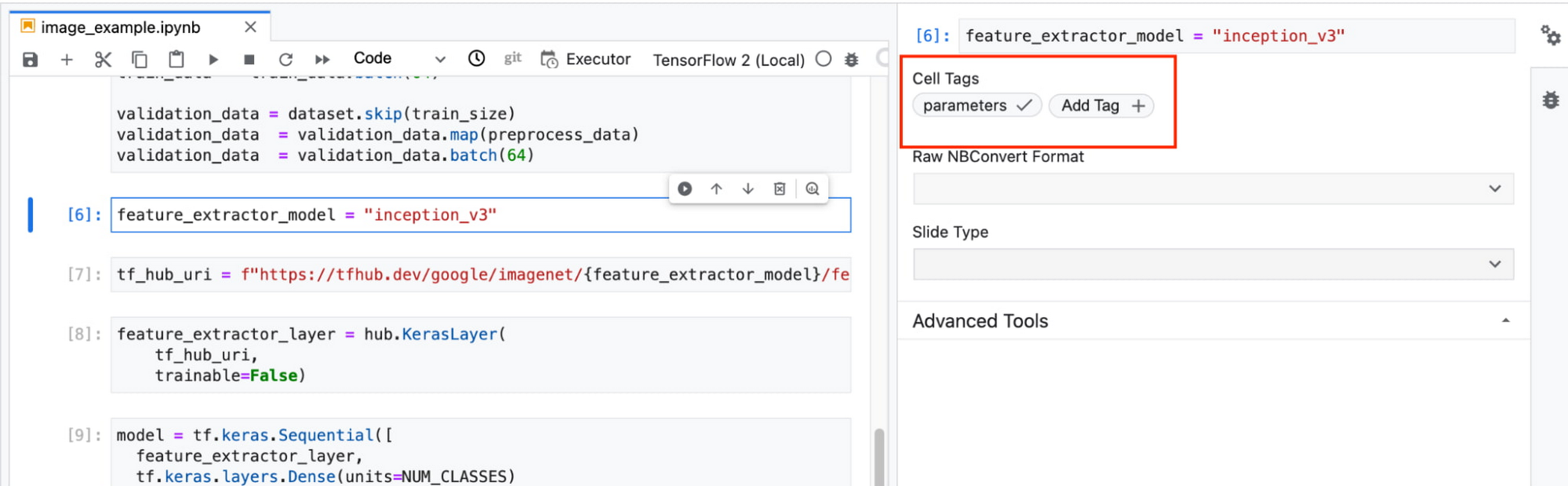
In this example, we create a parameter called feature_extractor_model, and we’ll pass in the name of the TF hub model we want to use when launching the execution. That model name will be substituted into the tf_hub_uri variable, which is then passed to the hub.KerasLayer, as shown in the screenshot above.
After you’ve discovered the optimal model architecture for your use case, you’ll want to track the performance of your model in production. You can create a notebook that pulls the most recent batch of serving data that you have labels for, gets predictions, and computes the relevant metrics. By scheduling these jobs to execute on a recurring basis, you’ve created a lightweight monitoring system that tracks the quality of your model predictions over time. The executor supports your end-to-end ML workflow, making it easy to scale up or scale out notebook experiments written with Vertex AI Workbench.
Configuring Executions
Executions can be configured through the Cloud Console UI or the Notebooks API.
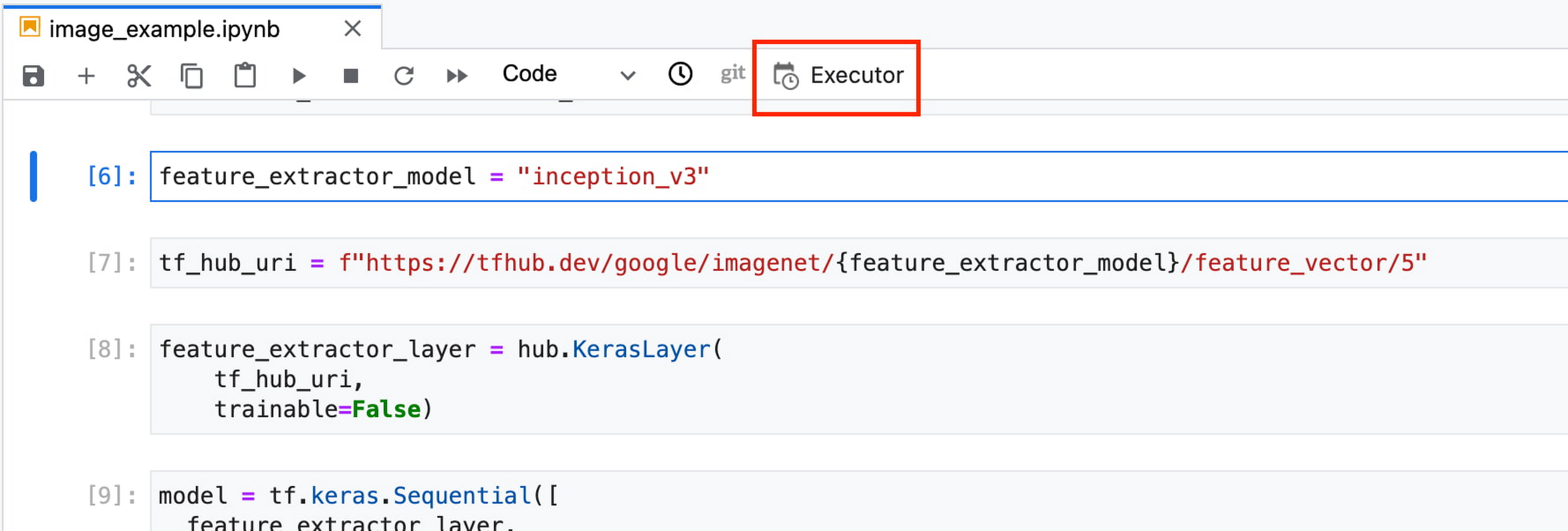
In your notebook, click on the Executor icon.
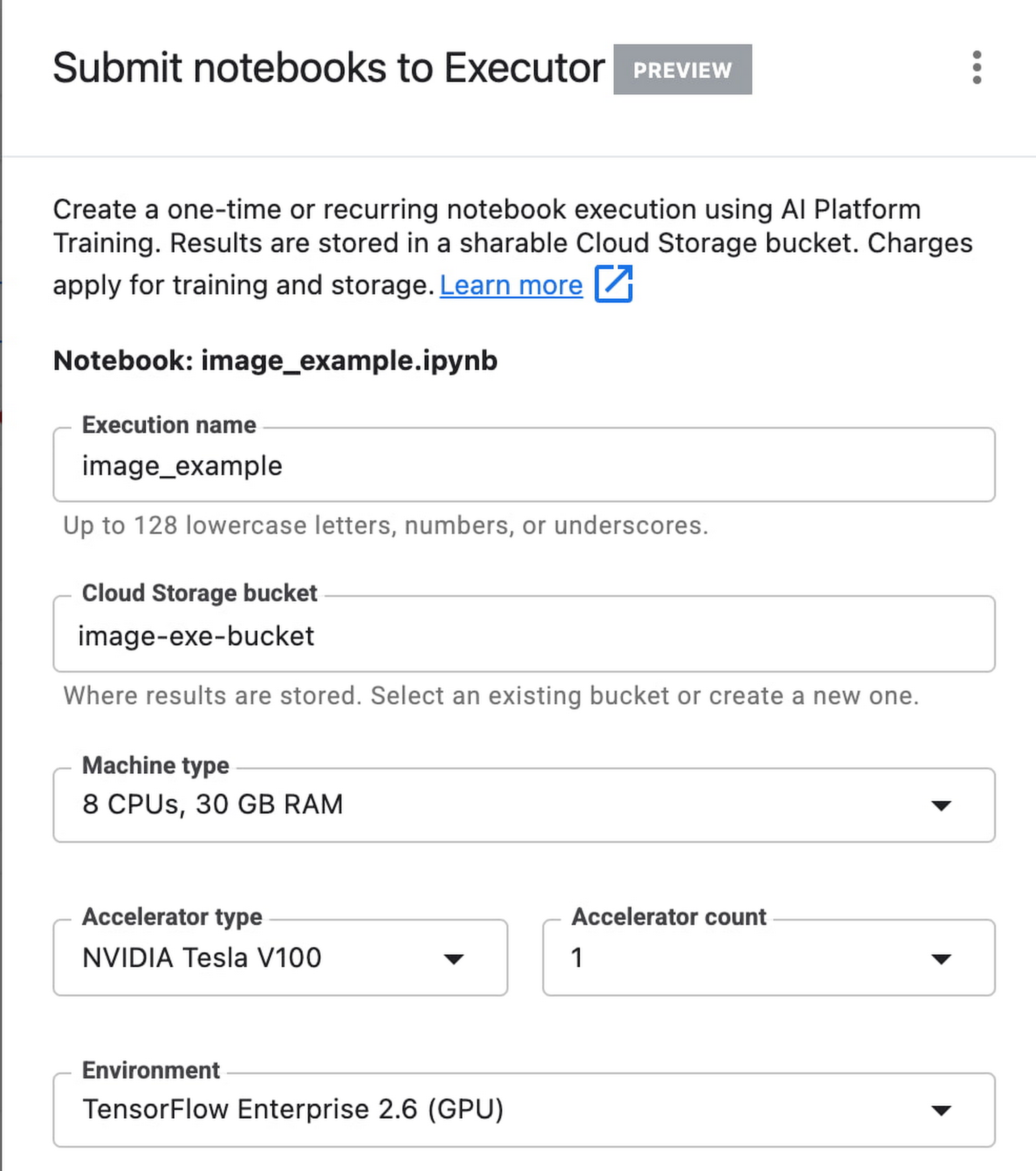
In the side panel on the right specify the configuration for your job, such as the machine type and the environment. You can select an existing image, or provide your own custom docker container image.
If you’ve added parameter tags to any of your notebook cells, you can pass in your parameter values to the executor.

Finally, you can choose to run your notebook as a one time execution, or schedule recurring executions.
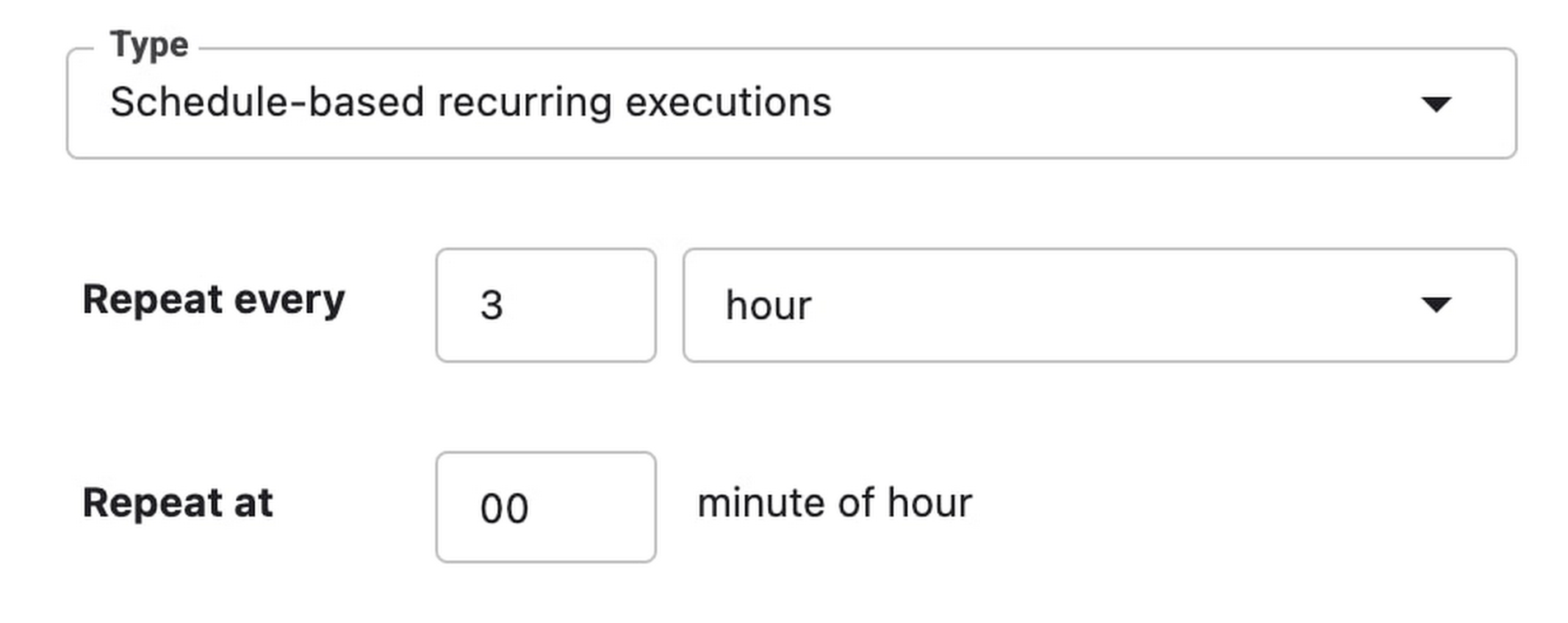
Then click SUBMIT to launch your job.
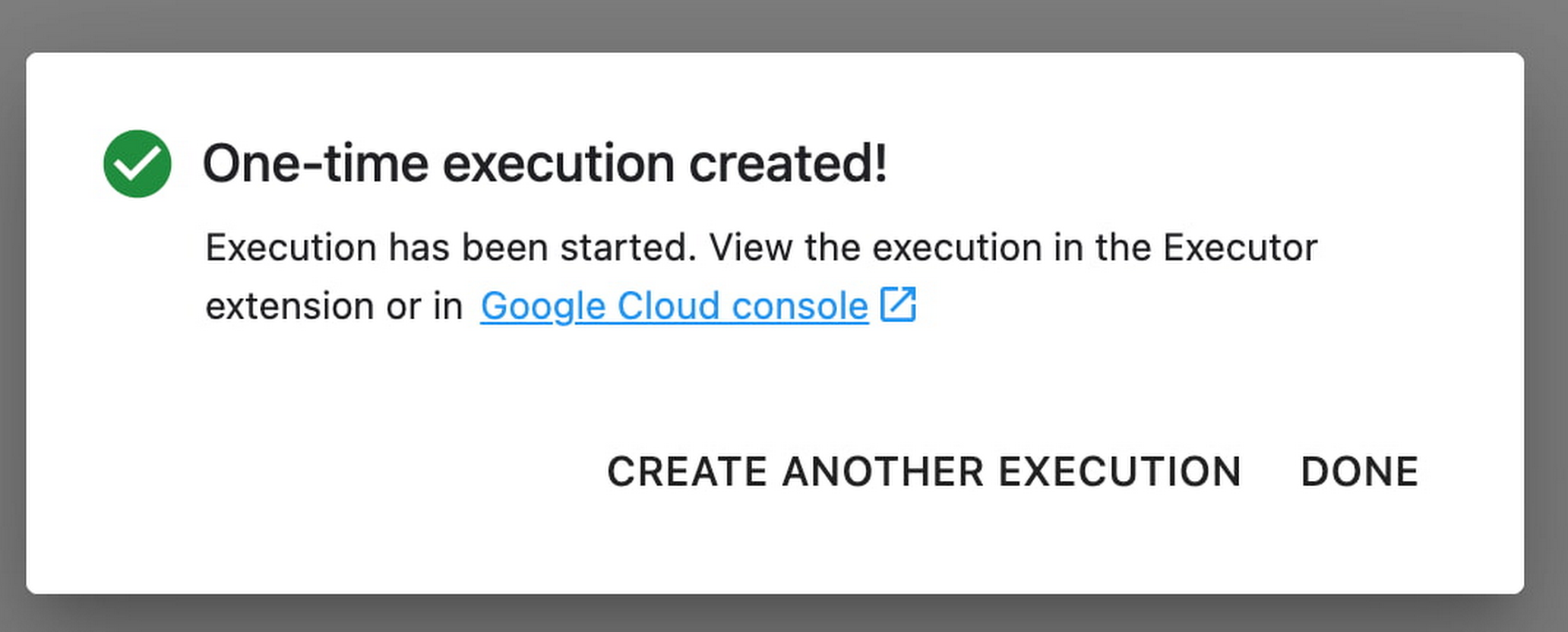
In the EXECUTIONS tab, you’ll be able to track the status of your notebook execution.

When your execution completes, you’ll be able to see the output of your notebook by clicking VIEW RESULT.

You can see that an additional cell was added with the comment # Parameters, that overrides the default value for feature_extractor_model, with the value we passed in at execution time. As a result, the feature vectors used for this execution came from a ResNet50 model instead of an Inception model.
What’s Next?
You now know the basics of how to use the notebook executor to train with a more performant hardware profile, test out different parameters, and track model performance over time. If you’d like to try out an end-to-end example, check out this tutorial. It’s time to run some experiments of your own!
More Relevant Stories for Your Company

Smart analytics: Deep dive on roadmap
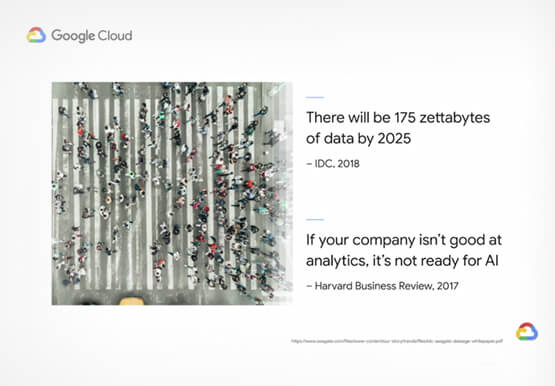
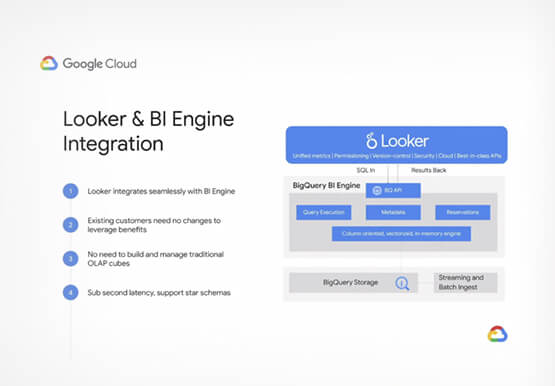
Data across organizations is growing and that organizations need a very strong analytics platform to leverage this data create insights and make real-time decisions on top of this data. That’s driving the advent of three large trends. First is the convergence of data lakes and data warehouses, that’s enable organizations

Ahead of the Curve: 5 Data and AI Trends Set to Shape 2023
How will your organization manage this year's data growth and business requirements? Your actions and strategies involving data and AI will improve or undermine your organization's competitiveness in the months and years to come. Our teams at Google Cloud have an eye on the future as we evolve our strategies

How a Mid-Sized Firm is Shrinking Inventory Carryovers 50% with AI
For more than 10 years, NMK Textile Mills has manufactured bed linens for major retailers in the United States and Canada. As e-commerce exploded, the company’s co-founder saw an opportunity to grow the business. So, in addition to manufacturing bed linens wholesale for retail customers, NMK Textile Mills reworked its complete supply

Google Cloud Helps LiveRamp Capture, Manage, Process and Visualize Data at Scale
Editor’s note: Today we’re hearing from Sagar Batchu, Director of Engineering at LiveRamp. He shares how Google Cloud helped LiveRamp modernize its data analytics infrastructure to simplify its operations, lower support and infrastructure costs and enable its customers to connect, control, and activate customer data safely and securely. LiveRamp is a data
