





Google Workspace’s Single Connected Experience Makes Workplaces Hybrid-ready

4044
Of your peers have already read this article.
1:30 Minutes
The most insightful time you'll spend today!
Our collective understanding of work—where it takes place and how it gets done—has been transformed over the last year. As companies and organizations across the globe reimagine work, new challenges and opportunities are emerging. How do people working “somewhere else” stay connected and part of the same conversations as those in the office? And if hybrid work is the sum of all the places and ways that work happens, how do employees create a shared experience, better manage their time and attention, and build stronger connections along the way?
For well over a decade, we’ve been building the future of work with products and experiences that transform how teams of all sizes connect, create, and collaborate together—on any device, from any location. Last October, we launched Google Workspace as an integrated solution with a singular promise: everything you need to get anything done, now in one place. In March, we introduced a series of innovations to help people better manage their time and build deeper connections with each other as the future of work continues to evolve. And at Google I/O last month, we took our next big step in transforming collaboration with smart canvas, a new product experience in Google Workspace. And today, we’re delivering additional innovations that address the specific challenges and opportunities of the hybrid work world.
A dedicated space for teamwork and collaboration
Chat and video meetings have been an essential part of work during the last year, serving as a bridge for separated colleagues to collaborate in real time. As we reflect on the lessons of a year where many people were working remotely, we know that distributed teams need a new type of dedicated, shared space. A place in Google Workspace to bring projects to life by connecting the right content, people, and conversations in new and powerful ways.
With the introduction of Spaces, we’re evolving the Rooms experience in Google Chat into a dedicated place for organizing people, topics, and projects in Google Workspace. Over the summer, we’ll evolve Rooms to become Spaces and launch a streamlined and flexible user interface that helps teams and individuals stay on top of everything that’s important. Powered by new features like in-line topic threading, presence indicators, custom statuses, expressive reactions, and a collapsible view, Spaces will seamlessly integrate with files and tasks, becoming a new home in Google Workspace for getting more done—together.

Spaces can provide a place to fuel knowledge sharing and community building for teams of all sizes, where all the relevant information, conversations, and files for a project can be organized, and where topics—even at the organization level—can be intelligently moderated. With the ability to pin messages where everyone can see them, Spaces will play a crucial role in helping people stay connected and informed as hybrid work evolves.
As we transition from Rooms to Spaces in Google Chat this summer we’ll be delivering new features on a rolling basis. Customers can have their admins turn on Google Chat in Gmail so their organizations can start using Rooms today, ensuring a seamless path to Spaces when it becomes available.
Keeping everyone in the conversation during hybrid meetings
Collaboration equity—the ability to contribute equally, regardless of location, role, experience level, language, and device preference—is a cornerstone of Google Workspace. When teammates were fully remote during the last year, everyone experienced meetings in much the same way and had access to the same communication features. But what happens when some colleagues are in a conference room together while others are joining from living rooms, home offices, or a remote co-working space? How do they all participate equally in the same conversation?
At Google I/O, we previewed Companion Mode in Google Meet as a way of fostering collaboration equity in a hybrid work world. Companion Mode is designed to seamlessly connect those in the room with their remote teammates, giving everyone advanced features to participate, while leveraging the best of in-room audio and video conferencing capabilities.

Companion Mode gives every meeting participant, no matter where they are, access to interactive features and controls like screen sharing, polls, in-meeting chat, hand raise, Q&A, live captions, and more. Colleagues who are in the same meeting room together will enable Companion Mode on their personal devices, giving them their own video tile in Meet and helping them to stay connected with their remote teammates. Companion Mode will be available on the web and our upcoming progressive web app in September, and it will be coming soon to mobile.
To allow meeting organizers to better plan for hybrid meetings, invitees will soon be able to RSVP with their join location, indicating whether they’ll be joining in a meeting room or remotely.
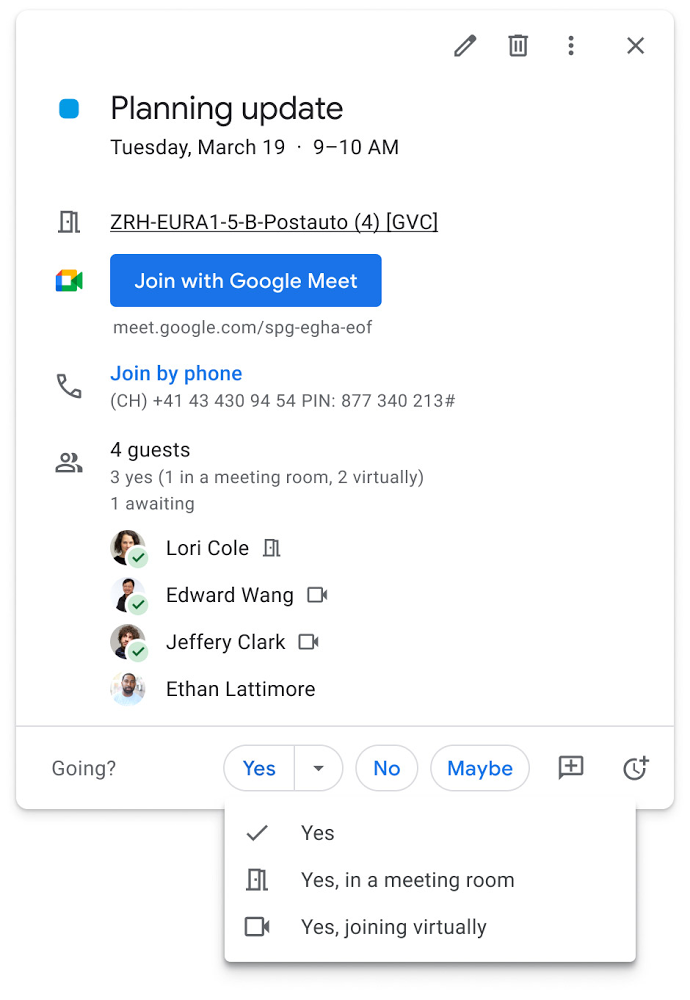
Updates to improve the in-room experience are also coming to Google Meet hardware in September, including the ability to see and use the hand-raise feature and receive notifications from polls and Q&As. The modular design of Meet’s Series One room kits can easily accommodate a variety of space layouts and be paired with an AV cart for optimum flexibility.
We’re also continually launching new controls to make meetings more safe and secure, including the ability for admins to set policies for who can join meetings, and how participants can engage within meetings. To help everyone stay focused in meetings without interruption, in the next few months we’ll introduce moderation controls for hosts, giving them the ability to prevent the use of in-meeting chat and prohibit presenting during meetings, as well as allowing them full control to mute and prevent participants from unmuting.
Together, these changes will make meetings a safer, more connected, and inclusive experience across all hybrid environments. Register today for our free webinar on how Google Workspace is enabling hybrid work and helping foster collaboration equity.
Trusted hybrid collaboration in Google Workspace
Security, data privacy, and trust continue to be the foundation that make anywhere, anytime collaboration possible. As organizations explore new ways for their teams to collaborate securely in a hybrid work world, we’re introducing several ways that we’re strengthening this foundation in Google Workspace.
Today, we’re announcing new security and privacy capabilities to help Google Workspace customers realize the full power of trusted, cloud-native collaboration. Google Workspace Client-side encryption will help customers strengthen the confidentiality of their data while addressing a range of data sovereignty and compliance needs. It will also strengthen meeting security when it comes to Google Meet this fall. Additionally, we’re rolling out a number of security enhancements for Google Drive, including trust rules for Drive that help control how files can be shared within and outside your organization; Drive labels that classify files and apply controls based on their sensitivity levels; and enhanced phishing and malware protections to help safeguard against insider threats and user error. For full details, please visit our security blog post.
A single, connected experience
As businesses move to a hybrid work environment, the importance of creating secure collaboration spaces and fostering human connection has never been more important. Because Google Workspace was designed to fuel anywhere, anytime collaboration, we’re now helping millions of organizations navigate the challenges and opportunities of the newly emerging work model. Our customers are using Google Workspace to rethink virtual meetings, provide people with modern tools to stay connected and manage their time and attention, and double down on security and privacy. In countless ways, Google Workspace was built for this moment.
See how we’re bringing Google Workspace to everyone. With this change, all of our 3 billion existing users across consumer, enterprise, and education now have access to the full Google Workspace experience, including Gmail, Chat, Calendar, Drive, Docs, Sheets, Meet and more.
Workspace powers business as usual for Optiva during COVID-19

3824
Of your peers have already read this article.
3:30 Minutes
The most insightful time you'll spend today!
Established companies in any industry, including telecommunications, often take a cautious approach when it comes to adopting new technology. This is true of any technology and especially of tools used across entire organizations and at all levels—like collaboration and communication tools. I joined Optiva Inc. as its Chief Marketing Officer in August 2018, and right off the bat I faced the need for cloud-based productivity and collaboration tools like Google Workspace (formerly G Suite), which was new to me.
Optiva was in the midst of making an organization-wide change to implement Google Workspace productivity and collaboration tools. Employees at that time—at Optiva and across other organizations I used to work with—primarily collaborated by attaching documents to company emails and meeting their colleagues in office corridors. Meetings were almost always in person or via phone. These processes were inefficient and contributed to version-control confusion and decreased overall productivity. They were also based on our pre-COVID world.
Today, Optiva is a fully remote-first organization, and our employees use all the tools in Google Workspace. Collaboration has increased dramatically, surprising even initial skeptics. Occasionally we still encounter resistance from new employees who are used to a different way of working. This is logical, but more often than not, they thank us later, and many have told me that they see the value for their productivity and the entire organization’s collaboration.
Google Workspace has become a real advantage, especially for a global company like Optiva with employees across the world and in so many different time zones. Instead of waiting for team members’ availability to review or collaborate on a document, wasting time coordinating who works on the latest version, or who is the “owner” of a deck, employees can open a document, view new changes, and add updates, even when others are working on the same document in parallel.
Google Workspace promotes business as usual during COVID-19
The combination of Optiva’s remote-first policy and Google Workspace collaboration tools proved a welcome addition during the challenges posed by COVID-19. Optiva was ahead of the curve of remote working policies in the telecommunications industry and in the software industry as a whole, so when the work-at-home orders went into effect in March last year, Optiva’s business charged ahead without missing a beat.
Google Meet has helped us maintain a strong corporate culture during this challenging time. For example, we constantly use video conferencing, which has been a great way to see the entire team and get a real sense for how each employee is doing—professionally as well as personally. Using Google Chat allowed us to keep in touch with everyone across our global teams. It helps us ensure that everyone feels secure and can work during this challenging time. Also, we have continued to create new teams with employees all around the world. If we attempted to onboard or train them using conference calls or emails, the experience wouldn’t be the same. Meet has helped us develop the strongest teams possible, faster, and much more effectively.
We also use Google Workspace tools to cross-train employees on tasks and processes in departments outside their own. That way, if one of our employees has to be out of the office unexpectedly, the company benefits from full business continuity. To make this possible, various teams and departments documented their specific processes, held training sessions on Meet, and recorded them so any employee could access them on demand.
Many struggled in the early days of the self-quarantine orders, especially when it came to the sudden need to select and deploy new technologies for remote collaboration and, more importantly, to keep supporting their customers. We were fortunate that our business was unphased—and we owe a lot of this success to Google Workspace.
4691
Of your peers have already watched this video.
2:04 Minutes
The most insightful time you'll spend today!
Video: How Google App Maker Helps Businesses Build Mobile Apps in No Time
Analysts estimate that the right custom mobile app can save each employee 7.5 hours per week (that’s a week’s worth of lunch breaks!). Yet, too few businesses have the means, let alone the resources, to invest time and effort in building customized mobile apps. Why?
That’s because their budgets center on big enterprise apps like CRM, ERP, and SCM and beyond those priorities.
App Maker was created to enable your line-of-business teams to build apps for the jobs these bigger apps don’t tackle. With App Maker, you can revamp company processes like requesting purchase orders or filing and resolving help desk tickets, create quick marketing assets, and generate sales enablement apps, for example, as if you designed and built the processes yourself.
This low-code, simple, easy-to-use, drag and drop mobile app creator doesn’t need extensive coding knowledge and can build apps in a jiffy. Anyone can make it: As simple as that.
8011
Of your peers have already watched this video.
2:51 Minutes
The most insightful time you'll spend today!
Video: How Did GANT Get Products to Market in Just Three Months?
It was in 1949 that a Ukranian immigrant Berl Gantmacher launched–what was going to be an iconic shirt-making company–GANT in Connecticut, America.
Since then, the company has reinvented shirts every single day. Headquartered in Stockholm, Sweden, GANT operates in 70 countries.
In 2017, GANT wanted to launch a flagship store in London. It takes most companies a year to open a store, considering the amount of cross country collaboration and planning that’s needed for a store to take off.
In order to open the store in London, teams from three countries—Sweden, Portugal and the UK—needed to work together.
“Right away through the process, we moved forward as one team with one goal. With G Suite we have access to all information in one place and we collaborate on Hangout. A flagship store could be well over a year. Regent Street (London) was three months. A very, very different timeline. It’s been an amazing success for the company,” says Matthew Wood, Creative Director, GANT.
G Suite made it possible for the various teams from different countries to collaborate on a single platform and launch a flagship store in just three months—instead of a year.
Customer Stories: Ocado

4057
Of your peers have already read this article.
2:30 Minutes
The most insightful time you'll spend today!
Ocado is the world’s largest online-only grocery store. But Ocado isn’t your typical corner grocery store. For one thing, there’s no corner as we’re an online-only grocery retailer reaching British households, and now with a fast-growing non-food business alongside. Our customers shop online using our award-winning webshop or mobile apps and then their orders are picked and packed in one of our huge automated warehouses, the largest of their kind in the world; hours later, our vans deliver to their kitchens in one-hour delivery slots.
Google Workspace allows us to do things our way, wherever and whenever we want. Our staff use Gmail, Google Calendar and Google Drive to stay on top of their day to day work, and Google+ is helping our teams stay in touch, share information and build local communities. Ultimately, all of these tools help to make sure our customers get the groceries they order, on time and in the best possible condition.
But we didn’t stop there. We looked at other ways we could use Google’s technology to help us run our business and started using Google App Engine for building internal applications. For example, we used App Engine to create a new version of our “Where’s My Order” application, which our customers will soon be using to find out where their orders are within our production cycle. Once their order is on the road, the integration with Google Maps allows them to see exactly where their delivery van is. So we’re taking what used to be a chore, grocery shopping, and making it a simple experience that you can do from the convenience of your own home, or wherever you may be.
Our most recent project was on Google Compute Engine. Within our warehouses there are certain tasks that are repetitive and arduous for humans to do, like picking heavy six packs of bottled water into customer orders. So our robotics team is developing solutions that use robots to automate these sorts of tasks and thus release staff for other more important work. But these robots need sophisticated 3D vision systems to enable them to see what they are doing. These are very computationally intensive applications and by providing the instantly flexible and scalable computing power to crunch all those numbers, Compute Engine provided the perfect solution. And, we are already using the cloud to store and process some of the huge volumes of data that our business spits out every minute.
But with an eye to future growth and international expansion, we have plans to use Compute Engine and Cloud Storage to move other parts of our production systems to the cloud. So walk into an Ocado warehouse in the future and you might run into a robot if you’re not careful. Like I said, we’re not your typical corner grocery store.
*Google Workspace was formerly known as G Suite
Center for Internet Security’s Latest Benchmark for Securing Chrome
5409
Of your peers have already read this article.
1:30 Minutes
The most insightful time you'll spend today!
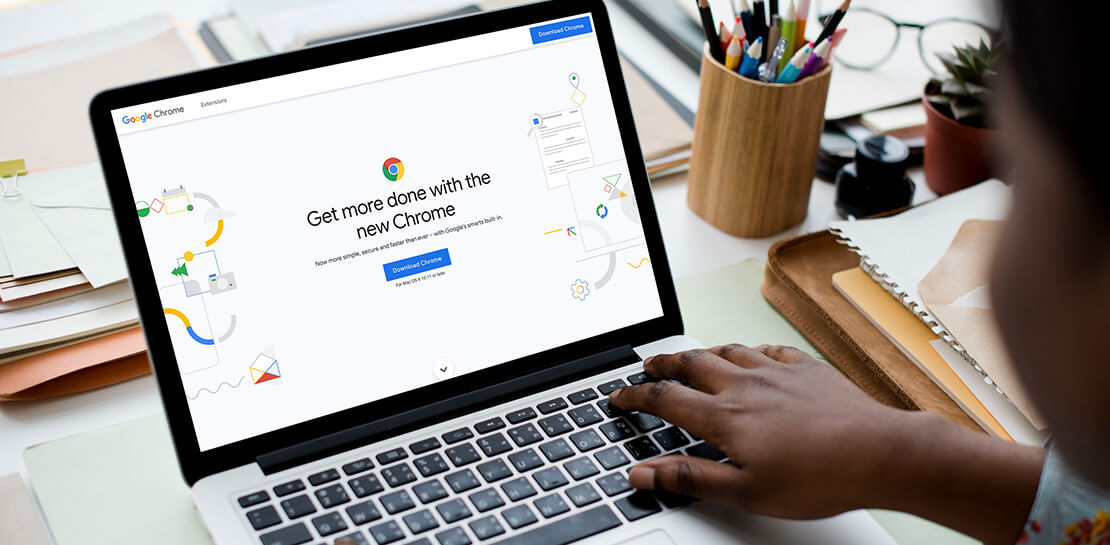
As the way people work continues to evolve, keeping security policies in place that protect organizations but give workers the ability to get things done is more important than ever. IT and security teams must aim to stay a step ahead of web-based security threats that come their organization’s way. To help, the Center for Internet Security (CIS) team has released the latest CIS Benchmark 2.1 for Google Chrome. This Benchmark offers independent recommendations on which Chrome policies to configure to help support organizations’ security and compliance needs. Thanks to Chrome being built with security at its core, in many cases, Chrome default settings are aligned with CIS recommendations.
Chrome is secure by default, but we also pride ourselves on providing customizations for enterprises to allow Chrome to better fit the needs of their business. And with hundreds of policies available through Chrome Browser Cloud Management and Group Policy Objects (Note: The CIS Benchmark is also available as a GPO), organizations can do just that.
Throughout the CIS guide you’ll notice that there are different designations for configuration profiles. Any labeled Level 1, are considered to be a good baseline for an organization. Level 2 profiles are recommended for deployments that require the highest level of security, but note that these settings could have a trade off on user productivity. We recommend looking at each setting and determining if it’s a good fit for your business.
The benchmark is made up of five sections:
- Enforced Defaults — Notes policies that are configured by default when you install Chrome. Enforcing these settings at an enterprise level can prevent these settings from being changed by business users to less secure options.
- Attack Surface Reduction — Details how to disable web features that may not be necessary in your enterprise environment and could reduce your overall attack surface.
- Privacy — Surfaces settings that improve user privacy.
- Data Loss Prevention — Contains settings that can help prevent data loss and protect your organization’s data. (Note: These recommendations cover additional capabilities that can be added to Chrome through BeyondCorp Enterprise).
- Forensics (Post Incident) — Shares recommendations on policies that give insights into post incident forensics and analysis.
Organizations can use these benchmarks to optimize the best way to secure Chrome in their environment. Download the CIS Benchmark here and check out our team’s configuration guide for additional recommendations on how to configure Chrome.
Note: This benchmark was created using a consensus review process composed of subject matter experts. Consensus participants provide perspective from a diverse set of backgrounds such as consulting, software development, audit and compliance, security research, operations, government, and legal. While these recommendations come from a trusted source, it’s important for each organization to weigh which policies make the most sense for their business.
More Relevant Stories for Your Company




Small Fish Farmer Shows Big Corporates How to Be More Efficient
Red Deer, Canada is known for a lot of things. It’s the first city in Canada, for example, to have had a court case to include female jurors. But, more recently, it’s made headlines for something on the outskirts of the city. Just 22 minutes out of Red Deer is

Customer Voices: How Firms from Across Industries Leverage Google Cloud
From powering everyday operations and accelerating application innovation, to providing tools for specific business needs and executing on big ideas, to advancing the security of technology solutions, companies from across industries have leveraged Google Cloud for business benefits. Companies from across industries have turned to Google Cloud for transforming their

How PLAID’S Multi-cloud Approach with Anthos Clusters on AWS Drives Higher Business Growth
Editor’s note: Today’s post comes from Naohiko Takemura, Head of Engineering, and Kosukex Oya, Engineer, both from Japanese customer experience platform PLAID. The company runs its platform in a multicloud environment through Anthos clusters on AWS and shares more on its experiences and best practices. At PLAID, our mission is to maximize the value

Transport Platform’s Richly-detailed Geospatial Data Allows Commuters to Track Buses in Real-time!
Vinayak Bhavnani, Co-Founder and CTO of India-based bus transport technology company Chalo, shares how Google Maps Platform is used to improve visibility for commuters and bus operators across India by visualizing geospatial data. Effective public transport networks contribute to the local economy and help make cities safe, pleasant, and sustainable.
