





Google Workspace Bolsters Data Security by Adding Client-Side Encryption to Gmail and Calendar

1579
Of your peers have already read this article.
4:30 Minutes
The most insightful time you'll spend today!
Editor’s note: This post originally appeared on the Google Workspace blog.
We consistently hear from our customers that the privacy of their data is top of mind, which is why we’ve built state-of-the-art security and privacy-preserving technologies into our products — to keep customer data private and secure. We’ve put Google AI to work on behalf of our customers to automatically stop the majority of online threats before they emerge. Gmail, for example, automatically blocks more than 99.9% of spam, phishing, and malware. These defenses, together with our unique encryption capabilities like client-side encryption (CSE), help our customers such as Groupe Le Monde, PwC, and Verizon, meet their security, privacy, compliance, and digital sovereignty requirements.
Last year, we enabled CSE for Drive, Docs, Slides, Sheets, and Meet, and today we’re excited to share that CSE is generally available for Gmail and Calendar, enabling even more organizations to become arbiters of their own data and the sole party deciding who has access to it. We recognize sovereign controls are important to customers and have accelerated delivery of these encryption capabilities to support our customers in maintaining control over their data and meeting their regulatory compliance needs.
Guarantee complete control of your data for the most challenging regulations
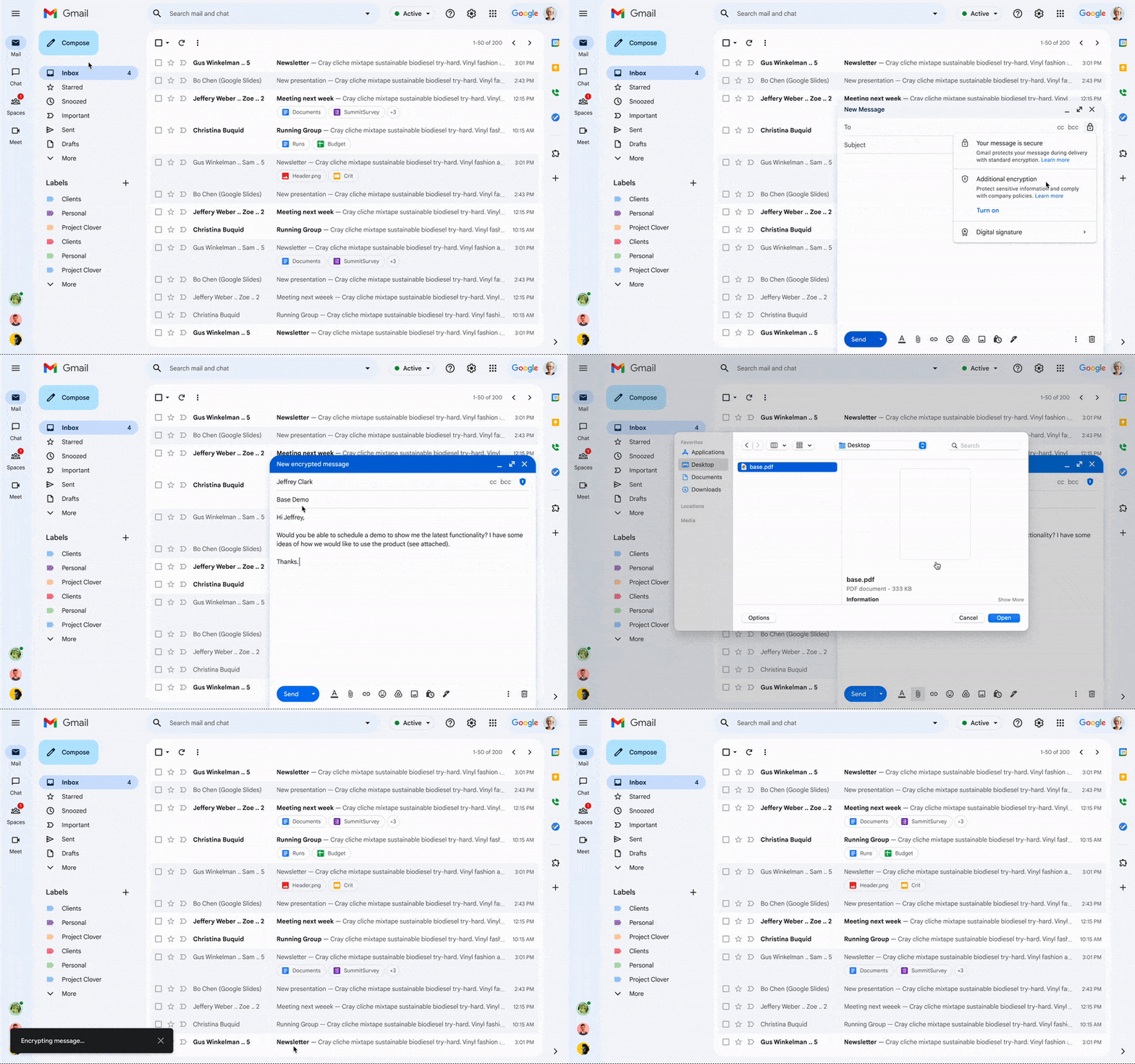
The expansion of CSE capabilities across Google Workspace helps to significantly reduce the burden of compliance for enterprises and public sector organizations. It gives organizations higher confidence that any third party, including Google and foreign governments, cannot access their confidential data. Workspace already encrypts data at rest and in transit by using secure-by-design cryptographic libraries. Client-side encryption takes this encryption capability to the next level by ensuring that customers have sole control over their encryption keys — and thus complete control over all access to their data. Starting today, users can send and receive emails or create meeting events with internal colleagues and external parties, knowing that their sensitive data (including inline images and attachments) has been encrypted before it reaches Google servers.
Users can continue to collaborate across other essential apps in Google Workspace while IT and security teams can ensure that sensitive data stays compliant with regulations. As customers retain control over the encryption keys and the identity management service to access those keys, sensitive data is indecipherable to Google and other external entities.
One key use case for CSE in this context centers on helping organizations subject to regulatory requirements, such as PwC, remain compliant, by meeting the need for the highest levels of encryption for certain types of communication.
“We have been searching for the capability to guarantee that our encrypted communications remain inaccessible to third-parties, including our technology providers, for some time. Google appears to be uniquely positioned with client-side encryption in providing us with complete control over our sensitive data, ensuring that we remain compliant as an organization in the ever changing world of data regulation. These features now being available across Google Workspace represent a pivotal moment for us. We’re enthusiastic about the ability to continue to benefit from the efficiency in working that Workspace provides us with, whilst at the same time maintaining trust with our customers that their confidential data will stay private and compliant,” said Shaun Bookham, UK Operations & Technology Director at PwC.
One of our global telecommunications customers, Verizon, is leveraging CSE to gain complete control over their sensitive data, ensuring that they remain compliant as an organization while supporting customers in highly regulated industries. This opens doors for the company to deliver an exceptional experience for its customers, by extending the level of data protection and privacy to their clients.
“At Verizon, we adhere to governance requirements related to access of our sensitive data while also providing the best experience coupled with deep trust. We have worked alongside Google to develop new encryption solutions and are excited to explore their utilization,” said Russell Leader, Director Collaboration and Mobility at Verizon.
Protecting an organization’s most important assets
The regulatory requirements for separation between an organization’s data and their cloud provider’s environment has resulted in important use cases for client-side encryption — from keeping sensitive R&D data extremely private, even from an organization’s SaaS provider, to scenarios where confidentiality is paramount to the success or failure of a mission-critical operation.
Customers, such as media giant Groupe Le Monde, rely on client-side encryption to protect their most crucial assets. By leveraging client-side encryption across Workspace, Groupe Le Monde can be assured that their communications, appointments, and files will not be subject to leaks, thus helping to keep their journalists safe.
“Client-side encryption gives us the next level of privacy, to ensure integrity within the journalistic process. This allows us to guarantee a higher level of security for our journalists, and to protect our sensitive content,” said Sacha Morard, Chief Technology Officer at Groupe Le Monde.
Another industry-leading Google Workspace enterprise customer uses client-side encryption to protect their most sensitive projects. For these projects, the customer is the sole owner of their encryption keys, thereby protecting their critical intellectual property and maintaining their data sovereignty requirements.
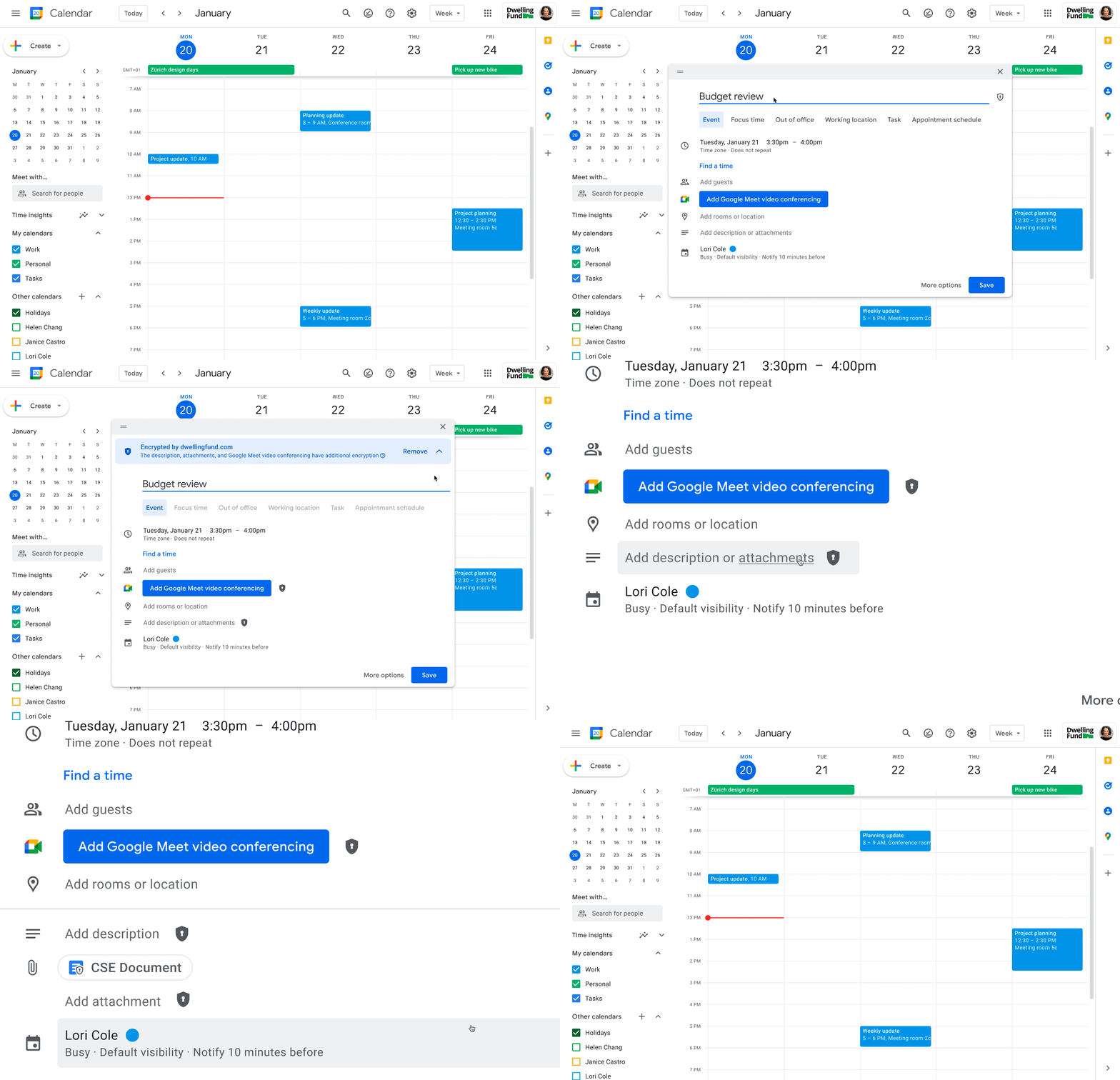
While each customer’s digital transformation journey is different, with all essential Google Workspace apps now being covered by CSE, companies of all sizes in all industries can benefit from these protections.
Starting today, client-side encryption is available globally to customers with Workspace Enterprise Plus, Education Standard, and Education Plus. To learn more about client-side encryption and how to get started today, watch our presentation from Google Cloud Next ’22 and check out the documentation.
Why APIs are De Facto Business Requirements

5558
Of your peers have already read this article.
1:30 Minutes
The most insightful time you'll spend today!
The benefits of APIs are becoming more clear in an ever-evolving tech landscape, yet ITDMs still struggle to convince executives and investors to buy into an API-first strategy. Here’s a look at the importance of APIs in a changing world, and how ITDMs can make the business case in order to secure the best API strategy for their organization.

According to Google Cloud’s new “State of the API Economy 2021” report, a majority of IT decision-makers view application programming interfaces, or APIs, as essential ingredients in improved customers experiences, expanded partner engagement, accelerated innovation, and other demands of today’s business environment. This is encouraging: APIs are how software talks to other software, and since much of digital transformation involves combining disparate data and functionality into rich user experiences and process automations, APIs are an essential ingredient in modern business strategies.
What’s less encouraging: the research surveys primarily IT professionals, not business leaders. It’s clear that IT people see the benefits of APIs in the ever-changing tech landscape, but we still hear regular concerns from these same people that they have trouble convincing executives and investors to buy into an API-first strategy. In this article, we’ll look into why they are having these difficulties and some proven ways to successfully position an API strategy not just as a technological solution, but also as a business requirement.
The importance of APIs in a changing world
The rise of APIs has been heavily influenced by the introduction of disruptive new business models and evolving customer preferences that traditional technologies are not positioned to quickly and efficiently address.
For example, traditionally, if your business sold tickets to events, it would build physical ticket booths and maybe a website or first-party mobile app. Today, tickets in many cases aren’t so much a physical thing presented to an usher as a digital code that an usher scans. Likewise, tickets are less-often purchased in person as opposed to online, and reliance on a first-party website can be unnecessarily restrictive. It places the burden on the business to attract customers, whereas surfacing organically in social media, search engine results, and other digital experiences lets the business meet customers where they’re already assembled.
Moreover, as COVID-19 continues to disrupt events throughout the world, many ticket sellers—and most organizations, for that matter—have pivoted to digital-first business interactions as a matter of necessity. All of these changes in the business model, and all of the interacting systems and functionality that underpin them, rely on communication among APIs.
Similarly, today’s banks cannot grow by simply building more branches or hiring more tellers. Instead, they need to make financial information and functionality available when and where customers require it, whether that means via an ATM, a first-party app, or within some other digital experience. Many banks also need to do more than just present this functionality, as customers are increasingly interested in the analytics and insights their spending patterns can yield. Again, all of these interactions—from customers making a purchase within an app to banks applying machine learning in order to offer customers financial insights—are enabled by APIs.
Related: The “State of API Economy 2021” report describes how digital transformation initiatives evolved throughout 2020, as well as where they’re headed in the years to come. Download for free.
When guidance meets resistance
These examples do not illustrate technology that updates the status quo, but rather technology that unlocks business opportunities that transcend the status quo—and that help businesses to thrive even as the status quo fades into irrelevance and obsolescence. APIs are thus not just an IT topic but also important business enablers that should be understood by everyone involved with the enterprise’s investments, from internal stakeholders approving business strategies to external shareholders trying to assess an organization’s trajectory.
The challenge for investor relations is to convey these financial and operational benefits in a way that clearly communicates the need for a new business model rather than refinements to the existing models. It’s essential that IT professionals understand APIs, but it’s also essential for business leaders to understand them too.
This is even trickier given that arguments for API investments are often based on future potential, while arguments for more conservative alternatives are based on past success.
At a high level, the API value proposition is clear: In the past, valuable functionality and data have been encased in systems and applications, making them difficult to scale or leverage for new, evolving use cases. In contrast, APIs make functionality and data infinitely reusable, infinitely scalable, and modular such that APIs can easily be combined for new uses. All of this accrues to richer user experiences and more flexibility than ever for companies to monetize their digital assets, share them with partners, or combine them with assets from third parties.
It’s essential that IT professionals understand APIs, but it’s also essential for business leaders to understand them too.
But investors typically want as much information as possible because their decisions can affect not just productivity and output, but company stock prices and potential future growth. High-level arguments may not be persuasive. The deeper assurances investors crave would normally come from guidance.
Guidance in this context refers to insights based on growth forecasts and customer adoption, but this can be difficult early in market entry. Robust forecasting processes need to be developed to demonstrate the efficacy and value of the API economy, which can be hard to predict: whereas APIs are well understood in some sectors, and especially among digital natives, they are in the early stages of the growth rate in other verticals, making it challenging to forecast developer adoption of a given API. And since there is a shortage of information, trying to use traditional guidance comes with a risk of being wrong and thus of little value to investors.
Related: Set your 2021 API resolutions with these top 2020 posts.
How to deliver a more useful value proposition
While guidance may be premature during the early stages of market entry, investor relations teams still need to convey the full value of an enterprise to investors. To do this, they need a value proposition that emphasizes the intrinsic value of the investment while reinforcing the benefits that can best drive business and stock growth. Considering how large an investment of time, effort, and money transitioning to an API economy can be, it is vital to convey that the benefits are substantial.
A solid value proposition should demonstrate maximum returns, and while this shouldn’t include far-fetched or unobtainable claims, it can include reasonable aspirational visions alongside statistical insights. To craft these aspirational narratives, investor relations teams should look to their organization’s existing business needs and challenges, and then demonstrate how APIs can benefit the organization in these areas. Here are some options that speak to a number of common business requirements:
- Sales channel: API investments are reusable, improve speed to market, enable automated processes and partner onboarding, and can uncover unanticipated opportunities.
- Cost: Businesses can reduce operational costs by using and reusing APIs for innovation and business development, and by using the services native to your partner’s digital surface, you can further reduce innovation costs and risks.
- Earnings: API-enabled digital ecosystems unlock a variety of partner services that leverage the business’s shared data to drive new customer acquisition, new market positions, new transaction volumes, and direct API monetization.
- Risk mitigation: By investing in a credible API, businesses can mitigate downside risks that traditional enterprises can face from market disruptors, industry-wide shifts to digital tools, and inabilities to ingest and analyze growing data sources.
- Intellectual property: Unlike project-driven innovation and customized, point-to-point integration that traps enterprise knowledge in small teams and divisional silos, APIs are reusable and modular, breaking down silos and encouraging intra-organizational collaboration.
- Speed to market: The efficient, repeatable API interface informs improvements to the fulfillment process with consistent access to data from across the organization, which drives solutions that more quickly and efficiently meet customer needs.
- Ethics: APIs offer the flexibility and economical advantages that give organizations the capacity to focus on their brand’s ethical “reason for being” beyond profitability by serving economically marginal and underserved market segments.
- Customer credibility: Organizations can deliver the extended, connected digital experiences that customers expect with the tools and flexibility included with API products.
- Employee retention: Businesses can avoid losing key employees by updating their legacy technologies with APIs, giving employees the opportunity to enhance their skills with modern technologies.
- Corporate strategy: Enterprises that use APIs’ reusable, modular structure and tools are more capable of adapting to rapid structural shifts in customer demand patterns and sectoral changes in the economy.
Whichever of these business challenges a team speaks to, it is imperative that they demonstrate the benefits of APIs, and that once they’ve determined the angle they intend to use, they keep their message consistent. While we’ve seen a number of viable ways to position APIs as a winning strategy, switching among them could make the presentation—and APIs in general—seem insubstantial and unreliable.
This is why it’s key to decide on the most relevant business concerns, and once you’ve tailored your presentation, to make sure that you have message alignment, including buy-in and support from C-level executives. With a strong pitch built around solving existing business concerns and solidarity from relevant stakeholders, you can go into your investor meeting with the confidence to secure the best API strategy for your organization.
Strengthen your pitch with additional insights. Here are five key trends in 2021 for API-first digital transformation.
About the Author: Paul Rohan is a researcher on Open Banking and a Google Cloud solutions consultant. Paul works with banking C-Suites that are examining the impact of the Platform Economy and Digital Ecosystems on financial services industry growth, market structures and governance. Paul is the author of “PSD2 in Plain English” and “Open Banking Strategy Formation”.
How Google is Showing the Way to the Differently-abled: A Blind Program Manager’s Account

4257
Of your peers have already read this article.
3:30 Minutes
The most insightful time you'll spend today!
What does “accessibility” mean to businesses? It’s not just about making sure that your office or retail space is accessible to workers and customers who have mobility challenges, it’s also about making sure that your apps, digital tools and content are also more accessible to everyone.
Our product teams work every day to ensure that tools like G Suite have built-in accessibility features. As a Program Manager, I help create those features and use many of them myself, as I’m blind. I would like to give an overview of product accessibility features that have been available for some time, as well as some new ones.
Listen to content with help from screen readers.
A screen reader is a helpful tool for people who are blind or have low vision. It provides methods to interact and control applications and also converts content on screen into spoken text. With a screen reader and keyboard shortcuts, you can read, edit, and comment on files. Getting started is easy: In Google Docs, Slides, or Sheets, go to the Tools menu, and in “Accessibility settings,” check the “Turn on screen reader support” box. Learn how to turn on screen reader support in Docs.
G Suite supports several screen readers, including ChromeVox, Google’s own screen reader. ChromeVox is automatically built into Chrome devices, like Chromebooks. You just have to enable it. There are many other screen readers you can use with G Suite too; this support guide explains which screen readers work best with which web browsers.
Another way to listen to content is with Select-to-speak, a feature that reads content aloud to you using text-to speech (TTS) to verbalize highlighted content. To try it out, highlight text and activate the select-to-speak button. An example of a select-to-speak tool is the one built into ChromeOS.
See a summary of changes to your documents.
To make it easier for people to keep track of collaborators’ contributions in Google Docs (without having to actively watch every single change), we recently added a feature called Live Edits. Helpful if you use a screen reader or magnification, Live Edits periodically summarizes changes made to a document by collaborators within the sidebar. Learn how to comment and collaborate in Docs using a screen reader.
And for people who are sensitive to visual crowding, we also introduced eight different Lexend font families that have varied widths and spacing to accommodate different reading speeds. Read more details about these font options.
Use voice typing to “write” by speaking.
Voice typing is a powerful productivity tool for everyone, including those who do not use a keyboard. It’s especially useful for people with low vision or with motor disabilities that may prevent them from using keyboards, mice or trackpads. When you speak into the computer’s microphone, voice typing uses artificial intelligence (AI) to convert your voice into text. In Docs, you can even use voice commands to select and edit text—for example, bolding words or cutting and pasting text.
16 Popular Chrome Insider Posts to Help You Simplify Browser Deployments

4448
Of your peers have already read this article.
1:00 Minutes
The most insightful time you'll spend today!
We launched the Chrome Insider blog in 2019 to share tips and best practices with IT admins so they could better deploy, manage, and secure Chrome browser. Since then, the series has covered everything from supporting legacy browsers to protecting enterprise credentials to simplifying deployments. To make it even easier to find and browse the series, we’ve pulled together all the posts to date here so you can read them all in one place or bookmark them for later.
Managing Chrome tips and tricks
- Understanding Policy Precedence for Chrome browser
- Protecting enterprise credentials with Password Alert
- Managing Chrome browser in a controlled environment
- Simplifying Chrome deployments on macOS
- Configuring Chrome browser in your VDI environment
- Know your options for Modern Enterprise Browser Management
- Managing policies and extensions across operating systems in Chrome Browser
Improving extension management and reporting
- Improving Chrome browser extension management through permissions
- Publishing custom extensions for the enterprise
- Enhanced extension reporting with Chrome Browser’s Takeout API
Ensuring your organization is secure
- Managing BeyondCorp Enterprise’s threat and data protection capabilities in Chrome
- A primer on enterprise private browsing modes
Increasing your organization’s productivity
- Ready, set, Chrome—Improvements and polices to make Chrome more performant
- Troubleshooting with Chrome Browser
- Preparing your enterprise for Flash deprecation
- Apps from the past? Fear not with legacy browser support in Chrome Enterprise
Although the series is 16 posts strong, there are plenty more Chrome Insider posts to come. You can read these posts and more on our Chrome Enterprise channel.
Rethinking time management: Helping employees manage their time efficiently

3600
Of your peers have already read this article.
3:30 Minutes
The most insightful time you'll spend today!
As business leaders evaluate their hybrid work models, employee productivity is top of mind. They’re trying to understand how to balance organizational needs for productivity with employee needs for autonomy, flexibility, and work/life balance. In my role as Google’s Productivity Advisor, I help organizations and employees realize that being productive means working smartly and efficiently — not overworking. And one key to productivity is developing strong time management skills.
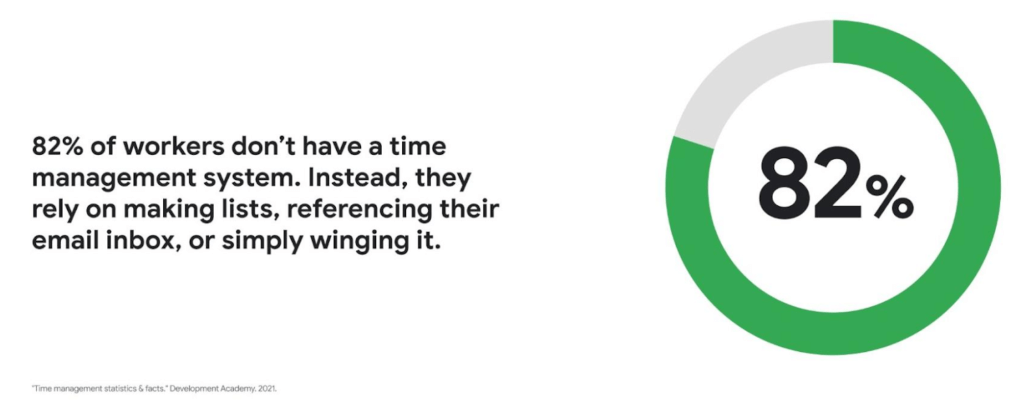
Recent research found that 82% of workers don’t have a proper time management system, however. Instead, they rely on making lists, referencing their inbox, or simply winging it. And the result is telling: 21% of people say “their work is never under control or only under control one day per week.”
Everyone works differently, and one of the best things about hybrid work is that it empowers people to work in their own way, at their own pace. However, if your employees are managing their time inefficiently over the long term, their risk of burnout increases — which can be bad news for employee wellbeing, morale and productivity.
In order for any hybrid work plan to be effective and your teams to be healthy, your employees need to build their time management muscle. You can help them do so with a three-step process:
- Understand how your employees are currently managing their time
- Encourage your employees to identify time management strengths and areas for improvement
- Empower your employees to maximize their time management practices
Step 1: Understanding your employees’ work habits
Before you can help your employees manage their time more effectively, you first need to understand how they spend it. To start, identify habits that might be preventing your employees from establishing productive workflows. For example, some employees might be working too much outside of business hours or spending the majority of their working hours in meetings.
While observation may help you glean some of this information, it’s best to go straight to the source. To find out if your employees feel they’re managing their time efficiently, simply ask them! You can distribute an anonymous questionnaire using a survey tool, like Google Forms, with questions like:
- Are you having trouble getting all your work done?
- Do you feel like you have enough independent working time?
- Do alerts and notifications interrupt or enhance your workflow?
- Which productivity and collaboration tools do you find the most and the least useful?
- How do you communicate best with your coworkers when working on- and off-site?
One major hurdle to effective time management can be too many meetings. To learn if meeting fatigue is plaguing your teams, include a survey question asking employees if they feel like they devote too much time to meetings. Help them get specific by encouraging them to use a tool like Time Insights. With this feature, employees can see exactly how much time they spend in meetings and how much focus time they schedule each week to accurately answer your survey.
Fielding an anonymous questionnaire is a great way to start your time management audit. The learnings that emerge can help you identify patterns in your workplace and among your teams — but they won’t reveal how individual employees work. For that, you’ll need to reach out to them directly.
Step 2: Identifying individual strengths to harness and areas for improvement
Once you have a general idea of how your team works, you can dig deeper into your individual employees’ time management methods and working styles. With this information, you can then help them identify the practices that work — and don’t work — for them.
Suggest to your employees that they spend a week observing their productivity patterns and time management methods. You might encourage people to look at:
- Their level of energy at different times during the day and/or on different days of the week
- The different types of work, such as strategic or administrative, they like doing and when
- How much time they spend doing work versus communicating about work
- How they feel during and after group meetings
- The amount of time they spend in deep-focus versus time spent switching among different tasks
If your organization uses digital timesheets, your employees can consult built-in, automatic time-tracking insights to see where they’re spending their time. Otherwise, you can easily create a custom time-tracking app using a no-code solution like AppSheet to help your employees measure the time they devote to their various responsibilities.
Once everyone has completed their weeklong study, set up dedicated meetings to review your employees’ observations with them individually. Armed with this new understanding, you and your employees can clarify when and how each person does their best work, identify areas for improvement, and start adjusting accordingly.
Step 3: Empowering your employees to flex their time management muscle
Now that you have clarity on how your employees spend their time, you can work with them to develop personal time management practices. To set them up for success, look for opportunities that take advantage of their strengths and offset their challenges — no matter how they like to work.
It’s important to remember there’s no one-size-fits-all solution to using time productively. Some workers love to tackle the most difficult tasks first thing in the morning; others feel more energized at the end of their day. Some people think best in conversation while others prefer to be alone with their thoughts. To help your employees develop time management practices that fit their working style, they need to feel empowered to decide how they can use their time and tools productively.
When it comes to time management, calendars are your best friend, so encourage your employees to take advantage of simple features. Google Calendar lets everyone see availability; by glancing at a shared calendar, coworkers will know when to reach out to someone (and when not to). You can also prompt your employees to block off quiet time during windows when they feel most productive, and use tools like Focus time to protect the time they need for heads-down work.
Email and chat are important, but they can also become a distraction if not used intentionally. Most people open email first thing in the morning, leave it open all day, and check it often. Instead, when you and your employees need to focus, try closing the email tab or using Gmail features to snooze and star emails to stay on task. The same approach applies to chat: check it strategically and turn off notifications when you need deep focus.
Finally, be intentional about building and maintaining trust with your teams as they develop new time management skills. If you decide to use Google Meet for regular check-ins, partner with your employees to develop meeting agendas directly inside Calendar invites to ensure your shared time will be used efficiently.
Valuing impact over output
Hybrid work offers an opportunity for business leaders to rethink their perspective on employee time management and what it means to be productive. Remember, the goal of building effective time management skills isn’t always to become more efficient so one can take on additional work. Often times, taking a step back helps us simplify how we work in order to deepen our impact. When you empower your employees to create a personal time management system, I think you’ll find they will be happier and healthier, with more to contribute to your organization.
5023
Of your peers have already watched this video.
2:08 Minutes
The most insightful time you'll spend today!
Tech Helps This In-Home Healthcare Service Focus on Making Lives Better and Save Costs by 23%
Buurtzorg is an in-home healthcare organization based in the Netherlands, with more than 15,000 nurses working in small community teams across Europe.
Working in small teams of empowered, highly qualified professionals, Buurtzorg provides nurse-led community care across the Netherlands. But as the number of clients grew, it was getting difficult for nurses to keep up with bureaucratic work and take care of patients at the same time. Buurtzorg’s rapid success lies in its nurses’ abilities to act quickly and effectively without unnecessary bureaucracy.
“I said why are we doing it this way? We called our company Buurtzorg, and Buurt means neighborhood. That’s why we moved to G Suite: to reduce unnecessary administrative tasks and focus on patient care,” says Jos De Blok, CEO, Buurtzorg.
Watch this 2-minute video to find out how Buurtzorg serves the community and reduces costs by 23% at the same time.
More Relevant Stories for Your Company

Chrome OS Helped Ocwen Achieve Remote Workplace in Just 2 Weeks during the 2020 Pandemic
Editor’s note: Today’s post is by Parveen Chander Aery, CIO, and Rishi Gupta, Head of Global IT Infrastructure, of Ocwen, a provider of residential and commercial mortgage loan services. The U.S.-based company adopted Chrome OS devices to help global contact center teams work productively together. We’re used to deployments of new

Hybrid Work with Google Workspace: What Customers can Expect
In June, we shared our vision for navigating the future of hybrid work with a single connected experience in Google Workspace. Now, as many of our customers begin to embark on their own hybrid journeys, I wanted to share how we’re helping them bridge the gaps in this new way of




Video: How Whirlpool’s 90,000 Employees Collaborate to Bring 100 New Products to Market Every Year
As one of the world’s largest manufacturing companies, Whirlpool needs no introduction. The 104-year-old company manufactures home appliances from over 70 manufacturing and technology research centers around the world. Innovation has been the company’s focus since its inception and that’s evident from the fact that it introduced close to 100

Safeguarding time and attention with Google Workspace and Gmail
As the pandemic forced millions of people to work from home, many of us found ourselves spending more time in video meetings and in our inboxes as a way to bridge the distance from our colleagues. When the workplace became the living room or the makeshift home office, and as
