





Google Workspace Bolsters Data Security by Adding Client-Side Encryption to Gmail and Calendar
1576
Of your peers have already read this article.
4:30 Minutes
The most insightful time you'll spend today!
Editor’s note: This post originally appeared on the Google Workspace blog.
We consistently hear from our customers that the privacy of their data is top of mind, which is why we’ve built state-of-the-art security and privacy-preserving technologies into our products — to keep customer data private and secure. We’ve put Google AI to work on behalf of our customers to automatically stop the majority of online threats before they emerge. Gmail, for example, automatically blocks more than 99.9% of spam, phishing, and malware. These defenses, together with our unique encryption capabilities like client-side encryption (CSE), help our customers such as Groupe Le Monde, PwC, and Verizon, meet their security, privacy, compliance, and digital sovereignty requirements.
Last year, we enabled CSE for Drive, Docs, Slides, Sheets, and Meet, and today we’re excited to share that CSE is generally available for Gmail and Calendar, enabling even more organizations to become arbiters of their own data and the sole party deciding who has access to it. We recognize sovereign controls are important to customers and have accelerated delivery of these encryption capabilities to support our customers in maintaining control over their data and meeting their regulatory compliance needs.
Guarantee complete control of your data for the most challenging regulations
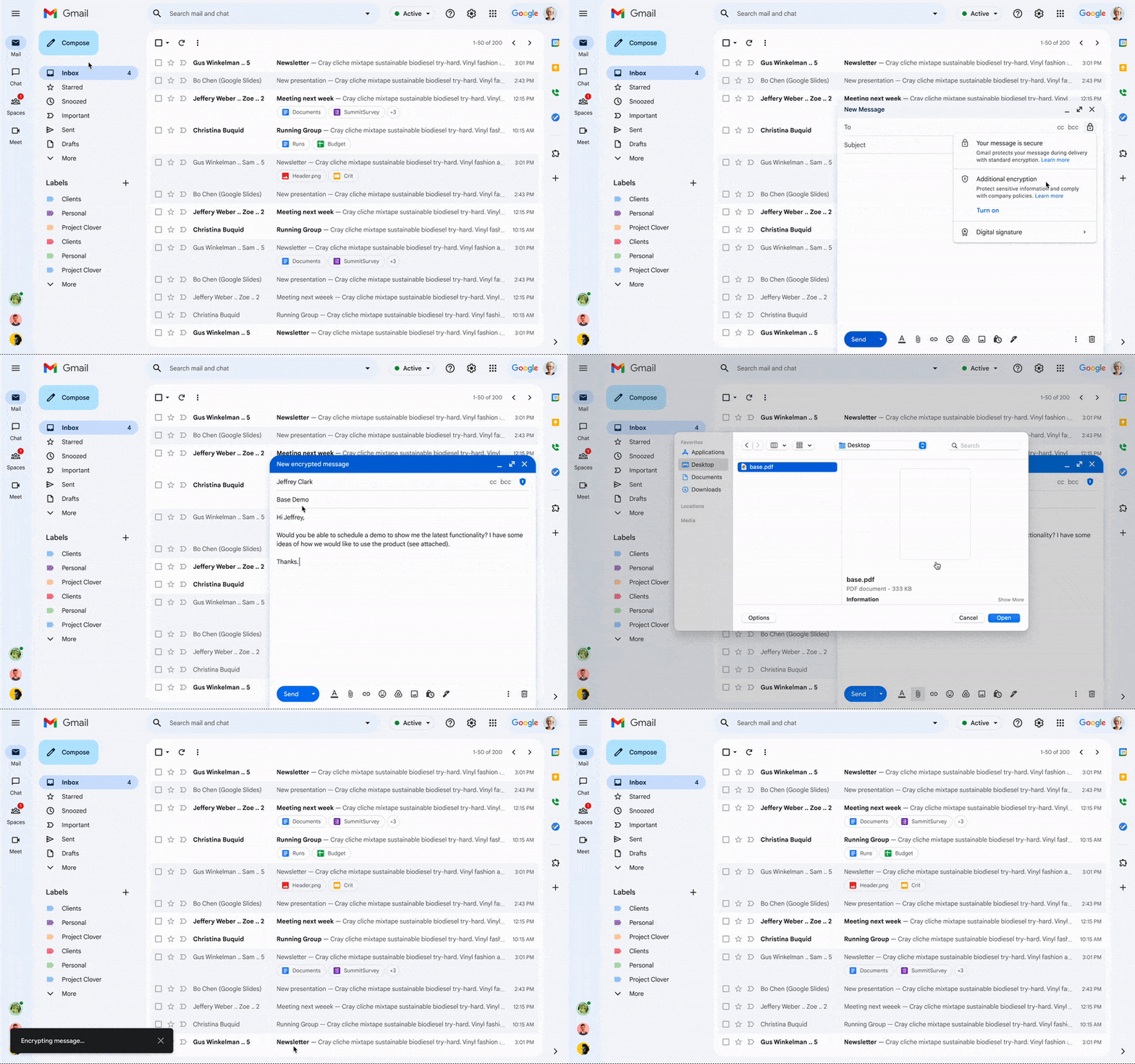
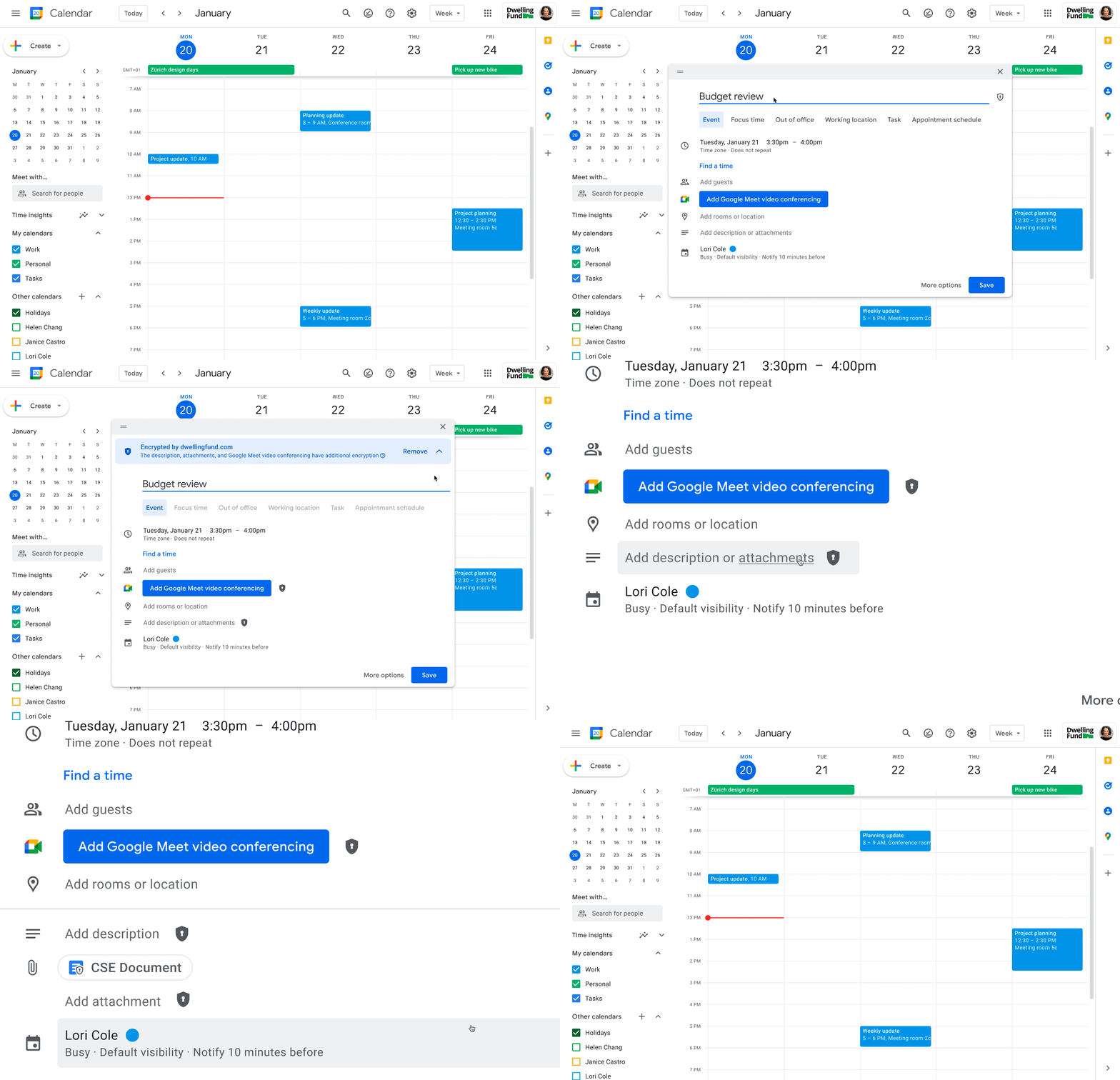
The expansion of CSE capabilities across Google Workspace helps to significantly reduce the burden of compliance for enterprises and public sector organizations. It gives organizations higher confidence that any third party, including Google and foreign governments, cannot access their confidential data. Workspace already encrypts data at rest and in transit by using secure-by-design cryptographic libraries. Client-side encryption takes this encryption capability to the next level by ensuring that customers have sole control over their encryption keys — and thus complete control over all access to their data. Starting today, users can send and receive emails or create meeting events with internal colleagues and external parties, knowing that their sensitive data (including inline images and attachments) has been encrypted before it reaches Google servers.
Users can continue to collaborate across other essential apps in Google Workspace while IT and security teams can ensure that sensitive data stays compliant with regulations. As customers retain control over the encryption keys and the identity management service to access those keys, sensitive data is indecipherable to Google and other external entities.
One key use case for CSE in this context centers on helping organizations subject to regulatory requirements, such as PwC, remain compliant, by meeting the need for the highest levels of encryption for certain types of communication.
“We have been searching for the capability to guarantee that our encrypted communications remain inaccessible to third-parties, including our technology providers, for some time. Google appears to be uniquely positioned with client-side encryption in providing us with complete control over our sensitive data, ensuring that we remain compliant as an organization in the ever changing world of data regulation. These features now being available across Google Workspace represent a pivotal moment for us. We’re enthusiastic about the ability to continue to benefit from the efficiency in working that Workspace provides us with, whilst at the same time maintaining trust with our customers that their confidential data will stay private and compliant,” said Shaun Bookham, UK Operations & Technology Director at PwC.
One of our global telecommunications customers, Verizon, is leveraging CSE to gain complete control over their sensitive data, ensuring that they remain compliant as an organization while supporting customers in highly regulated industries. This opens doors for the company to deliver an exceptional experience for its customers, by extending the level of data protection and privacy to their clients.
“At Verizon, we adhere to governance requirements related to access of our sensitive data while also providing the best experience coupled with deep trust. We have worked alongside Google to develop new encryption solutions and are excited to explore their utilization,” said Russell Leader, Director Collaboration and Mobility at Verizon.
Protecting an organization’s most important assets
The regulatory requirements for separation between an organization’s data and their cloud provider’s environment has resulted in important use cases for client-side encryption — from keeping sensitive R&D data extremely private, even from an organization’s SaaS provider, to scenarios where confidentiality is paramount to the success or failure of a mission-critical operation.
Customers, such as media giant Groupe Le Monde, rely on client-side encryption to protect their most crucial assets. By leveraging client-side encryption across Workspace, Groupe Le Monde can be assured that their communications, appointments, and files will not be subject to leaks, thus helping to keep their journalists safe.
“Client-side encryption gives us the next level of privacy, to ensure integrity within the journalistic process. This allows us to guarantee a higher level of security for our journalists, and to protect our sensitive content,” said Sacha Morard, Chief Technology Officer at Groupe Le Monde.
Another industry-leading Google Workspace enterprise customer uses client-side encryption to protect their most sensitive projects. For these projects, the customer is the sole owner of their encryption keys, thereby protecting their critical intellectual property and maintaining their data sovereignty requirements.
While each customer’s digital transformation journey is different, with all essential Google Workspace apps now being covered by CSE, companies of all sizes in all industries can benefit from these protections.
Starting today, client-side encryption is available globally to customers with Workspace Enterprise Plus, Education Standard, and Education Plus. To learn more about client-side encryption and how to get started today, watch our presentation from Google Cloud Next ’22 and check out the documentation.
Google Launches Smart Canvas to Stir-up Collaboration in Google Workspace

5459
Of your peers have already read this article.
2:00 Minutes
The most insightful time you'll spend today!
After more than a year of remote collaboration, many people are showing signs of digital fatigue. Throughout the pandemic, millions of employees bridged the physical distances with their colleagues by making themselves more available, joining a deluge of virtual meetings, and leaning into a dizzying array of tools and applications. As part of our mission to build the future of work, we’re addressing these challenges in Google Workspace.
As we announced today at I/O, we’re launching smart canvas—a new product experience that delivers the next evolution of collaboration for Google Workspace. Between now and the end of the year, we’re rolling out innovations that make it easier for people to stay connected, focus their time and attention, and transform their ideas into impact.
Specifically, we’re enhancing the apps that hundreds of millions of people use every day—like Docs, Sheets, and Slides—to make them even more flexible, interactive, and intelligent. With smart canvas, we’re bringing the content and connections that transform collaboration into a richer, better experience in Google Workspace.
When we launched Google Docs and Sheets 15 years ago, these apps introduced the world to a new way of working. They enabled anytime, anywhere teamwork—a stark contrast to the legacy tools that were designed for an era of individual work on office desktops. For over a decade now, we’ve been pushing documents away from being just digital pieces of paper and toward collaborative, linked content inspired by the web. Smart canvas is our next big step.https://www.youtube.com/embed/SDBbFETGiA4?enablejsapi=1&
Making collaboration more flexible and helpful
The evolving hybrid work model gives new urgency to existing collaboration challenges. How do teams stay focused and connected as they work together, regardless of where people are located? With smart canvas, we’re building deeper connections across Google Workspace to transform collaboration anywhere it happens.
For example, we’re taking something that people already use every day—@-mentions—to open up new, powerful collaboration capabilities. New interactive building blocks—smart chips, templates, and checklists—will connect people, content, and events into one seamless experience.
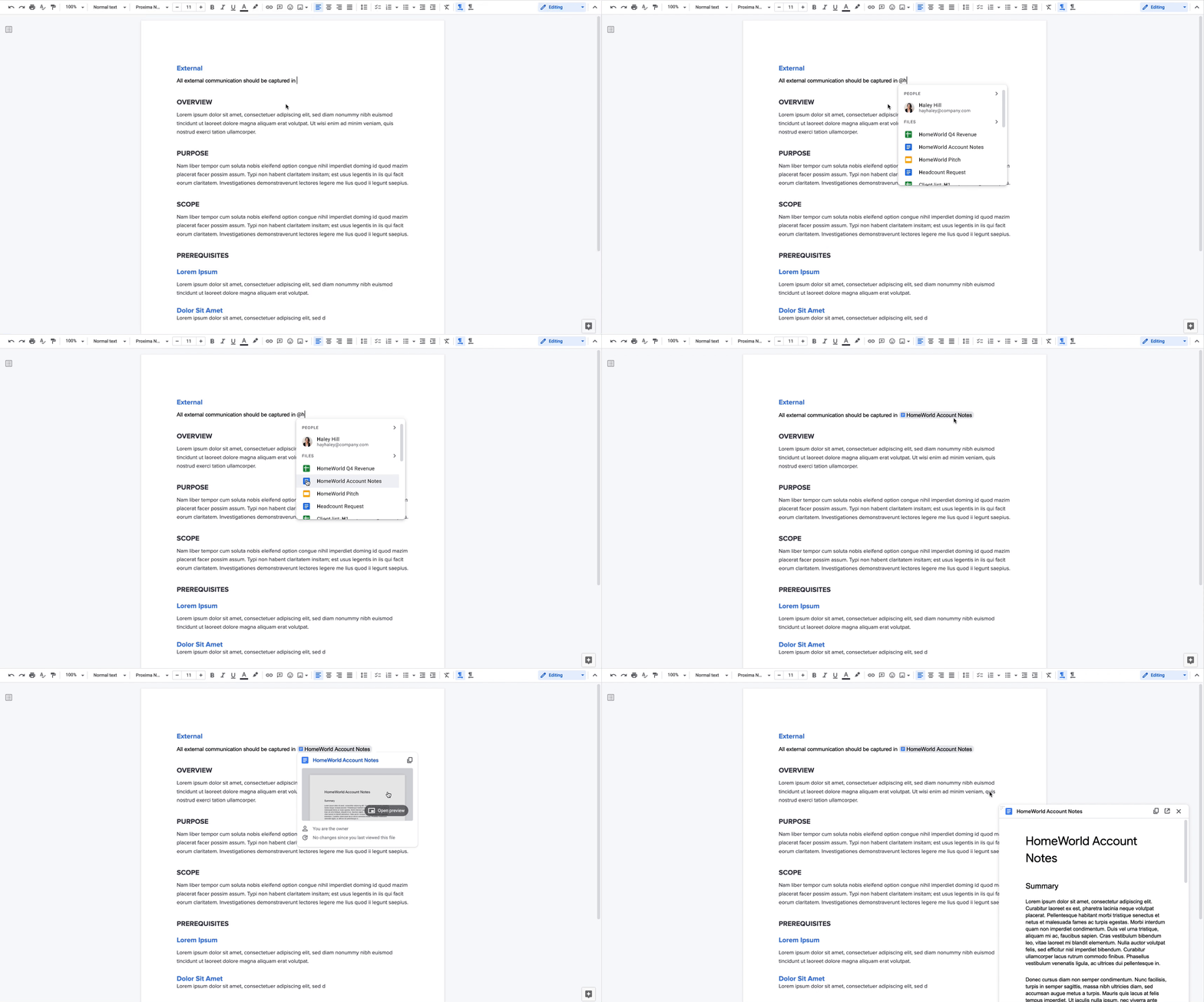
Already available, when you @ mention a person in a document, a smart chip shows you additional information like the person’s location, job title, and contact information. And starting today, we’re introducing new smart chips in Docs for recommended files and meetings. To insert smart chips into your work, simply type “@” to see a list of recommended people, files, and meetings. From web or mobile, your collaborators can then quickly skim associated meetings and people or preview linked documents, all without changing tabs or contexts. Smart chips will come to Sheets in the coming months.
Additionally, we’re making it easier to drive projects forward by streamlining common team workflows. Starting today in Docs, checklists are available on web and mobile, and you’ll soon be able to assign checklist action items to other people. These action items will show up in Google Tasks, making it easier for everyone to manage a project’s To Do list.
We’re also introducing table templates in Docs. Topic-voting tables will allow you to easily gather team feedback while project-tracker tables will help you capture milestones and statuses on the fly. And a new document template for capturing meeting notes will automatically import any relevant information from a Calendar meeting invite, including smart chips for attendees and attached files.
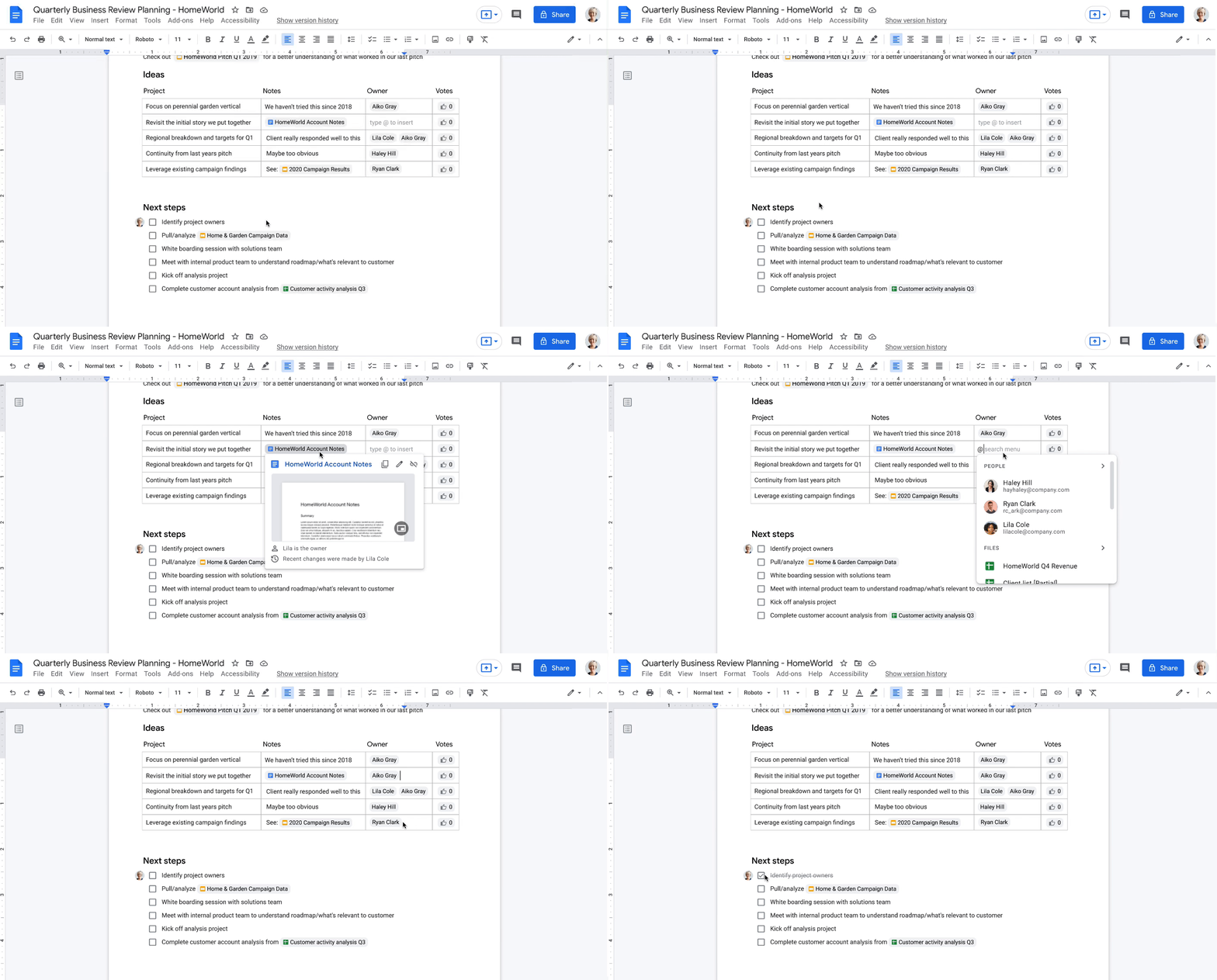
With our new pageless format in Docs, you’ll be able to remove the boundaries of a page to create a surface that expands to whatever device or screen you’re using, making it easier to work with wide tables, large images, or detailed feedback in comments. And if you want to print or convert to PDF, you’ll be able to easily switch back to a paginated view.
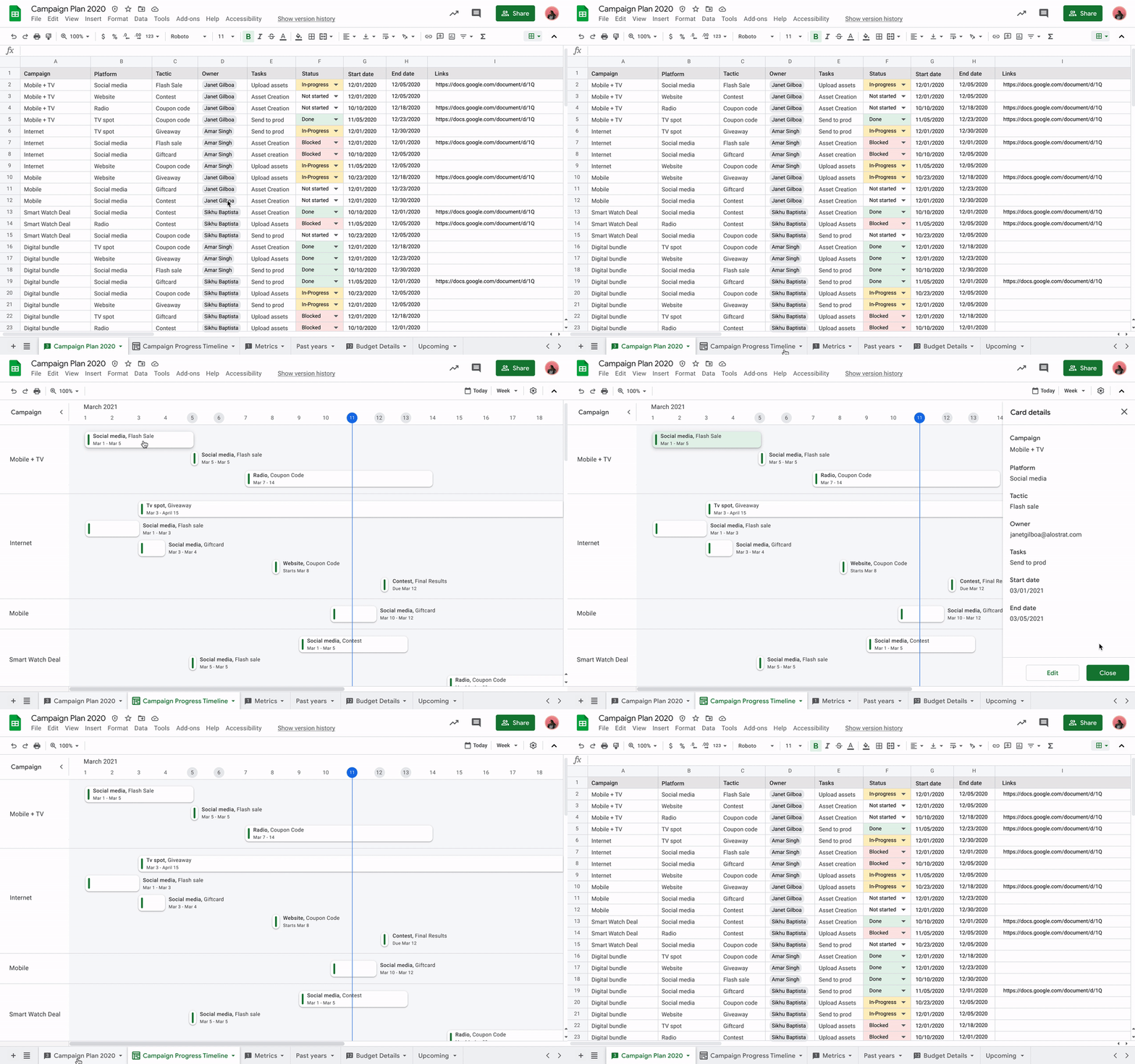
Meanwhile, you’ll be able to toggle between new views in Sheets to better manage and interact with your data. Our first launch will be a timeline view that makes tracking tasks easier and faster. This flexible view allows you to organize your data by owner, category, campaign, or whichever attribute fits best. Using a dynamic, interactive timeline strengthens your ability to manage things like marketing campaigns, project milestones, schedules, and cross-team collaborations.
Fostering human connection—wherever people work
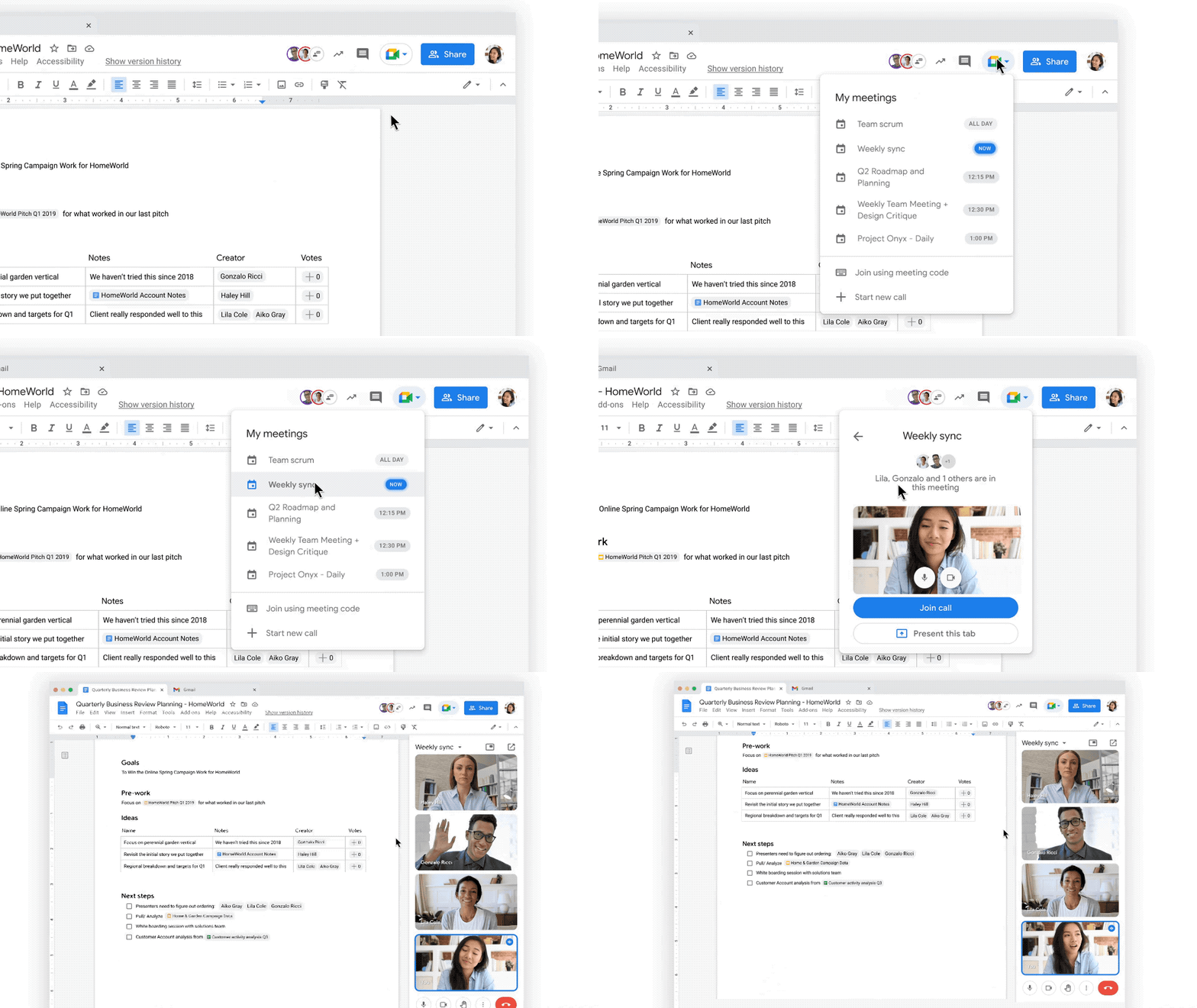
With smart canvas and innovations in Google Meet, we’re making it easy to bring the voices and faces of your team directly into the collaboration experience, to help people share ideas and solve problems together from anywhere. As part of that, we’re building tighter integrations between our communication and collaboration tools so you can pull content into conversations and conversations into content.
Starting today, we’re rolling out the ability to present your content to a Google Meet call on the web directly from the Doc, Sheet, or Slide where you’re already working with your team. Jumping between collaborating in a document and a live conversation without skipping a beat helps the project—and the team—stay focused. And in the fall, we’re bringing Meet directly to Docs, Sheets, and Slides on the web, so people can actually see and hear each other while they’re collaborating.
Live captions and translations in Google Meet will also play a crucial role in keeping people connected as they work together in distributed teams. We currently offer live captions in five languages, with more on the way. And we’re introducing live translations of captions later this year, starting with English-language live captions translated into Spanish, Portuguese, French, or German, with many more languages to follow.
With recent enhancements to Google Meet, we’re also giving people more control and flexibility over the meeting experience, including more space to see people and content, plus the ability to pin and unpin content and video feeds. And to help with meeting fatigue, you can now turn off your self-feed entirely.
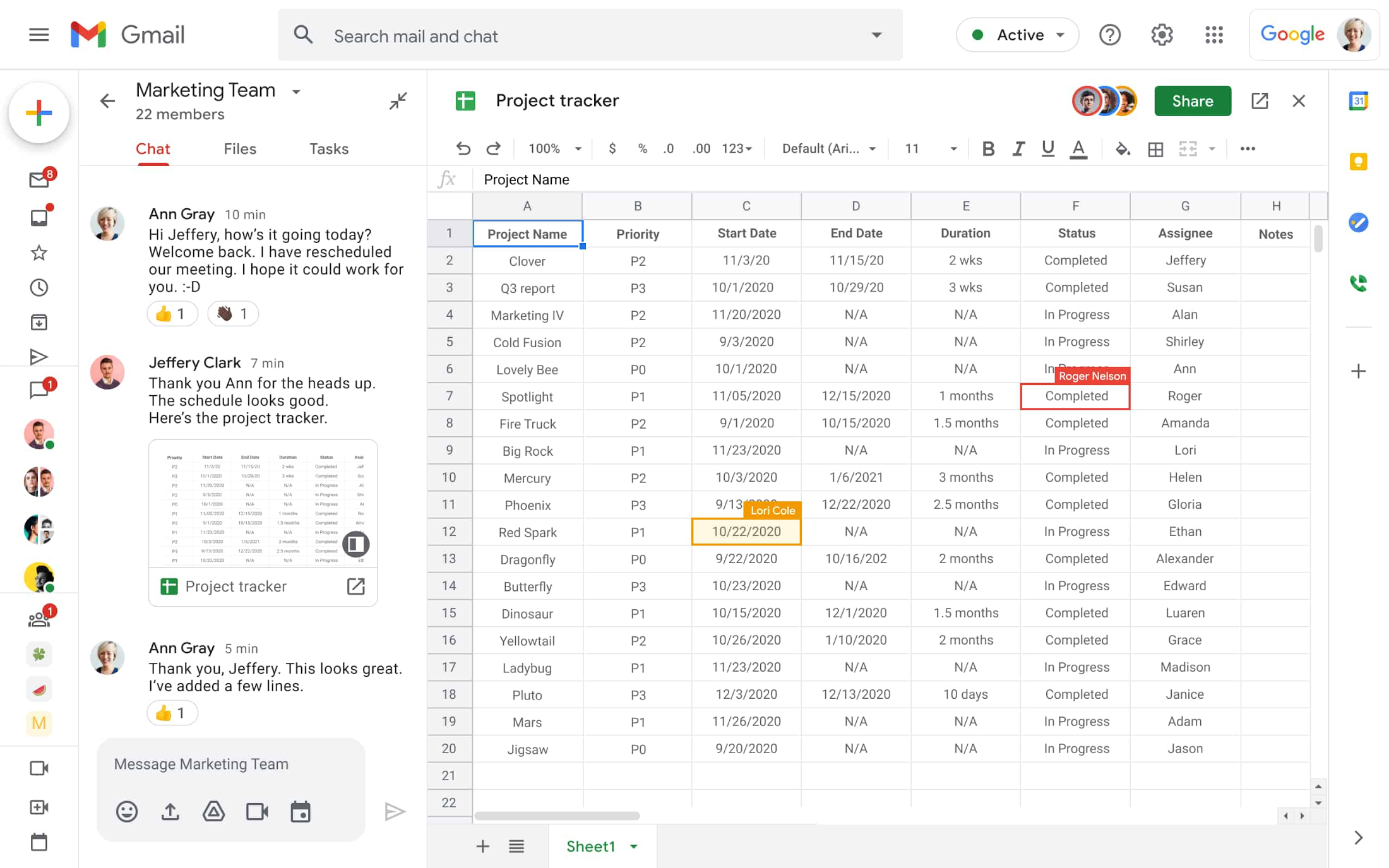
Because we know that collaboration is fluid and fast-moving, we’re making it easier for teams to give feedback on the fly and to move seamlessly between conversations and building content together. Teams can now jump from a discussion in Google Chat directly to building content together. Creating and editing Sheets and Docs from Google Chat rooms is already live in our web experience, and we’ll enable it for Slides in the coming weeks. And to gauge the team’s reactions along the way, we’re introducing emoji reactions in Docs in the next few months.
Working smarter and safer
Google Workspace is already infused with powerful intelligence that enables people to make the best use of their time and attention. Whether it’s with the two billion grammar suggestions we surface in Docs every month, or the intelligent file suggestions in Drive’s Priority and Quick Access features that cut file finding time by 50%.
To help everyone work smarter, in the next few months we’re introducing additional assisted writing features in Docs on the web. This includes warnings about offensive words and language, as well as other stylistic suggestions that can speed up editing and help make your writing more impactful. We’re also adding more assisted analysis functionality in our Sheets web experience, with formula suggestions that make it easier for everyone, not just analysts, to derive insights from data. Sheets intelligence helps you build and troubleshoot formulas, making data analysis faster and reducing errors.
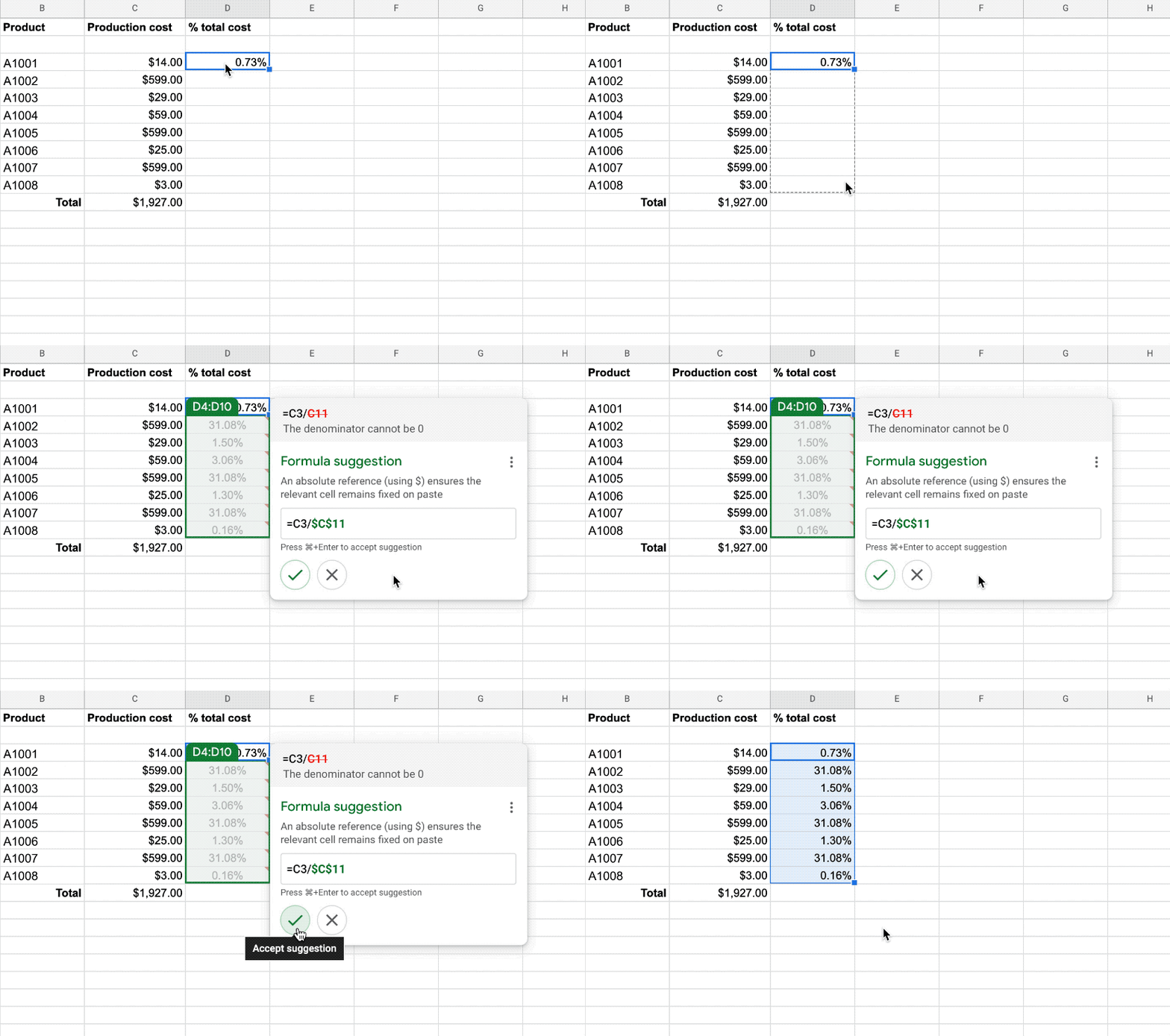
As smart canvas evolves, we’re making it easy for businesses to connect the apps and tools they rely on to Google Workspace. This builds on our history of supporting a variety of add-on features that take the friction out of collaboration—from adding e-signatures directly in Google Workspace with DocuSign to the Salesforce connector that integrates with Sheets. To help people work even smarter, we recently announced that AppSheet Automation is generally available, so that you can automate time-consuming tasks—like approving invoices and onboarding new hires—without having to write a single line of code.
Looking ahead, we’re planning to build additional APIs so you can bring the information and actions you need from third-party tools directly into smart canvas elements like smart chips, checklists, and table templates.
And because trust is at the center of all collaboration within Google Workspace, today we’re also launching advanced capabilities that help protect users against security threats and abuse as they work together.
Transforming how people work to deliver real-world innovation
While there’s no one way to collaborate, we know from our customers that transforming how people work results in real-world innovation.
Google Workspace fuels a new way of working together. It lets our teams around the world—whether they’re in the office, at home, or in the grocery store aisle—work more flexibly and translate their ideas into new ways of delighting customers.
—Thibaud Cainne, Global Head of Tech Infra and Digital Workplace, Carrefour
Transformation happens at all levels, and often in every tool. We were able to get 17,000 of our people to make the shift from Excel to Google Sheets in just six months by demonstrating how we could optimize, automate, and connect spreadsheets and their data. That kind of collaboration leads to real-world innovation for our clients.
—Monica Andrea Diaz Pinzon, Chief of Digital Transformation (Special Projects), Banco Davivienda
We built a digital hub on Google Workspace to transform the way we connect with employees and partners across multiple locations and organizations. It allowed us to spin up major research projects in days instead of months, including delivery of major COVID-19 vaccine studies.
—Justin Riordan-Jones, Head of System and Information (Research), Department of Health & Social Care, National Institute for Health Research (UK)
As smart canvas drives the next era of collaboration in Google Workspace, we remain committed to providing a solution that’s flexible, helpful, and that fuels innovation for organizations in every industry. On the frontlines, in corporate offices, and across the countless workspaces in between, Google Workspace will continue to transform how work gets done.
Work & wellbeing: Find the latest insights on future of work & collaboration

3245
Of your peers have already read this article.
2:30 Minutes
The most insightful time you'll spend today!
Business leaders and IT professionals come to Google Workspace to build secure, cloud-first collaboration solutions that transform how people work together. Here’s the latest from Google Workspace leaders and partners about the evolving future of work and collaboration, all in one place.
Empowering everyday innovation to build a more adaptive business
- Hear from Google Workspace VP of Engineering, Philip Brittan, about how organizations can rethink their approach to innovation.
How organizations can rethink their approach to time management coaching
- Laura Mae Martin, Google’s Productivity Expert, on helping employees get more from their time, without sacrificing their wellbeing.
Google Workspace and Google Cloud help build the future of work at Airbus
- See how Airbus lived up to its mantra of “Any device, anytime, anywhere,” with help from Google Workspace and Google Cloud. Read the article.
Shaping the future of work for frontline workers in Asia Pacific
- Read about the new urgency for businesses to take a fresh look at work and technology experiences on the frontlines in APAC.
Boosting collaboration and participation in the hybrid work world
- Strategies and best practices for organizations building people-first, sustainable hybrid work models.
The future of work requires a more human approach to security
- Security is no longer just about protecting information or restricting how that information is accessed—it’s about building safe, efficient, and effective ways to facilitate seamless collaboration and information-sharing. Read more.
Insights from our global hybrid work survey
- Google Workspace commissioned Economist Impact to conduct a global hybrid work survey. Here are the resulting insights about employee wellbeing, productivity, and the need for better technology.
The Future of Cloud Computing: Choose Your Own Services and Payment Options

2115
Of your peers have already read this article.
1:30 Minutes
The most insightful time you'll spend today!
As the saying goes, “it’s hard to make predictions, especially about the future.” Some organizations find it challenging to predict what cloud resources they’ll need in months or years ahead. Every organization is on its own unique cloud journey. To help, we’re developing new ways for customers to consume and pay for Google Cloud services. We’re doing this by removing barriers to entry, aligning cost to consumption and providing contractual and product flexibility. Read on to learn how we’re rolling out several new go-to-market programs across these key areas to help our customers purchase and consume Google Cloud services more easily.
Removing barriers to entry with Google Cloud Flex Agreements
Many customers choose multi-year commitments because they provide better line-of-sight into IT spend and budgeting. However, these commitments can create difficulty for those who don’t have clear visibility into their future cloud consumption needs. That’s why today we’re launching Flex Agreements, which enable customers to migrate their workloads to the cloud with no up-front commitments. As part of this new licensing option, Google Cloud customers still get access to unique incentives, such as monthly spend discounts1, committed use discounts, cloud credits, and access to professional services, based on monthly spend and workloads migrated to Google Cloud.
Flex Agreements are just one example of how we are removing barriers to help customers start using Google Cloud. In 2022, we launched the Innovators Plus annual subscription, which gives developers a curated toolkit to accelerate their expertise, including access to live and on-demand training through Google Cloud Skills Boost, Google Cloud credits, and more.
We also recently expanded trials for Google Cloud products. For example, the new Spanner free trial instance is good for 90 days, allowing developers to create Google Standard SQL or PostgreSQL databases, explore Spanner capabilities, and prototype applications—with no commitment or contract needed.
Contractual and feature flexibility
Contractual flexibility has always been one of our core principles. Committed Use Discounts (CUDs), for example, provide discounted prices in exchange for a commitment to use a minimum level of resources for a specified term. Last year, we introduced Flexible CUD, spend-based commitments that offer predictable and simple flat-rate discounts that apply across multiple virtual machine families and regions.
In addition to contractual flexibility, our customers also need the flexibility to choose features and functionality based on their stages of cloud adoption and the complexity of their business requirements. Therefore, over the next few quarters, we will launch new product pricing editions—Standard, Enterprise, and Enterprise Plus—in parts of our cloud portfolio. This new commercial packaging model will help give customers more choice and flexibility to optimize their cloud spend.
For customers running workloads such as those in regulated industries like banking and public sector, the higher-end Enterprise Plus tier will offer compute, storage, networking and analytics services with high availability, multi-region support, regional failover and disaster recovery, advanced security, and a broad range of regulatory compliance support. The Enterprise pricing tier will include a broad range of features designed for customers with workloads that demand a high level of scalability, flexibility, and reliability. The Standard pricing tier will offer cost-efficient and easy-to-use managed services that include all essential capabilities such as autoscaling to meet the core workload requirements of customers.
Align costs to consumption with autoscaling
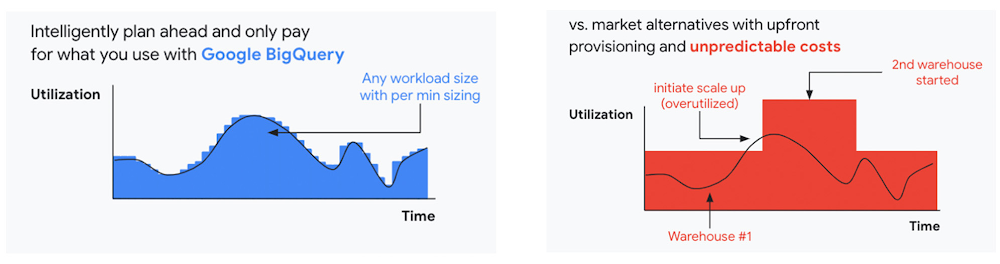
At Google Cloud, a core requirement for the products we build is providing customers industry-leading capabilities to automatically scale (autoscale) services up and down to match capacity with real-time demand. Autoscaling improves uptime, reduces infrastructure costs, and removes the operational burden of managing resources.
Many Google Cloud products include autoscaling capabilities to help customers manage unplanned variations in demand. For example, Dataflow vertical and horizontal autoscaling, in combination with granular adaptive resource configuration (aka “right-fitting”), has resulted in up to 50% saving in infrastructure costs for streaming by automatically choosing the right number of instances required to run the jobs and dynamically re-allocating more or fewer instances during the runtime of jobs. Bigtable also provides native autoscaling capabilities, and Spanner’s autoscale is an open source tool that works across regional and multi-regional Spanner deployments.
Similarly, we added multiple features such as Cluster Autoscaler, Horizontal Pod Autoscaling, Vertical Pod Autoscaling, and Node Auto-Provisioning to GKE for elasticity and cost efficiency.
For L.L.Bean, the ability to quickly scale capacity to meet changing usage patterns (e.g., during the holidays), as well as to rapidly perform load tests to test capacity, are “night and day” with Google Cloud compared to L.L.Bean’s legacy on-premises IT system.
“We won’t have to pay for peak capacity to have it available during peak shopping times. We just scale capacity up or down as needed.” — Randy Dyer, Enterprise Architect, L.L.Bean
We are now taking these capabilities to the next level by enabling autoscaling in BigQuery at a more granular level so you never pay more than what you use. This allows you to provision additional capacity in smaller increments, so you never overprovision and overpay for underutilized capacity. BigQuery customers can now try the new BigQuery autoscaler (currently in public preview) in their Google Cloud console.
A commitment to flexibility and choice
At Google Cloud, we remain deeply committed to the success of our customers and partners, and we are uniquely positioned to help organizations transform their business. By providing you with more flexibility and choice in how to purchase our products, we are empowering you to be more efficient and resilient.
Join Google Data Cloud & AI Summit to hear the latest announcements around innovations in Google Data Cloud for databases, data analytics, business intelligence, and AI. Gain expert insights, new solutions, and strategies that can help you transform customer experiences with modern apps, boost revenue, and reduce costs.
1. Not available for customers buying through Partner Advantage.
How MobileOne Expanded its Stores by 340% in Just Three Years

4829
Of your peers have already read this article.
7:30 Minutes
The most insightful time you'll spend today!
The mobile industry is extremely fast-paced. New smartphones arrive at rapid speed. Smartphone OS updates regularly add new features and capabilities. And by the end of 2018, 5G wireless, the game-changing successor to 4G, will begin to be available in some markets.
With more than 125 T-Mobile premium retail stores across the United States, MobileOne is at the forefront of the mobile industry’s constant, rapid-fire changes. The company is growing quickly, too, expanding its number of stores by 340% in just 3 years.
In this high-growth, non-stop environment, MobileOne’s mission is to keep frontline employees trained, informed, and updated at all times so that they, in turn, can serve as trusted experts to customers. Ultimately, the end game is to stay competitive by delivering the kind of positive experience that encourages customers to return, and to recommend MobileOne to friends.
But fulfilling this mission had become a major operational challenge for MobileOne. Information was typically created in the company’s productivity software suite and shared in emailed file attachments through the company’s on-premises email system. The method was slow and inefficient, and it could introduce errors if an outdated file was emailed.
In addition, there were no central, shared, easily accessible repositories of company knowledge. Thus, to find information shared a few months ago, team members might have to search their email archives for the appropriate file, and the search capabilities of MobileOne’s legacy email system were far from robust. Worse, a file that one employee suddenly needed may exist only on the hard drive of another employee who might be away on vacation.
“Without G Suite, I can’t imagine how we could keep up with everything.”
– Revel Stark, Director of Recruiting and Marketing, MobileOne LLC
MobileOne leaders recognized that a digital workforce transformation was needed to help the company stay focused on delivering excellent customer service. In response, the company began moving all employees to G Suite with the help of Suitebriar, a Google Cloud – G Suite Premier partner.
Sharing docs in seconds
G Suite applications help MobileOne team members collaborate, share information, and receive the latest training. G Suite also helps MobileOne move at an accelerated pace. For example, on a recent Sunday, Revel Stark, Director of Recruiting and Marketing at MobileOne, was on his way to the beach with his family when someone in the company needed a document from him right away.
“It took just seconds to launch the Google Drive smartphone app, do a quick search, and share the requested document,” says Revel. “Before G Suite, I’d have to start up my laptop, assuming I even had it with me, and search for the file. If the file wasn’t on my laptop’s drive, it might be Monday before I could have found and shared it. That just doesn’t work for us. Without G Suite, I can’t imagine how we could keep up with everything.”
Creating central repositories
“Now, with Drive and Sheets, everyone has access to the most recent, business-critical information at the same time. Having live spreadsheets helps us ensure that no important information gets lost, despite the rapid pace in which we work.”
– Revel Stark, Director of Recruiting and Marketing, MobileOne LLC
Drive, coupled with G Suite apps such as Docs and Sheets, streamlines document sharing at MobileOne by enabling the company to create central repositories of information that are easily accessible and, with Google search technology, easily searchable.
For example, the company used to track operations, growth metrics, and performance in its legacy productivity suite’s spreadsheet application. The spreadsheet files were shared via email. But given MobileOne’s rapid growth, the information in those spreadsheet files could become outdated quickly. And there was confusion at times about which file was the most recent version.
“Now, with Drive and Sheets, everyone has access to the most recent, business-critical information at the same time,” Revel says. “Having live spreadsheets helps us ensure that no important information gets lost, despite the rapid pace in which we work.”
MobileOne has set up a Team Drive for each of the company’s departments, too. “With Team Drives, department heads can make sure their department’s documents are well organized, up to date, and easy to find,” Revel says. “And they can give access only to the people who need it.”
Streamlining interview schedules
The thousands of apps in the G Suite Marketplace enable businesses to add even more functionality to the G Suite apps that their employees use every day. MobileOne uses a third-party scheduling app that integrates with Calendar to streamline the scheduling of job applicant interviews. “Job applicants can look at our calendar and pick an open slot to schedule their interview,” says Revel. “It speeds up the process by not having to go back and forth in email, trying to find a time that’s mutually agreeable.”
Simplifying admin duties
“Before G Suite, it was time-consuming to add a new user to our email system,” Revel says. “I’d have to ask our service provider, then wait for them to do it. But with the easy-to-use G Suite admin panel, we can add someone to Gmail ourselves in a minute or two.”
Receiving personalized service
To support the rollout, MobileOne worked with Suitebriar, a Google Cloud – G Suite Premier Partner. Suitebriar efficiently set up MobileOne on G Suite and now provides webinars and on-going support to help MobileOne users get more out of G Suite. “Suitebriar is incredibly responsive,” says Revel. “They know our business, they give us personalized service, and they get back to me quickly when I have questions, sometimes in as soon as 30 seconds.”
Driving new business with Forms
MobileOne uses Forms to help it organize public events and, in combination with Sheets, to measure the success of those events.
Last year MobileOne held 200 events across the company’s 125 stores and is planning to hold up to 400 events this year. The events are designed to connect MobileOne associates with local residents and bring people into its stores who might not otherwise visit.
“We developed a pre-event form that stores use to communicate with our corporate office about what’s needed to set up their event,” Revel explains. “And we have a post-event form that stores can fill out to capture what worked and what didn’t work at the event. The information in that form gets dropped into a Sheets spreadsheet, so we can track the success of events across all stores. It helps us focus on the events that drive the most traffic into stores, where we can connect with locals and show them how we can help them.”
Using Hangouts to train — and applaud
“When a team member in the field does something fantastic, we can gather a bunch of people in a conference room, get that team member into Hangouts, and give him or her a round of applause. It’s a great way to give someone a pat on the back.”
– Revel Stark, Director of Recruiting and Marketing, MobileOne LLC
At MobileOne, Hangouts is among the most used G Suite app. The company uses Hangouts to bring executives together in different locations for a weekly briefing. “Hangouts breaks down the barriers that geographical distances create, so that everyone gets quality time together,” Revel says.
Training is another key Hangouts use case. “Because keeping our people well informed is so important, we use Hangouts frequently to train team members,” says Revel. “We’re currently using Hangouts with a Hangouts Meet hardware in our corporate office for training, and we’re considering expanding that by adding 20 to 30 Hangouts Meet hardware in training rooms across all seven states where we operate.”
MobileOne uses Slides for training presentations, which are often scheduled using Calendar and presented in Hangouts. “Calendar makes it easy to set up training events and to see the availability of people you want to invite,” Revel says. When people find a time that works, they simply add a Hangouts link to the calendar event. Then during the Hangouts session, a presenter can launch a Slides presentation, and attendees can ask questions with Hangouts chat. All of this is easy to set up and the training happens in real-time, which gives it more of an impact.
The company is also leveraging Hangouts in a less conventional way. “When a team member in the field does something fantastic, we can gather a bunch of people in a conference room, get that team member into Hangouts, and give him or her a round of applause,” says Revel. “It’s a great way to give someone a pat on the back.
2022’s First Cloud CISO Perspectives: Recap of the Megatrends, Releases and News

9382
Of your peers have already read this article.
3:00 Minutes
The most insightful time you'll spend today!
I’m excited to share our first Cloud CISO Perspectives post of 2022. It’s already shaping up to be an eventful year for our industry and we’re only in month one. There’s a lot to recap in this post, including the U.S. government’s recent efforts to address critical security issues, like open source software security and zero trust architectures. We’ve also released new resources from our Google Cybersecurity Action Team like the Cloud Security Megatrends and the Boards of Directors whitepaper on cloud risk governance.
Cloud Security Megatrends
We’re often asked if the cloud is more secure than on-prem (and why) so we shared our answer in a recent blog post. At Google Cloud, security by design is our priority. We’ve long adopted zero-trust principles for our baseline security architectures and built a global network that relies on defense in depth layers to protect against configuration errors and attacks. But security is always evolving and that is why we also take advantage of the following megatrends:
- Economy of scale: Decreasing the marginal cost of security raises the baseline level of security.
- Shared fate: A flywheel of increasing trust drives more transition to the cloud, which compels even higher security and even more skin-in-the-game from the cloud provider.
- Healthy competition: The race by deep-pocketed cloud providers to create and implement leading security technologies is the tip of the spear of innovation.
- Cloud as the digital immune system: Every security update the cloud gives the customer is informed by some threat, vulnerability, or new attack technique often identified by someone else’s experience. Enterprise IT leaders use this accelerating feedback loop to get better protection.
- Software-defined infrastructure: Cloud is software defined, so it can be dynamically configured without customers having to manage hardware placement or cope with administrative toil. From a security standpoint, that means specifying security policies as code, and continuously monitoring their effectiveness.
- Increasing deployment velocity: Because of cloud’s vast scale, providers have had to automate software deployments and updates, usually with automated continuous integration/continuous deployment (CI/CD) systems. That same automation delivers security enhancements, resulting in more frequent security updates.
- Simplicity: Cloud becomes an abstraction-generating machine for identifying, creating and deploying simpler default modes of operating securely and autonomically.
- Sovereignty meets sustainability: The cloud’s global scale and ability to operate in localized and distributed ways creates three pillars of sovereignty. This global scale can also be leveraged to improve energy efficiency.
If you’re an IT decision maker, pay attention to these megatrends that will continue to drive and reinforce cloud security and will outpace the security of on-prem infrastructure well into the future.
U.S. Federal government cybersecurity momentum
- Open source software security: Earlier this month, Google participated in the White House Summit on open source software security. The meeting came at a critical time for the industry following December’s Log4j vulnerabilities and was both a recognition of the challenge and an important first step towards addressing it. The open source software ecosystem is not homogenous, despite the fact that the industry often thinks of or treats it this way. Some of it, like Linux, is highly curated, while other critical software is supported through diffuse communities including technology companies and other stakeholders. There is also a long tail of many other critical projects driven by a dedicated community of maintainers around the world, including Googlers. In light of this reality, we welcomed the chance to share our recommendations to advance the future of open source software security. Some work we’ve done includes founding the Open Source Security Foundation, which has been instrumental already in making security improvements. We’ve also helped drive a number of key security initiatives within the open source community including security scorecards, the SLSA framework to improve the security and integrity of open source packages, and Secure Open Source Rewards to financially incentivize improvements to critical open source security projects.
- OMB’s Federal zero trust strategy: The publication of the Office of Management and Budget’s zero trust architecture strategy marks an important step for the U.S. federal government’s efforts to modernize under Executive Order 14028. Google Cloud supports this approach, which recognizes the immense security benefits offered by modern computing architectures. For the past decade, Google has successfully applied zero trust principles through our BeyondCorp and BeyondProd frameworks for providing end-user access and securing our cloud workloads. And we’ve brought these best practices from our own journey to global governments and businesses of any size through solutions like BeyondCorp Enterprise and capabilities like Binary Authorization and Anthos Service Mesh, which are embedded in Anthos, our managed application platform. For Federal agencies embarking on this zero trust journey, the Google Cybersecurity Action Team will offer our expertise by conducting Zero Trust Foundations strategy workshops, which can help organizations in the public and private sectors develop actionable and achievable strategies and plans for zero trust implementation.
Google Cybersecurity Action Team Highlights
Here are the latest updates, products, services and resources across our security teams this month:
Security
- Democratizing security operations: We recently announced that Siemplify, a leading security orchestration, automation and response (SOAR) provider, is joining Google Cloud to help companies better manage their threat response. Providing a proven SOAR capability with Chronicle’s approach to security analytics is an important step forward in our vision to advance invisible security and democratize security operations for every organization.
- Security by design: The Highmark Health security team is using “secure-by-design” techniques to address the security, privacy, and compliance aspects of its Living Health solution with Google Cloud’s Professional Services Organization (PSO). Google has long advocated for and followed security by design principles, which is why we’re continuously building enhanced security, controls, resiliency and more into our cloud products and services.
- Secure collaboration for hybrid work environments: The Google Workspace team shared its recommendations for businesses as they prepare for the future of work, where the hybrid/flexible work model is becoming standard practice and a new approach to security is essential.
- Anthos Policy Controller CIS Benchmark enforcement: A big part of our shared fate philosophy is to build secure products and not just security products. A recent example of this in action is embedding CIS benchmark policy conformance in the Anthos Policy Controller. We believe the more we embed approaches like this into our products, the more application and infrastructure teams can intrinsically embed security at the start and reduce toil for the security team.
- DevOps for technology-driven organizations and startups: A key success factor for many security programs is the partnership and integration with development teams, and there are some great resources and lessons in our DORA research.
- Security by design with Chrome OS: ABN AMRO’s Asia-Pacific region team recently shared how they are using Chrome OS and CloudReady to work securely in the cloud, reduce total cost of ownership, and add flexibility for employees. This is a great example of secure by design principles in the use of Chromium.
Risk & Compliance
- Boards of Directors summary guide to cloud risk governance: The latest whitepaper from the Google Cybersecurity Action Team outlines how boards of directors can prioritize safe, secure, and compliant adoption processes for cloud technologies within their organizations.
- TruSight Risk Assessment of Google Cloud: TruSight recently released a comprehensive
risk assessment report on Google Cloud. Our Enterprise Trust team collaborated on this robust assessment of Google Cloud services to validate the design and implementation of controls. TruSight’s risk assessment of our security controls will help customers accelerate and complete their risk management due diligence. - Data governance: Check out this new blog series on data governance where our teams explain the role of data governance, its importance, and the necessary processes to run an effective data governance program. Implementing data governance will help maximize value derived from business data, build user trust, and ensure compliance with required security measures.
Controls and Products
- Encrypting Data Fusion: To help meet the security, privacy and compliance requirements of customers in regulated industries like finance or public sector, we announced the general availability of Customer Managed Encryption Keys (CMEK) integration for Cloud Data Fusion, which enables encryption of both user data and metadata at rest with a key that customers can control through our Cloud Key Management Service (KMS).
Don’t forget to sign-up for our newsletter if you’d like to have our Cloud CISO Perspectives post delivered every month to your inbox. We’ll be back next month with more updates and security-related news.
More Relevant Stories for Your Company

In sync for better efficiency: Effective collaboration strategies for distributed workforces
Workplace collaboration continues to evolve as hybrid work expands its footprint. While both “same-time” and “staggered-time” (or asynchronous) collaboration modes each have their place in the hybrid work environment, organizations and teams sometimes overuse one mode over another. That’s probably because in-person meetings or collaborating in real time have been


Introducing G Suite Essentials: The simplest way for teams to securely work together from anywhere
With millions of employees forced to work from home, it has become clear that the existing tools many have in place were not cutting it. The Google Cloud team stepped in and accelerated production timelines to launch a new offering. G Suite Essentials is Google's integrated set of tools designed

From operations to planning, G Suite customers scale data insights with Connected Sheets
We recently announced the general availability of Connected Sheets, which brings you the power and scale of a BigQuery data warehouse in the familiar context of Google Sheets. With Connected Sheets, you can analyze billions of rows and petabytes of data in Sheets without specialized knowledge of computer languages like SQL.
Guide to Google’s Underwater Infrastructure
From data centers and cloud regions to subsea cables, Google is committed to connecting the world. Our investments in infrastructure aim to further improve our network—one of the world’s largest—which helps improve global connectivity, supporting users and Google Cloud customers. Our subsea cables play a starring role in this work,
