





Google Products Helps HMH’s Healthcare Staff Work from Anywhere Efficiently and Securely!

10203
Of your peers have already read this article.
3:00 Minutes
The most insightful time you'll spend today!
Hackensack Meridian Health (HMH) executive Mark Eimer explains how an ambitiously-timed rollout of a comprehensive suite of Google products helped the entire organization—from doctors to IT staff—achieve better security, cultivate a more equitable work environment, and ultimately, improve patient outcomes.
How does a recently merged, 17-hospital healthcare system fast-track a platform migration and hardware rollout securely and in a way that improves work for everyone, regardless of location or role? These are the questions that kept me up at night in early 2020, when the pandemic demanded a “big bang”—something our legacy laptops and operating systems couldn’t handle.
We began our work with Google in 2020 with the adoption of Chrome as our default browser. As we migrated platforms, keeping patient data safe was of the utmost importance to us, along with providing every staff member with the tools they needed to work virtually. Our staff often experienced issues accessing our web-based applications using Internet Explorer or Edge Browser, a problem that went away when we switched to Chrome. Chrome’s versatile compatibility also made it easier for my team to migrate all of our web-based operations, and Chrome’s security and manageability were key components to making this switch a huge win for the organization.
The success of this migration led us to extend our Google partnership to patient care applications—where Google’s expertise in AI and ML helps scale the use of diagnostics tools and improve other aspects of the patient journey.

Achieving security at every step
Like so many other healthcare organizations, we’ve been concerned about ransomware attacks. This is part of why we moved to Google Workspace and distributed over 3,000 Chrome OS devices in kiosk mode in March of 2020, when many of us went remote due to the pandemic. We were very concerned about team members accessing corporate applications through home devices that were running EOL operating systems (WIN7), as well as a general lack of antivirus and encryption measures.
We were protected by the fact that Google’s software and hardware both had built-in security features that we needed to stave off sophisticated attackers. For example, Chrome OS automatically updates to the latest security update and encrypts data living outside the cloud on the hardware. These features protected us from security-related disruptions, letting us securely move a huge library of file shares and emails across thousands of accounts to Google Chrome OS in just four months.
A year later, in March 2021, we migrated the enterprise over to Google Workspace and saw an immediate reduction in spam by 30% from the inherent built-in AI/ML. This meant staff were less likely to receive (and click through) phishing attempts. My team could connect, create, and collaborate easily and securely—even as more of us were working from home and needed to access sensitive data remotely.
Leveling the playing field
As an organization, we were surprised by how many team members didn’t have personal computers at home. We quickly decided that if we needed team members to work from home, the health network would have to supply hardware. Chromebooks’ lower price tag compared to PCs—on top of their built-in security controls—allowed us to purchase, deploy, and support that initial distribution of 3,000 Chromebooks to team members in less than three weeks, providing devices to every eligible remote employee instead of just a select few. This was vital to reaching our equitable technology goal as part of our diversity and inclusion initiative: everybody has the same tools to do good work.
When all employees have what they need to do their jobs well, we get better patient outcomes. Before we began this cloud adoption journey, patient and staff experiences were different within the hospitals and outside of them.
Now it’s the same wherever our staff is, and we’ve seen efficiency and accessibility benefits extend to the patient side. For example, we built a web-based contact center that supports 80 locations that use Workspace and Chrome OS devices. Since customer service, admin, and providers are all on the same system, it has become a one-stop shop for patients.
Furthermore, through the Grow with Google program, we were able to provide another benefit to employees that drove our equity goals. Google trained 50 non-IT staff members—from environmental services, food and nutrition, and other non-tech areas who were interested in making a career change to IT—on the Google products we were using. They may not have thought about switching to a career in IT before the Grow with Google program came to our organization, but through this partnership, they now have that opportunity.
A strategic, long-term partner
With any large-scale rollout, the work doesn’t end once laptops are in employee hands. Google has shown their commitment to long-term collaboration as they continuously optimize their products for the unique needs of healthcare providers and go the extra mile in tailoring tools to our staff’s workflows.
For example, on the Chrome OS side, the Google team has helped our registration desks and document centers with device integration for hardware like credit card readers and e-signature pads. They’ve also helped us meet security and privacy requirements mandated by state and federal governments around HIPAA, Medicaid, and Medicare reimbursements. Over this next year, we’ll look at a feature roadmap with Google Cloud to deliver further enhancements, iterating on the product itself to meet our needs for the present and the future.

Delivering the future of healthcare
The benefits we’ve seen around security and usability—and the ability to provide all staff with equal access to Google’s technology—are why we’re expanding our partnership with Google to both the administrative and clinical sides of HMH. In addition to further Google rollouts with corporate, next year we’re distributing Chromebooks to all 350 of our ambulatory clinics.
We’re also working with the Google professional services team to create a custom AI model that analyzes 3D mammogram images. This AI model will enable two providers to read mammograms—which adheres to international best practices but is currently rare in the US—without requiring additional time. Conducting double readings of mammograms will yield better health outcomes for our patients, such as a lower patient recall rate and an increased accuracy in detecting breast cancer.
We’re currently building the model using a variety of Google Cloud products, including Cloud Healthcare API. Once complete, this model is expected to be trained, deployed, and maintained in Google’s Vertex AI, allowing our providers to be more productive as they make clinical decisions with AI support. As the model is proven over time, we plan to make the predictive services accessible to other healthcare organizations.
With Google, we’re able to achieve a unified architecture for storing data as well as training and deploying AI models, which enable our staff to work more efficiently and securely from anywhere. While I may not be able to predict the future as accurately as AI can, I foresee our continued partnership with Google as a key part of HMH’s improved provider and patient outcomes.
6 ways Google Workspace helps IT admins safely use BYOD

4186
Of your peers have already read this article.
6:30 Minutes
The most insightful time you'll spend today!
Many organizations, including Google, have moved quickly to embrace working from home. With this widespread remote work, it’s never been more important for IT admins to be certain that every device in their organization is secure, even when that device isn’t company-owned.
We pioneered zero-trust security through our BeyondCorp strategy and leverage it to offer advanced security for G Suite* users to protect secure access for all devices. Admins can enforce these controls across G Suite and other corporate applications and data, ensuring consistent security and user experience across your organization.
Today, we’re laying out six key controls that IT admins can use within G Suite to help keep their organizations safe when using the bring your own device approach (BYOD). You can also review our detailed security checklist here, and learn more from our course on Managing G Suite here.
Secure mobile and desktop devices with endpoint management

BYOD devices can differ widely across an organization, with a range of OS versions, hardware modes, patch versions, and more, so it’s impossible to rely on a one-size-fits-all approach to device management. With Google endpoint management, IT admins can easily support a variety of mobile and desktop devices by enforcing measures like minimum software versions and blocking jailbroken or rooted devices, in many cases without requiring full device rights for employee privacy.
When it comes to managing mobile devices, G Suite offers basic and advanced mobile device management:
- With basic mobile device management, BYOD devices are secured with baseline security features with no end user friction. Admins can enforce a passcode, get a device inventory, wipe Google accounts remotely, and even remotely install applications on Android devices.
- With advanced mobile device management, admins can apply more policy controls over BYOD devices, and Android users can keep their personal data private and separate from their work data with Android Work Profiles. You can also allow and manage work apps on iOS and Android devices.
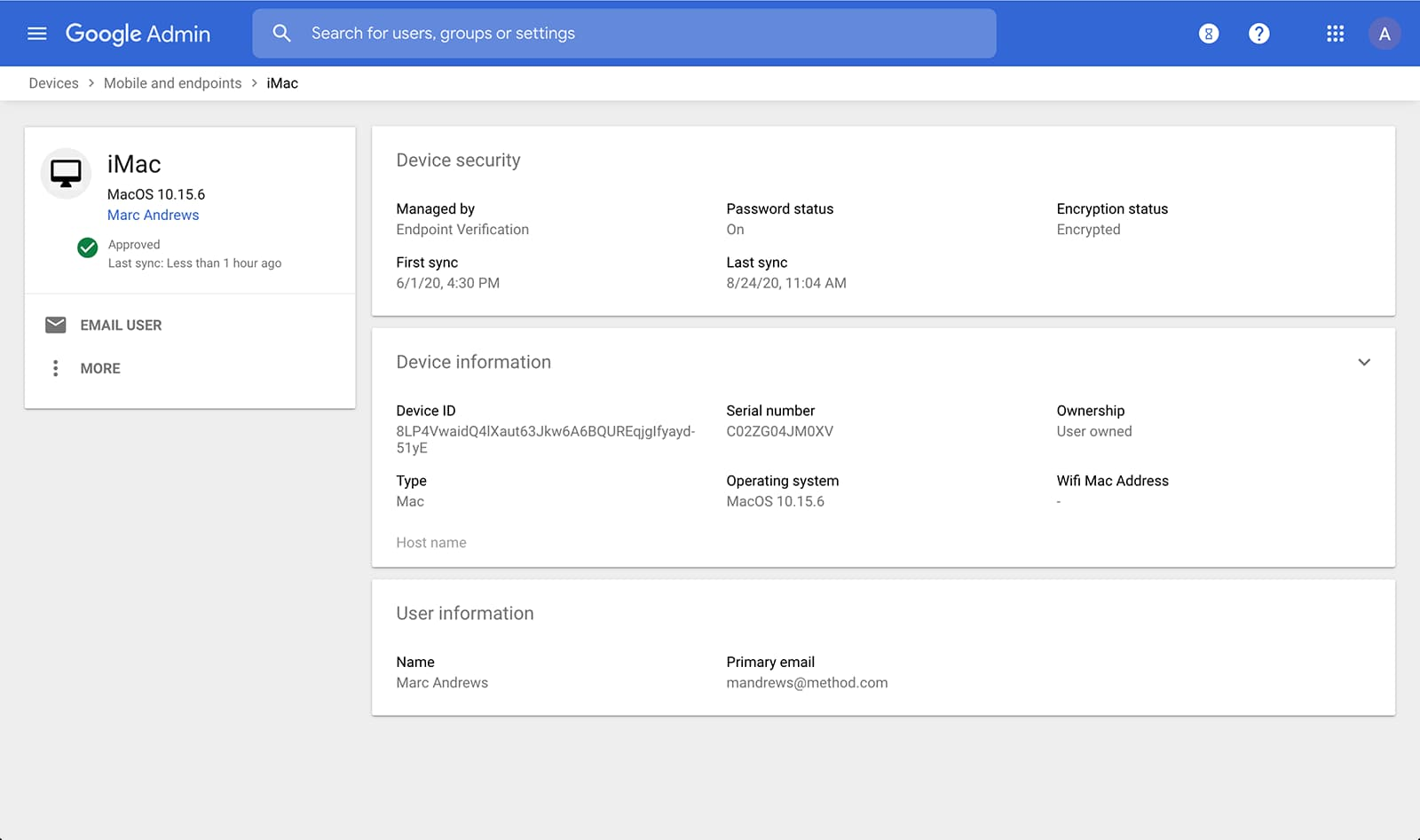
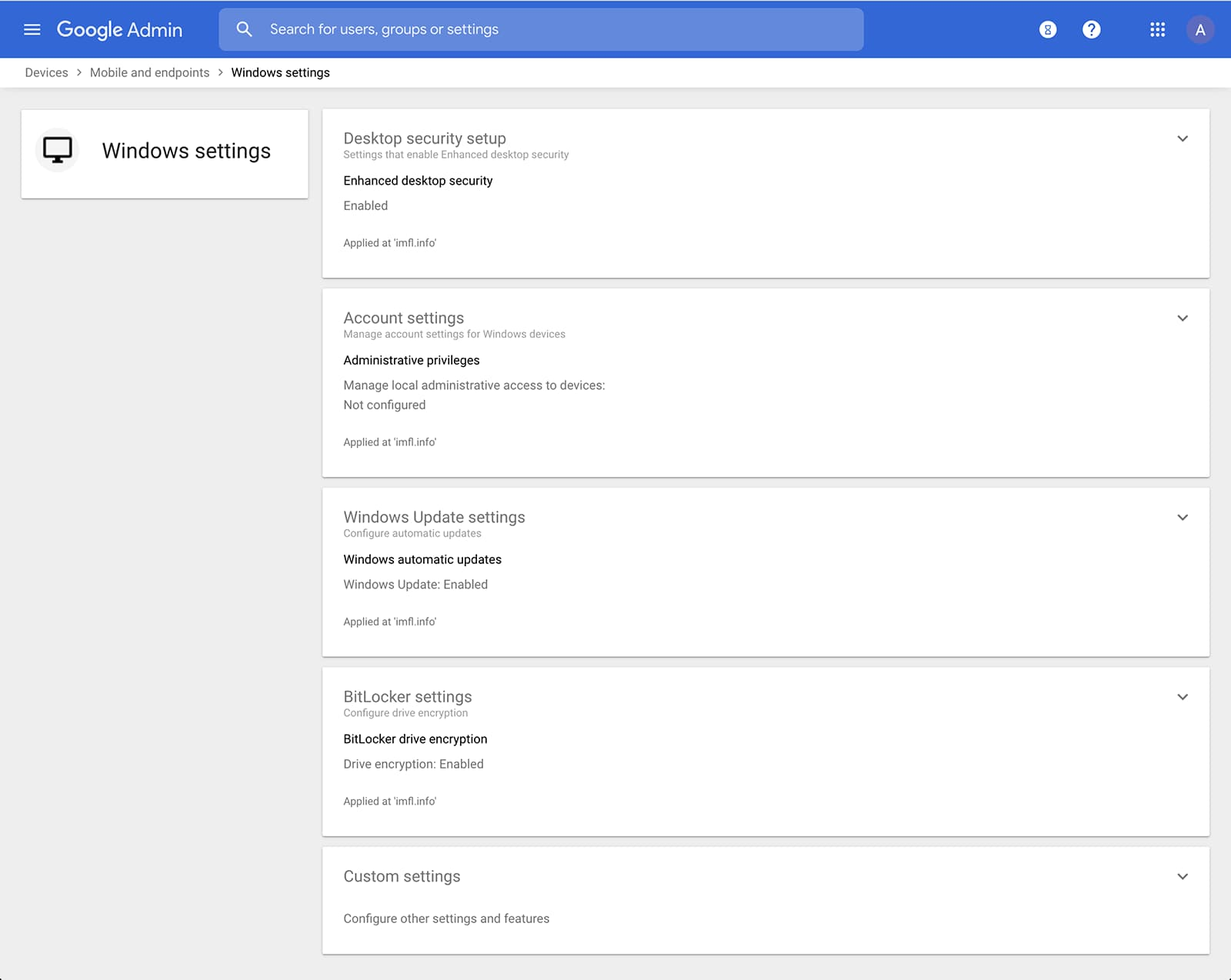
Admins can also manage and secure desktop devices with fundamental device management and enhanced desktop security for Windows. With fundamental device management, when a user logs into G Suite through any browser on a Windows, Mac, Chrome, or Linux device, that device will be automatically enrolled with endpoint management. This provides a base level of security to every desktop device that accesses G Suite data. With enhanced desktop security for Windows, admins can easily manage and secure Windows 10 devices through the admin console.
Enable secure connections without a corporate VPN using context-aware access
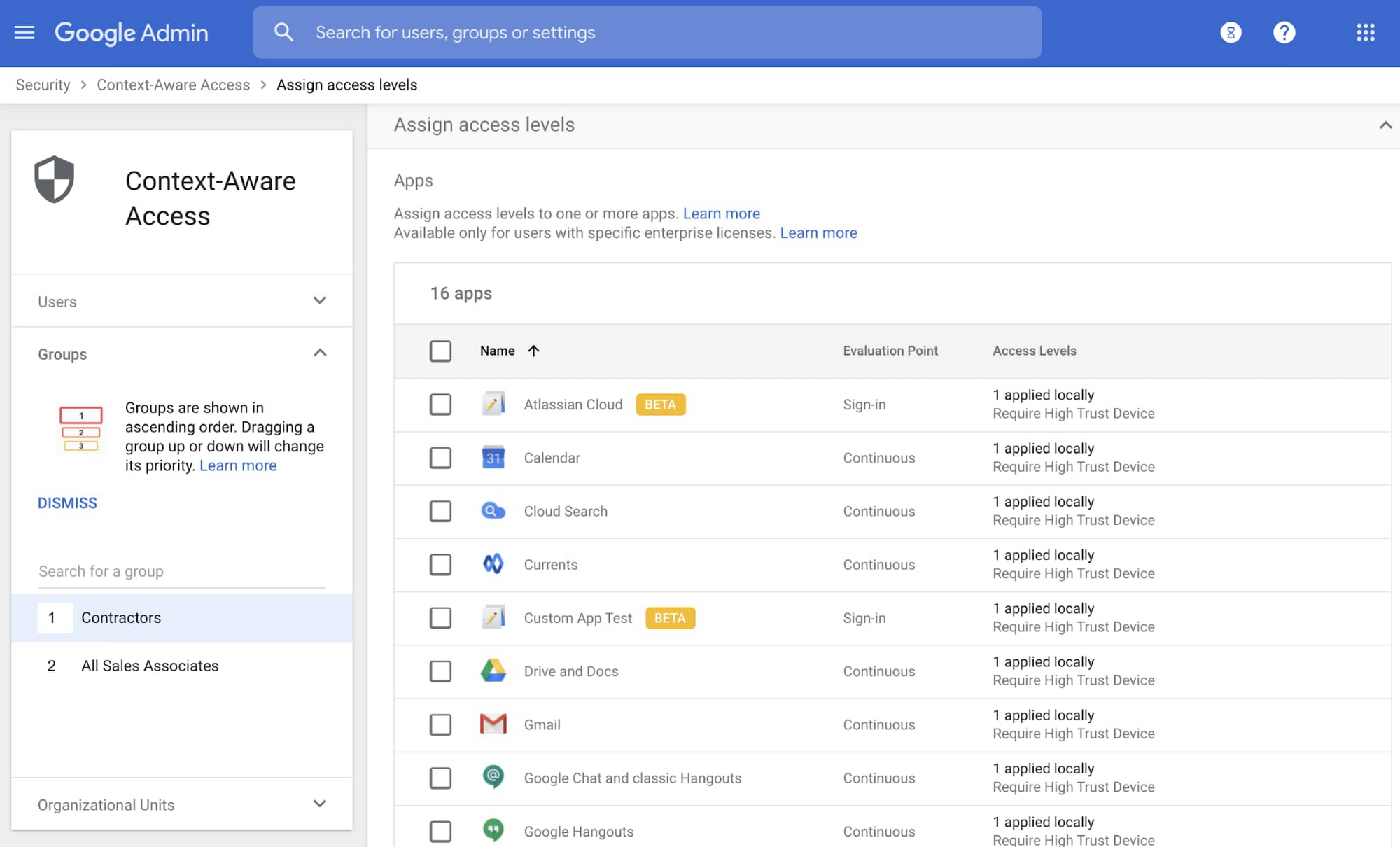
Context-aware access offers protection from unwanted access to G Suite services without the need for a VPN, and allows admins to set up different access levels based on a user’s identity and the context of the request, taking into account factors such as the country, device security status, and IP address of the request. For example, you can require BYOD devices accessing G Suite to meet encryption and password requirements, or restrict contractors from accessing G Suite from company managed Chromebooks.
Control data access with app access control
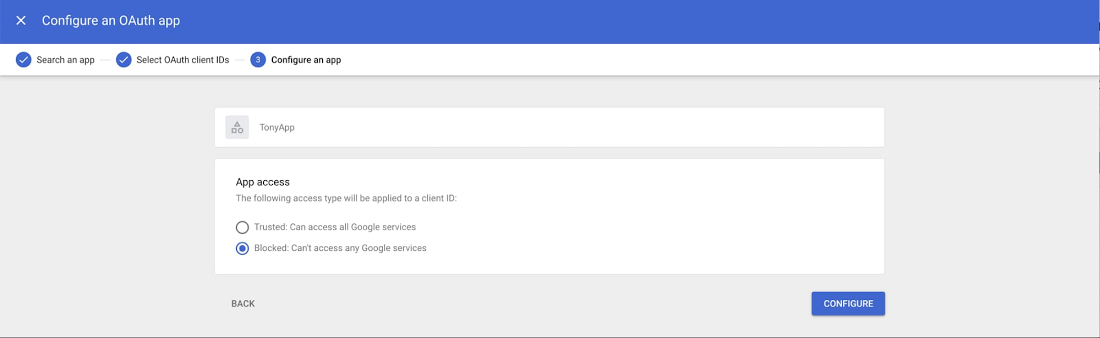
It’s important to protect all devices in your organization—corporate or BYOD—from malicious apps trying to gain access to corporate data. Using app access control, admins can take steps to prevent these apps from tricking users into mistakenly granting access to corporate data. With this feature, admins can choose which third-party apps are allowed to access users’ G Suite data by explicitly trusting, limiting, or blocking access for apps.
Enforce 2-Step Verification
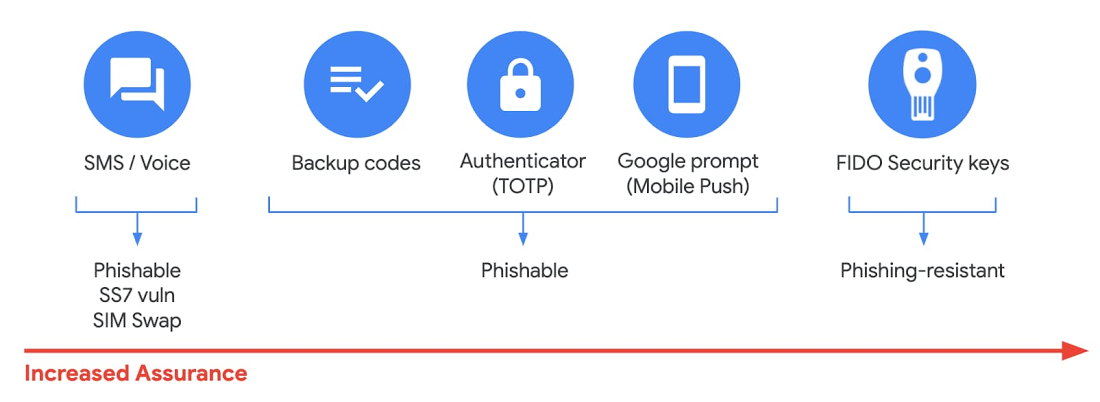
With 2-Step Verification, admins can reduce the risk of unauthorized access by asking users for additional proof of identity when signing in. And you can now use the Advanced Protection Program—our strongest protection for users at risk of targeted attacks. With the Advanced Protection Program for the enterprise, we’ll enforce a specific set of policies for enrolled users including security key enforcement, blocking access to untrusted apps and enhanced scanning for email threats
If you choose not to use security keys for any reason, you have multiple other options to enforce 2-Step Verification on BYOD devices. For Android and iOS, you can use Google prompt, Google Authenticator, text message, or phone call options for a second verification step.
Prevent data loss and leakage with data loss prevention
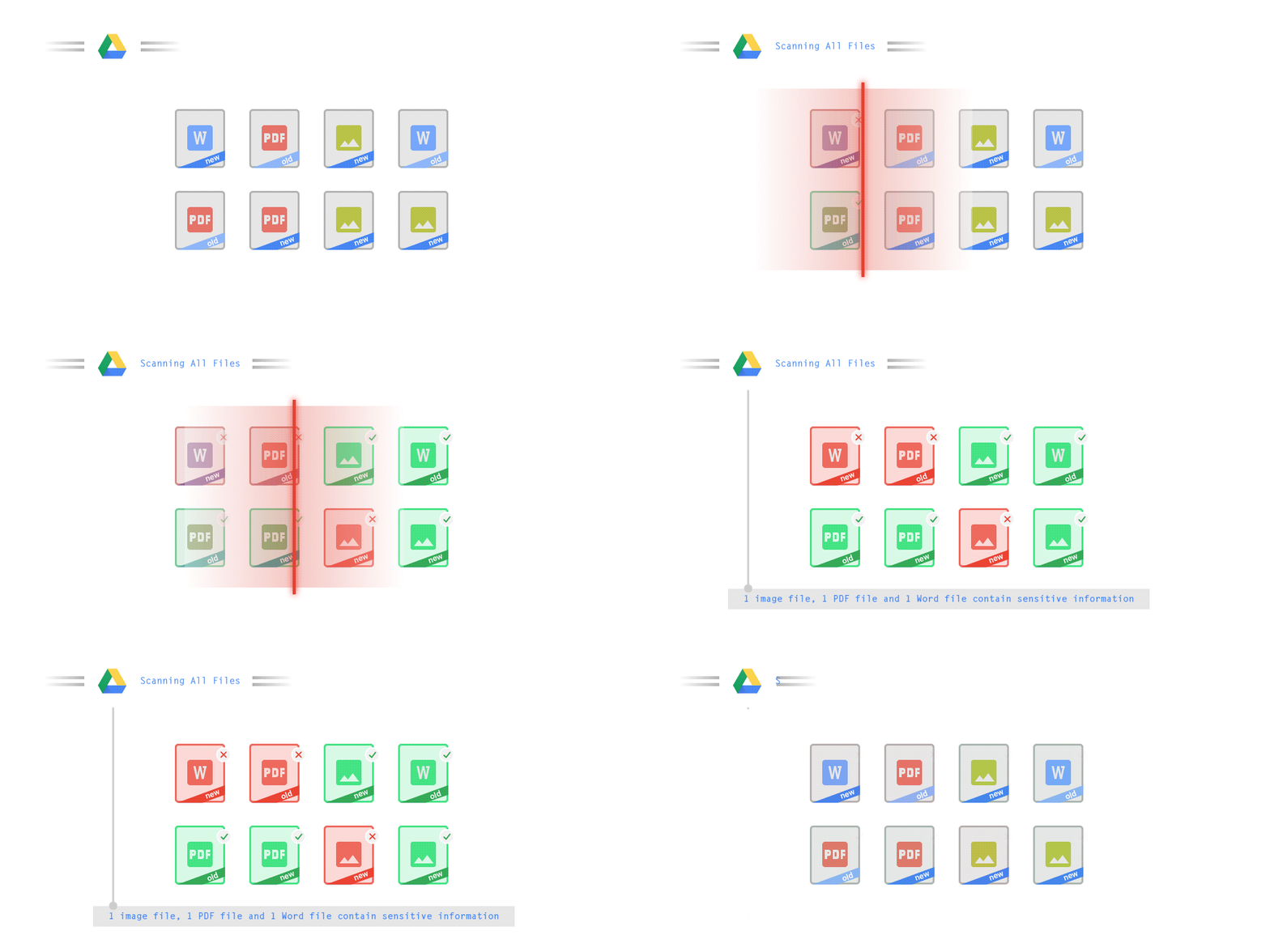
We know that as an admin, one of your highest priorities is to keep internal information safe and secure. That’s why we developed data loss prevention (DLP) policies to help protect sensitive information in Drive, Docs, Sheets, Slides, and Gmail from loss, misuse, or being accessed by unauthorized users. With G Suite DLP, admins can choose which types of data are sensitive and exactly how to protect them. Our controls enable easy detection of a wide variety of common info types, and administrators can supplement this with custom content detectors to meet their organization’s needs. You can also classify files in Drive automatically using DLP rules (beta) to categorize your data by sensitivity levels. DLP works on all the devices in your organization, including BYOD ones, since the protection is at the data and application level.
In addition to DLP, you can use DXP for iOS devices to restrict the copy/pasting of G Suite data to other accounts, personal or otherwise. DXP for iOS can also restrict users’ ability to drag and drop files from specific apps within their G Suite account. Similarly, you can use Google endpoint management to configure Android devices to prevent data sharing between personal and work profiles.
Make retention and eDiscovery possible on all your devices with Vault

To support your organization’s retention and eDiscovery needs, Vault enables corporate data that’s stored in G Suite and accessed by BYOD devices to be available for all your information governance needs. No matter the owner of the device, your organization’s data stored in Gmail, Drive, Chat, Groups, Voice, and Meet are accessible to Vault.
Using the zero-trust security model, the G Suite features above work together to keep your data protected and organization secure across all devices, whether they’re corporate-owned or BYOD.
(*Google Workspace was previously G Suite)
8000
Of your peers have already watched this video.
2:51 Minutes
The most insightful time you'll spend today!
Video: How Did GANT Get Products to Market in Just Three Months?
It was in 1949 that a Ukranian immigrant Berl Gantmacher launched–what was going to be an iconic shirt-making company–GANT in Connecticut, America.
Since then, the company has reinvented shirts every single day. Headquartered in Stockholm, Sweden, GANT operates in 70 countries.
In 2017, GANT wanted to launch a flagship store in London. It takes most companies a year to open a store, considering the amount of cross country collaboration and planning that’s needed for a store to take off.
In order to open the store in London, teams from three countries—Sweden, Portugal and the UK—needed to work together.
“Right away through the process, we moved forward as one team with one goal. With G Suite we have access to all information in one place and we collaborate on Hangout. A flagship store could be well over a year. Regent Street (London) was three months. A very, very different timeline. It’s been an amazing success for the company,” says Matthew Wood, Creative Director, GANT.
G Suite made it possible for the various teams from different countries to collaborate on a single platform and launch a flagship store in just three months—instead of a year.
Google Workspace Now Available to Over 3 Billion Users!

3797
Of your peers have already read this article.
3:00 Minutes
The most insightful time you'll spend today!
Over the past year, Google Workspace rapidly evolved to meet the needs of users as we collectively grappled with remote and hybrid work. First, we launched Google Workspace to commercial customers, which brought together the powerful individual apps people know and love into a single, integrated solution. Then we made Google Workspace available to nonprofits, governments, and schools. And in June, we brought the power of Google Workspace to everyone, enabling more than 3 billion users to transform the way they connect, create, and collaborate. To extend these experiences further, we’ve seen a stunning 4.8 billion apps installed in Google Workspace to date. We’re excited to see so many users personalize their experience by adding third-party apps or by building their own to create a more powerful engine for productivity and collaboration.
As we celebrate the more than 5,300 public apps in the Google Workspace Marketplace that provide users with the opportunity to extend their experience, we’re increasing our investment in the underlying platform. Developers have been able to build applications that integrate with Gmail, Drive, and Docs for years. And today, we’re announcing significant enhancements to the Google Workspace platform by making it just as easy for developers to build applications and integrate with Google Meet, Chat and Spaces.
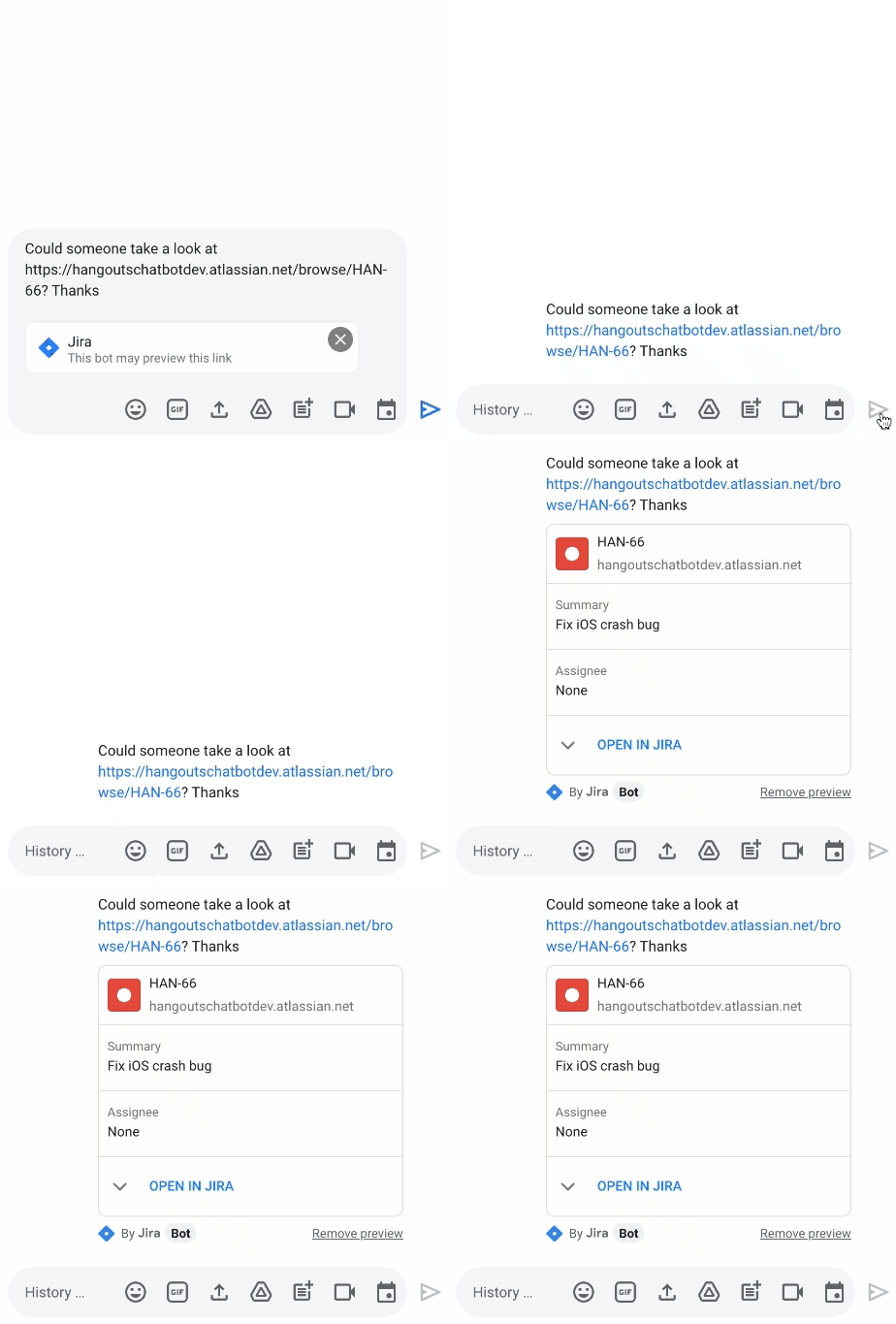
We’re releasing a new Jira integration for Google Chat and Spaces. This integration enables users to create new tickets quickly, see actionable previews, and monitor issues as they come into the space they’re already using for collaboration.
“Modern work requires people to switch contexts and tools faster than ever before. We believe an open ecosystem and tight integrations among the tools that users rely on every day is vital to their success. Since 2017, our Trello integration with Gmail has been installed by more than 7 million people. Today, we are excited to build on the partnership between Atlassian and Google to propel work collaboration further with the integration of Jira with Google Chat and Spaces,” said Joff Redfern, Chief Product Officer, Atlassian.
As work continues to evolve, we’re especially committed to the concept of collaboration equity: the ability for everyone to participate and drive impact no matter their location, technical ability, language preference, or device. Carrefour Property – Carmila is evolving how they innovate by connecting frontline workers to those in the office with our no-code development platform AppSheet. For example, after discovering a problem, onsite managers previously had to send an email, enter data into a spreadsheet, and sometimes attend a meeting to explain the issue. Now, with AppSheet, they can simply input the data on their phone in a single step, and the team back at headquarters can see and act on the issue while also tracking all the other issues being reported from other locations.
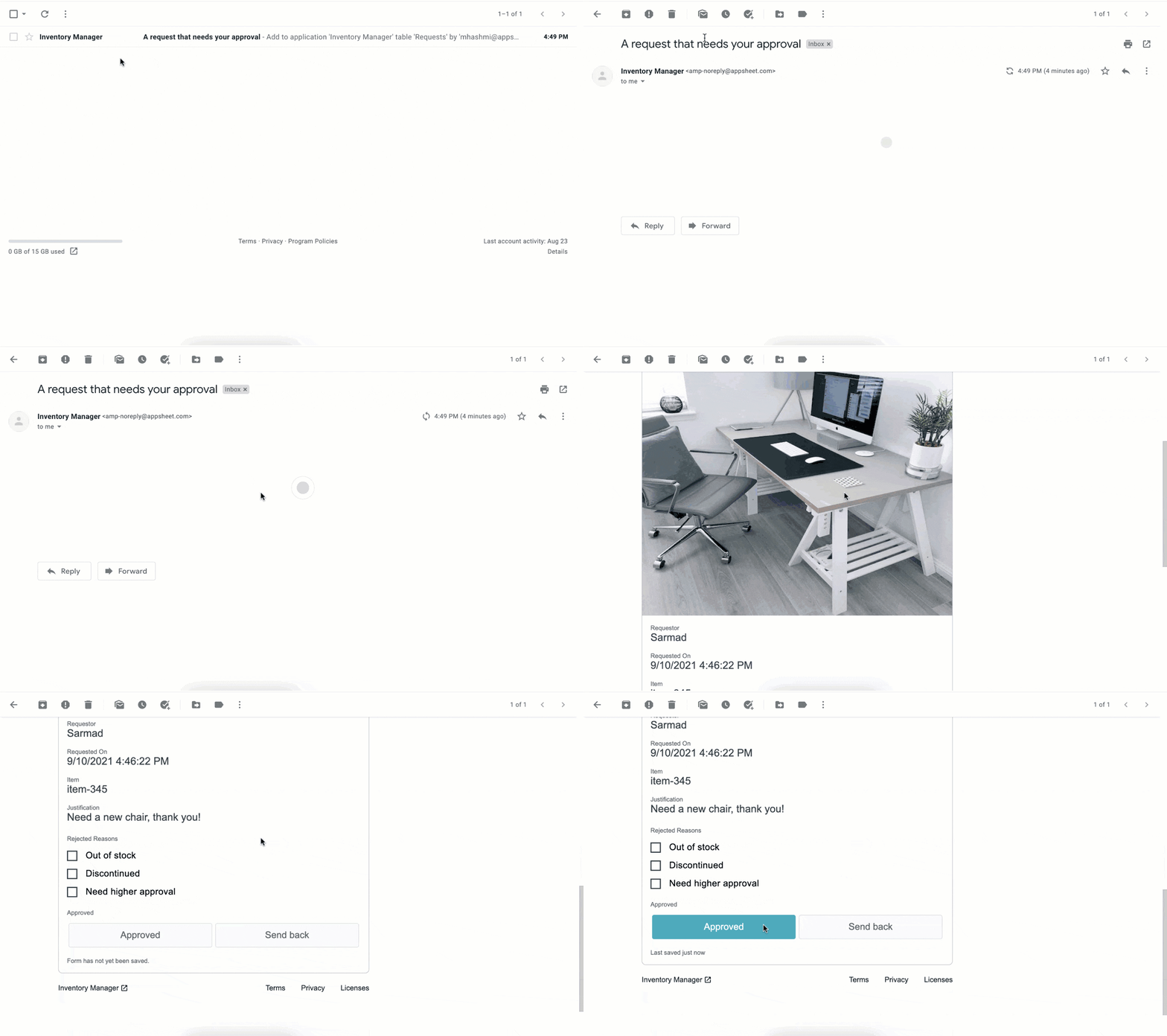
We continue to empower frontline workers and IT teams alike, bringing more flexibility into Google Workspace by integrating AppSheet into Gmail. This new integration allows anyone—regardless of their coding experience—to reclaim time with custom, no-code apps and automations. Budgets and vacation requests can be approved, inventories and asset management systems can be updated, and much more—all with AppSheet and directly from your inbox.
New investments in security
As we continue to deliver delightful new experiences for users, we are keeping security at the forefront; it’s infused in every layer of our product design so that customers have the flexibility and trust needed to operate in a secure environment. To build on this commitment, we’re announcing Google’s new Work Safer offering to help organizations, their employees, and partners collaborate and communicate securely and privately in today’s hybrid work environment. Work Safer will provide companies with access to best-in-class security for email, meetings, and messages, documents, and more. It uniquely brings together the cloud-native, zero-trust solutions of Google Workspace with industry-leading solutions from across Google and its cybersecurity partners, CrowdStrike and Palo Alto Networks.
To further strengthen security and privacy across the Google Workspace platform, we’re also announcing four key new capabilities:
- In June, we announced that Client-side encryption (CSE) was available in beta for Drive, Docs, Sheets, and Slides. Now we’re bringing CSE to Google Meet, giving customers complete control over encryption keys while helping them meet data sovereignty and compliance requirements. We’re also pleased to announce the beta of our Key Access Service Public APIs, which enables customers to directly manage their encryption keys without the need for a third-party partner.
- Data Loss Prevention (DLP) for Chat is now in beta. This is a continuation of our ongoing commitment to help organizations protect their sensitive data and information from getting into the wrong hands, without impacting the end-user experience. With DLP for Chat, you can enable the power of spontaneous conversation between individuals and teams, while preventing sensitive and confidential information from leaving your organization. Interested customers can sign up for the Client-side encryption and DLP for Chat betas today.
- Drive labels are now generally available. Organizations are now able to classify files stored in Drive based on their sensitivity level. Labels integrate with Google Workspace Data Loss Prevention, making it easier to manage external sharing, downloading, and printing of sensitive files.
- We’re rolling out additional protections to safeguard against abusive content and behavior. If a user opens a file that we think is suspicious or dangerous, we’ll display a warning to the user to help protect them and their organization from malware, phishing, and ransomware. This functionality is now available in Google Docs and will be rolling out soon for Google Sheets and Slides.
Fueling the future of work and collaboration
Our mission is to empower everyone with an innovative and seamless experience that gives people—no matter their location or technical ability—the opportunity to drive real impact. At its core, the vision of the Google Workspace platform is to help you build your own innovation momentum, while providing a foundation of security and privacy. I hope you’ll join me at the Google Cloud Next ’21 event where you can learn more about the Google Workspace vision, and even better, see these new experiences in action.
AI-powered Business Messages for Timely, Engaging and Helpful Conversations with Customers

9364
Of your peers have already read this article.
2:00 Minutes
The most insightful time you'll spend today!
Over the last two years, we’ve seen a significant uptick in the number of people using messaging to connect with businesses. Whether it was checking hours of operation, verifying what was in stock, or scheduling a pick-up, the pandemic caused a significant shift in consumer behavior.
- 45% of users are spending more time on messaging services because of the pandemic
- 85% of consumers would like to message brands directly
With the rise in demand for messaging, consumers expect communication with businesses to be speedy, simple, and convenient. For businesses, keeping up with customer inquiries can be a labor-intensive process, and offering 24/7 support outside of store hours can be costly.
To help businesses seamlessly deliver helpful, timely, and engaging conversations with customers when and where they need help, we introduced AI-powered Business Messages.
https://youtube.com/watch?v=fcgP3RHjBLY%3Fenablejsapi%3D1%26
What is AI-powered Business Messages?
With AI-powered Business Messages, you can connect with your customers in their moment of need, in the places they’re looking for answers—such as Google Search, Google Maps, or any brand-owned channel. For instance, check out how Walmart customers in the US are able to receive real-time information on product availability, straight from a search results page.
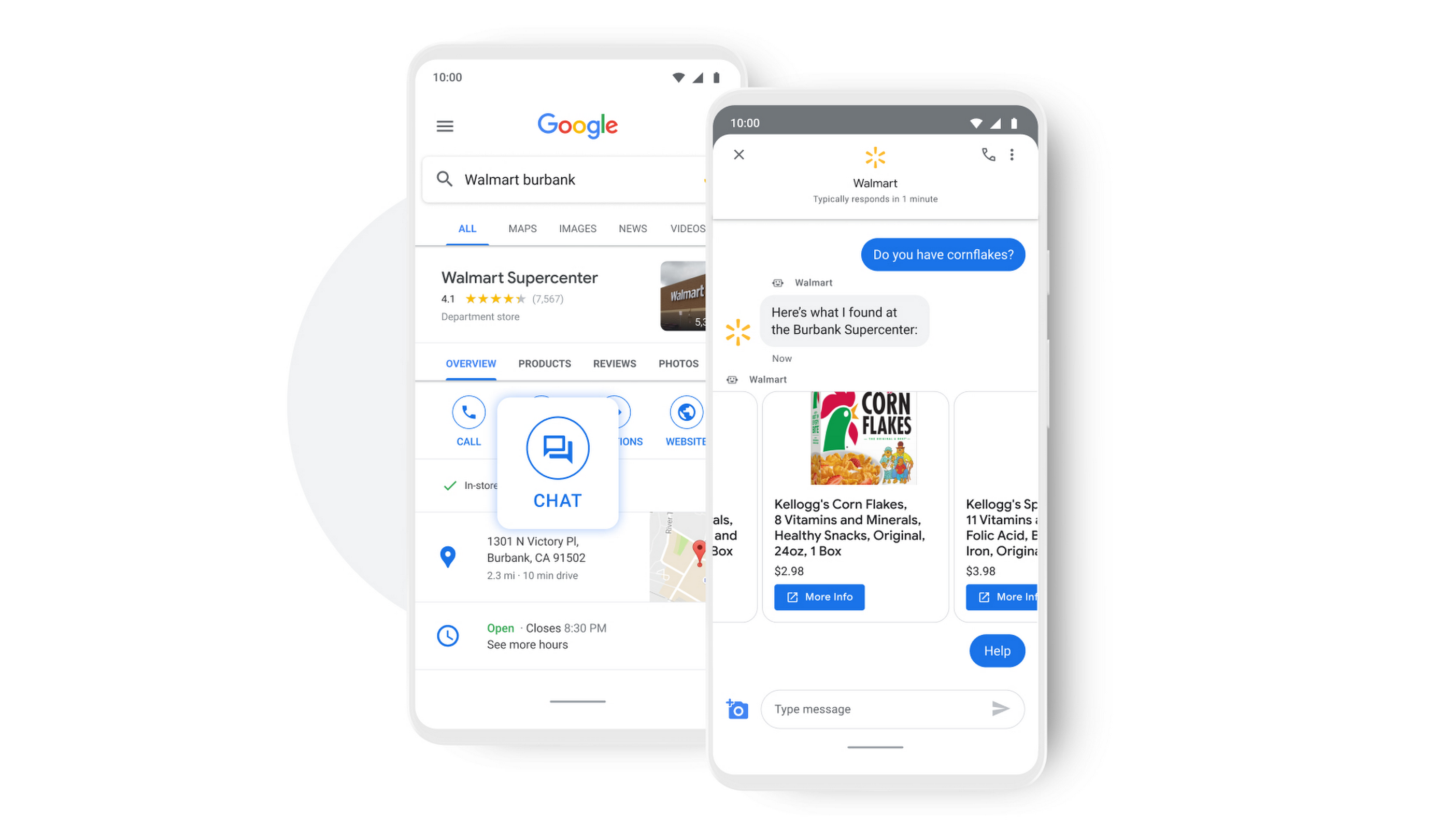
People turn to Google when they are searching for answers to their questions, looking to buy something, or trying to accomplish a particular task with one of our many tools. In fact, 68% of all online experiences begin with a search engine.
At Google, we know how important it is for interactions with a brand to be personalized, helpful, and simple. With AI-powered Business Messages, customers are able to chat with virtual agents that understand, interact, and respond in natural ways.
We are also combining smart automation with the ability for customers to chat with live agents when it’s really needed. This approach saves your customers precious time, while also saving you money. And with Business Messages automatically handling many customer inquiries in the background, businesses have the option to distribute their human customer service agents to address other needs.
Getting started with conversational AI is easy with Bot-in-a-Box
We know it can be difficult to get started with AI. That’s why we are utilizing existing Google AI tools like Dialogflow—part of Google Cloud Contact Center AI—to create the capability within Google’s Business Messages called Bot-in-a-Box, which makes getting started with Conversational AI easy. Bot-in-a-Box allows for fast and effective adoption of automation for businesses of all sizes.
Enabling Business Messages with Bot-in-a-Box can be as simple as leveraging an existing customer FAQ document you already have, whether it’s from a web page or an internal document. And since the conversational AI is powered by Business Messages and Dialogflow working together, your chat bot is able to understand and respond to customer questions automatically without the need to write code.
Bot-in-a-Box also supports other critical journeys like “Custom Intents.” That means that your bot is able to understand the different ways customers express a similar question and respond accurately by using machine learning capabilities.

Finding success
In April 2021, Wake County courthouses in North Carolina partnered with Tango Technology to implement Business Messages when it became apparent that being able to provide the public and attorneys with around-the-clock access to information would significantly reduce the pressure on courthouse staff. Using Bot-in-a-Box, Tango Technology was able to customize a solution for Wake County Courthouse, Justice Center, and Clerk of Superior Court in just four days.
“With the combination of Google’s Business Messages, GCP, and Dialogflow, we were able to spin up an AI-driven bot for the courts in days. And the technology stack allows us to continually improve by adding functionality in an agile process.”— Mike Lotz, Co-Founder, Tango Technology
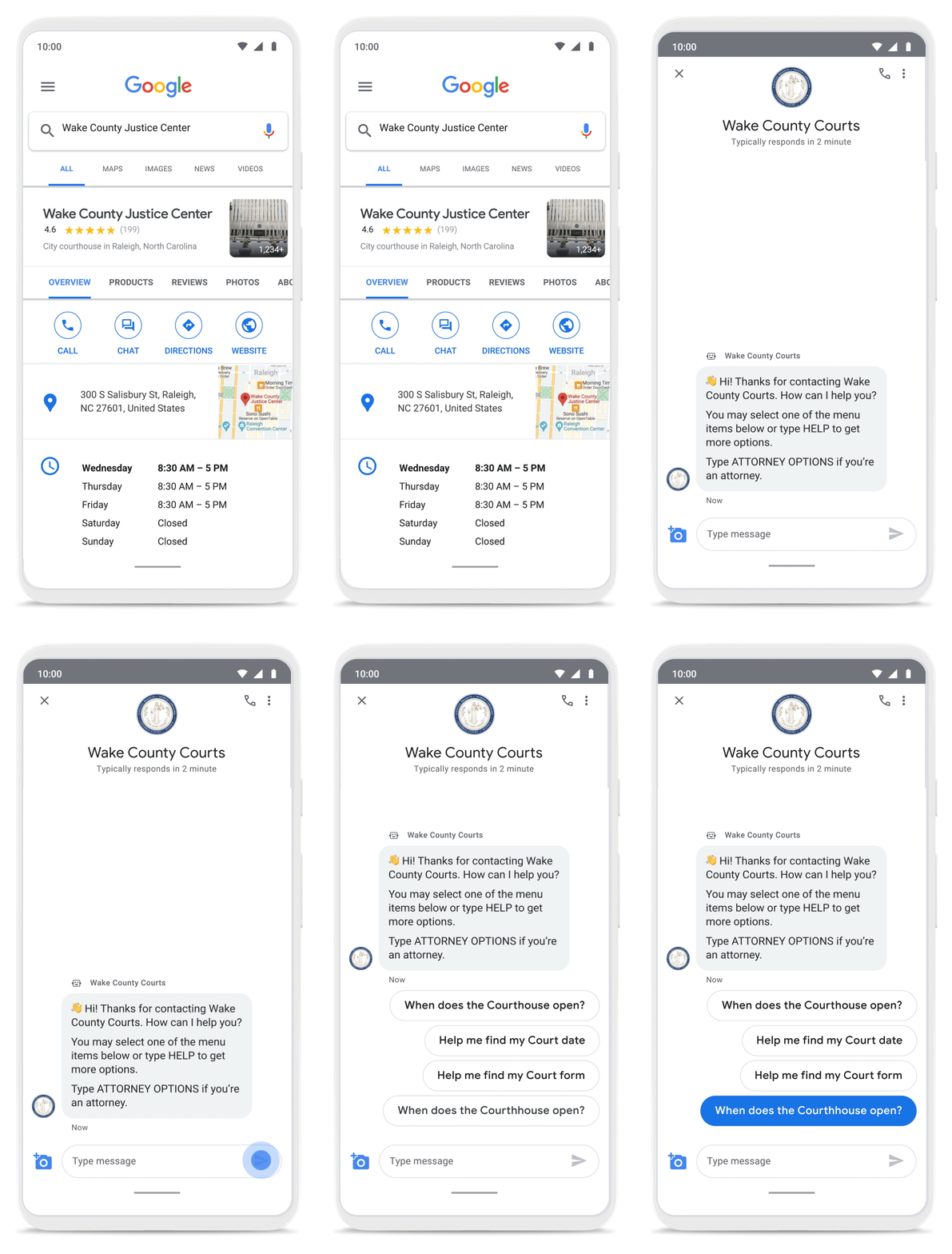
With Business Messages, North Carolina courthouses saw a 37% decrease in the call volume handled by courthouse staff. With 398,298 fewer phone calls during the first year of operation, the AI-based messages helped Wake County Courthouse work more efficiently and productively.
We’ve seen many brands benefiting from AI-powered Business Messages. For instance, Levi’s saw a 30% increase in off-hours shoppers and surpassed 85% customer satisfaction scores after implementing Business Messages. They also drove 30x more store-related questions than Levi’s website chat.
Bring Google’s conversational AI to your storefront with Business Messages
Google’s Business Messages makes it easier for businesses of all sizes to engage their existing or potential customers in a virtual conversation, when and where they need it.
To learn more, watch our Cloud Next session here or visit us at g.co/businessmessages. We have specialized services to help you get started and can share the wisdom of our channel partners and dedicated experts who specialize in unleashing the potential of conversational AI.
3930
Of your peers have already watched this video.
19:57 Minutes
The most insightful time you'll spend today!
Work beyond borders: How to use G Suite with Microsoft and your favorite third-party applications
The average enterprise uses 129 different applications on a day to day basis. These applications enable critical workflows that drive businesses forward. But when these apps don’t work well together that leads to lost time, frustration, and missed opportunities.
Professionals have access to dozens of applications in their organization. Apps like DocuSign, Box, or Trello can simplify individual processes and drive businesses to adopt newer ways of work. It’s really great that there seems to be an app specifically designed for what we need to get done for each task.
But there’s a downside to this proliferation of apps. The flood of notifications and disconnected processes frustrates users. Our work is spread across more apps than ever before, which inevitably leads to lots of apps switching, and reduces our ability to focus. Context-switching between applications cuts into time spent on value-additive work.
Learn how G Suite works seamlessly with Microsoft and other third-party applications to support key workflows, enhance collaboration, and help teams get to impact quickly.
*Google Workspace, formerly known as G Suite.
More Relevant Stories for Your Company
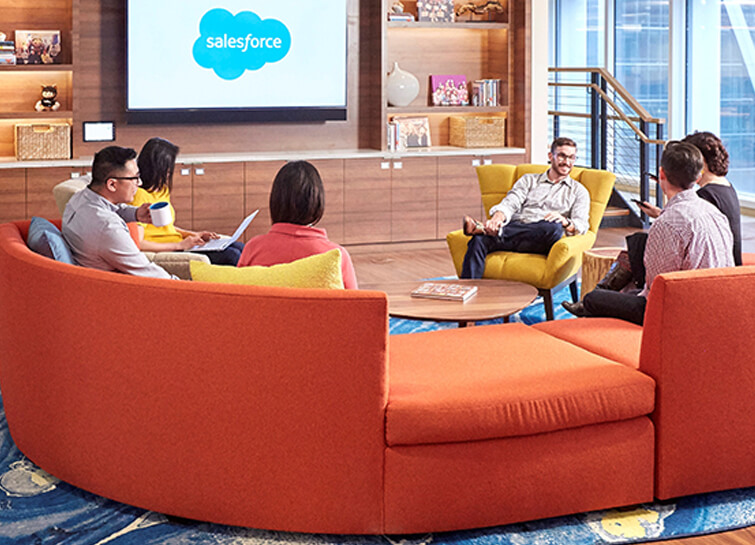
Salesforce Enhances Business Outcome with Real-time Collaboration
Nearly 20 years after its debut, the Customer Relationship Management (CRM) software company, Salesforce, “dominates the market,” as Bloomberg puts it, with 19.6 percent market share in 2017, according to International Data Corporation. The company as also recently named number 1 in Fortune’s 2018 list of 100 Best Companies to Work For. In


On-Demand Webinar: 3 Ways Collaboration Transforms How Your Company Works
A majority of your employees and teams spend 38% of their time unsuccessfully searching and recreating content, according to IDC. They also spend 20% of their time looking for information, according to McKinsey. That’s 58% of time lost in unproductive tasks that could have been spent coming up with the

How Cardinal Group Created a Collaborative Culture and Reduced Support Tickets by 43% Per IT Team Member
At Cardinal Group, we have four distinct lines of business, each of which are critical to our overall company performance: real estate investment, third-party property management, construction management, and marketing. As the VP of IT and Data, one of my top priorities is giving each of our team members across

Active Assist Expands Globally: Unleashing Cloud Optimization Insights Worldwide
Active Assist provides insights and recommendations to help Google Cloud customers proactively optimize their cloud environments for cost, security, performance, and sustainability. If you’re like most customers, you’ve likely encountered these insights and recommendations in the console — either in the Recommendations Hub or embedded on a resource page, like IAM or
