





Google Maps’ Cloud-based Styling Features Betters UX, Control and Flexibility
3363
Of your peers have already read this article.
2:00 Minutes
The most insightful time you'll spend today!
This year at Google I/O, we announced the general availability of Cloud-based maps styling for the Maps JavaScript API. In an effort to provide you with more options and more control to help create the best experience for your users, today we’re releasing new features to Cloud-based maps styling. You may already be familiar with these features from the consumer Google Maps web and mobile apps—Landmarks and Building Footprints. We’re also releasing updates to our industry optimized map styles to provide even more map details while providing the flexibility to craft the best experience for your users. Let’s take a look.
Help users quickly scan and orient themselves with Landmarks
You may have noticed some enhancements for prominent places in the consumer Google Maps web and mobile apps, these landmarks help show your users points of interest that help them orient and navigate cities they are exploring or visiting.
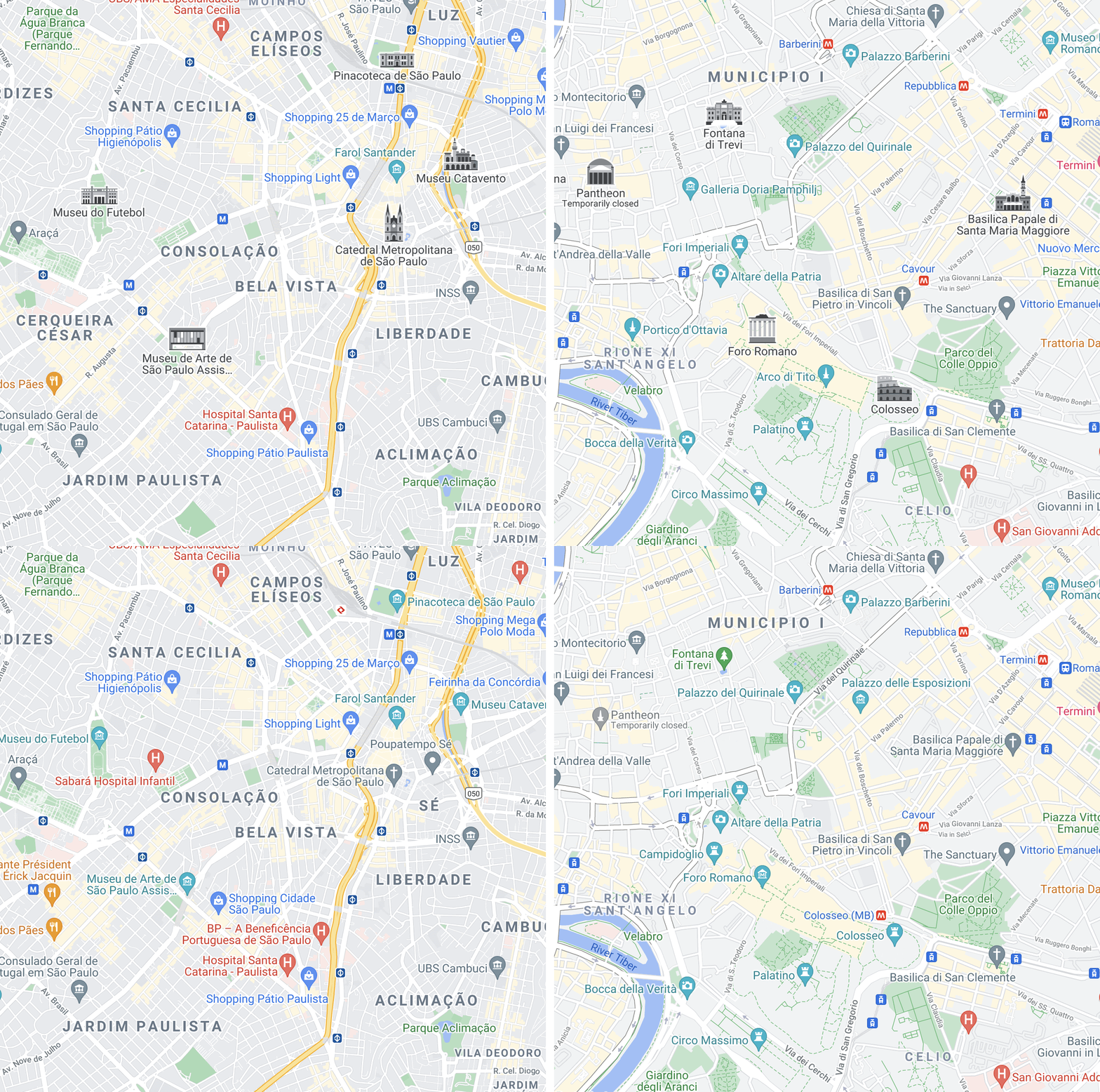
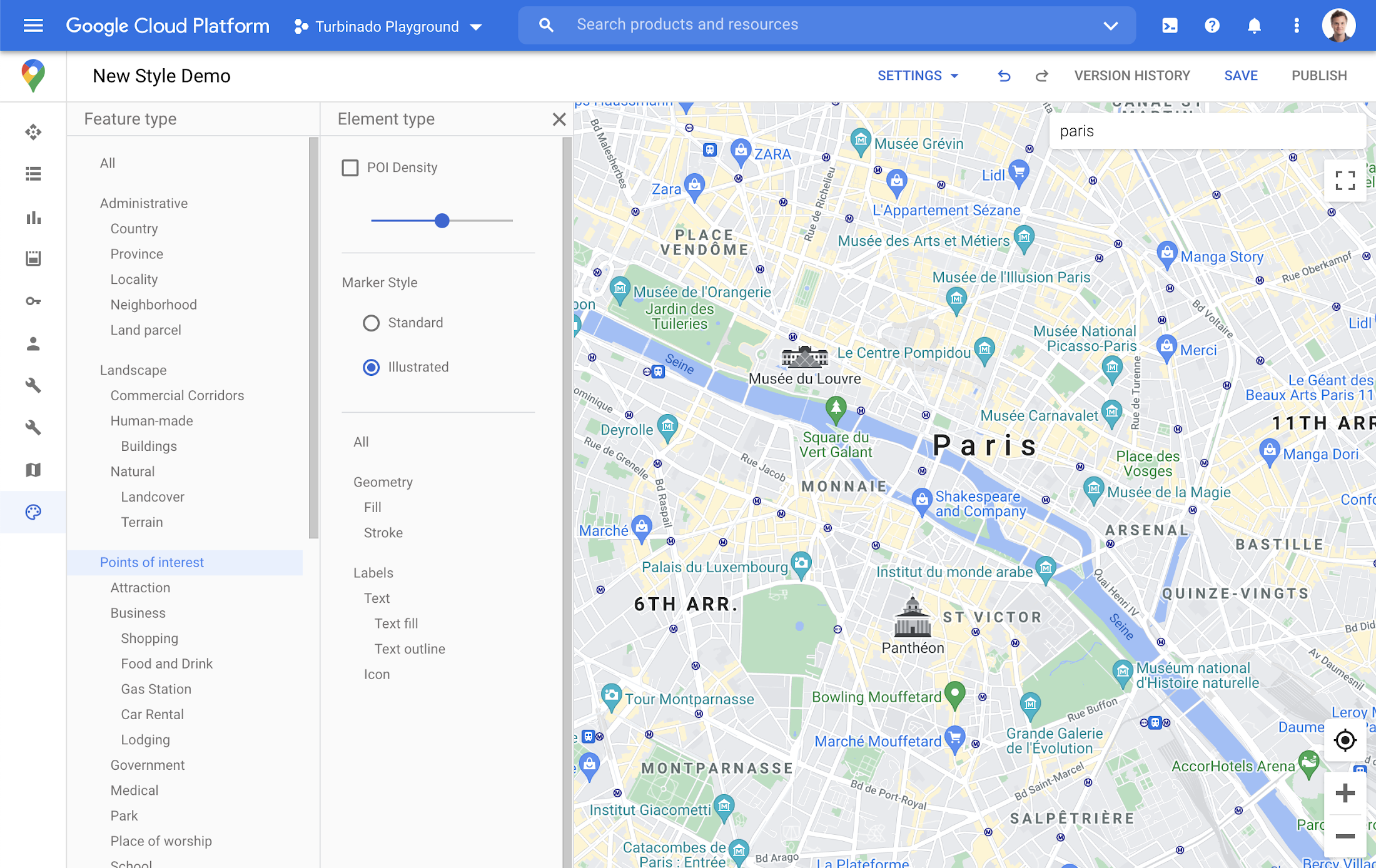
You now have the ability to bring this same experience to your users by creating maps using Cloud-based maps styling. This feature is available in 100 cities globally including New York, Dubai, Paris, Mumbai, and Singapore. To enable landmarks for your map, log into the Cloud console and in our style editor navigate to the Points of interest feature type and select ‘Illustrated’ under Marker Style.
Simplify maps features by switching to Building Footprints
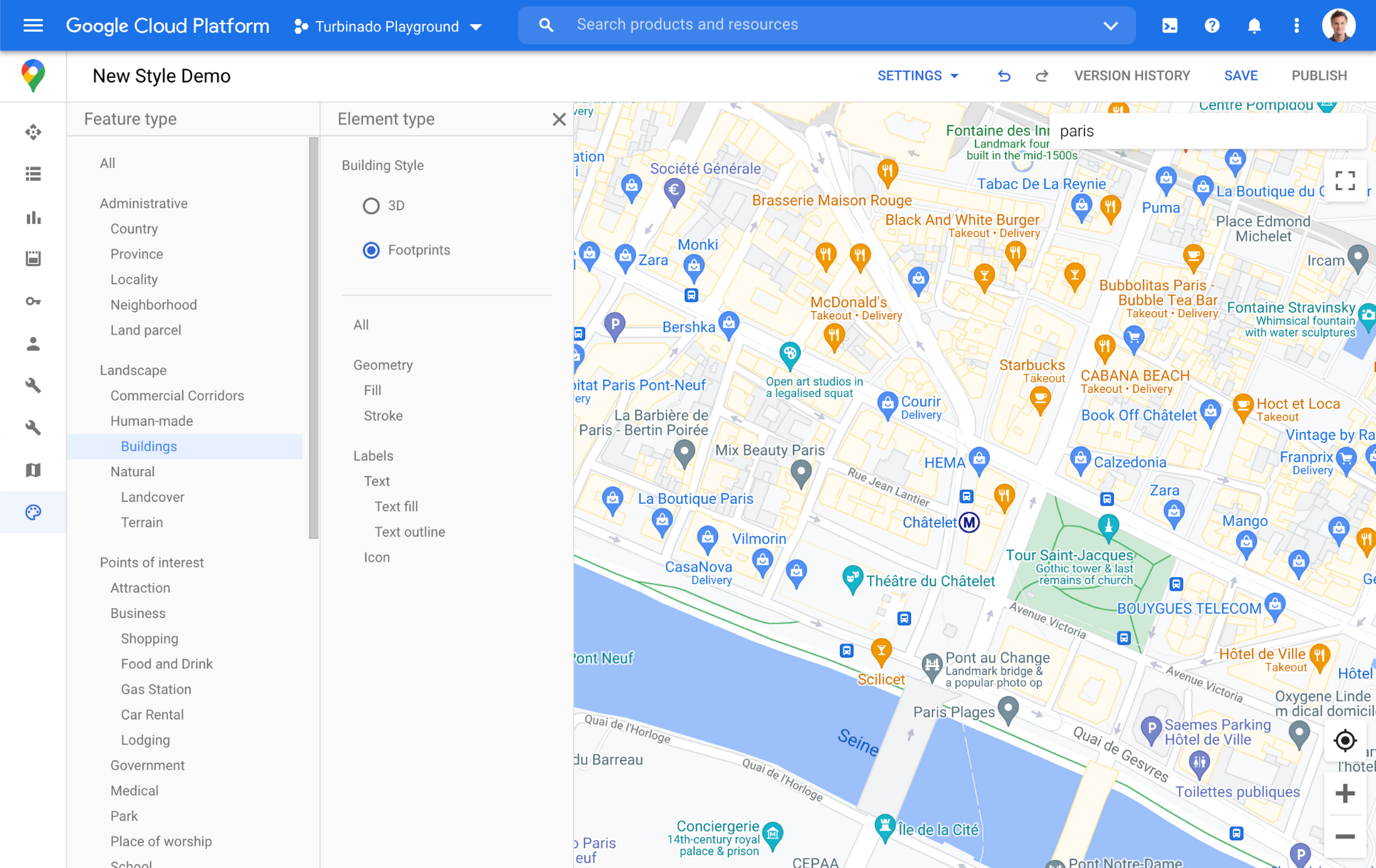
Sometimes less is more. In dense, highly vertical cities, showing 3D building heights can add cognitive load for users. Now, in addition to 3D buildings, we offer building footprints as an option in the style editor. Building footprints can provide a strikingly different basemap balance and composition to better support use cases that may not benefit from the added complexity that 3D buildings can present.

Fill and stroke geometries can also be styled independently to support various color themes. To enable Building Footprints, log into the Cloud console and in our style editor navigate to Buildings and choose ‘Footprints’ under building style.
Industry Optimized Map Styles now include Landmarks and Building Footprints, plus Detailed Street Maps
In January of this year we launched Industry Optimized Map Styles for the travel, real estate, retail, and logistics industries, providing customers with pre-styled map configurations, available via Cloud-based maps styling. Landmarks are now included in all of our Industry Optimized Map Styles and we have turned on Building Footprints in the travel style map. If you are already an Industry Optimized Map Styles user, these new features will be applied to your map with no action needed from you. If you would like to disable these changes, you can use the style editor to turn off these features.
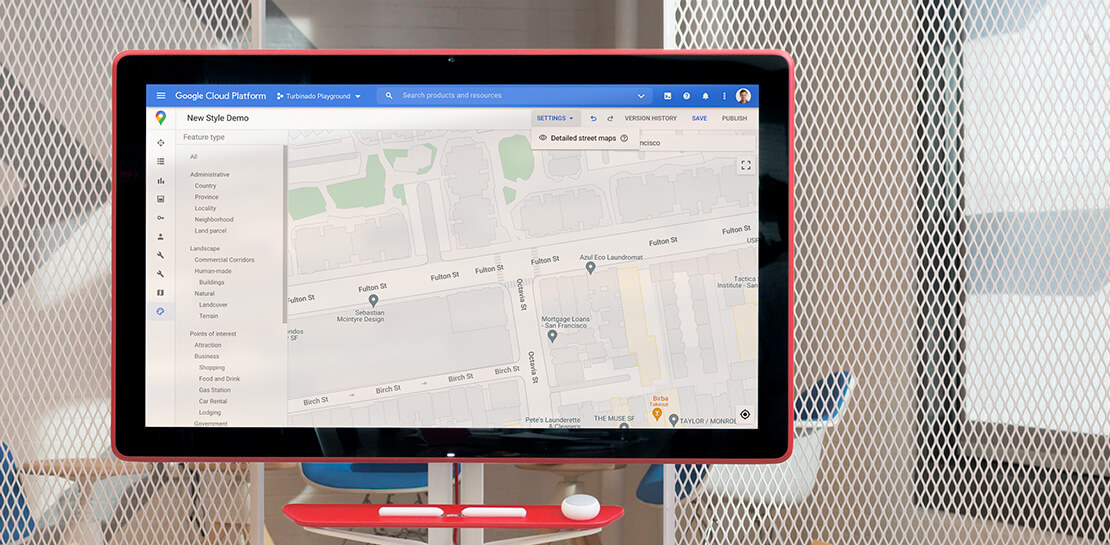
For Industry Optimized Map Styles only, we are also excited to enable Detailed Street Maps. You may have seen these features in our consumer products at Google I/O, released back in August of 2020 for the consumer Google Maps web and mobile apps. Detailed Street Maps are available in San Francisco, New York, London, and Tokyo, and we are targeting expansion to 50 new cities by the end of 2021.
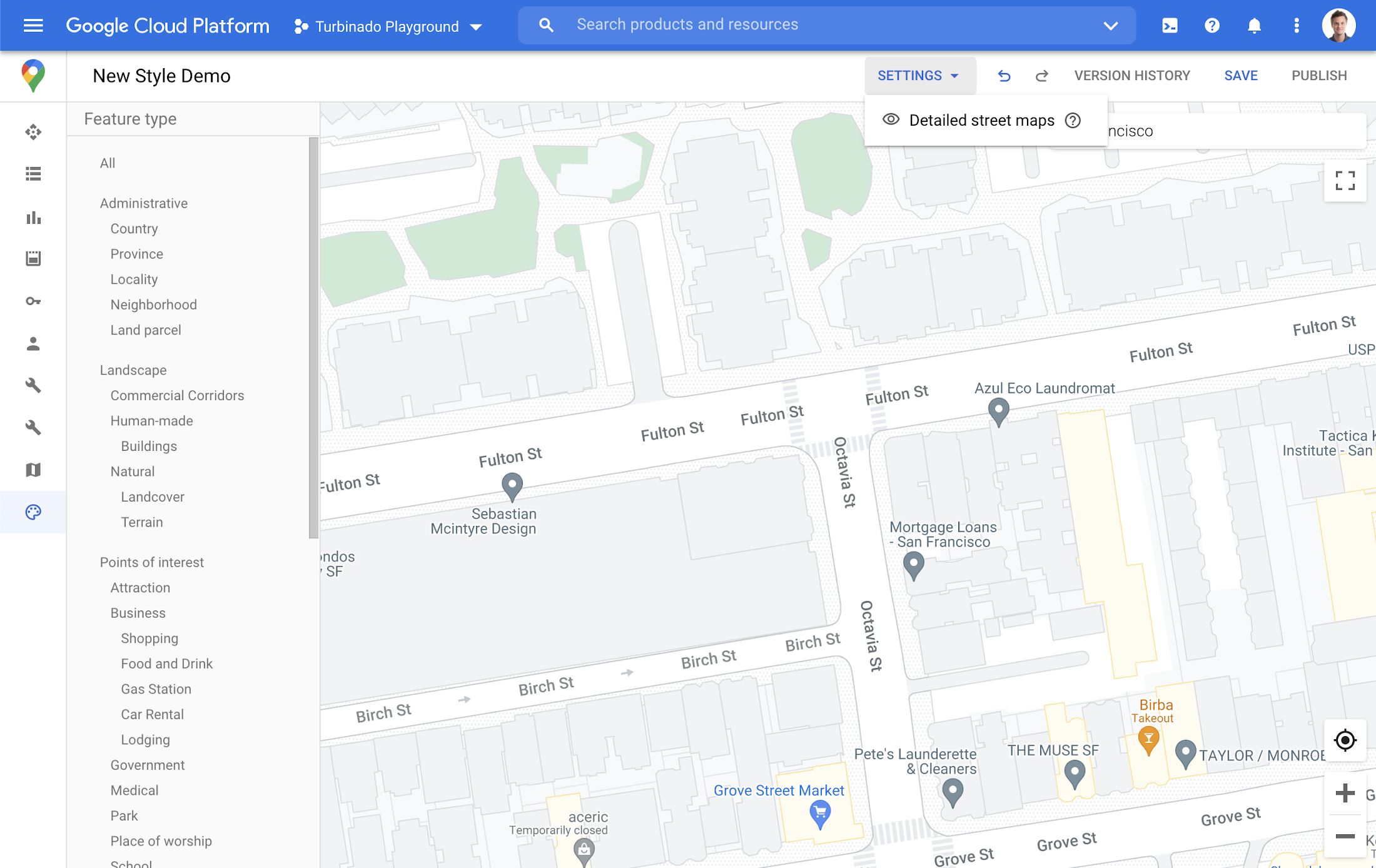
Detailed Street Maps are on by default for all Industry Optimized Map Styles and we created a new settings menu to change the visibility, as needed. We are working on bringing the full styling capability for Detailed Street Maps features to all Cloud-based maps styles in the future.
Landmarks and Building Footprints as well as the updates to Industry Optimized Map Styles are only available via Cloud-based map styling in the Google Cloud Console and are included in Google Maps Platform pricing. Learn more about how to use Landmarks and Building Footprints and Industry Optimized Map Styles. To get started with Cloud-based map styling, check out our documentation for JavaScript.
For more information on Google Maps Platform, visit our website.
How Japan’s Vaccine Locator Platform Became A One-stop Shop for COVID-19 and Vaccination-related Information
3905
Of your peers have already read this article.
4:00 Minutes
The most insightful time you'll spend today!
Editor’s Note: David Moore, Founder and CEO of Navagis, shares his story of teaming up with the Google Maps Platform team to help people across Japan get vaccinated amid COVID-19 pandemic.
The roots of Navagis go back to Hurricane Katrina, when I led an Army Corps of Engineers team that deployed 3D mapping technologies with Google Earth to respond to critical needs on the U.S. Gulf Coast. As a Google Cloud Premier Partner we work across various industries and organizational types to solve location intelligence challenges with our software solutions.
The experience taught me how powerful mapping insights can be in protecting lives when disaster strikes. The COVID-19 crisis brought a brand new human challenge to the world and like other countries, Japan found itself struggling to vaccinate its 125 million people, while trying to communicate about where (and under what circumstances) people could get their vaccines.
Our end goal was to build a reliable, enriched, real-time dataset on Japan’s vaccination centers. Living in Japan, seeing some confusion and anxiety, I felt great urgency when I accepted the mission on behalf of our team.
From the very beginning we faced many challenges. Japan was experiencing unique difficulties in building an accurate real-time vaccine locator. First, we noticed the fragmentation of address information across thousands of local governments, from Hokkaido in the north to subtropical Okinawa in the south. Second, Japan’s Ministry of Health, Labor and Welfare had launched a website of nationwide vaccination sites, which they were constantly updating data sources. We noticed the location information was prone to inconsistencies due to its dispersion at the local level, and different conventions among prefectures on writing addresses. In order to ensure the integrity of a massive amount of decentralized data, mostly in Japanese, we required on-the-ground presence and experience.
In addition, we needed to go beyond simply mapping the location of vaccination centers. Each one needed to be a one-stop shop for all information regarding vaccination, including opening hours, safety precautions, and qualifications for getting the COVID-19 vaccine.
Round-the-clock teamwork builds a helpful, informative mapping solution
People might think of mapping as all about AI, advanced satellites, and cloud computing power. Of course, these are essential. What is less known is the massive amount of human toil and dedication that goes into making vaccine location information available especially for an urgent health mission for a country as large and complex as Japan.
Realizing our task was urgent, we worked with the Google Maps Platform team across time zones and over weekends to make this happen fast. In some cases a vaccine center was at a place where one would not normally expect to get a vaccine—like a pop-up location at a convention center. So we matched vaccine center addresses from the government website against Google Maps Platform’s Places data.
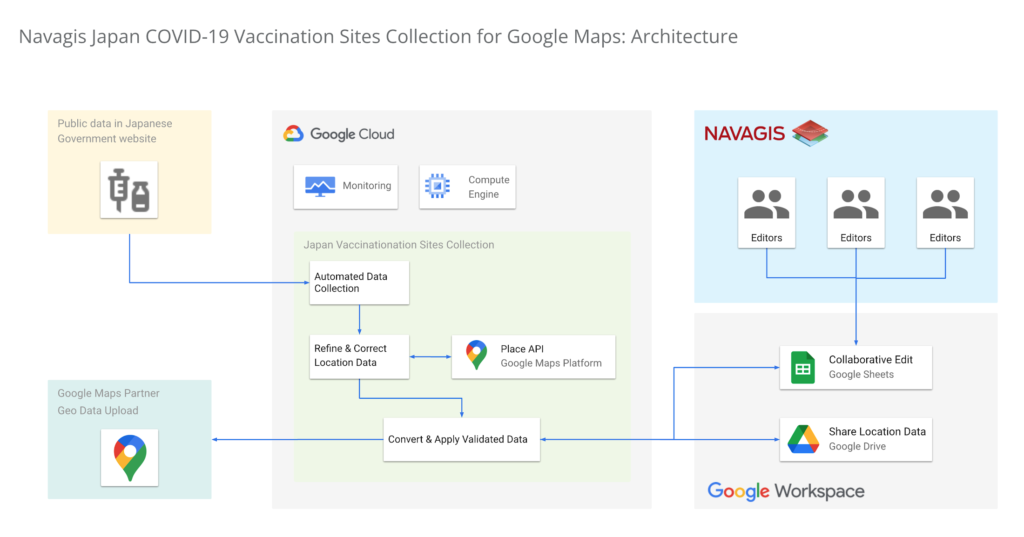
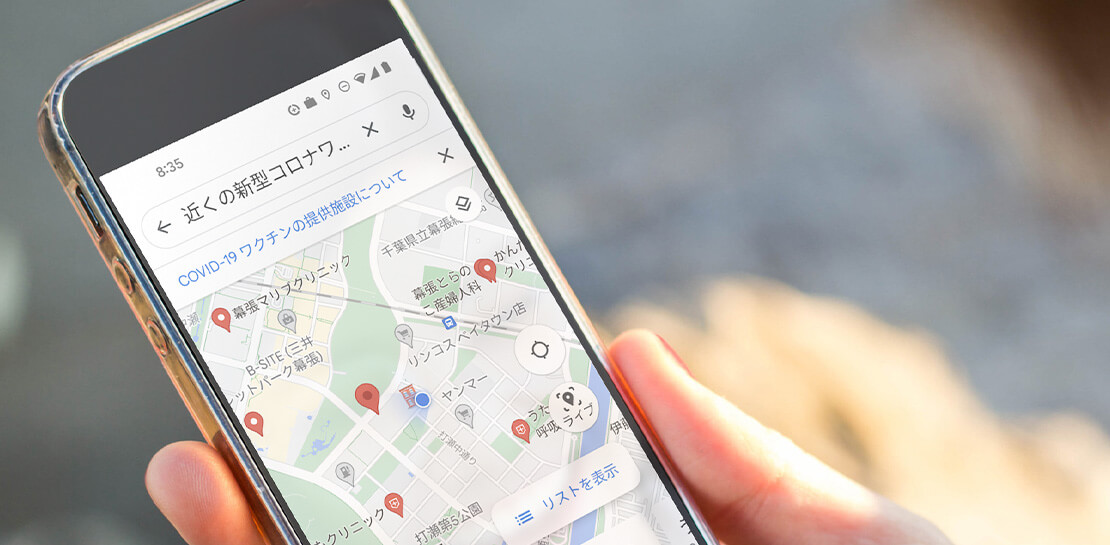
In under two weeks, we had identified, matched and marked tens of thousands of locations as vaccination centers around the country. Moreover, the power of the Geolocation API and Places API enabled us to provide richer details for many of the centers.
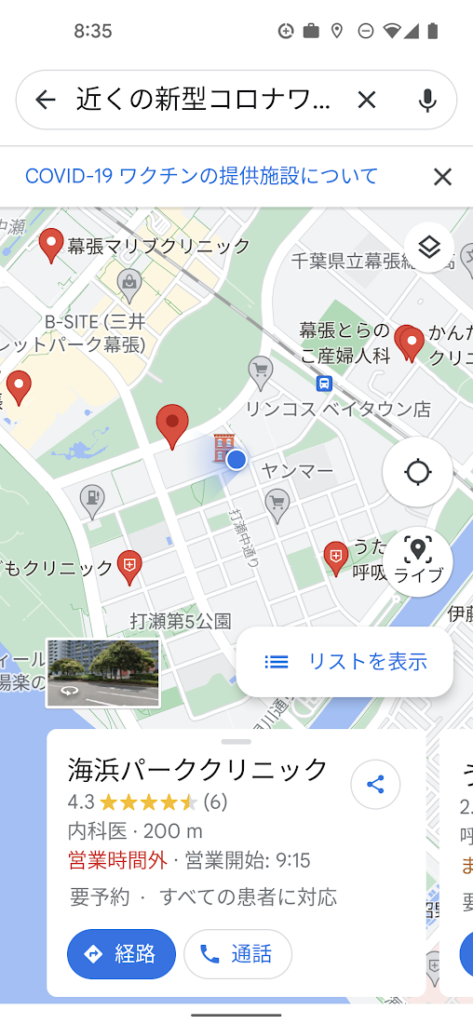
One of the unique aspects of this project was being able to surface our work across multiple channels to accomplish a single goal. We were able to work with Google to ensure the vaccine centers appeared on the consumer user-facing Google Maps apps and website, with information to help citizens learn where and how to get their vaccine. Our team was in hourly contact with requests such as “this center is mission-critical, can we get it mapped?” They were able to quickly get the site listed and visible on the map for end-users. This was a big human mobilization.
Powerful mapping APIs for pinpointed vaccine location information
We couldn’t have accomplished the massive task of validating 35,000 vaccination sites in such a short period of time without Google’s mapping APIs. The Maps Geocoding API and Places API enabled us to take location data from the government website, and quickly verify whether the location existed, or not, with up-to-date places intelligence.

The Places API served a critical role in two ways: breadth of information (covering Japan’s entire territory), and depth of information (complex insight into each place, such as landmarks and phone numbers).
The ability to take the addresses provided by the government of vaccination sites, run them through the Places API, and assess the address quality helped enormously. Google Street View, meanwhile, provided a further level of validation, enabling us to visually identify the specific locations where errors remained, and manually identifying clinics and hospitals before identifying their precise latitude and longitude within cities in Japan.
Looking beyond COVID-19
Japan went from being a laggard in global vaccination rates before the summer of 2021 to one of the leaders, with nearly 80% of the population fully vaccinated. And, daily confirmed cases had been as low as 100 nationwide prior to Omicron emerging globally.
The prospect of putting to bed our adventure with the Japan Vaccine Locator couldn’t bring us more joy.
Except perhaps, the prospect of helping people rediscover the joy of a return to normalcy—in partnership with Google Maps Platform.
For more information on Google Maps Platform, visit our website.
Dr. Agarwal’s Eye Hospital Cuts IT Support Tickets By 80% With Google

4960
Of your peers have already read this article.
3:00 Minutes
The most insightful time you'll spend today!
About Dr. Agarwal’s Eye Hospital
Dr. Agarwal’s Eye Hospital specializes in treating eye conditions such as cataracts; glaucoma; corneal problems such as ulcers, inflammation, and thinning; and retinal issues such as degeneration and detachment. The business operates 62 hospitals in cities across India and 14 hospitals in 8 countries in Africa, including Zambia, Nigeria, and Ghana.

Founded by the late Dr. J. Agarwal, Dr. Agarwal’s Eye Hospital, headquartered in Chennai, India, operates 62 hospitals in cities across India and 14 hospitals in 8 countries in Africa, including Zambia, Nigeria, and Ghana.
According to Dilip Ramadasan, GM-IT, Dr. Agarwal’s Eye Hospital, the business is the second-largest network of eye-care hospitals globally and aims to provide the best eye care in the world.
“We have focused on service over the last couple of years and decided to completely revamp back-end operations such as information technology and finance,” says Dilip.
“Realizing our vision involved moving to a completely new infrastructure that could deliver the scalability, agility, and performance our evolving application stack required.”
Replacing Aging Desktop Hardware and Applications
The business placed particular emphasis on upgrading its aging desktop fleet and traditional productivity applications.
“When I arrived in 2015, we only had 35 hospitals and all of them were using desktops that were five years or older,” Dilip says. “These desktops were due for replacement within the following six months to a year, so I had an ideal opportunity to upgrade our capabilities and address issues such as excessive support costs and resource requirements.”
For example, if a desktop at a hospital in a remote location experienced a problem, Dilip had to dispatch one of his technology team members to fix the issue. This could take up to five days, while the employee whose desktop was underperforming or failing often needed to wait until the fix was applied before resuming work.
Three Criteria for Improvement
When evaluating options to enhance the hospital’s information technology environment, Dilip applied three criteria: increasing revenue, increasing efficiency, and reducing costs.
Dilip elected to replace the traditional desktops and applications with Chromebase devices running Google Chrome and G Suite applications. “This option aligned perfectly with our efficiency and cost criteria,” he says.
The business started a four-month pilot of Chromebase devices with G Suite in October 2015 at four newly-opened hospitals.
“We wanted to see how users would react to the Chromebases running G Suite compared to the traditional desktops and applications,” he adds. “A large component of the project entailed educating users about the benefits of G Suite applications such as Google Docs and Sheets.”
Chromebases Running G Suite Deployed to 600 Users
Dr. Agarwal’s Eye Hospital has completed the deployment of Chromebases running G Suite to 600 users. This group comprised team members who needed to access a billing application or a human resources management system and doctors who needed to access patients’electronic medical records.
“My desktop total cost of ownership fell by up to 70% when I deployed these devices,” Dilip says.
With G Suite running on Chromebase devices, Dilip has been able to resolve many desktop support issues remotely, minimizing the need to send support team members to distant locations.
“The number of support tickets we used to process on the desktop computing side has fallen by a full 80%,” he says. “As a result, I’ve been able to cut the number of desktop support team members from eight to three and redeploy them to server and application management and support.”
Dilip cites Sheets and Google Drive as the G Suite applications most beneficial to the business.
Sheets enables hospital team members to share important cost and revenue numbers without having to attach multiple versions of spreadsheets to emails, while Google Drive facilitates collaboration by enabling the team members to store and view shared documents.
“Team members are able to spend more time on core activities rather than on picking up numbers and sharing them with regional managers,” Dilip says.
The business also uses Google Vault to protect management data held in emails and help ensure compliance with legislative requirements.
Google Cloud Platform Products Under Evaluation
Dr. Agarwal’s Eye Hospital is evaluating extending its deployment of Google Cloud Platform products to Google BigQuery and Google Data Studio.
“We are looking to add a business intelligence layer over applications running in other cloud environments, and Google potentially provides an option to do that,” Dilip says.
“This layer would enable us to analyze electronic medical record data to increase our understanding of patterns such as how a particular disease affects an individual across various stages of life and what types of interventions would deliver the best results.”
“Google has introduced the flexibility we need to reposition our engineers as needed, improved the relationship between the information technology team and operations teams, and given the information technology team greater confidence in resolving issues,” adds Dilip. “We will be continuing to scout for opportunities across Google platforms to increase our revenue and efficiencies while decreasing our costs.”
Maximize your downtime with these 12 cost-effective Google Cloud learning opportunities

2996
Of your peers have already read this article.
3:30 Minutes
The most insightful time you'll spend today!
The holiday season is upon us! If you are making your list and checking it twice, we’ve got a few learning gifts you can tick off the list and share with others too. For the season of giving, we’ve wrapped up some of our most popular training and certification opportunities and made them available at no-cost.
This December we’re aiming to offer something for everyone, whether you’re just getting started with cloud, or knee deep in preparing for a professional certification exam. Start with the fundamentals to gain a deeper understanding of cloud whether you’re in a business or technical role. Perhaps you’re looking to flex your data analytics and ML muscle with BigQuery and SQL, earn a Google Cloud skill badge, or enhance your technical cloud skills. Or jump into a hot topic like sustainability and learn about Google’s commitment to a clean cloud, and how to use sustainability tools. Read on to find something on your learning wishlist.
We also have a variety of learning formats to fit your needs. Complete hands-on labs, view courses and webinars, or jump into competitions like the Google Cloud Fly Cup Challenge or our most popular #GoogleClout Challenge of 2022 – and let the fun begin!
Are you ready to learn? Take a look at the training we’ve recommended below to work towards your goals as we head into the new year, with new skills, to make the most of new opportunities.
We’re giving plenty of learning gifts to choose from this month, so take your pick from the topics below:
ML, AI and data analytics
Who it’s for: ML, AI and data engineers
What you’ll take away: A deeper understanding of working in BigQuery and SQL.
Level: Foundational
Start learning now:
- Introduction to SQL for BigQuery and Cloud SQL – Get started with this one hour and 15 minute hands-on lab to learn fundamental SQL querying keywords, which you will run in the BigQuery console on a public dataset, and how to export subsets of a dataset into CSV files, then upload to Cloud SQL. You’ll also learn how to use Cloud SQL to create and manage databases and tables, with hands-on practice on additional SQL keywords that manipulate and edit data.
- Weather Data with BigQuery – In this 45 minute lab, you’ll use BigQuery to analyze historical weather observations, and run analytics on multiple datasets.
- Insights from Data with BigQuery – Earn a shareable skill badge when you complete this five hour quest. It includes interactive labs covering the basics of BigQuery, from writing SQL queries, creating and managing database tables in Cloud SQL, and querying public tables to loading sample data into BigQuery.
- The Google Cloud Fly Cup Challenge – This is a three-stage competition in the sport of drone racing in the Drone Racing League (DRL). You will use DRL’s race data to predict outcomes and give performance improvement tips to pilots (these are the best drone pilots in the world!). There’s a chance to win exclusive swag, prizes, and an expenses paid trip to the DRL World Championship. Registration closes on December 31, 2022.
CI/CD
Who it’s for: Software Developers
What you’ll take away: Take part in our most popular #GoogleClout challenge of 2022! Build a simple containerized application.
Level: Fundamental
Start learning now:
- GoogleClout – CI/CD in a Google Cloud World – Flex your #GoogleClout in this cloud puzzle that challenges you in a lab format to create a Cloud Build Trigger to rebuild a containerized application hosted on a remote repository. Register it in the Artifact Registry and deploy. You’ll be scored on your results and earn a badge to share.
Preparing for Google Cloud certification
Who it’s for: Cloud engineers and architects, network and security engineers and Google Workspace administrators
What you’ll take away: Explore the breadth and scope of the domains covered in the cloud certification exams, assess your exam readiness and create a study plan.
Level: Foundational to advanced
Start learning now:
- Preparing for Google Cloud certification – These courses are for Associate Cloud Engineers, Professional Cloud Architects, Professional Cloud Network Engineers, Professional Cloud Security Engineers, and Google Workspace Administrators preparing for Google Cloud certification exams. You’ll also earn a completion badge when you finish the course.
- Preparing for the Cloud Architect certification exam – Join this 30 minute on-demand webinar to learn about resources to maximize your study plan, and get tips from a #GoogleCloudCertified Professional Cloud Architect.
Intro to Google Cloud for technical professionals
Who it’s for: Software Developers
What you’ll take away: Boost your Google Cloud operational and efficiency skills to drive innovation by navigating the fundamentals of compute, containers, cloud storage, virtual machines, and data and machine learning services.
Level: Foundational
Start learning now:
- Getting Started with Google Cloud Fundamentals – This on-demand webinar takes a little less than three hours to complete. Navigate Compute Engine, container strategies, and cloud storage options through sessions and demos. You’ll also learn how to create VM instances, and discover Google Cloud’s big data and machine learning options.
Intro to Google Cloud for business professionals
Who it’s for: Business roles in the cloud space like HR, marketing, operations and sales
What you’ll take away: A deeper understanding of cloud computing and how Google Cloud products help achieve organizational goals.
Level: Foundational
Start learning now:
- Cloud Digital Leader learning path -There are four courses in this learning path covering digital transformation, innovating with data, infrastructure and application modernization, and Google Cloud security and operations.
- Preparing for the Cloud Digital Leader certification exam – In this 30 minute webinar continue your learning journey by preparing for the Google Cloud Digital Leader certification exam. The webinar covers all the resources we’ve made available to help you prepare.
Sustainability
Who it’s for: Software Developers
What you’ll take away: Learn how the cleanest cloud in the industry can help you save your cloud bill, and save the planet.
Level: Foundational
Start learning now
- A Tour of Google Cloud Sustainability -Work through this one hour, hands-on lab, to explore your carbon footprint data, use the Cloud Region Picker, and reduce your cloud carbon footprint with Active Assist recommendations.
Keep connected and learning with us in 2023
Accelerate your growth on Google Cloud by joining the Innovators Program. No-cost for users of Google Cloud (including Workspace), it’s for anyone who wants to advance their personal and professional development around digital transformation, drive innovation, and solve difficult business challenges.
Continue your learning with Google Cloud in 2023 by starting an annual subscription1 with Innovators Plus benefits. Gain access to $500 in Google Cloud credits, live learning events, our entire on-demand training catalog, a certification voucher, access to special events, and other benefits.
Build your skills, reach your goals and advance your career with 12 no-cost ways to learn Google Cloud!
- Start an annual subscription on Google Cloud Skills Boost with Innovators Plus for $299/year, subject to eligibility limitations.
Elevate Your SRE Practice: Streamlining Your SLO Design Process

1486
Of your peers have already read this article.
2:30 Minutes
The most insightful time you'll spend today!
Poll three Site Reliability Engineers with the question “What is SRE?” and you’re likely to get five different answers: an implementation of DevOps, a role, a set of practices, a cultural shift, a snazzy title. While these definitions may not necessarily align with those in the SRE books, there is one throughline differentiating SRE from other ways of working: Service Level Objectives (SLOs). While simple to understand – intentionally! – SLOs are frequently challenging to define in practice. And even though the specifics of an SLO vary across industries and verticals, we have found there are a number of practices and strategies common amongst teams that have successfully implemented SLOs for their workloads.
Bringing together product, development, and SRE teams to achieve a common understanding of the workload in question, and in particular its critical user journeys (CUJ), is a key first step. For many teams this means writing down, often for the first time, detailed sequence or flow diagrams for these CUJs. The maturity of and the relationship between the three “legs of the stool” (development, product, and SRE) will play a role in the level of effort required to complete this first step of the journey. Having a common understanding of your users’ expectations of your workload is a prerequisite to writing effective SLOs.
While modeling user journeys and decomposing them into SLOs is an art and no two applications are alike, there are a few key aspects upon which to anchor your discussion. The main question we recommend you keep top-of-mind when going through this process is “What do my users care about?” Framing your thought process in this way prevents implementation snafus and strategies that don’t approximate user expectations. Other aspects to consider include:
- Are there breakpoints where the user may choose not to take an action?
- Which parts of the interaction are we capable of measuring and which are we not (e.g., third-party dependencies)?
- Which parts of the user journey are common across many user journeys and thus are possible candidates for factoring out as their own CUJ (example: login)?
- Which parts of the journey can be measured in aggregate, and which must be separated because of differences in criticality, request rates, or other factors?
- Which steps of the journey have strict dependencies between one another?
Armed with answers to these questions, a detailed request diagram, and your application code, you’re ready to start putting pen to paper! Before jumping into your monitoring consoles, we recommend writing up an SLO design document which lays out the technical details of your chosen SLOs. We’ve made a template available to you to jump start this process (if you have a Google account, you can make a copy using this link). In it, you’ll find an empty template along with worked examples for reference as you create your own specifications. Whether you use this template or not, we recommend the following as you document your SLOs:
- Be pedantic with technical specifications – they will matter during implementation
- Maintain a section outlining clarifications, caveats, and/or tradeoffs made as a part of the design process
- Consider where you’re measuring – make sure it’s feasible
- Beware of summaries, averages, and other non-aggregatable statistics for latency SLOs
- Keep compliance periods consistent across your workload(s)
- We recommend the following defaults:
- 28 days rolling for operational needs (error budget alerting)
- Fixed calendar quarters for prioritization and lookback
- Changelog: Include one, even if your documentation tool has version history, so you can track major changes
- Put your SLO documentation in a location accessible by your team and company stakeholders
- Once your SLO PRD is finalized, treat your implementation as code and store it in your version control system
- Remember – DRY!
We hope these recommendations and template give you a head start in bringing your SLOs to production. If you find yourself in need of a tool to implement your SLOs, consider Google Cloud SLO Monitoring which allows you to create SLOs for any metric available in Google Cloud Monitoring and computes your error budget automatically, enabling burn rate-based alerting. If this process still feels daunting or you find your team in need of help with any of the above, our reliability engineering professional services team can assist. For more information, visit cloud.google.com/sre or you can contact your Google Cloud account team.
All About Cloud Run, its Scalability and Management Features

7397
Of your peers have already read this article.
3:00 Minutes
The most insightful time you'll spend today!
Mindful Containers is a fictitious company that is creating containerized microservice applications. They need a fully managed compute environment for deploying and scaling serverless containerized microservices. So, they are considering Cloud Run.
They are excited about Cloud Run because it abstracts away the cluster configuration, monitoring, and management so they can focus on building the features for their apps. Cloud Run is a fully-managed compute environment for deploying and scaling serverless containerized microservices.

What is Cloud Run?
Cloud Run is a fully-managed compute environment for deploying and scaling serverless HTTP containers without worrying about provisioning machines, configuring clusters, or autoscaling.
- No vendor lock-in – Because Cloud Run takes standard OCI containers and implements the standard Knative Serving API, you can easily port over your applications to on-premises or any other cloud environment.
- Fast autoscaling – Microservices deployed in Cloud Run scale automatically based on the number of incoming requests, without you having to configure or manage a full-fledged Kubernetes cluster. Cloud Run scales to zero— that is, uses no resources—if there are no requests.
- Split traffic – Cloud Run enables you to split traffic between multiple revisions, so you can perform gradual rollouts such as canary deployments or blue/green deployments.
- Custom domains – You can set up custom domain mapping in Cloud Run and it will provision a TLS certificate for your domain.
- Automatic redundancy – Cloud Run offers automatic redundancy so you don’t have to worry about creating multiple instances for high availability
How to use Cloud Run
With Cloud Run, you write your code in your favorite language and/or use a binary library of your choice. Then push it to Cloud Build to create a container build. With a single command—“gcloud run deploy”—you go from a container image to a fully managed web application that runs on a domain with a TLS certificate and auto-scales with requests.
How does Cloud Run work?
Cloud Run service can be invoked in the following ways:
HTTPS: You can send HTTPS requests to trigger a Cloud Run-hosted service. Note that all Cloud Run services have a stable HTTPS URL. Some use cases include:
- Custom RESTful web API
- Private microservice
- HTTP middleware or reverse proxy for your web applications
- Prepackaged web application
gRPC: You can use gRPC to connect Cloud Run services with other services—for example, to provide simple, high-performance communication between internal microservices. gRPC is a good option when you:
- Want to communicate between internal microservices
- Support high data loads (gRPC uses protocol buffers, which are up to seven times faster than REST calls)
- Need only a simple service definition you don’t want to write a full client library
- Use streaming gRPCs in your gRPC server to build more responsive applications and APIs
WebSockets: WebSockets applications are supported on Cloud Run with no additional configuration required. Potential use cases include any application that requires a streaming service, such as a chat application.
Trigger from Pub/Sub: You can use Pub/Sub to push messages to the endpoint of your Cloud Run service, where the messages are subsequently delivered to containers as HTTP requests. Possible use cases include:
- Transforming data after receiving an event upon a file upload to a Cloud Storage bucket
- Processing your Google Cloud operations suite logs with Cloud Run by exporting them to Pub/Sub
- Publishing and processing your own custom events from your Cloud Run services
Running services on a schedule: You can use Cloud Scheduler to securely trigger a Cloud Run service on a schedule. This is similar to using cron jobs. Possible use cases include:
- Performing backups on a regular basis
- Performing recurrent administration tasks, such as regenerating a sitemap or deleting old data, content, configurations, synchronizations, or revisions
- Generating bills or other documents
Executing asynchronous tasks: You can use Cloud Tasks to securely enqueue a task to be asynchronously processed by a Cloud Run service. Typical use cases include:
- Handling requests through unexpected production incidents
- Smoothing traffic spikes by delaying work that is not user-facing
- Reducing user response time by delegating slow background operations, such as database updates or batch processing, to be handled by another service,
- Limiting the call rate to backend services like databases and third-party APIs
Events from Eventrac: You can trigger Cloud Run with events from more than 60 Google Cloud sources. For example:
- Use a Cloud Storage event (via Cloud Audit Logs) to trigger a data processing pipeline
- Use a BigQuery event (via Cloud Audit Logs) to initiate downstream processing in Cloud Run each time a job is completed
How is Cloud Run different from Cloud Functions?
Cloud Run and Cloud Functions are both fully managed services that run on Google Cloud’s serverless infrastructure, auto-scale, and handle HTTP requests or events. They do, however, have some important differences:
- Cloud Functions lets you deploy snippets of code (functions) written in a limited set of programming languages, while Cloud Run lets you deploy container images using the programming language of your choice.
- Cloud Run also supports the use of any tool or system library from your application; Cloud Functions does not let you use custom executables.
- Cloud Run offers a longer request timeout duration of up to 60 minutes, while with Cloud Functions the requests timeout can be set as high as 9 mins.
- Cloud Functions only sends one request at a time to each function instance, while by default Cloud Run is configured to send multiple concurrent requests on each container instance. This is helpful to improve latency and reduce costs if you’re expecting large volumes.
Pricing
Cloud Run comes with a generous free tier and is pay per use, which means you only pay while a request is being handled on your container instance. If it is idle with no traffic, then you don’t pay anything.
Conclusion
After learning about the ease of set up, scalability, and management capabilities of Cloud Run the Mindful Containers team is using it to deploy stateless microservices. If you are interested in learning more, check out the documentation.https://www.youtube.com/embed/oR4btKLRdn4?enablejsapi=1&
For more #GCPSketchnote, follow the GitHub repo. For similar cloud content follow me on Twitter @pvergadia and keep an eye out on thecloudgirl.dev
More Relevant Stories for Your Company

Reactive Programming on Google Maps Platform: Watch Video to Learn
The Google Maps Platform Android SDK supports extensions for reactive programming, which helps you write code to handle asynchronous operations. Write reactive and responsive mapping applications with Google Maps Platform In mobile apps, asynchronous events can happen at any point in time: user touch events, waiting for network calls to complete, or

How Google is Showing the Way to the Differently-abled: A Blind Program Manager’s Account
What does “accessibility” mean to businesses? It’s not just about making sure that your office or retail space is accessible to workers and customers who have mobility challenges, it’s also about making sure that your apps, digital tools and content are also more accessible to everyone. Our product teams work

Building the future of work with Google Workspace
Since we launched Google Workspace last October, we’ve heard from many of our customers—from global enterprises to small businesses—about the new ways they’re connecting, creating, and collaborating, often across living rooms, time zones, and continents. This response propels us on our mission to build for the future with a solution

A Year of Connecting Brand and Consumers with Google’s Business Messages
Last June, in the early months of the pandemic, we expanded Business Messages to support all kinds of businesses, from pharmacies and grocery stores to airlines and luxury brands. Then, in December, we announced the ability for small businesses to use the Google Maps app to message with their customers. We knew people would
