





Google Cloud’s Recommendation AI Helps Bazaarvoice with 60 Percent increase in CTR

4494
Of your peers have already read this article.
2:00 Minutes
The most insightful time you'll spend today!
Not long ago, building AI into recommendation engines was a daunting, expensive task that could take years to get off the ground. But as Bazaarvoice has shown, with the help of cloud services, the time from AI investment to business outcomes is shorter than ever.
Bazaarvoice is the leading provider of product reviews and user-generated content (UGC) solutions that help brands and retailers understand and better serve customers. Its 2019 acquisition of Influenster.com, a community of consumer reviewers 6.5 million strong, expanded the Bazaarvoice portfolio with a platform where consumers can share their candid opinions — and share they have, over 54 million times.
After the acquisition, Bazaarvoice expanded the site’s product diversity by 53%, to more than 5.4 million unique products. To keep user engagement high, Influenster must be seen as both a source of trusted, transparent reviews and a place for customers to discover useful, relevant products for the first time. By introducing shoppers to new products Influenster not only provides value to customers but also helps brands collect consumer insights.
Influenster started out as a place where people gathered to share their honest thoughts on beauty products but quickly expanded to nearly every category, from Art to Wearables. Because of the much smaller scope, the site started and flourished under a rules-based recommendation engine. However, as Influenster expanded its scope under Bazaarvoice, a more robust recommendation system became necessary. In its earliest days, Influenster was successful because of the human perspective it offered: For every product there was a litany of reviews and images that made users feel as if they were getting an endorsement on a product from a friend.
The Bazaarvoice engineering team asked themselves how they could keep that same feeling of personalization with an ever-growing catalog of items and categories. They needed recommendations that could scale with the site, rather than requiring more rules be constructed each time a new product category was introduced. They also needed to ensure the Influenster experience would remain performant even towards unknown members.
Bazaarvoice tested out several recommendation engines, benchmarking each against their current rules-based system. In the end they decided on Google Cloud’s Recommendations AI because of its transparent billing, ease of integration and setup, and naturally, its proven results.
Transparent Billing
“Part of what the engineers loved was they knew exactly what it was going to cost as it scaled” says Nick Shiftan, SVP, Content Acquisition Services Product Unit for Influenster. The goal was to build once and innovate rather than leave a wake of technical debt only to be tackled when costs grew unexpectedly out of control. Google Cloud’s straightforward and pay-as-you-go billing allowed them to anticipate how costs would grow as user interactions did and plan accordingly.
Ease of integration

“I’m positively surprised how Google packed such a complex system in a very easy-to-use API” remarks Eralp Bayraktar, the Software Engineering team lead overseeing the project. Because the original team was made of just one full-time engineer the ease of integration became an even more critical feature. Not only does Recommendations AI pull from years of suggestion expertise in Google Search and YouTube, but in combination with Ad’s Merchant Center, it also creates a streamlined process for importing product metadata. From there, creating a model becomes a matter of picking the preferred recommendation type and then the business objective to optimize for. Once the model is created and the API integrated into the website, the code is already deployed at the global scale: There are no further architectural considerations to ensure recommendations are available to users worldwide. For Bazaarvoice, this meant going from ideation to production in one month.
Proven Results
“We have used it for product recommendations and off-loaded our DB-tiring business logic to Recommendations AI, which resulted in overall faster response times and much better recommendations as proven by our A/B tests,” Eralp continues.
Bazaarvoice began by A/B testing Recommendations AI against their rules-based system. Early on in the experimental phase they noticed a clear and consistent 60% increase in the click-through rate over their original recommendation system.
Even more impressive was the performance on Unknown Members. For every person that signs up for an account on Influenster.com there are many other visitors that come to the website and leave without fully registering. This is typically referred to as the “cold start” problem in the industry — how do you figure out what to recommend to those people without their history, behavior, or preferences? Recommendations AI gives you the option to input and train on unknown users, and by providing metadata on products, it can provide high-quality suggestions to registered members and first-time users alike.
With a mind to the future, Eralp concludes his thoughts on Bazaarvoice’s experience: “It enables discovery by adding an adjustable percentage of cross-category products [for] healthier [traffic distribution] across all our catalog. We are investing in data science and having the Recommendations AI as the baseline is a good challenge for us to thrive.”
To learn more about Recommendations AI and how it can help your organization thrive, check out our recently published 4 part guide which kicks off with an overview on “How to get better retail recommendations with Recommendations AI.” This series also covers data ingestion, modeling, as well as serving predictions & evaluating Recommendations AI. You can also easily get started with our Quickstart Guide.
Google Cloud’s Recommendation AI Helps Bazaarvoice with 60 Percent increase in CTR
4495
Of your peers have already read this article.
2:00 Minutes
The most insightful time you'll spend today!
Not long ago, building AI into recommendation engines was a daunting, expensive task that could take years to get off the ground. But as Bazaarvoice has shown, with the help of cloud services, the time from AI investment to business outcomes is shorter than ever.
Bazaarvoice is the leading provider of product reviews and user-generated content (UGC) solutions that help brands and retailers understand and better serve customers. Its 2019 acquisition of Influenster.com, a community of consumer reviewers 6.5 million strong, expanded the Bazaarvoice portfolio with a platform where consumers can share their candid opinions — and share they have, over 54 million times.
After the acquisition, Bazaarvoice expanded the site’s product diversity by 53%, to more than 5.4 million unique products. To keep user engagement high, Influenster must be seen as both a source of trusted, transparent reviews and a place for customers to discover useful, relevant products for the first time. By introducing shoppers to new products Influenster not only provides value to customers but also helps brands collect consumer insights.
Influenster started out as a place where people gathered to share their honest thoughts on beauty products but quickly expanded to nearly every category, from Art to Wearables. Because of the much smaller scope, the site started and flourished under a rules-based recommendation engine. However, as Influenster expanded its scope under Bazaarvoice, a more robust recommendation system became necessary. In its earliest days, Influenster was successful because of the human perspective it offered: For every product there was a litany of reviews and images that made users feel as if they were getting an endorsement on a product from a friend.
The Bazaarvoice engineering team asked themselves how they could keep that same feeling of personalization with an ever-growing catalog of items and categories. They needed recommendations that could scale with the site, rather than requiring more rules be constructed each time a new product category was introduced. They also needed to ensure the Influenster experience would remain performant even towards unknown members.
Bazaarvoice tested out several recommendation engines, benchmarking each against their current rules-based system. In the end they decided on Google Cloud’s Recommendations AI because of its transparent billing, ease of integration and setup, and naturally, its proven results.
Transparent Billing
“Part of what the engineers loved was they knew exactly what it was going to cost as it scaled” says Nick Shiftan, SVP, Content Acquisition Services Product Unit for Influenster. The goal was to build once and innovate rather than leave a wake of technical debt only to be tackled when costs grew unexpectedly out of control. Google Cloud’s straightforward and pay-as-you-go billing allowed them to anticipate how costs would grow as user interactions did and plan accordingly.
Ease of integration
“I’m positively surprised how Google packed such a complex system in a very easy-to-use API” remarks Eralp Bayraktar, the Software Engineering team lead overseeing the project. Because the original team was made of just one full-time engineer the ease of integration became an even more critical feature. Not only does Recommendations AI pull from years of suggestion expertise in Google Search and YouTube, but in combination with Ad’s Merchant Center, it also creates a streamlined process for importing product metadata. From there, creating a model becomes a matter of picking the preferred recommendation type and then the business objective to optimize for. Once the model is created and the API integrated into the website, the code is already deployed at the global scale: There are no further architectural considerations to ensure recommendations are available to users worldwide. For Bazaarvoice, this meant going from ideation to production in one month.
Proven Results
“We have used it for product recommendations and off-loaded our DB-tiring business logic to Recommendations AI, which resulted in overall faster response times and much better recommendations as proven by our A/B tests,” Eralp continues.
Bazaarvoice began by A/B testing Recommendations AI against their rules-based system. Early on in the experimental phase they noticed a clear and consistent 60% increase in the click-through rate over their original recommendation system.
Even more impressive was the performance on Unknown Members. For every person that signs up for an account on Influenster.com there are many other visitors that come to the website and leave without fully registering. This is typically referred to as the “cold start” problem in the industry — how do you figure out what to recommend to those people without their history, behavior, or preferences? Recommendations AI gives you the option to input and train on unknown users, and by providing metadata on products, it can provide high-quality suggestions to registered members and first-time users alike.
With a mind to the future, Eralp concludes his thoughts on Bazaarvoice’s experience: “It enables discovery by adding an adjustable percentage of cross-category products [for] healthier [traffic distribution] across all our catalog. We are investing in data science and having the Recommendations AI as the baseline is a good challenge for us to thrive.”
To learn more about Recommendations AI and how it can help your organization thrive, check out our recently published 4 part guide which kicks off with an overview on “How to get better retail recommendations with Recommendations AI.” This series also covers data ingestion, modeling, as well as serving predictions & evaluating Recommendations AI. You can also easily get started with our Quickstart Guide.
3300
Of your peers have already watched this video.
16:30 Minutes
The most insightful time you'll spend today!
Engage and Translate: Text and Audio Chat in 100+ Languages
As users worldwide connect to the internet and work remotely, it’s more important than ever to make interactive applications chat in many languages.
But when users speak 100s of languages, this quickly can get challenging. Where to start? If you are new to translation, Sarah Weldon, the Product Manager for Cloud Translation, and Dale Markowitz, an Applied AI Engineer and Developer Advocate touch on a couple of simple starters, then provide examples of how you could advance your translations once you have gone further along the learning curve.
They also share how the Translation API can quickly globalize an app, with no multilingual expertise required. Increasing language coverage can drastically increase engagement, even for internal applications. For example, when Mercy Corps integrated Translation API in their internal hub, traffic volume increased 70%. Learn about integrating the Google Cloud Translation API Advanced with a chatbot client, using the machine translation glossary feature to control a set of terms for more relevant translation.
Predict Protein Structures with AlphaFold on Vertex AI

2820
Of your peers have already read this article.
3:30 Minutes
The most insightful time you'll spend today!
Today, to accelerate research in the bio-pharma space, from the creation of treatments for diseases to the production of new synthetic biomaterials, we are announcing a new Vertex AI solution that demonstrates how to use Vertex AI Pipelines to run DeepMind’s AlphaFold protein structure predictions at scale.
Once a protein’s structure is determined and its role within the cell is understood, scientists can develop drugs that can modulate the protein function based on its role in the cell. DeepMind, an AI research organization within Alphabet, created the AlphaFold system to advance this area of research by helping data scientists and other researchers to accurately predict protein geometries at scale.
In 2020, in the Critical Assessment of Techniques for Protein Structure Prediction (CASP14) experiment, DeepMind presented a version of AlphaFold that predicted protein structures so accurately, experts declared the “protein-folding problem” solved. The next year, DeepMind open sourced the AlphaFold 2.0 system. Soon after, Google Cloud released a solution that integrated AlphaFold with Vertex AI Workbench to facilitate interactive experimentation. This made it easier for many data scientists to efficiently work with AlphaFold, and today’s announcement builds on that foundation.
Last week, AlphaFold took another significant step forward when DeepMind, in partnership with the European Bioinformatics Institute (EMBL-EBI), released predicted structures for nearly all cataloged proteins known to science. This release expands the AlphaFold database from nearly 1 million structures to over 200 million structures—and potentially increases our understanding of biology to a profound degree. Between this continued growth in the AlphaFold database and the efficiency of Vertex AI, we look forward to the discoveries researchers around the world will make.
In this article, we’ll explain how you can start experimenting with this solution, and we’ll also survey its benefits, which include offering lower costs through optimized selection of hardware, reproducibility through experiment tracking, lineage and metadata management, and faster run time through parallelization.
Background for running AlphaFold on Vertex AI
Generating a protein structure prediction is a computationally intensive task. It requires significant CPU and ML accelerator resources and can take hours or even days to compute. Running inference workflows at scale can be challenging—these challenges include optimizing inference elapsed time, optimizing hardware resource utilization, and managing experiments.Our new Vertex AI solution is meant to address these challenges.
To better understand how the solution addresses these challenges, let’s review the AlphaFold inference workflow:
- Feature preprocessing. You use the input protein sequence (in the FASTA format) to search through genetic sequences across organisms and protein template databases using common open source tools. These tools include JackHMMER with MGnify and UniRef90, HHBlits with Uniclust30 and BFD, and HHSearch with PDB70. The outputs of the search (which consist of multiple sequence alignments (MSAs) and structural templates) and the input sequences are processed as inputs to an inference model. You can run the feature preprocessing steps only on a CPU platform. If you’re using full-size databases, the process can take a few hours to complete.
- Model inference. The AlphaFold structure prediction system includes a set of pretrained models, including models for predicting monomer structures, models for predicting multimer structures, and models that have been fine-tuned for CASP. At inference time, you independently run the five models of a given type (such as monomer models) on the same set of inputs. By default, one prediction is generated per model when folding monomer models, and five predictions are generated per model when folding multimers. This step of the inference workflow is computationally very intensive and requires GPU or TPU acceleration.
- (Optional) Structure relaxation. In order to resolve any structural violations and clashes that are in the structure returned by the inference models, you can perform a structure relaxation step. In the AlphaFold system, you use the OpenMM molecular mechanics simulation package to perform a restrained energy minimization procedure. Relaxation is also very computationally intensive, and although you can run the step on a CPU-only platform, you can also accelerate the process by using GPUs.
The Vertex AI solution
The AlphaFold batch inference with the Vertex AI solution lets you efficiently run AlphaFold inference at scale by focusing on the following optimizations:
- Optimizing inference workflow by parallelizing independent steps.
- Optimizing hardware utilization (and as a result, costs) by running each step on the optimal hardware platform. As part of this optimization, the solution automatically provisions and deprovisions the compute resources required for a step.
- Describing a robust and flexible experiment tracking approach that simplifies the process of running and analyzing hundreds of concurrent inference workflows.
The following diagram shows the architecture of the solution.
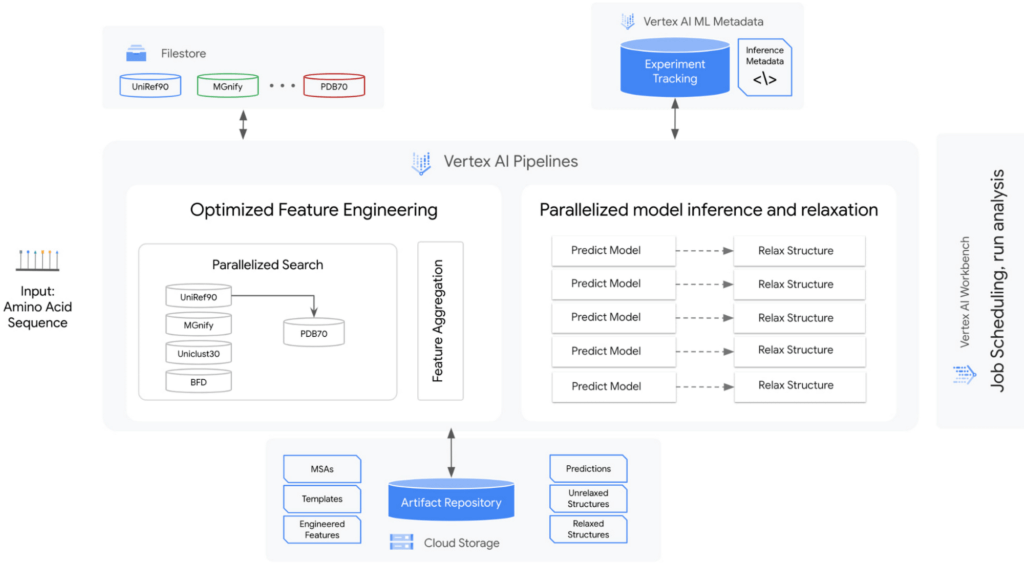
The solution encompasses the following:
A strategy for managing genetic databases. The solution includes high-performance, fully managed file storage. In this solution, Cloud Filestore is used to manage multiple versions of the databases and to provide high throughput and low-latency access.
An orchestrator to parallelize, orchestrate, and efficiently run steps in the workflow. Predictions, relaxations, and some feature engineering can be parallelized. In this solution, Vertex AI Pipelines is used as the orchestrator and runtime execution engine for the workflow steps.
Optimized hardware platform selection for each step. The prediction and relaxation steps run on GPUs, and feature engineering runs on CPUs. The prediction and relaxation steps can use multi-GPU node configurations. This is especially important for the prediction step because the memory usage is approximately quadratic with the number of residues. Therefore, predicting a large protein structure can exceed the memory of a single GPU device.
Metadata and artifact management. The solution includes management for running and analyzing experiments at scale. In this solution, Vertex AI Metadata is used to manage metadata and artifacts.
The basis of the solution is a set of reusable Vertex AI Pipelines components that encapsulate core steps in the AlphaFold inference workflow: feature preprocessing, prediction, and relaxation. In addition to those components, there are auxiliary components that break down the feature engineering step into tools, and helper components that aid in the organization and orchestration of the workflow.
The solution includes two sample pipelines: the universal pipeline and a monomer pipeline. The universal pipeline mirrors the settings and functionality of the inference script in the AlphaFold Github repository. It tracks elapsed time and optimizes compute resources utilization. The monomer pipeline further optimizes the workflow by making feature engineering more efficient. You can customize the pipeline by plugging in your own databases.
Next steps
To learn more and to try out this solution, check our GitHub repository, which contains the components and universal and monomer pipelines. The artifacts in the repository are designed so that you can customize them. In addition, you can integrate this solution into your upstream and downstream workflows for further analysis. To learn more about Vertex AI, visit our product page.
Acknowledgements
We would like to thank the following people for their collaboration: Shweta Maniar, Sampath Koppole, Mikhail Chrestkha, Jasper Wang, Alex Burdenko, Meera Lakhavani, Joan Kallogjeri, Dong Meng (NVIDIA), Mike Thomas (NVIDIA), and Jill Milton (NVIDIA).
Finally and most importantly, we would like to thank our Solution Manager Donna Schut for managing this solution from start to finish. This would not have been possible without Donna.
Unlocking the Power of Computer Vision: Vision AI Made Easy with Spring Boot and Java

1195
Of your peers have already read this article.
1:30 Minutes
The most insightful time you'll spend today!
In today’s era of data-driven applications, leveraging advanced machine learning and artificial intelligence services like computer vision has become increasingly important. One such service is the Vision API, which provides powerful image analysis capabilities. In this blog, we will explore how to create a Computer Vision application using Spring Boot and Java, enabling you to unlock the potential of image recognition and analysis in your projects. The application UI will accept as input, public URLs of images that contain written or printed text, extract the text, detect the language and if it is one of the supported languages, it will generate the English translation of that text.
Spring Boot and Google Cloud
Spring Boot is a powerful open-source framework for creating Spring-based applications. It simplifies development by providing auto-configuration, starter dependencies, and embedded servers. It also offers production-ready features like metrics and health checks. With Spring Boot, you can focus on writing code and deploying efficient applications without worrying about complex configuration or dependencies. Apart from the well-known features that make it an ideal choice for enterprise apps, a new exciting development is the official support for Native Image Builder using GraalVM, enabling the creation of native standalone executables without the need for a Java Runtime and are leaner and offer a super fast startup experience. Try Spring Native on Google Cloud.
The Spring Cloud GCP library makes it easy for Spring Boot applications to use Google Cloud services. It provides Spring Boot APIs for over a dozen Google Cloud services. This means you can take advantage of the benefits of Google Cloud services without having to learn separate Google Cloud client libraries. It is very easy to migrate or create a new Spring Boot application in Google Cloud. With just one command, you can bootstrap your production-ready Spring Boot project structure and start making code changes for your requirement. Refer to the documentation for a full list of features.
Prerequisites
Before diving into the development process, make sure you have the following prerequisites in place:
- A Google Cloud account with a project created and billing enabled
- Vision API, Translation, Cloud Run, and Artifact Registry APIs enabled
- Cloud Shell activated
- Cloud Storage API enabled with a bucket created and images with text or handwriting in local supported languages uploaded (or you can use the sample image links provided in this blog)
Refer to the documentation for steps on how to enable Google Cloud APIs.
Bootstrapping a Spring Boot project
To get started, create a new Spring Boot project using your preferred IDE or Spring Initializr. Include the necessary dependencies, such as Spring Web, Spring Cloud GCP, and Vision AI, in your project’s configuration. Alternatively, you can use Spring Initializr from Cloud Shell using the below steps to bootstrap your Spring Boot application easily:
1. Open a Cloud Shell terminal and make sure it is pointing to the correct project and that you are authorized (if not you can use the command below to set the right project):
gcloud config set project <PROJECT_ID>
2. Run the following command to create your Spring Boot project:
curl https://start.spring.io/starter.tgz -d packaging=jar -d dependencies=cloud-gcp,web,lombok -d baseDir=spring-vision -d type=maven-project -d bootVersion=3.0.1.RELEASE | tar -xzvf -spring-vision is the name of your project, change it per your requirement.
bootVersion is the version of Spring Boot, make sure to update it if required at the time of your implementation.
type is the version of project build tool type, you can change it to gradle if preferred.
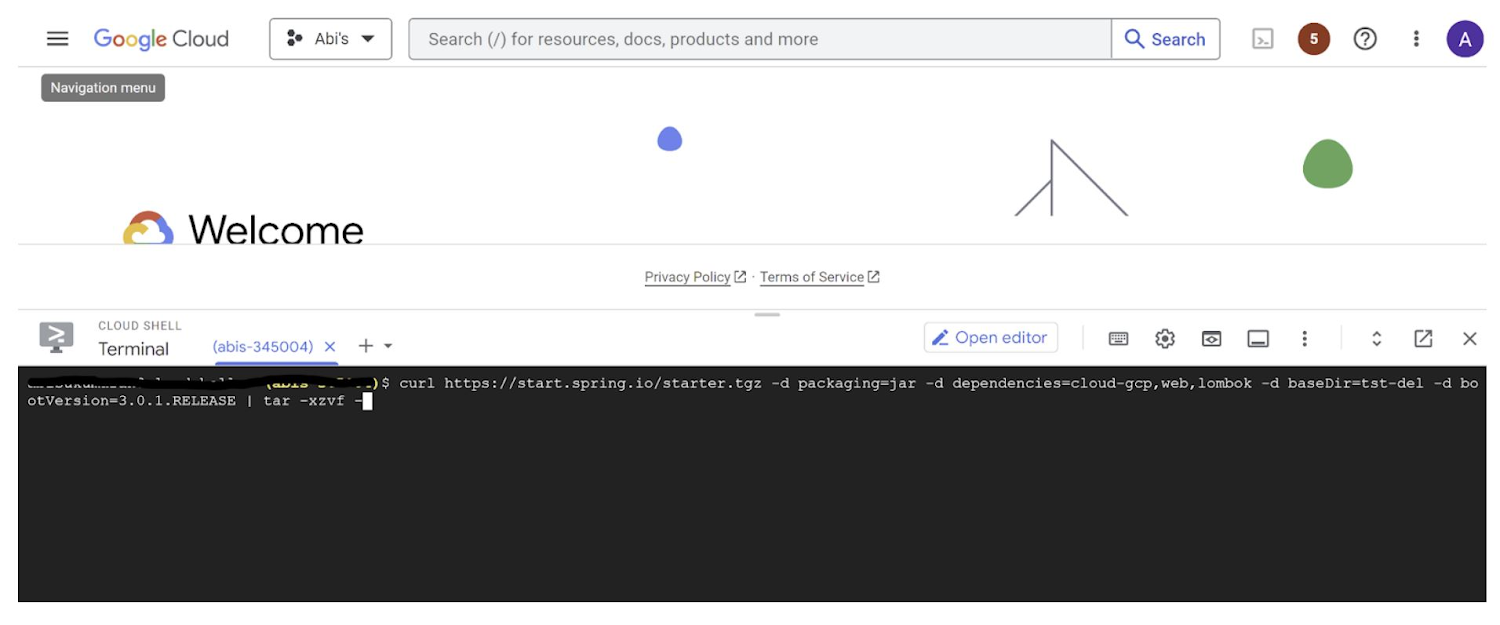
This creates a project structure under “spring-vision” as below:
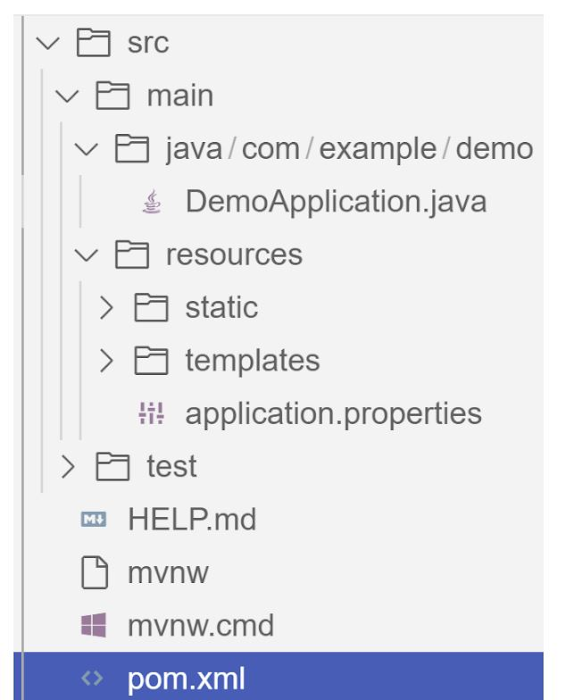
pom.xml contains all the dependencies for the project (dependencies you configured using this command are already added in your pom.xml).src/main/java/com/example/demo has the source classes .java files.resources contain the images, XML, text files and the static content the project uses that are maintained independently.application.properties enable you to maintain the admin features to define profile specific properties of the application.
Configuring the Vision API
Once you have the Vision API enabled, you have the option to configure the API credentials in your application. You can optionally use Application Default Credentials for setting up authentication. In this demo implementation however I have not implemented the use of credentials.
Implementing the vision and translation services
Create a service class that interacts with the Vision API. Inject the necessary dependencies and use the Vision API client to send image analysis requests. You can implement methods to perform tasks like image labeling, face detection, recognition, and more, based on your application’s requirements. In this demo, we will use handwriting extraction and translation methods. For this make sure you include the following dependencies in pom.xml
<dependency>
      <groupId>org.springframework.cloud</groupId>
      <artifactId>spring-cloud-gcp-starter-vision</artifactId>
</dependency>
<dependency>
<groupId>com.google.cloud</groupId>
<artifactId>google-cloud-translate</artifactId>
</dependency>Clone / Replace the following files from the repo and add them to the respective folders / path in the project structure:
Application.java(/src/main/java/com/example/demo)TranslateText.java(/src/main/java/com/example/demo)VisionController.java(/src/main/java/com/example/demo)index.html(/src/main/resources/static)result.html(/src/main/resources/templates)pom.xml
The method extractTextFromImage in the service org.springframework.cloud.gcp.vision.CloudVisionTemplate lets you extract text from your image input. The method getTranslatedText from the service com.google.cloud.translate.v3 lets you pass the extracted text from your image and get the translated text in the desired target language as response (if the source is in one of the supported languages list).
Building the REST API
Design and implement the REST endpoints that will expose the Vision API functionalities. Create controllers that handle incoming requests and utilize the Vision API service to process the images and return the analysis results.
In this demo, our VisionController class implements the endpoint, handles the incoming request, invokes the Vision API and Cloud Translation services and returns the result to the view layer. Implementation of the GET method for the REST endpoint is as follows:
@GetMapping("/extractText")
  public String extractText(String imageUrl) throws IOException {
    String textFromImage =
   this.cloudVisionTemplate.extractTextFromImage(this.resourceLoader.getResource(imageUrl));


    TranslateText translateText = new TranslateText();
    String result = translateText.translateText(textFromImage);
    return "Text from image translated: " + result;
  }
The TranslateText class in the above implementation has the method that invokes the Cloud Translation service:
String targetLanguage = "en";
 TranslateTextRequest request =
         TranslateTextRequest.newBuilder()
             .setParent(parent.toString())
             .setMimeType("text/plain")
             .setTargetLanguageCode(targetLanguage)
             .addContents(text)
             .build();
     TranslateTextResponse response = client.translateText(request);
     // Display the translation for each input text provided
     for (Translation translation : response.getTranslationsList()) {
       res = res + " ::: " + translation.getTranslatedText();
        System.out.printf("Translated text : %s\n", res);
     }
With the VisionController class, we have the GET method for the REST implemented.
Integrating Thymeleaf for frontend development
When building an application with Spring Boot, one popular choice for frontend development is to leverage the power of Thymeleaf. Thymeleaf is a server-side Java template engine that allows you to seamlessly integrate dynamic content into your HTML pages. Thymeleaf provides a smooth development experience by allowing you to create HTML templates with embedded server-side expressions. These expressions can be used to dynamically render data from your Spring Boot backend, making it easier to display the results of image analysis performed by the Vision API service.
To get started, ensure that you have the necessary dependencies for Thymeleaf in your Spring Boot project. You can include the Thymeleaf Starter dependency in your pom.xml:
<dependency>
<groupId>org.springframework.boot</groupId>
<artifactId>spring-boot-starter-thymeleaf</artifactId>
</dependency>
In your controller method, retrieve the analysis result from the Vision API service and add it to the model. The model represents the data that will be used by Thymeleaf to render the HTML template. Once the model is populated, return the name of the Thymeleaf template that you want to render. Thymeleaf will take care of processing the template, substituting the server-side expressions with the actual data, and generating the final HTML that will be sent to the client’s browser. Example:
return new ModelAndView("result", <<YOUR RESULT>>);In the case of the extractText method in VisionController, we have returned the result as a String to and not added to the model. But we have invoked the GET method extractText method on the index.html on page submit.
<form action="/extractText">

        Web URL of image to analyze:

        <input type="text"

               name="imageUrl"

               value=""

        <input type="submit" value="Read and Translate" />

</form>
With Thymeleaf, you can create a seamless user experience, where users can upload images, trigger Vision API analyses, and view the results in real-time. Unlock the full potential of your Vision AI application by harnessing the power of Thymeleaf for frontend development.
Deploying your Spring Boot application with Cloud Run
Write unit tests for your service and controller classes to ensure proper functionality under the /src/test/java/com/example folder. Once you’re confident in its stability, package it into a deployable artifact, such as a JAR file, and deploy it to Cloud Run, a serverless compute platform on Google Cloud. In this step, we will focus on deploying your containerized Spring Boot application using Cloud Run.
a. Package your application by executing the following steps from Cloud Shell(make sure the terminal is prompting at the project root folder)
Build:
./mvnw package
Once the build is successful, run locally to test:
./mvnw spring-boot:run
b. Containerize your Spring Boot Application with Jib:
Instead of manually creating a Dockerfile and building the container image, you can use the Jib utility to simplify the containerization process. Jib is a plugin that integrates directly with your build tool (such as Maven or Gradle) and allows you to build optimized container images without writing a Dockerfile. Before proceeding, you need to enable the Artifact Registry API (Use of Artifact Registry is encouraged over container registry). Then Run Jib to build a Docker image and publish to the Registry:
$ ./mvnw com.google.cloud.tools:jib-maven-plugin:3.1.1:build -Dimage=gcr.io/$GOOGLE_CLOUD_PROJECT/vision-jib
Note: In this experiment, we did not configure the Jib Maven plugin in pom.xml, but for advanced usage, it is possible to add it in pom.xml with more configuration options
c. Deploy the container (that we pushed to Artifact Registry in the previous step) to Cloud Run. This is again a one-command step:
gcloud run deploy vision-app --image gcr.io/$GOOGLE_CLOUD_PROJECT/vision-jib --platform managed --region us-central1 --allow-unauthenticated --update-env-vars
You can alternatively do this from the UI as well. Navigate to the Google Cloud Console and locate the Cloud Run service. Click on “Create Service” and follow the on-screen instructions. Specify the container image you previously pushed to the registry, configure the desired deployment settings (such as CPU allocation and autoscaling), and choose the appropriate region for deployment. You can set environment variables specific to your application. These variables can include authentication credentials (API keys etc.), database connection strings, or any other configuration needed for your Vision AI application to function correctly. When the deployment is completed successfully, you should get an endpoint to your application.
For our demo, the endpoint Cloud Run created for us is: https://vision-app-********-uc.a.run.app
Playing with your Vision AI app
For demo purposes, you can use the image URL below for your app to read and translate:
https://storage.googleapis.com/img_public_test/tamilwriting1.jfif
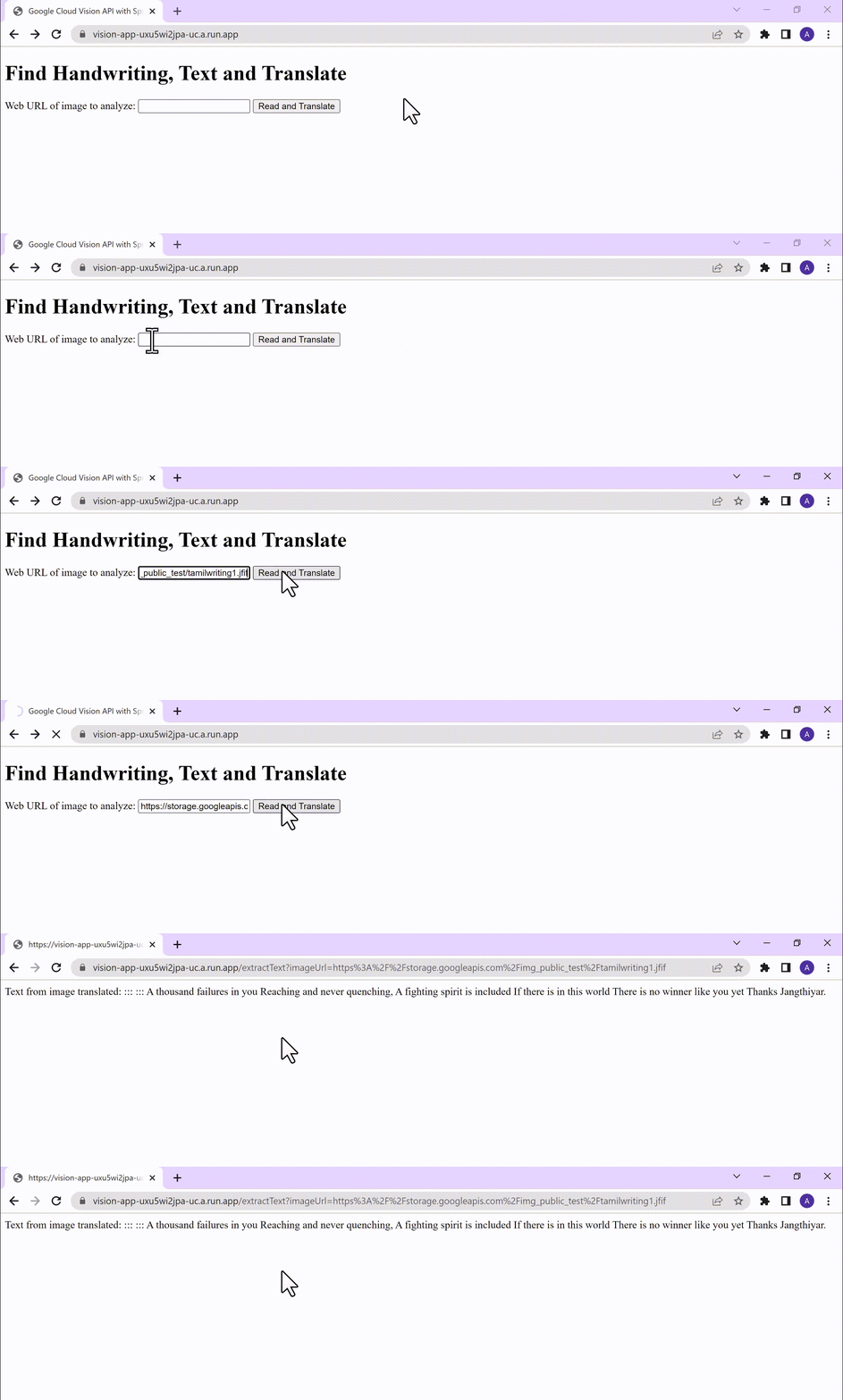
Conclusion
Congratulations! You have successfully created a Vision AI application using Spring Boot and Java. With the power of Vision AI, your application can now perform sophisticated image analysis, including labeling, face detection, and more. The integration of Spring Boot provides a solid foundation for building scalable and robust Google Cloud Native applications. Continue exploring the vast capabilities of Vision AI, Cloud Run, Cloud Translation and more to enhance your application with additional features and functionalities. To learn more, check out the Vision API, Cloud Translation, and GCP Spring docs. Try out the same experiment with the Spring Native option!! Also as a sneak-peak to Gen-AI world, checkout how this API shows up in Model Garden.
NCR’s Emerald Leverages Google Cloud to Help Grocers Boost Operational Agility

8246
Of your peers have already read this article.
3:00 Minutes
The most insightful time you'll spend today!
In recent years, the grocery industry has had to shift to facilitate a wider variety of checkout journeys for customers. This has meant ensuring a richer transaction mix, including mobile shopping, online shopping, in-store checkout, cashierless checkout or any combination thereof like buy online, pickup in store (BOPIS).
What’s more, in the past year and a half alone grocers have had to enable consumers new ways to shop for essentials. This has included needing to rapidly integrate or build on-demand delivery apps, offer curbside pickup with near-instant fulfillment as well as support touchless and cashless checkout experiences. Searches on Google Maps for retailers in the US with curbside pickup options have increased by 9000% since March 2020, and we believe these trends from 2020 will continue to define the future of grocery shopping.
The future of grocery will require agility and openness
Firstly, the need to rapidly adapt to changing consumer habits will be the new normal. Grocers will increasingly look to digitally transform legacy retail systems and modernize point of sale (POS) platforms to deliver and scale omnichannel experiences as quickly as possible. This necessitates a more agile and open architectural approach to technology – one built on microservices and leverages APIs so that new applications and experiences can be built, integrated and delivered faster.
Automation and data-driven retailing will be table stakes
In order for retailers to blend what they’re offering in the store with digital experiences more efficiently, they will also need to automate more. For example, with automation and business intelligence, grocers can take labor that might have been tied up with tender operations and checkout and redistribute those resources to restocking shelves, curbside pick-up or improving customer experiences.
Automation and access to real-time in-store inventory & supply chain data can also help grocers avoid the supply chain challenges seen in the early days of COVID-19. Grocers will need to find ways to leverage automation to ingest, organize, and analyze data from physical store networks, digital channels, distribution centers to better forecast demand and manage future fluctuations.
How NCR and Google Cloud are helping grocers adapt to disruption with operational agility
Helping grocers improve operational agility to address changing consumer shopping habits and to thrive during times of disruption is something that NCR and Google Cloud have teamed up to do. NCR has over 135 years of experience in retail, having invented the cash register and are continuing to help grocers innovate. NCR Emerald builds upon the company’s leadership in POS software and has turned it into a unified platform that helps grocers operate the entire store from front to back. The solution supports cashier-led checkout, self-checkout, integrated payments, merchandising, and enables regional managers and corporate employees access to the analytics and tools needed to optimize loyalty programs and promotions.

NCR has invested in a comprehensive, agile, and API-led retail architecture that lets grocers continually innovate and design new experiences as customers and the industry evolve. By running Emerald on Google Cloud, NCR can offer the solution on a subscription basis, helping grocers lower upfront capital expenditures and ensuring scalability. What’s more, NCR can tap into Google Cloud’s strength in data, analytics, and openness to deliver three key imperatives. Let’s take a look at each of these below.
Run the way grocers need to while leveraging Google Cloud as a single source of logic
Traditionally the POS system lived in the store. If disaster strikes, people still need access to food and essentials so the grocery store still needs to operate. It hardly gets more mission-critical than that. NCR Emerald is built on microservices, leveraging Kubernetes for front-of-house compute, and VMs (See graphic 1 below). This makes it easy to support lightweight clients accessible by store employees via any range of mobile devices, computer terminals, self-service kiosks, peripheral devices like receipt printers as well as legacy applications.
What’s unique is that because Emerald runs on Google Cloud, it supports all those in-store and digital touchpoints mentioned above, but also allows grocers to run lean. Emerald leverages Google Cloud as a single source of truth and operates a lot of what it does out of logic. Every sales transaction coming from every channel, including e-commerce, can be logged via NCR’s Hosted Service and centralized in BigQuery and Bigtable as a transaction data master. This enables the grocer to manage any transactional use case very consistently, whether it e supporting customers who want to purchase in one store and return in another, offering digital receipts or the ability to exchange online purchases in store. Emerald on Google Cloud can help retailers extend capabilities through the power of the cloud but not need to live exclusively in the cloud. In other words, the solution allows grocers the ability to run the way they need to.

Enable data-driven and real-time decision making for grocers
Store managers, regional managers, category managers, and others all require different cuts of the data to do their jobs effectively. However, data silos persist and how data is formatted and arranged can still remain pretty static. Therefore allowing users with different roles the ability to view and analyze that data quickly and in different ways continues to be a challenge.
As mentioned above, Emerald leverages Google Cloud data management solutions as the central repository for transactional, behavioral, and merchandising data. Every transaction from every store and every channel can be stored via NCR Hosted Service on BigQuery and Bigtable. NCR Analytics then harnesses the advanced analytical and data visualization capabilities of Looker to help grocers get a consolidated view of their business across all channels and then allow employees to slice and dice the data they way they need to. NCR Analytics also leverages the power of Google Cloud AI and machine learning to add another level of intelligence to the retailer’s data. For example, store managers can visualize how well they’re using their real estate and see how productive lanes 1-3 are compared with 7-10 or compare self-service versus manned lanes. By mapping to the retailer’s own catalog, they can also break down category-level performance and trends.

NCR Analytics takes advantage of Google Cloud’s data pipeline to reduce processing time, with scaling and resource management provided out of the box. By letting the cloud store and process the data, NCR is providing the ability for retailers to analyze their data in near real-time across all platforms – a real game changer in the grocery business.
Open APIs let grocers continually enrich the retail experience
Finally, Emerald is built on an API-first architecture managed through Apigee. It uses the power of Apigee as an open API platform to expose how Emerald can work with other NCR applications like loyalty and promotions, and third party applications like mobile ordering and order delivery to enrich the grocery experience for employees and customers. Every API that Emerald uses is available on Apigee, allowing them to share code samples and giving developers the ability to run scripts. This approach can allow retailers the ability to innovate in a fraction of the time and cost, speeding up 3rd party integrations up front and as businesses grow.
Take, for example, Northgate Market, a chain of 40 stores in California, that were able to transform its digital operations and enable experiences that set it apart from competitors – quickly and simply with Emerald. It took less than 6 months to go from contract to live deployment in the first store. Since then, Northgate Market has been able to extend their intelligence by leveraging the power of Looker and NCR Analytics.
Learn more about how NCR has been able to leverage an open, cloud-enabled architecture to help customers innovate across the retail, hospitality, and banking industries on the webinar “Role of APIs in Digital Transformation”. You can also learn more about how Northgate uses e-commerce to transform customer experience and gain consumer insights.
More Relevant Stories for Your Company

Maximize Efficiency in Document Extraction Models with Document AI Workbench GA Release
Each day, more documents are created and used across companies to make decisions. However, the value in these documents is primarily expressed as unstructured data, which makes the value difficult and manually intensive to extract and use for business processes. As the number and variety of documents used by businesses

Google Cloud Platform Gives Us 5x the Processing Power to Analyze Physician Performance at 75% Lower Cost
Patients about to undergo a healthcare procedure understandably want the best medical professionals they can get. But how can they know which doctors have had the most experience and the best outcomes with that particular procedure? How can they make an informed decision about which doctor to select when the


Why it’s Easier Than Ever for Developers to Break Into Machine Learning and Data Science
This week we talk about machine learning, its best use cases, and how developers can break into machine learning and data science. Dale Markowitz, Google Developer Advocate, talks about natural language processing as well, explaining that it’s basically the intersection of machine learning and text processing. It can be used

Document AI: A Platform for Businesses to Simplify Document Automation
As I type this blog in a Google Doc, I can’t help but think about how much we rely on digital documents to communicate, collaborate, and do business. Yet most of the data in documents remains un-analyzed. Even when documents are part of customer-facing workflows like processing a mortgage application
