





Google Cloud’s Med-PaLM 2: Pioneering Ethical AI Solutions for the Medical Domain

921
Of your peers have already read this article.
3:30 Minutes
The most insightful time you'll spend today!
Healthcare breakthroughs change the world and bring hope to humanity through scientific rigor, human insight, and compassion. We believe AI can contribute to this, with thoughtful collaboration between researchers, healthcare organizations and the broader ecosystem.
Today, we’re sharing exciting progress on these initiatives, with the announcement of limited access to Google’s medical large language model, or LLM, called Med-PaLM 2. It will be available in coming weeks to a select group of Google Cloud customers for limited testing, to explore use cases and share feedback as we investigate safe, responsible, and meaningful ways to use this technology.
Med-PaLM 2 harnesses the power of Google’s LLMs, aligned to the medical domain to more accurately and safely answer medical questions. As a result, Med-PaLM 2 was the first LLM to perform at an “expert” test-taker level performance on the MedQA dataset of US Medical Licensing Examination (USMLE)-style questions, reaching 85%+ accuracy, and it was the first AI system to reach a passing score on the MedMCQA dataset comprising Indian AIIMS and NEET medical examination questions, scoring 72.3%.
Industry-tailored LLMs like Med-PaLM 2 are part of a burgeoning family of generative AI technologies that have the potential to significantly enhance healthcare experiences. We’re looking forward to working with our customers to understand how Med-PaLM 2 might be used to facilitate rich, informative discussions, answer complex medical questions, and find insights in complicated and unstructured medical texts. They might also explore its utility to help draft short- and long-form responses and summarize documentation and insights from internal data sets and bodies of scientific knowledge.
Innovating responsibly with AI
Since last year, we’ve been researching and evaluating Med-PaLM and Med-PaLM 2, assessing it against multiple criteria — including scientific consensus, medical reasoning, knowledge recall, bias, and likelihood of possible harm — which were evaluated by clinicians and non-clinicians from a range of backgrounds and countries.
Med-PaLM 2’s impressive performance on medical exam-style questions is a promising development, but we need to learn how this can be harnessed to benefit healthcare workers, researchers, administrators, and patients. In building Med-PaLM 2, we’ve been focused on safety, equity, and evaluations of unfair bias. Our limited access for select Google Cloud customers will be an important step in furthering these efforts, bringing in additional expertise across the healthcare and life sciences ecosystem.
What’s more, when Google Cloud brings new AI advances to our products, our commitment is two-fold: to not only deliver transformative capabilities, but also ensure our technologies include proper protections for our organizations, their users, and society. To this end, our AI Principles, established in 2017, form a living constitution that guides our approach to building advanced technologies, conducting research, and drafting our product development policies.
From AI to generative AI
Google’s deep history in AI informs our work in generative AI technologies, which can find complex relationships in large sets of training data, then generalize from what they learn to create new data. Breakthroughs such as the Transformer have enabled LLMs and other large models to scale to billions of parameters, letting generative AI move beyond the limited pattern-spotting of earlier AIs and into the creation of novel expressions of content, from speech to scientific modeling.
Google Cloud is committed to bringing to market products that are informed by our research efforts across Alphabet. In 2022, we introduced a deep integration between Google Cloud and Alphabet’s AI research organizations, which allows Vertex AI to run DeepMind’s groundbreaking protein structure prediction system, AlphaFold.
Much more is on the way. In one sense, generative AI is revolutionary. In another, it’s the familiar technology story of more and better computing creating new industries, from desktop publishing to the internet, social networks, mobile apps, and now, generative AI.
Building on AI leadership
Additionally, today we’re announcing a new AI-enabled Claims Acceleration Suite, designed to streamline processes for health insurance prior authorization and claims processing. The Claims Acceleration Suite helps both providers of insurance plans and healthcare to create operational efficiencies and reduce administrative burdens and costs by converting unstructured data into structured data that help experts make faster decisions and improve access to timely patient care.
On the clinical side, last year we announced Medical Imaging Suite, an AI-assisted diagnosis technology being used by Hologic to improve cervical cancer diagnoses and Hackensack Meridian Health to predict metastasis in patients with prostate cancer. Elsewhere, Mayo Clinic and Google have collaborated on an AI algorithm to improve the care of head and neck cancers, and Google Health recently partnered with iCAD to improve breast cancer screening with AI.
From these examples and more, it’s clear that the healthcare industry has moved from testing AI to deploying it to improve workflows, solve business problems, and speed healing. With this in mind, we expect rapid interest in and uptake of generative AI technologies. Healthcare organizations are eager to learn about generative AI and how they can use it to make a real difference.
Looking ahead
The power of AI has reinforced Google Cloud’s commitment to privacy, security, and transparency. Our platforms are designed to be flexible, including data and model lineage capabilities, integrated security and identity management services, support for third-party models, choice and transparency on models and costs, integrated billing and entitlement support, and support across many languages.
While we’ll have some innovations like Med-PaLM 2 that are tuned for healthcare, we also have products that are relevant across industries. Last month, we announced several generative AI capabilities coming to Google Cloud, including Generative AI support in Vertex AI and Generative AI App Builder, which are already being tested by a number of customers. Developers and businesses already use Vertex AI to build and deploy machine learning models and AI applications at scale, and we recently added Generative AI support in Vertex AI. This gives customers foundation models they can fine-tune with their own data, and the ability to deploy applications with this powerful new technology. We also launched Generative AI App Builder to help organizations build their own AI-powered chat interfaces and digital assistants in minutes or hours by connecting conversational AI flows with out-of-the-box search experiences and foundation models.
As AI proves its value, it’s likely there will be increased focus on high-quality data collection and curation in healthcare and life sciences. Improving the flow and unification of data across health care systems, referred to as data interoperability, is one of the most important building blocks to leveraging AI, and it helps organizations run more effectively, improve patient care, and helps people live healthier lives. We expect to continue our investments in technology, infrastructure, and data governance.
We’re committed to realizing the potential of this technology in healthcare. By working with a handful of trusted healthcare organizations early on, we’ll learn more about what can be achieved, and how this technology can safely advance. For all of us, the prospects are inspiring, humbling, and exciting.
If you’re interested in exploring generative AI on Cloud, you can sign-up for our Trusted Tester program or reach out to your Google Cloud sales representative.

7702
Of your peers have already downloaded this article
4:30 Minutes
The most insightful time you'll spend today!
AI has the power to revolutionize every industry—from retail to agriculture, and education to healthcare. Yet many businesses still haven’t begun to adopt AI.
There are a number of factors, including the need for specialized talent and hardware, the right types and quantities of data for training and refining machine learning models, and of course, the broader complexities of introducing a new way of working inside an organization.
But above all, AI can be challenging to apply to very specific business needs.
Google wants to change that, which is why it’s introducing a number of AI solutions aimed at making it easier for businesses to use AI to address many of these specific use cases.
Google’s AI solutions fall into two categories. The first is a set of pre-packaged AI solutions that can be easily integrated into existing workflows. To make these solutions as easy to implement as possible, Google works with popular, trusted enterprise partners who have deep-domain expertise in these workflows.
The majority of Google’s pre-packaged solutions will be delivered through these partners, although it will be offering some
The second category of AI solutions is comprised of reference architectures that businesses can use to create highly-custom AI tools. These require more development work than Google’s pre-packaged
Additionally, businesses can build on these architectures and deploy them to market more quickly, helping your business take advantage of AI, faster.
Learn more about all Google’s AI solutions. Download the whitepaper now!
2021 was the Momentum for Contact Center AI!

3506
Of your peers have already read this article.
1:30 Minutes
The most insightful time you'll spend today!
2021 has been a high-stakes year for call centers, with many organizations forced to rapidly scale up their call center operations in response to ongoing pandemic disruptions. We’re proud that 2021 has also been an amazing year for Google Cloud’s Contact Center AI (CCAI), which has helped our customers adapt and thrive, despite the challenging conditions.
Beginning in January, we launched Dialogflow CX in GA. Agent Assist preview was released in May. Most recently, CCAI Insights GA was announced at Google Cloud NEXT in October. During NEXT, we shared lots of great content on how you can use CCAI to improve your customer experience with these breakout sessions:
- Using CCAI Insights to Better Understand Your Customers
- Customer Impact with Conversational AI
- Drive Results by Transforming the Customer Experience with AI-Powered Business Messages
But don’t just take our word for it. We also got a chance to hear how some companies are using CCAI to better reach their own customers, including The Home Depot, TELUS, and Love Holidays. We partnered with CDW to discuss transforming the contact center with AI and with Quantiphi on how to migrate from Dialogflow EX to CX. Our integration with Looker Block also makes CCAI Insights even more powerful by visualizing contact center metrics. Over the summer, we hosted a Dialogflow CX competition with more than 1,100 participants. Just last month, we showed how we’ve enabled businesses to use AI in their interactions using Google Business Messages. Looking to the future, we talked about the future in our article,“Reimagining your Customer Experience with Conversational AI.”
Amwell, a U.S.-based telehealth company that is launching CCAI, including the recently launched CCAI Insights, is among the enterprises harnessing AI to transform its call centers. “With Contact Center AI, we aim to digitize our support for improved operational efficiency and elevated analytics capabilities, while enhancing the customer experience for patients, providers, and staff,” says Paul Johnson, SVP Client Services at Amwell. “Contact Center AI Insights will allow Amwell to better understand why our platform users are reaching out to support and how they feel about the overall experience – valuable insights for our support organization.”
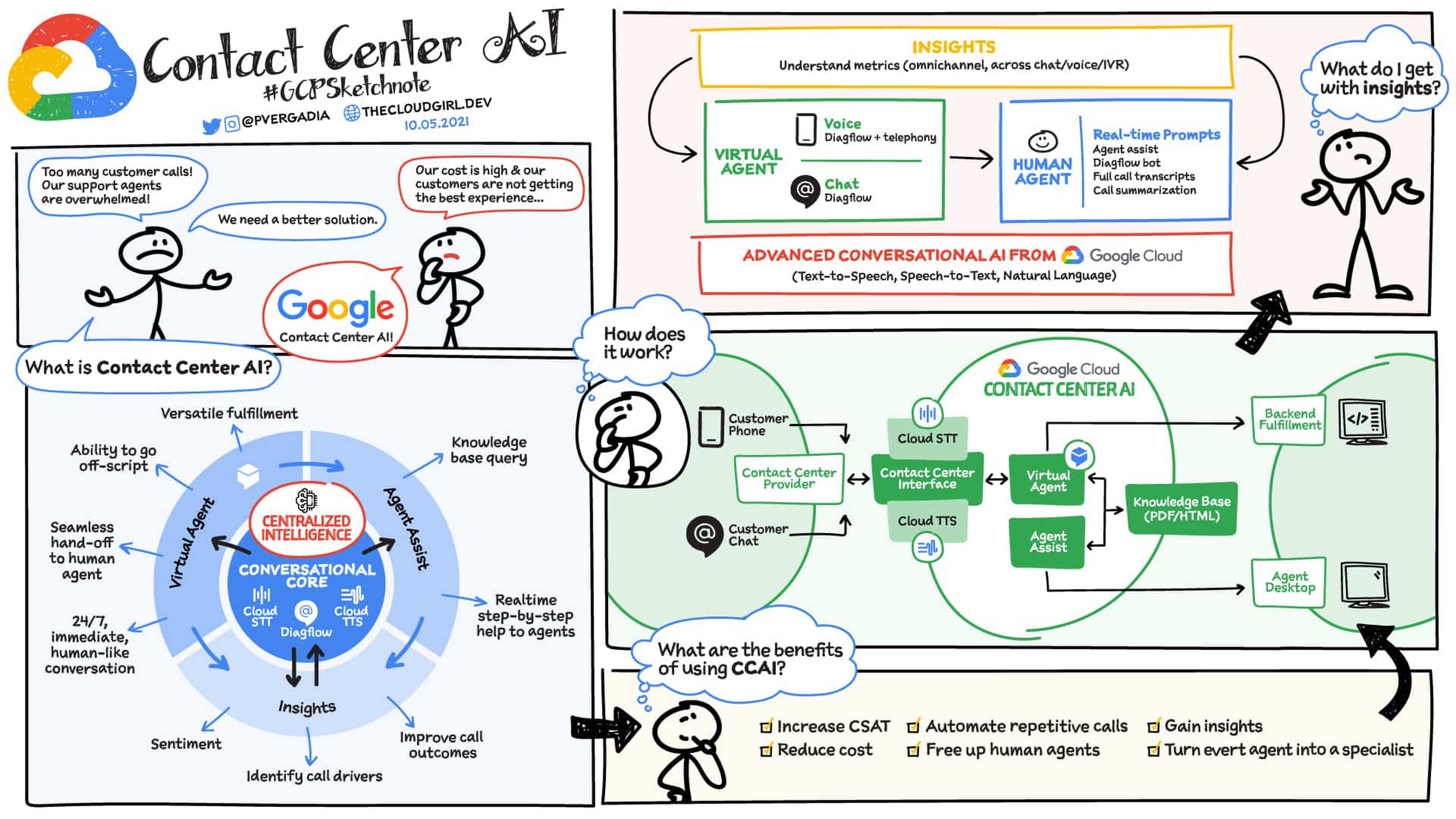
As we recap the momentum of CCAI for 2021, it’s also a good time to review exactly how CCAI works.
What is CCAI?
As the volume of customer calls increases, it’s becoming even more important to make the most of human agents’ time to lower costs and improve customer experiences. CCAI enables you to do just that: it frees human agents to concentrate on more complex calls by providing them with real-time information to better handle those calls.
Single source of intelligence: Contact Center AI provides a consistent, high-quality conversational experience across all channels and platforms, both human and virtual. Because the “brains” of CCAI are centralized in the cloud, you can apply consistent intelligence across every application in the customer journey.
Ability to go off-script: Huge cost savings can be realized by having a virtual agent handle voice calls. This is easier said than done, however, because conversations rarely are completely linear; instead, they meander from topic to topic, which is difficult to handle programmatically in a fixed-path Interactive Voice Response (IVR) system.
Contact Center AI has the ability to go “off script” — to let callers go down tangents or side paths to the main conversation, while still tracking towards the main objective of the call. With CCAI, your virtual agents can answer complex questions and complete complicated tasks, including allowing for unexpected stops and starts, unusual word choices, or implied meanings. Developers can define supplemental questions, and CCAI can easily retain the context, answer the supplemental question, and come back to the main flow.
Versatile fulfillment: CCAI has the ability to handle multiple use cases for the customer with the same virtual agent, which enables you to fully automate routine tasks and deflect calls. The same virtual agent can take a payment, update information like a phone number, give a customer information on their balance, and process information for other tasks, all within the same conversational flow.
How does CCAI work?
CCAI has three key components:
- Conversation Core: This is the central AI brain that underpins CCAI and its ability to understand, talk, and interact. It enables and orchestrates high-quality conversational experiences at scale making it possible for customers to have conversations with a virtual agent that are as good as conversations with a human agent.
- Understand – Speech-to-text speech recognition understands what customers are saying regardless of how they phrase things, what vocabulary they use, what accent they have, and so on.
- Talk – Text-to-speech enables virtual agents to respond to customers in a natural, human-like manner that pushes the conversation along, rather than frustrate them.
- Interact – Dialogflow identifies customer intent and determines the appropriate next step. You can build conversational flows in a point-and-click interface, and generate automated ML models for human-like conversational experiences.
- Virtual agents with Dialogflow: This component automates interactions with customers, using natural conversation to identify and address their issues. Virtual agents enable customers to get immediate help anytime, day or night. Agent Assist: This component brings AI to human agents to increase the quality of their work, while decreasing their average handling time. Agent Assist shares initial context and provides real-time, turn-by-turn guidance to coach agents through business processes, as well as full call transcriptions that agents can edit and file quickly.
- CCAI Insights: CCAI Insights aids your contact center management team in making better data driven decisions for their business by breaking down conversations using natural language processing and machine learning. Having this information allows your business to reduce manual analysis and focus on decision making like which conversations need your attention, where to deploy virtual agent automation to have the biggest impact and how to address your customer needs.
How does CCAI create experiences for agents and customers?
When a user initiates a chat or voice call and the contact center provider connects them with CCAI, a virtual agent engages with the user, understands their intent, and fulfills the request by connecting to the backend. If necessary, the call can be handed off to a human agent, who sees the transcript of the interaction with the virtual agent, gets feedback from the knowledge base to respond to queries in real time, and receives a summary of the call at the end. Insights help you understand what happened during the virtual agent and live agent sessions. The result is improved customer experiences and CSAT scores, lower agent handling times, and more time for human agents to spend on more complicated customer issues.
And there you have it: a quick overview of CCAI and its progress in 2021. For more details, check out the documentation or our CCAI solutions page.https://www.youtube.com/embed/6_Gilug2QYw?enablejsapi=1&
For more #GCPSketchnote, follow the GitHub repo. For similar cloud content follow me on Twitter @pvergadia and keep an eye out on thecloudgirl.dev.
Apollo24|7 partnered with Google Cloud to build the Clinical Decision Support System (CDSS) together

2743
Of your peers have already read this article.
4:30 Minutes
The most insightful time you'll spend today!
Clinical Decision Support System (CDSS) is an important technology for the healthcare industry that analyzes data to help healthcare professionals make decisions related to patient care. The market size for the global clinical decision support system appears poised for expansion, with one study predicting a compound annual growth rate (CAGR) of 10.4%, from 2022 to 2030, to $10.7 billion.
For any health organization that wants to build a CDSS system, one key block is to locate and extract the medical entities that are present in the clinical notes, medical journals, discharge summaries, etc. Along with entity extraction, the other key components of the CDSS system are capturing the temporal relationships, subjects, and certainty assessments.
At Google Cloud, we know how critical it is for the healthcare industry to build CDSS systems, so we worked with Apollo 24|7, the largest multi-channel digital healthcare platform in India, to build the key blocks of their CDSS solution.
We helped them to parse the discharge summaries and prescriptions to extract the medical entities. These entities can then be used to build a recommendation engine that would help doctors with the “Next Best Action” recommendation for medicines, lab tests, etc.
Let’s take a sneak peek at Apollo 24|7’s entity extraction solutions, and the various Google AI technologies that were tested to form the technology stack.
Datasets Used
To perform our experiments on entity extraction, we used two types of datasets.
- i2b2 Dataset – i2b2 is an open-source clinical data warehousing and analytics research platform that provides annotated deidentified patient discharge summaries made available to the community for research purposes. This dataset was primarily used for training and validation of the models.
- Apollo 24|7’s Dataset – De-identified doctor’s notes from Apollo24|7 were used for testing. Doctors annotated them to label the entities and offset values.
Experimentation and choosing the right approach — Four models put to test
For entity extraction, both Google Cloud products and open-source approaches were explored. Below are the details:
- Healthcare Natural Language API: This is a no-code approach that provides machine learning solutions for deriving insights from medical text. Using this, we parsed unstructured medical text and then generated a structured data representation of the medical knowledge entities stored in the data for downstream analysis and automation. The process includes:
- Extract information about medical concepts like diseases, medications, medical devices, procedures, and their clinically relevant attributes;
- Map medical concepts to standard medical vocabularies such as RxNorm, ICD-10, MeSH, and SNOMED CT (US users only);
- Derive medical insights from text and integrate them with data analytics products in Google Cloud.
The advantage of using this approach is that it not only extracts a wide range of entity types like MED_DOSE, MED_DURATION, LAB_UNIT, LAB_VALUE, etc, but also captures functional features such as temporal relationships, subjects, and certainty assessments, along with the confidence scores. Since it is available on Google Cloud, this offers long-term product support. It is also the only fully-managed NLP service among all the approaches tested and hence, it requires the least effort to implement and manage.
But one thing to keep in mind is that since the Healthcare NL API offers natural language models that are pre-trained, it currently cannot be used for custom entity extraction models trained using custom annotated medical text or to extract custom entities. This has to be done via AutoML Entity Extraction for Healthcare, another Google Cloud service for custom model development. Custom model development is important for adapting the pre-trained models to new languages or region-specific natural language processing, such as medical terms whose use may be more prevalent in India than in other regions
- Vertex AutoML Entity Extraction for Healthcare: This is a low-code approach that’s already available on Google Cloud. We used AutoML Entity Extraction to build and deploy custom machine learning models that analyzed documents, categorized them, and identified entities within them. This custom machine learning model was trained on the annotated dataset provided by the Apollo 24|7 team.
The advantage of AutoML Entity Extraction is that it gives the option to train on a new dataset. However, one of the prerequisites to keep in mind is that it needs a little pre-processing to capture the input data in the required JSONL format. Since this is an AutoML model just for Entity Extraction, it does not extract relationships, certainty assessments, etc.
- BERT-based Models on Vertex AI: Vertex AI is Google Cloud’s fully managed unified AI platform to build, deploy, and scale ML models faster, with pre-trained and custom tooling. We experimented with multiple custom approaches based on pre-trained BERT-based models, which have shown state-of-the-art performance in many natural language tasks. To gain better contextual understanding of medical terms and procedures, these BERT-based approaches are explicitly trained on medical domain data. Our experiments were based on BioClinical BERT, BioLink BERT, Blue BERT trained on Pubmed dataset, and Blue BERT trained on Pubmed + MIMIC datasets.
The major advantage of these BERT-based models is that they can be finetuned on any Entity Recognition task with minimal efforts.
However, since this is a custom approach, it requires some technical expertise. Additionally, it does not extract relationships, certainty assessments, etc. This is one of the main limitations of using BERT-based models.
- ScispaCy on Vertex AI: We used Vertex AI to perform experiments based on ScispaCy, which is a Python package containing spaCy models for processing biomedical, scientific or clinical text.
Along with Entity Extraction, Scispacy on Vertex AI provides additional components like Abbreviation Detector, Entity Linking, etc. However, when compared to other models, it was less precise, with too many junk phrases, like “Admission Date,” captured as entities.
“Exploring multiple approaches and understanding the pros/cons of each approach helped us to decide the one that would fit our business requirements.” according to Abdussamad M, Engineering Lead at Apollo 24|7.
Evaluation Strategy
In order to match the parsed entity with the test data labels, we used extensive matching logic that comprised of the below four methods:
- Exact Match – Exact match captures entities where the model output and the entities in the test dataset match. Here, the offset values of the entities have also been considered. For example, the entity “gastrointestinal infection” that is present as-is in both the model output and the test label will be considered an “Exact Match.”
- Match-Score Logic – We used a scoring logic for matching the entities. For each word in the test data labels, every word in the model output is matched along with the offset. A score is calculated between the entities and based on the threshold, it is considered as a match.
- Partial Match – In this matching logic, entities like “hypertension” and “hypertensive” are matched based on the Fuzzy logic.
- UMLS Abbreviation Lookup – We also observed that the medical text had some abbreviations, like AP meaning abdominal pain. These were first expanded by doing a lookup on the respective UMLS (Unified Medical Language System) tables and then passed to the individual entity extraction models.
Performance Metrics
We used precision and recall metrics to compare the outcomes of different models/experiments.
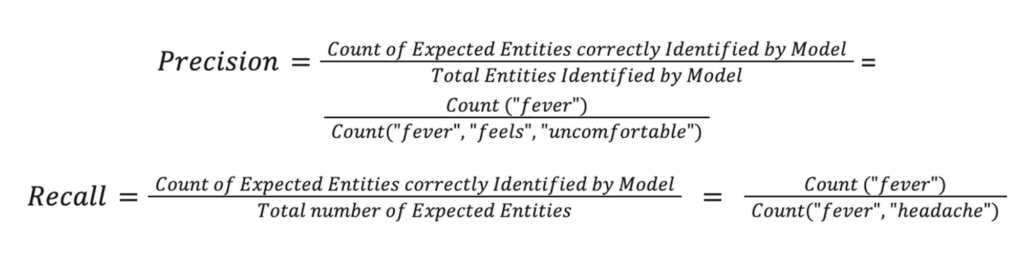
Precision (also called positive predictive value) is the fraction of relevant instances among the retrieved instances, while recall (also known as sensitivity) is the fraction of relevant instances that were retrieved.
The below example shows how to calculate these metrics for a given sample.
Example sample: “Krish has fever, headache and feels uncomfortable”
Expected Entities: [“fever”, “headache”]
Model Output: [“fever”, “feels”, “uncomfortable”]
Thus,

Experimentation Results
The following table captures the results of the above experiments on Apollo24|7’s internal datasets.
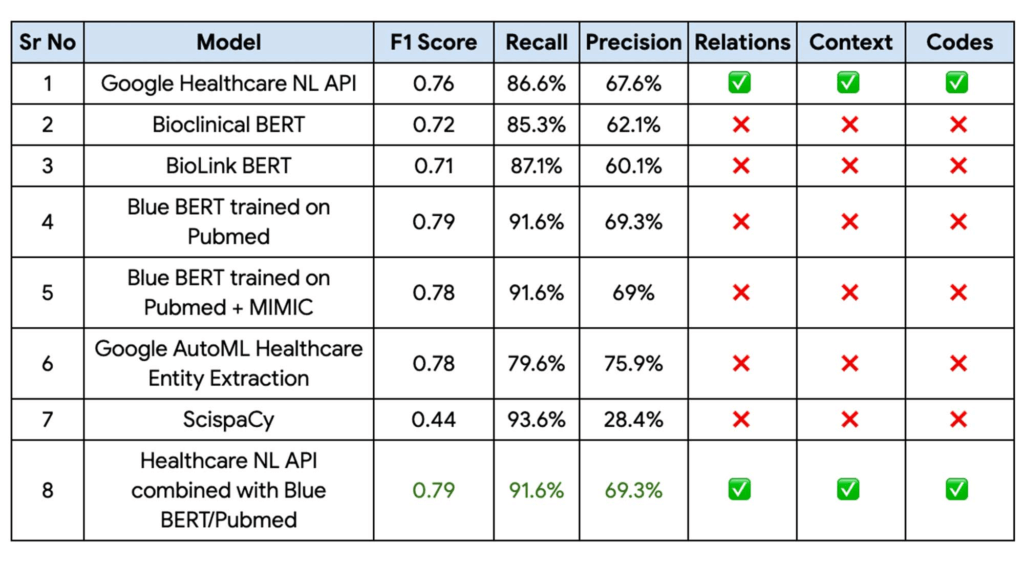
Finally, the Blue BERT model trained on the Pubmed dataset had the best performance metrics with a 81% improvement on Apollo 24|7’s baseline mode with the Healthcare Natural Language API providing the context, relationships, and codes. This performance could be further improved by implementing an ensemble of these two models.
“With the Blue BERT model giving the best performance for entity extraction on Vertex AI and the Healthcare NL API being able to extract the relationships, certainty assessments etc, we finally decided to go with an ensemble of these 2 approaches,“ Abdussamad added.
Fast track end-to-end deployment with Google Cloud AI Services (AIS)
Google AIS (Professional Services Organization) helped Apollo24|7 to build the key blocks of the CDSS system.
The partnership between Google Cloud and Apollo 24|7 is just one of the latest examples of how we’re providing AI-powered solutions to solve complex problems to help organizations drive the desired outcomes. To learn more about Google Cloud’s AI services, visit our AI & ML Products page, and to learn more about Google Cloud solutions for health care, explore our Google Cloud Healthcare Data Engine page.
Acknowledgements
We’d like to give special thanks to Nitin Aggarwal, Gopala Dhar and Kartik Chaudhary for their support and guidance throughout the project. We are also thankful to Manisha Yadav, Santosh Gadgei and Vasantha Kumar for implementing the GCP infrastructure. We are grateful to the Apollo team (Chaitanya Bharadwaj, Abdussamad GM, Lavish M, Dinesh Singamsetty, Anmol Singh and Prithwiraj) and our partner team from HCL/Wipro (Durga Tulluru and Praful Turanur) who partnered with us in delivering this successful project. Special thanks to the Cloud Healthcare NLP API team (Donny Cheung, Amirhossein Simjour, and Kalyan Pamarthy).
Contact Center AI (CCAI) with Agent Assist can Lower Opex and Handle 28% More Chats

4831
Of your peers have already read this article.
1:30 Minutes
The most insightful time you'll spend today!
Contact Center AI (CCAI) brings Google’s innovation in conversational AI to solve the most challenging customer service needs while lowering operational costs. More than a thousand customers have deployed CCAI and are steadily turning it on to power their production contact centers.
Today, we’re excited to announce that we’ve made CCAI even stronger with Agent Assist for Chat, now in public preview.
Agent Assist provides your human agents with continuous support during their calls and now chats by identifying the customers’ intent and providing them with real-time recommendations such as articles and FAQs as well as responses to customer messages to more effectively resolve the conversation.
Customers using Agent Assist for Chat have been able to manage up to 28% more conversations concurrently, while also driving up customer satisfaction by 10%. Additionally, we’ve seen them respond up to 15% faster to chats, reducing chat abandonment rates and solving more customer problems.
Agent Assist provides two key components to help agents manage conversations better:
- Smart Reply provides response suggestions to agents so they can quickly and appropriately respond to customer messages. These suggestions can be taken from your top performing agents as well as modified even further to ensure suggestions properly reflect the tone and voice of your brand. Agent Assist learns when and what recommendations to make by building a custom model that’s trained on your (and only your) data.
- Knowledge Assist unlocks the power of your knowledge base to provide articles and FAQ suggestions to agents in real-time as the conversation progresses. When using Knowledge Assist, agents no longer need to make the customer wait while they navigate multiple applications and data to find the resolution to the customer’s issue — the answer is delivered right to them.
“We’ve been very impressed by the chat capabilities of Agent Assist,” said Chris Smith, Vice President of Digital Service at Optus, one of the largest telecommunications companies in Australia
Optus has been using CCAI Dialogflow CX to send queries to virtual agents and sees great potential to use Agent Assist to provide recommendations to their customer support representatives. They expect Agent Assist to help minimize repetitive tasks by providing response and typeahead suggestions, helping improve the efficiency of their agents and the quality and consistency of service they provide.
Another customer, LoveHolidays, is using Agent Assist to support their agents and customers in the travel industry.
“Agent Assist has been a beneficial aid to agents and our customers alike… It gives us the power to flex our contact center staff levels in hours not weeks,” said Eugene Neale, Director of CX Engineering & Business IT at LoveHolidays
Analysts say online chat is becoming one of the most popular ways to reach out to businesses for customer support. IDC research finds that single-function contact centers worldwide are increasingly rare — in 2020, although phone/voice is still responsible for most interactions (at around 18%); email is responsible for around 13% of interactions, and live chat (without automation) is responsible for around 8% of interactions, according to IDC, Toward the AI-Powered Contact Center, Doc # EUR147017320, December 2020.
Deploying CCAI with Agent Assist for Chat
As part of Google’s Contact Center AI suite, Agent Assist provides a seamless handoff from chats managed by your Dialogflow CX virtual agents. If a conversation or customer requires a live agent, Agent Assist will help your team pick it up quickly and drive it to a satisfying resolution.
Historically, when managers saw contact center volumes increase they had two choices: allow customers to wait longer to speak to someone (lowering customer satisfaction) or bring on more agents (increasing cost to serve). Deploying CCAI provides contact center leaders with a third choice: equip agents with tools like, Agent Assist for Chat, to efficiently manage customer interactions while maintaining high quality service.
Global CCAI partners support Agent Assist for Chat
Agent Assist for Chat is a set of public APIs that your engineering team can integrate directly into an agent desktop to control the agent experience from end-to-end. For a more out-of-the-box solution, we have partnered with LivePerson and 247.ai to build Agent Assist directly into their agent desktops.
“Integrating our Conversational Cloud directly with Agent Assist means agents can leverage cutting-edge productivity AI to build even further on the massive ROI of conversational commerce, from reduced agent effort and time-to-respond to increased customer satisfaction and revenue,” said Alex Spinelli, CTO of LivePerson.
More Agent Assist resources
To learn more, check out the Agent Assist webpage. Give Agent Assist a try by training a model and then testing it using the Agent Assist simulator.
This New Offering of Google Cloud Brings AI and Data Together!

2965
Of your peers have already read this article.
5:00 Minutes
The most insightful time you'll spend today!
Without AI, you’re not getting the most out of your data.
Without data, you risk stale, out-of-date, suboptimal models.
But most companies are still struggling with how to keep these highly interdependent technologies in sync and operationalize AI to take meaningful action from data.
We’ve learned from Google’s years of experience in AI development how to make data-to-AI workflows as cohesive as possible and as a result our data cloud is the most complete and unified data and AI solution provider in the market. By bridging data and AI, data analysts can take advantage of user-friendly, accessible ML tools, and data scientists can get the most out of their organization’s data. All of this comes together with built-in MLOps to ensure all AI work — across teams — is ready for production use.
In this blog we’ll show you how all of this works, including exciting announcements from the Data Cloud Summit:
Vertex AI Workbench is now GA bringing together Google Cloud’s data and ML systems into a single interface so that teams have a common toolset across data analytics, data science, and machine learning. With native integrations across BigQuery, Spark, Dataproc, and Dataplex data scientists can build, train and deploy ML models 5X faster than traditional notebooks.
Introducing Vertex AI Model Registry, a central repository to manage and govern the lifecycle of your ML models. Designed to work with any type of model and deployment target, including BigQuery ML, Vertex AI Model Registry makes it easy to manage and deploy models.
Use ML to get the most out of your data, no matter the format
Analyzing structured data in a data warehouse, like using SQL in BigQuery, is the bread and butter for many data analysts. Once you have data in a database, you can see trends, generate reports, and get a better sense of your business. Unfortunately, a lot of useful business data isn’t in the tidy tabular format of rows and columns. It’s often spread out over multiple locations and in different formats, frequently as so-called “unstructured data” — images, videos, audio transcripts, PDFs — can be cumbersome and difficult to work with.
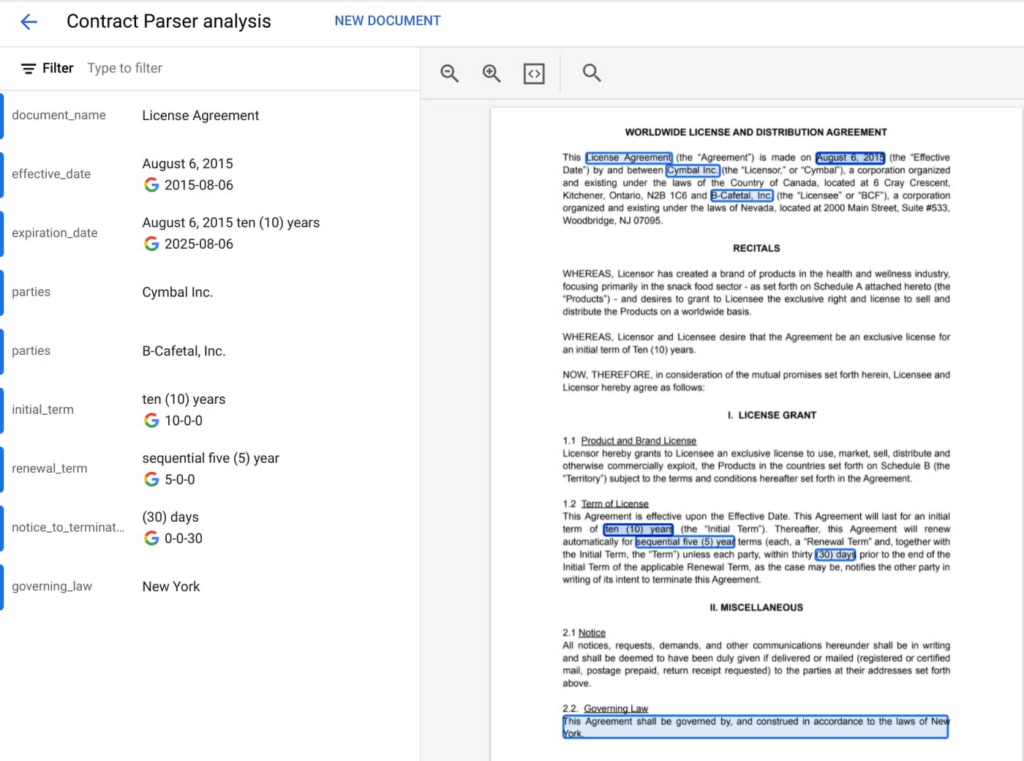
Here, AI can help. ML models can be used to transcribe audio and videos, analyze language, and extract text from images—that is, to translate elements of unstructured data into a form that can be stored and queried in a database like BigQuery. Google Cloud’s Document AI platform, for example, uses ML to understand documents like forms and contracts. Below, you can see how this platform is able to intelligently extract structured text data from an unstructured document like a resume. Once this data is extracted, it can be stored in a data warehouse like BigQuery.
Bring machine learning to data analysts via familiar tools
Today, one of the biggest barriers to ML is that the tools and frameworks needed to do ML are new and unfamiliar. But this doesn’t have to be the case. BigQuery ML, for example, allows you to train sophisticated ML models at scale using SQL code, directly from within BigQuery. Bringing ML to your data warehouse alleviates the complexities of setting up additional infrastructure and writing model code. Anyone who can write SQL code can train a ML model quickly and easily.

Easily access data with a unified notebook interface
One of the most popular ML interfaces today are notebooks: interactive environments that allow you to write code, visualize and pre-process data, train models, and a whole lot more. Data scientists often spend most of their day building models within notebook environments. It’s crucial, then, that notebook environments have access to all of the data that makes your organization run, including tools that make that data easy to work with.
Vertex AI Workbench, now generally available, is the single development environment for the entire data science workflow. Integrations across Google Cloud’s data portfolio allow you to natively analyze your data without switching between services:
Cloud Storage: access unstructured data
BigQuery: access data with SQL, take advantage of models trained with BigQuery ML
Dataproc: execute your notebook using your Dataproc cluster for control
Spark: transform and prepare data with autoscaling serverless Spark
Below, you’ll see how you can easily run a SQL query on BigQuery data with Vertex AI Workbench.
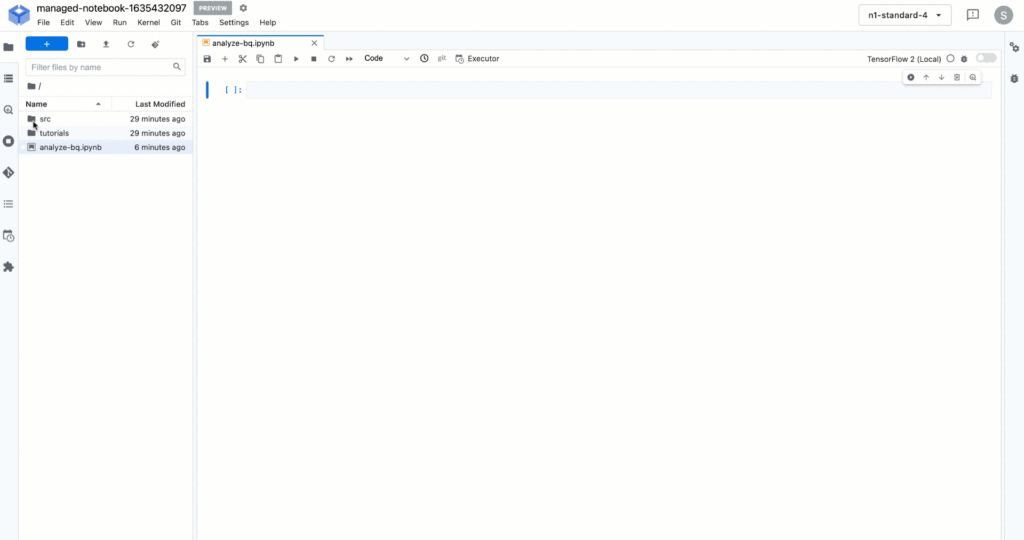
But what happens after you’ve trained the model? How can both data analysts and data scientists make sure their models can be utilized by application developers and maintained over time?
Go from prototyping to production with MLOps
While training accurate models is important, getting those models to be scalable, resilient, and accurate in production is its own art, known as MLOps. MLOps allow you to:
- Know what data your models are trained on
- Monitor models in production
- Make training process repeatable
- Serve and scale model predictions
- A whole lot more! (See the “Practitioners Guide to MLOps” whitepaper for a full and detailed overview of MLOps)
Built-in MLOps tools within Vertex AI’s unified platform remove the complexity of model maintenance. Practical tools can help with everything from training and hosting ML models, managing model metadata, governance, model monitoring, and running pipelines – all critical aspects of running ML in production and at scale.
And now, we’re extending our capabilities to make MLOps accessible to anyone working with ML in your organization.
Easy handoff to MLOps with Vertex AI Model Registry
Today, we’re announcing Vertex AI Model Registry, a central repository that allows you to register, organize, track, and version trained ML models and is designed to work with any type of model and deployment target, whether that’s through BigQuery, Vertex AI, AutoML, custom deployments on GCP or even out of the cloud.
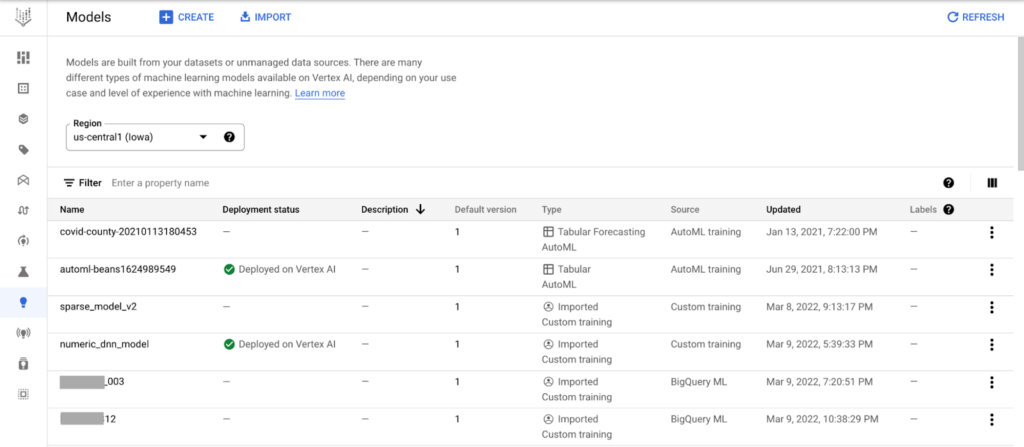
Vertex AI Model Registry is particularly beneficial for BigQuery ML. While BigQuery ML brings the powerful scalability of BigQuery for batch predictions, using a data warehouse engine for real-time predictions just isn’t practical. Furthermore, you might start to wonder how to orchestrate your ML workflows based in BigQuery. You can now discover and manage BigQuery ML models and easily deploy those models to Vertex AI for real-time predictions and MLOps tools.
End-to-End MLOps with pipelines
One of the most popular approaches to MLOps is the concept of ML pipelines: where each distinct step in your ML workflow from data preparation to model training and deployment are automated for sharing and reliably reproducing.
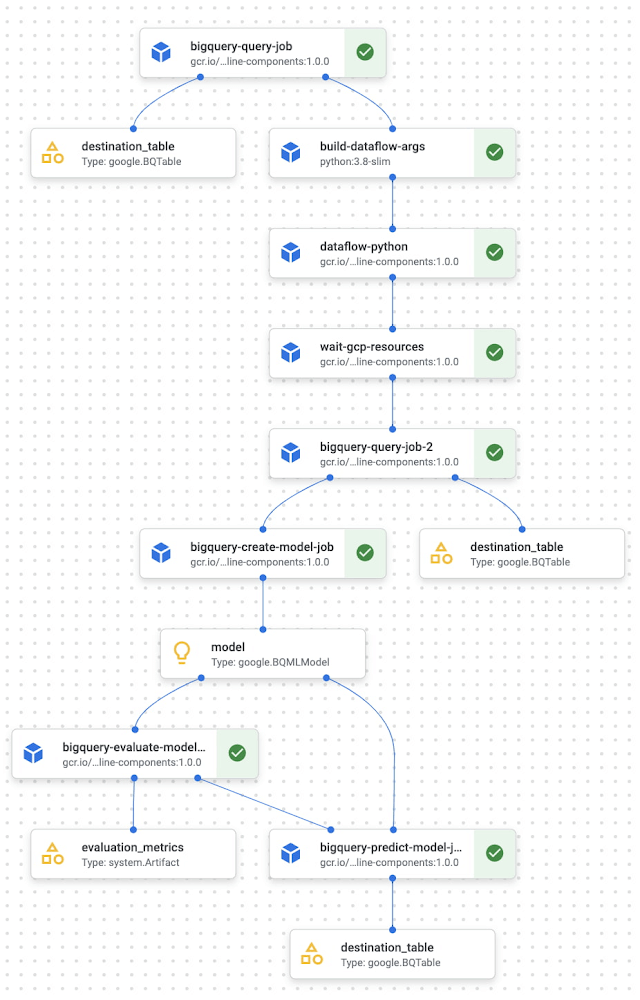
Vertex AI Pipelines is a serverless tool for orchestrating ML tasks using pre-built components or your own custom code. Now, you can easily process data and train models with BigQuery, BigQuery ML, and Dataproc directly within a pipeline. With this capability, you can combine familiar ML development within BigQuery and Dataproc into reproducible, resilient pipelines and orchestrate your ML workflows faster than ever.
See an example of how this works with the new BigQuery and BigQuery ML components.
Learn more and get started
We’re excited to share more about our unified data and AI offering today at the Data Cloud Summit. Please join us for the spotlight session on our “AI/ML strategy and product roadmap” or the “AI/ML notebooks ‘how to’ session.”
And if you’re ready to get hands on with Vertex AI, check out these resources:
Codelab: Training an AutoML model in Vertex AI
Codelab: Intro to Vertex AI Workbench
Video Series: AI Simplified: Vertex AI
GitHub: Example Notebooks
Training: Vertex AI: Qwik Start
More Relevant Stories for Your Company

AI Features in Apigee X Helps Build and Manage APIs at Scale
APIs are the backbone of digital transformation. Via APIs, you can securely share data and functionality with developers both inside and outside of your organizational boundaries, letting you build applications faster, seamlessly connect and interact with partners, and drive new business revenue. Because APIs encompass business-critical information, any downtime or

Beany’s Cloud-Based Accounting Solutions Transform Small Business Finance
Many people start a small business that aligns with their passions, but soon discover the day-to-day running of a business is very different than anticipated. Dealing with accounting, finance, and other daily activities can quickly overwhelm even the most promising of new businesses. Recognizing the unique challenges facing small businesses,




Engage and Translate: Text and Audio Chat in 100+ Languages
As users worldwide connect to the internet and work remotely, it’s more important than ever to make interactive applications chat in many languages. But when users speak 100s of languages, this quickly can get challenging. Where to start? If you are new to translation, Sarah Weldon, the Product Manager for


How Google Cloud is Fortifying the Social Safety Net
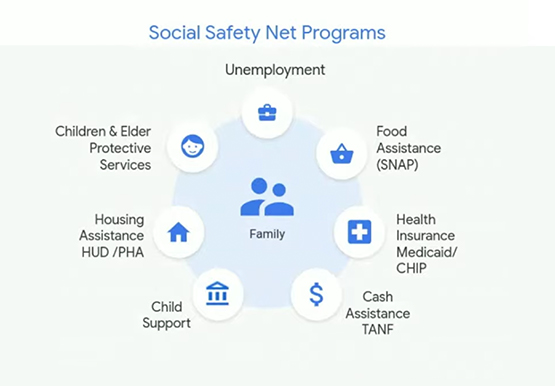
The COVID-19 crisis is triggering both immediate and longer-term challenges for state and local governments. In this video, Denise Winkler, Strategic Business Executive, Google Cloud and Jennifer Ricker, Assistant Secretary - Illinois Department of Innovation & Technology (DoIT), discuss a number of challenges and solutions around the pandemic. First, they
