





AI Features in Apigee X Helps Build and Manage APIs at Scale

5257
Of your peers have already read this article.
2:00 Minutes
The most insightful time you'll spend today!
APIs are the backbone of digital transformation. Via APIs, you can securely share data and functionality with developers both inside and outside of your organizational boundaries, letting you build applications faster, seamlessly connect and interact with partners, and drive new business revenue.
Because APIs encompass business-critical information, any downtime or performance degradation can lead to significant loss in revenue, customers, and brand value. Therefore, there’s mounting pressure on operations teams to ensure that APIs are always available and performing as expected. If the APIs go down, so too do the services that fuel customer experiences and on which the organization relies for collaboration and business processes.
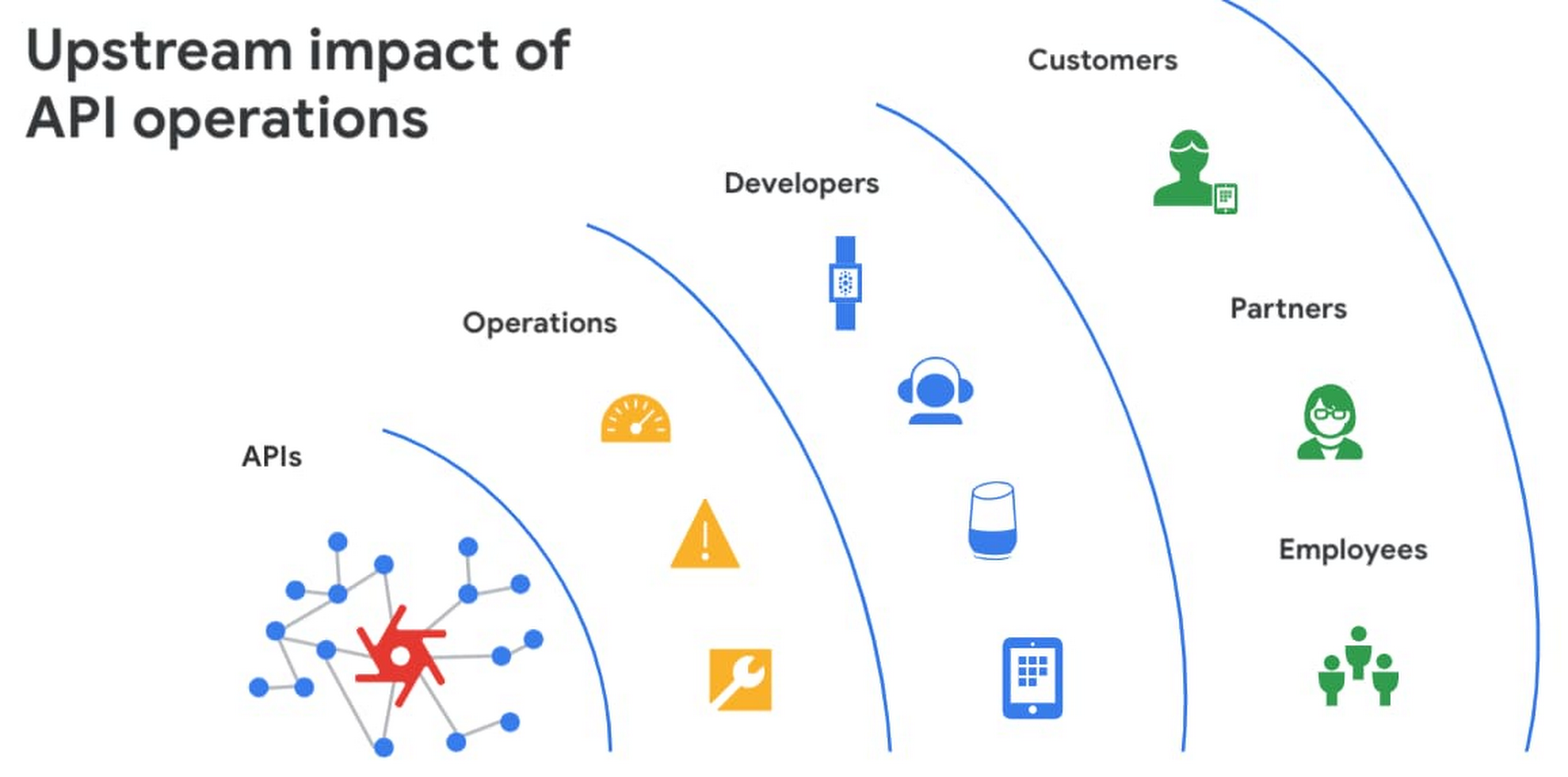
However, as you build and scale your API programs, it becomes practically impossible for API operators to manually monitor and manage all your APIs. To help, we brought the power of industry-leading AI and ML technologies to API operations via Apigee X, a major release of our API management platform. Apigee X seamlessly weaves together Google Cloud’s expertise in AI, security and networking to help you efficiently build and manage APIs at scale.
Put your API data into action
Apigee applies machine learning to your API metadata and provides you the required tools that simplify various aspects of API operations. A great example of AI for APIs is anomaly detection:
- AI-powered rules trigger alerts based on a set of predefined conditions that are determined by applying Google’s industry-leading machine learning models to your historical API data.
- Auto-thresholds adjust the monitoring criteria of your APIs and set them to pattern-based values.
- Reduce overhead results because operators don’t have to manually monitor anomalies or adjust the monitoring thresholds on APIs.
“By applying AI and ML models to our historical API data, these advanced features are able to alert us about scenarios we haven’t thought of. Such automation capabilities significantly reduce our upfront efforts. And from a security perspective, the actionable insights help us ensure that our proxies are exposed only over secure HTTPs ports and adhere to compliance requirements. We’re also able to closely monitor user activity and quickly pull out reports during audits.” – Adam Brancato, Sr. Manager, Global Technology and Security at Citrix

As our customers scale their API programs, they find it extremely useful to harness AI-powered capabilities. In our recent State of the API Economy 2021 report, we found a 230% increase in enterprises’ use of anomaly detection, bot protection, and security analytics features.

To learn more about Apigee X, and see AI and machine learning in action, check out this video, and to try Apigee X for free, click here.
Transforming the Contact Center Experience with Artificial Intelligence

2495
Of your peers have already read this article.
1:30 Minutes
The most insightful time you'll spend today!
We meet daily with contact center owners and customer experience (CX) execs across all industries, geographies, and business sizes. Looking back at these conversations, it’s crystal clear that 2022 was a high-stakes year for call centers, with three primary challenges trending across all customers and continuing in 2023:
- Many organizations feel pressure to rapidly scale up their call center operations in response to macroeconomic changes. Uncertain conditions are forcing Contact Centers to be ever more cost-effective, and to find ways to generate revenue for the business.
- End users are increasingly demanding and less forgiving when it comes to CX. Users have a choice, and they expect brands to meet them where they are with superior experiences. Connecting with customers where they engage is one of the key components of superior CX—customers should not have to go through elaborate processes or unhelpful phone trees to get help but should rather have service available quickly and easily in their preferred channels. Consumers demand more intimate ways of connecting with brands and Conversational AI can create that critical interaction medium.
- Organizations understand that AI can help address these challenges. However, many business leaders remain unsure how to successfully make the journey. A growing number of offerings are on the market, but many don’t deliver on their promise, with long and expensive integration requirements and unpredictable and underwhelming outcomes.
Helping our customers successfully address these challenges and opportunities was one of our top priorities last year and will continue to be a significant focus in coming months. In this blog post, we’ll review our Contact Center AI (CCAI) news from last year, as a primer for 2023.
Looking back: Why 2022 was a big year for Contact Center AI
In 2022, we increased our strategic investment in CCAI, including expanding it to include a comprehensive, end-to-end contact center solution suite that is user-first, AI-first, and cloud-first. We launched Contact Center AI Platform, our Contact Center as a Service (CCaaS) offering, as part of the CCAI product suite that offers a modern, turnkey solution, designed with user-first, AI-first, and cloud-first design. During Google Cloud Next ‘22, we shared lots of great content on how organizations can use CCAI to improve customer experiences, including these breakout sessions:
- Delight customers in every interaction with Contact Center AI
- Power new voice enabled interfaces with applications with Google Cloud’s speech solutions
We also got a chance to hear how customers are using CCAI to better reach their own customers, including Wells Fargo and TIAA. We partnered with CDW to discuss Providing Better Customer Experiences and with Quantiphi in a webinar called “Elevating the Banking Experience with CCAI Platform.” Just recently, our customer Segra shared their success story.
Through these customer interactions, three key priorities have surfaced as we look forward to 2023: Elevate the customer experience, bring new forms of AI to drive new automation and accelerate time to value.
Looking forward: Elevate CX, integrate new forms of AI, accelerate time to value
1. User-first: Meet them where they are with elevated Customer Experience.
As we have learned, users expect that brands meet them where they are and on their own terms and expectations. To do that, brands must integrate with and adopt the latest user-centric technologies and product best practices from consumer mobile and web apps. Enterprise B2C can’t exist anymore in a parallel world of different and often inferior user experience. Google has over 20 years of experience in building such consumer experiences, with multiple products successfully serving billions of users. Bringing these capabilities and experiences from our consumer products and research teams to our cloud offerings was a key component for our product offerings in 2022 and is a big part of our key investments in 2023. Moreover, a vast majority of CX user journeys start with a query on Google Search or YouTube. Connecting with the users at that point, even before they reach out directly to the contact center is a win-win, saving money for the brand and delivering immediate value to the user. By focusing on the user we created a superior integrated omnichannel experience.
2. AI-first and cloud-first: Quality contact center growth depends on transforming to modern, Cloud, AI solutions.
For contact centers to evolve, they need to transform from cost centers to revenue generators. That requires modern Cloud and AI solutions. Conversational data spans across all parts of the contact center, opening new ways to generate value. Cloud capabilities of privacy, security and scale can enable personalized CX across channels, enabling key omnichannel experiences. From a study by McKinsey: “Cross-channel integration and migration issues continue to hamper progress. For example, 77 percent of survey respondents report that their organizations have built digital platforms, but only 10 percent report that those platforms are fully scaled and adopted by customers. Only 12 percent of digital platforms are highly integrated, and, for most organizations, only 20 percent of digital contacts are unassisted.” Traditional telephony technologies are becoming commoditized and struggle to keep up with ever more complex rule based systems. Leaders in applicative AI and Cloud technology are stepping up as the new partners for brands who understand they need to take the leap to the next generation CX solutions. .
3. Accelerating time to value while future proofing investments with predictable and measurable value
Reducing upfront implementation investment and accelerating time to value can be a challenge for contact center solutions. Scaling Cloud and AI can provide a faster path advanced conversational AI, can help address these challenges. Let’s look at three examples:
- Out of the Box(OOTB) integrated transcription, chat and voice summarization, and topic modeling — This saves customers money by reducing agent handling time for every chat and call, as well as providing valuable insights that can be used for quality management, contact center optimization and automation, agent and user churn prediction, business insights, and revenue opportunities.
- AI based chat and voice calls steering paired with info-seeking virtual agents — Together these deliver higher Customer Satisfaction at scale while reducing cost – by significantly reducing waiting queues and being routed to the wrong agent, as well as automating away total handling time.
- Reduced time to full automation — Reduce the complexity of conversation modeling, prebuilt components and APIs for shorter time to value and more predictable outcomes, and metrics driven ML-Dev & QA tools and playbooks.
With these new capabilities, our customers can now see results as soon as they implement CCAI. We’re excited to get our customers to where they want to be faster!
And there you have it: a quick overview of CCAI and its progress in 2022 and what’s coming in 2023. For more details, check out the documentation or our CCAI solutions page.
Smart Reply: How the AI-augmented Chat Helps Scale Google’s Tech Support Operations

2896
Of your peers have already read this article.
3:00 Minutes
The most insightful time you'll spend today!
As Googlers transitioned to working from home during the pandemic, more and more turned to chat-based support to help them fix technical problems. Google’s IT support team looked at many options to help us meet the increased demand for tech support quickly and efficiently.
More staff? Not easy during a pandemic.
Let service levels drop? Definitely not.
Outsource? Not possible with our IT requirements.
Automation? Maybe, just maybe…
How could we use AI to scale up our support operations, making our team more efficient?
The answer: Smart Reply, a technology developed by a Google Research team with expertise in machine learning, natural language understanding, and conversation modeling. This product provided us with an opportunity to improve our agents’ ability to respond to queries from Googlers by using our corpus of chat data. Smart Reply trains a model that provides suggestions to techs in real time. This reduces the cognitive load when multi-chatting and helps a tech drive sessions towards resolution.
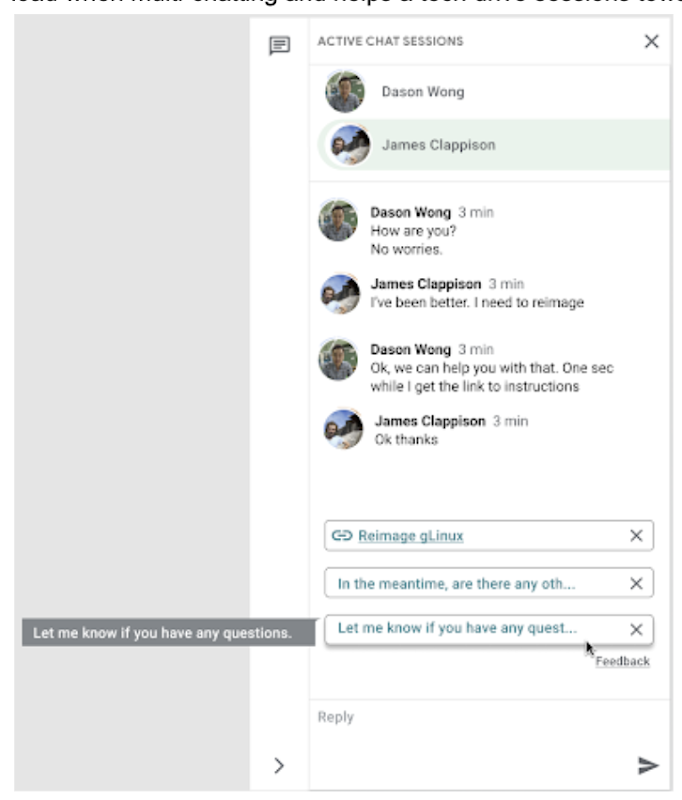
In the solution detailed below, our hope is that IT teams in a similar situation can find best practices and a few shortcuts to implementing the same kind of time saving solutions. Let’s get into it!
Challenges in preparing our data
Our tech support service for Google employees—Techstop—provides a complex service, offering support for a range of products and technology stacks through chat, email, and other channels.
Techstop has a lot of data. We receive hundreds of thousands of requests for help per year. As Google has evolved we’ve used a single database for all internal support data, storing it as text, rather than as protocol buffers. Not so good for model training. To protect user privacy, we want to ensure no PII (personal identifiable information – e.g. usernames, real names, addresses, or phone numbers) makes it into the model.
To address these challenges we built a FlumeJava pipeline that takes our text and splits each message sent by agent and requester into individual lines, stored as repeated fields in a protocol buffer. As our pipe is executing this task, it also sends text to the Google Cloud DLP API, removing personal information from the session text, replacing it with a redaction that we can later use on our frontend.
With the data prepared in the correct format, we are able to begin our model training. The model provides next message suggestions for techs based on the overall context of the conversation. To train the model we implemented tokenization, encoding, and dialogue attributes.
Splitting it up
The messages between the agent and customer are tokenized: broken up into discrete chunks for easier use. This splitting of text into tokens must be carefully considered for several reasons:
- Tokenization determines the size of the vocabulary needed to cover the text.
- Tokens should attempt to split along logical boundaries, aiming to extract the meaning of the text.
- Tradeoffs can be made between the size of each token, with smaller tokens increasing processing requirements but enabling easier correlation between different spans of text.
There are many ways to tokenize text (SAFT, splitting on white spaces, etc.), here we chose sentence piece tokenization, with each token referring to a word segment.
Prediction with encoders
Training the neural network with tokenized values has gone through several iterations. The team used an Encoder-Decoder architecture that took a given vector along with a token and used a softmax function to predict the probability that the token was likely to be the next token in the sentence/conversation. Below, a diagram represents this method using LSTM-based recurrent networks. The power of this type of encoding comes from the ability of the encoder to effectively predict not just the next token, but the next series of tokens.
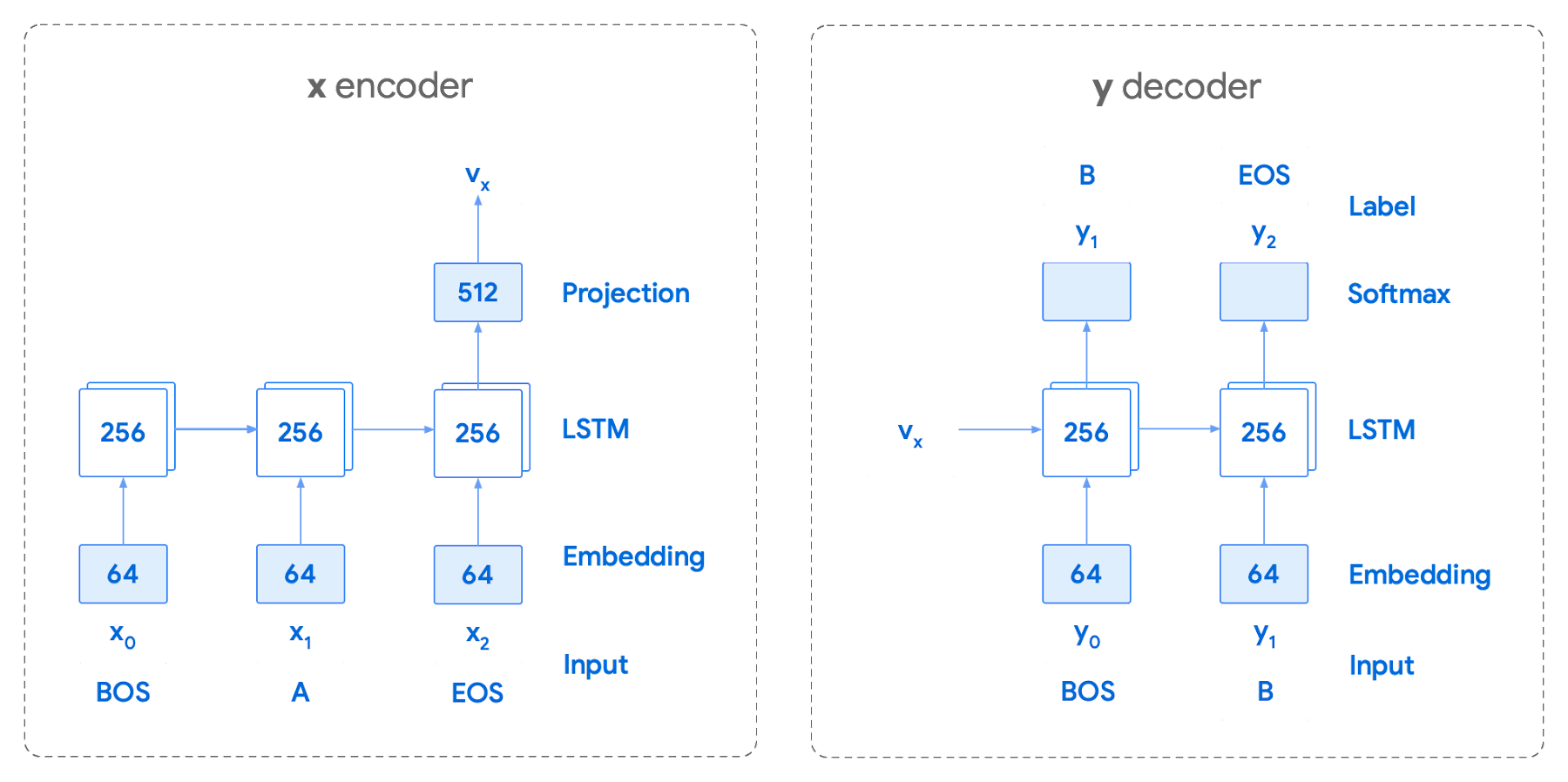
This has proven very useful for Smart Reply. In order to find the optimal sequence, an exponential search over each tree of possible future tokens is required. For this we opted to use beam search over a fixed-size list of best candidates, aiming to avoid increasing the overall memory use and run time for returning a list of suggestions. To do this we arranged tokens in a trie, and used a number of post processing techniques, as well as calculating a heuristic max score for a given candidate, to reduce the time it takes to iterate through the entire token list. While this improves the run time, the model tends to prefer shorter sequences.
In order to help reduce latency and improve control we decided to move to an Encoder-Encoder architecture. Instead of predicting a single next token and decoding a sequence of following predictions with multiple calls to the model, it instead encodes a candidate sequence with the neural network.
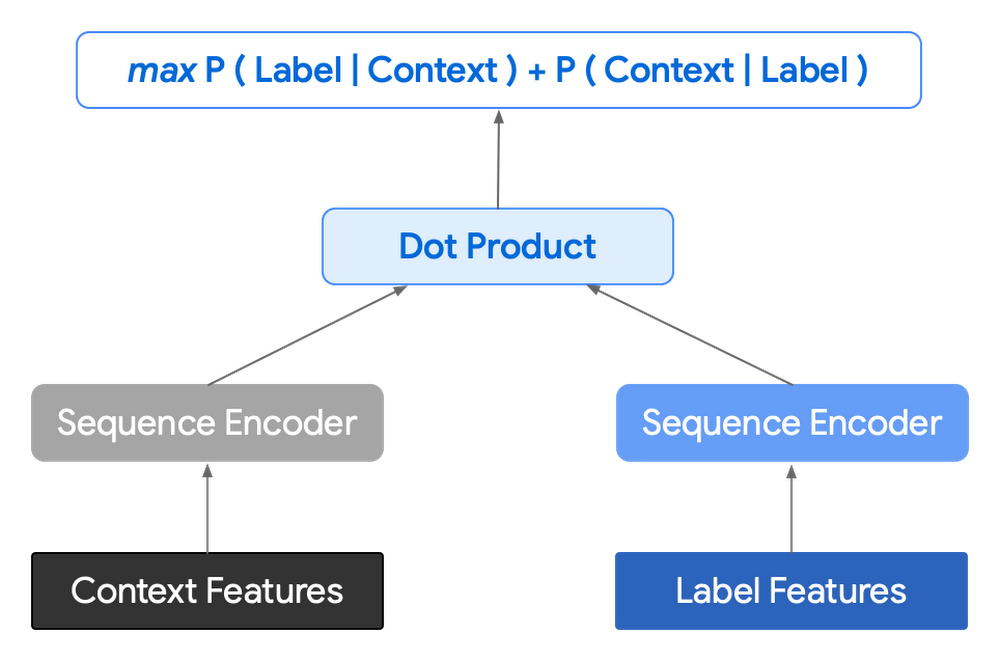
In practice, the two vectors – the context encoding and the encoding of a single candidate output – are combined with dot product to arrive at a score for the given candidate. The goal of this network is to maximize the score for true candidates – e.g. candidates that did appear in the training set – and minimize false candidates.
Choosing how to sample negatives affects the model training greatly. Below are some strategies that can be employed:
- Using positive labels from other training examples in the batch.
- Drawing randomly from a set of common messages. This assumes that the empirical probability of each message is sampled correctly.
- Using messages from context.
- Generating negatives from another model.
As this encoding generates a fixed list of candidates that can be precomputed and stored, each time a prediction is needed, only the context encoding needs to be computed, then multiplied by the matrix of candidate embeddings. This reduces both the time from the beam search method and the inherent bias towards shorter responses.
Dialogue Attributes
Conversations are more than simple text modeling. The overall flow of the conversation between participants provides important information, changing the attributes of each message. The context, such as who said what to whom and when, offers useful bits of input for the model when making a prediction. To that end the model uses the following attributes during its prediction:
- Local User ID’s – we set a finite number of participants for a given conversation to represent the turn taking between messages, assigning values to those participants. In most cases for support sessions there are 2 participants, requiring ID 0, and 1.
- Replies vs continuations – initially modeling focused only on replies. However, in practice conversations also include instances where participants are following up on the previously sent message. Given this, the model is trained for both same-user suggestions and “other” user suggestions.
- Timestamps – gaps in conversation can indicate a number of different things. From a support perspective, gaps may indicate that the user has disconnected. The model takes this information and focuses on the time elapsed between messages, providing different predictions based on the values.
Post processing
Suggestions can then be manipulated to get a more desirable final ranking. Such post-processing includes:
- Preferring longer suggestions by adding a token factor, generated by multiplying the number of tokens in the current candidate.
- Demoting suggestions with a high level of overlap with previously sent messages.
- Promoting more diverse suggestions based on embedding distance similarities.
To help us tune and focus on the best responses the team created a priority list. This gives us the opportunity to influence the model’s output, ensuring that responses that are incorrect can be de-prioritized. Abstractly it can be thought of as a filter that can be calibrated to best suit the client’s needs.
Getting suggestions to agents
With our model ready we now needed to get it in the hands of our techs. We wanted our solution to be as agnostic to our chat platform as possible, allowing us to be agile when facing tooling changes and speeding up our ability to deploy other efficiency features. To this end we wanted an API that we could query either via gRPC or via HTTPs. We designed a Google Cloud API, responsible for logging usage as well as acting as a bridge between our model and a Chrome Extension we would be using as a frontend.
The hidden step, measurement
Once we had our model, infrastructure, and extension in place we were left with the big question for any IT project. What was our impact? One of the great things about working in IT at Google is that it’s never dull. We have constant changes, be it planned or unplanned. However, this does complicate measuring the success of a deployment like this. Did we improve our service or was it just a quiet month?
In order to be satisfied with our results we conducted an A/B experiment, with some of our techs using our extension, and the others not. The groups were chosen at random with a distribution of techs across our global team, including a mix of techs with varying levels of experience ranging from 3 to 26 months.
Our primary goal was to measure tech support efficiency when using the tool. We looked at two key metrics as proxies for tech efficiency:
- The overall length of the chat.
- The number of messages sent by the tech.
Evaluating our experiment
To evaluate our data we used a two-sample permutation test. We had a null hypothesis that techs using the extension would not have a lower time-to-resolution, or be able to send more messages, than those without the extension. The alternative hypothesis was that techs using the extension would be able to resolve sessions quicker or send more messages in approximately the same time.
We took the mid mean of our data, using pandas to trim outliers greater than 3 standard deviations away. As the distribution of our chat lengths is not normal, with significant right skew caused by a long tail of longer issues, we opted to measure the difference in means, relying on central limit theorem (CLT) to provide us with our significance values. Any result with a p-value between 1.0 and 9.0 would be rejected.
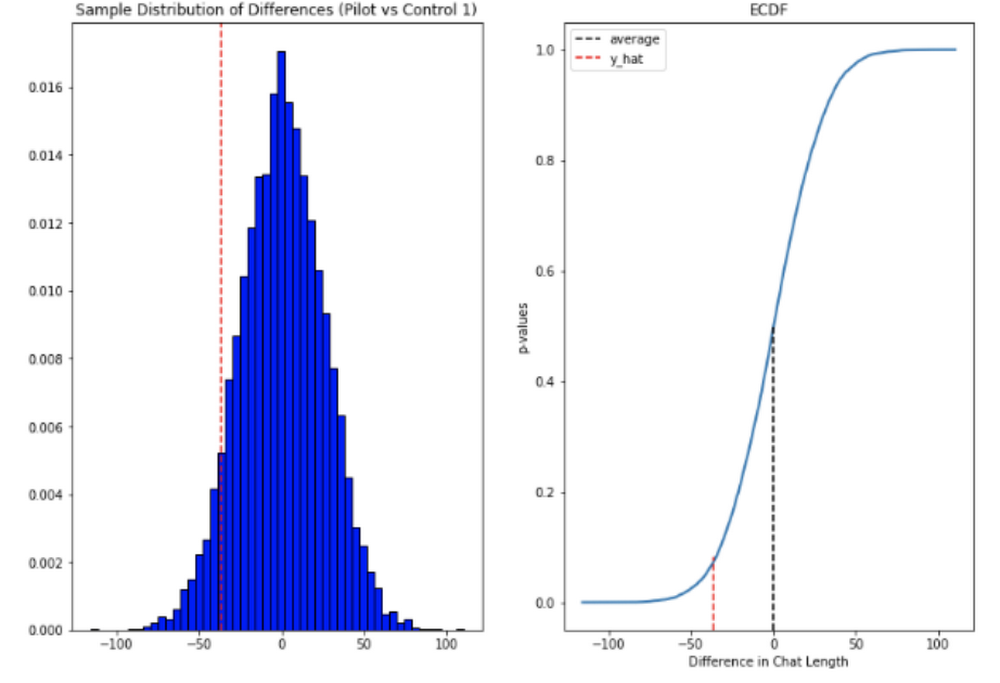
Across the entire pool we saw a decrease in chat lengths of 36 seconds.
In reference to the number of chat messages we saw techs on average being able to send 5-6 messages more in less time.
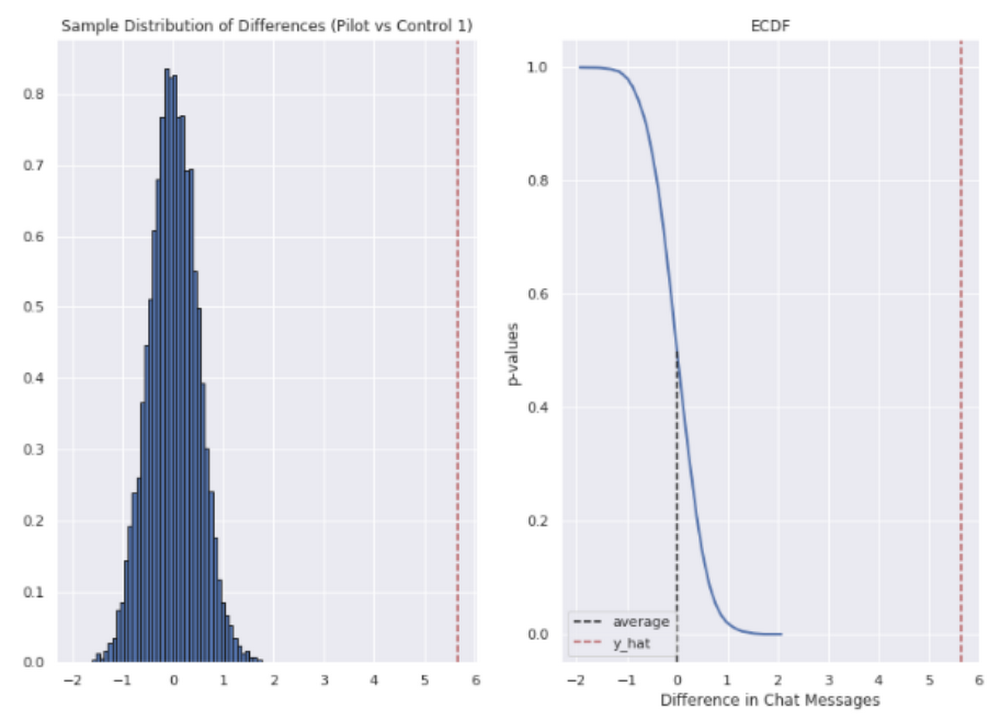
In short, we saw techs were able to send more messages in a shorter period of time. Our results also showed that these improvements increased with support agent tenure, and our more senior techs were able to save an average of ~4 minutes per support interaction.
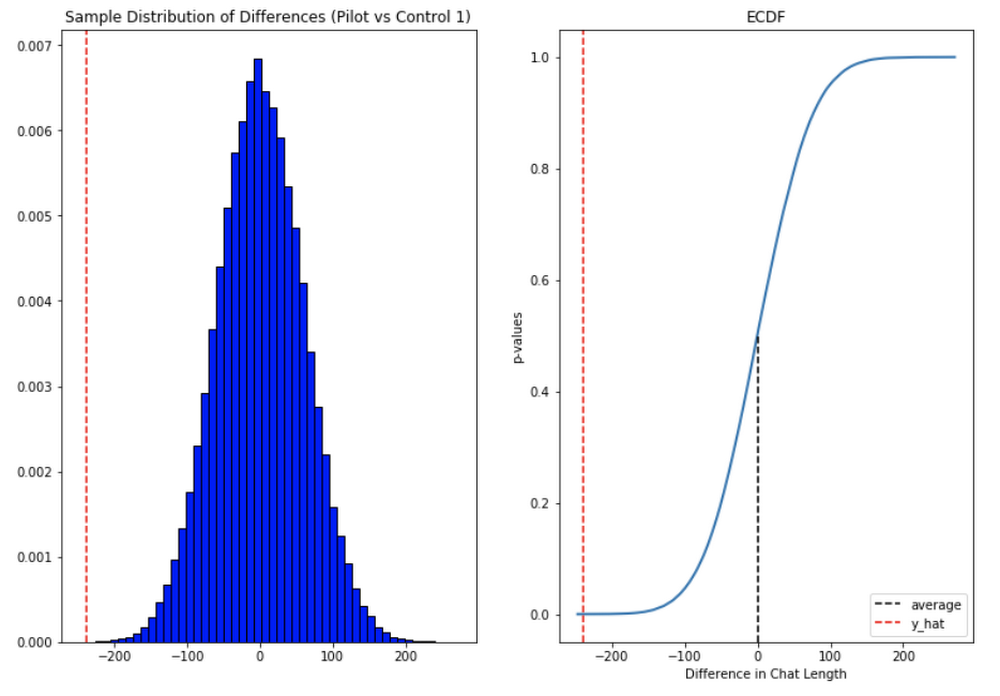
Overall we were pleased with the results. While things weren’t perfect, it looked like we were onto a good thing.
So what’s next for us?
Like any ML project, the better the data the better the result. We’ll be spending time looking into how to provide canonical suggestions to our support agents by clustering results coming from our allow list. We also want to investigate ways of making improvements to the support articles provided by the model, as anything that helps our techs, particularly the junior ones, with discoverability will be a huge win for us.
How can you do this?
A successful applied AI project always starts with data. Begin by gathering the information you have, segmenting it up, and then starting to process it. The interaction data you feed in will determine the quality of the suggestions you get, so make sure you select for the patterns you want to reinforce.
Our Contact Center AI allows tokenization, encoding and reporting, without you needing to design or train your own model, or create your own measurements. It handles all the training for you, once your data is formatted properly.
You’ll still need to determine how best to integrate its suggestions to your support system’s front-end. We also recommend doing statistical modeling to find out if the suggestions are making your support experience better.
As we gave our technicians ready-made replies to chat interactions, we saved time for our support team. We hope you’ll try using these methods to help your support team scale.
6074
Of your peers have already watched this video.
48:30 Minutes
The most insightful time you'll spend today!
Can Your Data Warehouse Handle a 100-Trillion Row Query?
Today’s enterprise demands from data go far beyond the capabilities of traditional data warehousing and for many leaders, the need to digitally transform their businesses is a key driver for data analytics spending.
Businesses want to make real-time decisions from fresh information as well as make future predictions from their data in order to remain competitive.
In this video, Jordan Tigani, Director of Product Management, Google BigQuery reveals the power of Google Cloud’s modern data warehouse, BigQuery, that helps businesses make informed decisions quickly.
In addition, he talks about how big Google BigQuery can get. He shares examples of how one customer ran a query against a giant table of 100 trillion rows. “I think it was something like 19 petabytes of data scanned. It took about took about 20 minutes. It used 39,000 slots, which is about 20,000 cores,” says Tigani.
He also shares examples of how businesses, such as online retailer, Zulily generate real business benefits from being able to query large datasets faster, and more easily than ever–without having to invest time managing infrastructure.
Finally, Amir Aryanpour, Technical Architect, Channel 4, talks abouut how connecting connecting Google BigQuery to other solutions with the Google Cloud Platform, including storage, data visualisation, and a sentiment analysis engine, among others, helped the company.
VCP Peering and Private Endpoints on Vertex AI to Better Security and Predictions in Near Real-time
4479
Of your peers have already read this article.
2:00 Minutes
The most insightful time you'll spend today!
One of the biggest challenges when serving machine learning models is delivering predictions in near real-time. Whether you’re a retailer generating recommendations for users shopping on your site, or a food service company estimating delivery time, being able to serve results with low latency is crucial. That’s why we’re excited to announce Private Endpoints on Vertex AI, a new feature in Vertex Predictions. Through VPC Peering, you can set up a private connection to talk to your endpoint without your data ever traversing the public internet, resulting in increased security and lower latency for online predictions.
Configuring VPC Network Peering
Before you make use of a Private Endpoint, you’ll first need to create connections between your VPC (Virtual Private Cloud) network and Vertex AI. A VPC network is a global resource that consists of regional virtual subnetworks, known as subnets, in data centers, all connected by a global network. You can think of a VPC network the same way you’d think of a physical network, except that it’s virtualized within GCP. If you’re new to cloud networking and would like to learn more, check out this introductory video on VPCs.
With VPC Network Peering, you can connect internal IP addresses across two VPC networks, regardless of whether they belong to the same project or the same organization. As a result, all traffic stays within Google’s network.
Deploying Models with Vertex Predictions
Vertex Predictions is a serverless way to serve machine learning models. You can host your model in the cloud and make predictions through a REST API. If your use case requires online predictions, you’ll need to deploy your model to an endpoint. Deploying a model to an endpoint associates physical resources with the model so it can serve predictions with low latency.
When deploying a model to an endpoint, you can specify details such as the machine type, and parameters for autoscaling. Additionally, you now have the option to create a Private Endpoint. Because your data never traverses the public internet, Private Endpoints offer security benefits in addition to reducing the time your system takes to serve the prediction when it receives the request. The overhead introduced by Private Endpoints is minimal, achieving performance nearly identical to DIY serving on GKE or GCE. There is also no payload size limit for models deployed on the private endpoint.
Creating a Private Endpoint on Vertex AI is simple.
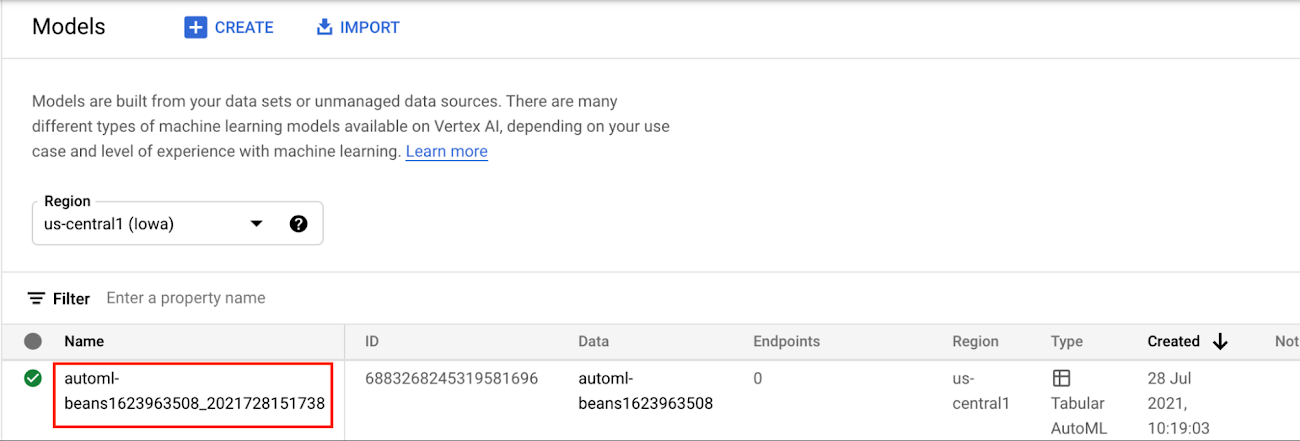
In the Models section of the Cloud console, select the model resource you want to deploy.
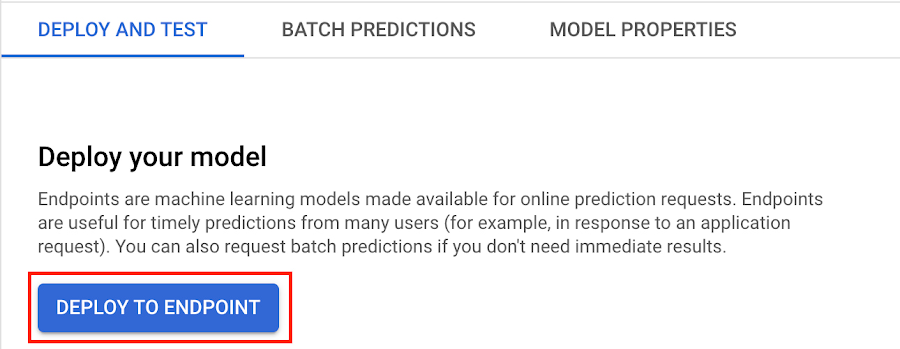
Next, select DEPLOY TO ENDPOINT
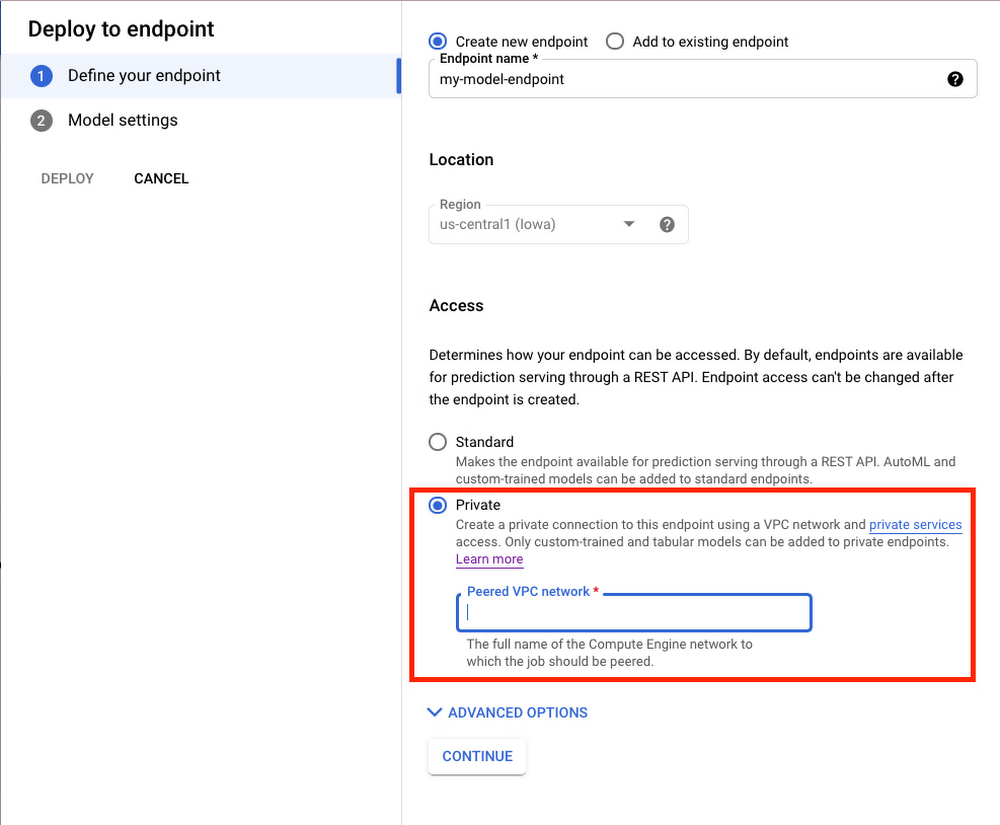
In the window on the right hand side of the console, navigate to the Access section and select Private. You’ll need to add the full name of the VPC network for which your deployment should be peered.
Note that many other managed services on GCP support VPC peering, such as Vertex Training, Cloud SQL, and Firestore. Endpoints is the latest to join that list.
What’s Next?
Now you know the basics of VPC Peering and how to use Private Endpoints on Vertex AI. If you want to learn more about configuring VPCs, check out this overview guide. And if you’re interested to learn more about how to use Vertex AI to support your ML workflow, check out this introductory video. Now it’s time for you to deploy your own ML model to a Private Endpoint for super speedy predictions!
Document AI: A Platform for Businesses to Simplify Document Automation

2362
Of your peers have already read this article.
2:30 Minutes
The most insightful time you'll spend today!
As I type this blog in a Google Doc, I can’t help but think about how much we rely on digital documents to communicate, collaborate, and do business. Yet most of the data in documents remains un-analyzed. Even when documents are part of customer-facing workflows like processing a mortgage application or a contract, businesses frequently struggle with the data those documents contain. Often, even finding the right document in a haystack of thousands across the organization can be challenging. To resolve these difficulties, most organizations rely on manual, time-consuming, and resource-intensive processes—all of which are incredibly frustrating for employees at the forefront of document workflows.
Because of challenges like these, in 2020, we launched Document AI, an AI agent that lets organizations apply machine learning (ML) to their hardest document automation problems. Since then, we have introduced specialized models to extract data for industry-specific use cases such as mortgage processing and procurement. With the launch of Document AI Workbench and Document AI Warehouse at Google Cloud Next ‘22, we’ve continued to take significant steps in our mission to help organizations simplify and automate document processing. Let’s double click on each of these announcements.
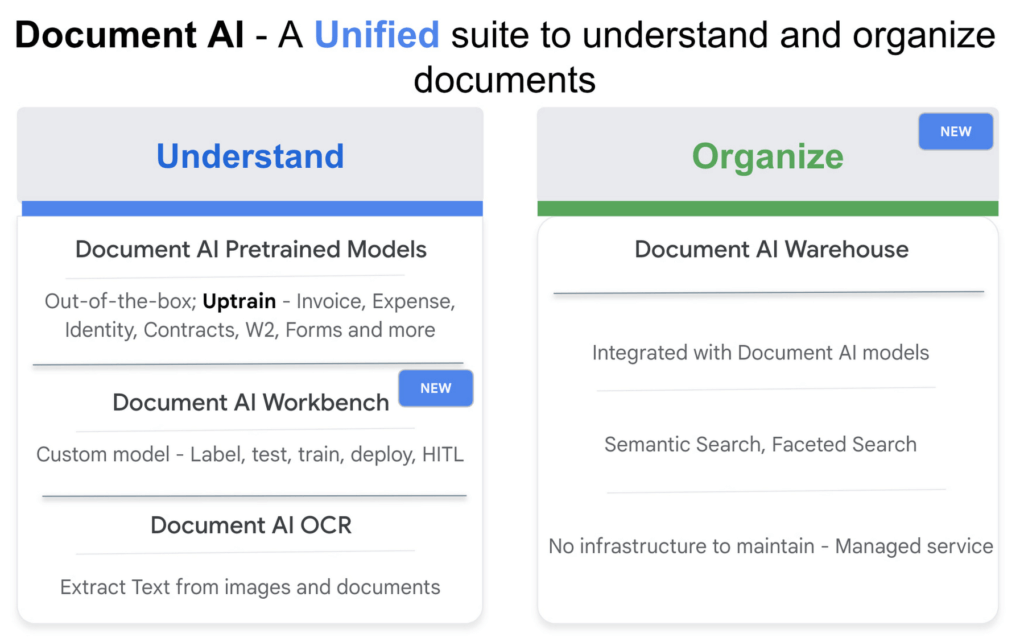
Custom document processing with Document AI Workbench
With Document AI Workbench, organizations can process documents by creating custom ML models that are specific to their business needs and extract unstructured data with a high degree of accuracy. Thanks to the user-friendly interface, even business users who do not have extensive ML skills can get started training or uptraining models.
Moreover, if an organization wants to transfer learning from pretrained models and enhance a model further to, say, include new fields, users can now do so by what we call “uptraining.” The uptraining feature is especially valuable for the most common yet complex use cases because it helps to save time and resources, so businesses don’t have to start from scratch. Uptraining for the invoice, purchase order (PO), contracts, W2, 1099-R, payslip, and 1040 pre-trained models unlocks new possibilities for improving accuracy, adding new language support, and schema customization.
We’re continuing to invest in these pretrained models. At Next’22, we announced an update to our invoice and expense pre-trained models with improvements to normalization and line item entities detection, as well as new ID proofing capabilities via a flexible API designed to spot fake, altered, or doctored ID documents. We’ve also added support for five new languages across invoice and expense models, in addition to the 12 previously-supported languages, and expanded availability in Canada and Australia regions, in addition to previously-supported US, EU, and Singapore regions.
According to Daan De Groodt, Managing Director, Deloitte Consulting LLP, Document AI Workbench “is poised to be a game changer, because we can now uptrain various text documents and forms utilizing powerful Google Machine Learning models to get the desired accuracy creating greater time and resource efficiencies for our clients.”
And customers are already seeing benefits. Libeo used Document AI to uptrain an invoice parser with 1,600 documents and increase its testing accuracy from 75.6% to 83.9%. “Thanks to uptraining, the Document AI results now beat the results of a competitor and will help Libeo save ~20% on the overall cost for model training over the long run,” said Libeo chief technology officer, Pierre-Antoine Glandier.
Google-powered document search with Document AI Warehouse
With Document AI Warehouse we are bringing the best of Google’s semantic search to documents. Document AI Warehouse lets enterprises search, store, govern and manage documents and their AI-extracted data and metadata in a single platform. With Document AI Warehouse’s simple and intuitive web accessible user interface, users can explore, view, bulk update and organize documents into folders. Document AI Warehouse offers robust enterprise control and governance so you can control who has access at the document and folder levels and assign users and groups permissions to view, edit, manage (share, delete) documents. You can migrate, sync, or federate documents from other repositories, such as Microsoft SharePoint, Amazon S3, and IBM FileNet. Or if that’s not an option we simply index the content and any extracted/tagged metadata).
We also will consolidate a number of next-generation product enhancements on Document AI OCR and Form Parser by the end of this year – including deeper insights into document quality & semantics, a unified document OCR experience, expanded language coverage for Form Parser, and advanced tooling for model lifecycle management. Google’s DeepMind team developed a new method that allows the creation of document parsing ML models for utility bills and purchase orders with 50%-70% less training data than what was previously needed for Document AI. We’re working on integrating this method into Document AI Workbench in the coming months.
Getting started
I’m very excited about what the future holds for Document AI as a platform for businesses to simplify document automation. Learn more about all these exciting developments in my session at Next’22 or try out one of our offerings today.
More Relevant Stories for Your Company

Smooth AI Adoption for Companies involves Three Principled Phases!
Business leaders see much in Artificial Intelligence, including new ways to save money, serve customers, and figure out what to build. What's often tougher is deciding how to engage. That's understandable, since getting into AI often raises questions about costs, data integrity, project length, and similar issues of planning and


Why it’s Easier Than Ever for Developers to Break Into Machine Learning and Data Science
This week we talk about machine learning, its best use cases, and how developers can break into machine learning and data science. Dale Markowitz, Google Developer Advocate, talks about natural language processing as well, explaining that it’s basically the intersection of machine learning and text processing. It can be used
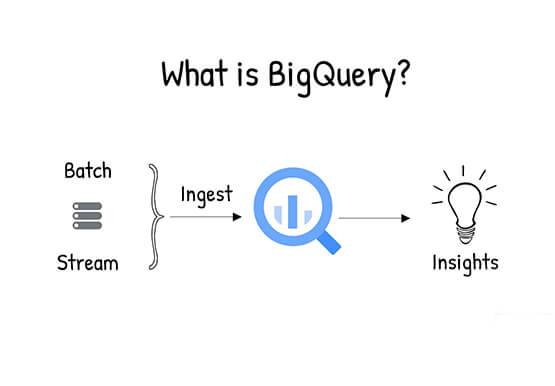
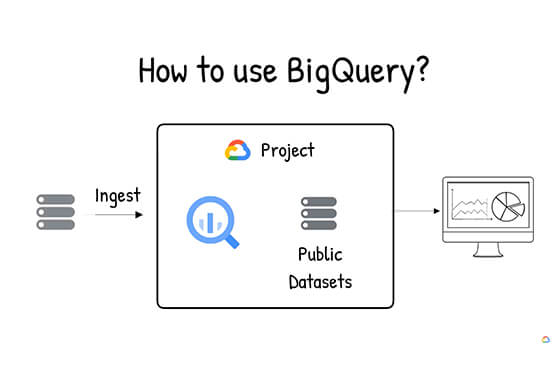

What is BigQuery?
BigQuery is Google Cloud's enterprise data warehouse designed to help you ingest, store, analyze, and visualize big data with ease. Organizations rely on data warehouses to aggregate data from disparate sources, process it, and make it readily available for data analysis that supports their strategic decision-making. You can ingest data


An Overview of Google’s Data Cloud
Data access, management and privacy has been at the center of priorities for enterprises that are aiming to be more agile, reliable and data-driven. Google Cloud's technology innovations spanning products like BigQuery, Spanner, Looker and VertexAI help organizations navigate the complexities related to siloed data in large volumes sprawled across
