





Google Cloud Content Protection: Unlock the Power of CSAP for Security

1308
Of your peers have already read this article.
2:45 Minutes
The most insightful time you'll spend today!
Content production is increasingly happening in the cloud. While moving a creative process that spans three centuries into the modern era brings challenges and risks, MovieLabs is one organization that takes digital transformation seriously.
A nonprofit research and development group founded by a consortium of the major Hollywood studios, MovieLabs describes their mission as “exploring innovative solutions to industry challenges shared by both our member studios and the broader production, post-production and distribution ecosystem.”
In more than 50 pages of densely-packed ideas and principles, MovieLab’s The Evolution of Media Production lays out an ambitious and revelatory vision for streamlining media production in the cloud. The key themes are summarized in 10 declarative statements, which envision a new modality for media production by the year 2030:
- All assets are created or ingested straight into the cloud and do not need to be moved.
- Applications come to the media.
- Propagation and distribution of assets is a “publish” function.
- Archives are deep libraries with access policies matching speed, availability and security to the economics of the cloud.
- Preservation of digital assets includes the future means to access them and edit them.
- Every individual on a project is identified and verified, and their access permissions are efficiently and consistently managed.
- All media creation happens in a highly secure environment that adapts rapidly to changing threats.
- Individual media elements are referenced, accessed, tracked and interrelated using a universal linking system.
- Media workflows are non-destructive and dynamically created using common interfaces, underlying data formats and metadata.
- Workflows are designed around real-time iteration and feedback.
The four bolded statements above are further explored in a follow-up whitepaper from MovieLabs, The Evolution of Production Security, which likewise offers six statements about what secure production in the cloud should look like:
- Security is Intrinsic and does not Inhibit Creative Processes
- The Security Architecture Addresses Challenges Specific to Cloud Workflows
- Production Workflows, Processes, and Assets are Secure, even on Untrusted Infrastructure
- The Content Owner Controls Security and Workflow Integrity
- The Security Can Be Scaled to Appropriate Levels and Can Integrate
- The Security Architecture Limits the Spread of any Breach and is Adaptable
The key to understanding these two papers is repeated in their titles: Evolution. Neither document is meant to outline solely what’s possible today; rather they are beacons guiding us toward a future in which the movie business is truly transformed by the cloud operating model. That means a future where media productions run much more like software supply chains: with speed, agility, and scale, and without sacrificing availability or security.
The good news is that it is possible to deploy secure production workloads in the cloud today. Using some of the built-in security features of Google Cloud, content producers can achieve Common Security Architecture for Production (CSAP) “Level 100” security for their assets (using the CSAP scale L100-L300).
However, we think that “evolution” word is important. As many companies have learned, operating an infrastructure cloud can be costly and often presents new threat vectors for attackers. Our mission at Google Cloud is to provide scalable, reliable services for traditional IT functions and to accelerate the abilities of every organization to digitally transform its business.
We believe the era of the transformation cloud is dawning, and companies who have been successfully operating in the cloud for years are now looking for ways to reduce costs while maintaining the cloud-scale advantages of agility and global reach. This aligns perfectly with the evolutionary vision of the MovieLabs papers, which envision media workflows changing radically to embrace cloud dynamism without all the unnecessary asset movement and complexity.
An important part of that vision from Google Cloud is that cloud service providers should remain open and interoperable with other clouds and infrastructures.
Here is a quickstart guide to mapping the L100 CSAP requirements to Google Cloud:
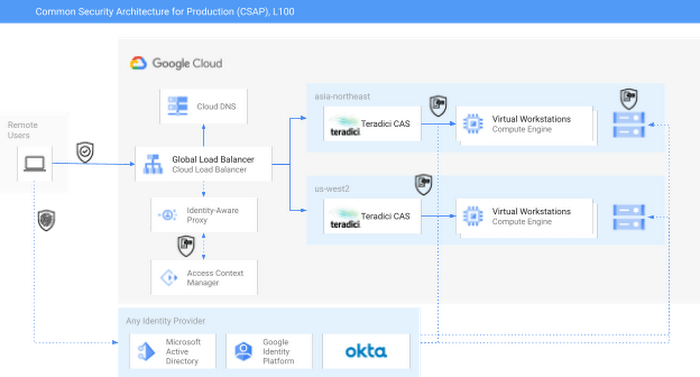
As you can see in the diagram, external identity providers (IdPs) such as Okta or Active Directory can serve as core security components of a CSAP L100 architecture. Alternatively, Google Cloud services such as Cloud Identity or Managed AD could be substituted.
Next, Google Cloud’s Identity-Aware Proxy (IAP) can be used in combination with Access Context Manager (ACM) to act as the first Policy Enforcement Point. This is an optional step, since it is somewhat redundant with the routing and authorization function performed by the native HP/Teradici Connection Brokers. However, IAP and ACM are core components of Google Cloud’s BeyondCorp architecture, on which CSAP is based. Additionally, adopting IAP with ACM offers productions the ability to swap out the Teradici PCoIP protocol for an alternative, such as Unity’s Parsec, without sacrificing security.
The Teradici Connection Broker is also a Policy Enforcement Point, since groups and role membership can be used to enforce access to specific workstations.
Finally, the identity context for each user is passed through to the storage layer. For some productions, Google Cloud Storage (GCS) buckets may offer enough functionality; GCS offers an S3-compatible API which should make it easy to immediately adopt OSS tools built for S3. Other options for this include the managed NetApp Cloud Volumes and Dell PowerScale for Google Cloud services. Both of these are managed shared storage services which offer file-level access controls using standard SMB/NFS permissions. There are also a variety of third-party filers available in the Google Cloud Marketplace, such as Nasuni. You can read more about those here.
For added security, both NetApp and PowerScale should be configured to use the private services access model in Google Cloud. This effectively limits any external access to these resources by only allowing traffic from user-managed VPCs into the Google-managed and peered VPC.
Following this architecture, you can see how to achieve CSAP L100 compliance by using either only Google Cloud services or a mix of managed and cloud-first services. In either scenario, access is managed through a unified control plane and based on both user identity and role. Zero Trust principles such as context-aware access and dynamic rulesets could further be applied to the Authentication step using either Google Cloud IAP or the equivalent services from Okta, Active Directory, or others.
At this weekend’s National Association of Broadcasters conference, Google experts will be talking about the cloud and content production, and the intersection of AI and media. The journey to 2030 is only just beginning.
Confidential Computing: Google Cloud Security, Project Zero and AMD Come Together to Secure Sensitive Workloads

4568
Of your peers have already read this article.
3:00 Minutes
The most insightful time you'll spend today!
At Google Cloud, we believe that the protection of our customers’ sensitive data is paramount, and encryption is a powerful mechanism to help achieve this goal. For years, we have supported encryption in transit when our customers ingest their data to bring it to the cloud. We’ve also long supported encryption at rest, for all customer content stored in Google Cloud.
To complete the full data protection lifecycle, we can protect customer data when it’s processed through our Confidential Computing portfolio. Confidential Computing products from Google Cloud protect data in use by performing computation in a hardware isolated environment that is encrypted with keys managed by the processor and unavailable to the operator. These isolated environments help prevent unauthorized access or modification of applications and data while in use, thereby increasing the security assurances for organizations that manage sensitive and regulated data in public cloud infrastructure.
Secure isolation has always been a critical component of our cloud infrastructure; with Confidential Computing, this isolation is cryptographically reinforced. Google Cloud’s Confidential Computing products leverage security components in AMD EPYC™ processors including AMD Secure Encrypted Virtualization (SEV) technology.
Building trust in Confidential Computing through industry collaboration
Part of our mission to bring Confidential Computing technology to more cloud workloads and services is to make sure that the hardware and software used to build these technologies is continuously reviewed and tested. We evaluate different attack vectors to help ensure Google Cloud Confidential Computing environments are protected against a broad range of attacks. As part of this evaluation, we recognize that the secure use of our services and the Internet ecosystem as a whole depends on interactions with applications, hardware, software, and services that Google doesn’t own or operate.
The Google Cloud Security team, Google Project Zero, and the AMD firmware and product security teams collaborated for several months to conduct a detailed review of the technology and firmware that powers AMD Confidential Computing technology. This review covered both Secure Encrypted Virtualization (SEV) capable CPUs, and the next generation of Secure Nested Paging (SEV-SNP) capable CPUs which protect confidential VMs against the hypervisor itself. The goal of this review was to work together and analyze the firmware and technologies AMD uses to help build Google Cloud’s Confidential Computing services to further build trust in these technologies.
This in-depth review focused on the implementation of the AMD secure processor in the third generation AMD EPYC processor family delivering SEV-SNP. SNP further improves the posture of confidential computing using technology that removes the hypervisor from the trust boundary of the guest, allowing customers to treat the Cloud Service Provider as another untrusted party. The review covered several AMD secure processor components and evaluated multiple different attack vectors. The collective group reviewed the design and source code implementation of SEV, wrote custom test code, and ran hardware security tests, attempting to identify any potential vulnerabilities that could affect this environment.
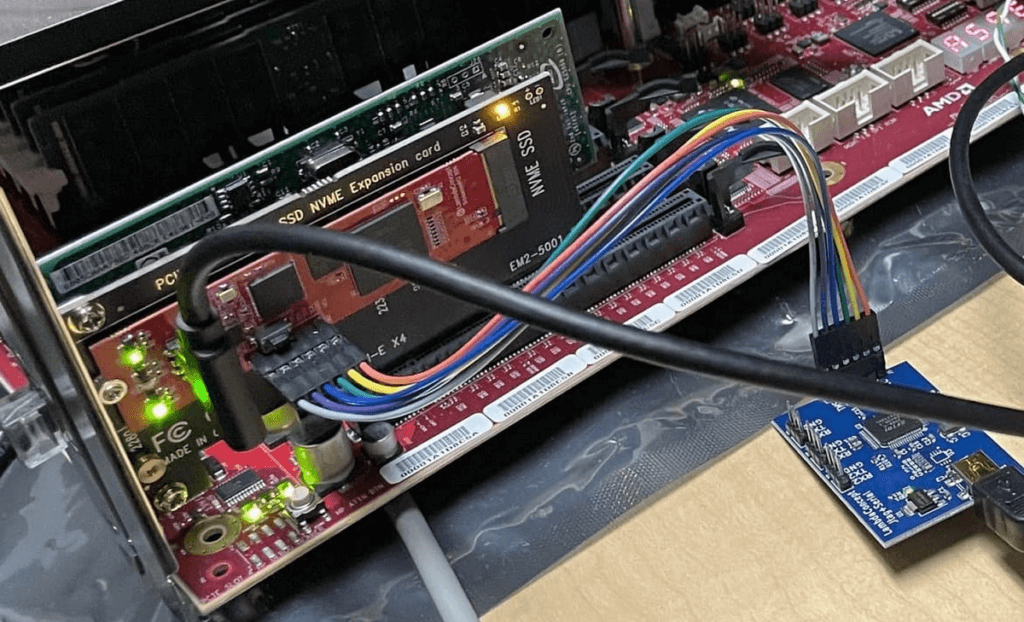
Working on this review, the security teams identified and confirmed potential issues of varying severity. AMD was diligent in fixing all applicable issues and now offers updated firmware through its OEM channels. Google Cloud’s AMD-based Confidential Computing solutions now include all the mitigations implemented during the security review.
“At Google, we believe that investing in security research outside of our own platforms is a critical step in keeping organizations across the broader ecosystem safe,” said Royal Hansen, vice president of Security Engineering at Google. “At the end of the day, we all benefit from a secure ecosystem that organizations rely on for their technology needs and that is why we’re incredibly appreciative of our strong collaboration with AMD on these efforts.”
“Together, AMD and Google Cloud are continuing to advance Confidential Computing, helping enterprises to move sensitive workloads to the cloud with high levels of privacy and security, without compromising performance,” said Mark Papermaster, AMD’s executive vice president and chief technology officer. ”Continuously investing in the security of these technologies through collaboration with the industry is critical to providing customer transformation through Confidential Computing. We’re thankful to have partnered with Google Cloud and the Google Security teams to advance our security technology and help shape future Confidential Computing innovations to come.”
Reviewing trusted execution environments for security is difficult given the closed-source firmware and proprietary hardware components. This is why research and collaborations such as this are critical to improve the security of foundational components that support the broader Internet ecosystem. AMD and Google believe that transparency helps provide further assurance to customers adopting Confidential Computing, and to that end AMD is working toward a model of open source security firmware.
With the analysis now complete and the vulnerabilities addressed, the AMD and Google security teams agree that the AMD firmware which enables Confidential Computing solutions meets an elevated security bar for customers, as the firmware design updates mitigate several bug classes and offer a way to recover from vulnerabilities. More importantly, the review also found that Confidential VMs are protected against a broad range of attacks described in the review.
Google Cloud’s Confidential Computing portfolio
The Google Cloud Confidential VMs, Dataproc Confidential Compute, and Confidential GKE Nodes have enabled high levels of security and privacy to address our customers’ data protection needs without compromising usability, performance, and scale. Our mission is to make this technology ubiquitous across the cloud. Confidential VMs run on hosts with AMD EPYC processors which feature AMD Secure Encrypted Virtualization (SEV). Incorporating SEV into Confidential VMs provide benefits and features including:
Isolation: Memory encryption keys are generated by the AMD Secure Processor during VM creation and reside solely within the AMD Secure Processor. Other VM encryption keys such as for disk encryption can be generated and managed by an external key manager or in Google Cloud HSM. Both sets of these keys are not accessible by Google Cloud, offering strong isolation.
Attestation: Confidential VMs use Virtual Trusted Platform Module (vTPM) attestation. Every time a Confidential VM boots, a launch attestation report event is generated and posted to customer cloud logging, which gives administrators the opportunity to act as necessary.
Performance: Confidential Computing offers high performance for demanding computational tasks. Enabling Confidential VM has little or no impact on most workloads.
The future of Confidential Computing and secure platforms
While there are no absolutes in computer security, collaborative research efforts help uncover security vulnerabilities that can emerge in complex environments and help to prevent Confidential Computing solutions from threats today and into the future. Ultimately, this helps us increase levels of trust for customers.
We believe Confidential Computing is an industry-wide effort that is critical for securing sensitive workloads in the cloud and are grateful to AMD for their continued collaboration on this journey.
To read the full security review, visit this page.
Acknowledgments
We thank the many Google security team members who contributed to this ongoing security collaboration and review, including James Forshaw, Jann Horn and Mark Brand.
We are grateful for the open collaboration with AMD engineers, and wish to thank David Kaplan, Richard Relph and Nathan Nadarajah for their commitment to product security. We would also like to thank AMD leadership: Ab Nacef, Prabhu Jayanna, Hugo Romero, Andrej Zdravkovic and Mark Papermaster for their support of this joint effort.
Manage IAM permissions with the Google Cloud mobile app

1216
Of your peers have already read this article.
2:00 Minutes
The most insightful time you'll spend today!
What’s new with Permissions Management on the Cloud Mobile App
Identity and Access Management (IAM) is the foundation of a strong cloud security posture, ensuring that the right access and permissions for cloud resources are granted across your organization. The Google Cloud mobile app gives cloud administrators the ability to quickly and easily manage their organization’s cloud identities and access from the mobile platform of their choice.
Permissions management is one of the top user-requested features for the Cloud mobile app based on feedback we’ve received. The Permissions tab is used by more than half of our mobile users every month, highlighting the importance of easily managing permissions on-the-go.
We are excited to announce the availability of enhanced permissions management on the Google Cloud mobile app. This new capability enables you to easily view, assign and search for all the roles in your organization.
Manage permissions easily on-the-go
The Cloud mobile app has expanded beyond supporting the three basic roles of Owner, Editor, and Reader, to supporting all the roles in your organization. Administrators are not only able to see all the roles but also assign these roles across their organization:
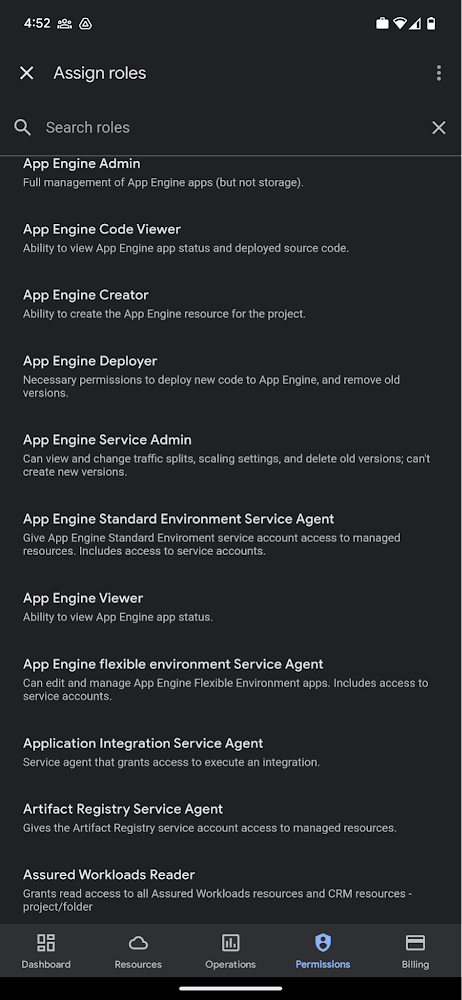
Administrators can also easily view a list of users, and click into each to see all the roles assigned to each user. On top of that, you can easily leverage the search capability to check if a role is assigned and modify its assignment. You can even assign multiple roles at the same time for easy editing. The app will show you a summary of changes before you will proceed.
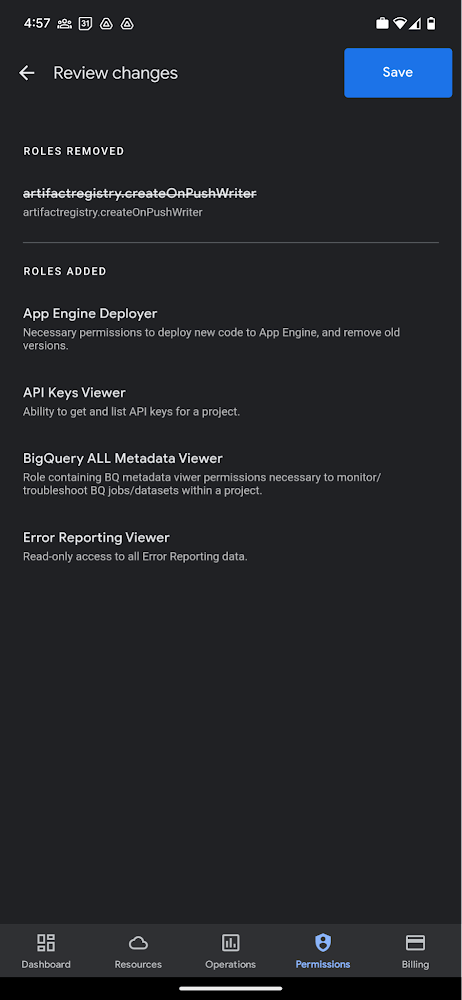
The layout is optimized for mobile, with the categories of information organized for easy viewing. Currently assigned roles are always displayed on the top of the screen so they are easily accessible. Basic roles appear below, followed by all other roles grouped by Google Cloud products.
Get started on the Google Cloud app today
To summarize we’ve enhanced permissions management on the Google Cloud mobile app with:
- Smoother navigation
- Support for all the roles in your organization
- Easy search for assigned roles
- Ability to review changes before applying
Give enhanced permission management a try and explore the possibilities by downloading the app today from Google Play or the Apple App Store. If you have any feedback, we would love to hear from you – simply click on the “send feedback” button in the app to share your experience.
What You Need to Know About Compute Engines

6556
Of your peers have already read this article.
1:30 Minutes
The most insightful time you'll spend today!
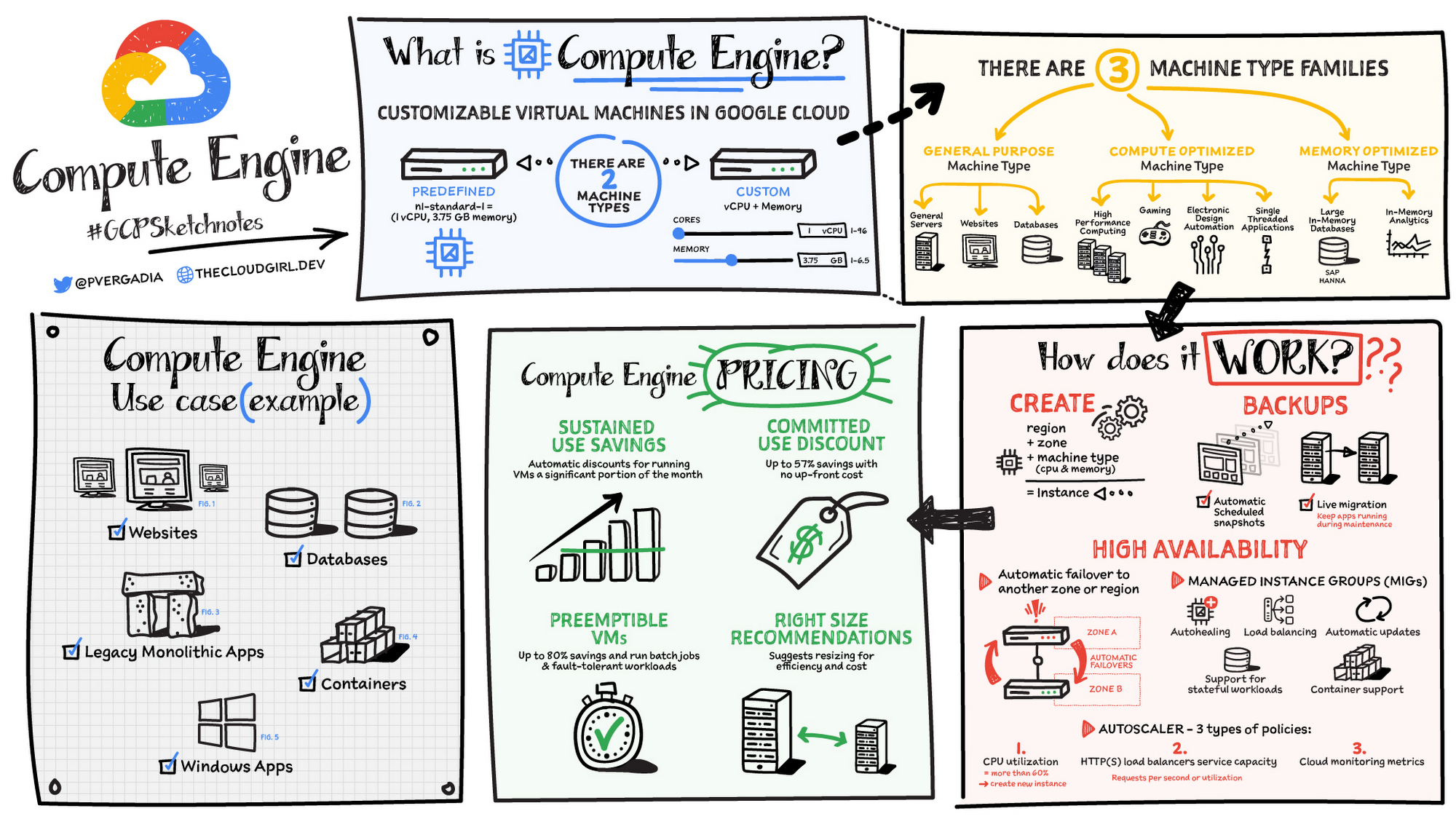
Compute Engine is a customizable compute service that lets you create and run virtual machines on Google’s infrastructure. You can create a Virtual Machine (VM) that fits your needs. Predefined machine types are pre-built and ready-to-go configurations of VMs with specific amounts of vCPU and memory to start running apps quickly. With Custom Machine Types, you can create virtual machines with the optimal amount of CPU and memory for your workloads. This allows you to tailor your infrastructure to your workload. If requirements change, using the stop/start feature you can move your workload to a smaller or larger Custom Machine Type instance, or to a predefined configuration.
Machine types
In Compute Engine, machine types are grouped and curated by families for different workloads. You can choose from general-purpose, memory-optimized, compute-optimized and accelerator-optimized families.
- General-purpose machines are used for Day-to-day computing at a lower cost and for balanced price/performance across a wide range of VM shapes. The use cases that best fit here are web serving, app serving, back office applications, databases, cache, media-streaming, microservices, virtual desktops, development environments.
- Memory-Optimized machine are recommended for ultra high-memory workloads such as in-memory analytics and large in-memory databases such as SAP HANA
- Compute-Optimized machines are recommended for ultra high performance workloads such as High Performance Computing (HPC), Electronic Design Automation (EDA), gaming, video transcoding, single-threaded applications.
- Accelerator-Optimized machines are optimized for high performance computing workloads such as Machine learning (ML), Massive parallelized computations and High Performance Computing (HPC)
How does it work?
You can create a VM instance using a boot disk image, a boot disk snapshot, or a container image. The image can be a public operating system (OS) image or a custom one. Depending on where your users are you can define the zone you want the virtual machine to be created in. By default all traffic from the internet is blocked by the firewall and you can enable the HTTP(s) traffic if needed.
Use snapshot schedules (hourly, daily, or weekly) as a best practice to back up your Compute Engine workloads. Compute Engine offers live migration by default to keep your virtual machine instances running even when software or hardware update occurs. Your running instances are migrated to another host in the same zone instead of requiring your VMs to be rebooted.
Availability
For High Availability (HA) Compute Engine offers automatic failover to other regions or zones in event of a failure. Managed instance groups (MIGs) help keep the instances running by automatically replicating instances from a predefined image. They also provide application based autohealing health checks. If an application is not responding on a VM, the auto healer automatically recreates that VM for you. Regional MIGs let you spread app load across multiple zones. This replication protects against zonal failures. MIGs work with load balancing services to distribute traffic across all of the instances in the group.
Compute Engine offers autoscaling to automatically add or remove VM instances from a managed instance group based on increases or decreases in load. Autoscaling lets your apps gracefully handle increases in traffic, and it reduces cost when the need for resources is lower. You define the autoscaling policy for automatic scaling based on the measured load, CPU utilization, requests per second or other metrics.
Active Assist’s new feature, predictive autoscaling, helps improve response times for your applications–When you enable predictive autoscaling, Compute Engine forecasts future load based on your Managed Instance Group’s (MIG) history and scales it out in advance of predicted load, so that new instances are ready to serve when the load arrives. Without predictive autoscaling, an autoscaler can only scale a group reactively, based on observed changes in load in real time. With predictive autoscaling enabled, the autoscaler works with real-time data as well as with historical data to cover both the current and forecasted load. That makes predictive autoscaling ideal for those apps with long initialization times and whose workloads vary predictably with daily or weekly cycles. For more information, see How predictive autoscaling works or check if predictive autoscaling is suitable for your workload, and to learn more about other intelligent features, check out Active Assist.
Pricing
You pay for what you use. But you can save cost by taking advantage of some discounts! Sustained use saving are automatic discounts applied for running instances for a significant portion of the month. If you know your usage upfront, you can take advantage of committed use discounts which can lead up to significant savings without any upfront cost. And by using short lived preemptive instances you can save up to 80%, they are great for batch jobs and fault tolerant workloads. You can also optimize resource utilization with automatic recommendations. For example if you are using a bigger instance for a workload that can run on a smaller instance you can save costs applying these recommendations.
Security
Compute Engine provides you default hardware security. Using Identity and Access Management (IAM) you just have to ensure that proper permissions are given to control access to your VM resources. All the other basic security principles apply, if the resources are not related and don’t require network communication amongst themselves, consider hosting them on different VPC networks. By default, users in a project can create persistent disks or copy images using any of the public images or any images that project members can access through IAM roles. You may want to restrict your project members so that they can create boot disks only from images that contain approved software that meet your policy or security requirements. You can define an organization policy that only allows Compute Engine VMs to be created from approved images. This can be done by using the Trusted Images Policy to enforce images that can be used in your organization.
By default all VM families are Shielded VMs. Shielded VMs are virtual machine instances that are hardened with a set of easily configurable security features to ensure that when your VM boots, it’s running a verified bootloader and kernel — is the default for everyone using Compute Engine, at no additional charge. For more details on Shielded VMs refer to the documentation here.
For additional security, you also have the option to use Confidential VM to encrypt your data in use, while it’s being processed in Compute Engine. For more details on Confidential VM refer to the documentation here.
Use cases
There are many use cases Compute Engine can serve in addition to running websites and databases. You can also migrate your existing systems onto Google Cloud, with Migrate for Compute Engine, enabling you to run stateful workloads in the cloud within minutes rather than days or weeks. Windows, Oracle or VMware applications have solution sets enabling a smooth transition to Google Cloud. To run windows applications either bring your own license leveraging Sole-tenant nodes or using the included licenced images.
Conclusion
Whatever your application use case may be, from legacy enterprise applications to digital native applications, Compute Engine’s families will fit it. For a more in-depth look into Compute Engine check out the documentation.
For more #GCPSketchnote, follow the GitHub repo. For similar cloud content follow me on Twitter @pvergadia and keep an eye out on thecloudgirl.dev
5177
Of your peers have already watched this video.
14:00 Minutes
The most insightful time you'll spend today!
How Google Workspace Helps Manage, Govern and Protect Sensitive Data
The shift towards a hybrid work style and trends accelerated by the pandemic has resulted in data deluge. With companies and individuals sharing increasingly large volumes of information and collaborating with internal and external stakeholders, the need for innovations for higher security also escalates. View this video to learn how Google Workspace approaches security across content lifecycle from client-side encryption updates, data loss prevention, Google Vault, data regions, labels, and more!
Enable high quality curated detections in Chronicle SecOps Suite

2840
Of your peers have already read this article.
2:30 Minutes
The most insightful time you'll spend today!
A critical component of any security operations team’s job is to deliver high-fidelity detections of potential threats across the breadth of adversary tactics. But increasingly sophisticated threat actors, an expanding attack surface, and an ever-present cybersecurity talent shortage make this task more challenging than ever.
Google keeps more people safe online than anyone else. Individuals, businesses and governments globally depend on our products that are secure-by-design and secure-by-default. Part of the “magic” behind Google’s security is the sheer scale of threat intelligence we are able to derive from our billions of users, browsers, and devices.
Today, we are putting the power of Google’s intelligence in the hands of security operations teams. We are thrilled to announce the general availability of curated detections as part of our Chronicle SecOps Suite. These detections are built by our Google Cloud Threat Intelligence (GCTI) team, and are actively maintained to reduce manual toil in your team.
Our detections provide security teams with high quality, actionable, out-of-the-box threat detection content curated, built and maintained by Google Cloud Threat Intelligence (GCTI) researchers. Our scale, and depth of intelligence, gained by securing billions of users everyday, gives us a unique vantage point to craft effective and targeted detections. These native detection sets cover a wide variety of threats for cloud and beyond, including Windows-based attacks like ransomware, remote-access tools (RAT), infostealers, data exfiltration, suspicious activity, and weakened configurations.
With this launch, security teams can smoothly leverage Google’s expertise and unique visibility into the threat landscape. This release helps understaffed and overstressed security teams keep up with an ever evolving threat landscape, quickly identify threats, and drive effective investigation and response. With this new release, security teams can:
- Enable high quality curated detections with a single click from within the Chronicle console.
- Operationalize data with high-fidelity threat detections, stitched with context available from authoritative sources (such as IAM and CMDB).
- Accelerate investigation and response by finding anomalistic assets and domains with prevalence visualization for the detections triggered.
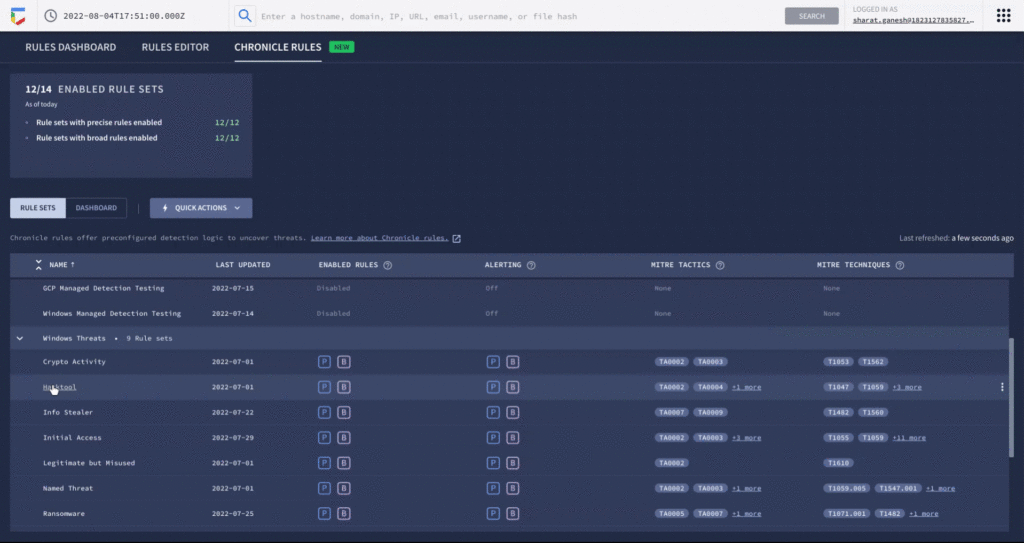
- Map detection coverage to the MITRE ATT&CK framework to better understand adversary tactics and techniques and uncover potential gaps in defenses.
Detections are constantly updated and refined by GCTI researchers based on the evolving threat landscape. The first release of curated detections includes two categories that cover a broad range of threats, including:
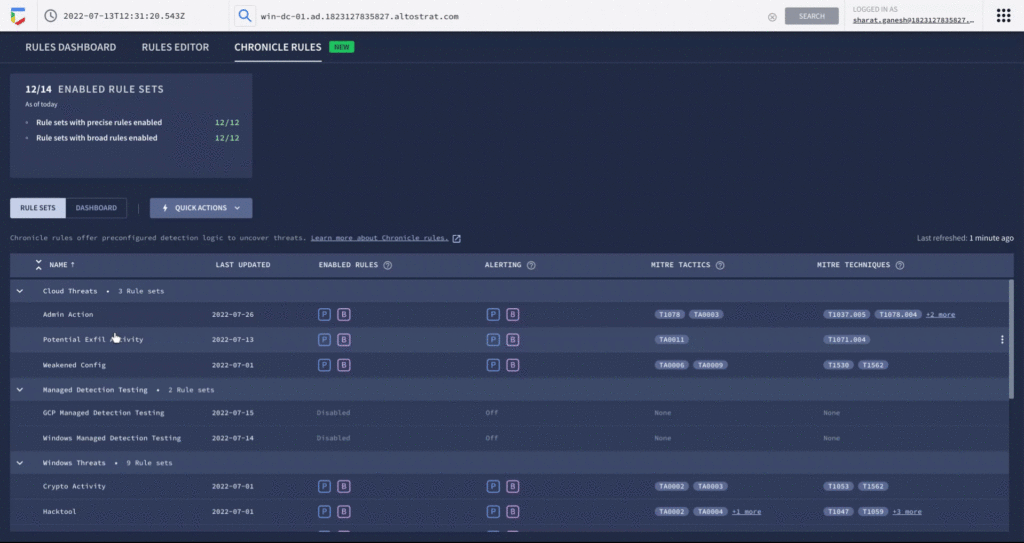
- Windows-based threats: Coverage for several classes of threats including infostealers, ransomware, RATs, misused software, and crypto activity.
- Cloud attacks and cloud misconfigurations: Secure cloud workloads with additional coverage around exfiltration of data, suspicious behavior, and additional vectors.
Let’s look at an example of how you can put curated detections to work within the Chronicle dashboard, monitor coverage, and map to MITRE ATT&CK®.
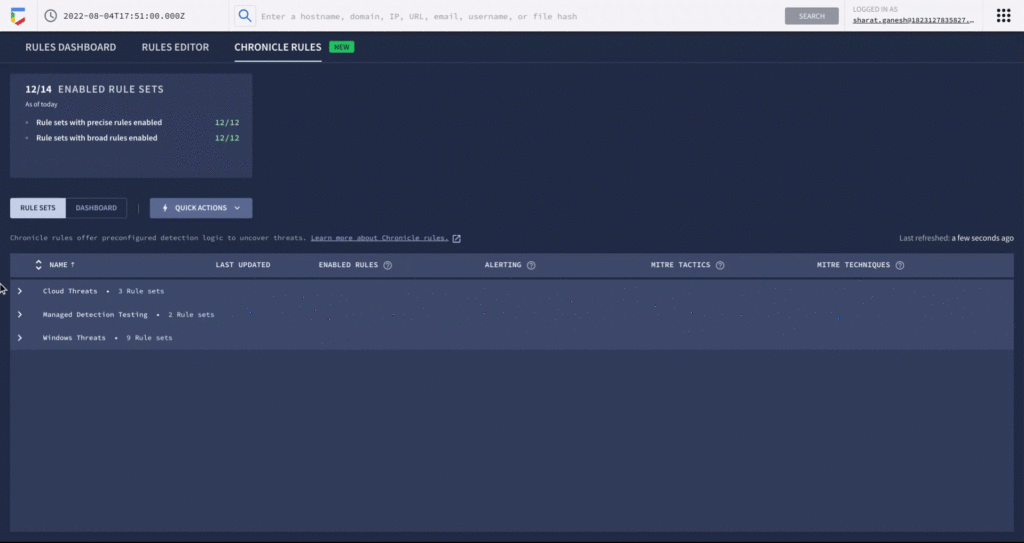
An analyst can learn more details around specific detections and understand how they map to the MITRE ATT&CK framework. There are customized settings to configure deployment and alerting, and specify exceptions via reference lists.
You can see each rule which has generated a detection against your log data in the Chronicle rules dashboard. You can observe detections associated with the rule and pivot to investigative views. For example, here is the detection view from the timeline of an Empire Powershell Stager launch triggered by the Windows RAT rule set. You can also easily pivot to associated information and investigate the asset on which it was triggered.
By surfacing impactful, high-efficacy detections, Chronicle can enable analysts to spend time responding to actual threats and reduce alert fatigue. Our customers who used curated detections during our public preview were able to detect malicious activity and take actions to prevent threats earlier in their lifecycle. And there’s more to come. We will be delivering a steady release of new detection categories covering a wide variety of threats, community-driven content, and other out-of-the-box analytics.
Ready to put Google’s intelligence to work in your Security Operations Center? Contact Google Cloud sales or your customer success CSM team. You can also learn more about all these new capabilities in Google Chronicle in our product documentation.
More Relevant Stories for Your Company

Defining cloud’s future: How autonomic data security can help
“Ninety percent of all data today was created in the last two years—that’s 2.5 quintillion bytes of data per day,” according to business data analytics company Domo. That would be a mind-bending statistic, except that it’s already five years old. As data usage has undergone drastic expansion and changes in

Using Google Cloud’s Backup and DR Service with Logging and Monitoring Tools
Backup and DR data is a valuable business asset, and ensuring that it’s safe and accessible is essential. In particular, you want to be able to monitor your backups to ensure that the data is indeed protected and that you can quickly recover it in the event of a disaster,

What Users and System Designers Must Learn from Google’s Best Practices for Password Management
Updated for 2021: This post includes updated best practices including the latest from Google's Best Practices for Password Management whitepapers for both users and system designers. Account management, authentication and password management can be tricky. Often, account management is a dark corner that isn't a top priority for developers or product managers. The resulting experience
Announcement: Merger of Google’s Data Processing Terms into CDPA
At Google, we are constantly looking to improve our products, services, and contracts so that we can better serve our customers. To this end, we are pleased to announce that we have updated and merged our data processing terms for Google Cloud, Google Workspace (including Workspace for Education), and Cloud
