





Using Google Cloud’s Backup and DR Service with Logging and Monitoring Tools

1091
Of your peers have already read this article.
2:30 Minutes
The most insightful time you'll spend today!
Backup and DR data is a valuable business asset, and ensuring that it’s safe and accessible is essential. In particular, you want to be able to monitor your backups to ensure that the data is indeed protected and that you can quickly recover it in the event of a disaster, user error, or failed upgrade.
Users of Google Cloud’s Backup and DR service often ask:
- What are the best practices for monitoring my backup and recovery jobs?
- How can I proactively identify issues and troubleshoot?
- How can I create alerts and be notified about important events?
The good news is that Google Cloud Backup and DR now integrates with Cloud Logging and Cloud Monitoring tools. Now, you can monitor backup events, jobs, appliance health, resource consumption and user actions in the same way you monitor other Google Cloud workloads and services.
With this integration, you can now:
- Monitor events related to backup and restore – With detailed Google Cloud Backup and DR service event logs in Cloud Logging, you can now use log based alerts to create a customisable notification, in near-real time. This lets you monitor important events such as backup job failures, jobs that did not run, local backup storage saturation, and network failures.
- Configure fine grained alerting – You can write custom event queries on a wide variety of dimensions such as event severity, application type, application name, job type, job name, error message and many more. This gives a lot of flexibility to define alerts for specific events or conditions within a system, thus reducing noise and helping you identify and fix issues easily.
- Get notified on your preferred notification channel – Google Cloud offers seven pre-built notification channels that let you receive customisable notifications directly over email, SMS, Slack or the Google Cloud mobile app. Alternatively, you can integrate with your own monitoring and event management tools using webhooks or Pub/Sub.
- Derive useful insights to troubleshoot issues – With Log Analytics, you can use BigQuery to query your data using SQL queries and generate operational insights, which can help you reduce time spent troubleshooting. For example, you can analyze the key reasons that backup and restore jobs fail for a given application or application type.
The integration also lets you proactively discover deeper issues related to backup and recovery, such as capacity-related issues or certain job failures that happen periodically, by monitoring recurring events in the logs over time. With log-based metrics, you can:
- Create trend charts to track important metrics such as the number of backup or restore jobs that failed during a day/week/month
- Receive a notification when the number of occurrences crosses a threshold, for example receive a notification if a snapshot pool saturates more than five times a week
- Monitor trends in data, such as latency values in logs, and receive a notification if the values change in an unacceptable way.
Getting started
The time to learn that your backup failed should never be when you go to restore. By integrating our Backup and DR service with Cloud Monitoring and Cloud Logging, you can get valuable assurances about the health of your backup and business continuity processes with the same tools that you use to manage other Google Cloud workloads. To get started, check out the Backup and DR event logs page. You can also watch a video that shows you how to set up and use the service and configure some custom alerts.
Utilizing Google Cloud’s PII Security Features

2608
Of your peers have already read this article.
2:30 Minutes
The most insightful time you'll spend today!
BigQuery is a leading data warehouse solution in the market today, and is valued by customers who need to gather insights and advanced analytics on their data. Many common BigQuery use cases involve the storage and processing of Personal Identifiable Information (PII)—data that needs to be protected within Google Cloud from unauthorized and malicious access.
Too often, the process of finding and identifying PII in BigQuery data relies on manual PII discovery and duplication of that data. One common way to do this is by taking an extract of columns used for PII and copying them into a separate table with restricted access. However, creating unnecessary copies of this data and processing it manually to identify PII increases the risks of failure and subsequent security events.
In addition, the security of PII data is often mandated by multiple regulations and failure to apply appropriate safeguards may result in heavy penalties. To address this issue, customers need solutions that 1) identify PII in BigQuery and 2) automatically implement access control on that data to prevent unauthorized access and misuse, all without having to duplicate it.
This blog will discuss a solution developed by Google Professional Services for leveraging Google Cloud DLP to inspect and classify sensitive data and suggest a solution for using these insights to automatically tag and protect data in BigQuery tables.
BigQuery Auto Tagging solution overview
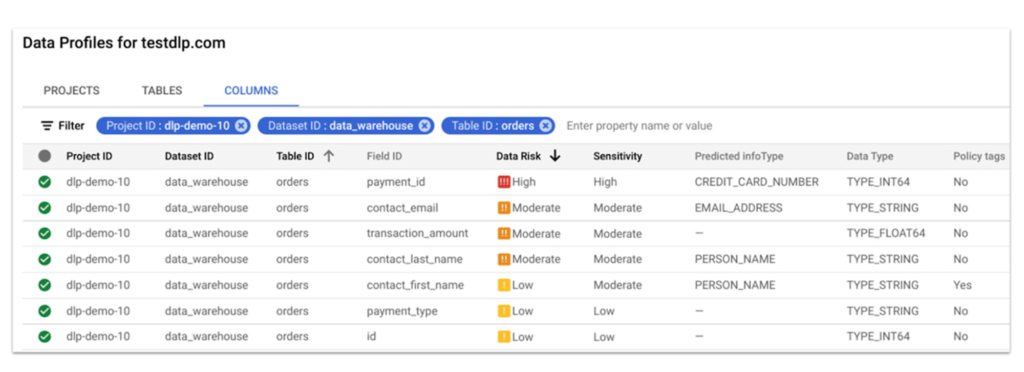
Automatic DLP can help to identify sensitive data, such as PII, in BigQuery. Organizations can leverage Automatic DLP to automatically search across their entire BigQuery data warehouse for tables that contain sensitive data fields and report detailed findings in the console (see Figure 1 below,) in Data Studio, and in a structured format (such as a BigQuery results table.) Newly created and updated tables can be discovered, scanned, and classified automatically in the background without a user needing to invoke or schedule it. This way you have an ongoing view into your sensitive data.
In this blog, we show how a new open source solution called BigQuery Auto Tagging Solution solves our second goal—automating access control on data. This solution sits as a layer on top of Automatic DLP and automatically enforces column-level access controls to restrict access to specific sensitive data types based on user-defined data classification taxonomies (such as high confidentiality or low confidentiality) and domains (such as Marketing, Finance, or ERP System.) This solution minimizes the risk of unrestricted access to PII and ensures that there is only one copy of data maintained with appropriate access control applied down to the column level.
The code for this solution is available on Github at GoogleCloudPlatform/bq-pii-classifier. Please note that while Google does not maintain this code, you can reach out to your Sales Representative to get in contact with our Professional Services team for guidance on how to implement it.
BigQuery and Data Catalog Policy Tags (now Dataplex) have some limitations that you should be aware of before implementing this solution to ensure that it will work for your organization:
- Taxonomies and Policy Tags are not shared across regions: If you have data in multiple regions you will need to create or replicate your taxonomy in each region that you want to apply policy tags.
- Maximum number of 40 taxonomies per project: If you require different taxonomies for different business domains or have replications to support multiple Cloud regions those will count against this quota.
- Maximum number of 100 policy tags per taxonomy: Cloud DLP supports up to 150 infoTypes for classification, however, a single policy taxonomy can only support up to 100 including any nested categories. If you need to support more than 100 data types, you may need to split these across more than one taxonomy.
High-level overview of the solution
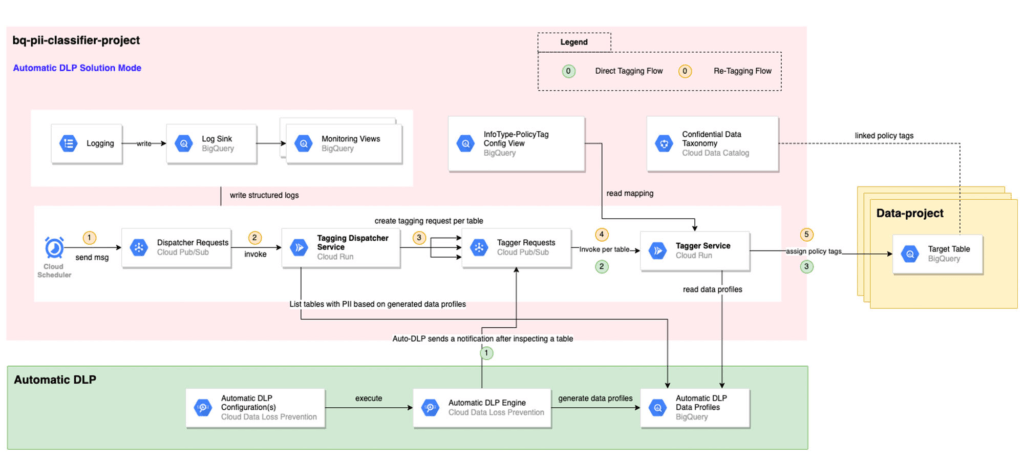
The solution is composed mainly of the following components: Dispatcher Requests topic, Dispatcher service, BigQuery Policy Tagger Requests topic, and BigQuery Policy Tagger service and logging components.
The Dispatcher Service is a Cloud Run service that expects a BigQuery scope to be expressed as inclusion and exclusion lists of projects, datasets, and tables. This Dispatcher service will query Automatic DLP Data Profiles to check if the tables in-scope have data profiles generated. For these tables, it will publish one request per table to the “BigQuery Policy Tagger Requests” PubSub topic. This topic enables rate limiting of BigQuery column tagging operations and apply auto-retries with backoffs.
The “BigQuery Policy Tagger” Service is also a Cloud Run service that receives the information of the DLP scan results of a BigQuery table. This service will determine the final InfoType of each column and apply the appropriate Policy Tags as defined in the InfoType – Policy Tags mapping. Only-one INFO_TYPE is selected and the function assigns the associated policy tag.
Lastly, all Cloud Run services maintain structured logs that are exported by a log sink to BigQuery. There are multiple BigQuery views that help with monitoring and debugging Cloud Run call chains and tagging actions on columns.
Deployment options
After deploying the solution, it can be used in two different ways:
[Option 1] Automatic DLP-triggered immediate tagging:
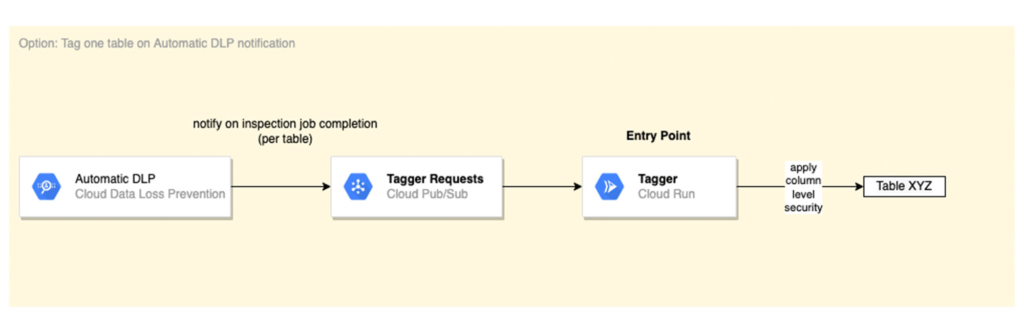
Automatic DLP is configured to send a Pub/Sub notification on each inspection job completion. The Pub/Sub notification includes the resource name and it triggers the Tagger service directly
[Option 2] Scheduled tagging:
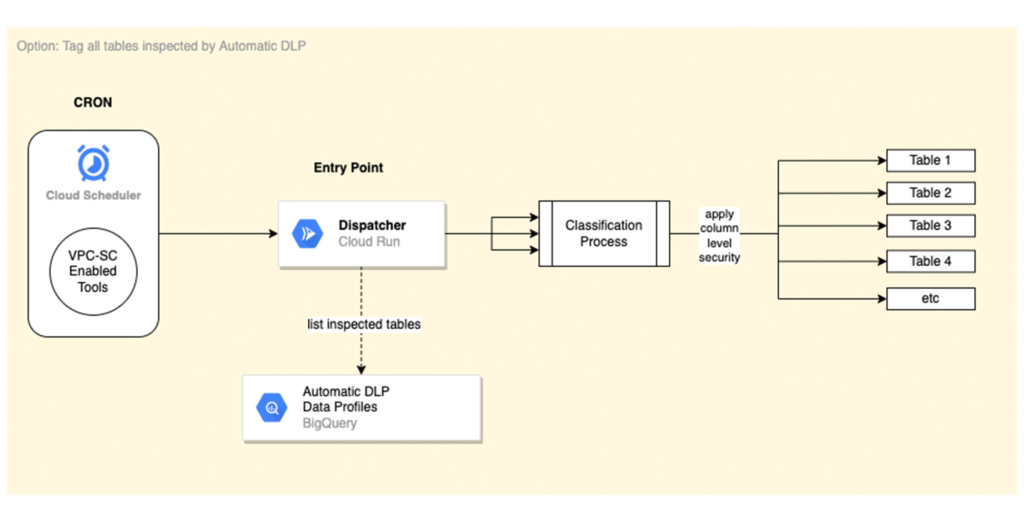
In this scenario, the Dispatcher service is invoked on a schedule with a payload representing a BigQuery scope to list inspected tables by Automatic DLP and create a tagging request per table. You could use Cloud Scheduler (or any Orchestration tool) to invoke the Dispatcher service. If the solution is deployed within a VPC-SC perimeter, other schedulers that support VPC-SC should be used (such as Composer or Custom App.)
In addition, more than one Cloud Scheduler/Trigger could be defined to group projects/datasets/tables that have the same tagging schedule (such as daily or monthly.)
To learn more about Automatic DLP, see our webpage. To learn more about the BQ classifier, see the open source project on Github: GoogleCloudPlatform/bq-pii-classifier and get started today!
Google Unveils New Cloud Region in Delhi NCR to Power India’s Digitization

8290
Of your peers have already read this article.
2:00 Minutes
The most insightful time you'll spend today!
In the past year, Google has worked to surface timely and reliable health information, amplify public health campaigns, and help nonprofits get urgent support to Indians in need. Now, we are continuing to focus on helping India’s businesses accelerate their digital transformation, deepening our commitment to India’s digitization and economic recovery. To support customers and the public sector in India and across Asia Pacific, we’re excited to announce that our new Google Cloud region in Delhi National Capital Region (NCR) is now open.
Designed to help both Indian and global companies alike build highly available applications for their customers, the Delhi NCR region is our second Google Cloud region in India and 10th to open in Asia Pacific.
What customers and partners are saying
Navigating this past year has been a challenge for companies as they grapple with changing customers demands and economic uncertainty. Technology has played a critical role, and we’ve been fortunate to partner with and serve people, companies, and government institutions around the world to help them adapt. The Google Cloud region in Delhi NCR will help our customers adapt to new requirements, new opportunities and new ways of working, like we’ve helped so many companies do in the region:
- InMobi scaled a personalized AI platform to support 120+ million active users. “With the arrival of the Google Cloud Delhi NCR, InMobi Group sees the opportunity to continue closing the gap between our users and products,” says Mohit Saxena, Co-founder and Group CTO of Inmobi. “Glance, especially, has been serving AI-powered personalised content to over 120 million active users. We can’t wait to continue giving them truly meaningful experiences that are speedy, scale well, and are relevant to them, by expanding the use of our current tools working on Google Cloud with the opening of a new region.”
- Groww now supports a sizable user base. “Google Cloud provides great technology that enables us to build and scale infrastructure to millions of users, and the new Google Cloud region in Delhi NCR will continue to help more businesses and startups in India access powerful cloud-based infrastructure, products and services,” says Neeraj Singh, Co-founder and Chief Technology Officer, Groww.
- HDFC Bank is positioned for the future. “At HDFC Bank, we are harnessing technology platforms to both run and build the bank. As we progress to be future ready, the objective is to invest in future technologies that give us scale, efficiency and resiliency. Towards this the Google Cloud region in Delhi NCR will enable us to enhance our resiliency and help us in building an active-active design framework for our new generation applications on cloud,” says Ramesh Lakshminarayanan, CIO, HDFC Bank.
- Dr. Reddy’s Lab built a modern data platform with Google Cloud. “At Dr Reddy’s, we pride ourselves in helping patients regain good health, acting quickly to provide innovative solutions to address patients’ unmet needs and in accelerating access to medicines to people worldwide. Our Google Cloud-powered data platform is helping us realize these objectives and we welcome Google’s investment in the new Delhi NCR region as helping us and other businesses in India make further contributions to our social and economic future,” says Mukesh Rathi, Senior Vice President & CIO, Dr. Reddy’s Laboratories.
- “To survive the disruption caused by the pandemic and to succeed in the long term, organizations need to become digital natives, so they can be more agile, explore new business models and build new capabilities that boost resilience. A cloud-first strategy plays a key role in enabling businesses to do this,” said Piyush N. Singh, Lead – India market unit & lead – Growth and Strategic Client Relationships, Asia Pacific and Latin America, Accenture. “Harnessing the potential of cloud requires the right data infrastructure and this expansion by Google Cloud will undoubtedly help Indian enterprises in their digital transformation journeys.”
A global network of regions
Delhi NCR joins 25 existing Google Cloud regions connected via our high-performance network, helping customers better serve their users and customers throughout the globe. As the second region in India, customers benefit from improved business continuity planning with distributed, secure infrastructure needed to meet IT and business requirements for disaster recovery, while maintaining data sovereignty.
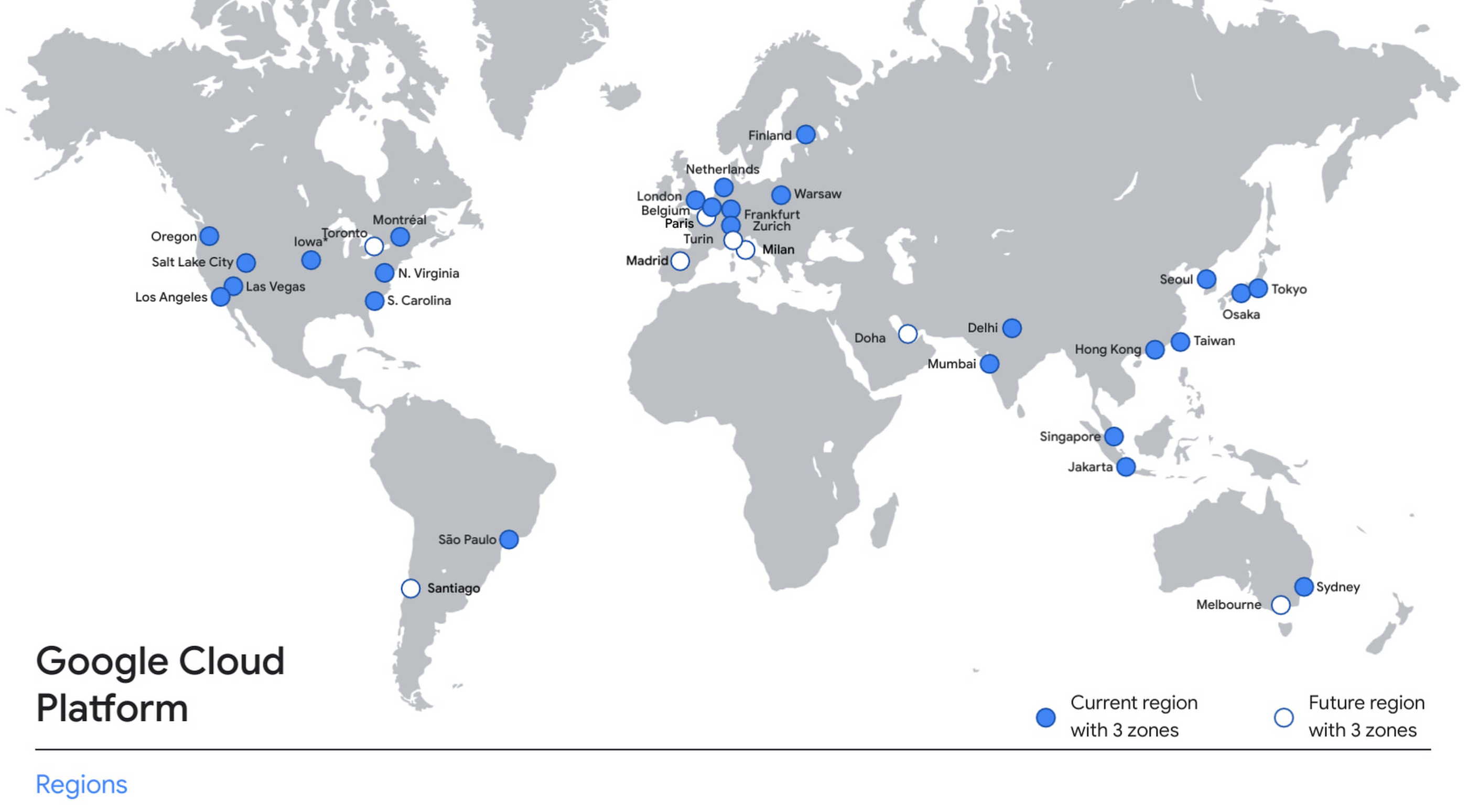
With this new region, Google Cloud customers operating in India also benefit from low latency and high performance of their cloud-based workloads and data. Designed for high availability, the region opens with three availability zones to protect against service disruptions, and offers a portfolio of key products, including Compute Engine, App Engine, Google Kubernetes Engine, Cloud Bigtable, Cloud Spanner, and BigQuery.
Supporting India’s recovery with training and education
Google and Google Cloud will also continue to support our customers with people and education programs. We’re investing in local talent and the local developer community to help enterprises digitally transform and support economic recovery.
Through the India Digitization Fund, we expanded our efforts to support India’s recovery from COVID-19—in particular, through programs to support education and small businesses. In addition to expanding internet access, and investments to help start-ups accelerate India’s digital transformation, we’ve grown our Grow with Google efforts. Businesses can access digital tools to maintain business continuity, find resources like quick help videos, and learn digital skills—in both English and in Hindi.
Helping customers build their transformation clouds
Google Cloud is here to support businesses, helping them get smarter with data, deploy faster, connect more easily with people and customers throughout the globe, and protect everything that matters to their businesses. The cloud region in Delhi NCR offers new technology and tools that can be a catalyst for this change. To learn more, visit the Google Cloud locations page, and be sure to watch the region launch event here.
The {$persona} Survival Guide: A Roadmap for Successful Transformation

2451
Of your peers have already read this article.
1:30 Minutes
The most insightful time you'll spend today!
Part of being a security leader whose organization is taking on a digital transformation is preparing for hard questions – and complex answers – on how to implement a transformation strategy.
In our previous CISO Survival Guide blog, we discussed how financial services organizations can more securely move to the cloud. We examined how to organize and think about the digital transformation challenges facing the highly-regulated financial services industry, including the benefits of the Organization, Operation, and Technology (OOT) approach, as well as embracing new processes like continuous delivery and required cultural shifts.
As part of Google Cloud’s commitment to shared fate, today we offer tips on how to ask the right questions that can help create the conversations that lead to better transformation outcomes for your organization. While there often is more than one right answer, a thoughtful, methodical approach to asking targeted questions and maintaining an open mind about the answers you hear back can help achieve your desired result. These questions are designed to help you figure out where to start and where to end your organization’s security transformation. By asking the following questions, CISOs and business leaders can develop a constructive, focused dialogue which can help determine the proper balance between implementing security controls and fine-tuning the risk tolerance set by the executive management and the board of directors.
To start the conversation, begin by asking:
- What defines our organization’s culture?
- How can we best integrate the culture with our security goals?
CISOs should ask business leaders:
- What makes a successful transformation?
- What are the key goals of the transformation?
- What data is (most) valuable?
- What data can be retired, reclassified, or migrated?
- What losses can we afford to take and still function?
- What is the real risk that the organization is willing to accept?
Business leaders should ask CISOs and the security team:
- What are the best practices for protecting our valuable data?
- What is the business impact of implementing those controls?
- What are the top threats that we need to address?
CISOs and business leaders should ask:
- Which threats are no longer as important?
- Where could we potentially use spending for more cost-effective controls such as firewalls and antivirus software?
- What benefits do we get from refactoring our applications?
- Are we really transforming, or lifting and shifting?
- How should we perform identity and access management to meet our business objectives?
- What are the core controls needed to ensure enterprise-level performance for the first workloads?
CISOs and risk teams should ask:
- How can we use the restructuring of an existing body of code to streamline security functions?
- How should we monitor our security posture to ensure we are aligned with our risk appetite?
Business and technical teams should ask:
- What’s our backup plan?
- What do we do if that fails?
Practical advice and the realities of operational transformation
Some organizations have been working in the cloud for more than a decade and have already addressed many operational procedures, sometimes with painful lessons learned along the way. If you’ve been operating in the cloud securely for that long, we recognize that there’s a lot to be gained from understanding your approaches to culture, operational expertise, and technology.
However, there are still many organizations that have not thought through how they will operate in a cloud environment until it’s almost ready – and at that point, it might be too late. If you can’t detail how a cloud environment will operate before its launch, how will you know who should be responsible for maintaining it?
Who are the critical stakeholders, along with those responsible for engineering and maintaining specific systems, who should be identified at the start of the transformation? There are likely several groups of stakeholders, such as those aligned with operations for transformation, and those focused on control design for cloud aligned with operations.
If you don’t have the operators involved in the design phase, you’re destined to create clever security controls with very little practical value because those tasked with day-to-day maintenance most likely won’t have the expertise or training to effectively operate these controls.
This is complicated by the fact that many organizations are struggling to recruit and retain resources with the right skills to operate in the cloud. We believe that training current employees to learn new cloud skills, and giving them the time away from other responsibilities, can help build skilled, diverse cloud security teams.
If your organization continually experiences high turnover in security leadership and skilled staff, it’s up to you to navigate your culture to ensure greater consistency. You can, of course, choose to supplement internal knowledge with trusted partners – however, that’s an expensive strategy for ongoing operational cost.
We met recently with a security organization that turns over skilled staff and leadership every two to three years. This rate of churn results in a continual resetting of security goals. This particular team joked that it’s like “Groundhog Day” as they constantly re-evaluate their best security approaches yet make no meaningful progress. This is not a model to emulate.
Many security controls fail not because they are improperly engineered, but because the people who use them – your security team – are improperly trained and insufficiently motivated. This is especially true for teams with high turnover rates and other organizational misalignments. A security control that blocks 100% of attacks might be engineered correctly, but if you can’t efficiently operate it, the effectiveness of the control will plummet to zero over time. Worse, it then becomes a liability because you incorrectly assume you have a functioning control.
In our next blog, we will highlight several proven approaches that we believe can help guide your security team through your organization’s digital transformation.
To learn more now, check out:
5216
Of your peers have already watched this video.
17:00 Minutes
The most insightful time you'll spend today!
AppSheet: Reduce Shadow IT and Accelerate Development of Enterprise-grade Apps
Google Cloud findings suggest that nearly 40 percent of organizations’ investments are consumed by shadow IT and can be a detractor to the adoption of cutting-edge tools and solutions. Also, about 51 percent of the surveyed executives are of the opinion that the inability to adapt to digital transformation trends and practices are at the risk of going out of business in the next 3-4 years. However, enterprises need not be blindsided by the mounting expenses involved with the implementation and optimization of solutions and tools meant for empowering employees. AppSheet, Google Cloud’s no-code application development and automation platform is at the helm of empowering organizations to custom build apps for employees without relying on third-party services.
Watch the video from the Google Workspace sessions of Next ’21 to hear experts’ insights on AppSheet to effectively govern workforce and ward off security threats to helps employees build enterprise-grade applications!
5552
Of your peers have already downloaded this article
1:30 Minutes
The most insightful time you'll spend today!
Protecting a global network against persistent and constantly evolving cyber threats is one of the most important challenges faced by Google Cloud. So, how does Google’s global network protects seven different global businesses, each with over 1 billion customers, including popular Google services such as Google Search, YouTube, Maps, and Gmail?
The answer is a multi-step process, which is constantly changing and evolving to stay one step ahead of the malicious hackers and attackers. For instance, it’s network communications protocols—the rules that enable communications between systems—change multiple times per second to make malicious intrusions much harder.
Data in Google Cloud is encrypted both in transit and at rest. Google’s network capacity far exceeds any traffic load it hosts to thwart and DDoS attack. In addition, it has numerous other products, tools, and processes at work to provide defense in depth.
Download this e-book to get a detailed overview of Google Cloud’s approach to security and privacy.
More Relevant Stories for Your Company

The Rise of Cloud-Based Security Analytics and Operations Technologies
Security analytics and operations can be complex, requiring highly skilled professionals and detailed processes. To overcome these issues, security teams tend to deploy an array of security analytics tools and technologies to collect, process, analyze, and act upon growing volumes of security telemetry. Despite this investment, however, many organizations continue

Next-Level Ecommerce Engagement: Transforming User Identities with GCIP
One of the fundamental questions that retailers constantly ask themselves is how well they know their customers and how they can build deeper relationships. Knowing who their customers are can have a direct impact on improving customer engagement, which can lead to increased conversion rates, customer loyalty, lifetime value, and

Confidential Computing: Google Cloud Security, Project Zero and AMD Come Together to Secure Sensitive Workloads
At Google Cloud, we believe that the protection of our customers’ sensitive data is paramount, and encryption is a powerful mechanism to help achieve this goal. For years, we have supported encryption in transit when our customers ingest their data to bring it to the cloud. We’ve also long supported

Improving Your Security Posture: Integrating Cloud DLP with Security Command Center
Our Cloud Data Loss Prevention (Cloud DLP) discovery service can monitor and profile your data warehouse to bring awareness of where sensitive data is stored and processed. Profiling is also useful for confirming that data is not being stored and processed where you don’t want it. But how can you
