





Creating and Using Storage Buckets for Your Data Needs

1375
Of your peers have already read this article.
2:30 Minutes
The most insightful time you'll spend today!
So, you want to store objects on the cloud? But you’re really new to Google Cloud or Cloud Storage and would like someone to walk you through the process step by step?
Today is your lucky day!
I will help you understand the big steps involved in setting up and using Cloud Storage. For a walkthrough of all the steps involved that even includes highlighting of things to select so you don’t spend all your time playing “Where’s Waldo” on the page looking for that one button, click try the tutorial!
Creating buckets, storing objects in them, and adjusting permissions may feel challenging at first, but after you’ve walked through these steps, you’ll be able to create and use the Cloud Storage your project needs.
Resource Hierarchy
Projects contain all of the related parts of your application. Inside projects, you may have buckets, the top level containers in Cloud Storage. Files and folders are stored in buckets. You can grant access to a bucket, folder, or file using Identity and Access Management.
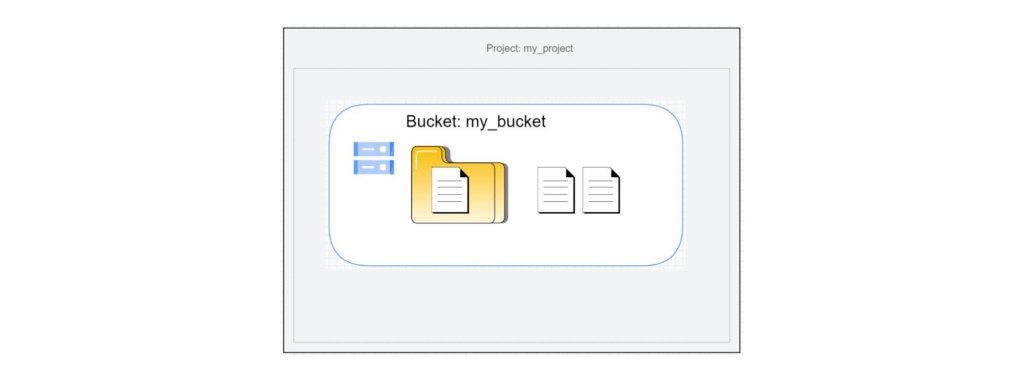
You can do all of that in this interactive tutorial. So let’s get started. I suggest you follow along in the tutorial so you can see the specific keys and screens as I describe them.
Creating a project
Everything in your application will be in a project, even if the only service you are using is storage. Projects need to be associated with a billing account, so if you don’t have one, consider signing up for the Free Trial. You’ll start in the Cloud Console.
Creating a bucket
Once you have a project, you can use storage by navigating to the Cloud Storage page by using either the Navigation menu at the top left of the console or by searching for “Cloud Storage” using the search box at the top of the console.
At the Buckets page of Cloud Storage, you’ll be able to create a bucket. The name of your bucket needs to be globally unique; that is no other bucket in Google Cloud Storage can have the same name. This is because if you or your organization allow your bucket to be accessible on the Internet, it will be at the URL https://storage.googleapis.com/<bucket name>. You can also consider implementing a security feature to prevent data exfiltration, organization restriction headers when you’re finished creating your bucket.. Pick a region close to you for your bucket. In some cases it may make sense to use multi-region or dual-region, but the details are more than I want to get into here. Don’t worry; you can find lots more information on them! Additionally, I won’t go into the details about selecting the appropriate storage class based on access frequency and longevity, but more information can be found here as well our recently introduced Autoclass tiering feature..
Since buckets can be accessed from the Internet, you need to be careful to only make the things you want to be public, public. The default value is to keep your data off of the Internet, so when you create the bucket, there’s an option to “Enforce public access prevention on this bucket” that is already selected. Since we’ll be making items in this bucket public later on, clear the option before confirming the bucket information. Don’t worry; you’ll see how to set that option back later.
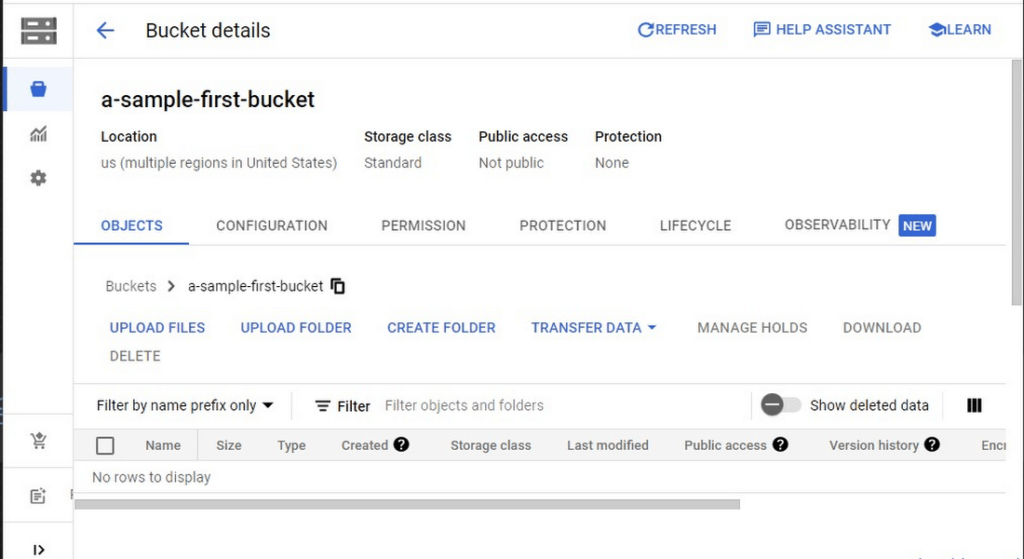
Take a look at the Bucket detail page. There are tabs to see the objects in the bucket, the permissions on the bucket, and much more. There are commands to create folders and to upload files and folders. We’ll do some of this in the next section. You can even find out much more from the Learn option in the upper right.
Adding items to the bucket
Find a file you’d like to upload to this bucket, remembering it will be made public to the Internet later. If you don’t have anything available, there’s a picture of a cat (of course, it’s a cat picture, this is the Internet!) in the interactive tutorial.
Go to the bucket details for your bucket. Using the “Upload files” button, you’ll just upload the file to the bucket by selecting the file from your computer. We won’t get into service classes here, but when you’re ready, there are links in the references.
Of course, if you have a lot of files in a bucket, you probably will want some sort of organization. You can do this by creating folders in your bucket with the “Create Folder” option. Once you’ve done that, you can go to the overflow menu (three vertical dots at the end line with the object information) and select Move. Remember, if you need help finding this, the interactive tutorial will point it out.
Making a bucket public
No surprise, the Bucket details hold lots of information about your bucket. You’ll change the bucket’s permissions in the Permission tab. (I hope that’s not a surprise.) You can then give access to individuals, groups, or all users. For this tutorial, follow the steps to grant access to allUsers. There are a variety of different levels of access you can grant to a user. In this case, just grant the ability to view the object using Storage Object Viewer.
Then go into the Objects tab to find the URL for the object you uploaded. Copy that URL and ensure you can indeed access the object from another tab or incognito window.
Now that you’ve done that, go back to the Permission tab for the bucket and select Prevent Public Access to secure the bucket again.
So, in a nutshell, to make all files in a bucket public, in the Permissions tab:
- Uncheck the option “Remove Public Access Prevention”
- Use Grant Access to give allUsers the Storage Object Viewer role in Cloud Storage.
To make all files in a bucket private, in the Permissions tab select Prevent Public Access.
Cleaning up
There is a charge to keep items in Cloud Storage, so you’ll probably want to delete the object you uploaded by selecting it and pressing Delete. You can delete the bucket in a similar way. The tutorial has details, of course.
While there are lots more details about Cloud Storage, you’ve got the big picture now. Go do something creative and useful with it!
So what now?
If you haven’t walked through the interactive tutorial, give it a try!
How to Pick a Database that is Suitable for Your Application

7010
Of your peers have already read this article.
2:30 Minutes
The most insightful time you'll spend today!
Picking the right database for your application is not easy. The choice depends heavily on your use case—transactional processing, analytical processing, in-memory database, and so on—but it also depends on other factors. This post covers the different database options available within Google Cloud across relational (SQL) and non-relational (NoSQL) databases and explains which use cases are best suited for each database option.

Relational databases
In relational databases information is stored in tables, rows and columns, which typically works best for structured data. As a result they are used for applications in which the structure of the data does not change often. SQL (Structured Query Language) is used when interacting with most relational databases. They offer ACID consistency mode for the data, which means:
- Atomic: All operations in a transaction succeed or the operation is rolled back.
- Consistent: On the completion of a transaction, the database is structurally sound.
- Isolated: Transactions do not contend with one another. Contentious access to data is moderated by the database so that transactions appear to run sequentially.
- Durable: The results of applying a transaction are permanent, even in the presence of failures.
Because of these properties, relational databases are used in applications that require high accuracy and for transactional queries such as financial and retail transactions. For example: In banking when a customer makes a funds transfer request, you want to make sure the transaction is possible and it actually happens on the most up-to-date account balance, in this case an error or resubmit request is likely fine.
There are three relational database options in Google Cloud: Cloud SQL, Cloud Spanner, and Bare Metal Solution.
Cloud SQL: Provides managed MySQL, PostgreSQL and SQL Server databases on Google Cloud. It reduces maintenance cost and automates database provisioning, storage capacity management, back ups, and out-of-the-box high availability and disaster recovery/failover. For these reasons it is best for general-purpose web frameworks, CRM, ERP, SaaS and e-commerce applications.
Cloud Spanner: Cloud Spanner is an enterprise-grade, globally-distributed, and strongly-consistent database that offers up to 99.999% availability, built specifically to combine the benefits of relational database structure with non-relational horizontal scale. It is a unique database that combines ACID transactions, SQL queries, and relational structure with the scalability that you typically associate with non-relational or NoSQL databases. As a result, Spanner is best used for applications such as gaming, payment solutions, global financial ledgers, retail banking and inventory management that require ability to scale limitlessly with strong-consistency and high-availability.
Bare Metal Solution: Provides hardware to run specialized workloads with low latency on Google Cloud. This is specifically useful if there is an Oracle database that you want to lift and shift into Google Cloud. This enables data center retirements and paves a path to modernize legacy applications.
Non-relational databases
Non-relational databases (or NoSQL databases) store compex, unstructured data in a non-tabular form such as documents. Non-relational databases are often used when large quantities of complex and diverse data need to be organized. Unlike relational databases, they perform faster because a query doesn’t have to access several tables to deliver an answer, making them ideal for storing data that may change frequently or for applications that handle many different kinds of data.
For example, an apparel store might have a database in which shirts have their own document containing all of their information, including size, brand, and color with room for adding more parameters later such as sleeve size, collars, and so on.
Qualities that make NoSQL databases fast:
- Eventual consistency: stores usually exhibit consistency at some later point (e.g., lazily at read time)
- Horizontal scaling, usually using hashed distributions
- Typically, they are optimized for a specific workload pattern (i.e., key-value, graph, wide-column)
- Typically, they don’t support cross shard transactions or flexible isolation modes.
Because of these properties, non-relational databases are used in applications that require large scale, reliability, availability, and frequent data changes.They can easily scale horizontally by adding more servers, unlike some relational databases, which scale vertically by increasing the machine size as the data grows. Although, some relations databases such as Cloud Spanner support scale-out and strict consistency.
Non-relational databases can store a variety of unstructured data such as documents, key-value, graphs, wide columns, and more. Here are your non-relational database options in Google Cloud:
- Document databases: Store information as documents (in formats such as JSON and XML). For example: Firestore
- Key-value stores: Group associated data in collections with records that are identified with unique keys for easy retrieval. Key-value stores have just enough structure to mirror the value of relational databases while still preserving the benefits of NoSQL. For example: Datastore, Bigtable, Memorystore
- In-memory database: Purpose-built database that relies primarily on memory for data storage. These are designed to attain minimal response time by eliminating the need to access disks. They are ideal for applications that require microsecond response times and can have large spikes in traffic. For example: Memorystore
- Wide-column databases: Use the tabular format but allow a wide variance in how data is named and formatted in each row, even in the same table. They have some basic structure while preserving a lot of flexibility. For example: Bigtable
- Graph databases: Use graph structures to define the relationships between stored data points; useful for identifying patterns in unstructured and semi-structured information. For example: JanusGraph
There are three non-relational databases in Google Cloud:
- Firestore: Is a serverless document database which scales on demand and acts as a backend-as-a-service. It is DBaaS that increases the speed of building applications. It is perfect for all general purpose uses cases such as ecommerce, gaming, IoT and real time dashboards. With Firestore users can interact with and collaborate on live and offline data making it great for real-time application and mobile apps.
- Cloud Bigtable: Cloud Bigtable is a sparsely populated table that can scale to billions of rows and thousands of columns, enabling you to store terabytes or even petabytes of data. It is ideal for storing very large amounts of single-keyed data with very low latency. It supports high read and write throughput at sub-millisecond latency, and it is an ideal data source for MapReduce operations. It also supports the open-source HBase API standard to easily integrate with the Apache ecosystem including HBase, Beam, Hadoop and Spark along with Google Cloud ecosystem.
- Memorystore: Memorystore is a fully managed in-memory data store service for Redis and Memcached at Google Cloud. It is best for in-memory and transient data stores and automates the complex tasks of provisioning, replication, failover, and patching so you can spend more time coding. Because it offers extremely low latency and high performance, Memorystore is great for web and mobile, gaming, leaderboard, social, chat, and news feed applications.
Conclusion
Choosing a relational or a non-relational database largely depends on the use case. Broadly, if your application requires ACID transactions and your data structure is not going to change much, select a relational database.
In Google Cloud use Cloud SQL for any general-purpose SQL database and Cloud Spanner for large-scale globally scalable, strongly consistent use cases. In general, if your data structure may change later and if scale and availability is a bigger requirement than consistency then a non-relational database is a preferable choice. Google Cloud offers Firestore, Memorystore, and Cloud Bigtable to support a variety of use cases across the document, key-value, and wide column database spectrum.
For more comparison resources on each database check out the overview. For more hands-on experience with Bigtable, check out our on-demand training here and learn about migrating databases to managed services check out this whitepaper.
https://youtube.com/watch?v=2TZXSnCTd7E%3Fenablejsapi%3D1%26
For more #GCPSketchnote, follow the GitHub repo. For similar cloud content follow me on Twitter @pvergadia and keep an eye out on thecloudgirl.dev.
Unlocking the Potential of Advanced Analytics with BigQuery and Connected Vehicle Data

2859
Of your peers have already read this article.
2:30 Minutes
The most insightful time you'll spend today!
As software-defined vehicles continue to advance and the quantity of digital services grows to meet consumer demand, the data required to provide these services continue to grow as well. This makes automotive manufacturers and suppliers look for capabilities to log and analyze data, update applications, and extend commands to in-vehicle software.
The challenges the automotive sector faces can be quantified. A modern vehicle contains upwards of 70 electronic control units (ECUs), most of which are connected to one or more sensors. Not only is it now possible to exactly measure many aspects of vehicle performance, but new options become available. Using LIDAR (light detection and ranging), for example, vehicles are achieving higher levels of autonomy; this leads to a data stream from such demanding applications that may reach 25 GB per hour. For the in-vehicle processing of data, 100 million lines of software code may be present — more than a fighter jet. This in-vehicle code will have to be maintained with updates and new functionalities.
Access to the data will allow manufacturers to gain valuable insights into operational details of their vehicles. The use of this data can help to reduce costs and risks, increase ROI, support ESG initiatives, and provide valuable insights to develop innovative solutions and shorten the time to value for Electric Vehicle innovations.
Sibros’ Deep Connected Platform (DCP) makes it possible for these manufacturers to build and launch new connected vehicle use cases from production to post-sale at scale by connecting and managing all software and data throughout every life cycle stage. A key component of this platform is the Sibros Deep Logger that provides capabilities like the following:
- Full configurability of what to record, when to record it, and how fast to record it.
- High resolution timestamps of all Controller Area Network (CAN) messages.
- Dynamic application of live log configurations to receive new data points without deploying new software.
For example, properly analyzed engine data enables true predictive maintenance for the first time, which creates the option to repair or replace components before failure happens. Another example would be the evaluation of data regarding the use of certain in-car features with the goal to redesign its interior.
Two other components of the DCP are software updates and remote commands to ECUs. The DCP on Google Cloud enables seamless integration with any vehicle architecture and provides OEMs and suppliers with the platform to manage connected vehicle data at rest and in transit using a proven and secure way on a global scale.
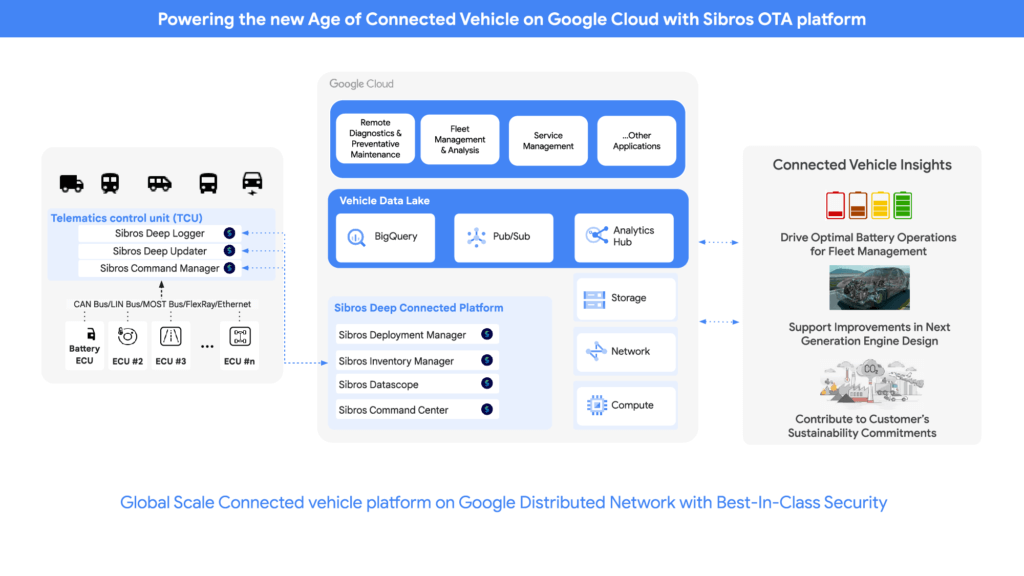
OEMs can pull data through APIs provided by Sibros into Google Data Cloud (including BigQuery) to gain access to the rich information data sets provided by the DCP within their environment and blend this data with their first party data sets to provide value insights for their business. Some of the Connected Vehicle insights that DCP information enables are:
- Damage prevention, improved operation, or development of the next generation of engines with insights from complex analyses that could consider parameters like model, engine type, mileage, overall speed, temperature, air pressure, load, services, and more.
- The combination of electric vehicle battery usage data like charging cycles, engine performance, and battery age with contributing factors as the use of the air conditioning to determine if such factors contribute to hazardous battery conditions and for improved battery development.
- Cross-organization collaboration in R&D by the provision of information on all these metrics and more from real-world driving, like engine knock data and even tire pressure.
- Google Cloud’s unified data cloud offering provides a complete platform for building data-driven applications like those from Sibros — from simplified data ingestion, processing, and storage to powerful analytics, AI, ML, and data sharing capabilities — integrated with Google Cloud. With a diverse partner ecosystem and support for multi-cloud, open-source tools and APIs, Google Cloud provides Sibros the portability and the extensibility they need to avoid data lock-in.
“Software has an ever increasing importance in the automotive world, even more so with electric vehicles and new mobility services. Google Cloud is partnering with Sibros to bring their award winning Deep Connected Platform to deliver high frequency, low latency over-the-air software updates, data logging & diagnostics capabilities to our automotive customers, leveraging the security and scale of Google Cloud. This is revolutionizing everything from development cycles to business models and customer relationships.” — Matthias Breunig, Director, Global Automotive Solutions, Google Cloud
Through Built with BigQuery, Google Cloud is helping tech companies like Sibros build innovative applications on Google’s Data Cloud with simplified access to technology, helpful and dedicated engineering support, and joint go-to-market programs.
“Sibros is looking forward to partnering with Google Cloud, which will enable vehicle manufacturers and suppliers to reach the next level in their use of data. Sibros solutions for Deep Data Logging and Updating on the Google Data Cloud, combined with Google BigQuery, will help them to mitigate risks, reduce costs, add innovative products, and introduce value-added use cases.” — Xiaojian Huang, Chief Digital Officer, Software, Sibros
Sibros and Google Cloud are driving Connected Mobility transformation to help our customers accelerate R&D innovation, power efficient operations, and unlock software-defined vehicle use cases with a full stack connected vehicle platform. Click here to learn more about Sibros on Google Cloud.
Why More DB Admins Love Google Cloud Spanner, Its Best Uses Cases—and What it Costs

3760
Of your peers have already read this article.
2:45 Minutes
The most insightful time you'll spend today!
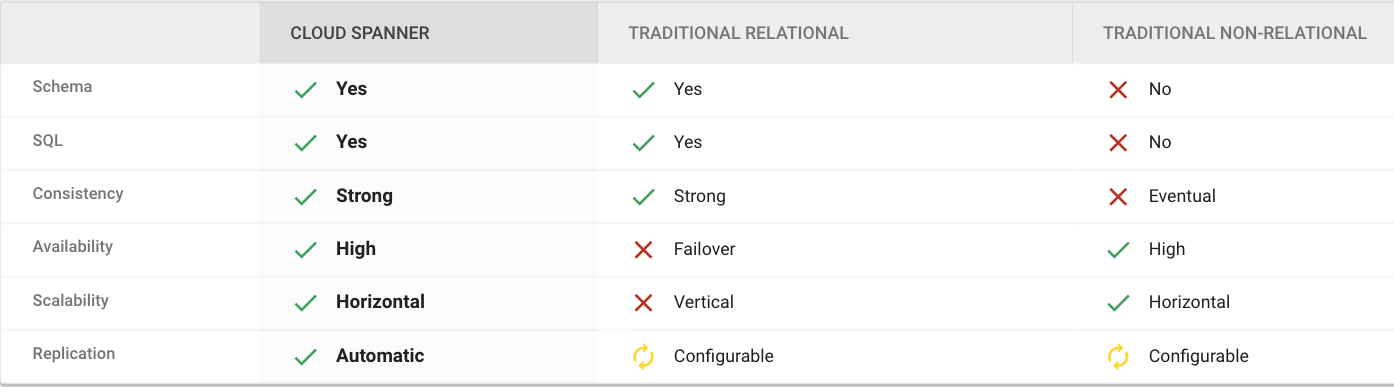
Cloud Spanner is the first scalable, enterprise-grade, globally-distributed, and strongly consistent database service built for the cloud specifically to combine the benefits of relational database structure with non-relational horizontal scale.
This combination delivers high-performance transactions and strong consistency across rows, regions, and continents with an industry-leading 99.999% availability SLA, no planned downtime, and enterprise-grade security.
Cloud Spanner revolutionizes database administration and management and makes application development more efficient.
Find out How Streak built a graph database on Cloud Spanner to wrangle billions of emails
What Are Cloud Spanner’s Strengths?
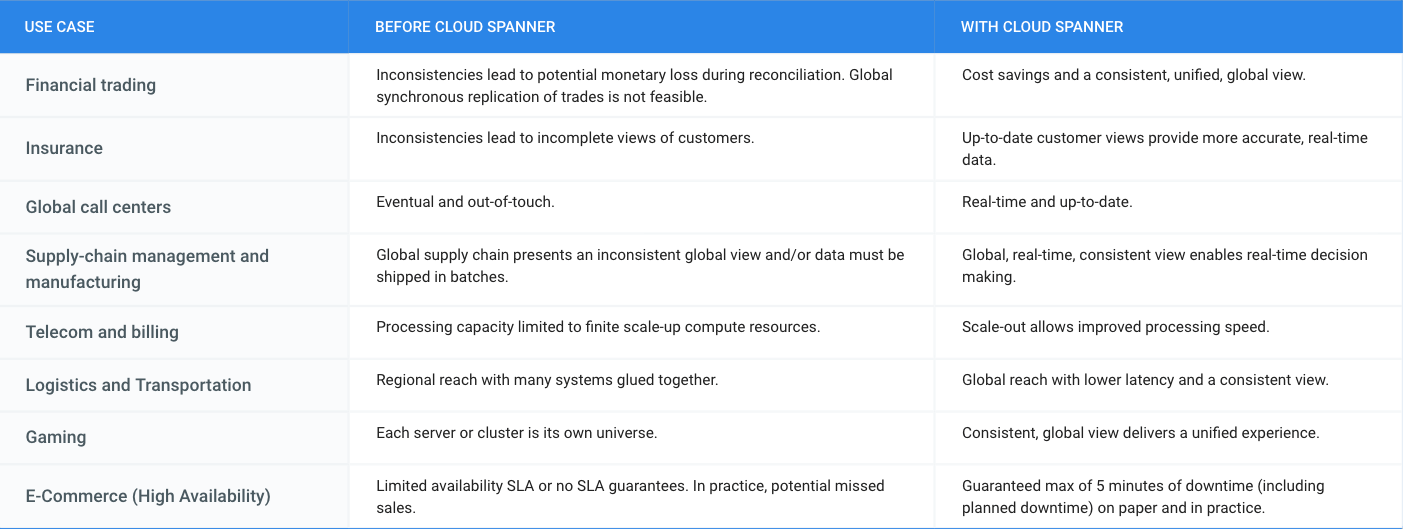
What is Cloud Spanner Useful For?
What Does it Cost?
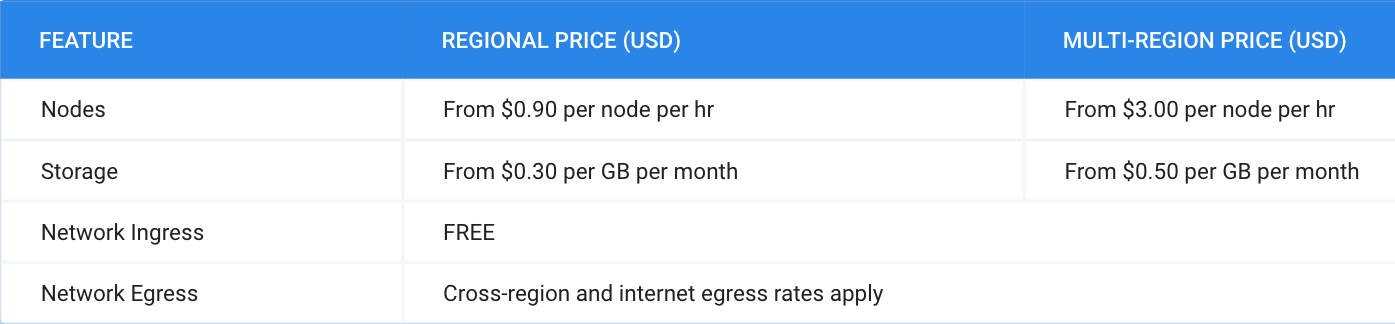
Pricing for Cloud Spanner is simple and predictable. You are only charged for the number of nodes in your instance, the amount of storage that your tables and secondary indexes use (not pre-provisioned), and the amount of network bandwidth used. Note that there is no additional charge for replication. For more detailed pricing information, please view the pricing guide.
Optimizing Bigtable Performance: Unveiling 20-50% Increase in Single-Row Read Throughput

1263
Of your peers have already read this article.
3:30 Minutes
The most insightful time you'll spend today!
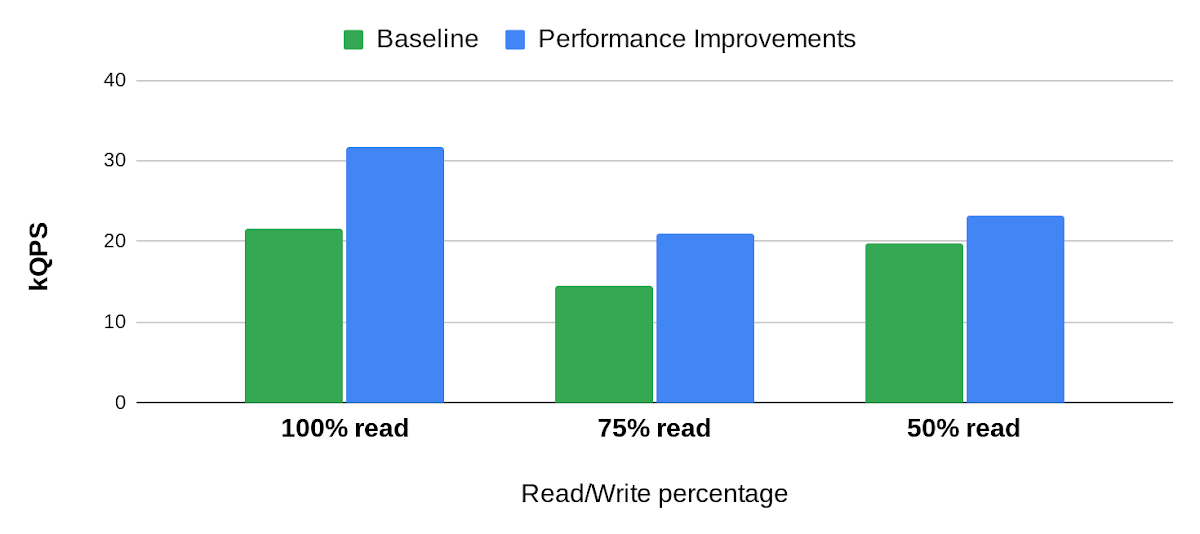
Bigtable is a scalable, distributed, high-performance NoSQL database that processes more than 6 billion requests per second at peak and has more than 10 Exabytes of data under management. Operating at this scale, Bigtable is highly optimized for high-throughput and low-latency reads and writes. Even so, our performance engineering team continually explores new areas to optimize. In this article, we share details of recent projects that helped us push Bigtable’s performance envelope forward, improving single-row read throughput by 20-50% while maintaining the same low latency.
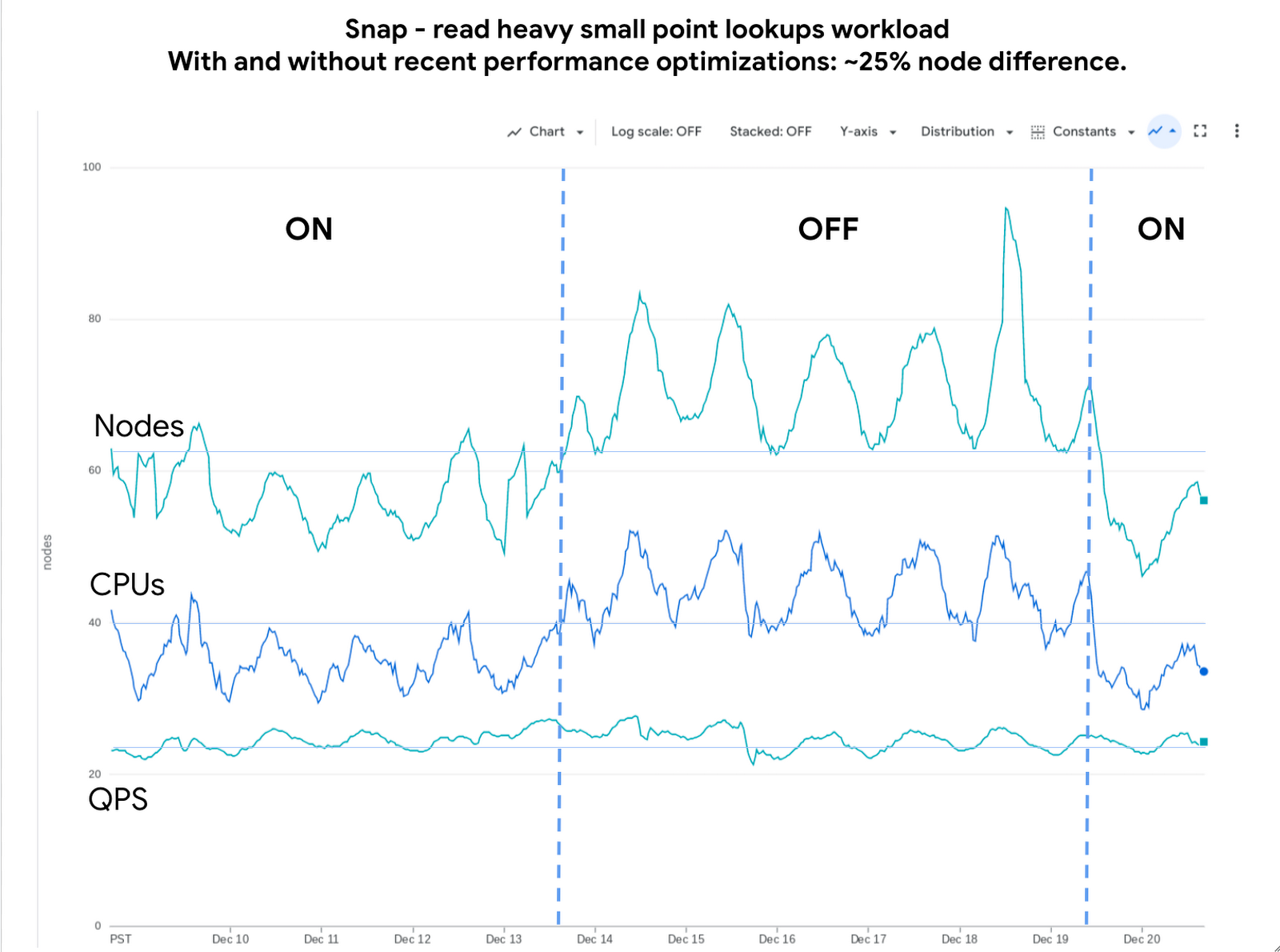
Below is an example of the impact we delivered to one of our customers, Snap. The compute cost for this small-point read-heavy workload reduced by 25% while maintaining the previous level of performance.
Performance research
We use a suite of benchmarks to continuously evaluate Bigtable’s performance. These represent a broad spectrum of workloads, access patterns and data volumes that we see across the fleet. Benchmark results give us a high-level view of performance opportunities, which we then enhance using sampling profilers and pprof for analysis. This analysis plus several iterations of prototyping confirmed feasibility of improvements in the following areas: Bloom filters, prefetching, and a new post-link-time optimization framework, Propeller.
Bloom filters
Bigtable stores its data in a log-structured merge tree. Data is organized into row ranges and each row range is represented by a set of SSTables. Each SSTable is a file that contains sorted key-value pairs. During a point-read operation, Bigtable searches across the set of SSTables to find data blocks that contain values relevant to the row-key. This is where the Bloom filter comes into play. A Bloom filter is a space-efficient probabilistic data structure that can tell whether an item is in a set, it has a small number of false positives (item may be in the set), but no false negatives (item is definitely not in the set). In Bigtable’s case, Bloom filters reduce the search area to a subset of SSTables that may contain data for a given row-key, reducing costly disk access.
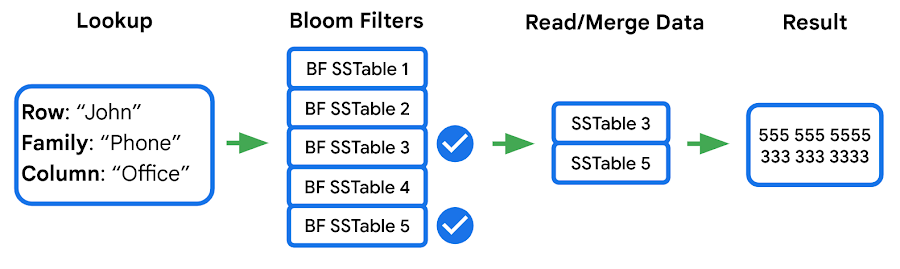
We identified two major opportunities with the existing implementation: improving utilization and reducing CPU overhead.
First, our statistics indicated that we were using Bloom filters in a lower than expected percentage of requests. This was due to our Bloom filter implementation expecting both the “column family” and the “column” in the read filter, while a high percentage of customers filter by “column family” only — which means the Bloom filter can’t be used. We increased utilization by implementing a hybrid Bloom filter that was applicable in both cases, resulting in a 4x increase in utilization. While this change made the Bloom filters larger, the overall disk footprint increased by only a fraction of a percent, as Bloom filters are typically two orders of magnitude smaller than the data they represent.
Second, the CPU cost of accessing the Bloom filters was high, so we made enhancements to Bloom filters that optimize runtime performance:
- Local cache for individual reads: When queries select multiple column families and columns in a single row, it is common that the query will use the same Bloom filter. We take advantage of this by storing a local cache of the Bloom filters used for the query being executed.
- Bloom filter index cache: Since Bloom filters are stored as data, accessing them for the first time involves fetching three blocks — two index blocks and a data block — then performing a binary search on all three. To avoid this overhead we built a custom in-memory index for just the Bloom filters. This cache tracks which Bloom filters we have in our block cache and provides direct access to them.
Overall these changes decreased the CPU cost of accessing Bloom filters by 60-70%.
Prefetching
In the previous section we noted that data for a single row may be stored in multiple SSTables. Row data from these SSTables is merged into a final result set, and because blocks can either be in memory or on disk, there’s a risk of introducing additional latency from filesystem access. Bigtable’s prefetcher was designed to read ahead of the merge logic and pull in data from disk for all SSTables in parallel.
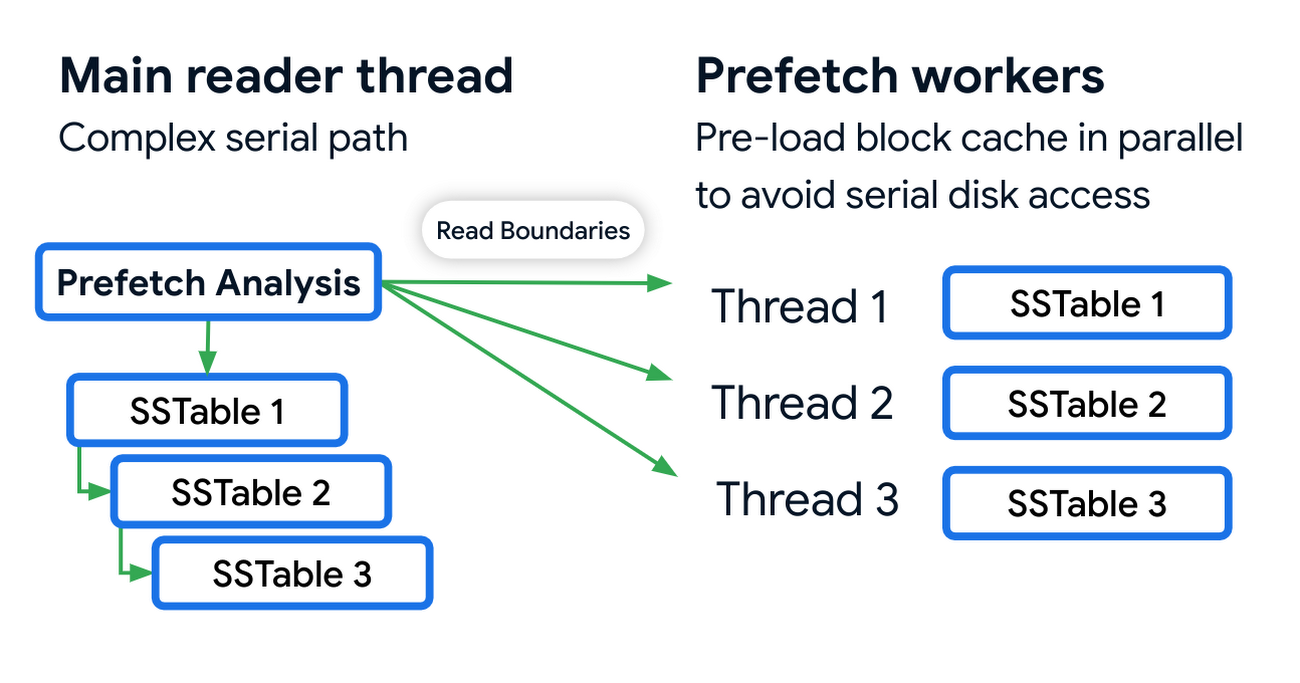
Prefetching has an associated CPU cost due to the additional threading and synchronization overhead. We reduced these costs by optimizing the prefetch threads through improved coordination with the block cache. Overall this reduced the prefetching CPU costs by almost 50%.
Post-link-time optimization
Bigtable uses profile guided optimizations (PGO) and link-time optimizations (ThinLTO). Propeller is a new post-link optimization framework released by Google that improves CPU utilization by 2-6% on top of existing optimizations.
Propeller requires additional build stages to optimize the binary. We start by building a fully optimized and annotated binary that holds additional profile mapping metadata. Then, using this annotated binary, we collected hardware profiles by running a set of training workloads that exercise critical code paths. Finally, using these profiles as input, Propeller builds a new binary with an optimized and improved code layout. Here is an example of the improved code locality.
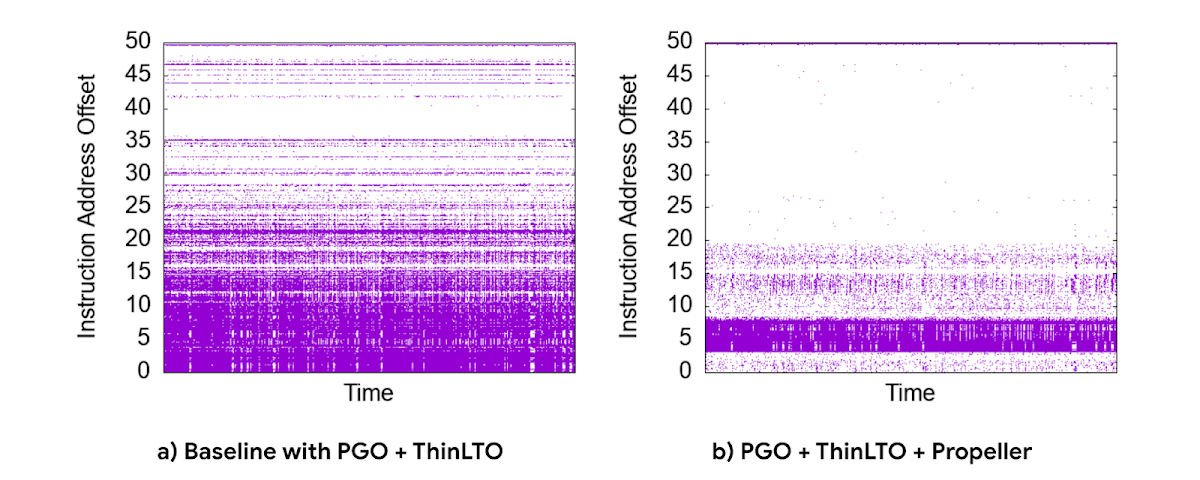
The new build process used our existing performance benchmark suite as a training workload for profile collection. The Propeller optimized binary showed promising results in our tests, showing up to 10% improvement in QPS over baseline.
However, when we released this binary to our pilot production clusters, the results were mixed. It turned out that there was overfitting for the benchmarks. We investigated sources of regression by quantifying profile overlap, inspecting hardware performance counter metrics and applied statistical analysis for noisy scenarios. To reduce overfitting, we extended our training workloads to cover a larger and more representative set of use cases.
The result was a significant improvement in CPU efficiency — reducing fleetwide utilization by 3% with an even more pronounced reduction in read-heavy workloads, where we saw up to a 10% reduction in CPU usage.
Conclusion
Overall, single-row read throughput increased by 20-50% whilst maintaining the same latency profile. We are excited about these performance gains, and continue to work on improving the performance of Bigtable. Click here to learn more about Bigtable performance and tips for testing and troubleshooting any performance issues you may encounter.
The Power of Personalization: Ocado Retail’s Strategy to Boost Revenue and Lower Churn

1705
Of your peers have already read this article.
3:30 Minutes
The most insightful time you'll spend today!
Retailers are becoming more skilled at making individual customers feel heard and valued. This is a necessity given the fact that 66% of respondents to a McKinsey survey stated that they expect email marketing messages to be tailored to their needs. While marketing personalization expertise is growing, it’s still difficult to manage, especially at scale.
Ocado Retail, one of the world’s largest dedicated online grocery retailers, delivering to over 645,000 customers in the U.K., has made personalization integral to its success.
Let’s look at how Ocado retail worked with Google Cloud and partner Cognizant to develop a new data platform to power its personalization efforts from the ground up.
Unifying data for more holistic, powerful personalization
To achieve its goals of personalization at scale, Ocado Retail needed a central data warehouse that could turn all forms of merchandising, advertising, business, and customer intelligence data into actionable insights. It wanted a means to accelerate customer segment identification, as well as the ideation and launch of relevant campaigns.
“We standardized on Google Cloud, including BigQuery, as the foundation for our data platform because we knew it was the right solution for now and the future,” says Kieren Johnson, Head of IT at Ocado Retail. “We have an incredibly lean team and we needed a partner with exceptional expertise to help build an ambitious enterprise data warehouse to provide powerful insights. Cognizant was also the clear choice to help us get there.”
Cognizant worked closely with Ocado Retail to make sure its expertise in Google Cloud and other technologies aligned with Ocado Retail’s vision to drive more advanced personalization at higher scales using machine learning. The partner helped build the foundation on BigQuery, and then incorporated other Google Cloud tools such as Cloud Run, Vertex AI, and Vertex AI Natural Language to provide no-ops, all-code warehousing, and analytics capabilities.
Cognizant also took advantage of the Google Cloud Partner Success Services (PSS) program to ensure best practices were being followed throughout the project. PSS provided advisory services that guided Cognizant through the highly complex process of building the new data warehouse for Ocado Retail on Google Cloud.
Building the enterprise data platform in this way allows Ocado Retail to leverage the full power of cloud-based analytics while maintaining a lean team. It also allows the company to greatly scale up its personalization efforts.
Making customers feel valued at every touch
The work Ocado Retail has done with Google Cloud and Cognizant has positioned it to make its growing customer base feel valued, understood, and supported in every interaction. Before launching the project with Cognizant and Google Cloud, Ocado Retail was only able to run a couple of campaigns per week and knew it lacked optimal insight into each campaign’s efficacy.
“We now run 10 times the number of campaigns we used to with the help of the data platform Cognizant built on Google Cloud,” says Kieren. “We run multiple campaigns every day for different customer segments, and all of that increased activity is entirely driven by data insights. The positive impacts on our marketing and customer service performance have been clear. We’re now working to expand what we do.”
Ocado Retail has enjoyed solid growth since the new data platform went live, including a 13% rise in active customers during fiscal year 2022, and has also seen a reduction in churn. It attributed these improvements to being better able to tailor products and communications to specific customer preferences.
Throughout the project, Cognizant supported data clean up while maximizing the scalable, flexible, and future-proofed data analytics infrastructure offered by Google Cloud.
Increasing data-driven actions
Ocado Retail plans to provide more data-driven insights to its commercial suppliers through a product called Beet Insights. So far, Beet Insights offers suppliers with intelligence about how their products are performing on the shelves. The result has been improving the role data plays throughout the supply chain, from production to purchase and beyond.
“By putting real-time insights about costs, marketing spend, and supply-funded activities into the hands of our commercial team and buyers, we are better positioned to improve our profits,” says Kieren. “At the same time, building data analytics into every part of our business will allow us to build on our personalization efforts.”
From the project’s inception, Ocado Retail ensured that the platform would be scalable and dynamic. Now, it is working to feed more data sources and streams into the warehouse to accelerate time to insights. Ocado Retail believes this next step in the evolution of the platform will unlock even more opportunities to initiate high-impact programs that transform personalization and every customer interaction.
Learn more about what Google Cloud and partners like Cognizant can do for your customer intelligence and personalization.
More Relevant Stories for Your Company

Gartner Magic Quadrant: Google Cloud a Leader in Operational DB Management Systems
We’re pleased to announce that Gartner has named Google Cloud a Leader in its 2019 Magic Quadrant report for Operational Database Management Systems (OPDBMS). This news reflects what we hear from our customers: that Google Cloud databases are flexible, open, and easy to use. These include our fully compatible managed services for

Takeaways from Forrester’s Cloud Data Warehouse Q1 2021 Report
Cloud data warehouse (CDW) solutions have transformed the delivery of modern analytics and are known to have the capabilities to provision data warehouse of any size in a matter of minutes, autotune queries, scale resources including compute and storage on demand and auto-upgrade to the latest version. As the need

A Breakdown of Cloud-based Data Ingestion Practices
Businesses around the globe are realizing the benefits of replacing legacy data silos with cloud-based enterprise data warehouses, including easier collaboration across business units and access to insights within their data that were previously unseen. However, bringing data from numerous disparate data sources into a single data warehouse requires you

DR for Cloud: Architecting Microsoft SQL Server with Google Cloud
Database disaster recovery (DR) planning is an important component of a bigger DR plan, and for enterprises using Microsoft SQL Server on Compute Engine, it often involves critical data. When you’re architecting a disaster recovery solution with Microsoft SQL Server running on Google Cloud Platform (GCP), you have some decisions to make
