





Google Cloud and Climate Engine Collaborate to Support Climate Action in Public Sector

4814
Of your peers have already read this article.
1:30 Minutes
The most insightful time you'll spend today!
While there is uncertainty about how much the climate will change in the future, we know it won’t look like the past. Extreme weather events will increase in frequency and severity; the world will continue to warm, and the cost of climate change will increase.
Government plays a vital role in understanding and responding to these changes quickly. Achieving this improved response time will require data insights to ensure informed decision-making—from local to global scales. The challenge is not only urgent; it’s one of the world’s biggest “big data” problems.
Fortunately, new technologies to help us monitor the Earth are proliferating. Thousands of satellites take millions of images of the planet every day. Sensors generate data about temperature, precipitation, wind, soil conditions, and more—as frequently as every second. We have more information about the planet’s systems than at any other time in history. And the data will only continue to grow. The problem is not the lack of data–it is harnessing this data to drive insights for decision makers to tackle climate change. That’s why Google Cloud has partnered with Climate Engine.
How Climate Engine and Google Cloud enable greater climate resilience
Climate Engine is a scientist-led company that works with Google to accelerate and scale the use of Google Earth Engine’s world-class geospatial capacities (in addition to those of Google Cloud Storage and BigQuery, among other tools) in support of climate action in the public sector. Powered by Google Cloud’s infrastructure, Google Earth Engine (GEE) combines a multi-petabyte catalog of satellite imagery and geospatial datasets with planetary-scale analysis capabilities, enabling scientists, researchers, and developers to detect changes, map trends, and quantify differences on the Earth’s surface.
With cloud-based technologies, we can leverage massive computing at a scale that generates actionable insights from Earth-based data. These insights help us better manage resources, understand risks, predict changes, and respond to disasters as we meet the challenge of climate change. Geospatial AI combines the power of artificial intelligence (AI) and machine learning (ML) with geospatial analysis. Google Cloud’s Geospatial AI solutions provide departments and agencies with a centralized system to collect, process, and deliver Earth-based data into decision-making contexts.
Climate Engine and Google Cloud provide specialists with the opportunity to go back in time and see how our landscapes have changed due to changes in climate and other human activities over the past few decades. Years of data can now be quantitatively analyzed and visualized in a matter of a few seconds, enabling government agencies to fulfill their mandates by drawing invaluable insights into how landscapes are changing, what physical and natural assets are at risk, and where the opportunities are for reducing emissions and increasing carbon sequestration.
“This is game changing for natural resource managers and scientists at public institutions at all levels of government,” says Dr. Daniel McEvoy, regional climatologist, at the Desert Research Institute & Western Regional Climate Center, Nevada System of Higher Education.https://www.youtube.com/embed/aPGsi8bd_Zk?enablejsapi=1&
Use cases for geospatial climate information systems
The use cases for this technology are as varied as the climate challenges themselves. These include monitoring, predicting, and analyzing the risks of extreme weather events like floods, wildfire, drought, extreme heat, wind, and other climate hazards. Use cases also include tracking changes in ecosystems, disease vectors, water availability and quality, soil health, growing seasons, air pollution, and more. These use cases are some of the ways that Google Cloud and Climate Engine can help the public sector deliver on government mandates. These provide insights that are helpful for a wide range of departments, and that can be applied in spatial and temporal scales that are meaningful for governments to take action.
“Our planet is changing at a rate that we have never experienced,” says Forrest Melton of the NASA Western Water Applications Office. To respond to these changes, we must understand what is happening across a wide range of environmental variables and at geospatial scales that range from local to global. We now have access to more data about the planet than ever before. The big challenge is converting data into actionable insights and then rapidly integrating these insights into decision-making systems. Climate Engine and Google Cloud help resolve this problem through innovative analytical tools and effective use of cloud computing.”
Climate change carries an existential risk to our current and future stability and security. Together, we are working to provide transformational technologies that help meet that risk and build a safer, more resilient future for all of us.
Learn more about Google Cloud’s environmental initiatives here and here.
Google Unveils New Cloud Region in Delhi NCR to Power India’s Digitization

8293
Of your peers have already read this article.
2:00 Minutes
The most insightful time you'll spend today!
In the past year, Google has worked to surface timely and reliable health information, amplify public health campaigns, and help nonprofits get urgent support to Indians in need. Now, we are continuing to focus on helping India’s businesses accelerate their digital transformation, deepening our commitment to India’s digitization and economic recovery. To support customers and the public sector in India and across Asia Pacific, we’re excited to announce that our new Google Cloud region in Delhi National Capital Region (NCR) is now open.
Designed to help both Indian and global companies alike build highly available applications for their customers, the Delhi NCR region is our second Google Cloud region in India and 10th to open in Asia Pacific.
What customers and partners are saying
Navigating this past year has been a challenge for companies as they grapple with changing customers demands and economic uncertainty. Technology has played a critical role, and we’ve been fortunate to partner with and serve people, companies, and government institutions around the world to help them adapt. The Google Cloud region in Delhi NCR will help our customers adapt to new requirements, new opportunities and new ways of working, like we’ve helped so many companies do in the region:
- InMobi scaled a personalized AI platform to support 120+ million active users. “With the arrival of the Google Cloud Delhi NCR, InMobi Group sees the opportunity to continue closing the gap between our users and products,” says Mohit Saxena, Co-founder and Group CTO of Inmobi. “Glance, especially, has been serving AI-powered personalised content to over 120 million active users. We can’t wait to continue giving them truly meaningful experiences that are speedy, scale well, and are relevant to them, by expanding the use of our current tools working on Google Cloud with the opening of a new region.”
- Groww now supports a sizable user base. “Google Cloud provides great technology that enables us to build and scale infrastructure to millions of users, and the new Google Cloud region in Delhi NCR will continue to help more businesses and startups in India access powerful cloud-based infrastructure, products and services,” says Neeraj Singh, Co-founder and Chief Technology Officer, Groww.
- HDFC Bank is positioned for the future. “At HDFC Bank, we are harnessing technology platforms to both run and build the bank. As we progress to be future ready, the objective is to invest in future technologies that give us scale, efficiency and resiliency. Towards this the Google Cloud region in Delhi NCR will enable us to enhance our resiliency and help us in building an active-active design framework for our new generation applications on cloud,” says Ramesh Lakshminarayanan, CIO, HDFC Bank.
- Dr. Reddy’s Lab built a modern data platform with Google Cloud. “At Dr Reddy’s, we pride ourselves in helping patients regain good health, acting quickly to provide innovative solutions to address patients’ unmet needs and in accelerating access to medicines to people worldwide. Our Google Cloud-powered data platform is helping us realize these objectives and we welcome Google’s investment in the new Delhi NCR region as helping us and other businesses in India make further contributions to our social and economic future,” says Mukesh Rathi, Senior Vice President & CIO, Dr. Reddy’s Laboratories.
- “To survive the disruption caused by the pandemic and to succeed in the long term, organizations need to become digital natives, so they can be more agile, explore new business models and build new capabilities that boost resilience. A cloud-first strategy plays a key role in enabling businesses to do this,” said Piyush N. Singh, Lead – India market unit & lead – Growth and Strategic Client Relationships, Asia Pacific and Latin America, Accenture. “Harnessing the potential of cloud requires the right data infrastructure and this expansion by Google Cloud will undoubtedly help Indian enterprises in their digital transformation journeys.”
A global network of regions
Delhi NCR joins 25 existing Google Cloud regions connected via our high-performance network, helping customers better serve their users and customers throughout the globe. As the second region in India, customers benefit from improved business continuity planning with distributed, secure infrastructure needed to meet IT and business requirements for disaster recovery, while maintaining data sovereignty.
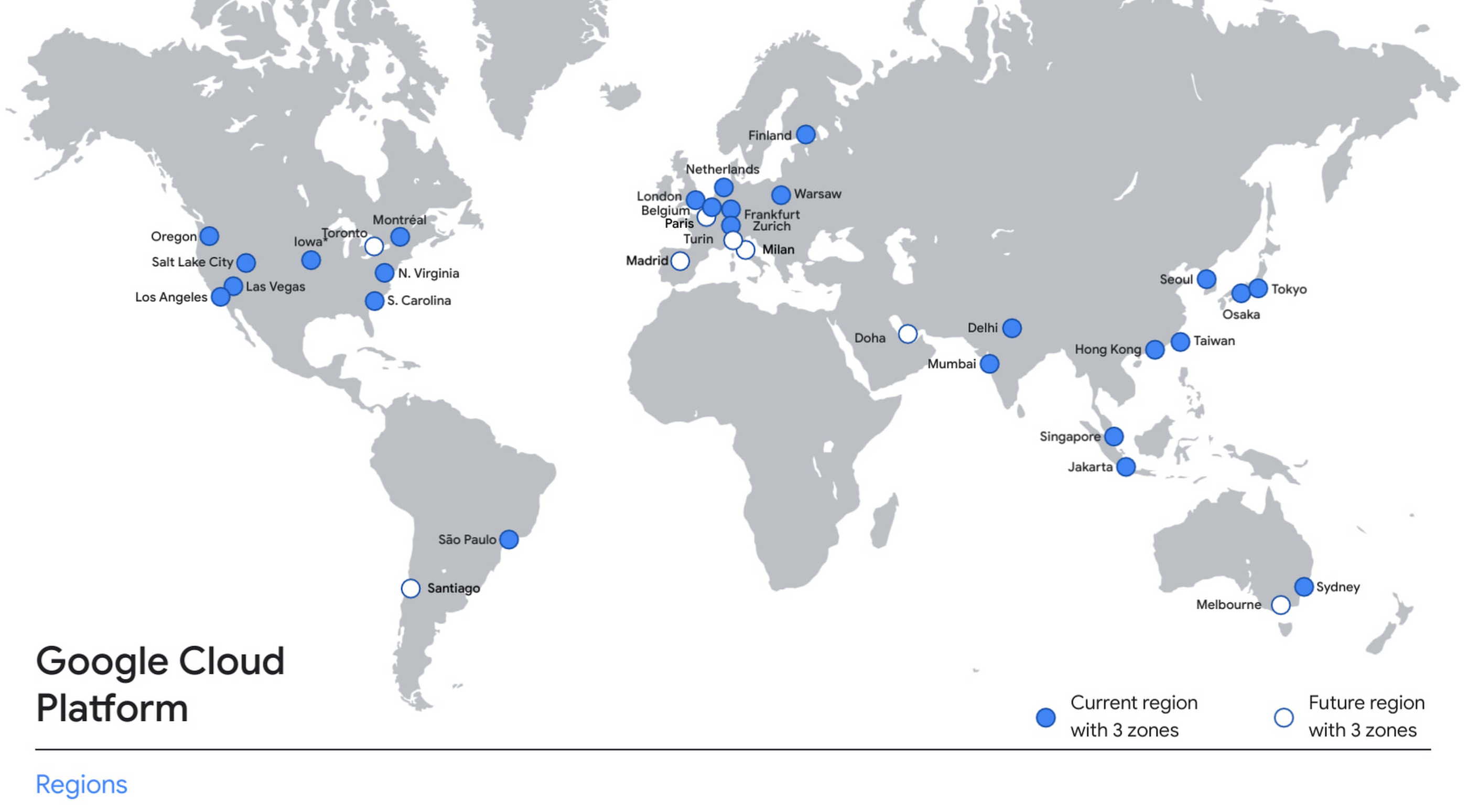
With this new region, Google Cloud customers operating in India also benefit from low latency and high performance of their cloud-based workloads and data. Designed for high availability, the region opens with three availability zones to protect against service disruptions, and offers a portfolio of key products, including Compute Engine, App Engine, Google Kubernetes Engine, Cloud Bigtable, Cloud Spanner, and BigQuery.
Supporting India’s recovery with training and education
Google and Google Cloud will also continue to support our customers with people and education programs. We’re investing in local talent and the local developer community to help enterprises digitally transform and support economic recovery.
Through the India Digitization Fund, we expanded our efforts to support India’s recovery from COVID-19—in particular, through programs to support education and small businesses. In addition to expanding internet access, and investments to help start-ups accelerate India’s digital transformation, we’ve grown our Grow with Google efforts. Businesses can access digital tools to maintain business continuity, find resources like quick help videos, and learn digital skills—in both English and in Hindi.
Helping customers build their transformation clouds
Google Cloud is here to support businesses, helping them get smarter with data, deploy faster, connect more easily with people and customers throughout the globe, and protect everything that matters to their businesses. The cloud region in Delhi NCR offers new technology and tools that can be a catalyst for this change. To learn more, visit the Google Cloud locations page, and be sure to watch the region launch event here.
MLOps Framework: Helping You Choose the Right Capabilities to Manage ML Projects
2888
Of your peers have already read this article.
3:00 Minutes
The most insightful time you'll spend today!
Establishing a mature MLOps practice to build and operationalize ML systems can take years to get right. We recently published our MLOps framework to help organizations come up to speed faster in this important domain.
As you start your MLOps journey, you might not need to implement all of these processes and capabilities. Some will have a higher priority than others, depending on the type of workload and business value that they create for you, balanced against the cost of building or buying processes or capabilities.
To help ML practitioners translate the framework into actionable steps, this blog post highlights some of the factors that influence where to begin, based on our experience in working with customers.
The following table shows the recommended capabilities (indicated by check marks) based on the characteristics of your use case, but remember that each use case is unique and might have exceptions. (For definitions of the capabilities, see the MLOps framework.)
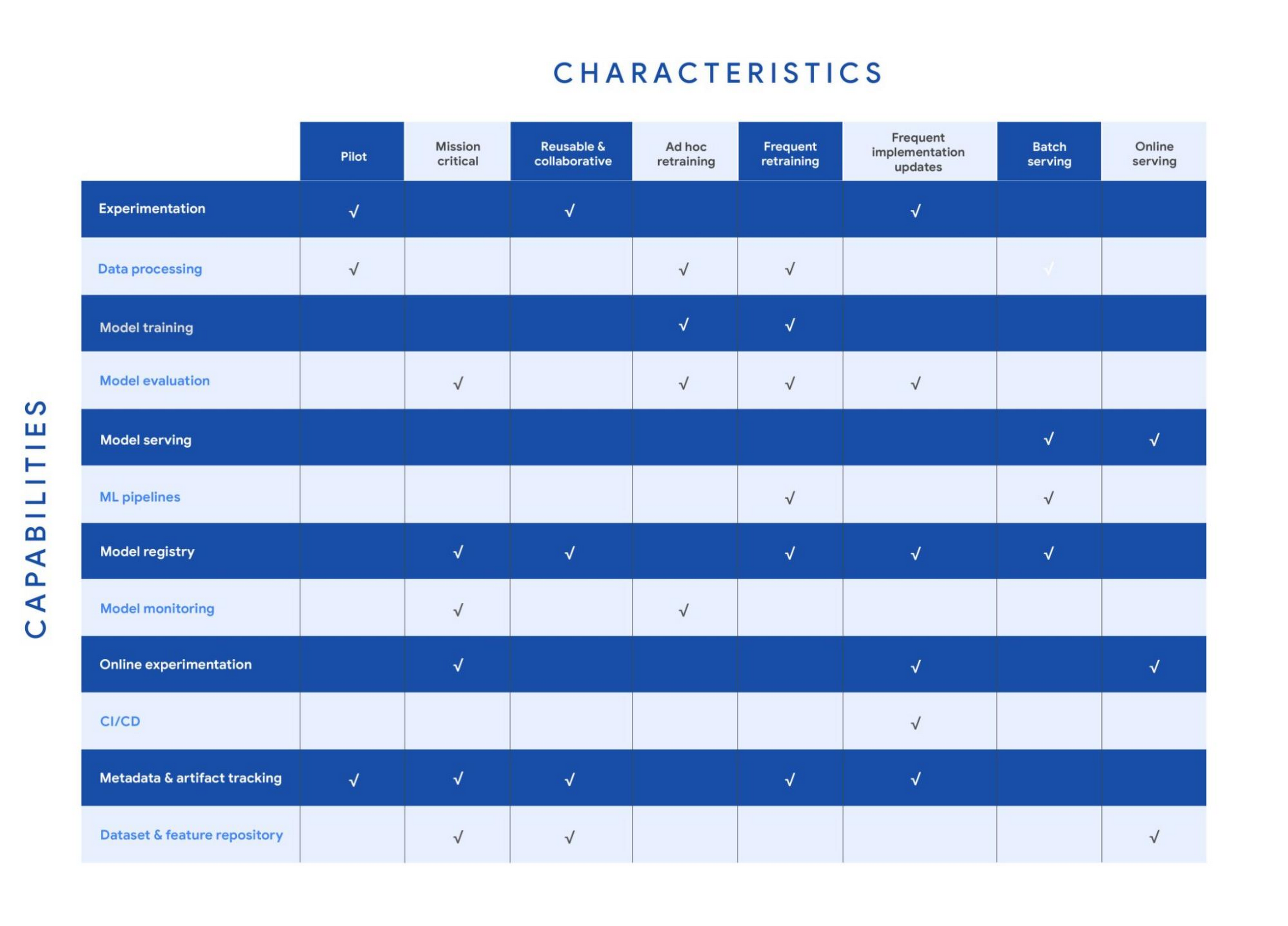
Your use case might have multiple characteristics. For example, consider a recommender system that’s retrained frequently and that serves batch predictions. In that case, you need the data processing, model training, model evaluation, ML pipelines, model registry, and metadata and artifact tracking capabilities for frequent retraining. You also need a model serving capability for batch serving.
In the following sections, we provide details about each of the characteristics and the capabilities that we recommend for them.
Pilot
Example: A research project for experimenting with a new natural language model for sentiment analysis.
For testing a proof of concept, your focus is typically on data preparation, feature engineering, model prototyping, and validation. You perform these tasks using the experimentation and data processing capabilities. Data scientists want to set up experiments quickly and easily and track and compare them. Therefore, you need the ML metadata and artifact tracking capability in order to debug, to provide traceability and lineage, to share and track experimentation configurations, and to manage ML artifacts. For large-scale pilots, you might also require dedicated model training and evaluation capabilities.
Mission-critical
Example: An equities trading model where model performance degradation in production can put millions of dollars at stake.
In a mission-critical use case, failure with the training process or production model has a significant negative impact on the business (a legal, ethical, reputational, or financial risk). The model evaluation capability is important to identify bias and fairness, as well as to provide explainability of the model. Additionally, monitoring is essential to assess the quality of the model during training and to assess how it performs in production. Online experimentation lets you test newly trained models against the one in production using a controlled environment before you replace the deployed model. Such use cases also need a robust model governance process to store, evaluate, check, release, and report on models and to protect against risks. You can enable model governance by using the model registry and metadata and artifact tracking capabilities. Additionally, datasets and feature repositories provide you with high-quality data assets that are consistent and versioned.
Reusable and collaborative
Example: Customer Analytic Record (CAR) features that are used across various propensity modeling use cases.
Reusable and collaborative assets allow your organization to share, discover, and reuse AI data, source code, and artifacts. A feature store helps you standardize the processes of registering, storing, and accessing features for training and serving ML models. Once features are curated and stored, they can be discovered and reused by multiple data science teams. Having a feature store helps you avoid reengineering features that already exist, and saves time on experimentation. You can also use tools to unify data annotation and categorization. Finally, by using ML metadata and artifacts tracking, you help provide consistency, testability, security and repeatability of the ML workflows.
Ad hoc retraining
Example: An object detection model to detect various car parts, which needs to be retrained only when new parts are introduced.
In ad hoc retraining, models are fairly static and you do not retrain them except when the model performance degrades. In these cases, you need data processing, model training, and model evaluation capabilities to train the models. Additionally, because your models are not updated for long periods, you need model monitoring. Model monitoring detects data skews, including schema anomalies, as well as data and concept drifts and shifts. Monitoring also lets you continuously evaluate your model performance, and it alerts you when performance decreases or when data issues are detected.
Frequent retraining
Example: A fraud detection model that’s trained daily in order to capture recent fraud patterns.
Use cases for frequent retraining are ones where model performance relies on changes in the training data. The retraining might be based on time intervals (for example, daily or weekly), or it could be triggered based on events like when new training data becomes available. For this scenario, you need ML pipelines to connect multiple steps like data extraction, preprocessing, and model training. You also need the model evaluation capability to ensure that the accuracy of the newly trained model meets your business requirements. As the number of models you train grows, both a model registry and metadata and artifact tracking help you keep track of the training jobs and model versions.
Frequent implementation updates
Example: A promotion model with frequent changes to the architecture to maximize conversion rate.
Frequent implementation updates involve changes to the training process itself. That might mean switching to a different ML framework, such as changing the model architecture (for example, LSTM to Attention) or adding a data transformation step in your training pipeline. Such changes in the foundation of your ML workflow require controls to ensure that the new code is functional and that the new model matches or outperforms the previous one. Additionally, the CI/CD process accelerates the time from ML experimentation to production, as well as reducing the possibility for human error. Because the changes are significant, online experimentation is necessary to ensure that the new release is performing as expected. You also need other capabilities such as experimentation, model evaluation, model registry, and metadata and artifact tracking to help you operationalize and track your implementation updates.
Batch serving
Example: A model that serves weekly recommendations to a user who has just signed up for a video-streaming service.
For batch predictions, there is no need to score in real time. You precompute the scores and you store them for later consumption, so latency is less of a concern than in online serving. However, because you process a large amount of data at a time, throughput is important. Often batch serving is a step in a larger ETL workflow that extracts, pre-processes, scores, and stores data. Therefore, you need the data processing capability and ML pipelines for orchestration. In addition, a model registry can provide your batch serving process with the latest validated model to use for scoring.
Online serving
Example: A RESTful microservice that uses a model to translate text between multiple languages.
Online inference requires tooling and systems in order to meet latency requirements. The system often needs to retrieve features, to perform inference, and then to return the results according to your serving configurations. A feature repository lets you retrieve features in near real time, and model serving allows you to easily deploy models as an endpoint. Additionally, online experiments help you test new models with a small sample of the serving traffic before you roll the model out to production (for example, by performing A/B testing).
Get started with MLOps using Vertex AI
We recently announced Vertex AI, our unified machine learning platform that helps you implement MLOps to efficiently build and manage ML projects throughout the development lifecycle. You can get started using the following resources:
- MLOps: Continuous delivery and automation pipelines in machine learning
- Getting started with Vertex AI
- Best practices for implementing machine learning on Google Cloud
Acknowledgements: I’d like to thank all the subject matter experts who contributed, including Alessio Bagnaresi, Alexander Del Toro, Alexander Shires, Erin Kiernan, Erwin Huizenga, Hamsa Buvaraghan, Jo Maitland, Ivan Nardini, Michael Menzel, Nate Keating, Nathan Faggian, Nitin Aggarwal, Olivia Burgess, Satish Iyer, Tuba Islam, and Turan Bulmus. A special thanks to the team that helped create this, Donna Schut, Khalid Salama, and Lara Suzuki, and Mike Pope for his ongoing support.
Make Meaningful Analysis with Geo Boundary Public Datasets on BigQuery

6327
Of your peers have already read this article.
4:00 Minutes
The most insightful time you'll spend today!
Geospatial data is a critical component for a comprehensive analytics strategy. Whether you are trying to visualize data using geospatial parameters or do deeper analysis or modeling on customer distribution or proximity, most organizations have some type of geospatial data they would like to use – whether it be customer zipcodes, store locations, or shipping addresses. However, converting geographic data into the correct format for analysis and aggregation at different levels can be difficult. In this post, we’ll walk through some examples of how you can leverage the Google Cloud platform alongside Google Cloud Public Datasets to perform robust analytics on geographic data. The full queries can be accessed from this notebook here.
Public US Geo Boundaries dataset
BigQuery hosts a slew of public datasets for you to access and integrate into your analytics. Google pays for the storage of these datasets and provides public access to the data via the bigquery-public-data project. You only pay for queries against the data. Plus, the first 1 TB per month is free! These public datasets are valuable on their own, but when joined against your own data they can unlock new analytics use cases and save the team a lot of time.
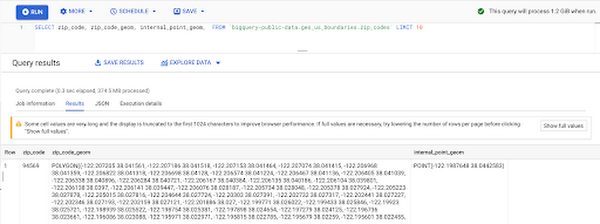
Within the Google Cloud Public Datasets Program there are several geographic datasets. Here, we’ll work with the geo_us_boundaries dataset, which contains a set of tables that have the boundaries of different geospatial areas as polygons and coordinates based on the center point (GEOGRAPHY column type in BigQuery), published by the US Census Bureau.
Mapping geospatial points to hierarchical areas
Many times you will find yourself in situations where you have a string representing an address. However, most tools require lat/long coordinates to actually plot points. Using the Google Maps Geocoding API we can convert an address into a lat/long and then store the results in the BigQuery table.
With a lat/long representation of our point, we can join our initial dataset back onto any of the tables here using the ST_WITHIN function. This allows us to check and see if a point is within the specified polygon.
ST_WITHIN(geography_1, geography_2)
This can be helpful for ensuring standard nomenclature; for example, metropolitan areas that might be named differently. The query below maps each customers’ address to a given metropolitan area name.
SELECTcust.id as customer_id,metro.name as metro_nameFROM `looker-private-demo.retail.customers` as cust,`bigquery-public-data.geo_us_boundaries.metropolitan_divisions` as metroWHERE ST_WITHIN(ST_GEOGPOINT(cust.longitude, cust.latitude),metro.metdiv_geom)
It can also be useful for converting to designated market area (DMA), which is often used in creating targeted digital marketing campaigns.
SELECTcust.id as customer_id,dma.dma_nameFROM `looker-private-demo.retail.customers` as cust,`bigquery-public-data.geo_us_boundaries.designated_market_area` as dmaWHERE ST_WITHIN(ST_GEOGPOINT(cust.longitude, cust.latitude),dma.dma_geom)
Or for filling in missing information; for example, some addresses may be missing zip code which results in incorrect calculations when aggregating up to the zipcode level. By joining onto the zip_codes table we can ensure all coordinates are mapped appropriately and aggregate up from there.
SELECTzip.zip_code,count(distinct cust.id) as unique_customersFROM `looker-private-demo.retail.customers` as cust,`bigquery-public-data.geo_us_boundaries.zip_codes` as zipWHERE ST_WITHIN(ST_GEOGPOINT(cust.longitude, cust.latitude),zip.zip_code_geom)GROUP BY 1
Note that the zip code table isn’t a comprehensive list of all US zip codes, they are zip code tabulation areas (ZCTAs). Details about the differences can be found here. Additionally, the zip code table gives us hierarchical information, which allows us to perform more meaningful analytics. One example is leveraging hierarchical drilling in Looker. I can aggregate my total sales up to the country level, and then drill down to state, city and zipcode to identify where sales are highest. You can also use the BigQuery GeoViz tool to visualize geospatial data!
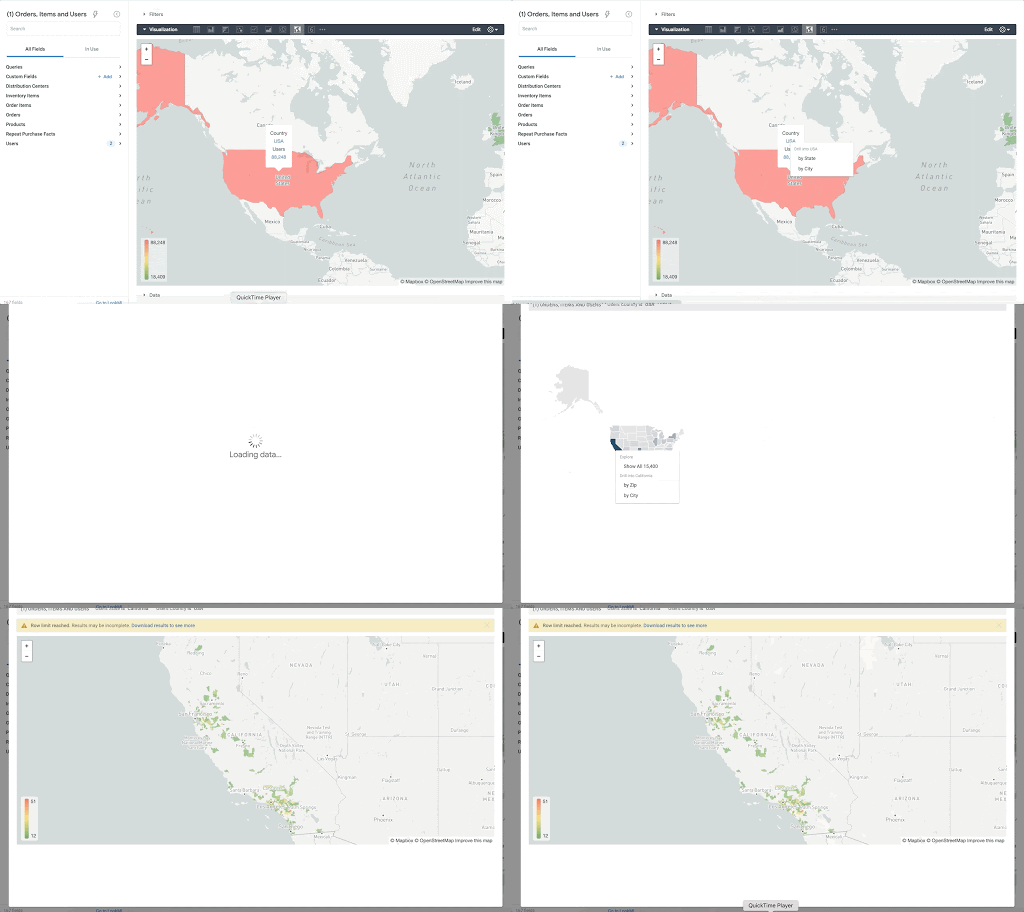
Aside from simply checking if a point is within an area, we can also use ST_DISTANCE to do something like find the closest city using the centerpoint for the metropolitan area table.
SELECTcust.id as customer_id,ARRAY_AGG(metro.name order by ST_DISTANCE(ST_GEOGPOINT(cust.longitude, cust.latitude),metro.internal_point_geom) asc limit 1)[offset(0)] as metro_nameFROM`looker-private-demo.retail.customers` as cust,`bigquery-public-data.geo_us_boundaries.metropolitan_divisions` as metroGROUP BY cust.id
This concept doesn’t just hold true for points, we can also leverage other GIS functions to see if a geospatial area is contained within areas that are listed in the boundaries datasets. If your data comes into BigQuery as a GeoJSON string, we can convert it to a GEOGRAPHY type using the ST_GEOGFROMGEOJSON function. Once our data is in a GEOGRAPHY type we can do things like check to see what urban area the geo is within – using either ST_WITHIN or ST_INTERSECTS to account for partial coverage. Here, I am using the customer’s zip code to find all metropolitan divisions where the zip code polygon and the metropolitan polygon intersect. I am then selecting the metropolitan area that has the most overlap (or the intersection has the largest area) to be the customer’s metro that we use for reporting.
SELECTcust.id as customer_id,ARRAY_AGG(metro.name order by ST_AREA(ST_INTERSECTION(zip.zip_code_geom,metro.metdiv_geom)) desc limit 1)[offset(0)] as metro_nameFROM`looker-private-demo.retail.customers` as custJOIN `bigquery-public-data.geo_us_boundaries.zip_codes` as zip on cust.zip=zip.zip_code,`bigquery-public-data.geo_us_boundaries.metropolitan_divisions` as metroWHERE ST_INTERSECTS(zip.zip_code_geom,metro.metdiv_geom)GROUP BY cust.id
The same ideas can be applied to the other tables in the dataset including the county, urban areas and National Weather Service forecast regions (which can also be useful if you want to join your datasets onto weather data).
Correcting for data discrepancy
One problem that we may run into when working with geospatial data is that different data sources may have different representations of the same information. For example, you might have one system that records state as a two letter abbreviation and another using the full name. Here, we can use the state table to join the different datasets.
SELECTst.state_name,sum(ab.sales+fn.sales) as total_salesFROM `bigquery-public-data.geo_us_boundaries.states` as stLEFT JOIN abbreviated_table as ab on ab.state = st.stateLEFT JOIN fullname_table as fn on fn.state = st.state_nameWHERE COALESCE(ab.state, fn.state) IS NOT NULLGROUP BY 1
Another example might be using the tables as a source of truth for fuzzy matching. If the address is a manually entered field somewhere in your application, there is a good chance that things will be misspelled. Different representations of the same name may prevent tables from joining with each other or lead to duplicate entries when performing aggregations. Here, I use a simple Soundex algorithm to generate a code for each county name, using helper functions from this blog post. We can see that even though some are misspelled they have the same Soundex code.
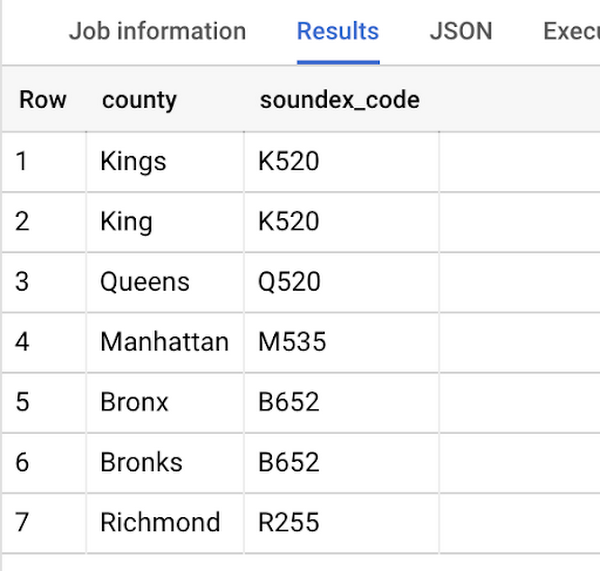
Next, we can join back onto our counties table so we make sure to use the correct spelling of the county name. Then, we can simply aggregate our data for more accurate reporting.
SELECTc.county_name,sum(sales) as total_salesFROMtableJOIN `bigquery-public-data.geo_us_boundaries.counties` as con testing.dq_fm_Soundex(table.county) = testing.dq_fm_Soundex(c.county_name)WHERE c.state_fips_code = cast(36 as string)GROUP BY 1
Note that fuzzy matching definitely isn’t perfect and you might need to try different methods or apply certain filters for it to work best depending on the specifics of your data.
The US Geo Boundary datasets allow you to perform meaningful geographic analysis without needing to worry about extracting, transforming or loading additional datasets into BigQuery. These datasets, along with all the other Google Cloud Public Datasets, will be available in the Analytics Hub. Please sign up for the Analytics Hub preview, which is scheduled to be available in the third quarter of 2021, by going to g.co/cloud/analytics-hub.
Next-Level Search: Discover the Game-Changing Capabilities of Enterprise Search on Gen App Builder

1181
Of your peers have already read this article.
4:30 Minutes
The most insightful time you'll spend today!
In our conversations with customers, few generative AI use cases have driven as much enthusiasm as generative search. Leaders at enterprises know the limits of traditional enterprise search, with queries producing a list of links based on pattern matching, and significant manual investigation required to find the more relevant answers. In generative AI, these leaders see an opportunity to leverage their data more effectively and deeply, including applying it to conversational apps that can answer complex questions, produce accurate summaries that synthesize many sources, and help people get the information they need, faster.
Enterprise Search on Generative AI App Builder (Gen App Builder) lets organizations create custom chatbots and semantic search applications in as little as a few minutes, with minimal coding needed to get started and enterprise-grade management and security built in. Customers can combine their internal data with the power of Google’s search technologies and generative foundation models, delivering relevant, personalized search experiences for enterprise applications or consumer-facing websites.
To date, most approaches to combining generative AI and search technology have been inadequate for the scale and reliability needed for enterprise use. For example, building search by breaking long documents into chunks and feeding each segment into an AI assistant typically isn’t scalable and doesn’t effectively provide insights across multiple sources. Likewise, many solutions are limited in the data types they can handle, prone to errors, and susceptible to data leakage. Bespoke, do-it-yourself approaches are generally no easier, with production-grade solutions often requiring complex tasks like integrating embeddings data with foundation models and significant use case data testing. Even when organizations make these efforts, the resulting solutions still tend to lack feature completeness and reliability, with significant investments of time and resources required to achieve high-quality results.
These challenges demonstrate that to effectively implement generative search, organizations typically need more than access to powerful foundation models. They also likely need the ability to ground model outputs in specific data, so that outputs are more relevant and less likely to include mistakes or “hallucinations.” They generally need safeguards that protect their data, how it is accessed, and how it is used. And they generally need the process to be high-performant and scalable out of the box, making the functionality easy to use even if the organization lacks data science and machine learning expertise.
Let’s look at how Enterprise Search on Gen App Builder helps customers bypass these scale and reliability challenges, so they can start leveraging generative search quickly.
The intersection of generative AI and enterprise data
Enterprise Search on Gen App Builder lets developers create search engines that help ground outputs in specific data sources for accuracy and relevance, can handle multimodal data such as images, and include controls over how answer summaries are generated. Multi-turn conversations are supported so that users can ask follow up questions as they peruse outputs, and customers have control over their data—including the ability to support HIPAA compliance for healthcare use cases. All of this is available as a fully managed service, so developers can focus on building rather than cloud complexity.
Gen App Builder’s out-of-box capabilities can remove the need for data chunking, generating embeddings, or managing indexes, hiding complexity behind a straightforward interface that lets developers build apps in minutes with little or no coding and no prior machine learning experience. With the ability to ingest large volumes of documents and support for both unstructured and structured data, apps built with Gen App Builder help customers solve the long-standing headache of finding relevant information across the organization, turning tasks that used to take hours into quick searches or conversational explorations with an app.
These capabilities are underpinned by both Google’s foundation models and a variety of Google Search technologies, including:
- Semantic search, which helps deliver more relevant results than traditional keyword-based search techniques by using natural language processing and machine learning techniques to infer relationships within the content and intent from the user’s query input.
- Google’s understanding of how users search for information.
- Google’s expertise in understanding relevance, which considers factors such as content popularity and user personalization of content when determining the order in which search results are displayed.
For more advanced use cases, Gen App Builder can be easily integrated with Vertex AI for in-depth foundation model tuning, enabling flexible input and output search formats.
As always with our AI products, Gen App Builder has been evaluated for alignment with our AI Principles, which is reflected by the product’s many safeguards against bias, toxic content, and unhelpful outputs. Whether for prototypes built in minutes or apps with many custom components, Enterprise Search on Gen App Builder offers a robust suite of user-friendly tools for customers across industries and levels of expertise.
How customers are innovating with Enterprise Search
After gaining access to Enterprise Search on Gen App Builder via our trusted tester program, a number of customers are already leveraging the product for novel use cases.
Priceline is harnessing Gen App Builder and Vertex AI for a range of projects, including internal search engines for employees and a new chatbot to assist customers as they make travel plans. Slated to be available across both desktop and mobile experiences, Priceline’s chatbot will help customers find the right information faster via always-on, personalized experiences, including answering nuanced questions like, “What are the best 4-star hotel options in midtown Manhattan within walking distance to Central Park?” and “Can you help me extend my hotel reservation for an additional night?”
“Priceline is charting a course to transform the novelty of generative AI into lasting value for our customers and our business. We believe it’s not just about having the latest technology; it’s also about practically targeting innovation to the right challenges and opportunities,” said Marty Brodbeck, Chief Technology Officer, Priceline. “With Google Cloud as our AI innovation partner, we’re doubling down on our commitment to delivering the fastest, most seamless and informative booking experience for our customers, from personalized planning and travel inspiration to customer service.”
Vodafone is experimenting with Enterprise Search and foundation models on Gen App Builder to build a tool that can rapidly and securely query documents, search, and understand specific commercial terms and conditions. Vodafone Voice and Roaming Services has over 10,000 contracts with other telecommunications companies worldwide, in a variety of formats such as PDFs, images, and complex tables. Searching this document repository is often a time consuming process for employees.
“Every day we introduce and manage new services like 5G to a roaming footprint comprising more than 700 operators in 210 countries to ensure both Vodafone and our partners’ business customers, holidaymakers, and Internet of Things devices stay connected when abroad. With Enterprise Search on Gen App Builder, we are building an intelligent assistant to securely and quickly search contracts.” said Sherif Bakir, CEO of Vodafone Voice and Roaming Services. “With generative AI, we’re accelerating otherwise protracted processes, increasing productivity and operational efficiency.”
Software startup Trender.ai, which creates customer monitoring and intelligence solutions for B2B relationships, is using Gen App Builder to build a product that can synthesize information from social media, public sources, and CRM data so that users can form more productive, personal relationships with prospects and customers.
“With Enterprise Search on Gen App Builder, we have been able to do things in the last month that we had projected to take 12-18 months on our prior roadmap,” said Betsy Bilhorn, co-founder at Trender.ai. “We had expected it would take at least 12 months to build and train models from an individual’s public social, web, and other data, and to then be able to ask questions like ‘What things are most important to this person?’ or ‘When and how is the best way to make an introduction to this prospect that they’ll respond to?’ Last year, we thought getting to this vision was a bit of a moonshot for a startup our size — but now we were able to achieve this in under a month.”
Stop searching for solutions — start discovering insights
We’re excited to see how customers use Enterprise Search on Gen App Builder to leverage data in powerful ways, discover new insights, and create useful, personal, and efficient experiences.
Today, we’re pleased to help our customers accomplish these goals, with the general availability of Enterprise Search on Gen App Builder for customers on the allowlist (i.e., approved for access). Please contact your Google Cloud sales team for access and pricing details. We are also launching two new features within Enterprise Search on Gen App Builder that are available today in our preview offering: multi-turn search, which supports asking follow-up questions, and content recommendations to find semantically relevant content. Access to the preview offering is available via Google Cloud’s trusted tester program. Read more about Enterprise Search on Gen App Builder and sign up for access on our webpage.
We’re also bringing generative AI features of Enterprise Search to our existing solutions like Contact Center AI and Document AI. As an example, starting this month, customers can preview generative AI-powered search in Document AI Warehouse. To keep up with our latest generative AI news, don’t miss The Prompt or our generative AI primer for executives on Transform with Google Cloud.
CCAI Platform goes GA: Deliver World-class CX and Accelerating Time-to-value with AI

2772
Of your peers have already read this article.
2:30 Minutes
The most insightful time you'll spend today!
Customers reach out to contact centers for help in moments of urgent need, but due to increasing demands, new channels, peak times, and operational pressures, contact centers often struggle to provide timely help. To bridge this gap, enterprises are increasingly investing in AI-driven solutions that balance addressing customer expectations with operational efficiency.
But building and generating value from such solutions can be complicated and challenging. Google Cloud built Contact Center AI (CCAI) to streamline and shorten this time to value, and CCAI Platform, our newest addition, takes a crucial step in this effort by introducing end-to-end call center capabilities. After debuting these new capabilities in March, we are excited to announce that CCAI Platform is now generally available across the US, Canada, UK, Germany, France, Italy and Spain—with more markets soon to come.
Delivering world-class customer experiences and accelerating time-to-value with CCAI
CCAI encompasses a comprehensive set of offerings to address the top pain points of the three main user groups in the contact center: contact center owners, their agents, and the customers they serve.
Dialogflow lets the contact center manager scale their operations while balancing cost and customer satisfaction, including reducing painful, long waiting times endured by end users. Using Dialogflow, contact center managers can build complex chat and voice virtual agents—a proven, cost-effective way to scale contact centers while continuing to provide great customer experiences. Available 24/7, without any waiting queue, these virtual agents can converse naturally with customers, identify their issues, and address them effectively.
Agent Assist reduces overall handling time and coaches human agents to become more effective and helpful. The service uses AI to “listen” to the voice and chat conversations between the human representative and the customer, then provides real-time guidance and recommendations to the agent, based on historical conversations, knowledge bases, and best practices of experienced agents. It also automates post-call actions such as transcription and call summarization, saving significant time and overhead at the end of every call.
CCAI Insights stores and analyzes all the customer conversations in the contact center, whether with human or virtual agents, to provide leaders with real-time, actionable data points on customer queries, agent performance, sentiment trends, and opportunities for automation.
At the heart of these technologies is our conversational AI brain. It uses Google Research’s technology to talk, understand, and interact, enabling and orchestrating high-quality conversational experiences at scale.
CCAI Platform: a modern CCaaS and the shortest path to CCAI value
While the value of the CCAI offerings is clear to our customers, we also hear from them that integrating these solutions with legacy infrastructure takes too long.
To minimize these integration difficulties, accelerate time-to-value using the CCAI offerings, and help businesses provide outstanding customer experiences, we’re pleased to announce the general availability of CCAI Platform, the Contact Center as a Service (CCaaS) solution from Google Cloud built in partnership with UJET.
CCAI Platform is a modern, turnkey Contact Center as a service solution, designed with user-first, AI-first, and mobile-first principles. It offers:
- Turnkey core Contact Center capabilities out-of-the-box, for faster time to production, lower implementation overhead, and custom development needed
- AI-powered experiences, from routing to better handling customer interactions
- Deep integration with CCAI’s offerings, to provide a unified end-to-end experience for contact center transformation
- Mobile-first design that enables interactions in line with the way people expect to communicate across channels
- CRM-centered design with automated updates, so agents can focus on the customer
- Deployment flexibility, with customer data residing in their CRM and the flexibility to bring their own telephony carrier to minimize cost
All of this is available without the typical need to integrate complex technologies from multiple providers.
“With Google Cloud and CCAI Platform, we will quickly move our contact center to the cloud, supporting both our customers and agents with industry-leading CX innovations, all while streamlining operations through more efficient customer care operations,” said Dean Kontul, Division CIO of KeyBank.
For customers looking to change platforms for a cloud-native CCaaS with deep Google AI integrations, CCAI Platform offers end-to-end capabilities that accelerate call center transformations. We also remain strongly committed to customer choice, and customers will continue to have the option to integrate our latest and greatest CCAI offerings through our existing OEM partners.
The Contact Center conversation is just beginning
This launch is part of a broader effort to deliver more value, faster, to more CCAI customers. As companies replace interactive voice response (IVR) with intelligent virtual agents (IVA) and begin to collect and analyze data, use cases are likely to grow more sophisticated—which is one reason Google Cloud is continuing to invest in technologies to make our CCAI offerings even more useful, as well as best practices like the following:
- CCAI Agent Assist and Insights are a great first step in AI transformation. They let contact center owners enable call transcription and use Topic Modeling to identify conversation themes that demand attention. Human agents can automatically generate high-quality conversation summaries to reduce call wrap-up time, and the associated costs, while improving business insights. We are working to make these features available both in CCAI Platform and with our partner ISVs.
- Chat and call steering are the first step for IVA automation. Another area of broad impact is conversational chat or call steering, in which friction is reduced by routing customers to the correct virtual or live agent experience. Many call centers rely on IVR systems in which customers have to use a keypad to select an option. Enterprise leaders tell us that attrition is very high throughout this process: some customers angrily hang up without resolution and, just as bad, many simply pound a single key in hopes of reaching a human agent, leading to the customer reaching the wrong person because their issue was never correctly identified or routed. Using Dialogflow’s natural language understanding (NLU) capabilities can sweep away such problems, with the customer more likely to not only reach the appropriate resources, but also share conversational data from which insights can be gleaned. It’s an approach that can pay dividends right away, and a quick first step to IVA automation.
In coming months, we will continue to work on these and other capabilities that are targeted to deliver higher and quicker value to our customers. We plan to release pre-built components to help companies tackle call center use cases in specific industries, for example. We’ll also continue to partner with companies that share our vision of transforming customer experiences with AI, such as TTEC, a provider of customer experience technology and software.
“TTEC Digital and Google Cloud have a shared vision for transforming global CX delivery through artificial intelligence, digital innovation, and operational excellence,” said Sam Thepvongs, VP of TTEC Digital. “With CCAI Platform, we can offer our largest enterprise customers a strategic blueprint for moving to the cloud while adopting a leading, AI-powered contact center platform. We couldn’t be more excited about this evolution of Google Cloud’s groundbreaking CCAI portfolio, and the opportunity to help our customers digitally transform their CX through this partnership.”
To get started with CCAI Platform, visit our solutions page or checkout our new omni channel demo video—and don’t forget to join us at Google Cloud Next ’22, where I’ll be sharing exciting new updates for CCAI in my session, “Delight customers in every interaction with Contact Center AI.”
More Relevant Stories for Your Company

redBus: Mastering Big Data with Google BigQuery
In 2006, online travel agency redBus introduced internet bus ticketing in India, unifying tens of thousands of bus schedules into a single booking operation. (Think of it as Expedia for bus booking.) Using BigQuery, redBus crunches terabytes of booking and inventory data in mere seconds and at a fraction of

Simplify Cloud Development with Duet AI on Google Cloud
Cloud developers — you’ve got it all. You can code in your choice of languages, enjoy portability with containers, minimize complexity with serverless, and manage the entire software lifecycle by following DevOps principles. But let’s face it, building and onboarding new cloud applications still requires a lot of manual planning,




Baking Gets Sweeter: Build ML Models that Help Predict the Best Recipe!
Baking recipes and ML models have one thing in common—they follow a pattern. Machine Learning is all about finding pattern in data sets, you can predict what you are baking based on the core ingredients and their respective amounts! Bread, cake or cookies, watch the video to make you make

Custom AI Solutions, Global Delivery Centers and More Resources Dedicated for Customer Success
At Google Cloud, our customers are at the forefront of digital transformation—launching entirely new businesses and products built in the cloud, redefining entire industries with data and artificial intelligence, delivering innovative new consumer experiences, or committing to sustainable new ways of doing business. We’re committed to our customers’ success, and
