





Prepare for the Unknown in Supply Chain with SAP IBP and Google Cloud

3416
Of your peers have already read this article.
3:00 Minutes
The most insightful time you'll spend today!
Responding to multiple, simultaneous disruptive forces has become a daily routine for most demand planners. To effectively forecast demand, they need to be able to predict the unpredictable while accounting for diverse and sometimes competing factors, including:
- Labor and materials shortages
- Global health crises
- Shifting cross-border restrictions
- Unprecedented weather impacts
- A deepening focus on sustainability
- Rising inflation
Innovators are looking to improve demand forecast accuracy by incorporating advanced capabilities for AI and data analytics, which also speed up demand planning. According to a McKinsey survey of dozens of supply chain executives, 90% expect to overhaul planning IT within the next five years, and 80% expect to or already use AI and machine learning in planning.
Google Cloud and SAP have partnered to help customers navigate these challenges and supply chain disruptions starting with the upstream demand planning process, focusing on improving forecast accuracy and speed through integrated, engineered solutions. The partnership is enabling demand planners who use SAP IBP for Supply Chain in conjunction with Google Cloud services to access a growing repository of third-party contextual data for their forecasting, as well use an AI-driven methodology that streamlines workflows and improves forecast accuracy. Let’s take a closer look at these capabilities.
Unify data from SAP software with unique Google data signals
When it comes to demand forecasting and planning, the more high-quality and relevant contextual data you use, the better, because it helps you understand the influencing factors of your product sales to sense trends and react to disruptions or capitalize on market opportunities more timely and accurately.
The expanded Google Cloud and SAP partnership helps customers who use SAP® Integrated Business Planning for Supply Chain (SAP IBP for Supply Chain) bring public and commercial data sets that Google Cloud offers into their own instances of SAP IBP and include them in their demand planning models in SAP IBP. So, in addition to sales history, promotions, stakeholder inputs and customer data that are typically in SAP IBP, a demand planner can incorporate their advertising performance, online search, consumer trends, community health data, and many more data signals from Google Cloud when working through demand scenarios.
More data enables more robust and accurate planning, so Google continues to build an ecosystem of data providers and grow the number of available data sets on Google Cloud. Some current providers include the U.S. Census Bureau, the National Oceanic and Atmospheric Administration, and Google Earth, and partnerships are underway with Crux, Climate Engine, Craft, and Dun & Bradstreet to help companies identify and mitigate risk and build resilient supply chains.
Augmenting demand planning with additional external causal factor data is a starting point to drive more accurate forecasting. For example, knowing what regional events may be happening, or the weather patterns that may impact sales of your products, allows you to react faster to these changes by making sure adequate supply is being provided. The result is a more accurate overall plan that reduces resource waste and out-of-stock events. Planners can respond with more accurate and granular daily predictions about sales, pricing, sourcing, production, inventory, logistics, marketing, advertising, and more based on the expanded data.
Get more accurate forecasts with Google AI inside
Extending the already expansive algorithm selection available in SAP IBP, the release of version 2205 allows SAP IBP customers to access Google Cloud’s supply chain forecasting engine, which is built on Vertex AI — Google Cloud’s AI-as-a-platform offering — from within SAP IBP as part of their forecasting process.
The benefit of using an AI-driven engine for demand forecasting is that it meaningfully improves forecast accuracy. Most demand forecasting today is done through a manually set, rules-based model versus an AI-driven model that is smarter and gets better at predicting demand as it works.
Take the fastest path from data to value with streamlined workflows
Vertex AI can include relevant contextual data sets for demand planning, and the results can be shown in SAP IBP for planners to incorporate when building their workflows.
In addition to more accurate forecasts, planners can work faster and more efficiently as they build potential scenarios, meaning they can do more simulations than they do now so that a wider range of disruptions can be modeled. Customers of SAP IBP don’t have to do any of the heavy lifting. They just have to share their data from SAP IBP with Google, then access the process workflow capabilities to set up automated workflows that use the combined data. Google makes the data available so that planners can use it as they’re setting up their workflows in Vertex AI.
Users of the Google Supply Chain twin and SAP IBP can combine the rich planning data from IBP with additional SAP data and other Google data sources to provide better supply chain visibility. The Google Supply Chain twin is a real-time digital representation of your supply chain based on sales history, open customer orders, past and future promotions, pricing and competitor insights, consumer history signals, external data signals and Google data.
Leverage Google data signals with SAP IBP for more accurate forecasts
It’s not difficult to access these new capabilities, and the benefits are more accurate near-term forecasts and more return on your investments in SAP IBP and Google Cloud. If you happen to be at the Gartner Supply Chain Symposium from June 6-8th in Orlando, Florida, stop by our booth to say hello. Or, get started now
Hike: Processing Analytics Queries 20X Faster with Google Cloud Platform

5568
Of your peers have already read this article.
2:30 Minutes
The most insightful time you'll spend today!
After a seamless migration to Google Cloud Platform with CloudCover and Google Cloud Professional Services, Hike has reduced its costs by 20% and processed analytics queries 20 times faster than with its previous cloud provider. The business is also using AI and machine learning to enhance the experience provided by a new sticker-based messaging app, Hike Sticker Chat.
India is a market of opportunity for businesses that provide messaging apps to consumers. With more than 1.3 billion people, the country is the second most populous in the world. However, global messaging app providers face a robust market challenge from Hike, a home-grown internet and technology startup. Launched in 2012, Hike provides innovative products such as Hike Messenger and more recently the AI- and machine-learning-enabled Hike Sticker Chat, a service that enables young people in the country to express themselves through digital stickers.
The business says it understands the people of India and communication like no one else, while its mission is to reduce individuals’ dependency on the keyboard. To do this, Hike is building one of the largest repositories of AI and machine-learning-enabled stickers for Hike Sticker Chat. This messaging platform is, according to Hike, the only product of its type that enables conversations through stickers covering more than 40 languages and local dialects.
Google Cloud Results
- Processes analytics queries 20X faster than previously
- Doubles compute throughput
- Uses Google Cloud Machine Learning Engine managed, distributed capabilities to train complex models on TensorFlow that provide delightful local sticker recommendations through Hike Sticker Chat
Founded by Kavin Bharti Mittal, the Delhi-based venture is backed by SoftBank, Tencent, Tiger Global, Foxconn, and Bharti. To date, Hike has raised $261 million in funding. In August 2016, Hike raised its Series D round of funding, led by Tencent and Foxconn, at a valuation of $1.4 billion. The business is one of the fastest Indian startups to achieve Unicorn status, doing so in less than four years.
Hike started operations on a multinational cloud service. However, as user numbers and usage grew, the business began exploring options to improve performance and stability, reduce costs, and cut administration loads. In particular, Hike wanted to reduce latency between cloud data centers.
Focus on product development
“We aimed to move away from a technology stack with single points of failure to a horizontally scaled, highly reliable, distributed systems and managed services environment that enabled us to focus on product development rather than operations,” says Aditya Gupta, Director, Engineering, Hike.
Hike then began exploring the opportunities presented by Google Cloud Platform. The business held a number of executive-level meetings with Google to understand the capabilities, roadmap, and track record of the cloud service. It then decided to proceed with a proof of concept with Google Cloud Premier Partner CloudCover.
The proof of concept revealed that when Cloud Load Balancing was operating, latency between the Google Cloud data center in Taiwan and Delhi, India, was less than the latency between the incumbent cloud provider’s data center and Delhi. Further, compute throughput was up to two times greater on Compute Engine than on the equivalent service, while Hike could complete more then 1 million connections on Compute Engine – up from 500,000 connections on the incumbent service.
Migrate to GCP
The success of the exercise prompted Hike to migrate its messaging app to Google Cloud Platform. “We chose Google Cloud Platform because of its very broad set of services and features,” explains Gupta. “In addition, Google’s innovation mindset and the richness of the partnership would allow us to be onboarded quickly to machine learning services such as Cloud Machine Learning Engine.”
The business called on Google Cloud Professional Services (Technical Account Management) to help ensure a seamless lift-and-shift migration over two months. Google Cloud Professional Services initially undertook a technical infrastructure kickoff to establish a foundation for architecture requirements such as identity and access management and security.
Google Cloud Professional Services team delivers smooth migration
Google Cloud Professional Services worked closely with Hike to map out and deliver the Google Cloud Platform architecture that would deliver the greatest value to the business. The Professional Services team also worked with Hike to resolve product and support queries quickly; provided project background for product and support teams; and organized project meetings and early adopter program access.
In addition, Professional Services team members worked on site at least once a week, coordinated external support during critical migration periods, and coordinated teams in five countries for a single, 17-hour migration marathon. Over 60 days, the business migrated 7,000 processor cores, running virtual machine instances used for messaging infrastructure and analytics, to Google Cloud Platform.
Throughout the exercise, Google Cloud Professional Services worked with CloudCover to educate the customers’ technology teams to achieve proficiency with Google Cloud Platform. The teams soon built up skills and knowledge of best practices and began applying them to the Google Cloud Platform environment.
The Hike Google Cloud Platform architecture comprises virtual machine instances running in Compute Engine; Cloud Storage for unified object storage; networking; a BigQuery analytics data warehouse; Cloud Dataflow to transform and enrich data; Cloud Load Balancing to distribute workloads to maximize efficiency; and Cloud Dataproc to run Hadoop clusters.
Hike is also stepping up its AI & machine learning capabilities. It uses Google Cloud Machine Learning Engine managed, distributed computing capabilities to train complex models on TensorFlow. This powers key use cases such as delightful local sticker recommendations on Hike Sticker Chat. Hike is also investing heavily on AI and machine learning research.
Hike has achieved a range of benefits from its Google Cloud Platform deployment. As well as reduced latency, improved compute throughput, and increased connection handling, Google Cloud Platform managed services have enabled the business to reduce the time and effort required to administer core infrastructure, with the saved resources allocated to improving its messaging product.
“Managed services are beginning to reduce our operational overheads,” says Gupta. “For example, managed instance groups and Cloud Load Balancing are reducing our instance count and costs, thereby reducing involvement from DevOps and developer teams.”
Google Cloud Platform 20% cheaper
Gupta and his team have calculated that running for three years on Google Cloud Platform will cost, including the cost of migration, 20 percent less than on its previous platform. BigQuery is processing queries 20 times faster than a similar service offered by the previous provider, while storing 125TB of data and streaming 1.5TB of data daily. Furthermore, Hike’s analytics pipeline costs 80 percent less than in its previous environment.
“Google Cloud Platform has played an important role in enabling us to continue to innovate and realize our mission of reducing dependency on the keyboard,” says Gupta.
Johnson & Johnson Increases it’s Ability to Find Highly Qualified Staffers for Business Critical Roles by 41% with Easy-to-Use AI

5119
Of your peers have already read this article.
3:30 Minutes
The most insightful time you'll spend today!
Job seekers can often feel lost or disconnected—like the right opportunity is out there, but they don’t know where or how to look. Employers face a similar challenge when trying to attract the right candidates. Many companies, especially large enterprises, face a talent shortage across a range of critical roles.
For global companies like Johnson & Johnson (J&J), their online career website is an important recruiting tool. It’s the “front door” for talent that could make a vital difference in the company’s future and drive innovation for years to come.
However, career sites are often underutilized. If a job seeker doesn’t find a good job match with a quick search, they will likely move on. Too often, that represents a lost opportunity for both the company and the job seeker that could have been avoided with better search results.
“Partnering with Jibe and using Cloud Talent Solution for our career site allows us to do a much better job matching opportunity to talent on a very large scale.”
—Sjoerd Gehring, Global VP of Talent Acquisition, Johnson & Johnson
While J&J receives approximately 1 million applications for 25,000 positions each year, the percent of applicants that were highly qualified for open positions was low.
Although the company always has a variety of open jobs on its career site, it noticed that even when strong matches existed between online job seekers and available positions, search results often didn’t highlight or even display the right opportunities. The user interface wasn’t intuitive enough, and job seekers couldn’t easily find their ideal positions.
As J&J began to reevaluate recruiting to take a more relationship-centric and digitally-driven approach, the company began working with Jibe, a career-site solutions provider.
Jibe introduced J&J to Cloud Talent Solution, which uses machine learning to better match job listings with job seekers’ interests and qualifications. Using Cloud Talent Solution, companies can build a compelling career-site search experience that helps candidates easily find the jobs most relevant to them. With smarter job searches and recommendations, J&J improved the effectiveness of its career site in just a few weeks.
“Jibe and Google make it easy for a large company to make a real difference in the candidate experience without investing a lot of time, money, or internal resources,” says Sjoerd Gehring, Global VP of Talent Acquisition at Johnson & Johnson. “Now that we’re using Cloud Talent Solution, our career site search results are exponentially better.”
Transforming job searches with better matches
Cloud Talent Solution better connects job seekers with jobs, because it understands the nuances of job titles, descriptions, industry jargon, and skills, matching job seeker preferences with relevant listings based on sophisticated classifications and relational models. It helps decipher job seeker queries and employer job postings, removing the manual effort of optimizing job content for search.
By using the Jibe platform to integrate Cloud Talent Solution with its career site, job seekers are more easily finding what they’re looking for and J&J is filling business critical roles more efficiently.
Since integrating Cloud Talent Solution, J&J has seen a 41% increase in high-quality job applicants per search and a nearly 45% increase in click-through rate on its career site.
“Partnering with Jibe and using Cloud Talent Solution for our career site allows us to do a much better job matching opportunity to talent on a very large scale,” adds Sjoerd. “We’re able to take a more personal approach and really connect with job seekers, which is a win.”
“Today’s job seekers expect a prospective employer’s career site to work like the other cloud services they use. Using Google’s machine learning and artificial intelligence, we can help customers like J&J get better search results and return jobs that candidates are more likely to apply to.”
—Joe Essenfeld, Founder & CEO, Jibe
Connecting people with opportunities
J&J is now offering job seekers experiences in line with what they have come to expect as consumers—searching for a job should be as easy as searching for flights, restaurants, products, and other services. Because candidates are familiar with the experience, their level of interaction and engagement goes up, creating a larger pipeline of qualified candidates and filling jobs faster.
“Today’s job seekers expect a prospective employer’s career site to work like the other cloud services they use,” says Joe Essenfeld, Founder & CEO at Jibe. “Using Google’s machine learning and artificial intelligence, we can help customers like J&J get better search results and return jobs that candidates are more likely to apply to.”
A new digital revolution for recruiting
J&J continues to work with Jibe and Google to offer new features which make its career site even more effective. By offering job seekers a transformative, engaging experience, J&J is a more attractive and visible employer, increasing the value of its brand. It’s also continuously improving its recruiting process with end-to-end visibility and feedback from interactions with a million people every year.
“Transforming our career site with Jibe and Cloud Talent Solution directly impacts our ability to attract high-quality talent and hire those candidates faster,” adds Sjoerd. “Lots of people are looking for their dream job, and if it’s here at J&J, we want them to find it quickly and easily.”
3465
Of your peers have already watched this video.
1:30 Minutes
The most insightful time you'll spend today!
Pharma Firm Drives 80% Improvement in Speed with SAP on Google Cloud
FFF Enterprises is a leading supplier of critical-care biopharmaceuticals, plasma products, and vaccines. Their passion for patient safety and product efficacy drives their mission of Helping Healthcare Care.
For FFF Enterprises if they have to focus on ERP infrastructure, that takes away from getting products to patents. Learn why FFF Enterprises chose to deploy SAP on Google Cloud and drove an 80% improvement in speed for their SAP environment at a lower cost.
New Capabilities in Cloud Asset Inventory Allow Better Visibility into Google Cloud Environments

4705
Of your peers have already read this article.
2:00 Minutes
The most insightful time you'll spend today!
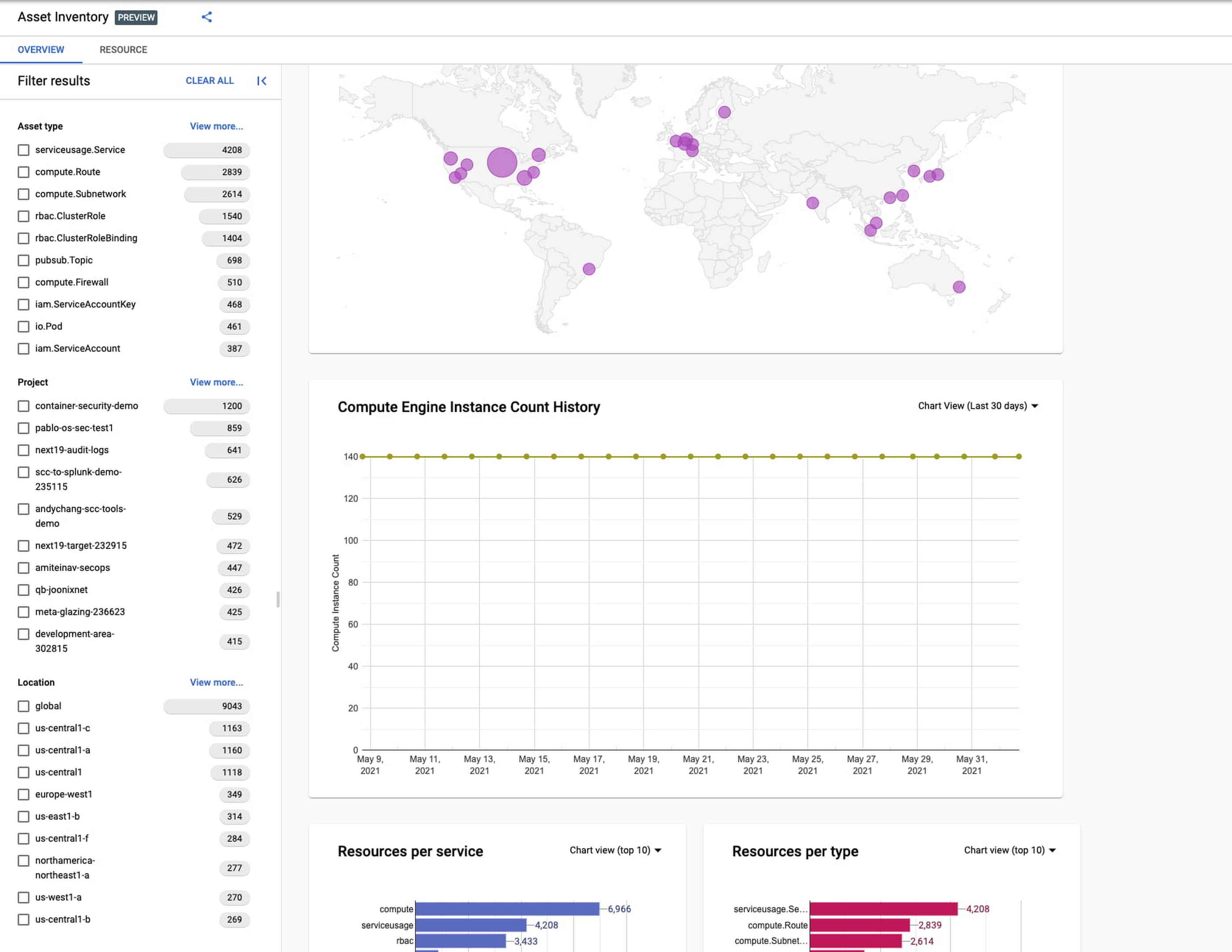
Businesses that operate in complex cloud environments, large fleets, or sophisticated security operations all require visibility into their cloud assets in order to keep their teams nimble and their data secure. Cloud Asset Inventory (CAI) helps these teams understand their Google Cloud and Anthos environments by providing complete visibility, real-time monitoring, and powerful asset analysis capabilities. Today, Cloud Asset Inventory gets four new capabilities that help you understand your environment more clearly and easily than ever before.
New user interface eases asset and insight discovery
Cloud Asset Inventory console preview is now publicly available for GCP and Anthos customers. This preview provides insights into your cloud footprint, history and details of resource usage with powerful filtering and search capabilities. For example, you can view your global distribution of resources and policies, how your GCE VM footprint has been changing over time, as well as full metadata and change history for all your assets. The CAI console can be filtered at the organization, folder, or project-level, so each user can view the resources they have permissions for down to project level granularity.
Asset discovery and Datadog integration
A new asset list service in CAI provides quick and comprehensive asset discovery, including asset history, without needing to export the data to a storage destination. Datadog, a leading multi-cloud monitoring and security service provider, relies on deep integration with CAI for service and asset discovery. Datadog has been piloting and taking full advantage of the newly released asset list service. Datadog Product Manager, Steve Harrington, commented:
“Google’s new Cloud Asset Inventory API provides us with an immensely valuable, single source of truth for determining the resources present in a given GCP environment. Along with its rich metadata, this enables us to enhance multiple aspects of our integration with GCP, including streamlined metric collection and ingestion of custom labels. We plan to continue building around Cloud Asset Inventory in the future to improve existing features, and are envisioning ways it could help us provide entirely new insights to our customers.”
Answer “who can access what resources?”
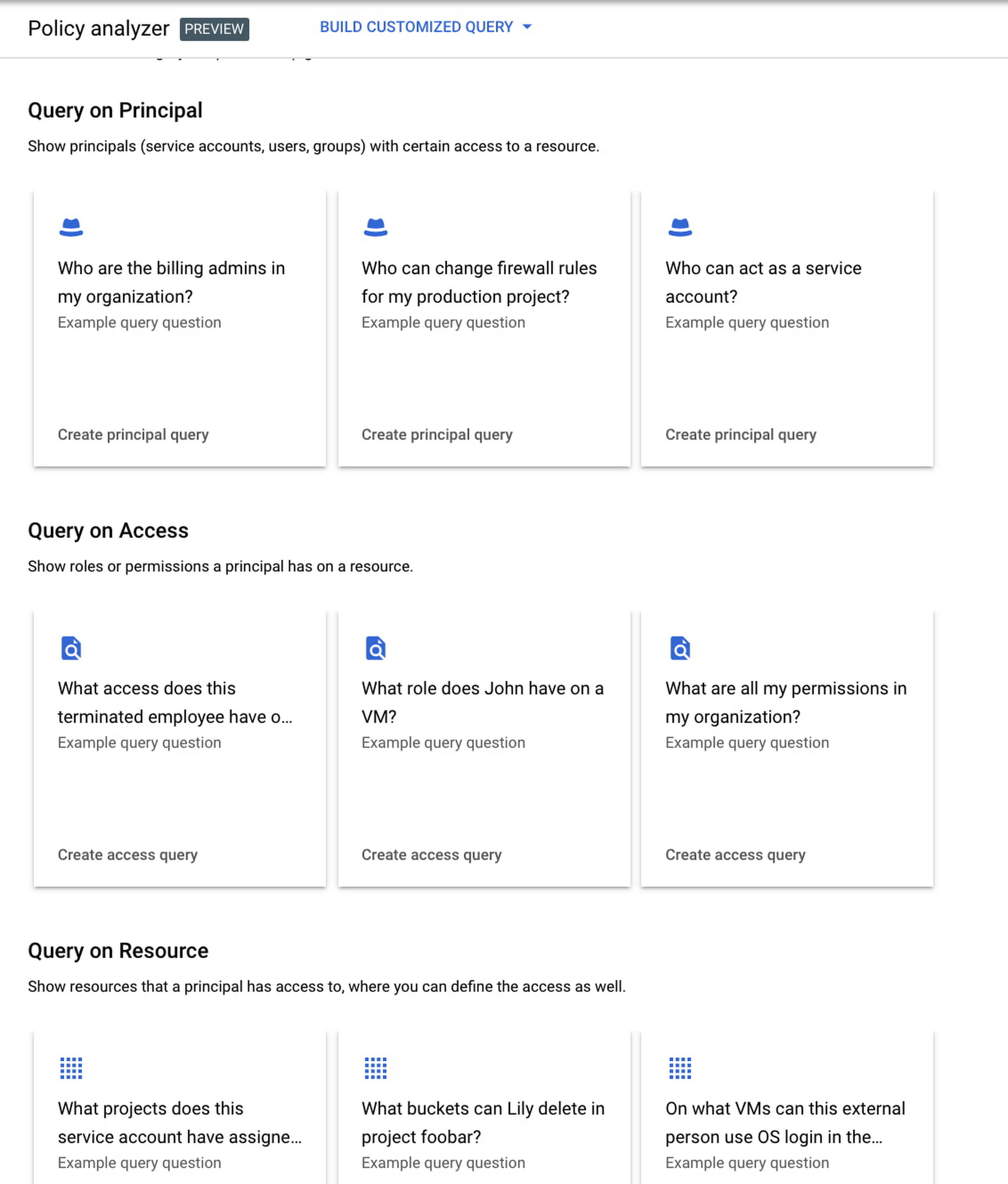
Determining authoritative answers to security-related questions like “Who can read data from my storage bucket that contains PII?” or “Does a terminated employee still have any remaining access to my system?” can be difficult and time consuming. This is why access management and identity certification is one of the top security priorities for enterprises running workloads in the cloud. To help alleviate this challenge, the new Policy Analyzer capability in CAI thoroughly analyzes the relationship between IAM policies and resources. The analysis includes powerful and efficient group expansion, service account impersonation, conditional access analysis, resource expansion, and more. You can even export the results to a BigQuery table or Cloud Storage bucket for further analysis and record keeping. CAI’s enhanced UI makes it even easier for you to build your own flexible queries and quickly get to a comprehensive answer.
Create asset posture visibility
Cloud Asset Inventory now provides seven types of Asset Insights through the Active Assist platform. These new asset insights help proactively detect anomalies within your organization’s IAM policies, which may be opportunities to improve your security posture. The insights can be aggregated at the Organization, Folder or Project level.
The seven new Asset Insights include:
- External members in IAM policies.
- External users that impersonate your service accounts.
- External members as policy editors.
- External users who can view cloud storage buckets.
- Terminated users/groups that are still in IAM policies
- IAM policies containing all users or all authenticated users.
- Projects with only terminated users as owners.
As a Google Cloud customer you can get started and use all the recently released capabilities and features immediately; check out our documentation to see how. We’d love to hear your feedback; email us with any questions or concerns!
5 Features IT Departments Love About Google Cloud

3649
Of your peers have already read this article.
5:30 Minutes
The most insightful time you'll spend today!
Throughout the past couple of years, I have helped a good number of companies, big and small, migrate their systems to the Google Cloud Platform (aka GCP). During the course of these migrations, there are always a few of those moments where people look at a specific Google Cloud feature and say, “now, that’s cool!”.
More often than not, it is because, coming from other platforms, they have gotten used to some features requiring multiple steps, or some operations being complicated, etc. And often they find out that in GCP you can do this specific operation in a couple of clicks, or by setting up a simple text-based configuration. Then you see that light bulb turning on in their head, and there you go… happy customer.
A few of these happen so often that I compiled them in a list to share with others who might also benefit from these “aha!” moments. You could say these are the five things I wish they told me when I started using Google Cloud.
Projects: Naturally Group Resources Together
A project is a namespace where resources live. Every resource you instantiate in GCP, from load balancers to Kubernetes clusters to virtual machines, belongs to a single project, and has no access (by default) to resources in other projects. User roles and authorisations can be defined per-project and trickle down to everything in it. This has two immediate benefits: you can group things that belong together in neat logical units, and things that don’t belong together are isolated from each other (and isolation is a Good Thing)
This is powerful and quite simple, but it often takes new users off-guard. I’ve had many clients call me and ask me “How can I make sure my developers cannot access the production machines? What’s the best way to create access policies? ”
The answer to this is actually super-simple:
- have a project for development where your developers have rights,
- have a project for production where they don’t.
- That’s it.
Every machine/other resource in the production project won’t be accessible to developers.
Of course there is a lot more to it, and you can refine roles and permissions to a much greater degree using Organizations, Folders, etc. Not to mention all the crazy things you can do with per-project billing. But at least you can say “hey, if it’s a machine in the staging environment then it can be found in the “staging” project”.
Global Virtual Networks Are *Truly* Global
Imagine you are using a Cloud provider and that you have servers in the US, and servers in Singapore, and that they need to communicate.
So you create a VPC (Virtual Private Cloud) network in the US data center, another one in the Singapore data center, and then you will connect them by setting up inter-region VPC peering or a VPN (Virtual Private Network) or a transit VPC or other routing magic.
Lots of work, right? And many moving parts, so lots of opportunities for things to break.
With GCP, however, what makes my clients go “aha!” is when they realize that in GCP a single VPC network covers the entire planet. Only subnets are attached to a geographic location, and virtual machines communicate between subnets on private IPs (good old RFC1918 addresses) — no extra routing needed.
So, to make your server communicate across continents on GCP, here are the steps:
- create a VPC network
- create a subnet in the US, put your US servers in it
- create a subnet in Singapore, put your Singapore servers in it
That’s all there is to it. Your VPC network spanning 2 continents is ready to use. Below is a screenshot of how it looks on my account, for a VPC network called ‘my-global-network’ with 2 subnets. The first column (“us-central1” and “asia-southeast1”) contains the name of the GCP regions (read: data centers). The second column is the subnet name that I picked when I created them.

A machine in the US (on the “us-central” subnet) with IP 10.0.0.5 can communicate directly with a machine in Singapore (on the “singapore”) subnet with IP 10.10.0.8.
Nothing else to set up.
And thanks to the way these networks work, the Google Cloud Load Balancer can present a single IP to the world, and forward traffic to the instances that are the closest to you geographically without having to setup a tedious DNS-based load balancing. But that’s worth an entire blog. I’ll save it for another day.
Firewalls with Tags and (Almost) No IP Addresses
There is no network security without a firewall so unsurprisingly GCP comes with one built-in.
Now, I don’t know about you, but nothing makes my brain hurt like a list of firewall rules displaying IP ranges and addresses and ‘Allow/Deny’ directives. It looks a bit like this:

If you imagine a normal network with a few dozen (hundred?) servers, you can quickly see how this can get out of control. You’d better have a solid printout of your network layout to refer to when you start adding and changing rules. And good luck debugging things!
Wouldn’t it be nice if, instead, you could just tell the firewall: “the HTTP traffic from outside can only reach the HTTP servers and the MySQL database is only reachable by the HTTP server(s) on the same network?”
Turns out it’s pretty simple on GCP by using a little thing called network tags. As the documentation says:
“Network tags are text attributes you can add to Compute Engine virtual machine (VM) instances. Tags allow you to make firewall rules and routes applicable to specific VM instances.”
So let’s see how it works. Firewall rules in GCP are defined in terms of source and target (the traffic flows from the source to the target). You can define filtering rules that apply to the source or the target, and in both cases you can use tags.
This is simpler shown with an example. The rule below states that on the default network, the traffic to the VMs with the tag mysql-server can come from the VMs with the tag http-appserver. Any other traffic is “Deny”-ed by default.

All you have to do is to tag your machines properly, and they will automatically be covered by the rule. You don’t need to enter their IP range.
That’s neat if you ask me. It makes it a lot simpler to grasp what’s happening.
Of course, there’s a TON more to firewalls in GCP. Tags also apply to routes and you can mix and match IP-based rules with tag-based rules. Not to mention that thing called service accounts, but I’ll leave those for another day.
The bottom line is that you can create most rules by just expressing a business need and not having to remember complicated network layouts. I have no hard stats, but I’m pretty sure this has saved me hours of work.
Console Access to VMs from the Browser
Easily access virtual machines (VMs) from the Google Cloud console was one of my first “aha!” moments when I started using GCP.
This is a screen capture of my Google Cloud console, with a virtual machine and its internal IP.

The last column has a header that says “Connect” and when you click on the word “SSH” a separate windows pops up. You wait for a few seconds, and… this is what you get. Your personal shell access — in a browser popup no less.

You are connected through ssh to the virtual machine of your choice. You did not have to download ssh keys and put them in the ~/.ssh directory, do the correct chmod command and run a long-winded ssh -i ~/.ssh/somekey me@<it-took-me-forever-to-copy-paste-the-address-here>
In addition, you have access to a few nifty features such as uploading and downloading files, changing the user etc. Just use the menu behind the cog icon at the top right.
In truth, you should not need to connect directly that often, but when you have to, this is a godsend.
Your Personal Jumphost from the Google Cloud Console
The Google Cloud console has a cool trick: you can actually connect to a virtual environment that is managed by the Google Cloud console itself. It serves a bit as a jump host. You can access most resources from the projects from it, and you can activate it directly from the top menu with, no particular setup on your side. It’s called the Cloud Shell.
This is how it looks at the top right of the console:

When you activate the Cloud Shell, the session opens at the bottom of the console. You get a command line prompt and it’s fully configured with the gcloud command line tool (the jack-of-all-trades of Google Cloud scripting).

You can do a great many things from there, and this even includes uploading and downloading files, editing code or deploying it, a web preview for your AppEngine application, and more.
So you can get access to a fully configured shell environment in your project from any laptop where you can connect with your credentials. On top of this, it persists between connections so you can fine-tune it to your needs and have these changes available the next time you re-connect.
This has saved me many times during my previous life as a traveling consultant!
Live migration
Did I say 5 “Aha!” moments ? Well, you’ve been patient reading all the way to here, so here’s one more for free.
Google Cloud has an amazing way to literally “teleport” a running virtual machine between physical hosts without stopping it. It’s called Live Migration. It allows Google to move your virtual machine away from a defective host, or a host that needs a patch or an upgrade, or for any other infrastructure related reason.
It’s all done in the background, and is totally transparent, so you never really see it happening. Unless you look VERY closely. I once did a demo to a client, where a machine was live migrated while he was simulating a solid network load — and we did not lose a single packet, with no noticeable degradation in latency.
And that’s a wrap!
So there you go. These are 5+1 things that made me go “Aha!” when I became more familiar with the Google Cloud Platform, and that still make my clients do the same.
There is a lot of depth to the platform, and my examples above only scratch the surface of our features. I encourage you to try it yourself. There is a generous free tier, and when you are ready to take the plunge and create that new company, please contact us at Google Cloud for Startups. We’ll get you up and running in no time.
Jerome is a Startup Architect at Google Cloud. Based in Singapore, he helps startups make the most of the Google Cloud Platform.
More Relevant Stories for Your Company

How Google Cloud Sped up Nuro’s Data Delivery to Engineers and Automated Storage Transfer
Engineers that build last-mile delivery services belong to an elite order, a hallowed subcategory. Delivery customers are incredibly demanding when it comes to speed and convenience, and the services they use must take variables like increased traffic, road conditions, human error, and even driver availability into account every day. Nuro

How One Company Uses AI and Data Analysis to Boost Revenue
AI, deep learning, and image recognition is transforming the shopping experience. These technologies enable consumers to use product images or screenshots rather than text to search for similar products. This improves the customer experience and enables retailers with online and offline outlets to provide a genuine omnichannel experience. The lack of




Philips Looks to Google Cloud for its Connected Lighting Solution
Philips Lighting wanted to transform the way people use lighting in their homes. The company aimed to connect light bulbs to the Internet, tie them to usage data, and make them interactive in order to offer benefits beyond basic lighting—for creating amazing experiences, home security, or to support well-being, like

Google Cloud Leads the Landscape for Unstructured Data Security Platform: Forrester
As organizations expand their use of cloud computing services, more of their sensitive data inevitably moves to and lives in the cloud. Much of this sensitive data is unstructured and can be challenging to secure. Despite this potential challenge, the usefulness of cloud for data storage and processing is too
