





G R Infraprojects Limited Turns to Google Cloud to Run Business-Critical SAP S/4HANA
3509
Of your peers have already read this article.
4:30 Minutes
The most insightful time you'll spend today!
Road construction is booming in India. A recent report prepared by the India Brand Equity Foundation—a trust established by the Department of Commerce—pointed out that in FY 2019 alone, the country added 10,855 kilometers of highways to a road network that spans 5.89 million kilometers. This network is the second largest in the world and transports 90% of passenger traffic and 64.5% of all goods in the country.
The Indian Government has also earmarked road construction as key to plans to increase the nation’s GDP to $5 trillion in coming years, targeting road construction worth $212.8 billion in the two years from April 2020.
G R Infraprojects Limited is well positioned to support the government’s program. The business, which started as a contractor building roads in rural villages in India, now specializes in road engineering, procurement, and construction (EPC), a model whereby private construction firms build roads funded by the government.
The business now undertakes the processing of bitumen, manufacture of thermoplastic road-marking paint and road signage, and fabrication and galvanizing road-crash barriers. Its in-house integration model includes a design and engineering team, as well as manufacturing facilities in Rajasthan, Assam, and Gujarat.
The business recently expanded into rail—another area expected to benefit from extensive government investment—with its competencies including earthworks, materials supply, track lining, and bridge construction.
In this environment—and despite the economic impact of the coronavirus pandemic—G R Infraprojects Limited aims to substantially increase turnover and manpower over the next five years.

Best-in-class infrastructure key to success
Digital transformation is key to enabling growth while best-in-class IT infrastructure is one of the foundations on which the business seeks to build success.
G R Infraprojects Limited’s digital initiatives include deployment of a new document management system and corporate systems that enable remote monitoring, live tracking, effective real-time communication, and efficient data management.
Providing a scalable, reliable cost-effective infrastructure
But most important of all is providing a scalable, reliable, and cost-effective infrastructure to support a business-critical SAP enterprise resource planning system. Over the last few years, versions of SAP have enabled the organization to digitize processes and seamlessly run business-critical functions such as inventory management and finance.
G R Infraprojects Limited initially went live with SAP ECC6.0, with a few hundred team members using the system for business-critical tasks such as tracking stock level and movement and generating financial statements and reports for review and action.
“Google Cloud is a very big brand, so we were easily able to secure the trust from our executive and business teams to run an important system such as SAP S/4HANA on the platform.”—Sachin Kumar Agarwal, Head, Transformation, G R Infraprojects Limited
Lowering maintenance costs
However, as G R Infraprojects Limited grew, projects proliferated, and new markets emerged, the business elected to move to the cloud from an on-premises infrastructure. “We wanted to move because there were so many maintenance costs in on-premises solutions and cloud provided convenience to IT and the broader organization,” explains Sachin Kumar Agarwal, Head, Transformation at G R Infraprojects Limited.
The business also wanted to move to SAP S/4HANA to take advantage of features such as AI, advanced analytics, and machine learning to transform business processes. The system runs on the HANA database, an in-memory database with fast processing speeds and a simplified data model.
G R Infraprojects Limited selected Google Cloud to run SAP S/4HANA because, Sachin says, it is “much better than any other platform,” incorporates a wide range of features, and meets uptime requirements. The cloud service could also scale to support forecast growth without a sharp increase in cost.
Furthermore, Sachin adds, “Google Cloud is a very big brand, so we were easily able to secure the trust from our executive and business teams to run an important system such as SAP S/4HANA on the platform.”
“With Google Cloud, our speed and availability are controlled and optimized day by day. With such a scalable and dynamic platform, we are very happy with the performance.”—Sachin Kumar Agarwal, Head, Transformation, G R Infraprojects Limited
Successful transition with Infrabeat
G R Infraprojects Limited completed the project with assistance from partner InfraBeat over three months and SAP S/4HANA on Google Cloud went live mid-2019. “Our dedicated SAP team worked closely with Infrabeat to deliver the project successfully,” says Sachin. “We needed an experienced partner to assist with the implementation process and Infrabeat performed that role admirably. Both teams supported each other and worked to plan to deliver a great result.”
SAP S/4HANA runs on an infrastructure comprising virtual machine instances delivered through Compute Engine, Cloud Storage, and Cloud NAT to enable the secure transmission and receipt of packets to and from the internet.
G R Infraprojects Limited estimates the cost of running SAP S/4 HANA in Google Cloud is significantly lower than on alternative infrastructure options—freeing up budget for other business priorities.
In addition, moving SAP S/4 HANA to infrastructure as a service through Google Cloud has eliminated the need to assign internal team members to infrastructure management, allowing them instead to focus on higher-value activities.
Google Cloud also incorporates the security needed to protect the data and processes of SAP S/4 HANA from intrusion or disruption and ensure the uptime and continuity required of a business-critical system.
Optimized speed and availability
G R Infraprojects Limited’s decision to run SAP S/4 HANA on Google Cloud is delivering benefits on a daily basis. “With Google Cloud, our speed and availability are controlled and optimized day by day,” says Sachin. “We are very happy with the performance.”
Success with SAP S/4HANA has helped the business decide to move its remaining apps and data to the cloud when its on-premises servers and other equipment reach end of life. G R Infraprojects Limited is already running Active Directory in Google Cloud and Sachin says the cloud platform’s “fast and excellent services” made the decision easy.
“There are definitely instances of various upgrades of our systems and within the organization, and as we talk about our application and mobility requirements, we see Google Cloud playing a crucial role.”—Sachin Kumar Agarwal, Head, Transformation, G R Infraprojects Limited
Adding value
As G R Infraprojects Limited grows, Sachin adds, the business expects Google Cloud to continue to add value. “There are definitely instances of various upgrades of our systems and within the organization, and as we talk about our application and mobility requirements, we see Google Cloud playing a crucial role.”

Google Cloud Introduces Enterprise-grade Scheduler across All GCP Regions

3426
Of your peers have already read this article.
1:30 Minutes
The most insightful time you'll spend today!
Reliably executing tasks on a schedule is critical for everything from data engineering, to infrastructure management, and application maintenance. Today, we are thrilled to announce that Google Cloud Scheduler, our enterprise-grade scheduling service, is now available in more GCP regions and multiple regions can now be used from a single project removing the prior limit of a single region per project.
With many enterprise customers deploying complex distributed cloud systems, Cloud Scheduler has helped solve the problem of single-server cron scheduling being a single point of failure. With this update you are now able to create Scheduler jobs across distinct cloud regions that can help satisfy cross-regional availability and fail-over scenarios.
Furthermore, you are no longer required to create an AppEngine application in order to use Cloud Scheduler. For existing Cloud Scheduler jobs, it is safe to disable the AppEngine application within the project. Jobs will continue to function without an AppEngine application.
Creating jobs in different regions is easy. You simply pick the location where you would like your job to run. For example you can specify a location when creating a job through the gcloud command line :
HTTP Targets
gcloud scheduler jobs create http <job-name>--location <cloud-region>--schedule <cron-schedule>--uri <target-uri>
Pub/Sub Topics
gcloud scheduler jobs create pubsub <job-name>--location <cloud-region>--schedule <cron-schedule>--topic <topic-name>(--message-body <message-body> | --message-body-from-file <file-path>)
AppEngine Services
gcloud scheduler jobs create app-engine <job-name>--location <cloud-region>--schedule <cron-schedule>
Or you can pick a location when creating a job through the Cloud Console:
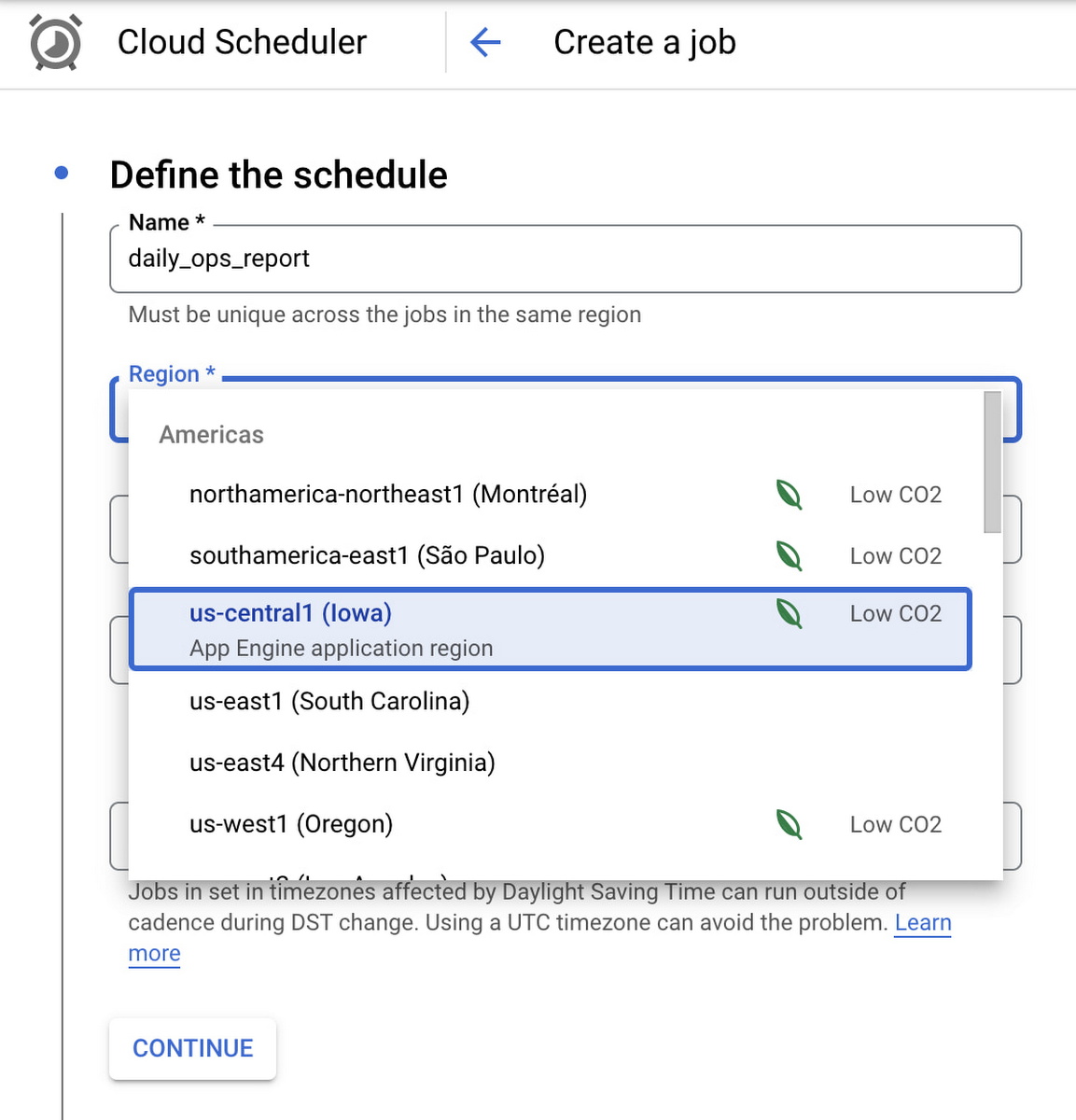
Google Cloud Scheduler is now available in 23 GCP Regions, and this number is expected to grow in the future. You can always find an up-to-date list of available regions by running:
gcloud scheduler locations list
We hope you are as excited about this launch as we are. Please reach out to us with any suggestions or questions in our public issue tracker.
Google and Fervo Agreement to Shape-up Plans for 24/7 Carbon-free Energy by 2030
4821
Of your peers have already read this article.
1:30 Minutes
The most insightful time you'll spend today!
When Google announced our plan to go beyond purchasing renewable power for 100% of our energy usage and operate on 24/7 carbon-free energy by 2030, we noted that achieving this goal will require new transaction structures, advancements in clean energy policy, and innovative new technologies. Today, we’re pleased to announce that one of these new technologies—a first-of-its-kind, next-generation geothermal project—will soon begin adding carbon-free energy to the electric grid that serves our data centers and infrastructure throughout Nevada, including our Cloud region in Las Vegas.
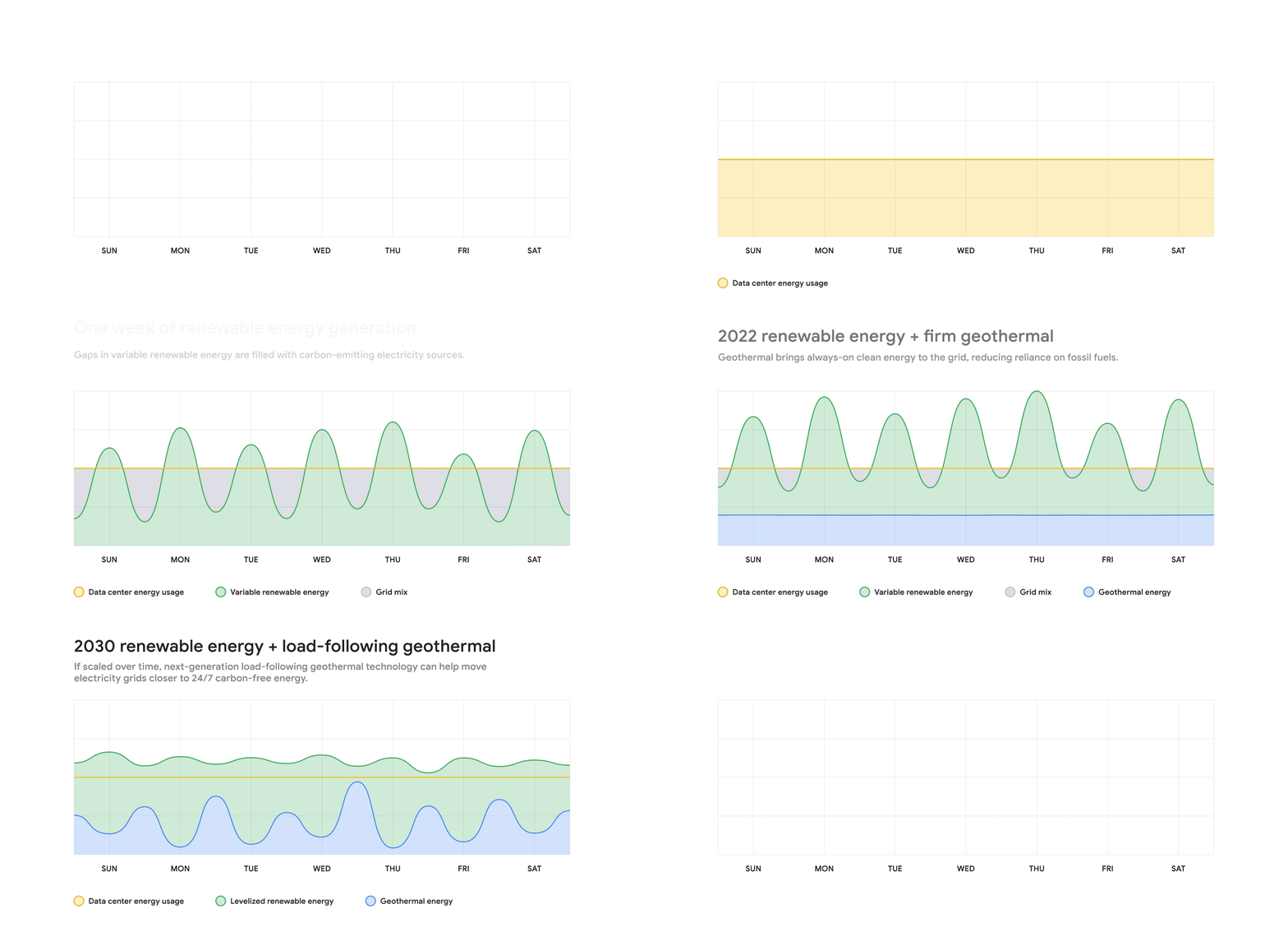
Google and clean-energy startup Fervo have just signed the world’s first corporate agreement to develop a next-generation geothermal power project, which will provide an “always-on” carbon-free resource that can reduce our hourly reliance on fossil fuels. In 2022, Fervo will begin adding “firm” geothermal energy to the state’s electric grid system, where Google’s commitments already include one of the world’s largest corporate solar-plus-storage power purchase agreements.
Importantly, this collaboration also sets the stage for next-generation geothermal to play a role as a firm and flexible carbon-free energy source that can increasingly replace carbon-emitting fossil fuels—especially when aided by policies that expand and improve electricity markets; incentivize deployment of innovative technologies; and increase investments in clean energy research, development, and demonstration (RD&D).
Next-generation geothermal technology
Traditional geothermal already provides carbon-free baseload energy to a number of power grids. But because of cost and location constraints, it accounts for a very small percentage of global clean energy production.
That’s one reason this new approach is so exciting; by using advanced drilling, fiber-optic sensing, and analytics techniques, next-generation geothermal can unlock an entirely new class of resource. And the US Department of Energy has found that with advancements in policy, technology, and procurement, geothermal energy could provide up to 120 GW of firm, flexible generation capacity in the US by 2050.
As part of our agreement, Google is partnering with Fervo to develop AI and machine learning that could boost the productivity of next-generation geothermal and make it more effective at responding to demand, while also filling in the gaps left by variable renewable energy sources. Although this project is still in the early stages, it shows promise.
Using fiber-optic cables inside wells, Fervo can gather real-time data on flow, temperature, and performance of the geothermal resource. This data allows Fervo to identify precisely where the best resources exist, making it possible to control flow at various depths. Coupled with the AI and machine learning development outlined above, these capabilities can increase productivity and unlock flexible geothermal power in a range of new places.
This won’t be the first time that Google is applying software solutions to clean energy applications: we’ve just announced an update to our carbon-intelligent computing program that helps us reduce emissions associated with running applications at Google data centers. And other forms of AI and machine learning are currently being used to increase the value of wind energy.
Already this year, Google has taken significant strides toward sourcing 24/7 carbon-free energy for all our data centers, office campuses, and Cloud regions. On Earth Day, our CEO Sundar Pichai announced that for the first time, five of our global data center sites operated near or at 90% carbon-free energy in 2020.
Not only does this Fervo project bring our data centers in Nevada closer to round-the-clock clean energy, but it also acts as a proof-of-concept to show how firm clean energy sources such as next-generation geothermal could eventually help replace carbon-emitting power sources around the world.
Canada’s Climate Scientists Use Google Earth Engine to Observe Foliage Density in Near-real Time
3404
Of your peers have already read this article.
1:30 Minutes
The most insightful time you'll spend today!
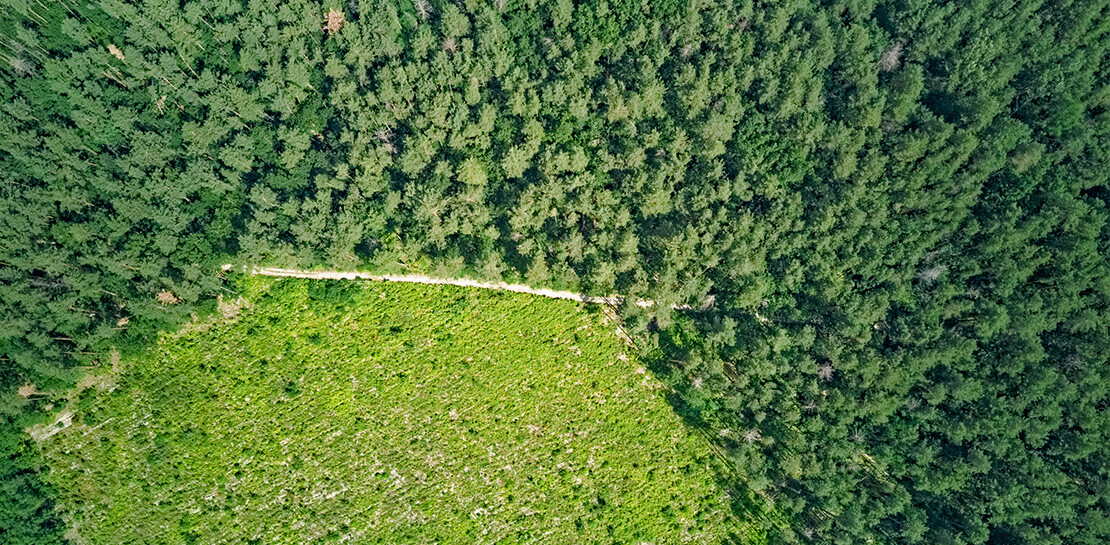
Climate scientists face a deluge of environmental data to analyze and interpret from real-time sensors and satellites across the globe. The stakes are as high as our planet’s long-term future, but rapidly changing conditions are already impacting communities through extreme events like floods and wildfires as well as management of everyday resources. In this context, detailed environmental maps are key sources for urgent global issues like food security, water quality, and vegetation levels.
Scientists, researchers, and developers rely on state-of-the-art cloud computing tools like Google Earth Engine (EE) to detect changes, map trends, and quantify differences on the Earth’s surface. EE leverages the compute power of Google Cloud to combine a multi-petabyte catalog of satellite imagery and geospatial datasets with planetary-scale analysis capabilities.
To find out more about how climate scientists address these complex research challenges, I spoke to Dr. Richard Fernandes, Research Scientist at Natural Resources Canada (NRCan). Dr. Fernandes is also a 2022-23 member of the Google Research Innovators Program, which provides technical and professional support to a global cohort of leading researchers. I asked him to describe how cloud computing and machine learning (ML) tools can support climate resilience research and drive awareness about climate sustainability.
Dr. Fernandes, can you give me an overview of your research in climate sciences?
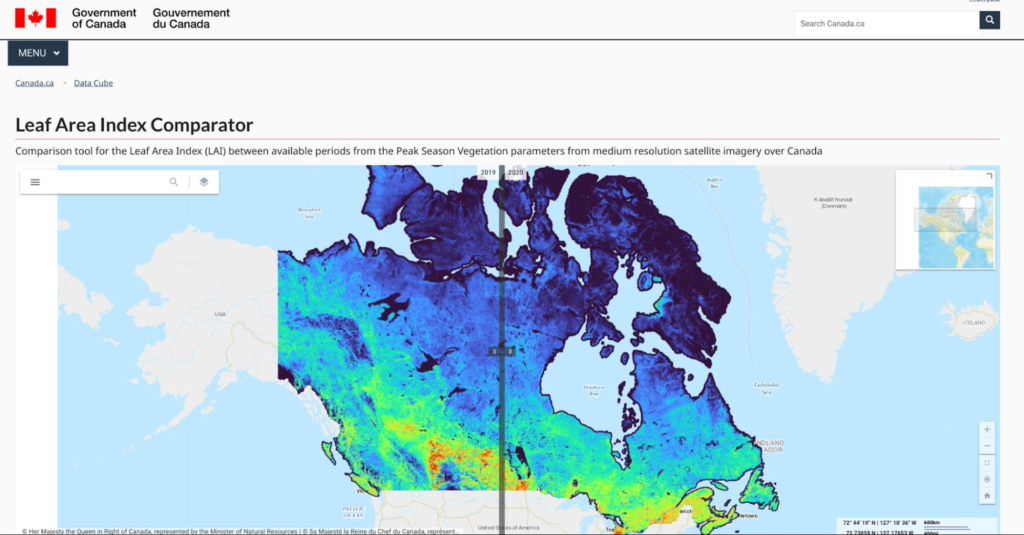
My research focuses on mapping the status and trends of vegetation over Canada. Every month we generate maps of vegetation parameters, such as canopy cover at 20m resolution, to support environmental monitoring and assessment. These maps contribute to global datasets that are used to reduce uncertainty in weather and climate forecasts.
Canada has approximately 10 million square kilometers of land and the annual data volume of these maps is equivalent to streaming HD movies for over 750 hours non-stop. And that’s only the tip of the iceberg: the volume of input data we need to generate those maps is typically 100 times more. Unlike movie streaming services, we have to independently process each input pixel to locate it accurately, screen for clouds (and even the shadows of clouds), and then transform it into a vegetation parameter value like canopy cover using ML algorithms.
The volume of high-resolution data and the amount of compute we need are challenging and ever-increasing. Rather than dedicating servers 24/7 for constant monitoring, we rely on cloud computing and ML. Cloud computing allows us to manage all this data in a useful and accessible way. We have also been able to successfully use the Google Artificial Intelligence (AI) Platform to calibrate new ML models for third-party datasets.
How did you start working with Google Cloud?
I started using EE together with open source APIs for integration with Google Drive about four years ago. With the pandemic my research group has transitioned to using EE, Google Cloud, and Google Drive for both our Canada-wide mapping as well as for R&D activities. In January we developed and released the LEAF toolbox, which builds on EE satellite data to create customizable maps of foliage density in near real-time. We do all of the pixel processing in EE and leverage the ability to integrate our own functions using their APIs. We combine EE with Google Cloud to handle and manage output datasets. Fortunately, EE has most of the input data already at hand so we don’t need to deal with that 100x larger volume.
What impact do you expect LEAF will have now–and down the road?
Both the Canadian federal government and provinces already use our data products as inputs to permafrost, crop status, and water resource models. Agriculture Canada had been using a conventional Geographic Information System (GIS) and approached us to ask how we manage our data. They want to use LEAF to assess how crops are progressing, which impacts local economies and the global food supply. We’re in a pilot with them to apply EE to their crop condition assessments.
Also exciting is that the Province of Alberta is integrating the LEAF toolbox within a system for monitoring the reclamation status of oil and gas wells and mines. They want to know how to rehabilitate sites that were developed for mineral and gas deposits. This is another great use case but many others are possible. The technology itself is cool, but that’s not even the point. ML algorithms are constantly evolving and improving. New ML algorithms use active learning that detects mistakes and makes updates on the fly. The technology will be different in five years — or five months! — so our priority is making these tools accessible and useful now.
Why is state-of-the-art technology for climate research so important?
Scientific research must be validated, transparent, and rigorous to drive the best solutions to our complex and changing ecosystem. Climate action needs greater public awareness, which requires more knowledge, which demands the best data. By democratizing information and decision-making, we can create an ecosystem of openness and public-private partnerships. We can lower the barrier to entry for advanced research and help scientists validate and reproduce their results. Also, scientists don’t want to have to become software engineers for these custom highly specific solutions. They want user-friendly tools that let them focus on their analyses and share their insights with the world. That’s one of the major appeals of the Google Research Innovators Program for me: I want to share LEAF with colleagues and collaborate with other researchers who are using new tools in new ways.
Do you have any parting words about your mission?
We’re so fortunate to have Canadian taxpayers and the Government of Canada funding our work. We have worked with many scientists over the past two decades to develop and validate the algorithms we use, especially Fred Baret and Marie Weiss at INRA France, who have championed the idea of free and open access to algorithms and knowledge, and data.
I really believe in democratic access to information. I like the fact that the terms of service of Google products allows us to offer not only maps but the actual processing system in a free and open manner to everyone. I also like that EE provides a simple-to-use user interface that works on mobile devices. We designed LEAF not just for experts, but for individuals. My mom was able to make maps of a nearby park in real time on her tablet. It is my hope that expanding access to critical environmental information will increase our collective awareness of how our actions impact both near and far places — and make us active in the cause of a sustainable future.
That’s an inspiring note to end on. Thank you for your time!
Thanks for having me!
Click here to learn more about Google’s commitment to renewable energy. Or try the LEAF toolbox for yourself!
3 Important Factors to Consider for Moving Large-scale On-prem Data to Cloud with Storage Transfer Service
3529
Of your peers have already read this article.
1:30 Minutes
The most insightful time you'll spend today!
Organizations have been moving their on-premises data and applications to the cloud for the past several years, driven by reasons as varied as application modernization and content delivery to archival. In particular, we have seen migration momentum pick up in sectors like media and entertainment, where customers are rethinking how they monetize and store their valuable historical content, often while exploring Google Cloud’s many analytical and AI solutions.
Many of these customers are interested in moving their unstructured data from on-premises appliances to Google’s Cloud Storage. Over the past year, we’ve noticed an uptick in larger migrations, where customers move tens of petabytes or more of on-premises file data to Google’s flexible, secure object storage.
For customers like Telecom Italia/TIM Brasil, Google’s fully managed Storage Transfer Service played a key role in making this transformation possible by moving data from on-premises filesystems to extensible, low-cost Cloud Storage over the network.
“Storage Transfer Service helped us move petabyte-scale data from on-premises filesystem to Google Cloud in a highly performant and fully-managed way,” said Auana Mattar, CIO at Telecom Italia/TIM Brasil. “Setting up the transfer pipeline required performing some tests to figure out the ideal number of agents and networking settings in our on-prem environment. Once the initial setup was done, transferring data was seamless, and the service was able to saturate a 20 Gbps Partner Interconnect link.”
While large-scale cloud migrations can be intimidating, there are a number of actions that customers can take to ensure that a multi-petabyte data transfer goes as smoothly as possible. In the past, we’ve shared general architectural guidance for customers new to their cloud journey. And for customers looking for options, Google has multiple paths to move on-premises file data to the cloud, including our fully offline Transfer Appliance.
In this blog post, we’ll provide an updated perspective focused on how to use Storage Transfer Service to move data from on-prem to the cloud. Specifically, we’ll look at three different factors to consider prior to moving large amounts of data from your on-premises filesystem to Cloud Storage with our Storage Transfer Service.
Understanding the source files and filesystem
If you are moving data from an on-premises filesystem, you should be aware of how your source files, and your source filesystem, can impact transfer performance.
Each copy you make to Cloud Storage incurs some overhead from associated operations like metadata transfer, checksumming, and encryption. This means that, for a given amount of storage, transferring large numbers of very small files will take longer. As a rule of thumb, Storage Transfer Service will be most performant when moving files that are 16 MB or larger.
If you have a large number of smaller files, you may choose to batch them using tools like tar and upload as a single object. This will improve transfer performance but will limit how you can use those files in Cloud Storage. It’s an option best considered for use cases like archival storage, where the data transferred to Google Cloud may not be managed or accessed regularly. Our Nearline, Coldline, and Archive archival tiers offer excellent performance should you ever need to retrieve the archived data.
The source filesystem may also slow down transfer performance, particularly if the filesystem has limited read throughput. Tools like Fio can be used to test read throughput. We’ve included a command below to run a series of 1MB sequential read operations in Fio and to generate a report:
#Install fio> sudo apt install -y fio#Create a new directory fiotest> TEST_DIR=/mnt/mnt_dir/fiotest> sudo mkdir -p $TEST_DIR#Test read throughput> sudo fio --directory=$TEST_DIR --direct=1 --rw=randread --randrepeat=0 --ioengine=libaio --bs=1M --iodepth=8 --time_based=1 --runtime=180 --name=read_test --size=1G
Fio will then generate a report. The final line labeled ‘bw’ represents the total aggregate bandwidth of all threads, and it can be used as a proxy for read throughput. In general, you should strive for read throughput (‘bw’) that is 1.5x of your desired upload throughput or speed. (And one easy way to increase read throughput is to ensure that the filesystem itself is not imposing any limits on maximum throughput.)
Optimizing Storage Transfer Service resources
Within the Storage Transfer Service, there are a few settings that we can adjust ahead of time to ensure optimal performance for a larger workload.
First, we should ensure that we have the right number of transfer agents for our source data. We would advise that, for any transfer job larger than 1 GB, you start with at least three agents in separate VMs, with each agent assigned at least 4 vCPU and 8 GB of RAM. In addition to providing a foundation for performant data transfer, this architecture also ensures that the transfer is fault tolerant should one agent machine become unavailable.
Google Cloud supports up to 100 concurrent agents for a given Google Cloud project. To help you identify the right number of agents to support your workload, you should start your larger transfer first, then wait three minutes after adding each agent to ensure that throughput has stabilized.
In general, each agent can facilitate roughly 1 Gbps of throughput for up to 10 agents, at which point it may be necessary to add more agents for a very large amount of network bandwidth. For example, in one larger migration, a customer with 20 Gbps of dedicated network capacity ran ~30 agents at once. These numbers illustrate what was required at one enterprise data center. Across all of your environments, it is important to test and monitor your throughput via Cloud Monitoring to ensure you have the right configuration for your transfer goals.
Another area to optimize is where and how you install your agents. As we mentioned earlier, agents should be installed in separate VMs, and each host machine should dedicate at least 4 vCPUs and 8 GB of memory per agent. This is a starting off point, and larger, long-running transfers may require additional CPU or memory. For those longer jobs, we advise that you monitor CPU utilization and unused memory closely to ensure optimal performance. You should provision more CPUs when utilization exceeds 70%. Similarly, you should be ready to provision additional memory when the agent has less than 1GB of unused memory.
Preparing your network for large-scale data transfer
The third and final area to consider is your network connectivity. While it can be easy to reduce this to the bandwidth between the source filesystem and the Google Cloud bucket, the network includes two other components that can be easier to configure: first, the network interface from the on-premises agents to the WAN; and second, the agents’ connection to the on-premises filesystem.
For the first component, the network interface from the on-premises agents to the WAN, the general guidance is to not let this become a bottleneck. Specifically, you should ensure that this interface is greater than or equal to the bandwidth you require to read from the filesystem, plus the upload bandwidth to write to Google Cloud. In other words, if you plan on moving 10 Gbps of data from on-premises to Google Cloud, you will need 20 Gbps of bandwidth between the on-premises agents to the WAN: 10 Gbps to read from the networked filesystem, and 10 Gbps to transfer and write to Google Cloud.
On-premises filesystems, and on-premises networks, come in many flavors. For the second component, how the agents connect to an on-premises filesystem, our general rule is to be mindful of latency and to test regularly. It is essential to ensure that agents run on machines that can access a networked filesystem with very low latency.
Finally, if you are trying to maximize transfer performance, make sure you’ve configured your network to avoid bandwidth restrictions between on-premises filesystem and Google Cloud that might impact transfer speed. Storage Transfer Service will allow you to cap the bandwidth used by transfer, making it easy to minimize any impact on other production applications. Consider using tools like lperf3, tcpdump, and gsutil to measure the network bandwidth available to upload to Cloud Storage.
In particular, gsutil is worth some additional detail. Gsutil is a Python tool that can help you perform a number of object storage management tasks in Google Cloud, including checking your agent’s connection to the Cloud Storage APIs. It can be installed via the Google Cloud SDK, or separately. In this case, you should also ensure that gsutil is available in the same on-premises VM as the Storage Transfer Service agent.
If you’d like to use gsutil to test connectivity to Google Cloud, here’s the command:
gsutil cp test.txt gs://my-bucketReplace:my-bucket with the name of your Cloud Storage bucket.
CP is a copy command that lets you copy data from on-premises to the cloud. In this case, gsutil is copying a test document, test.txt, to ensure that you have a connection with the Google Cloud APIs. You will need to create a test document before running this command.
Test twice, transfer once
One overarching theme across all factors is that testing can help you understand performance. For many customers, a large-scale data transfer from an on-premises filesystem to Google Cloud is an unusual event. And as with any unusual event in enterprise IT, it is a great idea to make sure that each party – from network administrators to filesystem and storage experts to cloud architects – is able to test their domain multiple times, to ensure the event will proceed seamlessly.
As you fine tune your testing in advance of a data transfer, you may want to learn more about your options for obtaining more network bandwidth, orchestrating transfer from SMB filesystems, or even how to make the right choices to save money on object storage. And we plan to share more in our blog about how customers have used our transfer offerings in the months ahead. Advanced agent setup | Cloud Storage Transfer Service Documentation
For more information about Storage Transfer Service and how to get started, please take a look at our documentation or get started via the Google Cloud console.
AgroStar: Small farms in India getting big help from the cloud

13275
Of your peers have already read this article.
3:30 Minutes
The most insightful time you'll spend today!
AgroStar has launched a cloud-based mobile app that is helping to boost crop yields and encourage best practices for small farmers in India. Launched as an on-premises ecommerce platform selling farm tools in 2008, the firm turned to Google Cloud Platform (GCP) to expand its offering. It now uses cloud-based analytics and is deploying ML models to provide timely advice in five languages on everything from seed optimization, crop rotation, and soil nutrition to pest control.
A 2018 survey underscored the demand for agricultural planning for Indian farmers. While farming remains a dominant sector in India, employing half of its labor force, 70 percent of small farmers – those cultivating fewer than three acres – said their crops are damaged by unforeseen weather and pests. An even higher number – 74 percent – say they lack access to farming-related information.
Widening that gap is the relative lack of access to new, higher yield seeds and improved soil analyses for small farmers, who must otherwise rely on traditional methods. “It could take a few years for innovative information to trickle down from universities to small, grassroots farmers,” says Pritesh Gudge, AgroStar Software Engineer. “Today, just by clicking through our Android application, farmers learn about new, effective farming practices and receive advice customized to their crop and soil.”
Connecting a million farmers in the cloud
Operating in the Indian states of Gujarat, Maharashtra, Rajasthan, Orissa, Bihar, and Karnataka, AgroStar is closing the knowledge gap with a full-service, cloud-based SaaS solution – the only one of its kind in India. It combines agronomy, data science, and analytics to help farmers by providing a variety of resources.
AgroStar has reached over a million farmers through its Android app, the AgroStar Agri-Doctor. The mobile client is available as a web-based or full-featured native app. Both provide access to the firm’s knowledge base hosted on GCP, a Q&A forum that connects farmers to each other to help understand and better solve problems and to learn about innovative practices and products. Farmers can also click through to follow local and national market trends that help forecast crop prices.
In addition to the self-service knowledge base, AgroStar provides access to agronomy experts who use cloud-based analytics tools and historical data to provide season-and locale-specific advice to each farmer. “We are now tracking thousands of calls in 5 languages each day,” says Pritesh.
The AgroStar app also provides links to purchase and then track the delivery of farm tools and supplies such as cultivators and fertilizers. An in-house platform manages fulfillment centers and a doorstep delivery network simplifies the supply chain while giving farmers what they need, when they need it. By procuring directly from the manufacturers and primary distributors of farm supplies, Agrostar is achieving cost savings, which it passes on to farmers.
Build fast, pivot faster
From the start, the human and environmental variables of farming in India, not to mention the volume of AgroStar’s few hundred thousand monthly active users, made a highly scalable cloud-based solution inevitable. Farmers rely on the firm’s Agri-Doctor app to provide advice in multiple languages on topics that range widely throughout three growing seasons, each with distinct crop nutrition and rotation cycles and farm implementation requirements.
“For farmers, the focus keeps changing every month, and every season,” says Pritesh. “To serve our growing community, we needed a platform that could process images at high volume, fulfill tools and seed orders across thousands of miles, and respond to multilingual queries. We quickly moved away from spreadsheets and server-based solutions – we needed to build fast and pivot faster.”
Ending late-night deployments
The firm’s first cloud experience was with an AWS solution. At the time, AWS was the only cloud provider in India, but AgroStar wanted to find a solution that was easier to use and offered better integration with Android devices. “Deployment and processing costs were very high, and the developer tools and documentation were not as intuitive as we needed,” says Pritesh.
When GCP service arrived in India in October 2017, AgroStar embarked on a platform re-implementation that made possible dramatic changes in the way it developed and deployed its solution. Using Google Kubernetes Engine (GKE) for crop advice management and Compute Engine for its production application services, the firm built the backend for the Agri-Doctor discussion forum in only three weeks. The platform’s microservice architecture is implemented in Python and Golang and deployed on GCP.
AgroStar began to realize significant efficiencies in its build, deploy, and test cycles. “We previously needed to work overnight to deploy to production,” says Pritesh. “Now using Google for Kubernetes containers and a rolling update strategy, we can deploy during the day without any problems or interruptions to service.”
The move to GCP streamlined AgroStar’s stack. “We were running 12 independent instances on AWS,” says Pritesh. “With Google Kubernetes Engine, we are deployed on a single cluster at a cost savings of $1,300 per month and growing.”
Improving customer response times by 85 percent
With a managed deployment capability, AgroStar can devote more time and resources to executing on its platform and Agri-Doctor app development plan. A strategic goal was managing customer response times as the firm grew its base. GCP has helped the firm meet that goal, achieving an 85 percent improvement in customer response times even as traffic grew significantly.
“With our on-premises solution, we could handle around 100 customers daily, which took 30 to 50 minutes for each customer,” says Pritesh. “We now handle thousands of customers daily, taking only 4 to 5 minutes for each one.”
AgroStar used Firebase to implement its Agri-Doctor app. A real-time cloud database, Firebase provides an API that enables the Agri-Doctor advice forum to be synchronized across all its far-flung mobile clients, effectively sharing knowledge base updates with one million users in near real time.
Using cloud tools to manage and monitor
Cloud Pub/Sub, Kafka, and Cloud Dataflow manage data ingestion and queueing of event and transaction data to the analytics layer. BigQuery fetches and persists data to Cloud Storage. Cloud SQL and dashboards powered by Tableau deliver farmer crop and soil profiles within minutes.
Cloud IAM helps AgroStar control access to all its cloud resources. And Stackdriver, the integrated logging aggregation capability for GCP, helps monitor and speed debugging on every tier of the AgroStar solution.
Machine learning to enhance yields
AgroStar is developing a variety of ML components to improve responsiveness and extend its platform offerings.
To speed up the diagnosis of and treatment for crop blight, AgroStar is building a deep learning pipeline using TensorFlow. The pipeline relies on GoogLeNet models that use multi-layered convolutional visual pattern recognition. It will assess uploaded images to support a disease-detection capability on the mobile app. Based on the commercially successful AI algorithms that automated postal code processing, GoogLeNet offers improved performance and computational efficiencies by using a creative layering technique that distinguishes them from older, sequential recognition engines.
To improve its customer search experience, AgroStar is developing an ML pipeline that shrinks fetch times by suggesting tags mapped to stored data. Processed using TPUs, Cloud Natural Language and Video AI, the tags provide a metadata layer that supports queries in any of the ten natural languages that AgroStar farmers can use.
The AgroStar search pipeline consists of Long Short-Term Memory (LSTM) models of Recurrent Neural Networks. Recurrent networks exhibit “memory” through iterative processing and are distinguished from feedforward networks by a feedback loop connected to their past decisions, ingesting their own outputs moment after moment as input.
Implementing a recommendation engine
The firm is also adapting the Random Forests TensorFlow AI model to develop a crop and product recommendation engine. The model is trained by consuming numerical (rainfall, humidity, water availability per acre) and categorical (soil type, water sources) parameters to suggest appropriate products by season, region, and locale.
To simplify the product suggestion experience, AgroStar developers are testing Cloud Dialogflow, the Google Cloud conversational interface, to build a chatbot capability into its mobile app. The bot will track a farmer’s crop schedules and answer simple questions by linking to the recommendation engine.
AgroStar is also extending its analytics platform with AI-powered sales planning and forecasting. Using linear regression models implemented in TensorFlow and powered by Cloud ML Engine, the capability will enhance supply chain logistics as the company scales its operations across India.
To provide a credit on-demand offering for a range of seed-to-harvest cycle products, AgroStar is attempting to use Vision API to create an AI model that will convert uploaded photos of customer application records into standard data formats. The firm’s credit policy features a grace period in which farmers begin paying back loans after harvested crops go to market.
A versatile and friendly development ecosystem
AgroStar credits the convivial tools and documentation that GCP offers and its incremental, pay-as-you-go pricing model for both the firm’s success and its ability to manage growth.
“What Google Cloud offers is extremely good documentation and extremely simple-to-use tools and interfaces across all services,” says Pritesh. “It helped us initially deploy our platform and at every scale that we have required since then, and its cost effectiveness enabled us to staff up to meet new feature milestones.”
More Relevant Stories for Your Company

Expect 40 Percent Higher Price-performance than General Purpose VM with Google TAU VMs!
In November 2021, we announced the general availability of Tau VMs. Since then, Google Cloud’s Tau VMs with Google Kubernetes Engine (GKE) have unlocked value for many customers who are now using Tau VMs for their production workloads, such as: Ascend, who achieved over 125% higher performance; Nylas, who gained
Explore The New Era of Flexibility: Streamlined AWS-to-Google Cloud Migration
As an IT leader, you’re asked to do it all: innovate and optimize your tech stack for business outcomes — all while being secure and compliant. It takes heroic efforts to achieve innovation and progress while also tightening budgets and teams. This is why many of you are considering migrating applications

A Record Breaking Calculation: 100 Trillion Digits of π on Google Cloud!
Records are made to be broken. In 2019, we calculated 31.4 trillion digits of π — a world record at the time. Then, in 2021, scientists at the University of Applied Sciences of the Grisons calculated another 31.4 trillion digits of the constant, bringing the total up to 62.8 trillion

Learn to Access Process Metrics for Full-visibility into Software and Infrastructure behind Your Apps
When you are experiencing an issue with your application or service, having deep visibility into both the infrastructure and the software powering your apps and services is critical. Most monitoring services provide insights at the Virtual Machine (VM) level, but few go further. To get a full picture of the
