





Forrester and IDC’s Research Confirms Quantifiable Benefits of Running SAP on Google Cloud

3629
Of your peers have already read this article.
3:00 Minutes
The most insightful time you'll spend today!
Cloud migration is top of mind for most companies with SAP applications. While the advantages of the cloud for SAP customers is generally understood, the move itself can be complicated and disruptive. So what actually are the business benefits and cost savings? How long will it take to recoup such an investment? Two recently published reports from Forrester and IDC can help to quantify the benefits and ROI.
Getting answers to the million-dollar questions
Forrester and IDC bring different methodologies to the table; they asked somewhat different questions and used different models to calculate their financial KPIs. This allows you to get two different points of view on the same basic questions about value, risk, and ROI.
As it turns out, both reports found that customers who migrate their SAP environments to Google Cloud see an impressive return on their investments. From uptime and infrastructure to efficiency and productivity—both Forrester and IDC identified major benefits to companies that have made the move to Google Cloud.
Let’s walk through some of the highlights from both reports.
Forrester’s TEI model spotlights the power of uptime improvements
Based on in-depth conversations and quantitative research with six companies, here are the key findings from the Forrester Total Economic Impact (TEI) study for companies running SAP systems on Google Cloud:
- Direct cost savings. When they compare cloud subscription and related costs to what they spent on legacy systems and infrastructure, most IT leaders expect a cloud migration to deliver up-front savings. But according to Forrester, the companies interviewed reported average savings of more than $3 million a year, including eliminated hardware purchases, right-sized software licensing, staffing efficiencies, and other operational cost savings.
- Dramatically improved uptime. Customers told Forrester that migrating SAP to Google Cloud pretty much eliminates downtime—planned or unplanned—as a significant IT concern. According to Forrester, companies realized an average of $1.5 million in savings per year by avoiding the revenue and user productivity losses that had once been a fact of life for their IT teams.
- Significant efficiency gains. Because Google Cloud works to mitigate performance bottlenecks, infrastructure mishaps, network delays and more, the companies Forrester interviewed reported a yearly average of $500,000 in productivity gains for SAP business users and frontline workers.
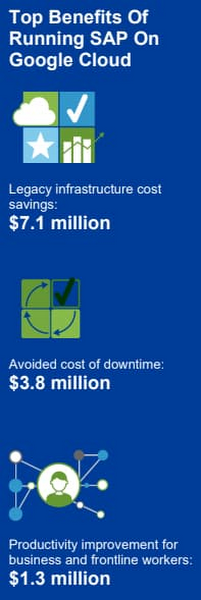
Companies also reported an annual average of $500,000 in additional IT efficiency gains after migrating SAP to Google Cloud. This quantifies what happens when IT practitioners no longer have to deal with the bottlenecks that come with legacy systems, and are able to spend their time on tasks that actually build value and help the business. Based on the Forrester analysis, the companies interviewed could expect average three-year net benefits of about $15.4 million.
“We benefit from any technical innovation in the infrastructure area because Google Cloud is doing that for us,” one customer told Forrester. “So, whenever there’s new hardware available or new processes or whatever, I don’t have to run the specific project to migrate from A to B.”
IDC finds that good things happen when SAP downtime is reduced
The IDC report highlights four areas where Google Cloud generates the most value for customers:
1. Cutting infrastructure costs. According to IDC, customers running SAP on Google Cloud spent 31% less on infrastructure each year, or an average of $233,000 less per company. The ability to scale SAP environments dynamically and to keep them right-sized was a major factor; so were the advantages of automated infrastructure monitoring and savings on software licenses once these companies could stop overprovisioning.
2. Giving a team better things to do. IDC found that the infrastructure, database, and security teams of the companies they interviewed reduced the time they need to maintain and manage SAP environments by an average of 66% per year, for a savings of $443,000, per company. As a result, these companies got the equivalent of a major staff expansion from their SAP migrations—giving them both the staff time and the expertise to focus on far more valuable activities.
3. Limiting unplanned downtime. These companies reported to IDC an average 98% reduction in unplanned downtime. Migrating SAP to Google Cloud significantly reduces the threat of downtime and saves the business an average of nearly $770,000 per year in lost revenue and user productivity. For some firms, the downtime savings topped $1 million per year.
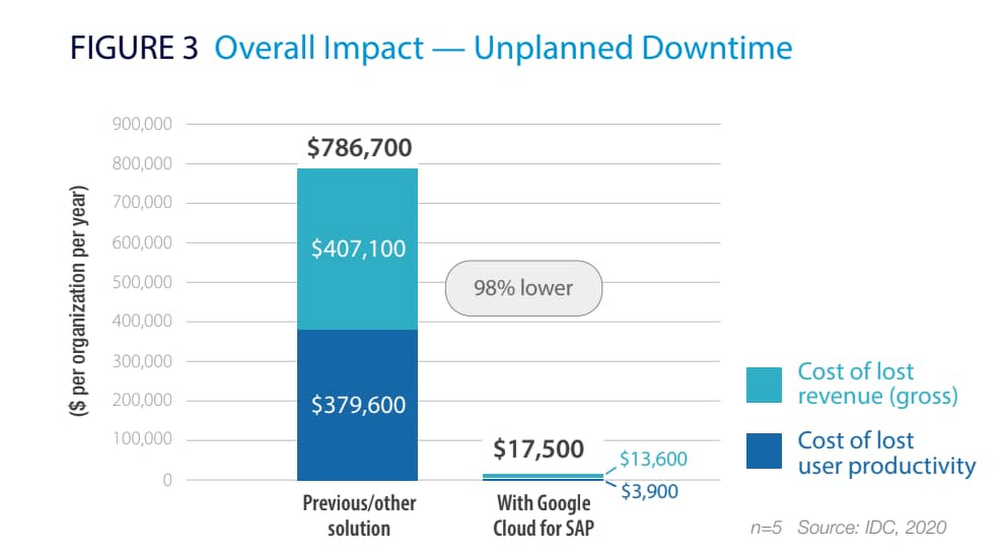
4. Making users more productive. The companies interviewed told IDC that by avoiding downtime and disruptions associated with upgrade and maintenance tasks for their legacy SAP systems, they saved an average of $363,000 annually in user productivity. But there’s an even more interesting under-the-hood stat contributing to these gains: These companies reduced the time required to deploy new SAP compute and storage resources from an average of 8.8 days to 1 hour.
When IDC added up these and other savings associated with running SAP on Google Cloud, it found an average three-year savings of more than $3.5 million and a five-month payback period.
“We acquired another company, so basically overnight we needed to be able to deal with that increase,” said one customer IDC spoke with. “We doubled our footprint overnight, and we had to take on hundreds of additional employees. We needed a platform that we could easily scale up if we required, and that’s the benefit of running SAP on Google Cloud for us.”
Explore the reports
There is a lot to think about when considering a move of SAP systems to the cloud. The cloud has many advantages, but migration can seem complicated and tricky; we appreciate that you are looking to understand the full picture. These papers are a great place to start.
Download the reports—Forrester’s “Total Economic Impact of SAP on Google Cloud” and IDC’s “Business Value of SAP for Google Cloud Environments.” Then, get in touch.
8 Must-Have Google Cloud Products for Startups

3174
Of your peers have already read this article.
2:30 Minutes
The most insightful time you'll spend today!
Startups worldwide turn to Google Cloud tools to build fast on a strong and easy to use platform that helps them get to market and launch products faster, all while building on the cleanest cloud in the industry. Startups leverage Google Cloud and our Google for Startups Cloud Program to go from idea to IPO, and there are a variety of products on Google Cloud that can help them.
Here are the 8 top products that startups use on Google Cloud to innovate and grow:
Firebase for app development
Speed up innovation with Firebase, a mobile development platform that’s fully integrated with Google Cloud. Work in a simpler cloud environment, easily pull in products or services, and build your apps faster.
Cloud SQL for database needs
Build your startup’s foundation with Cloud SQL, a fully managed relational database solution that integrates with Google Cloud services. Create and connect to your first database in minutes and scale with a single API call.
AI and machine learning products
Solve tough problems with AI and machine learning products, built with the best of Google’s technology. Train deep learning and machine learning models cost-effectively so you can iterate and innovate faster.
BigQuery for data analytics
Drive agility with BigQuery, a serverless, cost-effective, multi-cloud data warehouse. Query streaming data in real time, predict business outcomes with built-in machine learning, and share analytics with just a few clicks.
Google Kubernetes Engine (GKE) for containers
Unlock faster, more secure app development with GKE, the most scalable Kubernetes platform. Streamline operations with release channels that fit your business needs and leave cluster monitoring to Google engineers.
Looker for data visualization
Get more from your data to keep moving ahead of the competition with Looker, a trusted business intelligence and data platform. Generate real-time reports and get insights at the right time with proactive alerts.
Cloud Run for serverless computing
Create scalable containerized apps in any programming language on Cloud Run, a fully managed compute platform. Pair it with container tools like Cloud Build and Docker, and only pay when your code is running.
Cloud Armor for security
Protect your startup from Web attacks with Cloud Armor, a leading Distributed Denial-of-Service (DDOS) defense service. Use it with an HTTP Load Balancer for Managed Instance Groups across regions to keep your workloads highly available and secure.
To learn more about products best-suited to the unique demands of startups, check out our startups solution page. Our team is looking forward to discussing how these products can help you. If you’re not already in the program, you can get started here.
If you want to learn more about how Google Cloud can help your startup, visit our page here to get more information about our program, and sign up for our communications to get a look at our community activities, digital events, special offers, and more.
AI in Manufacturing Already A Mainstream: Google Cloud Study

5656
Of your peers have already read this article.
3:00 Minutes
The most insightful time you'll spend today!
While the promise of artificial intelligence transforming the manufacturing industry is not new, long-ongoing experimentation hasn’t yet led to widespread business benefits. Manufacturers remain in “pilot purgatory,” as Gartner reports that only 21% of companies in the industry have active AI initiatives in production.
However, new research from Google Cloud reveals that the COVID-19 pandemic may have spurred a significant increase in the use of AI and other digital enablers among manufacturers. According to our data—which polled more than 1,000 senior manufacturing executives across seven countries—76% have turned to digital enablers and disruptive technologies due to the pandemic such as data and analytics, cloud, and artificial intelligence (AI). And 66% of manufacturers who use AI in their day-to-day operations report that their reliance on AI is increasing.

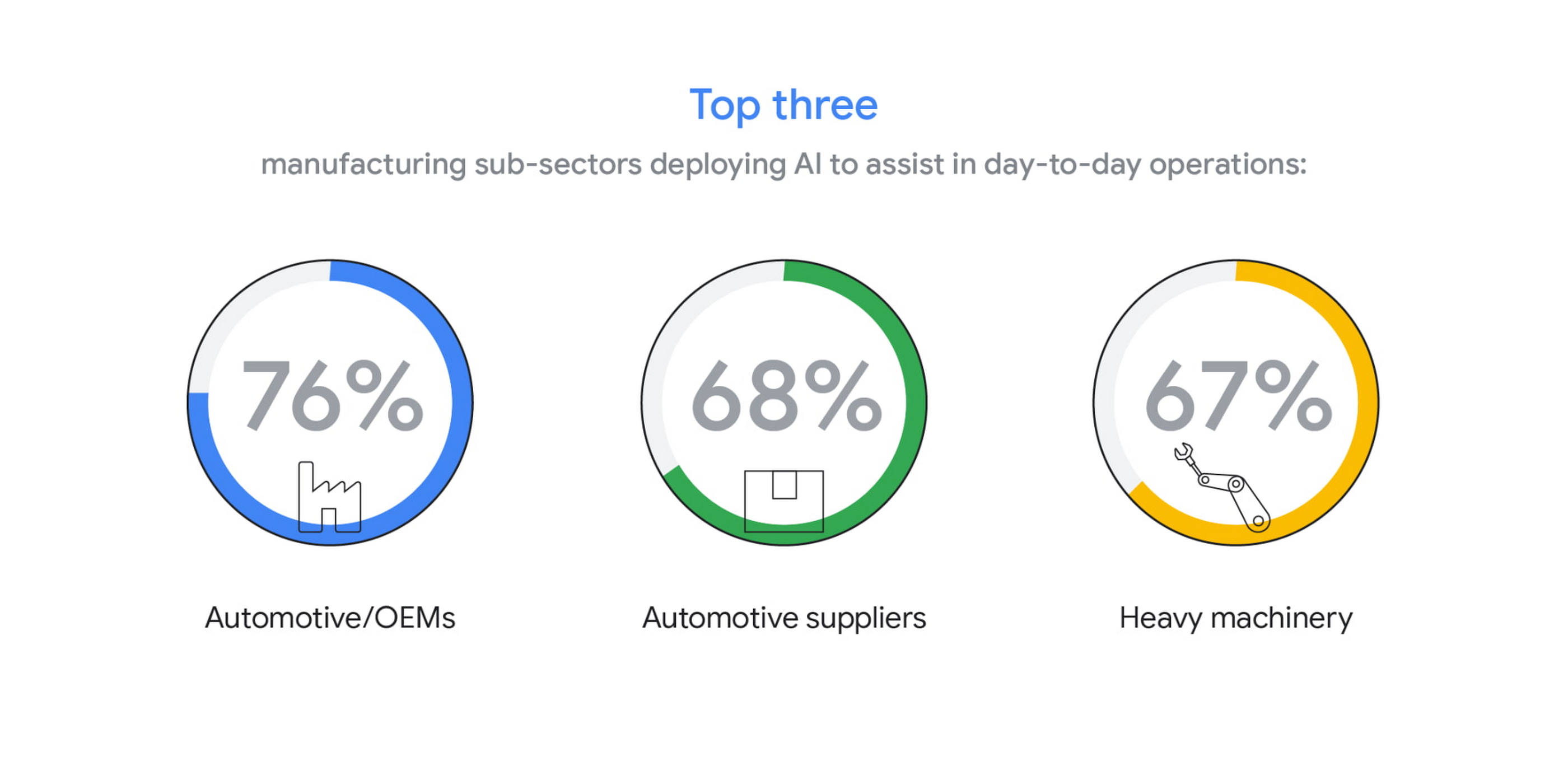
The top three sub-sectors deploying AI to assist in day-to-day operations are automotive/OEMs (76%), automotive suppliers (68%), and heavy machinery (67%).
In fact, Bryan Goodman, Director of Artificial Intelligence and Cloud, Ford Global Data & Insight and Analytics shares, “Our new relationship with Google will supercharge our efforts to democratize AI across our business, from the plant floor to vehicles to dealerships. We used to count the number of AI and machine learning projects at Ford. Now it’s so commonplace that it’s like asking how many people are using math. This includes an AI ecosystem that is fueled by data, and that powers a ‘digital network flywheel.’”
Moving from edge cases to mainstream business needs
Why are manufacturers now turning to AI in increasing numbers? Our research shows that companies who currently use AI in day-to-day operations are looking for assistance with business continuity (38%), helping make employees more efficient (38%), and to be helpful for employees overall (34%). It’s clear that AI/ML technology can augment manufacturing employees’ efforts, whether by providing prescriptive analytics like real-time guidance and training, flagging safety hazards, or detecting potential defects on the assembly line.

In terms of specific AI use cases called out by the research, two main areas emerged: quality control and supply chain optimization. In the quality control category, 39% of surveyed manufacturers who use AI in their day-to-day operations use it for quality inspection and 35% for product and/or production line quality checks. At Google Cloud, we often speak with manufacturers about AI for visual inspection of finished products. Using AI vision, production line workers can spend less time on repetitive product inspections and can instead focus on more complex tasks, such as root cause analysis.
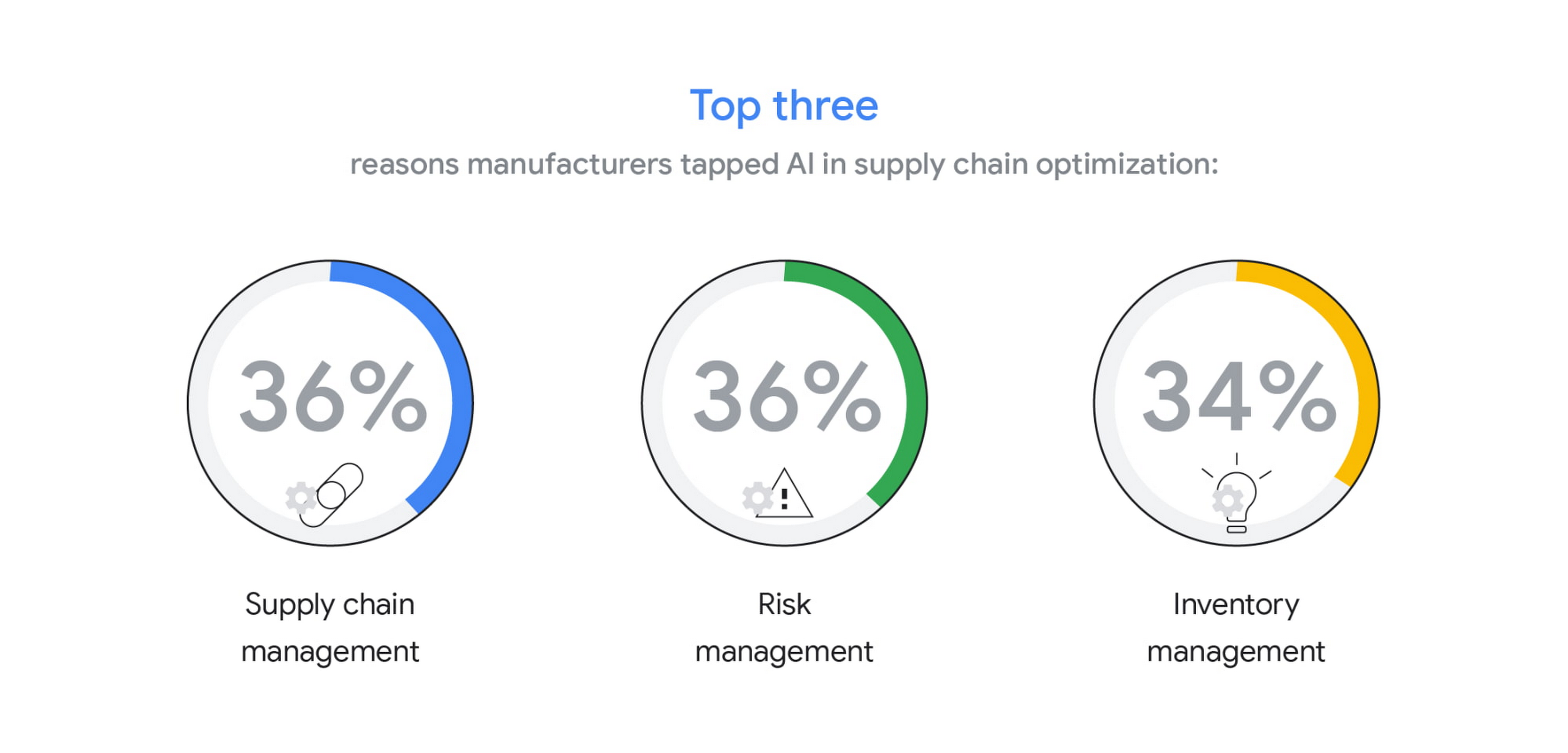
In the supply chain optimization category, manufacturers said they tapped AI for supply chain management (36%), risk management (36%), and inventory management (34%).
In our day-to-day work, we’re seeing many manufacturers rethink their supply chains and operating models to better accommodate for the increased volatility that has been brought about by the pandemic and support the secular trend of consumers asking for increasingly individualized products. We’ll share more on deglobalization in the third installment of our manufacturing insights series.
AI use differs by geography, but not for the reasons you may think
The extent to which AI is already being used today varies quite strongly between geographies, according to our research. While 80% and 79% of manufacturers in Italy and Germany respectively report using AI in day-to-day operations, that percentage plummets in the United States (64%), Japan (50%) and Korea (39%).

It’s tempting to state this disparity is due to an “AI talent gap.” Although the most common barrier, just a quarter (23%) of manufacturers surveyed believe they don’t have the talent to properly leverage AI. Cost, too, does not appear to be a roadblock (21% of those surveyed). Rather, from our observations, the missing link appears to be having the right technology platform and tools to manage a production-grade AI pipeline. This is obviously the focus of our efforts and others in the space, as we believe the cloud can truly help the industry make a step change.
Looking ahead: The Golden Age of AI for manufacturing
The key to widespread adoption of AI lies in its ease of deployment and use. As AI becomes more pervasive in solving real-world problems for manufacturers, we see the industry moving away from “pilot purgatory” to the “golden age of AI.” The manufacturing industry is no stranger to innovation, from the days of mass production, to lean manufacturing, six sigma and, more recently, enterprise resource planning. AI promises to bring even more innovation to the forefront.
To learn more about these findings and more, download our infographic here and our full report here.
Research methodology
The survey was conducted online by The Harris Poll on behalf of Google Cloud, from October 15 – November 4, 2020, among 1,154 senior manufacturing executives in France (n=150), Germany (n=200), Italy (n=154), Japan (n=150), South Korea (n=150), the UK (n=150), and the U.S. (n=200) who are employed full-time at a company with more than 500 employees, and who work in the manufacturing industry with a title of director level or higher. The data in each country were weighted by number of employees to bring them into line with actual company size proportions in the population. A global post-weight was applied to ensure equal weight of each country in the global total.
Google Cloud’s High-performance Compute Speeds Up the Chip Design Process

3494
Of your peers have already read this article.
2:00 Minutes
The most insightful time you'll spend today!
Cloud offers a proven way to accelerate end-to-end chip design flows. In a previous blog, we demonstrated the inherent elasticity of the cloud, showcasing how front-end simulation workloads can scale with access to more compute resources. Another benefit of the cloud is access to a powerful, modern and global infrastructure. On-prem environments do a fantastic job of meeting sustained demand but Electronic Design Automation (EDA) tooling upgrades happen much more frequently (every six to nine months) than typical on-prem data center infrastructure upgrades (every three to five years).
What this means is that your EDA tool can provide much better performance if given access to the right infrastructure. This is especially useful in certain phases of the design process.
Take for example, a physical verification workload. Physical verification is typically the last step in the chip design process. In simplified terms, the process consists of verifying design rule checks (or DRCs) against the process design kit (PDK) provided by the foundry. It ensures that the layout produced from the physical synthesis process is ready for handoff to a foundry (in-house or otherwise) for manufacturing. Physical verification workloads tend to require machines with large memories (1TB+) for advanced nodes. Having access to such compute resources enables more physical verification to run in parallel, increasing your confidence in the design that is being taped out (i.e., sent to manufacturing).
At the other end of the spectrum are functional verification workloads. Unlike the physical verification process described above, functional verification is normally performed in the early stages of design and typically requires machines with much less memory. Furthermore, functional verification (dynamic verification in particular) accounts for the most time (translating directly to the availability of compute) in the design cycle. Verifying faster, an ambition for most design teams, is often tied to availability of right-sized compute resources.
The intermittent and varied infrastructure requirements for verification (both functional and physical) can be a problem for organizations with on-prem data centers. On-prem data centers are optimized for maximizing utilization—this does not directly address access to right-sized compute to deliver the best tool performance. Even if the IT and Computer Aided Design (CAD) departments choose to provision additional suitable hardware, the process of provisioning, acquiring and setting up new hardware on-prem typically takes months for even the most modern organizations. A “hybrid” flow that enables use of on-prem clusters most of the time, but provides seamless access to cloud resources as needed would be ideal.
Hybrid chip design in action
You can improve a typical verification workflow simply by utilizing a hybrid environment that provides instantaneous access to better compute. To illustrate, we chose a front-end simulation workflow, and designed an environment that replicates on-prem and cloud clusters. We also took a few more liberties to simplify the environment (described below). The simplified setup is provided in a GitHub repository for you to try out.
In any hybrid chip design flow, there are a few key considerations:
- Connectivity between on-prem infrastructure and the cloud: Establishing connectivity to the cloud is one of the most foundational aspects of the flow. Over the years, this has also become a very well-understood field, and secure, high availability connectivity is a reality in most setups.
In our tutorial, we represent both on-prem and cloud clusters as two different networks in the cloud where all traffic is allowed to pass between these networks. While this is not a real-world network configuration, it is sufficient to demonstrate the basic connectivity model. - Connection to license server: Most chip design flows utilize tools from EDA vendors. Such tools are typically licensed, and you need a license server with valid licenses to operate the tool. License servers may remain on-prem in the hybrid flow, so long as latency to the license server is acceptable. You can also install license servers in the cloud on a Compute Engine VM (particularly sole-tenant nodes) for lower latency. Check with your EDA vendors to understand if you can rehost your license services in the cloud.
In our tutorial, we use an open source tool (Icarus Verilog Simulator) and therefore, do not need a license server. - Identifying data sources and syncing data: There are three important aspects in running EDA jobs: the EDA tools themselves, the infrastructure where the tools run, and the data sources for the tool run. Tools don’t change much, and can be installed on cloud infrastructure. Data sources, on the other hand, are primarily created on-prem and updated regularly. These could be SystemVerilog files that describe the design, the testbenches or the layout files. It is important to sync data between on-prem and cloud to maintain parity. Furthermore, in production environments, it’s also important to maintain a high-performance syncing mechanism.
In our tutorial, we create a file system hierarchy in the cloud that is similar to one you’d find on-prem. We transfer the latest input files before invoking the tool. - Workload scheduler configuration and job submission transparency: Most environments that leverage batch jobs use job schedulers to access a compute farm. An ideal environment finds the balance between cost and performance, and builds parameters in the system to enable predictive (and prescriptive) wrappers to job schedulers (see picture below).
In our tutorial, we use the open-source SLURM job scheduler and an auto-scaling cluster. For simplicity, the tutorial does not include a job submission agent.

Other cloud-native batch processing environments such as Kubernetes can also provide further options for workload management.
Our on-prem network is called ‘onprem’ and the cloud cluster is called ‘burst’. Characteristics of the on-prem and burst clusters are specified below:


Once set up, we ran the OpenPiton regression for single and two-tile configurations. You can see the results below:

Regressions run on “burst” clusters were on average 30% faster than on “onprem”, delivering faster verification sign-off and physical verification turnaround times. You can find details about the commands we used in the repository.
Hybrid solutions for faster time to market
Of course, on-prem data centers will continue to play a pivotal role in chip design. However, things have changed. Cloud-based, high performance compute has proved itself to be a viable and proven technology for extending on-prem data centers during the chip design process. Companies that successfully leverage hybrid chip design flows will be able to better address the fluctuating needs of their engineering teams. To learn more about silicon design on Google Cloud, read our whitepaper “Using Google Cloud to accelerate your chip design process”.
You Can Now ‘Listen’ to Over 50 Tech Blogs on Google Cloud Reader

4865
Of your peers have already read this article.
1:30 Minutes
The most insightful time you'll spend today!
🎧 Prefer to listen? Check out this episode on the Google Cloud Reader podcast
If you’re anything like me, you love reading, but also appreciate that sometimes your eyes need to be doing other things; whether it’s finding your exit off the highway, or keeping your puppy from destroying the couch.
And sometimes the thought of sitting down to read something just feels like it’s going to take valuable multi-tasking time away from my day. I know, I know, multitasking can be frowned upon, but it’s the way I live a good chunk of my life, and it’s working out so far. And while I’m not alone in my multitasking, I’m also not alone in my desire for a non-visual way to get this content, or any content.
*Google Cloud Reader enters the chat*
Google Cloud Reader is a podcast that lets you listen to the Google Cloud Blog posts that aren’t as dependent on visuals. This means they’re articles that are, or are adapted to be, less focused on graphs, or code samples, and instead describe the meaning behind those visual aids.
It’s an easy, audible way to absorb content around all things new in Cloud, while still being able to make sure Ruthie doesn’t eat my work from home equipment.

So by now you’re probably thinking “OK, so you started a podcast during the pandemic, even though you definitely seemed like the type to start making sourdough”—and you’re right. My 53 plants agree with you. But rest assured, one can listen to an episode of this podcast *while* creating a macramé plant hanger, or waiting for bread to rise—multitasking, am I right?
We’re a little over 50 episodes/macrame plant hangers in, so you should check it out (Ruth and I would appreciate it).
Some of my personal favorites
- Beginners Guide to Painless Machine Learning – Learn how to get started with Google Cloud AI tools
- Introducing GKE Autopilot: A Revolution in Managed Kubernetes – Learn more about GKE Autopilot, a revolutionary mode of operations for managed Kubernetes that lets you focus on your software, while GKE Autopilot manages the infrastructure.
- Cook up your own ML recipes with AI Platform – Learn about Mars Wrigley’s new ML-inspired recipe experiment on Google Cloud and how you can get started with your own.
- Recovering Global Wildlife Populations using ML – Review Google’s Wildlife Insight’s ML project and help users create an image classification model for motion-sensor cameras (called camera traps) used to help protect wildlife in an non-invasive way by collecting and tagging species via pictures.
Let me know your favorite episodes, and what other articles you’d like to hear on Twitter @jbrojbrojbro!
No matter why you prefer an audio format, we’ve got you covered; Google Cloud Reader, where we read the tech blog for you, and to you.
Get all the Google Cloud Reader on your favorite podcast platform, including Google Podcasts, Apple Podcasts, and Spotify.
This Chart, from Home Depot, Dramatically Demonstrates the Power of a Cloud Data Warehouse

7585
Of your peers have already read this article.
2:30 Minutes
The most insightful time you'll spend today!
The Home Depot (THD) is the world’s largest home-improvement chain, growing to more than 2,200 stores and 700,000 products in four decades. Much of that success was driven through the analysis of data. This included developing sales forecasts, replenishing inventory through the supply chain network, and providing timely performance scorecards.
However, to compete in today’s business world, THD has taken this data-driven approach to an entirely new level of success on Google Cloud, providing capabilities not practical on legacy technologies.
The pressures of contemporary growth that drove much of the work are familiar to many businesses. In addition to everything it was doing, THD needed to better integrate the complexities in its related businesses, like tool rental and home services. It needed to better empower teams, including a fast-growing data analysis staff and store associates with mobile computing devices. It wanted to better use online commerce and artificial intelligence to meet customer needs, while maintaining better security.
Even before addressing these new challenges, THD’s existing on-premises data warehouse was under stress as more data was required for analytics and data analysts were utilizing the data with increasingly complex use cases. This drove rapid growth of the data warehouse, but also created constant challenges for the team in managing priorities, performance, and cost.
In order to add capacity to the environment, it was a major planning, architecture, and testing effort. In one case, adding on-premises capacity took six months of planning and a three-day service outage. Within a year, capacity was again scarce, impacting performance and ability to execute all the reporting and analytics workloads required. The capacity refresh cycles were shrinking, and the expecations for data were growing. There had to be a better way.
Still, THD did not take its move to the cloud lightly. A large-scale enterprise data warehouse migration involves tremendous effort among people, process, and technology. After careful consideration, THD chose Google Cloud’s BigQuery for its cloud enterprise data warehouse.
BigQuery, a scalable serverless data warehouse, was better on cost, infrastructure agility, and analytics capability, driving better insights with improved performance. There are no service interruptions when capacity is added, and that capacity can be added within a week (and soon same day). It doesn’t require complex system administration, and its standard SQL support means people can easily ramp up quickly. Valuable BigQuery products like Identity and Access Management meant THD could create many separate Google Cloud projects, while ensuring that different teams weren’t interfering with each other or accessing protected data.
THD also utilizes BigQuery’s flat-rate monthly pricing model that allows teams to budget their capacity based on need and provides billing predictability. The capacity not being used by a given project is available for enterprise use. This ensures no surprises when the monthly bill arrives and provides all analytical users access to significant computing power.
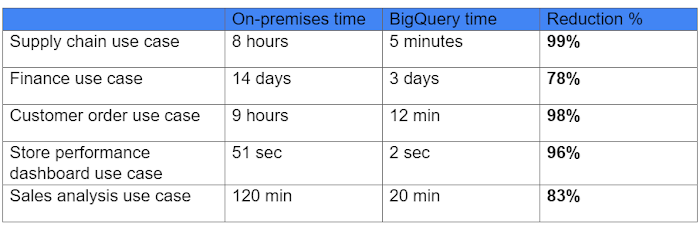
While THD’s legacy data warehouse contained 450 terabytes of data, the BigQuery enterprise data warehouse has over 15 petabytes. That means better decision-making by utilizing new datasets like website clickstream data and by analyzing additional years of data.
As for performance, look at this chart:
With the cloud EDW migration complete, and the legacy on-premises data warehouse retired, analysts now execute more complex and demanding workloads that they would not have been able to complete before, such as utilizing Datalab for orchestrating analytics through Python Notebooks, utilizing BigQuery ML for machine learning directly against the BigQuery data (no movement of large datasets), and AutoML to help determine the best model for predictions.
Additionally, engineers at THD have adapted BigQuery to monitor, analyze, and act on application performance data across all its stores and warehouses in real time, something that was not practical in the on-premises system.
With over 600 projects that THD now has on Google Cloud, the BigQuery story is just one of the many ways that Google Cloud is working with THD to deliver meaningful business results, every day.
More Relevant Stories for Your Company

Transformation Cloud: A New Wheel of Innovation and Digital Transformation
Looking back on the past year, I see challenges—but also reinvention. Reinvention in how children are educated. Reinvention in how medical professionals provide care. Reinvention in how customers purchase products. This reinvention was made possible by all of the IT leaders around the world who had a vision about what

Italian Utility Company Deploys its SAP Workloads on Google Cloud to Meet Sustainability Goals
With more than 2.5 million customers, Italian utility company A2A is committed to delivering electricity, gas, clean water, and waste collection every day. More recently, the company made another significant commitment: To incorporate the principles of the “circular economy” into its way of doing business — part of the UN

The Future of Retail: Automated Customer Journeys Powered by Technology
Editor’s note: To kick off the new year and in preparation for NRF The Big Show, we invited partners from across our retail ecosystem to share stories, best practices, and tips and tricks on how they are helping retailers transform during a time that continues to see tremendous change. Please

End Security Risks with the Unattended Projects Recommender Feature
In fast-moving organizations, it's not uncommon for cloud resources, including entire projects, to occasionally be forgotten about. Not only such unattended resources can be difficult to identify, but they also tend to create a lot of headaches for product teams down the road, including unnecessary waste and security risks. To
